towing AUDI A6 2017 User Guide
[x] Cancel search | Manufacturer: AUDI, Model Year: 2017, Model line: A6, Model: AUDI A6 2017Pages: 280, PDF Size: 70.24 MB
Page 110 of 280
Parking systems
Parking systems
General information
Applies to: vehicles with parking system plus/rearview cam
era/peripheral camera
Depending on your vehicle's equipment , various
parking aids will help you when parking and ma
neuvering.
The
parking system plus assists you when park
ing by audibly and visually indicating objects de
tected
in front of and behind the vehicle
¢page 109.
The
rearview camera shows the area behind the
vehicle in the Infotainment system display. This
display assists you when you are cross or parallel parking
¢ page 110. The parking system plus
functions are also available
¢ page 109.
The
peripheral cameras assist you with parking
and maneuvering. You are aided by various cam
eras depending on the vehicle equipment level
¢ page 113. The parking system plus functions
are also available
¢ page 109.
A WARNING
-Always look for traffic and check the area
around your vehicle by looking at it directly
as well. The parking system cannot replace
the driver's attention. The driver is always responsible when entering or leaving a park
ing space and during similar maneuvers.
- Please note that some surfaces, such as
clothing, are not detected by the system .
-
-Sensors and cameras have blind spots in
which people and objects cannot be detect ed . Be especially cautious of small children
and animals.
- The sensors can be displaced by impacts or
damage to the radiator grille, bumper,
wheel housing and the underbody . The park
ing system may be impaired as a result.
Have an authorized Audi dealer or author
ized Audi Service Facility check their func
tion .
- Make sure the sensors are not obstructed by stickers, deposits or other materials. If they
are, the sensor function could be impaired.
108
For additional information on cleaning, see
¢page 231.
(D Note
-Some objects are not detected or displayed
by the system under certain circumstances:
- Objects such as barrier chains, trailer draw
bars, vertical poles or fences
- Objects above the sensors such as wall ex
tensions
- Objects with certain surfaces or structures
such as chain link fences or powder snow
- If you continue driving closer to a low ob
ject, it may disappear from the sensor range. Note that you will no longer be
warned about th is obstacle .
- Keep enough distance from the curb to re
duce the risk of damage to the rims .
(D Tips
-The system may provide a warning even
though there are no obstacles in the cover
age area in some situations, such as :
- certa in road surfaces or when there is tall
grass.
- external ultrasonic sources such as from
cleaning vehicles .
- in heavy rain, snow, or thick vehicle ex
haust.
- We recommend that you practice parking in
a traffic-free location or parking lot to be
come familiar with the system . When doing
this, there should be good light and weath
er conditions.
- You can change the volume and pitch of the
signals as well as the display
¢ page 118.
- Please refer to the instructions for towing a
trailer located in
¢page 118.
- What appears in the infotainment d isplay is
somewhat time-delayed.
- Th e sensors must be kept clean and free of
snow and ice for park aid to operate .
Page 239 of 280
co
co
.... N
" N .... 0 0 <..:l '
The vehicle jack* in your vehicle is mainte
nance-free.
Replacing wheels
Before changing a wheel
Observe the following precautions for your own
and your passenger's safety when changing a
wheel .
.,. After you experience a tire failure, pull the car
well away from moving traffic and try to reach
level ground before you stop¢,&. .
.,. All passengers should
leave the car and move
to a safe location (for instance, beh ind the
guardrail)¢ ,&..
.. Engage the
parking brake to prevent your vehi
cle from rolling unintentionally ¢,&. .
.. Move
selector lever to position P ¢ ,&. .
.,. If you are towing a trailer, unhitch the trailer
from your vehicle.
.,. Take the
jack and the spare tire* out of the lug
gage compartment c:> page 236.
A WARNING
You or your passengers could be inju red wh ile
changing a wheel if you do not follow these
safety precautions:
- If you have a flat tire, move a safe distance
off the road. Turn off the engine, turn the
emergency flashers on and use other warn
ing devices to alert other motorists .
- Make sure that passengers wait in a safe
place away from the vehicle and well away
from the road and traffic.
- T o help prevent the vehicle from moving
sudden ly and possibly slipping off the jack,
always fully set the parking brake and block
the wheel diagonally opposite the wheel be ing changed. When one front wheel is lifted
off the ground, plac ing the Automatic
Transmission in P (Park) will
not prevent the
vehicle from mov ing.
- Before you change a wheel, be sure the
ground is level and firm. If necessary, use a
sturdy board under the jack .
Emergency assistance
-Always store the vehicle too l kit, the jack
and the replaced tire in the luggage com
partment
¢page 134.
@ Tips
Before changing the wheel, you must activate
the jacking mode, so that the automatic con
tro ls for the Adaptive Air Suspension* do not
make it more difficult to lift the vehicle with
the jack
c> page 239.
Changing a wheel
When you change a wheel, follow the sequence
described below step-by-step and in exactly that
order .
l. Activate the vehicle jack mode* ¢ page 239 .
2. Remove the decorative wheel cover* or the
wheel bolt caps* . For more details see also
¢ page 238, Decorative wheel covers or
¢ page 238, Wheels with wheel bolt caps .
3. Loosen the wheel bolts¢ page 238 .
4. Locate the proper mounting point for the
jack and align the jack below that point
¢page 239.
5. Raise the car with the jack c> page 239 .
6. Remove the wheel with the flat tire and then
install
the spare ¢ page 241.
7. Tighten all wheel bolts lightly.
8.
Lower the vehicle with the jack .
9 . Use the wheel bolt wrench and
firmly tighten
all wheel bolts
c> page 238.
10. Replace the decorative wheel cover* or the
wheel bolt caps*.
11. Deactivate the vehicle jack mode* in the
MMI:
I CARI function button > ( Car)* systems
control button > Servicing & checks > Air
susp.: jack mode > Off.
The vehicle jack mode* switches off automatica l
ly at speeds above 6 mph (10 km/h).
A WARNING
--
Always read and follow all WARNINGS and in
formation
¢ .&. in Raising the vehicle on
page 240
and c> page 242 .
237
Page 251 of 280
co
co
.... N
" N .... 0 0 <..:l '
General
This chapter is intended for trained emergency
crews and working personnel who have the nec
essary tools and equipment to perform these
ope rations.
Starting by pushing or
towing
CD Note
Veh icles with an automatic transmission can
not be started by pushing or towing.
Starting with jumper
cables
If necessary, the engine can be started by con
necting it to the battery of another vehicle.
If the engine shou ld fail to start because of a dis
charged or weak battery, the battery can be con
nected to the battery of
another vehicle, using a
pair of jumpe r cables to start the engine.
Jumper cables
Use only jumper cables of suffic iently large cross
section
to carry the starter current safely. Refer
to the manufacturer's specifications.
Use only jumper cables with
insulated term inal
clamps which are dis tinct ly marked:
plus (+) cable in most cases colored re d
minus( -) cable
in most cases colored black.
A WARNING
Batteries contain electricity, acid, and gas.
Any of these can cause very serious or fatal in
jury. Follow the instructions below for safe
handling of your vehicle's battery.
- Always shield your eyes and avo id leaning
over the battery whenever poss ible.
- A dead battery can freeze at temperatures
around 32 °F (0 °C). If the vehicle battery is
frozen, you must thaw it before connecting
the jump start cab les. If you do not, this in-
Emergency situations
creases the risk of an explosion and chemi
cal burns. After jump starting the vehicle,
drive to an authorized Aud i dealer or author
ized Audi Service Facility immediately to
have the vehicle battery checked.
- Do not allow battery ac id to contact eyes or
skin . Flush any contacted area with water
immed iately.
- Improper use of a booster battery to start a
veh icle may cause an explosion .
- Veh icle batteries generate explosive gases.
Keep sparks, flame and lighted cigarettes
away from batter ies.
- Do not try to jump start any vehicle with a
low acid level in the battery .
- The voltage of the booster battery must also
have a 12-volt rat ing . The capacity (Ah) of
the booster battery should not be lower
than that of the discharged battery. Use of
batter ies of different voltage or substantial
ly different "Ah" rating may cause an exp lo
sion and personal injury.
- Never charge a frozen battery. Gas trapped
in the ice may cause an explosion.
- Never charge or use a battery that has been
frozen . T he battery case may have be weak
ened.
- Use of batteries of different voltage or sub
stantially different capacity (Ah) rating may
cause an exp losion and injury . The capacity
(Ah) of the booster battery should not be
lower than that of the discharged battery.
- Before you check anything in the engine
compartment, always read and heed all
WARNINGS
qpage 198.
CD Note
-App lying a higher voltage booster battery
wi ll ca use expensive damage to sensitive
electronic components, such as control
units, relays, radio, etc.
- There must be no electrical contact between
the vehicles as otherwise current could al
ready start to flow as soon as the positive
(+) terminals are connected.
249
Page 253 of 280
-Before you check anything in the engine
compartment, always read and heed all
WARNINGS
o page 198.
(D Note
Improper hook-up of jumper cables can ruin
the generator.
-Always connect POSITIVE( +) to POSITIVE
(+), and NEGATIVE(-) to NEGATIVE(-)
ground post of the battery manager control
unit.
- Check that all screw plugs on the battery
cells are screwed in firmly. If not, t ighten
plugs prior to connecting clamp on negative
battery terminal.
- Please note that the procedure for connect
ing a jumper cable as described above ap
plies specifically to the case of your vehicle
being jump started. When you are giv ing a
ju mp start to another vehicle, do
not con
ne ct the negative( -) cab le to the negative
(-) terminal on the discharged ba ttery @
o fig. 209. Instead, securely connec t the
negative (-) cable to either a solid metal
component that is firm ly bolted to the en
gine block or to the engine block itself. If
the battery that is be ing charged does not
vent to the outs ide, escaping battery gas
could ignite and explode!
Towing with a tow truck
General hints
Your Audi requires special handling for towing .
The following information is to be used by com
mercial tow truck operators who know how to op
erate the ir equipment safely.
-Never tow your Audi. Towing will cause dam
age to the engine and transmission .
- Never wrap the safety chains or winch cables
around the brake lines.
- To prevent unnecessary damage, your Audi
must be transported with a flat bed truck .
co
co -To load the vehicle on to the flat bed, use the ....
~ towing loop found in the vehicle tools and at-N .... 0 0 <.,;) 'SI"
Emergency situations
tach to the front or rear anchorage
opage251 and opage252.
.&_ WARNING
-
A vehicle being towed is not safe for passen-
gers. Never allow anyone to ride in a vehicle
being towed, for any reason.
Front towing loop
Fig. 210 Front bumper: cover
Fig. 211 Front bu mper: insta lling t he towing loop
The threaded open ing for the towing loop is lo
cated behind a cover on the right side of the front
bumper .
.,. Remove the towing loop from the vehicle too l
kit
c:::, page 236.
.,. Press the cap inward with brief, forceful pres
sure
o fig. 210 . The cap will loosen from the
bumper.
., Tighten the towing loop in the threaded open
ing until it stops
r:';> fig. 211 and then tighten it
w ith a wheel wrench .
.,. After usi ng, p lace the towing loop back in the
veh icle tool kit . "'
251
Page 254 of 280
Emergency situations
_& WARNING
If the towing loop is not tightened until it
stops when installing, the threads may be
pulled out when towing the vehicle and that
could cause an accident.
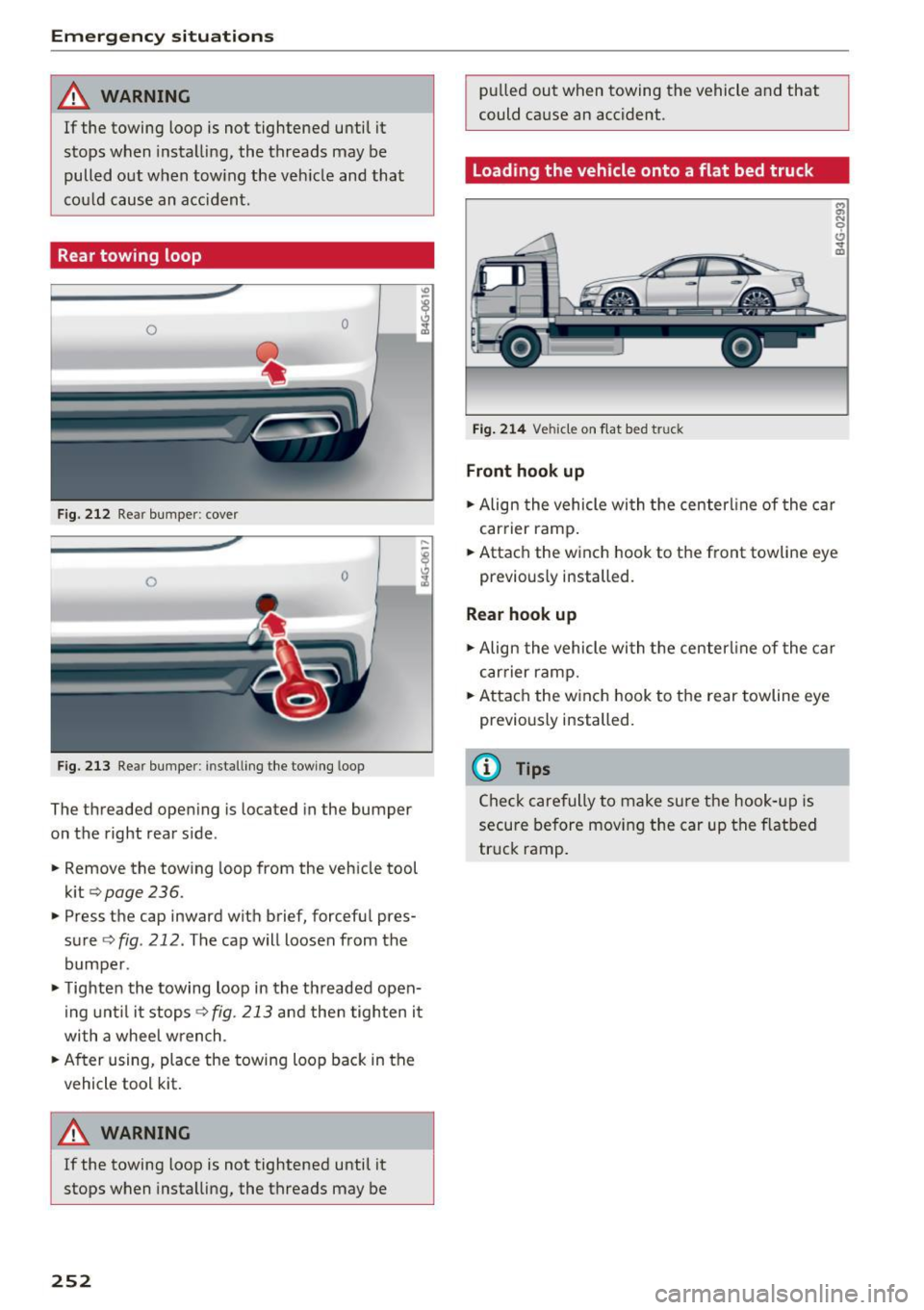
Rear towing loop
0 0
Fig. 212 Re ar bumper : cover
0 0
F
ig. 213 Re ar bumpe r: in stalli ng the towing loop
The threaded open ing is loca ted in the bumper
on the right rear side .
.,. Remove the towing loop from the vehicle tool
kit
c> page 236 .
.,. Press the cap inward with brief, forceful pres
sure
c> fig . 212 . The cap will loosen from the
bumper .
.,. Tighten the towing loop in the threaded open
ing until it stops
c>fig. 213 and then tighten it
with a wheel wrench .
.,. After using, place the towing loop back in the
vehicle tool kit.
8_ WARNING
If the towing loop is not tightened until it
stops when installing, the threads may be
252
-
pulled out when towing the vehicle and that
could cause an accident .
Loading the vehicle onto a flat bed truck
Fig. 214 Vehicle on f lat bed tru ck
Front hook up
:;i N 0 t!, .., m
.,. Align the vehicle with the centerl ine of the car
car rier ramp .
.,. Attach the winch hook to the front towline eye
previously installed.
Rear hook up
.,. Align the vehicle wi th the centerl ine of the car
car rier ramp .
.,. Attach the w inch hook to the rear towline eye
previously installed.
@ Tips
Check carefully to make sure the hook-up is
secure before moving the car up the flatbed
truck ramp .
Page 275 of 280
co
co
.... N
" N .... 0 0 <..:l '
Speed warning system . . . . . . . . . . . . . . . . . . 86
Sport differential . . . . . . . . . . . . . . . . . . . . . 104
Indicator light . . . . . . . . . . . . . . . . . . . . . . . 19
Star button . . . . . . . . . . . . . . . . . . . . . . . . . . . 22
Start-Stop system . . . . . . . . . . . . . . . . . . . . . . 72
Start/Stop system Engine does not switch off . . . . . . . . . . . . . 73
Engine starts automatically . . . . . . . . . . . . 73
Indicator lights . . . . . . . . . . . . . . . . . . . . . . 73
Messages . . . . . . . . . . . . . . . . . . . . . . . . . . . 74
Starting/stopping the engine . . . . . . . . . . . 73
Switching off/on . . . . . . . . . . . . . . . . . . . . . 74
START ENGINE STOP button . . . . . . . . . . . . . 70
Starting (engine) . . . . . . . . . . . . . . . . . . . 70, 73
Steering Electromechanical steering ..... .. ... 123, 0
I ndicator light .. ............. .. .. 15 , 123
L ock ing . . . . . . . . . . . . . . . . . . . . . . . . . . . . . 71
also refer to Electromechanical steering . 123
Steering wheel Buttons .. .. .. .. .. .. .... ... .. .. .. .. .. 22
Easy seat entry . . . . . . . . . . . . . . . . . . . . . . . 70
Manual adjustment . . . . . . . . . . . . . . . . . . . 68
Power adjustment . . . . . . . . . . . . . . . . . . . . 69
Shift padd les (automatic transmission) . . . 80
Steering wheel heating . . . . . . . . . . . . . . . . 65
Steps for determining correct load limit . . . 224
Stopping (engine) . . . . . . . . . . . . . . . . . . . 71, 73
Storage compartments . . . . . . . . . . . . . . . . . 55
Storage hooks . . . . . . . . . . . . . . . . . . . . . . . . . 59
S tronic (automatic transmission) . . . . . . . . . 77
Launch control program . . . . . . . . . . . . . . . 81
Sunroof . . . . . . . . . . . . . . . . . . . . . . . . . . . . . . 38
Convenience opening . . . . . . . . . . . . . . . . . . 37
Emergency closing . . . . . . . . . . . . . . . . . . . . 38
Sunshade . . . . . . . . . . . . . . . . . . . . . . . . . 46, 47
Sun visors . . . . . . . . . . . . . . . . . . . . . . . . . . . . 46
Symbo ls
refer to Indicator lights . . . . . . . . . . . . . . . . 10
T
Tachometer .... ............... .. . 9, 10, 21
Tail lights Cleaning . . . . . . . . . . . . . . . . . . . . . . . . . . . 232
Index
TOI clean diesel
refer to Ad Blue . . . . . . . . . . . . . . . . . . . . . . 194
Technical data . . . . . . . . . . . . . . . . . . . . . . . . 255
Technical modifications . . . . . . . . . . . . . . . . 261
Temperature display
Coo lant . . . . . . . . . . . . . . . . . . . . . . . . . . . . . . 9
Exterior temperature . . . . . . . . . . . . . . . . . . 21
T ether anchors . . . . . . . . . . . . . . . . . . . . . . . 188
Tether strap . . . . . . . . . . . . . . . . . . . . . . . . . 188
Tie-downs . . . . . . . . . . . . . . . . . . . . . . . . 58, 135
Time ......... ... .. .................. 24
tiptronic mode (automatic transmission) . . . 80
t iptronic (automatic transm iss ion) . . . . . . . . 77
Tire pressure (tire pressure monitoring sys ·
tern) .. ... ... .. .. .. ...... ....... .. .. 229
Tires........ ... .. .. ................ . 210
All wheel drive . . . . . . . . . . . . . . . . . . . . . . 124
Low aspect ratio tires . . . . . . . . . . . . . . . . 226
Replacing . . . . . . . . . . . . . . . . . . . . . . . . . . 237
Service life . . . . . . . . . . . . . . . . . . . . . . . . . 218
Tire pressure . . . . . . . . . . . . . . . . . . . . . . . 220
T ire pressure monitoring system . . . 228, 229
Tire pressure table . . . . . . . . . . . . . . . . . . . 221
Treadwear indicators . . . . . . . . . . . . . . . . . 218
Unidirectional....................... 212
Uniform tire quality grading . . . . . . . . . . . 227
T ires and wheels
Glossary of tire and loading terminology . 212
T ires and vehicle load limits . . . . . . . . . . . 223
Tool kit . . . . . . . . . . . . . . . . . . . . . . . . . . . . . 236
Torn or frayed safety belts . . . . . . . . . . . . . . 141
T owing
Tow trucks . . . . . . . . . . . . . . . . . . . . . . . . . 251
Towing loop .. .. .. .. ............. 251,252
TPMS (tire pressure monitoring system) . . . 229
T railer towing . . . . . . . . . . . . . . . . . . . . . . . . . 83
Information . . . . . . . . . . . . . . . . . . . . . . . . . 85
Operat ing instruct ions . . . . . . . . . . . . . . . . . 83
Parking system... .. ................ . 118
Technical requirements . . . . . . . . . . . . . 83 , 84
T ransmission malfunction (indicator light) . . 81
Transport Canada . . . . . . . . . . . . . . . . . . . . . 136
Turn signals . . . . . . . . . . . . . . . . . . . . . . . . . . 42
u
ULSD No . 2 (Diesel fuel) . . . . . . . . . . . . . . . . 191
273