instrument cluster AUDI A6 2017 Owner's Manual
[x] Cancel search | Manufacturer: AUDI, Model Year: 2017, Model line: A6, Model: AUDI A6 2017Pages: 280, PDF Size: 70.24 MB
Page 99 of 280
Switching on/off
A ppl ies to: ve hicles with Audi active lane assist
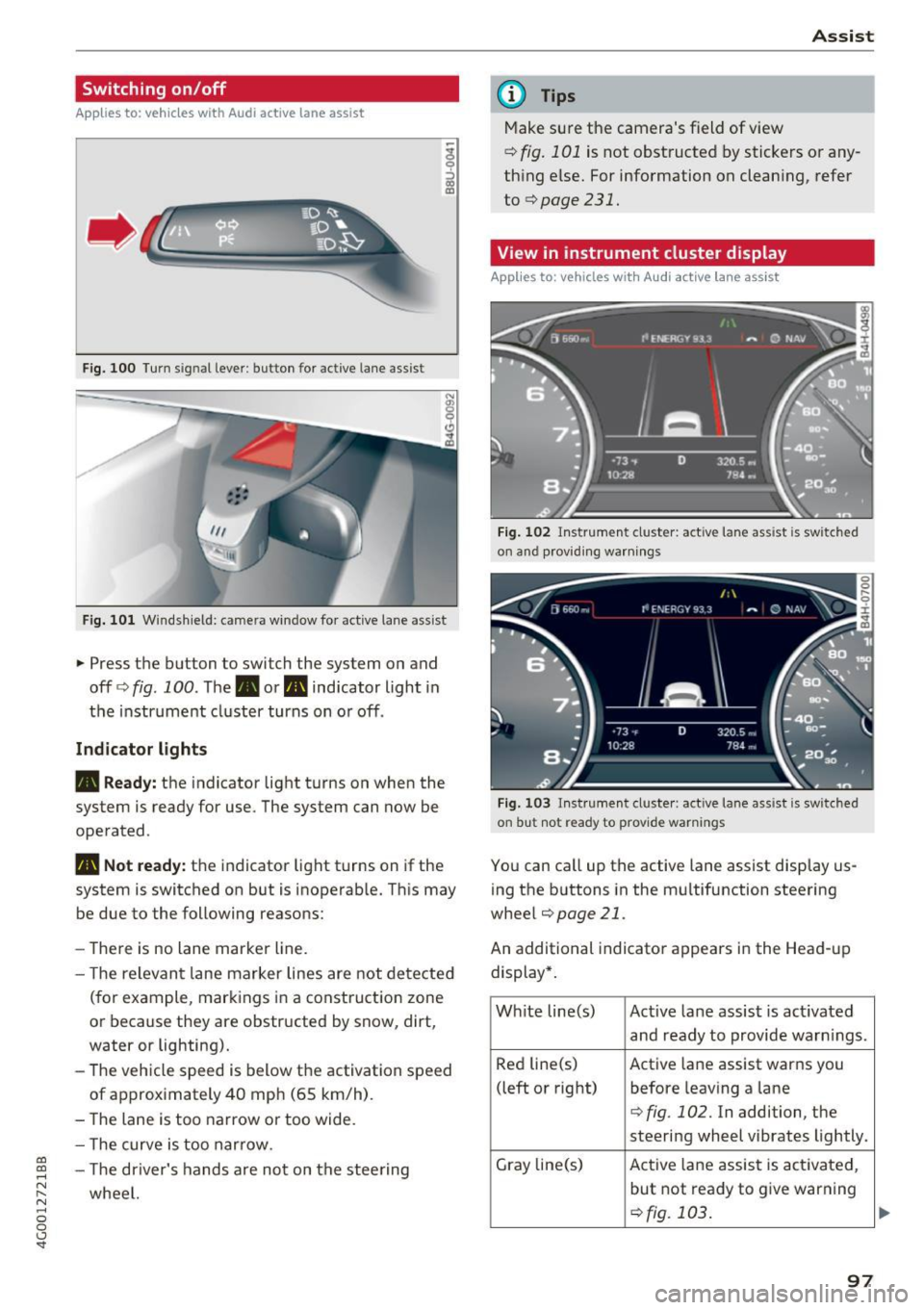
Fig. 100 Turn s ig n al lever: button for active lane ass ist
F ig. 101 Windsh ield: camera window fo r ac tive lane assist
... Press the button to switch the system on and
off ¢fig . 100 . The. or. indicator light in
the instrument cluster turns on o r off .
Indicator lights
• Ready: the indicator light turns on when the
system is ready for use. The system can now be
operated .
., Not ready: the indicator light turns on if the
system is switched on but is inoperab le. Th is may
be due to the following reasons:
- The re is no lane marker line.
- T he relevan t lane marker lines are not detected
(for example, mark ings in a construction zone
or because they are obstructed by snow, dirt,
water or lighting).
- The vehicle speed is below the activation speed
of approx imately 40 mph (65 km/h) .
- The lane is too narrow or too wide.
- The curve is too narrow.
co ~ - The driver's hands are not on the stee ring
~ wheel. N .... 0 0 <.,;) 'SI"
Assist
(D Tips
Make sure the camera's field of view
¢ fig. 101 is not obstructed by stickers or any
thing else. For information on clean ing, refer
to
¢page 231.
View in instrument cluster display
App lies to: vehicles with Audi a ctive la ne ass ist
Fig. 102 Instrument cluster: active lane ass ist is sw itc hed
on and providing warnings
Fig. 103 Instrument cluste r: act ive lane ass ist is sw itc hed
on b ut not ready to provide warnings
You can call up the active lane assist display us
ing the b uttons in the mu ltifunction steering
wheel
¢ page 21 .
An additional indicato r appears i n the Head-up
display*.
White line(s) Active lane assist is act ivated
and ready to provide warn ings .
Red line(s) Active lane assist warns you
(left or right) before leav ing a lane
¢fig . 102. In addition, the
steering wheel vibrates lightly.
Gray line(s) Active lane assist is activated,
but not ready to give warning
¢fig. 103 .
97
Page 100 of 280
Ass is t
Messag es in the instrument cluster display
If the active lane ass ist switches off automatica l
ly, the indicator lig ht in the display turns off and
one of the follow ing messages appears:
Audi acti ve lan e ass ist : Cur rently un availabl e.
No camera vie w
This message appears if the camera is unable to
detect the lines. This co uld happen if :
- The camera field of view
9 page 97, fig . 101 is
dirty or cove red in ice . Clean this area on the
windshield .
- The camera field of v iew is fogged over . Wait
unt il the fog has cleared before sw itch ing the
active lane assist on again .
- The system has been unable to detect the lanes for an extended period of time d ue to road con
ditions . Switch a ctive lane assist back on when
the lines are mo re visible .
Audi acti ve lan e ass ist : Cu rrently un available
There is a temporary active lane assist ma lf u nc
tion . Try sw itching the ac tive lane assist on aga in
la ter.
Audi active lane a ssist : System fault!
Dr ive to an a utho rized Aud i dea le r or a uthorized
Aud i Serv ice Facility immediately to have t he
malfunction corrected.
Audi active lane a ssist : Please take over steering
This message appea rs if you are not steering by
yourself . If th is is the case, active lane assist does
no t swi tch off, but it is "not ready " to provide a
warn ing . The system ca n he lp you keep the veh i
cle in the lane . However, yo u are responsib le for
d riving the vehicle and must steer it yo ursel f.
Adju sting the vibrat ion warning
Applies to: ve hicles with Audi active lane assist
.,. Se lect : th e ICARI function button > (Car )* Sys
tems
control button > Drive r assist ance > Audi
acti ve lane assist .
V ibrat ion warning
You can switch the additional vibration warni ng
in the steer ing wheel o n or off.
98
@ Tips
Your settings are automatically stored and as
signed to the remote contro l key being used.
Audi side assist
Description
App lies to: vehicles with Aud i side ass ist
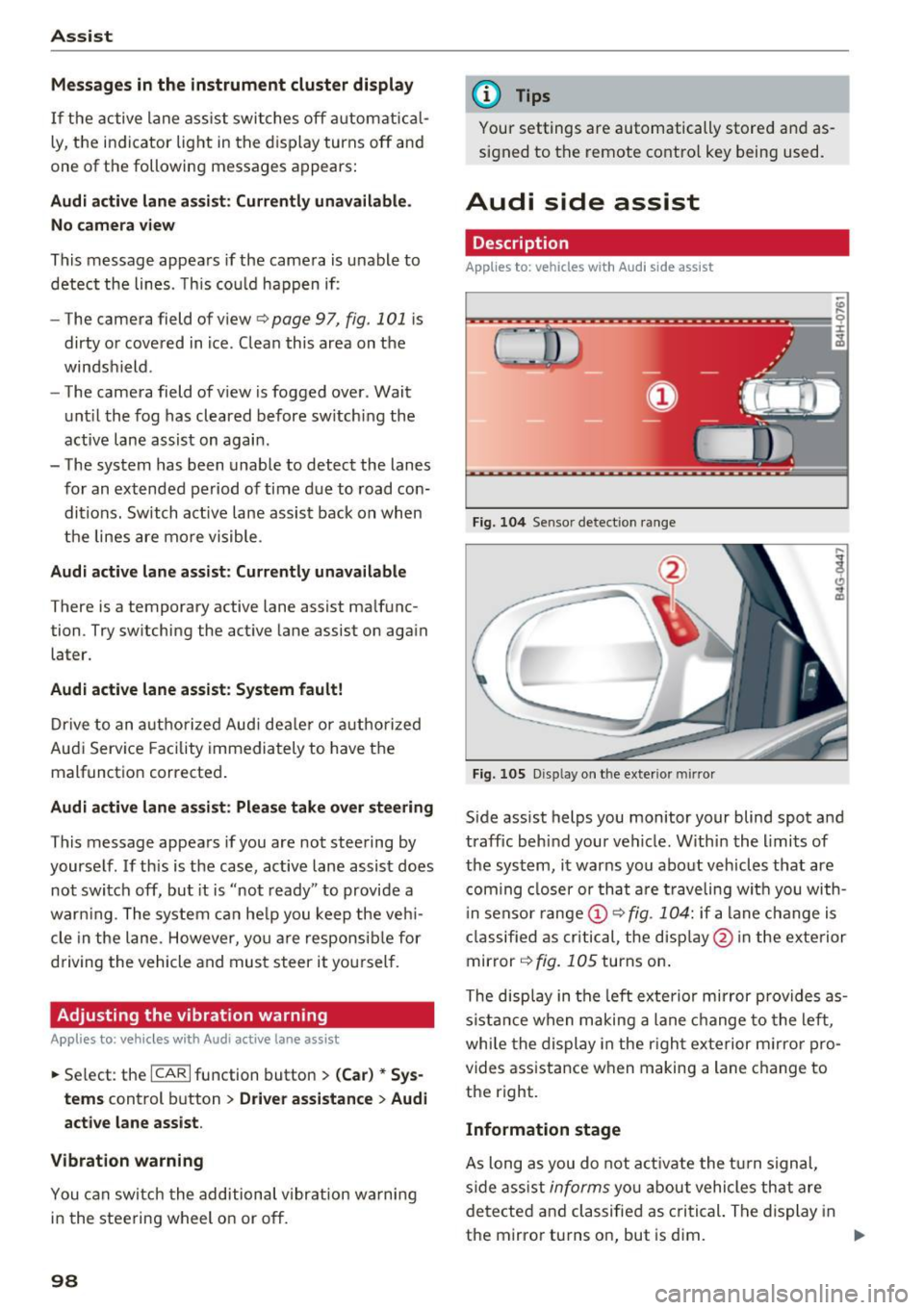
Fi g. 10 4 Senso r detect ion ra nge
Fig. 10 5 Dis pla y on t he exterio r mirr or
Side assist helps you monitor your blind spot and
traffic behind your vehicle. W ithin the limits of
the system, it warns you abo ut vehicles that are
coming closer or th at a re t raveling wit h you with
i n senso r range @
9 fig. 104: if a lane change is
classified as cri tical, the disp lay @ in the exte rior
mirror
9 fig. 105 turns on .
The disp lay in the left exte rio r mirror prov ides as
s ista nce when making a lane change to the left ,
whi le the display in the r igh t exterior m irror pro
vides assistance w hen making a lane c hange to
the right.
Information stage
As long as you do not a ct iva te the t urn signal,
side ass ist
informs yo u about vehicle s th at are
detected a nd classified as c rit ical. The di splay in
t he mirror turns on, but is dim. ""
Page 104 of 280
Ass is t
Highlighting detected pedestrians and wild
animals
A pplies to: ve hicles w ith night vi sion ass ist
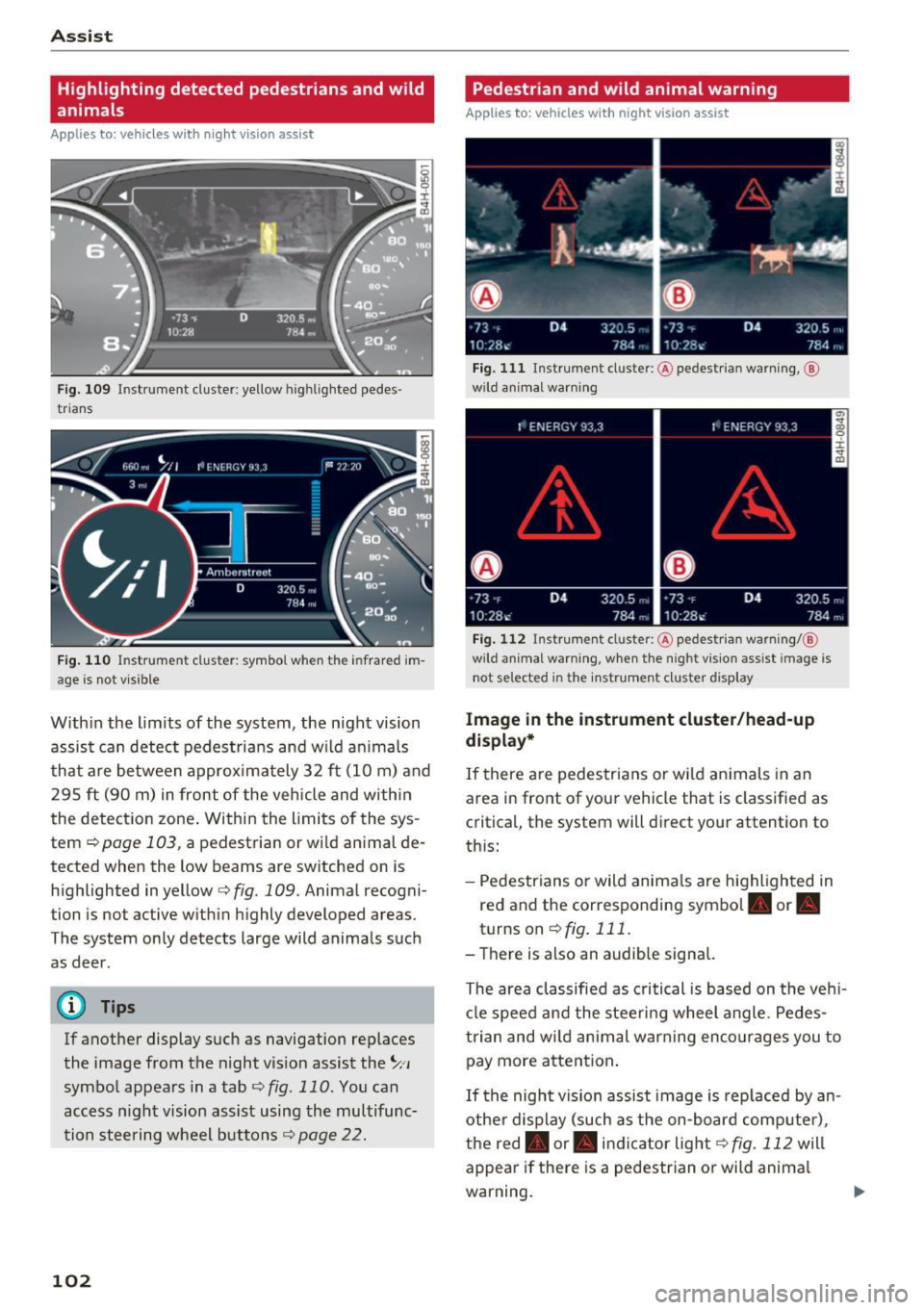
F ig. 109 Instrument cluster: yellow highl ighted pedes
trians
F ig. 110 Instrument cluster: symbol when the infrared im
age is not vi sible
With in the limits of the system, the night vision
assist can detect pedestria ns and w ild an imals
that are between approximately 32 ft (10 m) and 295
ft (90 m) in front of the vehicle and within
the detection zone . Within the limits of the sys
tem
q poge 103, a pedestrian or wild an imal de
tected when the low beams are switched on is
highlighted in yellow
q fig. 109. Animal recogni
tion is not active with in h ighly developed areas.
The system only detects large wild animals such
as deer.
@ Tips
If another display such as navigation replaces
the image from the night v is ion assist the~,,
symbo l appears in a tab
q fig . 110 . You can
access n ight vision assist using the multifunc
tion steering wheel buttons
q page 22.
102
Pedestrian and wild animal warning
App lies to : vehicles wit h night vision assis t
Fig. 111 Instrument cluster: @ pedest rian warning, @
wild anim al warn ing
Fig . 112 Instr ument clus ter: @pedestria n warning/ @
wild animal warning, when the nigh t vision ass ist im age is
not selected in the instru ment cluster display
Image in the instrument cluster /head-up
di spl ay *
If there are pedestrians or wild an imals in an
area in front of your vehicle that is classified as
cr itical, the system will direct your attention to
th is:
- Pedestrians or wild anima ls are highlighted in
red and the corresponding symbol. or.
turnson ~fig.111 .
- There is also an audible signal.
The area classified as critical is based on the veh i
cle speed and the steeri ng wheel angle . Pedes
trian and wild animal warning enco urages you to
pay more attention.
If the night vision assist image is rep laced by an
othe r d isplay (such as the on-board compute r),
the red. or. in dicator light~
fig. 112 will
appear if there is a pedestrian or wild anima l
warning.
Page 105 of 280
co
co
.... N
" N .... 0 0 <.,;) 'SI"
If the head-up display* is switched on and the
night vision assist content is activated,. or.
will appear in the head-up display*.
Marking light*
To direct the driver's attention to a pedestrian,
the headlights can flash on the pedestrian three
times in a row when there is a pedestrian warn
ing.
This occurs at speeds above approximately 35 mph (60 km/h) if you are outside of illuminat
ed areas and no detected vehicles are shown. The
high beam assistant* controls the marking light*
c::> page 42, High beam assistant .
The marking light is not used for wild animals.
General information
Applies to: vehicles with night vision assist
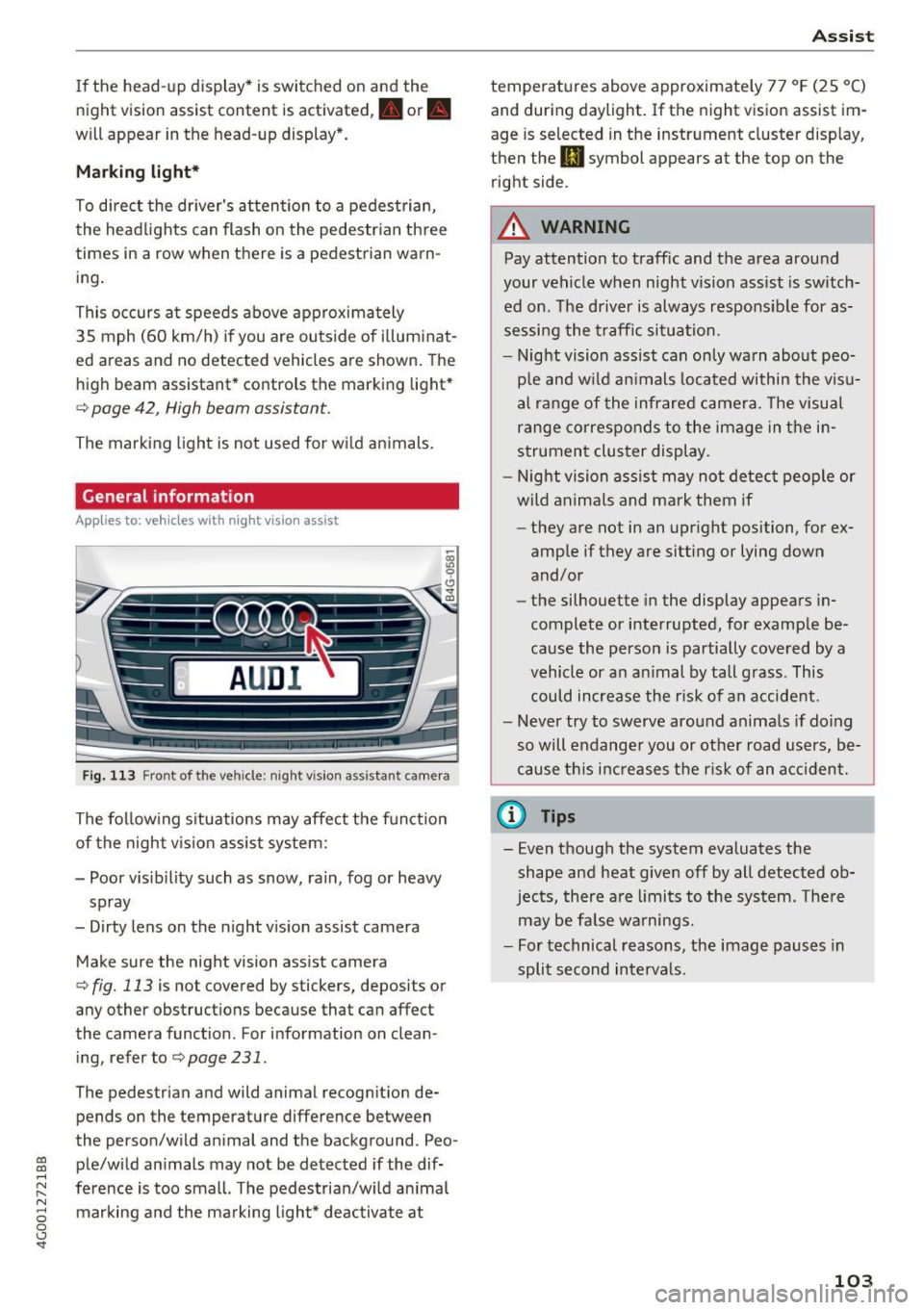
Fig. 113 Front of the vehicle: night vision ass istant came ra
The following situations may affect the function
of the night vision assist system:
- Poor visibility such as snow, rain, fog or heavy spray
- Dirty lens on the night vision assist camera
Make sure the night vision assist camera
c::> fig. 113 is not covered by stickers, deposits or
any other obstructions because that can affect
the camera function . For information on clean
ing, refer to
c::> page 231 .
The pedestrian and wild animal recogn it ion de
pends on the temperature difference between
the person/wild animal and the background . Peo
ple/wild animals may not be detected if the dif
ference is too small. The pedestrian/wild animal marking and the marking light* deactivate at
Assist
temperatures above approximately 77 °F (25 °C)
and during daylight.
If the night vision assist im
age is selected in the instrument cluster display,
then the
II symbol appears at the top on the
right side.
A WARNING
-Pay attention to traffic and the area around
your vehicle when night vision assist is switch
ed on. The driver is always responsible for as
sessing the traffic situation.
- Night vision assist can only warn about peo
ple and wild animals located within the visu
al range of the infrared camera. The visual
range corresponds to the image in the in
strument cluster display.
- Night vision assist may not detect people or
wild animals and mark them if
- they are not in an upright position, for ex
amp le if they are sitting or lying down
and/or
- the silhouette in the display appears in
complete or interrupted, for example be
cause the person is partially covered by a
vehicle or an animal by tall grass. This
could increase the risk of an accident.
- Never try to swerve around animals if doing
so will endanger you or other road users, be
cause this increases the risk of an accident.
(l'} Tips
-Even though the system evaluates the
shape and heat given
off by all detected ob
jects, there are limits to the system . There
may be false warnings.
- For technical reasons, the image pauses in
split second intervals.
-
103
Page 106 of 280
Ass is t
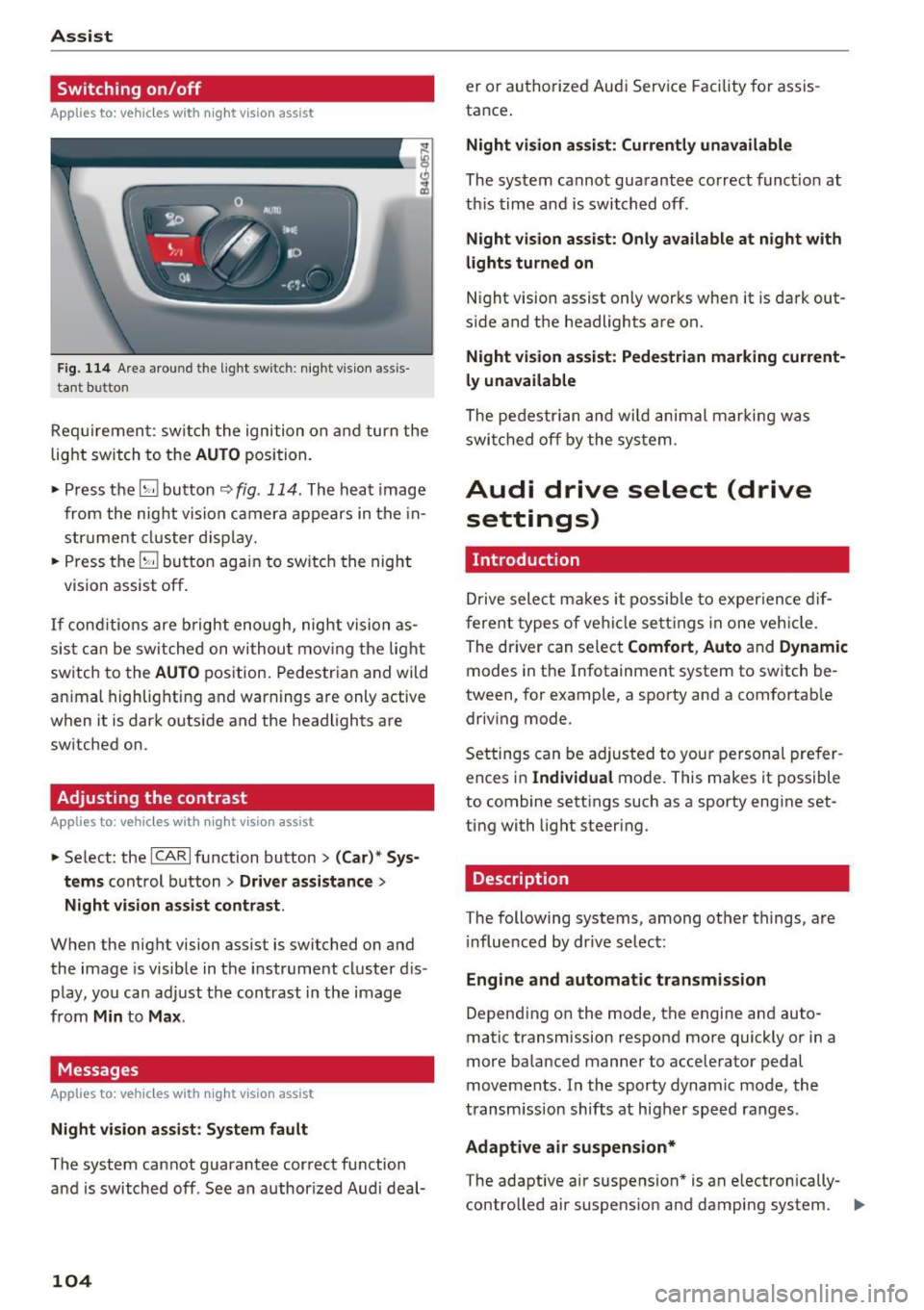
Switching on /off
Applies to: vehicles with night vision assist
Fig. 114 Are a aro und th e light sw itc h: n ight v is ion assis
ta nt b utto n
Req uiremen t: sw itch the ignition on and turn the
light switch to the
AUTO position.
• Press the
[g button ~ fig. 114 . The heat image
from the nig ht vision camera appears in the in
strume nt cluster d isplay.
• Press the
(g button again to switch the night
vision assist off .
If conditions are b right enough, night vision as
sis t can be switched on withou t mov ing the light
switch to the
AUTO position. Pedestrian and wild
an imal highlighting and warnings are only active
when it is da rk outs ide and the headlights are
sw itched on .
Adjusting the contrast
Applies to: vehicles with night vision assist
• Select : the ICARlfunction button > (C ar)* S ys
t e ms
control button > Dri ver assistance >
Night vi sion a ssis t contrast .
When the night vision assist is switched on and
the image is visible in the instrument cluster d is
p lay, you can adjust the contrast in the image
from
Min to Ma x.
Messages
Applies to: vehicles with night vision assist
Ni ght vision assist : S ystem fau lt
The system cannot guarantee correct function
and is switched off . See an author ized Audi deal-
104
er or authori zed Aud i Service Facility for assis
tance .
Night vi sion a ssis t: Curren tly unavailable
The system cannot guarantee correct funct io n at
th is time and is switched off .
Night vis ion ass ist: O nly ava ilabl e a t n ight with
lights turned on
N ight vision assist only works when it is dark out
s ide and the headlights are on.
Night vis ion a ssist: Pede st ria n marking current
l y unavailab le
The pedestrian and wi ld animal marki ng was
swi tched off by the system .
Audi drive select (drive
settings)
Introduction
D rive select makes it possib le to exper ience dif
ferent types of ve hicle settings in one veh icle .
The dr iver can select
Comfort , Auto and Dynamic
modes in the Infotainment system to switch be
tween, for example, a sporty and a comfortab le
driv ing mode .
Settings can be adjusted to your persona l prefer
ences in
Individua l mode. This makes it possible
to combine settings such as a sporty engine set
ting with light steering.
Description
T he following systems, among other things, are
i nfluenced by dr ive select:
Eng ine and aut om atic transmi ssion
Depend ing on the mode, th e engine and auto
matic transmission respond more quickly or in a
more balanced manner to acceler ator pedal
movements. In the sporty dynamic mode, the
transm ission shifts at higher speed ranges .
Adaptive air su spen sion*
The adaptive a ir suspension * is an e lectronically
controlled air suspens ion and damping system. ..,_
Page 141 of 280
co
co
.... N
" N .... 0 0 <..:l '
General information
Always wear safety belts!
Wearing safety belts correctly saves lives!
This chapter explains why safety belts are neces
sary, how they work and how to adjust and wear
them correctly.
~ Read all the information that follows and heed
all of the instructions and WARNINGS.
A WARNING
Not wearing safety belts or wearing them im
properly increases the risk of serious personal
injury and death.
- Safety belts are the single most effective
means available to reduce the risk of serious
injury and death in automobile accidents.
For your protection and that of your passen
gers, always correctly wear safety belts
when the vehicle is moving.
- Pregnant women, injured, o r physically im
paired persons must also use safety belts.
Like all vehicle occupants, they are more
likely to be seriously injured if they do not
wear safety belts. The best way to protect a
fetus is to protect the mother -throughout
the entire pregnancy.
Number of seats
Your Audi has a total of five seating positions:
two in the front and three in the rear. Each seat ing position has a safety belt.
A WARNING
Not wearing safety belts or wearing them im
properly increases the risk of serious personal
injury and death.
- Never strap more than one person, includ
ing small children, into any belt.
It is espe
cially dangerous to place a safety belt over a
child sitting on your lap.
- Never let more people ride in the vehicle
than there are safety belts available.
Safety belts
-Be sure everyone riding in the vehicle is
properly restrained with a separate safety
belt or child restraint.
~ Safety belt warning light
Your vehicle has a warning system for the driver
and front seat passenger (on USA models only)
to remind you about the importance of buckling
up .
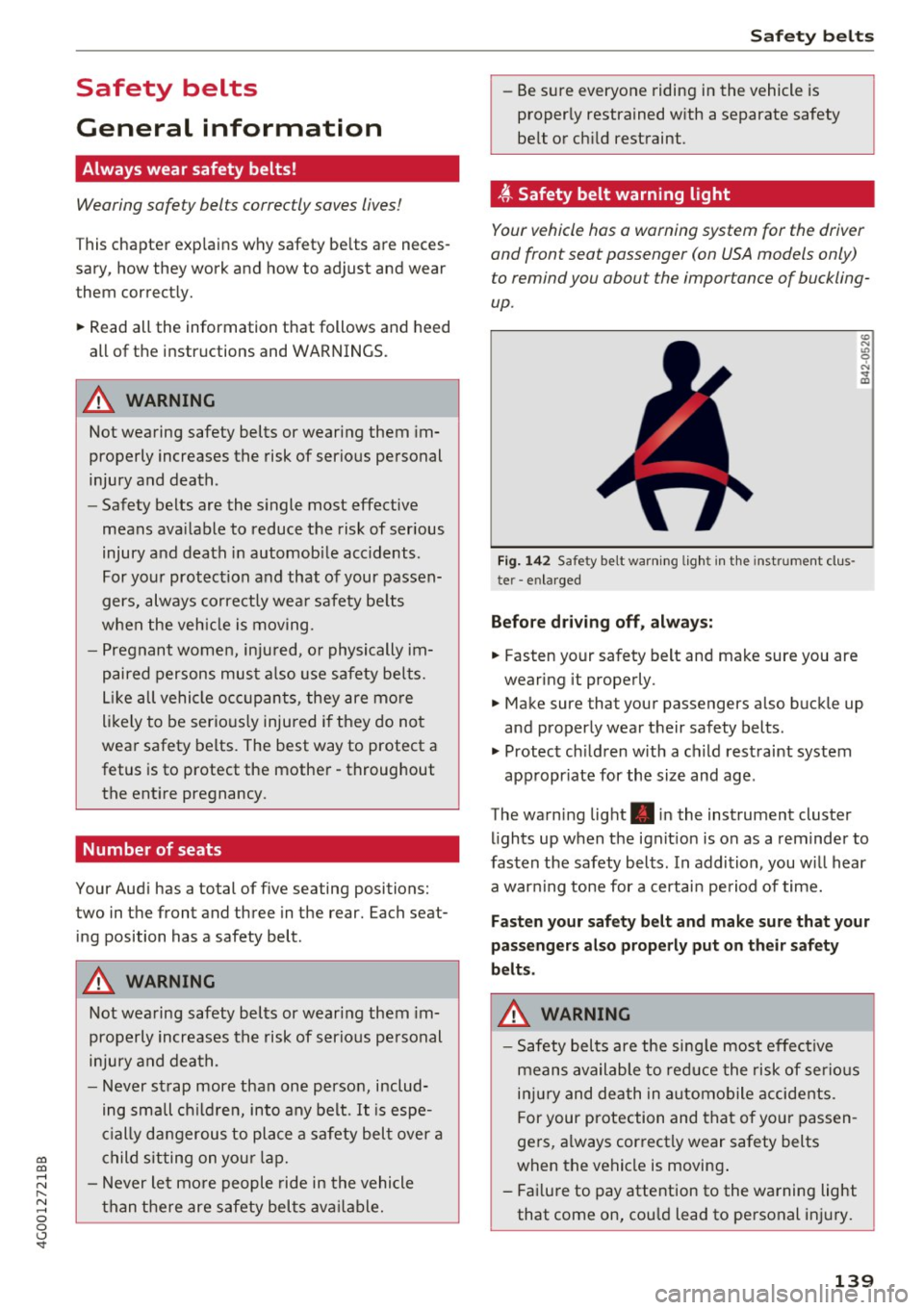
Fig. 142 Safety belt warn ing light in the instrument clus
te r -enlarged
Before driving off, always:
.. Fasten your safety belt and make sure you are
wearing it properly.
.,, N
"' 0 ..:, ., m
~ Make sure that your passengers also buckle up
and properly wear their safety belts .
~ Protect children w ith a ch ild restraint system
appropr iate for the size and age .
The warning light . in the instrument cluster
lights up when the ignit ion is on as a reminder to
fasten the safety belts. In addition, you wil l hear
a warning tone for a certain period of time.
Fasten your safety belt and make sure that your
passengers also properly put on their safety
belts.
A WARNING
-
- Safety belts are the sing le most effective
means available to reduce the risk of serious
injury and death in automobile accidents.
For your protection and that of your passen
gers, a lways correctly wear safety belts
when the vehicle is moving .
- Failure to pay attention to the warning light
that come on, could lead to personal injury.
139
Page 157 of 280
co
co
.... N
" N .... 0 0 <..:l '
on when a malfunction in the one of the system
components is detected
c::> page 159. Because
the front passenger seat contains important
parts of the Advanced Airbag System, you must
take care to prevent it from being damaged .
Damage to the seat may p revent the Advanced
Airbag System for the front passenger seat from
doing its job in a crash.
The f ront Ad vanc ed Airb ag System con sists
of the following:
- Crash sensors in the front of the vehicle that
measu re vehicle accelerat ion/ decelerat io n to
provide info rmation to the Advanced Airbag
System about the severity of the crash.
- An electro nic cont rol un it, with integrated
c rash senso rs fo r front and side impacts. The
contro l unit "decides" whether to fire the fro nt
airbags based on the information received from
the crash sensors . The contro l unit a lso "de
c ides" whether the safety be lt pretensioners
shou ld be activated .
- An Advanced Airbag with gas generator and
contro l valve for the driver ins ide the steer ing
wheel hub.
- An Advanced Airbag with gas generator and
contro l valve inside the instrument panel for
the front passenger.
- A capac itive passenger detect ion system under
neath the front passenger seat cover. This sys
tem measures the electrical capac itance of the
person in the seat . T he information registered
i s sent conti nuous ly to the electro nic cont rol
unit to regulate deployment of the front Ad
vanced Airbag on the passenge r side.
- An airbag monito ring system and indicator
li gh t in the ins trument cluster
c::> page 159.
-A sensor i n each front seat registers the dis
tance between the respective seat and the
stee ring wheel or instrument pane l. The info r
mation reg istered is sent cont in uous ly to the
electronic control unit to regulate deployment
of the front Adv a need Ai rbags.
- The
PASSENGER AIR BAG OFF light comes on
and stays on in the center of the instrument
pane l
c::> page 159, fig. 156 and tells you when
Airb ag sys tem
the front Advanced Airbag on the passenger
side has been turned off .
- A sensor in the safety belt latch for the driver
and for the front seat passenger that senses
whether that safety be lt is latched or not and
transmits this information to the electronic
control un it.
A WARNING ,-
Damage to the front passenger seat can pre-
vent the front airbag from working properly.
- Improper repair or disassembly of the front
passenger and driver seat will p revent the
Advanced Airbag System from funct io ni ng
p roper ly .
- Repairs to the front passenger seat must be pe rformed by qualified a nd p roperly trained
wo rkshop personne l.
- Never remove the front passenger or driver
seat from the vehicle .
- Never remove the upholste ry from the front
passe nger seat.
- Never d isassemble or remove parts from the
s e at o r disco nnect w ire s from it.
- Never carry sharp objects in your pockets or
put them on the seat. The capacit ive pas
senge r de tect io n mat in the front passenger
seat will not function properly if it is punc
tured.
- Never carry things on your lap or carry ob
jects on the front passenge r seat. S uch ob
jects c an influen ce the cap aci tance reg is
t ered by the capaci tive passenger dete ction
sys tem, so that incorrect in formation is pro
vided to the ai rbag control un it.
- Never store i tems unde r the front p assenger
seat . Parts of the Advanced Airbag System
under the passenger seat cou ld be dam
aged, p reventing them and the airbag sys
tem from working proper ly.
- Never p lace seat covers or replacement up
holstery that have not been specifically ap
proved by Audi on the front seats.
- Seat covers can prevent the Advanced A ir
bag System from recognizing chi ld re
stra ints or occupants on the front passenger
seat and preven t the side airbag in the seat
backrest from deploying prope rly .
155
Page 196 of 280
Checking and Filling
-A worn or damaged nozzle or a nozz le that
is too sma ll may not be ab le to open the
diesel misfueling guard . If this is the case,
try turning the noz zle before inserting it in
the fuel filler neck, use a different fuel p ump, or see an authorized Audi dealer or
aut horized Aud i Serv ice Facility for ass is
ta nce.
- The misfueling guard does not open when adding fue l from a fue l conta iner . You can
bypass it by adding the diese l fuel s low ly.
Fuel filler door emergency release
If the central locking system is faulty, the fuel
filler door can be unlocked manually.
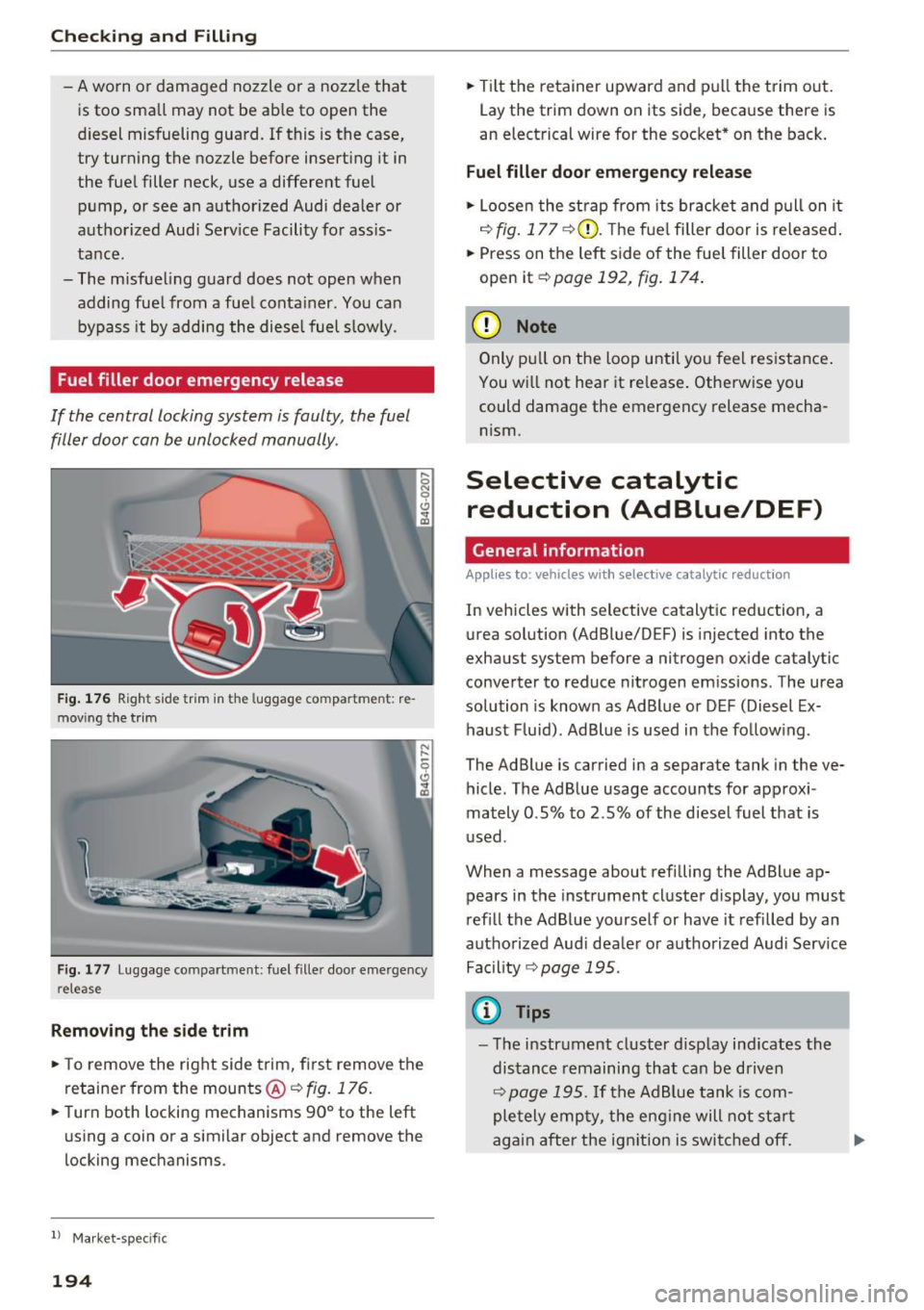
F ig. 1 76 Righ t side tr im in the luggag e com pa rtmen t: re
m ovi ng t he trim
F ig . 1 77 Luggage com partment: fuel f ille r doo r eme rge ncy
re leas e
Removing the side trim
• To remove the right side trim, fi rst remove the
re taine r from the mounts@¢
fig. 176.
• Turn both locking mechanisms 90° to the left
us ing a coin or a similar object and remove the
locking mechanisms .
l) Ma rket -specifi c
194
• Tilt t he retainer upward and pull the trim out .
Lay the trim down on its side, beca use there is
an electrical wire for the soc ket* on the back .
Fuel filler door emergency release
• Loose n the strap from its bracke t and p ull on it
¢ fig. 17 7 ¢(i). Th e f ue l filler door is re le ased .
• Press on the left side of the fue l filler door to
open it
¢ page 192, fig . 174.
(D Note
Only p ull on the loop u nti l yo u feel resistance .
You wi ll not hear it re lease . Otherw ise you
could damage the emergency release mecha nism .
Selective catalytic
reduction (AdBlue/DEF)
General information
Appl ies to: vehicles with selective catalytic reduct ion
In vehicles with selective catalyt ic reduction, a
u rea solution (AdBlue/DEF) is injected into the
exhaust system before a nitrogen oxide catalytic
conve rter to reduce nitrogen em issions . The urea
solution is known as Ad Blue or D EF (Diesel Ex
haust Fluid) . Ad Blue is used in the follow ing .
The Ad Blue is carried in a separate tank in the ve hicle. The AdBlue usage acco unts for approxi
mately 0 .5% to 2 .5% of the diese l fuel that is
u sed .
When a message about refilling the AdBlue ap pears in the instrument cl uster display, you must
ref ill the Ad B lue yourself or have it refilled by an
autho rized Aud i dea le r o r a uthorized Audi Serv ice
Fa cility
¢ page 195.
(D Tips
- The i nstr ument cluster d isplay ind icates the
dis tance remaining that ca n be driven
¢ page 195 . If the Ad Blue tank is com
pletely emp ty, the eng ine will no t st art
again after the ign ition is swi tched
off.
Page 197 of 280
co
co
.... N
" N .... 0 0 <.,;) 'SI'
-Ad Blue is req uired by law to operate this ve
hicle .
Messages in the instrument cluster display
Appl ies to: ve hicles with selective ca talytic reduc tion
The display indicates if the Ad Blue level is low or
if there is a system malfunction.
AdBlue level low
You wi ll be informed if the Ad Blue in t he tank
dr ops below a certain leve l.
Please r efill Ad B lu e. Rang e x mi (km )
This message appears when there is only enough
Ad Blue left to drive the distance indicated in the
driver information system . Fill the AdBlue.
Ad Blue /9 Refill AdBlue! Cannot start engine
in x mi (x km )! See owner 's m anual
This message appea rs when there is only eno ugh
Ad Blue left to d rive the distance indicated in the
driver information system. Fill the AdBlue. Other
wise the engine will not start again if you stop it
once the distance ind icated has been driven. You
can also check the remaining distance in the on
board computer*.
Refill AdBlue! No restart! See o wn·
er 's manual
This message appears when the AdBlue tank is
empty. Fill the Ad B lue . Otherwise you will not be
ab le to start the engine again once you stop it.
The AdB lue m ust be refilled when the amount in
the tank has reached the minimum level
¢ page 195, Filling Ad Blue .
Incorrect filling/system malfunction
A message appears if the Ad Blue tank was filled
with a fluid other than AdBl ue and the sys tem
h as detec ted t hat the tank was f illed incorrect ly,
or if there is a system malfunction .
Ad Blue/ AdBlue : system fault . No restart in
x mi (x km ) See owner 's manu al
This message appears when it is only poss ible to
drive the d ista nce ind icated in the dr iver informa
tion system. Drive to t he nearest autho rized Aud i
dealer or authorized Aud i Serv ice Facility to have
Checking and Filling
the mal func tion corrected. Otherw ise the engine
will not sta rt again if you stop it once the dis
tance indicated has been driven .
Ad Blue: Syst em fault No re start!
See owne r's ma nual
T his message appears if the system has detected
that the tan k was fi lled incorrect ly or tha t there
is a ma lf u nction. Drive immed iate ly to the nea r
est authorized A udi dealer or authorized Audi
Service Facility to have the malfunction correct
ed. Otherwise you will not be able to start the en
gine again once you stop it .
Filling AdBlue
Applies to : vehicles wi th selective cat alyt ic re du ctio n
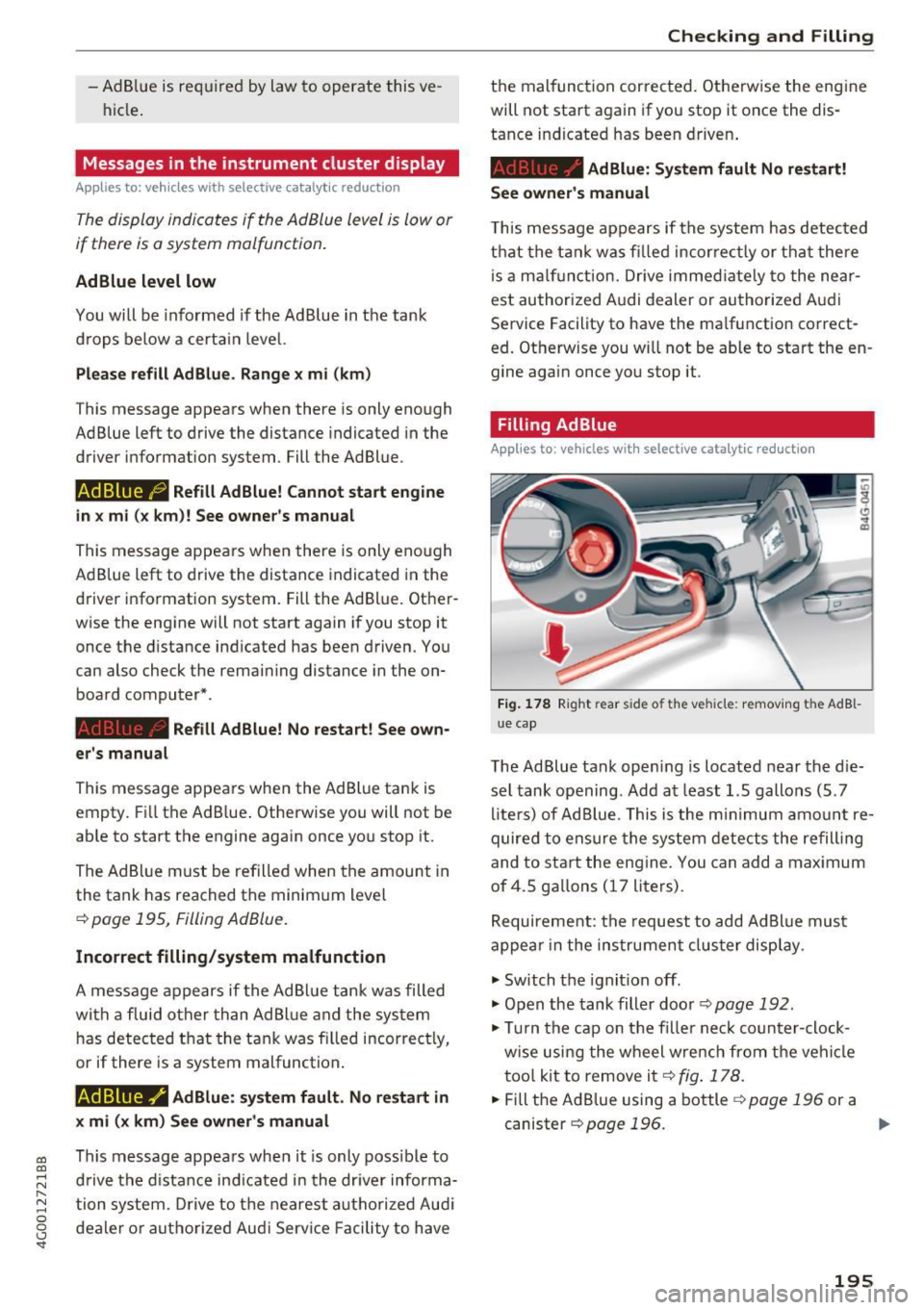
Fi g. 17 8 Right rear side of the vehicle: removing t he AdBl
ue cap
The Ad Blue tank open ing is located near the d ie
se l tank opening . Add at least 1.5 gallons (5 . 7
li te rs) of Ad Blue. This is the m inimum amo unt re
quired to ensure the system detects the refilling
and to start the eng ine. You can add a max imum
of4.5 gallons ( 17 liters).
Requirement: the request to add Ad Blue mus t
appea r in the ins trument clus ter display.
.,. Switch the ignit ion off .
.,. Open the tank filler door ¢
page 192.
.,. Tur n the cap on the f iller ne ck coun ter-clock
w ise using the wheel wre nch from the vehi cle
too l kit to remove it¢
fig . 178.
.,.. Fill the AdBlue using a bottle ¢ page 196 or a
canister
¢page 196. ..,.
195
Page 231 of 280
Tire pressure monitoring system
Applies to: vehicles with Tire Pressure Monitoring System in
dicator
The tire pressure indicator in the instrument
cluster informs you if the tire pressure is too low
or if there is a system malfunction .
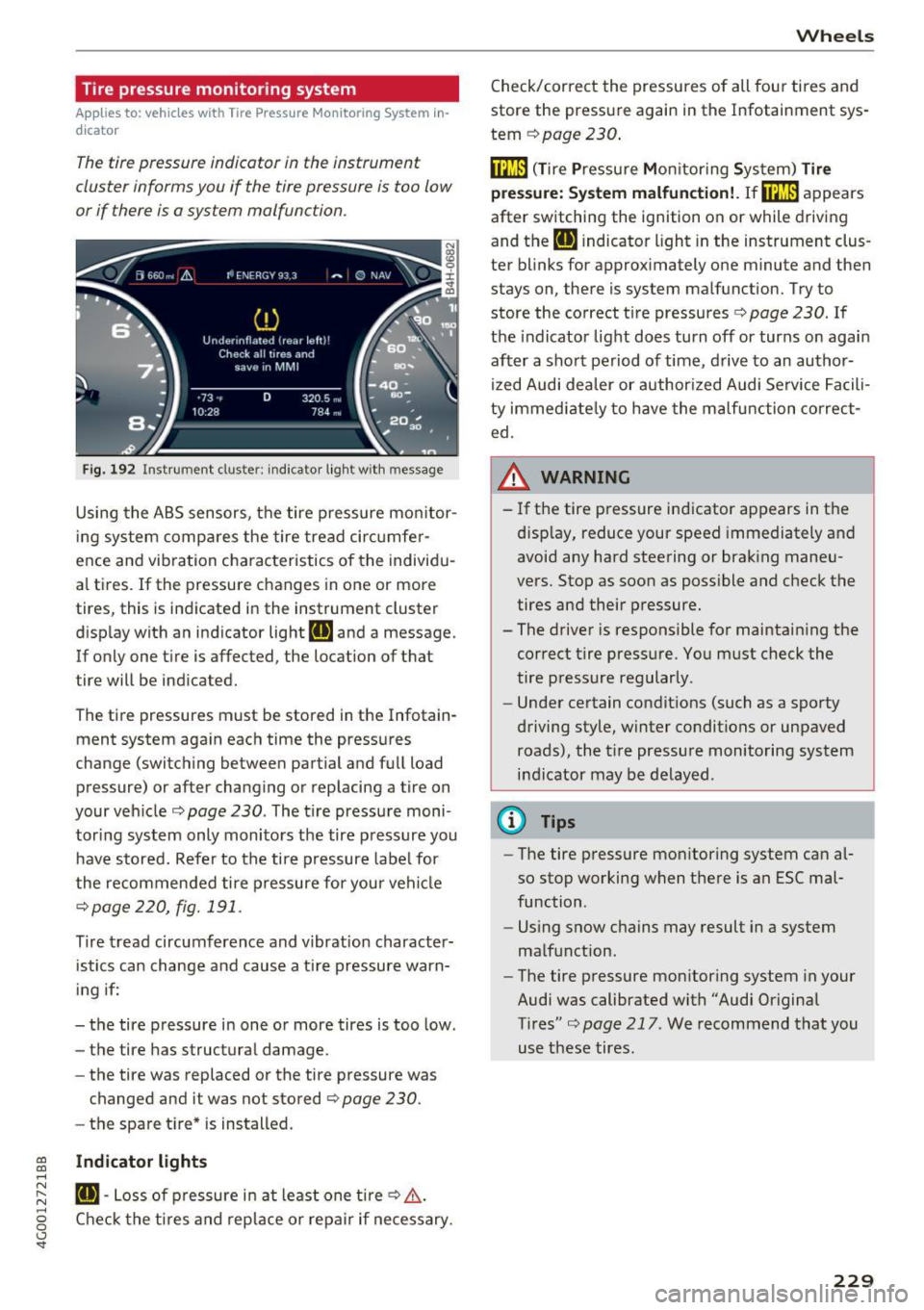
Fig. 192 Instrument clus ter : indicator ligh t w ith message
Using the ABS sensors, the tire pressure monitor
ing system compares the tire tread circumfer
ence and vib ration characteristics of the individu
al tires.
If the pressure changes in one or more
tires, this is indicated in the instrument cluster
display with an indicator light
RE and a message.
If only one tire is affected, the location of that
tire will be indicated.
The tire pressures must be stored in the Infotain
ment system again each time the pressures
change (switching between partial and full load pressure) or after changing or replacing a tire on
your vehicle ¢
page 230 . The tire pressure moni
toring system only monitors the tire pressure you have stored. Refer to the tire pressure label for
the recommended tire pressure for your vehicle
¢page 220, fig.191 .
Tire tread circumference and v ibration character
istics can change and cause a tire pressure warn
ing if:
- the tire pressure in one or more tires is too low.
- the tire has structural damage.
- the tire was replaced or the tire pressure was
changed and it was not stored
¢ page 230.
- the spare tire* is installed.
~ Indicator lights ....
~ RE-Loss of pressure in at least one tire¢,&,. . ....
g Check the tires and replace or repair if necessary.
<.,;) 'SI"
Wheels
Check/correct the pressures of all four tires and
store the pressure again in the Infotainment sys
tem
¢ page 230 .
fflm (T ire Pressure Monitoring System) Tire
press ure: System malfunction!.
Ifffi:m appears
after switching the ignition on or while driving
and the
RE indicator light in the instrument clus
ter blinks for approximately one minute and then
stays on, there is system malfunction. Try to
store the correct tire pressures¢
page 230. If
the indicator light does turn off or turns on again
after a short period of time , drive to an author
ized Audi dealer or author ized Audi Service Facili
ty immediately to have the malfunction correct
ed.
_& WARNING ,..___
- If the tire pressure indicator appears in the
d isplay, reduce your speed immediately and
avoid any hard steering or braking maneu
vers. Stop as soon as possible and check the
tires and their pressure.
- The driver is responsible for maintaining the
correct tire pressure. You must check the
tire pressure regularly.
- Under certain conditions (such as a sporty
driving style, winter conditions or unpaved roads), the tire pressure monitoring system
indicator may be delayed .
@ Tips
-The tire pressure monitoring system can al
so stop working when there is an ESC mal
function .
- Using snow chains may result in a system
malfunction.
- The tire pressure monitoring system in your
Audi was calibrated with "Audi Original
Tires"¢
page 217 . We recommend that you
use these tires.
229