change wheel AUDI A6 2018 User Guide
[x] Cancel search | Manufacturer: AUDI, Model Year: 2018, Model line: A6, Model: AUDI A6 2018Pages: 266, PDF Size: 41.38 MB
Page 159 of 266
a co .... N
" N .... 0 0 \,;J '
install a forward-facing child restraint on
the front passenger seat, always move the
seat into its rearmost position in the seat's
fore and aft adjustment range, as far away
from the airbag as possible. The backrest must be adjusted to an upright position.
- Make sure that the
PASSENGER AIR BAG
OFF
light comes on and stays on all the time
whenever the ignition is switched on.
A WARNING
- If the PASSENGER AIR BAG OFF light does
not go out when an adult is sitting on the
front passenger seat after taking the steps
described above, make sure the adult is
properly seated and restrained at one of the
rear seating positions.
- Have the airbag system inspected by your
Audi dealer before transporting anyone on
the front passenger seat .
(D Tips
If the capacitive passenger detection system
determines that the front passenger seat is
empty, the frontal airbag on the passenger
side will be turned off, and the
PASSENGER
AIR BAG OFF
light will stay on.
Repair, care and disposal of the airbags
Parts of the airbag system are installed at many
different places on your Audi . Installing , remov
ing , servicing or repairing a part in an area of the
vehicle can damage a part of an airbag system
and prevent that system from working properly
in a collision.
There are some important things you have to
know to make sure that the effectiveness of the
system will not be impaired and that discarded
components do not cause injury or pollute the
environment.
A WARNING
Improper care, servicing and repair proce
dures can increase the risk of personal injury
and death by preventing an airbag from de-
-
Airbag system
ploying when needed or deploying an airbag
unexpectedly :
- Never cover, obstruct, or change the steer
ing wheel horn pad or airbag cover or the in
strument panel or modify them in any way.
- Never attach any objects such as cup holders
or telephone mountings to the surfaces cov
ering the airbag units.
- For cleaning the horn pad or instrument
panel, use only a soft, dry cloth or one mois
tened with plain water . Solvents or cleaners
could damage the airbag cover or change
the stiffness or strength of the material so
that the airbag cannot deploy and protect properly.
- Never repair, adjust, or change any parts of
the airbag system.
-All work on the steering wheel, instrument
panel, front seats or electrical system (in
cluding the installation of audio equipment,
cellular telephones and CB radios, etc.)
must be performed by a qualified technician
who has the training and special equipment
necessary.
- For any work on the airbag system, we
strongly recommend that you see your au
thorized Audi dealer or qualified workshop.
- Never modify the front bumper or parts of
the vehicle body.
- Always make sure that the side airbag can inflate without interference:
- Never install seat covers or replacement
upholstery over the front seatbacks that
have not been specifically approved by
Audi .
- Never use additional seat cushions that
cover the areas where the side airbags in
flate.
- Damage to the original seat covers or to
the seam in the area of the side airbag
module must always be repaired immedi
ately by an authorized Audi dealer.
- The airbag system can deploy only once. Af
ter an airbag has been deployed, it must be
replaced with new replacement parts de
signed and approved especially for your
Audi model version. Replacement of com plete airbag systems or airbag components
157
Page 160 of 266
Airbag system
must be performed by qualified workshops
only. Make sure that any airbag service ac
tion is entered in your Audi Warranty
&
Maintenance booklet under AIRBAG RE·
PLACEMENT RECORD .
-For safety reasons in severe accidents, the
alternator and starter are separated from
the vehicle battery with a pyrotechn ic circuit
interrupter.
- Work on the pyrotechnic circuit interrupt
er must only be performed by a qualified
technicians who have the experience, in
formation and special tools necessary to
perform the work safely.
- If the vehicle or the circuit interrupter is
scrapped, all applicable safety precautions
must be followed .
@ For the sake of the environment
Undeployed airbag modules and pretension
ers might be classified as Perchlorate Materi
al
-special handling may apply , see
www .dtsc.ca.gov/hazardouswaste/perchlo
rate . When the vehicle or parts of the re
straint system including airbag modules and
safety belts w ith pretensioners are scrapped,
all applicable laws and regulations must be
observed . Your authorized Audi dealer is fa
miliar with these requirements and we recom
mend that you have your dealer perform this
service for you.
Other things that can affect Advanced
Airbag performance
Changing the vehicle's suspension system can
change the way that the Advanced Airbag System
performs in a crash. For example, using tire-rim
comb inations not approved by Audi, lower ing the
vehicle, chang ing the stiffness of the suspension,
including the springs, suspension struts , shock
absorb ers etc . can change the forces that are
measured by the airbag sensors and sent to the
electronic control unit . Some suspension changes
can, for example, increase the force levels meas
ured by the sensors and make the airbag system
deploy in crashes in which it would not deploy if
the changes had not been made. Other kinds of
158
changes may reduce the force levels measured by
the sensors and prevent the airbag from deploy
i ng when it should .
& WARNING
Changing the vehicle's suspension including
use of unapproved tire-rim combinations can
change Advanced Airbag performance and in
crease the risk of serious personal injury in a
crash .
- Never install suspension components that do not have the same performance charac
teristics as the components origina lly instal
led on your vehicle.
- Never use tire-rim combinations that have
not been approved by Aud i.
Knee airbags
Description of knee airbags
Applies to: vehicles with knee airbags
The knee airbag system can provide supplemen
tal protection to properly restrained front seat
occupants.
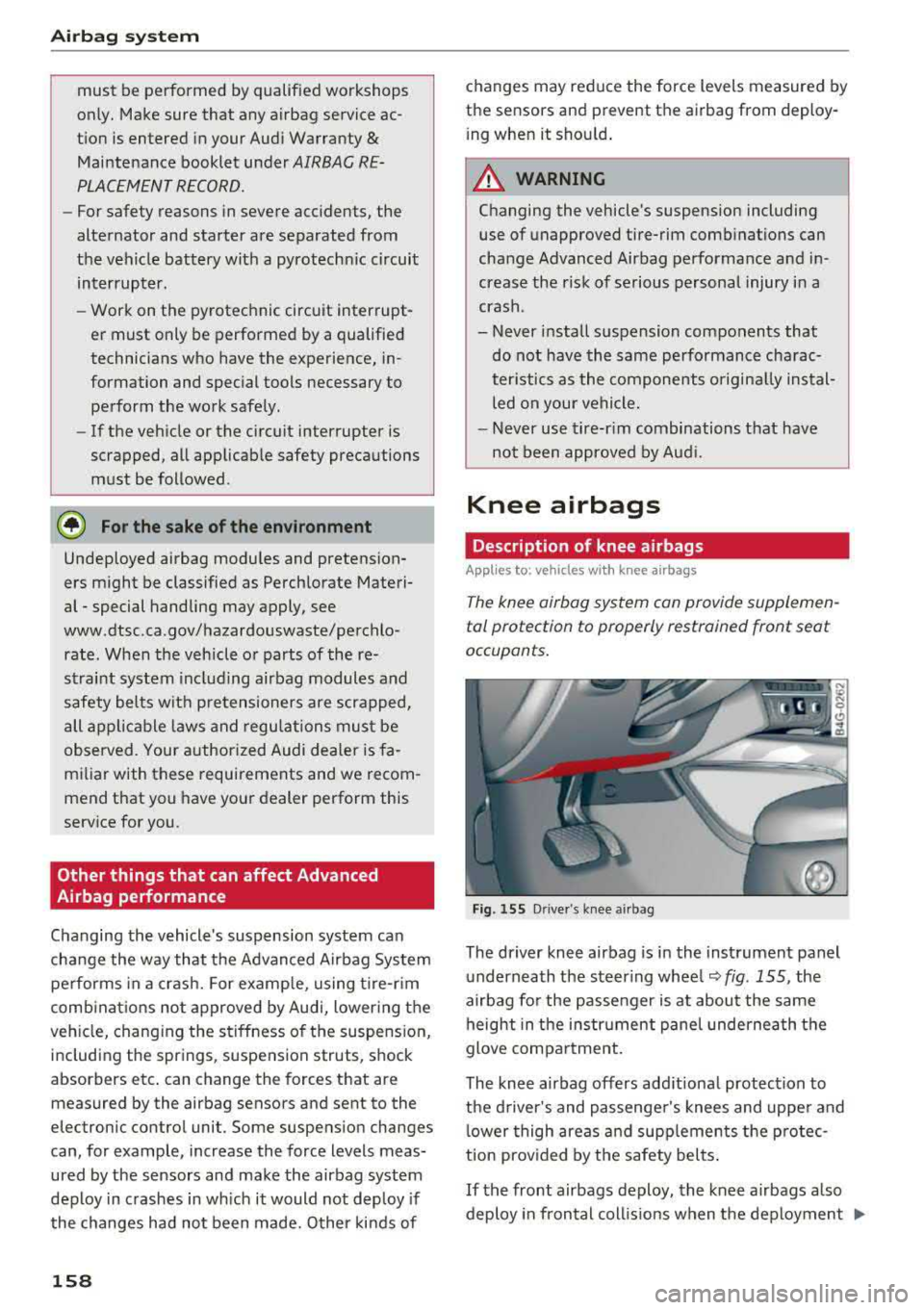
Fig . 155 Driver 's knee airbag
The driver knee airbag is in the instrument panel
underneath the steering wheel ¢
fig. 155, the
airbag for the passenger is at about the same height in the instrument panel underneath the
glove compartment.
The knee airbag offers add itional protect ion to
the driver's and passenger's knees and upper and lower thigh areas and supplements the protec
tion prov ided by the safety belts .
If the front airbags deploy, the knee airbags also
deploy in frontal coll is ions when the deployment
..,.
Page 208 of 266
Wheels
Production options we igh t
means the combined weight of
those installed regular production
options weighing over 5 lbs.
(2.3 kg) in excess of those stand
ard items which they replace, not previously considered in curb
weight or accessory weight, in
cluding heavy duty brakes, ride levelers, roof rack, heavy duty
battery, and special trim.
Radial pl y tir e
means a pneumatic tire in which
the ply cords that extend to the beads are laid at substantially
90 degrees to the centerline of
the tread.
R ecomm ended in flation
pressure
see ¢ page 204 , Cold tire infla
tion pressure.
R einforced tire
means a tire designed to operate
at higher loads and at higher in
flation pressures than the corre
sponding standard tire . Rein
forced tires may be identified as
"XL" "xl" "EXTRA LOAD" or "RF" , , ,
on the sidewall.
206
Rim
means a metal support for a tire
or a tire and tube assembly upon
which the tire beads are seated.
Rim diam eter
means nominal diameter of the
bead seat . If you change your
wheel size, you will have to pur
chase new tires to match the new rim diameter .
Rim size designation
means rim diameter and width.
Rim width
means nomina l distance between
r im
flanges .
Sidewall
means that portion of a tire be
tween the tread and bead .
Speed rating (letter code )
means the speed at which a tire is
designed to be driven for extend
ed periods of time. The ratings range from 93 mph (150 km/h)
to
186 mph (298 km/h) ¢ table
on page 202 .
You may not find
this information on all tires be
cause it is not required by law .
The speed rating letter code,
where applicable, is molded on
the tire sidewall and indicates the
...
Page 215 of 266
a co .... N
" N .... 0 0 \,;J '
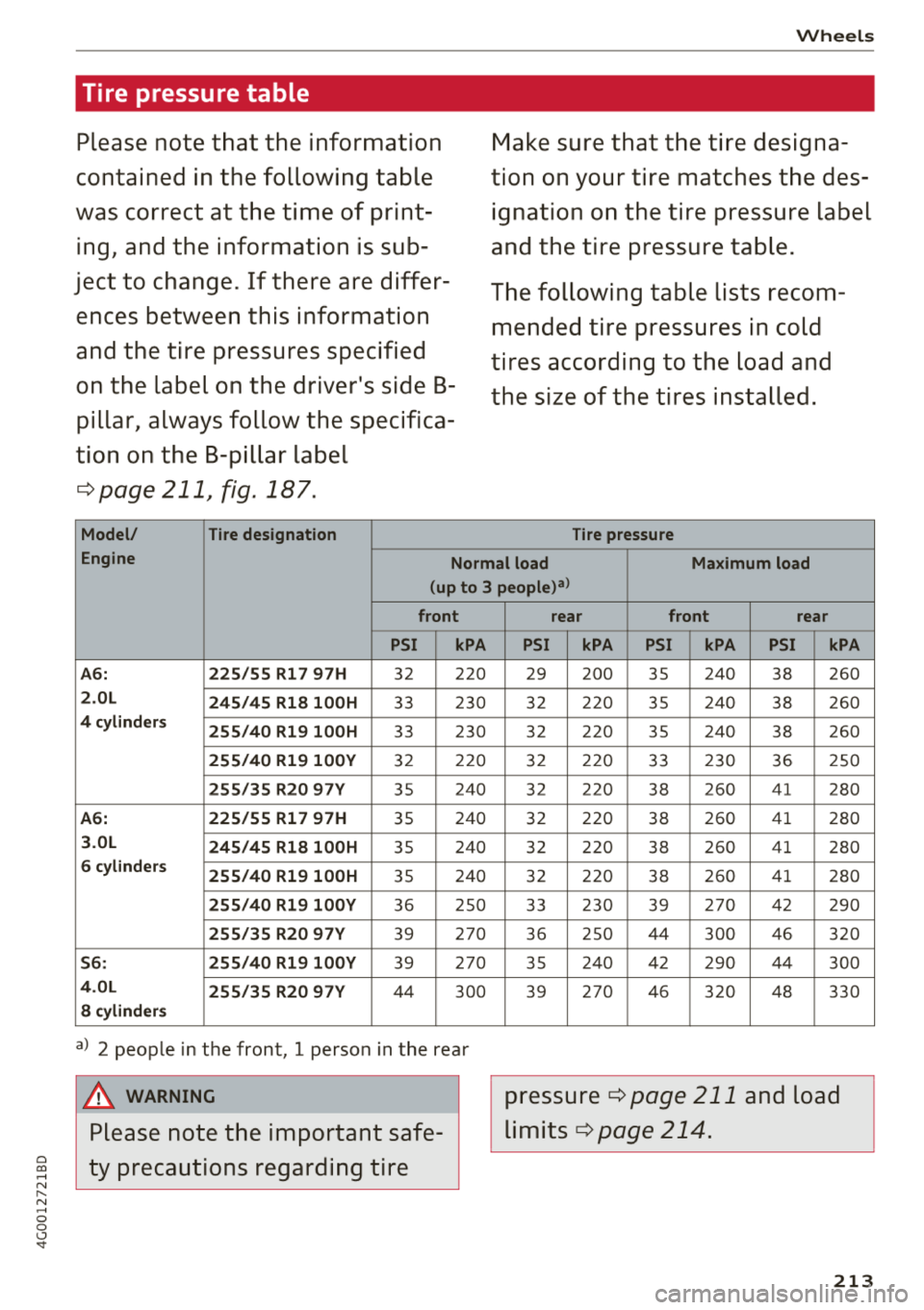
Please note that the information
contained in the following table
was correct at the time of print
ing, and the information is sub
ject to change. If there are differ
ences between this information
and the tire pressures specified
on the label on the driver's side B
pillar, always follow the specifica
tion on the B-pillar label
¢page 211, fig. 187.
Model/ Tire designation
Wheels
Make sure that the tire designa
tion on your tire matches the des
ignation on the tire pressure label
and the tire pressure table.
The following table lists recom mended tire pressures in cold
tires according to the load and
the size of the tires installed.
Tire pressure
Engine Normal load Maximum load
(up to 3
people)3>
front
PSI kPA
A6:
225/55 Rl 7 97H 3 2 220
2.0L
245/45 Rl8 l00H 33 230
4 cylinders 255/40 Rl9 l00H 33 230
255/40 Rl9 l00Y 32 220
255/35 R20 97Y 35 2
40
A6: 225/55 Rl7 97H 35 240
3.0L
245/45 Rl8 l00H 35 240
6
cylinders 255/40 Rl9 l00H 35 240
255/40 Rl9 l00Y 36 250
255/35 R20 97Y 39 270
56: 255/40 Rl9 l00Y 39 270
4.0L
255/35 R20 97Y 44 300
8 cylinders
a) 2 people in the front, 1 person in the rear
A WARNING
Please note the important safe
ty precautions regarding tire
rear front rear
PSI kPA PSI kPA PSI kPA
29 200 35 240
38 260
32 220 35 240 38 260
32 220 35 240
38 260
32 220 33 230 36 250
3 2 220
38 2
60 4 1 280
32 220 38 260 41 280
32 220 38 260 41 280
32 220 38 260 41 280
33 230
39 270 42 290
36 250 44 300 46 320
35 240 42 290 44 300
39 270 46 320 48 330
pressure ¢page 211 and load
limits
¢ page 214.
213
Page 221 of 266
a co ,...,
N
" N ,...,
0 0 \,;J '
proper tire maintenance, and it is the driver's re
sponsib ility to ma intain correct tire pressure,
even if under-inf lation has not reached the level
to trigger illum ination of the TPMS low tire pres
sure telltale .
Your veh icle has also been equ ipped w ith a TPMS
malfunct ion indicator to indicate when the sys
tem is not operating properly. The TPMS mal
function indicator is combined w ith the low tire
pressure telltale. Whe n the system detects a
malfunct ion, the telltale will flash for approxi
mately one minu te and then remain cont inuous ly
i llum inated. This sequence wi ll continue upon
subseq uen t veh icle start -ups as long as the ma l
function exists.
When the malfunct ion i ndicator is ill uminated,
the system m ay not be ab le to detec t or sig nal
l ow tire press ure as intended. TPMS ma lfunctions
may occur for a var iety of reasons, incl uding the
installation of replacement or alternate tires or
wheels on the vehicle that prevent the TPMS
from functioning properly. Always check the TPMS malfunction telltale after rep lacing one or
more t ires or whee ls on your vehicle to ensu re
that t he replacement or alternate ti res and
wheels allow the TPMS to cont inue to func tion
p roperly.
If the tire pressure monitoring system
indicator appears
A ppl ies to: ve hicles with Tire Pressure Moni toring System in
di cato r
The tire pressure indicator in the instrument
cluster informs you if the tire pressure is too low
or if there is a system malfunction .
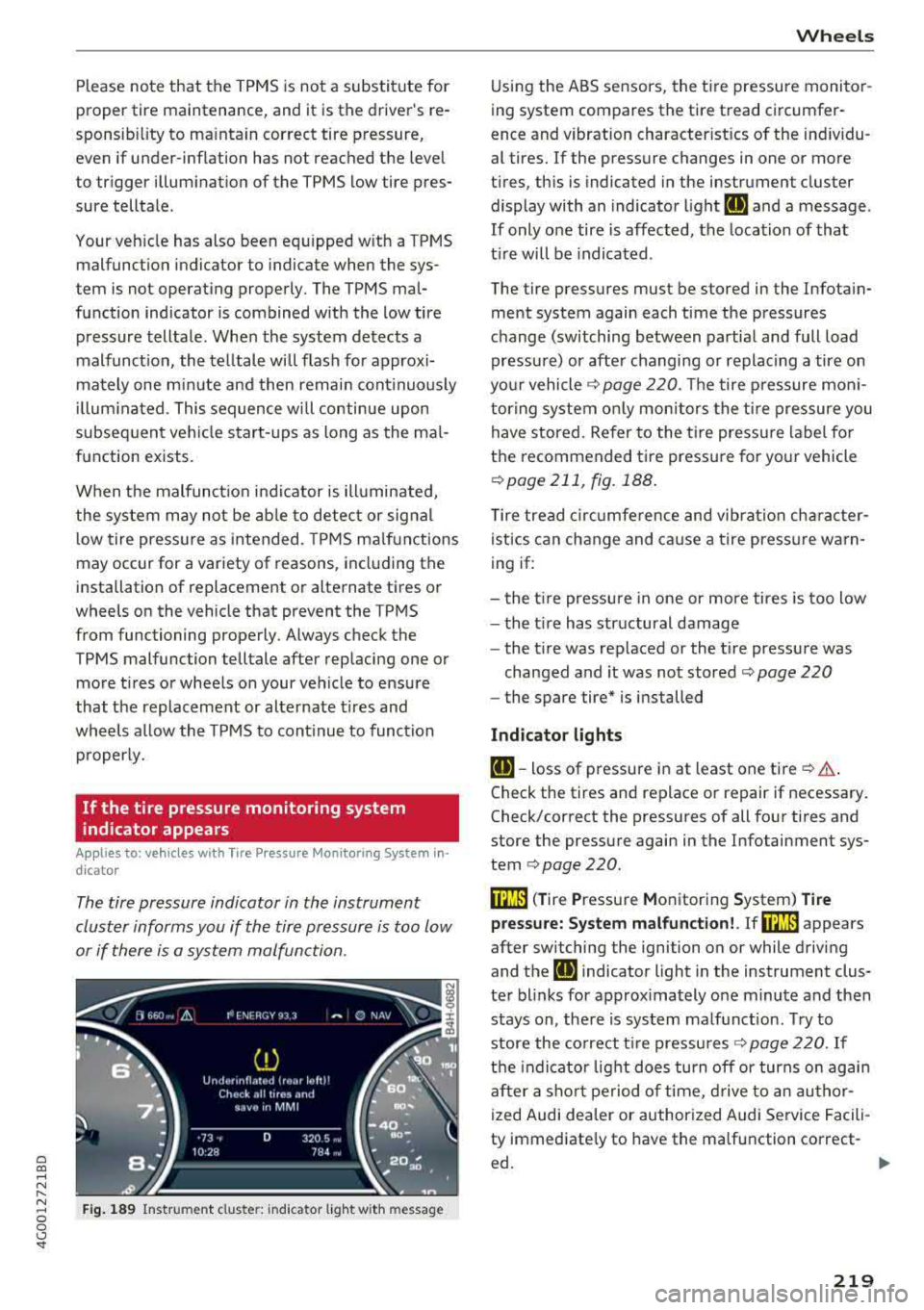
Fig. 1 89 Instrument cl uste r: in dicator l ight w it h m essage
Wheels
Using the ABS sensors, the tire pressure monito r
ing system compares the tire tread circumfer
ence and vibration characterist ics of the ind ividu
al tires. If the pressure changes in one or more
t ires, th is is indicated in the instrument cluster
display with an indicator l ight
IE and a message .
If only o ne tire is affected, the location of tha t
t ir e will be indicated .
The tire pressures must be stored in the Infotain ment system again each time the pressures
change (switching between partial and full load
pressure) or afte r changing or replac ing a tire on
yo ur vehicle
Q page 220. The tire p ressure mon i
tor ing system on ly mon itors the t ire pressure you
have stored. Refer to the t ire press ure label fo r
the recommended ti re pressure for yo ur vehicle
Q page 211, fig. 188 .
Tire tread c ircu mfe rence and vibr ation cha racter
istics can change and ca use a tire press ure warn
ing if:
- the t ire pressure in one or more tires is too low
- the t ire has str uctural damage
- the t ire was replaced or the t ire pressure was
changed and it was not stored
Q page 220
- the spare tire* is i nstalled
Indicator light s
IE-toss of pressure in at least one tire Q & .
Check the tires and replace or repair if necessary .
Check/correct the pressures of all four tires and
store the pressu re again in the Infotainment sys
tem
Q page 220.
m ( T ire Pressure Monitoring System) Ti re
pressure: System malfunction!.
If rn:m appears
after switching the ignition on or while driving
and the
IE indicator light in the instrument clus
te r blinks for approx imately one minute and then
stays on, the re is system malf unct ion . Try to
store the co rrect t ire pressu res
Q page 220. If
t h e indicat or light does turn off or turns on agai n
af ter a sho rt pe riod o f time, d rive to an au thor
ized Audi dea ler or authorized Audi Service Facili
ty immediate ly to have the ma lfunction correct-
ed.
~
219
Page 222 of 266
Wheels
A WARNING
-If the t ire pressure indicator appears in the
display, reduce your speed immediate ly and
avoid any hard s teer ing or braking maneu
vers . Stop as soon as possib le and check the
t ir es and thei r pressu re .
- The driver is responsib le for main taining the
correct tire pressure. You mus t check t he
t ir e pressure regu larly.
- Under certain conditions (such as a sporty
dr iv ing style, winter cond itions o r unpaved
ro ads), the tire p ressure mon itoring system
in dicator may be delaye d.
(D Tips
- The t ire pressu re monitoring sys tem can al
so stop work ing when there is an ESC mal
fun ct ion.
- Using snow chains may result in a system
malfu nction.
- The t ire pressu re monitoring sys tem in your
A udi was calibrated with "A udi Orig inal
T ires "~ page 208. Using these ti res is re c
ommended.
Storing tire pressures
Applies to: vehicles with Tir e Pressure Monitor ing System in
dicator
I f the tire pressure changes or a tire is replaced,
it must be confirmed in the Infotainment sys tem .
.,. Make sur e before sto ring that t he tire pressures
of a ll fo ur t ires meet the specified val ues and
are ada pted to the load
c:;> page 211 .
.,. Switch the ign ition on .
.,. Se lect : the ICARI fu nction bu tton> ( Car )* Sys
tems
con trol button > Service & control > Tire
pre ssure monitor > Store tire pre ssure > Yes,
store now .
(D Tips
Do not store the tire pre ssu res i f snow chains
are installed.
220
Page 229 of 266
a co .... N
" N .... 0 0 \.J '
The vehicle jack* in your vehicle is mainte
na nee-free.
Replacing wheels
Before changing a wheel
Observe the following precautions for your own
and your passenger's safety when changing a
wheel .
'"After you experience a tire failure, pull the car
well away from moving traff ic and try to reach
le ve l ground before you stop ¢,&. .
'"All passe ngers should le ave the car and move
to a safe location (for instance, be hind the
guardra il) ¢ ,&. .
.. Engage the parkin g brake to p revent your vehi
cle from rolling
unintentionally ¢,&. .
'"Move selecto r lev er to p osition P ¢ ,&. .
'"If you are towing a trailer, unh itch the trailer
from your veh icle.
'" Take the jac k and the sp are tir e* out of the lug
gage compartment
i::> page 226 .
A WARNING
You or your passengers cou ld be inju red w hile
chang ing a wheel if you do not follow these
safety precautions :
- If you have a flat t ire, move a safe distance
off t he road. Tur n off the engine, t urn the
emergency flashers on and use other warn
ing devices to alert other motorists .
- Make s ure tha t pa ssengers w ait in a sa fe
place away from the vehicle and we ll away
from the road and traffic.
- T o help prevent the vehicle from moving
sudden ly and possibly slipping o ff th e jack,
always fully set the parking brake and b lock
the front and back of the wheel diagonally opposite the wheel be ing changed. When
one front whee l is lifted off the ground,
placing the Automatic Transm ission in P
(Park) w ill
not prevent the veh icle from
moving.
Em ergenc y ass is tanc e
-Before you change a whee l, be sure the
ground is level and firm . If necessary, use a
sturdy board under the jack.
- Always store the vehicle too l kit, the jack
and the replaced tire in the luggage com
partment
¢ page 130.
(D Tips
Before changing the wheel, you must activate
the jacking mode, so that the automatic con
tro ls for the Adaptive Air Suspension* do not
make it more difficult to lift the vehicle with
the
jack ¢ page 229 .
Changing a wheel
When you change a wheel , follow the sequence
described below step-by-step and in exactly that
order .
l. Activate the vehicle jack mode* ¢ page 229.
2. Remove the deco rati ve wheel co ver* or the
wheel bolt c aps *. For more details see also
¢ page 228, Decorative wheel covers or
¢ page 228, Wheels with wheel bolt caps .
3. Loosen the wheel bolt s ¢page 229.
4. Locate t he p roper mount ing point for the
jack and align the jack be low that poin t
¢page 229 .
S. R ais e the car with the jack ¢ page 229 .
6. Remove the wheel with the fl at tir e and then
install
the spare ¢ page 231.
7. Tig hte n all wheel bolts lightly .
8 .
Lower the vehicle with the jack .
9 . Use the wheel bolt wrench and
firml y tighten
all wheel
bo lts ¢ page 229.
10. Replace t he decorat ive wh eel cover * or the
wheel bolt cap s*.
11. Deactivate the vehicle jack mode* in t he
MMI :
ICAR I function button > (Car )* sys tem s
contro l button > Ser vicing & che cks > Air
s usp.: jack mod e> Off.
The vehicle jack mode * switches off automatica l-
ly at speeds abov e 6 mph (10 km/h).
.,.
227
Page 230 of 266
Emergency assistance
A WARNING
Always read and follow all WARNINGS and in
formation
c:> & in Raising the vehicle on
page 230
and c:> page 232.
After changing a wheel
A wheel change is not complete without the do
ing the following .
.. Always store the vehicle tool kit, the jack* and
the replaced tire in the luggage compartment
c:> page 130 .
.. Check the tire pressure on the spare wheel im
med iate ly after mount ing it .
.. As soon as possible, have the tightening tor
ques
on all wheel bolts checked with a torque
wrench. The correct tightening torque is 90 ft
lb s (120 Nm) .
.. Have the flat tire replaced as soon as possible.
@ Tips
-If you notice that the wheel bolts are cor
roded and difficu lt to turn while changing a
tire, they should be replaced before you
check the tightening torque.
-Drive at reduced speed until you have the
tightening torques checked.
-After changing a wheel, the tire pressure in
a ll four tires must be checked/corrected and
the tire pressure monitoring indicator must
be stored in the MMI
<=> page 220.
Decorative wheel covers
App lies to: vehicl es w ith decorative wheel covers
The decorative wheel covers must be removed
first to access the wheel bolts.
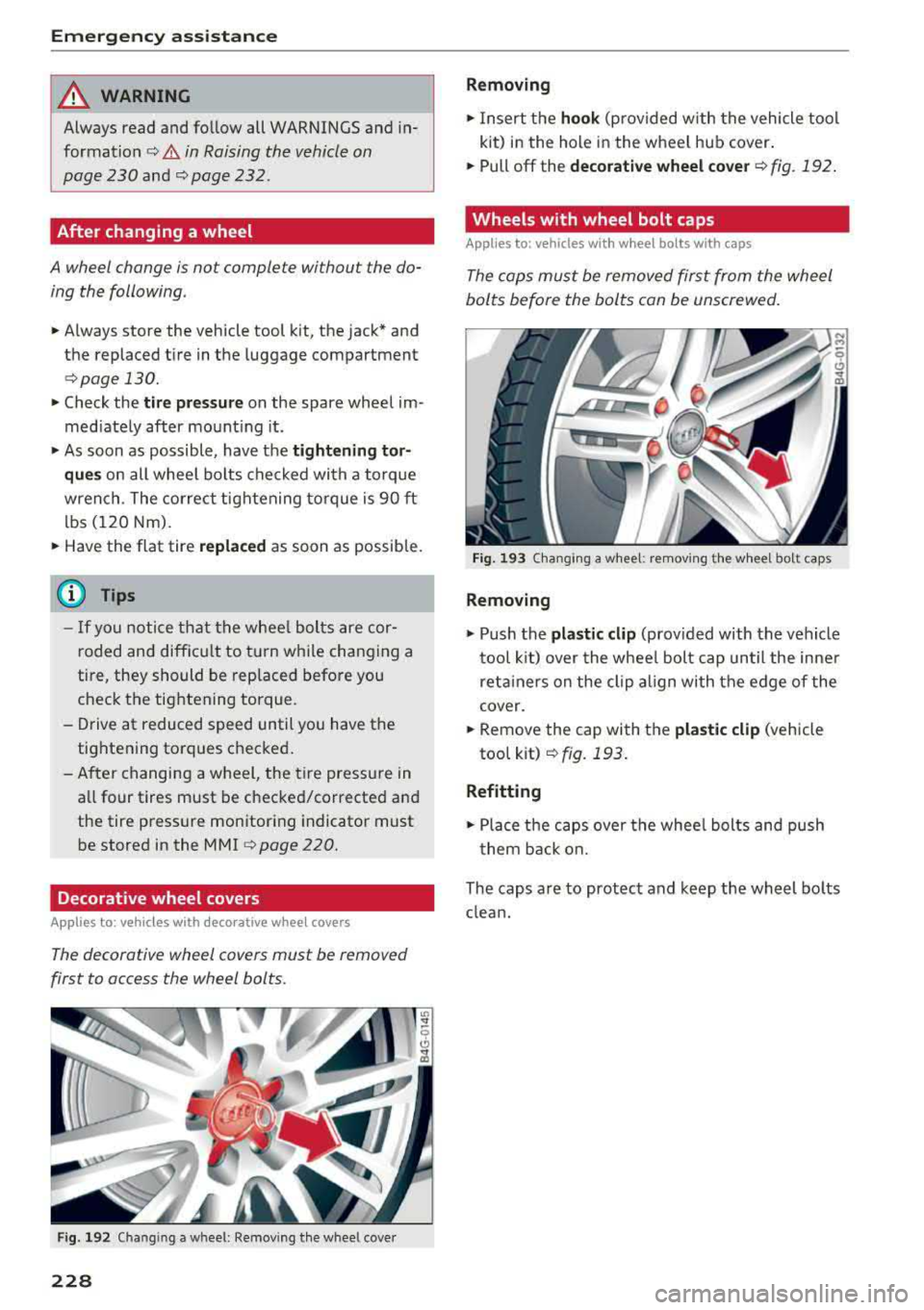
Fig. 192 Changing a wheel: Remov in g the whee l cove r
228
Removing
.,. Insert the hook (provided w ith the vehicle tool
kit) in the hole in the wheel hub cover.
.. Pull off the decorative wheel cover c:> fig. 192 .
Wheels with wheel bolt caps
Applies to: vehicles with wheel bolts with caps
The caps must be removed first from the wheel
bolts before the bolts can be unscrewed .
Fig. 193 C hanging a wheel: remov ing the w heel bolt caps
Removing
.,. Push the plastic clip (provided with the vehicle
tool kit) over the whee l bolt cap until the inner
reta iners on the clip align with the edge of the
cover.
.. Remove the cap with the plastic clip (vehicle
tool kit)
c:> fig. 193.
Refitting
.,. Place the caps over the whee l bolts and push
them back on.
The caps are to protect and keep the wheel bo lts
clean.
Page 231 of 266
a co ,...,
N
" N ,...,
0 0 \,;J '
The wheel bolts must be loosened before raising
the vehicle.
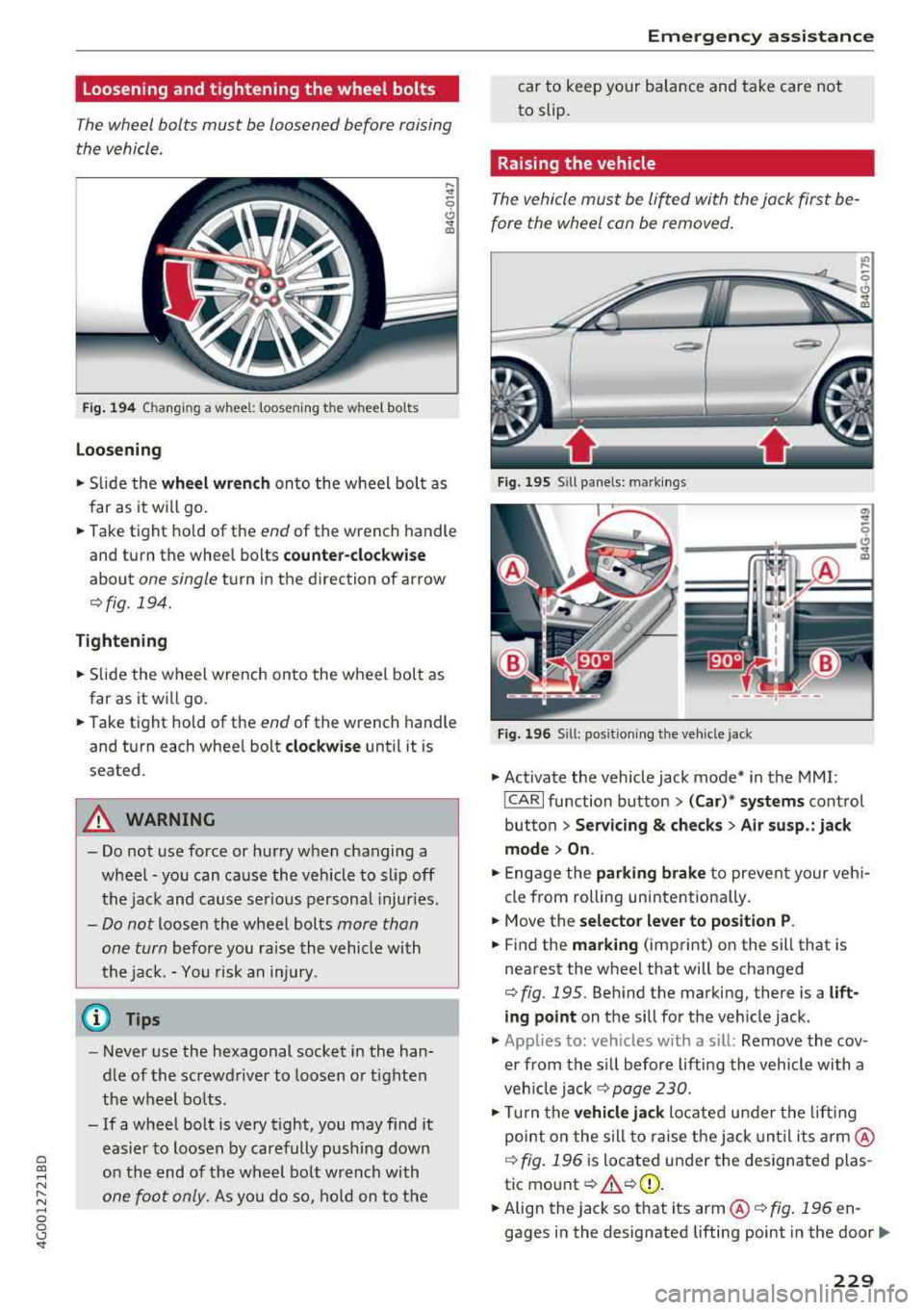
Fi g. 194 Changing a wheel: loosening the wheel bo lts
Loosening
.... ..,.
5
CJ ..,. ID
.,. S lide the wheel wr ench onto the wheel bol t as
far as it wi ll go.
... Take tight hold of the end of the wrench handle
and turn the wheel bolts
counte r-cloc kwi se
about one single turn in the direction of arrow
Qfig. 194.
Tighten ing
.,. Slide the wheel wrench onto the wheel bol t as
far as it will go .
... Take tight hold of the end of the wrench handle
and turn each whee l bolt
cl oc kw ise until it is
seated.
A WARNING
- Do not use force or hurry when changing a
wheel - you can ca use the vehicle to slip off
the jack and cause se rious personal injur ies.
- Do not loosen the wheel bolts more than
one turn
before you raise the vehicle with
the jack. -You risk an injury.
(D Tips
- Never use the hexagonal socket in the han
dle of the screwdriver to loosen or tighten
the wheel bo lts.
- If a whee l bolt is very tight, you may find it
easier to loosen by carefully pus hing down
on the end of the wheel bo lt wrench with
one foot only. As you do so, hold on to the
Em ergen cy as sis tanc e
car to keep your balance and take care not
to slip.
Raising the vehicle
The vehicle must be lifted with the jack first be
fore the wheel can be removed .
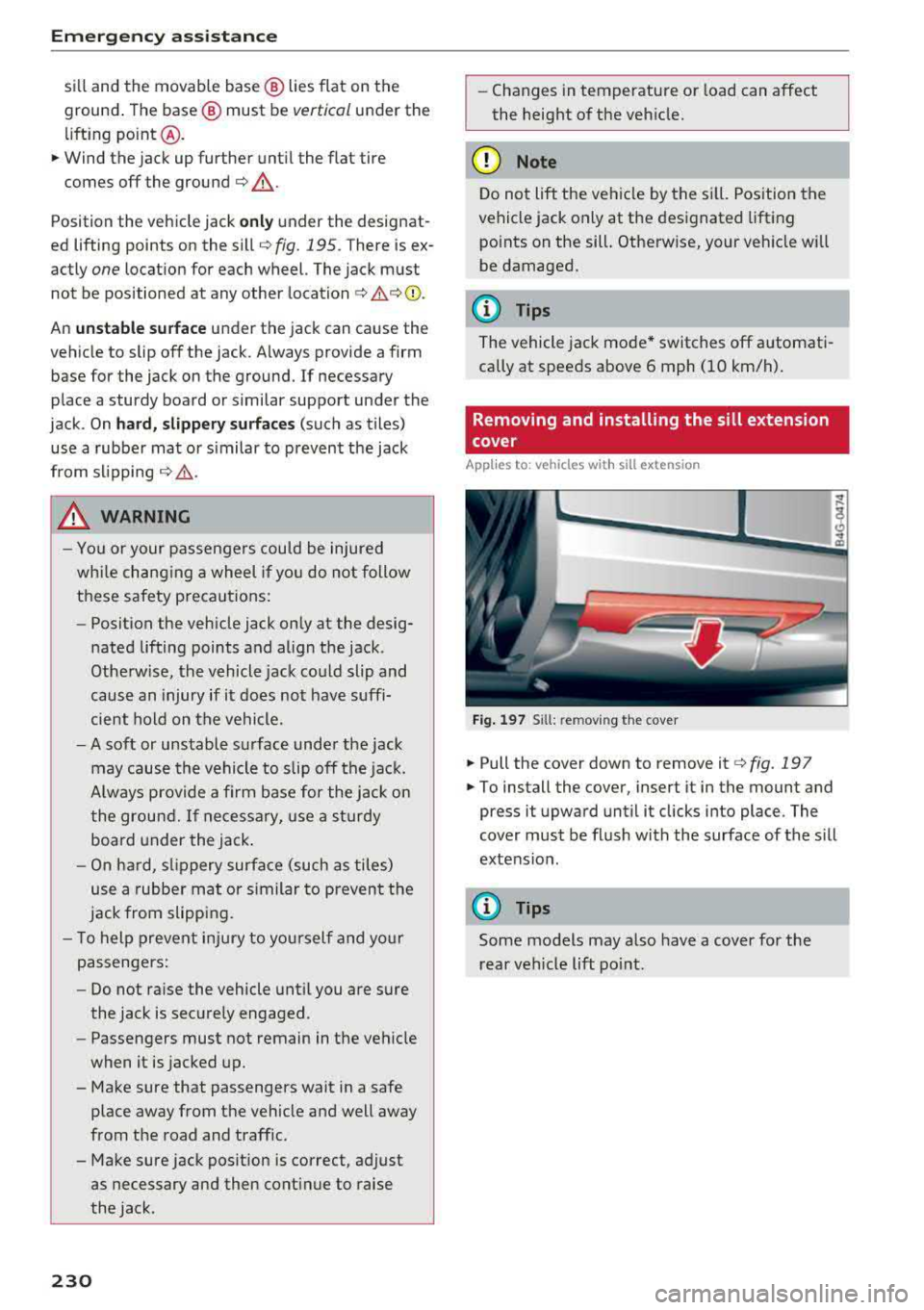
Fig . 1 95 Sill panels: mark ings
"' ..
-0
-~~~:'"'""".:i-~
Fi g. 196 Sill: pos it ion ing t he veh icle jack
.,. Activate the veh icle jack mode* in the MMI:
iCARI function button> ( Car )* sys tems control
button >
S ervi cing & che cks > Air su sp .: jack
mo de > On .
.,. Engage the parking brake to prevent your veh i
cle from rolling unintent iona lly.
... Move the select or le ver to position P.
... Find the marking (imprint) on the sill that is
nearest the wheel that will be changed
Qfig. 195. Behind the marking, there is a lift
ing point on the sill for the veh icle jack .
.,. Applies to: vehicles with a s ill: Remove the cov
er from the s ill before lifting the vehicle with a
veh icle jack
Q page 230.
.,. Turn the v e hicle ja ck located under the lift ing
point o n the sill to raise the jack unti l its
arm @
Q fig. 196 is located under the designated plas
tic mo unt
Q A Q(D .
... Align the jack so that its arm @¢ fig. 196 en
gages in the designated lifting point in the
door..,.
229
Page 232 of 266
Emergency assistance
sill and the movable base @ lies flat on the
ground . The base @ must be
vertical under the
lifting point @ .
.. Wind the jack up further until the flat tire
comes off the ground
¢ .&_ .
Position the vehicle jack only under the designat
ed lifting points on the sill
¢ fig. 195. There is ex
actly
one location for each wheel. The jack must
not be positioned at any other
location ¢ £¢(D .
An unstable surface under the jack can cause the
vehicle to slip off the jack . Always provide a firm
base for the jack on the ground. If necessary
place a sturdy board or similar support under the
jack . On
hard, slippery surfaces (such as tiles)
use a rubber mat or similar to prevent the jack
from
slipping ¢& .
,&. WARNING
-
-Yo u or your passengers could be injured
wh ile chang ing a wheel if you do not follow
these safety precautions:
- Position the vehicle jack only at the desig
nated lifting points and align the jack .
Otherw ise, the vehicle jack could slip and
cause an injury if it does not have suffi
cient hold on the vehicle.
- A soft or unstable surface under the jack
may cause the vehicle to slip off the jack.
Always provide a firm base for the jack on
the ground.
If necessary, use a sturdy
board under the jack .
- On hard, s lippery surface (such as tiles)
use a rubber mat or similar to prevent the
jack from slipping.
- T o help prevent injury to yourself and yo ur
passengers:
- Do not raise the vehicle until you are sure
the jack is securely engaged .
- Passengers must not remain in the vehicle
when it is jacked up.
- Make sure that passengers wait in a safe
place away from the vehicle and well away
from the road and traff ic.
- Make sure jack position is correct, adjust as necessary and then cont inue to raise
the jack.
230
- Changes in temperature or load can affect
the height of the vehicle.
(D Note
Do not lift the veh icle by the si ll. Position the
vehicle jack only at the designated lifting
points on the sill. Otherwise, your vehicle will
be damaged.
(D Tips
The vehicle jack mode * switches off automati
cally at speeds above 6 mph (10 km/h).
Removing and installing the sill extension
cover
App lies to: vehicles with sill extension
Fig. 197 Sill : re m ov ing the cover
.. Pull the cover down to remove it ¢ fig. 197
.. To install the cover, insert it in the mount and
press it upward until it clicks into place. The
cover must be flush with the surface of the sill
extens ion .
@ Tips
Some models may also have a cover for the
rear vehicle lift point.