remote control AUDI A6 2018 User Guide
[x] Cancel search | Manufacturer: AUDI, Model Year: 2018, Model line: A6, Model: AUDI A6 2018Pages: 266, PDF Size: 41.38 MB
Page 38 of 266
Opening and closing
Valet parking function
Applies to: vehicles w ith valet parking function
The valet parking function protects the luggage
comportment from unauthorized access .
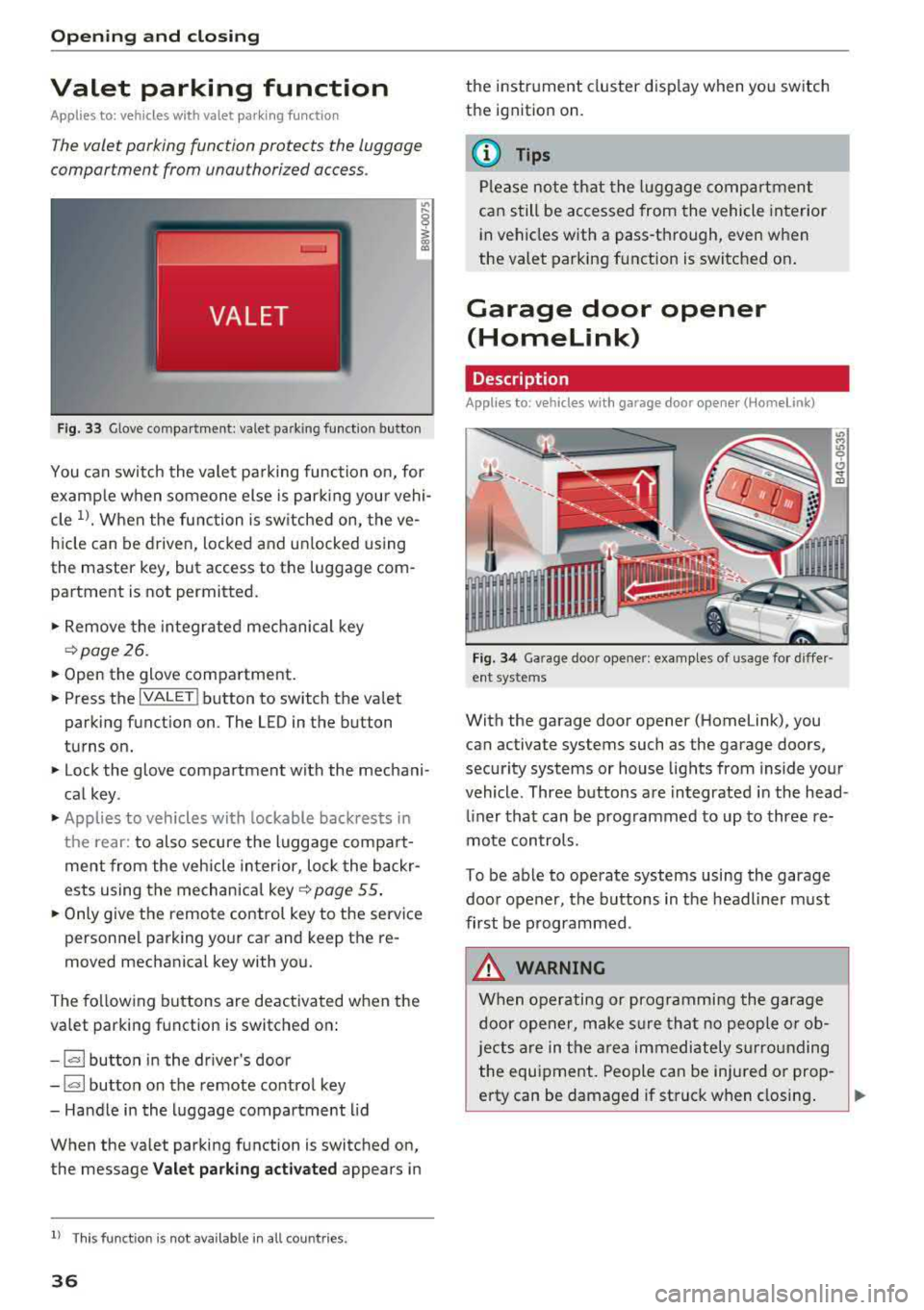
Fig. 33 Glove compartment: valet parking function button
You can switch the valet parking function on, for
example when someone else is parking your vehi
cle
l }_ When the function is switched on, the ve
hicle can be driven, locked and unlocked using
the master key, but access to the luggage com
partment is not permitted .
... Remove the integrated mechanical key
¢page 26.
... Open the glove compartment.
... Press the I VALET I button to switch the va let
parking function on. The LED in the button
turns on.
... lock the glove compartment with the mechani
cal key .
... Applies to vehicles with lockable backrests in
the rear: to also secure the luggage compart
ment from the vehicle interior, lock the backr
ests using the mechanical key ¢
page 55.
... Only give the remote control key to the service
personnel parking your car and keep the re
moved mechanical key with you.
The following buttons are deactivated when the
valet parking function is switched on:
-1""' 1 button in the driver's door
-I a I button on the remote control key
- Handle in the luggage compartment lid
When the valet parking function is switched on,
the message
Valet parking activated appears in
ll This fun ctio n is not availa ble in all c oun tries.
36
the instrument cluster display when yo u switch
the ignition on.
(D Tips
Please note that the luggage compartment
can still be accessed from the vehicle interior
in vehicles w ith a pass-through, even when
the valet parking function is switched on.
Garage door opener
(Homelink)
Description
Applies to: vehicles with garage door opener (Home Link}
Fig. 34 Garage door opener: exa mples of usage fo r d iffer ·
ent syste ms
With the garage door opener (Homelink), you
can activa te systems such as the garage doors ,
security systems or house lights from inside your
vehicle. Three buttons a re integrated in the head
liner that can be prog rammed to up to three re
mote controls.
To be able to operate systems using the garage
door opener, the buttons in the headliner must
first be programmed .
A WARNING
When operating or programming the garage
door opener, make sure that no people or ob
jects are in the area immediately s urrounding
the equipment . People can be injured or prop -
erty can be damaged if struck when closing.
~
Page 43 of 266
a co ,...,
N
" N ,...,
0 0 <..:l '
temporarily .
The emergency flashers also wo rk whe n the igni
tion is turned off.
Interior Lighting
Front and rear interior lighting
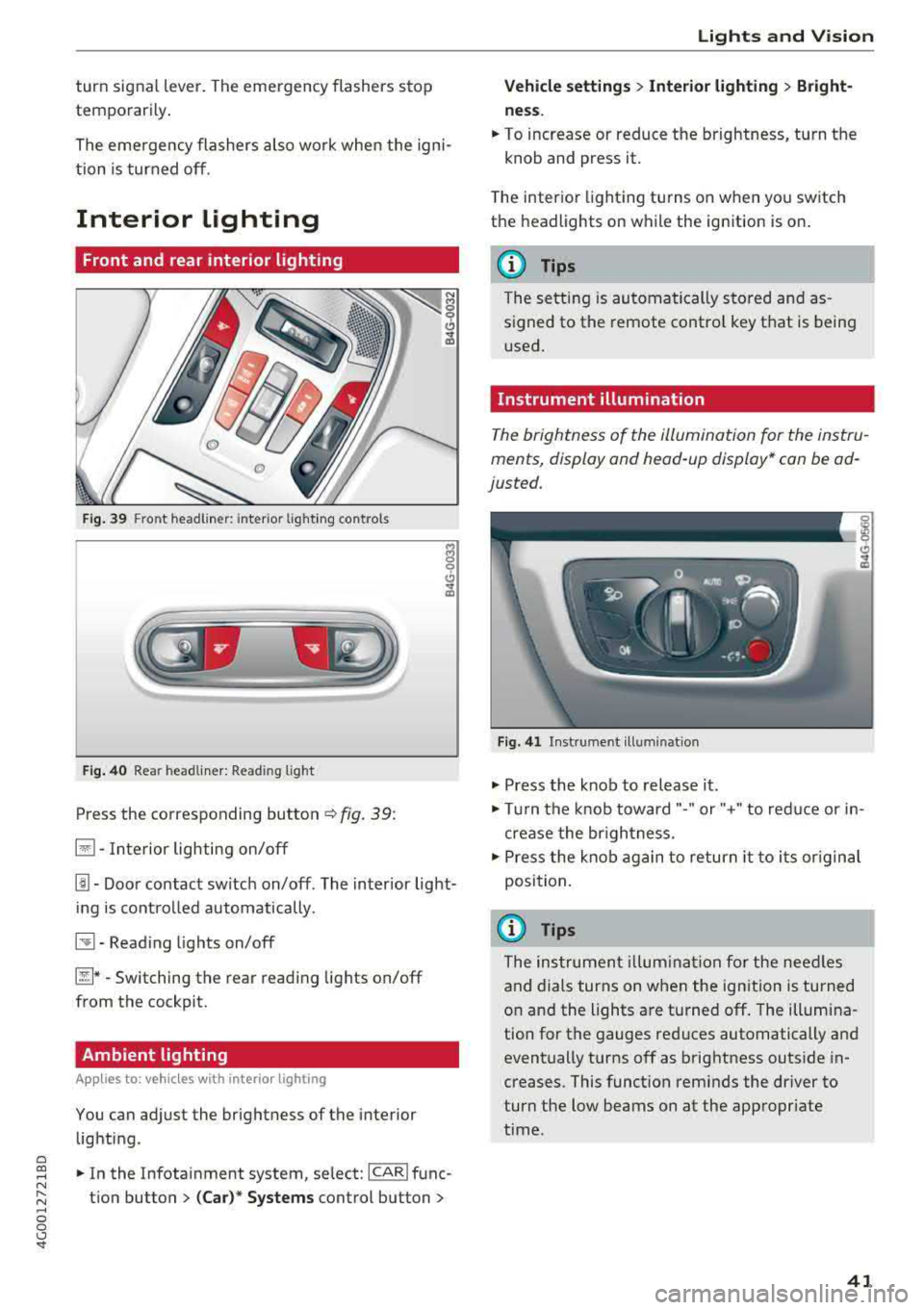
F ig. 39 Front headl iner: inter io r light ing contro ls
F ig . 4 0 Rea r headliner: Reading light
Press the co rresponding button ¢ fig . 39:
El -Interior lighting on/off
I]]. Doo r contac t switch on/off . The inter ior light
i ng is cont ro lled automatically.
~-Read ing lights on/off
~ * -Switching the rear read ing lights on/off
from the cockpit.
Ambient lighting
A ppl ies to : ve hicl es with interio r lighting
You can adjust the brightness of the interior
lighting.
.., In the Infotainment system, select: ICARI func
tion button
> (Ca r)* Systems control button >
Lights and V ision
Vehicle settings > Interior lighting > Bright
ne ss .
... To increase or reduce the brightness, turn t he
knob and press it.
T he inter ior light ing tu rns on when yo u sw itch
the headlights on while the ignition is o n.
(D Tips
The setting is au toma tically s to red a nd as
s igned to the remote cont rol key t hat is being
u sed .
Instrument illumination
The brightness of the illumination for the instru
ments, display and head-up display* can be ad
justed.
Fig . 4 1 Instrument illumina tion
.., Press the knob to release it .
.., Tur n the knob toward"- " or"+" to red uce or in
crease the br igh tness.
.., Press the kno b again to return it to i ts or igin al
posi tion.
(D Tips
The ins trumen t illum ina tion for the needles
and dials turns on when the ignition is turned
on and the lights a re turned off. The illumina
tion for the gauges red uces automatically and
eventually turns off as brightness outside in
creases. This funct ion reminds the dr iver to
turn the low beams on at the appropriate
time .
41
Page 51 of 266
a
Rear head restraints
Applies to: ve hicles with a djustable head restra ints
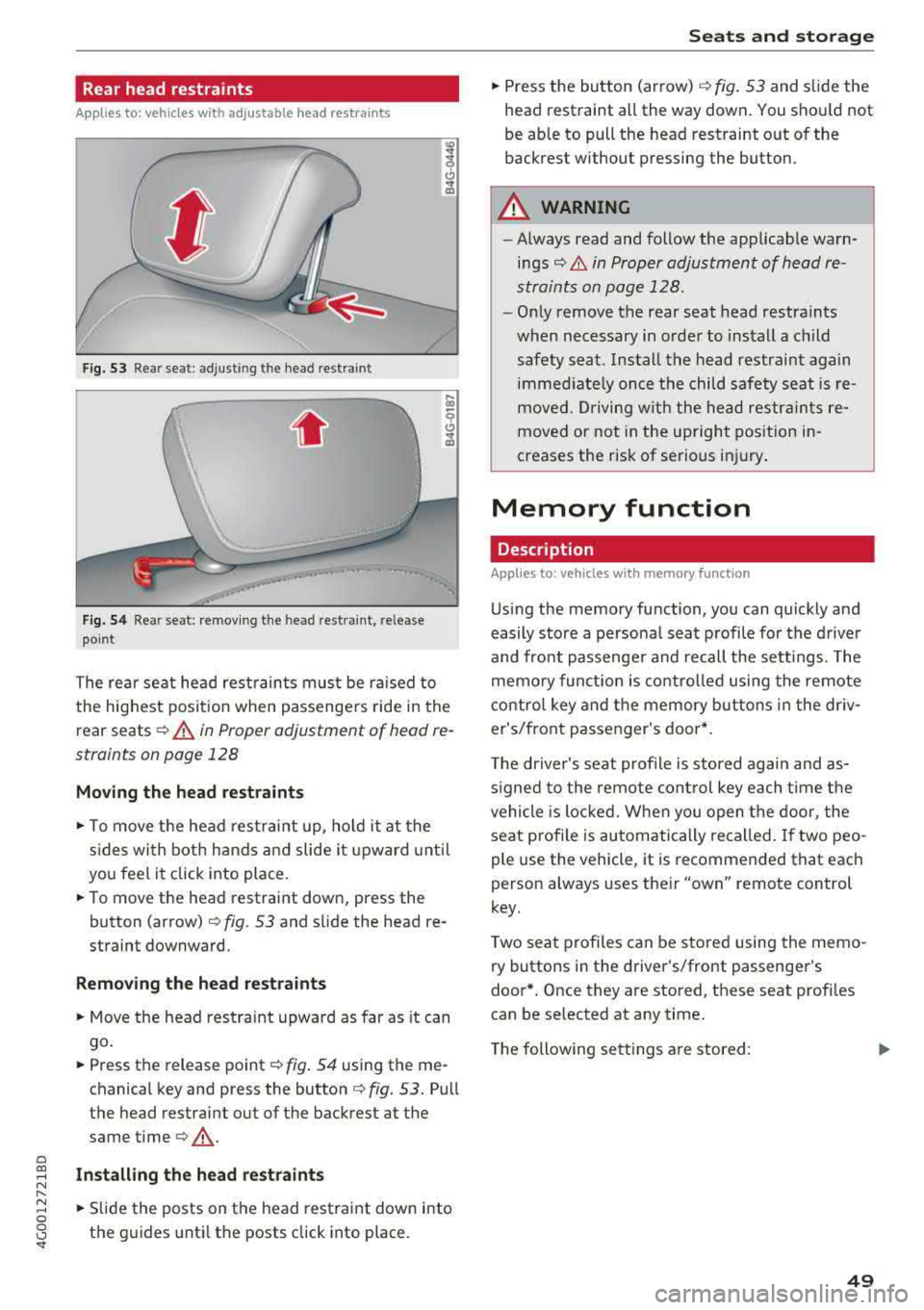
F ig. 53 Rea r seat: adjusti ng the head restraint
Fig. 54 Rear seat: remov ing the head restra int, release
point
The rear seat head restrain ts must be ra ised to
the highest posit ion when passengers ride in the
rear seats
c::> A in Proper adjustment of head re
straints on page 128
Moving the head rest raints
.,. To move the head rest raint up, ho ld it at the
s ides with both hands a nd slide i t upward unt il
you feel it click into place.
.. To move the head restraint down, press the
button (arrow)
c::> fig. 53 and s lide the head re
straint downward.
Remov ing th e head re straints
.,. Move the head restra int upward as far as it can
go .
.. Press the release point c::> fig . 54 using the me
chanical key and press the button
c::> fig. 53. Pull
the head restraint out of the backrest at the
same
time¢ .,&..
~ Install ing the head re st raint s N
" ~ .. Slide the posts on the head restraint down into 0
8 the guides until the posts click into place. '
.,. Press the button (arrow) ¢ fig. 53 and slide the
head restraint all the way down . You shou ld not
be able to pull the head restraint out of the
backrest without pressing the button.
A WARNING
-==
- Always read and follow the applicable warn-
ings
c::> & in Proper adjustment of head re
straints on page 128.
- Only remove the rear seat head restraints
when necessary in order to install a child
safety seat. Install the head restraint again immed iate ly once the child safety seat is re
moved. Driving w ith the head restraints re
moved or not in the upright position in
creases the risk of serious inj ury.
Memory function
Description
Appl ies to: vehicles wit h memo ry funct ion
Us ing the memory function, you can quickly and
easily store a persona l seat profile fo r the driver
and front passenge r and recall the sett ings. The
memo ry func tion is co ntro lled using the remote
contro l key and the memory buttons i n the dr iv
er's/front passe nger's door*.
T he driver's seat profile is stored again and as
s igned to the remote cont rol key each t ime t he
vehicle is loc ked. When you open the door, the
seat profile is automatically recalled. If two peo
ple use the vehicle, it is recommended that each
person always uses their
"own" remote control
key.
T wo sea t profiles can be stored using the memo
ry buttons in the driver's/front passenger's
door* . Once they are stored, these seat profi les
can be selected at any time .
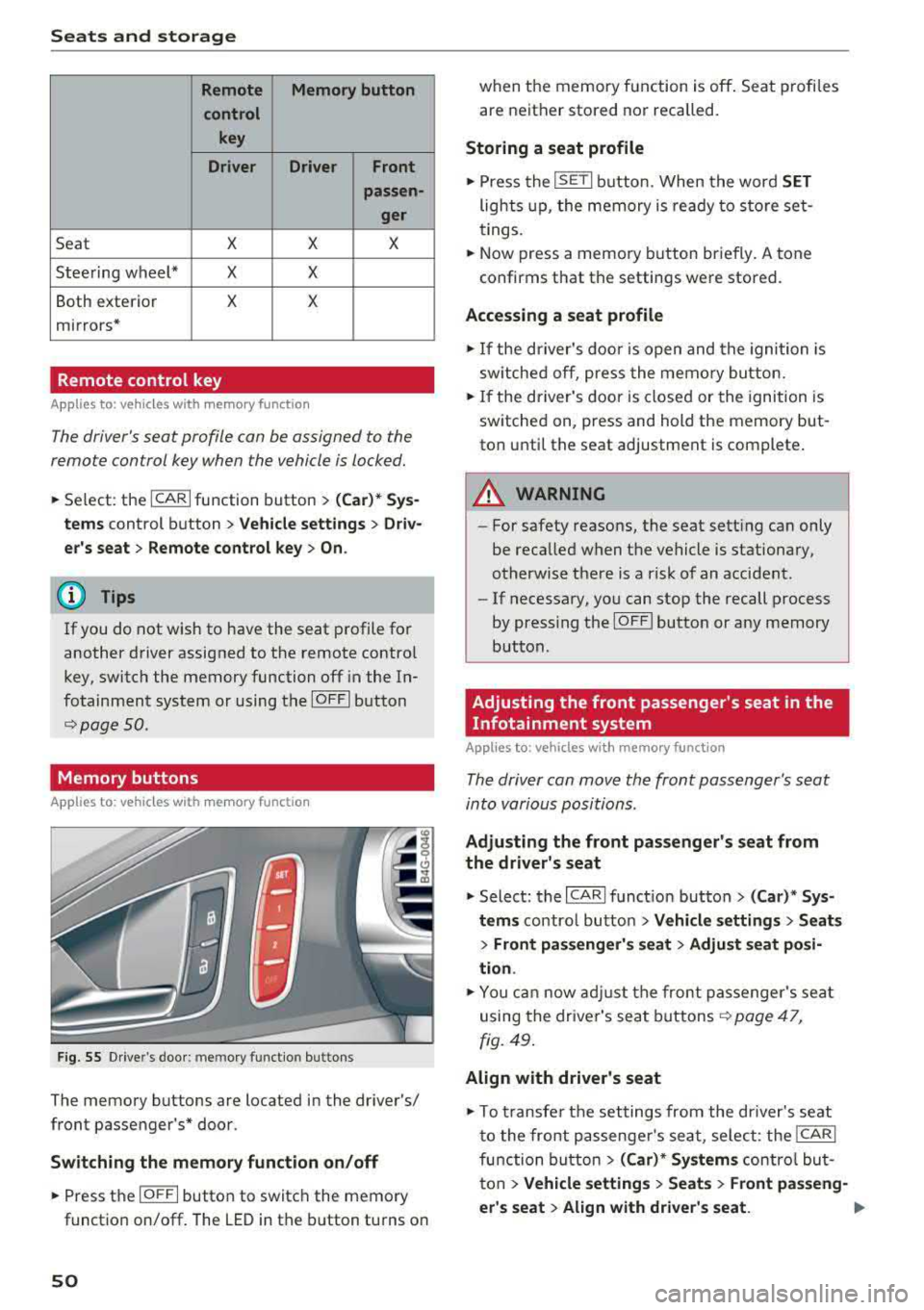
T he following se tt ings are stored:
..,.
49
Page 52 of 266
Seats and storage
Remote Memory button
control key
Driver Driver
Front
passen-
ger
Seat X X X
Steering wheel* X X
Both exterior X X
mirrors*
Remote control key
Applies to: vehicles with memory function
The driver 's seat profile can be assigned to the
remo te control key when the vehicle is locked.
.,.. Se lect : the ICARI function button > (Car)* Sys
tems
control button > Vehicle settings > Driv
er 's seat
> Remote control key > On.
(D Tips
If you do not wish to have the seat profile for
another driver assigned to the remote contro l
key, switch the memory function off in the In
fotainment system or using the
IOFFI button
r::::;, page 50 .
Memory buttons
App lies to: vehicles with memory function
F ig. 55 Drive r's door : m em ory functio n bu ttons
The memory buttons are located in the driver's/
front passenger 's* door.
Switching the memory function on/off
.,.. Press the IO FF I button to switch the memory
functio n on/off. The LED in the button turns on
50
when the memory function is off . Seat profiles
are neither stored nor recalled.
Storing a seat profile
.,.. Press the ISET I button . When the word SET
lights up, the memory is ready to store set
tings.
.,.. Now press a memo ry button briefly. A tone
confirms that th e settings were stor ed.
Accessing a seat profile
.,.. If the driver's door is open and the ignition is
sw itched off, press the memory button.
.,.. If the driver's door is closed or the ignition is
switched on, press and hold the memory but
ton until the seat adjustment is complete .
A WARNING
-For safety reasons, the seat setting can only
be recalled when the vehicle is stationary,
otherwise there is a risk of an accident .
-If necessary, you can stop the recall process
by press ing the
IOF FI butto n or any memory
button .
Adjusting the front passenger's seat in the
Infotainment system
Applies to: vehicles with memory function
The driver can move the front passenger's seat
into various positions .
Adjusting the front passenger's seat from
the driver's seat
.,. Select: the I CARI function button > (Car)* Sys
tems
control butto n > Vehicle settings > Seats
> Front passenger's seat > Adjust seat posi
tion .
.,.. You can now adjust the front passenger's seat
using the driver's seat buttons
r:::;, page 47,
fig. 49.
Align with driver's seat
.,. To trans fer the settings from the dr iver's seat
to the front passenge r's seat, select: the
I CAR I
function button > (Car)* Systems control but
ton
> Vehicle settings > Seats > Front passeng-
er 's seat
> Align with driver 's seat. .,..
Page 60 of 266
Warm and cold
Warm and cold
Climate control system
Description
The climate control system warms, cools and re moves humidity from the air in the vehicle interi
or. It is the most effective when the windows and
sunroof* are closed. If there is a bui ld-up of heat
inside the vehicle, ventilation can he lp to speed
up the cooling process.
I n all heating mode functions, except for defrost,
the blower only switches to a higher speed once
the engine coolant has reached a sufficient tem
perature.
Pollutant filt er
The po llutant filter removes poll utants such as
dust and pollen from the a ir .
Ke y re cognition
A pp lies to: ve hicles w ith de luxe au toma tic clima te co ntrol
The blower sett ing and air distribution are stored
automatically and ass igned to the remote control
key that you are using.
A pp lies to: ve hicles w ith 4 -zo ne del uxe automatic c limate
co ntrol
The climate control set tings are automatically
stored and assigned to the remote control key
that is in use.
A WARNING
Poor visibility can lead to accidents.
- For safer driving, keep all windows free of
ice, snow and fog .
- Become familiar as quickly as possible with
the correct use and function of the climate contro l system, especially with the defrost
ing and defogg ing function.
58
- When the temperature is below freezing,
only use the windshield washer system after
the windshield has been warmed by the cli mate control system . The washer fluid could
freeze on the w indsh ield and impair v isib il i
ty .
@ Note
-If you suspect that the climate contro l sys
tem is damaged, switch the system
off to
prevent further damage and have it checked
by an authorized Aud i dea ler or authorized
Audi Serv ice Facility.
- Repa irs to t he Aud i climate control system
require special techn ical know ledge and
special tools. See an aut ho rized Aud i dea le r
or authorized Aud i Serv ice Fac ility .
@) For the sake of the environment
To save fue l, turn off cooling mode by press
i ng the
IA/Cl button. This will a lso reduce
emissions.
(D Tips
- T o prevent i nterference with t he heat ing
and cooli ng outpu t and to p revent the win
dows from fogging over, the a ir intake in
front of the windshie ld must be free of ice,
snow or leaves.
- C ondensation from the coo ling system can
drip and form a pudd le o f water under the
vehicle . This is norma l and does not mean
there is a leak.
- Th e energy management system may tem
porarily switc h
off certain functions, such as
the seat heating* or rear window defogger.
These systems are ava ilable again as soon
as the energy supply has been restored.
Page 65 of 266
a co ,...,
N
" N ,...,
0 0 \,;J '
Applies to: veh icles with steering wheel heating
The steering wheel rim can be heated.
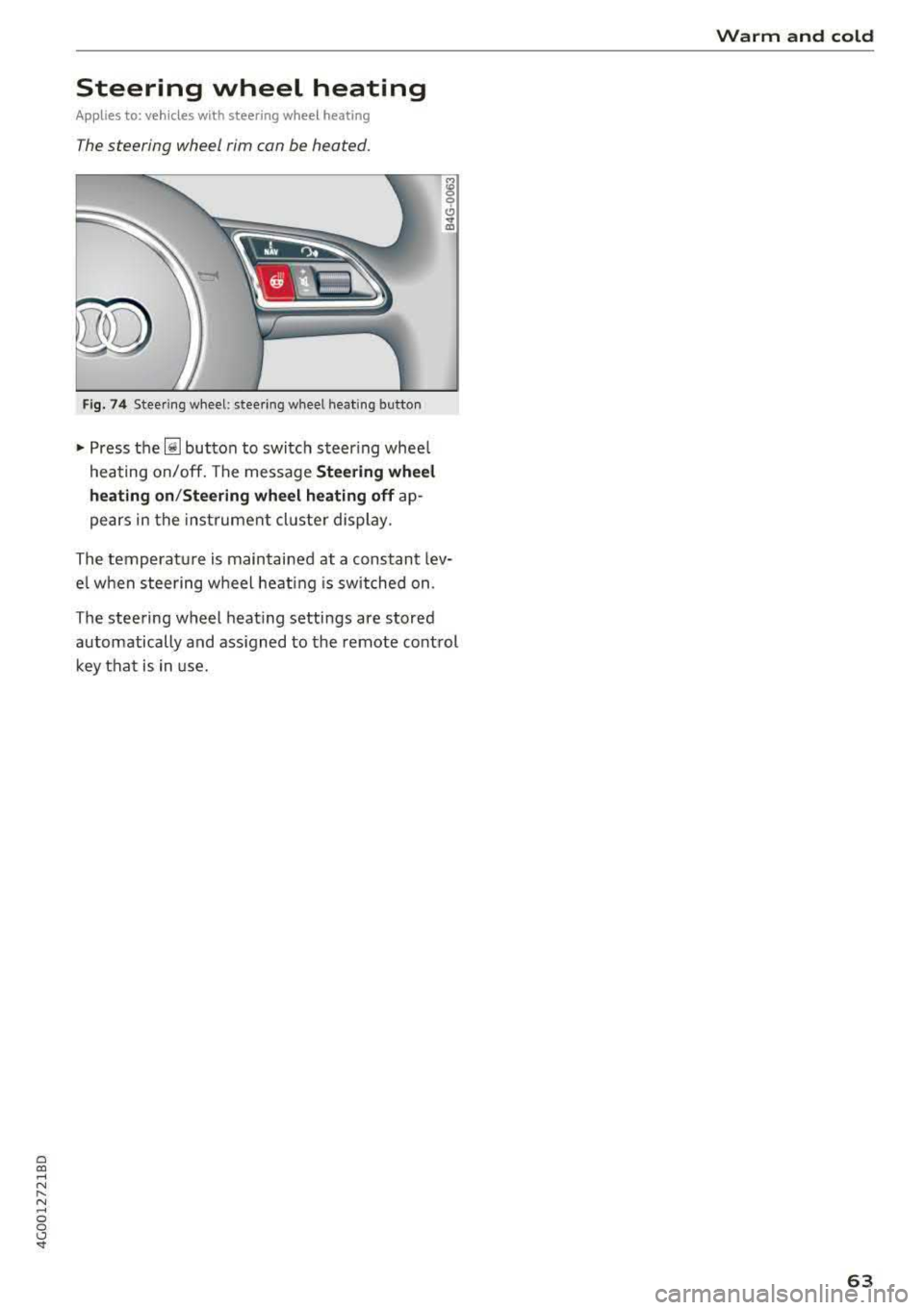
Fig . 74 Steering wheel: steering wheel heating button
~ Press the~ button to switch steer ing whee l
heating on/off. The message
Steering wheel
heating on /Steering wheel heating off
ap
pears in the instrument cluster display.
The temperature is maintained at a constant lev
e l when steering wheel heat ing is switched on.
The steering wheel heating settings are stored
automatically and ass igned to the remote control
key that is in use.
Warm and cold
63
Page 93 of 266

a co ,...,
N
" N ,...,
0 0 <..:l '
to a distance of
92 ft (28 m) when traveling at 62
mph (100 km/h), for examp le (time between: 1
second).
~ --~--Distance 2: this setting corresponds
to a distance of 118
ft (36 m) when traveling at
62 mph (100 km/h), for examp le (time between:
1.3 seconds).
~ -- -~ -Distance 3: this setting corresponds
to a distance of 164
ft (SO m) when traveling at
62 mph (100 km/h), for examp le (time between:
1.8 seconds).
~ -- --~ Distance 4: This setting corresponds
to a distance of 210
ft (64 m) when traveling at
62 mph (100 km/h), (time distance of 2.3 sec
onds).
A WARNING
Following other vehicles too closely increases
the risk of collisions and ser ious perso nal in
jury.
- Setting short distances to the traffic ahead
reduces the t ime and distance available to
br ing your vehicle to a safe stop and makes
it even mo re necessary to pay close atten
t ion to traffic.
- Always obey applicable traff ic laws, use
good judgment, and select a safe following
dis tance fo r the traffic, road and weathe r
condit ions .
{]) Tips
-Distance 3 is set automatically each time
you switch the igni tion on.
- You r settings are automatically stored and
assigned to the remote control key being
u sed.
Selecting the driving mode
A pplies to: ve hicles with Audi adaptive cruise co ntro l
.. Select the des ired driving mode in dr ive se lect
¢ page 104.
Assi st a nce systems
(D Tips
Your settings are automatically stored and as
s igned to the remote control key being used.
Request for driver intervention
Applies to : vehicles wi th Audi ada ptive c ruise control
Fig. 97 Instrument cluster: request for driver intervention
In certain si tuations, the system will request you
to take action:
- I f the brak ing from the ad apt ive cru ise con trol
sys tem is not enough to ma intain eno ugh dis
tance to the object ahead .
T he da nger is indica ted by
the . indica tor light
¢ fig. 97. A n aud io signa l wi ll also so u nd .
- Press the brake pedal to slow your vehicle down.
Audi braking guard
App lies to : vehicles with A udi ada ptive cr uise control
Fig. 98 Inst rume nt cluste r: approach warnin g
The braking guard uses radar sensors and a video
camera . It also functions w ith in the limits of the
system when adaptive cru ise control is switched
~ ~
91
Page 95 of 266

a co .... N
" N .... 0 0 \.J '
the ris k of damage or i njury.
Settings in the Infotainment system
Applies to: vehicles with Audi adaptive cruise control
~ Select : the ICARI function button > ( Car )* Sys
tems
control button > Driver assistance > Audi
braking guard .
System -
switch the brak ing guard On /Off. When
you switch the ign it ion on, the message
B raking
guard: Off
appears if the sys tem is switched off .
Early warning -the distance and approach warn
ings in the display can be switched
On /Off .
(D Tips
-You r settings are automatically stored and
assigned to the remote contro l key being
u sed .
-If yo u rest rict or sw itch off the ESC, t he
bra king gua rd also sw itches itself off
c> page 120.
-Switc h braking guard off w hen yo u are load
i ng t he ve hicle onto a vehicle ca rr ier, t rain,
s hi p or other type o f transportation . This
ca n prevent undesired warnings from the
braking guard system .
Messages
Applies to: vehicles with Audi adaptive cruise control
Braking guard: Off
This message appears if the system is switched
off through the Infota inme nt system . Otherwise,
if the system is turned off, the information ap
pea rs every time shortly after the start of the
tr ip.
The message also appears if the system is not
ava ilable d ue to a malfunct io n or if the ESC is
sw itched off
c> page 120 . If this is the case, the
sys tem w ill not prov ide warnings about a possi
b le co llision.
Braking guard: engaged
This message appea rs if a sharp brake press ure
was applied due to an acute wa rning.
A ss istance systems
ACC: Unavailable!
ACC and Audi braking guard: Unavailable
The system cannot guarantee that it will detect objects correctly and is sw itched off . The sensors
have been moved or are faulty . Th e p re sense
funct ions may a lso be affec ted . D rive to an au
tho riz ed Au di dealer or author ized Audi Serv ice
F aci lity immed iate ly to have the ma lfunction co r
r ected .
ACC: Currently unavailable. No sensor vision
A CC and Audi braking guard: Currently unavail
able. No sensor vision
This message appears if the sensor v iew is ob
structed, for examp le by leaves, snow, heavy
spray or dirt . Clean the sensors
c> page 86 ,
fig . 89 .
AC C: Currently unavailable . Gradient too steep
T he road exceeds the maxim um poss ible angle
fo r safe adaptive c ruise contro l operation . Adap
tive cruise control is switched off.
ACC : Only available in D , Sor M
Select t he "D/S" or "M" se lecto r lever position .
ACC: Currently unavailable . Parking brake ap
plied
T he adaptive cr uise cont rol system switches off
automat ica lly if the parking brake is set.
ACC: Currently unavailable . Stability control
( ESC ) input.
This message appears if the e lectro nic s tabiliza
t io n c ontrol ( ES C) is tak ing a ct ion to s tabili ze the
vehicle. In t his case, adaptive cruise contro l
switches off automatically.
ACC off : Manual control!
Th is message appears when adaptive c ruise co n
t rol cannot set the parking brake . P ress the brake
peda l to prevent the veh icle from ro lling.
• ••
T hree white dots appear if a setting cannot be se
l ected w ith the operating lever. For example, this
happens if adapt ive cru ise control cannot sta rt
driv ing automat ica lly in stop-and-go traff ic
93
Page 103 of 266

a co ,...,
N
" N ,...,
0 0 \,;J '
-Side assist is not active w hile you are mak
i ng the ad justment.
- Your settings are automatically stored and
ass igned to the remote control key being
used.
Messages
App lies to: ve hicles with Audi side assist
If side assist switches off by i tself, the LED in the
button turns off and a message will appear in the
i nstr ument cluster d isplay:
Audi side a ssist: Currently una vailable . N o
senso r vision
The radar sensor v is ion is impaired . Do not cover
the area in front of the sensors with bike wheels, stickers, dirt or other objects . Clean the area in
front of the senso rs , if
necessa ry ~ page 99 ,
fig . 106.
Audi side as sist: Currently un avail able
Side assist cannot be switched on at th is time be
cause there is a malfunction (for example , the
battery charge level may be too low) .
Audi side as sist : System fault!
The sys tem cannot guarantee that it will detect
veh icles correctly and it has switched off. The
sensors have been moved or are faulty . H ave the
system checked by an authorized Audi dealer or
author ized Audi Se rvice Facility soon .
Audi side assist: Unav ailable when towing
Side assist sw itches off automatically when a fac
tory-ins talled trailer hi tch is connected to the
e lectrical connector on the trailer . There is no
gua rantee the system will sw itch off when using
a retrofi tte d trai ler hitch. Do not use s ide ass ist
when towing a t railer.
A ssi st a nce systems
Night vision assist with
pedestrian and wild
animal detection
Description
Applies to : vehicles wit h night vision assist
The night vision assist con detect, highlight and,
if n ecessary, warn about p ed estrians and large
wild animals.
Night vision assist wit h pedest rian and wi ld ani
mal detection assists you at night by using an in
frared camera to monitor the a rea in front of
your vehicle, within the limits of the system. It can d isplay objects up to a distance of approxi
mately 1000 feet (300 m). The thermal image
detected by the camera is shown in the inst ru
ment cluster d isp lay. Wa rm areas appear lighter
and co ld areas appear da rker.
Highlighting detected pedestrians and wild
animals
Appl ies to: vehicles with night vision assist
Fig. 1 08 In strum ent cluster: ye llow highlig h ted pedes
tria ns
Fi g. 10 9 Ins trumen t cl uster : sy mb ol when t he in frar ed im
age is not v is ib le
Wi thin the limi ts of the sys tem, the night v is io n
ass ist can detec t pedestr ians and wild animals
.,_
101
Page 108 of 266

Assistance systems
Systems comfort auto dynamic
Engine/transmission
balanced balanced sporty
Air suspension* comfortable balanced sporty
Steering comfortable balanced sporty
Dynamic steering* comfortable/ind i recil: ba lan ced/d irect sporty/direct
Sport differential * balanced
Adaptive cruise control* comfortable
Engine sound * subtle
al Subtle in the selector lever position "D" an d sporty in "S".
(D Tips
Your Individual mode settings are automati
cally stored and assigned to the remote con
trol key being used .
Raising/lowering the vehicle
App lies to: ve hicles w ith a daptive a ir s uspens io n
You can raise your vehicle temporarily , for exam
p le to drive ove r a tall cu rb.
Raising the vehicle
"' Select the following in the Infotainment sys
tem : the
!CARI function button> Raise control
button.
"'W ait for the ar rows or segments in the Info
tainment system display to stop blinking and
the vehicle to reach its fina l position .
Lowering the vehicle
"'To lower the vehicle, select the following in the
Infotainment system: the
! CAR I function button
>
Lower control button.
"' Wait for the arrows or segments in the Info
tainment system display to stop blinking and
the vehicle to lower complete ly .
{LlJ) Note
- Remember that your vehi cle is not suitable
for driving offroad even when it is raised.
There is not enough ground clearance.
- If the vehicle is raised, it wi ll lo wer auto
matically when driving 62 mp h (100 km/h)
or faster.
106
ag ile sporty
ba lan ced sporty
subtle/sportyal sporty
Messages
Applies to: vehicles wi th adap tive a ir suspension
Air suspension: Vehicle is too high. Controlling
level. ..
Air suspension: Vehicle is too low. Controlling
level. ..
The driver message switches off when the leve l
contro l process is comp lete.