ignition AUDI A6 2018 Owner's Manual
[x] Cancel search | Manufacturer: AUDI, Model Year: 2018, Model line: A6, Model: AUDI A6 2018Pages: 266, PDF Size: 41.38 MB
Page 47 of 266

a co .... N
" N .... 0 0 \.J '
camera* are cleaned at intervals .
A WARNING
-The rain sensor is only intended to assist the
dr iver. The driver may still be responsible
for manually sw itching the w ipers on based
on v is ibility conditions.
- The windshie ld may not be treated with wa
ter-repell ing windsh ield coating agents . U n
favorable cond itions, such as wetness, dark
ness or low sun, can result in increased
glare, wh ich inc reases the risk of an acc i
dent . W iper b la d e chatter is also poss ible.
- Prope rly funct ion ing windsh ield wiper
blades are required fo r a clear view and safe
dr iv ing¢
page 45, Replacing windshield
wiper blades.
0 Note
- If there is frost, make su re the windsh ie ld
wipe r blades a re not fro zen to the wind
s hi eld. Sw itch ing on the win dsh ield wipe rs
when the blades are frozen to the wind
sh ield can damage the wiper blades.
- The w inds hield wipe r system must be
swi tched off ( lever in pos ition 0) befo re us
ing a car wash. This prevents the wipers
from switching on unintentionally and ca us
i ng damage to the windshie ld w iper system.
(D Tips
- The windshield wipers switch off when the
ignition is switched off . Yo u can activate the
windsh ield wipers after the ign it ion is
switched back on by moving the winds hield
wiper lever to any pos it ion.
- Wo rn o r dirty windshield wipe r blades result
i n streak ing . This can affect the ra in sensor
funct io n. Check yo ur windsh ield wiper
b lades regu larly .
- The was her fluid nozzles fo r th e windshie ld
washer system are heated at low tempera
tures when the ignition is on .
- When stopp ing temporarily, such as at a
traffic l ight, the speed of the windsh ield
wipe rs a utomat ically red uces by one leve l.
Light s and Vision
Cleaning windshield wiper blades
Clean t he wiper b lades when yo u see w iper
st reaks. Use a soft cloth and a g lass cleaner.
"" Place th e w indsh ield w iper arms in the service
position ¢
page 45.
"" Fold the windsh ie ld w iper arms away from t he
w indshie ld.
A WARNING ~ -
D ir ty windshie ld w iper b lades can impa ir vi
sion, w hic h increases the risk of an accident .
Replacing windshield wiper blades
Fig. 48 Remov ing w inds hield w iper b lades
Windshield wiper service position /blade
replacem ent po sit ion
- -M 0 :i:
wiper lever to position @briefly ¢
page 44,
fig. 47.
The windshield wipers move into the
serv ice position .
""To br ing the windshie ld w ipers back to the nor
mal position, switch the ignition on and ho ld
the windshield wiper lever in pos ition
@ unt il
the wi ndsh ield wipers go back to the normal
position , or d rive faster than 8 mph (12 km/ h).
You can also turn the service posit io n on or off in
the Infotainment system:
"" Switch the windsh ield w ipers off (pos it io n @
¢ page 44, fig. 47) .
"" Select: the I CAR ! fu nct io n button > (Car )* Sys
tem s
contro l bu tton > Servi ce & control > Wip -
er change po sition.
> On /Off IJJ,-
45
Page 52 of 266
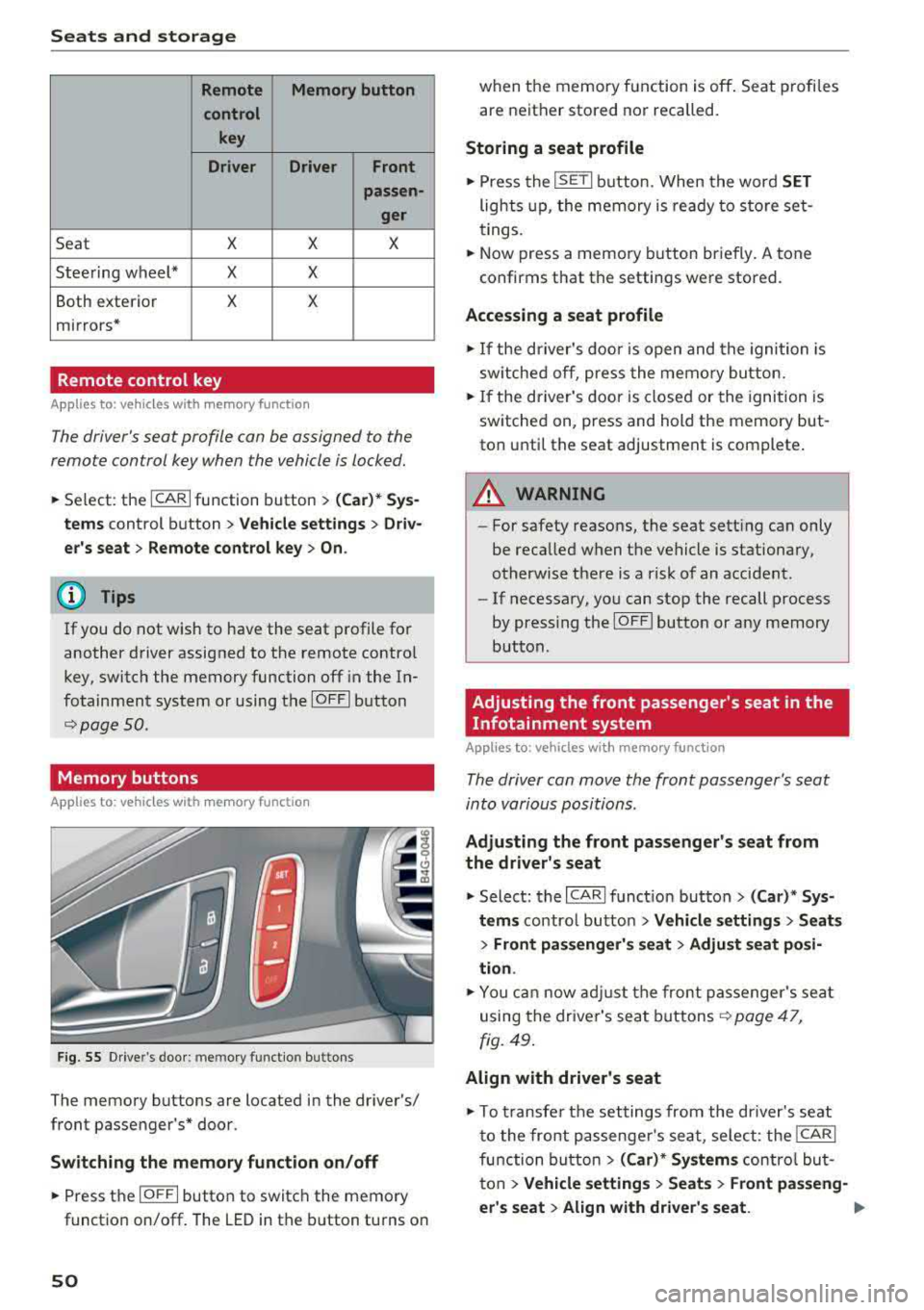
Seats and storage
Remote Memory button
control key
Driver Driver
Front
passen-
ger
Seat X X X
Steering wheel* X X
Both exterior X X
mirrors*
Remote control key
Applies to: vehicles with memory function
The driver 's seat profile can be assigned to the
remo te control key when the vehicle is locked.
.,.. Se lect : the ICARI function button > (Car)* Sys
tems
control button > Vehicle settings > Driv
er 's seat
> Remote control key > On.
(D Tips
If you do not wish to have the seat profile for
another driver assigned to the remote contro l
key, switch the memory function off in the In
fotainment system or using the
IOFFI button
r::::;, page 50 .
Memory buttons
App lies to: vehicles with memory function
F ig. 55 Drive r's door : m em ory functio n bu ttons
The memory buttons are located in the driver's/
front passenger 's* door.
Switching the memory function on/off
.,.. Press the IO FF I button to switch the memory
functio n on/off. The LED in the button turns on
50
when the memory function is off . Seat profiles
are neither stored nor recalled.
Storing a seat profile
.,.. Press the ISET I button . When the word SET
lights up, the memory is ready to store set
tings.
.,.. Now press a memo ry button briefly. A tone
confirms that th e settings were stor ed.
Accessing a seat profile
.,.. If the driver's door is open and the ignition is
sw itched off, press the memory button.
.,.. If the driver's door is closed or the ignition is
switched on, press and hold the memory but
ton until the seat adjustment is complete .
A WARNING
-For safety reasons, the seat setting can only
be recalled when the vehicle is stationary,
otherwise there is a risk of an accident .
-If necessary, you can stop the recall process
by press ing the
IOF FI butto n or any memory
button .
Adjusting the front passenger's seat in the
Infotainment system
Applies to: vehicles with memory function
The driver can move the front passenger's seat
into various positions .
Adjusting the front passenger's seat from
the driver's seat
.,. Select: the I CARI function button > (Car)* Sys
tems
control butto n > Vehicle settings > Seats
> Front passenger's seat > Adjust seat posi
tion .
.,.. You can now adjust the front passenger's seat
using the driver's seat buttons
r:::;, page 47,
fig. 49.
Align with driver's seat
.,. To trans fer the settings from the dr iver's seat
to the front passenge r's seat, select: the
I CAR I
function button > (Car)* Systems control but
ton
> Vehicle settings > Seats > Front passeng-
er 's seat
> Align with driver 's seat. .,..
Page 64 of 266
Warm and cold
mode switches off . The temperature shou ld be
set to approximate ly 72 ° F (22 °C).
The
IAUTOI button sw itches the defroster off.
IQill REAR I Switching the rear window defogger
on /off
The rear window heate r on ly operates when the
e ng ine is r unni ng.
It sw itches off a utomat ica lly
afte r a few minutes, depend ing on the o utside
temperature .
To prevent the rear w indow heater from swit ch
i n g off automatically, p ress and ho ld the
l lliil REAR I
button fo r more than 2 seconds . This is s tored
until the ignition is switched off.
I SYNC I Synchronization
When synchronization is switched on, the set
tings for the dr ive r's side are appl ied to the front
p a ssenger's s ide (except for se at heating/ventila
tion*) . The settings in t he rear are a lso synchron
ized. Synchronization switches off when the set
tings are adj usted individually for the front pas
senger 's side or for the rear.
You can sync hronize the settings in a row by
p ressing and holding a contro l. For example, to
app ly the settings for the front passenger 's side
to the driver's side, press and ho ld the contro l on
the front passenger's side. The same applies to
the rear .
Residual heat *
With the ignition turned off, yo u can activate the
residual heat function by pressing the
Iii button
c:> fig. 72. The residual heat from the coolant is
used to heat the vehicle interior. The residual
heat function switches off automatically after
about 30 m inutes .
Air vents
You can open or close the center and rear vents in
the cockpit and the vents in the rear center con
sole and door p illars using the r idged thumb
wheels . The levers adjust the direct ion of the a ir
flow from the vents .
62
A WARNING
-You shou ld not use the recircu lation mode
for an extended period of time since no
fresh air is drawn in . W it h the air-condition
ing sw itched off, the windows ca n fog up,
whi ch inc reases the risk of an acc ident.
- Individ uals w ith reduced sensit iv ity to pa in
or tempe rature co uld develop b urns when
using the sea t heat ing f unct io n. T o re duce
t he r isk of injury, t hese individua ls sho uld
no t u se sea t hea ting.
@ Note
T o avoid damage to the heating elements in
the seats, do no t knee l on t he se ats o r pla ce
h eavy lo ads on a small area of the seat.
Basic settings
The climate control system basic settings are ac
cessed in the Infotainment system.
~ Select: the I CARI funct ion button > (Car )* Sys-
tems
contro l butto n > AC.
Rear seat settings *
When this function is se lected, all settings for
the rear can be adjusted through the climate con
trol system in the cockp it . T he climate control
system settings cannot be ad justed in the rear
seat at the same time. This f unct io n sw itches off
after a ce rtain per iod of t ime o r whe n one of t he
con tro ls in t he coc kp it is pressed.
Automatic recirculation*
The sensitivity level of t he automatic recircula
tion mode can be set at various levels from
Off to
Sen sitive . Recircul at io n mode is cont ro lled auto
matically. If the w indows fog up, p ress t he
l
Footwell temperature*
You can adjust the footwell temperature so that
i t is cooler or wa rme r.
Page 68 of 266
Driving
When not being used, a roof rack should be removed to decrease the wind resistance of the ve
hicle. You will save approximately 12% of your
fuel when at speeds from 62- 7 5 mph
(100-120 km/h) .
Save energy
The engine drives the generator, which generates
electricity ; the fuel consumption also increases
with the demand for electricity. Therefore, switch electrical equipment off when you no longer
need it. Examples of equipment that uses a lot of
energy are air blowers at a high setting, the rear
window defogger and seat heating* .
@ Note
Do not leave engine idling unattended after
starting. If warning lights should come on to
ind icate improper operation, they would go
unheeded. Extended idling also produces
heat, which could result in overheating or
other damage to the vehicle or other proper-
ty.
@ Note
- Have your vehicle maintained properly and
in accordance with the service recommenda
tions in your Warranty
& Maintenance book
let. Lack of proper maintenance as well as
improper use of the vehicle will impair the
function of the emission control system and
could lead to damage.
- Do not alter or remove any component of
the Emission Control System unless ap proved by the manufacturer .
- Do not alter or remove any device , such as
heat shields, switches, ignition wires,
valves, which are designed to protect your
vehicle's Emission Control System and other important vehicle components .
@ Tips
The consumption estimates as published by
ENVIRONMENTAL PROTECTION AGENCY (EPA) and Transport Canada may not corre
spond to your actual consumption on the
road, which will vary depending upon vehicle
66
load and speed, road and weather conditions ,
trip length, etc.
Steering
Manual steering wheel position adjustment
Applies to: vehicles with manual steering wheel adjustment
The steering wheel posi tion is adjustable up and
down and forward and back .
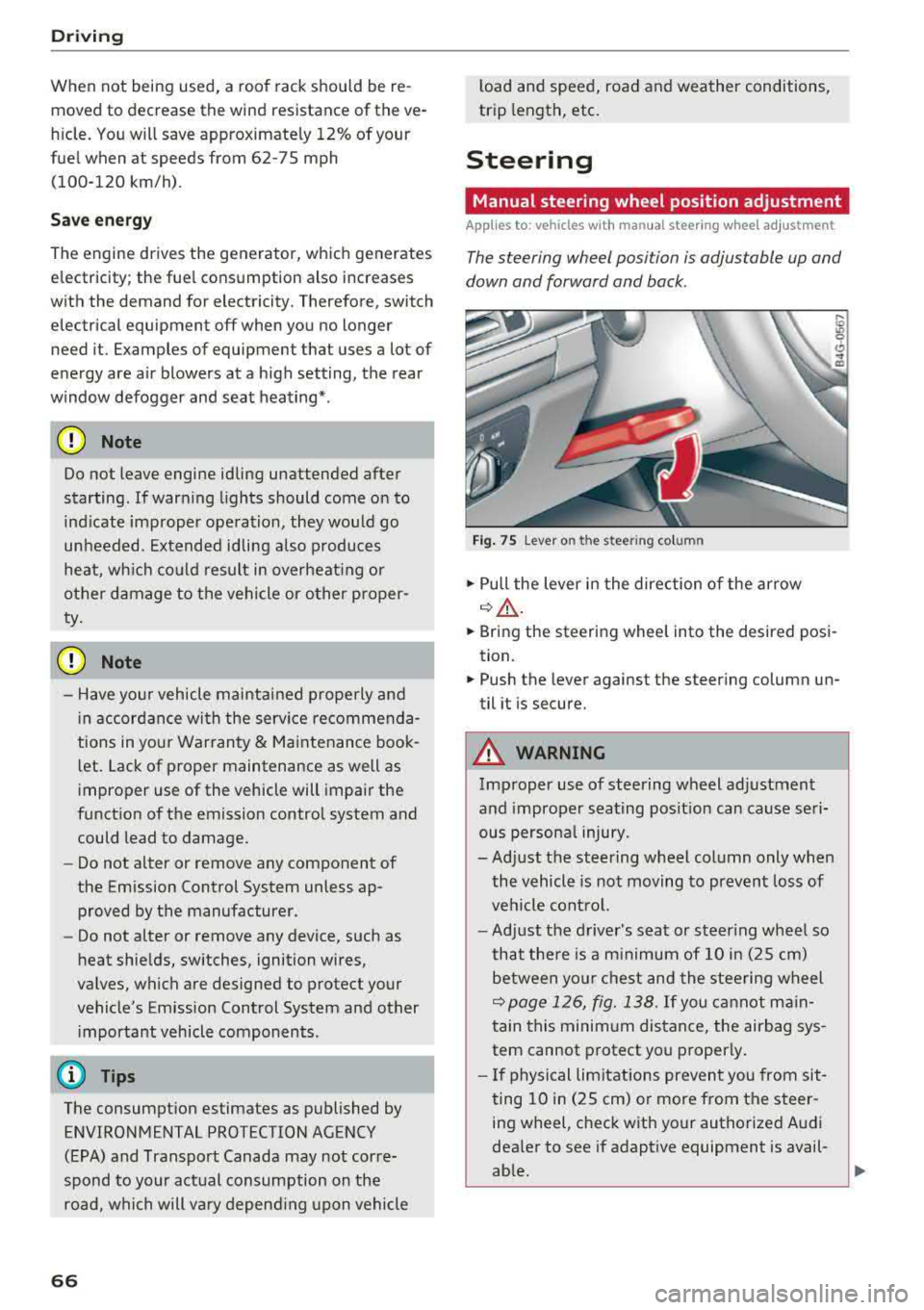
Fig. 75 Lever on th e stee ring column
.,. Pull the lever in the direction of the arrow
~A -
... Bring the steering wheel into the desired posi
tion .
.,. Push the lever against the steering column un
til it is secure.
A WARNING
Improper use of steering wheel adjustment
and improper seating position can cause seri
ous personal injury.
-Adjust the steering wheel column only when
the vehicle is not moving to prevent loss of
vehicle control.
-Adjust the driver's seat or steering wheel so
that there is a minimum of 10 in (25 cm)
between your chest and the steering wheel
~page 126, fig. 138. If you cannot main
tain this minimum distance, the airbag sys
tem cannot protect you properly .
- If physical limitations prevent you from sit
ting 10 in (25 cm) or more from the steer
ing wheel, check with your authorized Audi
dealer to see if adaptive equipment is avail-
able.
.,.
Page 69 of 266

a co ,...,
N
" N ,...,
0 0 <.,;) '
face, the supplemental driver's airbag can
not provide as much protection in an acci
dent . Always make sure that the steering
wheel is aligned with your chest .
- Always hold the steering wheel with your
hands at the 9 o'clock and 3 o'clock posi
tions to reduce the risk of personal injury if
the driver's airbag deploys.
- Never hold the steering wheel at the 12 o'clock position or with your hands inside
the steering wheel rim or on the steering
wheel hub. Holding the steering wheel the
wrong way can cause serious injuries to the hands, arms and head if the driver's airbag
deploys.
Power steering wheel position adjustment
Applies to: veh icles with power steering wheel adjustment
The steering wheel position can be adjusted elec
trically up and down and forward and back.
Fig. 76 Switch for adjusting the steering whee l pos itio n
.,. To adjust the height, press the switch up/down.
The steering column will continue moving as
long as you are pressing the switch .
.,. To move the steering wheel forward or back,
press the switch forward/back. The steering
column will continue moving as long as you are
pressing the switch.
The steering wheel can also be adjusted when the ignition is switched off .
In vehicles with memory fun ction*, the steering
column settings are stored together with the
seat position.
Driving
A WARNING
Improper use of steering wheel adjustment
and improper seating position can cause seri
ous personal injury.
- Adjust the steering wheel column only when
the vehicle is not moving to prevent loss of
vehicle control.
- Adjust the driver's seat or steering wheel so
that there is a minimum of 10 in (25 cm) between your chest and the steering wheel
¢ page 126, fig. 138. If you cannot main
tain this minimum distance, the airbag sys
tem cannot protect you properly.
- If physical limitations prevent you from sit
ting 10 in (25 cm) or more from the steer
ing wheel, check with your authorized Audi
dealer to see if adaptive equipment is avail
able.
- If the steering wheel is aligned with your
face, the supplemental driver's airbag can not provide as much protection in an acci
dent. Always make sure that the steering
wheel is aligned with your chest.
- Always hold the steering wheel with your
hands at the 9 o'clock and 3 o'clock posi
tions to reduce the risk of personal injury if
the driver's airbag deploys .
- Never hold the steering wheel at the 12
o'clock position or with your hands inside
the steering wheel rim or on the steering
wheel hub. Holding the steering wheel the
wrong way can cause serious injuries to the
hands, arms and head if the driver's airbag
deploys.
Easy seat entry
Applies to: vehicles with power stee ring wheel adjus tment
Easy seat entry makes it easier to enter and exit
the vehicle by adjusting the steering column au
tomatically.
.,. In the Infotainment system, select the ICARI
function button > (Car)* Systems control but
ton
> Vehicle settings > Seats > Driver's seat >
Easy seat entry > On.
When easy seat entry is switched on, the steering
column goes back up into the park position when
.,.
67
Page 70 of 266
Driving
the ignition is switched off. After entering the ve
hicle, the steering co lumn returns to the stored
position once the ignition is sw itched on.
Starting and stopping
the engine
Starting the engine
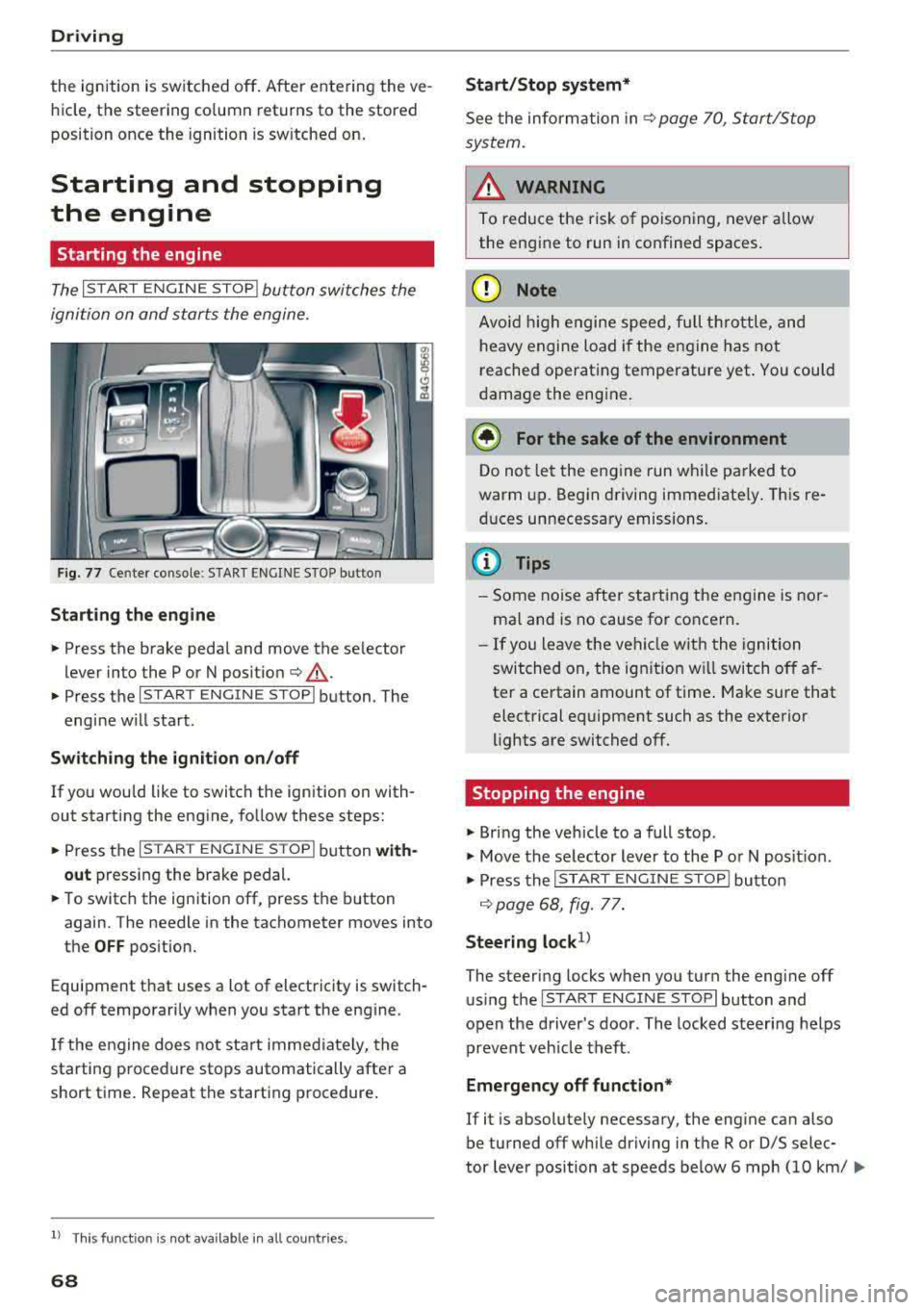
The I S TAR T ENGINE ST OP I button switches the
ignition on and starts the engine.
Fig. 77 Center co nsole : START ENGINE STO P butto n
Starting the engine
.. Press the brake pedal and move the se lector
lever into the P or N po sit ion
¢ ,A .
.. Press the I START ENGIN E STOPI button . The
engine will start .
Switch ing the ignition on /off
If you wou ld like to switch the ignition on with
out starting the engine, follow these steps:
.. Press the I S TAR T ENG IN E STOPI button with
out
pressing the brake pedal.
.. To switch the ignition off, press the button
again. The needle in the tachometer
moves into
the
OFF position.
Equipment that uses a lot of electricity is switch
ed off temporari ly when you start the engine .
If the engine does not start immediate ly, the
starting procedure stops automatically after a
short time. Repeat the starting procedure .
ll This fun ctio n is not availab le in all c oun tries.
68
Start /Stop system*
See the information in ¢ page 70, Start/Stop
system.
A WARNING
To reduce the risk of poisoning, never allow
the engine to run in confined spaces.
(D Note
Avoid high engine speed, full th rottle, and
heavy engine load if the engine has not
reached operating temperature yet . You could
damage the engine.
@ For the sake of the environment
Do not let the engine run while parked to
warm up. Begin driving immediate ly. This re
duces unnecessary emissions.
(D Tips
- Some noise after starting the engine is nor
ma l and is no cause for concern.
- If you leave the veh icle w ith the ignition
switched on, the ignition w ill switch off af
ter a certain amount of time . Make sure that
electrical equipment such as the exterior
lights are switched off .
Stopping the engine
.. Bring the vehicle to a full stop .
.. Move the selector lever to the P or N posit io n.
.. Press the I START ENGINE STOP I button
¢ page 68, fig. 77.
Steering lock1>
The steering locks when you turn the engine off
using the
I STAR T ENGIN E STOPI button and
open the driver's door . The locked steering helps
prevent veh icle theft .
Emergency off function*
If it is absolutely necessary, the engine can also
be turned off while driving in the R or D/S selec-
tor lever position at speeds be low 6 mph (10 km/
...
Page 71 of 266
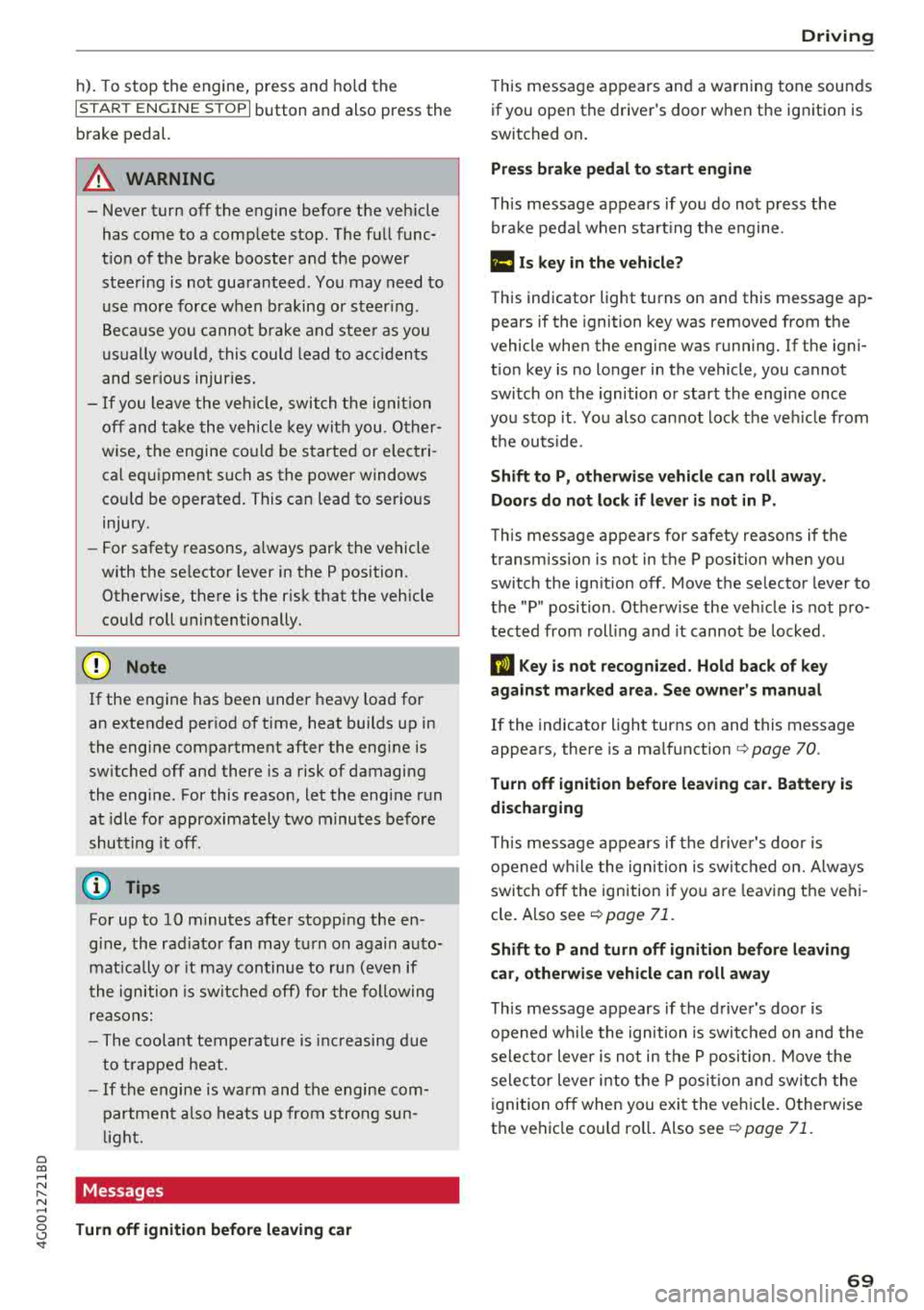
a co .... N
" N .... 0 0 \.J '
I START ENGINE STOPI button and also press the
brake pedal.
A WARNING
- Never turn off the engine before the vehicle
has come to a complete stop. The full func
tion of the brake booster and the power
steering is not guaranteed. You may need to
use more force when braking or steering.
Because you cannot brake and steer as you
usually would, this could lead to accidents
and serious injuries.
- If you leave the vehicle, switch the ignition
off and take the vehicle key with you . Other
wise, the engine could be started or electri
cal equipment such as the power windows
could be operated. This can lead to serious
injury.
- For safety reasons, always park the vehicle
with the selector lever in the P position .
Otherwise, there is the risk that the vehicle
could roll unintentionally.
0 Note
If the engine has been under heavy load for
an extended period of time, heat builds up in
the engine compartment after the engine is
switched off and there is a risk of damaging
the engine. For this reason, let the engine run
at idle for approximately two minutes before
shutting it off .
(D Tips
For up to 10 minutes after stopping the en
gine, the radiator fan may turn on again auto
matically or it may continue to run (even if
the ignition is switched off) for the following
reasons:
- The coolant temperature is increasing due
to trapped heat.
- If the engine is warm and the engine com
partment also heats up from strong sun
light.
Messages
Turn off ignition before leaving car Driving
This
message appears and a warning tone sounds
if you open the driver's door wh en the ignition is
switched on.
Press brake pedal to start engine
This message appears if you do not press the
brake pedal when starting the engine.
fll 1s key in the vehicle?
This indicator light turns on and this message ap
pears if the ignition key was removed from the
vehicle when the engine was running. If the igni
tion key is no longer in the vehicle , you cannot
switch on the ignition or start the engine once
you stop it. You also cannot lock the vehicle from
the outside .
Shift to P, otherwise vehicle can roll away.
Doors do not lock if lever is not in P.
This message appears for safety reasons if the
transmission is not in the P position when you
switch the ignition off . Move the selector lever to
the "P" position . Otherwise the vehicle is not pro
tected from rolling and it cannot be locked.
II Key is not recognized. Hold back of key
against marked area. See owner's manual
If the indicator light turns on and this message
appears, there is a malfun ction
c> page 70 .
Turn off ignition before leaving car. Battery is
discharging
This message appears if the driver's door is
opened while the ignition is switched on. Always
switch off the ignition if you are leaving the vehi
cle. Also see
c> page 71.
Shift to P and turn off ignition before leaving
car, otherwise vehicle can roll away
This message appears if the driver's door is
opened while the ignition is switched on and the
selector lever is not in the P position . Move the
selector lever into the P position and switch the
ignition off when you exit the vehicle. Otherwise
the vehicle could roll. Also see
c> page 71.
69
Page 72 of 266
Driving
Starting the engine when there is a
malfunction
It may not be possible to start the engine under
certain circumstan ces, for example if the battery
in the vehicle key is drained, if interference is af
fected the key or if there is a system malfunc
tion .
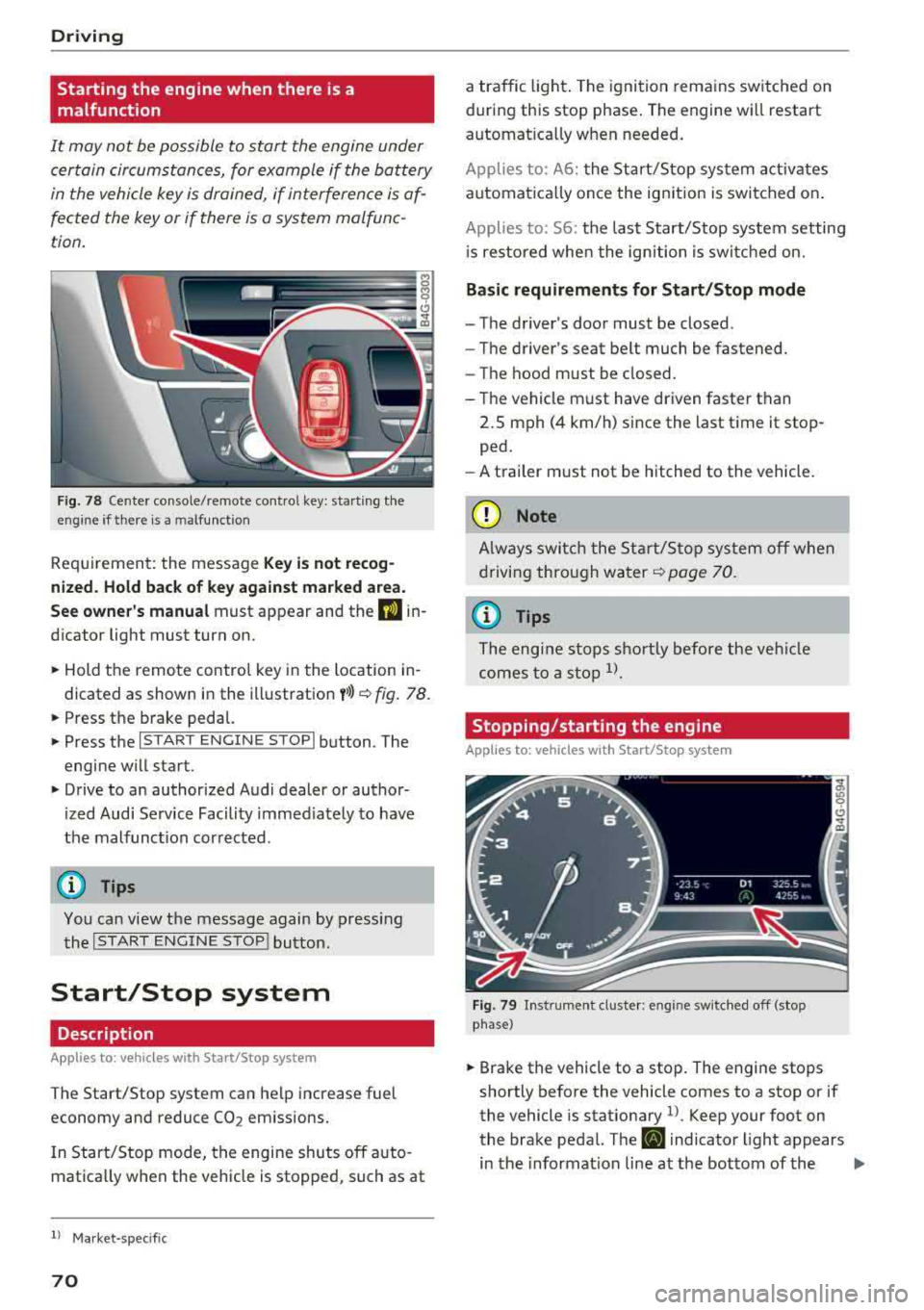
Fig . 78 Cen te r co nsole /rem ote co ntro l key : sta rt ing t he
en gine if th ere is a m alfu nction
Req uiremen t: the messa ge Key i s no t recog
nized . Hold back of key against marked a rea.
See owner's manual
must app ear and the DJ in
dicator light must tu rn on .
,.. Hold the remo te contro l key in the loc ation in
dicated as shown in the illustration
y >l) c::> fig . 78.
,.. Press the b rake pedal.
,.. Press the I S TAR T ENGINE STOPI button . The
engine will start.
,.. Drive to an authorized Audi dealer or author
ized Audi Service Facility immed iately to have
the malfunc tion cor rected .
(D Tips
You can view the message again by pressing
the
I START ENGINE STOP ! button.
Start/Stop system
Description
Applies to: veh icles with Sta rt/Stop system
The Start/Stop system can help increase fuel
economy and reduce
CO 2 em issions.
I n Start/Stop mode, the engine shuts off a uto
mat ica lly w hen the veh icle is stopped, such as at
ll Ma rket -spe cifi c
70
a traffic light . The ignition remains sw itched on
during this stop phase . The engine wi ll restart
automat ica lly w hen needed .
Applies to: A 6: the Sta rt/Stop system activates
automat ica lly once the ig nition is switched on .
Applies to: 56: the last S tart/Stop system setting
i s re stored whe n the ignition is switc hed on.
Basic requirements for Start/Stop mode
- The driver's doo r must be closed .
- The driver 's seat be lt much be fastened.
- The hood must be closed.
- T he vehicle m ust have driven faster than
2.5 mph (4 km/h) since the last t ime it stop
ped.
- A t railer m ust not be hitched to the vehicle.
(D Note
A lways swi tch the Start/Sto p system o ff whe n
drivi ng thro ugh wa ter
<::> page 70.
(D Tips
The engi ne s tops s hortly before the ve hicle
comes to a sto p
ll.
Stopping/starting the engine
Applies to: vehicles with Start/Stop sys tem
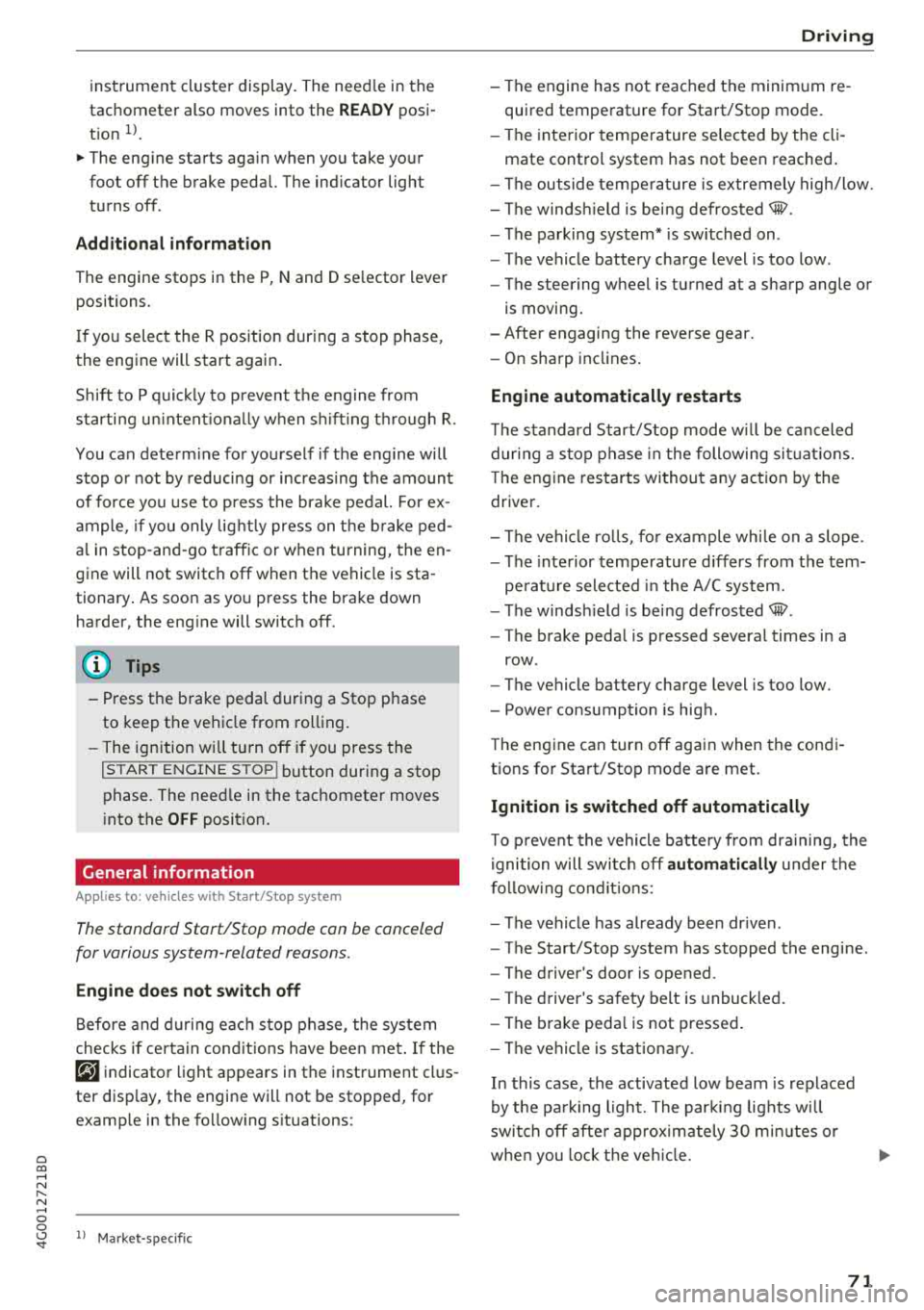
F ig. 79 In str umen t cl uste r: en gin e sw it ch ed off (stop
p hase )
,.. Brake the vehicl e to a stop. The engine stops
shortly before the vehicle comes to a stop or if
the vehicle is stationary
1> . Keep your foot on
the brake pedal. The
D] i ndicator light appears
in the informat ion line at the bottom of the
.,..
Page 73 of 266
a co .... N
" N .... 0 0 \.J '
tachometer also moves into the
READ Y posi
t ion
ll .
~ The eng ine starts aga in when you take your
foot off the brake pedal. The ind icator light
turns off.
Additional inf ormation
The engine stops in the P, N and D se lector lever
positions.
I f you select the R pos ition dur ing a stop phase,
the engine will start again .
Shift to P q uickl y to p revent t he engine from
starti ng u ninten tiona lly w hen s hift ing t hrough R .
You can determ ine for yourself if the eng ine will
stop or not by reducing or increas ing the amount
of force you use to press the bra ke pedal. For ex
ample, if you only lig htly press on t he b rake ped
a l in stop-and -go traff ic or w hen tu rning, the en
gine will not switch
off when the vehicle is sta
tionary . As soon as yo u press the brake down
harder, the eng ine will switch off.
(D Tips
-Press the b rake pedal during a Stop p hase
to keep the ve hicle from rolling.
-The ignition wi ll tu rn off if you press the
I START E NGINE STOP ! button during a stop
phase . The need le in the tachomete r moves
i nto the
OFF position.
General information
App lies to: ve hicles with Start/Stop system
The standard Start/Stop mode can be canceled
for various system-related reasons.
Engine does not switch off
B efore and d urin g e ach stop phase , the system
checks if certa in con ditions have been me t. If the
@j indicator light appears in the instrument cl us
ter disp lay, the engine will not be stopped, for
examp le in the fo llow ing s ituations:
ll Ma rket -specific
Driving
-The engine has not reached the minim um re
quired temperature for Sta rt/Stop mode.
-The interior temperature selec ted by the cli -
mate control system has not been reached .
-The outside tempe ra ture is ex tremely high/low.
-The winds hield is bei ng defros ted® .
-The parking system * is sw itched on .
-The vehicle battery charge level is too low .
-The steering wheel is tu rned at a sharp angle o r
is moving.
-After engaging the reverse gear.
-On sharp inclines .
Engine automatically restarts
The standard Start/S top mode w ill be can celed
dur ing a stop phase in the followi ng si tuatio ns.
T he eng ine restarts wi thout any action by the
driver .
-The vehi cle ro lls, fo r example whi le on a slope .
-The inte rior tempe rature d iffers from t he tem-
pe ra ture selected in the A/C system.
-The winds hield is bei ng defrosted® .
-The brake peda l is pressed severa l times in a
row .
-The vehicle battery charge level is too low.
-Power consumption is high.
T he eng ine can turn off aga in when the cond i
tions for Start/Stop mode are met.
Ignition is switched off automatically
T o p reve nt the vehicle battery from dra ining, the
i gni tion will switc h off
automaticall y under the
f o llow ing co nditions:
-The vehicle has already been dr iven .
-The Start/Stop system has stopped the engine .
-The driver's door is opened .
-The driver's safety belt is unbuckled.
-The brake peda l is not pressed .
-The vehicle is stat ion ary.
In this case, the activated low beam is replaced
by the pa rk ing light. The par kin g lights wi ll
swi tch off afte r approx imately 30 m inutes o r
whe n you lock t he ve hicle.
71
Page 74 of 266
Driving
If the Start/Stop system has not turned of f the
engine or if you have switched the Start/Stop sys
tem off manually, the ignition will not be auto
matically switched off and the engine w ill contin
ue to run
c:> .&. .
A WARNING
To reduce the risk of poisoning, never allow
the engine to run in confined spaces.
(D Tips
If you select the D or N se lector lever position
after shift ing into reverse, the vehicle must
be driven faster than 6 mph (10 km/h) in or
de r for the engine to switch off again .
Manually switching the Start/Stop system
off/on
Applies to: vehicles with Start/Stop system
If you do not wish to use the system, you can
switch it off manually.
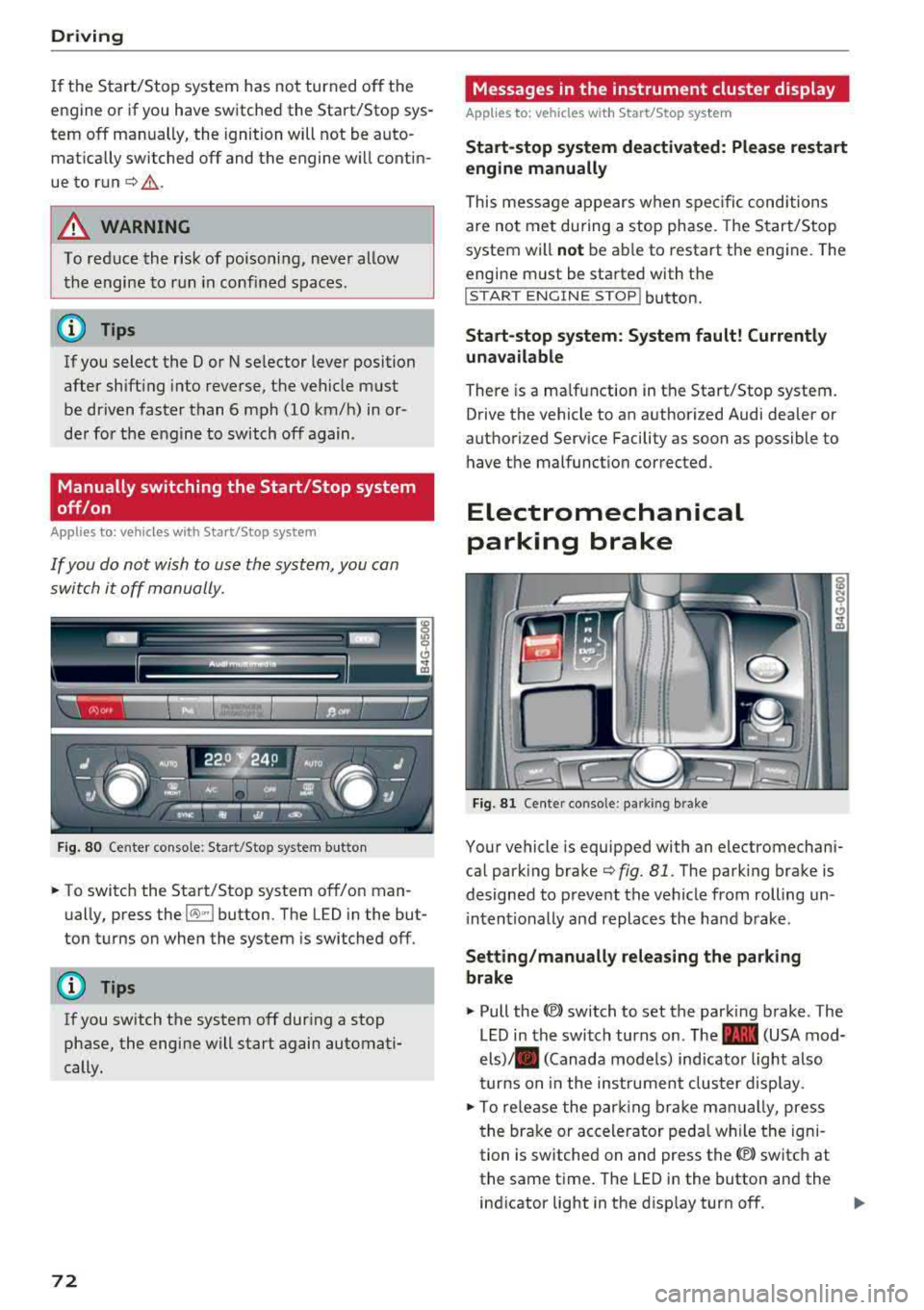
F ig . 80 Center conso le: Start/Stop system button
-
.. To switch the Start/Stop system off/on man
ually, press the
l(>:)ml button. The LED in the but
ton turns on when the system is switched off.
(D Tips
If you switch the system off during a stop
phase, the engine will start again automati
cally.
72
Messages in the instrument cluster display
Applies to: vehicles with Start/Stop system
Start -stop system deact ivated: Please restart
engine manually
This mess age appears when spec ific conditions
are not met during a stop phase. The Start/Stop
system will
not be ab le to restart the engine. The
engine m ust be started with the
!START ENGINE S T OP ! button.
Start -stop system: System fault! Currently
una vailable
There is a malfunction in the Start/Stop system.
Drive the vehicle to an authorized Audi dealer or
authorized Service Facility as soon as possible to have t he malfunction corrected.
Electromechanical
parking brake
Fi g. 81 Cente r conso le : pa rk in g brake
Your vehicle is equipped with an electromechani
cal park ing brake
c:>fig. 81 . The park ing brake is
designed to prevent the vehicle from rolling un i ntentionally and replaces the hand brake .
Setting/manually releasing the parking
brake
.. Pull the<®> switch to set the parking brake . The
LED in the switch turns on. The
-(USA mod
els)/ . (Canada models) ind icator light also
turns on in the instrumen t cluster display .
.. To re lease the par king br ake man ually, press
the brake or accelerator peda l w hil e the igni
tion is switched on and press the
(®) switch at
the same time. The LED in the button and the
ind icator light in the disp lay turn off.