light AUDI A6 2018 Repair Manual
[x] Cancel search | Manufacturer: AUDI, Model Year: 2018, Model line: A6, Model: AUDI A6 2018Pages: 266, PDF Size: 41.38 MB
Page 99 of 266

a co .... N
" N .... 0 0 \.J '
disp lay *.
White line(s) Active lane assist is activated and ready to provide warnings .
Red line(s) Active lane assist warns yo u
(left or right) before leaving a lane
c> fig. 101. In addit ion, the
steering wheel vibra tes light ly.
Gray line(s) Active lane ass ist is activ ated,
b ut not ready to give warning
c> fig . 102 .
Messages in the instrument cluster display
If t he ac tive lane ass ist switches off automat ic al
l y, the indicator lig ht in the display turns off and
one of the following messages appears :
Audi active lane assis t: Currently unavailabl e.
No camera view
This message appea rs if the came ra is u nable to
detect t he lines. This co uld happen if:
- The camera field of v iew
c> page 96, fig . 100 is
dirty or covered in ice. C lea n this area on the
wi ndsh ield .
- The camera field of v iew is fogged over . Wait
u nt il the fog has cleared before sw itch ing the
active lane assist on again .
- T he system has been unab le to detect the lanes
fo r an extended pe riod of time due to road con
dit ions. Sw itch act ive lane assist bac k on when
t h e lines are mo re visible .
Audi active lane a ssist : Currently unavailable
T here is a temporary active lane assist malf unc
tion . Try sw itching the act ive lane assist on aga in
l a ter.
Audi active lane as sist : System fault!
D rive to an autho rized Aud i de aler o r a uth o rized
Aud i Service Facility immediately to have t he
malfunction corrected.
Audi active lane as sist: Please take over steering
T his message appea rs if you are not steering by
yourself . If t his is t he case, active lane assist does
n ot swi tch off, but it is "no t ready " to prov ide a
war ning. The system c an help you keep t he ve hi-
A ss istance systems
cle in the lane . Howeve r, you are responsible for
driving the ve hicle and m ust steer it yourse lf .
A WARNING
--
Note that messages may be de layed or not
d isplayed o n ve hicles w ith accessories mount
ed on the steering wheel, such as a steer ing
whee l spinne r knob . Always keep your hands
on the steering wheel.
Adjusting the vibration warning
App lies to: veh icles w it h Audi act ive lane ass ist
.,. Select: the I CAR ! funct io n button > (Car) * Sys
tem s
contro l butto n > Driver as sistance > Audi
activ e lane assi st.
Vibration warning
You can switch the add it io nal vibration warn ing
i n t he steer ing whee l on or off .
(D Tips
Your settings are automatically stored and as
s igned to the remote co ntro l key being used .
97
Page 103 of 266

a co ,...,
N
" N ,...,
0 0 \,;J '
-Side assist is not active w hile you are mak
i ng the ad justment.
- Your settings are automatically stored and
ass igned to the remote control key being
used.
Messages
App lies to: ve hicles with Audi side assist
If side assist switches off by i tself, the LED in the
button turns off and a message will appear in the
i nstr ument cluster d isplay:
Audi side a ssist: Currently una vailable . N o
senso r vision
The radar sensor v is ion is impaired . Do not cover
the area in front of the sensors with bike wheels, stickers, dirt or other objects . Clean the area in
front of the senso rs , if
necessa ry ~ page 99 ,
fig . 106.
Audi side as sist: Currently un avail able
Side assist cannot be switched on at th is time be
cause there is a malfunction (for example , the
battery charge level may be too low) .
Audi side as sist : System fault!
The sys tem cannot guarantee that it will detect
veh icles correctly and it has switched off. The
sensors have been moved or are faulty . H ave the
system checked by an authorized Audi dealer or
author ized Audi Se rvice Facility soon .
Audi side assist: Unav ailable when towing
Side assist sw itches off automatically when a fac
tory-ins talled trailer hi tch is connected to the
e lectrical connector on the trailer . There is no
gua rantee the system will sw itch off when using
a retrofi tte d trai ler hitch. Do not use s ide ass ist
when towing a t railer.
A ssi st a nce systems
Night vision assist with
pedestrian and wild
animal detection
Description
Applies to : vehicles wit h night vision assist
The night vision assist con detect, highlight and,
if n ecessary, warn about p ed estrians and large
wild animals.
Night vision assist wit h pedest rian and wi ld ani
mal detection assists you at night by using an in
frared camera to monitor the a rea in front of
your vehicle, within the limits of the system. It can d isplay objects up to a distance of approxi
mately 1000 feet (300 m). The thermal image
detected by the camera is shown in the inst ru
ment cluster d isp lay. Wa rm areas appear lighter
and co ld areas appear da rker.
Highlighting detected pedestrians and wild
animals
Appl ies to: vehicles with night vision assist
Fig. 1 08 In strum ent cluster: ye llow highlig h ted pedes
tria ns
Fi g. 10 9 Ins trumen t cl uster : sy mb ol when t he in frar ed im
age is not v is ib le
Wi thin the limi ts of the sys tem, the night v is io n
ass ist can detec t pedestr ians and wild animals
.,_
101
Page 104 of 266
Assistance systems
that are between approximately 32 ft (10 m) and
295
ft (90 m) in front of the vehicle and within
the detection zone. Within the limits of the sys
tem
c:> page 102, a pedestrian or wild animal de
tected when the low beams are switched on is
highlighted in yellow
c:> fig. 108. Animal recogni
tion is not active within highly developed areas.
The system only detects large wild animals such
as deer.
(D Tips
If another display such as navigation replaces
the image from the night vision assist
the~--,
symbol appears in a tab c:>fig. 109. You can
access night vision assist using the multifunc
tion steering wheel buttons
c:> page 20.
Pedestrian and wild animal warning
Applies to: vehicles with night vision assist
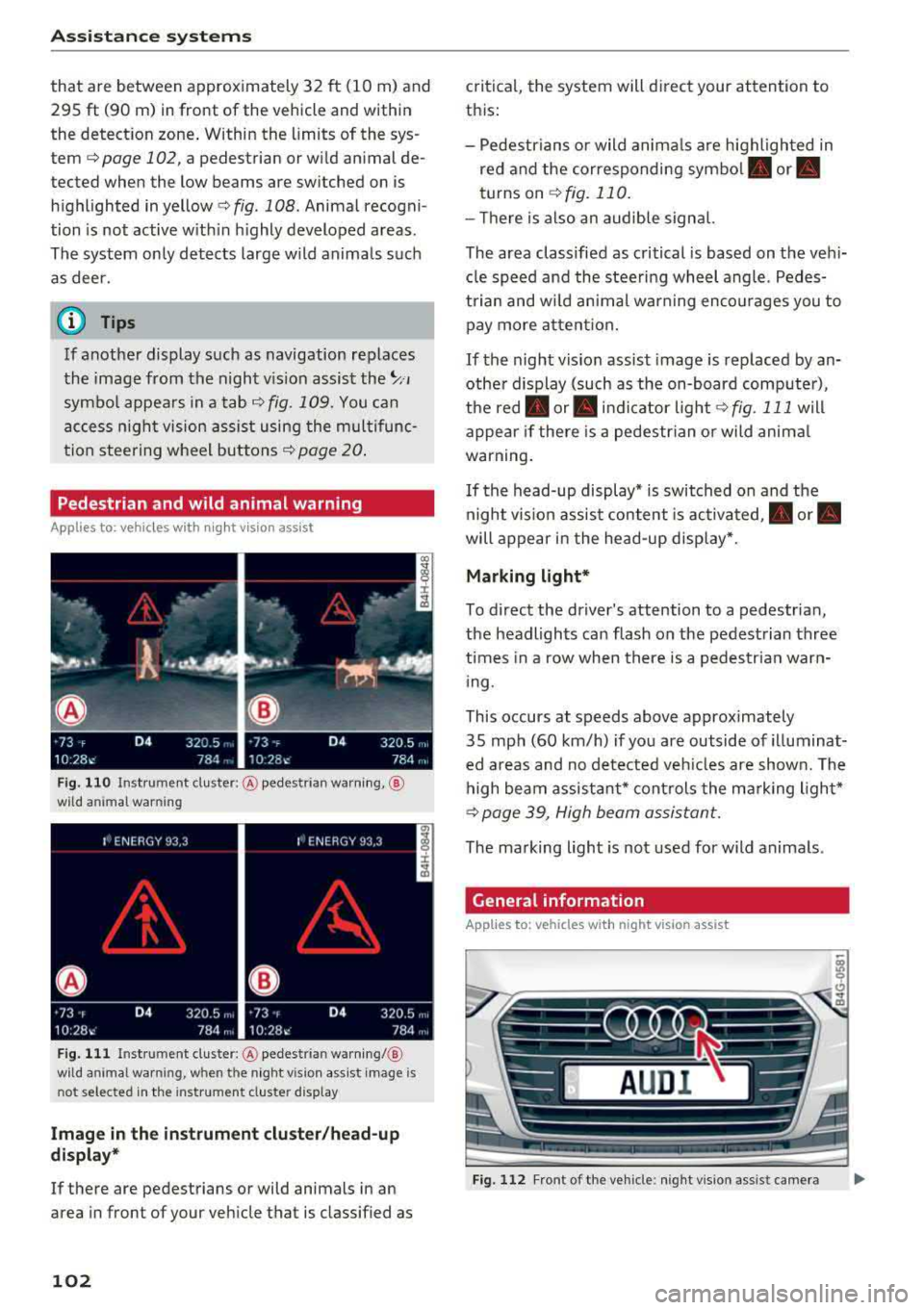
Fig . 110 Inst rument cluster :® pedestrian warning, ®
wild animal warning
Fig. 111 In strument cl uster: ® pedestrian warning/ @
w ild an imal warning, when the night vision assist image is
n ot selected in the instrument cl uster display
Image in the instrument cluster/head-up
display*
If there are pedestrians or wild animals in an
area in front of your vehicle that is classified as
102
critical, the system will direct your attention to
this :
- Pedestrians or wild animals are highlighted in
red and the corresponding
symbol . or.
turns on c:>fig. 110.
- There is also an audible signal.
The area classified as critical is based on the vehi
cle speed and the steering wheel angle. Pedes
trian and wild animal warning encourages you to pay more attention.
If the night vision assist image is replaced by an
other display (such as the on-board computer),
the
red . or. indicator light c:> fig. 111 will
appear if there is a pedestrian or wild animal
warning.
If the head-up display* is switched on and the
night vision assist content is activated, .
or.
will appear in the head-up display*.
Marking light*
To direct the driver's attention to a pedestrian,
the headlights can flash on the pedestrian three
times in a row when there is a pedestrian warn
ing.
This occurs at speeds above approximately
35 mph (60 km/h) if you are outside of illuminat
ed areas and no detected vehicles are shown. The
high beam assistant* controls the marking light*
c:> page 39, High beam assistant.
The marking light is not used for wild animals .
General information
Applies to: vehicles with night vision assist
Fig. 112 Fro nt of the vehicl e: night vision assist camera
Page 105 of 266

a co ,...,
N
" N ,...,
0 0 <..:l '
of the night vision assist system:
- Poor visibility such as snow, rain, fog or heavy
spray
- Dirty lens on the night vision assist camera
Make sure the night vision assist camera
c::> fig. 112 is not covered by stickers, deposits or
any other obstructions because that can affect
the camera function. For information on clean
ing, see
c::> page 221 .
The pedestrian and wild animal recognition de
pends on the temperature difference between
the person/wild animal and the background. Peo ple/wild animals may not be detected if the dif
ference is too small. The pedestrian/wild animal
marking and the marking light* deactivate at
temperatures above approximately 77 °F (25 °C)
and during daylight.
If the night vision assist im
age is selected in the instrument cluster display,
then the
D symbol appears at the top on the
right side .
_&, WARNING
Pay attention to traffic and the area around
your vehicle when night vision assist is switch
ed on. The driver is always responsible for as
sessing the traffic situation.
- Night vision assist can only warn about peo
ple and wild animals located within the visu
al range of the infrared camera. The visual
range corresponds to the image in the in
strument cluster display.
- Night vision assist may not detect people or
wild animals and mark them if
-they are not in an upright position, for ex
ample if they are sitting or lying down
and/or
-the silhouette in the display appears in
complete or interrupted, for example be
cause the person is partially covered by a
vehicle or the animal is partially covered
by tall grass. This could increase the risk
of an accident.
- Never try to swerve around animals if doing
so will endanger you or other road users, be
cause this increases the risk of an accident.
Assistance systems
(D Tips
-Even though the system evaluates the
shape and heat given off by all detected ob
jects, there are limits to the system . There
may be false warnings.
-For technical reasons, the image pauses in
split second intervals.
Switching on/off
Applies to: vehicles with night vision assist
Fig. 113 Area around the light switc h: night vis ion assist
button
Requirement: switch the ignition on and turn the
light switch to the
AUTO position.
.. Press the~ button c::> fig. 113. The heat image
from the night vision camera appears in the in
strument cluster display .
., Press the~ button again to switch the night
vision assist off.
If conditions are bright enough, night vision as
sist can be switched on without moving the light
switch to the
AUTO position. Pedestrian and wild
animal highlighting and warnings are only active
when it is dark outside and the headlights are
switched on.
Adjusting the contrast
Applies to: vehicles with night vision assist
.. Select: the I CAR! function button > (Car)* Sys
tems
contro l button > Driver assistance >
Night vision assist contrast .
When the night vision assist is switched on and
the image is visible in the instrument cluster dis
play, you can adjust the contrast in the image
from
Min to Max .
103
Page 106 of 266

Assistance systems
Messages
App lies to: ve hicles w ith night v isio n ass ist
Night vision assist: System fault
The system cannot guarantee correct function
and is switched off . See an author ized Audi deal
er or authorized Audi Service Facility for assis
tance .
Night vision assist: Currently unavailable
The system cannot guarantee correct function at
this t ime and is switched off.
Night vision assist: Only available at night with
lights turned on
Night vision assist onl y works when it is dar k out
side and the head lights are on.
Night vision assist: Pedestrian marking current
ly unavailable
The pedestrian and wild animal marking was
sw itched off by the system.
Audi drive select (drive
settings)
Introduction
Drive select makes it possible to experience dif
ferent types of vehicle settings in one vehicle .
The driver can se lect
Comfort , Auto and Dynamic
modes in the Inf ota inme nt system to switch be
tween, for example, a sporty and a comfo rtable
driving mode .
I n the
Individual mode, the sett ings can be ad
justed to your perso nal preferences. This makes
it poss ible to comb ine settings such as a spo rty
engine setting with light steering.
Description
The following systems, among other things, are
influenced by drive select:
Engine and automatic transmission
Depending on the mode , the engine and a uto
mat ic tran smission respond more quickly or in a
mo re balanced manner to accelerator peda l
104 movements
. In the sporty dynamic mode, the
transmission shifts at higher speed ranges.
Adaptive air suspension*
The adaptive a ir suspens ion* is an electron ically
controlled air suspension and damping system.
The adjustment depends on the driving mode se
l ected, steering movements, the driver's braking
and acce leration, and as the road surface, vehicle
speed and load.
The vehicle ground clearance depends on the
mode selected and the speed . When you are in
the
auto mode, the highway setting is activated
when you drive above 75 mph (120 km/h) for
more than 30 seconds. The ground clearance is
i ncreased automatically if the speed drops below
44 mph (70 km/h) for more than 120 seconds .
Steering
The power steering adapts. Indirect steering that
moves easily as in comfort mode is especia lly
su ited to long drives on a highway. The dynamic
mode provides sporty, direct steering.
App lies to: vehicles wit h dynamic steer ing
The steering ratio changes based on vehicle
speed in order to maintain optimum steering ef
fort for the driver at all times. Th is sets the steer
i ng to be less sensitive at h igher speeds in order
to provide improved veh icle control. At reduced
speeds, steering is more direct in o rder to keep
t h e steer ing effort as minimal as possible whe n
the driver is maneuvering the vehicle. At low and
average speeds, dynamic steering* additionally
provides more responsive steering performance.
Sport differential*
As a component of the all whee l dr ive system
(quattro)
~ page 123, the sport differe ntial dis
tributes the driving power to the rear axle de
pending on the situation. The distribution of
power varies from ba lanced (comfort) to sporty
(dynamic) depending on the se lected mode. The
goal is a high level of agility and ability to accel
erate on curves. The vehicle is very responsive to
steering.
IJIJ,
Page 107 of 266

a co .... N
" N .... 0 0 \.J '
The cornering light adapts the high beams to the
direc tion of the curve depending on the speed .
The pivoting action and the lighting also adapt to
the mode .
Adaptive cruise control*
The behav ior when accele rating can be adjusted
from comfortab le to sporty, depen ding on the
drive select mode . Adaptive cr uise cont rol a lso
responds to the driving behavior of the ve hicle
ahead in a more conservative or sporty manner.
Engine sound*
The engine sound adapts to the cur rent mode
an d can be subtle to sporty .
(UJ) Note
Applies to: vehicles with adaptive air suspension
-Make sure the re is eno ugh clearance above
and below t he ve hicle when par king . The
height of the vehicle (ground clearance) can
change once it is pa rked due to tempe rature
fluctuations , changes to the load conditions
and c hanges to the driv ing modes .
-When transport ing the veh icle on a car car
r ier, tra in, sh ip or by other means, only t ie
the veh icle dow n at the runni ng surface of
t h e tires, wh ich is the outer circ umference .
Secur ing the ve hicle at t he a xle co mpo
nen ts, suspe nsio n str uts or tow ing eyes is
not permi tted be cause the p ress ure in the
air sus pension str uts can change during
transport. The vehicle may not be secured
sufficiently if this happens .
Adjusting the Individual mode
Ass istance systems
(D Tips
-In some models, the maximum ve hicle
speed can only be reached in t he auto and
dynamic modes.
-T he S selector lever position automatica lly
engages if the dynamic mode is selected.
- Applies to: vehicles with dynamic steering:
operati ng no ise is heard when sta rting or
stopp ing the engine. T his does not ind icate
a prob lem.
Selecting the driving mode
.. To select the mode, select the follow ing in the
Infota inment:
!CARI function b utton> Comfort ,
Auto , Dynamic or Individual.
You can change the driv ing mode when the veh i
cle is stationary or while driving . If traff ic per
mits , afte r changing modes, briefly take your
foot off the accelerator pedal so t hat the recently
selected mo de is also ac tiva ted fo r th e e ngine.
Comfort -provides a comfort-or iented vehicle
setup a nd is s uited fo r long d rives o n highways .
Auto -provides an ove rall comfortab le yet dy
nam ic dr iving feel and is suited for everyday use .
Dynamic -gives the driver a sporty driving fee l
and is suited to a sporty driving style .
Individual -q page 105.
A WARNING ~ -
Pay attention to traffic w hen ope rating the
d rive select to reduce the r isk o f an accident.
You con adjust the vehicle settings to your personal preferences .
.,. Select : t h e ICARI fu nction bu tton > Set individ
ual
con trol button . Once yo u select the me nu,
yo u wi ll au tomatically drive in t he
Indi vidual
mode.
Afte r you have closed the se tt ings, you will a uto
mat ica lly dr ive i n the
Individual mode . T
he equ ipment in yo ur vehicle will dete rm ine
wh ich se tt ings you can adjust. The fo llow ing ta -
ble g ives an overview o f the characteristics .
.,_
105
Page 109 of 266
a co .... N
" N .... 0 0 \.J '
General information
A pp lies to: ve hicles with pa rk in g system p lus/rearview cam
era/peripheral camera
Depending on your vehicle 's equipment, various
pa rking aids wi ll help you when parking and ma
ne uvering.
The
p arki ng sys tem plu s assists you when park
ing by aud ibly and visua lly indicating objects de
tected
in front of and behind the ve hicle
¢page 108.
The re arv ie w ca mer a shows the area beh ind the
veh icle in the Infotainment system d isplay. The
lines in the rearview came ra image help you to
pa rk or maneuver
¢ page 109.
The peripher al c amer as assist you with parking
and maneuvering . You are aided by var ious cam
eras depend ing on the vehicle equipment leve l
¢page 112. The pa rking system pl us functions
are also availab le
¢ pag e 108.
& WARNING
-Always look for traffic and check the area
around your vehicle by looking at it direct ly
as well. The parking system cannot replace
the driver's attent ion. The driver is always
responsible when enter ing or leav ing a park
ing space and during similar maneuvers .
- Please note that some surfaces, such as
clothing, are not detected by the system .
-
-Sensors and cameras have blind spots in
wh ich people and objects cannot be detect
ed . Be especially caut ious of small children
and animals .
- The sensors can be displaced by impacts or
damage to the radiator gr ille, bumper,
wheel housing and the underbody . The park
ing system may be impa ired as a result.
Have a n author ized A udi dealer or author
ized Audi Serv ice Facility check their func
tion .
- Make s ure the senso rs a re not obstructed by
stickers, deposits o r other materia ls. If they
are, the sensor function could be impaired.
For additiona l information on cleaning, see
¢ page 221. Parking
syste m s
@ Note
-Some objects are not detected or disp layed
by the system under certain circumstances:
- objects such as barrier cha ins, tra iler draw
ba rs, vertical po les o r fences
- objects above the sensors such as wall ex
tensions
- objects with certain surfaces or structures
such as cha in l ink fences or powder snow
- If you continue driving closer to a low ob
ject, it may disappear from the sensor range . Note that you will no longer be
wa rned about t his obstacle.
- Keep enough distance from the curb to re
duce the risk of damage to the rims .
(D Tips
-The system may provide a warning even
though there are no obstacles in the cover
age area in some situat ions, such as:
- certain road surfaces or when there is tall grass
- externa l ultrasonic sources such as from
cleaning vehicles
- in heavy rain, snow, o r th ick vehicle ex
h aust
- We recommend tha t you practice par king in
a traff ic-free location or parking lot to be
come fami liar with the system . W hen doing
this, there shou ld be good light and weath
er conditions.
- You can change the volume and pitch of the
signa ls as well as the
d isplay ¢ page 117.
-Please refer to the instructions for towing a
trai ler located in
¢ page 117 .
-What appea rs in the infotainment display is
somewhat time -delayed .
- Th e sensors m ust be kep t clean and free of
snow and ice for the parking aid to operate .
107
Page 121 of 266

a co .... N
" N .... 0 0 \,;J '
control (ESC)
Description
Electronic stabilization control (ESC) supports
driver safety. It reduces the risk of slipping and
improves driving stability. ESC detects critica l sit
uations such as the vehicle oversteering and un
dersteering or the wheels are spinning. The vehi
cle is stabilized by applying the brakes or reduc ing engine torque. As soon as the ESC is actively
regulating, the
If] indicator light b links in the in
strument cluster.
The following systems are integrated in the ESC:
Anti-lock braking system (ABS)
ABS prevents the wheels from locking when brak
ing. The vehicle can still be steered even during
hard braking. Apply steady pressure to the brake
pedal. Do not pump the pedal. A pulsing in the
brake pedal indicates that the system is act ing to
stabilize the vehicle .
Brake assist system
The brake assist system can decrease braking dis
tance. It increases braking power when the driver
presses the brake pedal quickly in emergency sit
uations . You must press and hold the brake pedal
until the dangerous situat ion is over . In veh icles
with adaptive cruise contro l*, the brake assist
system is more sensitive if the distance detected
to the vehicle dr iv ing ahead is too small. On
vehicles with activated and functioning night vi
sion assist*, the brake assist system can respond more sensitively if there is a warning .
Anti-Slip Regulation (ASR)
ASR reduces eng ine power when the drive wheels
begin spinning and adapts the force to the road
conditions. This makes it easier to start, acceler
ate and drive up hills.
Electronic differential lock (EDL)
The EDL applies the brakes to a whee l that starts
spinning and transfers the drive power to the
other driving wheel or wheels (if the vehicle is
Intelligent Technology
equipped with a ll wheel drive*). This function is
not avai lab le at higher speeds.
In extreme cases , EDL automatically switches off
to keep t he brake on the braked whee l from over
heating. The vehicle is still working correctly. EDL
will switch on again automatically when condi
tions have returned to normal.
Power steering
The ESC can also support veh icle stability
through steering .
Selective wheel torque control
Selective wheel torque control is used when driv
i ng on curves. The front whee l on the ins ide of
the curve or both wheels on the ins ide of the
curve are braked selectively as needed. This al
lows more precise driving in curves.
Automatic post-collision braking system
The "automat ic post-collis ion braking system"
can help to reduce the risk of sliding and of addi
tional collisions after an accident. If the airbag
contro l module
detects a co llision above a certa in
vehicle speed, the vehicle is braked by the ESC.
T he vehicle does not brake automatically if:
- the driver presses the accelerator pedal, or
- the braking force generated by the pressed brake pedal is greater than the braking force
that would be initiated by the system, or
- the ESC, the brake system or the vehicle electri
cal system are not functioning.
A WARNING
-
- The ESC and its integrated systems cannot
overcome the lim its imposed by natura l
p hys ica l laws. This is especially impo rtant
on slippery or wet roads. If the systems be
g in acting to stabilize yo ur vehicle, you
should immediately alter your speed to
match the road and traffic conditions. Do
not let the increased safety provided tempt
you into taking risks. This could increase
your r isk of a coll is ion.
- Please note the risk of a coll ision increases
when dr iv ing fast, especially through curves
and on slippery or wet roads, and when
IIJ,,
119
Page 122 of 266
Intelligent Technology
driving too close to objects ahead . The ESC
and its integrated systems cannot always prevent coll isions
-there is still a risk of ac
cidents!
- Press the accelerator pedal carefully when
accelerating on even, slippery surfaces such as ice and snow . The drive wheels can spin
even when these control systems are instal-
Switching on /off
led and this can affect driving stability and
increase the risk of a collision.
(D Tips
-ABS and ASR only function correctly when
all four wheels are equipped with identical
tires. Different tire sizes can lead to a reduc
tion in engine power.
- You may hear noises when the systems de
scribed are working.
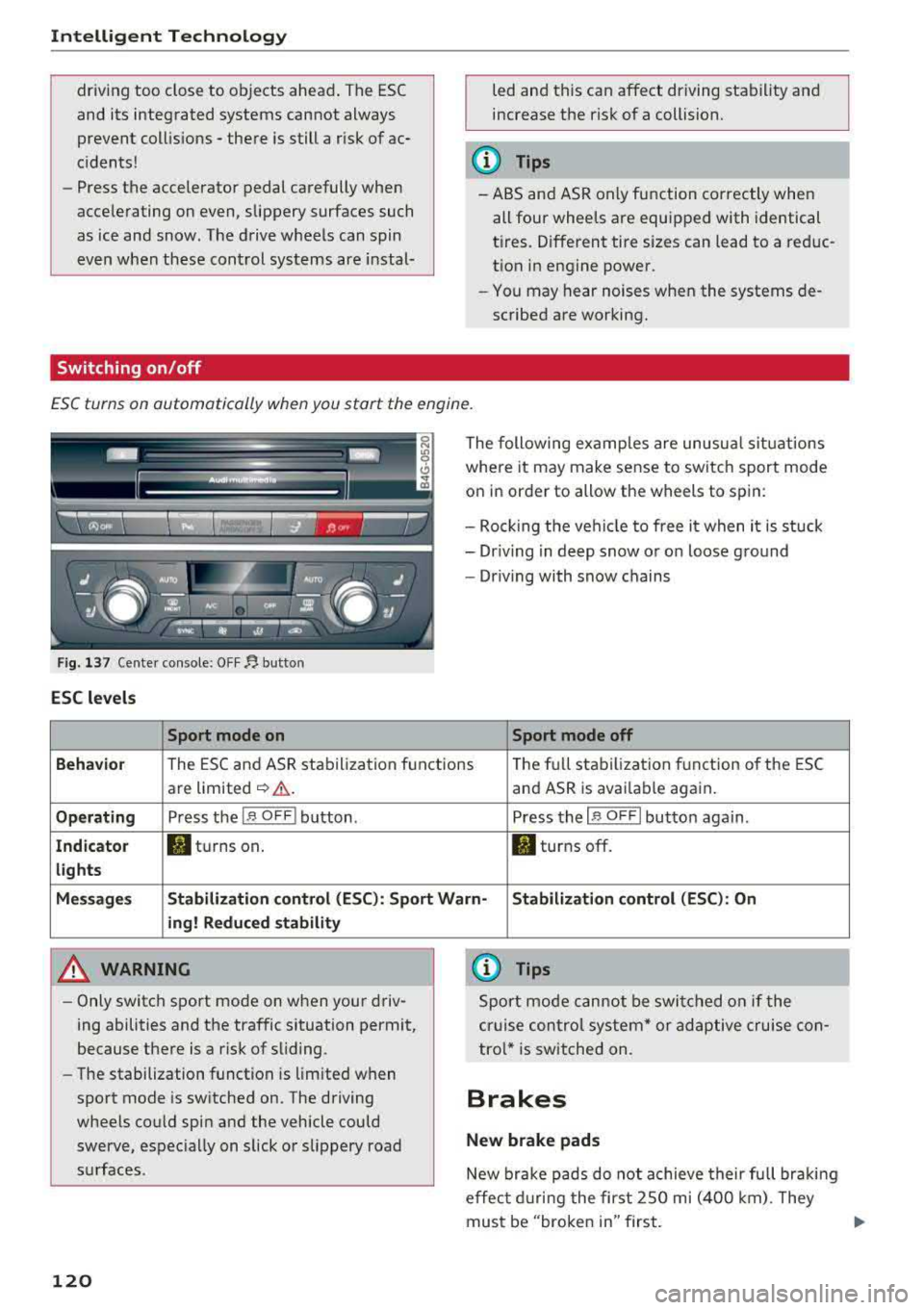
ESC turns on automatically when you start the engine .
Fig. 137 Ce nter con sole: OF F~ button
ESC levels
Sport mode on
The following examples are unusual situations
where it may make sense to switch sport mode
on in order to allow the wheels to spin:
- Rock ing the vehicle to free it when it is stuck
- Dr iving in deep snow or on loose ground
- Driving with snow chains
Sport mode off
Behavior
The ESC and ASR stabilization f unctions Th
e fu ll stabilization f unction of the ESC
are limited
~ &. . and ASR is avai lab le again.
Operating Press the I~ O FF I button . Press the I~ OF F! button again .
Indicator filturns on. . turns off.
lights
Messages Stabilization control (ESC): Sport Warn-Stabilization control (ESC): On
ing! Reduced stability
A WARNING
-Only switch sport mode on when your driv
ing abilities and the traffic situation permit,
because there is a risk of sliding .
- The stabilization function is limited when
sport mode is switched on. The driving
wheels could spin and the vehicle could
swerve, espec ially on slick or slippery road
surfaces .
120
-
{l) Tips
Sport mode cannot be switched on if the
cruise control system* or adaptive cruise con
tro l* is switched on .
Brakes
New brake pads
New brake pads do not achieve their full braki ng
effec t during the first 2SO mi (400 km). They
must be "broken in" first.
Page 123 of 266
a co .... N
" N .... 0 0 \,;J '
wear depends largely on the way the
vehicle is driven and on operating conditions.
This is especially true if you are driving frequently
in the city and on curves or with a sporty driving
style.
Operating noise
Noises may occur when braking depending on the
speed, braking force and outside conditions such
as temperature and humidity.
Effect of water and road salt
In certain situations, for example after driving
through water, in heavy ra in, after overnight con
densat ion or after washing your car, the braking
effect can be reduced by moisture or ice on the
brake rotors and brake pads. The brakes must be
"dried" first with a few careful brake applica
tions.
At higher speeds and with the windshie ld wipers
turned on, the brake pads press against the brake rotors for a short amount of time. This action,
which is not felt by the driver, happens at regular
intervals and ensures a better reaction time for
the brakes in wet weather .
The braking effect can also be reduced if you are
driving on salted roads and you do not apply the brakes for long periods of time. The layer of salt
on the brake rotors and pads must be worn off
f ir st when the brakes are applied.
Corrosion
Leaving the vehicle parked for long periods of
time, low mileage and avo iding heavy brak ing
can contribute to corrosion on the brake rotors
and to d irty brake pads .
If you usually avoid heavy braking or if there is
corros ion present, occasional heavy braking at
high speeds is recommended to clean the brake
rotors and
pads¢ &..
Brake system malfunction
If you notice that the brake pedal travel has sud
denly
increased, then a brake circuit in the dual
circu it brake system may have malfunct ioned.
Drive to an authorized Aud i dealer or authorized
Intelligent Technology
Audi Service Facility immediately to have the
problem corrected. On the way there, drive with
reduced speed and keep in mind that you will
need a longer distance to stop and you will need
to press the brake peda l harder.
Low brake fluid level
When the brake fluid level is low, malfunctions in
the brake system may occur . The brake fluid level
is e lectronically monitored.
Brake booster
T he brake booster amplifies the press ure you ap
ply to the brake pedal. It on ly works w hen the en
gine is running.
A WARNING
-
-Only apply the brakes for the purpose of
cleaning the brake system when road and
traffic cond itions permit. You must not en
danger other road users. This increases the
risk of an accident .
- Never let the vehicle roll while the engine is
stopped because this increases the risk of an
accident .
- New brake pads do not ach ieve the ir full
braking effect dur ing the first 250 m i
(400 km). They must be "broken in" first .
However, you can compensate fo r the
slightly reduced braking force by pressing
firmly on the brake pedal. Avoid heavy b rak
ing during the break -in period.
- Ce rtain weather and operating conditions
such as driving through water, dr iv ing in
heavy rain or driving after washing your ve
hicle can impair the effectiveness of the
brakes. In the winter, ice may build up on
the brake pads, rotors and drums. Check
these components by braking carefully. Ap
plying the brakes carefully several times
dries the brakes and removes ice build-up .
- The efficiency of the brakes can also be im
pa ired by dr iv ing for long stretches on roads
covered with salt without using the brakes.
You can remove salt deposits from the
brake rotors and pads by carefully applying
the brakes several times.
121