cup AUDI A6 2020 User Guide
[x] Cancel search | Manufacturer: AUDI, Model Year: 2020, Model line: A6, Model: AUDI A6 2020Pages: 316, PDF Size: 86.41 MB
Page 75 of 316

4K0012721BD
Sitting correctly and safely
PASSENGER AIR BAG OFF #; must remain
on.
— Front passenger's seat not occupied: the front
passenger's airbag must be deactivated, so
PASSENGER AIR BAG OFF #¥; must remain
on.
ZA WARNING
— An adult or a person with a small stature
(such as a young person or small adult) seat-
ed on the front passenger's seat will not be
protected by the passenger's airbag in the
event of a collision if the passenger's airbag
is deactivated. This increases the risk of in-
jury and death. Always make sure that
PASSENGER AIR BAG ON @ remains on
while driving. If
PASSENGER AIR BAG ON @ does not
turn on, make sure the front passenger is
sitting correctly in the seat > page 60 and
that there are no objects covering the front
passenger's seat (such as blankets or pil-
lows). If PASSENGER AIR BAG ON @
still does not turn on, the front passenger's
seat must not be used. Drive to an author-
ized Audi dealer or authorized Audi Service
Facility and have the airbag system inspect-
ed.
—Achild ina child safety seat on the front
passenger's seat - especially in a rear-facing
child safety seat - can receive a severe im-
pact if the front passenger's airbag deploys,
which increases the risk of serious or fatal
injury. Always secure child safety seats on
the rear seats. If special circumstances re-
quire the use of a child safety seat on the
front passenger's seat, always make sure
that PASSENGER AIR BAG OFF 3%; re-
mains on while driving. If
PASSENGER AIR BAG OFF #¥; does not
turn on, remove the child safety seat and in-
stall it again according to the child safety
seat manufacturer instructions. If
PASSENGER AIR BAG OFF &%; still does
not turn on, the front passenger's seat must
not be used. Drive to an authorized Audi
dealer or authorized Audi Service Facility
and have the airbag system inspected.
— Fluids, electronic devices, or mechanical
damage on the front passenger's seat may
cause the front passenger seat occupant de-
tection to malfunction. The system may
then incorrectly detect if the front passeng-
er's seat is occupied. As a result, it could de-
ploy the front passenger’s airbag incorrectly
or fail to deploy it, which increases the risk
of serious or fatal injury. Make sure that no
wet objects (such as a wet hand towel) and
no fluids come into contact with the front
passenger's seat cushion. If the front pas-
senger's seat becomes wet, dry it immedi-
ately. Make sure no electronic devices (such
as a laptop or a retrofitted seat heater) are
on the front passenger's seat. Do not trans-
port any objects on or under the front pas-
senger's seat.
— Seat covers or protective covers may prevent
the advanced airbag system from correctly
detecting child safety seats or passengers in
the front passenger's seat. You must not use
seat covers or protective covers on the front
passenger's seat that are not specifically ap-
proved for use on Audi seats with an ad-
vanced airbag system.
Child safety seats
General information
When installing and using child safety seats, fol-
low the information in this Owner's Manual, the
applicable state and federal regulations, and the
manufacturer instructions for the child safety
seat.
You can also obtain useful and current informa-
tion from the following sources:
U.S. National Highway Traffic Safety Adminis-
tration
http://www.nhtsa.gov
http://www. safercar.gov
National SAFE KIDS Campaign
http://www. safekids.org
SafetyBeltSafe U.S.A.
http://www.carseat.org
73
Page 82 of 316
Stowing and using
Stowing and using
Power sources
When the ignition is switched on, you may be
able to use multiple power sources for external
devices, depending on the vehicle equipment.
12 volt sockets
You can connect electrical accessories to the 12
volt sockets. The power usage must not exceed
120 watts.
The 12 volt sockets are labeled with the 12V
symbol. They are located in the front center con-
sole, in the rear* and on the side trim panel in the
luggage compartment*.
USB ports
Applies to: vehicles with USB input
You can charge mobile devices using the USB
ports. The USB ports are labeled with the «> or
(4 symbol or CHARGE ONLY.
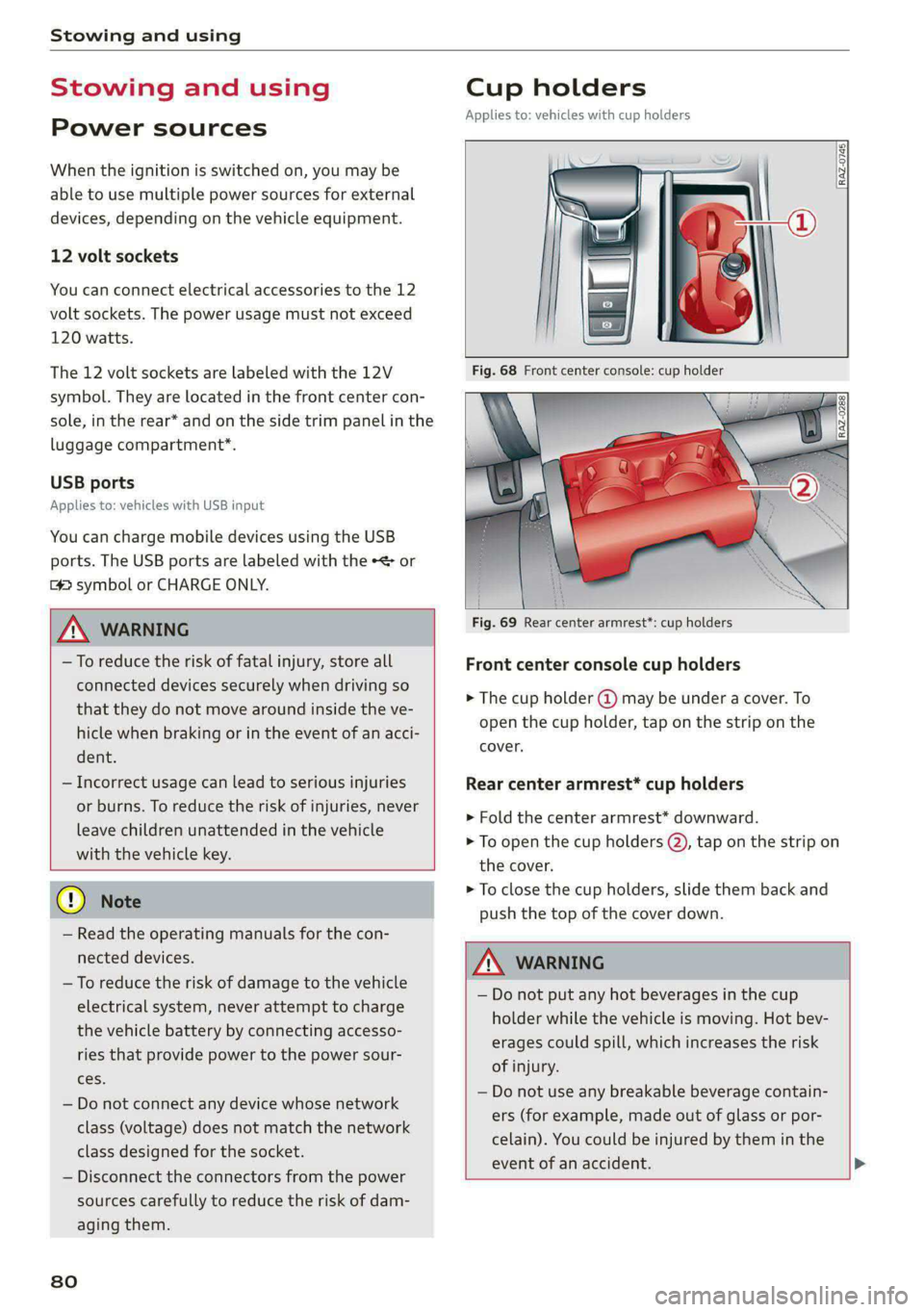
Cup holders
Applies to: vehicles with cup holders
[RAz-0745
ZA\ WARNING
—To reduce the risk of fatal injury, store all
connected devices securely when driving so
that they do not move around inside the ve-
hicle when braking or in the event of an acci-
dent.
— Incorrect usage can lead to serious injuries
or burns. To reduce the risk of injuries, never
leave children unattended in the vehicle
with the vehicle key.
@) Note
— Read the operating manuals for the con-
nected devices.
—To reduce the risk of damage to the vehicle
electrical system, never attempt to charge
the vehicle battery by connecting accesso-
ries that provide power to the power sour-
ces.
— Do not connect any device whose network
class (voltage) does not match the network
class designed for the socket.
— Disconnect the connectors from the power
sources carefully to reduce the risk of dam-
aging them.
80
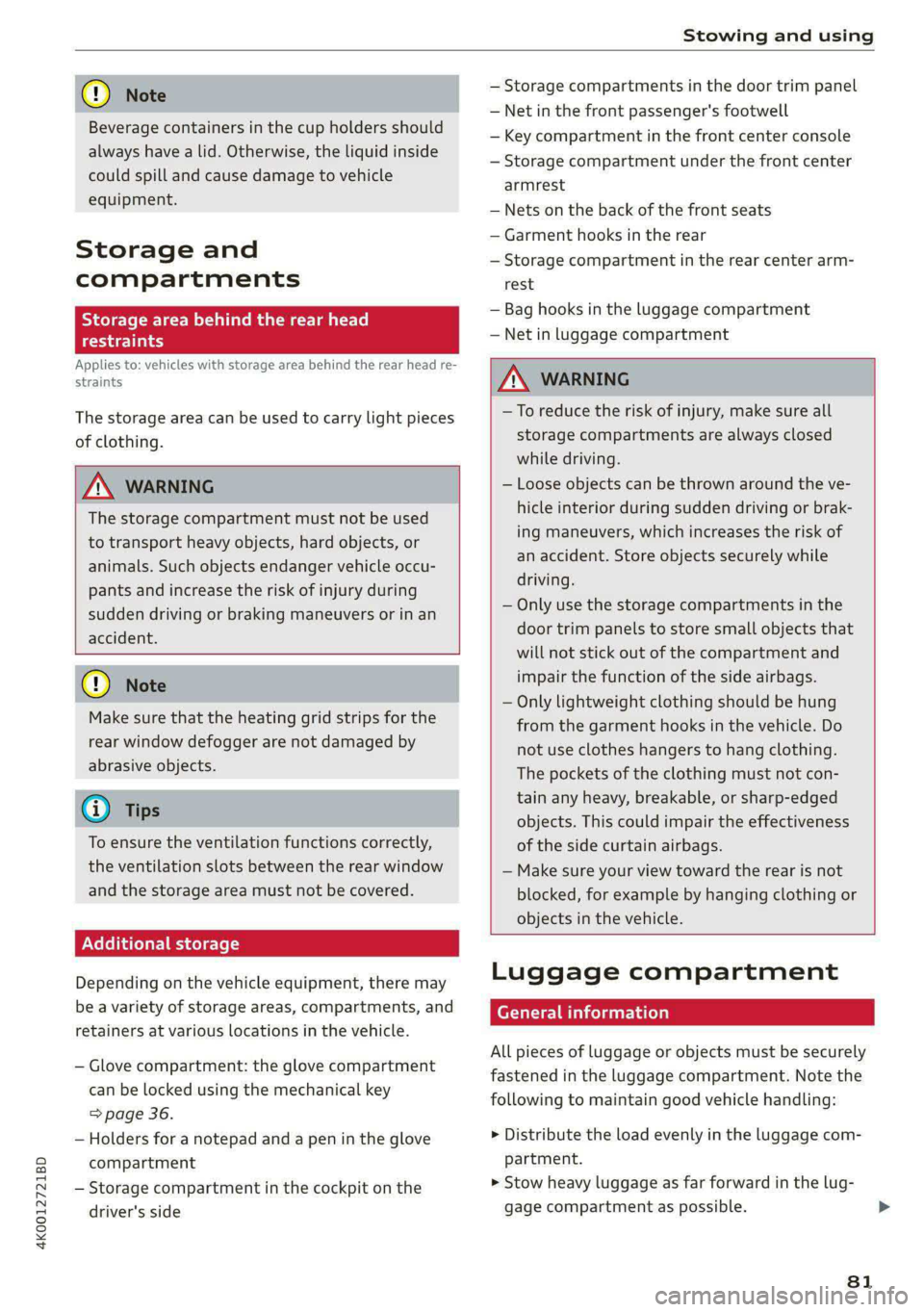
Fig. 69 Rear center armrest*: cup holders
Front center console cup holders
> The cup holder @ may be under a cover. To
open the cup holder, tap on the strip on the
cover.
Rear center armrest* cup holders
> Fold the center armrest* downward.
> To open the cup holders @), tap on the strip on
the cover.
> To close the cup holders, slide them back and
push the top of the cover down.
Z\ WARNING
— Do not put any hot beverages in the cup
holder while the vehicle is moving. Hot bev-
erages could spill, which increases the risk
of injury.
— Do not use any breakable beverage contain-
ers (for example, made out of glass or por-
celain). You could be injured by them in the
event of an accident.
Page 83 of 316
4K0012721BD
Stowing and using
@) Note
Beverage containers in the cup holders should
always
have a lid. Otherwise, the liquid inside
could spill and cause damage to vehicle
equipment.
Storage and
compartments
Storage area behind the rear head
eel ey
Applies to: vehicles with storage area behind the rear head re-
straints
The storage area can be used to carry light pieces
of clothing.
Z\ WARNING
The storage compartment must not be used
to transport heavy objects, hard objects, or
animals. Such objects endanger vehicle occu-
pants and increase the risk of injury during
sudden driving or braking maneuvers or in an
accident.
@) Note
Make sure that the heating grid strips for the
rear window defogger are not damaged by
abrasive objects.
@ Tips
To ensure the ventilation functions correctly,
the ventilation slots between the rear window
and the storage area must not be covered.
Additional storage
Depending on the vehicle equipment, there may
be a variety of storage areas, compartments, and
retainers at various locations in the vehicle.
— Glove compartment: the glove compartment
can be locked using the mechanical key
=> page 36.
— Holders for a notepad and a pen in the glove
compartment
— Storage compartment in the cockpit on the
driver's side
— Storage compartments in the door trim panel
— Net in the front passenger's footwell
— Key compartment in the front center console
— Storage compartment under the front center
armrest
— Nets on the back of the front seats
— Garment hooks in the rear
— Storage compartment in the rear center arm-
rest
— Bag hooks in the luggage compartment
— Net in luggage compartment
ZA\ WARNING
—To reduce the risk of injury, make sure all
storage compartments are always closed
while driving.
— Loose objects can be thrown around the ve-
hicle interior during sudden driving or brak-
ing maneuvers, which increases the risk of
an accident. Store objects securely while
driving.
— Only use the storage compartments in the
door trim panels to store small objects that
will not stick out of the compartment and
impair the function of the side airbags.
— Only lightweight clothing should be hung
from the garment hooks in the vehicle. Do
not use clothes hangers to hang clothing.
The pockets of the clothing must not con-
tain any heavy, breakable, or sharp-edged
objects. This could impair the effectiveness
of the side curtain airbags.
— Make sure your view toward the rear is not
blocked, for example by hanging clothing or
objects in the vehicle.
Luggage compartment
General information
All pieces of luggage or objects must be securely
fastened in the luggage compartment. Note the
following to maintain good vehicle handling:
> Distribute the load evenly in the luggage com-
partment.
> Stow heavy luggage as far forward in the lug-
gage compartment as possible.
81
>
Page 84 of 316
Stowing and using
> Use non-elastic cords attached to the tie-downs
to secure objects.
ZA WARNING
— Applies to: vehicles with luggage compart-
ment cover: The luggage compartment cov-
er is not a surface for storing objects. Ob-
jects placed on the cover increase the risk of
injury to all vehicle occupants during sudden
driving or braking maneuvers or in the event
of an accident.
— Loose objects can be thrown around the ve-
hicle interior during sudden driving or brak-
ing maneuvers, which increases the risk of
an accident. Always stow objects securely in
the luggage compartment and secure them
at the tie-downs. Use straps suitable for
heavy objects.
— If pieces of luggage or objects are secured
to the tie-downs with unsuitable or dam-
aged straps, this can increase the risk of in-
jury during braking maneuvers or accidents.
— When transporting heavy objects, the vehi-
cle characteristics will change due to the
shift in the center of gravity, which increases
the risk of an accident. You may need to
adapt your driving style and speed to the
current conditions.
— The cargo net is only strong enough to se-
cure light objects. Heavy objects are not ade-
quately secured. Attempting to secure heavy
objects increases the risk of injury.
— Never exceed the permitted axle and load
and vehicle weight > page 299.
— Never secure a child safety seat to the tie-
downs.
— Never leave your vehicle unattended, espe-
cially if the luggage compartment lid is
open. Children could enter the luggage com-
partment and close the luggage compart-
ment lid from the inside. This creates the
risk of fatal injury, since the children would
be locked in and may not be able to escape
by themselves.
— Do not allow children to play in or on the ve-
hicle. Close and lock the luggage compart-
ment lid as well as all other doors when you
leave the vehicle.
— Never transport passengers in the luggage
compartment. Every passenger must be cor-
rectly secured with the safety belts in the
vehicle > page 65.
— Be careful when releasing the backrest and
folding
it forward. To reduce the risk of be-
ing pinched, pay attention and check when
folding backrests forward.
— The backrest must be securely latched so
objects cannot slide forward out of the lug-
gage compartment during sudden braking.
— The backrest must be latched securely to en-
sure that the safety belt is protecting the
center seating position.
— Always pull forward on the backrest to make
sure it is check if it is correctly locked in
place.
82
@) Note
—To reduce the risk of damage, move the rear
head restraints down > page 64 before fold-
ing the rear backrests forward.
— When folding the backrest forward, make
sure the outer safety belts are in the belt
guide recess so that they do not get pinched
in the backrest lock and damaged. Other ob-
jects should be removed from the rear
bench seat to protect the backrest from
damage.
— If you move the front seat back when the
rear seat backrest is folded forward, you
could damage the head restraints on the
rear seat.
— Make sure that the heating grid strips for
the rear window defogger are not damaged
by abrasive objects.
— Let the luggage compartment cover roll up
slowly to reduce the risk of damage.
— Let the partition net roll up slowly to pre-
vent damage.
@ Tips
— The tire pressure must be adapted to the
load > page 255.
— You can purchase straps at specialty stores.
Page 100 of 316

Driving
ET Mela ace) |
Applies to: vehicles with S tronic transmission and Launch
Control
Launch Control provides the best possible accel-
eration when starting from a stop.
Requirements
— The engine must be at operating temperature.
— The steering wheel must not be turned.
— Start/Stop system* must be deactivated
=> page 101.
— ESC must be limited > page 112.
— Driving program “S” > page 96 or the Dynamic
Audi drive select* mode must be selected
=> page 108.
Using Launch Control
— Press the brake pedal with your left foot and
hold it all the way down for at least one second.
— With the brake pedal pressed, press the accel-
erator pedal all the way down with your right
foot at the same time.
— Once the engine reaches a constant speed, re-
move your foot from the brake pedal.
Once the vehicle has started moving, reactivate
the ESC so that it is fully functional.
Z\ WARNING
Only use Launch Control when road and traffic
conditions allow it and other road users will
not be endangered or impacted by your driv-
ing and the vehicle's acceleration. The driving
wheels could spin and the vehicle could
swerve, especially on slick or slippery road
surfaces,
which increases the risk of an acci-
dent.
@ Note
When accelerating using Launch Control, all
vehicle components are subject to heavy
loads. This can result in increased wear.
@ Tips
After accelerating using the Launch Control,
the temperature of some vehicle components
may increase greatly. If that happens, the
function will not be available for a few mi-
98
nutes to reduce the risk of damage. After a
cool-down period, Launch Control will be
available again.
rking lock emergency release
RAZ-0310)
Fig. 89 Center console: releasing the parking lock using
the emergency release
The emergency release is located in the front cup
holder under a cover. Read and follow the impor-
tant instructions about towing > page 281.
Releasing the parking lock using the
emergency release
> Set the parking brake to secure your vehicle
from rolling away. If this is not possible, secure
your vehicle from rolling using another meth-
od.
» Remove the rubber mat.
> Pry the cover off the opening using the screw-
driver from the vehicle tool kit.
> Insert the socket wrench from the vehicle tool
kit in the opening so that the handle points to-
ward the front passenger's side.
> Turn the socket wrench clockwise @ until it
stops and press it downward (2) until it locks in-
to place.
> Leave the socket wrench inserted.
Resetting the parking lock
> Grasp the socket wrench with both hands, care-
fully pull it all the way up, and then turn it
back.
> Now remove the socket wrench.
> Reinsert the cover and rubber mat.
Page 148 of 316

Driver assistance
weather conditions may be too poor or the cam-
era may be covered. Clean the area in front of the
camera > page 120 and try to turn on the sys-
tems again later.
If the malfunction remains, drive to an author-
ized Audi dealer or authorized Audi Service Facili-
ty immediately to have the malfunction correct-
ed.
Audi pre sense
Applies to: vehicles with Audi pre sense
Within the limits of the system, the Audi pre
sense functions can initiate measures in certain
driving situations to protect the vehicle occu-
pants and other road users. Depending on the ve-
hicle equipment, various Audi pre sense systems
may
be installed:
— Audi pre sense basic can react during emergen-
cy and dangerous braking maneuvers and un-
stable driving situations (such as oversteering
or understeering).
— Audi pre sense front) can detect an impending
frontal impact and react with warnings, braking
interventions, and preemptive safety measures
for the vehicle occupants.
— Audi pre sense rear monitors the rear traffic
behind your vehicle and can react to an impend-
ing rear impact.
— Audi pre sense side can detect an impending
side impact from cross-traffic and vehicles com-
ing from the side, and can initiate preemptive
safety measures.
— The swerve assist can assist during an evasive
maneuver recognized as critical with steering
movement and by braking individual wheels in-
dividually.
— The turn assist can detect vehicles in the oppo-
site lane and react with braking maneuvers.
D_ This is not available in some countries.
146
Audi pre sense preemptive safety measures
Applies to: vehicles with Audi pre sense
Depending on the vehicle speed and the vehicle
equipment, the following functions may be initi-
ated in certain situations:
— Visual and audio warnings
— Activation of the emergency flashers)
— Reversible tensioning of safety belts
— Closing the windows and panoramic glass roof
— Adjusting the seats
— Other preemptive safety measures by individual
systems
ZA\ WARNING
Follow the safety precautions and note the
limits of the assist systems, sensors, and
cameras > page 118.
(i) Tips
— Depending on the risk situation that is de-
tected and the selected Audi drive select*
mode, not all preemptive safety measures
may be initiated under certain circumstan-
ces. Certain functions can be adjusted or
skipped if necessary.
— Audi pre sense may be restricted or unavail-
able under certain circumstances, for exam-
ple if:
— There are passengers with unfastened
safety belts
— It has only been several seconds since the
ignition was switched on The ndicator
light turns on.
— When driving in reverse
— There is an airbag control module mal-
function
— System functions may not be available if
the ESC is limited or switched off, or if
there is a malfunction.
Page 154 of 316

Driver assistance
Exit warning
Applies to: vehicles with exit warning system
B4M-0065
Fig. 118 Front door: warning strip (diagram)
General information
Within system limits, the exit warning system
can detect traffic approaching from behind such
as vehicles, and provide assistance based on this
information when you are exiting the vehicle
=> fig. 117. The system uses the data from the ra-
dar sensors at the rear corners of the vehicle.
Displays and warnings
If you pull a door handle while the vehicle is sta-
tionary and an object classified as critical is ap-
proaching, the warning strip @ and the display
on the exterior mirror (2) will light up on the cor-
responding side of the vehicle. The opening of
the door will also be slowed briefly.
If the door is opened, the displays on that side
will flash. If another road user that is classified
as critical is approaching while a door is already
open, the displays on that door will turn on.
The same messages apply for the exit warning
system and side assist > page 151.
152
Switching the exit warning on and off
— The system can be switched on and off in the
MMI & page 121.
ZX WARNING
— Follow the safety precautions and note the
limits of the assist systems, sensors, and
cameras > page 118.
— Always pay attention to traffic and to the
area around your vehicle. The exit warning
system does not replace the attention of the
vehicle occupants. The vehicle occupants are
always responsible for opening the doors
and exiting the vehicle.
— The exit warning system does not respond
to people and cannot warn you about every
type of approaching objects, such as cyclists.
Always monitor the traffic as well as the ve-
hicle's surroundings with direct eye contact.
— The display may not appear in time when
vehicles are approaching very quickly.
— The exit warning system does not react to
stationary objects or pedestrians.
— The exit warning system will not provide
alerts if your vehicle is pulled too far into
the parking space so that it is hidden by ad-
jacent vehicles.
GY tn.
@ Tips
— The exit warning system can be available for
up to approximately three minutes after un-
locking the vehicle and opening the door as
well as after switching off the ignition. Then
the displays flash briefly and the system
switches off.
— For an explanation on conformity with the
FCC regulations in the United States and the
Industry Canada regulations, see
=> page 296.
Page 186 of 316
Emergency call
LED status
— Green - The emergency call function is availa-
ble.
— Red - There is a malfunction in the emergency
call function. Contact an authorized Audi dealer
or authorized Audi Service Facility. Note the
messages about the availability of the emer-
gency function > page 184.
— Off - The emergency call function is not availa-
ble, perhaps because no network is available.
Warnings
If there is a critical system failure in the emer-
gency call systems, the vehicle occupants will re-
ceive the following warning: see > page 184, LED
status and > page 184, Messages.
G) Tips
If the emergency call is canceled due to a
poor connection, then the system automati-
cally tries to connect again.
Applies to: vehicles with emergency call function
BS Emergency call function: malfunction! Lim-
ited availability. Please contact Service
If this indicator light turns on and this message
appears, the emergency call function is restrict-
ed. For example, you cannot call the emergency
call center, but data may still be transmitted un-
der certain circumstances. Drive to an authorized
Audi dealer or authorized Audi Service Facility im-
mediately to have the malfunction corrected.
& Emergency call function: malfunction! Func-
tion unavailable. Please contact Service
If this indicator light turns on and this message
appears, you cannot make an emergency call.
Drive to an authorized Audi dealer or authorized
Audi Service Facility immediately to have the
malfunction corrected.
) The availability of the services offered depends on the
country and may change in the future.
184
Online roadside
assistance
Applies to: vehicles with online roadside assistance
An online roadside assistance call )) is a combina-
tion of data transmission and a phone call. The
data transmission from your vehicle forwards im-
portant information to the Audi service center,
such as the vehicle and position data.
Calling online roadside assistance
Applies to: vehicles with online roadside assistance
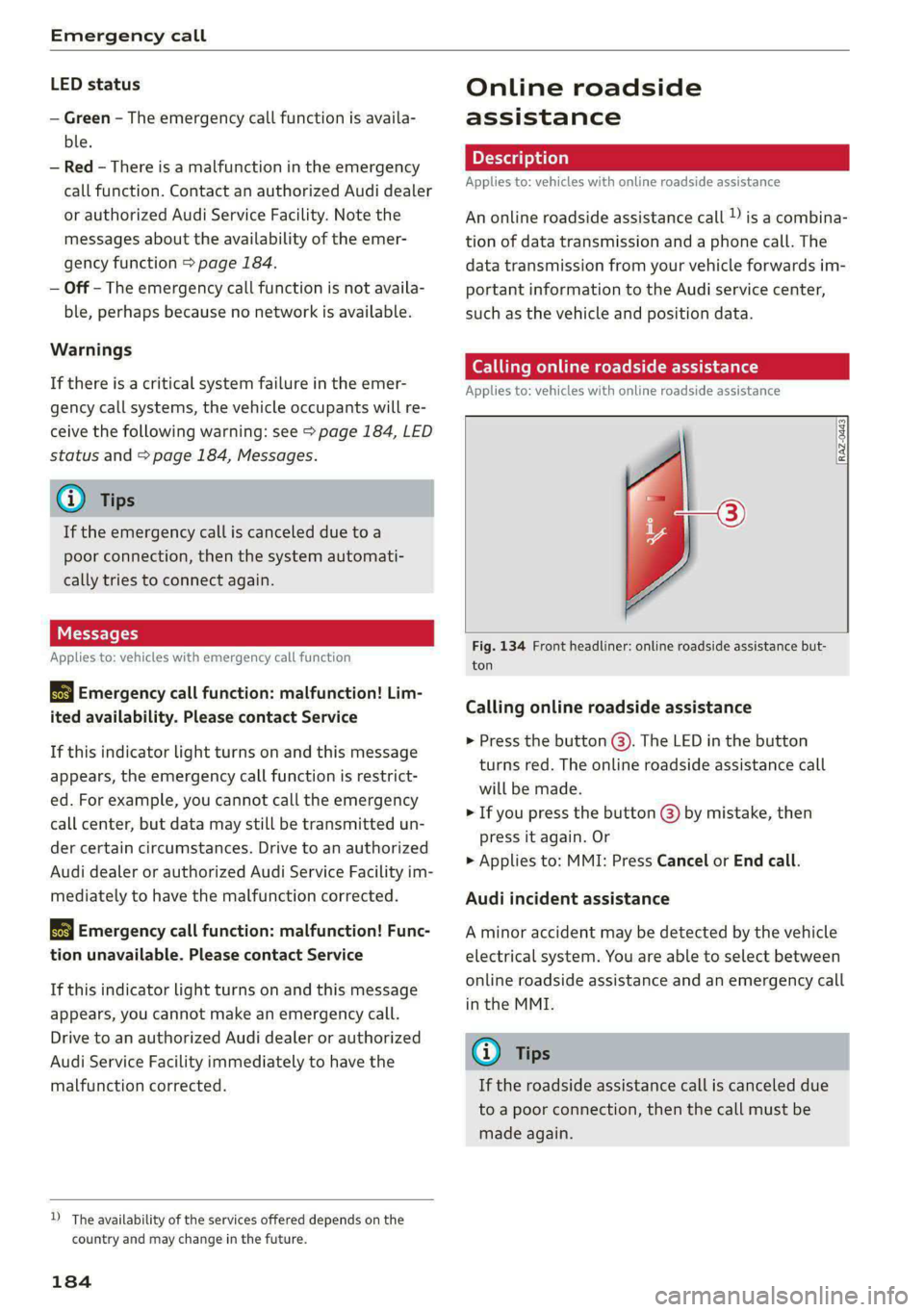
[RAzZ-0443)
+O
Fig. 134 Front headliner: online roadside assistance but-
ton
Calling online roadside assistance
> Press the button @). The LED in the button
turns red. The online roadside assistance call
will be made.
» If you press the button @) by mistake, then
press it again. Or
> Applies to: MMI: Press Cancel or End call.
Audi incident assistance
A minor accident may be detected by the vehicle
electrical system. You are able to select between
online roadside assistance and an emergency call
in the MMI.
G) Tips
If the roadside assistance call is canceled due
to a poor connection, then the call must be
made again.
Page 243 of 316

4K0012721BD
Checking and Filling
Switch off all electrical equipment that is not
needed. Vehicle functions/driving stability may
be limited. Drive to an authorized Audi dealer or
authorized Audi Service Facility immediately.
= Electrical system: low battery charge. Bat-
tery will be charged while driving
The starting ability may be impaired.
If this message turns off after a little while, the
vehicle battery has charged enough while driving.
If this message does not turn off, drive immedi-
ately to an authorized Audi dealer or authorized
Audi Service Facility.
ZA WARNING
When there is an electrical system malfunc-
tion, vehicle functions may not work and driv-
ing stability may be limited, which increases
the risk of an accident. Do not continue driv-
ing and switch the ignition off. See an author-
ized Audi dealer or authorized Audi Service Fa-
cility for assistance.
Battery
Praia Ueeece(el)
Because of the complex power supply, all work on
batteries such as disconnecting, replacing, etc.,
should only be performed by an authorized Audi
dealer or authorized Audi Service Facility > A\.
Multiple batteries with different technologies
may be installed in your vehicle:
— Vehicle battery (for example, for starting the
engine, basic power supply) > page 242, 12
Volt vehicle battery or > page 242, Other bat-
tery types
— Auxiliary battery (for example, for recuperation
or optional equipment) > page 242, Other bat-
tery types
Not running the vehicle for long periods of
time
The battery will gradually drain if the vehicle
does not run for long periods of time. To ensure
that the vehicle can still be started, the electrical
equipment will be limited or switched off. Some
convenience functions, such as interior lighting
or power seat adjustment, may not be available
under certain circumstances. The convenience
functions will be available again when you start
the
engine.
Even when electrical equipment is switched off,
the equipment can still drain the battery if the
vehicle is not driven for long periods of time.
Deep draining results in a chemical reaction that
destroys the inside of the battery. The battery
must be charged every month to prevent this
= page 243. Contact an authorized Audi dealer or
authorized Audi Service Facility for more infor-
mation.
Winter operation
Cold weather places an especially high load on
the 12 Volt vehicle battery. Have the battery
checked by an authorized Audi dealer or author-
ized Audi Service Facility before cold weather be-
gins.
Z\ WARNING
— All work on the battery or electrical system
in your vehicle can result in injuries, chemi-
cal burns, accidents, or burns. Because of
this, all work must be performed only by an
authorized Audi dealer or authorized Audi
Service Facility.
— Never connect a charging cable or jump
start cable directly to the 12 Volt vehicle
battery. Only use the connections in the en-
gine compartment > page 243.
ZA WARNING
California Proposition 65 Warning:
— Battery posts, terminals and related acces-
sories contain lead and lead compounds,
chemicals known to the State of California
to cause cancer and reproductive harms.
Wash hands after handling.
CG) Note
— If the vehicle will be parked for long periods
of time, protect the battery against the cold
so that it will not be destroyed by “freezing”
241
>
Page 251 of 316

4K0012721BD
Wheels
Gross Axle Weight Rating
(“GAWR”)
means the load-carrying capacity
of a single axle system, measured
at the tire-ground interfaces.
Gross Vehicle Weight Rating
(“GVWR”)
means the maximum total loaded
weight of the vehicle.
Groove
means the space between two ad-
jacent tread ribs.
Load rating (code)
means the maximum load that a
tire is rated to carry for a given in-
flation pressure. You may not find
this information on all tires be-
cause it is not required by law.
Maximum load rating
means the load rating fora tire at
the maximum permissible infla-
tion pressure for that tire.
Maximum loaded vehicle
weight
means the sum of:
(a) Curb weight
(b) Accessory weight
(c) Vehicle capacity weight, and
(d) Production options weight
Maximum (permissible)
inflation pressure
means the maximum cold infla-
tion pressure to which a tire may
be inflated. Also called “maxi-
mum inflation pressure.”
Normal occupant weight
means 150 lbs. (68 kilograms)
times the number of occupants
seated in the vehicle up to the to-
tal seating capacity of your vehi-
cle.
Occupant distribution
means distribution of occupants
in a vehicle.
Outer diameter
means the overall diameter of an
inflated new tire.
Overall width
means the linear distance be-
tween the exteriors of the side-
walls of an inflated tire, including
elevations due to labeling, deco-
rations, or protective bands or
ribs.
Ply
means a layer of rubber-coated
parallel cords.
249