rest AUDI A6 2020 Owners Manual
[x] Cancel search | Manufacturer: AUDI, Model Year: 2020, Model line: A6, Model: AUDI A6 2020Pages: 316, PDF Size: 86.41 MB
Page 4 of 316
Table of contents
About this Owner's Manual......
SUMIMALY: ; « ss6% : osen ss sean cs poe s
QC CCeS Skis: si esis a 6 ores os ewe
Cockpit... 2... ee eee eee eee
Indicator lights overview...........0.
Display and operation............
Instrument cluster...............
Instrument cluster overview...........
Loading a personal profile.............
Operating. ........ 20.00. cece eee eee
Adjusting the display.................
Coolant temperature display...........
Tachometer............. eee eee eee
OdOMELEF as + 2 ams < gay & = pemE se ROR «
Outside temperature display...........
Engine oil temperature indicator.......
Boost indicator’: vos + 2 xeeg es meme a 2 oes
Vehicle functions « sisi ss em ee omen ees
Touch displays....................
General touch display operation........
Multi Media Interface................
Head-up display..................
DeSGriPtionis << seorve so mses w + axocune & ovorene
Voice recognition system........
General information.................
Operating... 0... cece eee eee eee
External voice operation..............
Global functions.................
Additional function buttons...........
Starting and driving.............
Personalization..................
Luggage compartment lid.............
Child safety lock sae < « see8 cs vena ee oes
Power windowSiin: ss sew. 4 sve eo scares a
Panoramic glass roof.................
NOD
OO
13)
14 14
15
15
15
16
16
16
18 18
20
26
26
27 27 27 28 29 29 30 30 30
32
32
36 38
43 43 45
Valetiparking «= s ss-ec «x ences ov cusee a 2 oe 46
Garage door opener..........---00 eee 46
Lights and Vision................. 49
Exterior lighting...................0. 49
Interior ligQhting ss =e aves sy cows so owas §2
ViSIOM a « 3 sees 2s oman 2 mena = HOR © oe 53
Windshield wipers................05- 55
Digital compass..............--.0000- 58
Sitting correctly and safely...... 60
Correct passenger seating position...... 60
FrontS@ats:: 2 ss«s < = scws ¢ » sees + = eee e 60
Steering wheel sie < «cries + eee ss oeree 63
Head restraints..................000. 64
Safety DEltS': < sews + x neue 3 e eas Fe Hae 65
Memory function . « scion ss cee ve ero ee 68
Airbag system... .. 2.6... eee eee eee 69
Child
safety seats...............-000- 73
Stowing and using............... 80
POWEPFSOUICES csisu ¢ ¢ avons 8 Baws 2s Re 80
Gup holders'. ¢ scr 2 + wen 2 = wee 2 oe een 80
Storage and compartments............ 81
Luggage compartment............... 81
ROOf FaGK:: « = seve x ¢ saws 2 & noes 2 8 ewe es 86
Warm and cold.................65 88
Climate control system.............0- 88
Steering wheel heating............... 91
Fluids in the A/C system. ............. 92
DEIN): «wesc 3 seen 3 @ ares 6 vo eee 6 2 es 93
Starting the vehicle.................. 93
WHER ATIVING ius s = eres s treme x 2 ees £2 94
DFiVe SYStEM sce 5s cesses 6 2 vase oo case sw 100
Start/Stop system. ...........000000- 101
Brakes: « 5 saa,a 2 aauaa & = aauee @ 3 mawee & & Bane 102
Electromechanical parking brake....... 104
Special driving situations.............. 105
Driving dynamic.................. 108
Audi drivesselects. « cscas + 6 conan + « cneen + we 108
Suspension ....... 00.00 ese eee eee eee 109
St@Gritig « cas s+ mews ve mews ve Hees ee os 110
Page 22 of 316

Touch displays
> If the General button is not displayed, swipe
toward the left or right with one finger until it
appears.
>» Press the General button.
> If the Date & time button is not displayed,
swipe upward or downward with one finger un-
tilit appears.
> Press the Date & time button.
@) Tips
If a menu or symbol is in parentheses in the
path, for example, (General) or (423), then it is
an optional menu item that does not need to
be used in every system.
You can adjust or turn off the MMI touch display
feedback.
> Applies to MMI: Select on the home screen:
SETTINGS > Display & brightness > MMI.
Possible settings:
— Brightness
— Touchscreen Feedback
Multi Media Interface
Airlie lia acoder)
Audi recommends performing certain Infotain-
ment system functions, such as entering a desti-
nation, only when the vehicle is stationary. Al-
ways be prepared to stop operating the Infotain-
ment system in the interest of your safety and
the safety of other road users.
ZA\ WARNING
Only use the Infotainment system when road,
traffic, weather, and visibility conditions per-
mit and always in a way that allows you to
maintain complete control over your vehicle.
@ Tips
Certain functions are not available while driv-
ing.
20
Wine mela mel mela
Switching the MMI on or off
> To switch the MMI off, press and hold the
On/Off knob > page 29, fig. 21 until the up-
per display and all Infotainment system func-
tions are switched off.
> To switch the MMI on, press the On/Off knob.
Restarting the MMI
>» Press and hold the On/Off knob for at least 10
seconds.
Switching displays on or off
> To switch the upper display off, press [Jon the
lower display.
> To switch the upper display on, touch the upper
display or press [Jon the lower display.
> To switch both displays on or off, press and hold
Co] on the lower display.
Introduction
You can display and operate Infotainment system
and vehicle functions using both of the Multi Me-
dia Interface (MMI) touch displays.
Configuration wizard
After starting for the first time, the configuration
wizard helps you to set up the vehicle, for exam-
ple to set the desired system language and con-
nect a telephone.
> Follow the instructions in the display.
> Applies to: MMI: To access the configuration
wizard at a later time, select on the home
screen: HELP > Configuration wizard.
Tool tips
Tool tips are displayed on the upper display after
starting for the first time. They introduce various
MMI functions to you.
> Follow the instructions in the display.
> Applies to: MMI: To access the tool tips at a lat-
er time, select on the home screen: SETTINGS
> Help > Show tool tips.
> Applies to: MMI: To receive additional tool tips,
select on the home screen: HELP > Tool tips >
Basic information or Expert information.
Page 38 of 316
Opening and closing
Interior/towing protection monitor
The alarm will be triggered if there are move-
ments detected in the vehicle interior (for exam-
ple, by animals) or if there is a change in the vehi-
cle angle (for example, when the vehicle is being
towed).
You can prevent the alarm from being triggered
by deactivating the interior/towing protection
monitor.
Deactivating the interior/towing protection
monitor
There are the following options for deactivating
the interior/towing protection monitor:
> Press the & button on the vehicle key a second
time within two seconds. Or
» Applies to: vehicles with convenience key:
Touch the sensor on the door handle a second
time within two seconds. Or
> Turn the mechanical key in the door lock to the
close position a second time within 2 seconds.
If you lock the vehicle, then the interior/towing
protection monitor will stay off until the next
time the vehicle is unlocked.
ZX WARNING
No one, especially children, should stay in the
vehicle when it is locked from the outside, be-
cause the windows can no longer be opened
from the inside. Locked doors make it more
difficult for emergency workers to enter the
vehicle, which puts lives at risk.
(i) Tips
The interior/towing protection monitor only
functions correctly when the windows and the
panorama glass roof* are closed.
36
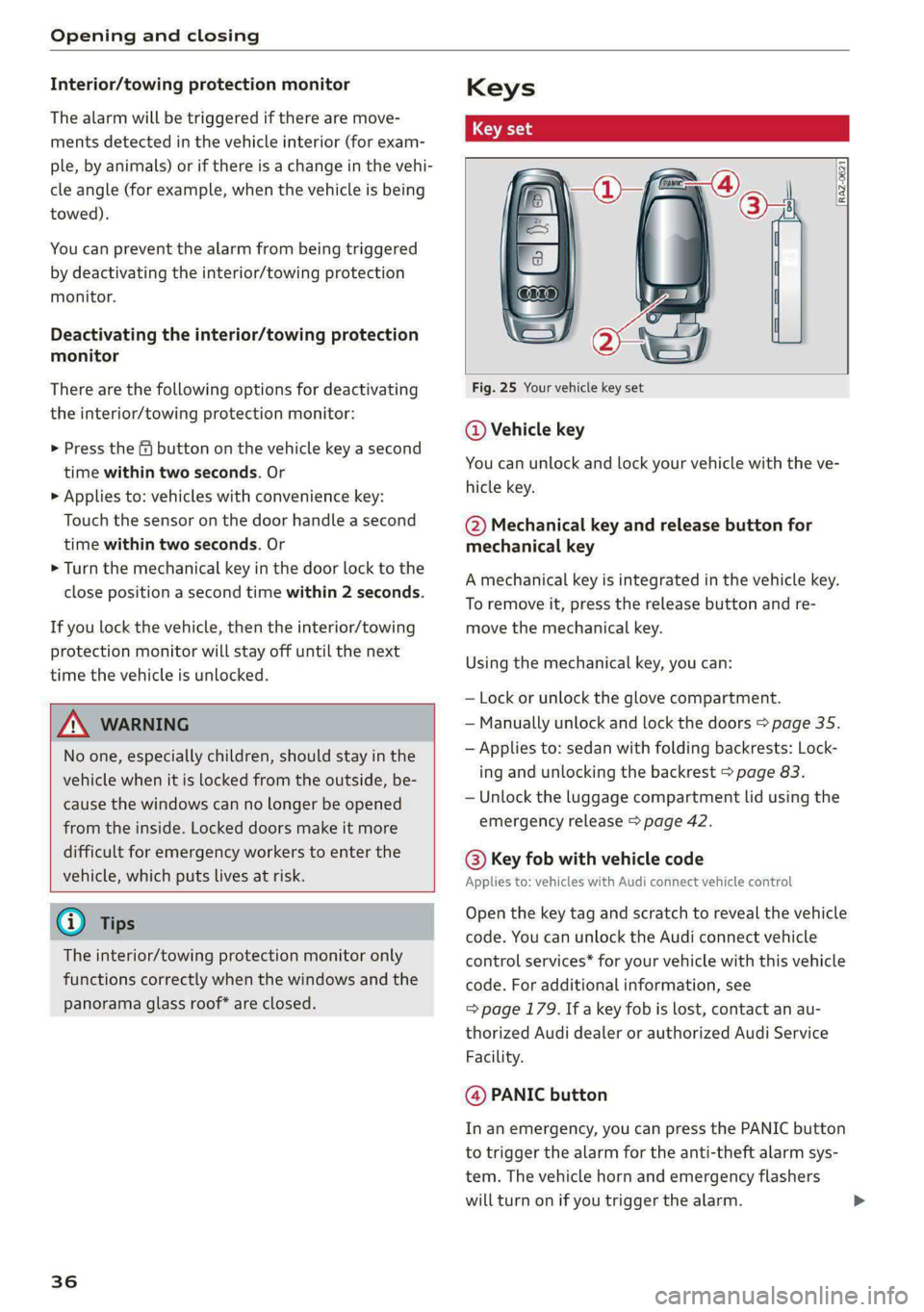
RAZ-0621
Fig. 25 Your vehicle key set
@ Vehicle key
You can unlock and lock your vehicle with the ve-
hicle key.
@ Mechanical key and release button for
mechanical key
A mechanical key is integrated in the vehicle key.
To remove it, press the release button and re-
move the mechanical key.
Using the mechanical key, you can:
— Lock or unlock the glove compartment.
— Manually unlock and lock the doors > page 35.
— Applies to: sedan with folding backrests: Lock-
ing and unlocking the backrest > page 83.
— Unlock the luggage compartment lid using the
emergency release > page 42.
@ Key fob with vehicle code
Applies to: vehicles with Audi connect vehicle control
Open the key tag and scratch to reveal the vehicle
code. You can unlock the Audi connect vehicle
control services* for your vehicle with this vehicle
code. For additional information, see
=> page 179. If a key fob is lost, contact an au-
thorized Audi dealer or authorized Audi Service
Facility.
@ PANIC button
In an emergency, you can press the PANIC button
to trigger the alarm for the anti-theft alarm sys-
tem. The vehicle horn and emergency flashers
will turn on if you trigger the alarm.
Page 44 of 316

Opening and closing
echanically unlocki
compartment lid
luggage
Applies to: vehicles with folding backrests
Fig. 31 Inner luggage compartment lid: access for emer-
gency release @) sedan, @) allroad
Applies to: vehicles with fixed backrests
Fig. 32 Rear bench seat: release cable for emergency re-
lease in the sedan
Depending on the equipment, the luggage com-
partment lid can be opened either from inside
the luggage compartment or from the rear bench
seat using the emergency release.
Folding rear seat backrest
> Fold the backrest on the rear bench seat for-
ward > page 83.
> Remove the mechanical key > page 36.
42
> Applies to: sedan: Using the mechanical key,
pry out the cover in the luggage compartment
lid trim panel @ ® fig. 31.
> Applies to: allroad: Using the mechanical key,
pry out the cover &s in the luggage compart-
ment lid trim panel @) ° fig. 31.
> Press the lever with the mechanical key in the
direction of the arrow to release the luggage
compartment lid.
>» Fold the backrest backward until it locks into
place.
Fixed rear seat backrest
Applies to: sedan
> Carefully pull the left side of the rear bench
seat out of its mount until you can reach the re-
lease cable > fig. 32.
> Remove the Velcro® tape @).
> Pull on the loop @) until the luggage compart-
ment lid releases.
> Tape the release cable back in place and press
the bench seat back into its retainer.
Follow the safety precautions > page 38.
— Applies to: vehicles with folding backrests:
If you have folded the backrests into the up-
right position, always check if the lock is se-
cured by pulling forward on the backrest.
— Applies to: vehicles with fixed backrest: Af-
ter the emergency release on the luggage
compartment lid is activated, make sure
that
the bracket under the rear bench seat
engages securely in the lifting eye.
Page 45 of 316

4K0012721BD
Opening and closing
ing the luggage compart
baceemiasie(-M Uma tee (Tn
Applies to: vehicles with fixed rear backrests
RAZ-0146,
Fig. 33 Inner luggage compartment lid: lever
> Press the lever in the direction of the arrow un-
til the luggage compartment lid opens.
® Tips
Never close the luggage compartment lid us-
ing
the emergency handle.
Child safety lock
The child safety lock prevents the rear doors
from being opened from the inside and the rear
power windows from being operated.
BGA-0029
Fig. 34 Driver's door: controls
> To activate or deactivate the child safety lock
(rear power windows and interior door handle)
for the rear doors, press the left and/or right 8
button in the driver's door > fig. 34. The indica-
tor light in the button turns on/blinks.
> Make sure the child safety lock is working by
checking the function on the rear power win-
dow switch and door handle.
> Applies to: vehicles with controls for the cli-
mate control system in the rear and MMI: To al-
so restrict the operation of the climate control
system in the rear, select on the home screen:
SETTINGS > Display & brightness > Operation
in rear
When the child safety lock is switched on, the
following functions are disabled:
— The rear inner door handles
— The rear power windows
—The
control panel* for the climate control sys-
tem in the rear
Message in the instrument cluster display
@®/
& Child safety lock: malfunction! Please contact
Service
There is a malfunction in the child safety lock.
Press the button again.
If the message stays on, drive immediately to an
authorized Audi dealer or authorized Audi Service
Facility to have the malfunction repaired.
ZA WARNING
— Follow the safety precautions > page 32.
—A malfunction in the child safety lock could
allow the rear doors to be opened from the
inside, which increases the risk of an acci-
dent.
Power windows
Opening and closing the windows
RAZ-0723,
Fig. 35 Driver's door: power window switch
Power window switches:
@ Left front door
43
Page 48 of 316
Opening and closing
@) Tips
— After switching off the ignition, the roof and
sunshades can still be operated for several
minutes as long as neither of the front
doors are opened.
— It is not possible to open the roof when
temperatures are too low.
Valet parking
Applies to: vehicles with valet parking function
The valet parking function can protect the lug-
gage compartment from unauthorized access.
The [VALET] button for valet parking is in the
glove compartment.
You can switch the valet parking function on, for
example when someone else is parking your vehi-
cle }). The vehicle can be driven, locked, and un-
locked using the vehicle key, but access to the
luggage compartment is blocked.
> Remove the mechanical key > page 36.
> Press the [VALET] button in the glove compart-
ment. The LED in the button turns on if the
function is switched on.
> Lock the glove compartment with the mechani-
cal key.
> Applies to: vehicles with lockable pass-through
and lockable rear seat backrests: To secure the
luggage compartment from the vehicle interior,
lock the pass-through and the rear seat backr-
ests using the mechanical key > page 84,
> page 83.
>» Give your vehicle key to the service personnel
who are parking your vehicle and keep the me-
chanical key.
The following buttons are deactivated when the
valet parking function is switched on:
— < button in the driver's door
— <¥ or 4s button on the vehicle key
— Handle in the luggage compartment lid
D_ This function is not available in all countries.
2) The possible number of hand-held transmitters depends
on the equipment.
46
If the valet parking function is switched on, a
message will appear every time the ignition is
switched on.
G) Tips
Please note that the luggage compartment
can still be accessed from the vehicle interior
in vehicles with fixed rear seat backrests or
ones that cannot be locked, even when the
valet parking function is switched on.
Garage door opener
Applies to: vehicles with garage door opener
With the garage door opener, you can activate
systems such as the garage doors, security sys-
tems or house lights from inside your vehicle.
These functions are operated in the MMI. Multi-
ple receivers can be programmed, which can con-
trol the functions of up to eight?) hand-held
transmitters.
ZA\ WARNING
— When operating or programming the garage
door opener, make sure that no people or
objects are in the area immediately sur-
rounding the equipment. People can be in-
jured or property can be damaged if struck
when closing.
— Do not allow yourself to be distracted from
traffic by the viewing and operating the dis-
plays.
G) Tips
— If you sell your vehicle, remove the key user
= page 31 and reset all settings to the fac-
tory settings > page 224.
— For an explanation on conformity with the
FCC regulations in the United States and the
Industry Canada regulations, see
=> page 296.
Page 62 of 316

Sitting correctly and safely
Sitting correctly and
safely
Correct passenger
seating position
General information
As the driver, you are responsible for making sure
every passenger is sitting correctly in their seat
and maintaining this seating position while driv-
ing. Make sure that:
— Every passenger in the vehicle has adjusted his
or her seat correctly > page 60
— The steering wheel is adjusted correctly
=> page 63
— The mirrors are adjusted so that there is a suffi-
cient view of the area around the vehicle
=> page 53
— Every passenger in the vehicle has his or her
head restraint adjusted correctly > page 64
— Every passenger in the vehicle has his or her
safety belt fastened correctly > page 65
— The activation status of the front passenger's
airbag is suitable for the passenger in the front
passenger's seat > page 71
— Children are secured in suitable child safety
seats that are secured to appropriate vehicle
seats > page 73. Read and observe the impor-
tant safety information pertaining to the use of
child safety seats on the front passenger's seat
= A in General information on page 74.
Examples of incorrect seating positions
Safety belts can only provide its optimal protec-
tion when they are routed correctly. Incorrect
seating positions significantly reduce the protec-
tive functions of the safety belts and increase the
risk of injury due to incorrect belt routing.
The following list includes examples of seating
positions that could be dangerous for all vehicle
occupants. This is not a complete list. The pur-
pose is to provide examples to increase your
awareness of the topic. The following points ap-
ply when the vehicle is in motion:
— Never stand inside the vehicle.
— Never stand on the seats.
60
— Never kneel on the seats.
— Never tilt your backrest too far back.
— Never lean against the instrument panel.
— Never lie down on the rear bench seat.
— Never sit only on the front section of the seat.
— Never sit sideways on the seat.
— Never lean against the window.
— Never place your feet out of the window.
— Never place your feet on the instrument panel.
— Never place your feet on the seat cushion.
— Never ride in the footwell.
— Never sit on the armrests.
— Never drive or ride in a seat without fastening
your safety belt.
— Never ride in the luggage compartment.
ZA WARNING
Incorrect seating positions, failure to wear a
safety belt, or being too close to an airbag in-
crease the risk of serious or fatal injury to ve-
hicle occupants, especially if the airbags de-
ploy and come into contact with occupants
who are not seated correctly. Note the impor-
tant information and warnings in the chapters
for the topics given above.
Gi) Tips
— Save your seat profile* > page 68. This al-
lows you to access your personal seat profile
quickly and easily at any time.
— If you or other vehicle passengers have
physical limitations that prevent sitting in a
correct position, modifications to the vehi-
cle may be necessary. For more information,
contact an authorized Audi dealer or author-
ized Audi Service Facility, or call Audi cus-
tomer support at 1-800-822-2834.
Front seats
General information
Make sure that:
— You can press the pedals down completely
while your legs are slightly bent
Page 63 of 316

4K0012721BD
Sitting correctly and safely
— The distance between your upper body and the
steering wheel or instrument panel is at least
10 inches (25 cm)
— The distance between your knees and the in-
strument panel is at least 4 inches (10 cm)
— Your thighs are lightly supported by the front
surface of the seat
— The backrest is in an upright position and your
back
is resting against it
— You have a sufficient view of the area around
the vehicle
— You have a clear view of the instrument cluster,
indicator lights, and the head-up display*
Seat settings menu: quick access
Applies to: vehicles with seat settings in the MMI
If you press on the image of the driver's or front
passenger's seat in the climate control system
menu © page 88, fig. 84 @, you will go directly
to the seat settings for that seat.
to use the pedals if sudden driving or brak-
ing maneuvers were needed, which increas-
es the risk of an accident.
— Make sure that the floor mats are always se-
curely attached.
—To reduce the risk of an accident, never place
additional floor mats or other floor covers
over the installed floor mats, because this
reduces the pedal's range of motion and can
impair pedal operation.
—To reduce the risk of injury, never place your
feet on the instrument panel, out of the
window, or on the seat surfaces. This also
applies to passengers in the rear seats.
Z\ WARNING
— If you are too close to the steering wheel or
instrument panel, the airbag system cannot
provide the optimal protection, which in-
creases the risk of injury and death.
—To reduce the risk of injury in the event of
sudden braking maneuvers or accidents,
never drive with the backrest reclined very
far. The airbag system and seat belts can on-
ly provide optimal protection when the back-
rest is in an upright position and the driver
is wearing the seat belt correctly. If the
backrest is angled back too far, the safety
belt can shift to soft areas of the body, such
as the stomach, which increases the risk of
injury.
—To reduce the risk of an accident, only adjust
the seats when the vehicle is stationary.
— Be careful when adjusting the seat. Lack of
control or attention when adjusting can re-
sult in injuries due to pinching to vehicle oc-
cupants both in the front seats and rear
seats.
— Never place objects in the driver's footwell.
Objects could shift and enter the area
around the pedals, which could prevent you
from using them. You would then be unable
@) Note
To reduce the risk of damage, be very careful
when adjusting the seat to make sure the
head restraints do not come into contact with
the headliner or the sunroof*.
G@) Tips
At the same time, only move the respective
seat using the controls.
Adjusting the front power seats
You can adjust the basic settings using the but-
RAZ.0172
tons.
CO.
oS
Fig. 51 Front seat: seat adjustment buttons
The settings depend on the vehicle equipment.
Adjusting the seat position
> To move the seat forward or backward, push
the button @) forward or backward.
61
Page 64 of 316

Sitting correctly and safely
> To adjust the seat upward or downward, push
the rear section of the button @) upward or
downward.
> To adjust the seat surface, press the front part
of the button @ upward or downward.
Adjusting the backrests
> To move the backrest forward or backward,
press the button @) forward or backward.
Adjusting the lumbar support
> To adjust the lumbar support, press the button
@ at the applicable location.
Massage function
Switch the massage function on or off @). Setting
the massage type and intensity > page 62.
ZA\ WARNING
The power front seats can also be adjusted
when the ignition is switched off. To reduce
the risk of injury, children should never be left
unattended in the vehicle.
Neem a Rice D
Applies to: vehicles with seat settings in the MMI
You can adjust additional settings in the MMI.
Cre
@—
RAZ-0589)
—O
©=-c
Fig. 52 Upper display: seat setting
The settings and the number of menus and but-
tons depend on the vehicle equipment.
Operating
Applies to: MMI
> Select on the home screen: VEHICLE > Seats.
> To access the various menus (3), swipe to the
left or right.
> To display the various seats, press ) or ¢ @®.
The red color of the symbol () indicates which
seat is selected.
62
Seat adjustment
Applies to: MMI
> To select a seat setting, press (@ if necessary.
> Press the respective arrow (@) until the desired
position is reached.
Massage
See > page 62
Additional seat settings
See > page 62
Front seat massage function
Applies to: vehicles with massage function
Selecting the massage function
Applies to: MMI
> To access the Massage menu, press the J but-
ton @) > page 61, fig. 51.
Switching the massage function on or off
Applies to: MMI
> To switch the massage function on or off, press
the J button @ © page 61, fig. 51. Or:
> Press Start/Stop on the MMI.
Setting the massage type and intensity
Applies to: MMI
> To adjust the massage type, press the desired
button on the MMI, for example Wave.
> To adjust the intensity of the massage, press
Intensity on the MMI repeatedly until the de-
sired level is reached.
(i) Tips
The massage function switches off automati-
cally after approximately 10 minutes.
ONC eerste Meee
You can adjust additional settings and switch
functions on or off in the MMI.
> Applies to: MMI: Select on the home screen:
VEHICLE > Seats > Additional seat settings.
Depending on the vehicle equipment, the follow-
ing options may be available.
Page 65 of 316

4K0012721BD
Sitting correctly and safely
Reset seat position
You can adjust the position of the front passeng-
er’s seat to match the driver's seat.
Driver seat entry assistance/Front passenger
seat entry assistance
Entry assistance makes it easier to enter or exit
the vehicle.
Adjusting the front passenger's seat from
AK Least
Applies to: vehicles with front passenger seat adjustment
You can adjust the front passenger's side with the
driver's seat buttons.
Applies to: MMI:
> Select on the home screen: VEHICLE > Seats.
> To display the various seats, press ) or ¢.
> To switch on the function, press the 2) button.
The lower edge of the button will turn red.
After you have switched on the function, you can
adjust the front passenger's seat using the driv-
er's seat buttons > page 61, fig. 51.
@ Tips
The function switches off automatically when
you exit the menu.
aaa lerlenl et i
Applies to: vehicles with a front center armrest
The front center armrest is located between the
front seats.
Adjusting the center armrest
> To adjust the armrest forward or backward,
move the armrest in the desired direction.
> To adjust the angle, raise the armrest from the
starting position in stages.
> To bring the armrest back into the starting po-
sition,
raise it out of the top level and fold it
back down.
ZA WARNING
In certain positions, the front center armrest
can interfere with the driver’s arm movement,
which increases the risk of injury.
Steering wheel
General information
Make sure that:
— The distance between your upper body and the
steering wheel is at least 10 in (25 cm)
— Your arms are bent slightly at the elbows
— You have a sufficient view of the area around
the vehicle and you have a clear view of the in-
strument cluster and head-up display”.
— You are always holding the steering wheel with
both hands on the outer edge at the sides (9:00
and
3:00 position) when driving
ZA WARNING
—To reduce the risk of an accident, make sure
the steering wheel is adjusted correctly and
cannot be moved out of position before you
start to drive.
— If you are too close to the steering wheel,
the driver's airbag cannot provide optimal
protection, which increases the risk of injury
or fatality.
— Never hold the steering wheel in the 12:00
position or in any other way, such as holding
the center of the steering wheel. Otherwise,
your arms, hands, and head could be injured
in the event that the driver's airbag deploys.
Power steering wheel position adjustment
The steering wheel position can be adjusted elec-
trically
up/down and forward/back.
2 S
S z
a
Fig. 53 Steering column: switch for adjusting the steering
wheel position
> To move the steering wheel upward or down-
ward, press the switch upward or downward.
63
>