power steering AUDI A6 2021 Owner´s Manual
[x] Cancel search | Manufacturer: AUDI, Model Year: 2021, Model line: A6, Model: AUDI A6 2021Pages: 332, PDF Size: 119.45 MB
Page 116 of 332

Driving dynamic
permitted because the pressure in the air
suspension struts can change during trans-
port. The vehicle might not be secured suffi-
ciently if this happens.
Ground clearance
The vehicle height and clearance can be influ-
enced by the following factors:
— Change in temperature
— Change in load
— Change to the Audi drive select* mode
— Lifting and lowering via the air suspension*
ZA WARNING
To reduce the risk of injury, make sure no one
gets pinched when the vehicle level is chang-
ing, for example when cleaning the under-
body or the wheel housings.
@) Note
Always make sure there is enough clearance
above and below the vehicle. This is especially
important for entrances with height restric-
tions, for example, before driving into under-
ground garages. You could also scrape the
ground when driving over the edges of curbs
or on steep ramps, which could damage your
vehicle.
Messages
B Air suspension: malfunction! You may con-
tinue driving slowly at max. XX mph (km/h)
There is a malfunction. Driving stability may be
limited. Drive to an authorized Audi dealer or au-
thorized Audi Service Facility immediately. Do not
drive faster than the speed given in the message.
E@ Air suspension: malfunction! Safely stop ve-
hicle. Steering and ground clearance limited
There is a malfunction. Do not continue driving.
Secure the vehicle against rolling before exiting
the vehicle > page 97. Avoid turning the steering
wheel, because the vehicle ground clearance may
be so low that turning the steering wheel could
114
result in damage to the wheels and wheel hous-
ings.
1 o | Suspension: malfunction! You can continue
driving
There is a malfunction. See an authorized Audi
dealer or authorized Audi Service Facility for as-
sistance.
B Air suspension: vehicle too low. Limited
ground clearance
The vehicle ground clearance is very low. Wait un-
til the air suspension system has restored normal
ground clearance. Have an authorized Audi dealer
or authorized Audi Service Facility repair the mal-
function immediately if the indicator light does
not turn off after a significant period of time.
B Air suspension: malfunction! Please contact
Service
There is a malfunction. The driving stability may
be limited and the ground clearance may be low.
See an authorized Audi dealer or authorized Audi
Service Facility for assistance.
Audi drive select: automatic suspension low-
ering. See owner's manual
The vehicle level is adjusted to the setting stored
for the active personal profile > page 32.
Audi drive select: automatic suspension lift.
See owner's manual
The vehicle level is adjusted to the setting stored
for the active personal profile > page 32.
Steering
Electromechanical steering supports the driver's
steering movements by electronically adapting
the power steering depending on the vehicle
speed. The settings depend on the selected Audi
drive select* mode.
Progressive steering
Applies to: vehicles with progressive steering
The driving dynamic and driving stability are in-
creased by the steering ratio based on the steer-
ing wheel angle. The steering is very direct when
Page 117 of 332

4K0012721BE
Driving dynamic
the steering wheel angle is sharp, and indirect
when the angle is low. This enables comfortable
maneuvering and a precise steering response at
higher driving speeds.
Dynamic all-wheel steering
Applies to: vehicles with dynamic all-wheel steering
Active corrective steering at the front and rear
axles increases the driving dynamic and driving
stability. At low speeds, the rear wheels are
steered in the opposite direction from the front
wheels to reduce the steering effort needed by
the driver and to reduce the turning radius. Vehi-
cle handling improves. At high speeds, steering
the rear wheels in the same direction as the front
wheels improves the vehicle response and driving
stability. The vehicle reacts quickly and precisely
to the driver's steering movements.
Messages
& Steering: malfunction! Please stop vehicle
The power steering may have failed. Adapt your
driving style immediately to compensate for the
fact that it may be more difficult to turn the
steering wheel, and stop your vehicle in a safe lo-
cation as soon as possible. Do not continue driv-
ing. See an authorized Audi dealer or authorized
Audi Service Facility for assistance.
B Steering: malfunction! Please stop vehicle.
Pay attention to distance at side
The rear axle steering may have failed. More
space on the road may be needed at the side of
the vehicle, and the turning radius may be much
larger. Slow down immediately, and stop your ve-
hicle as soon as possible in a safe location with
enough space at the sides of the vehicle. Do not
continue driving. See an authorized Audi dealer
or authorized Audi Service Facility for assistance.
le—| Steering: malfunction! Please stop vehicle
There is a malfunction in the electronic steering
lock. You cannot turn the ignition on. Secure the
vehicle against rolling before exiting the vehicle
= page 97. Do not tow your vehicle because it
cannot be steered. See an authorized Audi dealer
or authorized Audi Service Facility for assistance.
a Steering: malfunction! You can continue
driving
There is a malfunction in the steering system.
Steering may be more difficult or more sensitive.
Adapt your driving style. Have the steering sys-
tem checked immediately by an authorized Audi
dealer or authorized Audi Service Facility. Please
note that the red indicator light may turn on af-
ter restarting the engine. Do not continue driving
if it does.
a Steering: malfunction! Adapt driving style.
Larger turning radius
The rear axle steering may have failed. The vehi-
cle will have a larger turning radius, and the sta-
bility when driving around curves will be compa-
rable to a vehicle without rear axle steering. Drive
carefully to an authorized Audi dealer or author-
ized Audi Service Facility to have the malfunction
corrected.
|@—e| Steering lock: malfunction! Please contact
Service
There is a malfunction in the electronic steering
lock. Drive immediately to an authorized Audi
dealer or authorized Audi Service Facility to have
the malfunction repaired.
Dynamic steering: correcting steering wheel
position
The steering is reinitializing. The steering wheel
will move easily after starting the vehicle. Reiniti-
alization might be necessary if the steering wheel
was moved while the engine was switched off.
The display turns off if the initialization was suc-
cessful.
Z\ WARNING
Do not tow your vehicle if there is a malfunc-
tion in the electronic steering lock because
this increases the risk of an accident.
@ Tips
— If there is a malfunction, the steering wheel
may be crooked when driving straight.
—Ifthe a or e indicator light only stays on
for a short time, you may continue driving.
115
Page 119 of 332

4K0012721BE
Driving dynamic
Electronic Stabilization
Control
Electronic Stabilization Control (ESC) supports
driver safety. It reduces the risk of slipping and
improves driving stability. ESC detects critical sit-
uations, such as if the vehicle is oversteering or
understeering, or if the wheels are spinning.
The brakes are applied or the engine torque is re-
duced in order to stabilize the vehicle.
The following stabilization functions are integrat-
ed into the ESC, among others:
Anti-lock braking system (ABS)
ABS prevents the wheels from locking when brak-
ing. The vehicle can still be steered even during
hard braking. Apply steady pressure to the brake
pedal. Do not pump the pedal.
A pulsing in the brake pedal indicates that the
system is acting to stabilize the vehicle.
Anti-Slip Regulation (ASR)
ASR reduces drive power when the wheels begin
spinning and adapts the power to the road condi-
tions. This will increase the driving stability.
Electronic Differential Lock (EDL)
The EDL applies the brakes to wheels that are
slipping and transfers the drive power to the oth-
er wheels. This function is not available at higher
speeds.
In extreme cases, EDL automatically switches off
to keep the brake on the braked wheel from over-
heating. The vehicle is still functioning correctly.
EDL will switch on again automatically when con-
ditions have returned to normal.
Selective wheel torque control
Selective wheel torque control is used when driv-
ing on curves. Braking is targeted toward the
wheels on the inside of the curve as needed. This
allows more precise driving in curves.
Power steering
The ESC can also support vehicle stability
through steering.
ZA WARNING
— The ESC and its integrated systems cannot
overcome the limits imposed by natural
physical laws. This is especially important on
slippery or wet roads. If the systems begin
acting to stabilize your vehicle, you should
immediately alter your speed to match the
road
and traffic conditions. Do not let the in-
creased safety provided tempt you into tak-
ing risks. This could increase your risk of a
collision.
— Please note the risk of a collision increases
when driving fast, especially through curves
and on slippery or wet roads, and when driv-
ing too close to objects ahead. There is still
a risk of accidents because the ESC and its
integrated systems cannot always prevent
collisions.
— Accelerate carefully when driving on
smooth, slippery surfaces such as ice and
snow. The drive wheels can spin even when
these control systems are installed and this
can affect driving stability and increase the
risk of a collision.
@) Tips
— The ABS and ASR only function correctly
when all four wheels have a similar wear
condition. Different tire sizes can lead toa
reduction in engine power.
— You may hear noises when the systems de-
scribed are working.
The So button (or #, depending on the model)
for controlling the ESC is located in the center
console, in front of the selector lever. The ESC is
automatically switched on when the ignition is
switched on.
Limiting ESC
In some situations, it may make sense to limit
the stabilizing function of the ESC so that the >
117
Page 144 of 332
Driver assistance
Switching lane guidance on and off
Requirement: lane guidance must be preselected
in the MMI > page 146.
> To activate or deactivate the availability of the
lane guidance, press the button on the turn sig-
nal lever > fig. 103.
The system will assist the driver by providing cor-
rective steering only when adaptive cruise assist
is actively regulating and availability is switched
on.
Overview of displays and lane guidance
limitations
The availability of lane guidance is shown with in-
dicator lights and with arrows @)) > page 139,
fig. 100 in the Driver assistance display.
> 4 - Lane guidance is active.
ri turns on (applies to vehicles with Audi vir-
tual cockpit) or the Z indicator light blinks (ap-
plies to vehicles with analog instrument cluster),
the limits of the system have been reached (for
example, the system does not have enough steer-
ing power in tight curves). Take over steering.
rg turns white, lane guidance is switched on
but is not active. This may occur due to the fol-
lowing system limits or situations:
— The necessary lane marker lines have not been
detected (for example, in a construction zone
or because the lines are obstructed by snow,
dirt, water, or lighting)
— The lane is too narrow or too wide
— The curve is too narrow
— Visibility is obstructed by a rise or dip.
— The driver's hands are not on the steering
wheel
— The turn signal was activated.
Steering intervention request
If no steering activity is detected or the limits of
the system are reached, the driver steering inter-
vention request will alert the driver using audio
and visual signals, such as B or BE. Take over
the steering and keep your hands on the steering
wheel so that you will be ready to steer at any
time. The system will become inactive after a
short time and will only be active again later.
142
If the driver does not take over steering, adaptive
cruise assist will be canceled. If the vehicle is
equipped with emergency assist and it is ready to
function, it will be activated if possible
> page 158.
ZA WARNING
Observe the safety precautions and note the
limits of the assist systems, sensors, and
cameras > page 122.
(i) Tips
— Always keep your hands on the steering
wheel so you can be ready to steer at any
time. The driver is always responsible for
adhering to the regulations applicable in
the country where the vehicle is being oper-
ated.
— Audi recommends only switching on lane
guidance on well-constructed roads.
—The & fig. 103 button switches lane guid-
ance availability and the lane departure
warning on or off simultaneously, if lane
guidance is preset in the adaptive cruise as-
sist settings.
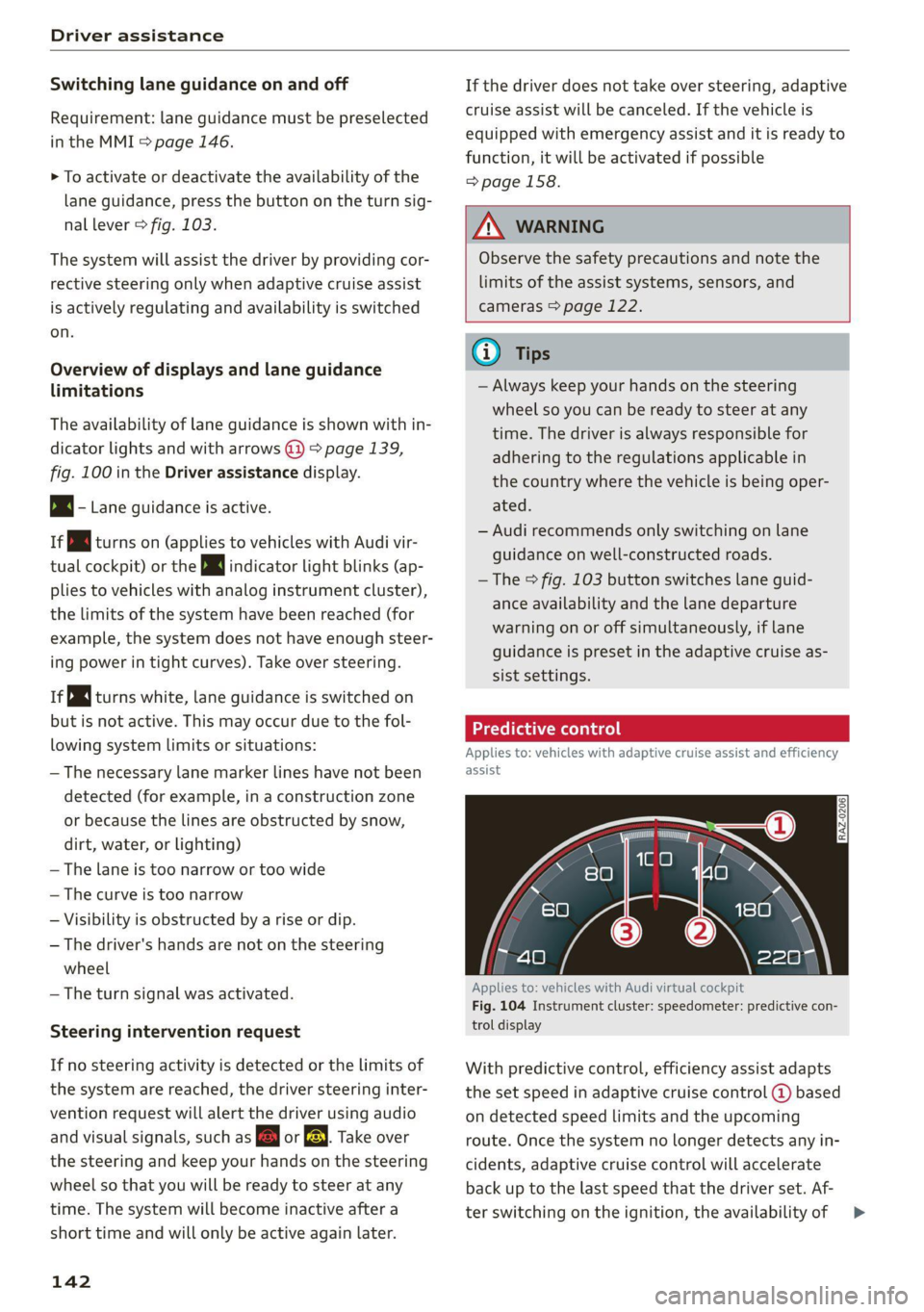
Predictive control
Applies to: vehicles with adaptive cruise assist and efficiency
assist
Applies to: vehicles with Audi virtual cockpit
Fig. 104 Instrument cluster: speedometer: predictive con-
trol display
With predictive control, efficiency assist adapts
the set speed in adaptive cruise control @ based
on detected speed limits and the upcoming
route. Once the system no longer detects any in-
cidents, adaptive cruise control will accelerate
back up to the last speed that the driver set. Af-
ter switching on the ignition, the availability of >
Page 166 of 332

Parking and maneuvering
Applies to: vehicles with rearview camera/peripheral cameras
Fig. 122 Upper display: aiming at a parking space
When parking with the rearview camera or pe-
ripheral camera, the parking system plus audio
and visual warnings* will also assist you
=> page 161.
Visual orientation lines
@ The orange orientation lines show the vehi-
cle's direction of travel >@. Turn the steer-
ing wheel until the orange orientation lines
align with the parking space.
@) Use the blue markings to help you estimate
the distance to an obstacle. Each marking
represents approximately 3 feet (1 meter).
The blue area represents an extension of the
vehicle's outline by approximately 16 feet (5
meters) to the rear.
@® You can recognize the rear bumper in the
lower display.
@ You should stop driving in reverse when the
red orientation line touches the edge of an
object, at the latest.
Symbols
If 2/&9/< is displayed and the display area
represented by that symbol is not available, then
the camera on the that side is not available. The
power exterior mirrors may have been folded in
or a door or the luggage compartment lid may
have been opened.
If # is displayed, there is a system malfunction
and the display area represented by that symbol
is not available. The camera is not working in this
area.
164
If Avis displayed, the respective ultrasonic sensor
is icy or dirty. Clean the area in front of the sen-
sors > page 124.
If one of the symbols continues to be displayed,
drive immediately to an authorized Audi dealer or
authorized Audi Service Facility to have the mal-
function repaired.
ZA WARNING
— Observe the safety precautions and note the
limits of the assist systems, sensors, and
cameras > page 122.
— Sensors and cameras have spots in which
the surrounding area cannot be detected.
Objects, animals, and people may only be
detected with limitations may not be detect-
ed at all. Always monitor the traffic and the
vehicle's surroundings directly and do not
become distracted.
() Note
— The orange orientation lines @ show the di-
rection the rear of the vehicle will be travel-
ing, based on the steering wheel angle. The
front of the vehicle swings out more than
the rear of the vehicle. Maintain plenty of
distance so that an exterior mirror or a cor-
ner of the vehicle does not collide with any
obstacles.
— Keep enough distance from the curb to
avoid damage to the rims.
— Only use the images provided by the camera
on the rear of the vehicle when the luggage
compartment lid is completely closed. Make
sure any objects you may have mounted on
the luggage compartment lid do not block
the rearview camera.
G) Tips
Applies to vehicles with air suspension: The
accuracy of the orientation lines and blue sur-
faces on the camera display decreases when
the vehicle is raised or lowered with the air
suspension.
Page 225 of 332

4K0012721BE
Media
Never leave mobile devices in the vehicle in
extremely high or low temperatures.
@ Tips
— Always follow the information found in
=> page 84.
— When you switch the ignition off, the USB
ports are still supplied with power until the
energy management intervenes.
— Do not use an additional adapter cable or
USB extension cable to connect mobile devi-
ces to the Audi music interface that already
have a cable or that must be connected with
a USB adapter cable (> page 222, fig. 151).
Using an additional adapter or US extension
cable may impair functionality.
— Functionality is not guaranteed for mobile
devices that do not conform to the USB 2.0
specification.
— USB hubs are not supported.
— Video playback through the Audi music in-
terface is not supported on Apple devices
and MTP devices (such as smartphones).
— iPod touch or iPhone malfunctions also af-
fect the operation of the MMI. Reset your
mobile device in these situations.
— Audi recommends updating the iPod touch
or iPhone software to the latest version. Re-
fer to your mobile device owner's manual
for more information.
— The USB adapter on the Audi music inter-
face will support iPod touch or iPhone devi-
ces from the 5th generation or newer with
the lightning connector.
—Aselection of supported devices can be
found in the database for tested mobile de-
vices at www.audi.com/mp3.
Playing media
The following sources can be selected depending
on the vehicle equipment:
— Amazon Alexa > page 221.
— USB device > page 222.
— DVD & page 221.
— External device: you can connect external devi-
ces via Bluetooth and use the Bluetooth audio
player > page 221, or you can connect an exter-
nal device directly to the Audi music interface
=> page 222.
Accessing media
Playing media files using the MMI
> Applies to: MMI: Select on the home screen:
MEDIA > Source > a source. Depending on the
connected device, the symbol for a source may
change. The device name may be displayed (for
example: myPhone).
> Select a track from the categories in the media
center > page 224.
Playing media files using the multifunction
steering wheel
Requirement: a media source must contain me-
dia files > page 223.
> Select the radio/media tab in the instrument
cluster.
> Turn the left thumbwheel to display the play-
list.
> To switch to a different source, press the
button.
> To select a media file or a source, turn and
press the left thumbwheel.
> To switch between radio and media, select in
the instrument cluster: the LE] button > Switch
to radio/Switch to media.
G) Tips
— For safety reasons, the video image is only
displayed when the vehicle is stationary. On-
ly the sound from the video plays while driv-
ing.
— Applies to: multifunction steering wheel:
Depending on the selected function, opera-
tion through the MMI may be required.
223
Page 298 of 332

Emergency assistance
(50 km), then transport the vehicle ona
special carrier.
— If the vehicle is towed by a tow truck at the
axle that is not permitted, this can cause se-
vere damage to the transmission.
— The vehicle must not be tow started for
technical reasons.
@) Tips
— If the power supply is interrupted, then it
will not be possible to move the selector
lever out of the "P" position. The parking
lock must be released using the emergency
release before towing the vehicle
=> page 101.
— Switch Audi pre sense* off > page 153 when
loading the vehicle onto a vehicle carrier,
train, ship, or other type of transportation,
or when towing the vehicle. This can prevent
an undesired intervention from the pre
sense* system.
— Follow the local legal regulations for tow-
ing.
Read and follow the important information under
=> page 295.
Preparations
> Only secure the towing cable or tow bar at the
designated towing loops > page 296,
=> page 297.
> Make sure the towing cable is not twisted. Oth-
erwise it could disconnect from the towing loop
while towing.
> Switch the emergency flashers on in both
vehicles > page 56. However, do not do this if it
prohibited by law.
Towing vehicle (front)
> Only start to drive when the towing cable is
taut.
> Press the brake pedal very carefully.
> Avoid sudden braking or driving maneuvers.
296
Vehicle being towed (rear)
> Make sure the ignition is switched on so that
the steering wheel is not locked and so that you
can use the turn signals, the horn, and the
windshield wipers if needed > /A\.
> Switching it off before the vehicle has stopped
may
impair the function of the brake booster
and power steering. You would then need to
use more force to steer and brake the vehicle.
> Release the parking brake > page 107.
> Select the “N” selector lever position.
> Make sure the towing cable is always taut.
ZA\ WARNING
— Never tow a vehicle using a tow bar or tow-
ing cable if the vehicle does not have electri-
cal power.
— If the vehicle runs out of power while it is
being towed, stop towing the vehicle imme-
diately and consult an authorized Audi deal-
er or qualified repair facility.
Front towing loop
Fig. 183 Front bumper: installing the towing loop
The threaded opening for the towing loop is lo-
cated on the right side of the front bumper.
> Remove the towing loop from the vehicle tool
kit > page 286.
> Press the cap inward with brief, strong pressure
> fig. 183. The cap will loosen from the bump-
er.
> Tighten the towing eye as far as it will go into
the mount. Use a suitable object to tighten the
towing eye completely and securely in the
mount.
Page 325 of 332

4K0012721BE
Parksassist plus esis c+ esncere ve somere ve asecone ve 170
Parking « seve 2 6 snes eo wesen 2 8 ween 2 ee a 97
Parking aids s < ssus s+ ces so mews ve mee ve 160
Adjusting the volume...............-. 162
Automatic activation...............005 161
Cleaning the sensors and camera........ 281
Deactivating rear cross-traffic assist... . . 167
Park assist plus...............02--00. 170
Parking aid PlUS « news « « mews 4 « cams a «caw 160
Parking space search.................. 168
Peripheral cameras...........--0000-5 163
Rearview Cameras: « : seve s ¢ weer so awe 163
Remote controlled parking............. 174
Switching off maneuver assist.......... 180
Parking and maneuvering.............-. 160
Parking brake
refer to Electromechanical parking brake. 107
Parking lights. .......... 00. e eee eee ee 53
Parking lock emergency release.......... 101
Partition MEb was 5 & cmers s & sonrene «ones wo wear 88
Passethroug inci © « scawors a saves @ & sowvens & inane 88
PedalStic « « sews = s eee 9 o eon oo ews v HER 100
Pedestrian detection................... 132
Perchlorate : seus ¢ 2 wees : 2 seme to wee 2 oe 308
Performance/torque display
refer to Sport displays.................. 16
Peripheralcamerasiy: « x ess xe eaegs x s cee 163
Phone
Connecting a second mobile device...... 182
Disconnecting a mobile device.......... 183
SOttinGSiccs s = ness so hase oF ROR Se BORG 188
Phonebook
refer to Directory...........-02e+- eee 186
PIN
A-digit myAudi PIN. «0... .6eeseeeee eens 32
Protection. ..... 2... cee cece eee eee ee 33
Playback: (redia)'. « sisson ss uscase sv acmnate 6 8 ace 223
Podcast
refer to Online radio.............. 216, 217
Polishing. ... 0.2.2... ee eee eee eee eee 282
Pollutant filter... 0.0... 0... eee eee eee 91
Power closing:(doons) « sau si susie 0 v averse vv a 35
POWEr SOUICES®. « csc eevee ev omen swe 84, 222
POWErWINKOWS « scious ss wows s reser o Hee ao 47
Malfunction..............00 0c ee eee 47
Power windows malfunction.............. 47
Predictive:control.. = sesso cices v o sonnei oo oe 142
Predictive messages............... 100, 137
pre sense
refer to Audi presense................ 150
Presentation mode..............-+-005- 211
Presets
Radio... cece eee eee eee 215
Presets list
refer to PresetS............ eee eee ee 215
Pressure
Tire pressure monitoring system.... 275,276
THEO: co concerns 3 o esis @ o eres © Bene © ¥ eee 266
Profil@PictUres wasu ws wan as wee a e wens 62 32
Progressive steering « « « scsi ss sees se ees s 114
PROtECEIAG iz: 5 = eas 5 = ees 5 e ee ss ee 282
Pyrotechnic elements............-...0- 308
Q
quattro... eee eee 116
Selective wheel torque control.......... 117
R
Radio’: « « esas « same os seme 2 § eae oe eee ee 212
Radiorterteaesc sx sseusm w samene 2 x memes a ¥ oxmme 215
Station list... 0.0.0... c eee cece eee ee 212
Radio communications equipment........ 310
RadioequipMent vince « « scan + a: same © eieeee @ » 310
Radio Standards Specification (RSS) ....... 311
Raibearrier’s » iscane 2 wane oy smn a 2 omen 2 ae 113
Rain/light sensor
Headlight icin: + « sss » «cca 2 # seam 2 woneuene 53
Intermittent mode (windshield wipers) .... 60
Random
feferto Shuffle’: < s cece co esac pees ce ve 225
Range... cee eects 17
Reading lights.................0022000. 57
Rear cross-traffic assist..............0-. 167
Rear lid
refer to Luggage compartment lid........ 43
Rear shelf
refer to Storage area behind the rear head
FOSERAINES: csoes o srcsens ov oem @ 6 women we areees x 85
Rearview camera. ...............00000. 163
Rear window defogger............-..0--- 93
323
Page 327 of 332

4K0012721BE
TAIMOZONC Lies « & socveee wo ceeneis ww ewes woo sere 233
Wi-Fi hotspot........ 0... eee eee 195
Setting the language................... 233
Setting the time..............2-.00000- 233
Shift light-indieator « wesc « 2 wave = o eee ¥ eave 16
Shift paddlesins = ssc = 3 ven x 2 meee = ween 100
Ship ¢arriet isces 2 sews + 2 snes + ¢ sews ¢ 9 oe 113
SNOP's = seoys « @ news ¢ 2 noes & eto =e eeu 194
Shortcut
refer to: Shortcuts «esis e vewe ee een es eee 24
SHOFECUES's ss wags : sane: g = neem 2 2 sete & 2 ne 24
Shuffle 2 x awww & 2 mes oy aoe o Bee 2 Boe 225
Side SSSiSt is « x saiza s aise 8s SaWeR Gs mae Ee a 154
Cleaning the sensors...............-.. 281
SIM card osx xo ae < ¢ sates 2 seems Fo eee 193
Sliding/tilting sunroof
refer to Panoramic glass roof............ 48
Smart Favorites
refer to PresetS........ 2... eee eee eee 215
Smartphone
refer to Telephone...........-....-00. 181
Snow chains.......... 0.002 273
Socket
refer to Power sourceS..........-eee eee 84
Software information
Legal information.........0..eeeee eee 236
Software version (MMI)
Version information...............00. 236
Sound
refer to Adjusting the sound............ 233
Space-saving spare tire (compact spare tire) . 292
SPareitiress « css 2 3 sw 2 2 eres wo nT oo ee 292
Speed limit information
refer to Traffic sign recognition......... 127
Speed limits
refer to Traffic sign recognition......... 127
Speedometer.......... 0.0 c eee eee eee 12
Speed warning system............000005 127
Sport differentials se waa se waves w wae 9 116
Sport displays woe ss news ss eons ss eee s eee 16
SPOFVGLiVING! secs s x aos so eewe & Hee & ee 109
Start/Stop'system: « «sees: «eee a ze seme se 104
Me@SSAQ@S iis oo ice oo omnes & 6 meses 4 & mens 105
Switching offandon...............0-- 104
Starting to drive......... 2... ee eee eee 97
Starting (@mgiMe)« «cos:
SEONG sss oo esesvee a comnts v 6 astoone ¥ & sews Y 6 a
Audi drive select
also refer to Steering..........00.e008 114
Steering lock. ss ices cc eeee ec wee ees 96,115
Steering wheel
ACjUStING we ¢ = cases ¢ 2 eees eo eee ce ewe 68
Shift paddles.......... 00... cee eee eee 100
Steering
wheel heating................. 94
also refer to Multifunction steering wheel. . 13
Steps for determining correct load limit... 271
Stopover (navigation) .................- 204
Stopping.......... 00... eee eee eee eee 97
Stopping the vehicle..............-..00. 97
SHOPPING ENGIME)) rm» sows ms sete «0 anne 105
StOMa Qe lis « o accra + 2 wwe wo cwevane @ ¥ cress © 0 ces 85
Storage area behind the rear head restraints. 85
Storage compartment...............00-. 85
Stored stations
refer'to Presets sv «sews ee ewe ee mews ve 215
Subtitles
DVD... 0. eee eee 227
Sunshade
Rear doors ..... 6. cece eee eee ees 60
ROOF's » sess ¢ = aeees © ¢ eewE 8 ESR Fs eR Ee 48
also refer to Panoramic glass roof........ 48
SUMNIVISOMS « seme sx enw 2 2 semi © wane + eR @ 60
SUSPENSION = seo oo sem Heme ae eee ey ees 113
Audi drivesselect:, cscs ss eceuere oo ecuseon a 0 one 113
Swappingiallsis « cv «x eevee vo oaeers @ w ermsens 187
SWORVERASSISE o ixrcen «2 eames oo ween 2 2 mame 2 L53
Symbols
NAVIGATOR Es « «sesso 4 0 encom 6 vieewecn ob ate 204
Traffic... eee ee 209
also refer to Indicator lights.............. z
SYNC (climate control system)............ 92
SYStEM'SELLINGS & ees se ees se eee se Hawa 233
T
Tachometer...........00000ceeeeaee 12,15
Tail lights
ClEANING?s s « ageas 5 = eee x 2 gem ae aOR FB 281
Technical datas ¢ 2 ecsis 3 x eee & news 2 3 ree 313
Technical modifications ..............0-. 308
Telephone........ 0.0... c eee eee eee 181
Accepting/ending acall................ 187
Audi phone:boxiec « = secre a = sen + 2 omen ¥ 2 183
Page 329 of 332

4K0012721BE
Vv
Valet parking............ 0... cee eee eee 49
Vanity Mirror. ... 02.2... e eee eee eee 60
Vehicle
Angle... 6. 6c eee eee eee eee 109
Care/cleaning saws =. eec5 se eee ce eae 280
DiRMeE MSI ONS ssi. + x ssi oo cevmens oo sommens 0 one 313
Identification data................04. 313
Qutof Services: + secs se ews ev oe eA eee 285
Raising « resins 2 aioe» 6 ceria © v arene © ¥ Hee 290
Starting. ..... 0.2... eee 96
TRANSPO bw + = ean se sews < e oeE x RaREE 113
Unlocking and locking................0. 40
Vehicle: caress. « sca + sean oo etc oo seen 280
Vehicle control services............00005 194
Vehicle data label...........00 sees eens 313
Vehicle identification number............ 313
Vehicle jack... 20... eee eee eee eee 286
Lifting points. ¢ esos: ¢ ¢ ewes 2 5 aes re ews 290
Tirerchange1node sisecs « 6 scene + 6 arson 3 6 exe 288
Vehicleskey', « issu > x sone #2 awus 2 0 arnams « 355.39
Vehicle start system ............-000000. 105
Vehicle toolkit’: seas « » swe =e eee ee Hey t 286
Venitilation’s = 2 ses = 2 aes ¢ z een ¢ y sows gz ne 91
VIEW button........ 0... eee eee eee 13
Voicemail... 2.0... 60. eee eee eee 187
Voice recognition system...........-.0005 28
Extéralec: « « saee 2 e eeay sv See se eeR ees 29
Operating « & sci 2 6 wes 9 6 ome + emis + wes 28
Ww
Warning lights
refer to Indicator lights..............000. 7
Washing matte finish paint.............. 280
Wave band
refer to Frequency band............... 212
Weights ........ 2... cee eee ee eee eee 314
WIHeELDOLES scsi i a sensine ov avenue ww iumsins 8 one 271
anti-theft........................00. 289
Tightening specification............... 291
WHGELS «ssn & nawes 2 2 ReoeS cE Hane sb eS 256
Cleaning « « cia se exer eo eee oo ae oo oe 282
Glossary of tire and loading terminology... 259
Loose wheel warning...............05. 272
Replacing « svascs + a saves vo ceaven ¥ even we sue 288
Tire pressure monitoring system.... 275, 276
Tires and vehicle load limits............ 269
WheelWrerichs « « siza s agen es came ¢ ¢ aan 286
Wi-Fi
HotspotsSettingSies << wie s ¢ eww s 9 eure + 195
USingsahOtSPOE « ssevsve © ccamns wo wreriee w © vrscw 193
Wild animal recognition...............- 132
Windows
Child safety lock........ 2.0.00 cece eee 46
Cleaning and removing ice............. 282
Convenience opening and closing......... 48
Defrosting.......... cee cece 93
Opening and closing................4-- 47
POWEr WINGOWS 2»: = 2 ecven 5 ¢ suey o 8 ater bes 47
Windshield
Cleaning’. « = soma oo womans wo semwens 6 2 ceoaie @ x eee 60
also refer to Windshield................ 60
Windshield washer system..........- 60, 254
Reservoir capacity............0......0. 314
Windshield wipers..............-..00005 60
Winter operation
Car washes : wey x i wees ¢ eee ce wee bee 280
Cooling system s « sisi ss ecw se aretes 6 6 ane 249
Defrosting the windows................ 93
Rear window defogger...............0- 93
Removing ice from windows............ 282
Seat heating....... 2... ee eee eee eee eee 93)
Snow chains..................0000008 273
Steering wheel heating................. 94
THOS. & swswene 1 © stranioe we o soars w/w sommes © 6 seston 272
Vehicle battery (12 Volt)............... 252
Windshield washer system............. 254
WIRED EIFES score 5 @ eases ¢ x seers ge eG Ge 272
Wireless Apple CarPlay
refer to Audi smartphone interface...... 231
Wireless charging..........-....+-.05- 184
327