brakes AUDI A7 2012 User Guide
[x] Cancel search | Manufacturer: AUDI, Model Year: 2012, Model line: A7, Model: AUDI A7 2012Pages: 294, PDF Size: 73.33 MB
Page 87 of 294
Adaptive cruise control and braking guard 85
@ Tips
- Distance 3
is set automatically each time
you switch the ignition on.
- Your standard settings are automatically
stored and assigned to the remote con
trol key being used.
Audi braking guard
Descript ion
Applies to vehicles: with adaptive cruise contro l
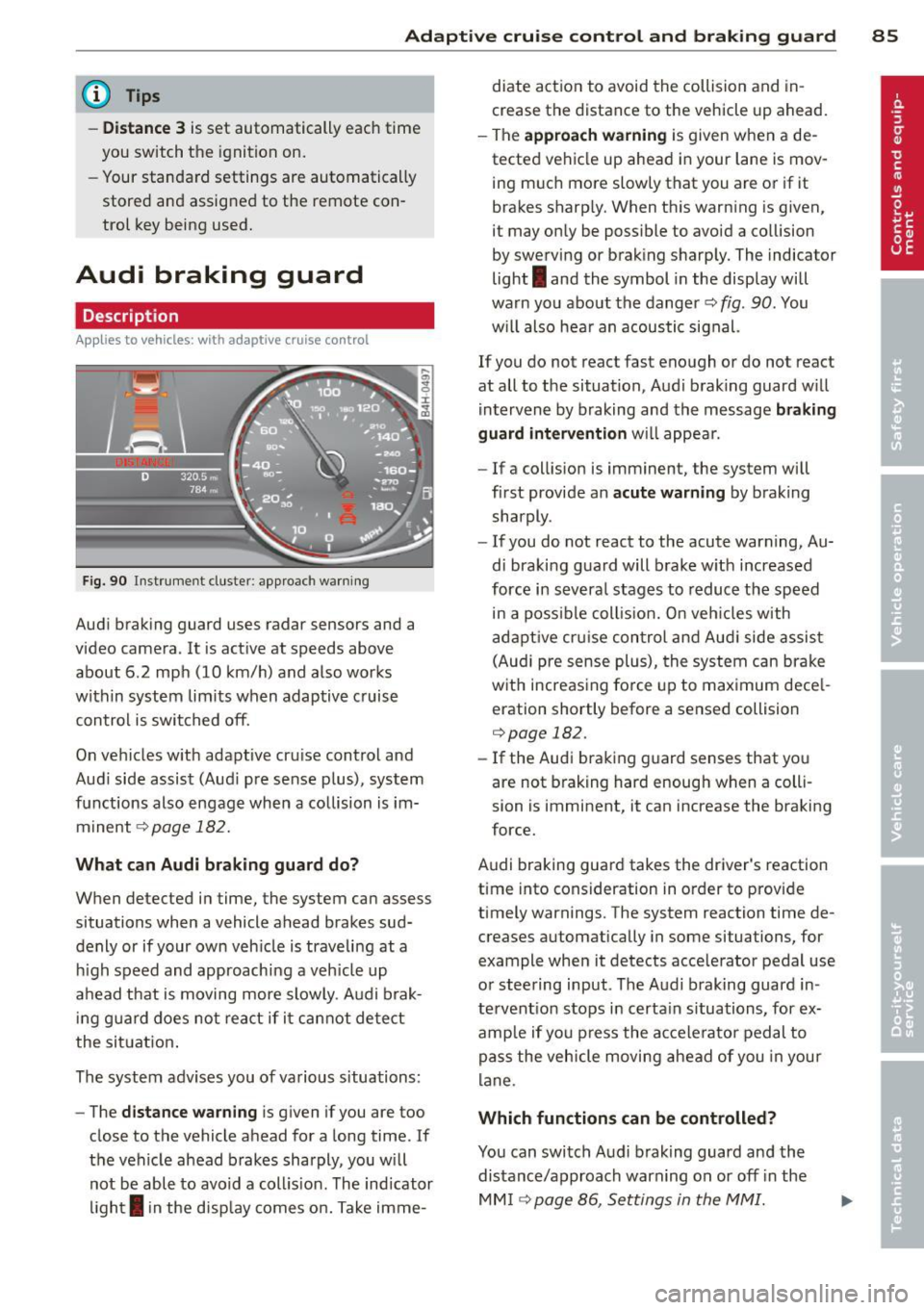
Fig. 90 Instrument cluster: approach warning
Audi braking guard uses radar sensors and a
video camera. It is active at speeds above
about 6.2 mph (10 km/h) and also works
within system limits when adaptive c ruise
control is switched off.
On vehicles w ith adaptive cru ise control and
Audi side assist (Aud i pre sense plus), system
functions also engage when a collision is im
minent
c::> page 182.
What can Audi braking guard do?
When detected in time, the system can assess
situations when a vehicle ahead brakes sud
denly or if your own veh icle is traveling at a
h igh speed and approaching a veh icle up
ahead that is moving more slowly . Audi brak
in g guard does not react if it cannot detect
the situation.
The system advises you of various s ituations:
- The
distance warning is given if you are too
close to the vehicle ahead for a long time. If
the vehicle ahead brakes sharply, you will not be able to avoid a coll is ion . The ind icator
light
I in the disp lay comes on. Take imme- diate action to avoid
the collision and in
crease the distance to the vehicle up ahead.
- The
approach warning is given when a de
tected vehicle up ahead in your lane is mov
ing much more slowly that you are or if it
brakes sharp ly. When this warning is given,
it may only be possible to avoid a collision
by swerving or braking sharply. The indicator
light
I and the symbol in the display will
warn you about the danger
c::> fig . 90 . You
w il l also hear an acoustic signal.
If you do not react fast enough or do not react
at all to the situation, Audi braking guard w ill
intervene by braking and the message
braking
guard intervention
will appear.
- If a collision is imminent, the system will
first provide an
acute warning by braking
sharply.
- If you do not react to the acute warning, Au
di braking guard will brake w ith increased
force in severa l stages to reduce the speed
in a poss ible collis ion. On veh icles with
adaptive cruise control and Audi side assist
(Audi pre sense plus), the system can brake
with increasing force up to maximum dece l
eration shortly before a sensed collision
c::>page 182.
-If the Audi braking guard senses that you
are not brak ing hard enough when a colli
sion is imminent, it can increase the braking
force.
Audi braking guard takes the driver's reaction
time into consideration in order to provide
timely warnings. The system reaction time de
creases automatically in some situations, for
example when it detects acce lerator pedal use
or steering input . The Audi braking guard in
tervent ion stops in certa in situations, for ex
amp le if you press the accelerato r pedal to
pass the vehicle moving ahead of you in your
lane .
Which functions can be controlled?
You can switch Audi braking guard and the
distance/approach warning on or
off i n the
MM I ¢ page 86, Settings in the MMI.
Page 88 of 294

86 Adapti ve crui se co ntrol a nd bra king guard
& WARNING
The Audi braking guard is an assist system
and cannot prevent a collision by itself.
The driver must always intervene . The driv
er is always responsible for braking at the
correct time.
- Always pay close attention to traffic, even when the Audi braking guard is
switched on. Be ready to intervene and
be ready to take comp lete control when
ever necessary. Always keep the safe and
legal distance between your vehicle and
vehicles up ahead.
- Audi braking guard works within limits
and w ill not respond outs ide the system
limits, for examp le when approaching a
stopped vehicle or stationary obstacle
(end of a traffic jam or vehicle that has
broken down in traffic).
- Always remember that the radar sensor
for the Audi braking guard works only
within defined detection and range limits
that may prevent the proper detection of
other vehicles.
- The radar sensor's function and range
can be reduced by rain, snow and heavy
spray. moving vehicles up ahead may not
be promptly detected or may not be de
tected at all.
- Reflective surfaces includ ing crash barr i
ers or tunnel entrances may impair the
function of the radar sensor .
(D Tips
Lack of attention can cause coll is ions, oth
er accidents and ser ious personal injuries.
- You can stop the Audi braking guard in- tervention w ith increas ing braking force
by applying the brakes yourself or by ac
celerat ing rapidly .
- Audi braking guard error messages
.:> page 86.
Settings in the MMI
Applies to vehicles: wit h adaptive cruise contro l
., Sele ct: I CAR I function button > Car system s
contro l button > Driv er a ssis t> Audi brak
in g gu ard .
S ys tem -
Switch Audi braking guard On and
Off. When you switch the ignit io n on, the
message
Audi brakin g gu ard off appears in
the instr ument cluster disp lay if the system is
switched off.
Earl y wa rnin g -The distan ce and approach
warnings in the d isplay can be switched
On /
Off .
(D Tips
-Yo ur settings are automatically stored
and assigned to the remote contro l key
being used at the times the settings are
made.
- If you switch the ESP to sport mode, A u
di braking guard switches off a utomati
cally¢
page 186.
Messages
Applies to vehicles: wi th adaptive c ruise control
ACC unav ailable
ACC and braking guard: unavailabl e
The system cannot detect moving vehicles up
ahead co rrectly and is sw itched off . The sen
sors have been displaced or a re not working
properly. The Audi pre sense functions may a l
so be affected.
ACC: unava ilable at this time. No sensor vi
sion
A CC and b raking gu ide: un available at this
time . No sensor vision
This message appears if the sensor view is ob
structed, for examp le by leaves, snow, heavy
spray or d irt. Clean the sensors¢
page 79,
fig. 81.
ACC: un availabl e at this time. Incline too
steep
Page 105 of 294
"creep" forward or backward. When
stopped, keep the brake pedal fully de
pressed and use the park ing brake if
necessary to keep the veh icle from roll
ing.
- If the selector lever is unintentionally
moved into N wh ile you are driving, take
your foot off the accele rator pedal and
wait for the engine to return to idle speed before selecting a d riving position.
- Never shift into R or P when the vehicle is in motion.
- Never get out of the driver's seat when
the engine is running.
- If you must get out of the vehicle, move
the se lector lever securely into the P po
sit ion and apply the par king brake firm ly.
- If the engine must remain running , never
have any driv ing position engaged when
chec king under the hood. Make sure the
selector lever has securely engaged and is locked in P with the parking bra ke
firmly set ¢
page 210, Engine compart
ment .
Otherw ise, any increase in engine
speed may set the vehicle in mot ion,
even with the parki ng brake applied.
Selector lever positions
Applies to vehicles: with tiptronic
This section describes the selector lever posi
tions and driving ranges.
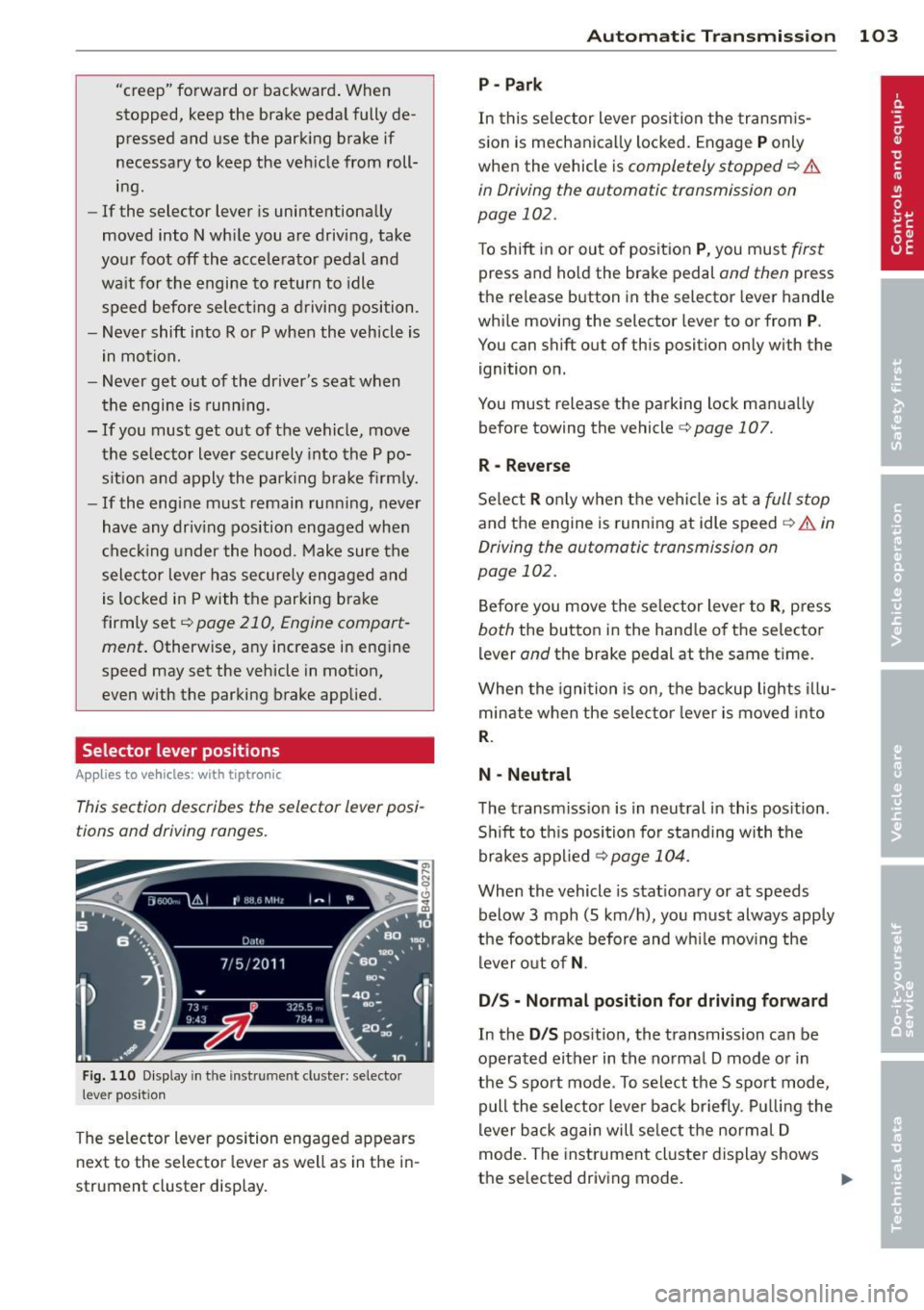
F ig . 1 10 D isplay in th e inst rument cluste r: selec to r
lever position
The selector lever position engaged appears
next to the selector lever as well as in the i n
strument cluster display.
Automatic Tra nsmi ssi on 10 3
P-Park
In this se lector lever posi tion the transm is
s ion is mechanica lly locked. Engage
P only
when the vehicle is
completely stopped ¢ &
in Driving the automatic transmission on
page 102.
To shift in or out of posit ion P , you mus t first
press and ho ld the brake pedal and then press
the re lease button in the selector lever hand le
whi le moving the selector lever to or from
P.
You can shift out of this position only with the
ignition on.
You must release the parking lock man ua lly
before towing the vehicle
c:> page 107.
R -Reverse
Se lect R o nl y when the vehi cle is at a full s top
and the engine is running at idle speed ¢ A in
Driving the automatic transmission on
page 102.
Be fore you move the se lector lever to R , press
both the button in the hand le of th e selector
lever
and the brake pedal at the same ti me .
When the igni tion is on, the backup lights illu
minate when the selec tor lever is moved into
R.
N -Neutral
The transm iss ion is in neut ral in this pos ition .
S hi ft to th is position for standing with the
brakes a pplied
¢ page 104.
When the vehicle is stat ionary or at speeds
below 3 mph (5 km/h), yo u must always apply
the foo tbrake before and w hile mov ing the
lever o ut of
N .
D/S - Normal posit ion for driving forward
In the D/S pos ition, the transmission can be
operated either in the no rmal D mode o r in
the S spo rt mode . To select the S spo rt mode,
pull the selector lever bac k br iefly . Pul ling the
lever b ack again will se lect the norma l D
mode. The inst rument cl uster display shows
the selected driving mode.
II>
Page 187 of 294

ESP includes and/or works together with the
anti-lock brake system (ABS) , brake assist sys
tem, anti -slip regulation (ASR) , e lectronic dif
ferential lock ( EDL) and e lectronic interax le
d ifferential lock* . ESP is swi tched on all the
time. In certain situat ions when you need less
traction , you can switch off ASR by pressing
the button
[ru <::;> page 186, fig . 161 . Be sure
to switch ASR on again when you no longer
n eed less t raction.
Anti-lock br aking s ystem (ABS)
ABS prevents the wheels from locking up
when braking . The veh icle can still be steered
even during hard braking . Apply steady pres
sure to the brake pedal. Do not pump the ped
a l. A puls ing in the bra ke peda l indicates that
the system is he lping you to brake the vehicle.
Brake assist system
The brake assist system can decrease brak ing
d istance.
It increases braking power when the
d river p resses the brake pedal quic kly in emer
gency situations. You must press and ho ld the
b rake peda l until the situation is over. In vehi
cles with adaptive cruise control*, the brake
assist system is more sensitive if the distance
detected to the vehicle ahead is too small.
Anti -slip regulati on (ASR )
ASR reduces engine power when the drive
wheels begin to spin and adapts the force to
the road conditions. This makes it easier to
start, accelerate and drive up hills .
Electronic differential lock (EDL )
The ED L brakes wheels that are spinn ing and
transfers the drive power to the other drive
wheel or whee ls if the vehicle is equipped with
all-whee l drive* . This function is available up
to about 75 mph (120 km/h).
I n extreme cases, ED L automat ica lly switches
off to help keep the brake on the braked whee l
from overheating . EDL will switch on again au
tomatically when conditions have returned to
normal.
Int ellig ent technolog y 185
Electronic intera xle differ ential l ock */
s el ecti ve w heel torque cont rol *
The electronic interaxle differential lock (front
whee l drive) or the se lective whee l torque
control (all-wheel dr ive) operates when dr iv
ing through curves . The front wheel on the in
s ide of the curve or both wheels on the inside
of the curve are braked selectively as needed .
T his min imizes sliding in the front wheels and
allows for more p recise d riving through
curves . T he applicable system may no t acti
vate when driv ing in wet or snowy conditions.
A WARNING
-
- ESP , ABS, ASR, EDL and the e lectronic in
teraxle diffe rential lock function* cannot
overcome the laws of physics. This is es
pecially important on slippery or wet
roads . If the systems begin acting to sta
bilize your veh icle, you shou ld immedi
ately change you r speed to match the
road and traffic cond itions. Do not let
the increased safety provided by these
systems tempt you to take risks. Do ing
so will increase the risk o f a loss of vehi
cle control, collision and serious persona l
inju ries.
-A lways adapt your speed to road, traffic
and weather conditions . The risk of los
ing control of the vehicle increases when
driving too fast, espec ially through
curves and on slippery or wet roads, and
when dr iv ing too close to vehicles up
ahead . ESP, ABS, the brake ass ist system,
EDL, ASR and the e lectronic interax le dif
fe rential lock fu nction* cannot prevent
coll is ions .
- Always accelerate with spec ial care on
even, smooth su rfaces such as those that
are wet or covered with ice and snow.
The drive wheels can spin even with these assistance systems that cannot al
ways he lp to red uce the risk of loss of ve -
hicle control. .,.
•
•
Page 189 of 294
Manual mode
-Manua l dep loyment: Tapping b riefly on the
switch
¢ fig. 162 dep loys the rear spoiler.
- Manua l retraction: A t speeds up to abo ut
10 mph (20 km/h), ret ract the rear spoiler
by pressing and holding the switch
¢ fig. 162 . At speeds between 10 mph (20
km/h) and 80 mph (130 km/h), retract the
rear spoiler by tapping on the switch
¢ fig. 162.
Ind icat or light s
1,1 /. Rea r spo ile r: sys tem malfunct ion!
The rear spoiler may not have extended due to
a ma lf u nction. This could change the vehicle 's
driving characteristics at high speeds . Do not
exceed 85 mph (140 km/h). Drive to your au
thorized Audi dealer immed iate ly to have the
malfunction corrected. The co lor of the indica
tor light depends on the ve hicle speed.
A WARNING
Dr iv ing at higher speeds w ithout the rear
spoiler dep loyed can impair handling char
acteristics, making the veh icle harde r to
cont ro l.
- Always make sure that the spoiler is de
ployed when driving at speeds over
85 mph (1 40 km/h). If the rear spoiler
warning/ind icator light in the i nstr u
ment cluster comes on, the rear spoiler
may not have dep loyed .
- Never drive at speeds higher than
85 mph (140 km/h) if the spoiler is not
deployed. Have the spoi ler inspected as
soon as possib le by an authorized A udi
dealer or qualif ied workshop.
- Always obey speed limits and other traf
fic laws.
A WARNING
Improper operation of the rear spoiler can
cause crushing injuries.
- Always make sure that nobody, espec ially
children, is in the way when the rear
spoiler is deployed or retracted.
Int ellig ent technolog y 187
@ Note
-Never push the vehicle or apply force to
the rear spoiler -it could be damaged.
- Only operate the rear spoiler manua lly
w hen the rear lid is closed . Otherwise,
damage cou ld occur.
(D Tips
C lean the spoiler compa rtment every 2 to
3 months. The spoiler compartment must
a lways be free of ice, snow, leaves or other
debris.
Braking
General information
What affects braking efficiency?
Ope rating condition s and dri ving h abit s
The brakes on today's automobiles are still
subject to wear, depending largely on operat
ing condit ions and driving habits ¢.&, . On ve
hicles that are either dr iven mostly in stop
and-go c ity traff ic or are dr iven hard, the
brake pads should be checked by your author
ized Audi dea ler more often th an specified in
the
Warran ty & Maintenan ce boo klet. Failure
to have yo ur brake pads inspected can result
in reduced brake performance .
On steep slopes, you sho uld use the braking
effect o f the engine . This way, you prevent un
necessary wear on the b rake system. If you
must use your brakes, do not hold the brakes
down cont inuous ly. Pump the brakes at inter
vals.
Mo istur e or road salt
U nder certain conditions, for example, when
driving through water or very heavy rain, or
even after washing your vehicle, the braking
effect can be reduced due to moisture (or in
freez ing cond itions ice) on the brake pads. A
few carefu l brake applications should dry off
the brake pads or remove any ice coatings.
The effectiveness of the brakes can be reduced
when the vehicle is driven on a salt-covered
Ill-
•
•
Page 190 of 294
188 Intelligent technology
road and the brakes are not used. Here too,
you should clean
off accumulated salt coating
from brake discs and pads with a few careful applications of the brake
i:> ,&. .
Corrosion
There may be a tendency for dirt to build up
on the brake pads and corrosion to form on
the discs if the car is not driven regularly or
only for short trips with little use of the
brakes .
If the brakes are not used frequently, or if cor
rosion has formed on the discs, it is advisable
to clean
off the pads and discs by braking
firmly a few times from a moderately high
speed
i:> .&. .
Faults in the brake system
If you should notice a sudden increase in
brake pedal travel, then one of the two brake
circuits may have failed
i:> ,&. .
Low brake fluid level
Malfunctions can occur in the brake system if
the brake fluid level is too low. The brake fluid
level is monitored electronically.
Brake booster
The brake booster works with vacuum pres
sure which is created only when the engine is
running
c> .&. .
Brake lining wear status
Brake lining wear may be checked by visual in
spection of the condition of the brake pads
through the openings in the wheel. If neces
sary, the wheel may be removed for this in
spection
c> page 254, Changing a wheel.
,8. WARNING
-You should perform braking maneuvers
for the purpose of cleaning the brake
system only if road conditions permit.
Other road users must not be put at risk -
you may cause an accident!
- Before descending a steep grade, reduce
speed and shift transmission into a lower
gear or lower driving range. Do not ride the brakes or hold the pedal down too
long or too often . This could cause the
brakes to get hot and diminish braking
efficiency .
- Do not "ride the brakes" by resting your
foot on the pedal when you do not intend
to brake. This may cause the brakes to
overheat, premature wear and increased
stopping distance.
- Under certain climatic and operating
conditions such as passing through wa
ter, driving in heavy rain or after washing
the vehicle, the effectiveness of the
brakes can be reduced. In winter, ice can
accumulate on the brake pads, linings,
discs and drums. Carefully apply brakes
for a test. Brakes will dry and ice coat
ings will be cleaned
off after a few care
ful brake applications.
- Driving for an extended period of time on
salt-covered roads without using your brakes can also affect braking efficiency.
Clean
off accumulated salt coating from
brake discs and pads with a few careful
brake applications.
- If you damage the front spoiler, or if you
install a different spoiler, be sure the air
flow to the front brakes is not obstruct
ed. Otherwise the brake system could
overheat reducing the effectiveness of
the entire brake system.
- Failure of one brake circuit will impair
the braking capability resulting in an in
creased stopping distance. Avoid driving
the vehicle and have it towed to the near
est Audi dealer or qualified workshop.
- Never let the vehicle roll to a stop with
the engine shut
off.
- If the brake booster is not working, for
example when towing your vehicle, or because the brake booster has somehow
been damaged, the brake pedal must be
pressed considerably harder to make up
for the lack of booster assistance .
Page 194 of 294

192 Driving and environment
Driving and
environment
The first 1,000 miles
(1,500 km) and
afterwards
New engine
The engine needs to be run-in during the first
1,000 miles (1,500 km).
For the fir st 600 miles (1,000
kilometers ):
.,. Do not use full throttle.
... Do not drive at engine speeds that are more
than 2/3 of the max imum permitted RPM.
... Avoid hig h engine speeds.
From 600 to 1,000 mile s (1 ,000 to
1,500 kilometers):
... Speeds can gradually be increased to the
max imum pe rm iss ible road or eng ine speed .
During and after break-in per iod
.,. Do not rev the engine up to high speeds
when it is cold. Th is app lies whether the
transm ission is i n N (Neutra l) or in gear.
After the break-in period
... Do not exceed maximum engine speed un
der any circumstances.
.,. Upshift into the next hig her gear
before
reaching the red area at the end of the tach
ometer scale
c:> page 10.
During the first few hours of driving, the en
g ine's interna l friction is higher than later
when all the moving parts have been broken
in . How well this break- in p rocess is do ne de
pends to a conside rable extent on th e way the
ve hicl e is driven d uring the first 1,0 00 miles
(1, 500 k ilome ters).
0 Note
E xtremely high engi ne speeds are auto
mat ica lly reduced. However, these rpm
lim its are progr amme d for an engine well
r u n- in, not a new engine .
{® For the sake of the environment
Do not drive with unnecessarily high en
g ine speeds - upshifting ear ly saves fuel,
reduces no ise and protects the environ
ment.
, New tires
If your vehicle is runni ng on new tires, drive
part icularly caref ul for the first 350 miles
(500 kilomete rs) afte r fitt ing .
A WARNING
New tires tend to be sl ippery and mus t al
so be "broken -in" . Be s ure to remember
this dur ing the fi rst 350 mi les ( 500 kilo
meters) . Brake gently . Avoid fo llow ing
closely behind other vehicles or other sit
uations that m ight require sudden, hard
braking .
New brake pads
Remember that new brake pads do not have a
full bra king effect dur ing the fi rst 250 m iles
(400 kilomete rs) afte r they a re insta lled .
New brake pads have to be "burnished in" be
fo re t hey have optima l grab
c:> A .
During the break- in period, you should avoid
putting severe loads on the brakes. Severe
l oads include, for example, sudden hard brak
i ng, in particular at very high speeds or, for
example, on mounta in passes .
A WARNING
New b rake pa ds don't have t he bes t stop
pi ng power and mus t be "broke n-in " dur
i ng the in iti al 1 00 to 150 mi les (150 to
20 0 k ilometers) of no rma l city driving . You
can compensate for this by pressing the
br ake peda l mo re f irm ly . This also applies
l ater when new pads are installed.
Page 196 of 294

194 Driving and en vironm ent
Driving through water
on roads
Note the following to avoid vehicle damage
when driving through water, for example on
flooded roads:
- The water must not be any higher than the
bottom of the vehicle body.
- Do not drive faster than wa lking speed.
A WARNING
After driving through water, mud, slush,
etc., the brakes may be slow to take effect
because of wet brake rotors and pads. Dry
the brakes first by braking carefully to re
sto re the full braking effect.
@) Note
Vehicle components such as the engine,
transmiss ion, suspension or electrical sys
tem can be severely damaged by driving
through water.
- Check the depth of the water before dr iv
i ng through it.
- Do not stop the vehicle, drive in reverse
or switch the engine off when driving
through water .
- Keep in mind that oncoming vehicles
may create waves that raise the water
level and make it too deep for your vehi
cle to drive through safely.
- Avoid dr iving through salt water because
i t can cause corrosion.
Operate your vehicle
economically and
minimize pollution
General
Your personal style of driving will determine
the economy of your vehicle, as well as ex
haust and noise levels.
Fuel economy, environmenta l impact, and
wear on your engine, brakes and tires largely
depend on three factors:
- your personal driving style
- operating conditions
- technical limitations
If you anticipate what you need to do next and
drive economically, you can easily cut your
fuel consumpt ion by 10-15 percent . This sec
t ion will give you some tips on how you can
help the env ironment and your pocketbook.
@ Tips
The consumption estimates as published
by ENVIRONMENTAL PROTECTION AGENCY
(EPA) and Transport Canada may not corre
spond to your actual consumption on the
road, which will vary depending upon vehi
cle load and speed, road and weather con
ditions, trip length, etc.
Drive smoothly and keep a lookout
ahead
Vehicles use the most fuel when they are ac
celerating.
.,. Avoid unnecessary accelerating and braking.
Vehicles use the most fuel when they are ac
ce lerating. If you anticipate what is going to
happen next, you will need to brake less and,
thus, acce lerate less . Let the vehicle coast
whenever possible - for example when you see
that the next traffic light is red.
Page 199 of 294
Trailer towing Driving with a trailer
General information
Your Audi was designed primarily for passen
ger transportation .
If you plan to tow a tra iler, p lease remember
that the addit ional load will affect durab ility,
economy and performance .
T railer towing not on ly places more stress on
the vehicle, it also calls for more concentra
tion from the driver.
F or this reason, a lways fo llow the operating
and driving instructions provided and use
common sense.
Technical requirements
Traile r hitch
Use a weight-carrying hitch conforming to the
gross trailer we ight. The hitch must be suita
b le for your veh icle and trailer and must be
mounted secure ly on t he veh icle's chassis at a
technically sound location . Use only a t railer
h itch w ith a removab le ball moun t. A lways
check with the tr ailer hitch man ufac tur er to
make sure that you are using the correct
hitch.
Do not use a bumper hitch.
T he hitc h must be installed in such a way that
it does not inte rfe re with the impac t-absorb
i ng b umper syst em. No modifica tions should
be made to the vehicle exhaus t and b rake sys
tems . From t ime to time, check that a ll hitch
mo unt ing bolt s remain securely fas tened.
W hen you are not tow ing a trailer, remove the
trai le r hi tch ball moun t. T h is prevents the
hi tch from causing damage sho uld your ve hi
cle be str uck from be hind
¢ &. .
Trailer brakes
If yo ur tra iler is equ ipped w it h a braking sys
tem, check to be su re that it conforms to a ll
r eg ulat io ns.
Trailer towin g 197
The trailer hyd ra ulic bra ke system must not be
direct ly connected to the vehicle's hydraulic
brake system .
Safety chains
Alw ays use saf ety chains between your ve hicle
and t he tra ile r.
Trailer lights
Tra iler lights must meet all reg ulations . Be
su re to check with your Audi dea ler fo r cor re ct
wir ing, swi tches and relays.
Mirrors
If you a re unable to see the traffic behind you
u sing the regula r outside m irrors, then you
must i nsta ll ext ended mir rors . It is important
t h at you
always have clea r vis ion to the rear .
.8, WARNING
-
Afte r removing the trailer hit ch, do no t
s tore i t in yo ur vehicle . In case of sudden
b raking, the h itch cou ld fly forwar d an d in
ju re you or yo ur passengers .
Operating instructions
Maximum trailer weight
A tra ile r fo r you r vehicle is limited to a ty pical
cl ass 1 or class 2 tra ile r.
Trailer load distribution
B e sure the loa d in the tr aile r is held secure ly
i n place to p reven t it from shift ing forw ard,
ba ckward or sideways.
Never allow a passenger to ride in a trailer
¢&. in Driving instru ctions on page 198.
Engine cooling system
Towing a trailer makes the engine work hard
er . It is impo rtant that the cooling system's
perfo rmance is up to the additional load .
Make sure that the coo ling syst em has enough
f lui d.
Tire pressure
When towing a trailer , inflate the tires of your
vehicle to t he cold tire pressure listed under .,..
•
•
Page 200 of 294
198 Trailer towing
"Full load" on the label located on the driver's
side B-pillar (visible when the door is open) .
Inflate trailer t ires to tra iler and t ire manufac
turers' specif ications.
Lights
Check to ma ke s ure bot h ve hicle and trailer
lights are working proper ly.
Safet y chains
Be sure tra ile r safety cha ins are prope rly con
nected from the trailer to the hi tch on the ve
h icle. Leave enough s lack in the chains to per
mit turning corners. When you install safety
chains, make sure they wi ll not drag on the
road when yo u are driving .
The cha ins shou ld cross under the tra ile r
tongue to prevent it from dropping in case o f
separation from the hitch.
Driving instructions
Driving with a trailer always requires extra
care and consideration .
To obtain the best poss ible handling of vehicle
and tra ile r, p lease no te the following:
.. Do not tow a loaded tra ile r when your car it
self is not loaded.
.,. Be especia lly ca reful whe n passing other
ve
hicles.
.. Observe speed limits .
.. Do not d rive at the maximum permissible
speed.
.. Always apply brakes early .
.. Monitor the temperature gauge.
W eight distribution
Towing a loaded trai le r with an empty ca r re
sults in a high ly unstable distribution of
weight . If this cannot be avoided, drive at
very
low speeds only to avoid the risk of losing
steering control.
A "balanced" rig is eas ier to operate and con
trol. This means that the tow vehicle should be loaded to the extent poss ible and permiss i
ble, while keeping the trailer as light as possi
b le under the circumstances . Whenever possi- ble, transfer some cargo to the luggage com
partment of the tow vehicle while observing
tong ue load requ irements and vehicle load ing
considerations.
Speed
T he higher the speed, the mo re d iff icu lt it be
comes for the driver to control the rig . Do not
drive at the maximum permissible speed . Re
duce your speed
even more if load, weather or
wind conditions are unfavorable -particularly
when going downhill .
Red uce vehicle speed
immediatel y if the trail
er shows the slightest s ign of sway ing.
Do not
try to stop the swaying by accelerating.
Observe speed limits. In some areas, speeds
for vehicles towing trai lers are lower than for
regular vehicles .
Always apply brakes early . When driving
down hill , shift into a lower gear to use the en
gine braking effect to s low the vehicle. Use of
the brakes alone can cause them to overheat
and fail.
Coolant temperatur e
The coo lant temperat ure gauge ¢ page 10
must be observed carefu lly. The coolant tem
perature can increase if you drive on long in
clines in a low gear at h igh engine speeds. Re
duce your speed immediately if the LEDs in
the top part of the d isp lay turn on .
For more information about indicator lights,
referto .¢page
15 .
A WARNING
Anyone not properly restrained in a mov
i ng vehicle is at a much greater risk in an
accident. Never let anyone ride in your car
who is not p roperly wea ring the rest raints
p rov ided by A udi.
Trailer towing tips
Important to know
Your vehicle handles differently when towing
a trai ler because of the additional weight and ..,.