steering wheel AUDI A7 2012 User Guide
[x] Cancel search | Manufacturer: AUDI, Model Year: 2012, Model line: A7, Model: AUDI A7 2012Pages: 294, PDF Size: 73.33 MB
Page 73 of 294

steering column will continue moving as long as you are pressing the switch.
There must be at least 10 inches (25 cm) be
twe en your chest and the cente r of the steer
ing wheel. If you cannot sit more than 10 in
ches (25 cm) from the steering wheel, see if
adaptive equipment is available to help you
reach the pedals and increase the distance
from the steer ing wheel.
F or detailed information on how to adjust the
driver's seat, see
r::> page 51.
In vehicles with the memory f unction*, the
steering column settings are stored together
with the seat position.
A WARNING
Improper use of steering wheel adjust
ment and improper seating position can
cause serious personal injury.
- Adjust the steering wheel column only
when the vehicle is not moving to pre
vent loss of veh icle control.
-
- Adjust the driver's seat or steering wheel
so that there is a min imum of 10 inches
(25 cm) between your chest and the
steering wheel¢
page 119, fig. 128. If
you cannot maintain this minimum dis
tance, the airbag system cannot protect
you p roperly.
- If phys ical limitations prevent you from
sitting 10 inches (25 cm) or more from
the steering wheel, check with your au
thorized Audi dealer to see if adaptive
equipment is availab le.
- If the steering wheel is aligned with your
face, the supplemental driver's airbag
cannot provide as much protection in an accident. Always make sure that the
steering wheel is aligned with your
chest.
- Always hold the steering wheel with your
hands at the 9 o'clock and 3 o'clock posi
t ions to reduce the risk of personal injury
if the driver's airbag deploys.
- Never hold the steering whee l at the 12
o'clock posit ion or w ith your hands inside
On the road 71
the steerin g wheel rim or on the steering
wheel hub. Holding the steering wheel
the wrong way can cause serious injuries
to the hands, arms and head if the driv
er 's airbag deploys.
Easy entry feature
Applies to vehicles: with electrically adjustable steer ing
wheel
The easy entry feature makes it easier to en
ter and exit the vehicle by automatically ad
justing the steering wheel.
.. Select in the MMI : ICAR lfunction button>
Car systems control button > Vehicle set
tings
> Seats > Driver's seat > Easy entry >
On.
When the easy entry feature is turned on, the
stee ring wheel moves up to the park position
when you switch off the ignition. After you en
ter the vehicle, the steering wheel moves to
the stored position as soon as you switch on
the ignit ion .
Starting and stopping
the engine
Starting the engine
This button switches on the ignition and
starts the engine.
Fig . 76 Center console: S TART ENGINE ST OP button
.. Step on the brake pedal and move the selec
tor lever to
P or N ¢ _&...
.. Press on the ~ ,s_T_A_R_T_E_N_G_I_N_E_S_T_O_P~I button
~ fig. 76 -the engine will start. ..,.
Page 77 of 294
Parking
Various rules apply to prevent the parked ve
hicle from rolling away accidentally .
Pa rkin g
.. Stop the vehicle with the foot brake .
.. Pu ll the switch(®) to apply the park ing
brake.
.. Select the
P selector lever position
~page 102 .
.. Turn the eng ine off ~,&. .
In addition on inclines and grade s
.. Turn the steering wheel so that your vehicle
will roll against the curb in case it should
start to move .
A WARNING
-When you leave your veh icle - even if on
ly b riefly - always take the ignition key
with you. This applies particu la rly when
children remain in the veh icle . Otherw ise
the chi ldren could start the engine, re
lease the parking brake or operate elec
trical equipment (e.g. power windows) .
There is the risk of an accident .
- When the vehicle is locked, no one - par
ticularly not children sho uld remain in
the vehicle. Locked doors make it more
difficult for emergency workers to get in
to the vehicle - putting lives at risk.
Starting from rest
The star ting assis t func tion ensures tha t the
parking brake is released automatically upon
starting .
Stopp ing and appl ying park ing b rake
.. Pull the switch<®) to apply the park ing
brake.
Startin g and automatically relea sing the
pa rking br ake
.. When you start to drive as usua l, the park
ing brake is automatically re leased and your
vehicle begins to move.
On th e ro ad 75
When stopping at a traffic signal or s topping
in city traffic, the parking brake can be ap
plied. The vehicle does not have to be he ld
with the footbrake . The parking brake elimi
nates the tendency to creep w ith a dr ive range
engaged. As soon as you drive off as usual,
the parking brake is released automatically
and the veh icle starts to move .
Starting on slope s
When starting on inclines, the starting assist
prevents the vehicle from un intent ionally roll
i ng back. The braki ng force of the parking
brake is not released unti l suff ic ient driving
fo rce has been built up at the wheels .
(D Tips
For safety reasons, the parking brake is re
leased automatically only when the d riv
er's safety belt is engaged in the buckle.
Starting off with a trailer
To prevent rolling back unintentionally on an
incline, do the following:
.. Keep the switch<®> pulled and depress the
accelerato r. The parking brake stays applied
and prevents the vehicle from roll ing back
ward .
.. You can release the switch<®) once you are
sure that you are developing enough for
wa rd momentum at the whee ls as you de
press the acce lerator .
Depend ing on the weight of the rig (veh icle
and t ra iler) and the severity of the incline, yo u
may ro ll backwards as yo u start . You can pre
vent rolling backwards by holding the parking
brake switch (®) pulled out and accelerating -
just as you would when starting on a hill with
a conventiona l hand brake.
Page 84 of 294

82 Adaptive cruise control and braking guard
Setting the speed and activating
regulation
.. To set the current speed, press the I SET !
button ¢ fig. 85. The set speed is shown in
the tachometer @and in the display
¢
fig . 86. You must also press the brake
pedal when the vehicle is stopped.
Switching adaptive cruise control off
.. Push the lever away from you into position
@ until it clicks into p lace. The message
ACC off appears.
Indicator lamps and messages in the instru
ment cluster display inform you about the cur
rent system status and settings.
@ Indicator lights
II -adaptive cruise control is switched on. No
vehicles are detected up ahead. The stored
speed is ma intained.
I -A moving vehicle is detected up ahead.
The adaptive cruise control system regulates
the speed and distance to the moving vehicle
ahead and acce lerates/brakes automat ically.
fij-adaptive cruise control is switched on. A
moving vehicle up ahead was detected. Your
vehicle remains stopped and will not start driving automatically.
I-When a utomat ic brak ing is not able to
keep enough distance to a previously detected
moving vehicle up ahead, you must take con
trol and brake¢
page 83, Prompt for driver
intervention.
© Display
If adaptive cruise control is not shown in the
display, you can call it up with the multifunc
tion steering wheel buttons¢
page 22.
Based on the symbo ls in the display, you can
determine if the system is main taining a dis
tance to the vehicle ahead and what that dis
tance is .
No vehicle -No vehi cle ahead was detected.
White vehicle -A vehicle ahead was detected.
Red vehicle -Prompt for the driver to take ac
tion ¢
page 83 .
Both arrows on the scale © indicate the dis
tance to the vehicle ahead. No arrow appears
when the vehicle is on an open road and the re
is no object ahead. If an object is detected
ahead, the arrow moves on the scale.
T he green zone on the scale shows the stored
distance . For information on changing the
stored distance ¢
page 84. If the distance
selected is too close or may soon become too
close, the arrows move into the red zone on
the scale.
A WARNING
Improper use of the adaptive cruise con
trol can cause collisions, other accidents
and serious personal injur ies.
- Pressing the
!SET ! button when driv ing at
speeds below
20 mph (30 km/h), w ill au
tomatically accelerate the vehicle to
20
mph (30 km/h), which is the minim um
speed that can be set.
(D Tips
-If you switch the ignit ion or the adaptive
cruise contro l off, the set speed is e rased
from the system memory.
- You cannot switch the Electron ic Stabili
zation Program (ESP) to the SPORT mode
when adaptive cruise control is sw itched
on.
Driving in stop-and-go traffic
Applies to vehicles: with adaptive cruise control
The adaptive cruise control system also as sists you in stop-and-go traffic. If a previous
detected vehicle ahead stops, your vehicle will
brake to a stop, within the limits of the sys
tem.
.. To resume driving with adaptive cruise con
trol, tap the acce lerator pedal or
.. Pull the lever toward you into position @
¢ page 81, fig. 85. .,.
Page 100 of 294
98 Night vision assistant
Night vision assistant
Night vision assistant
with detected pedestrian marking
Description
App lies to vehicles: with night v isio n ass istant
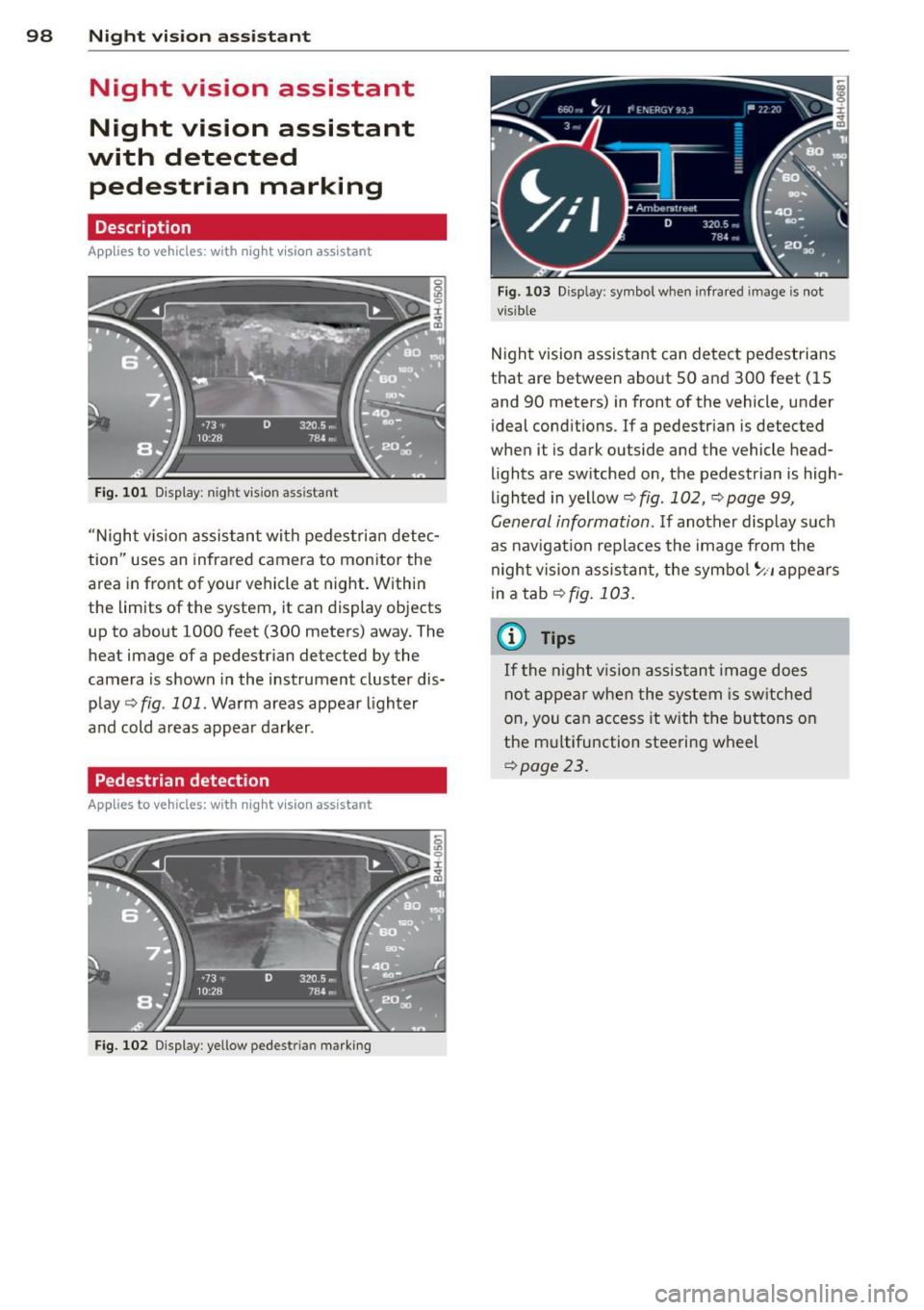
Fig. 101 D isplay: n ight vis ion assistant
"N ight v is ion assistant with pedestrian detec
tion" uses an infrared camera to monitor the
area in front of your vehicle at night. Within
the limits of the system, it can display objects
up to about 1000 feet (300 meters) away. The
heat image of a pedestrian detected by the
camera is shown in the instrument cluster dis
play
q fig. 101. Warm areas appear lighter
and cold areas appear darker .
Pedestrian detection
Applies to vehicles: with n ig ht v ision ass istant
Fig. 102 Display : yellow pedestrian marking
Fig. 103 Disp lay: symbo l w hen infrare d im age is not
visible
Night vision assistant can detect pedestrians
that are between about SO and 300 feet (15
and 90 meters) in front of the vehicle, under
ideal conditions . If a pedestrian is detected
when it is dark outside and the vehicle head
lights are switched on, the pedestrian is high
lighted in yellow
q fig. 102, q page 99,
General information. If another display such
as nav igation replaces the image from the
night vision assistant, the symbol
~11 appears
in a tab
qfig. 103.
(0 Tips
If
th e night vi.sion assistant image does
not appear when the system is switched
on, you can access it with the buttons on
the multifunction steering wheel
qpage 23.
Page 108 of 294

106 Autom atic Tran smissi on
To d ownsh ift
.,. Push the lever to the m inus position 0 -
When acce lerat ing, the transm iss ion w ill au
tomatically sh ift into the next gear befo re the
engine reaches its maxim um RPM.
If you apply a light throttle when accelerat ing , tiptronic will automatically shift from 1st
to 2nd gea r to save fuel.
If you apply a heavy
thrott le, the transmission will stay in 1st gear
unti l near maximum RPM is reached, or unt il
the driver shifts into 2nd gear .
If you take your foot off the accelerator peda l
when dr iving down a steep i ncl ine, tiptronic
will downshift from the selected gear into the
next lower gear until it reaches 1st gear,
based on road speed and engine RPM. Auto
matic downshifting is interrupted as soon as
you apply the throttle again.
(D Tips
- When you shift into the next lower gear,
the transmiss ion will downshift only
when there is no possibility of over-rev
v ing the engine.
- When the kick-down comes on, the transmission will sh ift down to a lower
gear, depending on vehicle and engine
speeds.
- tiptronic is inoperative when the trans
mission is in the fail-safe mode .
Steering wheel with tiptronic
Applies to vehicles: with tiptron ic steer ing wheel
The shift buttons on the steering wheel allow
the driver to shift gears manually .
Fig. 1 14 Stee ring wheel: Sh ift butto ns
.,. To downshift, touch the button on the left
0 -
.,. To upshift, touch the button on the r ight
0 -
The shift buttons are activated when the se
lector lever is in
D /S or in the manual shift
program (tiptronic).
Of course , you can continue to use the manua l
shift program with the selector lever on the
center console.
Transmission malfunction
Applies to vehicles: with tiptronic
[O] Transm iss ion : pleas e pre ss the br ake ped
al and select the pos ition again
Press the brake pedal and select the desired
selector lever position again. You can then
continue driving.
[O] Tran smi ssio n hot: ple ase m odify dri ving
style
The transm iss io n temperat ure has in cr eased
s ignificantly due to the spor ty driving manner.
Drive in a less sporty ma nner until the tem
perature returns to the normal range and the
indicator light switches of.
[O] Transmi ssion malfun ction: You can c on
tinue driv ing
T he re is a system malfunction i n the t ransm is
s ion. You m ay cont inue drivi ng. Drive to you r
authorized Aud i dea ler o r qualified repa ir fa
c il ity soon to have the malfunction corrected.
[O] Transmis sion malfun ction: Limited driv
ing functionality
There is a system malfunction in the t ransm is
s ion . The transm ission is switching to emer
gency mode . This mode o nly shifts into ce r
ta in gears o r will no longer shift at all. The en
gine may sta ll. Drive to your authorized Audi
dealer or qualified repair faci lity immediately
to have the malfunction corrected .
[O] Transmi ssion malfunc tion: St op and shift
~p ~
Page 114 of 294
112 Park in g s ystem
Reverse Park ing
App lies to vehicles: with park ing system p lus w it h rear
view ca mera
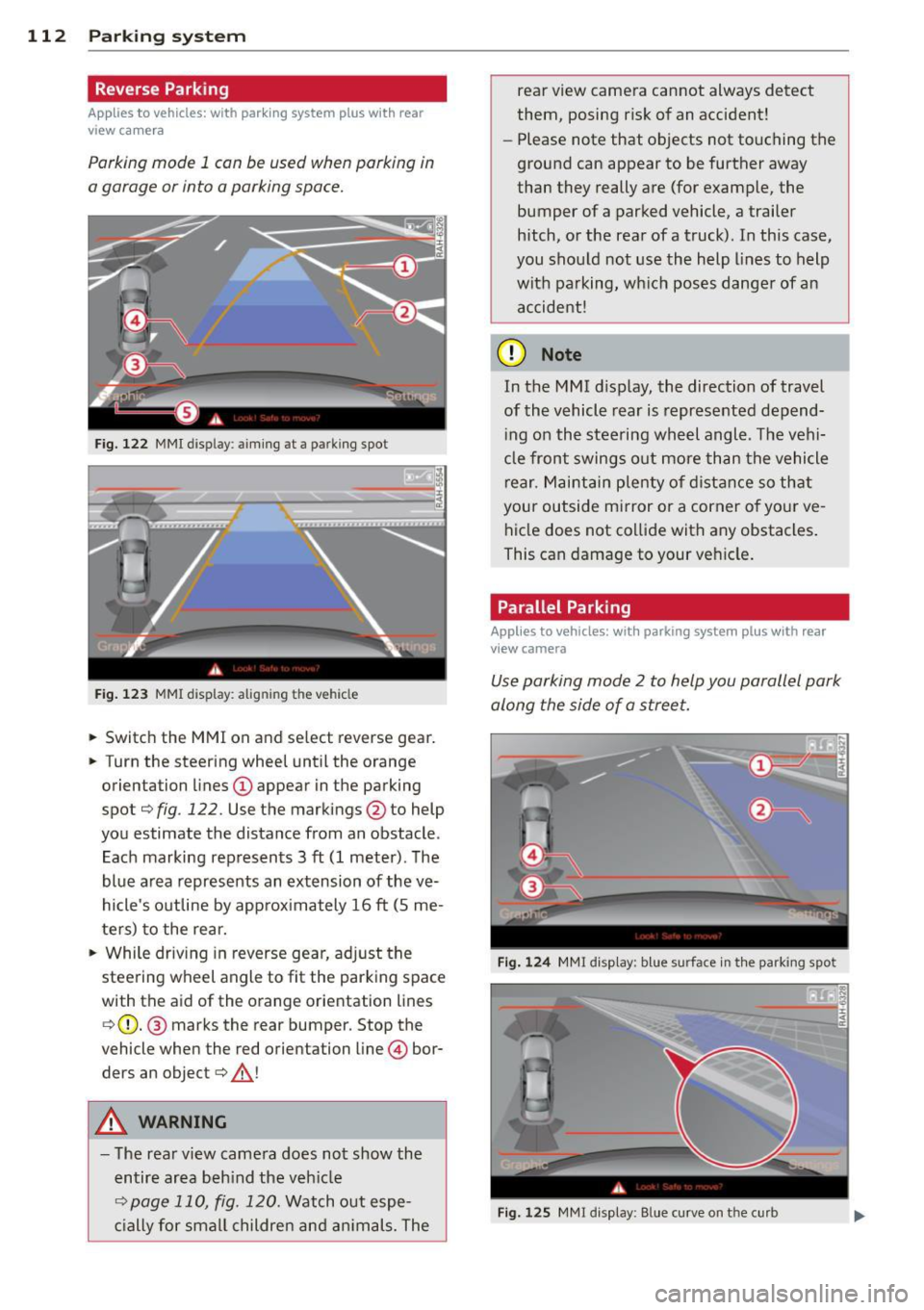
Parking mode 1 con be used when parking in
a garage or into a parking space.
Fig. 122 MMI display : aiming at a parking spot
Fig . 123 MMI display: alig nin g th e veh icle
... Switch the MMI on and select reverse gear .
... Turn the steering wheel until the orange
orientation lines
(D appear in the parking
spot¢
fig . 122. Use the markings @to help
you estimate the distance from an obstacle .
Each marking represents 3
ft (1 meter). The
blue area represents an extension of the
ve
hicle's outline by approx imately 16 ft (5 me
ters) to the rear.
"' While driv ing in reverse gear, ad just the
steering wheel angle to fit the parking space
with the aid of the orange orientation lines ¢ (D. @ marks the rear bumper. Stop the
vehicle when the red orientation line © bor
ders an object¢ .&_!
A WARNING
-The rear view camera does not show the
entire area beh ind the veh icle
¢ page 110, fig. 120. Watch out espe
c ially for small childre n and an imals. The rear view camera cannot always detect
them, posing risk of an accident!
- Please note that objects not touching the
ground can appear to be further away
than they really are (for example, the
bumper of a parked vehicle, a trailer
hitch, or the rear of a truck). In this case,
you shou ld not use the help lines to help
with pa rking, wh ich poses danger of an
accident!
(D Note
In the M Ml d is play , the direction of travel
of the vehicle rear is represented depend
i ng on the steering wheel angle . T he vehi
cle front swings o ut more than the vehicle
rear. M aint ain plenty of dista nce so th at
your outside mirror or a corner o f you r
ve
hicle does not co llide with any obstacles .
This can damage to your ve hicle .
Parallel Parking
Applies to vehicles: wit h parking system plus with rea r
v iew camera
Use parking mode 2 to help you parallel park
along the side of a stree t .
F ig . 124 MMI disp lay: b lue surface in th e parking spot
Fig . 125 MM! display : B lue curve on th e curb
Page 115 of 294

The following steps apply only when there is
no obstacle such as a wall near the parking
spot. Otherwise, please read the information
prov ided in the "Parking Next to Obstacles"
section
c::> page 113.
~ Activate the turn signal.
~ Position your vehicle parallel to the edge of
the street, approximately 3 ft (1 meter)
from a parked vehicle.
~ Switc h the MMI on and se lect reverse gear.
The parking aid tu rns o n and parking mode
1 appears on the display .
~ Press the contro l bu tton (D c::> fig. 124 on
the MMI contro l conso le. Parking mode 2
appea rs .
~ Back up and align your vehicle so t he blue
area @ borders on the rear end of the vehi
cle or on the parking spot line. The blue area
represents an extension of the vehicle's out
line by approximate ly 16 ft (5 meters) to the
rear. The long side of the blue area should
be o n the curb . The entire blue area must fit
i nto the parking spot .
~ With the vehicle stopped, turn the steer ing
whee l to the right as far as it w ill go.
~ Back into the park ing spot until the blue
cu rve to uches the curb
c::> fig. 125. Stop the
vehicle.
~ With the veh icle stopped, turn the steering
wheel to the left as far as it will go.
~ Continue to back into the parking spot until
the vehicle is parked para llel to the curb. @
marks the rear bumper. Stop the vehicle
when the red orientation line@ borde rs an
object
c::> .&, . Keep an eye o n the fron t of
yo ur vehicle while do ing this
c::> (j) .
Parking next to obstacles
When t here is an obstacle (such as a wall)
next to the pa rking spot, choose a spot wit h
mo re space on t he sides. Pos ition the long
side of the b lue a rea so that there is sufficient
space from the curb. The a rea m ust no t be on
the c urb. You w ill also need to start turn ing
the steering wheel much earlier. T he re should
be a suffic ient amo unt of space between the
curb and the blue c urve, and the blue cu rve
c::> fig. 125 must not touch the curb.
Parking system 113
A WARNING
-The rear view camera does not show the
entire area behind the vehicle
c::> page 110, fig. 120. Watch out espe
cially fo r small children and anima ls. The
rea r view ca m era ca nnot alway s de te ct
them, posing r is k of an a ccident!
- P lease note that objects not touching the
g rou nd can appear to be further away
than they really are (for example, the
bumper of a parked vehicle, a trai ler
hitch, or the rea r of a truck) . In this case,
you shou ld not use the help lines to help
with parking, wh ich poses danger of an
accident!
(D Note
In the MMI display, the direction of travel
of the vehicle rear is represented depend
i ng on the steering wheel angle. The vehi
cle front swings o ut more than the vehicle
rear. Maintain ple nty of d istance so that
your outside mirror or a corner of your ve
hicle does not col lide with any obstacles.
T his can damage to your ve hicle.
(0 Tips
The left o r right orientation lines and su r
faces will be disp layed, depending on the
turn s ignal being used.
Adjusting the display
and warning tones
App lies to v ehicl es: wi th parkin g sys tem pl us or parkin g
system plus wit h rear view ca mera
The display and warning tones can be adjust
ed in the MMI .
~ Select:!CAR !function button> Car sy stem s
cont ro l butto n > Driv er a ssist > Parking aid
> Setting s control b utton .
Display
On* -turns o n the visual d isplay for parking
system p lus and shows the rearview came ra
image for the par king system p lus w ith rea r
view came ra*. ..,
Page 121 of 294
.. Make sure to use the right child restraint
correct ly to protect children
Q page 163,
Child Safety.
.. Sit properly in your seat and make sure that
your passengers do the same¢
page SO,
General recommendations .
.. Faste n your safety belt and wear it properly.
Also instruct your passengers to fasten their
safety belts properly ¢
page 128.
What impairs driving safety?
Safe driving is directly related to the condi
tion of the vehicle, the driver as well as the
driver 's ability to concentrate on the road
without being distracted.
The driver is respons ible for the safety of the
veh icle and all of its occupants.
If your ability
to drive is impai red, safety r isks for everybody
in the vehicle increase and you also become a
hazard to everyone else on the road ¢ _&. .
Therefore:
.. Do not let yourself be dist racted by passen
gers or by using a cellular telephone.
.. NEVER drive when your driving ability is im
paired (by medications, alcohol, drugs, etc.).
.. Observe all traffic laws, rules of the road
and speed limits and plain common sense .
.. ALWAYS adjust your speed to road, traffic
and weather conditions .
.,. Take frequent breaks on long trips . Do not
drive for more than two hours at a stretch.
.. Do NOT drive when you are tired, under
pressure or when you are stressed.
A WARNING
Impaired driving safety increases the risk
of serious personal injury and death when
ever a vehicle is being used.
Driving Safely 119
Proper occupant
seating positions
Proper seating position for the driver
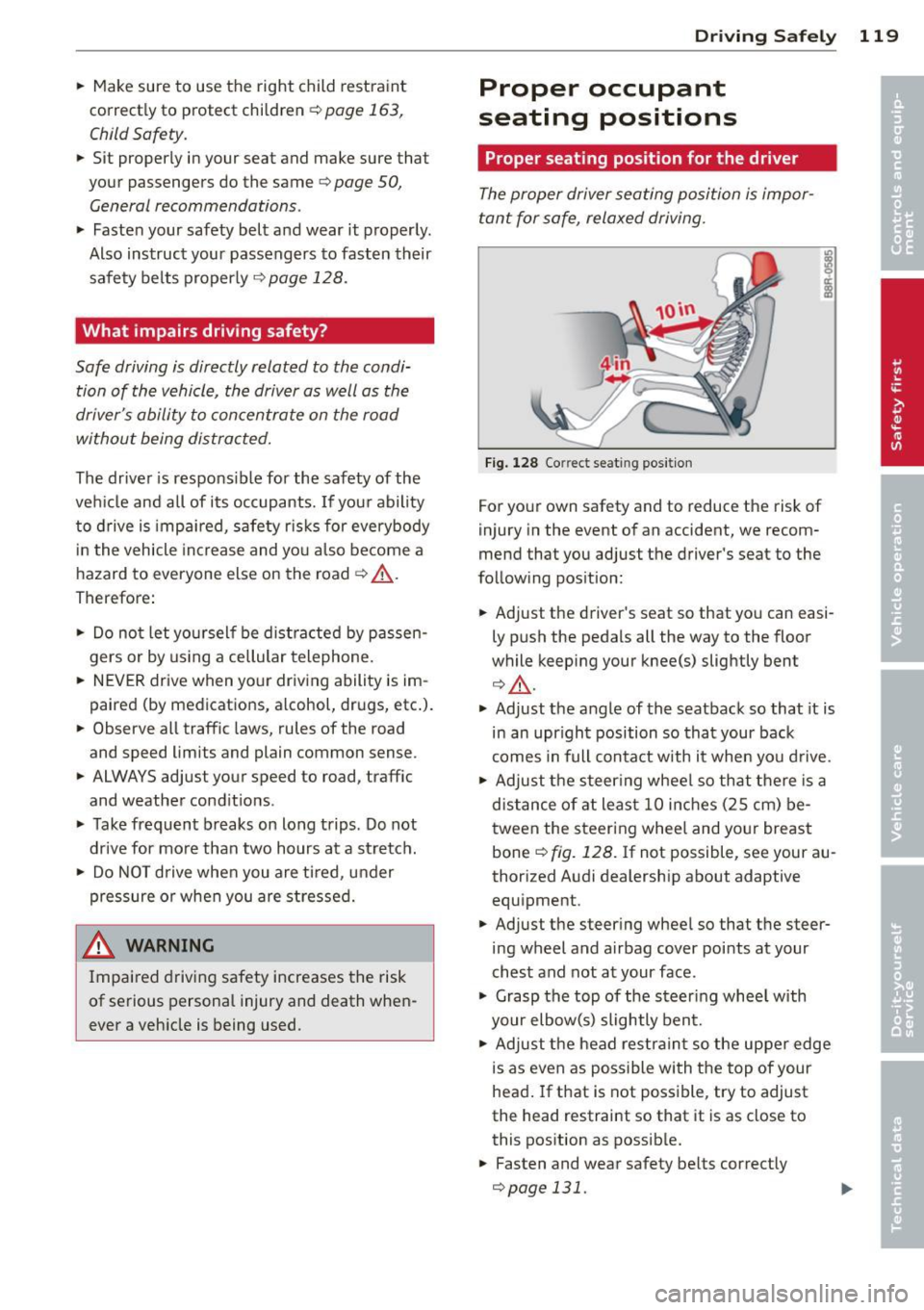
The proper driver seating position is impor
tant for safe, relaxed driving .
Fig. 128 Correct seat ing pos it ion
For your own safety and to reduce the risk of
injury in the event of an accident, we recom
mend that you adjust the driver's seat to the
follow ing pos ition:
.. Adjust the driver's seat so that you can easi
ly push the pedals all the way to the floor
wh ile keeping your knee(s) slightly bent
¢ _&. .
.. Adjust the angle of the seatback so that it is
in an upr ight position so that your back
comes in full contact w ith it when you drive.
.. Adjust the steering wheel so that there is a
distance of at least 10 inches (25 cm) be
tween the steering wheel and yo ur breast
bone
Q fig. 128. If not possible, see your au
thorized Audi dealership about adaptive
equipment .
.. Adjust the steer ing wheel so that the steer
ing wheel and airbag cover points at your
chest and not at your face.
.,. Grasp the top of the steering whee l with
your elbow(s) slightly bent.
.. Adjust the head restraint so the upper edge
is as even as possible with the top of your
head. If that is not poss ible, try to adjust
the head restraint so that it is as close to
this position as possible .
.. Fasten and wear safety belts correctly
¢page 131.
Page 122 of 294
120 Driving Safely
• Always keep both feet in the footwell so
that you are in control of the vehicle at all
times.
For detailed information on how to adjust the
driver's seat, see
¢ page 51.
A WARNING
Drivers who are unbelted, out of position
or too close to the airbag can be seriously
injured by an airbag as it unfolds. To help
reduce the risk of serious personal injury:
- Always adjust the driver's seat and the
steering wheel so that there are at least
10 inches (25 cm) between your breast
bone and the steering wheel.
- Always adjust the driver's seat and the
steering wheel so that there are at least
4 inches (10 cm) between the knees and
the lower part of the instrument panel.
- Always hold the steering wheel on the
outside of the steering wheel rim with
your hands at the 9 o'clock and 3 o'clock positions to help reduce the risk of per
sonal injury if the driver's airbag inflates.
- Never hold the steering wheel at the
12 o'clock position or with your hands at
other positions inside the steering wheel
rim or on the steering wheel hub. Hold
ing the steering wheel the wrong way
can cause serious injuries to the hands,
arms and head if the driver's airbag in
flates.
- Pointing the steering wheel toward your
face decreases the ability of the supple
mental driver's airbag to protect you in a
collision.
- Always sit in an upright position and nev
er lean against or place any part of your
body too close to the area where the air
bags are located.
- Before driving, always adjust the front
seats and head restraints properly and
make sure that all passengers are prop
erly restrained.
- Never adjust the seats while the vehicle
is moving. Your seat may move unexpect- edly and you could lose control of the ve
hicle .
- Never drive with the backrest reclined or
tilted far back! The farther the backrests
are tilted back, the greater the risk of in
jury due to incorrect positioning of the safety belt and improper seating posi
tion .
- Children must always ride in child seats
¢
page 163. Special precautions apply
when installing a child seat on the front passenger seat¢
page 137.
Proper seating position for the front
passenger
The proper front passenger seating position
is important for safe, relaxed driving .
For your own safety and to reduce the risk of
injury in the event of an accident, we recom
mend that you adjust the seat for the front
passenger to the following position :
• Adjust the angle of the seatback so that it is
in an upright position and your back comes in full contact with it whenever the vehicle is
moving.
• Adjust the head restraint so the upper edge
is as even as possible with the top of your
head. If that is not possibl e, try to adjust
the head restraint so that it is as close to
this position as possible
¢page 122.
• Keep both feet flat on the floor in front of
the front passenger seat .
• Fasten and wear safety belts correctly
¢page 131.
For detailed information on how to adjust the
front passenger's seat, see
¢ page 50 .
A WARNING
-
Front seat passengers who are unbelted,
out of position or too close to the airbag
can be seriously injured or killed by the air
bag as it unfolds. To help reduce the risk of
serious personal injury:
Page 132 of 294

130 Safety belts
occupant will slam violently into the steering
wheel, instrument panel, windshield, or what
ever else is in the way
c::> fig. 133. This imp act
with the vehicle interior has all the energy
t hey had just before the crash.
Never rely on a irbags alone for protection.
Even when they deploy, airbags provide only
additional protection. Airbags are not sup
posed to deploy in all kinds of accidents. Al
though your Audi is equipped with airbags, all
vehicle occupants, including the driver , must
wear safety belts correctly in order to mini
mize the risk of severe injury or death in a
crash.
Remember too, that airbags will deploy only
once and that your safety belts are always
there to offer protection in those accidents in
which airbags are not supposed to deploy or
when they have already deployed . Unbelted
occupants can also be thrown out of the vehi
cle where even more severe or fatal injuries
can occur.
It is also important for the rear passengers to
wear safety belts correctly. Unbelted passen
gers in the rear seats endanger not only them
selves but also the driver and othe r passen
gers ~
fig. 134. In a frontal collision they will
be thrown forward violently, where they can
hit and injure the driver and/or front seat pas
senger .
Safety belts protect
People think it's possible to use the hands to
brace the body in a minor collision . It's simply
not true !
Fig. 135 Driver is co rr ect ly re strain ed in a sudd en brak
ing maneuve r
Safety belts used properly can make a big dif
ference. Safety belts help to keep passengers
in their seats, gradually reduce energy levels
applied to the body in an accident, and help
prevent the uncontrolled movement tha t can
cause serious injuries . In addition, safety belts
reduce the danger of being thrown out of the
vehicle .
Safety belts attach passengers to the car and
give them the benefit of being slowed down
more gently or "softly" through the "give" in
the safety belts, crush zones and other safety
features engineered into today's vehicles. By
"absorbing " the kinetic energy over a longer
period of ti me, the safety belts make the
forces on the body more "tolerable" and less
likely to cause injury.
Although these examples are based on a fron
tal collision, safety belts can also substantial
ly reduce the r isk of injury in other kinds of
crashes. So, whether you're on a long trip or
just going to the corner store, always buckle up and make sure others do, too. Accident sta
tistics show that vehicle occupants properly
wearing safety belts have a lower risk of being
injured and a much better chance of surviving
an accident. Properly using safety belts also
greatly increases the ability of the supplemen
tal airbags to do their job in a collision . For
this reason, wearing a safety belt is legally re
quired in most countries including much of
the United States and Canada.
Although your Audi is equipped with airbags,
you still have to wear the safety belts provid
ed. Front airbags , for example, are activated
only in some frontal collisions. The front air
bags are not activated in all frontal collisions,
in side and rear collisions, in roll overs or in
cases where there is no t enough decelera tion
through impact to the front of the vehicle .
The same goes for the other airbag systems in
your Audi . So, always wear your safety belt
and make sure everybody in your vehicle is
properly restrained!