turn signal AUDI A7 2012 User Guide
[x] Cancel search | Manufacturer: AUDI, Model Year: 2012, Model line: A7, Model: AUDI A7 2012Pages: 294, PDF Size: 73.33 MB
Page 91 of 294

-Side assist signal does not work around
tight corners (turning radius less than
328 feet or 100 m).
- Side assist is no replacement for the driv
er's full attention. The driver alone is re
sponsible for lane changes and similar
driving maneuvers. Always keep an eye on the direction you are traveling and the
relevant area around the vehicle.
(D Note
- To ensure that you do not adversely af
fect side assist, do not block the area on
the rear bumper where the radar sensors
are located with foreign objects (such as
stickers or bicycle racks).
- Make sure that the signal light on the
outside mirror is not blocked by stickers
or other items.
(D Tips
- Side assist automatically deactivates if it
detects that the radar sensors are
blocked¢
page 94. The indicator light
on the button goes out.
- The area on the bumper where the radar
sensors are located must consistently re
main free of snow, ice, and heavy soiling
so that side assist can function properly.
Follow the additional notes on
¢ page 94.
- Additional tinting on the front side win
dows can make it harder to see and cor
rectly understand the signal light on the
outside mirror.
- For Declaration of Compliance to United
States FCC and Industry Canada regula
tions
Q page 2 76.
Audi side assist 89
Sensor detection area
Applies to vehicles: with side assist
Fig. 93 Schematic illustrat ion : Sensor detection a rea
The detection ¢ fig. 93 of the radar sensor de
tection area is made up of:
- the approach area (light red area)
(D, about
230 feet (70 m) behind the vehicle, and
- the "blind spot" (dark red area) @.
Th e radar sensors cover the adjacent left and
r ight lanes. Other lanes are
not covered by the
radar sensors.
(D Tips
Side assist does not measure actual lane
width. The system assumes a fixed lane
width. Detection in the left and right lanes
is based on this assumed lane width.
When driving on narrow roads or when
driving to the left or right of the center of
a travel lane, it is possible that vehicles
will be detected that are
not in the lane
next to the lane you are using
~page 93.
Operation
Applies to vehicles: with side assist
Side assist compares the distance and differ
ence in speed of detected vehicles with the
speed of your vehicle. Whenever the differ
ence in speed and distance is registered as no
table if you were to change lanes, a signal
light appears on the respective mirror.
The signal can light up if you are passed by a
vehicle or if you are passing another vehicle.
If you pass another vehicle slowly (difference
in speed less than 9 mph, or 15 km/h), the ..,.
Page 92 of 294

90 Audi side assist
signal light will come on as soon as the other
vehicle is in your blind spot and is detected by
side assist. When the difference in speed is
greater, the signa l light will not come on.
Informational and alert stage signals
Applies to vehicles: with side assist
Side assist has two s ignal stages:
- the informational stage signal, and
- the a le rt stage signa l.
Side assist helps you by using the appropriate
signal stage, depending on whethe r or not
you have activated the turn signal, and thus
have indicated that you are or are not chang
ing lanes.
Informational stage signal
As long as you have not activated the turn sig
nal, side assist informs you of detec ted vehi
cles that are registered as being in a notable
l ocation if you were to change lanes. Whenev
er the detected vehicle's difference in speed
and distance is registered by side assist as no
table, the signal light on the respective m irror
produces muted illumination.
The brightness of the informational stage sig
na l is designed not to be as intense, so that it
does not interfere with your view of the road
when you are driving and have no intention of
changing lanes. When you look in the outside
mirror, you can clearly see the informat ional
stage signal.
Alert stage signal
When you activate the turn signal, and side
assist has detected a vehicle in a notable loca
tion on that part icular side, the signal l ight on
this side mirror flashes bright ly . The repeated
brief and bright flashing of the alert stage
signal reminds you to carefully check traffic to
the rear in the outside mirror and over your
shoulder, so that yo u can safely complete the
lane change
c::> & in Safety tips on page 94.
(D Tips
The brightness of the signal light on the
outside m irrors can be adjusted with the
MMI c::> page 93.
Driving situation: Fast approaching
vehicles
Applies to vehicles: with side assist
©
@
Fig. 94 Side ass ist: Fast approach ing ve hicles
@ Signal on outside mirror does not light
up
No vehicle was detected by the sensors . The
signal on the o utside mirror does not light up
c::> & in Safety tips on page 94.
@ Informational stage signal lights up
A fast approaching vehicle - in the left-hand
lane for example - was detected by the sen
sors . Although this vehicle is still far away, it
should be taken into account if yo u were to
change lanes, due to the considerab le differ
ence in speed. The informational stage s ignal
on the outside mirror lights up
c::> page 90 . ..,.
Page 93 of 294
@ Alert stage signal flashes
If you activate your turn signal in driving sit
uation @, the signa l briefly f lashes repeated
ly. Side assist is a lerting yo u to a vehicle that
you may not have noticed.
@ Tips
- The faster a vehicle approaches from the
rear, the sooner the signa l on the outside
mirror lights up. Side assist will signa l,
at the latest, when a detected vehicle en
ters your "blind spot".
- When vehicles approach very quickly,
changing lanes can be dangerous even if
the signal on the outside mirror does not
light up.
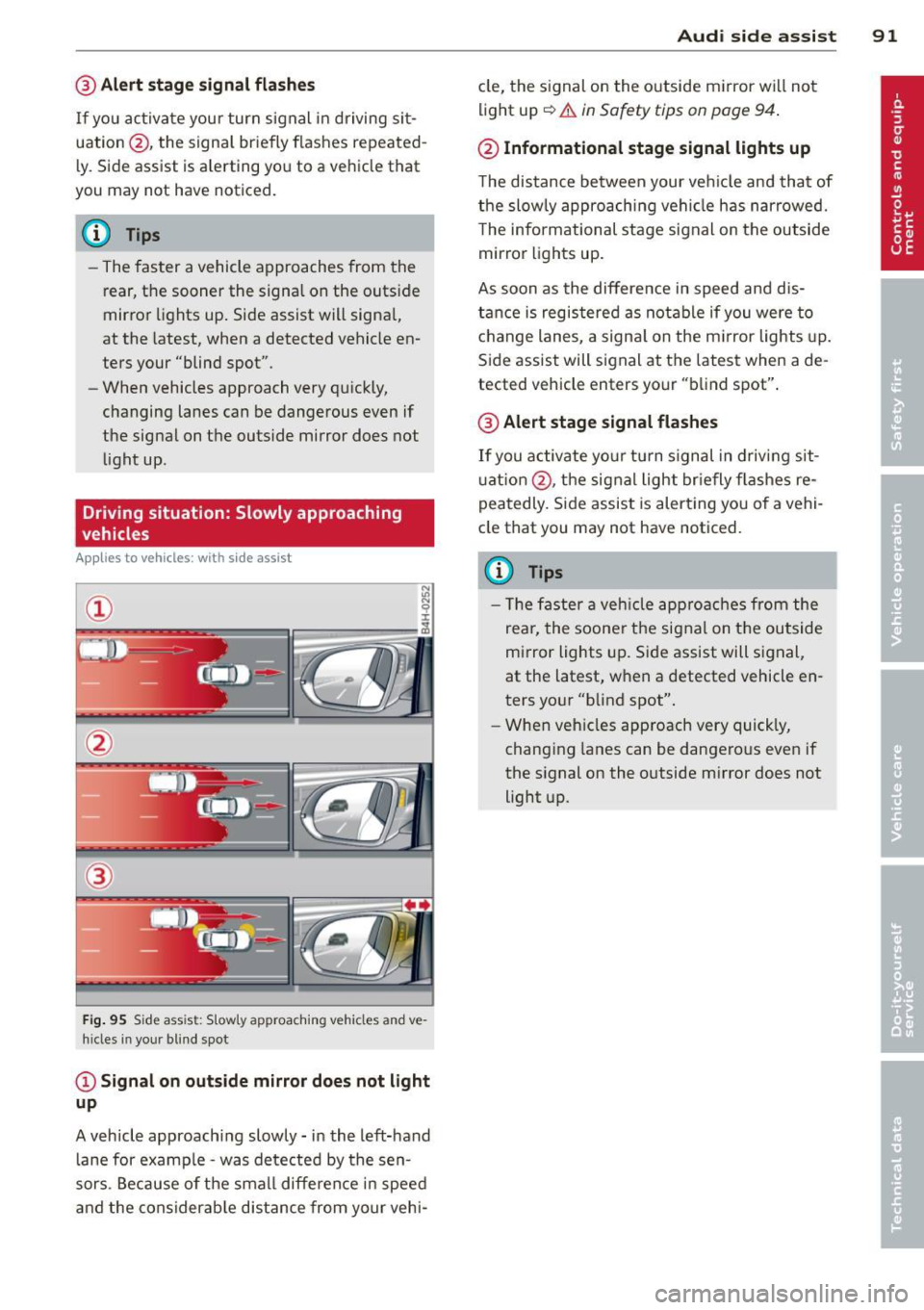
Driving situation: Slowly approaching
vehicles
Appl ies to vehicles : wit h side ass ist
®
F ig . 95 S ide ass ist: S lowly approaching vehicles and ve·
h ides in your blind spot
@ Signal on outside mirror does not light
up
A vehicle approaching slowly -in the left-hand
lane for examp le -was detected by the sen
sors. Because of the small difference in speed
and the considerab le distance from your vehi-
Audi side assist 91
cle, the signal on the outside mirror wi ll not
light up
~.& in Safety tips on page 94 .
@ Informational stage signal lights up
The distance between your ve hicle and that of
the slowly approaching vehicle has narrowed.
T he informational stage signal on the outside
mirror lights up.
As soon as the difference in speed and dis
tance is registered as notable if you were to
change lanes, a signal on the m irror lights up.
Side assist will signal at the latest when a de
tected vehicle enters your "blind spot".
@ Alert stage signal flashes
If you activate your turn signal in driving sit
u ation @, the signal light briefly fla shes re
peatedly. Side assist is alert ing you of a vehi
cle that you may not have noticed.
(D Tips
- Th e faster a vehicle approaches from the
rear, the soone r the signal on the outside
mirror lights up. Side assist will signal,
at the latest, when a detected vehicle en
ters your "blind spot".
- When vehicles approach very quickly,
changing lanes can be dangerous even if
the signal on the outside m irror does not
light up.
Page 94 of 294
92 Audi side assist
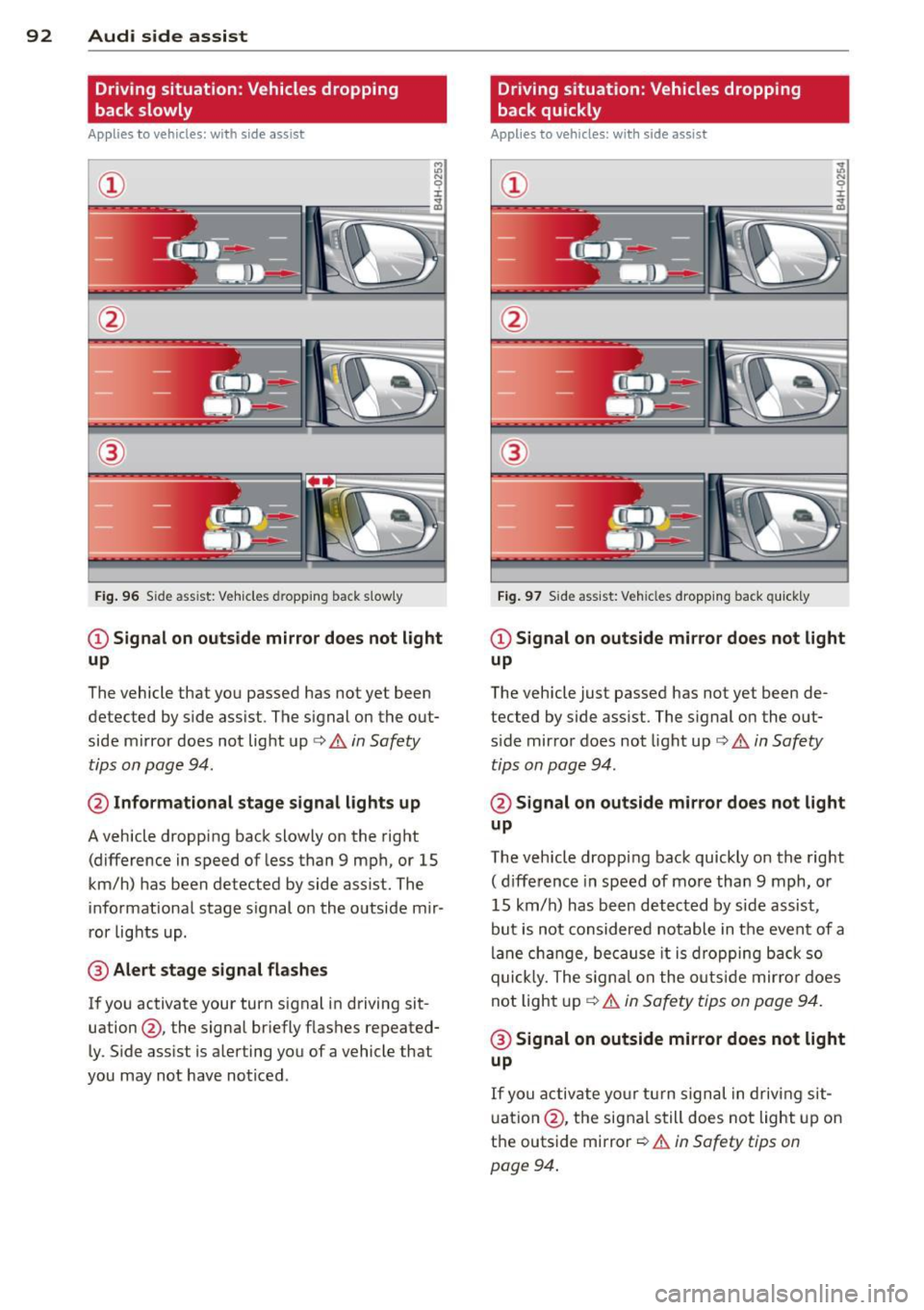
Driving situation: Vehicles dropping
back slowly
Applies to vehicles: with side assist
i:i N 9 J:
-------::~
®
Fig. 96 Side ass ist: Veh icles d ropping back slow ly
CD Signal on outside mirror does not light
up
The vehicle that you passed has not yet been
detected by side assist . The signal on the out
side mirror does not light up¢
A in Safety
tips on page 94.
@ Informational stage signal lights up
A vehicle dropping back slowly on the right
(difference in speed of less than 9 mph, or 15
km/h) has been detected by side assist. The
informational stage signal on the outside mir
ror lights up.
@ Alert stage signal flashes
If you activate your turn signal in driving sit
uation@, the signal briefly flashes repeated
ly. Side assist is alerting you of a vehicle that
you may not have noticed .
Driving situation: Vehicles dropping
back quickly
Applies to vehicles: with side assist
®
Fig. 97 Side ass ist: Vehicles dropping ba ck quickly
CD Signal on outside mirror does not light
up
The vehicle just passed has not yet been de
tected by side assist. The signal on the out
s ide mirror doe s not light up¢
A in Safety
tips on page 94 .
@Signal on outside mirror does not light
up
The vehicle dropping back quickly on the right
( d ifference in speed of more than 9 mph, or
15 km/h) has been detected by side assist ,
but is not considered notable in the event of a
lane change, because it is dropping back so
quick ly. The signal on the outs ide mirro r does
not light up¢
A in Safety tips on page 94.
@ Signal on outside mirror does not light
up
If you activate your turn signal in driving sit
uation @, the signal still does not light up on
the outside mirror ¢
A in Safety tips on
page 94 .
Page 95 of 294

MMI settings
Applies to vehicles: with side assist
The basic brightness setting of the signal on
the outside mirror can be adjusted via the
MMI.
~ Select : ICARI funct ion button> Car systems
control button > Driver assist > Audi side
assist.
The brightness of the signal light for both the informational and alert stages is automatical
ly adjusted to ambient light conditions. In ad
d ition, you can adjust the
basic brightness
separately, via the brightness function .
W hile making the adjustment, the new
brightness setting is displayed briefly . The
brightness displayed is that of the informa
tional stage signal. The alert stage signal
brightness is linked to the informational stage
signal brightness.
The informational stage signa l br ightness
should be adjusted so that you not ice the sig
nal illumi nation when you look in the outside
mirror, but not when you look forward
through the windshield .
I n very dark or light sur roundings, the auto
mat ic brightness setting adjusts signal light
brightness to maximum or minimum intensi
ty, as needed. In circumstances such as these,
you may not notice any change in the bright
ness on the outside mirror when adjusting the
basic brightness. You may not notice the
change until lighting conditions are normal
again.
(D Tips
- Side assist is not active when the basic
brightness is adjusted. The signal light
comes on briefly to help you make the
adjustment .
- Your settings are automatically stored
and ass igned to the remote control key
being used.
Audi side assist 93
General information
Applies to vehicles: wit h side assist
Side assist has limits and cannot detect vehi
cles unde r al l road and weather conditions.
Please remember system limitations and nev
er rely on the system, especially when :
- driving through curves
c::> page 93,
-lanes are of diffe rent widths c::> page 93 .
When driving through curves
Applies to vehicles: wit h side assist
Side assist cannot detect ve hicles in curves
with a turning radius of less than 328 feet
(100 m).
When dr iving through a curve, it is poss ible
that side assist may reg ister a vehicle two
lanes over, and the signal on the outside mir
ror will light up.
Lane width
Appl ies to vehicles: wit h side assist
Fig. 98 Lanes of a normal width are in detect ion area
Fig. 99 Narrow lanes: S ide assist may detec t vehicles
two lanes away
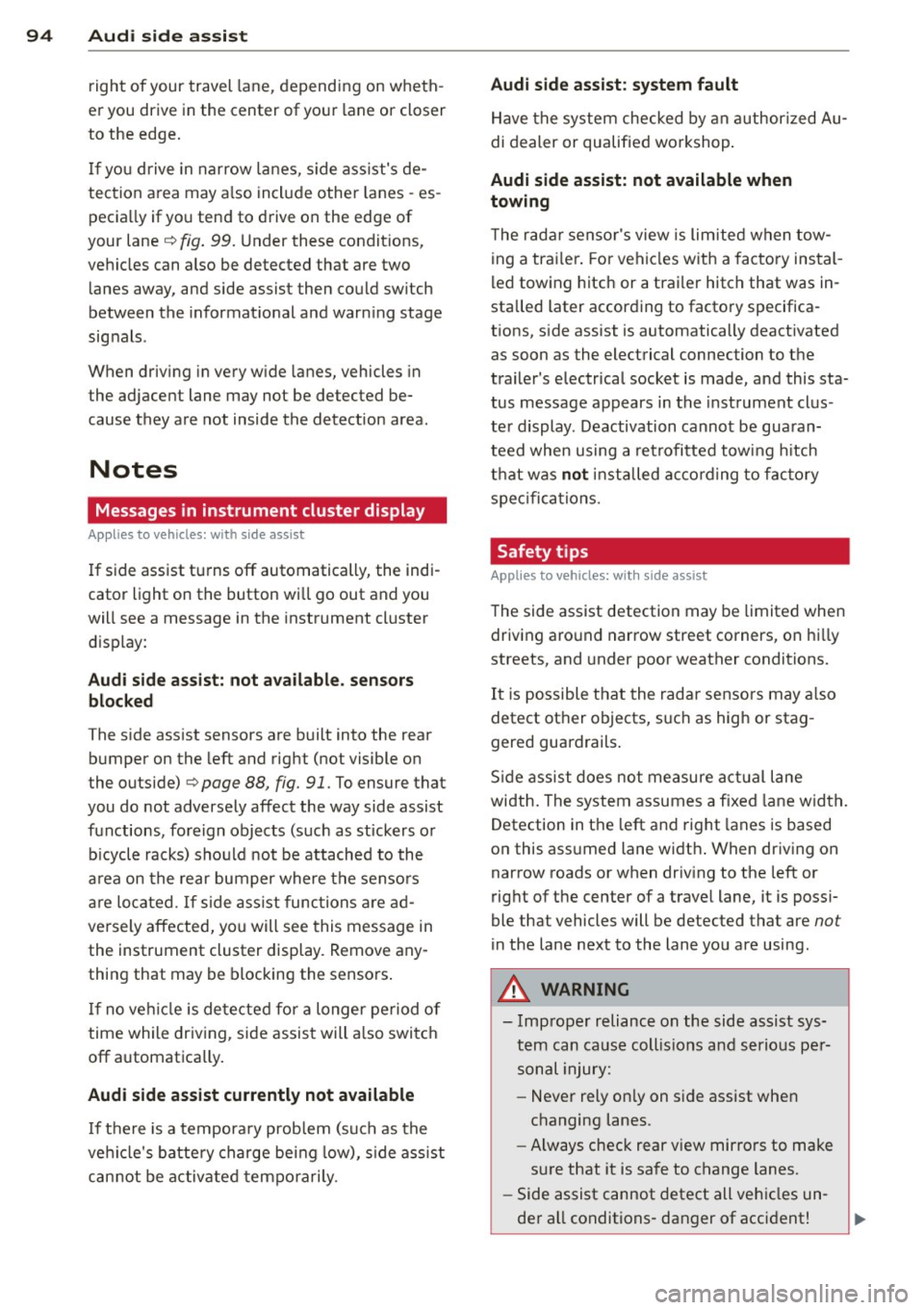
Side assist's detection area is designed to cov-
er lanes of standa rd width to the left and ..,.
Page 96 of 294
94 Audi side assist
right of your travel lane, depending on wheth
er you drive in the center of your lane or closer
to the edge.
If you drive in narrow lanes, s ide ass ist's de
tection area may a lso include other lanes -es
pecia lly if you tend to drive on the edge of
your lane¢
fig. 99. Under these condit ions,
vehicles can also be detected that are two lanes away, and side assist then could switch
between the informat ional and warning stage
signals .
When driving in very w ide lanes, vehicles in
the adjacent lane may not be detected be
cause they are not inside the detection area .
Notes
Messages in instrument cluster display
Applies to vehicles: with side assis t
If side assist turns off automatically, the indi
cator light on the button wi ll go out and you
will see a message in the instrument cluster
d isplay:
Audi side assist: not available. sensors
blocked
The side assist sensors are built into the rear
bumper on the left and right (not visible on
the outside)
¢ page 88, fig. 91 . To ensure that
you do not adversely affect the way side assist
functions, foreign objects (such as stickers or
b icycle racks) should not be attached to the
a rea on the rear bumper where the sensors
are located. If side assist functions are ad
versely affected, you will see this message in
the instrument cluster display. Remove any
thing that may be blocking the sensors .
If no vehicle is detected for a longer period of
time while driving, side assist will also switc h
off a utomatica lly.
Audi side assist currently not available
If there is a temporary problem (such as the
ve hicle's battery charge being low), s ide ass ist
cannot be activated tempo rari ly.
Audi side assist: system fault
Have the system checked by an authorized Au
di dealer or qualified workshop.
Audi side assist: not available when
towing
T he radar senso r's view is limited when tow
ing a trai le r. For vehicles with a fa ctory instal
led towing hitch or a trailer hitch that was in
stalled later according to factory specifica
tions, side assist is automatically deactivated
as soon as the electrical connection to the
trailer's electrical socket is made, and this sta
tus message appears in the instrument clus
ter display . Deactivation cannot be guaran
teed when using a retrofitted towing hitch
that was
not installed according to factory
specifications.
Safety tips
Appl ies to vehicles : wi th side assist
The side assist detection may be limited when
driving aro und narrow street corners, on hilly
streets, and under poor weather cond itions.
It is possible that the radar sensors may also
detect other objects, such as high or stag
gered guardrails .
Side assist does not measure actual lane
width. The system assumes a fixed lane width.
Detection in the left and right lanes is based
o n this ass umed lane width . When driving on
narrow roads or when driving to the left or
right of the center of a trave l lane, it is poss i
ble that vehicles will be detected that are
not
in the lane next to the lane you are using.
A WARNING
- Improper reliance on the side assist sys
tem can cause collis ion s and serious per
sonal injury:
- Never rely only on side assist when
changing lanes .
- Always check rear view mirrors to make
sure that it is safe to change lanes.
- Side assist cannot detect all vehicles un-
der all conditions- danger of accident! ..,.
Page 97 of 294

-Side assist cannot detect vehicles in time
to alert you when they approach from
behind at very high speed, or fall drop
back very quickly .
- The radar sensor 's
vision can be reduced
or entirely blocked by rain, snow, and
heavy spray . This can result in side assist
not adequately detecting vehicles or, in
some cases, not detecting them at all.
Always keep an eye on the direction you are traveling and the relevant area
around the vehicle.
- Please note that side assist indicates
there are approaching vehicles, or vehi
cles in your blind spot, only after your ve
hicle has reached a driving speed of at
least 19 mph (30 km/h).
- Side assist signal does not work around
tight corners (turning radius less than
328 feet, or 100 m).
- Side assist is no replacement for the driv
er's full attention. The driver alone is re
sponsible for lane changes and similar driving maneuvers. Always keep an eye
on the direction you are traveling and the
relevant area around the vehicle.
(D Note
To ensure that side assist is not adversely
affected, you should not block the area on
the rear bumper where the radar sensors
are located with foreign objects (such as
with stickers or bicycle racks).
If the positions of the radar sensors have
been changed as a result of a rear end-col
lision, for instance, have side assist
checked by an authorized Audi dealer for
safety reasons.
Audi side assist 95
Page 115 of 294

The following steps apply only when there is
no obstacle such as a wall near the parking
spot. Otherwise, please read the information
prov ided in the "Parking Next to Obstacles"
section
c::> page 113.
~ Activate the turn signal.
~ Position your vehicle parallel to the edge of
the street, approximately 3 ft (1 meter)
from a parked vehicle.
~ Switc h the MMI on and se lect reverse gear.
The parking aid tu rns o n and parking mode
1 appears on the display .
~ Press the contro l bu tton (D c::> fig. 124 on
the MMI contro l conso le. Parking mode 2
appea rs .
~ Back up and align your vehicle so t he blue
area @ borders on the rear end of the vehi
cle or on the parking spot line. The blue area
represents an extension of the vehicle's out
line by approximate ly 16 ft (5 meters) to the
rear. The long side of the blue area should
be o n the curb . The entire blue area must fit
i nto the parking spot .
~ With the vehicle stopped, turn the steer ing
whee l to the right as far as it w ill go.
~ Back into the park ing spot until the blue
cu rve to uches the curb
c::> fig. 125. Stop the
vehicle.
~ With the veh icle stopped, turn the steering
wheel to the left as far as it will go.
~ Continue to back into the parking spot until
the vehicle is parked para llel to the curb. @
marks the rear bumper. Stop the vehicle
when the red orientation line@ borde rs an
object
c::> .&, . Keep an eye o n the fron t of
yo ur vehicle while do ing this
c::> (j) .
Parking next to obstacles
When t here is an obstacle (such as a wall)
next to the pa rking spot, choose a spot wit h
mo re space on t he sides. Pos ition the long
side of the b lue a rea so that there is sufficient
space from the curb. The a rea m ust no t be on
the c urb. You w ill also need to start turn ing
the steering wheel much earlier. T he re should
be a suffic ient amo unt of space between the
curb and the blue c urve, and the blue cu rve
c::> fig. 125 must not touch the curb.
Parking system 113
A WARNING
-The rear view camera does not show the
entire area behind the vehicle
c::> page 110, fig. 120. Watch out espe
cially fo r small children and anima ls. The
rea r view ca m era ca nnot alway s de te ct
them, posing r is k of an a ccident!
- P lease note that objects not touching the
g rou nd can appear to be further away
than they really are (for example, the
bumper of a parked vehicle, a trai ler
hitch, or the rea r of a truck) . In this case,
you shou ld not use the help lines to help
with parking, wh ich poses danger of an
accident!
(D Note
In the MMI display, the direction of travel
of the vehicle rear is represented depend
i ng on the steering wheel angle. The vehi
cle front swings o ut more than the vehicle
rear. Maintain ple nty of d istance so that
your outside mirror or a corner of your ve
hicle does not col lide with any obstacles.
T his can damage to your ve hicle.
(0 Tips
The left o r right orientation lines and su r
faces will be disp layed, depending on the
turn s ignal being used.
Adjusting the display
and warning tones
App lies to v ehicl es: wi th parkin g sys tem pl us or parkin g
system plus wit h rear view ca mera
The display and warning tones can be adjust
ed in the MMI .
~ Select:!CAR !function button> Car sy stem s
cont ro l butto n > Driv er a ssist > Parking aid
> Setting s control b utton .
Display
On* -turns o n the visual d isplay for parking
system p lus and shows the rearview came ra
image for the par king system p lus w ith rea r
view came ra*. ..,
Page 143 of 294

-Always carefully follow instru ctions from
c hild restraint manufacturers when in
sta lling child restraints.
A WARNING
If, in exceptional circumstances, you must
install a forward or rearward-facing child
restraint on the front passenger's seat:
- Improper installation of child restraints
can reduce their effectiveness or even
prevent them from providing any protec
tion.
- An improperly installed child restraint
can interfere with the airbag as it de
ploys and seriously injure or even kill the
child - even with an Advanced Airbag
System.
- Always carefully follow the manufactur
er's instructions provided with the child
seat or carrier .
- Always make sure that there is nothing
on the front passenger seat that will
cause the capacitive passenger detection
system in the seat to signal to the Airbag
System that the seat is occupied by a
person when it is not, or to signal that it
is occupied by someone who is heavier
than the person actually sitting on the
seat. The presence of additional objects
could cause the passenger front airbag
to be turned on when it should be off, or
could cause the airbag to work in a way
that is different from the way it would
have worked without the object on the
seat .
Airbag system 141
Front airbags
Description of front airbags
The airbag system can provide supplemental
protection to properly restrained front seat occupants.
Fig. 141 Loc ation of driver airbag: in steering w heel
Fig. 142 Loc ation of front passenger's a irbag: in the in·
strument panel
Your vehicle is equipped with an "Advanced
Airbag System" in compliance with United
States Federal Motor Vehicle Safety Standard
(FMVSS) 208 as applicable at the time your
vehicle was manufactured. The system senses
the position of the front seats and controls
front airbag inflation with a valve, depending
on the distance between the respective seat
and the steering wheel or instrument panel.
The safety belts for the seats have "preten
sioners" that help to take slack out of the belt
system. The pretens ioners are also activated
by the electronic control unit for the airbag
system .
The front safety belts also have load limiters
to help reduce the forces applied to the body
in a crash.
The airbag for the driver is in the steering
wheel hub
q fig. 141 and the airbag for the
front passenger is in the instrument panel
Page 152 of 294
150 Airbag system
continuously to serve as a constant reminder
to have the system inspected immediately.
If a malfunction occurs that turns the front
airbag on the passenger side off, the
PASSEN
GER AIR BAG OFF
light will come on and stay
on whenever the ignition is on .
.&_ WARNING
An airbag system that is not functioning
properly cannot provide supplemental pro
tection in a frontal crash.
- If the airbag indicator light comes on, it
means that there may be somet hing
wrong with the Advanced Airbag System.
It is possible that the airbag will inflate
when it is not supposed to, or will not in
flate when it should.
- Have the airbag system inspected imme
diately by your Audi dealer.
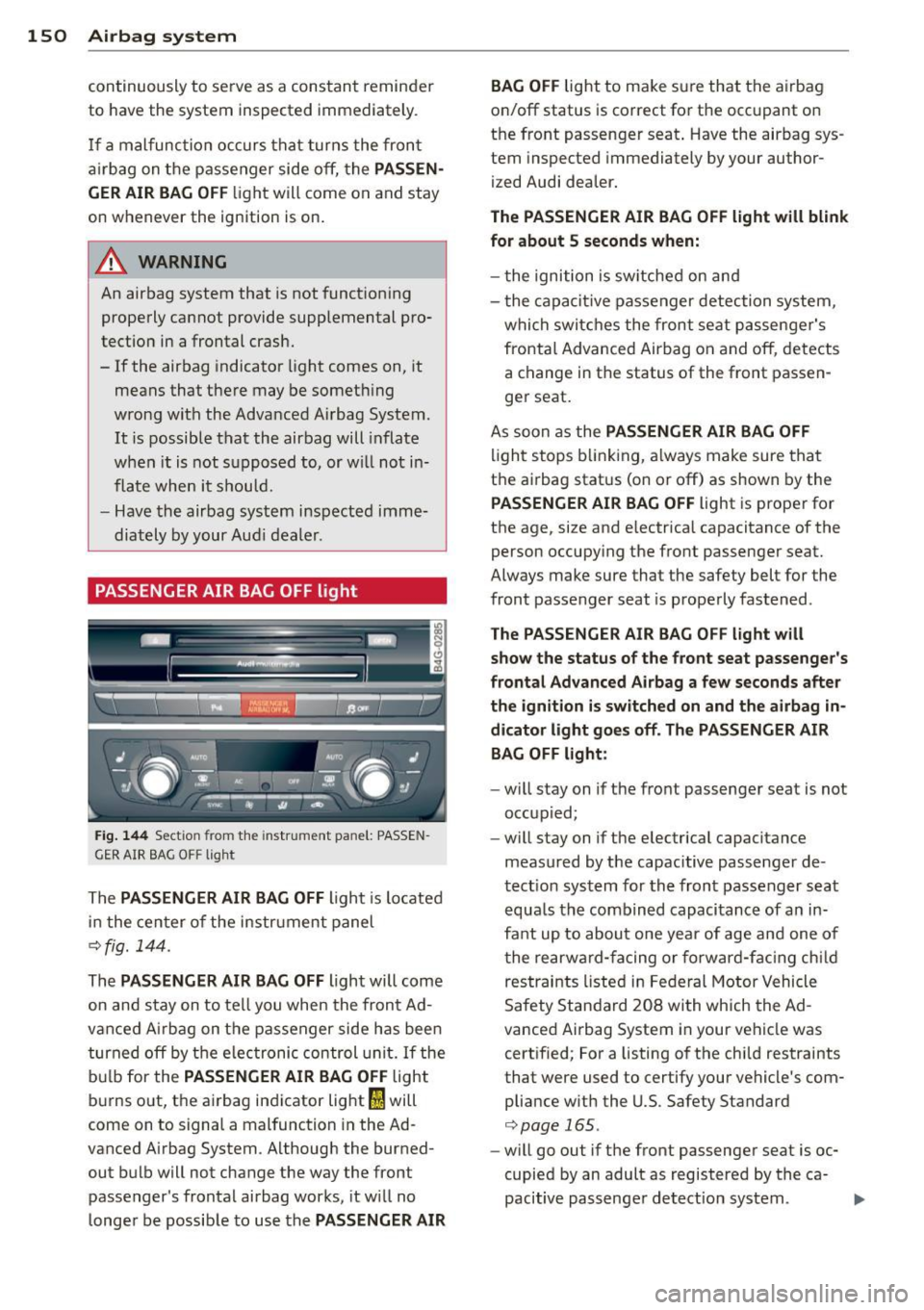
PASSENGER AIR BAG OFF light
Fig. 144 Sect ion from the instrument pa nel: PASS EN
GER AIR BAG OFF light
The PASSENGER AIR BAG OFF Light is Located
in the cen ter of the instr ument panel
~fig. 144.
The PASSENGER AIR BAG OFF Light will come
on and stay on to tell you when the front Ad
vanced A irbag on the passenger side has been
turned off by the electronic control unit. If the
bulb for the
PASSENGER AIR BAG OFF Light
burns out, the airbag indicator Light
fl will
come on to signal a malfunction in the Ad
vanced A irbag System . Although the burned
out bulb will not change the way the front
passenger's frontal airbag works, it w ill no
longer be possible to use the
PASSENGER AIR BAG OFF
Light to make su
re that the airbag
on/off status is correct for the occ upant on
the front passenger seat . Have the airbag sys
tem inspected immediately by your author
ized Audi dealer.
The PASSENGER AIR BAG OFF Light will blink
for about
5 seconds when:
- the ignition is sw itched on and
- t he capacitive passenger detection system,
whi ch switches the front seat passenger's
frontal Advanced Airbag on and off, detects
a change in the status of the front passen
ger seat.
As soon as the
PASSENGER AIR BAG OFF
light stops blinking, always make sure that
t h e airbag status (on or off) as shown by the
PASSENGER AIR BAG OFF Light is proper for
the age, size and e lectrical capacitance of the
person occupy ing the front passenger seat.
Always make sure that the safety belt for the
front passenger seat is properly fastened .
The PASSENGER AIR BAG OFF light will
show the status of the front seat passenger's
frontal Advanced Airbag a few seconds after
the ignition is switched on and the airbag in
dicator light goes off . The PASSENGER AIR
BAG OFF light:
- will stay on if the front passenger seat is not
occupied;
- will stay on if the electrical capacitance
measured by the capacitive passenger de
tection system for the front passenger seat
equals the combined capacitance of an in
fant up to about one year of age and one of
the rearward-facing o r forward-facing child
restraints Listed in Federal Motor Vehicle
Safety Standard 208 with which the Ad
vanced Airbag System in your vehicle was
certified; For a listing of the child restraints
that were used to certify your vehicle's com pliance w ith the U.S. Safety Standard
~page 165.
-will go out if the front passenger seat is oc
cupied by an adult as registered by the ca
pacitive passenge r detect ion system.
...