lane assist AUDI A7 2013 User Guide
[x] Cancel search | Manufacturer: AUDI, Model Year: 2013, Model line: A7, Model: AUDI A7 2013Pages: 310, PDF Size: 77.45 MB
Page 98 of 310
96 Audi active lane assist
Activating and deactivating
A ppl ies to vehicles: with active lan e assis t
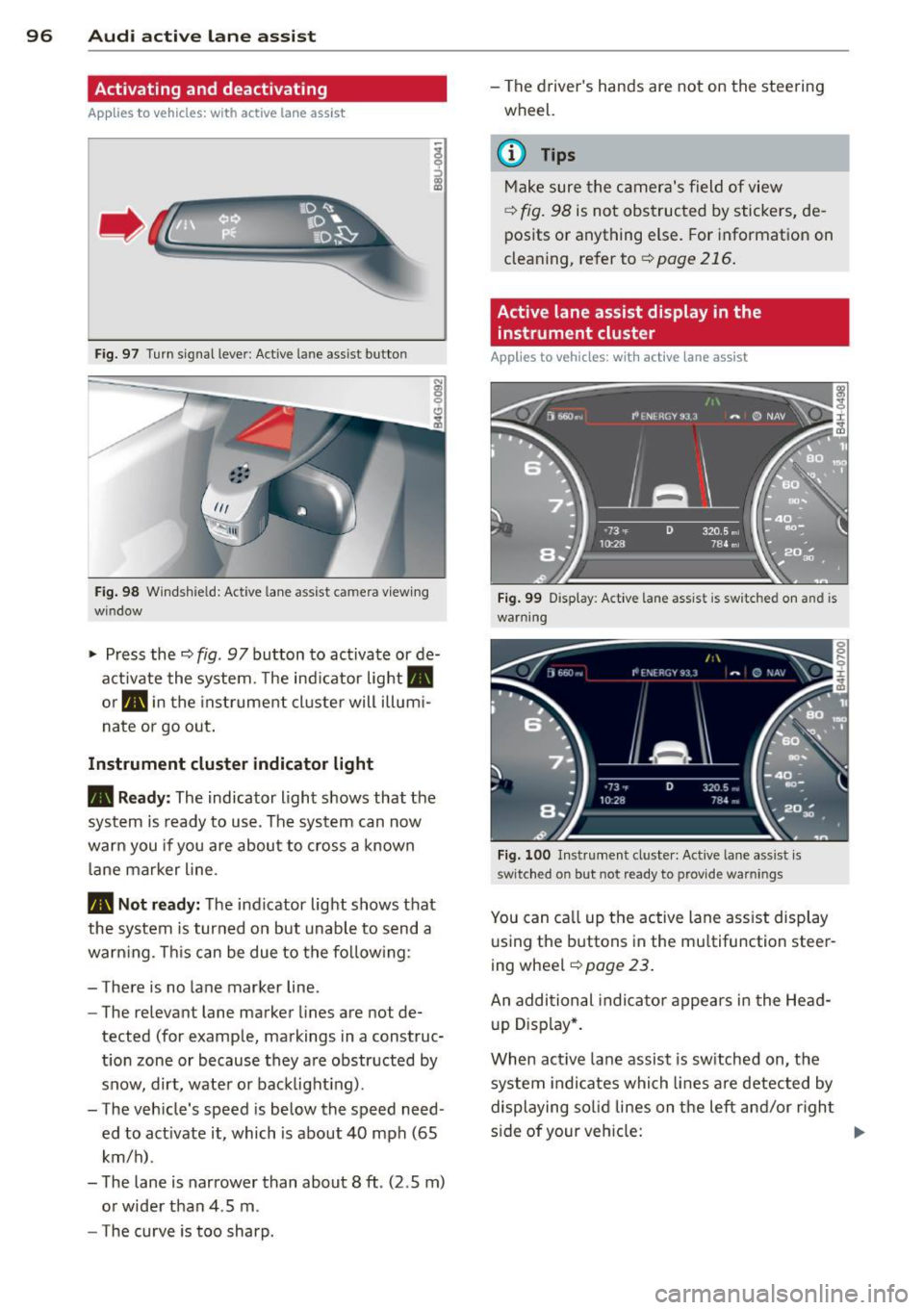
Fig. 97 Turn signal leve r: Active lane ass ist butto n
Fig. 98 Windshie ld: Active lane assist ca mera viewing
wi ndow
-
I
~ Press the c::> fig. 97 button to activate or de
activate the system. The indicator light.
or . in the instrument cluster will illumi
nate or go out.
Instrument cluster indicator light
• Ready:
The indicator light shows that the
system is ready to use . The system can now
warn you if you are about to cross a known
lane marker line .
• Not ready: The indicator light shows that
the system is turned on but unable to send a
warning . This can be due to the following:
- There is no lane marker line .
- The relevant lane marker lines are not de·
tected (for example, markings in a construc
tion zone or because they are obstructed by
snow, dirt, water or backlight ing).
- The vehicle 's speed is below the speed need
ed to activate it, which is about 40 mph (65
km/h) .
- The lane is narrower than about 8 ft . (2 .5 m)
or wider than 4 .5 m .
- The curve is too sharp. - The driver's hands are not on the steering
wheel.
(D Tips
Make sure the camera's field of view
c::> fig. 98 is not obstructed by stickers, de
posits or anything else. For information on
cleaning, refer to
c::> page 216.
Active lane assist display in the
instrument cluster
Applies to vehicles: wit h act ive lane assist
Fig. 99 Display : Active lane assist is switc hed on a nd is
warning
Fig. 100 Instrument cl uster: Active lane assist is
switch ed on but not re ad y to provid e wa rnin gs
You can call up the active lane assist display
using the buttons in the multifunction steer
ing wheel
c::> page 23.
An additional indicator appears in the Head
up Display*.
When active lane assist is switched on, the
system indicates which lines are detected by
displaying solid lines on the left and/or right
side of your vehicle: .,..
Page 99 of 310
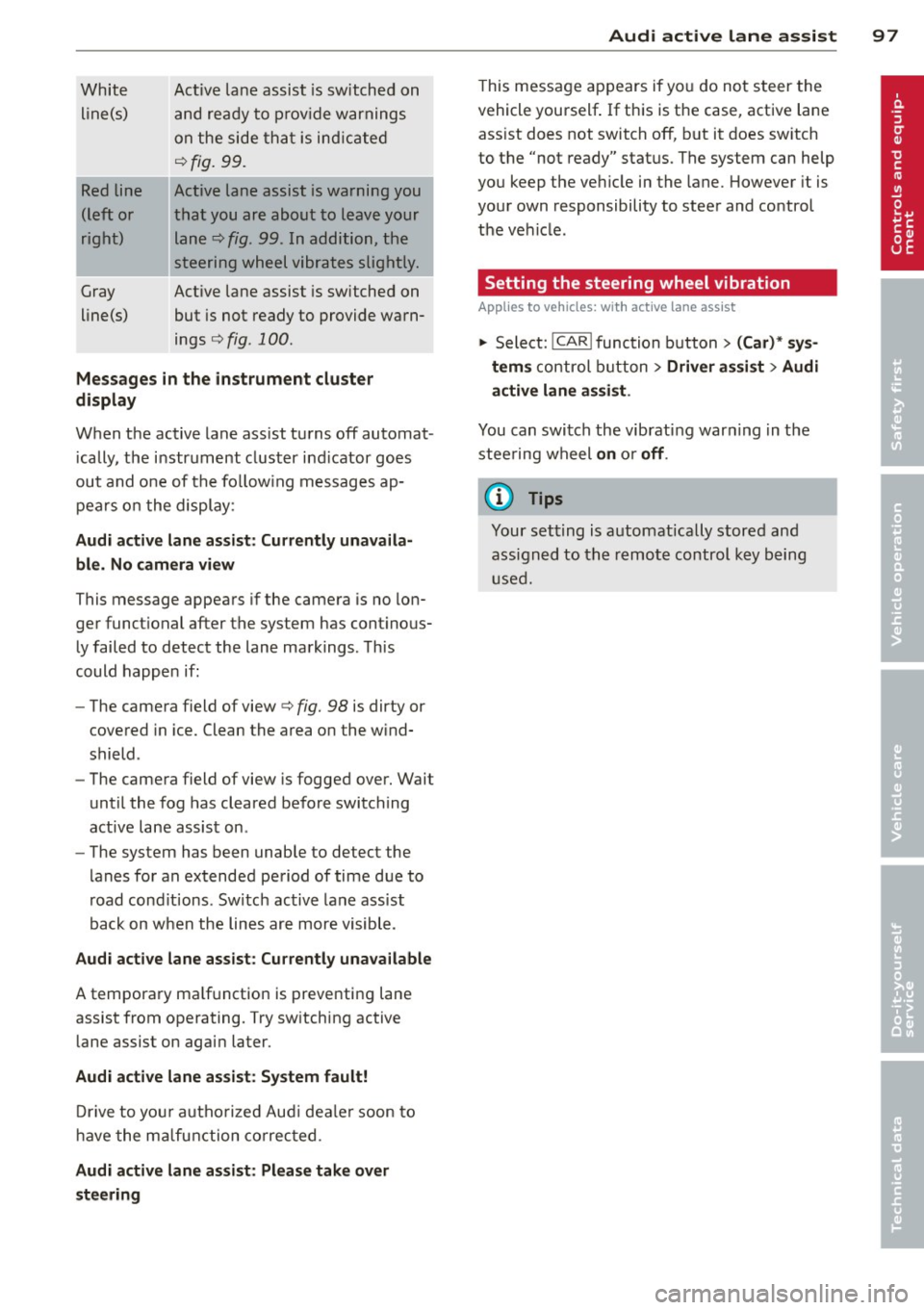
White line(s)
Red line
(left or
right)
Gray
line(s) Act
ive lane assist is switched on
and ready to p rov ide warnings
on the side that is ind icated
Q fig. 99.
Act ive lane assist is warning you
that you are about to leave your lane
Q fig. 99. In addition, the
steering wheel vibrates slightly.
Act ive l ane assist is switched on
but is not ready to provide warn
ings
Q fig . 100 .
Mes sages in the instrument clu ster
display
When the active lane ass ist turns off automat
i cally, the i nstrument cluster ind icator goes
out and o ne of the fo llow ing messages ap
pears on the display :
Audi active lane a ssist : Currently un availa
ble . No camera view
This message appears if the camera is no lon
ger funct ional after the system has cont inous
ly failed to detec t the lane markings . This
could happe n if:
- The camera field of view
Q fig. 98 is dirty or
covered in ice. Clean the area o n the wind
shield .
- The camera field of view is fogged over. Wait
until the fog has cleared before switching
active lane assis t on .
- The system has been unable to detect the
lanes for an extended period of time due to
road cond it ions . Switch active lane ass ist
back on when the lines are more visible .
Audi active lane assist: Currently un available
A temporary ma lf u nction is preventing lane
assist from operating. Try sw itching active
lane assist on again later.
Audi active lane a ssist : Sy stem fault!
D rive to you r a utho rized Aud i dea le r soon to
h ave the ma lfunction co rrec ted .
Audi active lane a ssist : Pl ea se take over
s te ering
Audi acti ve lane a ssis t 97
This message appears if yo u do not s teer the
vehicle yourself . If this is the case, active lane
ass ist does not switch off, b ut it does sw itch
to the "not ready" stat us. The system can help
you keep the ve hicle in the lane. However it is
your own responsibility to steer and control
t h e ve hicle .
Setting the steering wheel vibration
Applies to vehicles: with active lane assist
11> Select: !CAR !function button> (Car) * sys
tem s
control button > Driver assi st > Audi
active lan e assi st.
You can switch the vibrat ing war ning in t he
stee ring wheel
on o r off .
(D Tips
Your setting is a utomat ically stored and
assigned to the remo te control key being
used.
Page 100 of 310
98 Audi side assist
Audi side assist
Lane Change Assistant
Description
App lies to vehicles: wit h side ass ist
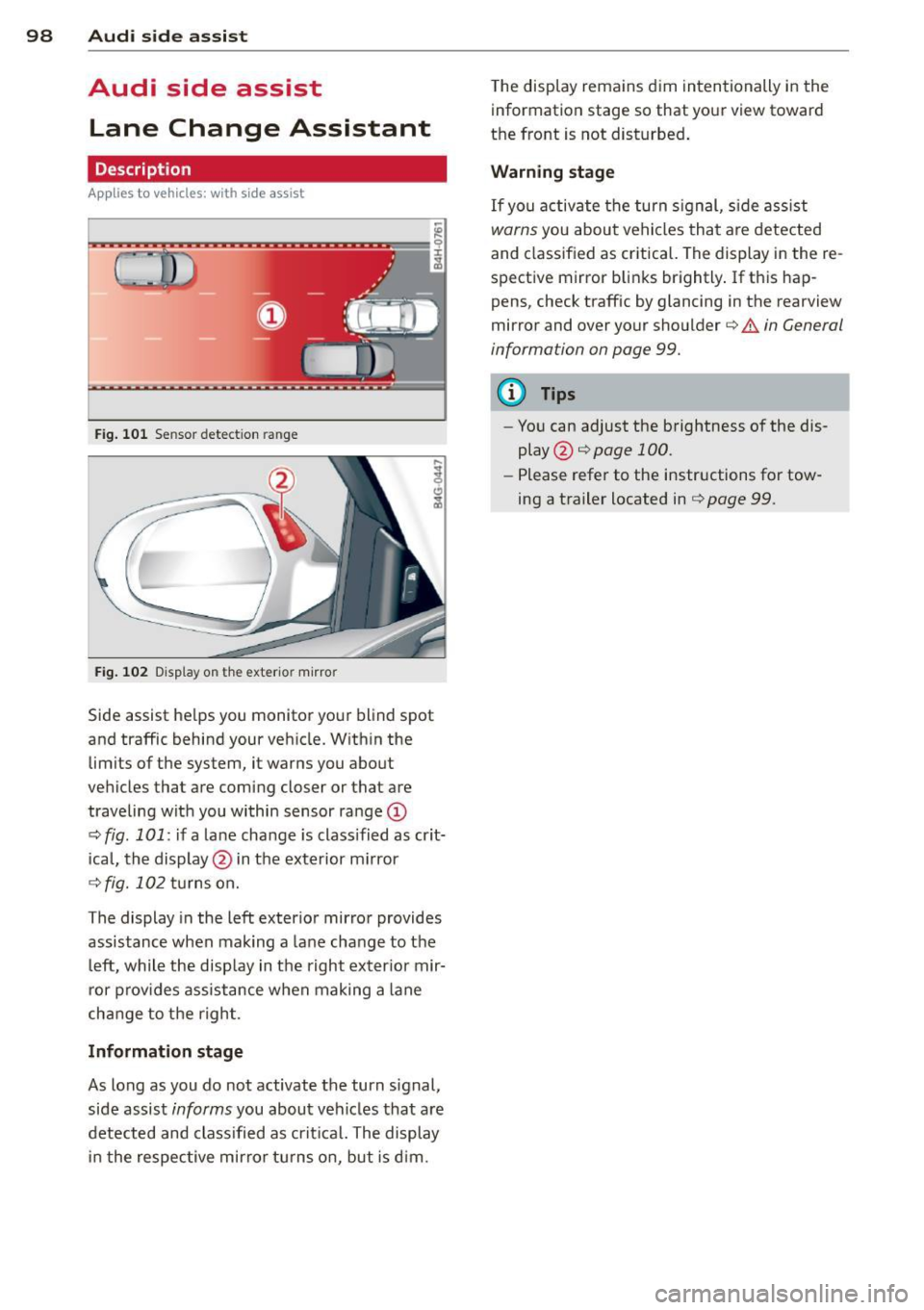
Fig . 101 Sensor detectio n ran ge
Fig. 102 Display on the exterio r mirro r
Side assist helps you monitor your blind spot
and traffic behind your vehicle. Within the
limits of the system, it warns you about
vehicles that are coming closer or that are
traveling with you within sensor range
(D
c:> fig . 101: if a lane change is class ified as crit
ical, the display @ in the exterior mirror
¢fig. 102 turns on.
The display in the left exterior mirror provides
assistance when mak ing a lane change to the
left, while the display in the right exterior mir·
ror provides assistance when making a lane
change to the right.
Information stage
As long as you do not activate the turn signal,
side assist
informs you about vehicles that are
detected and class ified as critical. The display
in the respective mirror turns on, but is dim. The
display remains dim intentionally in the
information stage so that your view toward
the front is not disturbed.
Warning stage
If you activate the turn signal, side assist
warns you about vehicles that are detected
and class ified as critical. The display in the re
spective mirror blinks brightly. If this hap
pens, check traffic by glancing in the rearview
mirror and over your shoulder c:>
.&. in General
information on page 99.
(D Tips
- You can adjust the brightness of the dis
play @c:>
page 100.
-Please refer to the instructions for tow·
ing a trailer located in
¢ page 99.
Page 101 of 310
General information
Applies to vehicles: with side ass ist
®
©
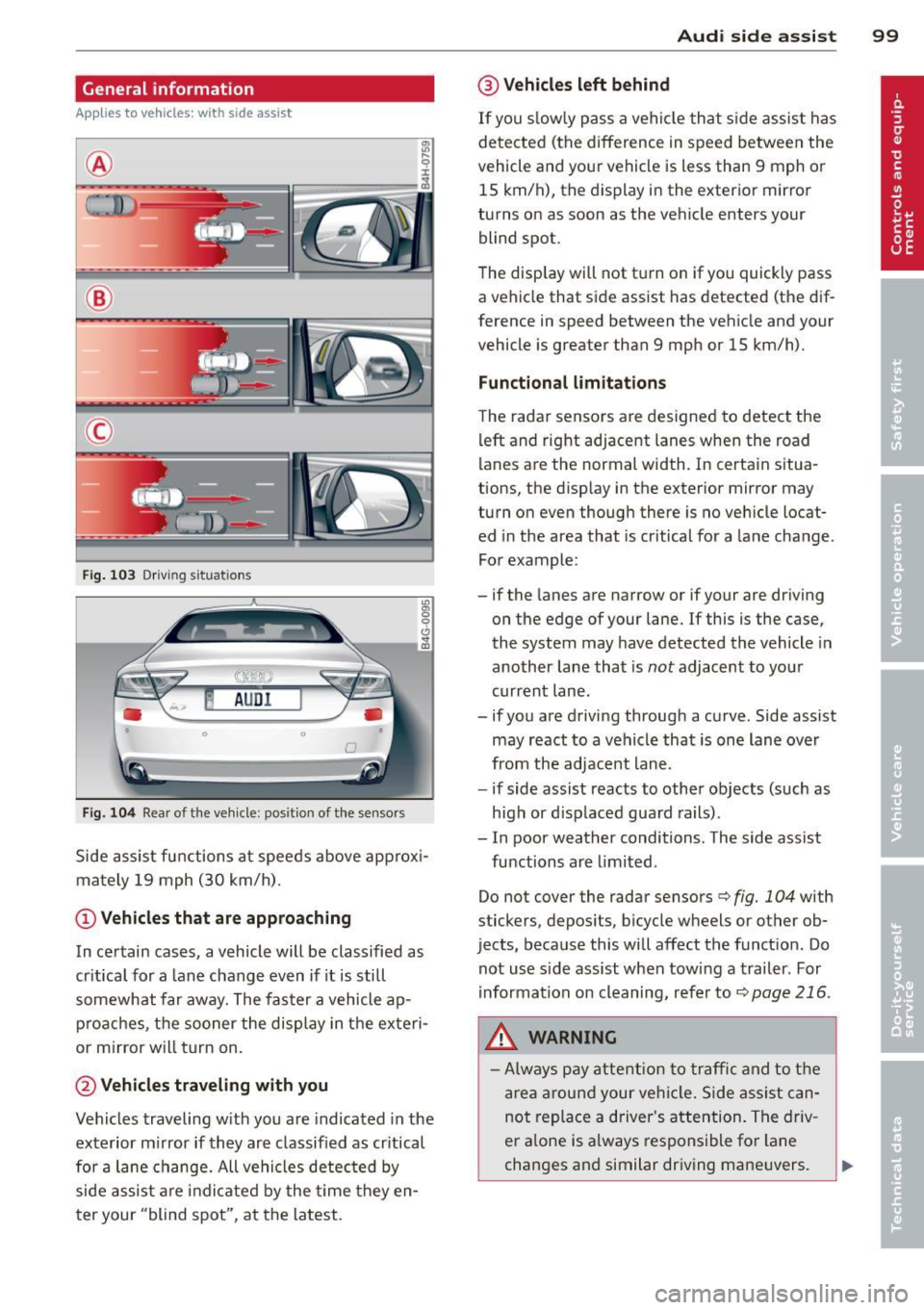
Fig . 103 Dr iving situations
Fig. 104 Rear of t he ve hicle: positio n of t he se nsors
"' a, 0 0
" a,
Side assist functions at speeds above approx i
mately 19 mph (30 km/h).
@ Vehicl es th at ar e approaching
In certain cases, a vehicle will be classified as
cr itical for a lane change even if it is still
somewhat far away. The faster a vehicle ap
p roaches, the sooner the display in the exteri
or m irror will t urn on.
@ Vehicles traveling with you
Vehicles traveling w ith you are indicated in the
exterior m irror if they are classified as cr itical
for a lane change. All vehicles detec ted by
side assist are indicated by the time they en
ter your "blind spot", at the latest.
Audi side assist 99
@ Veh icle s left behind
If you s low ly pass a vehi cle that s ide assist has
detected (the difference in speed between the
vehicle and you r vehicle is less than 9 mph or
15 km/h), the display in the exterior mirror
turns on as soon as the vehicle enters your blind spot.
The disp lay will not t urn on if you quickly pass
a vehicle that side assist has detected (the dif
ference in speed between the vehicle and your
vehicle is greater than 9 mph or 15 km/h).
Functi onal limitation s
The radar sensors are designed to detect the
left and right adjacent lanes when the road
lanes are the normal width. In certain situa
tions, the d isp lay in the exterior mirror may
turn on even though there is no veh icle locat
ed in the area that is cr itical for a lane change.
For example:
- if the lanes are narrow or if your are dr iving
on the edge of your lane.
If this is the case,
the system may have detected the vehicle in
another lane that is
not adjacent to your
current lane .
- if you a re driving through a curve. Side assist
may react to a vehicle that is one lane ove r
from the adjacent lane.
- if side assist reacts to other objects (such as
high or d isp laced guard rails) .
- In poor weather conditions. The side assist
functions are l imited .
Do not cover the radar sensors
c> fig. 104 with
stickers, depos its, bicycle wheels or other ob
jects, because this will affect the funct ion. Do
not use s ide ass ist when towing a trailer. For
i nformation on cleaning, refer to
c> page 216 .
_&. WARNING
-Always pay attention to traffic and to t he
area around your ve hicl e. S ide assist can
not replace a driver's attention. The driv
er a lone is always responsible for lane
changes and similar driving mane uvers.
Page 102 of 310
100 Audi side assist
-Improper reliance on the side assist sys
tem can cause collisions and serious
personal injury:
- Never rely only on side assist when
changing lanes.
- Always check rear view mirrors to make
sure that it is safe to change lanes.
- Side assist cannot detect all vehicles un
der all conditions- danger of accident!
- Please note that side assist indicates
there are approaching vehicles, or
vehicles in your blind spot, only after
your vehicle has reached a driving speed of at least 19 mph (30 km/h).
- In certain situations, the system may not
function or its function may be limited.
For example:
- if veh icles are approaching or being left
behind very quickly . The display may
not turn on in time.
- in poor weather conditions such as
heavy rain, snow or heavy mist .
- on very wide lanes, in tight curves or if
there is a rise in the road surface.
Vehicles in the adjacent lane may not
be detected because they are outside
of the sensor range.
(D Note
The sensors can be displaced by impacts or
damage to the bumper, wheel housing and
underbody. This can affect the system.
Have your authorized Audi dealer or au
thorized Audi Service Facility check their
function.
@ Tips
- If the window glass in the driver's door
or front passenger's door has been tint ed, the display in the exterior mirror may
be misinterpreted.
- For Declaration of Compliance to United
States FCC and Industry Canada regula
tions¢
page 292.
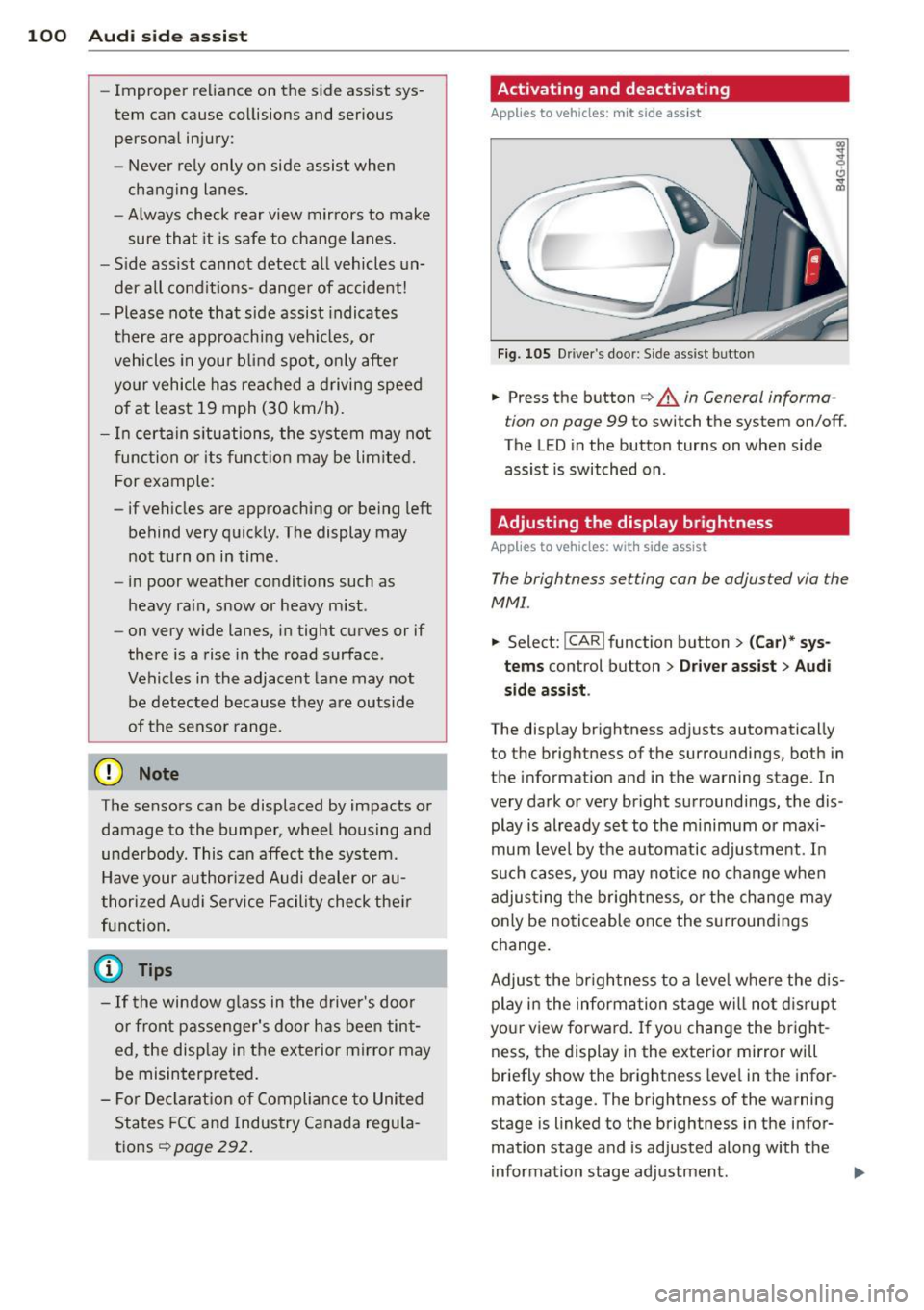
Activating and deactivating
Applies to vehicles: rnit s ide ass ist
Fig. 105 Driver's door: Side ass ist butto n
.. Press the button c> & in General informa
tion on page 99
to switch the system on/off.
The LED in the button turns on when side
assist is switched on.
Adjusting the display brightness
Applies to vehicles: wit h side assist
The brightness setting con be adjusted via the
MMI.
.. Select: !CAR ! function button> (Car)* sys
tems control button > Driver assist > Audi
side assist .
The display brightness adjusts automatically
to the brightness of the surroundings, both in
the information and in the warning stage. In
very dark or very bright surroundings, the dis
play is already set to the minimum or maxi
mum level by the automatic adjustment. In
such cases, you may notice no change when
adjusting the brightness, or the change may
only be noticeable once the surroundings
change.
Adjust the brightness to a level where the dis
play in the informa tion stage will not disrupt
yo ur view forward. If you change the bright
ness, the display in the exterior mirror will
briefly show the brightness leve l in the infor
mation stage. The brightness of the warning
stage is linked to the brightness in the infor
mation stage and is adjusted along with the
information stage adjustment .
Page 198 of 310
196 Intelligent technology
Intelligent technology
Notice about data
recorded by vehicle
control modules
Your vehicle is not equipped with an Event Da
ta Recorder (EDR), installed by some manu
facturers fo r the express purpose of capturing
data for retrieval after an accident or crash
event . EDR's are sometimes ca lled "crash re
corders".
Some state laws restrict the retr ieval or down
loading of data stored by EDR's that were in
stalled in a vehicle for the express purpose of
retrieving data after an accident or crash
event without the owner's consent.
A lthough your vehicle is not equipped with an
EDR, it is equipped with a number of electron
ic control modules for various vehicle systems
such as, for examp le, eng ine function, em is
sion control, as well as for the airbags and
safety belts.
These electronic contro l modules also record
vehicle-re lated data during normal vehicle op
eration for diagnostic and repair purposes.
The recording capacity of the electronic con
trol modules is limited to data (no sound is re
corded) and only a small amount of data is ac
tually recorded over a very limited pe riod of
time and stored when a system fault or other
condition is sensed by a control unit. Some of
the data then stored may relate to vehicle
speed, direction, braking as we ll as restraint
system use and performance in the event of a
crash or other condition. Stored data can only
be read and downloaded with special equip
ment.
Electronic Stabilization
Control (ESC)
Description
ESC helps to improve road holding and vehicle
dynamics to help reduce the probability of
skidd ing and loss of vehicle control. It works
only when the engine is running. ESC detects certain difficult driving situat
ions, including
when the vehicle is beginning to spin (yaw)
out of control and helps you to get the veh icle
back under control by se lectively braking the
wheels, and/or reducing engine power and
providing steering assistance to help hold the
vehicle on the driver's intended course. The in
dicator light
G) in the instrument cluster
blinks when ESC is taking action to help you
control the vehicle.
ESC has limitations.
It is important to remem
ber that ESC cannot overcome the laws of
physics. It wi ll not always be able to help out
under all conditions you may come up against.
For example, ESC may not always be able to
help you master situations where there is a
sudden change in the coefficient of friction of
the road surface. When there is a section of
dry road that is suddenly covered with water,
slush or snow, ESC cannot perform the same
way it wou ld on the dry surface . If the vehicle
hydroplanes (rides on a cushion of water in
stead of the road surface), ESC will not be
able to help you steer the vehicle because con
tact with the pavement has been interrupted
and the vehicle cannot be braked or steered.
During fast cornering, particularly on winding
roads, ESC cannot always deal as effectively
with difficult driving situations than at lower
speeds. When towing a trailer, ESC is not able
to help you regain control as it would if you
were not tow ing a trailer.
Always adjust your speed and driving style to road, traffic; and weather condit ions. ESC can
not override the vehicle's physical limits, in
crease the available traction, or keep a vehicle
on the road if road departure is a result of
drive r inattention. Instead, ESC improves the
poss ibility of keeping the vehicle under con
trol and on the road during ex treme maneu
vers by using the driver's steering inputs to
help keep the vehicle going in the intended di
rection . If you are traveling at a speed that
causes you to run off the road before ESC can
provide any assistance, you may not experi
ence the benefits of ESC.
Page 218 of 310
216 Cleaning and protec tio n
Apply the product using a micr ofib er cl oth. To
avoid damaging the paint surface, do not use
too m uch pressure.
R inse the vehicle t ho roughly with water . Clean
the vehicle sta rting at the top and working to
ward the bottom using a
neutra l sh ampoo
and a soft mi crofiber cloth . Stop frequently to
rinse the cloth thoroughly.
C lean the wheels and sill panels last. Use a
clean
s pon ge on these areas .
R inse the vehicle tho roughly aga in and let it
a ir dry.
If there are any wa ter spo ts, they can
be removed using a
leather cloth .
Clean again with the spe cial clean er for matt e
finish paint
if ne cessary.
Removing stubborn d irt
B ird d ropping s or tree sap are best removed
with plenty of water and a m icrofiber cloth .
You should r inse
off ga soli ne res idue immedi
ately with plenty of water.
A WARNING
- Wash your ve hicle only when the ignition
is switched
off to reduce the risk of a
crash .
- Always read and heed all WARNINGS and othe r information
c:::> page 213.
([) Note
-Do not treat vehicle parts painted w ith
matte f inish paint us ing polish ing mate
r ials or hard wax. These products could
cause damage to the appea rance or sur
face that cannot be repaired.
- Never use p rotective wax.
It can destroy
the matte fin ish effect .
- Do not p lace any st ickers or magnetic
s igns on vehicle parts painted with
matte finish paint. The pa int could be
damaged when the st ickers or magnets
a re removed.
- To preven t pa int damage, do not wash
the veh icle in direct s unl igh t. -
To prevent damage to the pa int surface,
do not use insect remova l sponges,
rough kitchen sponges or sim ilar items .
- Yo u should remove debris (such as in
sects) from the headlight lenses on a
regu lar basis, for example when refuel
ing your vehicle. Only clean the head
lights using a wet cloth or sponge, never
a dry one. Cleaning with soapy water is
recommended.
(D Tips
For more information on special cleaning
products designed for matte finish paint,
seeyourAud idea~~
Sensors and camera lenses
- Remove snow with a hand brush and remove
ice with a de -icing spray that does not con
tain so lvents.
- Clean the senso rs (adaptive c ruise control*,
park ing system*) w ith a cleaning so lution
tha t does not contain so lvents and a soft
cloth .
- The camera lens or the area in front of the
camera lens is norma lly cleaned by the
windshield wipers (Audi active lane assist*)
or head light wipers (night vision system *).
If the lens or the area is exceptionally dirty,
clean the area with glass cleaner and a soft,
dry cloth .
(D Note
-If you wash your vehicle with a pressure
washer,
- make sure there is eno ugh distance to
sensors i n the fron t and rear bumper,
- do not clean the camera lenses and the
ar ea a round them with the p ress ure
washer.
- N ever use warm or hot wate r to remove
snow or i ce from the camera lens. This
cou ld cause the lens to crack.
- Never clean the camera lens wi th abra
sive products.
Page 278 of 310
2 76 Fuses and bulbs
Fuse panel
@ (bl ack )
No. Equ ipment
= 7 Audi adaptive cruise control
8 Airbag control module, front
passenger's seat sensor system
9 Gateway
Homelink (garage door opener),
10 night vision system contro l
module
Image processing (Audi active
11 lane assist, Audi adaptive cruise
control)
12 Steering
I 13 Terminal 15 in the luggage com-
partment
14 T
ermina l 15 in the instr ument
pane l (front passenger's s ide)
15 Terminal 15 engine
16 Starter
Fuse panel B (brown)
No. Equipment
1 Gateway
2 Climate control
3 E SC con trol module
Front door (driver's side)
5 Power seat adjustment (dr
iver's
sea t)
6 Steering
7 Sun roof
8
R ear door control module (driv-
er's side)
9
Lumbar support ( Front passen-
ger seat)
11 Sunroof, rear spoiler ( Sportbac k)
12 Driver door control mod
ule
Fuse panel c (red)
No. Equipment
2 Fuel p ump
.
3
Brake light sensor/brake pedal
sensor s ystem
4 Engine aco ustics
Amp s
10
5
5
10
5
15
30 15
40
Amps
5
10
10
30
7,5
35
20 15
5
20
15
Amps
25
5/5
7 ,5
-Fuse panel © (red )
No. Equipment Amps
=· Rear door control module (driv-
5 30
er's side)
6 Left rear seat ______ , 7,5
Ho rn 15
Windshield wiper ____ 30
Light/rain sensor ___ 5
10 Lumba r support (dr iver seat) 5
11 Front passenger door control
module
1 2 Rig ht rear door control mod ule
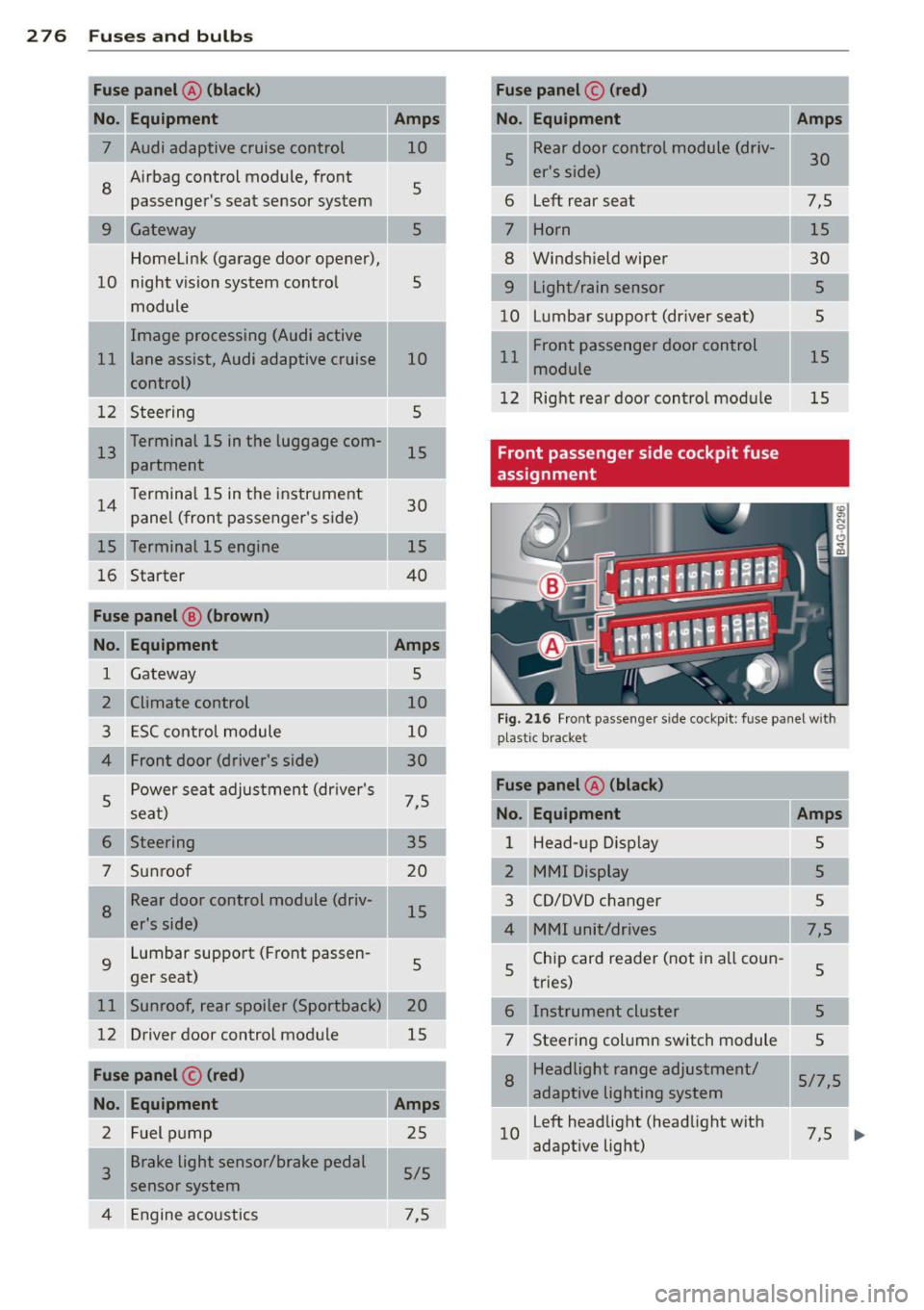
Front passenger side cockpit fuse
assignment
15
15
Fig. 21 6 Fro nt passen ger sid e co ckp it : fu se pa nel w it h
p last ic brac ket
Fuse panel @ (black)
No. Equipment Amps
1 Head-up D is p la y 5
2
MMI Display 5
3 C D/DVD changer 5
4 MMI unit/drives 7,5
5 Chi
p card rea der (not in a ll co un-
5
tries)
6 Instrument cluster 5
7 Stee
ring column switch module
5
8 Headlight range adjustment/
5/7,5
adaptive lighting sys tem
1 0 Left headlight (head
light wit h
7,5
adaptive light)
I
...
Page 302 of 310
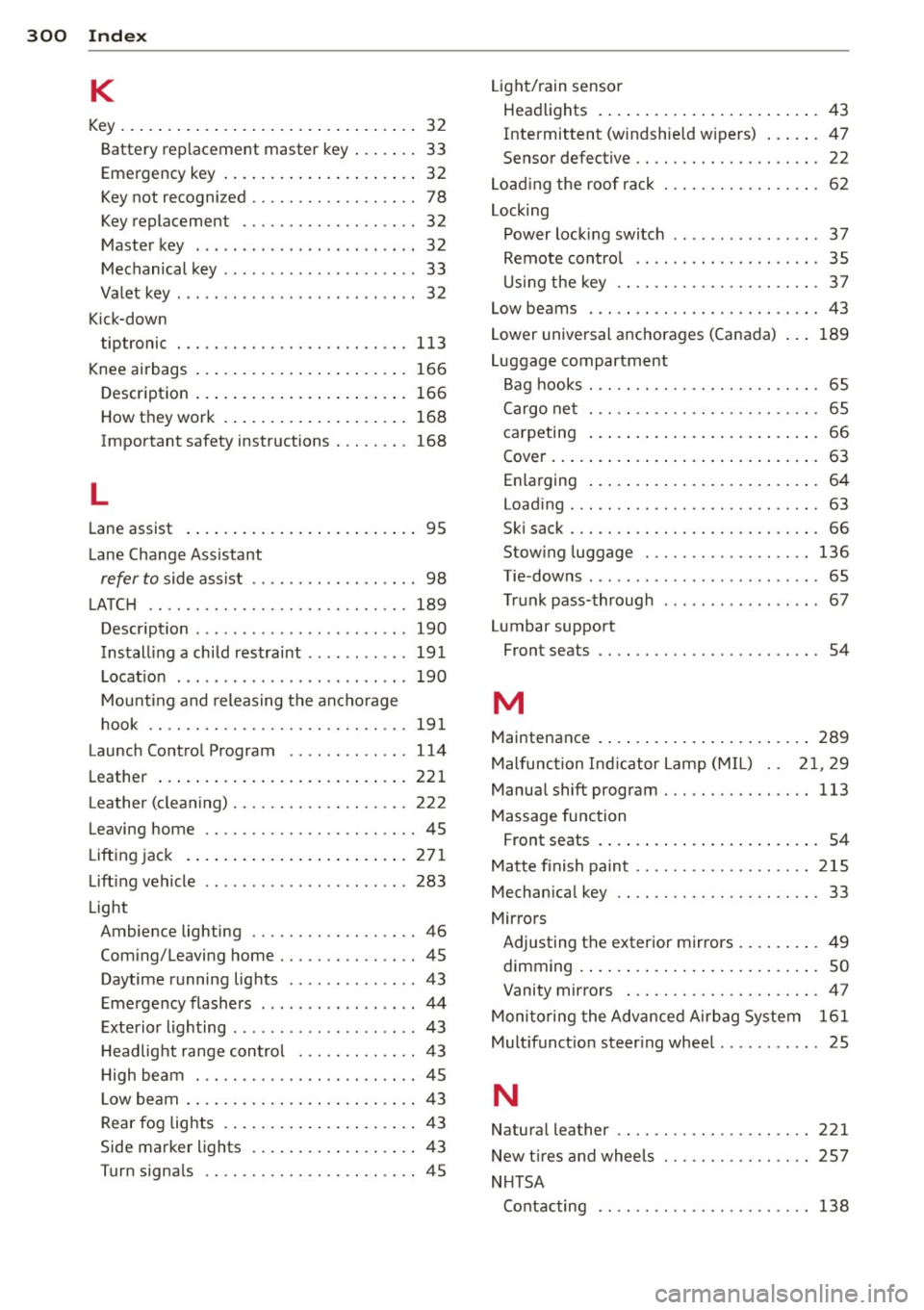
300 Index
K
Key ... . ... ....... ......... ... .... .. 32
Battery replacement master key ... .. .. 33
Emergency key .............. ..... .. 32
Key not recognized . . . . . . . . . . . . . . . . . . 78
Key replacement ......... .... .... .. 32
Master key . . . . . . . . . . . . . . . . . . . . . . . . 32
Mechanical key .............. ... ... . 33
Valet key . .. .. ........ .... ... .. .. .. 32
Kick-down tiptronic
113
Knee airbags ................. ..... . 166
Description ................. ..... . 166
How they work .............. ..... . 168
Important safety instructions . . . . . . . . 168
L
Lane assist . . . . . . . . . . . . . . . . . . . . . . . . . 95
Lane Change Assistant
refer to side assist . . . . . . . . . . . . . . . . . . 98
LATCH .. .. .. ............. .... .. ... 189
Descript ion .... .... ...... .. .. .. .. .
Installing a child restraint ...... .. .. .
Location .. .... ............. ... ' . .
Mounting and releasing the anchorage
hook
. . .. .. ............. .... .. .. .
190
191
190
191
Launch Control Program .... .. .. .. .. . 114
Leather ..................... ..... . 221
L eather (cleaning) .......... .. .. .. .. . 222
Leaving home ............. .. .. .. .. .. 45
Lifting jack . . . . . . . . . . . . . . . . . . . . . . . . 2 71
Lifting vehicle ................ ... ... 283
Light Ambience lighting .......... .. .... .. 46
Coming/Leaving home ..... .. .. ...... 45
Daytime running lights .. ... ... .. .. .. 43
Emergency flashers . . . . . . . . . . . . . . . . . 44
Exterior lighting .... .. .... .. .. .. .. ..
43
H ead light range control ... .. .. .. .. . . 43
High beam .............. ........ .. 45
L ow beam . ................. ..... ..
43
Rear fog lights .............. ..... .. 43
Side marker lights ......... ... .... ..
43
Turn signals ............. .. .. .. .. .. 45 Light/rain
sensor
Headlights . ..... ................ .. 43
Intermittent (windshield w ipers) ...... 47
Sensor defective . . . . . . . . . . . . . . . . . . . . 22
Loading the roof rack ................ . 62
Locking Power locking switch ................ 37
Remote control .... ........... .. .. . 35
Using the key ................. ..... 37
Low beams . .... .. ... .......... .... . 43
Lower universal anchorages (Canada) . . .
189
Luggage compartment
Bag hooks . . . . . . . . . . . . . . . . . . . . . . . . . 65
Cargo net . . . . . . . . . . . . . . . . . . . . . . . . . 65
carpeting ..... .. ................ .. 66
Cover ......... .. ..................
63
Enlarging . . . . . . . . . . . . . . . . . . . . . . . . . 64
Loading ... ...... ................. .
63
Ski sack ...................... ..... 66
Stowing luggage .............. ....
136
Tie -downs . . . . . . . . . . . . . . . . . . . . . . . . . 65
Trunk pass-through ...... ...... .. .. . 67
Lumbar support
Front seats . . . . . . . . . . . . . . . . . . . . . . . . 54
M
Maintenance .... .. ................ . 289
Malfunction Indicator Lamp (MIL) . . 21, 29
Manual shift program ............ .. .. 113
Massage function
Front seats . . . . . . . . . . . . . . . . . . . . . . . . 54
Matte finish paint .. ............. .. .. 215
Mechanical key .. .. ... .......... .. .. . 33
Mirrors Adjusting the exterior mirrors ..... ... .
49
d' . ,mmrng .. .... .. ................ .. so
Vanity mirrors ................ ..... 47
Monitoring the Advanced Airbag System
161
Multifunction steering wheel .. .. .. .. .. . 25
N
Natural leather .....................
New t ires and wheels
NHTSA 221
257
Contacting .. .. .. ....... ...... .. .. 138