mirror AUDI A7 2013 User Guide
[x] Cancel search | Manufacturer: AUDI, Model Year: 2013, Model line: A7, Model: AUDI A7 2013Pages: 310, PDF Size: 77.45 MB
Page 121 of 310
example, after a collision, do not contin
ue to use the system for safety reasons.
Have it checked by your authorized Audi
dealership or authorized repair facility.
- Only use the rear view camera to assist
you if it shows a good, clear picture. For
example, the image may be affected by
the sun shining into the lens, dirt on the
lens or if there is a system fault.
- Use the rear view camera only if the lug
gage compartment lid is completely
closed. Make sure any objects you may
have mounted on the luggage compart
ment lid do not block the rear view cam
era.
- The camera lens enlarges and distorts
the field of vision. The object appears
both altered and inaccurate on the
screen.
- In certain situations, people or objects in
the display appear closer or further
away:
- For objects that do not touch the
ground, such as the bumper of a
parked vehicle, a trailer hitch or the
rear of a truck. Do not use the help
lines in this case.
- If driven from a level surface onto an
incline, or a downward slope.
- If driven toward protruding objects.
- If the vehicle is carrying too much load
in the rear.
(D Note
- Always read and follow the applicable
warnings
¢ (D in General information on
page 116.
- The orange colored orientation lines in
the Infotainment display show the vehi
cle path depending on the steering
wheel angle. The front of the vehicle
front swings out more than the rear of
the vehicle. Maintain plenty of distance
so that your outside mirror or a corner of
your vehicle does not collide with any ob stacles.
Parking systems 119
Switching on/off
App lies to vehicles: wit h parking system plus w ith rear
v iew camera
Switching on
.. Shift into reverse or
.. press the
p,,1A button in the center console
¢ fig. 122 . A short confirmation tone
sounds and the LED in the button turns on .
Switching between the rear view camera
and optical display
.. Press the Graphic control button ®
¢ fig. 128 to see the optical display.
.,. Press the
Rearview control button to see
the rear view camera image.
Switching off
.. Drive forward faster than 6 mph (10 km/h),
or
.,. Press the
p,,1A button, or
.,. Switch the ignition off.
(D Tips
The visual display in the left part of the
display should help you detect the critical
vehicle areas.
Page 123 of 310
r::> & in General information on page 118,
r::> (Din General information on page 119 .
The blue area represents an extension of the
vehicle's outline by approximately 16 ft
(5 m) to the rear . The long side of the blue
area should be on the curb . The entire blue
area must fit into the parking space.
• With the vehicle stopped, turn the steering
wheel to the right as far as it will go.
• Back into the parking space until the blue
curve
r::> fig. 131 touches the curb r::> & in
General information on page 118,
r::> (D in
General information on page 119.
Stop the
vehicle.
• With the vehicle stopped, turn the steering
wheel to the left as far as it will go .
• Continue to back into the parking space un
t il the vehicle is parked parallel to the curb
r::> & in General information on page 118,
r::> (D in General information on page 119.
@ marks the rear bumper. Stop the vehicle,
at the latest, when the red orientation line
@ borders an object. Keep an eye on the
front of your vehicle while do ing th is .
Parking next to obstacles
If there is an obstacle (such as a wall) next to
the parking space, position the vehicle so
there is more space on that side. Position the
long side of the blue surface so that there is
sufficient space from the obstacle. The sur
face must not be touching . You will also need
to star t turning the steering wheel much ear
lier . The blue curve
r::>fig .131 must not touch
the obstacle and should have sufficient room.
(D Tips
The left or right orientation lines and sur
faces will be displayed, depending on the
turn signal being used .
Peripheral cameras
Introduction
Applies to vehicles: with parki ng system plus w ith periph
eral cameras
In addition to parking system plus
r::> page 117, this pa rking system contains pe-
Parking systems 121
ripheral cameras. Depending on the vehicle
equ ipment, you are assisted by various views
such as peripheral view, corner views at the
front and rear of the vehicle, and views direct
ly in front of or behind the vehicle.
General information
Applies to vehicles: with parking system plus with periph
eral cameras
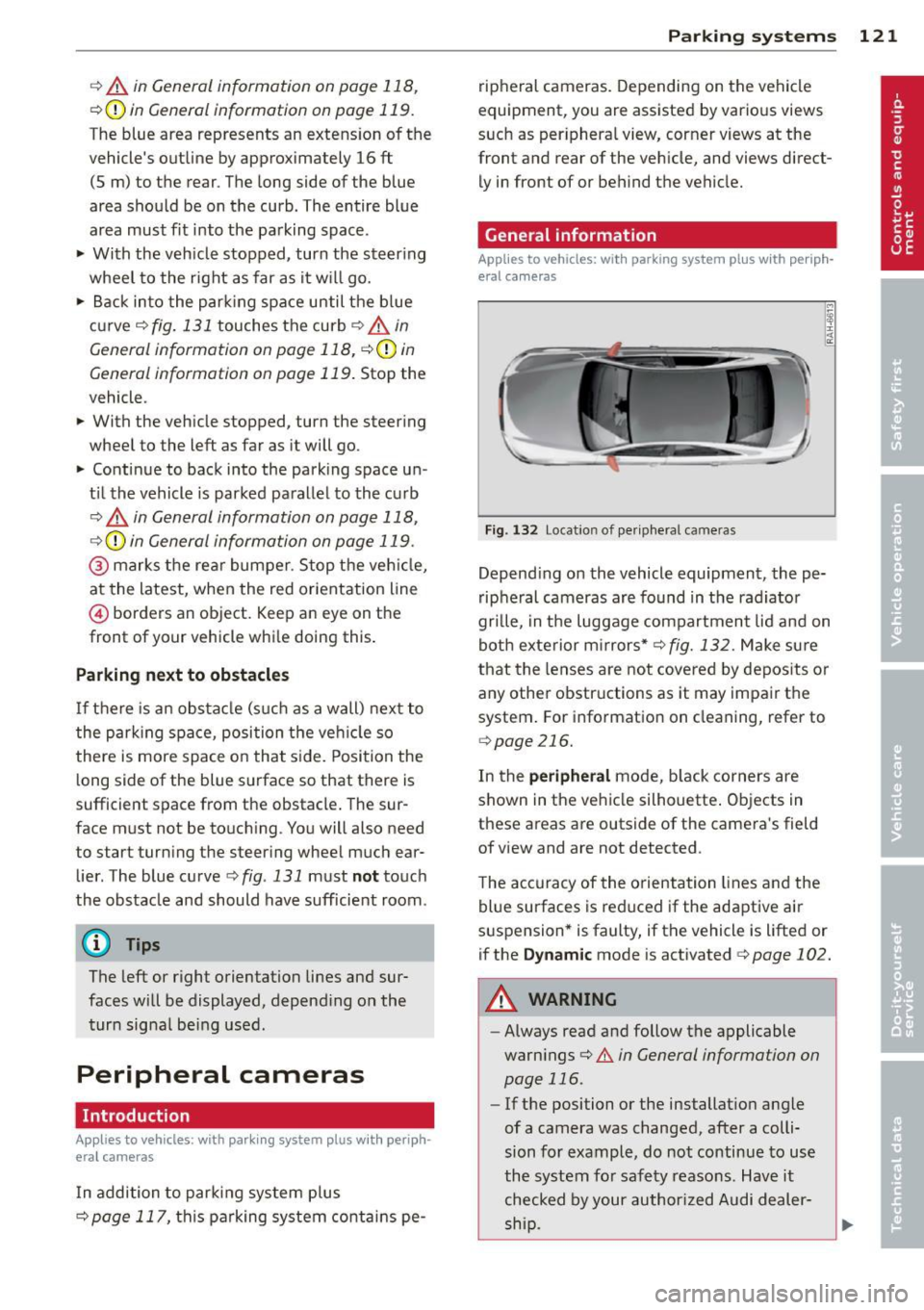
Fig. 132 Locat io n of per ipheral cameras
Depending on the vehicle equipment , the pe
ripheral cameras are found in the radiator
grille, in the luggage compartment lid and on
both exterior mirrors*
r::> fig. 132. Make sure
that the lenses are not covered by deposits or
any other obstructions as it may impair the
system. For information on cleaning, refer to
qpage 216.
In the peripheral mode, black corners are
shown in the vehicle silhouette. Objects in
these areas are outside of the camera's field
of view and are not detected .
The accuracy of the orientation lines and the
blue surfaces is reduced if the adaptive air
suspension* is faulty, if the vehicle is lifted or
if the
Dynamic mode is activated 9 page 102.
A WARNING
-Always read and follow the applicable
warnings
r::> .&. in General information on
page 116 .
-If the position or the installation angle
of a camera was changed, after a colli
sion for example, do not continue to use
the system for safety reasons. Have it checked by your author ized Audi dealer-
-
ship . ~
Page 124 of 310
122 Park in g s ystems
- Keep in mind that the image in the dis
play is distorted if the exter ior mirror
housing has been manually adjusted.
- Use the
re ar mode and the corne r view
( rear )
mode on ly when the luggage com
partment lid is fully closed . Otherwise
the image in the display will be distort
ed .
- The veh icle surroundings are shown us
ing the camera images. The vehicle im
age is shown by the system . Objects and
obstacles above the camera are not dis
played .
- Camera lenses en la rge and distort the
field of v is io n . The objects appear bo th
alte red and ina ccu rate on the screen.
(D Note
- Always read and follow the applicable
warnings
c::> 0 in Gen eral information on
page 116 .
-The Infota inment display shows the di
r ection in wh ic h the rear of the vehicle is
t ra veli ng based on the steering wheel
angle . T he front o f the ve hicle front
swings o ut more than the rear of the ve
hicle . Ma inta in plenty of distance so that
you r outside m irror or a corner of your
vehicle does not col lide with any obsta
cles.
(D Tips
If the 8/~/,c:;s symbol appears in the
disp lay and the respective d isplay area is
grayed out, then the power exterior mir
rors were fo lded in or the dr iver 's door/
front passenger's door/luggage compart
ment Lid was opened.
Switching on or off
Applies to vehicles: with parking system plus with periph
eral cameras
F ig. 1 33 Ce nt er co n so le: f» A butt on
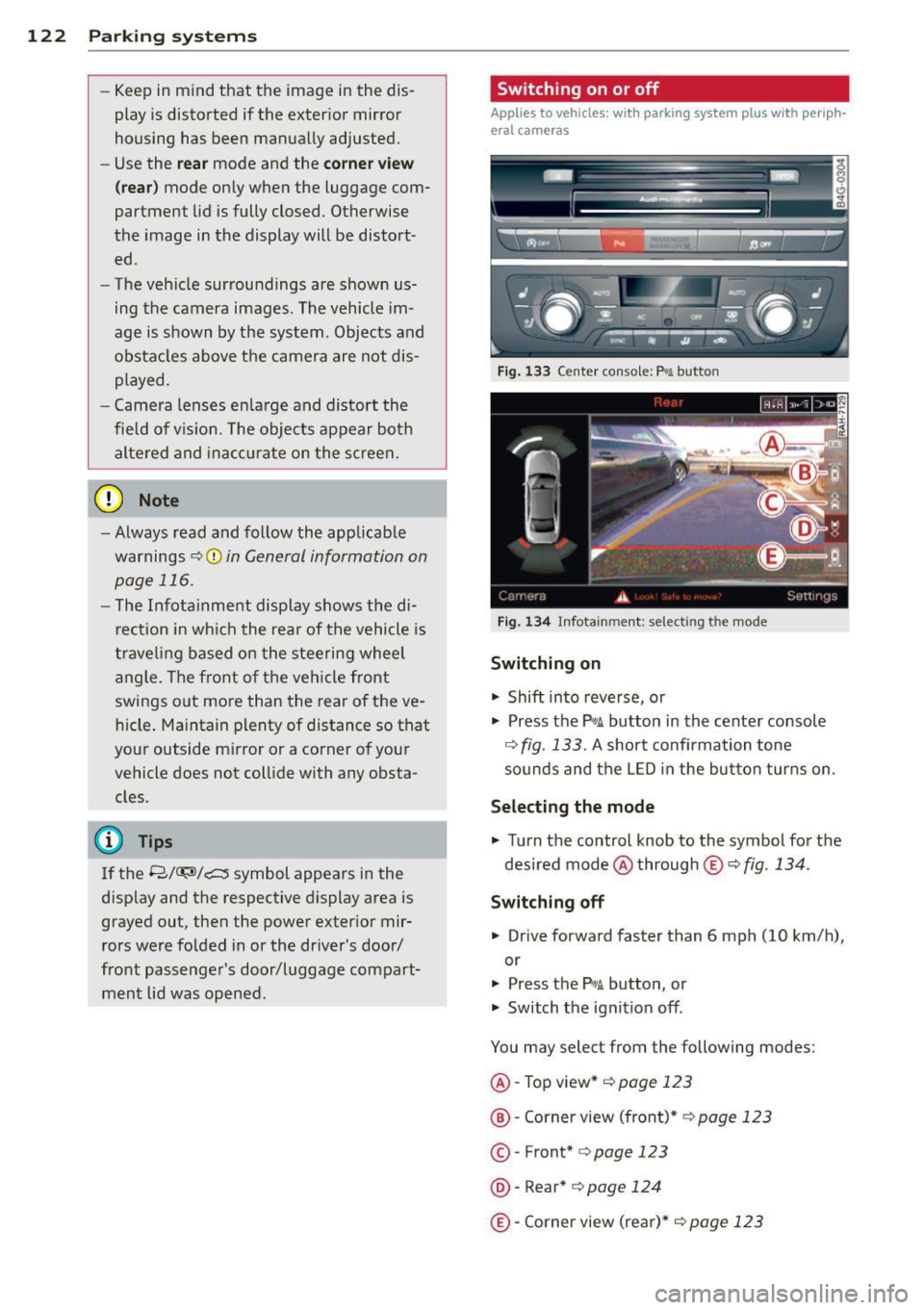
Fig . 1 34 In fota inme nt: se lect in g th e mo de
Switching on
.,. Shift into reverse, or
.,. Press the
p,,;A button in the cente r console
c::> fig. 133 . A short confirmation tone
sounds and the LED in the but ton tur ns on .
Selecting the mode
.,. Turn the control knob to the symbol fo r the
desired mode @through
® c::> fig. 134 .
Switching off
.,. Drive forward faster than 6 mph (10 km/h),
or
.,. Press the
P,,1A button, or
.,. Switch the ignit ion off .
You may select from the following modes:
@ -Top view*
c::> page 123
@ -Corner view (front)* c::> page 123
© -Front* c::> page 123
@ -Rear* c::> pag e 124
@-Corner view (re ar)* c::> page 123
Page 211 of 310
Trailer towing Driving with a trailer
General information
Your Audi was designed primarily for passen
ger transportation .
If you plan to tow a tra iler, p lease remember
that the addit ional load will affect durab ility,
economy and performance .
Trailer towing not on ly places more stress on
the vehicle, it also calls for more concentra
tion from the driver.
F or this reason, a lways fo llow the operating
and driving instructions provided and use
common sense.
(D Note
If you are going to tow a trai ler, you must
ac tivate the trailer operation mode
c::> page 209, Operating instructions.
Technical requirements
Traile r hitch
Use a weig ht-carrying hitch conforming to the
gross trailer we ight. The hitch must be suita
b le for your veh icle and trailer and must be
mounted securely on t he ve hicle's chassis at a
technically sound location . Use only a trail er
hi tch w ith a removab le ball moun t. A lways
check wi th t he tra ile r hi tch man ufa ctur er to
make sure that you are using the cor rect
h itch.
Do not us e a bumper hitch .
The hitch m ust be installed in such a way that
i t does not interfe re with the impac t-absorb
i ng bumper syst em. No mod ificat ions should
b e made to the vehi cle e xhaus t and br ake sys
tems . From t ime to time, check th at a ll hitc h
mo unt ing bo lts rem ain securely fas tened.
When you are not towing a trail er, remove the
tra ile r hi tch ball moun t. T h is prevents the
hi tch from causing damage sho uld your ve hi
cle be str uck from behind~ .&.
Trailer towin g 209
Trailer brakes
If your trailer is equippe d wi th a bra king sys
tem, check to be s ure that i t conforms to all
regulations .
T he trailer hyd ra u lic bra ke sys tem mus t not be
d irec tly connec ted to the vehicle's hydraulic
brake system .
Safety chains
Always use safety chains be tween your ve hicle
and t he tra ile r.
Trailer lights
Trai ler lights must meet all reg ulations. Be
su re to c heck with your Audi dea ler for correct
wir ing, switches and relays .
Mirrors
If you a re unable to see the traffic behind you
u sing the regula r outside mirrors, then you
must insta ll extended mir rors. It is important
t h at you
always have clea r vis io n to the rear.
_&. WARNING
-
Afte r removi ng the trailer hitch , do no t
s tor e i t in yo ur v ehicl e. In case of sudden
b raki ng, the hi tch co uld fly forwar d and in
j ur e you o r yo ur pass enge rs.
Operating instructions
Maximum trailer weight
A tra ile r fo r you r vehi cle is l imited to a typi cal
cla ss 1 o r class 2 tr ailer.
Trailer load distribution
Be sure the load in the tra ile r is held secure ly
in place to p revent it from shift ing fo rward,
ba ckward or sideways.
Never allow a passenger to ride in a trailer
c::> .& in Driving instructions on page 211 .
Engine cooling sy stem
Towing a t railer ma kes the engine wor k hard
er . It is impo rtant that the cooling system's
performance is up to the additional load.
•
•
Page 216 of 310
214 Cleaning and protec tio n
Automatic car wash
The vehicle can be washed in almost any
modern automatic car wash .
The vehicle paint is so durable that the vehicle
can normally be washed without problems in
an automatic car wash. However, the effect on
the paint depends to a large extent on the de
sign of the facility, the filte ring of the wash
water, the type of wash and care mater ial , etc.
I f the pa int has a dull appearance afte r going
through the car wash or is scratched, bring
this to the attention of the operator immedi
ately.
If necessary, use a different car wash.
Before going through a car wash, be sure to
take the usual precautions such as closing the
windows and power roof . Factory installed an
tennas must not be removed.
I f you have installed additional accessor ies on
the vehicle - such as spoilers, roof rack, etc. -
it is best to ask the car wash operator if these
should be removed .
A WARNING
Always read and heed all WARNINGS and
other information
c;, page 213.
- Before washing the vehicle in an auto
matic car wash, p lease make sure to re
tract the exterior mirrors to prevent
them from being damaged. Power fold
i ng exter ior mirrors* must not be folded
i n or out by hand . Always use the electri
ca l power control.
- Compare the width of your vehicle with the width of the tunnel at the facility.
Washing the vehicle by hand
A lot of water is needed when washing a vehicle by hand.
• Before you start washing , make sure you
have read and understood the WARNINGS
r:::;, _& ,
• First soak all dried dirt unti l it is soft, then
rinse it off.
• As you clean your vehicle, start w ith the
roof and work your way down to the bottom,
using a sponge, a sponge glove or a clean
brush .
• Rinse the sponge or the sponge g love often,
flushing it clean each time .
• Use spec ial car shampoo only for very per
sistent d irt .
• Rinse the car thoroughly with water.
• Use a chamois leather to gently wipe the ex -
terior dry .
Use a separate sponge for cleaning the
whee ls, door sills and other regions exposed
to road dirt. In this way, you will not scratch
the paint with coarse particles imbedded in
the sponge the next time you wash the car.
A WARNING
'-
- Wash your vehicle only when the ign ition
is switched off to reduce the risk of a
crash .
- Always read and heed all WARNINGS and
other information
c;, page 213 .
(D Note
-Never try to remove dirt, mud or dust if
the surface of the vehicle is dry. Never
use a dry cloth or sponge, since this
could scratch your vehicle's paint or win
dows.
- Never wash your car in bright sunlight .
Drops of water act as magn ifying lenses
and may damage your paint .
- When you wash your car in the winter : if
you rinse your vehicle with a hose, be careful not to aim the stream of water
directly at locks, or at door or hatch
openings - they can freeze sh ut.
- Never use sponges designed to remove
insects, or any k itchen scouring sponges
or simi lar products. They can damage
your paint finish.
- Never use a dry cloth or sponge to clean
the headlights. Only use wet cloths or
Page 220 of 310
218 Cleaning and protection
8_ WARNING
Always read and heed all WARNINGS and other information
Q page 213 .
Touch-up paint
Minor paint damages should be touched up
immediately.
.. Use either a to uch -up paint stick or spray
paint to cover minor scratches and nicks .
Your Audi dea ler has touch-up paint for minor
scratches and stone chips. Scratches shou ld
be touched up soon after they occur to pre
vent corrosion.
If a spot starts to rust, however, a simple
touch-up job will not be enough . The affected
surface must be sanded smooth and coated
with an anti-rust primer before the painted
finish can be restored.
The number for the origina l vehicle paint can
be found on the vehicle identification label
r::>
page 2 85.
A WARNING
Always read and heed all WARNINGS and other information
Qpage 213.
Windows
Clear vision to all sides.
Clean all windows regularly to remove road
fi lm and car wash wax buildup.
.. Remove sno w from windows using a brush.
.. Use a plastic ice scraper to remove ice from
windows and mirrors .
.. Remove other residue on the windows with
a spray -on glass cleaner.
.. Wipe the windows dry with a clean p iece of
cloth or kitchen paper towel.
The best way to remove snow from windows
and mirrors is to use a brush . Use a non-abra
sive
plastic ice scraper -better still, a spray
deicer - to remove
ice from windows and mir
rors . Oil, grease or silicone residue can be removed
with
glass cleaner or silicone remover . How
ever, wax res idue requires the use of a spec ial
ly formulated so lvent. Please contact your
Audi dealer for adv ice on safe products for
wax removal.
Windows should also be cleaned on the inside at regu lar intervals.
Never dry windows with the same chamois
that you use to dry painted surfaces . Wax resi
due on the chamois can impair v is ion through
the windows.
A WARNING
- Always read and heed all WARNINGS and
other information
Q page 213 .
-The windsh ield must not be treated w ith
water-repellent materials. They can in crease glare under poor v is ib ility condi
tions such as wetness, darkness, or when
the sun is low on the hor izon. In addi
tion, they can cause the windshield wip
ers to chat ter.
(D Note
- Never use warm or hot water to remove
snow and ice from windows and mirrors.
Thi s could cause the glass to crack .
- To prevent damage to the wires of the
rear defogger, do not place any adhesive
st ick ers on the inside of the rear win dow
over the wires.
- To help prevent dirt from scratching the
w ind ow, always scrape in a forward di
rection -pushing the scraper away from
you -never back and forth .
Cast (light) alloy wheels
Cast (light) alloy wheels require special care .
.. Wash the wheels with a sponge or hose
brush every other week.
.. For deep cleaning afterwards, use only a
dedicated
acid-free cast alloy wheel cleaner.
.. Rub a coat of
liquid wax onto the rims every
three month . Be sure to reach and treat all
parts of the rim.
...
Page 277 of 310
Fuses and bulbs
Fuses
Replacing fuses
Fuses that have blown will have metal strips
that have burned through.
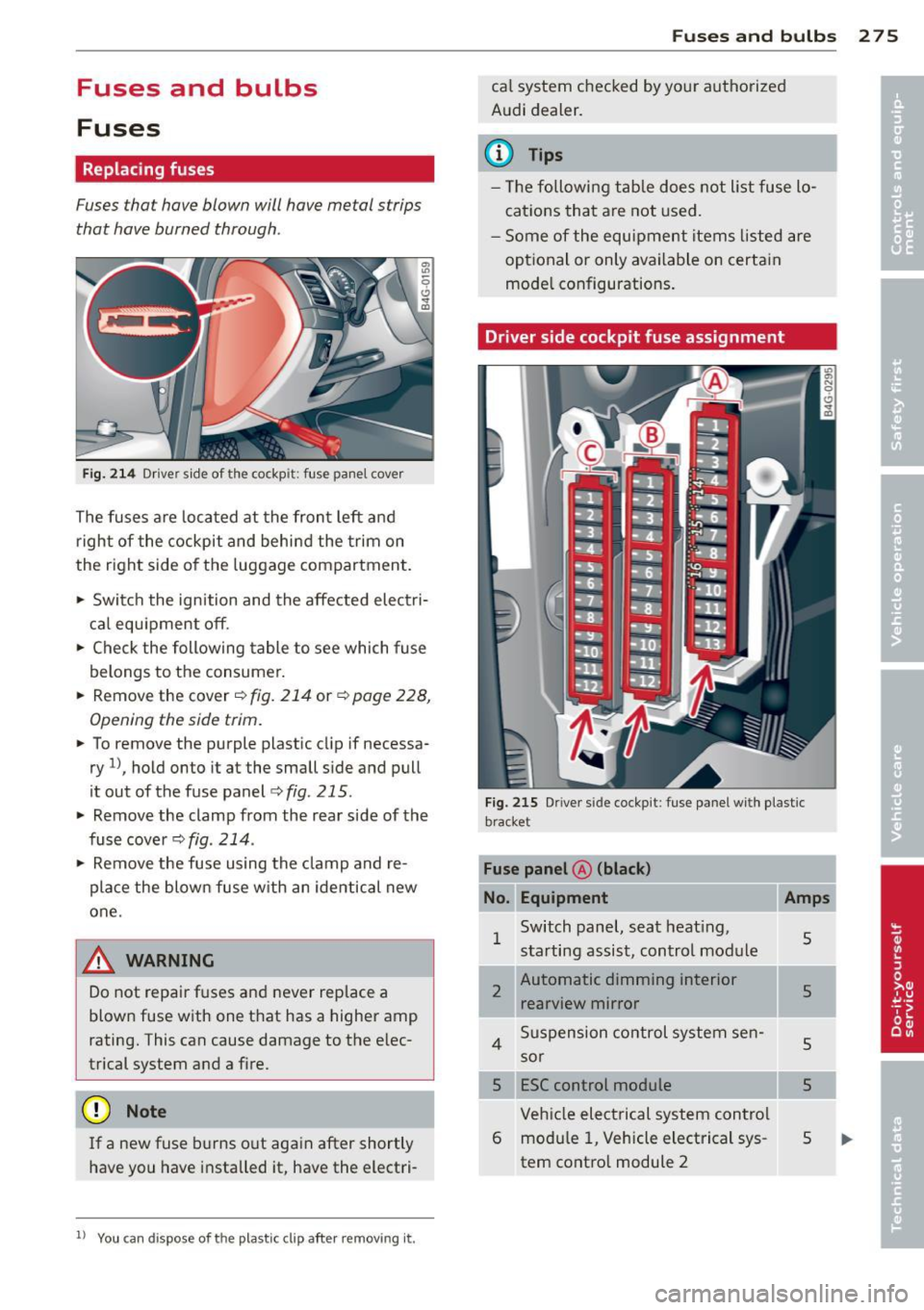
Fig. 2 14 Driver s ide of the cockp it: fuse panel cover
The fuses are located at the front left and
r igh t of the cockpit and behi nd the trim on
the right side of the luggage compartment .
.. Switc h the ignition and the affected electri
ca l equipment off .
.. Check the following table to see which fuse
belongs to the consumer .
.. Remove the cover ~
fig. 214 or~ page 228,
Opening the side trim .
.. To remove the purple plastic clip if necessa
ry
ll, hold onto it at the small s ide and pull
it out of the fuse panel ¢
fig. 215 .
.. Remove the clamp from the rear s ide of the
fuse cover ¢
fig. 214 .
.. Remove the fuse using the clamp and re
place the blown fuse w ith an identical new
one.
A WARNING
-
Do not repair f uses and never replace a
blown fuse w ith one t hat has a higher amp
rating. This can cause damage to the e lec
trical system and a fire.
(D Note
If a new fuse b urns o ut again after shortly
have you have installed it, have the electri-
11
You can dispose of the pla stic cl ip after removing it.
Fu se s and bulb s 2 7 5
ca l system checked by your authorized
Audi dealer.
a) Tips
- T he followi ng table does not list fuse lo
cations that are not used.
- Some of the equipment items listed are
optional or only available on certain
mode l configurations.
Driver side cockpit fuse assignment
F ig. 215 Dr iver side cockp it : fuse pa nel with plastic
brac ket
No. Equipm ent
1
2
Switch panel, seat heating,
starting assist, control module
Automatic dimming interior rearview mirror
4 Suspension control system sen-
sor
5 ESC control module Veh icle electrical system contro l
6 modu le 1, Vehicle electrical sys
tem contro l module 2
Amp s
s
5
5
5
s
Page 279 of 310

Fuse s and bulb s 2 77
Fuse panel @ (brown) Fuse panel@ (red )
No. Equipment Amps No.
Equipment Amps
Climate control 10 1 Left belt tensioner 25
Climate control system blower 40 2 Right belt tensioner 25
3
Diagnost ic connec tor 10 3 Socke t 20
4
Electrical ignition lock 5 4 Socket 20
5
Power s teering colum n adj ust-
5 ment
5 Ele ctromechanical parking brake 5
6 adaptive air suspension 15
6 Steering column switch module 10
7
Power steering column adjust -
25
ment
7
Rear door (front passenger 's
30 side)
8 Rear e xterior lighting 30
8 Light switch 5
9
L u ggage compa rtment lid con-
30
trol modu le
Luggage compartment fuse assignment Telephone 5
11
Sound amplif ier 30
12
Rear spoiler (Sportback) 20
Fuse panel © (b rown )
No . Amps
1
Radio receiver, Sound amplifier/ 30/20
MMI unit/drives
2 Tank leak detection system 5
Fig. 2 17 Luggage co mpar tment: fuse panel w ith plas-
t ic b racke t 4
AEM co ntrol module/battery 10/15
module
Fuse p anel A (black )
Battery fan 35
Radio receive r 7,5
No. Equipment Amps 8 Rear Seat Entertainment 7,5
Electromechanical parking brake 30
Electromechanical parking brake 30 9
Automatic d imm ing interior 5/15
rearview mirror/battery mod ule
6
Front door (front passenger's
30 side)
10 Parking system 5
7
Rear exterior lighting 30 Fuse panel @ (green )
Rear sun shade, clos ing aid, lug-No .
Equipment Amps
8
gage compartment lock, con-
20 venience key, START ENGINE
1 Aud i pre sense 5
2
Electromechanical parking brake 5
STOP, fuel fi ller door 3 ad aptive air suspens ion 5
9 Power seat adjustment 15
4 Automatic transmission 7,5
10
Parking system 5 5 Parking system 5
11
Rear seat heating 30 6 Rear Seat Entertainment 5
7
Sta rt -Stop-Sys tem 5
8 Audi side assist 5
Page 289 of 310
Data
Data
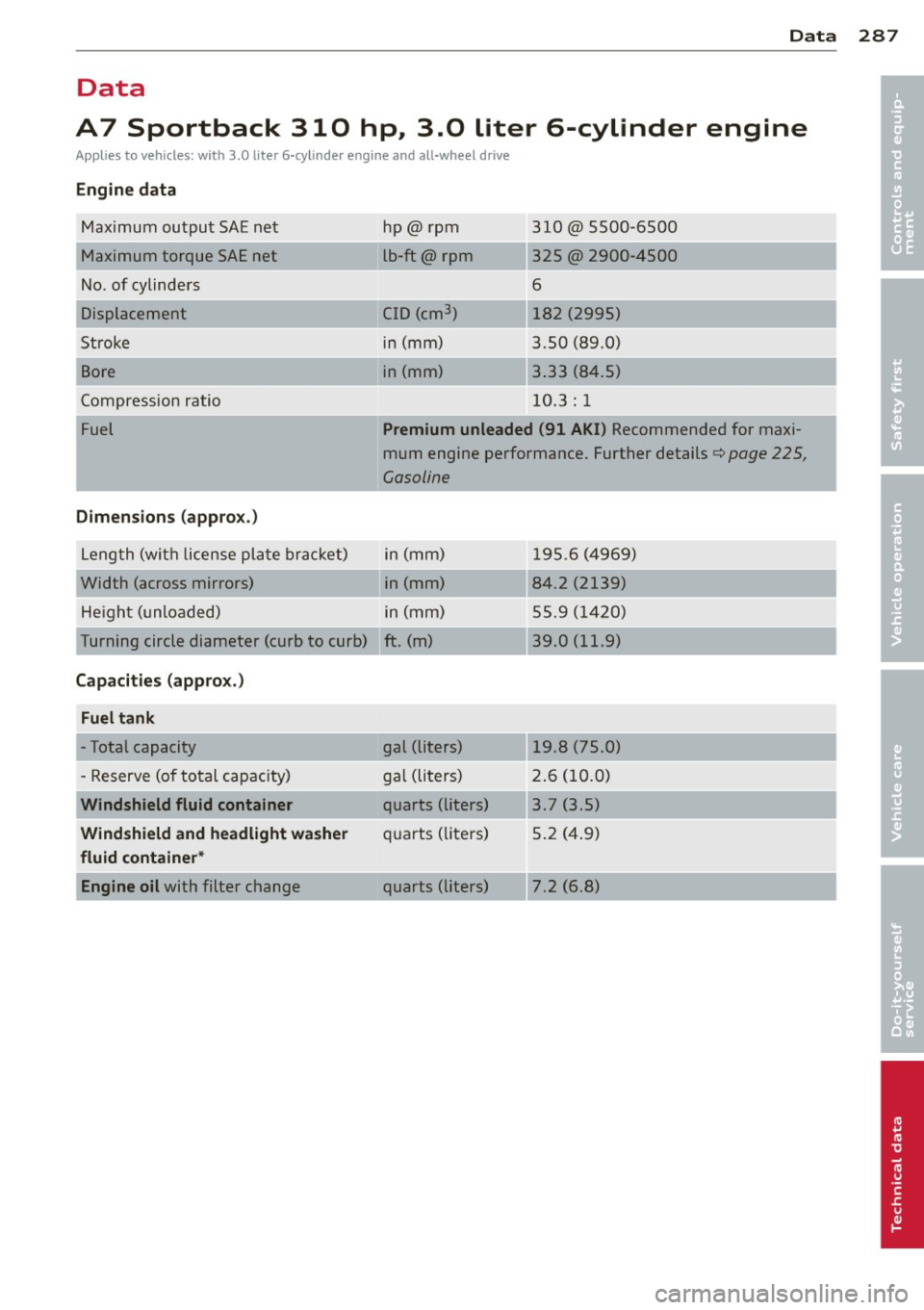
A7 Sportback 310 hp., 3.Q, liter 6-cylinder engine
Applies to vehicles: with 3.0 liter 6-cyli nde r engine and all-wheel d rive
Engine data
Maximum output SAE net
Maximum torque SAE net
No . of cylinders
Displacement
Stroke
Bore
Compression ratio
Fuel
Dimensions (approx .)
L eng th (wit h license pl ate brac ket)
Width (across mirrors) He igh t (unloaded) hp@
rpm
lb-ft@ rpm
C ID (cm
3
)
in (mm)
in (mm)
-- ,
__ ...
310@ 5500-6500
325 @ 2900-4500
6
182 (2995)
3.50 (89 .0)
3 .33 (8 4.5)
10 .3 : 1
Premium unleaded (91 AKI) Recommended for maxi
mum engine performance. Further details
Qpage 225,
Gasoline
in (mm) 1 95.6 ( 4969)
in (mm) 84.2 (2139)
in (mm) 55.9 (1 420)
Turning circle diameter (curb to curb) ft. (m) 39. 0 (11.9)
Capacities (appro x.)
Fuel tank
- Total capacity
- Reserve (o f to tal capacity)
Windshield fluid container
Windshield and headlight washer
fluid container *
Engine oil
with filter change gal (liters)
19.8 (75.0)
g
al (li ters) 2. 6 (10.0)
quarts (liters) 3.7 (3.5)
qu arts ( liters) 5 .2 ( 4.9)
quarts (lite rs) 7.2 (6.8)
287
•
•
Page 290 of 310
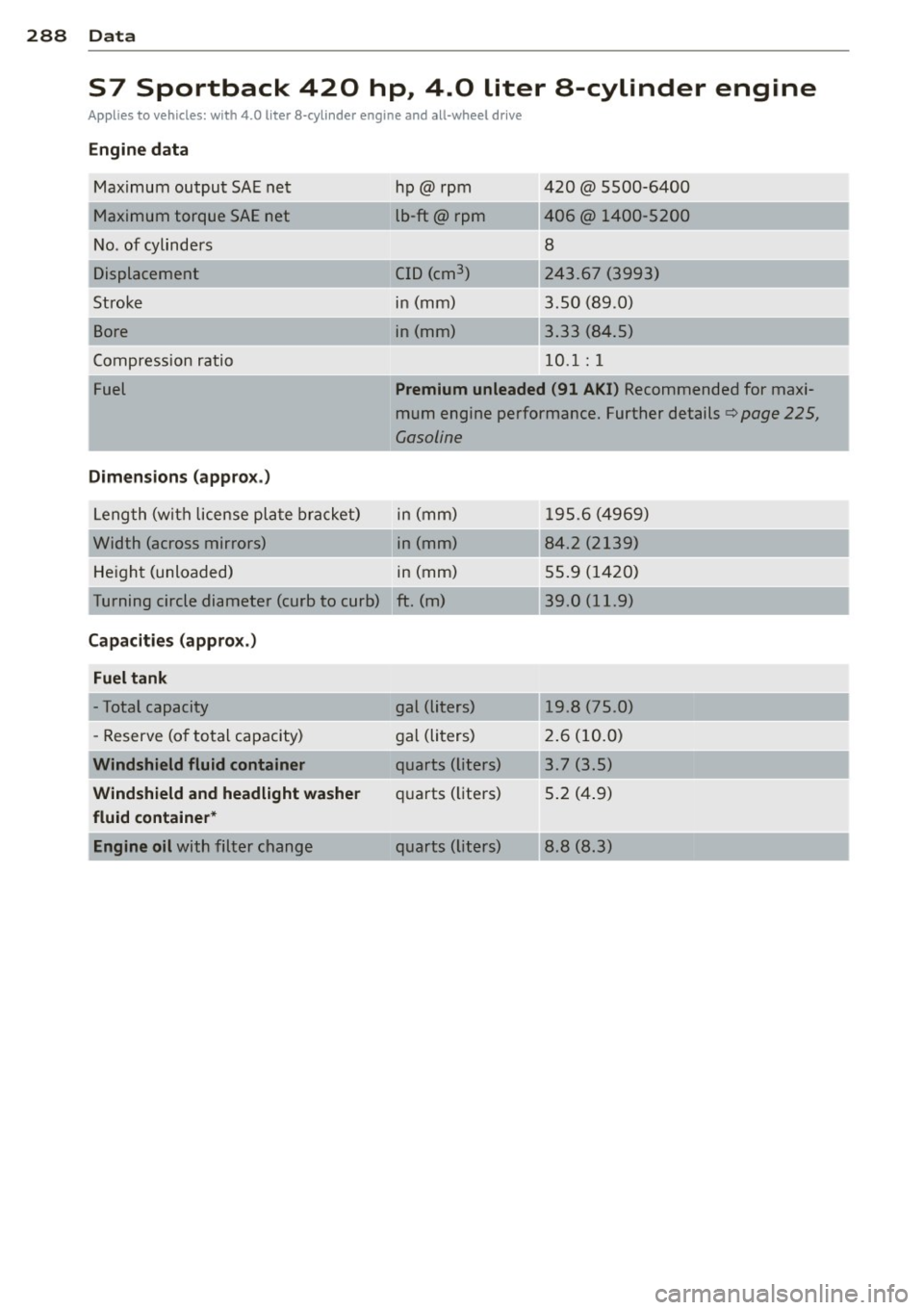
288 Data
S7 Sportback 420 hp, 4.0 liter a-cylinder engine
Applies to vehicles: with 4.0 liter 8-cylinder engine and all-wheel drive
Engine data
Maximum output SAE ne t
Maximum torque SAE net
No. of cylinders
Stroke
Bore
Compressio n ratio
Fuel
Dimensions ( approx .)
Leng th (with lice nse pl ate bra cket)
Width (across mirrors) He igh t (unloaded) hp@ rpm
lb-ft@ rpm
CID (cm
3 )
in (mm)
in (mm)
__ ,
-~ .. ,
420 @ 5500-6400
406@ 140 0-5200
8
24 3 .67 (3993)
3 .50 (89 .0)
3 .33 (84.5)
10 .1: 1
Premium unleaded (91 AKI) Recommended for maxi
mum engine performance . Further details¢
page 225,
Gasoline
in (mm) 1 95.6 (4969)
in (mm) 84.2 (2139)
in (mm) 55.9 (1 420)
Turning circle diamet er (curb to curb) ft . (m) 39 .0 (11.9)
Capacities (appro x.)
Fuel tank
- Total capacity
- Reserve (o f to tal capacity)
Windshield fluid container
Windshield and headlight wa sher
fluid container *
Engine oil
with filter c hange gal (li
ters)
19 .8 (75 .0)
gal (li ters) 2. 6 (10. 0)
q uarts (lit ers) 3 .7 (3 .5)
qu arts ( li1ters) 5 .2 ( 4.9)
quarts (li te rs) 8 .8 (8.3)