change time AUDI A7 2013 Owner's Manual
[x] Cancel search | Manufacturer: AUDI, Model Year: 2013, Model line: A7, Model: AUDI A7 2013Pages: 310, PDF Size: 77.45 MB
Page 242 of 310
24 0 Ch eck ing and filling
The location of the brake fluid reservo ir can be
seen in the engine compartment illustration
¢ page 232.
The fl uid level may drop slightly after some
time due to the automatic adjustment of the
brake pads. This is not cause for alarm.
I f the brake fluid level falls
considerably be
low the "MIN" mark, the brake warning/ind i
cator light
1111 (U .S . models)/ . (Canadian
models) will come on¢
page 15. Do not con
tinue to operate the vehicle. The comp lete
brake system shou ld be thoroughly checked
by an au thorized Audi dealer or other quali
fied facility and the cause corrected . If the
brake fluid level is too low, the brake warn ing/
indicator light w ill illuminate . Contact an au
thor ized Audi dealer
imm ediatel y.
Changing brake fluid
Have the brake fluid changed by an experi
enced technician .
Brake fluid absorbs moisture from the a ir . If
the water content in the brake fluid is too
h igh , corros ion in the brake system may result
after a per iod of t ime . The bo iling po int of the
brake fluid w ill also decrease considerably and
dec rease braking performance.
Therefore, the brake flu id must be changed
ev ery two year s. Always use new b rake fluid
which conforms to Fede ral Motor Vehicle
Standard "FMVSS
116 DO T 4".
The brake flu id reservoir can be difficult to
r each, therefo re , we recommend that you
have the brake fl uid changed by yo ur author
ized
Audi d ealer. Your dea ler has the correct
too ls, the right brake fluid and the know -how
to do this for you .
A WARNING
-Brake fluid is poisonous . It must be stor
ed only in the closed orig inal container
out of the reach of children!
- Brake fa ilure can result from old or inap
propriate brake fluid. Observe these pre
caut ions: -
Use only brake fluid that meets SAE
specification
J 1703 and conforms to
Federa l Motor Vehicle Standard
116.
Always check with your authorized Audi
dealer to make sure you are using the
correct brake fluid . The correct type of
brake f lu id is also ind icated on the
brake flu id reservoir.
- T he brake fluid must be new. Heavy use
of the bra kes ca n cause a vapo r lock if
the b rake fluid is left in the system too
l ong . This can seriously affect the effi
c iency of the brakes as well as your
safety. This co uld resu lt in an accident.
(D Note
Bra ke fluid will damage the paint of you r
vehicle .
(® For the sake of the environment
Because of the p rob lem of p roper disposal
of b ra ke fluid as well as the spec ial too ls
r equired and the necessary expertise, we
re commend that you have the brake fluid
changed by yo ur authorized Aud i dea ler.
Battery
General information
U nder normal ope rat ing cond itions , the bat
tery in yo ur Audi does not need any ma inte
nance. With
high o utside tempe ra tu res or
l ong daily drives we recommend that you have
the e lectrolyte level checked by a service fa
cility. The electrolyte leve l should a lso be
checked each t ime the battery is charged
<=> page 243.
Have th e battery checked when yo u take your
veh icle in for service. You are well advised to
replace a battery that is o lder than S years .
With certain types of airbag deployment, the battery is disconnected from the veh icle elec
trical system for safety reasons<=>.&
in Re
pair , care and dispo sal of the airbags on
page
165.
Page 244 of 310
242 Checking and filling
-Always wear gloves and eye protection.
Do not tilt the battery because acid
could leak out of the ventilation open ings.
- If you get battery acid in your eyes or
on your skin, immediately rinse with
cold water for several minutes and get
medical attention .
- If you should ingest any battery acid,
seek medical attention immediately.
- Do not expose the battery to an open
flame, electric sparks or an open light .
- Do not smoke.
- Do not interchange the positive and neg-
ative cables .
- When working on the battery , be sure
not to short-circuit the terminals with
tools or other metal objects. This would
cause the battery to heat up very quickly,
which could lead to damage or explosion
and personal injury .
- When a battery is charged, it produces
hydrogen gas which is explosive and
could cause personal injury .
- Always keep the battery well out of the reach of children .
- Before work is done on the electrical sys
tem, disconnect the negative ground ca ble.
- Before performing any work on the elec
trical system, switch off the engine and
ignition as well as any electrical equip
ment. The negative cable on the battery
must be disconnected. If you are just go
ing to replace a light bulb, then it is
enough to switch off the lights.
- Before disconnecting the battery, switch
off the anti-theft alarm system! Other
wise you will set off the alarm.
- When disconnecting the battery, first
disconnect the negative cable and then
the positive cable.
- Before reconnecting the battery, make sure all electrical consumers are switch
ed off. Reconnect the positive cable first
and then the negative cable. Never inter
change the cables - this could start a fire! -
Never charge a frozen or a thawed-out
battery . It could explode! If a battery has
frozen, then it must be replaced. A dis charged battery can freeze over at 32 °F
(0 °C) .
-Make sure the vent hose is always attach
ed to the opening on the side of the bat
tery .
- Never use batteries which are damaged .
There is the danger of an explosion! Al
ways replace a damaged battery.
A WARNING ....__
California Proposition 65 Warning:
- Battery posts, terminals and related ac
cessories contain lead and lead com
pounds, chemicals known to the State of
California to cause cancer and reproduc
tive problems . Wash hands after han
dling.
(D Note
- Do not disconnect the vehicle battery
when the ignition is on or when the en
gine is running, otherwise , you will dam
age electronic components in the electri
cal system.
- If your vehicle is going to stand for a
long period of time without being driven,
protect the battery from "freezing", oth
erwise it will be damaged and will then
have to be replaced.
- When opening the doors, the windows
lower approximately 10 mm automati
cally. This function is not available when
the battery is disconnected, which
means there is a risk that the door seal
or the window could be damaged .
Page 246 of 310
24 4 Ch eck ing and filling
Never use a fast charger as a booster to
start the engine. This will seriously dam
age sensitive electronic components, such
as control units, relays, rad io, etc., as well
as the battery charger.
Battery replacement
The new battery must have the same specifi
cations and dimensions as the original equip
ment battery .
Intelligent energy management in your veh i
cle is respons ible for d istributing the electr i
cal energy throughout your vehicle
c::> page 202. The intell igent energy manage
ment system w ill keep the engine battery
cha rged bette r than vehicles w ithout t his sys
tem. To make sure the additional e lectrica l en
e rgy is availab le once again after you have
changed the battery, we recommend that you
install batteries of the same type and man u
facture only (the same as those installed at
the time your vehicle was delivered). Specifi
cations are listed on the battery hous ing. Your
author ized dealer must code the battery in
the energy management system to enable you
to use the energy management funct ions cor
rectly after replac ing the battery .
The new battery must have the same capacity ,
voltage (12-volts), amperage, const ruct ion
and p lug sealing.
When insta lling the battery, make sure the ig
n ition and all e lectr ica l consumers are sw itch
ed off .
{[) Note
Make sure the venti lation hose on the s ide
of the battery is connected, ot herwise
fumes or battery ac id can leak out.
- Vehicles with the Start-Stop-System* are
equipped with a special cycle-proof AGM
batte ry. Insta lling a differe nt type of
batte ry can ca use p rob lems in the vehi
cle elect rical system. When rep lacing the
vehicle bat tery, always ins ta ll one wi th the same specifica
tions as the o rigina l
battery .
~ For the sake of the env ironment
B ec ause o f th e p rob lem of p roper disposal
of a battery, we recommend your author
ized Audi dealer change the battery fo r
you. Batteries contain sul fur ic acid and
l ead and must always be disposed of prop
erly in compl iance with all environmental
regulations. Disposing of veh icle batter ies
i mproperly is very dange rous to the envi
r onment.
Windshield/headlight
washer container
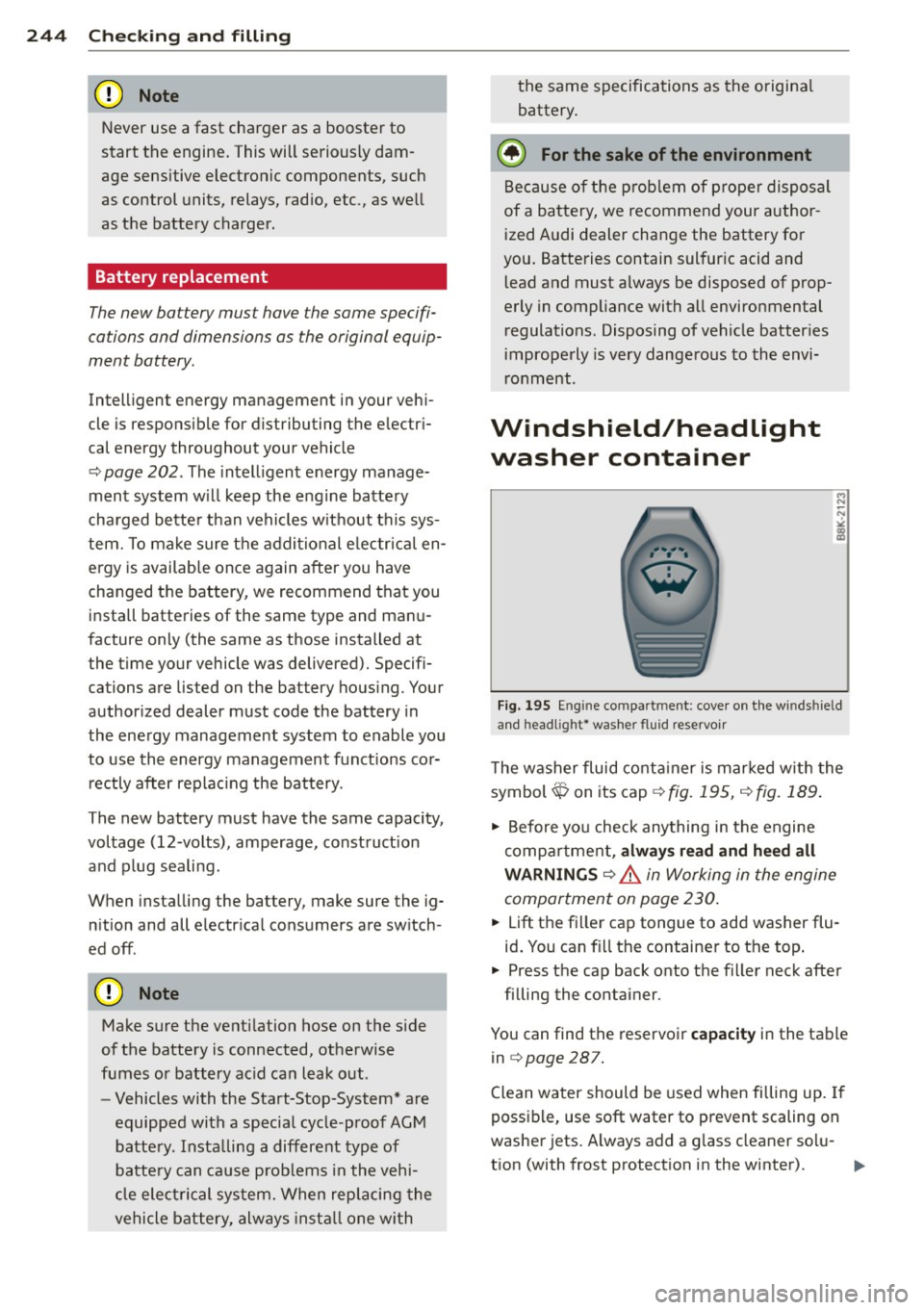
Fi g. 195 Eng in e compa rt m ent: cove r on t he w inds hield
and head lig ht* was her flu id reservo ir
T he washer fluid co nta iner is mar ked w ith the
symbol$ on its cap
c::> fig. 195, c::> fig. 189.
.,. Before yo u check anything in the engine
compa rtment,
alwa ys read and heed all
WARNINGS
c::> A in Working in the engine
compartment on page 230 .
.. Lift the fi ller cap tongue to add washer flu
id . You can fi ll the containe r to the top .
.. Press the cap back onto the filler neck after
filling the container .
You can find the reservoi r
capacity in the table
in
c::> page 287.
C lean water should be used when filling up . If
possible, use soft water to prevent scaling on
washe r jets. Always add a g lass cleaner so lu
t ion (with frost protection in the winter).
Page 250 of 310
248 Tires and wheels
Groove
means the sp ace between two ad jacent tread
ribs .
Load rating (code )
means the maximum load that a tire is rated
to carry fo r a g iven inflat ion pressu re. You
may not find this in fo rmat io n on all t ires be
c a use i t is no t re quir ed by law.
Maximum load rating
means the load rating for a t ire at the max i
mum permissible inflation pressure for that
tire.
Maximum loaded vehicle weight
means t he sum of:
(a) Curb weig ht
(b) Accessory weight
( c ) Vehicle c apa city we ight, and
(d) Prod uction opt ions we ight
Maximum (permissible) inflation pressure
means t he maximum co ld inflation pressure
to which a tire may be inflated . Also called
"maxim um infla tion p ressure ."
Normal occupant weight
means 150 lbs. (68 k ilog rams) times the
n umber of occupants seated in the vehicle up
to the tota l seating capacity of yo ur vehicle .
Occupant distribution
means dist ribution o f occ upants in a veh icle.
Outer diameter
means t he overa ll diamete r of a n inflated new
tire.
Overall w idth
means the linea r distance between the exter i
ors of the sidewalls of an inflated tire, includ
ing e levations due to labeli ng, decorations, or
p rotectiv e bands o r ribs .
Ply
means a layer of rubber-coated para llel cords.
Production options weight
me ans the com bine d we igh t of tho se ins tall ed
regular prod uction opt ions we ighing over 5
lb s. (2 .3 kg) in excess of those stan da rd item s
which they replace, not previously considered
in curb weight or accessory we ight, including
heavy duty brakes, ride levelers , roof rack ,
heavy duty battery, and special tr im .
Radial ply tire
means a pneumat ic tire in wh ich the ply cords
t h at exte nd t o the beads are laid at substa n
t ia lly 90 deg rees to the center line of the
tread .
Recommended inflation pressure
see<=> page 247, Cold tire inflation pressure.
Reinforced tire
means a t ire des ign to operat e at h igher loads
and a t higher in flation pressures than t he cor
re spondi ng s tand ard tire. Reinfor ce d tires
may be iden tifie d as "X L" "xl" "E X TRA LOAD"
' ' '
or "RF " on the sidewa ll.
Rim
means a metal s upport for a ti re or a tire and
tube assembly upon whi ch t he tire beads are
sea ted.
Rim diameter
means nom inal d iameter of the bead seat. If
you change your wh eel s ize, you wi ll have to
purchase new ti res to match the new r im di
ameter.
Rim size designation
means r im diameter and width .
Rim width
means nominal d istance between rim fla nges .
Sidewall
means tha t po rtion of a tire betwee n the
t read and be ad.
Page 253 of 310
Tires and wheels 251
Bear in mind that the tire pressure monitoring
system* can only monitor the tire pressures
you have stored. The system does not recog
ni ze the load cond it ion of your vehicle.
The effectiveness of the tire pressure monitor
ing system* will be impaired if you store nor
mal load pressures but then operate the vehi
cle at its maximum load
c;, & .
See the illustration c;, fig. 196 for the location
of the label on driver's side B-pillar (co lor of
the actua l labe l and exact location on the ve
hicle will vary slightly).
Tire designation
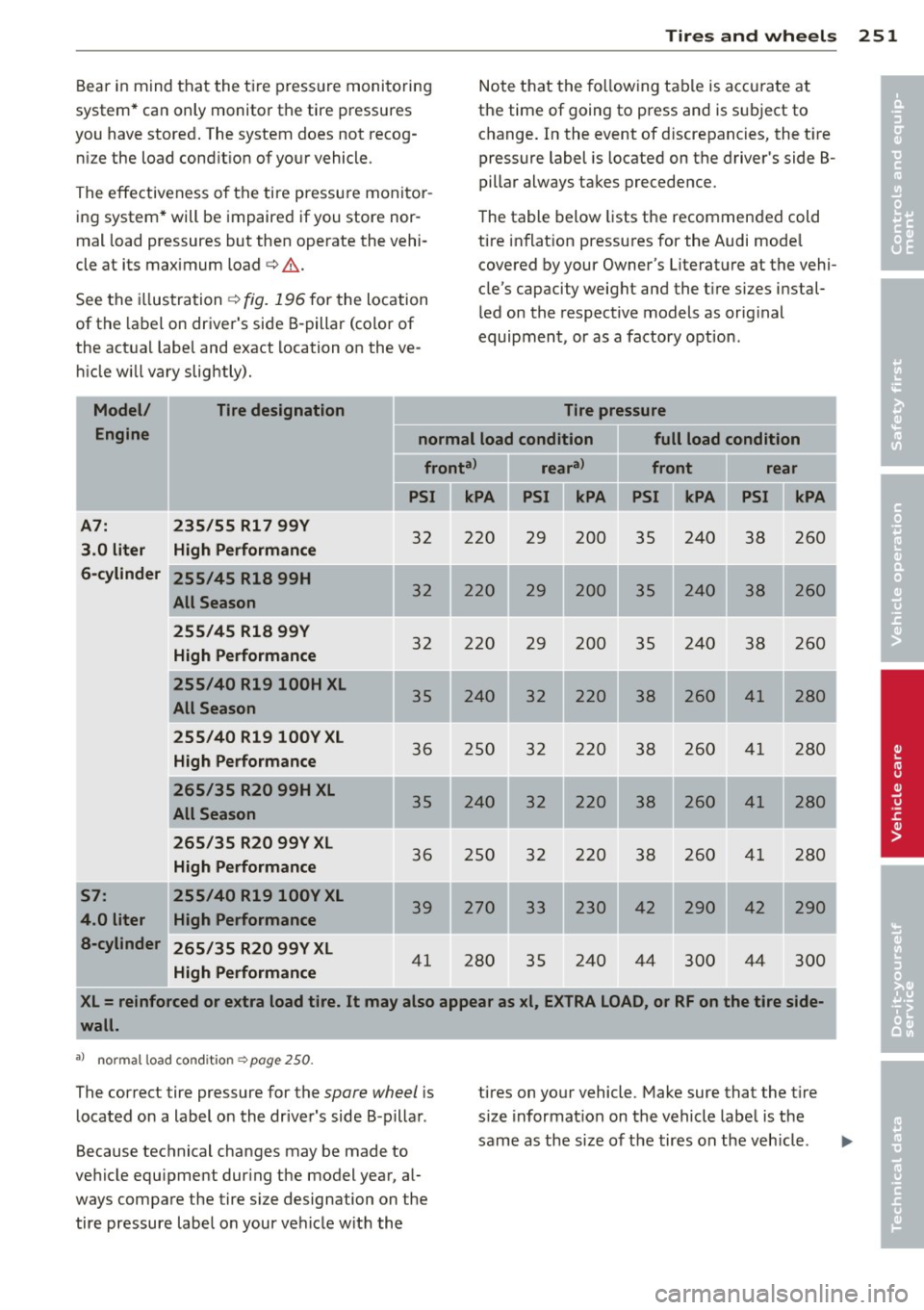
Note that the following table is accurate at
the time of going to press and is subject to change. In the event of d iscrepancies, the t ire
pressure label is located on the driver's side B
pillar always takes precedence.
The table below lists the recommended cold
tire inflat ion pressures for the Audi mode l
covered by your Owner's Literature at the vehi
cle's capacity weight and the t ire sizes instal
led on the respective models as orig inal
equipment, or as a factory option.
Tire pressure
Model/
Engine normal load condition full load condition
fronta> reara>
front rear
PSI kPA PSI
A7: 235/55 Rl 7 99Y
3.0 liter High Performance
6-cylinder
S7:
4.0 liter a-cylinder 255/45 R18 99H
All Season
255/45 R18
99Y
High Performance
255/40 R19 l00H XL
All Season
255/40 R19100YXL
High Performance
265/35 R20 99H XL
All Season
265/35 R20 99Y XL
High Performance
255/40 R19
l00Y XL
High Performance
265/35 R20 99Y XL
High Performance
32 220
32 220
32 220
35 240
36 250
240
36 250
39 270
41 280 29 200
35 240 38 260
29 200 35 240 38 260
29 200 35 240 38 260
32 220 38 260 41 280
32 220 38 260 41 280
32 220 38 260 4
1
280
32 220 38 260 41 280
33 230
42 290
42 290
35 240
44 300 44
300
XL= reinforced or extra load tire. It may also appear as xl, EXTRA LOAD, or RF on the tire side-
wall.
al no rmal load condition c:;,page 250.
The correct tire pressure for the spare wheel is
located on a label on the driver's side B-pillar.
Because technical changes may be made to
vehicle equ ipment dur ing the model year, al
ways compare the tire size designation on the
tire pressure label on your vehicle w ith the tires on your vehicle.
Make sure that the tir e
s ize informat ion on the vehicle label is the
same as the size of the tires on the vehicle .
'
I
'
I
•
•
Page 267 of 310

When the malfunction indicator is illuminat
ed, the system may not be able to detect or
signal low tire pressure as intended. TPMS
malfunctions may occur for a variety of rea
sons, including the installation of replace ment or alternate tires or wheels on the vehi
cle that prevent the TPMS from function ing
properly . Always check the TPMS malfunction
tellta le after replacing one or more tires or
wheels on your vehicle to ensure that the re
placement or alternate tires and wheels allow
the TPMS to continue to function properly.
Tire pressure indicator appears
Applies to vehicles: with tire pressure monitoring system
The tire pressure indicator in the instrument
cluster informs you if the tire pressure is too
low or if there is a system malfunction.
Fig. 201 Display : underinflatio n warning
Fig. 202 Display : Syste m malfun ctio n
Using the ABS sensors, the tire pressure moni
toring system compares the tire tread circum
ference and vibration characteristics of the in
dividual tires . If the pressure decreases in one
or more tires , th is is indicated in the instru
ment cluster with a warning symbol
RE and a
message¢
fig . 201.
The tire pressure monitoring system must be
reset via MMI each time the pressures are ad-
Tires and wheels 265
justed (e.g. when switching between partial
and full load pressure) or after changing or re
plac ing a tire on your vehicle¢
page 266. The
TPMS indicator only monitors the tire pres
sure that you have previously stored. You can
find the recommended tire pressures for your
vehicle on the label on dr iver's side B-pillar
<=:>page 250 .
Tire tread circumference and vibration charac
teristics can change and cause a tire pressure
warning if :
- the tire pressure in one or more tires is too
low,
- the tire has structural damage,
- the tire pressure was changed, wheels rotat-
ed or replaced but the TPMS was not reset
¢page 266 .
Warning symbols
RE Loss of pressure in at least one tire¢.&. .
Check the tire or tires and replace or repair if
necessary. The indicator light
RE in the instru
ment cluster also illuminates
¢ page 12.
Check/correct the pressures of all four tires
and reset TPMS via MMI.
11;;~, ( T ire Pressure Monitoring System) Tire
pressure! System malfunction.
If11NIS, appears after switching the ignition
on or while driving¢
fig. 202 and the indica
tor light
RE in the instrument cluster blinks
for approximately one minute and then stays
on, there is a system malfunction.
Attempt to store the correct tire pressure
¢
page 266 . If the indicator light does not
turn off or if it turns on shortly thereafter, im
mediately drive your vehicle to an authorized
Audi dealer or authorized repair facility to have the malfunction corrected .
A WARNING
-If the tire pressure ind icator appears in
the instrument cluster display, one or
more of your tires is significantly under
inflated. Reduce your speed immediately
and avoid any hard steering or braking
maneuvers. Stop as soon as possib le and .,.
Page 302 of 310
300 Index
K
Key ... . ... ....... ......... ... .... .. 32
Battery replacement master key ... .. .. 33
Emergency key .............. ..... .. 32
Key not recognized . . . . . . . . . . . . . . . . . . 78
Key replacement ......... .... .... .. 32
Master key . . . . . . . . . . . . . . . . . . . . . . . . 32
Mechanical key .............. ... ... . 33
Valet key . .. .. ........ .... ... .. .. .. 32
Kick-down tiptronic
113
Knee airbags ................. ..... . 166
Description ................. ..... . 166
How they work .............. ..... . 168
Important safety instructions . . . . . . . . 168
L
Lane assist . . . . . . . . . . . . . . . . . . . . . . . . . 95
Lane Change Assistant
refer to side assist . . . . . . . . . . . . . . . . . . 98
LATCH .. .. .. ............. .... .. ... 189
Descript ion .... .... ...... .. .. .. .. .
Installing a child restraint ...... .. .. .
Location .. .... ............. ... ' . .
Mounting and releasing the anchorage
hook
. . .. .. ............. .... .. .. .
190
191
190
191
Launch Control Program .... .. .. .. .. . 114
Leather ..................... ..... . 221
L eather (cleaning) .......... .. .. .. .. . 222
Leaving home ............. .. .. .. .. .. 45
Lifting jack . . . . . . . . . . . . . . . . . . . . . . . . 2 71
Lifting vehicle ................ ... ... 283
Light Ambience lighting .......... .. .... .. 46
Coming/Leaving home ..... .. .. ...... 45
Daytime running lights .. ... ... .. .. .. 43
Emergency flashers . . . . . . . . . . . . . . . . . 44
Exterior lighting .... .. .... .. .. .. .. ..
43
H ead light range control ... .. .. .. .. . . 43
High beam .............. ........ .. 45
L ow beam . ................. ..... ..
43
Rear fog lights .............. ..... .. 43
Side marker lights ......... ... .... ..
43
Turn signals ............. .. .. .. .. .. 45 Light/rain
sensor
Headlights . ..... ................ .. 43
Intermittent (windshield w ipers) ...... 47
Sensor defective . . . . . . . . . . . . . . . . . . . . 22
Loading the roof rack ................ . 62
Locking Power locking switch ................ 37
Remote control .... ........... .. .. . 35
Using the key ................. ..... 37
Low beams . .... .. ... .......... .... . 43
Lower universal anchorages (Canada) . . .
189
Luggage compartment
Bag hooks . . . . . . . . . . . . . . . . . . . . . . . . . 65
Cargo net . . . . . . . . . . . . . . . . . . . . . . . . . 65
carpeting ..... .. ................ .. 66
Cover ......... .. ..................
63
Enlarging . . . . . . . . . . . . . . . . . . . . . . . . . 64
Loading ... ...... ................. .
63
Ski sack ...................... ..... 66
Stowing luggage .............. ....
136
Tie -downs . . . . . . . . . . . . . . . . . . . . . . . . . 65
Trunk pass-through ...... ...... .. .. . 67
Lumbar support
Front seats . . . . . . . . . . . . . . . . . . . . . . . . 54
M
Maintenance .... .. ................ . 289
Malfunction Indicator Lamp (MIL) . . 21, 29
Manual shift program ............ .. .. 113
Massage function
Front seats . . . . . . . . . . . . . . . . . . . . . . . . 54
Matte finish paint .. ............. .. .. 215
Mechanical key .. .. ... .......... .. .. . 33
Mirrors Adjusting the exterior mirrors ..... ... .
49
d' . ,mmrng .. .... .. ................ .. so
Vanity mirrors ................ ..... 47
Monitoring the Advanced Airbag System
161
Multifunction steering wheel .. .. .. .. .. . 25
N
Natural leather .....................
New t ires and wheels
NHTSA 221
257
Contacting .. .. .. ....... ...... .. .. 138
Page 309 of 310
It has always been Audi's policy to continu
ously improve its products. Aud i, therefore,
reserves the right to make changes in design
a nd specifications, and to make additions or
improvements in its p roducts, w ithout incur
ring any obl igat ion to insta ll t hem on p rod
uc ts p revio usly man ufact ured.
Text, illustrat ions and specifications in th is
manual a re based on the most up-to-date in
formation available at the time of p rinting.
All rights reserved. May not be reproduced or
translated in whole or in part without the wr
itten consent of AUDI AG. Specifications are
subject to change without notice.
"Audi", "q uattro" and the four r ings emblem
are registered trademarks of AUDI AG.
Editor ial de adlin e: 08 /2 7/ 2012
@ For the sake of the environment
Printed on environmentally friendly pape r
(b leached without chlorine, recyclable).
Printed in Germany
© 2012 AUDI AG