lights AUDI A7 2013 Owner's Manual
[x] Cancel search | Manufacturer: AUDI, Model Year: 2013, Model line: A7, Model: AUDI A7 2013Pages: 310, PDF Size: 77.45 MB
Page 45 of 310
Clear vision Lights
Switching the headlights on and off
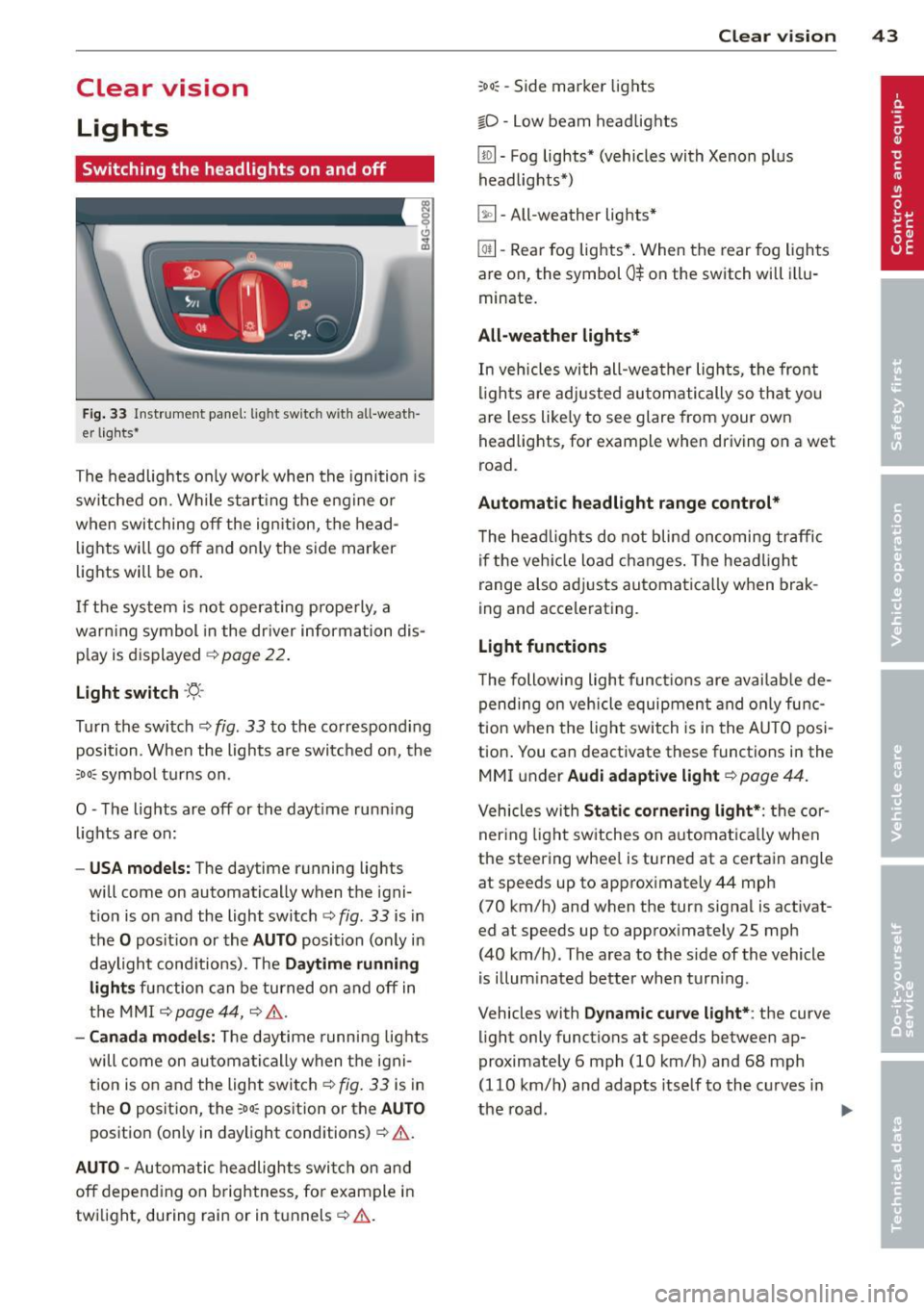
Fig . 33 Instrument pane l: lig ht sw itc h wit h all -weath
er lights•
The headlights only wo rk when the ignition is
switched on. Wh ile start ing the eng ine o r
when switching off the ign ition, the head
lights will go off and on ly the side marker
lights will be on .
If the system is not operating p rope rly, a
war ning symbol in the dr iver information dis
p lay is d isplayed
c::> page 22 .
Light switch -'tj_ -
Tu rn the switch c::> fig . 33 to the correspond ing
position . When the lights a re switched on, the
oD o: symbo l tu rns on .
0 -The lig hts are off or the dayt ime runn ing
lights are on:
- USA models: The day time running lights
will come on automatically when the igni
t ion is on and the light switch
c::> fig . 33 is in
the
O posit ion or the AUTO position (only in
daylight cond itions). The
Daytime running
light s
function can be turned on and off in
the MMI
c::> page44, c::>A .
-Ca nada model s: The daytime running lig hts
will come on automa tically when the igni
t ion is on and the light switch
c::> fig . 33 is in
the
O position, the : Do: pos ition or the AUTO
position (only in daylight conditions) c::> A .
AUTO -Automatic headlights swi tch on and
off depend ing o n brightness, for example i n
tw ilight, during rain or in tunnels
c::> &. .
:Do: -Side marker lights
io -Low beam headlights
Clear vi sion 43
lm -Fog lights* (vehicles with Xenon p lus
headlights *)
~ -All-weather lights *
@il-Rear fog lights* . When the rear fog lights
are on, the symbol
0$ on the switch will i llu
minate.
All-weather lights*
In vehicles with all-wea ther lights , the front
ligh ts are ad justed au tomatically so that yo u
are less like ly to see glare from your own
head lights , for example when driving on a wet
road.
Automatic h eadl ight range control*
T he head lights do not blind oncoming traffic
i f the veh icle load changes . The headligh t
range also adj usts automatically when brak
ing and accelerating .
Light functions
The following light funct io ns are availab le de
pend ing on vehicle equipment and o nly func
tion when t he lig ht switch is in the AUTO posi
tion . You can deactivate these functions in the
MMI under
Audi adaptive light c::> page 44.
Vehicles with St atic corn ering light* : the cor
ner ing ligh t sw itches on a utomat ically when
the steering whee l is turned at a certain angle
at speeds up to approximately 44 mph
( 7 0 km/h) and when the turn signa l is activat
ed at speeds up to approximately 25 mph
(40 km/h) . The area to the side of the vehicle
is illum inated better when turn ing .
Vehicles with
Dynamic cu rve light* : the curve
light only functions at speeds between ap
proximately 6 mph (10 km/h) and 68 mph
(110 km/h) and adapts itself to the curves in
the road .
~
Page 46 of 310
44 Clear vision
& WARNING
-Automatic headlights are only intended
to assist the driver . They do not relieve
the driver of his responsibility to check
the headlights and to turn them on man
ually according to the current light and
visibility conditions. For example, fog
cannot be detected by the light sensors.
So always switch on the headlights
io
under these weather conditions and
when driving in the dark.
- Crashes can happen when you cannot see
the road ahead and when you cannot be
seen by other motorists. Always turn on
theheadlightssothatyoucanseeahead and so that others can see your car from
the back .
- Please observe legal regulations when
using the lighting systems described .
(D Note
The rear fog lights should only be turned
on in accordance with traffic regulation, as
the lights are bright for following traffic.
{D) Tips
- The light sensor* for automatic head
light range control* is located in the rear
view mirror mount . You should therefore
not apply any stickers to the windshield
in this area in order to prevent malfunc
tions or failures .
- In the event of a light sensor malfunc
tion, the driver is notified in the instru
ment cluster display ~
page 22 .
-You will hear a warning tone if you open
the driver door when the exterior lights
are switched on.
- In cool or damp weather, the inside of
the headlights, turn signals and tail lights can fog over due to the tempera
ture difference between the inside and
outside. They will clear shortly after
switching them on. This does not affect
the service life of the lighting.
Emergency flasher
The emergency flasher makes other motorists
aware that you or your vehicle are in an emer
gency situation .
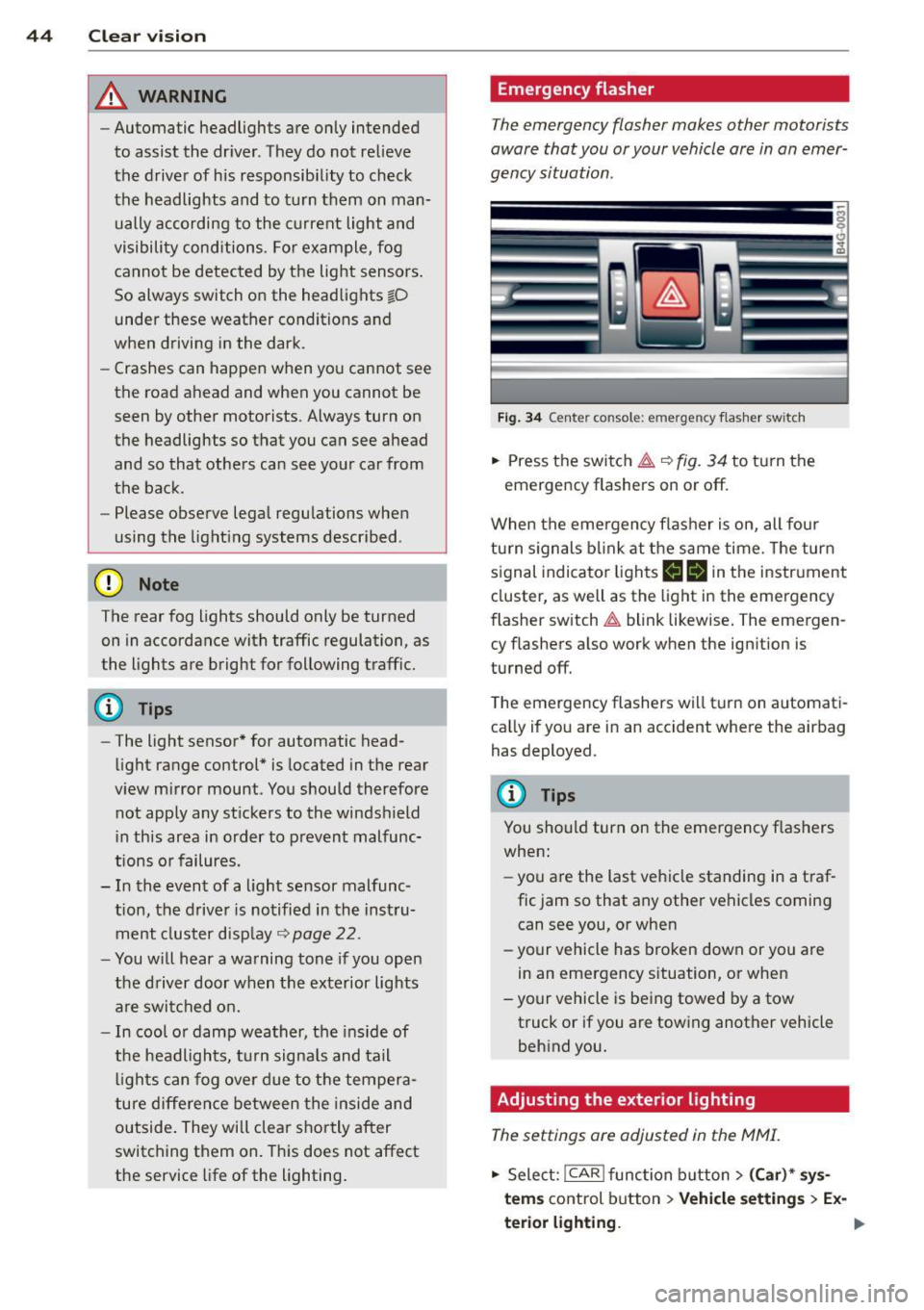
Fig. 34 Ce nte r co nso le: em erg en cy flash er sw itc h
.. Press the switch I:;,,. ~fig. 34 to turn the
emergency flashers on or off.
When the emergency flasher is on, all four
turn signals blink at the same time. The turn
signal indicator lights
B Nin the instrument
cluster, as well as the light in the emergency
flasher switch
I:;,,. blink likewise. The emergen
cy flashers also work when the ignition is
turned off.
The emergency flashers will turn on automati
cally if you are in an accident where the airbag
has deployed.
@ Tips
You should turn on the emergency flashers
when:
- you are the last vehicle standing in a traf
fic jam so that any other vehicles coming
can see you, or when
- your vehicle has broken down or you are
in an emergency situation, or when
-your vehicle is being towed by a tow
truck or if you are towing another vehicle
behind you.
Adjusting the exterior lighting
The settings ore adjusted in the MMI.
.. Select: !CAR ! function button> (Car)* sys
tems
control button > Vehicle settings > Ex-
terior lighting. ..,.
Page 47 of 310
Automatic headlights
You can adjust the following settings in the
Automatic headlights menu:
Headlights activation time -You can adjust if
the headlights switch on
Early, Med . or Late
according to the sensitivity of the ligh t sensor.
Audi adaptive light* -You can switch adaptive
light
On and Off.
Daytime running lights
USA models:
You can switch the dayt ime run
n ing lights
on and off .
Canada models :
The function cannot be
turned off . It is activated automatically each
time the ignition is switched on. This menu
item is shown "greyed out" .
Coming home, Leaving home
The coming home function illuminates the
area outside the vehicle when you switch the
ignition off and open the driver's door. To turn
the function on, select
Lights when leaving
car > On .
The leaving home function illuminates the
area outside the vehicle when you un lock the
vehicle. To turn the funct ion on, select
Lights
when unlocking car > On .
The coming home and leaving home functions
only operate when it is dark and the light
switch is in the
AUTO position. Clear
vision 45
Turn signals and high beam lever
The lever on the left side of the steering col
umn is used to operate the turn signals and
the high beam as well as
the headlight flash
er.
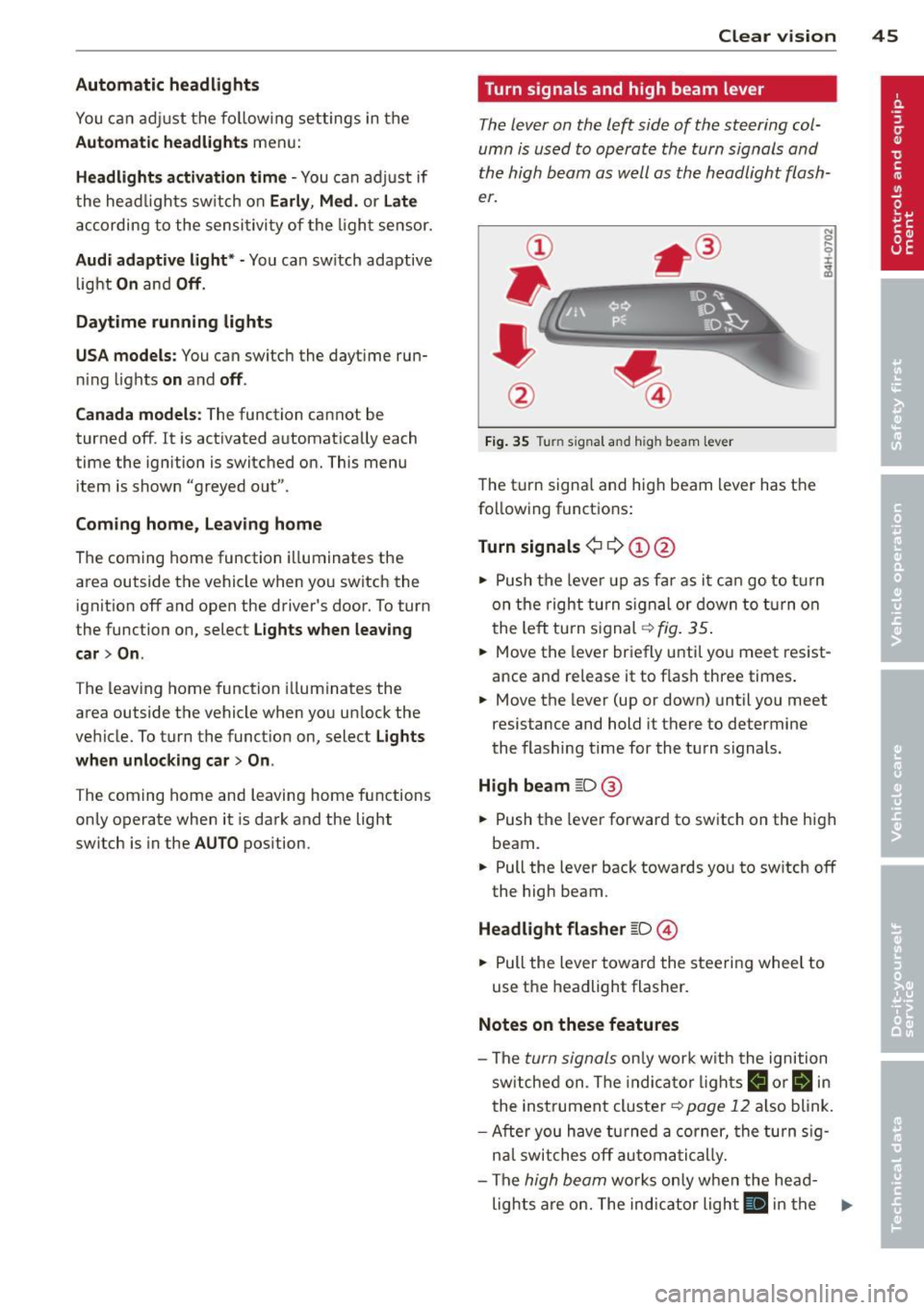
Fig. 35 Tu rn signal and high beam lever
The turn signal and high beam lever has the
following functions:
Turn signals ¢ 9 ©@
.. 0 ....
~
.,. Push the leve r up as far as it can go to turn
on the right turn signa l or down to turn on
the left tu rn s ignal ¢
fig. 35.
... Move the lever briefly until you meet resist
ance and re lease it to flash three times.
.,. Move the lever (up or down) until you meet
resistance and hold it there to determine
the flashing time for the turn signals.
High beam ~D @
... Push the lever forward to switch on the high
beam .
.,. Pull the lever back towards you to sw itch
off
the high beam.
Headlight flasher ~D ©
... Pull the lever toward the steering wheel to
use the headlight flasher.
Notes on these features
-The turn signals on ly work w ith the ignition
sw itched on. The indicator l ights
B or Bin
the instrument cluster¢ page 12 also blink.
-After you have turned a corner, the turn sig-
n al switches
off automatically.
- The
high beam works only when the head-
lights are on. The indicator light
El in the .,.
Page 48 of 310
46 Clear vis ion
instrument cluste r illuminates when the
high beams are on.
- T he
headlight flash er works only as long as
yo u hold the lever - even if there are no
l ights turned on. The indicator light
II in
the instrument cluster il luminates when you
use the headlight flasher.
A WARNING
Do not use the high beam or headlight
flasher if you know that these could blind
oncoming traffic.
Interior lights
Front and rear interior lighting
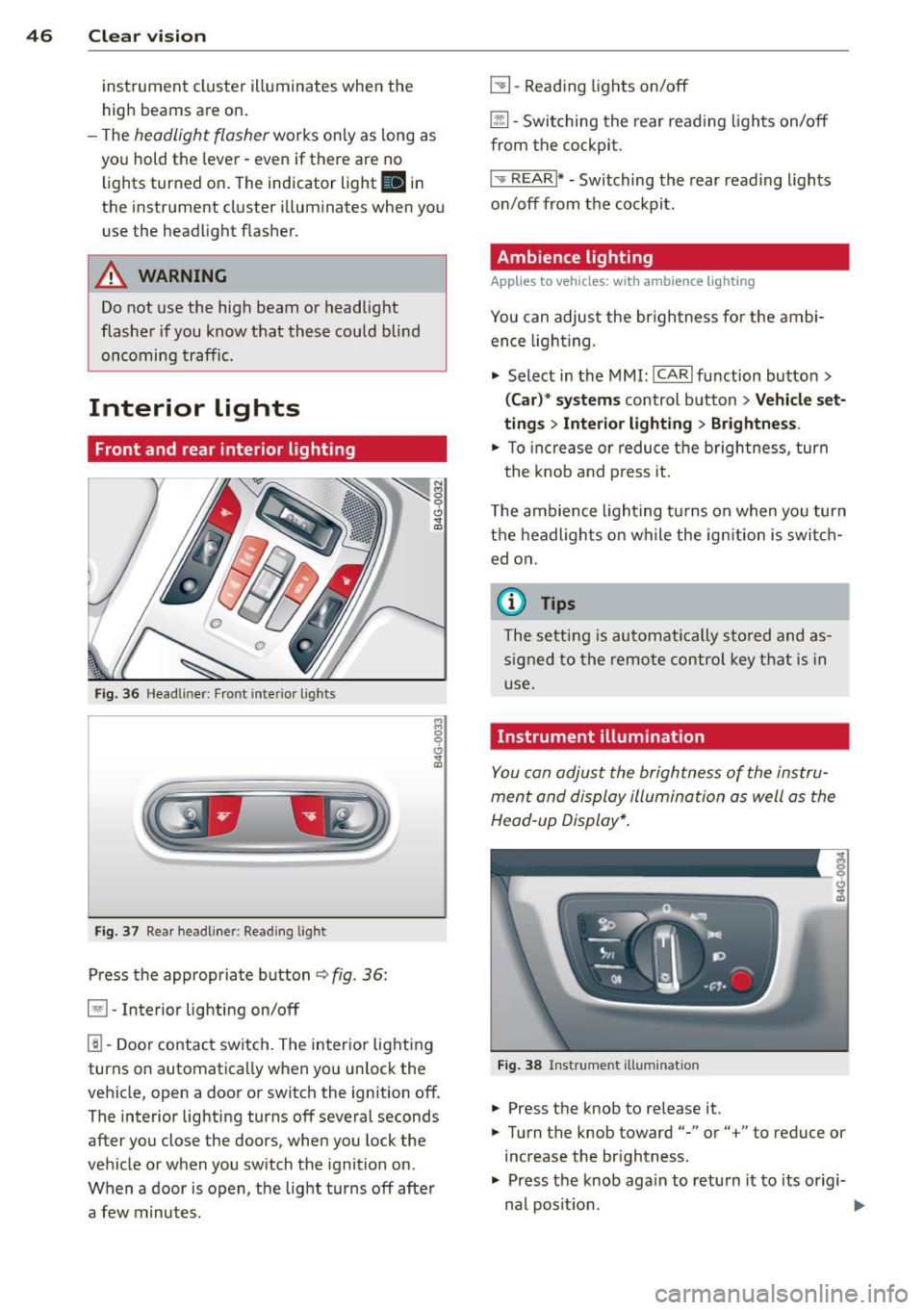
Fi g. 36 Headliner: Front interior ligh ts
Fig . 37 Re ar headli ne r: Readi ng light
Press the appropriate button q fig . 36:
El-Interior lighting on/off
I]]-Door contac t sw itch . The inter ior lighting
turns on automatica lly when you unlock the
vehicle, open a door or switch the ignition off.
The interior lighting turns off several seconds
after you close the doors, when you lock the
vehicle or when you sw itch the ignition on.
When a door is open, the light t urns off afte r
a few minutes.
L:!l -Read ing lights on/off
~ - Switching the rear read ing lights on/off
from the cockpi t.
I" REARI * - Switching the rear reading lights
o n/off from the cockpit.
Ambience lighting
Applies to vehicles: with ambience lighting
You can adjust the br ightness for the ambi
ence ligh tin g.
.. Select in the MMI: ICARlfunction butto n>
(Car )* sys tem s control button > Vehicle set
ting s
> Interi or lighting > Brightne ss.
.. To increase or reduce the b rightness , turn
t he knob and press it .
T he ambience light ing tu rns on when you turn
t h e headlights on wh ile the ig nition is swi tc h
ed on.
(D Tips
The setti ng is automati cally sto red and as
s igned to the remo te contr ol key t hat i s in
u se .
Instrument illumination
You can adjust the brightness of the instru
men t and di splay illumination a s well as the
Head-up Display*.
Fi g. 38 Instrume nt illumina tion
... Press the knob to re lease it.
.. Turn the knob toward"-" or"+" to reduce or
increase the br ightness .
.. Press the knob aga in to return it to its origi-
na l posit ion . ...
Page 49 of 310
@ Tips
The instrument illumination (for dials and
needles) lights on when the ign it ion is
sw itched on and the vehicle lig hts are
turned off. As the daylight fades, the ill u
m ination of the dials likewise dims auto
mat ically and w ill go out comp lete ly when
the o utside lig ht is ve ry low . This fea ture is
meant to remi nd you t o swit ch on the
headl igh ts when o utside light condi tions
become poor.
Vision
Sun visors
( J
F ig . 39 Sun v isor
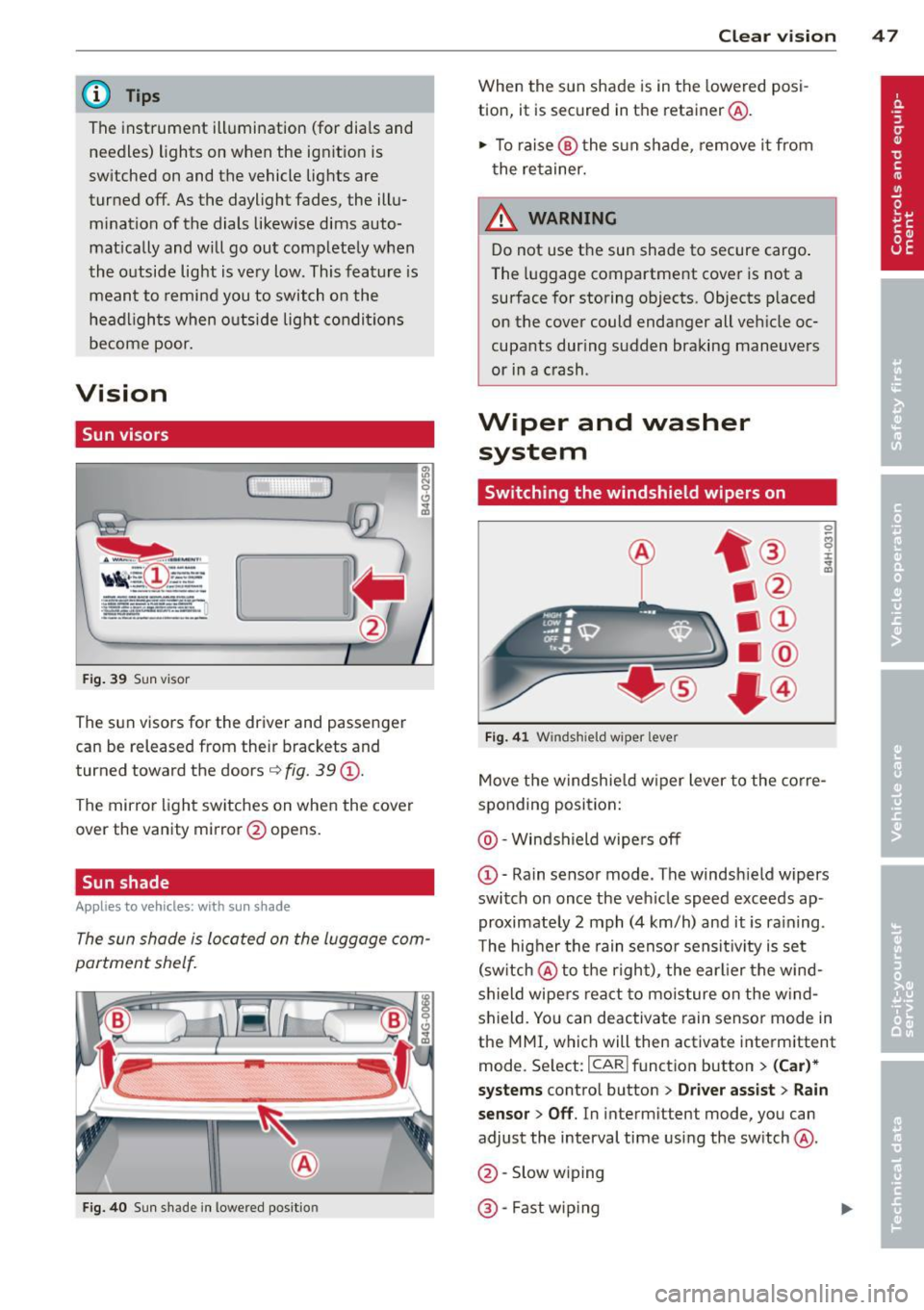
The sun visors for the driver and passenger
can b e released from their brackets and
turned tow ard the doors ¢
fig. 39@.
The mirror light switches on when the cover
over the vanity mirror @opens.
Sun shade
Applies to vehicles: with sun shade
The sun shade is located on the luggage com
partment shelf.
a a
F ig . 40 Sun s hade i n lowe red pos it io n
Clear vi sion 4 7
When the sun shade is in the lowered posi
tion, it is secured in t he retainer @.
1-To raise @the s un shade , remove it from
t he re tainer.
_& WARNING ..
Do not use t he sun shade to secure cargo .
The luggage compartment cove r is not a
surface for storing objects . Objects p laced
on the cover could endanger all ve hicle oc
cupants dur ing sudden braking maneuvers
or i n a c rash .
Wiper and washer
system
Switching the windshield wipers on
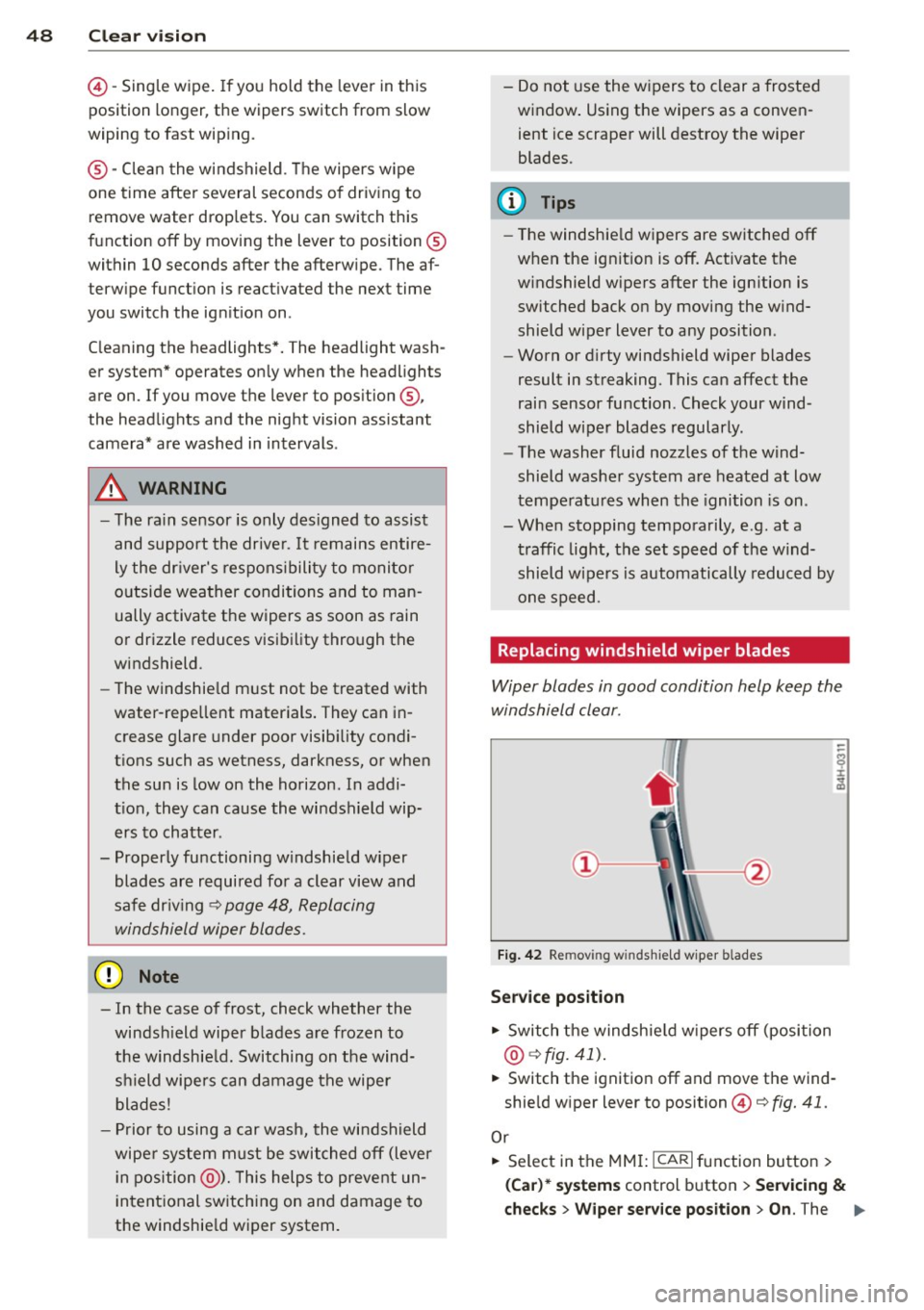
Fi g. 4 1 Windshi eld wipe r leve r
Move the windshie ld w iper lever to the corre
sponding position:
@ -Windshield wipe rs off
@ -Rain senso r mode . The windsh ield wipers
switch on once the veh icle speed exceeds ap
proximate ly 2 mph (4 km/h) and it is ra ining .
T he hig her the rain senso r sens it ivity is set
(sw itch @to th e r ight) , the earlier the wind
shield wipers react to mois ture on the w ind
shield. Yo u can deactivate rain sensor mode in
the MMI, which will then activate interm ittent
mode. Se lect: ICAR ifunct ion button>
(Car )*
systems
contro l button > Driver assist > Rain
sensor > Off .
In interm ittent mode, yo u can
adjust the interval time using the switch @.
@ -Slow w ip ing
@ -Fast wip ing
Page 50 of 310
48 Clear vis ion
© -Single wipe . If you hold the lever in this
position longer, the wipers switch from slow
wiping to fast wip ing.
® -Clean the windshield . T he wipers wipe
one time after several seconds o f driv ing to
remove water drop lets . You can switch this
function off by moving the lever to position ®
within 10 seconds after the afterw ipe. The af
terw ipe funct ion is react ivated the next time
you switch the ig nition on .
C leaning the headlights *. The headlight wash
er system* operates on ly when the headlights
are on. If you move the lever to pos ition ®,
the head lights and the nig ht vision assistant
camera* are washed in intervals .
A WARNING
- The ra in sensor is only des igned to assist
and support the drive r.
It remains entire
ly the dr iver's respons ibility to monito r
o utside wea ther conditions and to man
ually activate the wipers as soon as rain
or drizzle reduces visib ility through the
windshield.
- The windshie ld must not be treated with
water-repe llent materials. They can in
crease glare under poor visib ility condi
t ions such as wetness, darkness, or when
the sun is low on the horizon. In addi
t io n, they can cause the wi ndshield wip
ers to chatter .
- Properly fu nctioning windshie ld w iper
blades are required fo r a clear view and
safe dr iv ing
c::> page 48, Replacing
windshield wiper blades .
(D Note
- In the case of frost, check whether the
winds hield wiper b lades a re frozen to
the windshie ld. Switching on the wind
s h ield wipers can damage the wipe r
blades!
- Prior to using a car wash, the windshield
wipe r system must be switched off (lever
i n position @). This helps to prevent un
i ntent ional sw itching on and damage to
the windshie ld w iper system. - Do not
use the w ipers to clear a frosted
w indow . Us ing the wipers as a conven
ient ice scrape r will destroy the wiper
blades.
(D Tips
- The windshie ld w ipers are switched off
w hen the ignit ion is off. Activate the
w indshield wipers after the ign ition is
switched back on by moving the w ind
shield wiper lever to any position .
- Worn or d irty windshield wiper blades
result in streaking. This can affect the
rain sensor function . Check your wind
shield wiper blades regularly.
- The washer fluid nozz les of the wind
shield washe r system a re heated at low
tempe rat ures when the ignition is on .
- Whe n stopping temporarily, e.g . at a
traffic light, the set speed of the wind
shield w ipe rs is automatically reduced by
one speed.
Replacing windshield wiper blades
Wiper blades in good condition help keep the
windshield clear .
Fig. 42 Remov ing w indsh ie ld wiper b lades
Service position
.,. Switch the windsh ie ld w ipers o ff (position
@ c::>fig. 41).
.,. Switch the ignition off and move t he wind
shie ld w iper lever to position ©
c::> fig. 41.
Or
.,. Select in the MMI: ICAR I function bu tton >
(Car) * system s control b utton > Servicing &
check s > Wiper service position > On . The ..,.
Page 52 of 310
50 Clear vis ion
Tilt function for the pass enger' s mirror
To help y ou see the curb when backi ng into a
parking space , the surface of the m irro r tilts
slightly. The knob must be in the P position
for this to happ en .
You can adj ust the ti lted mirror s urface by
turning the knob in the desired direction .
When you move out of reverse and into anoth
er gear, the new mirror position is stored and
assigned to the key you are using.
The mirror goes back into its origina l positio n
once yo u drive forward faster than 9 mph (15
km/h) or sw itch the ignition off .
A WARNING
- Curved (i.e . convex) mirror s urfaces in
crease your field of view. Remember that
vehicles or other objects will appear
smaller and fa rther away than when seen
in a flat mi rror .
If you use this mirror to
est imate distances of following vehicles
when ch anging lanes , you cou ld es tim ate
incorrectly and cause an acc ident .
(D Note
-If the mirror hous ing is moved uninten
tiona lly (for example, whi le par king you r
vehicle), then you must first fo ld the mi r
r or electr ically. Do not readjust the mir
ror housing manua lly. You could damage
t h e motor which controls the mirror.
- If you wash t he vehi cle in an au tomatic
car wash, yo u m ust fold the exterior m ir
ro rs in to reduce the risk of damage to
the mirrors. Never fold power fo lding ex
terior mirrors* by hand. Only fold them
i n and out us ing the power contro ls.
(D Tips
- The exterior mirror settings are stored
with the memory funct ion*
c> page 56.
- If there is a malfunct ion in the electrical
system, you can still ad just the exter ior
mir rors by press ing the edge of the mir
r or.
Dimming the mirrors
F ig . 44 A uto ma tic d immin g rearview mirro r*
Manu al anti-glare adjustment
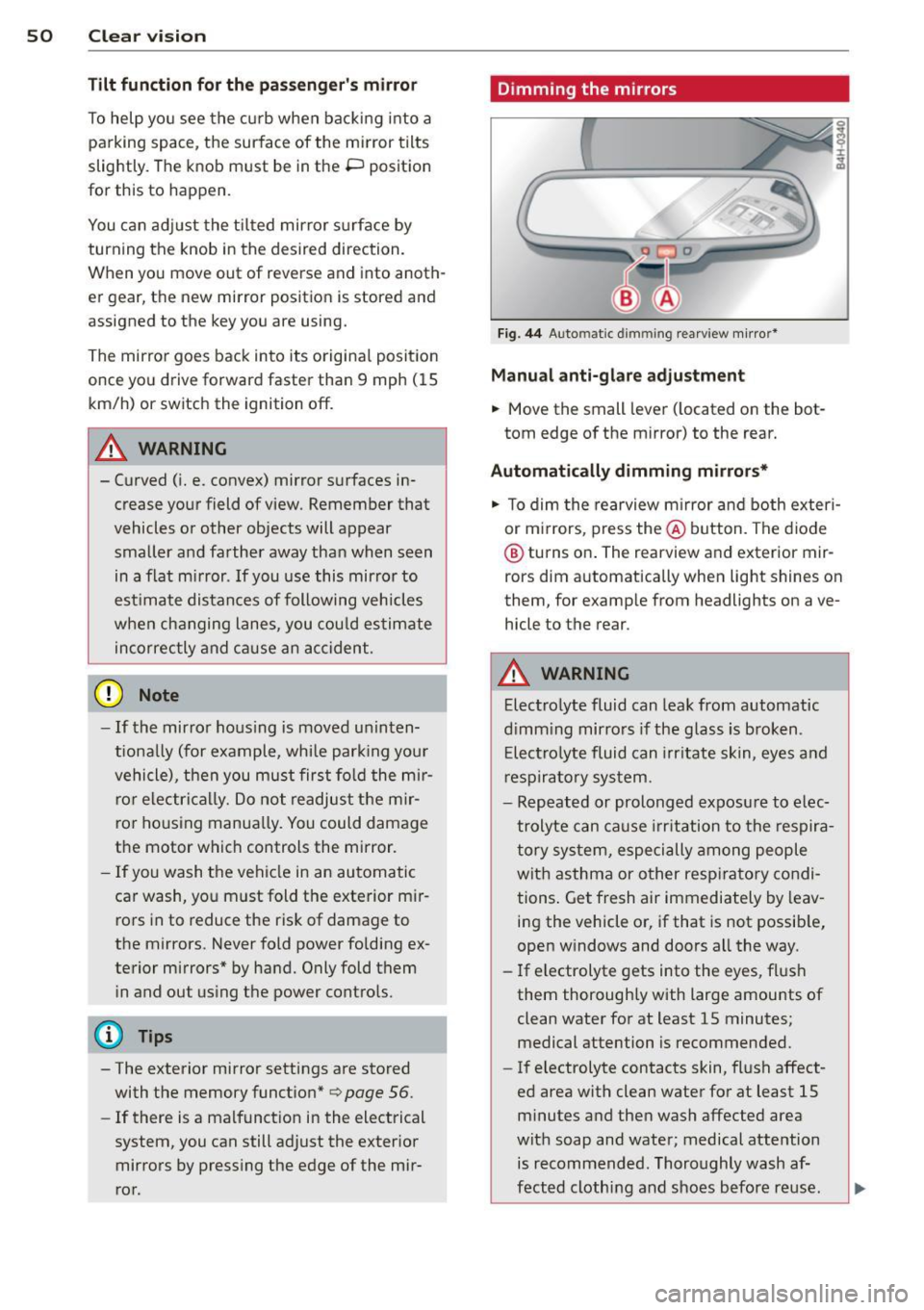
.,. Move the small leve r (located on the bot
tom edge of the mirror) to the rear.
Automatically dimming mirrors*
.,. To dim the rearview m irror and both exteri
or m irrors, press the@ button . The diode
@ turns on . The rearview and exterior mir
rors dim automatically when light shines on
them, for examp le from headlights on ave
hicle to the rear .
A WARNING
-Electrolyte fluid can lea k from automatic
d imm ing mirro rs if the g lass is broken .
E lectro lyte fluid can irr itate sk in, eyes a nd
r espira to ry system .
- Repeated or prolonged exposu re to e lec
trolyte can ca u se irritation to the respira
t ory sys tem, especially among people
wit h asthma or other resp iratory condi
tions . Get fresh air immediately by leav
ing the vehicle or, if that is not possib le,
open w indows and doors all the way .
- If electrolyte gets into the eyes, fl ush
them thorough ly with large amou nts of
clean water for at least 15 minutes; medical attention is recommended.
- If electrolyte contacts skin, fl ush affect
ed area with clean water for at least 15 minutes a nd then wash affected area
with soap and water; medical atte ntion
is recommended. Thoroughly wash af
fect ed clothing and shoes before re use .
Page 59 of 310
key, switch off the memory f unction using
the MMI or the
I OFF ! button c::> page 5 7.
Memory buttons
Applies to vehicles: with memory function
Fig . 51 Dri ver's door: memory fu nct io n buttons
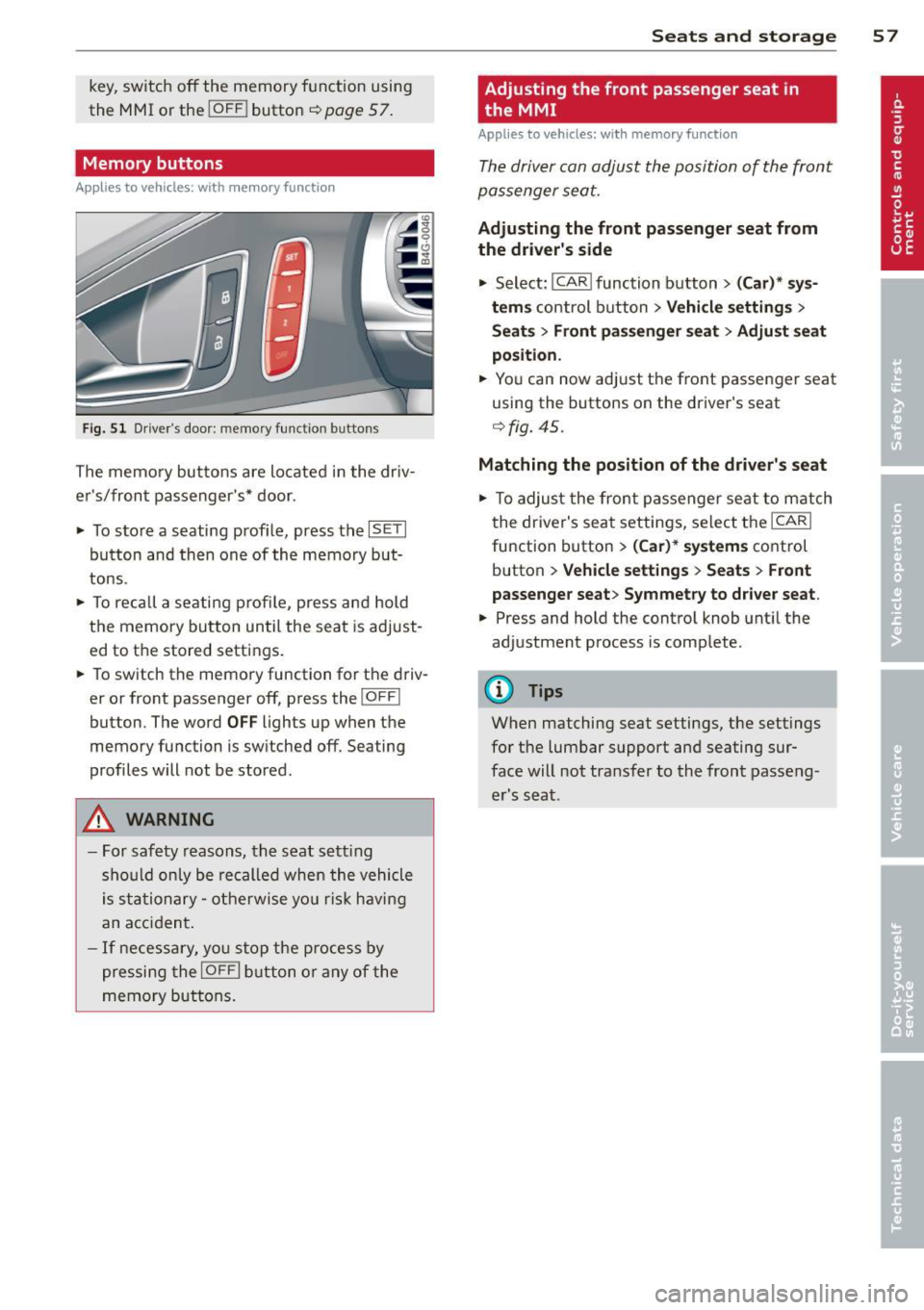
The memo ry butto ns are located in the dr iv
e r's/fron t passenger 's* door.
• To sto re a seating prof ile, press the
ISE TI
button and th en one of the memo ry but
tons.
• To rec all a se ati ng profile, p ress an d hold
t h e memory button un til the sea t is adjust
ed to t he stored settings .
• To switch the memo ry function fo r th e d riv
er or front passenger off, press the
I O FFI
button. The w ord OFF lights up when the
memo ry fu nction is sw itched off. Seating
profiles will not be stored.
A WARNING
- For saf ety reasons, th e seat s ett ing
sho uld o nly be re called when the vehicle
i s stationa ry - otherwise y ou ris k havi ng
a n ac cid en t.
- I f nece ssa ry, yo u stop the pr ocess by
pressi ng the
I OFFI butt on o r any of the
me mory b utt o ns.
Seats and storage 5 7
Adjusting the front passenger seat in
, the MMI
Applies to vehicles: with memory function
Th e driver can adjust the position of the fro nt
p assenger seat.
Adjusting the front passenger seat from
the driver's side
• Select: I CAR I func tion button > (Car) * sy s
tems
c ontr ol bu tton > Vehicle settings >
Seat s> Front passenger seat > Adjust seat
position.
• Yo u can now ad just t he front passenger seat
using the buttons on the driver's seat
c::> fig. 45.
Matching the position of the driver's seat
• To adjust the fron t pa ssenger se at to m atch
t he drive r's seat setti ngs, selec t th e
ICARI
function button > (Car )* systems control
button
> Vehicle settings > Seats > Front
passenger seat > Symmetry to driver seat .
• Press and hold the control knob unt il the
adjustment p rocess is comp lete .
(!) Tips
When matching seat settings, t he settings
fo r the lumbar support and seating sur
face will not tra nsfer to the front passeng
er 's s eat.
Page 78 of 310

76 On the road
By pressing the I STAR T ENGINE ST OP I button
without depressing the brake peda l, the igni
tion is on and switched
off by pressing it
again .
After a cold engine is started, the re may be a
brief period of increased noise because oil
pressure must first bu ild up in the hydraulic
va lve adjusters. This is normal and not a cause
f or concern.
If the engine should not start immediately,
the starting process is automatically stopped
after a short time . Repeat starting procedure.
Start-Stop-S ystem *:
When you stop and the Start-Stop-System*
turns
off the engine, the ignition still remains
switched on.
- If you press the I STAR T ENGINE STOPI but
ton now, the ignition wi ll be switched
off.
T he engine will not start ¢ page 82 .
-Make sure tha t th e ig nit ion is swi tched off
before ex iting the vehicle.
Sw itching the ignition /engine off
automat icall y*
The fo llow ing applies to vehicles with Start
Stop -System*: to prevent the battery from
draining, the ignition and the engine wi ll
switch
off automatically under the following
conditions :
- T he vehicle has already been dr iven.
- T he d river's door is opened.
- T he driver's seat be lt is removed.
- The brake pedal is not pressed down .
- The veh icle is sta tionary.
In t his case, the activated low beam w ill be re
p laced by the side marker lights. The side
marker lights will switch
off after a certain pe
riod of time or when you lock the vehicle.
Driver m essage in the in strument clu ster
di spl ay
P ress b rake pedal to start engine
This message appears i f you press the
I S TAR T ENGINE STOP ! button to start the en
gine and do not depress the brake peda l. The engine can only be started if the brake pedal
is depressed.
!I C
o nveni ence key: I s ke y not in th e vehi
cle?
T h is message appears along with the !I sym
bol if the master key is removed from the ve
hicle with the eng ine runn ing.
It is in tended
to rem ind yo u (e.g . when chang ing dr ivers)
not to continue the journey without the mas
ter key.
If the master key is no longe r in t he ve hicl e,
yo u canno t swi tch on the igni tion after stop
ping the engine and you also cannot start the
engine again. Moreover, you cannot lock the
vehicle from the outside with the key.
Tu rn off ignition before leav ing car
This message appears if the drive r's door is
opened wh ile the ign ition is switched on. Al
ways swi tch
off the ignit io n if you a re leav ing
the vehi cle. See also ¢
page 76.
Shift to P, otherwi se vehicle can roll away.
Doors do not lock if lever is not in P .
This message appears for safety reasons
along with an audible warning tone if the P
selector lever position is not engaged when
stopp ing the eng ine with t he
I S TAR T ENGI NE ST OP I but ton. Select the P se
l ector lever posi tion. Otherwise the vehicle
could roll and it cannot be locked.
Ke y not r ecogni sed . Hold back of ke y again st
marked ar ea . See owner' s manual.
If the indicato r light turns on and this mes
sage appears, there is a malfunct ion
~ page 78.
Turn off ignition b efore leaving car
This message appears if the driver's door is
opened wh ile the ignition is switched on. Al
ways switch
off the ignit ion if you a re leav ing
the vehicle. See also ¢
page 76.
Shift to P and turn off ignition before leav-
ing car, otherwise vehicle can roll awa y
This message appears if the drive r's door is
opened while the ignition is switched on and
jll,,
Page 79 of 310
the sel ector lever is not in the P position. Shift
the s ele ctor lever into th e P position and
sw itch
off the ign ition when you ex it the vehi
cle . Otherwise the vehicle could ro ll. See a lso
¢page 76.
St eeri ng lock
The steering locks when you turn the engine
off using the I S TAR T ENGINE STOP I button
and open the d river 's door. The locked steer
ing helps prevent vehicle theft.
A WARNING
- Never allow the engine to run in confined
spaces -dange r of asphyxiation .
- Never turn
off the eng ine until the vehi
cle has come to a complete stop .
- The brake booster and power steer ing
only work when the engine is running . If
the engine is
off, you have to use more
force when steering or braking . Because
you cannot stee r and brake as you usua l
ly wou ld, this could lead to crashes and
serious injur ies.
(IT),) Note
- Avoid high eng ine rpm , full th rottle and
heavy engine loads unti l the engine has
r eached operating temperat ure -other
wise yo u risk eng ine damage.
- The eng ine cannot be sta rted by pushing
or tow ing the veh icle.
-If the engine has been under heavy load
fo r an ex tended pe riod, hea t builds up in
the engine compartment after the en
gine is switched
off -there is a risk of
damaging the engine. Allow the engine
to run at idle for about 2 m inutes befo re
switching it
off.
@ Tips
- If you open the driver's door with the ig
nitio n on, a buzzer sounds and the mes
sage
Ignition is on appears in the instru
ment cluster disp lay. Switch the ign it ion
off .
- If you leave the vehicle with t he ignit ion
switched on, the igniti on will switch
off
On th e ro ad 77
after a cer tain per iod of t ime. P lease
note that electrical eq uipment such as
exterior lights will sw itch
off as well
when that happens.
Stopping the engine
... Bri ng your ve hicle to a complete stop.
... Move the se lector lever to the P or N posi
tion .
... Press the
I STA RT ENGINE ST OP ! button
¢fig. 78 .
Emergency off
If necessary, the engine can be switched off
with the selector lever in the R or D/S posi
tion . The eng ine stops if you press the
I S TAR T ENG INE S T OPI button at speeds below
6 mph (10 km/h) and press the b rake peda l.
A WARNING
-Never turn off the en gine until the vehi
cle has come to a complete stop .
- The brake booster and p owe r stee ring
only work when the eng ine is r unning .
If
the engine is off, you have to use more
force when steering or braking. Because
you cannot steer and bra ke as you usual
ly would, this cou ld lead to crashes and
serious injuries.
- For safety reasons, you sho uld a lways
park your vehicle w it h the selector lever
in P. Otherwise, the vehicle could inad
vertently roll away .
- After the eng ine has been switched
off,
the radiator fa n can cont in ue to run for
up to 10 minutes - even with the ignition
sw itc hed
off. It can also sw itch on again
afte r some t ime if the coo lant tempera
ture rises as the resu lt of a hea t buildu p
or if the engine is hot and the engine
compa rtment is additionally heated by
the s un's rays .
(D Note
Do no t stop the eng ine immedia tely after
hard o r extended driving . Keep the engine
.