park assist AUDI A7 2016 User Guide
[x] Cancel search | Manufacturer: AUDI, Model Year: 2016, Model line: A7, Model: AUDI A7 2016Pages: 294, PDF Size: 73.82 MB
Page 96 of 294
Audi active lane assist
Audi active lane assist Lane assist
Description
A pp lies to veh icles: w ith Audi active lane assist
Active lane assist detects lane marker lines with
in the limits of the system using a camera in the
windshield. If you are approaching a detected lane marker line and it appears likely that you
will leave the lane, the system will warn you with
corrective steering. You can override this steering
at any time. If you pass over a line, the steering
wheel will vibrate lightly. In order for this warn
ing vibration to occur, it must first be switched
on in the Infotainment system. Active lane assist is operable when the lane marker line is detected
on at least one side of the vehicle.
The system is designed for driving on freeways
and expanded highways and thus works only at
speeds of 40 mph (65 km/h) or more .
Applies to vehicles with side assist*: If you acti
vate a turn s ignal when active lane assist is ready
and it classifies a lane change as critical because
of vehicles traveling alongside you or approach ing you, there will be noticeable corrective steer
ing shortly before you leave the lane. This will at
tempt to keep your vehicle in the lane.
Applies to vehicles without side assist*: the sys
tem does not warn when it is ready if you activate
the turn signal before crossing the lane marker line. In this case, it assumes that you are chang
ing lanes intentionally.
Applies to vehicles with adaptive cruise control*
or parking aid*: The corrective steering is target
ed based on the driving situation. In addition to
the lane marker lines, the system can also take
into account other objects such as guard rails. If
they are detected in close proximity to the vehi
cle, active lane assist helps prevent the vehicle
from driving too close to them. There is also
passing assistance . The system does not provide
any corrective steering if it detects that you are
passing another vehicle.
94
A WARNING
-
- The system warns the driver that the vehicle
is leaving the lane using corrective steering.
The driver is always responsible for keeping
the vehicle within the lane.
- The system can help you keep the vehicle in the lane, but it does not drive by itself. Al
ways keep your hands on the steering
wheel.
- Corrective steering may not occur in certain
situations, such as during heavy braking.
- There may be cases where the camera does
not recognize all lane marker lines. Correc
tive steering can only take place on the side
of the vehicle where lane marker lines are
detected.
- Other road structures or objects could possi
bly be identified unintentionally as lane marker lines. As a result, corrective steering
may be unexpected or may not occur.
- The camera view can be restricted, for ex
ample by vehicles driving ahead or by rain,
snow, heavy spray or light shining into the
camera. This can result in active lane assist
not detecting the lane marker lines or de
tecting them incorrectly.
- Under certain conditions such as ruts in the
road, a banked roadway or crosswinds, the
corrective steering alone may not be enough
to keep the vehicle in the middle of the lane.
- For safety reasons, active lane assist must
not be used when there are poor road and/
or weather conditions such as slippery roads, fog, gravel, heavy rain, snow and the
potential for hydroplaning. Using active lane
assist under these conditions may increase
the risk of a crash.
Page 112 of 294
Automatic transmission
-Do not ride the brakes or press the brake
pedal too often or too long when driving
down a hill. Constant braking causes the
brakes to overheat and substantially re
duces braking performance, increases brak
ing distance or causes complete failure of
the brake system .
- To prevent the vehicle from rolling back
when stopping on inclines, always hold it in
place with the brake pedal or parking brake.
- Never hold the vehicle on an incline with a
slipping clutch. The clutch opens automati
cally when it becomes too hot from the
overload . An indicator lamp
mJ illuminates
and a driver message appears¢
page 112
when the clutch is overloaded.
-If the engine must remain running, never
have any driving position engaged when
checking under the hood. Make sure these
lector lever has securely engaged and is
locked in P with the parking brake set
¢page 218. Otherwise, any increase in en
gine speed may set the vehicle in motion,
even with the parking brake applied.
@ Note
- When stopping on an incline, do not try to
hold the vehicle in place by pressing the ac
celerator pedal while a driving gear is se lected . This can cause the transmission to
overheat and can damage it . Activate the
parking brake or press the brake pedal to
prevent the vehicle from rolling.
- Allowing the vehicle to roll when the engine
is stopped and the selector lever is in N will
damage the transmission because it is not
lubricated under those circumstances.
@ Tips
For safety reasons, the parking brake is re
leased automatically only when the driver's
safety belt is engaged in the buckle.
110
· Hill descent control
Hill descent control assists the driver when driv
ing down hills .
Hill descent control is activated when the selec
tor lever is in the D or S posi tion and you press
the brake pedal. The transmission automatically selects a gear that is suitable for the incline . Hill
descent control tries to maintain the speed ach
ieved at the time of braking, within physical and
technical limitations. If may still be necessary to
adjust the speed with the brake pedal.
Hill descent control switches off once the hill lev
els out or you press the accelerator pedal.
On vehicles with a cruise control system*
¢
page 83, hill descent control is also activated
when the speed is set.
A WARNING
Hill descent control cannot overcome physical
limitations, so it may not be able to maintain
a constant speed under all conditions. Always be ready to apply the brakes.
Page 114 of 294
Automatic transmi ssion
DYNAMIC driving mode in drive select
¢page 102 .
• Press the brake pedal firmly with your left food
and hold it all the way down for at le ast 1 sec
ond.
• At the same time, press the gas peda l all the
way down w ith your r ight foot u ntil the engine
reaches and stays at a high R PM level.
• Remove your foot from t he b rake pedal w it hi n 5
seconds ¢,& .
A WARNING
-Always adapt you r driving to the traffic f low.
- Only use the La unch control program when
road and t raff ic condi tions a llow i t and oth
er drivers wi ll not be endangered or both
ered by yo ur driving and t he ve hicle's acce l
eration.
- Please note that the dr ive whee ls can sp in
and the vehicle can brea k away w hen spo rt
mode is switched on, especially when the
road is slippery.
- Once the vehicle has started moving, press
the
I .$ O FF l button briefly to turn the sport
mode off.
(D Tips
- The t ransmission tempe ratu re may inc rease
significantly after using the launch control
program. If that happens, the program may
not be available for a few minutes. It will be
ava ilable again after a coo l-down period .
- When accelerat ing using the launch contro l
program, all vehicle pa rts a re subject to
heavy loads. This can lead to increased wear .
Transmission malfunction
DD Transmission : Please press brake pedal and
s el ect gear again .
Press the brake pedal and se lect the desired se
lecto r leve r posit io n aga in . Yo u can then continue
d riving.
[O] Transmiss ion overhe ating: Please drive con
servativ ely.
112
The transm ission temperat ure has inc reased s ig
nificantly d ue to the sporty driving manner. Drive
i n a less sporty manne r until the temperature re
turns to the normal range and the indicator light
switches of.
DD Transmission malfunction: you can continue
driving
The re is a system mal func tion in the t ransm is
s ion . You may contin ue driving . Drive to yo ur au
thorized Audi dea ler or a uthorized Audi Se rvice
Fac ility soon to have the ma lfunction corrected.
DD Trans mission malfun ction : You can continue
driving with limited functionality
There is a system malfunct ion in the t ransm is
s io n. The t ransm ission is swi tching to eme rgency
mode. This mode on ly shifts in to cer tain gears or
will no longer shift at al l. The engine may stall.
D rive to an authorized A udi dealer o r authorized
Audi Service Facility immed iate ly to have the
malfunction corrected.
DD m Trans mission malfunction: No reverse
gear. You can continue driving
S tronic tra nsmission: The re is a system malfunc
tion in the tr ansmission . Th e transmission is
swi tching to emergency mode. This mode on ly
shifts into certain gears or will no longer shift at
a ll. The eng ine may stall. Yo u cannot engage the
r everse gea r. Drive to an aut hori zed Aud i dea ler
or a uthori zed Audi Service Facility immedia tely to
have the malfunct ion corrected .
DD Transmission malfunction: Stop veh icle and
shift to park.
Do not con tinue driving . Se lect the P selector lev
e r position and see an authorized A udi dealer or
a utho riz ed Aud i service facility for assistance .
([) Note
If the transmission has switched to eme rgen
cy mode, drive to you r aut ho rize d Aud i dea le r
i mmediately to have the ma lf u nction co rrect
ed.
Page 116 of 294
Parkin g sys tems
Parking systems
General information
A ppl ies to veh icles: w ith pa rk in g system plus/rear v iew ca m
era/per ipheral came ras
Depending on your vehicle 's equipment, various
pa rking aids will help you when parking and ma
neuvering.
The
p ark ing syste m plu s assists you when park
ing by audibly and visua lly indicating objects de
tected
in front of and behind the vehicle
¢ page
115.
The rear v iew ca mera shows the area beh ind the
ve hicle in the Infotainment display. This display
assists you when you are c ross or parallel parking
¢ page
116. In add ition, you are ass isted by the
functions from the parking system plus
¢ page
115.
The pe riph era l cam era s assist you with parking
and maneuvering. You are aided by var ious cam
eras depending on the vehicle equipment level
¢ page
119. In addition, you are assisted by the
functions from th e parking syst em p lus
¢ page 115.
A WARNING
-Always look for traffic and check the area
around your vehicle by looking at it directly
as well. The parking system cannot rep lace
the driver's attent ion. The dr iver is a lways
responsible for safety during parking and
f or all other maneuvers.
- Please note that some surfaces, such as
clothing, are not detected by the system.
- Sensors and cameras have blind spots in
wh ich peop le and objects cannot be detect
ed . Be especia lly caut ious of ch ild ren and
animals.
- T he sensors can be displaced by impacts or
damage to the radia tor grille, bumper ,
wheel housing and the underbody . The park
ing systems may become impai red as a re
s u lt . Have yo ur autho rized Audi dealer or
qualified workshop check their function .
- Make sure the sensors are not covered by
stickers, deposits or any other obstructions
114
-
as it may impair the sensor function. For in
formation on cleaning, refer to¢ page
205 .
(D Note
- Some ob jects are not detec ted by the sys
tem under certain circumstances :
- Objects such as barrier chains, trailer draw
bars, vertical poles or fences
- Objects above the sensors such as wall ex
tensions
- Objects w ith specific surfaces or struc
tures such as chain link fences or powder
snow .
- If you continue driving closer to a low-lying
object, it may disappear from the sensor
range . Note that you w ill no longe r be
wa rned about th is obstacle.
(D Tips
- The system may provide a warning even
tho ugh there are no obstacles in the cover
age area in some situat ions, such as :
- certain road surfaces or for long grass.
- externa l ultrason ic sources e.g. from
cleaning vehicles.
- h eavy ra in, snow or thick vehicle exhaus t.
- We recommend that you practi ce parking in
a traff ic-free location or par king lo t to be
come fam iliar with the sys tem. When doing
this, there should be good light and weather conditions.
- Yo u can change the vo lume and pi tch of the
signals as well as the display¢ page
124.
-Please refer to the instr uctions for towing a
trailer ¢ page
124.
-What appea rs in the infot ainmen t display is
somewha t time-delayed.
Page 118 of 294

Parking systems
Rearview camera
Introduction
Applies to vehicles: with rearview camera
, I
F ig. 123 Illustration: cross parking
Fig. 124 Illustrat ion: parallel park ing
The rearview camera gives you two views : You can
use
cross parking for examp le, to park in a park
ing space or in a garage
r::;, fig . 123. You can use
parallel parking if you would like to park on the
side of the road
r::;, fig. 124 .
General information
Appl ies to vehicles : with rearview camera
F ig. 125 Area covered (D and area not covered @by the
rearv iew camera.
116
Fig. 126 Luggage compartment lid: Locat ion of the rear
view came ra
N Cl)
"' 9 CJ ... m
The rearview camera is located above the rear li
cense p late bracket. Make sure that the lens for
the parking system
¢ fig . 126 is not covered by
deposits or any other obstructions because this
can affect the function of the parking system. For
information on cleaning, refer to
r::;, page 205.
The rearview camera coverage area includes ©
r::;, fig. 125. Only this area is shown in the Info
ta inment display . Objects that are outside of th is
area @are not displayed .
The accuracy of the orientation lines and the blue
surfaces is reduced if the adaptive air suspen
s ion* is faulty, if the veh icle is lifted or if the
Dy
namic mode is activated r::;, page 101.
&_ WARNING
-Always read and follow the applicable warn
ings
c::> .& in General information on
page 114.
-If the position and the installation angle of
th e rearview camera was changed, for exam
ple, after a collis ion , do not continue to use
the system for safety reasons. Have it
checked by your Audi dealer or authorized
Aud i Service Facility.
- Only use the rearv iew camera to assist you if
it shows a good, clear picture. For example,
the image may be affected by the sun shin
ing into the lens, dirt on the lens or if there
is a defect.
- Use the rearv iew camera only if the luggage
compartment lid is comp letely closed. Make
sure any objects you may have mounted on
the luggage compartment lid do not block
the rearview camera.
Page 123 of 294

M N <( I.J "". rl I.O
"' N I.O rl
Corner view (front)/corner view (rear)
Applies to vehicles: with per ip hera l cameras
F ig . 135 In fot ainm en t: co rner view (fro nt) mode
Fig . 136 In fo tai nme nt: co rner view (rear) mod e
This view can assist you for examp le, when you
are exit ing from an area with poor visibility . The
area at the front and rear sides of the vehicles is
displayed.
.. To show the side view toward the front, se lect
the symbol ®~
fig. 135 with the control knob
and press the control knob .
.. To show the side view toward the rear, select
the symbol ®¢
fig. 136 with the control knob
and press the control knob.
Parking systems
Front
Applies to vehicles: with peripheral cameras
Fig. 137 Infota inment: fro nt mode
This view assists you for example, in using the
full maneuvering range in front of the vehicle .
The area in front of the vehicle is displayed. The
vehicle surroundings are shown in the left area of
the display . You can switch between optical dis
play and camera image¢
page 120 .
.. Select the © symbo l with the control knob. The
orange or ientat ion lines mark the expected
path of the vehicle. Stop the vehicle at the lat
est when the red orientation line* borders an
object
~ ,&. in General information on
page
119.
Rear
Applies to vehicles: with peripheral came ras
Fig. 138 Infota inment: rear mode
This view assists you for example, in using the
full maneuvering range behind the vehicle . The
area behind the vehicle is displayed. The vehicle
surroundings are shown in the left area of the
display. You can switch between optical display
and camera image
¢page 120. ..,.
121
Page 125 of 294
M N <( I.J "". rl I.O
"' N I.O rl
to this vehicle should be approximately 3 ft (1
m) .
.. Turn the Infotainment on and shift into reverse
gear. The parking system is turned on and the
cro ss park ing view is d isplayed .
.. Press the contro l button on the Infotainment
unit @
c::>page 118, fig . 129. T he par all el park
ing
ind icator is displayed .
.. Back up and align you r vehicle so the b lue area
@ borders on the rear end of the vehicle behind
you or on the parking space line
c::> .&. in Gener
al information on page 119,
c::> (j) in General in
formation on page 119 .
The blue area repre
sents an extension of the vehicle 's outline by
approximately
16 ft (5 meters) to the rear . The
long side of the blue area should be on the
curb . The entire blue area must fit into the
parking space .
.. With the vehicle stopped, turn the steer ing
wheel to the right as far as it w ill go .
.. Back in to the park ing space u ntil the b lue curve
c::> page 118, fig. 130 touches the curb c::> .&. in
General information on page 119,
c::> (D in Gen
eral information on page 119 .
Stop the vehicle.
.. With the vehicle stopped, turn the steer ing
wheel to the left as far as it will go .
.. Continue to back into the park ing space unt il
the vehicle is parked parallel to the curb
c::> ,&
in General information on page 119, c::> (D in
General information on page 119. @
displays
the rear bumper . Stop the vehi cle, at the latest,
when the red or ientation line @borders an ob
ject . Keep an eye on the front o f you r vehicle
whi le doing this .
Parking n ext to obstacles
When there is an obstacle (such as a wall) next to
the park ing space, choose a sp ace with more
space on the sides. Position the long side o f the
b lue area so that there is sufficient space from
the object . The area must not be on the curb. You
will also need to start turning the steering wheel
much earlier. The blue curve
c::> page 118, fig . 130
must not touch the obstacle, but rather there
should be enough distance .
Parking systems
(D Tips
The left or right orientation lines and s urfaces
will be d isp layed, depending on the turn s ig
nal be ing used.
Trailer mode
Applies to vehicles: with peripheral cameras and trailer hitch
This view assists you in positioning the vehicle in
front of a trailer .
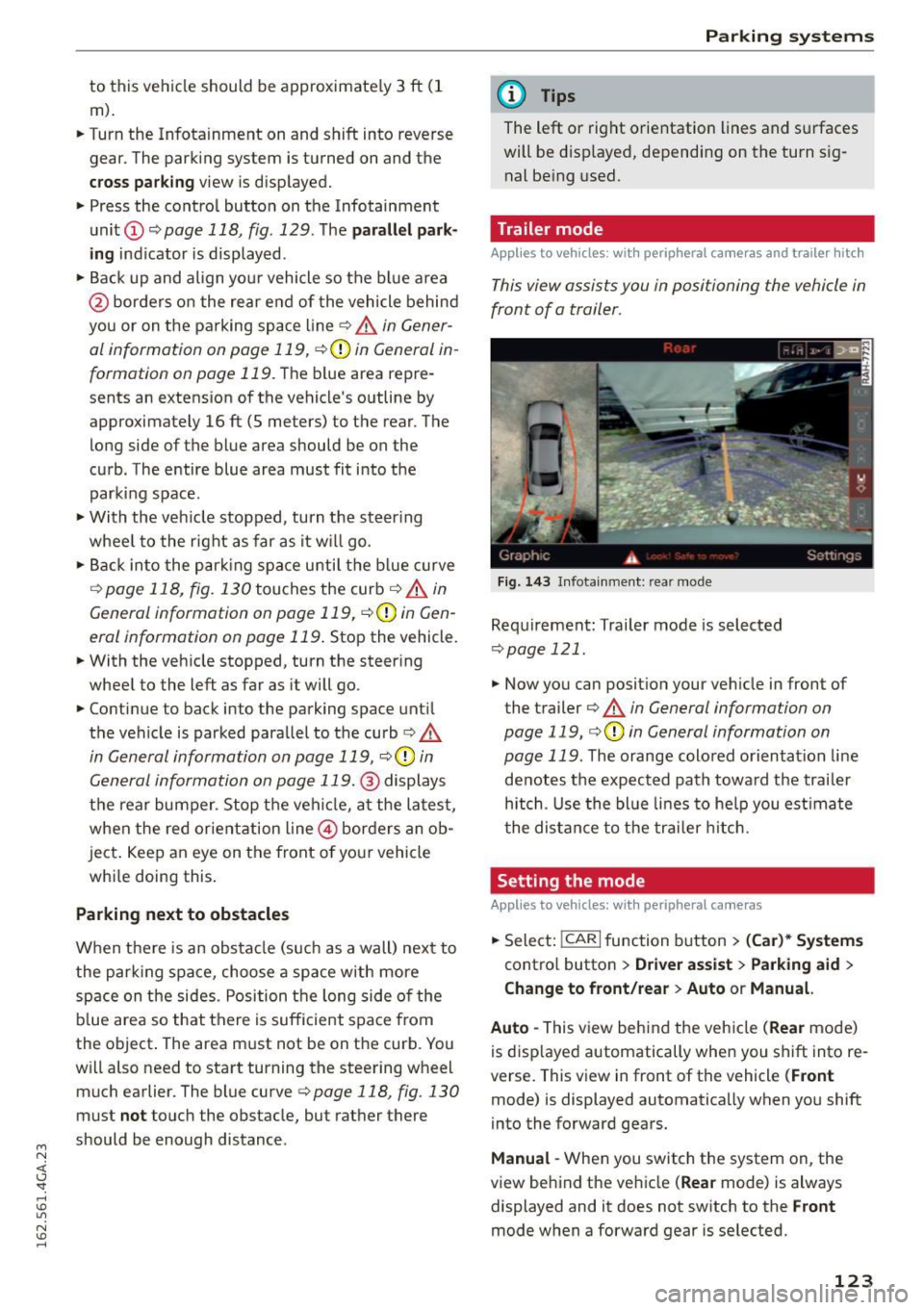
Fig. 14 3 Infota inmen t: rear mode
Requirement: Trailer mode is selected
c::> page 121 .
.. Now you can posit ion your veh icle in front of
the trailer
c:> .&. in General information on
page 119,
c::> (D in General information on
page 119 .
The orange colored orientation line
denotes the expected path toward the trailer
hitch . Use the bl ue li nes to he lp you est imate
t he distance to the trailer h itch.
Setting the mode
Applies to vehicles: with peripheral cameras
.. Select: I CAR I function button > (Car )* Syst em s
contro l butto n > Driver a ssist > Parking aid >
Change to front /re ar > Auto or M anual.
Auto -
This view behind the vehicle (Rea r mode)
is disp layed automatically when you shift into re
verse. This view in front of the vehicle
( Front
mode) is displayed automatically when you shift
into the forward gears.
Manu al -When you switch the system on, the
view behind the ve hicle
(Re ar mode) is always
displayed and it does not switch to the
F ro nt
mode when a forward gear is selected.
123
Page 228 of 294

Checking and Filling
Do not fill coolant above the "MAX" mark. Excess
coolant will be forced out through the pressure relief valve in the cap when the engine becomes
hot.
A WARNING
- The cooling system is under pressure and
can get very hot. Reduce the risk of scalding
from hot coolant by following these steps .
- Turn off the engine and allow it to cool
down.
- Protect your face, hands and arms from
escaping fluid and steam by covering the
cap with a large, thick rag.
- Turn the cap slowly and very carefully in a
counter-clockwise direction while applying light, downward pressure on the top of
the cap.
- To avoid being burned, do not spill anti
freeze or coolant on the exhaust system or
hot engine parts. Under certain condi
tions, the ethylene glycol in engine cool
ant can catch fire .
-Antifreeze is poisonous. Always store anti
freeze in its original container and well out
of the reach of children .
- If you drain the coolant, it must be caught
and safely stored in a proper container
clearly marked "poison" .
(D Note
- Do not add coolant if the expansion tank is empty. Air could enter the cooling system
and damage the engine. If this is the case,
do not continue driving. Seek professional
assistance .
- Coolant pollutes the environment and could cause an engine fire. Excess coolant will be
forced out through the pressure relief valve
in the cap when the engine becomes hot.
- If, in an emergency, only water can be add
ed, the correct ratio between water and an
tifreeze
¢ page 224 must be restored as
soon as possible.
226
-
® For the sake of the environment
Drained coolant should not be reused. Always
dispose of used coolant while observing all
environmental regulations.
Radiator fan
The radiator fan switches on automatically by it
self
An auxiliary electric radiator fan switches on and
off depending on coolant temperature and other
vehicle operating conditions.
After you switch the engine off, the auxiliary fan
can continue running for up to 10 minutes -even
with the ignition off. It can even switch on again later by itself ¢& . if
- the temperature of the engine coolant rises due
to the heat build-up from the engine in the en
gine compartment, or
- the engine compartment heats up because the
vehicle is parked in intense sunlight.
A WARNING
- To reduce the risk of personal injury never
touch the radiator fan.
- The auxiliary electric fan is temperature con
trolled and can switch on suddenly even
when the engine is not running.
- The auxiliary radiator fan switches on auto
matically when the engine coolant reaches a
certain temperature and will continue to run
until the coolant temperature drops. -
Page 257 of 294
M N <( (.J
'SI: ,...., \!) 1.1'1
N \!) ,....,
Replacing wheels
Before changing a wheel
Observe the following precautions for your own
and your passenger's safety when changing a
wheel .
.,. After you experience a tire failure, pull the car
well away from moving traffic and try to reach
level ground before you stop¢,& .
.. All passengers should
leave the car and move
to a safe location (for instance, beh ind the
guardrail) ¢ ,& .
.,. Engage the
parking brake to prevent your vehi
cle from rolling unintentiona lly ¢,& .
.. Move
selector lever to position P ¢ ,& .
1> lfyou are towing a trai ler, unhitch the trailer
from your vehicle .
.,. Take the
jack and the spare tire out of the lug
gage compartment
¢ page 253, ¢ page 254.
.,&. WARNING
You or your passengers could be injured while
changing a wheel if you do not follow these
safety precautions:
- If you have a flat tir e, move a safe distance
off the road. T urn off the engine, turn the
emergency flashers on and use other warn
ing devices to alert other mo torists.
- Make sure that passengers wait in a safe
place away from the vehicle and well away
from the road and traffic.
- T o help prevent the vehicle from moving
sudden ly and possibly slipping off the jack,
always fully set the parking brake and block
the wheel diagonally opposite the wheel be ing changed. When one front wheel is lifted
off the ground, placing the Automatic Trans
mission in P (Park) will
not prevent the vehi
cle from moving.
- Before you change a wheel, be sure the
ground is level and firm . If necessary, use a
stu rdy board under the jack.
- Always store the vehicle tool kit, the jack
and the replaced tir e in the luggage com
partment ¢
page 132.
Emergency assistance
{!) Tips
Before changing the whee l, you must activate
the jacking mode, so that the automat ic con
trols for the Adapt ive Air Suspension* do not
make it more difficult to lift the vehicle with
the jack ¢
page 257 .
Changing a wheel
When you change a wheel , follow the sequence
described below step-by-s tep and in exactly tha t
order .
l. Activate the vehicle jack mode* ¢ page 2 5 7.
2. Remove the
decorative wheel cover*. For
more details see also¢
page 256, Decora
tive wheel covers
or¢ page 256, Wheels
with wheel bolt caps .
3. Loosen the wheel bolts ¢page 256.
4. Locate the pro per mounting point for the
jack and align the jack be low that point
¢page 257.
5. Raise the car with the jack¢ page 257 .
6. Remove the wheel with the flat tire and then
install
the spare ¢ page 259.
7. Tighten all wheel bolts ligh tly.
8.
Lower the vehicle with the jack .
9. Use the wheel bolt w rench and
firmly tighten
all wheel bolts¢
page 256 .
10. Replace the decorative wheel cover*.
11. Deactivate the vehicle jack mode* in the
MMI :
ICAR I funct ion button > (C ar)* systems
control button > Servicing & checks > Air
susp.: jack mode > Off .
The vehicle jack mode* switches off automatically
at speeds above 6 mph (10 km/h) .
.,&. WARNING ~ -
Always read and follow all WARNINGS and in
formation ¢
.& in Raising the vehicle on
page 258
and ¢ page 260.
255
Page 264 of 294
Fuses
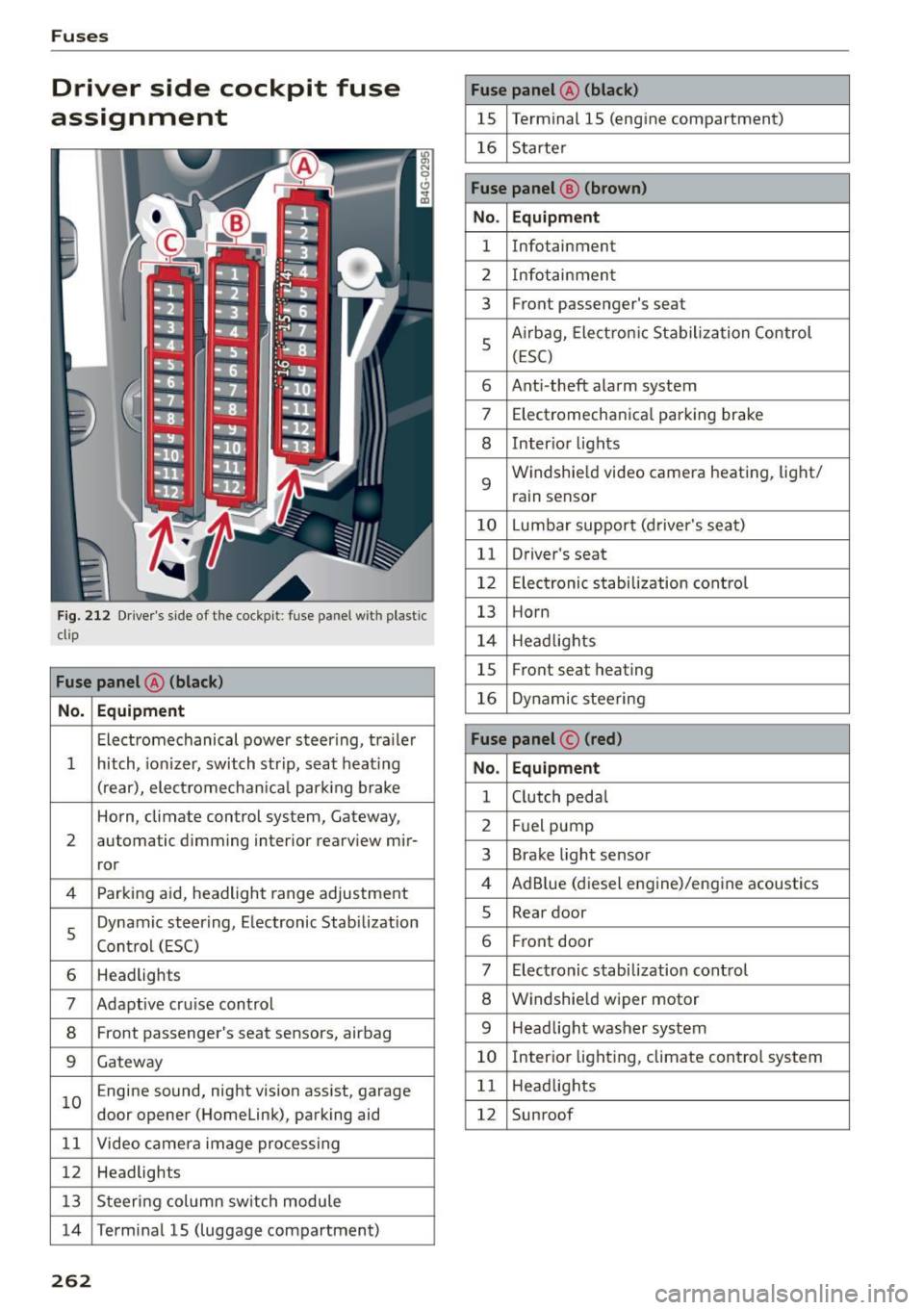
Driver side cockpit fuse
assignment
Fig. 212 Driver's side of the cockpit : fuse pa nel w it h plastic
cl ip
Fuse panel @ (black)
No. Equipment
Electromechanical power steer ing, trailer
1 hitch, ionizer, switch strip, seat heating
(rear), electromechanica l park ing brake
Horn, climate control system, Gateway,
2 automatic dimming interior rearview mir-
ror
4 Parking aid, headlight range adjustment
5 Dynamic steering, Electronic Stabilization
Control (ESC)
6 Headlights
7 Adaptive cru
ise control
8 Front passenger's seat sensors, airbag
9 Gateway
10 E
ngine sound, night vision assist, garage
door opener (Homelink), parking aid
11 Video camera image processing
12 Headlights
13 Steering col umn switch module
14 Terminal 15 (luggage compartment)
262
Fuse panel @ (black)
15 Terminal 15 (engine compartment)
16 Starter
Fuse panel @ (brown)
No . Equipment
1 Infotainment
2 Infotainment
3 Front passenger
's seat
5 Airbag, Electron
ic Stabilization Control
(ESC)
6 Anti -theft alarm system
7 Electromechanical parking brake
8 Inter
ior lights
9 Windshie
ld video camera heating , light/
rain sensor
10 Lumbar support (driver's seat)
11 Driver's seat
12 Electronic stabilization control
13 Horn
14 Headlights
15 Front seat heating
16 Dynamic steering
Fuse panel © (red)
No. Equipment
1 Clutch pedal
2 Fuel pump
3 Brake light sensor
4 AdBlue (diesel engine)/engine acoustics
5 Rear door
6 Front
door
7 Electronic stabilization control
8 Windshield wiper motor
9 Headlight washer system
10 Interior lighting, climate control system
11 Headlights
12 Sunroof