brakes AUDI A7 2016 Owners Manual
[x] Cancel search | Manufacturer: AUDI, Model Year: 2016, Model line: A7, Model: AUDI A7 2016Pages: 294, PDF Size: 73.82 MB
Page 17 of 294
workshop and have the malfunction corrected.
- If the brake warning/indicator light does
not go out after a few seconds and the park
ing brake is released, or lights up while you
are driving, the fluid level in the brake fluid
reservoir is too low. If you believe that it is
safe to do so, proceed immediately at low
speed to the nearest authorized Audi dealer
or qualified repair facility and have the
brake system inspected.
- Always keep in mind that after several brake
applications, you will need greater pressure
on the brake pedal to stop your vehicle. Do
not rely on strained brakes to respond with
maximum stopping power in critical situa
tions. You must allow for increased braking
distances. The extra distance used up by
fading brakes could lead to an accident.
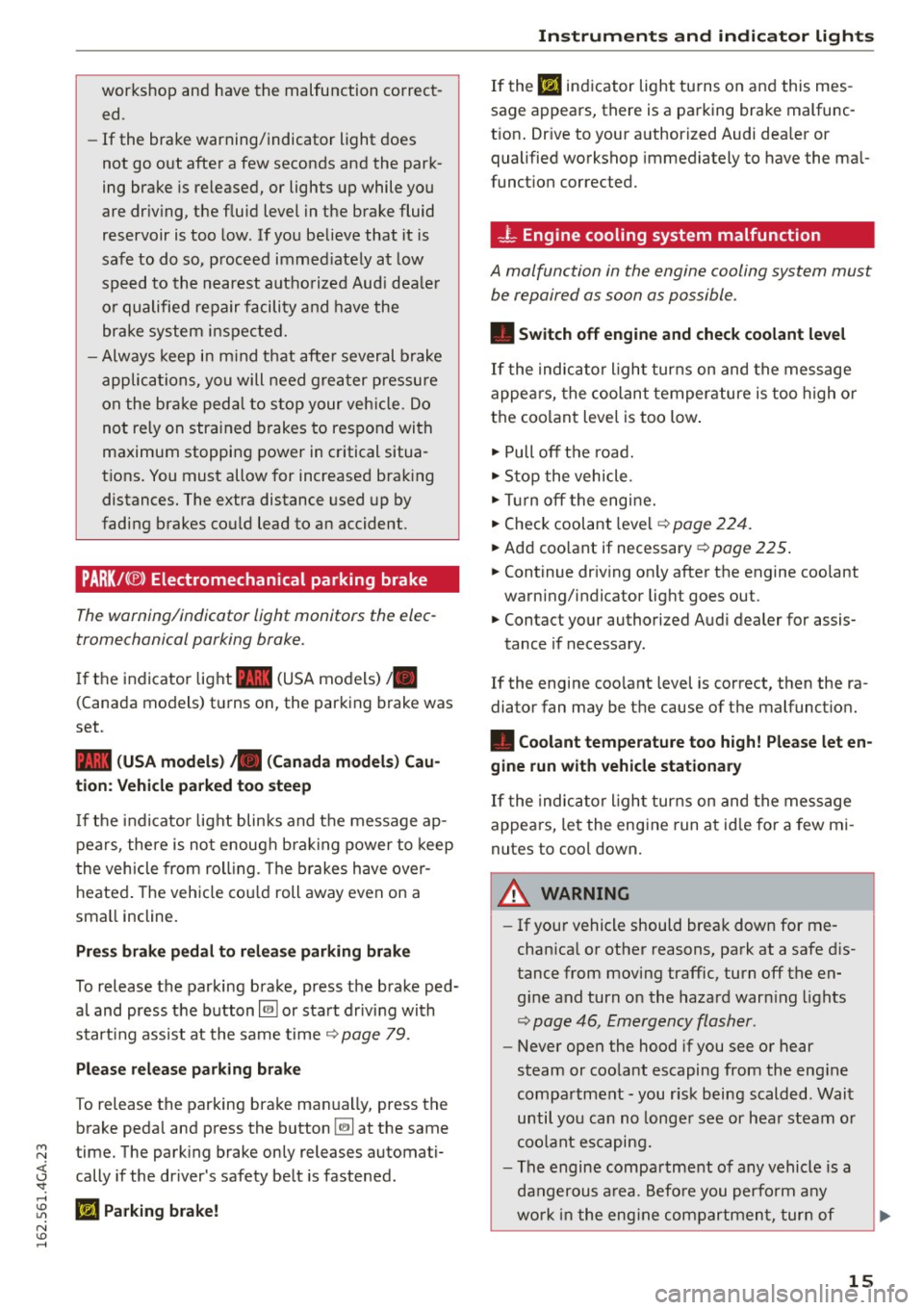
PARK/( ®) Electromechanical parking brake
The warning/indicator light monitors the elec
tromechanical parking broke.
If the indicator light- (USA models)/ .
(Canada models) turns on, the parking brake was
set .
- (USA models) • (Canada models) Cau
tion: Vehicle parked too steep
If the indicator light blinks and the message ap
pears, there is not enough braking power to keep
the vehicle from rolling. The brakes have over
heated. The vehicle could roll away even on a
small incline.
Press brake pedal to release parking brake
To release the parking brake, press the brake ped
al and press the button~ or start driving with
starting assist at the same time ¢
page 79.
Please release parking brake
To release the parking brake manually, press the
brake pedal and press the button
(2) at the same
~ time. The parking brake only releases automati-
j cally if the driver's safety belt is fastened. 'SI:
; Ill Parking brake!
N
ID
......
Instruments and indicator lights
If the Ill indicator light turns on and this mes
sage appears, there is a parking brake malfunc
tion. Drive to your authorized Audi dealer or
qualified workshop immediately to have the mal
function corrected.
- L Engine cooling system malfunction
A malfunction in the engine cooling system must
be repaired as soon as possible.
• Switch off engine and check coolant level
If the indicator light turns on and the message
appears, the coolant temperature is too high or
the coolant level is too low.
"' Pull
off the road.
"'Stop the vehicle.
"'Turn off the engine.
"'Check coolant level¢
page 224.
"'Add coolant if necessary ¢ page 225.
"'Continue driving only after the engine coolant
warning/indicator light goes out.
"' Contact your authorized Audi dealer for assis-
tance if necessary.
If the engine coolant level is correct, then the ra
diator fan may be the cause of the malfunction.
• Coolant temperature too high! Please let en
gine run with vehicle stationary
If the indicator light turns on and the message
appears, let the engine run at idle for a few mi
nutes to cool down.
&_ WARNING
= -
-If your vehicle should break down for me
chanical or other reasons, park at a safe dis
tance from moving traffic, turn
off the en
gine and turn on the hazard warning lights
¢ page 46, Emergency flasher.
-Never open the hood if you see or hear
steam or coolant escaping from the engine
compartment - you risk being scalded. Wait
until you can no longer see or hear steam or
coolant escaping.
- The engine compartment of any vehicle is a
dangerous area. Before you perform any
work in the engine compartment, turn of
15
Page 21 of 294

M N <( (.J
'SI: ,...., \!) 1.1'1
N \!) ,....,
ABS/(@)) Anti-lock braking system (ABS )
This warning/indicator light monitors the ABS
and the electronic differential lock (EDL) .
The warning/indicator light
,n:) (USA models) /
ill (Canada models) will come on for a few sec
onds when the ignition is switched on. The light
will go out after an automatic check sequence is
completed.
There is a malfunction in the ABS when:
-The warning/indicator light does not illuminate
when you switch the ign it ion on.
- The warning/indicator light does not go out af
ter a few seconds.
- The warning/indicator light illuminates while driving .
The ESC indicator light also illuminates if there is
a ma lfunction in the ABS . The message
Stabiliza
tion control (ESC/ABS): Fault! See owner's man
ual
also appears in the instrument cluster display
and a warning tone sounds.
The brake system will still respond even with
out the assistance of the ABS system. See your
authorized Audi dealer as soon as possible to re
store full braking performance.
For more infor
mat ion regarding the ABS ¢page 188.
Malfunction in the brake system
If the brake warning light¢ page 14 and the ABS
warn ing illuminate together there may be a mal
function in the ABS, and there may also be a mal
function in the brake system itself¢,& .
The ABS
will not work and you will notice a change in
braking response and performance.
In the event of a malfunct ion in the brake sys
tem
the warning/indicator light 1111 (USA mod
els)/. (Canada models) in the instrument clus
ter flashes ¢ page 14 .
Malfunction in the electronic differential
lock (EDL)
The ED L works together with the ABS . The ABS
warn ing light will come on if there is a malfunc
tion in the EDL system
c::> page 188 . See your au
thorized Audi dealer as soon as possible.
Instruments and indicator lights
A WARNING
-If the ,n:) (USA mode ls)/ ill (Canada mod
els) warn ing light does not go out, or if it
comes on while dr iv ing, the ABS system is
not working prope rly . The vehicle can then
be stopped only with the standard brakes
(without ABS) . You will not have the protec
tion ABS provides. Contact your Audi dealer
as soon as possible .
- USA models: If the
1111 warning light, the
G1 warning light and the ,n:) warning light
come on together, the rear wheels could
lock up first under hard braking . Rear wheel
lock-up can cause loss of vehicle control and
an accident. Have your vehicle repaired im
mediately by your author ized Audi dealer or
a qualified workshop . Dr ive slowly and avoid
sudden, hard brake applications .
- Canada models: If the brake warning light
• • the
DJ warning light and the ABS warn
ing light
ill come on together, the rear
wheels could lock up first under hard brak
ing. Rear wheel lock-up can cause loss o f ve
hicle control and an accident . Have your ve
hicle repaired immediately by your author
ized Audi dealer or a qualified workshop.
Drive s low ly and avoid sudden, hard brake
applications.
{0) Worn brake pads
EiJ Brake pads!
-
If the warning light i lluminates, immed iate ly
contact your authorized Audi dealer or qualified
workshop to have all brake pads inspected. On
USA models the warning light
EiJ comes on to
gether w ith the warning light
1111 . Both sets of
brake pads on an axle must always be replaced at
the same time .
A WARNING
Driving with bad b rakes can cause a collision
and serious personal injury .
-
19
Page 62 of 294
Seats and storage
-Never carry any beverage containers with
hot liquids, such as hot coffee or hot tea, in
the vehicle while it is moving. In case of an
accident, sudden braking or other vehicle movement, hot liquid could spill, causing
scalding burns . Spilled hot liquid can also
cause an accident and personal injury.
- Use only soft cups in the cupholder. Hard
cups and glasses can cause injury in an acci
dent.
- Never use the cupholder or adapter as an
ashtray- risk of fire.
(D Note
Only drink containers with lids should be car
ried in the cupholder. Liquid could spill out
and damage your vehicle's electronic equip
ment or stain the upholstery, etc.
Cooled glove compartment
A pp lies to ve hicles: w ith coole d glove compart men t
The cooled glove compartment only functions
when the AIC system is switched on.
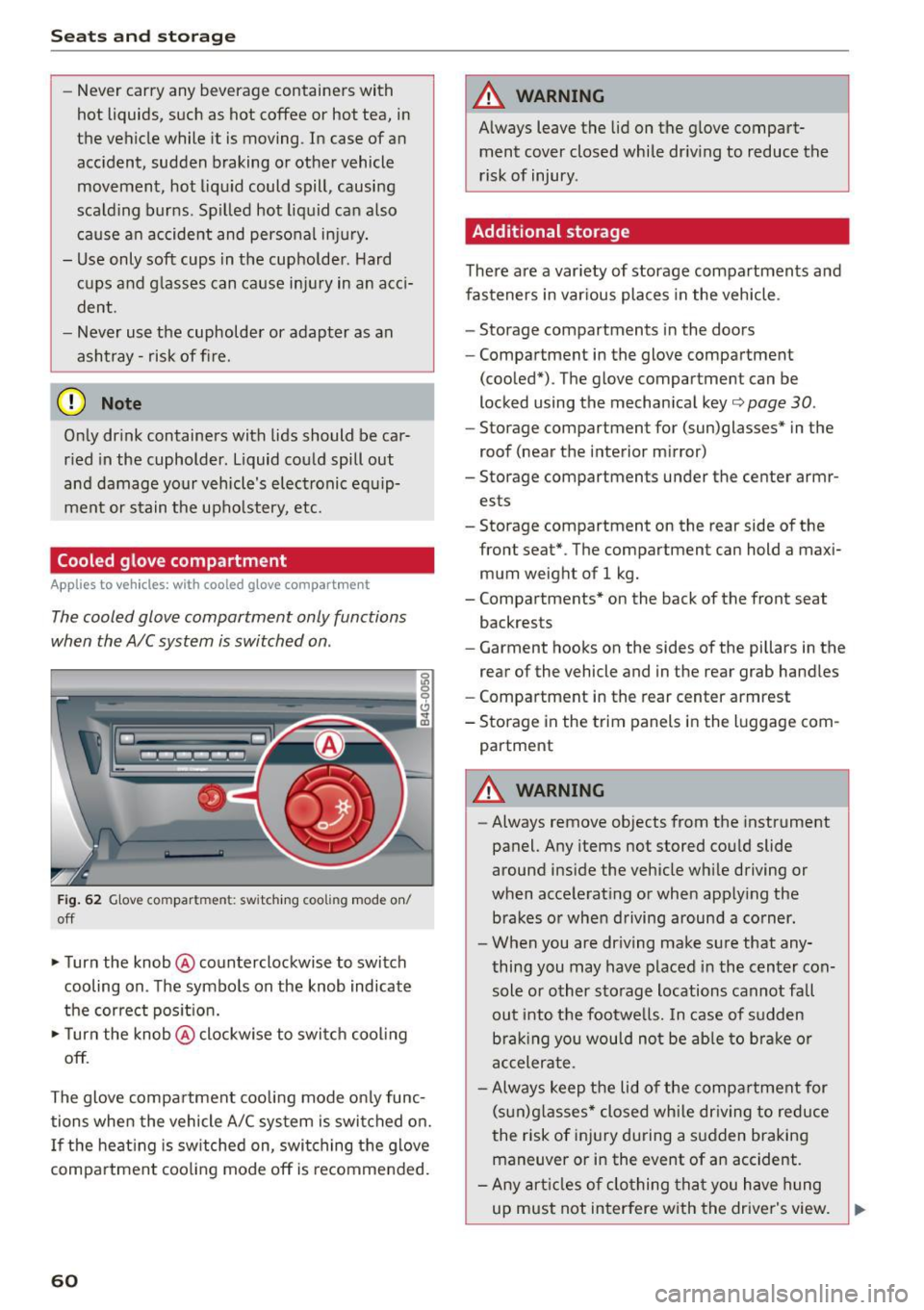
Fig. 62 Glove compartment: switching cooling mode on/
off
• Turn the knob @counterclockwise to switch
cooling on. The symbols on the knob indicate
the correct position.
• Turn the knob @clockwise to switch cooling
off.
The glove compartment cooling mode only func tions when the vehicle A/C system is switched on.
If the heating is switched on, switching the glove
compartment cooling mode off is recomme nded.
60
A WARNING
Always leave the lid on the glove compart
ment cover closed while driving to reduce the
risk of injury.
Additional storage
There are a variety of storage compartments and
fasteners in various places in the vehicle .
- Storage compartments in the doors
- Compartment in the glove compartment
(cooled*) . The glove compartment can be
locked using the mechanical key¢
page 30.
-Storage compartment for (sun)glasses* in the
roof (near the interior mirror)
- Storage compartments under the center armr
ests
- Storage compartment on the rear side of the
front
seat* . The compartment can hold a maxi
mum weight of 1 kg.
- Compartments* on the back of the front seat
backrests
- Garment hooks on the sides of the pillars in the
rear of the vehicle and in the rear grab handles
- Compartment in the rear center armrest
- Storage in the trim panels in the luggage com-
partment
A WARNING
-Always remove objects from the instrument
panel. Any items not stored could slide
around inside the vehicle while driving or
when accelerating or when applying the brakes or when driving around a corner.
- When you are driving make sure that any
thing you may have placed in the center con
sole or other storage locations cannot fall
out into the footwells. In case of sudden
braking you would not be able to brake or
accelerate .
- Always keep the lid of the compartment for
(sun)glasses* closed while driving to reduce
the risk of injury during a sudden braking
maneuver or in the event of an accident.
- Any articles of clothing that you have hung
up must not interfere with the driver's view.
~
Page 80 of 294
Driving
"' Drive to an authorized Audi dealer or author
i z ed Audi Service Facility immediately to have
the malfunction corrected .
@ Tips
You can view the message again by pressing
the
I START ENGINE ST OPI button .
Electromechanical
parking brake
Operation
The electromechanical parking brake replaces
the hand brake.
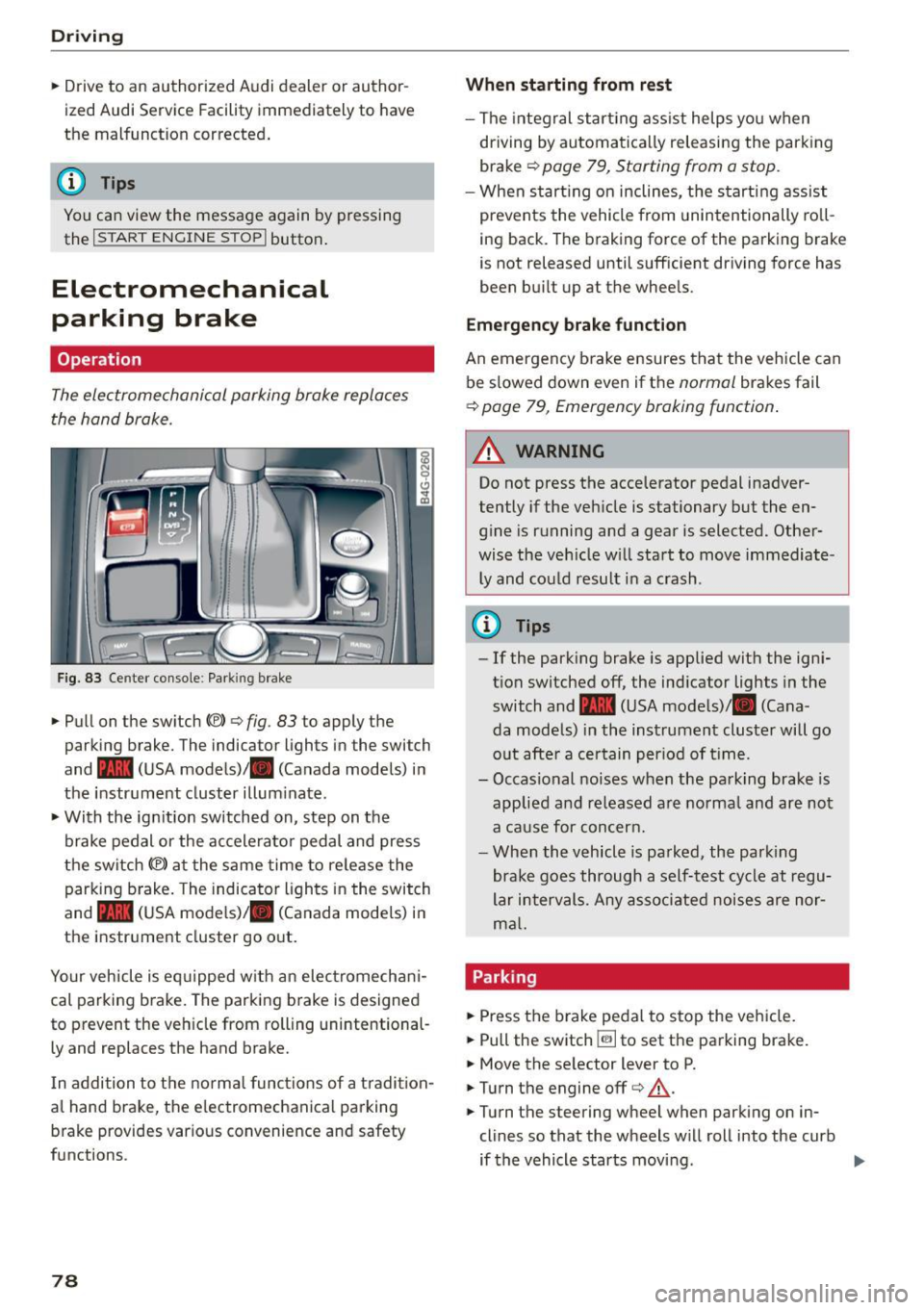
Fig. 83 Ce nter co nso le : Park ing brake
• Pull on the switch{®) ¢ fig. 83 to apply the
parking brake. The indica tor lights in the swi tch
and - (USA mode ls)/ . (Canada models) i n
the instr ument cluster illum inate .
• With the ig nition switched on, step on the
brake pedal or the ac celera to r pedal and press
the switch {®) at the same time to re lease the
parking b rake . The indicator ligh ts in the switch
and - (USA mode ls)/ . (Canada models) i n
the inst rument cluster go o ut.
Your veh icle is eq uipped w ith an elec tromechan i
cal parking b rake. The parking b rake is designed
to prevent the veh icle from rolling unintentional
ly and replaces the hand brake.
I n addition to t he normal func tions of a tradi tion
al hand brake, the e lectromechanica l parking
b rake provides var ious convenience and safety
functions.
78
When starting from rest
- The integral star ting ass ist helps you when
dr iving by automa tica lly releasing the park ing
brake ¢
page 79, Starting from a stop .
-When st art ing on inclines, the s tart ing assist
prevents the vehicle from unintentionally ro ll
i ng back. The braking force of the parking brake
is not released until sufficient dr iving force has
been bu ilt up at the whee ls .
Emergency brake function
An emergency b rake ensures tha t the vehicle can
be s lowed down even if the
normal brakes fail
¢ page 79, Emergency braking function .
_&. WARNING
-
Do not press the accelerator pedal inadver
tently if the veh icle is stationary but the en
g in e is running and a gear is selected. Other
wise the ve hicle w ill sta rt to move immediate
ly and could result i n a crash .
@ Tips
-If the park ing brake is applied with the ign i
t ion switched off, the ind icator lights in the
switch and -(USA mode ls)/ . (Cana
da models) in the instrument cluster will go
o ut afte r a ce rtain per iod of t ime.
- Occasional noises when the pa rking brake- is
applied a nd re leased a re norma l and are not
a ca use for concer n.
- Whe n the v ehicle is pa rked, the par king
brake goes through a self -test cycle at r egu
lar i nterval s. Any asso ciated noises are nor
m al.
Parking
• Press the brake peda l to stop the ve hicle.
"' Pull the switch ~ to set the pa rking brake.
• Move the se lector lever to P.
• Turn the engine off¢&_ .
• Turn the steering wheel when parking on in
clines so that the wheels w ill roll into the curb
if the vehicle starts movi ng .
Page 85 of 294
M N <( \,J
"". rl I.O
"' N I.O rl
Cruise control system
Switching on
Applies to vehicles: with cr uise contro l system
The cruise control system makes it possible to
drive a constant speed that is 30 km/h or higher.
0
f
®t
0
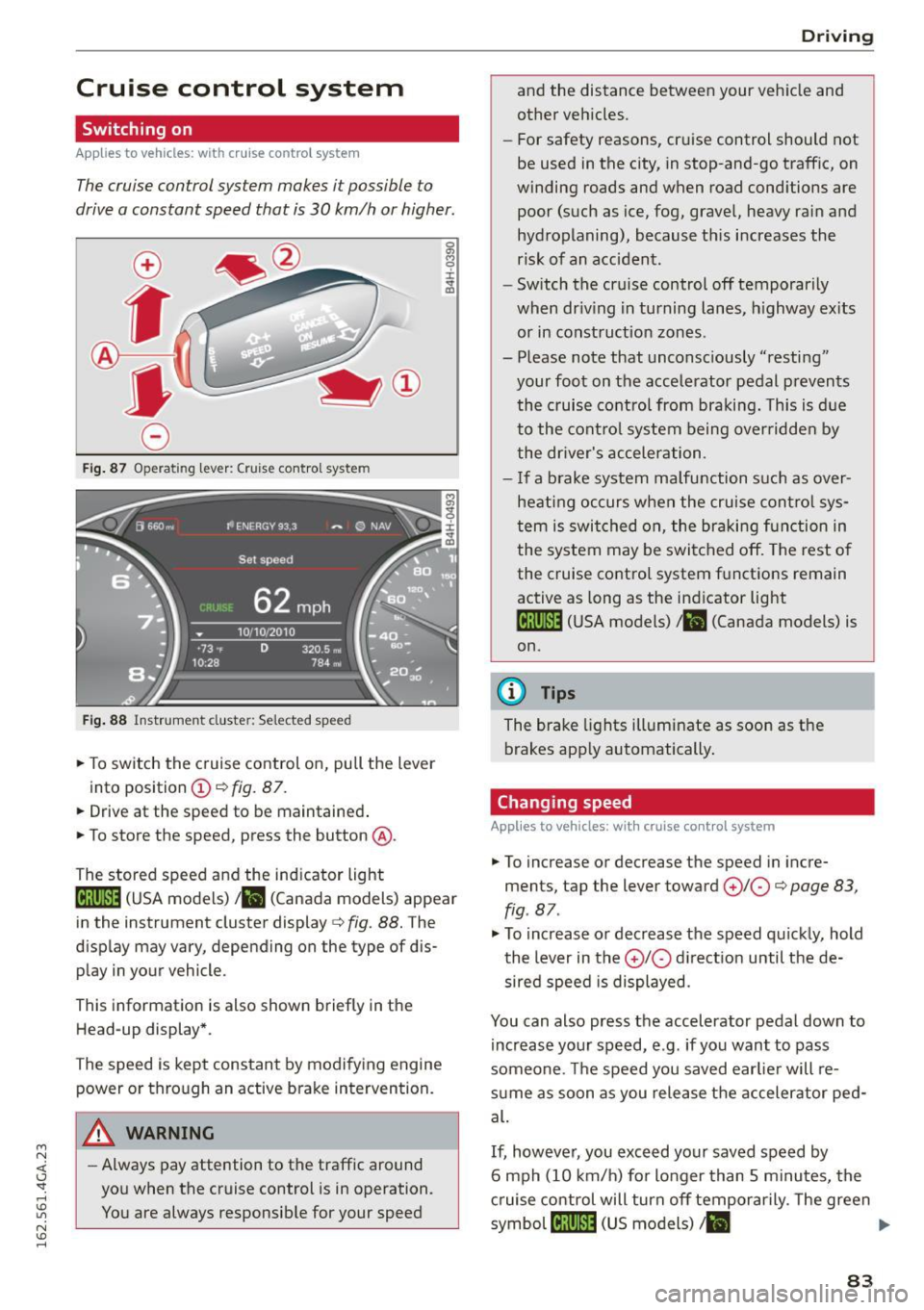
Fig. 87 Operating lever: Cruise control system
Fig. 88 Instrument cluster: Selected speed
.,. To switch the c ruise control on, pull the lever
into position
(D c:> fig. 87 .
.,. Drive at the speed to be maintained .
.,. To store the speed, press the button @.
The stored speed and the indicator light
lij;(l )~i~ (USA models) ,ii (Canada models) appear
in the instrument cluster display
c:> fig. 88. The
display may vary, depending on the type of dis
play in your vehicle.
This informat ion is also shown briefly in the
Head-up display*.
The speed is kept constant by modifying engine power or through an active brake intervention.
A WARNING
- Always pay attention to the traffic around
you when the cruise control is in operation.
You are always responsib le for your speed
-
Dr ivi ng
and the distance between your vehicle and
other vehicles.
- For safety reasons, cruise control should not
be used in the city, in stop-and-go traffic, on
winding roads and when road cond itions are
poor (such as ice, fog, gravel, heavy rain and
hydroplaning), because this increases the
risk of an accident.
- Switch the cruise control off temporarily
when dr iv ing in turning lanes, h ighway ex its
or in construction zones.
- Please note that unconsciously "resting" your foot on the accele rator pedal p revents
the cruise control from braki ng. This is d ue
to the contro l system being over ridden by
the dr iver's acceler ation.
- I f a brake system malfunction such as over
hea ting occurs when the cruise cont ro l sys
tem is swit ched on, the braking f unction in
the system may be switched off. The rest o f
the cruise co ntrol system f unctions remain
active as long as the indicator light
1ff;(i )~i~ (USA models) ,ii (Canada models) is
on.
{!) Tips
The brake lights illuminate as soon as the
brakes app ly automatically .
Changing speed
Applies to vehicles: wit h cruise co ntro l system
.,. To increase or decrease th e speed in incre
ments, tap the lever toward
(£)10 c:> page 83,
fig . 87 .
.,. To increase or decrease the speed quic kly, hold
the lever in the
0 10 d irect ion until the de
sired speed is displayed.
You can also press the accelerator pedal down to increase yo ur speed, e.g. if you want to pass
someone. The speed you saved earlie r will re
s u me as soon as you release the accelerator ped
al.
If, however, you exceed your saved speed by
6 mph (10 km/h) for longer than 5 m inutes, the
c ruise control will turn off temporarily. The green
symbol
cij;(l)~i~ (US models) I ii
83
Page 88 of 294

Audi adapt ive cru ise control and brak ing gu ard
- For safety reasons, do not use adaptive
cruise control when driving on roads with
many curves, when the road surface is in
poor condition and/or in bad weather (such
as ice, fog, gravel, heavy rain and hydrop lan
ing). Using the system under these condi
t ions could resu lt in a col lision.
- Switch adaptive cruise control off tempora
rily when driving in turn ing lanes, on ex
pressway exits or in construction zones. This
prevents the vehicle from accelerating to
the set speed when in these situat ions.
- The adapt ive cr uise control sys tem wi ll not
brake by itself if yo u put you r foot on the ac
celerator pedal. Doing so can ove rride the
speed and distance regulation.
- When approach ing stationary objects such
as stopped traffic, adaptive cruise control
will not respond and braking g uard will have
limited function.
- The adapt ive cr uise control system and brak
ing guard do not react to people, animals,
objects cross ing the road or oncoming ob
jects .
- The function of the radar sensors can be af
fected by reflective objects such as guard
rails, the entrance to a tunnel , heavy rain or
ice.
- Never follow a veh icle so closely that you
cannot stop your vehicle safe ly . The adap
t ive cru ise control cannot s low or brake the
vehicle safely when you fo llow another veh i
cl e too close ly. Always remembe r that the
automa tic brak ing funct ion c annot bring the
vehicle to a sud den or emergency stop un
der these conditions.
- To prevent unin tended operation, always
switch ACC off when it is not be ing use d.
(D Note
The sensors can be displac ed by impacts or
damage to the bum per, whee l hou sing and
unde rbody. That could affe ct the adap tive
cruise contro l system and braking guard . Have
your authorized A udi dealer or authorized
Audi Service Facility c heck their function.
86
In curves
App lies to vehicles: wi th Aud i adapt ive cru ise contro l
Fig. 90 Examp le: dr iv in g in to a curve
When dr iving into a curve c:::> fig. 90 and out of a
curve , the adaptive cruise control may react to an
object in the neighboring lane and apply the brakes . You ca n prevent that by pressing the ac
ce lerator pedal b riefly.
Stationary objects
App lies to vehicles: wi th Aud i adap tive cr uise con tro l
Fig .
91 Exa mple: object chang ing la nes a nd stat ion ary ob ·
j e ct
The adaptive cruise contro l system only reacts to
ob jects that are moving or that the system has
already detected as moving. For example, it can
react when a vehicle that has already been de
t ec ted @ turns or changes lanes, but adapt ive
cruise control does not react to a stationary vehi
cle @.
Page 90 of 294
Audi adapt ive cru ise control and brak ing gu ard
• You must also press the brake pedal when the
vehicl e is stopped .
Switch ing adaptiv e cruis e co ntrol off
• Push the lever away from you into position @
unt il it clicks into place. T he message ACC off
appears.
@ Indicator light s
• • Adaptive cruise control is switched o n. No
vehicles are detected up ahead . The stored speed
is mainta ined .
• • A moving vehicle i s detected up ahe ad . T he
adapt ive cru ise control system regulates the
speed and distance to the moving vehicle ahead
and accelerates/brakes automatically.
( - )·Adaptive cruise contro l is switched on . A
mov ing vehicle up ahead was detected. Your veh i
cle remains stopped .
• • When automa tic braking is not able to keep
enough d istance to a prev iously detected moving
veh icle up ahead, you must take control and
brake
~ page 90, Prompt for driver interven
tion .
© Displa y
If adap tive cr uise control i s no t shown in the dis·
play, you can call it up with the multifunction
steer ing wheel buttons
~ page 23 .
Based on the symbols in the d is play, you can de·
termine if the system is ma inta ining a di stance to
the vehicle ahead and what that di stance is .
No v ehicl e· No vehicle ahead was dete cted.
W hite vehicle · A vehicle ahead was detected .
Red veh icle· Prompt for the driver to take action
c::>page 90.
Both arrows on the sc ale © indicate the distance
to the vehicle ahead . No arrow appears when the
vehicle is on an open road and there is no object ahead . If an object is detected ahead, the arrow
moves on the scale .
The green zone on the scale shows the stored d is
tance . For information on chang ing the stored
d istance, refer to
c::> page 89 . If the distance se-
88
lected is too close or may soon becom e too close,
t h e arrows move into the red zone on the scal e.
A WARNING
Improper use of the adaptive cruise contro l
can cause collisions, other acc idents and seri
ous persona l injuries.
- Pressing the
!SET ! button when driving at
speeds be low 20 mph (30 km/h), will auto·
mat ically acce lerate the vehicle to 20 mph
(30 km/h), which is the min imum speed
that ca n be set .
@ Tips
-If you switch the ign it ion or the adaptive
cruise control off, the set speed is erased
from the system memory .
- The electronic stabilizat ion control (ESC)
and the anti -slip -regulation (ASR) are auto·
matically turned on when the adaptive
cruise contro l is turned on. Both systems
canno t be turned off if t he adaptive cruise
cont ro l is turned o n.
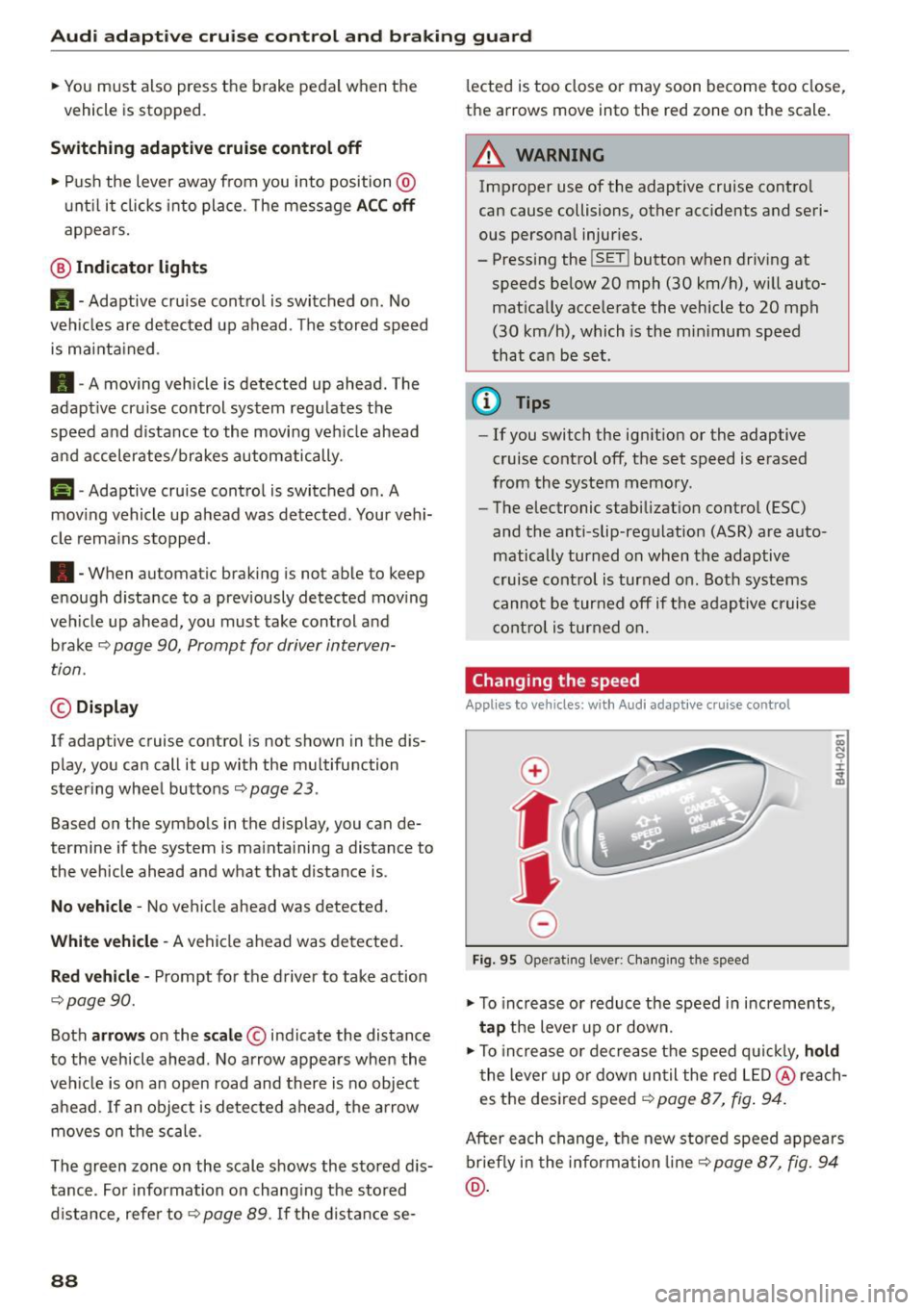
Changing the speed
Appl ies to vehicles: with Audi adap tive cruise control
0
f
JJ
0
Fig. 95 Oper atin g leve r: Cha nging t he s pee d
• To increase or reduce the speed in increments,
tap the lever up or down.
;;; N 9 :c .., m
• To inc rease or dec rease the speed q uic k ly, ho ld
t he lever up o r down until the red LED @ reach·
es the desi red speed
c::> page 87, fig . 94.
After each change, the new stored speed appears
briefly i n the informa tion line
c::> page 87, fig . 94
@ .
Page 91 of 294

M N <( I.J "". rl I.O
"' N I.O rl
Audi adapt ive crui se cont rol and bra king gu ard
Driving in stop-and-go traffic
App lies to vehicles: with Audi adaptive cruise co ntrol
The adaptive cruise control system a lso ass ists
you in stop-and-go traff ic. If a p revious detected
veh icle ahead stops, your veh icle will brake to a
stop, within the limits of the system.
.. To resume dr iv ing with adaptive cruise co ntrol,
tap the ac celerato r pedal or
.. Pull the lever toward you into posit ion @
¢page 89, fig. 96.
@ Tips
-If adaptive cru ise contro l is active and your
vehicle does not start driving as expected
after pu lling the lever once, you can start
out again by tapping the acce lerator pedal.
- If an obstacle is detected when your vehicle starts driving, the system will prompt you
to take over ¢
page 90. Your vehicle will
drive more slowly when start ing. Th is may
also happen in some situations when no ob
stacle is apparent.
Interrupting cruise control
A ppl ies to vehicles: with Audi adaptive cruise co ntrol
Fig. 96 Selector lever
Requirement: The adaptive cruise control is
sw itched on.
Overriding c ruise control
.. To accelerate manua lly, pull the lever towa rd
yo u into position @and hold it there. The mes
sage
ACC: Ov erride appears. Or
.. press the accelerator peda l.
.. To resume cruise control, release the lever or
take you r foot off the accelerator pedal.
Cance ling crui se contro l while driving
.. Move the lever into position @. The message
ACC : Standb y appears. Or
.. press the brake pedal.
.. To resume the stored speed, move the lever in
to position @.
Cance ling crui se control when stopped
.. Push the lever away from you into posit ion @ .
The message
ACC : S ta ndb y appears.
.. To resume cru ise contro l, press the brake pedal
and pu ll the lever toward you into position @.
A WARNING
-It is dangerous to activate cruise control and
r esume the stored speed when the current
road, traffic or weather conditions do not per
mit this. Th is could result in a crash.
Setting the distance
A pp lies to vehicles: wit h Audi ada ptive c ruise contro l
Fig. 9 7 Selecto r lever : setting t he distance
.. Tap the switch to display the current set dis
tance ¢
fig. 97 .
.. To increase or reduce the d istance by incre
ments, tap the switch again to the left o r right .
The distance between the two veh icles will
change in the ins trument cluster display .
When app roach ing a mov ing vehicle up ahead,
the adaptive cruise control system automatically brakes to mat ch that obje ct's speed and then
mai ntains the s tored d istance.
If the veh icle
ahead accelerates, adaptive cru ise con trol w ill al-
so accelerate up to the stored speed .
Ill>-
89
Page 93 of 294

Audi adaptive cruise control and braking guard
Audi braking guard
Description
Applies to vehicles: with Audi adaptive cruise co ntrol
F ig. 99 Instrument cluster : approach warning
Braking guard uses radar sensors and a video
camera. It also functions within the lim its of the
system when adaptive cruise control is sw itched
off.
What can braking guard do?
When detected in time, the system can assess
situations when a vehicle ahead brakes suddenly
or if your own veh icle is traveling at a high speed
and approaching a vehicle up ahead that is mov
ing more slow ly . Braking guard does not react if it
cannot de te ct the situation .
The system advises you of various situations:
- The
distance warning is given if you are too
close to the vehicle ahead for a long time. If the
vehicle ahead brakes sharply, you will not be
able to avo id a collision. The indicator light.
in the d isplay comes on .
- The
approach warning is g iven when a detected
vehicle up ahead in your lane is moving much
more slowly than you are or if it brakes sharply .
When this warning is g iven, it may only be pos
sible to
avoid a co llis ion by swerving or braking
sharp ly. The indicator light. and indica tor in
the display will warn yo u about the danger
¢
fig. 99. You will also hear an acoustic signal.
If you do not react fast enough or do not react at
all to the situation, braking guard will intervene
M N by braking. <( I.J "". rl I.O
"' N <.0 ll This is not a vailable in some coun tri es. rl
- If a collision is imminent, the system wi ll first
provide an
acute warning by briefly and sharply
app ly ing the brakes.
- If you do not react to the acute warning, brak
ing guard can brake with increasing force within
the limits of the system. This reduces the vehi
cle speed in the event of a collision.
- The system can initiate maximum braking
short ly before a collision
1l . Full dece leration at
high speeds occurs only in vehicles with adap
tive cruise control and s ide ass ist (pre sense
plus).
- If the braking guard senses that you are not
braking hard enough when a collis ion is imm i
nent, it can increase the braking force .
- The pre sense functions also engage when a
collision is imm inent ¢
page 185 .
Which functions can be controlled?
You can switch braking guard and the distance/
approach warning on or off in the MMI
¢ page 92, Settings in the Infotainment sys
tem .
A WARNING
--
Lack of attention can cause collisions, other
accidents and ser ious personal injuri es. The
braking guard is an ass ist system and cannot
prevent a collision by itself. The driver must
always intervene . The driver is always respon
sib le for braking at the correct time.
- Always pay close attent ion to traffic,
even
when the braking guard is switched on . Be
ready to intervene and be ready to take com
p lete control whenever necessary. Always
keep the safe and legal distance between
your veh icle and vehicles up ahead.
- Braking guard works within limits and will
not respond outside the system limits, for
example when approaching a stopped vehi
cle or stationary obstacle (end of a traffic
jam or vehicle that has broken down in traf
fic).
-Always remember that the radar sensor for
the braking gua rd works on ly w ithin defined
liJ,,
91
Page 109 of 294
M N <( I.J "". rl I.O
"' N I.O rl
Automatic transmission S tronic, tiptronic
Introduction
The automat ic transm iss ion is controlled elec
tronically. The transmission upshifts or down
shifts automatically depending on which drive
program is selected.
When a
moderate driving style is used, the
transmission selects the most econom ical driving
mode. The transmiss ion upshifts at a lower RPM
and downshifts at a higher RPM to improve fuel
efficiency.
The transmission switches to a sporty mode after a kick-down or when the driver uses a
sporty driv
ing style
cha racterized by quick accelerator pedal
movements, heavy acceleration, frequent
changes in speed and traveling at the maximum
speed.
If desired, the driver can also select the gears
manually (tiptronic mode) ¢ page 111.
Various automat ic tr ansm issions may be instal
led, depending on the model:
S tronic transmission
The S tronic is a dual -clutch transmission . Power
is transferred using two clutches that work inde
pendently from one another. They replace the
torque converter used in conventional automat ic
transmissions and a llow the vehicle to accelerate
without a noticeable interruption in traction.
tiptronic transmission
In the tiptronic transmission, power is transfer
r ed by a torque converter.
Automatic transmission
Selector lever positions
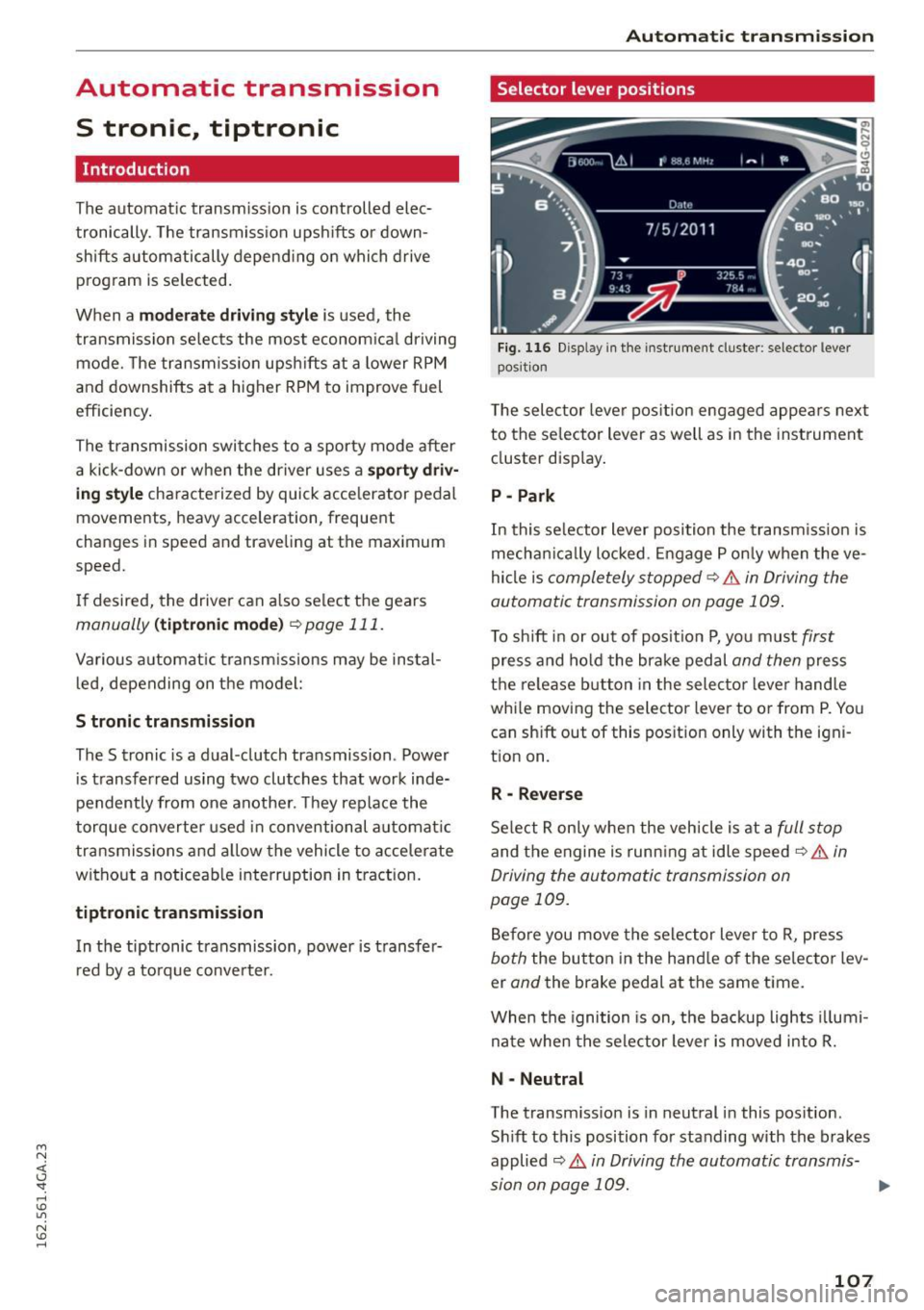
Fig. 116 Disp lay in the instrument cluste r: selector lever
posit ion
T he selec tor lever pos ition engaged appea rs next
to the se lector lever as well as in the instrument
cluster display.
P -Park
In this selector lever position the transmission is
mechanica lly locked . Engage P only when the ve
hicle is
completely stopped¢.& in Driving the
automatic transmission on page 109.
To shift in or out of posit ion P, you must first
press and hold the brake pedal and then press
the release button in the selector lever hand le
whi le moving the selector lever to or from P. You
can sh ift out of this position only with the igni
tion on.
R -Reverse
Select R only when the vehicle is at a full stop
and the engine is running at idle speed¢ .& in
Driving the automatic transmission on
page 109.
Before you move the selector lever to R, press
both the button in the hand le of the selector lev
er
and the brake pedal at the same time.
When the ignition is on, the backup lights illumi
nate when the selector lever is moved into R.
N -Neutral
The transm iss io n is in neutral in this pos ition.
Sh ift to this position for standing with the brakes
applied
¢ .& in Driving the automatic transmis-
sion on page 109. .,.
107