towing AUDI A7 2016 Owners Manual
[x] Cancel search | Manufacturer: AUDI, Model Year: 2016, Model line: A7, Model: AUDI A7 2016Pages: 294, PDF Size: 73.82 MB
Page 6 of 294
Table of contents
Front passenger s ide cockpit f use
assig nment . . . . . . . . . . . . . . . . . . . . . . . . 263
L uggage compartment fuse assignment . 263
Emergency situations . . . . . . . . . . . . 265
General . . . . . . . . . . . . . . . . . . . . . . . . . . . . 265
Starting by push ing or towing . . . . . . . . . . 265
Starting with jumper cables . . . . . . . . . . . 265
Use of jumper cab les . . . . . . . . . . . . . . . . . 266
Tow ing with a tow truck . . . . . . . . . . . . . . . 267
Ra is ing the ve hicle . . . . . . . . . . . . . . . . . . . 269
Technical Data . . . . . . . . . . . . . . . . . . . . 271
Technical data . . . . . . . . . . . . . . . . . . . . 27 1
Vehicle ident ificat io n . . . . . . . . . . . . . . . . . 27 1
Weights . . . . . . . . . . . . . . . . . . . . . . . . . . . 27 1
D imensions. . . . . . . . . . . . . . . . . . . . . . . . . 27 2
Capac ities . . . . . . . . . . . . . . . . . . . . . . . . . . 272
Gasoline engines . . . . . . . . . . . . . . . . . . . . 273
Diese l engines . . . . . . . . . . . . . . . . . . . . . . 273
Consumer information . . . . . . . . . . 274
Warranty coverages . . . . . . . . . . . . . . . . . . 274
Operating yo ur vehicle outside the U.S.A.
or Canada . . . . . . . . . . . . . . . . . . . . . . . . . . 274
Aud i Service Repair Manua ls and
Literature . . . . . . . . . . . . . . . . . . . . . . . . . . 274
Ma intenance .................. ... .. . 274
Acc esso ries and technical changes . . . . . . 276
D eclaration of Compl ian ce,
Te lecommunica tion and Electronic
Sys tems . . . . . . . . . . . . . . . . . . . . . . . . . . . 277
Index ... .. .. ............... .. .. .. . 27 8
4
Page 24 of 294
Instruments and indicator lights
Drive to an authorized Aud i dea ler or authorized
Audi Service Faci lity immediately to have the
malfunct ion corrected .
~(D Headlight range control
El Headlight range co ntrol: defe cti ve !
If the symbo l illuminates, the headlight range
control is no longer working properly. Have the
system checked and repaired at your A udi dealer .
1aO Adaptive Light
Applies to veh icles: with Adapt ive Light
mi Aud i adapti ve light: system fault
If the indicator lig ht t urns on and this message
appears, there is a malfunction in the adaptive
light system . The headlights still f unction.
Go to an a uthorized dea le rship to have the head
lights or the control unit for the Adaptive Light
repaired.
~ o Light/rain sensor
El Automatic headlights / automat ic wipe rs:
System fault
The light/rain sensor is malfunctioning.
F or safety reasons , the low beams are turned on
permanen tly with the switch in
AUTO. However,
you can continue to turn the lights on and off us
ing the light switch . You can still control a ll func
tions that are independent of the rain sensor
t hrough the windshield wiper lever.
D rive to an a uthorized Audi dea ler or a uthorized
Aud i Service Faci lity immediately to have the
malfunct ion corrected.
!-- : Sport differential
Applies to veh icles: w ith sport different ia l
II) Sport di fferential : system fault
There is a malfunction with the sport differentia l.
Drive to your aut ho rized Aud i dea le r i mmedia tely
to have the ma lfunction co rrec ted .
II) Sport differential: overheating
22
The transm ission temperat ure has increased s ig
nificantly d ue to the sporty driving manner. Drive
i n a less sporty manner unt il the temperature re
turns to the normal range and the indicator light
switches of.
A WARNING
-
Contact your author ized Audi dealer or a
qualified workshop if the spo rt differential is
fa ulty o r malfunctioning . The repa ir must be
performed by trained pe rsonnel using the cor
rect o il in order to ens ure s afety.
¢ ¢Turn signals
The indicator light blinks when you use either
turn signal.
Wheneve r you use the left B or the right B
turn s ignal, the indicator light blinks . When you
use the eme rgency flashers, bot h indicator lights
flash.
If one of the turn signa l light bulbs burn out, the
turn s ignal will bli nk twice as fast as normal.
Carefully dr ive to your author ized Audi dealer im
med iate ly to have the malfunction cor rected. The
i ndica tor l igh t does not ind icate a ma lf u nction if
a turn signal on the tra iler or on the vehicle fails
i n tra iler towing mode.
(D Tips
Fo r more informa tion on the turn s ign als , re
fer to<=>
page 44.
CRUISE 1• 0 Cruise control
The warning/indicator lig ht (ij;(l)~14 (USA mode ls)/
l'I (Canada mode ls) illuminates when the cruise
control is activated <=>
page 83.
Page 48 of 294
Lights and Vision
The leaving home function illuminates the area
outside the vehicle when you un lock the vehicle.
To turn the function on, select
Lights when un
locking car> On .
The coming home and leaving home functions
only operate when it is dark and the light switch
is in the
AUTO posit ion .
Emergency flasher
The emergency flasher makes other motorists
aware that you or your vehicle are in an emer
gency situation.
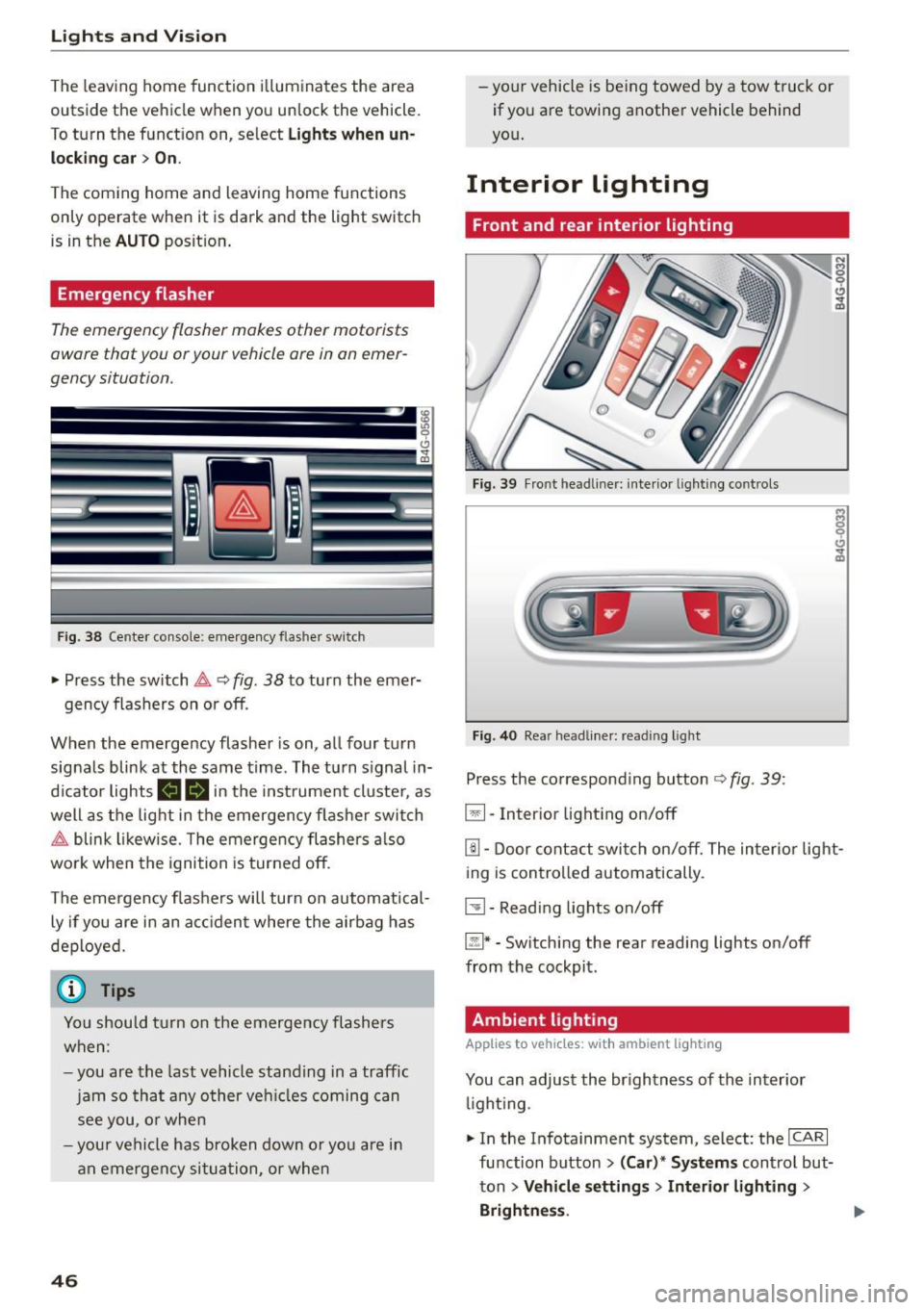
F ig. 38 Cente r co nsole: e mergen cy flasher sw itc h
~ Press the switch &, Q fig. 38 to turn the emer-
gency flashers on or off.
When the emergency flasher is on, all four turn
signals blink at the same time . The turn s ignal in
d icator lights
111!1 in the instrument cluster, as
well as the light in the emergen cy flashe r swit ch
&, blink likewise . T he emergency flashers also
wo rk when the ignition is turned off.
The emergency flashers will turn on automatical
ly if you are in an acc ident where the airbag has
deployed.
(j) Tips
You should turn on the emergency flashers
when:
- you are the last vehicle standing in a traffic
jam so that any other vehicl es coming can
see you, or when
- your vehicle has broken down or you are in
an emergency situation, or when
46
-your vehicle is being towed by a tow truck or
if you are towing another vehicle behind
yo u.
Interior Lighting
Front and rear interior lighting
Fig. 39 Front head liner: interio r light ing controls
Fig . 40 Rea r head lin er: read ing light
Press the corresponding button ¢ fig. 39:
5:1-Interior lighting on/off
rn-Door contact switch on/off. The interior light
ing is controlled automatically.
~- Reading lights on/off
~* -Switching the rear reading lights on/off
from the cockpit.
Ambient lighting
Applies to vehicles: wit h ambient lig hting
You can adjust the br ightness of the interior
li ght ing .
~ In the Infotainment system, select : the ICA RI
function button > (Car)* Systems control but
ton
> Vehicle settings > Interior lighting >
Brightne ss.
Page 100 of 294
Audi side assist
General information
App lies to vehicles: with sid e assist
®
@
©
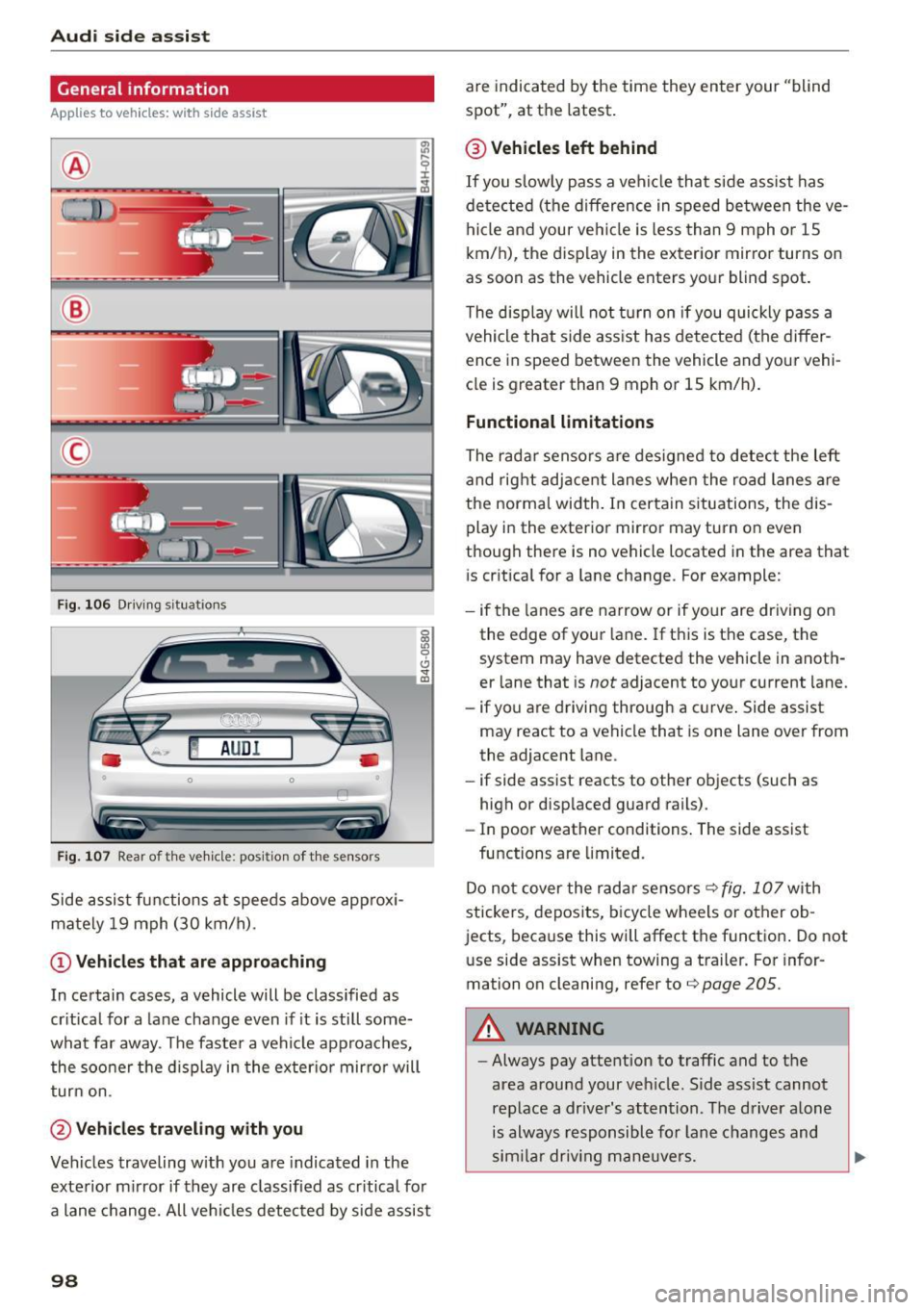
Fig. 106 Driving s itua tions
~ AUD I
• 0 0 •
Fig. 107 Rear of the ve hicle: pos it io n of t he sensors
Side assist functions at speeds above approx i
mately 19 mph (30 km/h).
(D Vehicles that are approaching
In certain cases, a vehicle will be classified as
critical for a lane change even if it is still some
what far away . The faste r a vehicle approaches,
the sooner t he d isplay in the exter io r mirro r will
turn on.
@Vehicles traveling with you
Vehicles traveling w ith you are indicated in the
exterior mirror if they are classified as critical for
a lane change. All vehicles detected by side assist
98
are indicated by the time they enter your "blind
spot", at the latest.
@ Vehicles left behind
If you slowly pass a veh icle that side assist has
detected (the difference in speed between the ve
hicle and your vehicle is less than 9 mph or 1S
km/h), the display in the exterior mirror turns on
as soon as the vehicle enters your blind spot.
T he display will not turn on if you quickly pass a
vehicle that side ass ist has detected (the differ
ence in speed between the vehicle and your vehi
cle is greater than 9 mph or 15 km/h).
Functional limitations
The radar sensors are designed to detect the left
and right adjacent lanes when the road lanes are
the normal width. In certain s ituations, the dis
play in the exterior mirror may turn on even
though there is no vehicle located in the area that
i s cr itical for a lane change. For example:
- if the lanes are narrow or if your are dr iving on
the edge of your lane. If this is the case, the
system may have detected the vehicle in anoth
er lane that is
not adjacent to your current lane.
- if yo u are driving through a c urve . Side assist
may react to a vehicle that is one lane over from
the adjacent lane.
- if side assist reacts to other objects (such as
high or displaced guard rails).
- In poor weather conditions . The side assist
functions are limited.
Do not cover the radar sensors
q fig. 107 with
stickers, deposits, bicycle wheels or other ob
jects, because this will affect the function . Do not
use side assist when towing a trailer . For infor
mation on cleaning, refer to
q page 205 .
A WARNING
-Always pay attention to traffic and to the
area around your veh icle. S ide ass ist cannot
replace a dr iver's attention . The driver alone
is always responsible for lane changes and
sim ila r driv ing maneuvers.
Page 102 of 294
Audi side assist
(D Tips
-Si de ass ist is not active wh ile you are ma k
i ng the a djustment .
- Your settings are automat ica lly stored and
assi gned to t he remote control key being
u sed.
Driver messages
Applies to veh icles: w ith Audi side assist
If s ide ass ist switches off by itse lf, t he LED in the
button turns
off and a message w ill appear in the
i n str ument cluster d isp lay:
Audi side assist not available: sensor blocked
The radar sensors' vision is affected. Do not cover
the area in fr ont of the senso rs with bike wheels,
stic kers, dirt or oth er objects. Clean the a rea in
fro nt of the sensors, if necessa ry ¢
page 98,
fig . 107 .
Audi side assist: currently unavailable
Side assist cannot be switched on tempora rily be
cause t here is a ma lf u nction (for e xamp le , th e
battery c harge level may be too l ow).
Audi side assist: System fault!
T he system can not guara ntee that it wi ll detect
ve hicl es co rrectly a nd it is switche d off . The sen
s o rs have been disp laced or are faulty. Have the
system checke d by an auth orized A udi dealer or
author ized Audi Se rv ice Facility so on .
Audi side assist: Unavailable when towing
Side as sis t sw itches off aut omatically when a fac
to ry -insta lled t railer hitch is connected to t he
e lectr ica l co nnector on t he tra ile r. T he re is n o
gua rantee t he system w ill switch
off when using
a retrofitted tra ile r hitc h. Do n ot use s ide assist
wh en t owing a t ra ile r.
100
Page 104 of 294

Audi dri ve se lect
Engine soun d*
The sound of the engine is adapted to the select
ed mode and ranges from subtle to sporty.
(D Note
-Make sure there is enough clearance above
and below the veh icle when parking. The
height of the vehicle can change once it is
parked due to temperature fluctuations,
changes to the load conditions and changes
to the driving modes, which can affect clear
ance.
- When transporting the vehicle on a car car
rier, train, ship or by other means, only tie
the vehicle down at the running surface of
the tires, which is the outer c ircumference .
Securing the vehicle at the axle compo
nents, suspension struts or towing eyes is
not permitted because the pressure in the
a ir s uspension struts can change dur ing
transport. The vehicle may not be secured
sufficient ly if this happens .
- If yo u are goi ng to tow a t railer, yo u m ust
activate the trai ler operation mode
¢ page 201.
(D Tips
-In some models, the maximum vehicle
speed can on ly be reached in the
Auto and
D ynami c modes.
- Se lecting the
D ynamic mode results in spor
ty shifting characte ristics . The S gear posi
tion engages automatically.
- In vehicles with spo rt differential*, the
Dy·
na mic
mode is deactivated when towing a
trai ler.
- In vehicles that have dynamic steering*, op
erating noise is heard when starting or stop -
Adjusting the Individual mode
ping the engine. This does not indica te a
problem .
Selecting the driving mode
You can choose between comfort, auto, dynamic
and individual.
Fig . 109 Infota inment : drive select
.. To select the mode, se lect the following in the
Infotainment system:
I CAR I function button >
Comfort , Auto , D yn amic or Indi vidu al.
You can change the driv ing mode when the vehi
cle is stationary or whi le driving . If traffic per
mits, after changing modes, briefly take your
foot off the accelerator pedal so that the recently
selected mode is also activated for the engine.
Comfort -provides a comfort-o riented vehicle
setup and is s uited for long drives o n highways.
Auto -provides an overall comfortable ye t dy
nam ic dr iv ing feel and is suited for eve ry day use.
D ynami c· gives the driver a sporty driving feel
and is suited to a sporty driv ing style .
Individual ·¢ page 102.
A WARNING
Pay attent ion to traffic when operating the
drive select to reduce the risk of an accident .
You con adjust the vehicle settings to your personal preferences .
.. Se lect: the ICARI function button> Set individ
ual
control button. Once you select the menu,
102
you will automatically drive in the In di vid ua l
mode.
Page 116 of 294
Parkin g sys tems
Parking systems
General information
A ppl ies to veh icles: w ith pa rk in g system plus/rear v iew ca m
era/per ipheral came ras
Depending on your vehicle 's equipment, various
pa rking aids will help you when parking and ma
neuvering.
The
p ark ing syste m plu s assists you when park
ing by audibly and visua lly indicating objects de
tected
in front of and behind the vehicle
¢ page
115.
The rear v iew ca mera shows the area beh ind the
ve hicle in the Infotainment display. This display
assists you when you are c ross or parallel parking
¢ page
116. In add ition, you are ass isted by the
functions from the parking system plus
¢ page
115.
The pe riph era l cam era s assist you with parking
and maneuvering. You are aided by var ious cam
eras depending on the vehicle equipment level
¢ page
119. In addition, you are assisted by the
functions from th e parking syst em p lus
¢ page 115.
A WARNING
-Always look for traffic and check the area
around your vehicle by looking at it directly
as well. The parking system cannot rep lace
the driver's attent ion. The dr iver is a lways
responsible for safety during parking and
f or all other maneuvers.
- Please note that some surfaces, such as
clothing, are not detected by the system.
- Sensors and cameras have blind spots in
wh ich peop le and objects cannot be detect
ed . Be especia lly caut ious of ch ild ren and
animals.
- T he sensors can be displaced by impacts or
damage to the radia tor grille, bumper ,
wheel housing and the underbody . The park
ing systems may become impai red as a re
s u lt . Have yo ur autho rized Audi dealer or
qualified workshop check their function .
- Make sure the sensors are not covered by
stickers, deposits or any other obstructions
114
-
as it may impair the sensor function. For in
formation on cleaning, refer to¢ page
205 .
(D Note
- Some ob jects are not detec ted by the sys
tem under certain circumstances :
- Objects such as barrier chains, trailer draw
bars, vertical poles or fences
- Objects above the sensors such as wall ex
tensions
- Objects w ith specific surfaces or struc
tures such as chain link fences or powder
snow .
- If you continue driving closer to a low-lying
object, it may disappear from the sensor
range . Note that you w ill no longe r be
wa rned about th is obstacle.
(D Tips
- The system may provide a warning even
tho ugh there are no obstacles in the cover
age area in some situat ions, such as :
- certain road surfaces or for long grass.
- externa l ultrason ic sources e.g. from
cleaning vehicles.
- h eavy ra in, snow or thick vehicle exhaus t.
- We recommend that you practi ce parking in
a traff ic-free location or par king lo t to be
come fam iliar with the sys tem. When doing
this, there should be good light and weather conditions.
- Yo u can change the vo lume and pi tch of the
signals as well as the display¢ page
124.
-Please refer to the instr uctions for towing a
trailer ¢ page
124.
-What appea rs in the infot ainmen t display is
somewha t time-delayed.
Page 126 of 294
Parking systems
Adjusting the display and the warning tones
Applies to veh icles: With parking system plus/rea rview ca m
era/peripheral came ras
The display and warning tones can be adjusted in
the Infotainment.
~ Se lect: the ICARI function button > (Car )* Sys
tems
contro l button > Dri ver assi stance > Park
ing aid .
Display
On * -
An optical disp lay is shown for t he parking
system plus, a rearview camera image is shown
for the rearview camera* .
Off -When the p ark ing system is sw itched off,
only audib le signa ls are given.
Warning tones
Front volume -
Volume for the front area
Rear volume -Volume for the rear area
Front frequenc y -Frequency for the front area
Rear frequency -Frequency fo r the rear area
Entertainment volume lowering -When the
pa rking system is turned on, the vo lume of the
aud io/v ideo source is lowered.
The newly adjusted value is briefly heard from
the signal generator.
(D Tips
- The warning tones can also be adjusted d i
rectly by the visual display or the picture
from the camera . S imply press the
Settings
control b utton .
- Changed settings are activated when the
p arking system is switc hed on aga in.
- The settings for volume and frequency are
automat ically saved and ass igned to the re
mote con trol key being used.
Error messages
Applies to veh icles: With parking system plus/rearview cam
era/peripheral came ras
There is an e rror in the system if the LED in t he
Pw , button is b link ing and yo u hear a continuous
124
alarm for a few seconds afte r switching on the
par kin g system or when the parking system is al
r eady act ivated . If the error is not corrected be
fo re you switch off the ignition, the LED in the
Pw ,
button will blink the next time you switch on the
parki ng system by shifting into reverse.
Parking sy stem plus
If a senso r is fa ulty, the .f;l4 symbol will appear in
front of/behind the vehicle in the Infota inment
display. If a rear sensor is faulty, only obstacles
that are in areas @and @ are shown
<=:> page 115, fig . 121 . If a fro nt sensor is faulty,
o n ly obs tacles that a re in areas © and @are
shown. Ther e is a lso a system ma lf u nction if all
segme nts around the vehicle a re red or if no seg
men ts a re dis played.
Peripheral cameras*
There is a system malfunct ion if the i:8l• • symbol
appears and the co rrespo nd ing display a rea is
shown in bl ue. The came ra is not wo rking in this
a rea.
Drive to an authorized A udi dealer or authorized
Audi Se rvice Facility immed iately to have th e
malfunction corrected.
Trailer hitch
App lies to vehicles: with parking system plus/rearview cam
era/periphe ral ca meras and trailer hitch
For vehicles us ing the trailer socket, the parking
system rear sensors do not turn o n when yo u
shift into reverse gear or when you press the
p,,1 A
button . This res ults in the following restrictions.
Parking sy stem plus
There is no d istance warning for the rear. The
front sensors remain act ivated. The visual display
switches to the trailer towing mode.
Rearview camera* /peripheral came ras*
There is no d istance warn ing fo r th e rea r. T he
front sensors remain act ivated . The visual display
switches to the trailer towing mode. The rearv iew
camera image will not show t he or ientat ion lines
and the b lue sur faces. .,._
Page 203 of 294
M N <( (.J
'SI: ,...., \!) ..,.,
N \!) ,....,
Trailer mode Driving with a trailer
General information
Your Audi was designed primarily for passenger
transportation .
If you plan to tow a trailer, p lease remember that
the additional load will affect durability, econo
my and performance.
Trailer towing not only places more stress on the
vehicle, it also calls for more concentration from
the driver.
For this reason, always follow the operating and
driving instructions provided and use common
sense.
(D Note
If you are going to tow a trai ler, you must ac
tivate the trailer operat ion mode
c::> page 201, Operating instructions.
Technical requirements
Trailer hitch
Use a weight-carrying hitch conforming to the
gross trailer weight. The hitch must be suitable
for your vehicle and trailer and must be mounted
securely on the vehicle's chassis at a
technically
sound
location. Use only a trailer hitch with a re
movable ball mount. Always check with the trail
e r hitch manufacturer to make sure that you are
using the correct hitch.
Do not use a bumper hitch.
The hitch must be installed in such a way that it
does not interfere with the impact-absorbing
bumper system. No modifications should be
made to the vehicle exhaust and brake systems.
From time to time, check that all hitch mounting
bolts remain securely fastened .
When you are not towing a trailer,
remove the
trailer hitch ball mount. This prevents the hitch
from causing damage should your vehicle be
struck from behind
c::> &, .
Trailer mode
Trailer brakes
If your trailer is equipped with a brak ing system,
check to be sure that it conforms to all regula
tions.
T he trailer hydraulic brake system must not be di
rect ly connected to the vehicle's hydraulic b rake
system.
Safety chains
Always use safety chains between your veh icle
and the tra iler.
Trailer lights
Trailer lights must meet all regulations. Be sure
to check with your Aud i dealer for correct wiring,
switches and relays.
Mirrors
If you are unable to see the traffic behind you us
ing the regular outside mirrors, then you
must in
stall extended mirrors. It is important that you
always have clear vision to the rear .
A WARNING
--
After removing the trailer hitch, do not store
i t in your vehicle. In case of sudden braking,
the hitch could fly forward and injure you or
your passengers.
Operating instructions
Maximum trailer weight
A trailer for your vehicle is limited to a typical
class 1 or class 2 trailer.
Trailer load distribution
Be sure the load in the trailer is held securely in
place to prevent it from sh ifting forward, back
ward or sideways.
Never allow a passenger to ride in a trailer c::> &.
in Driving instructions on page 203 .
Engine cooling system
Towing a trailer makes the engine work harder. It
is important that the cooling system's perform
ance is up to the additional load. Make sure that
the cooling system has enough fluid . .,..
201
Page 204 of 294

Trailer mode
Tire pressure
When tow ing a trailer, inflate the tires of your ve
hicle to the cold tire pressure listed under " Full
load" on the label located on the driver's side B
pillar (visible when the door is open). Inflate
trailer tires to trailer and tire manufacturers'
specifications.
Lights
Check to make sure both vehicle and trailer lights
are working properly .
Safety chains
Be sure trailer safety cha ins are p roperly connect
ed from the trailer to the hitch on the vehicle.
L eave enough slack in the chains to permit turn
ing corners. When you install safety chains, make
sure they will not drag on the road when you are
driving.
The chains should cross under the trai ler tongue
to prevent it from dropping in case of separation
from the hitch.
Adjusting the Audi drive select
Make su re the vehicle is on a level su rface before
h itching up the trailer and before adjusting the
tongue weight . The vehicle must be in
auto or
comfort driving mode and not raised
r::!> page 101, r::!> 0.
Make sure that the vehicle is lowered. In Info
tainment, select:
ICARI function button > Lower
control button.
If you must drive under poor road conditions, you
can raise the vehicle
after coupling the traile r or
after adjusting the tongue weight c::!> page 103 .
(D Note
-Changes in temperature or load can affect
the height of the vehicle.
- Always select
auto or comfort mode. Other
wise, the tongue load specified for your ve
hicle will no longer be applicable.
202
· Driving instructions
Driving with a trailer always requires extra care
and consideration .
To obtain the best possible handling of vehicle
and trailer, please note the follow ing:
.,. Do not tow a loaded trailer when your car itself
is not loaded .
.,. Be especially carefu l when passing other
vehicles.
.,. Observe speed lim its .
.,. Do not drive at the maximum permissib le
speed.
.,. Always app ly brakes early .
.,. Monitor the temperature gauge.
Weight distribution
Towing a loaded trailer with an empty car results
i n a h ighly unstab le distribution of weight. If th is
cannot be avoided, dr ive at very low speeds only
to avoid the risk of losing steer ing control.
A "balanced" rig is easier to operate and control.
This means that the tow vehicle shou ld be loaded
to the extent possible and permissib le, w hile
k eep ing the traile r as light as possible under the
circumstances. Whenever possible, transfer
some ca rgo to the luggage compartment of the
tow vehicle while observing tongue load require
ments and vehicle loading considerations.
Speed
The higher the speed, the more difficult it be
comes for the driver to contro l the rig. Do not
drive at the maximum permissible speed. Reduce
your speed even more if load, weather or wind cond itions are unfavorab le -particular ly when
going downh ill.
Red uce vehicle speed
immediately if the trailer
shows the slightest sign of swaying .
Do not try
to stop the swaying by accelerating.
Observe speed limits . In some areas, speeds for
vehicles towing trai lers are lower than for regular
vehicles.
Always apply brakes early. When driving dow n
hill, shift i nto a lower gear to use the engine