light AUDI A7 2017 Owner´s Manual
[x] Cancel search | Manufacturer: AUDI, Model Year: 2017, Model line: A7, Model: AUDI A7 2017Pages: 284, PDF Size: 72.29 MB
Page 236 of 284

Wheels
"'If the changed tire pressures are not displayed
in the Infotainment system, drive the vehicle
for approximately 10 minutes so that the sen
sor signal from the wheels is received again.
During this adaptation phase, --.--is displayed
for the pressure and temperature and the tire
pressure monitoring system is only partially
available. It only provides a warning if one or
more t ire pressures is below the minimum per
mitted specified pressure. If this is the case, the
Rt] indicator light appears with a message.
_& WARNING
Read and follow the important information
and notes
r::!;>page 232.
Malfunctions
Appl ies to : vehicles wi th tire pressure mo nito rin g system
If the Tire Pressure Monitoring System is not
avai lable, the
mm indicator light appears in the
driver information system. The
Rt] indicator light
also blinks for approximately one minutes each
time the ignition is switched on. The tire pressure
monitoring system cannot be selected in the In
fotainment system. The following are examples
of situations that could cause a malfunction:
- If the message appears at the end of the adap
tation phase, the system cannot detect the
wheels installed on the vehicle. This may result
from one or more wheels being installed with out wheel sensors or with incompatible wheel
sensors.
- A wheel sensor or another component has
failed.
- Using snow chains can affect the function of
the system because of the shield ing effect of
the cha ins.
- The tire pressure monitoring system is not
available due to a malfunction .
- Transmitters with the same frequency, such as
headphones or remote-controlled devices, may
cause a temporary system malfunction due to
the strong electromagnetic field.
The
mm indicator light turns off once the Tire
Pressure Monitoring System is available again.
If
you cannot correct the malfunction and the mm
234
indicator light stays on, drive immediately to an
authorized Audi dealer or authorized Audi Service Facility to have the malfunction repaired.
Page 237 of 284

co
co
.... N
" N .... 0
00
\.J '
General information
Regular, proper care helps to maintain your vehi
cle's value.
It can a lso be a requirement when
submitting warranty claims for corrosion damage
and paint defects on the body.
The necessary care products can be obtained
from an authorized Audi dealer or authorized
Audi Service Facility . Read and follow the instruc
tions for use on the packaging.
A WARNING
- Us ing clean ing and care products incorrectly
can be dangerous to your health.
- Always store clean ing and care products out
of reach of children to reduce the r isk of po i
soning .
@ For the sake of the environment
- Preferably purchase env ironmenta lly-friend
l y cleaning products.
- Do not d ispose of leftover cleaning and care
products with household trash.
Car washes
T he longer that deposits remain on the vehicle,
the more the surface may be damaged. High
temperatures such as those caused by sunlight
increase the damag ing effect.
Befor e washing, rinse
off heavy depos its with
p lenty of water.
S tubborn depos its such as bird droppings or tree
sap are best removed with plenty of water and a
microfiber cloth.
A lso, wash t he un derside of yo ur vehicle once
road sa lt stops being used for the season .
Pressure washers
When washing your ve hicles w ith a pressure
washer, always follow t he ope rating inst ructions
p rovided w ith the pressure washe r. This is espe
cially important in regard to the pressu re and
sp raying distance. Do not a im the spray directly
at the sea ls on the side w indows, doors, lids or
Ca re and cleaning
the sun roof * or at tires, rubber hoses, ins ulating
material, sensors* or camera lenses* . Keep a dis
tance of at least 16 in (40 cm).
Do not remove snow and ice with a pressure
washer.
Never use cone noz zles o r high pressu re noz zles .
The water temperature must not be above 140 °F
(60 °C).
Automat ic car washe s
Spray off the vehicle befo re washing .
Make s ure that the wi ndows and roo f* are closed
and the windsh ie ld wipers are
off . Follow instruc
tions from the car wash operator, especially if
there are accessories attached to your vehicle .
If possible, use car washes that do not have
brushes .
Applies to: RS models: only use car washes where
t h e vehi cle rema ins s ta ti onary and the washi ng
equipmen t moves around the veh icle when wash
ing and drying. Car washes that move the ve hicle
th rough the car wash using a chain are not rec
ommended.
Washing by hand
Clean the ve hicl e s tarting from the top and wor k
ing down using a soft sponge or cleaning br ush .
Use solvent -free cleaning products.
Washing vehicles with matte finish paint by
hand
T o avo id damag ing the pa int when washing, firs t
remove dust and large pa rticles from your vehi
cle . Insects, grease spots and fingerprints are
best removed w ith a special cleaner for matte
finish paint.
Apply the product using a microfiber cloth . To
avo id damaging the pa int surface, do not use too
much pressure .
Rinse the ve hicl e thorough ly w ith wate r. Then
clean using a neutra l shampoo and a so ft micro
fiber cloth .
Rinse the ve hicl e thoroug hly aga in and let it air
dry . Remove any water residue using a chamois. ..,.
235
Page 238 of 284

Care and cleaning
A WARNING
- Only wash the vehicle when the ignition is
off and follow the instructions from the car
wash operator to reduce the risk of acci
dents.
- To reduce the risk of cuts, protect yourself
from sharp metal components when wash
ing the underbody or the inside of the wheel
housings.
-After washing the vehicle, the braking effect
may be delayed due to mo isture on the
brake rotors or ice in the winter . This in
creases the risk of an acc ident. The brakes
must be d ried first w ith a few careful b rake
applications.
(D Note
- If yo u wash the ve hicle in an automatic car
wash, yo u m ust retract the rear spoiler if
necessary, and fold the exte rior mi rrors in
to reduce the risk of da mage. Power fo ld ing
ex ter ior mirro rs* m ust only be folded in and
out using the power folding func tion.
-
- To red uce the risk of pa int damage, do not
wash the vehicle in direct sun light .
- T o reduce the risk of damage to the s urface,
do not use insect removing sponges, kitchen
sponges o r similar items .
- Matte finish painted vehicle components:
-To reduce the risk of damage to the sur-
face, do not use polis hing agents or hard
wax .
- Never use protective wax. It can destroy
the matte finish effect .
- Do not place any stickers or magnetic
signs on vehicle parts painted with matte
finish paint. The paint could be damaged
when the stickers or magnets are re
moved.
@ For the sake of the environment
Only wash the veh icle in facili ties spec ially de
s igned for that pu rpose . This will reduce the
r isk of dirty wate r contam inated with o il from
ente ring the sewe r system.
Cleaning and care information
W hen clean ing and ca ring for ind ividua l vehicle
components, refer to the fo llow ing tables. The
i n formation conta ined there is s imply recom
mendations. For quest ions or for components t
h at are not listed, cons ult an autho rize d Aud i
dealer or au thor ized Aud i Servi ce Fac ility. Also
fo llow the informa tion found in <=> & .
Ext erior cleaning
Component Situation Solution
Windshield wiper
Deposits ¢ page 47, Cleaning windshield wiper blades
blades
Headlights /
Deposits Soft sponge wi th a m ild soap solution3>
Tail light s
Sensors /
Deposits Sensors: soft cloth with solvent-free cleaning solution
camera lens es Camera lenses: soft cloth w ith alcohol -free cleaning solu -
tion
Snow/ice Hand br ush/solvent-free de-icing spray
Wheels Road salt Water
Bra ke dust Acid-free special cleaning solution
Exhaust tail pipes Road salt Water, clea ning solution su itab le for s tainl ess stee l, if nee-
essa ry
236
Page 240 of 284

Care and cleaning
Component Situation Solution
Te xtil es
Deposits adhering to Vacuum cleaner
a rt ifici al le ather , the surface
Alcant ara Water-based deposits Absorben
t cloth and mild soap solutiona>
such as coffee, tea,
blood, etc.
O il-based deposits Apply a m ild soap solution a), blot away the dissolved oil or
such as oil, make-up, dye, treat afterward with water, if necessary
etc.
Special deposits such Special stain remover, b lot with absorbent material, treat
as ink, na il polish, la- afterward with mild soap solution, if necessary a)
tex paint, shoe pol-
ish, etc.
Natural leather Fresh stains Cotton cloth with a mi
ld soap solutiona>
Water-based deposits Fresh sta ins : absorbent cloth
such as coffee, tea, Dried sta ins: stain remover suitable fo r leather
blood, etc.
Oil-based deposits Fresh stains: absorbent cloth and stain remover suitable
such as oil, make-up, for leather
etc. Dried sta ins : grease dissolv ing spray
Special deposits such Spot remover suitab le for leather
as ink, nai l polish, la -
tex paint, shoe pol-
ish, etc.
Ca re Regularly apply cond ition ing cream that protects from
light and penet rates into the materia l. Use specia lly-co l-
ored conditioning cream, if necessary.
Carbon parts Deposits clean the same way as plastic parts
a) Mild soap solution: maximum two tablesp oons of neutral soap in 1 quart (l liter) of water
_& WARNING
The windshie ld may not be trea ted with wa
ter-repelling windshield coating agents. Un
favorable conditions s uch as wetness, dark
ness, or low sun can result in increased glare .
Wiper blade chatter is also possible.
(D Note
- Headlights /tail light s
-Never clean headlights or tail lights with a
dry cloth or sponge.
- Do not use any cleaning product that con
tains alcohol, because they could cause
cracks to form.
- Wheels
238
-
- Never use any paint polish or other abra
sive materials.
- Damage to the protect ive layer on the
rims such as stone chips or scratches must
be repaired immediately.
- Sensors /camera l enses
- Neve r use wa rm or ho t water to remove
snow or ice from the camera lens . This
could cause the lens to crack .
- Neve r use ab rasive cleaning materials or
a lcohol to clea n the camera lens . This
could cause scratches and cracks .
-Doo r window s
-Remove snow and ice on windows and ex-
terior mirrors with a plast ic scraper. To
Page 241 of 284

co
co
.... N
" N .... 0
00
\.J '
one direction and not back and forth.
- Never remove snow or ice from door win
dows and mirrors using warm or hot water
because this could cause cracks to form.
- To avoid damage to the rear window de
fogger, do not apply any stickers on the
heating wires on the inside of the window.
- Decorative part .s/trim
- Never use chrome care or cleaning prod-
ucts .
-Paint
- To reduce the risk of scratches, the vehicle
must be free of dirt and dust before pol
ishing or waxing.
- To prevent paint damage, do not polish or
wax the vehicle in direct sunlight .
- To reduce the risk of paint damage, do not
polish away rust spots .
- Remove cosmetics and sunscreen immedi
ately- these could damage the paint.
-Displays
-To avoid scratches, do not use dry cleaning
methods on displays.
-Controls
- Make sure that no fluids enter the con-
trols, because this could cause damage.
- Safety belts
- Do not remove the safety belts to clean
them.
- Never clean safety belts or their compo
nents chemically or with corrosive fluids
or solvents and never allow sharp objects
to come into contact with the safety belts.
This could cause damage to the belt web
bing.
- If there is damage to the webbing, the
connections, the retractors or the buckles,
have them replaced by an authorized Audi
dealer or authorized Audi Service Facility.
- Textiles/artificial leather/ Alcantara
- Never treat artificial leather/ Alcantara
with leather care products, solvents, floor
polish, shoe polish, spot remove or similar
products .
- Have a specialist remove stubborn stains
to prevent damage.
Care and cleaning
-Never use steam cleaners, brushes, hard
sponges, etc. when cleaning.
- Do not turn on the seat heating* to dry the
seat.
- Objects with sharp edges, such as zippers
or rivets on clothing or belts, can cause
damage to the surface.
- Open hook and loop fasteners, for exam
ple on clothing, can damage seat covers.
Make sure hook and loop fasteners are
closed.
- Natural leather
- Never treat leather with solvents, floor
polish, shoe polish, spot remover or simi
lar products.
- Objects with sharp edges, such as zippers or rivets on clothing or belts, can cause
damage to the surface.
- Never use steam cleaners, brushes, hard
sponges, etc . when cleaning.
- Do not turn on the seat heating* to dry the
seat.
- To help prevent the leather from fading,
do not leave the vehicle in direct sunlight
for long periods of time. If leaving the ve
hicle parked for long periods of time, you
should cover the leather to protect it from
direct sunlight.
(D Tips
-Insects are easier to remove from paint that
has been freshly waxed.
- Regular waxing can prevent rust spots from
forming.
Placing your vehicle out
of service
If you would like to take your vehicle out of serv
ice for a longer period of time, contact an author
ized Audi dealer or authorized Audi Service Facili
ty. They will advise you of important measures,
such as corrosion protection, service and storage procedures . Also follow the information about
the vehicle battery~
page 207.
239
Page 245 of 284

co
co
.... N
" N .... 0
00
\.J '
authorized Aud i dealer or authorized Audi
Service Facility for assistance.
@ For the sake of the environment
You can give the used tire sealant bottle to an
authorized Audi dealer or authorized A udi
Service Facility for disposal.
@ Tips
Remember to obtain a new bottle of sea lant
from an authorized Audi dea ler or authorized
Audi Service Facility after repairing a tire.
Replacing wheels
Before changing a wheel
Observe the following precautions for your own
and your passenger's safety when changing a
wheel.
.. After you experience a tire failure, pull the car
well away from moving traffic and try to reach
level ground before you stop c::> &.,.
.. All passengers should leave the car and move
to a safe location (for instance, beh ind the
guardrai l) ¢ ,&. .
.. Engage the
parking brake to prevent your vehi
cle from rolling unintentionally ¢,&. .
.. Move
selector lever to position P ¢ ,&. .
.. If you are towing a trailer, unhitch the trailer
from your vehicle .
.. Take the
jack and the spare tire* out of the lug
gage compartment ¢
page 240.
.8, WARNING
You or your passengers could be injured while
changing a wheel if you do not follow these
safety precautions:
- If you have a flat tire, move a safe distance
off the road. Turn off the engine, turn the
emergency flashers on and use other warn
ing devices to alert other motorists.
- Make sure that passengers wait in a safe
place away from the vehicle and well away
from the road and traffic.
Emergency assistance
- To help prevent the vehicle from moving
suddenly and possibly slipping off the jack,
always fully set the parking brake and block
the wheel diagonally opposite the wheel be
ing changed . When one front wheel is lifted
off the ground, placing the Automatic
Transmission in P (Park) wi ll
not prevent the
veh icle from moving.
- Before you change a wheel, be sure the
ground is leve l and firm. If necessary, use a
sturdy board under the jack.
- Always store the vehicle tool kit, the jack
and the replaced tire in the luggage com
pa rtment
¢page 135.
(D Tips
Before changing the wheel, you must activate
the jacking mode, so that the automatic con
trols for the Adaptive Air Suspension* do not
make it more difficult to lift the vehicle with
the jack ¢
page 245 .
Changing a wheel
When you change a wheel, follow the sequence
described below step-by-step and in exactly that
order.
1. Activate the vehicle jack mode*¢ page 245.
2. Remove the decorative wheel cover* or the
wheel bolt caps*. For more details see also
¢ page 244, Decorative wheel covers or
¢ page 244, Wheels with wheel bolt caps .
3. Loosen the wheel bolts ¢page 245.
4. Locate the proper mounting point for the
jack and align the jack below that point
¢page 245.
5. Raise the car with the jack¢ page 245 .
6. Remove the wheel with the flat tire and then
install
the spare ¢ page 247.
7. Tighten all whee l bolts lightly.
8.
Lower the vehicle with the jack.
9. Use the wheel bolt wrench and
firmly tighten
all wheel bolts
c::>page 245.
10. Replace the decorative wheel cover* or the
wheel bolt caps*.
11. Deactivate the vehicle jack mode* in the
MMI:
I CARI funct ion button> (C ar )* systems .,.
243
Page 249 of 284

co
co
.... N
" N .... 0
00
<.,;) 'SI"
Taking the wheel off/installing the spare
Follow these instructions step-by-step for chang
ing the wheel.
Fig. 207 Changing a wheel: using the screwdriver hahd le
(with the blade removed} to turn the bolts
F ig. 208 Changing a wheel: alignment pin ins ide the top
hole
After you have loosened all wheel bo lts and
raised the vehicle
off the ground, remove and re
p lace the whee l as follows:
Removing th e wheel
" Use the hexagon al so cket in the screwdri ver
handle to completely remove the topmost
wheel bolt and set it aside on a
clean surface
¢fig. 207.
.. Screw the threaded end of the alignment pi n
from the tool kit hand-tight into the empty bolt
hole
¢ fig. 2oa1>.
" Then remove the other wheel bolts as described
above .
" Take
off the wheel leaving the a lignment pin in
the bolt ho le
¢ 0 .
l) Applies to vehicles with ceram ic brake rotors•: Use a sec
ond alignme nt pin• (stored in t he spa re wheel well mold
ing} for the lower hole , fo llow ing the descript ion for the
first alignment pin.
Em ergen cy a ssis tanc e
Putting on th e spar e wheel
" Lift the spare whee l and caref ully slide it over
the alignment pin to guide it in place¢(!).
.. Use the hexagona l socket in the screwdriver
handle to screw in and tighten all wheel bolts
slightly .
"Remove the alignment pin and insert and tight
en the remaining wheel bo lt slightly like the
rest .
.. Turn the jack hand le counter-clockw ise to lower
the vehicle unt il the ja ck is fully released.
" Use the wheel bo lt wrench to t ighten a ll wheel
bolts firmly¢
page 245. Tighten them cross
wise,
from one bo lt to the (approx imately) op
posite one, to keep the wheel centered.
(D Note
When removing or installing the wheel, the
rim could hit the brake rotor/ceramic brake
rotor* and damage the rotor . Work carefully
and have a second person he lp you.
(D Tips
Never use the hexagonal socket in the hand le
of the screwdriver to loosen or tighten the
whee l bolts.
- Pull the reversible blade from the screwdr iv
er before you use the hexagona l socket in
the handle to turn the wheel bolts.
- When mounting tires with unidirectional
t read de sign make sure the tread pattern is
pointed the right way
¢ page 248.
- The wheel bolts sho uld be clean and easy to
turn. Check for dirt and corrosion on the
mating surfaces of both the wheel and the
hub. Remove all dirt from these surfaces be
fore remounting the wheel.
247
Page 253 of 284
co
co
.... N
" N .... 0
00
<.,;) 'SI"
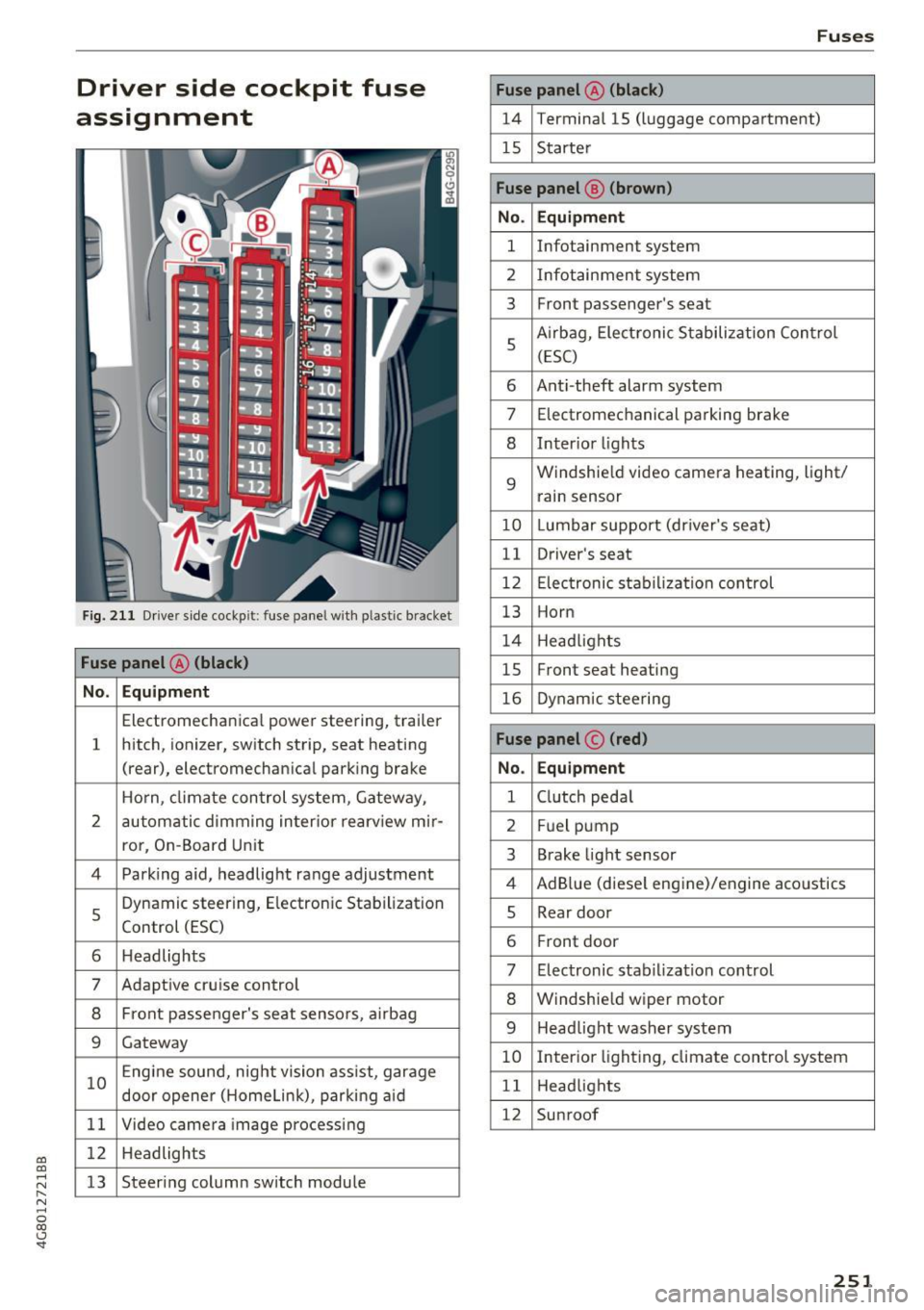
Driver side cockpit fuse
assignment
Fig. 2 11 Driver side cockp it: fuse panel wit h plastic bracket
Fuse panel @ (black)
No . Equipment
Electromecha nica l powe r steering, trailer
1 hitch, ionizer, switch st
rip, seat heating
(rear), electromechan ica l park ing brake
Ho rn, climate con trol system, Gateway,
2 automati
c dimm ing in ter ior rearv iew m ir-
ro r, On -Board Un it
4 Park ing aid, headlight ra nge adjustment
5
Dynamic steering, E lectron ic Stabilization
Control (ESC)
6 Headlights
7 Adapt ive cruise control
8 Front passenger's seat senso rs, a irbag
9 Gateway
10 Engine sound, night vision ass
ist, garage
door opene r (H ome link), parki ng aid
11 Video camera image processing
1 2 Headlights
13 Steering column sw
itch module
Fuses
Fuse panel @ (black)
14 Termina l 15 (luggage compartment)
15 S tarte r
Fuse panel @ (brown)
No . Equipment
1 Infotainment system
2 Infotainment system
3 Front passenger's seat
5
A
irbag, Elect ronic S tabilization Con trol
( E SC)
6 Ant
i-theft alarm system
7 Electromec hanical pa rking brake
8 Inter io r li ghts
9
Windshie ld video came ra heating, light/
rain sensor
10 Lumbar support (dr iver's seat)
11 Driver
's seat
12 Electronic st abilization con trol
13 Horn
1 4 Head lights
15 Front seat heating
16 Dynam ic steering
Fuse panel © (red)
No . Equipment
1 Clutch peda l
2 Fuel p ump
3 Brake
light sensor
4 AdB lue (diese l engine)/engine aco ustics
5 Rear door
6 Fr
ont door
7 Electronic stab ilization control
8 Windshie ld w iper motor
9 Head light washer system
10 Interio
r lighting, climate control system
1 1 Head lights
12 Sunroof
251
Page 254 of 284
Fuses
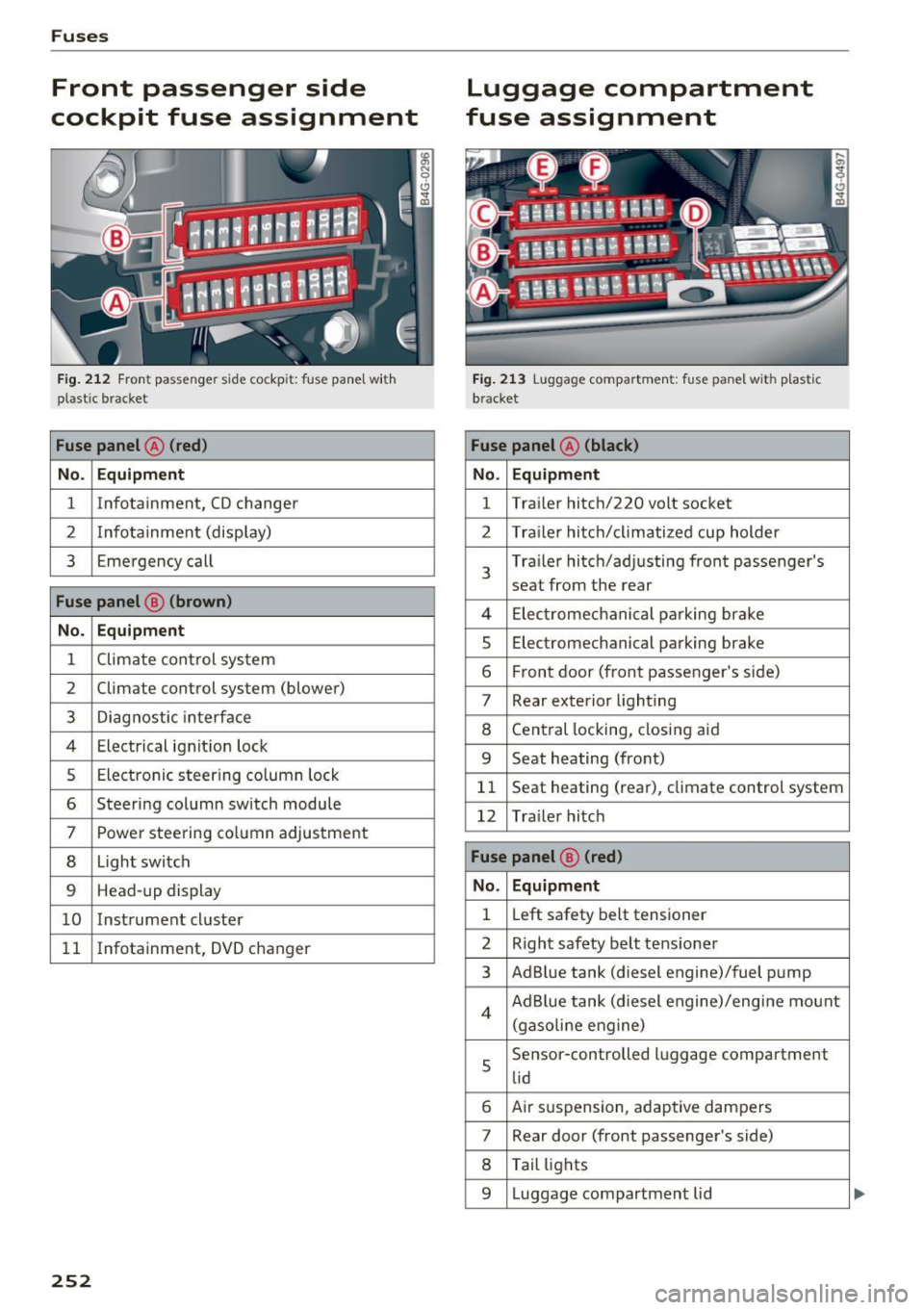
Front passenger side
cockpit fuse assignment
Fig. 212 Front passenger side cockpit: fuse panel wit h
plastic bracket
Fuse panel @ (red)
No. Equipm ent
1 Infotainment, CD changer
2 Inf
ota inment (display)
3 Emergency call
Fuse panel @ (brown)
No. Equipment
1 Climate control system
2 Climate control
system (blower)
3 Diagnostic interface
4 Electrical ignit ion lock
5 Electronic steering column lock
6 Steering column switch module
7 Power steering column adjustment
8 Light switch
9 Head-up display
10 Instrument cl uster
11 Infotainment, DVD
changer
252
Luggage compartment
fuse assignment
Fig. 213 Luggage compa rtme nt: fuse panel with plast ic
bracket
Fuse panel @ (black)
No . Equipment
1 Tra
iler hitch/220 volt socket
2 Trailer hitch/climatized cup holder
3
Trailer hitch/adjusting front passenger's
seat from the rear
4 El ec trom echan ical parking brake
5 Electromechanical parking brake
6 Front door (front passenger's side)
7 Rear exterior lighting
8 Central locking, closing aid
9 Seat heating (fro nt)
11 Seat heating
(rear), climate control system
12 Trailer hitch
Fuse panel @ (red)
No. Equipment
1 L
eft safety belt tensioner
2 Right safety belt tensioner
3 Ad Blue tank (diesel engine)/fuel pump
4 Ad Blue tank (diesel engine)/engi ne mount
(gaso lin e eng ine)
5
Se nsor-controlled luggage compartment
lid
6 Air suspension, adaptive dampers
7 Rear door (front passenger's side)
8 Tail lights
9 Luggage compartment lid
Page 256 of 284
Emergency situations
Emergency situations
General
This chapter is intended for trained emergency
crews and working personnel who have the nec
essary tools and equipment to perform these
operations.
Starting by pushing or
towing
(D Note
Vehicles with an automat ic transmission can
not be started by pushi ng or towing.
Starting with jumper
cables
If necessary, the engine con be started by con
necting it to the battery of another vehicle .
If the engine should fail to start because of a dis
charged or weak battery, the battery can be con
nected to the battery of
another vehicle, using a
pair of jumper cables to start the engine.
Jumper cables
Use only jumper cables of suffic iently large cross
section
to carry the starter current safely. Refer
to the manufacturer's specifications.
Use on ly jumper cables with
insulated term inal
clamps which are distinct ly marked :
plus(+ ) cable in most cases co lored red
minus (-) cable
in most cases colored black .
A WARNING
Batteries contain electricity, acid, and gas.
Any of these can cause very serious or fatal in
jury. Follow the instructions below for safe hand Ling of your veh icle's batte ry .
- Always shield your eyes and avo id leaning
over the battery whenever possible.
- A dead battery can freeze at temperatures
around 32 °F (0 °C). If the vehicle battery is
frozen, you must thaw it before connecting
the jump start cables.
If you do not, this in-
254
creases the risk of an explosion and chemi
cal burns. After jump starting the vehicle,
drive to an authorized Audi dealer or author
ized Audi Service Fac ility immediately to
have the vehicle battery checked.
- Do not allow battery acid to contact eyes or
skin . Flush any contacted area with water
immed iately.
- Improper use of a booster battery to start a
veh icle may cause an explosion .
- Vehicle batteries generate explosive gases.
Keep sparks, flame and lighted cigarettes
away from batter ies .
- Do not try to jump start any vehicle with a
low acid level in the battery .
- The voltage of the booster battery must also
have a 12-volt rat ing. The capacity (Ah) of
the booster battery should not be lower
than that of the discharged battery. Use of
batter ies of different voltage or substantial
ly different "Ah" rating may cause an exp lo
sion and persona l injury.
- Never cha rge a frozen battery. Gas trapped
in the ice may cause an explosion.
- Never cha rge o r use a battery that has been
frozen . The battery case may have be weak
ened.
- Use of batter ies of different voltage or sub
stantially diff erent capacity (Ah) rating may
cause an explosion and injury . The capacity
(Ah) of the booster battery should not be
lower than that of the discharged battery.
- Before you check anything in the engine
compartment, always read and heed all
WARNINGS
r=:> poge 199.
([) Note
-Applying a higher voltage booster battery
will cause expensive damage to sensitive electronic components, such as control
units, relays, radio, etc.
- Th ere must be no electrical contact between
the vehicles as otherwise current could al
ready start to flow as soon as the positive
(+) terminals are connected .