cruise control AUDI A7 2017 Owner´s Manual
[x] Cancel search | Manufacturer: AUDI, Model Year: 2017, Model line: A7, Model: AUDI A7 2017Pages: 284, PDF Size: 72.29 MB
Page 93 of 284
co
co
.... N
" N .... 0
00
<.,;) 'SI"
Switching on/off
App lies to: vehicles with Audi adaptive cruise contro l
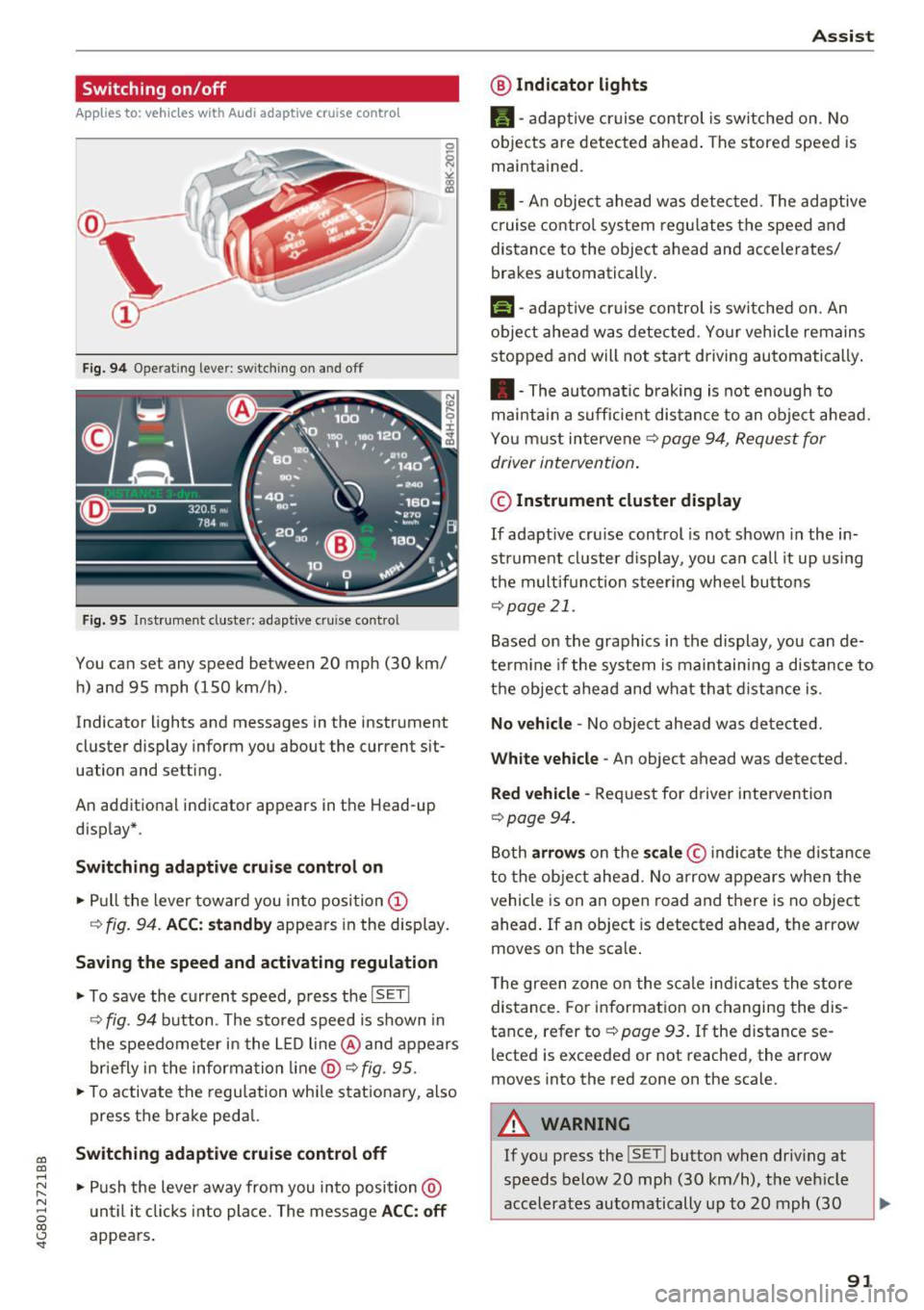
Fig. 9 4 Operat ing leve r: sw itching o n and off
Fig. 95 Inst rument cluste r: adaptive cruise contro l
You can set any speed between 20 mph (30 km/
h) and 95 mph (150 km/h) .
Indicator lights and messages in the instrument
cluster display inform you about the current sit
uation and setting.
An addit ional indicator appears in the Head-up
d isplay* .
Switching adaptiv e cruise control on
.,. Pull the lever toward you into position @
¢
fig . 94. ACC: standb y appears in the display.
Saving the speed and activating regulation
.. To save the current speed, p ress the ISETI
¢ fig . 94 button . The stored speed is shown in
the speedometer in the L ED l ine @ and appears
briefly in t he information line @ ¢
fig. 95 .
.,. To activate the regu lation whi le stationary, also
press the brake peda l.
Switching adaptive cruis e control off
.,. Push the lever away from you in to posi tion @
u nt il it clicks i nto place. The message
ACC : off
appears.
A ss ist
@ Indic ato r light s
•-adaptive cruise control is switched on. No
objects are detected ahead . The stored speed is
maintained .
• - An object ahead was detected . The adaptive
c ruise contro l system regu lates the speed and
distance to the object ahead and accelerates/
brakes automatically .
f:i-adaptive cruise control is switched on. An
object ahead was detected. Your vehicle remains
stopped and will not sta rt driving automatically .
• -The automatic braking is not enough to
mai ntai n a sufficie nt dis tance to an obje ct ahead.
You must intervene ¢
page 94, Request for
driver intervention .
© Instrument cluster display
If adaptive cru ise control is not shown in the in
strument cl uster d isplay, you can call it up using
t h e m ultif unction steer ing whee l butto ns
¢page 21.
Based on the graphics in the display , you can de
te rm ine if the system is maintain ing a distance to
t h e object ahead and what that d ist ance is .
No vehicle -No object ahead was detected .
White veh icle -An object ahead was detected.
Red vehicle -Request for driver intervention
~page 94.
Both arrow s on the scale © indicate the distance
to the object ahead. No arrow appears w hen the
vehicle is on an open road and t here is no object
ahead . If an object is detected ahead, the arrow
moves on the sca le .
The green zone on the s cale i ndicates the store
distance . For information on changing the dis
tance, refer to ¢
page 93. If the distance se
lected is exceeded or not reached , the arrow
moves into the red zone on the scale .
A WARNING
~~ --
If you press the !SET ! button when driv ing at
speeds below 20 mph (30 km/h), the vehicle
accelerates automatically up to 20 mph (30
91
Page 94 of 284

Ass is t
km/h), which is the minimum speed that can
be set.
(D Tips
- If you switc h the ignition or the adapt ive
cruise control system off, the set speed is
erased for safety reasons.
- The electronic stabilization control (ESC)
and the anti-slip -regulation (ASR) are auto
matically sw itched on when the adaptive
cruise control is switched on.
Changing the speed
Applies to: vehicles with Aud i adapt ive cruise control
0
,
•
0
F ig. 96 Operat ing lever: changing the speed
~ co N
0
±
~
.. To increase or red uce the speed in increments,
tap the lever up or down.
.. To increase or decrease the speed quickly,
hold
the lever up or down until the red LED@ reach
es the desired speed
¢ page 91, fig . 95 .
After each change, the new stored speed appears
briefly in the information line ¢
page 91, fig. 95
@.
Driving in stop-and-go traffic
Applies to: veh icles with Aud i adapt ive cruise control
The adaptive cruise contro l system also assists
you in stop-and-go t raff ic.
Stopp ing automatically
If an object ahead stops, your veh icle w ill brake
and stay at a stop, w ith in the limits of the sys
tem. The Start/Stop system* can be used as usu
al.
92
Driving m anually
.. Tap the accelerator pedal, or
.. pull the lever toward you into pos ition @.
@ Tips
If an obst acle is detected when you r vehicle
starts moving, the dr iver intervent ion reques t
appears¢
page 94 . Your vehicle will drive
more slowly when starting. T his may a lso
h appen in some situations when there is no
apparent obstacle.
Interrupting cruise control
Applies to: vehicles with Audi adaptive cruise control
F ig . 9 7 Se lector lever
Requirement: adaptive cruise control must be
switched on .
Overriding cruise control
.. To accelerate ma nually, pull the lever toward
you into posit ion @ and hold it there . The mes
sage
ACC: override appears. Or
.. press the accelerator peda l.
.. To resume cruise control, release the lever or
take your foot off the accelerator pedal.
Cancelin g cruise control whil e dri ving
.. Move the lever into position @. The message
ACC: standb y appears . Or
.. press the brake pedal.
.. To resume the stored speed, move the lever in
to position @.
Canceling cruise control when stopped
.. Push the lever away from you into position @.
T he message
ACC : standby appears. ..,.
Page 95 of 284
.. To resume cr uise control, press the b rake pedal
and pull the lever toward you into position @.
A WARNING
It is dangerous to activate cruise control and
resume the stored speed when the current
road, traffic or weather conditions do not per
m it this. This increases the risk of an acc ident.
Setting the distance
App lies to: veh icles with Audi adaptive cruise contro l
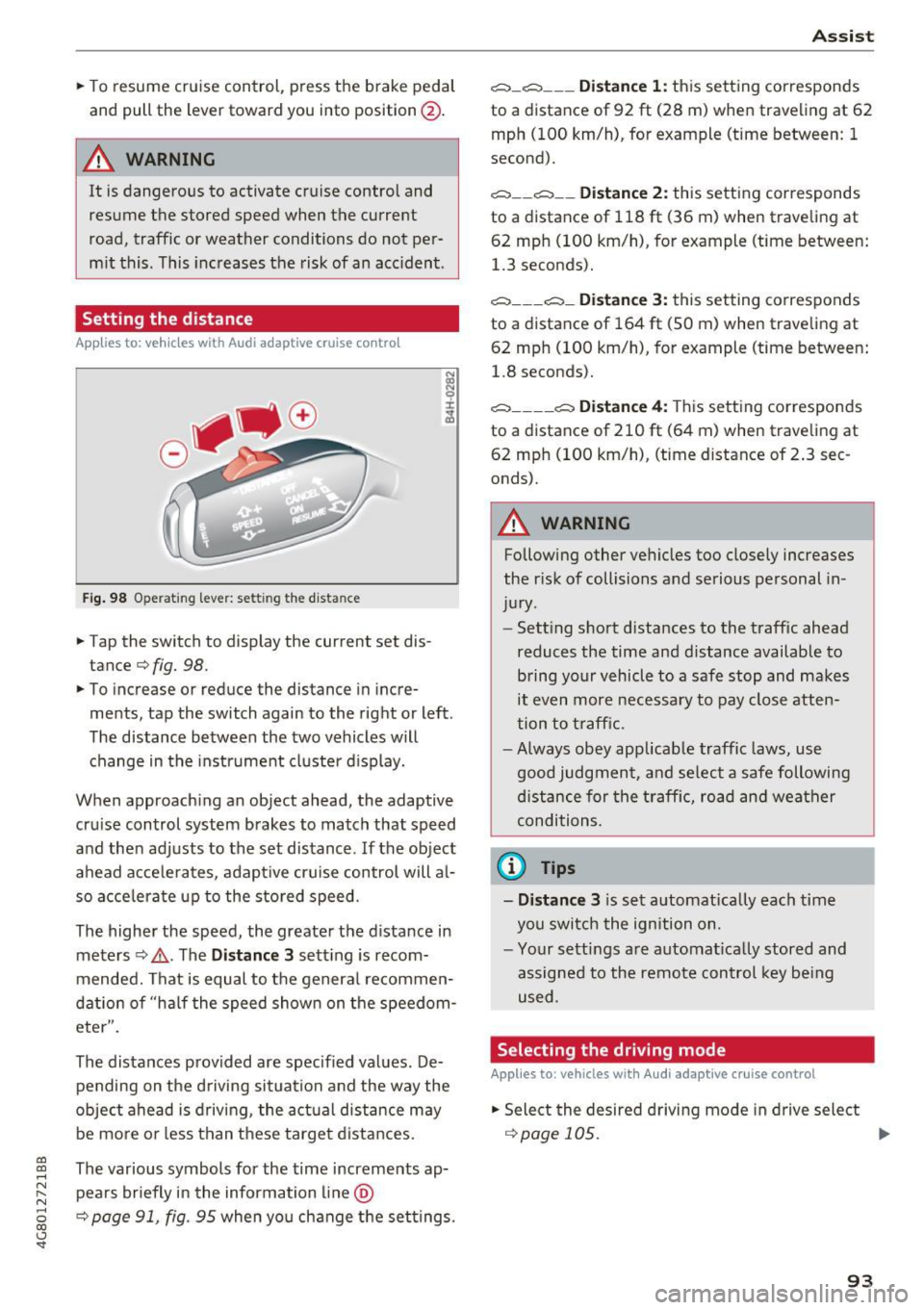
Fig . 98 O perat 1ng leve r: set ting the d ista nce
.. Tap the switch to display the current set dis
tance¢
fig. 98.
.. To increase or reduce the distance in incre
ments, tap the switch again to the right or left .
The distance between the two vehicles w ill
change in the instrument cluste r d isplay.
When approach ing an object ahead, the adaptive
cru ise control system b rakes to match that speed
and the n adj usts to the set distance . If the ob ject
a head acce le ra tes, adapt ive cruise control will a l
so acce le ra te up to the s to red speed .
The higher the speed, the greater the d istance in
meters ¢,&. . The
Distance 3 sett ing is recom
mended. That i s equal to the genera l recommen
dation of "ha lf the speed shown on the speedom
eter".
The distances prov ided are specified values . De
pending on the d riving si tuation and the way the
ob ject ahead is d riving , the act ual d istance may
be mo re o r less t han t hese targe t dista nces.
co ~ The various symbols for the time increments ap-
~ pea rs briefly in the information line @
8 ¢ page 91, fig. 95 when yo u change the set tings. 00 <..:l 'SI"
A ss ist
c:::::, _c:::::, ___ Distance 1: this sett ing corresponds
to a distance of 92
ft (28 m) when traveling at 62
mph (100 km/h), for example (time between: 1
second).
c:::::, __ c:::::, __ Distance 2: this setting cor responds
to a distance of 118 ft (36 m) when traveling at
62 mp h (100 km/h), for example (time between:
1.3 seconds).
c:::::, ___ c:::::,_ Distance 3: this setting corres ponds
to a distance of 164 ft (SO m) when trave ling at
62 mp h (100 km/h), for example (time between:
1.8 seconds).
c:::::, ____ c:::::, Distance 4: This sett ing correspon ds
to a distance of 210 ft (6 4 m) when traveling at
62 mp h (100 km/h), (time distance of 2 .3 sec
onds).
A WARNING
-Following other ve hicles too close ly incre .ases
the r isk of collisions a nd serious personal in
ju ry.
- Sett ing s hort d ista nces to the traff ic ahead
reduces the time and distance available to b ring yo ur vehicle to a safe stop and makes
it even more necessa ry to pay close atten
tion to t raffic.
- Always obey app licab le traffic laws, use
good judg men t, a nd se lect a safe following
di stance f or the traff ic, ro ad an d wea ther
condi tion s.
@ Tips
- Distance 3
is s et au tomatically each time
you swi tch the ign ition on.
- Yo ur sett ings a re automat ica lly stored and
assigned to the remote control key be ing
used .
Selecting the driving mode
Applies to: vehicles with Audi adaptive cruise control
.. Select the desire d driving mode in dr ive select
¢page 105 . ..,.
93
Page 96 of 284

Ass is t
@ Tips
Your settings are automatica lly stored and as
signed to the remote control key be ing used .
Request for driver intervention
App lies to: ve hicles w ith Audi adaptive cruise co ntro l
Fig . 99 Instrum ent clus te r: r eq ues t fo r drive r interve ntio n
In certain situations, the system w ill request you
to take action :
- if t he braking from the adapt ive cr uise control
system is no t enough to maintai n enough dis
tance to the object ahead.
The dange r is ind icated by the . indicator light
~ fig. 99. An audio s ignal will also sound.
- Press the brake pedal to slow your vehicle down .
Audi braking guard
Applies to: ve hicles w ith Audi adaptive cruise co ntro l
Fig . 100 In str um ent clus te r: appro ach warning
The braking guard uses radar sensors and a video
camera .
It also functions within the limits of the
l) This is no t a vail able in som e coun trie s.
94
system when adaptive cru ise control is switched
off.
What can the braking guard do ?
When detected in time, the system can assess
dange rous si tu at ions where an object ahead
brakes sudden ly or if yo ur own vehicle is trave ling
at a h igh speed and approach ing an ob ject that is
moving more slow ly. The braking guard does not
react if it cannot detect the situation.
The system advises you of var ious dange rous sit
uations :
- The
di stan ce warning occu rs if you dr ive too
close ly to the object ahead fo r a long per iod of
time .
If the object ahead brakes strongly, you
would not be ab le to avoid a co llis ion. The .
indicator light appears as an indication for this .
- T he
appr oach w arning occurs when an object
ahead is trave ling more slowly or brakes
strongly. When this warning occurs, it may only
be possible to avoid a collis ion by swerving or
brak ing strongly . The danger is indicated by the
• indicator light
¢fig. 100 . An audio signal
w ill also so und .
If you do not react early enough or at all to a dan
gerous situation, the braking guard supports you
with a braking intervention .
- If a co llision is imminent, the system wi ll first
provide an
acute warning by braking sharply .
- If you do not react to th e acute warning, the
b raking guard can inc rease the braking force
w ith in the lim its of the system
1> . This reduces
the vehicle speed in the event of a coll is ion.
- T he system can in itiate complete dece leration
shortly before a collision
l) . Full deceleration at
high speeds occurs only in veh icles with adap
tive cruise control and side assist (pre se nse
plus) .
- If the braking guard determ ines that you are
not braking s trongly enough when the re is a n
impending coll is ion, it can increas e the b raking
force.
- The p re sense funct io ns also engage w hen
there is an impending collision ~
page 138.
Page 97 of 284

co
co
.... N
" N .... 0
00
\.J '
You can switch the braking guard and the dis
tance/approach warning on or off in the Infotain
ment system
c::, page 95 , Settings in the Info
tainment system.
A WARNING
Lack of attention can cause collisions, other
accidents and serious personal injuries. The
braking guard is an assist system and cannot
prevent a collision by itself. The driver must
always intervene . The driver is always respon
sible for braking at the correct time.
- Always pay close attention to traffic , even
when the braking guard is switched on . Be
ready to intervene and be ready to take
complete control whenever necessary. Al
ways keep the safe and legal distance be
tween your vehicle and vehicles up ahead.
- Braking guard works within limits and will
not respond outside the system limits, for
example when approaching a stopped vehi
cle or stationary obstacle (end of a traffic
jam or vehicle that has broken down in traf
fic).
- Always remember that the radar sensor for
the braking guard works only within defined
detection and range limits that may prevent
the proper detection of other vehicles .
- The radar sensor's function and range can
be reduced by rain, snow and heavy spray.
Moving vehicles up ahead may not be
promptly detected or may not be detected
at all.
- Reflective surfaces including crash barriers
or tunnel entrances may impair the function
of the radar sensor.
{!) Tips
- You can cancel the braking with increasing
force that is initiated by the system by brak
ing yourself, by accelerating noticeably or
by swerving.
- Keep in mind that braking guard can brake
unexpectedly. Always secure any cargo or
objects that you are transporting to reduce
the risk of damage or injury .
Assist
Settings in the Infotainment system
Applies to: vehicles with Audi adaptive cruise control
.,. Select: the I CAR! function button > (Car)*Sys·
terns
control button > Driver assistance > Audi
braking guard.
System -
Switch the braking guard On/Off. When
you switch the ignition on, the message
Braking
guard: Off
appears if the system is switched off.
Early warning -The distance and approach warn
ings in the display can be switched
On/Off.
(D Tips
- Your settings are automatically stored and
assigned to the remote control key being
used.
- If you restrict or switch off the ESC, the
braking guard also switches itself off
¢ page 121 .
-Switch braking guard off when you are load
ing the vehicle onto a vehicle carrier, train,
ship or other type of transportation. This
can prevent undesired warnings from the
braking guard system.
Messages
Applies to : vehicles with Aud i adapt ive c ru ise control
Braking guard: Off
This message appears if the system is switched
off through the Infotainment system. Otherwise,
if the system is turned off, the information ap
pears every time shortly after the start of the
trip .
The message also appears if the system is not
available due to a malfunction or if the ESC is
switched
off ¢page 121. If this is the case, the
system will not provide warnings about a possi
ble collision.
Braking guard: engaged
This message appears if a sharp brake pressure
was applied due to an acute warning .
ACC: unavailable
ACC and Audi braking guard: Unavailable
95
Page 98 of 284
Ass is t
The system cannot guarantee that it will detect
objects correctly and is switched off. The sensors
have been moved or are faulty. The pre sense
functions may also be affected. Dr ive to an au
thor ized Audi dealer or authorized Audi Service
Facility immediately to have the malfunction cor
rected .
ACC: Currentl y unav ailabl e. No senso r vis ion
ACC and Audi braking guard : Curre ntly un avail
a ble . No se nsor v ision
This message appea rs if the sensor view is ob
s truc ted, for example by leaves, snow, heavy
spray or d irt. C lean the sensors ¢
page 89,
fig. 91.
ACC: Curre ntly unavailable. Gradient too steep
The road exceeds the max imum possible angle
for safe adapt ive cruise control operation . Adap
tive c ruise contro l is switched off.
AC C: onl y availab le in D, S or M
Select the 0/5 or M selector lever position .
ACC: Currentl y unavailable . Parking brake ap •
pl ied
The adaptive c ruise contro l system switches off
automatically if the park ing bra ke is set.
ACC: Curre ntly unavail abl e. Stab ility control
( ESC) input .
This message appears if the Electronic Stabiliza
tion Control (ESC) is tak ing action to stabilize the
ve hicle . In this case, adapt ive cruise control
sw itches off automatically.
AC C off: Manual control!
This message appears when adaptive cr uise con
trol cannot set the parking brake . Press the brake
pedal to prevent the vehicle from rolling.
•••
Three white dots appear if a sett ing cannot be se
lected wi th the ope rating lever. For example, this
h a ppens if adaptive c ruise cont ro l canno t start
driving automatically in stop -and-go traffic be
cause the driver has not fastened their safety
be lt.
96
Door open
The adaptive cru ise cont rol system cannot switc h
o n when a door is open.
Stationary obj ect ah ead
This message appears if you wo uld like to switch
adaptive cruise control on and there is a station
ary object or obstacle direct ly ahead of your vehi
cle .
Audi active lane assist
Description
Appl ies to: vehicles with Audi act ive lane assist
Active lane assist detects lane marker lines with
i n the lim its of the system using a camera in the
windshield. If you are approach ing a detected
lane marker line and it appears like ly that you
will leave the lane, the system w ill warn you with
corrective steering. You can override this steering
at any time. If you pass over a line, the steering
whee l w ill vibrate lightly. In orde r fo r thi s warn
i ng vibration to occ ur, it must first be switched
on in the Infotainment system. Active lane ass ist
is ready for operation when the lane marker line
is detected on at least one side of the vehicle.
The system is des igned for driving on express
ways and highways and therefore on ly activates
at speeds above approximately 40 mph (65 km/
h) .
Applies to: vehicles with side assist
If you activate a turn s ignal when act ive lane as
s ist is ready and it classifies a lane change as crit
ica l because of vehicles traveling a longside you or
approach ing you, there wi ll be noticeable correc
tive steer ing shortly before you leave the lane.
This will attempt to keep your veh icle in the lane.
Applies to: vehicles without side assist
The system will not wa rn you befo re c ross ing a
l ane marke r line if you have act ivated the t urn
s ignal. In this case, it assumes that you are
changing lanes intentionally.
Applies to: vehicles with adaptive cru ise control
The corrective steer ing is targeted based on the
driv ing situation . In add it ion to the lane marke r .,.
Page 108 of 284

Ass is t
depending on the s ituation. The distr ibution of
power varies from balanced (comfort) to sporty
(dynamic) depending on the selected mode. The
goal is a high leve l of agility and ability to accel
erate on curves. The veh icle is very responsive to
steer ing .
Cornering light*
The cornering light adapts the high beams to the
direction of the curve depending on the speed.
The pivot ing action and the lighting also adapt to
the mode.
Adaptive c ru ise contr ol*
The behavior when acce le rating can be adjusted
from comfortable to sporty, depending on the
drive select mode. Adaptive cruise control a lso
responds to the driving behavior of the veh icle
ahead in a more conservative or sporty manner.
Engine sound *
The engine sound adapts to the current mode
and can be subtle to sporty .
(D Note
Applies to: vehicles with adaptive air suspension
- Make sure there is enough clearance above
and below the veh icle when parking. The
height of the vehicle (ground clearance) can
change once it is parked due to tempera ture
fluctuations, changes to the load condit ions
and c hanges to the d riving modes.
- When transporting the veh icle on a car car
r ier, tra in, ship or by other means, only tie
the veh icle dow n at the running surfa ce of
the tires, w hic h is the outer circ umference .
Securing the vehicle at the axle compo
nents, suspension st ruts or towing eyes is
not permitted because the pressure in the
air suspension struts can change dur ing
transport . The vehicle may not be secured
sufficiently if this happens.
(D Tips
- In some models, the maximum vehicle
speed can only be reached in the auto and
dynam ic modes.
106
- The S se lector lever position a utomat ica lly
engages if the dynamic mode is selected.
- Applies to: vehicles with dynamic steering:
operating noise is heard when starting or
stopp ing the engine. Th is does not indicate
a problem.
Selecting the driving mode
F ig. 116 Infota inmen t: drive select
'" To select the mode, select the follow ing in the
Infota inment :
!CAR ! function b utton> Comfort ,
Auto , Dynamic or Individu al.
'" Applies to: vehicles with a ti.re'! button on the
steering wheel: press the button repeatedly un
til the desired mode appea rs in the instrument
cl uste r display.
You can change the driv ing mode when the vehi
cl e is stationary or while driv ing. If traff ic per
mits, afte r changing modes, briefly ta ke your
foot off the accelerator pedal so that the recently
selected mode is also activated fo r the engine.
Comf ort -prov ides a comfort -or iented vehi cle
setup and is suited fo r long drives on highways.
Auto -provides an overal l comfortab le yet dy
namic dr iv in g feel and is suited for everyday use.
Dynamic -gives the dr iver a sporty driving fee l
and is suited to a sporty d riving style .
Individual -¢ page 107.
A WARNING
Pay attention to traffic when ope rating the
d rive select to reduce the r is k of an accident.
-
Page 109 of 284
co
co
.... N ,..._
N .... 0
00
\.J '
Adjusting the Individual mode
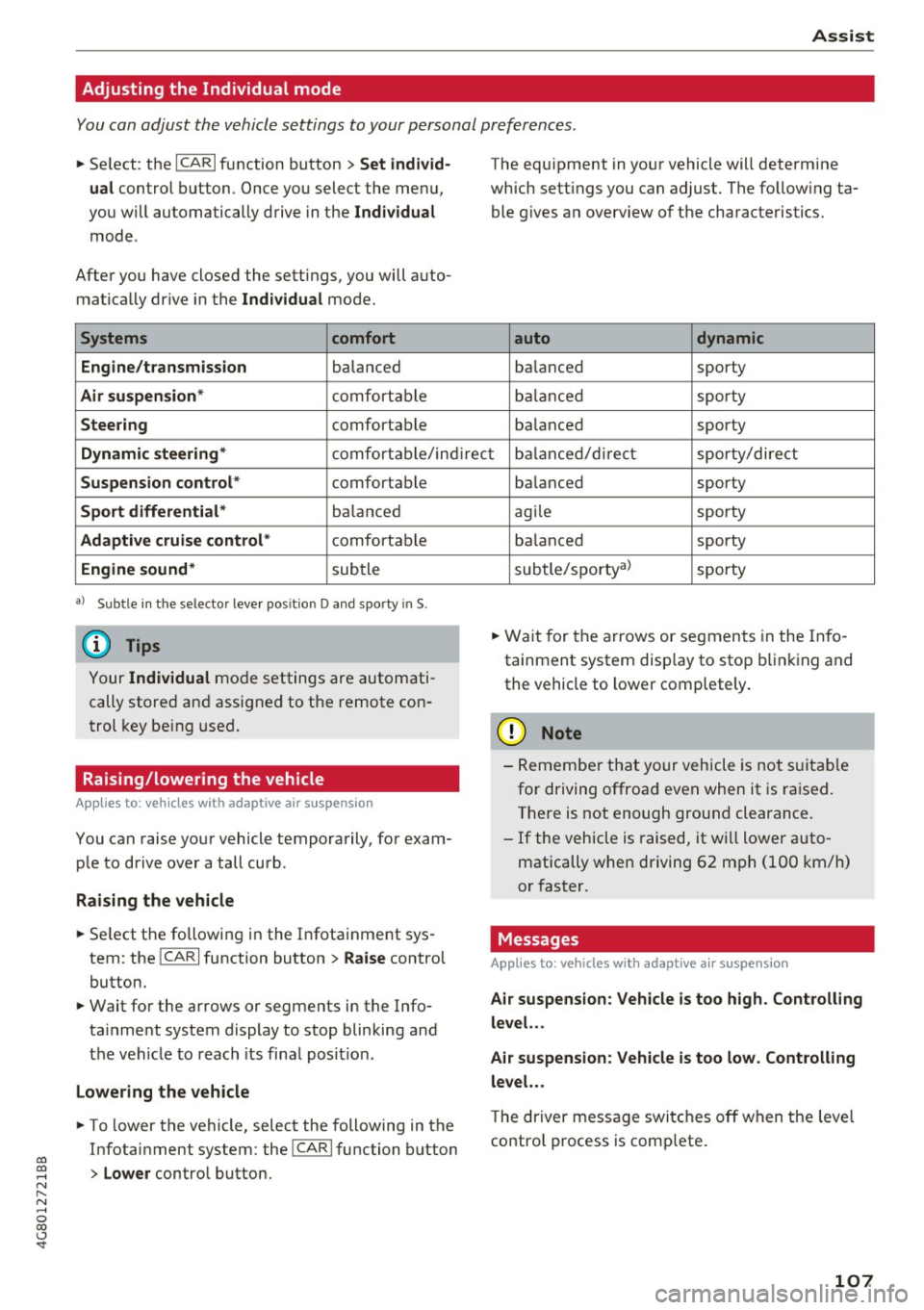
You can adjust the vehicle settings to your personal preferences.
~ Se lect : the ICARI function button > Set individ
ual
control button . Once you select the menu,
you will automatically drive in the
Individual
mode .
After you have closed the sett ings, you will auto
mat ically dr ive in the
Individual mode.
Systems comfort
Engine/transmission
balanced
Air suspension* comfortab le
Steering comfortable The equipment
in your vehicle will determine
which settings you can adjust. The follow ing ta
ble g ives a n overview of the characteristics.
auto dynamic
balanced sporty
balanced sporty
ba lanced sporty
Dynamic steering* comfortable/indirect balanced/direct sporty/direct
Suspension control* comfortable
Sport differential* balanc ed
Adaptive cruise control* comfortable
Engine sound* subtle
a} Sub tle in th e se lector lever positio n D and sporty in S.
(D Tips
Your Individual mode settings are automati
cally stored and assigned to the remote con
trol key being used.
Raising/lowering the vehicle
Applies to: veh icles with adaptive air suspension
You can raise your vehicle temporarily, for exam
ple to drive over a tall curb .
Raising the vehicle
~ Select the following in the Infotainment sys
tem : the
ICARI function button > Raise control
button.
~ Wait for the arrows or segments in the Info
ta inme nt system display to stop blinking and
the vehicle to reach its final posit ion.
Lowering the vehicle
~ To lower the vehicle, select the following in the
Infotainment system: the
! CAR I function button
> Lower control button . balanced
sporty
agile sporty
ba lanced sporty
subtle/sportyal sporty
~ Wait for the arrows or segments in the Info
tainment system disp lay to stop blinking and
the vehicle to lower completely.
(D Note
- Remember that your vehicle is not suitab le
for driving offroad even when it is ra ised.
There is not enough ground clearance.
- If the vehicle is raised, it will lower auto
matically when driving 62 mph (100 km/h)
or faster.
Messages
Appl ies to : vehicles with adaptive air suspension
Air suspension : Vehicle is too high . Controlling
level. ..
Air suspension : Vehicle is too low. Controlling
level. ..
T he driver message switches off when the leve l
contro l process is comp lete.
107
Page 140 of 284

Audi pre sense
Audi pre sense
Preventative passenger
protection
A pp lies to: ve hicles w ith Audi p re se nse
Pre sense can initiate steps to protect vehicle oc
cupants in certain dangerous situations. The
functions described are available depending on
veh icle equipment:
Pre sense basic*
The following functions can be triggered in cer
tain driving situations:
- Tensioning of the safety belts (for example,
during heavy braking): the front safety belts
have reversible belt tensioners. If a collision
does not occur, the safety belts loosen slightly
and are ready to trigger again.
- Closing the windows and the sunroof* (for ex
ample, when
over-or understeering): the win
dows and the sunroof* close until there is only
a small gap open.
The function of the pre sense basic is activated at
a speed of 20 mph (30 km/h) or higher.
Drive select: the deployment time is adapted in
Dynamic mode.
Pre sense front (vehicles with adaptive cruise
control*}
Pre sense front contains the functions of pre
sense basic . In addition, the likelihood of a rear
end collision with the vehicle ahead is also calcu
lated, within the limits of the system. If the risk
of a collision is detected, the following functions
can trigger:
- Braking guard
c:> page 94
- Tensioning of the safety belts
- Closing the windows and the sunroof*
Pre sense rear (vehicles with side assist*)
Pre sense rear contains the functions of pre sense
bas ic. In addition, the likelihood of a rear-end
coll ision from the vehicle beh ind is also calculat
ed, within the limits of the system. If the risk of a
collision is detected, the following functions can
trigger:
138
- Tensioning of the safety belts
- Closing the windows and the sunroof*
Pre sense plus*
Pre sense plus contains the functions of pre
sense front and pre sense rear .
Error message
Audi pre sense: Unavailable
Preventative passenger protection is not availa
ble. Drive to your authorized Audi dealer or au
thorized Audi Service Facility immediately to have
the malfunction corrected.
A WARNING
Pre sense cannot overcome natural physical
laws. It is a system designed to assist and it
cannot prevent a collision . Do not let the in
creased safety provided tempt you into taking
risks. This could increase your risk of a colli
sion.
- The system can deploy incorrectly .
- Please note that the sensors do not always
detect all objects . This increases the risk of
a collision .
- Pre sense does not react to people or ani
mals or objects that are crossing the vehi
cle 's path or are difficult to detect
c:> page 89.
- Reflective objects such as guard rails or the
entrance to a tunnel, heavy rain and ice can
affect the function of the radar sensors and
the system's ability to detect a collision risk.
(D Note
The sensors can be displaced by impacts or
damage to the bumper, wheel housing and
underbody. Pre sense can be impaired by this.
Have an authorized Aud i dealer or authorized
Audi Service Facility check their function.
{!) Tips
-Certain pre sense front functions switch off
when sport mode is switched off or when
driving in reverse. ..,.
Page 141 of 284

co
co
.... N
" N .... 0
00
\.J '
ble if there is a malfunction in the ESC
system or the airbag control module.
- The pre sense front/plus functions are not
available if there is a ma lfunction in the
adaptive cruise contro l* system
c:> page 95.
- The pre sense rear/plus f unctions are not
available if there is a ma lf u nct ion in the side
ass ist* system
c:> page 95.
Audi pr e sense
139