lane assist AUDI A7 2017 Owner´s Manual
[x] Cancel search | Manufacturer: AUDI, Model Year: 2017, Model line: A7, Model: AUDI A7 2017Pages: 284, PDF Size: 72.29 MB
Page 100 of 284

Ass is t
@ Tips
Make sure the camera's fie ld of view
¢
fig. 102 i s not obstructed by st ickers or any
thing else. For information on cleaning, refer
to¢
page 235.
View in instrument cluster display
A ppl ies to: ve hicles w ith Audi active lane assist
Fig . 1 03 Instrument cl uster: act ive lane ass ist is sw itc hed
on a nd prov id ing warn ings
Fi g. 10 4 Inst rument cluster: act ive la ne assist is sw itc hed
on but not ready to provide warnings
You can call up the active lane assist display us
ing the buttons in the multifunction steering
wheel ¢
page 21.
An addit iona l indicator appears in the Head -up
disp lay*.
White line(s) Active lane assist is activated and ready to p rov ide warnings.
Red line(s) Active lane assist warns you
(left or r ight) before leaving a lane
¢ fig. 103. In addit ion, the
steering wheel vibrates light ly.
Gray line(s) Active lane assist is activated,
b ut not ready to give warning
¢ fig . 104.
98
Messages in the instrument clu ster disp lay
If t he a ctive lane assist sw itches off automa tical
l y, the indicator light in the display turns off and
one of the fo llow ing messages appears:
Audi a ctive lane assi st : Currentl y unavailable.
No camera v iew
This message appears if the camera is unable to
de tect the lines. This could happe n if:
- The camera field of view¢
page 97, fig. 102 is
dirty or covered in ice . Clean th is area on the
w indshield.
- The camera fie ld of view is fogged over. Wait
until the fog has cleared before switch ing the
active la ne assist on aga in .
- T he system has been unable to detect the lanes
for an extended p eriod of t ime due to road con
ditions . Switch ac tive lane assist back on when
t he lines a re more visib le.
Audi a cti ve lane assi st: Currently unavailab le
There is a temporary act ive lane assist malfunc
tion. Try switc hing the active lane assist on again
later.
Audi a cti ve l ane assist: System fault!
D rive to an au thor ized A udi dealer or au thorized
Audi Service Facility immediate ly to have the
malfunction corrected.
Audi active lane a ssis t : Plea se take over steering
This message appears if you are not steer ing by
yourself .
If this is the case, active lane assist does
not switch off, b ut it is "not ready" to provide a
warning. The system can help you keep the vehi
cl e in the lane. However, you are responsible for
driv ing the vehicle and must steer it yourse lf .
Adjusting the vibration warning
App lies to: vehicles wit h Audi active la ne ass ist
.,. Select: the I CARI function button > (Car ) * Sys
tems
contro l button > Dri ver assistan ce > Audi
a ct ive lane assist .
Vibrat ion warning
You can swi tch the addit io nal vib ra ti on war ning
in the steering whee l on or off .
Ill-
Page 101 of 284
co
co
.... N
" N .... 0
00
<.,;) 'SI"
@ Tips
Your settings are automatically stored and assigned to the remote control key being used.
Audi side assist
Description
A ppl ies to: ve hicles with Audi side assist
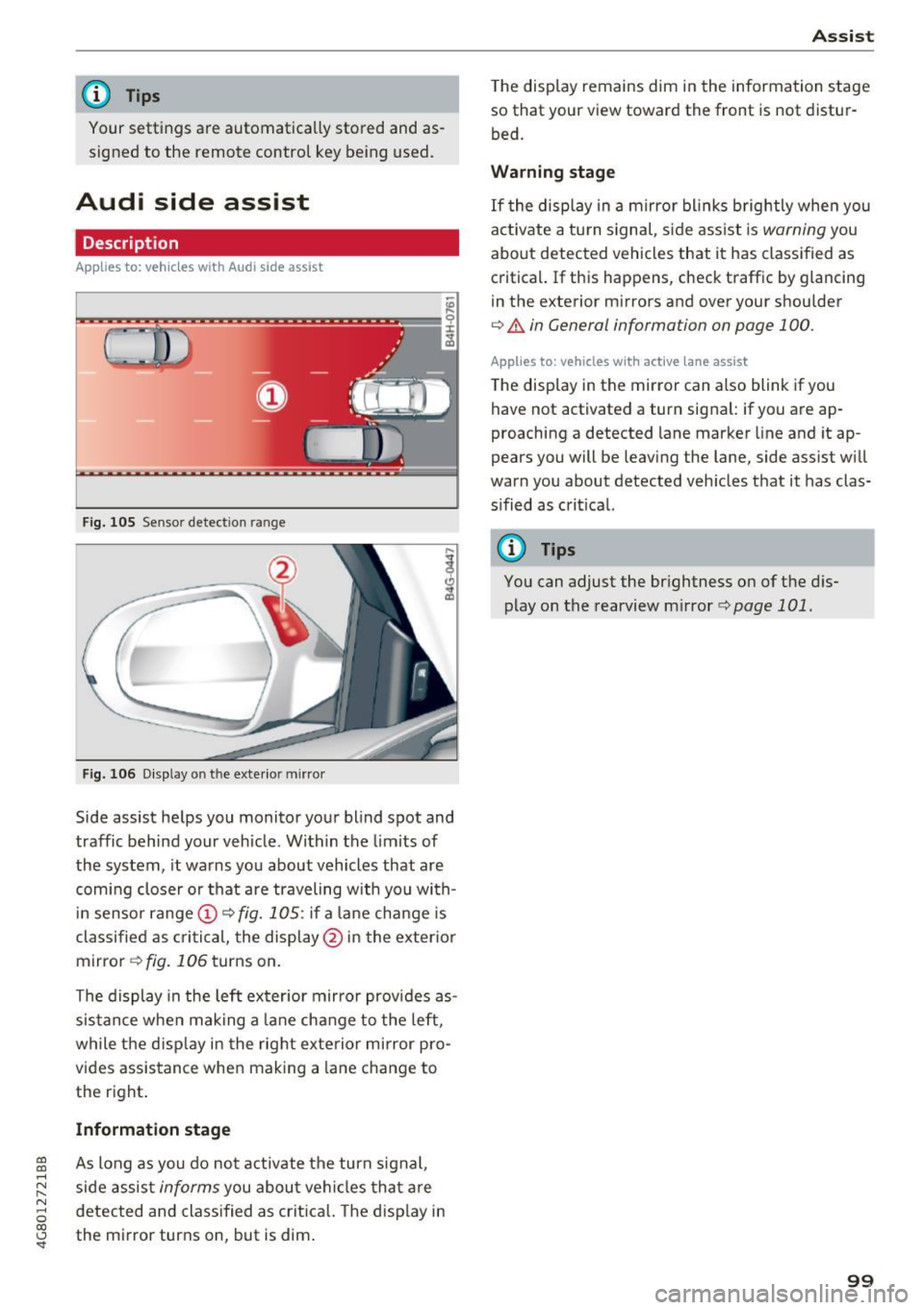
Fig. 105 Senso r detection range
Fig. 106 D isp lay on the exte rior mirro r
Side assist helps you monito r your blind spot and
traffic behind your vehicle . Within the limits of
the system, it wa rns you about vehicles that are
com ing closer or that are traveling with you with
in sensor range
(D c> fig. 1 OS: if a lane change is
classified as cri tic al, the display @ in the exter io r
mirror
c> fig. 106 turns on.
The display in the left ex ter ior mir ror provides as
sis tance when mak ing a lane change to the left,
while the d isp lay in the right exterior mirror pro
vides assis tance when making a lane change to
the r ight .
Information stage
As long as you do no t activate the turn s ignal,
side assis t
informs you about ve hicl es that a re
d etec ted and class ified as crit ica l. T he disp lay in
the mi rror turns on, but is dim .
Ass ist
The display remains dim in the information stage
so that your view toward the front is not distur
bed.
Warning stage
If the display in a mirror bl inks b rightly when you
act ivate a tu rn s ignal, s ide assist is
warning you
about detected vehicles that it has classified as
c ritical. If this happens, check traffic by glancing
in the exterior m irrors and over your shoulder
c> .&. in General information on page 100.
App lies to: vehicles wit h active lane assist
The display in the mirror can also blink if you
have not activated a turn signal: if you are ap
proaching a detected lane marker line and it ap
pears you will be leaving the lane, side assist w ill
warn you about detected veh icles that it has clas
s ified as crit ical.
@ Tips
You can adjust the br ightness on of the d is
play on the rearview m irror
c> page 101.
99
Page 102 of 284

Ass is t
General information
Applies to: ve hicles w ith Audi side assis t
®
@
©
Fig. 107 Driving s ituations
~ A UD I
• 0 0 •
Fig. 108 Rear of the vehicle: pos it ion of the senso rs
Side assist functions at speeds above approxi
mately 19 mph (30 km/h).
@ Vehicles that are appro aching
In certain cases, a vehicle will be classified as
cr itica l for a la ne change even if it is still some
what far away. The faster a veh icle approaches,
the soo ner the d isplay in the exterior mirror w il l
turn on.
@ Vehicles traveling with you
Veh icles traveling with you are indicated in the
exterior m irror if they are classified as critical for
a lane change. All ve hicl es detected by side assist
100
are indicated by the time they enter your "blind
spot", at the latest .
© Vehicle s you are passing
If you slow ly pass a vehicle that side assist has
de tected (the diffe rence in speed between the
vehicle and your vehicle is less than 9 mph (15
km/h)), the display in the exterior mirror turns
on as soon as the vehicle enters your blind spot.
The display w ill not turn on if you quickly pass a
vehicle that side ass ist has detected (the differ
ence in speed is greater than 9 mph (15 km/h)) .
Functional limitations
The radar sensors are designed to detect the lef t
and right adjacent lanes when the road lanes are
the norma l width. In some situations, the display
i n the exterior mirror may turn on even though
there is no vehicle located in the area that is criti
ca l for a lane change. For example:
- If the lanes are n arrow or if your are d riving on
the edge o f you r lane . If th is is the case, the
system may have detected a vehicle in another
lane that is
not adjacent to your current lane.
- If you are d riving through a curve. Side assist
may react to a vehicle that is one lane over
from the adjacent lane .
- If side assist reacts to other objects (such as
high or disp laced guard rai ls) .
- In poor weather conditions. The side ass ist
functions are limited .
Do no t cover the rada r senso rs ¢
fig. 108 w it h
stickers, deposi ts, b icycle wheels or other ob
j ects, because they will impair the function . Do
not use side assist when towing a trailer. For in
format ion on cleaning, see
¢page 235.
_& WARNING
-Always pay attention to traffic and to the
area around your vehicle. Side assist cannot
replace a d river's attention . The driver alone
is always respo nsible for lane changes a nd
sim ila r driv ing maneuve rs .
- In some situations, the system may not function o r its function may be limited . For
examp le:
-
Page 103 of 284

co
co
.... N
" N .... 0
00
<..:l 'SI"
-If vehicles are approaching or being l.eft
behind very quickly. The display may not
turn on in time.
- In poor weather conditions such as heavy
rain, snow or heavy mist.
- On very wide lanes, in tight curves, or if
there is a rise in the road surface. Vehicles
in the adjacent lane may not be detected
because they are outside of the sensor
range.
- Audi side assist cannot detect all vehicles
under all conditions, which can increase the
risk of accidents.
- Please note that side assist only displays ap
proaching vehicles or vehicles in your blind
spot if your vehicle is traveling at least 19 mph (30 km/h).
- In certain situations, the system may not
work or its function may be limited . For ex
ample:
- The display may not turn on at the right
time if vehicles are approaching or passing
very quickly.
- In poor weather conditions, such as heavy
rain, snow or fog.
- In very wide lanes, in tight curves or when
there are slopes in the roadway, vehicles
in the neighboring lanes may not be de
tected because they are outside of the
sensor range .
(D Note
The sensors can be displaced by impacts or
damage to the bumper, wheel housing and
underbody. This can impair the system. Have
an authorized Audi dealer or authorized Audi
Service Facility check their function.
(D Ti ps
If the window glass in the driver's door or
front passenger's door has been tinted, the
display in the exterior mirror may be incor
rect.
- For an explanation on conformity with the
FCC regulations in the United States and the
Industry Canada regulations, see
¢page 267.
Assist
Switching on and off
App lies to : vehicles wi th Audi side ass ist
Fig. 109 Driver 's door : side assist button
"' Press the button to switch the system on and
off ¢.&. in General information on page 100 .
The LED in the button turns on when side assist
is switched on.
Adjusting the display brightness
App lies to: vehicles wi th Audi side ass ist
The display brightness can be adjusted in the In
fotainment system .
"' Select: the I CAR I function button > (Car)* Sys
tems control button > Driver assistance > Audi
side assis t.
The display brightness adjusts automatically to
the brightness of the surroundings, both in the
information and in the warning stage. In very
dark or very bright surroundings, the automatic
adjustment will set the display to the minimum
or maximum level. In such cases, you may notice
no change when adjusting the brightness, or the
change may only be noticeable once the sur
roundings change.
Adjust the brightness to a level where the display
in the information stage will not disrupt your
view ahead. If you change the brightness, the dis
play in the exterior mirror will briefly show the
brightness level in the information stage. The
brightness of the warning stage is linked to the
brightness in the information stage and is adjust-
ed along with the information stage . ..,
101
Page 270 of 284

Index
Numbers and
Symbols
4-zone deluxe automatic climate control 59
Air vents . . . . . . . . . . . . . . . . . . . . . . . . . . . . 63
Key recognition . . . . . . . . . . . . . . . . . . . . . . 59
Operation . . . . . . . . . . . . . . . . . . . . . . . . . . . 61
Residual heat . . . . . . . . . . . . . . . . . . . . . . . . 63
Synchronizing . . . . . . . . . . . . . . . . . . . . . . . . 63
A
A/C (4-zone deluxe automatic climate
control) . . . . . . . . . . . . . . . . . . . . . . . . . . . . . . 62
A/C (deluxe automatic climate control) 60
ABS
refer to Anti-Lock Braking System . . . . . . 120
Accessories . . . . . . . . . . . . . . . . . . . . . . . 53, 266
Active lane assist . . . . . . . . . . . . . . . . . . . . . . 96
Adjusting the vibration warning . . . . . . . . . 98
Cleaning the camera area . . . . . . . . . . . . . 236
Indicator light . . . . . . . . . . . . . . . . . . . . . . . 97
Messages . . . . . . . . . . . . . . . . . . . . . . . . . . . 98
Sw itching on/off . . . . . . . . . . . . . . . . . . . . . 97
Adaptive air suspension . . . . . . . . . . . . . . . . 105
Adaptive cruise control. . . . . . . . . . . . . . . . . . 88
braking guard . . . . . . . . . . . . . . . . . . . . . . . . 94
Cleaning the sensor . . . . . . . . . . . . . . . . . . 236
Messages . . . . . . . . . . . . . . . . . . . . . . . . . . . 95
Request for driver intervention . . . . . . . . . . 94
Stop -and -go traffic . . . . . . . . . . . . . . . . . . . 92
Adaptive dampers . . . . . . . . . . . . . . . . . . . . . 105
Indicator light . . . . . . . . . . . . . . . . . . . . . . . 19
AdBlue . . . . . . . . . . . . . . . . . . . . . . . . . . . . . . 195
Messages . . . . . . . . . . . . . . . . . . . . . . . . . . 196
Opening the tank door . . . . . . . . . . . . . . . . 196
Refilling . . . . . . . . . . . . . . . . . . . . . . . . . . . 196
Adjusting air distribution (4 -zone deluxe auto
mat ic cl imate control) . . . . . . . . . . . . . . . . . . 62
Adjusting air distribution (deluxe automatic
climate control) . . . . . . . . . . . . . . . . . . . . . . . 60
Adjusting the temperature (4-zone deluxe au
tomatic climate control) . . . . . . . . . . . . . . . . 62
Adjusting the temperature (deluxe automatic
climate control) . . . . . . . . . . . . . . . . . . . . . . . 60
advanced key
refer to Convenience key . . . . . . . . . . . . . . . 69
268
Airbag . . . . . . . . . . . . . . . . . . . . . . . . . . . . . . 148
Airbag system . . . . . . . . . . . . . . . . . . . . . . . . 168
Advanced Airbag-System . . . . . . . . . . . . . . 152
Advanced Airbag System components . . . 155
Care . . . . . . . . . . . . . . . . . . . . . . . . . . . . . . 163
Children . . . . . . . . . . . . . . . . . . . . . . . . . . . 17 4
Child restraints . . . . . . . . . . . . . . . . . . . . . 174
Components (front airbags) . . . . . . . . . . . 155
Danger of fitting a child seat on the front
passenger seat . . . . . . . . . . . . . . . . . . . . . . 149
Disposal . . . . . . . . . . . . . . . . . . . . . . . . . . . 163
Front airbags . . . . . . . . . . . . . . . . . . . 152, 153
How do the front airbags work? . . . . . . . . 158
How many a irbags does my vehicle have? 155
How the Advanced Airbag System compo-
nents work together . . . . . . . . . . . . . . . . . 157
Important information . . . . . . . . . . . . . . . 148
Important safety instructions on the knee
airbag system . . . . . . . . . . . . . . . . . . . . . . . 166
Knee air bags. . . . . . . . . . . . . . . . . . . . . . . . 164
Monitoring . . . . . . . . . . . . . . . . . . . . . . . . . 160
PASSENGER AIR BAG O FF light . . . . . . . . . 160
Repairs . . . . . . . . . . . . . . . . . . . . . . . . . . . . 163
Safety instructions . . . . . . . . . . . . . . . . . . . 162
Side a irbags . . . . . . . . . . . . . . . . . . . . . . . . 166
Side curtain airbags . . . . . . . . . . . . . . . . . . 169
Warning/Indicator lights . . . . . . . . . . . . . 160
When must the system be inspected? 160
Air pressure (tire pressure monitoring system) ......................... 230,231
Air suspension . . . . . . . . . . . . . . . . . . . . . . . 105
Alignment pin (tire changing) . . . . . . . . . . . 240
All season tires . . . . . . . . . . . . . . . . . . . . . . . 227
All weather lights . . . . . . . . . . . . . . . . . . . . . . 40
All wheel drive . . . . . . . . . . . . . . . . . . . . . . . 124
Alternator
refer to Alternator (indicator light) . . . . . . 14
Alternator (indicator light) . . . . . . . . . . . . . . 14
Ambient lighting . . . . . . . . . . . . . . . . . . . . . . 43
Anti-freeze Windshield washer system 209
Anti-lock braking system Ind icator light . . . . . . . . . . . . . . . . . . . . . . . 16
Anti-Lock Braking System . . . . . . . . . . . . . . 120
Anti-slip regulation Indicator light . . . . . . . . . . . . . . . . . . . . . . . 16
Anti-Slip Regulation . . . . . . . . . . . . . . . . . . . 120
Page 276 of 284
Index
Instruments . . . . . . . . . . . . . . . . . . . . . . . . . . . 9
Ad justing i llumination . . . . . . . . . . . . . . . . . 43
I nter ior light ing
Ambien t ligh ting . . . . . . . . . . . . . . . . . . . . . 43
Fr ont and rear . . . . . . . . . . . . . . . . . . . . . . . 43
Intermittent (windshield wipers) . . . . . . . . . 46
J
Jump-starting 254
J umpe r ca bles . . . . . . . . . . . . . . . . . . . . . . . . 255
K
Key... .. .. .. .. .. .. . .......... .... .. .. 28
I ndicato r ligh t . . . . . . . . . . . . . . . . . . . . . . . 70
K ey not recognized . . . . . . . . . . . . . . . . . . . 71
K ey rep lacement . . . . . . . . . . . . . . . . . . . . . 28
Mechanical key . . . . . . . . . . . . . . . . . . . . 28, 29
Replac ing the battery . . . . . . . . . . . . . . . . . 29
Unlocking/ locking . . . . . . . . . . . . . . . . . . . . 30
Unlock ing and locking . . . . . . . . . . . . . . . . . 32
Key recognition (climate control system) . . . 59
Kick-down (automatic transmission) . . . . . . . 80
Knee airbags . . . . . . . . . . . . . . . . . . . . . . . . . 164
Descr ipt io n . . . . . . . . . . . . . . . . . . . . . . . . . 164
H ow they work . . . . . . . . . . . . . . . . . . . . . . 165
Important safety instructions . . . . . . . . . . 166
L
Lane assist
refer to Act ive lane assist . . . . . . . . . . . . . . 96
Lap timer. . . . . . . . . . . . . . . . . . . . . . . . . . . . . 87
E valuating times . . . . . . . . . . . . . . . . . . . . . 88
Starting . . . . . . . . . . . . . . . . . . . . . . . . . . . . 87
Stopping timi ng . . . . . . . . . . . . . . . . . . . . . . 87
also refer to Lap t imer . . . . . . . . . . . . . . . . . 87
L A TCH . . . . . . . . . . . . . . . . . . . . . . . . . . . . . . 186
Descr ipt ion . . . . . . . . . . . . . . . . . . . . . . . . . 187
Install ing a child restraint . . . . . . . . . . . . . 188
Location . . . . . . . . . . . . . . . . . . . . . . . . . . . 187
Mounti ng and releasing the anchorage
hook . . . . . . . . . . . . . . . . . . . . . . . . . . . . . . 188
Launch contro l program . . . . . . . . . . . . . . . . . 80
L ea ther care/clean ing . . . . . . . . . . . . . . . . . 238
Leaving home . . . . . . . . . . . . . . . . . . . . . . . . . 42
Lifting jack . . . . . . . . . . . . . . . . . . . . . . . . . . 245
274
Light
Ambient lighting . . . . . . . . . . . . . . . . . . . . . 43
Coming/Leaving home . . . . . . . . . . . . . . . . . 42
Dayt ime running lights . . . . . . . . . . . . . . . . 40
Head light flasher . . . . . . . . . . . . . . . . . . . . . 41
Head lights . . . . . . . . . . . . . . . . . . . . . . . . . . 41
Hig h beam ass istant . . . . . . . . . . . . . . . . . . 41
Low beams . . . . . . . . . . . . . . . . . . . . . . . . . . 40
Parking lig hts . . . . . . . . . . . . . . . . . . . . . . . . 40
Rear fog ligh ts . . . . . . . . . . . . . . . . . . . . . . . 40
Light/ra in sensor
Head lights . . . . . . . . . . . . . . . . . . . . . . . . . . 40
Ind icator light . . . . . . . . . . . . . . . . . . . . . . . 19
Inter mittent (windsh ie ld w ipers) . . . . . . . . 46
Light ing
Exterior . . . . . . . . . . . . . . . . . . . . . . . . . . . . . 40
Interio r . . . . . . . . . . . . . . . . . . . . . . . . . . . . . 43
Lights Head light range contro l system . . . . . . . . . 40
Interio r/read ing lights . . . . . . . . . . . . . . . . 43
Locking/ unlocking
By remote control . . . . . . . . . . . . . . . . . . . . 30
With the centra l loc king sw itch . . . . . . . . . 31
With the convenience key . . . . . . . . . . . . . . 30
Lock ing and unloc king
On t he door lo ck . . . . . . . . . . . . . . . . . . . . . . 32
Low beam Ind icator light . . . . . . . . . . . . . . . . . . . . . . . 19
Low beams . . . . . . . . . . . . . . . . . . . . . . . . . . . 40
Lower universal an chorages ( Canad a) . . . . . 186
Luggage compartment . . . . . . . . . . . . . . . . . . 55
12 Volt socket . . . . . . . . . . . . . . . . . . . . . . . 53
Cove r. . . . . . . . . . . . . . . . . . . . . . . . . . . . . . . 5 7
Increasing the s ize . . . . . . . . . . . . . . . . . . . . 55
Luggage compartmen t net . . . . . . . . . . . . . 56
Pass -thro ugh . . . . . . . . . . . . . . . . . . . . . . . . 58
S ki bag . . . . . . . . . . . . . . . . . . . . . . . . . . . . . 58
Stor ing cargo cor rectly . . . . . . . . . . . . . . . 135
Stowing luggage . . . . . . . . . . . . . . . . . . . . 135
Tie-downs . . . . . . . . . . . . . . . . . . . . . . . . . . . 56
Luggage compartmen t lid
Closing button . . . . . . . . . . . . . . . . . . . . . . . 33
Emergency release . . . . . . . . . . . . . . . . . . . . 35
movement-activated opening . . . . . . . . . . . 35
Open ing/closing . . . . . . . . . . . . . . . . . . . . . . 33
Luggage r ack . . . . . . . . . . . . . . . . . . . . . . . . . . 55
Lumbar support . . . . . . . . . . . . . . . . . . . . . . . 48