steering wheel AUDI A7 2017 Owner´s Manual
[x] Cancel search | Manufacturer: AUDI, Model Year: 2017, Model line: A7, Model: AUDI A7 2017Pages: 284, PDF Size: 72.29 MB
Page 74 of 284
Driving
Stopping/starting the engine
Applies to: ve hicles w ith Start/Stop system
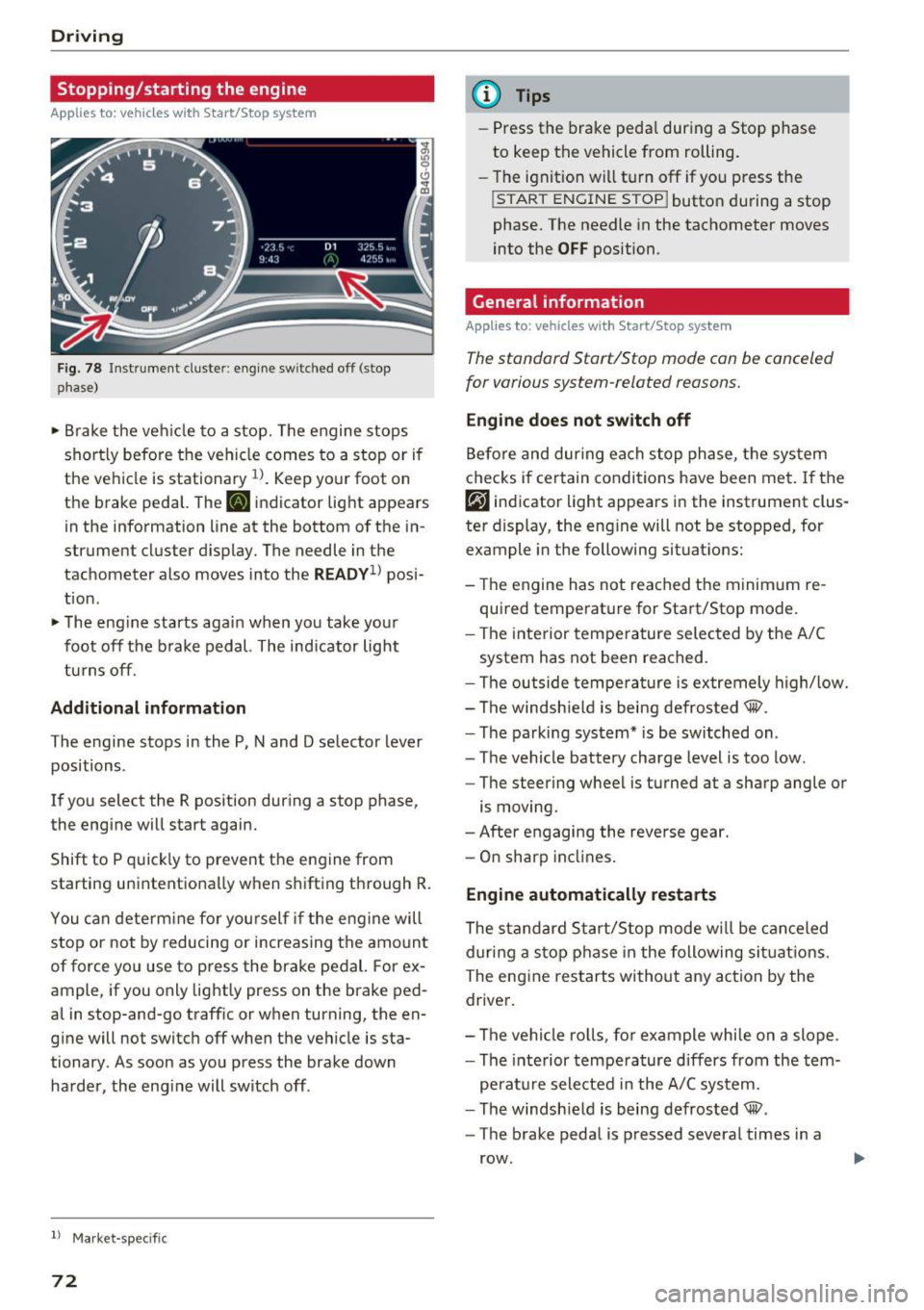
F ig. 78 Instrument cluster: eng ine sw itched off (stop
phase)
• Brake the ve hicle to a stop. The engine stops
shortly before the vehicle comes to a stop or if
the vehicle is stationary
l l. Keep your foot on
the brake pedal. The
[IJ indicator light appears
in the information line at the bottom of the in
strument cluster display. The needle in the
tachometer also moves into the
RE ADV1> posi
tion .
• The eng ine starts again when you take your
foot off the b rake pedal. The indicator light
turns off.
Add itional informat ion
The engine stops in the P, N and D selector lever
positions .
If you select the R position dur ing a stop phase,
the engine will start again.
Shift to P quick ly to prevent the engine from
starting unintent ionally when shifting through R.
You can determ ine fo r you rself if the engine will
stop or not by reducing or increasing the amo unt
of force you use to press the brake pedal. For ex
ample, if you only lightly press on the brake ped
al in stop-and-go traff ic or when turning, the en
g ine will not switch off when the vehicle is sta
tionary. As soon as you press the brake down
harder , the eng ine will switch off .
l) Market -specifi c
72
@ Tips
-Press the brake peda l during a Stop phase
to keep the vehicle from rolling.
- The ignition w ill turn off if you press the
I START ENGINE STOPI butto n du ring a stop
phase. The needle in the tachometer moves
into the
OFF position.
General information
App lies to: vehicles wit h Start/Stop syste m
The standard Start/Stop mode con be canceled
for various system-related reasons.
Engine do es not switch off
Before and dur ing each stop phase, the sys tem
checks if certain conditions have been met.
If the
rjJ indicator light appears in the instrument clus
ter display, the eng ine will not be stopped, for
example in the following situat ions:
- The engine has not reached the minim um re
quired temperature for Start/Stop mode.
- The interior temperature selected by the A/C
system has not been reached.
- The outside tempe ra tu re is extremely high/low.
- The windsh ield is being defrosted® .
- The parking system* is be switched on .
- The vehicle battery charge level is too low.
- The steering wheel is turned at a sharp angle or
is moving.
- After engaging the reverse gear.
- On sharp inclines.
Engine automatically restarts
The standard S tart/Stop mode w ill be canceled
d uring a stop p hase in the following si tuations.
The eng ine restarts without any action by the
driver.
- The vehicle ro lls, fo r example while on a slope .
- The inte rior tempe rature differs from the tem-
pe rat ure selected in the A/C system.
- The windsh ield is being defrosted® .
- The brake pedal is pressed several times in a
row .
Page 76 of 284

Driving
Electromechanical
parking brake
Fig . 80 Center conso le: par king brake
Your vehicle is equipped with an electromechani
cal parking brake
Q fig. 80 . The parking brake is
designed to prevent the vehicle from rolling un intentionally and rep laces the hand brake.
S etting /manuall y re leas ing the parking
bra ke
.. Pull the(®) switch to set the parking brake. The
LED in the switch illuminates. The -(USA
models)/ . (Canada models) indicator light al
so turns on in the instrument cluster display .
.. To release the parking brake manua lly, press
the brake o r acce lerato r pedal while the igni
tion is switched on a nd p ress the®> switch at
the same time. The L ED in the b utton and the
indicator light in the display t urn off.
Releasing the parking brake automatically
Req uirement: the driver's door must be closed,
the dr iver's safety belt must be la tched and the
pa rking brake must be set.
.. To start driving and release the park ing brake
automat ica lly, press the acce lerato r pedal as
us ual.
In addition to releasing the park ing brake auto
mat ically, othe r convenience and safety funct ions
are available whe n you sta rt driving
Q page 75,
Starting from a stop.
Preventing the automatic parking br ake
release
The vehicle could begin ro lling unintentionally,
depending on the hill or if towing a trailer.
74
.. To prevent the park ing brake from releasing au
tomatically, pull and ho ld the<®> switch and
press the acce lerator peda l. The parking brake
remains set and prevents the vehicle from roll
ing backward.
" You can release the®) switch again once you
are sure that yo u are giving enough driving
force to the wheels by press ing the accelerator
pedal.
Eme rgency braking function
You can use the emergency braking function in an
emergency sit uation, or if the standa rd brake op
eration malfunctions or is disab led.
" Pull and ho ld the®) switch.
" As soon as you release the ®> switch or acceler-
ate, the braking stops.
Pul ling and ho ld ing the®> switch while driving
the vehicle activates the emergency braking func
tion. The ve hicle is braked at all four wheels by
activating the hydraulic brake system . The brak
i ng effect is sim ila r to heavy brak ing
Q ,&. .
To reduce the risk of activating the emergency
braking by m istake, a warning tone (buzzer)
sounds when the© switch is pulled. Emergency
braking stops as soon as the© switch is released
o r the accelerator pedal is pressed.
Park ing
" Press the brake pedal to stop the vehicle.
" Pull the© switch to set the parking brake .
" Place the selector leve r in t he P position .
" Tu rn the engine off
Q ,&. .
"Tur n the steering w hee l when parking on in
cl ines so that the wheels w ill roll into the cu rb
if the vehicle start s moving.
& WARNING
- Do not press the acce le rator pedal inadve r
tently if a gea r is selected when the vehicle
is stationary and the engine is running. Oth
erwise, the vehicle will start to move imme
diate ly and this could result i n an accident .
- Emergency braking sho uld only be used in
an emergency, when the norma l brake pedal
has fai led or the brake peda l is obstr ucted. "'
Page 82 of 284

Driving
"'T o shift up one gear, tap the shi ft paddle 0
¢ fig. 84.
"'To shift down one gear, tap the 0 sh ift paddle .
The transmission automatically shifts up o r down
before critical engine speed is reached .
Appl ies to: RS mode ls: when accelerating, the
transmission does
not a utomat ically shift to the
next gear shortly before the maximum pe rm itted
engine RPM is reached .
The transm ission only a llows manual shifting
when the engine speed is within the permitted range.
Kick-down
Kick-down enables maximum acceleration.
When you press the accelerato r peda l down be
yond the resistance point, the automatic trans
miss io n downshifts into a lower gear, depend ing
on vehicle speed and engine RPM. It shif ts up in
to the next higher gear once the max imum speci
fied engine RPM is reached .
I n t iptroni c mode, the t ransmission does
not au
tomatically sh ift down into a lowe r gear. If you
m ust accelerate, for example to pass a veh icle,
you must shift manually .
_& WARNING
Please note that the wheels could spin on
slick or slippery roads when kick-down is ac
tive.
Overboost
Applies to: RS 7 Spo rtback perfor man ce
-
The max imum engine torque is temporar ily in
creased in overboost. Overboost is activated
when nearing full throttle in the S position and
when the engine is at operat ing temperatu re .
The bars in the boost p ressure indicator are red
¢page 87.
_& WARNING
= -
Please note that the wheels could spin on
slick or s lippery roads when overboost is ac
tive.
80
' Launch control program
App lies to: vehicles with S tronic
The launch control program provides the best
possible acceleration when starting from a stop .
Requirement: the engine must be at operating
temperature and the steering wheel must not be
turned .
"' Deactivate the Start/Stop system*¢
page 73.
The LED in the jr,;i ••I button turns on .
"' Switch the Electronic Stabilization Control
(ESC) sport mode on¢
page 121. The Iii indi
cato r light turns on.
"' Pull the selector leve r back out of the D/S posi
tion b riefly to selec t the S position or se lect t he
DYNAM IC driv ing mode in d rive sele ct
<=:> page 106.
"'Press the brake pedal firm ly with your left foot
and hold it all the way down for at least one
second .
"' At the same time, press the gas peda l all the
way down with your right foot until the eng ine
reaches and stays at a high RPM level.
"' Remove your foot from the brake peda l w ith in
five seconds ¢,& .
_& WARNING
-Always a dapt your driving to the traff ic flow.
- On ly use t he Launch cont rol program when
road and traffic con dit ions allow it an d oth
er drivers will no t be endange red o r bot h
ered by your driving and the veh icle's accel
eratio n.
- Please note that the d rive wheels can spin
and the vehicle can break away when sport mode is switched on, especially when the
road is slippery.
- Once the vehicle has started moving, press
the
I ~ OFF! button b rief ly to turn the sport
mode off.
(D Tips
- The transmission temperat ure may increase
significant ly after using the launch control
prog ram . If that happens, the prog ram may
not be ava ilab le for a few minutes. It will be
available again after a coo l-down period.
...
Page 89 of 284

co
co
.-, N
" N .-, 0
00
<.,;) 'SI'
Boost, shifting and
engine oil temperature
indicators
Applies to: vehicles with boost, shifting and engine oil tem
peratu re indicators
Fig. 87 Instrument cluster: boost, shift ing and eng ine oil
temperature indicators
... Turn the menu thumbwheel on the steering
wheel until
Lap timer appears in the instru
ment cluster display.
@ Boost pressure indicator
The current engine load (meaning the current
boost pressure) is indicated by a bar .
@ Shifting indicator
The shifting indicator is on ly visible when shifting
gears in tiptronic mode ¢ page
79. Green LEDs
turn on as the engine RPMs increase. The LEDS
flash red at speeds near the RPM limit.
In vehicles with an activated head-up display
¢ page
24, the shifting indicator is shown in the
head-up display instead of the instrument clus
ter.
© Engine oil tempe rature indicator
If the engine oil temperature is below 140 °F
(60 °(), th<> I# symbol followed by three hy
phens"- - -" and the
0
( unit is shown.
The engine has reached its operating tempera
ture when the engine oil temperature is between
140
° F (60 °() and 248 °F (120 °() under normal
driving conditions. The engine oil temperature
may be higher if there is heavy engine load and
high temperatures outside. This is not a cause for
concern as long as the .¢ page
15 or Ill
Assist
¢ page 15 indicato r lights in the display do not
blink.
Lap timer
Introduction
Applies to: vehicles with lap timer
You can record and evaluate lap times with the
lap timer ¢ page
87, fig. 88. Th e time is meas
ur ed in m inutes, seconds and 1/10 seconds . The
hours are also shown when the lap time exceeds
60 minutes. The maximum individual measure
ment is 99 hours. A maximum of SO laps can be
recorded.
A WARNING
-Your focus shou ld always be on driving your
vehicle safe ly. As the driver, you have com
plete respons ibility for safety in traffic. Only
use the functions in such a way that you al
ways maintain complete control over your ve
hicle in all traffic situations .
@ Tips
You can retr ieve informat ion from the tr ip
computer wh ile the lap timer stopwatch is
r unning.
Opening the lap timer and recording times
Applies to: vehicles with lap timer
Fig. 88 Display: lap t imer
Opening the lap timer
... Turn the menu thumbwheel on the steering
wheel until
Lap timer appears in the instru
ment cluster display .
-
87
Page 99 of 284

co
co
.... N
" N .... 0
00
<.,;) 'SI"
lines, the system c an also t ake into account other
objects such as guard rails . If they are detected in
close proximity to the veh icle, active lane assist
he lps prevent the vehicle from driving too close
to them. There is also passing assistance . The
system does not provide any corrective steering if
i t detects that you are passing another veh icle .
& WARNING
-The system wa rns the driver that the veh icle
is leav ing the lane using co rre ctive s teer ing.
T he driver is always respo nsible for kee ping
the vehicle within the lane .
- T he system can help you keep the vehicle in
th e lan e, but i t does not drive by itself. Al
w ays keep yo ur hands on the steering
whee l.
- Corrective steer ing may not o ccur in ce rtain
situations , su ch as during heavy bra king.
- T here m ay be cases where the came ra does
not recognize all lane ma rker lines . Correc
t ive steering can o nly take p lace on the side
of the veh icle where lane marker lines are
detected.
- Other road structures or objects could possi
bly be identified unintentiona lly as lane
marker lines . As a result, corrective steering
may be unexpected or may not occur.
- The camera view can be restricted, for ex ample by vehicles driv ing ahead or by rain,
snow, heavy spray or light shining into the
camera . This can result in act ive lane assist
not detec ting the lane marke r lines or de
tecting them incor rectly.
- Under certa in conditions suc h as rut s in the
road, a bank ed roadway o r crosswinds , the
co rrective stee ring a lone may not be enough
to keep the vehicle in the mi ddle of the lane.
- F or safety reasons, active lane assis t m ust
not be used when the re are poor roa d an d/
o r we athe r cond itions s uch a s slippery
roads, fog, grave l, heavy r ain, snow a nd the
potent ial for hydroplaning . Using active lane
assist under these conditions may increase
the risk of a crash.
A ss ist
Switching on/off
App lies to : veh icles w it h A udi act ive lane ass ist
Fi g. 10 1 Turn s ignal leve r: bu tto n fo r active lan e ass is t
Fig . 1 02 W inds hield: came ra w indow fo r active lane a ssist
.,. Press the button to sw itch the sys tem on and
off c'.>fig .101. The .or. indicator light in
the inst rument cluste r turns o n or off .
Indicator lights
• Ready: the indicator light turns on when the
system is ready for use. The system can now be
operated .
• Not ready : the indicator light turns on if the
system is switched on but is inoperable. This may
be due to the following reasons:
- There is no lane marker line .
- The relevant lane mar ke r li nes a re not detected
(for examp le, ma rkings in a construction zone
or because they are obstructed by snow, dirt,
water or light ing).
- The vehicle speed is be low the activation speed
of approximate ly 40 mph (65 km/h) .
- The la ne is too nar row or too wide .
- The curve is too narrow.
- The d river's hands are not on the steer ing
wheel.
97
Page 100 of 284

Ass is t
@ Tips
Make sure the camera's fie ld of view
¢
fig. 102 i s not obstructed by st ickers or any
thing else. For information on cleaning, refer
to¢
page 235.
View in instrument cluster display
A ppl ies to: ve hicles w ith Audi active lane assist
Fig . 1 03 Instrument cl uster: act ive lane ass ist is sw itc hed
on a nd prov id ing warn ings
Fi g. 10 4 Inst rument cluster: act ive la ne assist is sw itc hed
on but not ready to provide warnings
You can call up the active lane assist display us
ing the buttons in the multifunction steering
wheel ¢
page 21.
An addit iona l indicator appears in the Head -up
disp lay*.
White line(s) Active lane assist is activated and ready to p rov ide warnings.
Red line(s) Active lane assist warns you
(left or r ight) before leaving a lane
¢ fig. 103. In addit ion, the
steering wheel vibrates light ly.
Gray line(s) Active lane assist is activated,
b ut not ready to give warning
¢ fig . 104.
98
Messages in the instrument clu ster disp lay
If t he a ctive lane assist sw itches off automa tical
l y, the indicator light in the display turns off and
one of the fo llow ing messages appears:
Audi a ctive lane assi st : Currentl y unavailable.
No camera v iew
This message appears if the camera is unable to
de tect the lines. This could happe n if:
- The camera field of view¢
page 97, fig. 102 is
dirty or covered in ice . Clean th is area on the
w indshield.
- The camera fie ld of view is fogged over. Wait
until the fog has cleared before switch ing the
active la ne assist on aga in .
- T he system has been unable to detect the lanes
for an extended p eriod of t ime due to road con
ditions . Switch ac tive lane assist back on when
t he lines a re more visib le.
Audi a cti ve lane assi st: Currently unavailab le
There is a temporary act ive lane assist malfunc
tion. Try switc hing the active lane assist on again
later.
Audi a cti ve l ane assist: System fault!
D rive to an au thor ized A udi dealer or au thorized
Audi Service Facility immediate ly to have the
malfunction corrected.
Audi active lane a ssis t : Plea se take over steering
This message appears if you are not steer ing by
yourself .
If this is the case, active lane assist does
not switch off, b ut it is "not ready" to provide a
warning. The system can help you keep the vehi
cl e in the lane. However, you are responsible for
driv ing the vehicle and must steer it yourse lf .
Adjusting the vibration warning
App lies to: vehicles wit h Audi active la ne ass ist
.,. Select: the I CARI function button > (Car ) * Sys
tems
contro l button > Dri ver assistan ce > Audi
a ct ive lane assist .
Vibrat ion warning
You can swi tch the addit io nal vib ra ti on war ning
in the steering whee l on or off .
Ill-
Page 105 of 284
co
co
.... N
" N .... 0
00
<..:l 'SI'
that are between approximately 32 ft (10 m) and
295
ft (90 m) in front of the vehicle and within
the detection zone . Within the limits of the sys
tem ¢
page 103, a pedestrian or w ild animal de
tected when the low beams are sw itched on is
highlighted in yellow¢
fig. 110 . Animal recogni
tion is not active w it hi n highly developed areas .
The system on ly de tects large wild anima ls s uch
as deer.
@ Tips
If another display such as navigation replaces
the image from the night v is ion assist the~.,
symbo l appea rs in a tab¢
fig. 111. You can
a ccess nigh t vision assist using the mul tifunc
t ion stee ring w heel buttons ¢
page 22 .
Pedestrian and wild animal warning
Applies to: vehicles with night vision assist
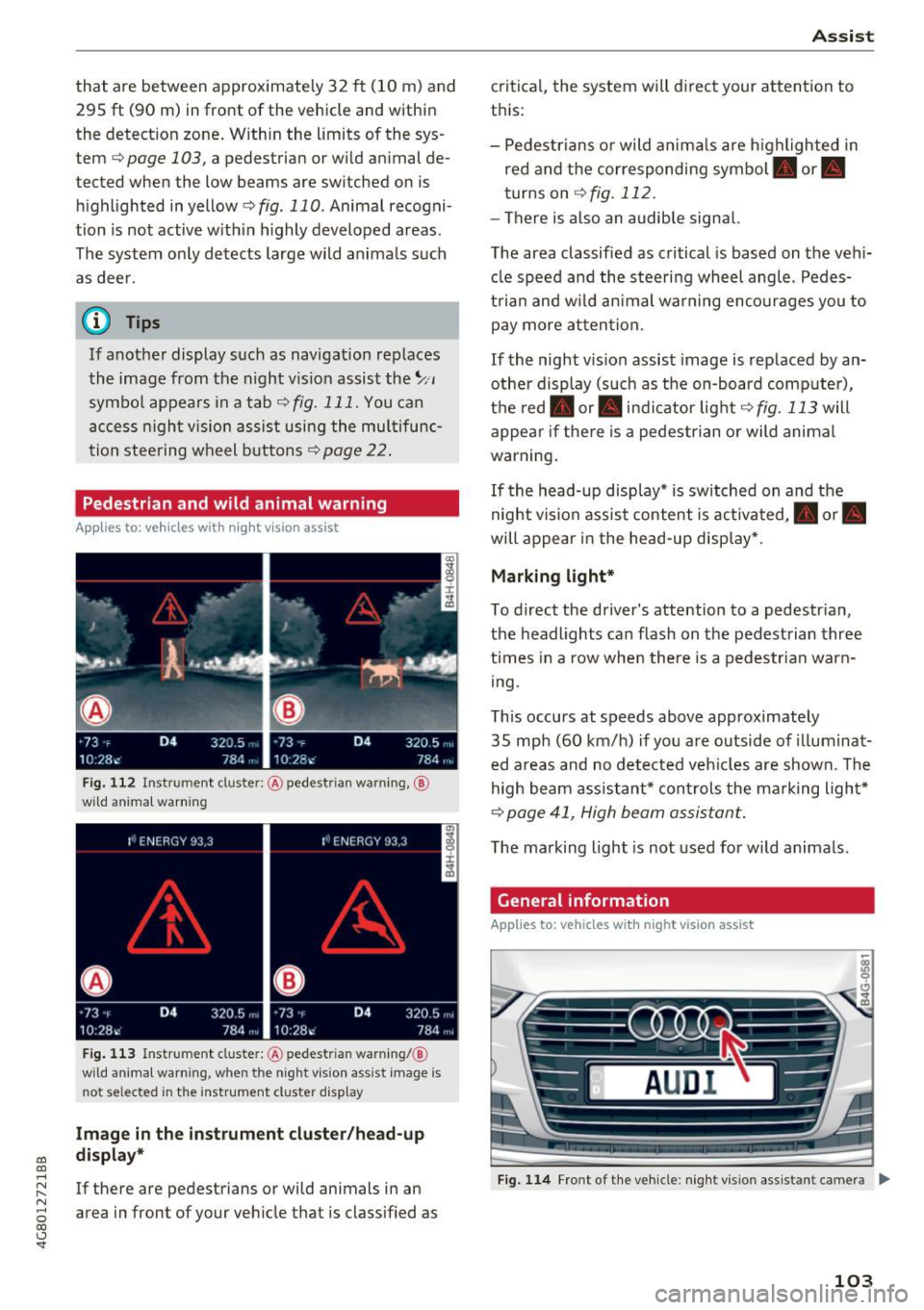
F ig . 11 2 Instru ment clust er: @ pede stri an warn ing ,@
wild animal warnin g
Fig . 11 3 In strument clus te r: @ pedest ria n warn ing/ @
wi ld an imal warning, when the nigh t vis ion a ssis t image is
n ot se lec ted in the instrument clust er dis p lay
Image in the inst rument clu ster /h ead -up
di spla y*
If there are pedestrians or wild animals in an
area in front of your veh icle that is class ified as
A ss ist
critica l, the system will d irect your attention to
t h is:
- Pedestrians or wild anima ls are h ighl ighted in
red and the corresponding symbol. or.
turns on
¢ fig. 112 .
-There is also an audib le signal.
T he area classified as critical is based on the vehi
cle speed a nd the steering wheel angle . Pedes
t rian an d w ild an imal warning encourages you to
pay more atten tion.
If the night vision assist image is replaced by an
othe r display (such as the on-board comp ute r),
t h e red . or. in d icator light ¢
fig . 113 will
appea r if the re is a pedestrian or wild animal
war ning .
If the head-up display* is sw itched on and the
night vis ion assist content is activated, . or.
will appe ar i n the head-up displ ay* .
Marking light*
To direct the driver's attention to a pedestr ian ,
the headlights can flash on the pedestrian three
t imes in a row whe n there is a pedestr ian warn
i ng .
This occurs at speeds above approximately
35 mph (60 km/h) if you are outside of illuminat
ed a reas and no de tected veh icles are shown. Th e
high beam assistant* con trols the ma rking ligh t*
¢ page 41, High beam assis tant.
T he ma rking light is not used for wild anima ls .
General information
Applies to: vehicles with night vision assist
Fig. 1 14 Front of the ve hicle : n ig h t v is io n as sist an t cam era ..,_
103
Page 108 of 284

Ass is t
depending on the s ituation. The distr ibution of
power varies from balanced (comfort) to sporty
(dynamic) depending on the selected mode. The
goal is a high leve l of agility and ability to accel
erate on curves. The veh icle is very responsive to
steer ing .
Cornering light*
The cornering light adapts the high beams to the
direction of the curve depending on the speed.
The pivot ing action and the lighting also adapt to
the mode.
Adaptive c ru ise contr ol*
The behavior when acce le rating can be adjusted
from comfortable to sporty, depending on the
drive select mode. Adaptive cruise control a lso
responds to the driving behavior of the veh icle
ahead in a more conservative or sporty manner.
Engine sound *
The engine sound adapts to the current mode
and can be subtle to sporty .
(D Note
Applies to: vehicles with adaptive air suspension
- Make sure there is enough clearance above
and below the veh icle when parking. The
height of the vehicle (ground clearance) can
change once it is parked due to tempera ture
fluctuations, changes to the load condit ions
and c hanges to the d riving modes.
- When transporting the veh icle on a car car
r ier, tra in, ship or by other means, only tie
the veh icle dow n at the running surfa ce of
the tires, w hic h is the outer circ umference .
Securing the vehicle at the axle compo
nents, suspension st ruts or towing eyes is
not permitted because the pressure in the
air suspension struts can change dur ing
transport . The vehicle may not be secured
sufficiently if this happens.
(D Tips
- In some models, the maximum vehicle
speed can only be reached in the auto and
dynam ic modes.
106
- The S se lector lever position a utomat ica lly
engages if the dynamic mode is selected.
- Applies to: vehicles with dynamic steering:
operating noise is heard when starting or
stopp ing the engine. Th is does not indicate
a problem.
Selecting the driving mode
F ig. 116 Infota inmen t: drive select
'" To select the mode, select the follow ing in the
Infota inment :
!CAR ! function b utton> Comfort ,
Auto , Dynamic or Individu al.
'" Applies to: vehicles with a ti.re'! button on the
steering wheel: press the button repeatedly un
til the desired mode appea rs in the instrument
cl uste r display.
You can change the driv ing mode when the vehi
cl e is stationary or while driv ing. If traff ic per
mits, afte r changing modes, briefly ta ke your
foot off the accelerator pedal so that the recently
selected mode is also activated fo r the engine.
Comf ort -prov ides a comfort -or iented vehi cle
setup and is suited fo r long drives on highways.
Auto -provides an overal l comfortab le yet dy
namic dr iv in g feel and is suited for everyday use.
Dynamic -gives the dr iver a sporty driving fee l
and is suited to a sporty d riving style .
Individual -¢ page 107.
A WARNING
Pay attention to traffic when ope rating the
d rive select to reduce the r is k of an accident.
-
Page 113 of 284

co
co
.... N
" N .... 0
00
<.,;) 'SI"
-For objects that do not touch the ground,
such as the bumper of a parked vehicle, a
tra iler hitch or the rear of a truck. Do not
use the orientation lines in this case .
- If driven from a level surface onto an in
cline, or a downward slope.
- If driven toward protrud ing objects .
- If the vehicle is carrying too much load in
the rear.
- Applies to: vehicles with air s uspension: the
accuracy of the orientation lines and bl ue
surfaces decreases when the vehicle is raised/lowered
<=) page 105.
(D Note
-Always read and follow the applicable warn
ings
Q 0 in General information on
page 108 .
-The orange-colored orientation lines in the
Infotainment display show the vehicle path
based on the steering wheel angle . The
front of the vehicle swings out more than
the rear of the veh icle . Mainta in plenty of
distance so that an exterio r mirror or a cor
ner of t he ve hicle does not co llide w it h any
obstacles.
Switching on/off
Applies to : vehicles wit h rearv iew came ra
Switching on
.,. Shift into reve rse , or
.,. Press t he
P' #A bu tton in the cente r console
Q page 109, fig . 118 . A short conf irmation
tone sounds and the LED in the button turns
on.
Switching between the r earview camera and
optical di splay
.,. Press t he Graphic control button ®
Q page 111, fig. 123 to see the opt ica l display.
.,. Press the
Rear view contro l button to see the
rearview camera image.
Switching off
.,. Drive faster than 6 mph ( 10 km/h), or
.,. Press the P•
11A button, or
.,. Switch the ign ition off .
Parking systems
(D Tips
-The visua l display in the left part of the d is
play sho uld he lp you detect the critical veh i-
cle areas.
- You can change the vol ume and pitch of the
signa ls as well as the d isplay
Q page 118.
Perpendicular parking
Applies to : veh icles w it h rearv iew camera
This view may be used when parking in a garage
or in a parking space .
Fig. 1 23 In fota inme nt syste m: a im ing at a park in g space
Fi g. 124 Infot ainment syste m: alig ning t he vehicl e
.,. Turn the Infotainment system on and shift into
reverse gear .
.,. The orange orientation lines
(D show the direc
tion of trave l of the vehicle . Turn the steering
whe el unti l the orange orientation lines appear
in the parking space
Q fig. 123. Use the mark
ings @to help you es timate the distance to an
obs ta cl e. Each mar king represen ts approxi
mately 3 ft ( 1 m) . The blue area represents an
extens ion of the vehicle 's o utline by app roxi
mately 16 ft (5 meters) to the rear .
.,. Wh ile driving in reverse gear , adjust the steer-
ing wheel angle to fit the park ing space using ..,_
111
Page 114 of 284

Parking systems
the orange orientation lines for assistance
¢ A in General information on page 110, ¢0
in General information on page 111 . @ repre
sents the rear bumper. At the very latest, stop
the vehicle when the red orientation line©
borders an object .
Parallel parking
Appl ies to: ve hicles w ith rearview ca mera
This view may be used when parallel parking
along the side of a street.
F ig. 125 Infotainment: blue surfaces aligned in t he park·
ing space
Fig . 126 Infotainment: contact of the blue curved line with
the curb
Parking on the right is described here. It is identi
cal when parking on the left .
If there is an obstacle next to the parking space (such as a wall), refer to "Information for park ing
next to obstacles" ¢
page 112.
• Activate the turn signal.
• Position your vehicle next to a parked veh icle in
front of the desired parking space. The distance
to this vehicle should be approximately 3 ft . (1
m) .
112
• Tur n the Infotainment system on and shift into
reverse gear. The parking system is turned on
and the
Cross parking view is disp layed .
• Press the contro l button on the Infotainment
unit
(D ¢ fig. 125. The Parallel parking view is
displayed .
.,. Back up and align your veh icle so the blue area
@ borders on the rear end of the vehicle be
hi nd you o r o n the parking space line ¢.&.
in
General information on page 110,
¢0 in Gen
eral information on page 111.
The blue area
represents an extension of the vehicle's outline
by approximate ly 16 ft (5 meters) to the rear .
The long side of the blue area should be on the
curb. The ent ire blue area must fit into the
parking space .
.,. With the vehicle stopped, turn the steering
wheel to the right as far as it will go .
.,_ Back up into the parking spot. When the blue
curve ¢
fig. 126 is near the curb ¢.&. in Gener
al information on page 110,
stop the vehicle
¢ (i) in General information on page 111 .
.,. With the vehicle stopped, turn the steering
wheel to the left as far as it will go.
• Continue to back into the parking space until
the vehicle is parked parallel to the curb¢
A
in General information on page 110, ¢0 in
General information on page 111 .
@ repre
sents the rear bumper. At the very latest, stop
the vehicle whe n the red orientation line©
borders an object. Keep an eye on the front of
your veh icle wh ile doing this.
Parking next to obstacles
If there is an obstacle (such as a wall) next to the
parking space, position the vehicle so there is
more space on that side. Position the long side of
the blue surface so that there is sufficient space
from the obstacle. The surface must not be
touching . You will also need to start turning the
steering wheel earlier . The blue curve¢
fig. 126
must not touch the obstacle, but rather the re
shou ld be enough distance.
(D Note
Keep enough distance from the curb to re
duce the risk of damage to the rims.