tow AUDI A7 2017 Owner´s Manual
[x] Cancel search | Manufacturer: AUDI, Model Year: 2017, Model line: A7, Model: AUDI A7 2017Pages: 284, PDF Size: 72.29 MB
Page 110 of 284

Parking systems
Parking systems
General information
Applies to: vehicles with parking system plus/rearview cam
era/peripheral camera
Depending on your vehicle's equipment , various
parking aids will help you when parking and ma
neuvering.
The
parking system plus assists you when park
ing by audibly and visually indicating objects de
tected
in front of and behind the vehicle
¢page 109.
The
rearview camera shows the area behind the
vehicle in the Infotainment system display. This
display assists you when you are cross or parallel parking
¢ page 110. The parking system plus
functions are also available
¢ page 109.
The
peripheral cameras assist you with parking
and maneuvering. You are aided by various cam
eras depending on the vehicle equipment level
¢ page 113. The parking system plus functions
are also available
¢ page 109.
A WARNING
-Always look for traffic and check the area
around your vehicle by looking at it directly
as well. The parking system cannot replace
the driver's attention. The driver is always responsible when entering or leaving a park
ing space and during similar maneuvers.
- Please note that some surfaces, such as
clothing, are not detected by the system .
-
-Sensors and cameras have blind spots in
which people and objects cannot be detect ed . Be especially cautious of small children
and animals.
- The sensors can be displaced by impacts or
damage to the radiator grille, bumper,
wheel housing and the underbody . The park
ing system may be impaired as a result.
Have an authorized Audi dealer or author
ized Audi Service Facility check their func
tion .
- Make sure the sensors are not obstructed by stickers, deposits or other materials. If they
are, the sensor function could be impaired.
108
For additional information on cleaning, see
¢page 235.
(D Note
-Some objects are not detected or displayed
by the system under certain circumstances:
- Objects such as barrier chains, trailer draw
bars, vertical poles or fences
- Objects above the sensors such as wall ex
tensions
- Objects with certain surfaces or structures
such as chain link fences or powder snow
- If you continue driving closer to a low ob
ject, it may disappear from the sensor range. Note that you will no longer be
warned about th is obstacle .
- Keep enough distance from the curb to re
duce the risk of damage to the rims .
(D Tips
-The system may provide a warning even
though there are no obstacles in the cover
age area in some situations, such as :
- certa in road surfaces or when there is tall
grass.
- external ultrasonic sources such as from
cleaning vehicles .
- in heavy rain, snow, or thick vehicle ex
haust.
- We recommend that you practice parking in
a traffic-free location or parking lot to be
come familiar with the system . When doing
this, there should be good light and weath
er conditions.
- You can change the volume and pitch of the
signals as well as the display
¢ page 118.
- Please refer to the instructions for towing a
trailer located in
¢page 118.
- What appears in the infotainment d isplay is
somewhat time-delayed.
- Th e sensors must be kept clean and free of
snow and ice for park aid to operate .
Page 113 of 284

co
co
.... N
" N .... 0
00
<.,;) 'SI"
-For objects that do not touch the ground,
such as the bumper of a parked vehicle, a
tra iler hitch or the rear of a truck. Do not
use the orientation lines in this case .
- If driven from a level surface onto an in
cline, or a downward slope.
- If driven toward protrud ing objects .
- If the vehicle is carrying too much load in
the rear.
- Applies to: vehicles with air s uspension: the
accuracy of the orientation lines and bl ue
surfaces decreases when the vehicle is raised/lowered
<=) page 105.
(D Note
-Always read and follow the applicable warn
ings
Q 0 in General information on
page 108 .
-The orange-colored orientation lines in the
Infotainment display show the vehicle path
based on the steering wheel angle . The
front of the vehicle swings out more than
the rear of the veh icle . Mainta in plenty of
distance so that an exterio r mirror or a cor
ner of t he ve hicle does not co llide w it h any
obstacles.
Switching on/off
Applies to : vehicles wit h rearv iew came ra
Switching on
.,. Shift into reve rse , or
.,. Press t he
P' #A bu tton in the cente r console
Q page 109, fig . 118 . A short conf irmation
tone sounds and the LED in the button turns
on.
Switching between the r earview camera and
optical di splay
.,. Press t he Graphic control button ®
Q page 111, fig. 123 to see the opt ica l display.
.,. Press the
Rear view contro l button to see the
rearview camera image.
Switching off
.,. Drive faster than 6 mph ( 10 km/h), or
.,. Press the P•
11A button, or
.,. Switch the ign ition off .
Parking systems
(D Tips
-The visua l display in the left part of the d is
play sho uld he lp you detect the critical veh i-
cle areas.
- You can change the vol ume and pitch of the
signa ls as well as the d isplay
Q page 118.
Perpendicular parking
Applies to : veh icles w it h rearv iew camera
This view may be used when parking in a garage
or in a parking space .
Fig. 1 23 In fota inme nt syste m: a im ing at a park in g space
Fi g. 124 Infot ainment syste m: alig ning t he vehicl e
.,. Turn the Infotainment system on and shift into
reverse gear .
.,. The orange orientation lines
(D show the direc
tion of trave l of the vehicle . Turn the steering
whe el unti l the orange orientation lines appear
in the parking space
Q fig. 123. Use the mark
ings @to help you es timate the distance to an
obs ta cl e. Each mar king represen ts approxi
mately 3 ft ( 1 m) . The blue area represents an
extens ion of the vehicle 's o utline by app roxi
mately 16 ft (5 meters) to the rear .
.,. Wh ile driving in reverse gear , adjust the steer-
ing wheel angle to fit the park ing space using ..,_
111
Page 117 of 284
co
co
.... N
" N .... 0
00
<..:l 'SI"
Corner view (front)/corner view (rear)
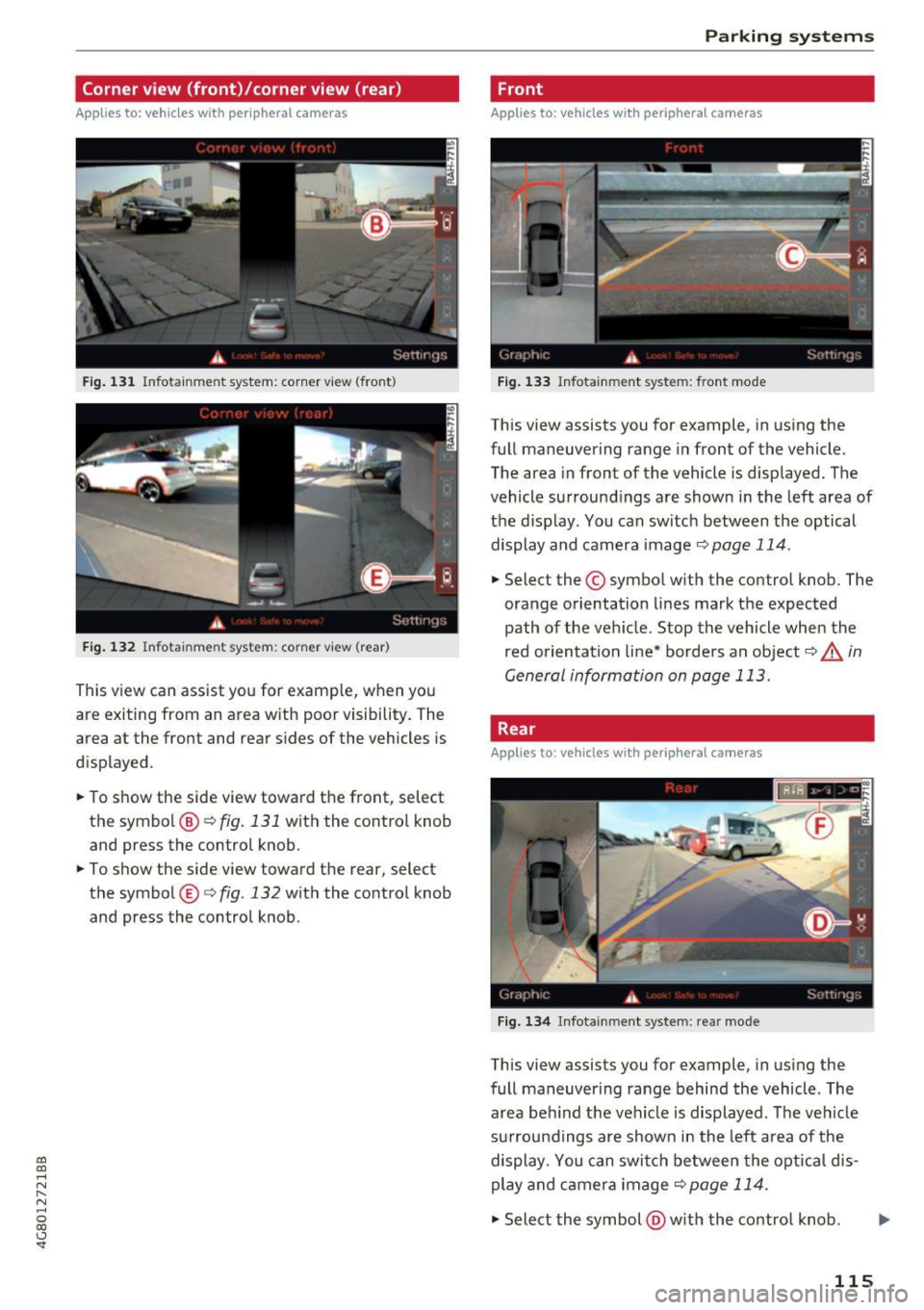
Applies to: vehicles with peripheral cameras
Fig . 131 Infotainment system: corner v iew (front)
Fig . 132 Infotainment system: corner view (rear)
This view can assist you for examp le, when you
are exiting from an area w ith poor visibility. The
area at the front and rear s ides of the vehicles is
displayed .
.. To show the side view toward the front, select
the symbol ®
9 fig. 131 with the contro l knob
and press the control knob .
.. To show the side view toward the rear, select
the symbol ®
q fig. 132 with the control knob
and press the control knob .
Parking systems
Front
Applies to: vehicles with peripheral cameras
Fig. 133 Infot ainme nt system: front mode
This view assists you for example, in using the
full maneuvering range in front of the vehicle.
The area in front of the vehicle is displayed. The
vehicle surround ings are shown in the left area of
the display . You can switch between the optical
display and camera image
q page 114 .
.. Select the © symbol with the control knob. The
orange orientation lines mark the expected
path of the vehicle. Stop the vehicle when the
red orientation line* borde rs an object
q & in
General information on page 113.
Rear
Applies to: vehicles with peripheral cameras
Fig. 134 Infotainmen t system: rea r mo de
This view assists you for example, in using the
full maneuvering range behind the vehicle. The
area be hind t he vehicle is displayed. The vehicle
s ur rou ndings are shown in the left area of the
display. You can switch between the optical dis
play and ca mera image
9page 114.
.. Select the symbol @with the contro l knob . Ill>-
115
Page 119 of 284

co
co
.... N
" N .... 0
00
<.,;) 'SI"
.. Turn the Infotainment system on and shift into
reverse gear. The parking system must be
turned on and the
Cro ss pa rking view must be
displayed .
.. Press the control button on the Infotainment
unit @¢page
112, fig . 125 . The Parall el park
ing
view is displayed .
.. Back up and align your vehicle so the blue area
@ borders on the rear end of the vehicle be
hind yo u or on the parking space line
¢ ,&. in
General information an page 113, ¢(Din Gen
eral information on page 113 .
The blue area
represents an extens ion of the vehicle's out line
by approximately 16 ft (5 mete rs) to the rear .
The long side of the blue area should be on the curb . The entire blue area must f it into the
parking space .
.,. With the ve hicle stopped, turn the steer ing
wheel to the right as far as it will go .
.. Back into the park ing space until the b lue curve
¢
page 112, fig . 126 tou ches the curb¢,&. in
General information on pag e 113, ¢(Din Gen
eral information on page 113 .
Stop the vehicle.
.. With the vehicle stopped, tu rn the steering
whee l to the left as far as it will go .
.. Cont inue to back into the parking space unt il
the vehicle is parked parallel to the curb¢.&.
in General information on page 113, ¢(Din
General information on page 113.@
repre
sents the rea r bumpe r. At the very latest, stop
the vehicle when the red orientation line @
borde rs an object. Keep an eye on t he front of
your vehicle while doing this .
Parking next to obstacles
If
there is an obstacle (such as a wall) next to the
parking space, pos ition the vehicle so t here is
mo re spa ce on that side. Posi tion the long s ide of
the blue area so th at there is s ufficient space
from the object. The area must not be on the
curb . You will also need to start turning the
steer ing whee l earlier. The blue curve
¢
page 112, fig. 126 must not touch the obsta
cle, but rather there should be enough distance.
Parking systems
(D Tips
The left or right orientation lines and surfaces
will be d isp layed, depend ing on the turn sig
nal be ing used .
Trailer mode
Appl ies to : vehicles with peripheral cameras a nd trai le r hitch
This view assists you in positioning the vehicle in
front of a trailer .
Fig. 1 39 Infot ainme nt syste m: rear mode
Requireme nt: the trailer mode must be selected
¢ page 115 .
.. Now you can posit ion you r ve hicle in front of
the trailer
¢ &. in General information on
page 113, ¢(Din General information on
page 113 .
The orange orientat ion line indicates
th e expected path toward the trailer h itch . Use
t he bl ue lines to help you es timate the d istance
t o the trai ler hitch.
Setting the mode
Appl ies to : vehicles with peripheral cameras
.. Sele ct: !CAR ! function button> (Car )* Sy stem s
control button > Driver assistance > Pa rking
aid
> Front /re ar camera swit ching > Auto or
M anual.
Auto -
This view behind the vehicle (Rear mode)
is disp layed automatically when you shift into re
verse. This view in front of the vehicle
( Front
mode) is d isplayed automat ica lly when you shift
into the forward gears.
Manu al -When you switch the system on, the
view beh ind the veh icle
(Rear mode) is always
117
Page 125 of 284
co
co
.... N
" N .... 0
00
\.J '
the brakes in wet weather.
The braki ng effect can also be red uced if you are
driving on salted roads and you do not apply the b rakes for long periods of time . The layer of salt
on the brake rotors and pads must be worn off
f irst when the brakes are app lied.
Due to its surface, the ceramic bra ke rotor* ab
sorbs moisture in certa in situations. There fore,
there will temporarily be less braking force than
when the brakes are dry . You can compensate for
this by pressing the brake pedal harder.
Cor rosion
L eaving the vehicle parked fo r long periods of
time, low mi leage and avoiding heavy braking
can contribute to corrosion on the brake rotors
and to dirty brake pads.
I f you usually avo id heavy braking or if there is
corrosion present , occasional heavy braking at
high speeds is recommended to clean the brake
rotors and pads
q ,& .
Brak e system malfunct ion
if you notice that the brake pedal travel has sud
denly increased, then a brake c ircui t in the dual
circuit brake system may have malfunctioned. Drive to an authorized Audi dea ler or a uthorized
Aud i Service Facility immediately to have the
problem corrected. On the way there, drive with
reduced speed and keep in mind that you w ill
need a longer distance to stop and you w ill need
to p ress the b rake pedal harde r.
L ow brake fluid level
When the brake fl uid level is low, malfunct ions in
the brake system may occur . The brake f lu id level
is electronically monitored.
Br ak e boost er
The brake booster amplifies the pressure you ap
p ly to the brake peda l. It only works when the en
g ine is running.
A WARNING
- Only apply the brakes for the purpose of
cleaning the brake system whe n road and
-
Intellig ent Technology
traffic conditions permit. You must not en
danger other road users. This increases the
risk of an accident.
- Never let the vehicle roll while the engine is
stopped because this increases the risk of an
accident.
- New brake pads do not ach ieve the ir full
braking effect during the first 250 m i
(400 km). They m ust be "broken in" first.
The break-in per iod ca n be cons iderably lon
ge r fo r vehicles with ceram ic brake rotors* .
H owever, you can compensate fo r the
slightly reduced braking force by pressi ng
fi rm ly on the brake pedal. Avo id heavy b rak
ing du ring the break -in pe riod.
- Ce rtain weathe r and ope rating condi tions
such as driving through water, dr iv ing in
heavy rain o r driv ing after was hing your ve
hicle can impa ir the effect iveness of the
brakes. In the winter, ice may build up on
the brake pads, rotors and drums . Check
these components by braking carefully. Ap
p lyi ng the brakes carefully several times
d ries the b rakes and removes ice build-up .
- The efficiency of the brakes can also be im
pa ired by dr iv ing for long stretches on roads
covered with sa lt without using the bra kes .
You can remove salt deposits from the
b rake rotors and pads by carefully applying
t he brakes several times .
- I f the fron t spoiler is damaged o r yo u install
another spoi ler, make su re the front wheel
b rakes are ven tilated properly . Othe rw ise,
the brake system co uld overheat, which re
duces their effectiveness .
- Fa ilure of a brake circuit impairs brak ing
pe rformance, which increases b raking dis
tance. Avo id driving the vehicle and have it
towed it to the nearest a uthorized Audi
deale r or authorized Aud i Serv ice Facility.
- I f the brake booster is not working, yo u w ill
have to p ress much harder on the brake
pedal to compensate fo r the lack of the
booster.
Q) Note
- Never let the brakes "rub" by pressing the
peda l lightly when braking is not actually
123
Page 133 of 284

co
co
,...,
N
" N ,...,
0
00
\.J '
you are in control of the vehicle at all times.
F or detailed information on how to adjust the
driver's seat, see¢
page 48.
A WARNING
Drivers who are unbelted, out of position or
too close to the airbag can be seriously in
jured by an airbag as it unfolds. To help re
duce the risk of serious personal injury:
- Always adjust the driver's seat and the
steering wheel so that there are at least
10 inches (25 cm) between your breastbone
and the steering wheel.
- Always adjust the driver's seat and the
steering wheel so that there are at least
4 inches (10 cm) between the knees and the
lower part of the instrument panel.
- Always hold the steering wheel on the out
side of the steering wheel rim with your
hands at the 9 o'clock and 3 o'clock posi
tions to help reduce the risk of personal in
jury if the driver's airbag inflates.
- Never hold the steer ing wheel at the
12 o'clock posit ion or with your hands at
other positions inside the steering wheel
rim or on the steering wheel hub. Holding
the steering wheel the wrong way can cause
serious injuries to the hands, arms and head if the driver 's airbag inflates.
- Pointing the steering wheel toward your
face decreases the ability of the supplemen
tal driver's airbag to protect you in a colli sion.
- Always sit in an upright position and never
lean against or place any part of your body
too close to the area where the airbags are
located.
- Before driving, always adjust the front seats
properly and make sure that all passengers
are properly restrained.
- For adjustable head restraints: before driv
ing, always also adjust the head restraints
properly .
- Never adjust the seats while the vehicle is
moving. Your seat may move unexpectedly
and you could lose control of the vehicle.
-
Driving safety
-Never drive with the backrest reclined or
tilted far back! The farther the backrests are
tilted back, the greater the risk of injury due
to incorrect positioning of the safety belt
and improper seating position.
- Children must always ride in child seats
¢
page 172 . Special precautions apply
when installing a child seat on the front
passenger seat¢
page 148.
Proper seating position for the front
passenger
The proper front passenger seating position is
important for safe, relaxed driving.
For your own safety and to reduce the risk of in
jury in the event of an accident, we recommend
that you adjust the seat for the front passenger
to the fol lowing position:
~ Adjust the angle of the seatback so that it is in
an upright position and your back comes in full
contact with it whenever the vehicle is moving.
~ For adjustable head restraints: adjust the head
restraint so the upper edge is as even as possi
ble with the top of your head. If that is not pos
sible, try to adjust the head restraint so that it is as close to this position as possible
¢
page 132. Move the head restraint so that it
is as close to the back of the head as possible.
~ Keep both feet flat on the floor in front of the
front passenger seat.
~ Fasten and wear safety belts correctly
¢page 143.
For detailed information on how to adjust the
front passenger's seat, see¢
page 48.
A WARNING
Front seat passengers who are unbe lted, out
of position or too close to the airbag can be
seriously injured or killed by the airbag as it
unfolds . To help reduce the risk of serious
personal injury:
- Passengers must always sit in an upright po
sition and never lean against or place any pa rt of their body too close to the area
where the airbags are located. .,,.
131
Page 137 of 284
co
co
.... N
" N .... 0
00
\.J '
floor coverings on top of already installed
floor mats. Additional floor mats and other
coverings will reduce the size of the pedal
area and interfere with the pedals .
- Always properly reinstall and secure floor
mats that have been taken out for cleaning.
- Always make sure that objects cannot fall
into the driver footwell while the vehicle is
moving . Objects can become trapped under
the brake pedal and accelerator pedal caus ing a loss of veh icle control.
Storing cargo correctly
Loading the luggage compartment
All luggage and other objects must be properly
stowed and secured in the luggage compart
ment.
L oose items in the luggage compartment can
shift suddenly, changing vehicle handling charac
teristics. Loose items can also increase the risk of
serious personal injury in a sudden vehicle ma
neuver or in a collision.
.. Distribute the load evenly in the luggage com
partment.
.. Always place and properly secure heavy items in
the luggage compartment as far forward as
possible.
.,. Secure luggage using the tie-downs provided
¢ page 55 .
.,. Make sure that the rear seatback is securely
latched in place.
A WARNING
Improperly stored luggage or other items can
fly through the vehicle causing serious per
sonal injury in the event of hard braking or an
accident. To help reduce the risk of serious
personal injury:
- Always put objects, for example, luggage or
other heavy items in the luggage compart
ment.
- Always secure objects in the luggage com
partment using the tie-down hooks and
suitable straps.
Driving safety
A WARNING
Heavy loads will influence the way your vehi
cle handles. To help reduce the risk of a loss
of control leading to serious personal injury:
- Always keep in mind when transporting
heavy objects, that a change in the center of
gravity can also cause changes in vehicle handling:
- Always distribute the load as evenly as
possible .
- Place heavy objects as far forward in the
luggage compartment as possible.
- Never exceed the Gross Axle Weight Rating
or the Gross Vehicle Weight Rating specified
on the safety compliance sticker on the left
door jamb. Exceeding permissible weight
standards can cause the vehicle to slide and handle differently.
- Please observe information on safe driving
¢page 129.
A WARNING
To help prevent poisonous exhaust gas from
being drawn into the vehicle, always keep the
rear lid closed while driving .
- Never transport objects larger than those
f itting completely into the luggage area be
cause the rear lid cannot be fully closed.
- If you absolutely must drive with the rear lid open, observe the following notes to reduce
the risk of poisoning:
- Close all windows,
- Close the power roof*,
- Open all air outlets in the instrument pan-
el,
- Switch off the air recirculation,
- Set the fresh air fan to the highest speed .
A WARNING
Always make sure that the doors, all win
dows , the power roof* and the rear lid are se
curely closed and locked to reduce the r isk of
in jury when the vehicle is not being used.
- After closing the rear lid, always make sure
-
that it is properly closed and locked. ~
135
Page 147 of 284
co
co
.... N
" N .... 0
00
<..:l 'SI'
Pregnant women must also be correctly
restrained
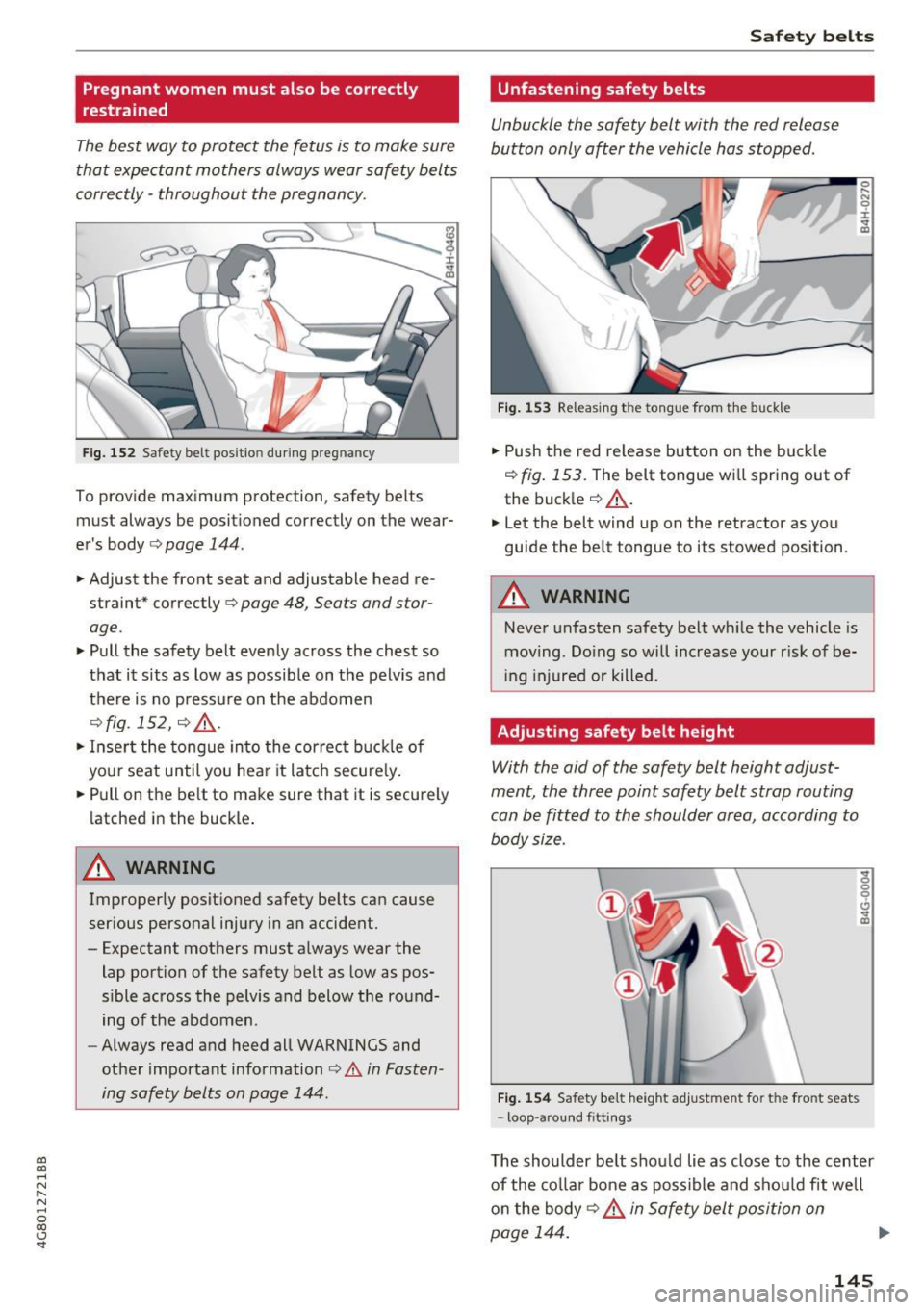
The best way to protect the fetus is to make sure
that expectant mothers always wear safety belts
corre ctly -throughout the pregnan cy.
F ig. 152 S afe ty be lt pos it io n dur ing pregnan cy
To provide max imum pro tection, safety bel ts
mu st always be posit ioned correctly on the wear
er 's body ¢
page 144 .
.,. Adjust the front seat and adjustable head re
strain t* cor re ctly ¢
page 48, Seat s and stor
age .
.,. Pull the safety belt evenly across the chest so
that it sits as low as poss ib le on the pelv is and
the re is no pressu re on the abdomen
¢ fig . 152, ¢ ,& .
.,. Inse rt the tongue in to the correc t buckle of
your seat until you hea r it latch secure ly .
.. Pull on the belt to make sure that it is securely
latched in the buck le .
.&_ WARNING
Improperly posit ioned safety be lts can cause
ser ious personal injury in an accident.
- Expectant mothers must always wear the lap portion of the safety belt as low as pos
sible across the pelvis and below the round
ing of the abdomen .
- Always read a nd heed all WARNINGS and
other important information
i:> &. in Fasten
ing safety belts on page 144 .
Safety bel ts
Unfastening safety belts
Unbuckle the safety belt with the red release
button only o~er the vehicle hos stopped .
J-L
Fig . 1 53 Re leas ing t he tong ue from the buckl e
.. Push the red re lease button on the buck le
¢
fig . 153. The belt tongue w ill spring out of
the buck le ¢ ,& .
.,. Let the belt wind up on the retractor as you
guide the belt tongue to its stowed position .
_& WARNING
-Never unfasten safety belt wh ile the vehicle is
moving . Do ing so w ill increase your r isk of be
in g injured or killed .
Adjusting safety belt height
With the aid of the safety belt height adjust
ment , the three point safety belt strop routing
con be fitted to the shoulder area, according to
body size .
Fig. 154 Safet y belt he ig h t adj ust m en t fo r th e fro nt seats
- loop -a rou nd f itt ings
0 ..... N
0
:i:
"' CD
The shoulder be lt shou ld lie as close to the center
of the co ll ar bone as possible and shou ld fit well
o n the body
¢ ,& in Safe ty belt position on
page 144. ..,.
145
Page 159 of 284

co
co
.... N
" N .... 0
00
\.J '
erwise added to the front passenger seat,
never install any child restraint system on
this seat.
- Never use cushions, pillows, blankets, or
similar items on the front passenger seat.
The additional layers prevent the capacitive
passenger detection system from accurately
measuring the ca pacita nee of the child safe
ty seat and/or the person on the seat and
thus keep the Advanced Airbag System from
working properly.
- Never place or use any electrical device
(such as a laptop, CD player, electronic
games device, power inverter or seat heater
for child seats) on the front passenger seat if the device is connected to the 12-volt
socket or the cigarette lighter socket. Such
devices can influence the capacitance regis
tered by the capacitive passenger detection system, so that incorrect information is pro
vided to the airbag control unit .
- If you must use a child restraint on the front
passenger seat and the child restraint man
ufacturer's instructions require the use of a
towel, foam cushion or something else to properly position the child restraint, make
certain that the
PASSENGER AIR BAG OFF
light comes on and stays on whenever the
child restraint is installed on the front pas
senger seat.
-If the PASSENGER AIR BAG OFF light does
not come on and stay on, immediately in
stall child restraint in a rear seating position
and have the airbag system inspected by
your Audi dealer.
.&_ WARNING
If the front passenger seat gets wet, dry it im
mediately.
- If liquid soaks into the front passenger seat,
this can keep the airbag system from work
ing properly and may, for instance, deacti
vate the passenger frontal airbag.
If this
happens, the
PASSENGER AIR BAG OFF
light will come on and stay on together with
the airbag indicator light
fl (USA models) I
Airbag system
E,I (Canada models) in the instrument clus
ter.
- If liquid is pooled on the seat, but has not
soaked in, this may also keep the airbag sys
tem from working properly and cause the
passenger frontal airbag to be enabled
(turned on), even though there is a properly
installed child restraint system on the seat.
Wet towels or other wet things on the seat
cushion can have the same effect.
If the
front passenger frontal airbag is turned on,
the
PASSENGER AIR BAG OFF light light
will go out.
How the Advanced Airbag System
components work together
The front Advanced Airbag System and the side
airbags supplement the protection offered by the
front three-point safety belts with pretensioners
and load limiters and the adjustable head re
straints* to help reduce the risk of injury in a
wide range of accident and crash situations. Be
sure to read the important information about
safety and heed the WARNINGS in this chapter.
Deployment of the Adv a need Airbag System and
the activation of the safety belt pretensioners de
pend on the deceleration measured by the crash
sensors and registered by the electronic control
unit. Crash severity depends on speed and decel
eration as well as the mass and stiffness of the
vehicle or object involved in the crash.
On the passenger side, regardless of safety belt
use, the front passenger frontal airbag will be
turned off if the electrical capacitance measured by the capacitive passenger detection system on
the front passenger seat is less than the amount
programmed in the electronic control unit . The
front passenger frontal airbag will also be turned off if the capacitance measured by the system for
the front passenger seat equals that of an infant of about one year of age in one of the child seats
that was used to certify the Advanced Airbag Sys
tem under Federal Motor Vehicle Safety Standard
208. The
PASSENGER AIR BAG OFF light comes
on and stays on to tell you when the front Ad
vanced Airbag System on the passenger side has been turned
offc::;,page 160 . Ill>-
157
Page 163 of 284

co
co
.... N
" N .... 0
00
\.J '
the safety belt for the front passenger seat is proper ly fastened .
The PA SSEN GER AIR BAG OFF ligh t will sh ow
the statu s of the fr ont sea t pass eng er 's frontal
A dvanced Ai rb ag a fe w second s after the igni
tion i s swit ched on and the air bag indi cator
light goes off. The PA SSENGER AIR BA G OFF
light:
- will stay on if the front passenger seat is not
occup ied;
- will stay on if the electrical capacitance meas
ured by the capacitive passenger detection sys
tem for the front passenger seat equals the
combined capacitance of an infant up to about
one year of age and one of the rearward-facing
or forward-facing child restraints listed in Fed
era l Motor Vehicle Safety Standard 208 w ith
which the Advanced Airbag System in your veh i
cl e was certified ; Fo r a listing of the child re
straints th at were used to ce rtify you r vehicle's
compliance with the U.S. Safety Standard
¢ page 174.
-wi ll go out if the front passenge r seat is occu
pied by an adult as registered by the capacitive
passenger detection system .
- The
PAS SENGER AIR BAG OF F light must come
on and stay on if the ignition is on and .. .
- a car bed has been insta lled on the front pas
senger seat, or
- a rearward-facing child restra int has been in
sta lled on the front passenger seat , or
- a fo rwa rd-facing child restra int has been instal
led on the front passenge r seat,
- and if the e lectr ica l capacitance registered on
the front passenger seat is equal to or less than
the combined capacitance of a typica l 1 year
o ld infant and one of the rearward-facing o r
forward-facing chi ld restraints listed in Federal
Motor Vehicle Safety Standard 208 with which
the Advanced Airbag System in your vehicle was certified.
If the front passenger seat is not occupied, the
front airbag wi ll not deploy, and the
PAS SENG ER
AIR BA G OFF
light will stay on. Never install a
rearward-fac ing child restraint on the front pas
senger seat, the safest place for a child in any
Airb ag sys tem
kind of child restraint is at one o f the seating po
sitions on the rear seat¢
page 149, Child re
straints on the front seat -some important
things to know
and ¢ page 172, Child safety .
If the PASSENGER AI R BAG light come s
on ...
If the PA SSEN GER AIR BAG O FF light comes on
when one of the conditions listed above is met,
be sure to check the light regularly to make cer
ta in that the
PA SSENGER AIR BAG OFF light
stays on continuously whenever the ignition is
on. If the
PAS SENGER AIR BA G OFF light does
not appea r on and does no t stay on a ll the time ,
stop as soon as it is safe to do so and
- reactivate the system by turning the ignit ion
off for more than 4 seconds and then turn ing it
on again;
- remove and re insta ll the chi ld restraint . Make
sure that the chi ld restraint is properly insta l
led and that the safety belt for the front pas
senger seat has been correct ly routed through
the child restraint as described in the c hild re
straint man ufacturer's instructions;
- ma ke sure that the conve rt ible lock ing retrac
tor on the safety belt for the front passenger
seat has been activated and that the safety belt
has been pulled tight.
- make sure that no e lectrica l device (such as a
laptop, CD player , e lectronic games device,
power inverter or seat heater for chi ld seats) is
placed or used on the front passenger seat if
the device is connected to the 12-volt socket or
the c igarette lighter socket;
- make sure that no seat heater has been retro
fitted or otherw ise added to the front passen
ger seat;
- make sure that noth ing can interfere with the
safety belt buckles and that they are not ob
structed;
- make sure that there are no wet objects (such
as a wet towel) and no water or other liquids on
the front passenger seat cushion . .,._
161