cooling AUDI A7 2017 Owner´s Manual
[x] Cancel search | Manufacturer: AUDI, Model Year: 2017, Model line: A7, Model: AUDI A7 2017Pages: 284, PDF Size: 72.29 MB
Page 5 of 284
co
co
.... N
" N .... 0
00
\.J -
Notice about data recorded by the Event
Data Recorde r and vehicle control
modules
127
Safety . . . . . . . . . . . . . . . . . . . . . . . . . . . . 129
Driving safety . . . . . . . . . . . . . . . . . . . . 129
Basics . . . . . . . . . . . . . . . . . . . . . . . . . . . . . 129
Cor rect passenger seating positions . . . . . 130
Driver's and front passenger 's footwell . . 134
Pedal area . . . . . . . . . . . . . . . . . . . . . . . . . . 134
Sto ring cargo co rrect ly .............. .
Repo rting Safe ty Defe cts ............. . 135
136
Audi pre sense . . . . . . . . . . . . . . . . . . . 13 8
Pr eventative passenge r prote ction 138
Safety belts . . . . . . . . . . . . . . . . . . . . . . 14 0
Gene ral information . . . . . . . . . . . . . . . . . 14 0
Why use safety belts? . . . . . . . . . . . . . . . . 14 1
Safety bel ts . . . . . . . . . . . . . . . . . . . . . . . . 143
Belt tens ione rs . . . . . . . . . . . . . . . . . . . . . . 146
Airbag system . . . . . . . . . . . . . . . . . . . . 148
Important information . . . . . . . . . . . . . . . 148
F ront airbags . . . . . . . . . . . . . . . . . . . . . . . 152
Mon itoring the Advanced Airbag System . 160
Knee airbags . . . . . . . . . . . . . . . . . . . . . . . . 164
Side airbags . . . . . . . . . . . . . . . . . . . . . . . . 166
Side curtain airbags . . . . . . . . . . . . . . . . . . 169
Ch ild safety . . . . . . . . . . . . . . . . . . . . . . 172
Important information . . . . . . . . . . . . . . . 172
C hi ld seats . . . . . . . . . . . . . . . . . . . . . . . . . 178
Secur ing c hild seats . . . . . . . . . . . . . . . . . . 183
LATCH system ( lowe r anchorages a nd
tethers for chi ldren) . . . . . . . . . . . . . . . . .
186
Addit io n al i nfo rm ation . . . . . . . . . . . . . . . 190
Maintenance and Care . . . . . . . . . . . 19 1
Checking and Filling . . . . . . . . . . . . . 19 1
Gasoline . . . . . . . . . . . . . . . . . . . . . . . . . . . 191
Diese l fue l . . . . . . . . . . . . . . . . . . . . . . . . . 192
Refueling . . . . . . . . . . . . . . . . . . . . . . . . . . 193
Selective catalytic reduction (Ad Blue/
DEF) . . . . . . . . . . . . . . . . . . . . . . . . . . . . . .
195
Catalytic converter . . . . . . . . . . . . . . . . . . . 198
D iese l part iculate filter . . . . . . . . . . . . . . . 199
Table of contents
Engine compartment . . . . . . . . . . . . . . . . . 199
Engine oi l . . . . . . . . . . . . . . . . . . . . . . . . . . 202
Cooling system . . . . . . . . . . . . . . . . . . . . . . 205
Brake fl uid . . . . . . . . . . . . . . . . . . . . . . . . . 207
Battery . . . . . . . . . . . . . . . . . . . . . . . . . . . . 207
Windsh ield washer system . . . . . . . . . . . . 209
Service interval display 209
Wheels .... .. .. .... .. .......... ... 211
Wheels and Tires ... .... ...... ... .. .. 211
T ire pressure monitoring system
T ire p ressure monitoring system 2 29
231
Care and cleaning . . . . . . . . . . . . . . . . 235
General info rmation . . . . . . . . . . . . . . . . . 235
Car washes . . . . . . . . . . . . . . . . . . . . . . . . . 2 35
Cleaning and care info rmat ion . . . . . . . . . 2 36
Plac ing you r vehicle out of serv ice . . . . . . 2 39
Do It Yourself . . . . . . . . . . . . . . . . . . . . 240
Emergency assistance . . . . . . . . . . . 24 0
Genera l information . . . . . . . . . . . . . . . . . 24 0
Equipment . . . . . . . . . . . . . . . . . . . . . . . . . 240
Tire mobility kit . . . . . . . . . . . . . . . . . . . . . 241
Replacing wheels . . . . . . . . . . . . . . . . . . . . 243
Spare tire 248
Fuses ............................. 250
Replacing fuses . . . . . . . . . . . . . . . . . . . . . 250
D river side cockpit fuse assignment
Front passenger side cockpit fuse 251
ass ignment . . . . . . . . . . . . . . . . . . . . . . . . 252
Luggage compartment f use assignme nt . 252
Emergency situations . . . . . . . . . . . . 254
General . . . . . . . . . . . . . . . . . . . . . . . . . . . . 2 54
Start ing by p ushi ng o r tow ing . . . . . . . . . . 2 54
Sta rt ing wi th ju mpe r cabl es . . . . . . . . . . . 2 54
U se of j umpe r cables . . . . . . . . . . . . . . . . . 255
T owing with a tow truck . . . . . . . . . . . . . . 256
Raising the vehicle . . . . . . . . . . . . . . . . . . . 258
Accessories and Technical Data . 260
Technical data . . . . . . . . . . . . . . . . . . . . 260
Vehicle spec ificat ions . . . . . . . . . . . . . . . . 260
Notes about technical data . . . . . . . . . . . . 260
Weig hts . . . . . . . . . . . . . . . . . . . . . . . . . . . 261
D . . 1mens
1ons .. .. .. .. .... ...... ... .. . . 261
3
Page 11 of 284
co
co
....
Instruments and indicator lights
Instruments and indicator lights
Instruments
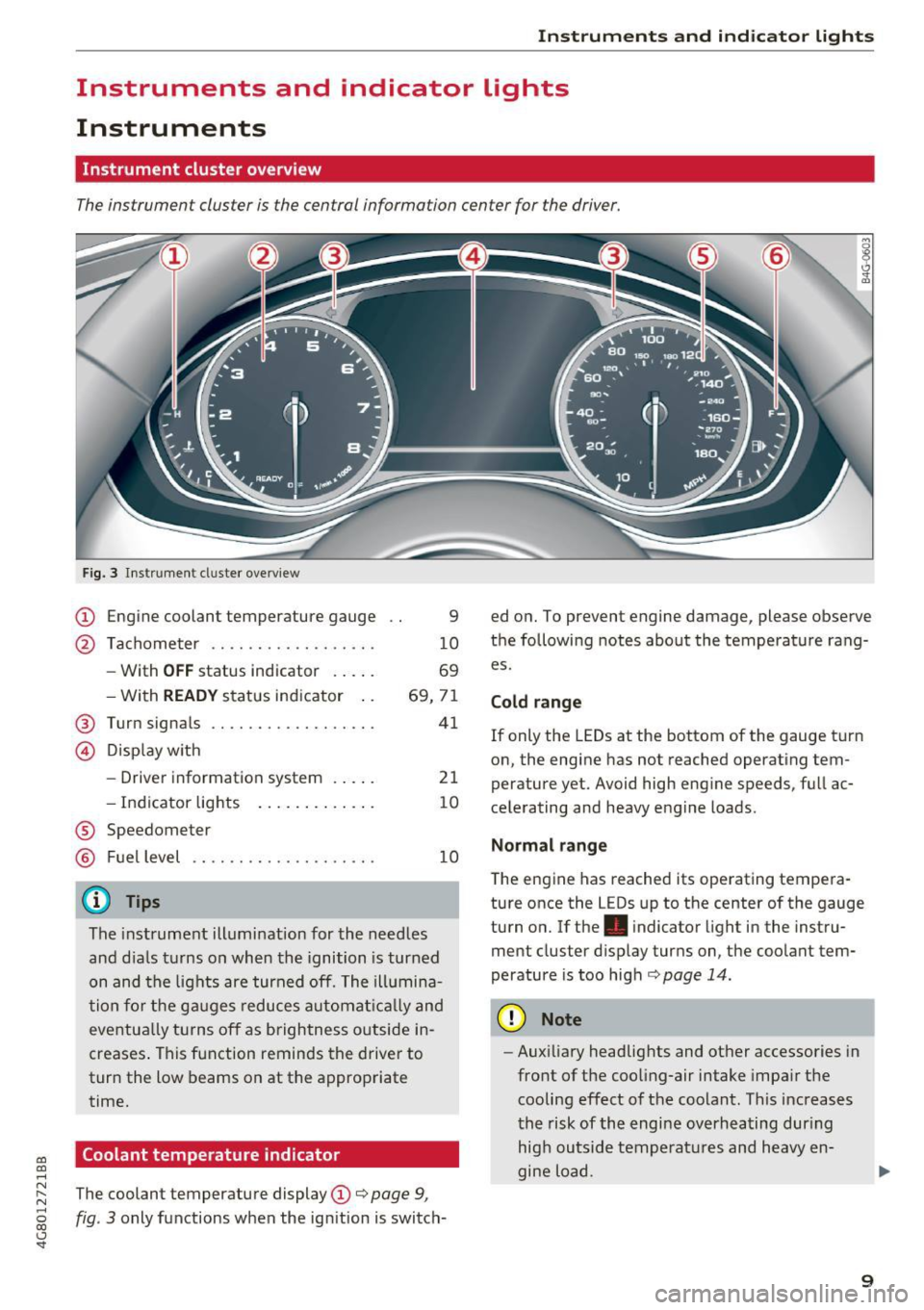
Instrument cluster overview
The instrument cluster is the central information center for the driver.
Fig . 3 Instru ment cl uste r overview
CD Engine coolant temperature gauge
@ Tachometer ...... .... ...... . .
- With
OFF status indicator . .. . .
- With
READY status ind icator ..
@ Turn signals ...... .... ....... .
© Dis p lay w ith
- Drive r information system . .. . .
- Indicator lig hts ..... .. . .. .. .
® Speedometer
® Fuel level
(D Tips
9
1 0
69
69, 7 1
41
21
10
10
The instrument illumination for the needles
and d ia ls t urns on when the ignition is turned
on and the lights are turned off. The ill umina
t ion fo r the g auges reduces aut omat ically and
eve ntu ally t urns off as brigh tness outside in
creases . This f unction reminds the drive r to
tur n the low beams on at the approp riate
time.
Coolant temperature indicator
ed o n. To prevent engine damage, please observe
t h e following notes about the temperature rang
es.
Cold range
If only the LEDs at the bottom of the gauge t urn
on, the engine has not reached operating tem
perature yet. Avoid high eng ine speeds, full ac
ce le rating and heavy e ngine loads.
Normal range
T he eng ine has reached its operating tempera
ture once the L EDs up to the center of the gauge
turn on.
If the. indicator light in the inst ru
ment cluster d isp lay turns on, the coolant tem
perature is too high¢
page 14.
(D Note
-Aux iliary headlig hts and ot her accessories in
front of the coo ling-air intake impa ir th e
cooling effect o f th e coolant . This increases
t he risk of th e engi ne overheating dur ing
hig h ou tsid e tempera tures and heavy en
gine load.
~ The coolant temperature display CD¢ page 9,
~ fig. 3 only functions w hen the ignition is switch-
<..:> 'SI"
9
Page 12 of 284
Instruments and indicator lights
-The front spoiler also he lps to distr ib ute
cooling air while driving . If the spoiler is
damaged, the cooling effect w ill be im
paired and the risk of the engine overheat
i ng will increase. See an author ized Audi
dealer or authorized Audi Service Fac ility for
ass istance.
(D Tips
Applies to: ve hicles w ith d iese l engines
Due to the high eff ic iency of these engines,
the engine may not always reac h opera ting
t em perature i n cold outside tempe ra tur es.
This is normal and not a cause for con cern .
Tachometer
The tachometer displays the engine speed in rev
olutions per minute (RPM).
You shou ld shift to the next lowest gea r whe n
the speed is below 1,S00 R PM. T he begin ning of
the re d zone in the tachome ter ind icates the
maximum permissible engine speed fo r all gea rs
once the engine has been bro ken in and when it is
warmed up to operating temperature . Before
reaching the red zone, you should shift into the
next h igher gea r, c hoose the Dor S selecto r lever
position, or remove your foot from the accelera
tor pedal.
CD Note
The needle in the tachometer @ c> page 9,
fig. 3
may only be in the red area of the gauge
for a short time or the re is a r isk of engine
damage.
@ For the sake of the environment
Upshifting early helps you to save fuel and re
duce operating no ise.
(D Tips
Applies to: Sa nd RS mo de ls
The engine speed is limi ted when the eng ine
is cold -the full engine o utp ut is not availa
ble. When the engi ne is at oper ating temper
at ure, the re d a rea in the ta chome ter move s
t o a higher RPM r ang e.
10
· Fuel level
The display @ only wor ks w hen the ig nition is
swi tched on.
If th e fue l level drops below 2.6 g al
(1 0
L), a red L ED w ill tu rn on and t he HJ indica
tor light wi ll turn o n
i=>page 18. The LED b links
red when the fue l level is very low .
The poss ible range base d on the cu rrent fue l lev
e l is shown in tab@¢
page 21, fig . 4.
For th e tank capacity i n your veh icle, refe r to the
Techn ica l Da ta
c> page 2 62.
CD Note
Neve r drive until t he tank is complete ly em p
ty. The irregu la r su pply of fuel that res ults
from tha t can cause engine misfires. Un co m
b uste d fue l w ill th en en ter the exhaust sys
tem . This c an cause overheating and damage
to the ca talyt ic converter .
Indicator Lights
· Description
The ind icator lights in the instrument cluster
bl ink or tur n on. They ind icate fu nctions or mal
funct io ns.
Messages may appear w ith some indicator lights.
A war ning s ignal will sound at the same time.
The ind icator lights and messages i n the instru
ment clus ter d isp lay can be cove red by ot he r dis
plays. To show them ag ai n, se lec t t he tab for in
dicator lights and messages using the mu ltifu nc
tion steering whee l
c> page 21. If there are sev
eral ma lfunctions, you can display them one at a
time us ing the thumbwheel.
Some indicator lights in the d isplay can disp lay in
severa l co lors .
Central indicator light
App lies to: vehicles wit h mo nochrome d isplay
If a message appears together with a central in
dicator light . or
U. the centra l ind icator light
will indicate the priority of the warning. If a
white indicator light also appea rs, the centra l in
dica tor light w ill have its ow n colo r. Fo r example, ..,.
Page 13 of 284

co
co
.... N
" N .... 0
00
\.J '
description for •.
Overview
Some ind icator lights turn on briefly as a function
check whe n you switch the ig nition on . These sys
tems are marked with a../ in the following tables .
If o ne of these indicator lights does not turn on,
there is a ma lfu nction in t hat sys tem .
Red indicator lights
--------------
US A models:
brake syste m ../
¢page 13
Canada models:
brake system ../
¢pag e 13
USA models:
electromechanical parking brake
¢page 14
Canada models:
electromechanical parking brake
¢ page 14
Cooling system
¢page 14
Eng ine oi l pressure
¢ page 15
Eng ine oil level
¢ page 15
Alternator
¢page 14
Eng ine stop while dr iv ing
¢page 15
Fr ont safety belt
¢page 14
Ele ct romechani ca l st eer ing ../
¢page 124
Steer ing lock
¢ page 15
Instruments and ind icator lights
En gine sta rt syste m
¢page 15
USA models: speed warning sys
tem
¢ page 85
Canada model s: spee d wa rni ng
system
¢ page 85
Adap tive c ruise contro l* ../
¢ page 91
A ir suspension
¢ page 16
Rear spoiler
¢page 125
Night vision assistant *
¢page 103
Night vision assistant *
¢page 103
Ad B lue*
¢ page 195
Ad B lue*
¢page 19 5
Centra l indicator light
¢ page 10
Yellow indicator lights
--------------
Electronic Stab ilization Contro l
(ESC) ../
¢pag e 16
Elec tron ic Sta bilization Contro l
(ESC) ../
¢page 16
El ectron ic Stab ilizatio n Contro l
( ES C)
¢page 12 0
USA models:
an ti- lock b raking system (ABS)../
¢page 16
Canad a models:
anti- lock b raking system (ABS)../
¢page 16
11
Page 16 of 284
Instruments and indicator lights
increases the risk that the vehicle will slide.
Do not continue driving. See an author ized
Audi dealer or author ized Audi Service Facili
ty for assistance.
PARK/( ®) Electromechanical parking brake
If t he - (USA models) /. (Canada models)
indicator light tu rns on , the park ing brake was
set.
- (USA mod els) /. (Canada models) Cau
tion : V ehi cle parked too st eep
If the indicato r light blinks and the message ap
pears, there is not enough braking power to se
cure the vehicle . The brakes have overhea ted . The
ve hicle could roll away even on a small incline.
- (U SA models) /. (Canada models) Press
b rake p edal to release parking brake
To release the parking brake, press the brake
pedal and press the~ button at the same time
or start driv ing with hill start ass ist
r=> page 75 .
rlJ Parking b rake!
There is a malfunction in the parking brake. Dr ive
to a n author ized Audi dealer or author ized Audi
Serv ice Faci lity immediately to have the malfunc
tion correc ted.
(D Tips
For add it iona l information on the park ing
brake, see
r=> page 74.
...L Cooling system
• Switch off engine and check coolant lev el!
The coolant leve l is too low.
Do not cont inue driving and switch the engine
off. Check the coolant level
r=> page 206 .
-If the coolant level is too low, add coolant
r=> page 206. Only cont inue driving once the in
dicator light turns off .
• Cool ant temperature too high! Plea se let en
gine run with vehicle st ationa ry
14 Let the engine run at idle for a few minutes to
cool off, until the indicator lig
ht turns off .
- If the ind icator light does not tu rn off , do no t
cont inue driv ing the veh icle. See an authorized
Audi dea ler or a uthorized Audi Service Facility
for ass istance.
A WARNING
- Never open the hood if you can see or hear
steam or coolant escaping from the engine
compartment. This increases the risk of burns . Wait until you no longer see o r hear
steam or coolant escaping .
- The engine compartment in any vehicle can
be a dange rous area . Stop the engine and
allow it to cool befo re working in the engine
compa rtment. Always follow the informa
tion fo und in
r=> page 199, Working in the
engine compartment .
(D Note
Do not continue driving if the . indicato r
li ght t urns on -this inc reases the risk of en
gine damage.
,(,. Front safety belt
The . indicator lig ht stays on until the dr iver's
and front passenger's safety belts are fastened.
Above a certain speed, there will a lso be a warn
i ng tone.
(j) Tips
For additional information on safety belts,
see ¢
page 140 .
0 Alternator/vehicle battery
• Electrical s ystem: m alfunction! Battery is
not being charged
There is a ma lfunction in the a lternator or the ve
hicle e lectrical system.
Drive to an au thorized A udi dealer or au thori zed
Audi Se rvice Fa cility immediate ly. Beca use the ve
hicle battery is discharging, turn off a ll unneces
sary ele ctrical eq uipment such as the radio . Se e
your authori zed Audi dea ler or authori zed Audi
Ill>
Page 56 of 284

Seats and storage
_& WARNING
-Do not put any hot beverages in the cup
holder while the vehicle is moving. Hot bev
erages could spill, which can cause injury.
- Do not use any breakable beverage contain
ers (for example, made out of glass or por
celain) . You could be injured by them in the
event of an accident.
0 Note
Beverage containers in the cup holders should
always have a lid . If not, beverages could spill
and cause damage to vehicle equipment, such
electronics or seat covers .
Cooled glove compartment
Applies to: veh icles with cooled glove compartment
The cooled glove compartment only functions
when the
AIC system is switched on.
Fig. 59 Glove compar tm ent: s witch in g coo ling mode on/
off
~ Turn the knob@ counter-clockwise to switch
the cooling on . The symbols on the knob indi
cate the correct position.
~ Turn the knob @ clockwise to switch the cool-
ing off .
The glove compartment cooling mode only func
tions when the vehicle A/C system is switched on .
If the heating is switched on, switching the glove
compartment cooling mode off is recommended.
Other storage compartments
You will find a range of storage compartments
and holders at different locations in the vehicle.
54
- Compartments in the doors
-Compartment in the glove compartment
(cooled*) . The glove compartment can be
locked using the mechanical key.
- Glasses holder* in the headliner (near the rear
view mirror)
- Storage compartment under the front center
armrest*
- Compartments* on the backrests of the front
seats
- Garment hooks on the sides of the pillars in the
rear of the vehicle and in the rear grab handles
- Compartment in the rear center armrest
- Bag hooks in the luggage compartment
_& WARNING
-To reduce the risk of personal injury in an
accident or sudden stop, always keep the
glove compartment closed while driving.
- Always keep the lid of the compartment for
(sun)glasses* closed while driving to reduce
the risk of injury during a sudden braking
maneuver or in the event of an accident .
- Any articles of clothing that you have hung
up must not interfere with the driver's view.
The coat hooks are designed only for light
weight clothing. Never hang any clothing
with hard, pointed or heavy objects in the
pockets on the coat hooks. During sudden
braking or in an accident -especially if the
airbag is deployed -these objects could in
jure any passengers inside the vehicle .
- Read and follow all WARNINGS
c::> page 168, Important safety instructions
on the side airbag system.
- Hang clothes in such a way that they do not
impair the driver 's vision .
-
-The coat hooks must only be used for light
weight clothing. Do not leave any heavy or
sharp edged objects in the pockets which
may interfere with the side curtain airbag
deployment and can cause personal injury in
a crash.
- Do not use coat hangers for hanging cloth
ing on the coat hooks as this can interfere
with proper deployment of the side curtain
airbags in an accident.
Page 61 of 284
co
co
.... N
" N .... 0
00
\.J '
Description
The climate control system warms, cools and re
moves humidity from the air in the vehicle interi
or. It is the most effective when the w indows and
sunroof* are closed. If there is a build-up of heat
inside the vehicle, ventilation can help to speed
up the cooling process.
I n all heating mode functions, except for defrost,
the blower on ly switches to a higher speed once
the engine coolant has reached a sufficient tem
perature .
Pollutant filter
The pollutant filter removes pollutants such as
dust and pollen from the air.
Key recognition
Appl ies to: ve hicles with de luxe a utoma tic clima te co ntro l
The blower setting and air distribution are stored
automatically and assigned to the remote control
key that you are using.
Appl ies to: ve hicles with 4 -zo ne del uxe automat ic cl imate
co ntrol
The climate control settings are automatically
stored and assigned to the remote control key
that is in use.
A WARNING
Poor visibility can lead to accidents.
- For safer driving, keep all windows free of
ice, snow and fog .
- Become familiar as quickly as possible with
the correct use and function of the climate
contro l system, especially with the defrost
ing and defogging function.
- When the temperature is below freezing,
only use the windshield washer system after
Warm and cold
the windshield has been warmed by the cli
mate control system. The washer fluid could
freeze on the windshield and impair visibili ty .
(D Note
-If you suspect that the climate control sys
tem is damaged, switch the system off to
prevent further damage and have it checked
by an authorized Audi dealer or authorized
Aud i Service Facility.
- Repairs to the Audi climate control system
require special technical knowledge and
special tools . See an authorized Aud i dealer
or authorized Audi Service Facility.
@ For the sake of the environment
-To save fuel, turn off cooling mode by press
ing the
IAJCI button . This will also reduce
em iss ions.
- In vehicles w ith a diesel engine, you can
switch the auto supplementary heater off in
the Infotai nment system.
(D Tips
- To prevent interference with the heat ing
and cooling output and to prevent the win
dows from fogging over, the air intake in
front of the windshie ld must be free of ice,
snow or leaves.
- Condensation from the cooling system can
dr ip and form a puddle of water under the
vehicle. This is normal and does not mean
there is a leak.
- The energy management system may tem
porarily switch off certain functions, such as
the seat heating* or rear window defogger .
These systems are avai lable aga in as soon
as the energy supply has been restored.
59
Page 62 of 284

Warm and cold
Automatic climate control
Applies to: vehicles w ith de luxe a utomat ic cl imate contro l
We recommend pressing the !AUTOI button and setting the temperature to 72 °F (22 °C) .
Fig . 70 De luxe automatic cl imate control: cont ro ls
Press the buttons to turn the functions on or off.
The dial adjusts the temperature and the blower .
The LED in a button will light up when the func
tion is sw itched on .
!AUTO I Switching automatic mode on
Automatic mode maintains a constant tempera
ture inside the vehicle . Air temperature, airflow
and a ir distribution are controlled automatically .
Adjusting the temperature
The temperat ure can be adjusted individually for
the dr iver and front passenger using the dials
(I)
and @.
Adjusting the blower c9e
Using the dial@, you can manually adjust the
amo unt of air generated by the blower to suit
your preferences. The blower should always run at a low sett ing to prevent the windows from
fogging and to ensure a cont inuous exchange of
air inside the vehicle. To have the blower regulat
ed automatically, p ress the
!AUTO I button.
~. ~ . (2) Adjusting air distribution
You can manua lly se lect the vents where the air
will flow. To have the a ir distribution regu lated
automatically, press the
IAUTO I button.
60
1- 1 Switching recirculation mode on/off
In recirculat ion mode, the air inside the vehicle is
c irculated and filtered. Th is prevents the unf il
te red air outs ide the veh icle from entering the
vehicle interior. We recommend sw itching recir
cu lation mode on when driving through a tunnel
o r when sitt ing in traffic ~.&, .
The
! AUTOI button or l
recirculation mode off.
I OFF I Switching the climate control system
on/off
The ! O FF ! button switches the climate control
system on or off .
It also switches on when you
press the blower control. Airflow from outside is
blocked when the climate control system is
swi tch ed off.
IA/C l Switching cooling mode on/off
The air is not cooled and humidity is not removed
when cool ing mode is sw itched off . This can
cause fog on the w indows. The cooling mode
switches off automatically when there are cold
outside temperatures.
l
The w indshield and side windows are defrosted
or cleared of condensat ion as quick ly as poss ible . ..,.
Page 64 of 284

Warm and cold
Fig. 72 4-zone deluxe automat ic climate control system:
r ear con tro ls
Press the buttons to turn the functions on or off.
Use the controls to adjust the temperature, the
blower speed and the air distribution. The LED in
a button will light up when the function is
sw itched on . The front settings are shown in the
climate control system display and in the Info
tainment system disp lay for a few seconds . T he
driver and front passenger settings can be ad
justed separately.
The settings can also be adjusted in the rear
~ fig. 72.
IO FF ! Switchin g the clim ate con trol s ystem
on /off
The I O FF I button switches the climate control
system on or off. It also switches on whe n you
p ress the cont rol. Airflow from outside is b locked
when the climate control system is switched off .
The
IO FF I button in the rear only switches the A/C
system on/off in the rear of the vehicle.
IA/C l Switching cooling mode on /off
The air is not cooled and humidity is not removed
when cooling mode is switched off . T his can
cause fog on the windows. The cooling mode
switches off automatically when there are cold
outside temperatures.
l """ I Switch ing recirculation mode on /off
In recircu lation mode, the a ir inside the vehicle is
circu lated and fi ltered. This prevents the unfil
tered a ir outside the vehicle from entering the
vehicle inter ior. We recommend switching recir
culation mode on when driving through a tunne l
or when sitting in traffic~.&. .
62
The !AU TOI button o r I@ FRON TI button switches
recircu lation mode off .
IAUTO I Switching automatic mode on
Automatic mode maintains a constant tempera
ture inside the vehi cle. Air temperature , a ir flow
and air distrib ution are controlled automatica lly.
If press and hold the button longer,
72 °F (22 °C)
will be set.
Adjusting the temperatu re
Temperatures between 60 °F (+ 16 °() and 84 °F
(+28 °() can be set . Outside of this range, LO or
HI w ill appear in the climate control system dis
play. In both settings, the climate control runs
constantly at the max imum coo ling or heat ing
l evel. The temperature is not regu lated .
Adjusting the blower~
You can adjust the volume of air generated by the
blower to your preference . The blower should al
ways run at a low setting to prevent the windows
from fogg ing and to ensure a cont inuo us ex
change of air inside the vehicle . To have the blow
er regulated automatically, p ress the
IAU TO I but
ton.
~ Adjusting air distribution
You can man ua lly select the vents where the air
will flow. To have the air distr ibut ion regulated
a utomat ica lly, press the
IAU TO I button.
~ Adjusting seat heat ing* /seat ventilation*
Pressing the button switches the seat heating/
seat ventilation on at the h ighest setting (level
3). The LEDs ind icate the temperature level. To
reduce the temperat ure, press the b utton again.
To switc h the seat heat ing/seat ventila tion off,
press the button repeatedly until the LED turns
off.
After
1 0 m inutes, the seat heating automatically
switches from level 3 to level 2.
l
The w indshield and side windows are defrosted
o r cleared of condensat ion as quick ly as poss ible.
The maxim um amount of ai r flows mainly from
t h e vents below the windsh ield. Recirc ulation ..,.
Page 67 of 284
co
co
.... N
" N .... 0
00
\.J '
General information
Breaking in
A new vehicle must be broken in, and the break
in distance should be 1,000 mi les ( 1,500 km). Do
not drive at speeds that w ill exceed
2/3 of the
maximum permitted engine speed
(RPM) for the
first 600 miles (1,000 km) , and avoid full accel
eration during this period . You may gradually
start increasing the
RPM and the speed between
600 miles (1,000 km) and 1,000 miles (1,500 km).
During the first hours of use, the engine has a
higher internal friction than later on when all
moving parts have settled into place with each
other.
How the vehicle is driven during the first 1,000
miles (1,500 km) also affects the engine quality.
Drive at moderate engine speeds after the initial
break-in per iod, part icularly when running a cold
engine . This will reduce engine wear and improve
the mileage .
Do not drive at too
low of an engine speed (rpm).
Shift down if the engine stops running "smooth ly" . Extremely high eng ine speeds are automati
cally reduced .
New tires
If your vehicle is running on new tires, drive pa r
ticularly careful for the first 350 miles (500 kilo
meters) after fitting .
.&_ WARNING
-
New tires tend to be slippery and must also
be "broken-in". Be sure to remember this dur
ing the first 350 miles (500 kilometers).
Brake gently . Avo id following closely behind
other vehicles or other situations that might
require sudden, hard brak ing.
Avoid damaging the vehicle
When you are driving on poor roads, or over
curbs, steep ramps, etc., make certain that low-
D riving
lying parts such as spoilers and exhaust system
parts do not bottom out and get damaged .
T h is is espec ially true for veh icles with low-slung
chass is (sports chassis)* and fully loaded
vehicles.
Warming up/cooling down
Appl ies to: Sand RS models
By warming up/cooling down the engine careful
ly, you can he lp reduce unnecessary strain on
your vehicle when driving in a sporty style.
The engine speed is limited when the engine is
cold -the full engine output is not available.
When the engine is at operat ing temperature,
the engine speed limitation moves to a higher
RPM range. The tires also only reach their full
road holding capab ility once they have warmed
up .
Your vehicle also has an after-run cooling fea
ture . However, cooling down is still important.
The engine and the brakes as well as the exhaust
system and the transmission become very hot
when driving in a spo rty style . Before you shut
the vehicle off, you should cool down the vehicle
by driving a few miles at low speeds with light ac
celeration.
Driving through water on roads
Note the following to reduce the risk of vehicle
damage when driving through water, for example
on flooded roads:
- The water must not be any higher than the bot
tom of the vehicle body .
- Do not drive faste r than walking speed.
.&_ WARNING
= -
After driving through water or mud, the effec-
tiveness of the brakes may be reduced due to
moisture on the brake rotors and brake pads.
A few careful brake applications should dry
off the brakes .
(D Note
-Vehicle components such as the engine,
transmission, suspens ion or electrical
65