open hood AUDI A7 2017 Owner´s Manual
[x] Cancel search | Manufacturer: AUDI, Model Year: 2017, Model line: A7, Model: AUDI A7 2017Pages: 284, PDF Size: 72.29 MB
Page 16 of 284
Instruments and indicator lights
increases the risk that the vehicle will slide.
Do not continue driving. See an author ized
Audi dealer or author ized Audi Service Facili
ty for assistance.
PARK/( ®) Electromechanical parking brake
If t he - (USA models) /. (Canada models)
indicator light tu rns on , the park ing brake was
set.
- (USA mod els) /. (Canada models) Cau
tion : V ehi cle parked too st eep
If the indicato r light blinks and the message ap
pears, there is not enough braking power to se
cure the vehicle . The brakes have overhea ted . The
ve hicle could roll away even on a small incline.
- (U SA models) /. (Canada models) Press
b rake p edal to release parking brake
To release the parking brake, press the brake
pedal and press the~ button at the same time
or start driv ing with hill start ass ist
r=> page 75 .
rlJ Parking b rake!
There is a malfunction in the parking brake. Dr ive
to a n author ized Audi dealer or author ized Audi
Serv ice Faci lity immediately to have the malfunc
tion correc ted.
(D Tips
For add it iona l information on the park ing
brake, see
r=> page 74.
...L Cooling system
• Switch off engine and check coolant lev el!
The coolant leve l is too low.
Do not cont inue driving and switch the engine
off. Check the coolant level
r=> page 206 .
-If the coolant level is too low, add coolant
r=> page 206. Only cont inue driving once the in
dicator light turns off .
• Cool ant temperature too high! Plea se let en
gine run with vehicle st ationa ry
14 Let the engine run at idle for a few minutes to
cool off, until the indicator lig
ht turns off .
- If the ind icator light does not tu rn off , do no t
cont inue driv ing the veh icle. See an authorized
Audi dea ler or a uthorized Audi Service Facility
for ass istance.
A WARNING
- Never open the hood if you can see or hear
steam or coolant escaping from the engine
compartment. This increases the risk of burns . Wait until you no longer see o r hear
steam or coolant escaping .
- The engine compartment in any vehicle can
be a dange rous area . Stop the engine and
allow it to cool befo re working in the engine
compa rtment. Always follow the informa
tion fo und in
r=> page 199, Working in the
engine compartment .
(D Note
Do not continue driving if the . indicato r
li ght t urns on -this inc reases the risk of en
gine damage.
,(,. Front safety belt
The . indicator lig ht stays on until the dr iver's
and front passenger's safety belts are fastened.
Above a certain speed, there will a lso be a warn
i ng tone.
(j) Tips
For additional information on safety belts,
see ¢
page 140 .
0 Alternator/vehicle battery
• Electrical s ystem: m alfunction! Battery is
not being charged
There is a ma lfunction in the a lternator or the ve
hicle e lectrical system.
Drive to an au thorized A udi dealer or au thori zed
Audi Se rvice Fa cility immediate ly. Beca use the ve
hicle battery is discharging, turn off a ll unneces
sary ele ctrical eq uipment such as the radio . Se e
your authori zed Audi dea ler or authori zed Audi
Ill>
Page 29 of 284
co
co
.... N
" N .... 0
00
\.J '
Central locking
Description
You can lock and unlock the veh icle centrally . You
have the following options:
- Remote control key¢
page 30,
-Sensors in the door handles* ¢ page 30,
-Lock cylinder on the driver 's door c::> page 32,
or
- Interior central locking switch
c::> page 31.
Turn signals
The turn s ignals flash twice when you unlock the
veh icle and flash once when you lock the veh icle.
If the blinking continues, one of the doors or the
luggage compartment lid/hood is not closed or
the ignition is still switched on.
Auto Lock
The Auto Lock function locks all doors and the
l uggage compartment lid once the speed has ex
ceeded approximately 9 mph (15 km/h).
The vehicle can be unlocked if the opening func
tion in the central locking system sw itch is used
or one of the door handles is pulled.
The Auto Lock funct ion can be switched on and
off in the Infotainment system
c::>page 32.
In the event of a crash with airbag deployment,
the doors will also automatically unlock to allow
access to the veh icle.
Selective door unlocking
The doors and luggage compartment lid will lock
when they close. You can set in the Infotainment
system whether
only the driver's door or the en
tire vehicle should be unlocked when unlocking
c::> page 32.
Unintentionally locking yourself out
The following conditions prevent you from lock
ing your remote control key in the vehicle :
- If the driver's door is open, the vehicle cannot
be locked by pressing the
Iii button on the re-
Opening and closing
mote contro l key or touching the locking sen
sor* on a door.
- When locking using the
Iii button in the central
locking switch, the vehicle will not lock if a door
is open
c::> page 31.
- On vehicles with a convenience key*, the lug
gage compartment lid unlocks again after clos
ing if the most recent ly used key is in the lug
gage compartment. The emergency flashers
blink four times.
Do not lock your vehicle with the remote control
key or convenience key* until all doors and the
luggage compartment lid are closed. This helps
to prevent you from locking yourself out acciden
tally .
Closing aid on the doors*
The vehicle doors are equipped with closing aids.
When closing a door, you only have to let it fall
lightly into the latch. It then closes automatically
c::> &..
A WARNING
-
-When you lock your vehicle from outs ide,
nobody -espec ially children -should rema in
inside the vehicle . Remember, when you
lock the vehicle from the outside the win
dows cannot be opened from the inside.
- When you leave the vehicle, always take the
ignit ion key with yo u. This will prevent pas
sengers (children, for examp le) from acci
dentally being locked in the vehicle should
they accidentally press the power locking
switch in the doors.
- Do not leave children inside the vehicle un
supervised. In an emergency it would be im
possible to open the doors from the outside
without the key.
- Applies to vehicles with power side door
closer*:
- When closing a door, make sure nothing
can interfere with the door. Th is could
cause serious person al inj ury.
- You can stop the door from closing at any
time by pulling on the inside or outside
door handle .
27
Page 32 of 284
Opening and clo sin g
@ Tips
The replacement battery must meet the same
specifications as the orig inal battery in the re
mote control key.
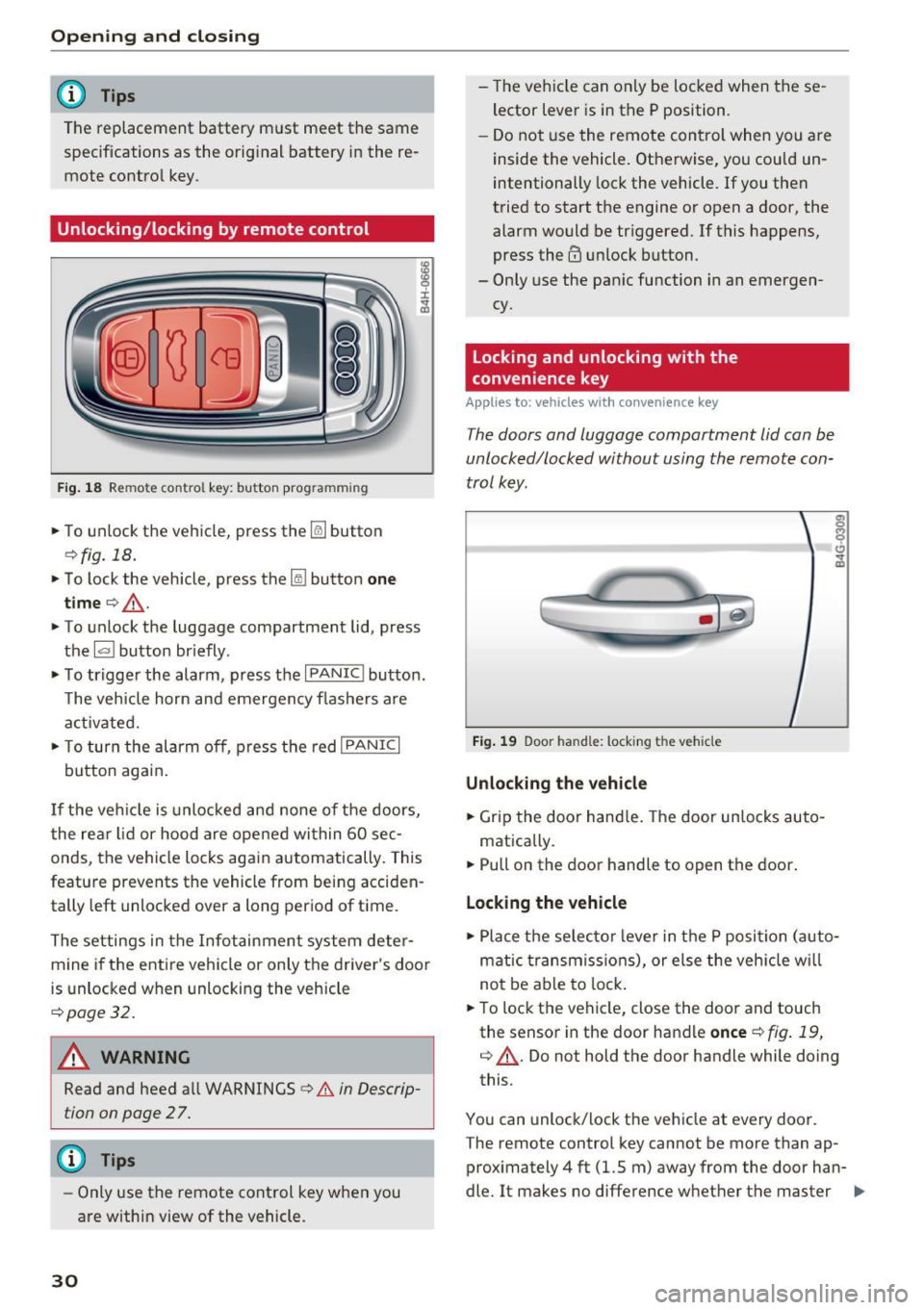
Unlocking/locking by remote control
F ig . 18 Rem ote contro l key : bu tton prog ra mmin g
• To unlock the vehicle, press the~ button
¢fig. 18.
• To lock the vehicle, press the lil button one
tim e¢ ,& .
• To unlock the luggage compartment lid, press
the
1£1 button br iefly .
• To trigger the alarm, press the
I PANIC I button.
T he vehicle horn and emergency flashers are
activated.
• To turn the alarm off , press the red
I PANIC I
button again .
If the vehicle is unlocked and none of the doors,
the rear lid or hood are opened within 60 se c
onds, the veh icle locks again automatically. This
feature prevents the vehicle from being acciden
tally left unlocked over a long p eriod of t ime.
The settings in the Infotainment system deter mine if the entire veh icle or only the driver 's door
is unlocked when unlocking the vehicle
¢ page 32.
A WARNING
Read and heed all WARNINGS¢.& in Descrip
tion on page 2
7 .
@ Tips
- Only use the remote control key when you
are within view of the vehicle.
30
- The vehicle can only be locked when the se
lector lever is in the P position.
- Do not use the remote control when you are
inside the vehicle. Otherwise, you could un
intentionally lock the vehicle. If you then
tried to start the engine or open a door, the alarm would be tr iggered. If this happens,
press the@ unlock button.
- Only use the pan ic function in an emergen
cy.
Locking and unlocking with the
convenience key
Applies to: vehicles with convenience key
T he doors and luggage compartment lid can be
unlocked/locked without using the remote con
trol key.
F ig . 19 Door han d le : locking t he vehicle
Unlocking the vehicl e
• Grip the door hand le . T he door un locks auto-
matically.
• Pull on the door handle to open the doo r.
Locking the vehicle
• Place the selec to r l eve r in the P position (auto
matic t ransmiss ions), or else the veh icle wi ll
not be ab le to lock .
• To lock the vehi cle, close the door and touch
the sensor in the door handle
once ¢ fig . 19,
¢ ,& . Do not hold the door handle while doing
this.
You can unlock/lock the ve hicle at every door .
T he remote control key cannot be more than ap
proximately 4 ft (1.5 m) away from the door han
dle. It makes no difference whether the master ..,.
Page 49 of 284
co
co
.... N
" N .... 0
00
\.J -
blades regularly .
- The washer fluid nozzles for the windshie ld
washer system are heated at low tempera
tures when the ignition is on .
- When stopping temporarily, such as at a
traffic light, the speed of the windshie ld
wipers automatically reduces by one leve l.
Cleaning windshield wiper blades
Clean the wiper blades when you see wiper
streaks. Use a soft cloth and a glass cleaner.
.. Place the windshield wiper arms in the service
position
c::> page 47.
.. Fold the windshield wiper arms away from the
windshield .
.&_ WARNING
Dirty windshield wiper blades can impair v i
sion, which increases the risk of an accident .
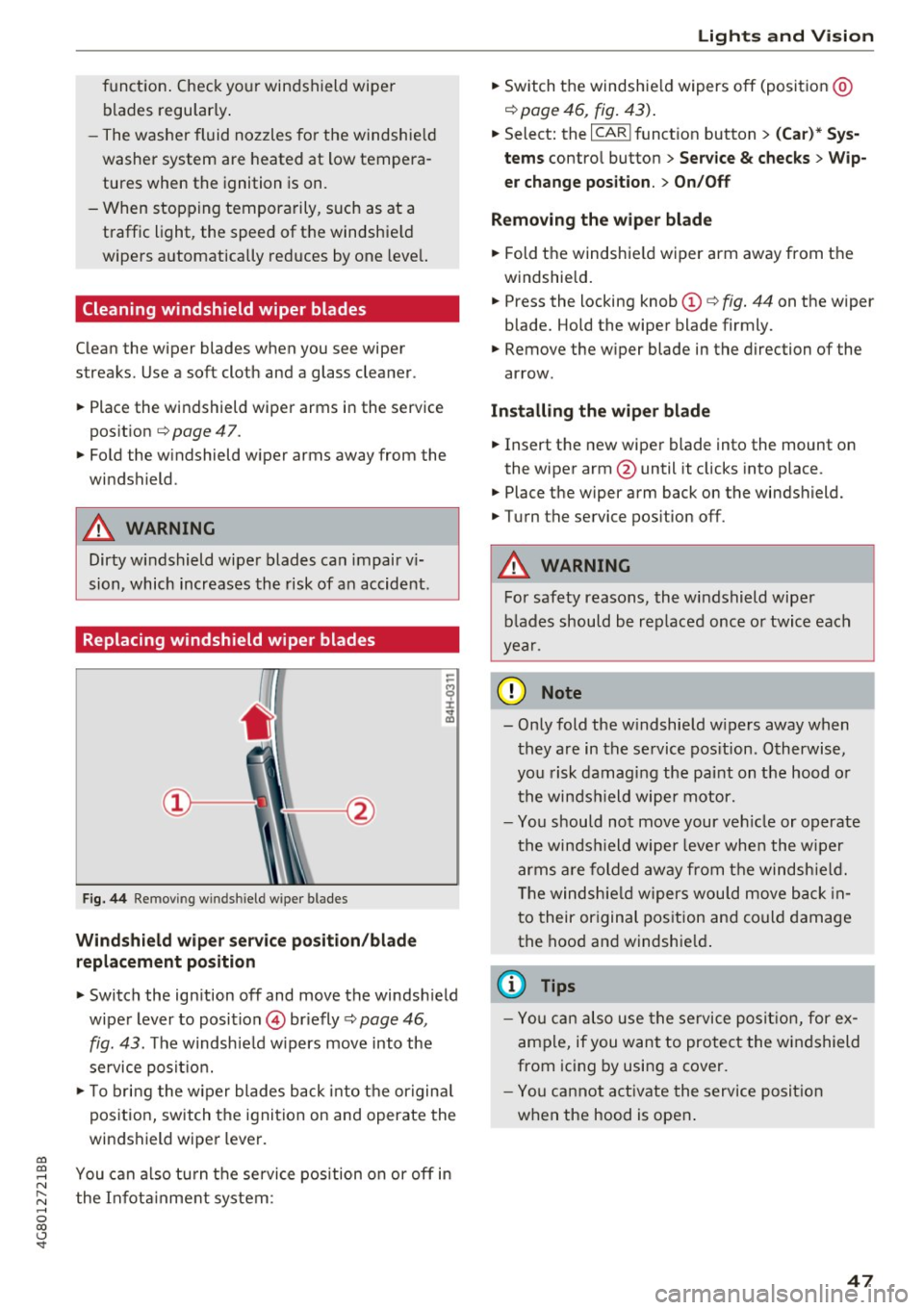
Replacing windshield wiper blades
Fig. 44 Remov ing windshield wiper blades
Wind shield wiper ser vice po sition /blade
rep lacement position
-
.. Switch the ign ition off and move the windsh ield
wiper lever to position © briefly
c::> page 46 ,
fig. 43. The windsh ie ld w ipers move into the
service posit io n.
.. To bring the w iper blades back into the origina l
position, switch the ignition on and operate the
windshield wiper lever .
You can a lso turn t he service position on or
off in
the Infota inment system :
Lights and Vision
.. Sw itch the windshie ld wipers off (posit ion @
¢page 46, fig. 43) .
.. Select: the I CAR I funct ion button > (C ar )* Sys
tem s
control button > Service & checks > Wip
er change po sition .
> On/Off
Remo ving the wiper blad e
.. Fold the windshie ld wiper arm away from the
w indshield .
.. Press the locking knob©
c::> fig. 44 on the wiper
blade. Hold the wiper blade firmly.
.. Remove the wiper blade in the direction of the
arrow .
Install ing the wiper blade
.. Insert the new wiper blade into the mount on
the wiper arm@until it clicks into place.
.. Place the wiper arm back on the windshield .
.. Turn the service pos ition
off .
.&_ WARNING
-
For safety reasons, the windshield wipe r
b lades should be rep laced once o r twice each
year .
([) Note
-Only fold the w indshie ld w ipers away when
they are in the service pos ition . Otherwise,
you risk damaging the paint on the hood o r
the winds hield wiper motor.
- Yo u should not move your ve hicle or operate
the winds hield wiper leve r when the wipe r
arms a re folded away from the windshie ld.
T he windsh ie ld wipers wou ld move back in
t o their or iginal pos ition and could damage
the hood a nd windshie ld .
(D Tips
- Yo u can also use the service posit ion , for e x
ample, if you want to protect the windshield
from icing by using a cover.
- You cannot a ct ivate the serv ice posit io n
when the hood is open .
47
Page 73 of 284

Turn off ignit ion before lea ving vehi cle. Batte ry
i s di schar ging
This message appea rs if the driver's door is
opened while the ignition is sw itched on . Always
switch off the ignition if you are leaving the vehi
cle. Also see
9 page 73.
Shift to P and turn off i gnition b efore l eaving
ca r, otherwi se vehicle can roll aw ay
This message appears if the driver's door is
opened while the igni tion is sw itched on and the
selecto r lever is not in t he P posit ion. Move the
selecto r lever in to the P pos ition and switch the
ignit ion off when you exit the vehicle. Otherwise
the vehicle could roll. A lso see
9 page 73 .
Starting the engine when there is a
malfunction
It may not be possible to start the engine under
certain circumstances, for example if the battery
in the vehicle key is drained, if interference is af
fected the key or if there is a system malfunc tion .
Fig. 77 Center console/remote control key : starting the
engine if there is a malfunctio n
Requirement: the message Key is not r ecog
nized . Hold ba ck of key again st mark ed area .
See owner 's manual
must appear and the DJ in
d icator light mus t turn on.
• Hold the remote control key in the location in
dicated as shown in the illustrat ion
f >l) c::> fig . 77 .
• Press the b rake pedal.
• Press the
I START ENGINE STOPI button. The
~ engi ne will s tart .
.... N
" N .... 0
00
~ ll Market -specific
Drivi ng
• Drive to an authorized Audi dea ler or author
ized Audi Service Facility immediately to have
the malfunction corrected.
@ Tips
You can view the message again by pressing
the
I START ENGINE STOP I button.
Start-Stop system
Description
Applies to: veh icles w ith Start/Stop system
T he Sta rt/Stop system can help increase fue l
eco nomy and reduce CO2 emissions.
In Start/Stop mode, the engine shuts off auto
matically when the vehicle is stopped, such as at
a traffic ligh t. The ignition rema ins switched o n
dur ing this stop phase. The engine w ill restart
automat ica lly when needed.
Applies to A7 Sportback: the Start/Stop system
activates automatically once the ignit ion is
switched on.
Applies to 57 Sportback: the last Start/Stop sys
tem setting is restored when the ignit ion is
switched on.
Ba sic requirements for Start /Stop m ode
- The driver's door must be closed .
- The driver's seat belt much be fastened.
- The hood must be closed.
- The vehicle must have dr iven faster than
2.5 mph (4 km/h) since the last time it stop
ped .
- A trailer must not be hitched to the vehicle.
(D Note
A lways swi tch the Sta rt/S top sys tem off when
driv ing th ro ugh wa ter
c::> page 71.
© Tips
The engine stops short ly before the ve hicle
comes to a s top
l) .
71
Page 79 of 284

co
co
.... N
" N .... 0
00
<.,;) 'SI'
In the normal m ode D, the tr ansmission auto
matica lly selects t he suitab le gear ratio . It de
pends on en gine load, vehicle speed and driving
style.
Select the
s p o rt m od e S for sporty driving. The
ve hicle makes full use of the engine's power .
Shifting is more noticeable when accelerat ing.
To move from selector lever position N to D, you must press the brake pedal and the vehicle must
be traveling less than 1 mph (2 km/h) or be sta
tionary ¢.&. .
.&_ WARNING
-The veh icle can roll even if the ignition is
switched off.
- Never select R or P while driving, because
this increases the risk of an accident.
-
- Power is still transmitted to the wheels
when the eng ine is running at idle. To pre
vent the veh icle from "creeping", you must
keep your foot on the brake in all selector
lever positions (except P) when the eng ine is
running . Otherwise, th is increases the r isk
of an accident.
- Do not inadvertently press the accelerator
peda l w hen the veh icle is stopped if a gear is
engaged. Ot herwise the veh icle will start to
move immediately, even i f the parking bra ke
is set. This cou ld res ult in a crash .
- T o de cre ase the risk of an accident, these
lector lever must be in the P posi tion and
the parking brake must be set before open
ing the hood and working on a r unning en
gine. Always read and fo llow the applicable
warnings
q page 199, Working in the en
gine compartment.
(D Tips
- Drive select: sporty shifting character istics
can be selected us ing the
Dy namic driving
mode.Sw ill appea r in the instrument clus
ter display instead of D.
- If you accidenta lly select N while driv ing,
take your foot off the accelerator pedal and
wait for the engine to slow down to idle be
fore selecting D/S.
D rivi ng
-If there is a powe r failure, the se lector lever
wi ll not move out of the P position. The
eme rgency re lease can be used if t his hap
pens
¢ page 81.
Selector lever lock
The selector lever lock prevents you from select
ing a gear accidentally, causing the vehicle to
roll.
)
Fi g. 82 Selector lever lock
T o release the se lector lever lock:
" Switch the ignit ion on .
" Press the brake pedal
while pressing the inter-
lock butto n.
Automatic shift lock (ASL)
The selector lever is locked in the P and N posi
t ions when the ig nit ion is switched on. The re
move it from t hese positions, the driver must
press the b rake peda l and press the lock button
at the same time. The following message ap
pears in the inst rument cluster display when the
selector lever is in the P or N posi tion to remind
t h e driver:
Brake pedal mu st be applied to shift from P
The automatic shift lock only funct ions when the
vehicle is stat ionary or at speeds be low 1 mph
(2 km/h) . At higher speeds, the lock is automati
c a lly deactivated in the N pos ition .
The selector lever is not locked when shifting
quick ly throug h N, for example from R to D. This
makes it possible to free the veh icle when it is
stuck by "rocking" it. The selecto r lever lock en-
gages if t he lever stays in t he N pos it ion longer ...
77
Page 140 of 284

Audi pre sense
Audi pre sense
Preventative passenger
protection
A pp lies to: ve hicles w ith Audi p re se nse
Pre sense can initiate steps to protect vehicle oc
cupants in certain dangerous situations. The
functions described are available depending on
veh icle equipment:
Pre sense basic*
The following functions can be triggered in cer
tain driving situations:
- Tensioning of the safety belts (for example,
during heavy braking): the front safety belts
have reversible belt tensioners. If a collision
does not occur, the safety belts loosen slightly
and are ready to trigger again.
- Closing the windows and the sunroof* (for ex
ample, when
over-or understeering): the win
dows and the sunroof* close until there is only
a small gap open.
The function of the pre sense basic is activated at
a speed of 20 mph (30 km/h) or higher.
Drive select: the deployment time is adapted in
Dynamic mode.
Pre sense front (vehicles with adaptive cruise
control*}
Pre sense front contains the functions of pre
sense basic . In addition, the likelihood of a rear
end collision with the vehicle ahead is also calcu
lated, within the limits of the system. If the risk
of a collision is detected, the following functions
can trigger:
- Braking guard
c:> page 94
- Tensioning of the safety belts
- Closing the windows and the sunroof*
Pre sense rear (vehicles with side assist*)
Pre sense rear contains the functions of pre sense
bas ic. In addition, the likelihood of a rear-end
coll ision from the vehicle beh ind is also calculat
ed, within the limits of the system. If the risk of a
collision is detected, the following functions can
trigger:
138
- Tensioning of the safety belts
- Closing the windows and the sunroof*
Pre sense plus*
Pre sense plus contains the functions of pre
sense front and pre sense rear .
Error message
Audi pre sense: Unavailable
Preventative passenger protection is not availa
ble. Drive to your authorized Audi dealer or au
thorized Audi Service Facility immediately to have
the malfunction corrected.
A WARNING
Pre sense cannot overcome natural physical
laws. It is a system designed to assist and it
cannot prevent a collision . Do not let the in
creased safety provided tempt you into taking
risks. This could increase your risk of a colli
sion.
- The system can deploy incorrectly .
- Please note that the sensors do not always
detect all objects . This increases the risk of
a collision .
- Pre sense does not react to people or ani
mals or objects that are crossing the vehi
cle 's path or are difficult to detect
c:> page 89.
- Reflective objects such as guard rails or the
entrance to a tunnel, heavy rain and ice can
affect the function of the radar sensors and
the system's ability to detect a collision risk.
(D Note
The sensors can be displaced by impacts or
damage to the bumper, wheel housing and
underbody. Pre sense can be impaired by this.
Have an authorized Aud i dealer or authorized
Audi Service Facility check their function.
{!) Tips
-Certain pre sense front functions switch off
when sport mode is switched off or when
driving in reverse. ..,.
Page 201 of 284

co
co
.... N
" N .... 0
00
\.J '
complete ly empty . The engine cou ld mis
fire. Unburned fuel could also get into the
exhaust system and this cou ld cause the
catalytic converter to overheat.
- Do not switch off the ignition while the vehi
cle is moving.
- Do not continue to operate your vehicle un
der these conditions, as otherwise fuel can
reach the catalytic converter. This could re
sult in overheating of the converter, requ ir
i ng its replacement.
- To assure efficient operation of the Emis
sion Control System:
- Have your vehicle maintained properly and
in accordance with the service recommen
dations in your Warranty
& Maintenance
book let.
- Lack of proper maintenance as we ll as im
proper use of the vehicle will impair the
function of the emission control system and could lead to damage.
® For the sake of the environment
Even when the Emission Control System is op
erating properly, the exhaust gas can have a
sulfur-like exhaust gas smell under some op
erat ing states. This depends on the su lfur
content of the fuel being used. Using a differ
ent brand of fue l may help, or filling the tank
w ith lead-free super grade gasoline .
Diesel particulate filter
Applies to: veh icles with diesel engine
The diesel particulate filter filters nearly all of
the soot particles out of the exhaust. The filter
cleans itself automatically under normal driving
conditions . If the filter cannot clean itself (for ex
ample , because you are only driving short distan
ces), the fi lter becomes clogged with soot and
the
II symbo l for the diesel particulate filter il
luminates
¢ page 17.
A WARNING
-Do not park your vehicle over flammable
materials such as grass or leaves because
-
Checking and Filling
the high temperature of the diesel particu
late filter could start a fire.
- Do not apply an underbody protectant in the
exhaust system area or a fire could start.
Engine compartment
Working in the engine compartment
Special care is required if you are working in the
engine compartment
For work in the engine compartment, such as
checking and filling fluids, there is a risk of in
jury, scalding, accidents, and burns. For this
reason, follow all the warnings and general
safety precaution s provided in the following in·
formation . The engine compartment is a dan
gerous area on the vehicle.
¢ ,&..
A WARNING
= =--
- Turn the engine off.
- Switch the ignition off.
- Set the parking brake.
-Select the P selector lever position.
- Let the engine cool down.
- Never open the hood when there is steam or
coolant escaping from the engine compart
ment, because there is a risk that you could
be burned. Wait until no steam or coolant is
escaping .
- Keep children away from the engine com
partment .
- Never sp ill fluids on a hot engine. These flu
ids (such as the freeze protection contained
in the coolant) can catch fire.
- Avoid short circuits in the electrical system.
- When working in the engine compartment,
remember that the radiator fan can switch
on even if the ignition is switched off, which
increases the risk of personal injury.
- Never open the cap on the coolant expan
sion tank when the engine is warm . The
coo ling system is under pressure.
- To protect your face, hands, and arms from
hot steam or coolant, cover the cap with a
large cloth when opening.
199
Page 203 of 284

co
co
.... N
" N .... 0
00
<..:l 'SI"
Opening/closing the hood
The hood is released from inside the vehicle.
Fig. 1 82 D rive r footwell: release lever
Fi g. 1 83 Roc ke r sw itc h under the hood
M ake sure the w iper arms a re not raised up from
the windshield . Otherwise the pa int could be
damaged .
Opening the engine compartment lid .. Wi th the driver's doo r open, pu ll the leve r be
low the instrument panel in the direct ion of the
arrow c>fig.182 .
Checking and Filling
.. Raise the hood slightly c> ,& .
.. Press the rocker switch under the hood upward
¢fig. 183. This releases the catch .
.. Open the hood .
Closing the engin e compartm ent lid
.. Push the hood down until yo u over ride the
force of the strut .
.. Let the hood fall lightly into the latch.
Do not
press it in.
c> ,&.
A WARNING
-
-Never open the hood when there is steam or
coolant escaping from the engine compart
ment, because there is a risk that you could
be burned. Wait unt il no steam or coolant is
escaping.
- For safety reasons, the hood m ust always be
closed securely while driv ing . Because of
this, a lways check t he hood afte r closing i t
t o make sure it is latched correct ly . T he
hood is latched if the front corners cannot
be lifted.
- If you no tice that t he hood is not latched
while you are d riving, stop immed iately and
close it, because driving when the hood is
not latched increases the risk of an accident .
201
Page 206 of 284

Check ing and F illing
- If you have the impression your engine con
sumes excessive amounts of oil, we recom mend that you consu lt your Audi dealer to
have the cause of your concern properly di
agnosed . Keep in mind that the accurate
measurement of oil consumption requi res
great care and may take some time . Your
Audi dealer has inst ructions about how to
measure oil consump tion accurate ly.
Checking the engine oil level and adding
engine oil
The engine oil level can be checked in the Info
tainment system
F ig. 18 5 Eng ine co mpar tment : en gin e o il fille r open ing
cove r
Obse rve the sa fe ty precau tions ¢&. in Working
in the engine compartment on page 199 .
Checking the engine oil level
.,. Park the vehicle on a level surface .
.,. Sh ut the engine off w hen it is warm . Wait ap
prox imately two m inutes so tha t the engine oil
can flow back in to the o il pa n .
.,. Switc h only the ignit ion back on.
.,. Se lect: the
ICARI function button > ( Car )* Sy s
tems
control b utton > Service & checks > Oil
level.
.,. Read the oil level in the Infota inment system.
Add engine oil if the bar in the oil leve l indica
tor is just before "min".
Adding engine oil
.,. Turn the eng ine off .
.,. Unscrew the engine oil filler opening cap~
¢ fig.185, ¢page 202, fig.184 .
.,. Carefully add 0 .5 quart (0 .5 liter) of the correct
o il ¢ page 202.
204
.,. Close the eng ine oi l filler opening ca p~ -
.,. Close the hood, restart the ignition after two
m inutes and read t he current o il level in the In
fotainment system.
A WARNING
- When adding oil, do not let oil dr ip onto hot
engine components . This inc reases the risk
of afire.
- You must sea l the cap on the oi l filler open
ing correct ly so that oi l does not leak out
on to the hot e ngine and exha ust system
w hen t he e ngine is runni ng, bec ause this is
a fire ha zar d.
- Always clean s kin thoroughly if it comes into
con tact with eng ine oil.
0 Note
- The engine o il level must not be under the
" min " mark ing, beca use this increases the
r isk of engine damage.
- If the message
Oil level is too full. Please
reduce oil level.
appea rs, there is too m uch
o il i n t he engi ne a nd there is a risk of cata
lyt ic converter and engine damage . D o no t
sta rt the eng ine. Co nta ct an a uth o rize d Aud i
dealer or authorized Audi Service Facility to
have excess engine oil extracted if necessa
ry.
- Do not mix any ad ditiona l lubr icants into
the engine oil. Damage caused by such add i
t ives is not covered by the wa rranty .
@ For the sake of the environment
- Oil sho uld never enter the sewer system or
come into contact with the ground .
- Pay attention to lega l req uiremen ts when
disposing of empty o il containers .
(D Tips
-Th e oil leve l in dica tor in the inst rument
cl uster d is p lay is only an i nformationa l dis
play. If the o il level is too low, a minim um
oil warn ing appears in the instrument clus
ter . Add o il and close the hood. The c urrent
oil leve l is d isplayed in the Infotainment