ECU AUDI A7 2018 User Guide
[x] Cancel search | Manufacturer: AUDI, Model Year: 2018, Model line: A7, Model: AUDI A7 2018Pages: 274, PDF Size: 42.77 MB
Page 58 of 274
Seats and stor age
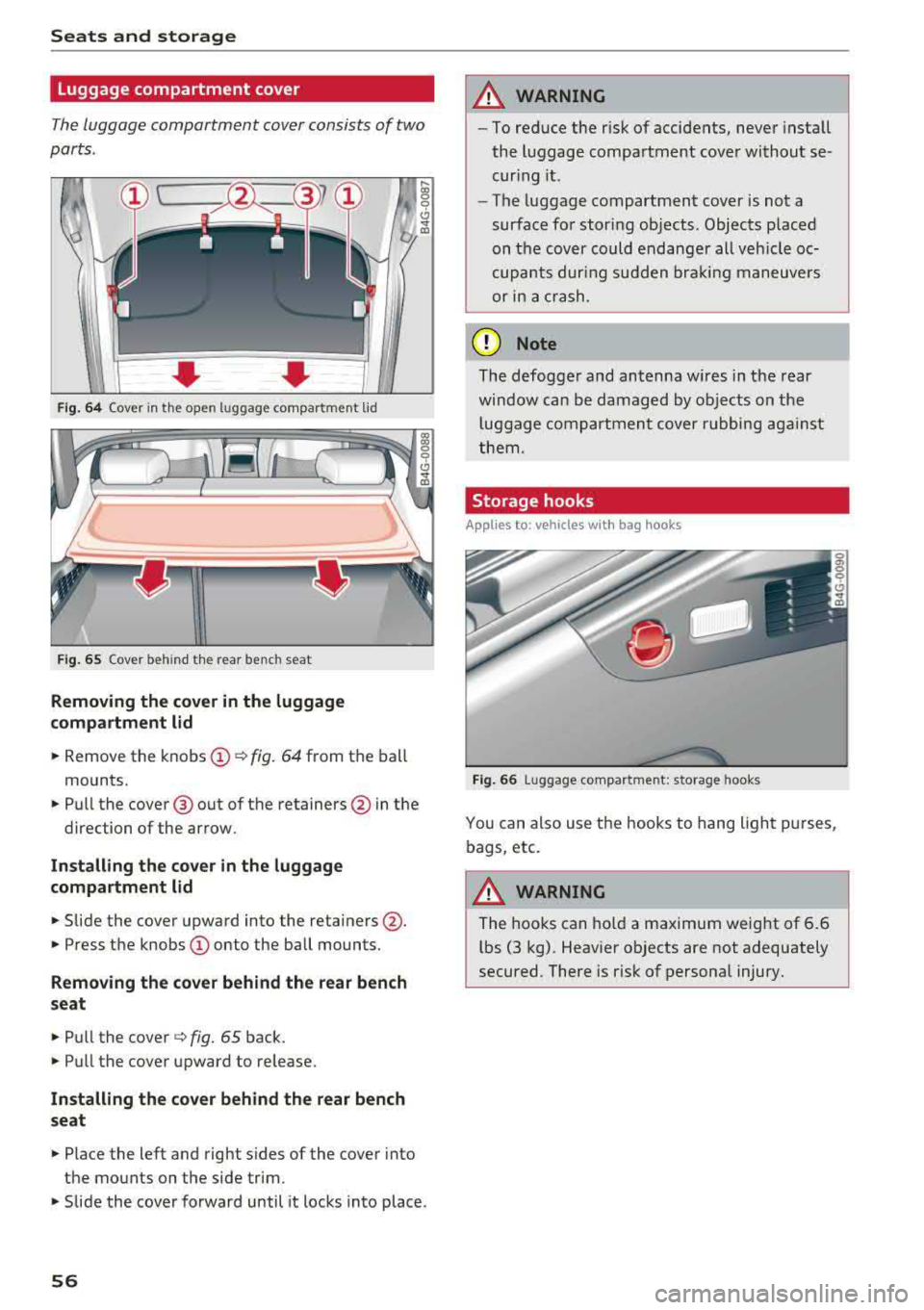
Luggage compartment cover
The luggage compartment cover consists of two
parts .
• Fig . 6 4 Cover in the open luggage compartment lid
F ig . 6 5 Cover behind the rear bench seat
Removing th e cover in the luggage
compartment lid
.. Remove the knobs @¢ fig. 64 from the ball
mounts.
" Pull the cover@out of the retainers @ in the
direction of the arrow.
In stall ing th e cov er in the luggage
c ompa rtment lid
" Slide the cover upward into the retainers @.
"Press the knobs (D onto the ball mounts.
Removing the c over beh ind the rear bench
s eat
" Pull the cover ¢ fig. 65 back.
"Pull the cover upward to release.
Install ing th e co ver beh ind the r ear bench
s eat
" Place the left and right s ides of the cover into
the mounts on the side trim.
9 C) ..,. ID
" Slide the cover forward until it locks into place.
56
A WARNING
,-
- To reduce the r isk of accidents, never install
the luggage compartment cover without se
curing it.
- The luggage compartment cover is not a
surface for stor ing objects . Objects p laced
on the cover could endanger all veh icle oc
cupants dur ing sudden bra king maneuvers
or in a crash.
(D Note
The defogger and antenna w ires in the rear
window can be damaged by objects on the
l uggage compartment cover rubbing aga inst
them.
Storage hooks
App lies to: vehicles wi th bag hooks
Fig . 66 Luggage compa rtment: storage hooks
You can also use the hooks to hang light purses,
bags, etc.
A WARNING
The hooks can ho ld a maximum weight of 6.6
lbs (3 kg). Heavier objects are not adequately
secured. There is r isk of personal injury.
Page 59 of 274
a co .-, N
" N .-, 0 00 <..:l '
Applies to: vehicles with pass-through and ski bag
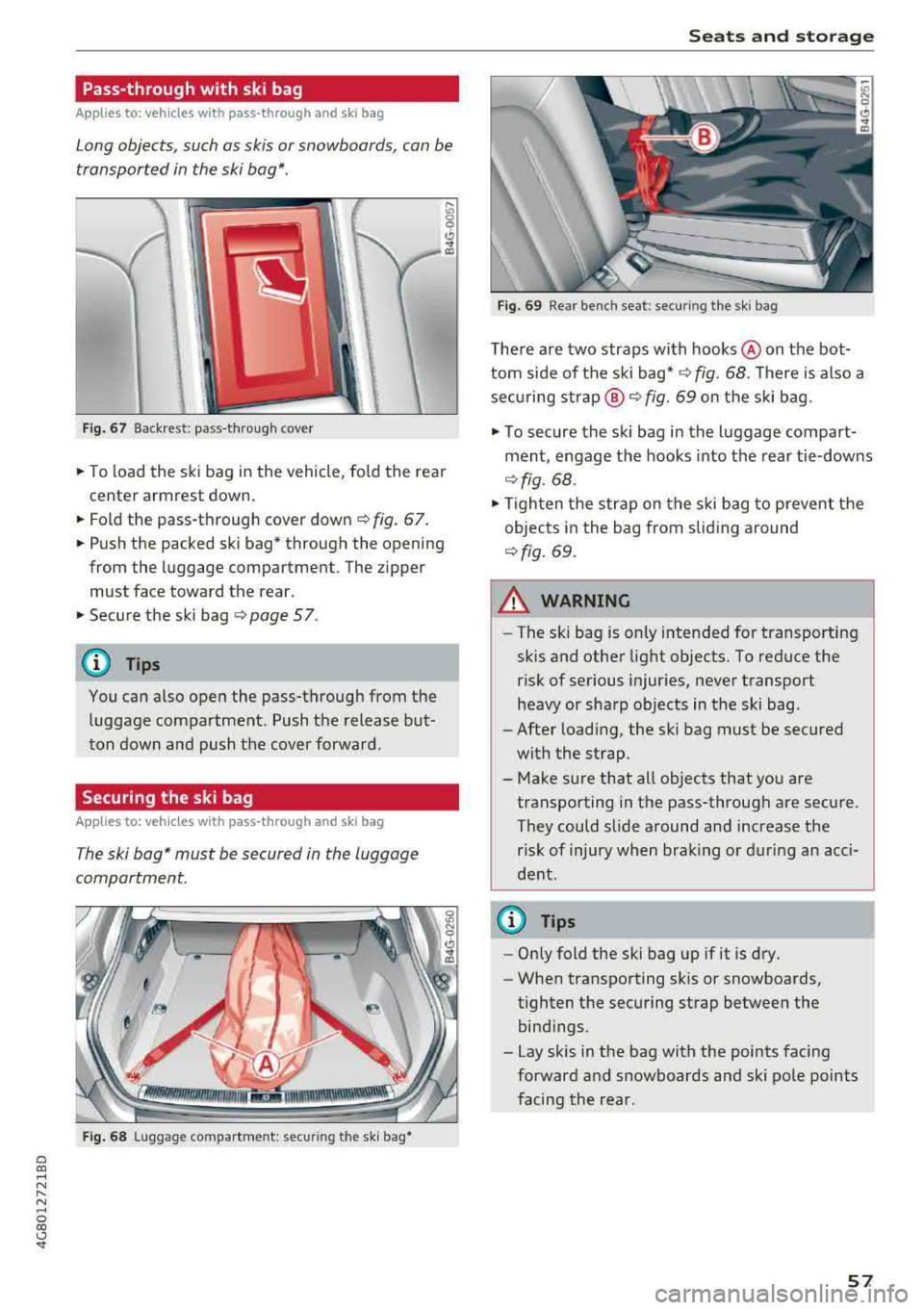
Long objects, such as skis or snowboards, can be
transported in the ski bag*.
Fig . 67 Backrest: pass-through cover
.,. To load the ski bag in the vehicle, fo ld the rear
center armrest down.
.,. Fold the pass-through cover down C) fig. 67.
.,. Push the packed ski bag* through the opening
from the luggage compartment. The zipper
must face toward the rear .
.,. Secure the ski bag C) page 5 7.
(D Tips
You can also open the pass-through from the
luggage compartment. Push the release but
ton down and push the cover forward.
Securing the ski bag
Applies to: vehicles with pass-through and ski bag
The ski bag* must be secured in the luggage
compartment.
Fi g. 68 Luggage compartment: securing the sk i bag•
S eats and storag e
Fig. 69 Rear bench seat: securing the sk i bag
There are two straps with hooks @on the bot
tom side of the ski
bag* ¢ fig. 68. There is also a
securing
strap @¢ fig. 69 on the ski bag .
.,. To secure the ski bag in the luggage compart
ment, engage the hooks into the rear tie-downs
¢ fig. 68 .
.,. Tighten the strap on the ski bag to prevent the
objects in the bag from slid ing around
C) fig. 69.
A WARNING
- The ski bag is only intended for transporting
skis and other light objects. To reduce the
risk of serious injuries, never transport
heavy or sharp objects in the ski bag.
- After loading, the ski bag must be secured
with the strap.
- Make sure that all objects that you are
transporting in the pass-through are secure.
They could slide around and increase the risk of injury when brak ing or during an acci
dent .
(D Tips
-Only fold the ski bag up if it is dry.
- When transporting sk is or snowboards,
tighten the securing strap between the
bind ings.
- Lay skis in the bag with the points facing
forward and snowboards and ski pole points
facing the rear.
57
Page 68 of 274

Driving
When not being used, a roof rack should be removed to decrease the wind resistance of the ve
hicle. You will save approximately 12% of your
fuel when at speeds from 62- 7 5 mph
(100-120 km/h) .
Save energy
The engine drives the generator, which generates
electricity ; the fuel consumption also increases
with the demand for electricity. Therefore, switch electrical equipment off when you no longer
need it. Examples of equipment that uses a lot of
energy are air blowers at a high setting, the rear
window defogger and seat heating* .
@ Note
Do not leave engine idling unattended after
starting. If warning lights should come on to
ind icate improper operation, they would go
unheeded. Extended idling also produces
heat, which could result in overheating or
other damage to the vehicle or other proper-
ty.
@ Note
- Have your vehicle maintained properly and
in accordance with the service recommenda
tions in your Warranty
& Maintenance book
let. Lack of proper maintenance as well as
improper use of the vehicle will impair the
function of the emission control system and
could lead to damage.
- Do not alter or remove any component of
the Emission Control System unless ap proved by the manufacturer .
- Do not alter or remove any device , such as
heat shields, switches, ignition wires,
valves, which are designed to protect your
vehicle's Emission Control System and other important vehicle components .
@ Tips
The consumption estimates as published by
ENVIRONMENTAL PROTECTION AGENCY (EPA) and Transport Canada may not corre
spond to your actual consumption on the
road, which will vary depending upon vehicle
66
load and speed, road and weather conditions ,
trip length, etc.
Steering
Manual steering wheel position adjustment
Applies to: vehicles with manual steering wheel adjustment
The steering wheel posi tion is adjustable up and
down and forward and back .
Fig. 74 Lever on th e stee ring column
.,. Pull the lever in the direction of the arrow
~A -
... Bring the steering wheel into the desired posi
tion .
.,. Push the lever against the steering column un
til it is secure.
A WARNING
Improper use of steering wheel adjustment
and improper seating position can cause seri
ous personal injury.
-Adjust the steering wheel column only when
the vehicle is not moving to prevent loss of
vehicle control.
-Adjust the driver's seat or steering wheel so
that there is a minimum of 10 in (25 cm)
between your chest and the steering wheel
~page 130, fig. 140 . If you cannot main
tain this minimum distance, the airbag sys
tem cannot protect you properly .
- If physical limitations prevent you from sit
ting 10 in (25 cm) or more from the steer
ing wheel, check with your authorized Audi
dealer to see if adaptive equipment is avail-
able.
.,.
Page 75 of 274

a co .... N
" N .... 0 00 \,;J '
Requirement: the driver's door must be closed,
the driver's safety belt must be latched and the
parking brake must be set.
.,. To start driving and release the parking brake
automatically, press the accelerator pedal as
usual.
In addition to releasing the parking brake auto
matically, other convenience and safety functions
are available when you start driving
¢page 74,
Starting to drive.
Preventing the automatic parking brake
release
The vehicle could begin rolling unintentionally,
depending on the hill or if towing a trailer.
.,. To prevent the parking brake from releasing au
tomatically, pull and hold
the(®) switch and
press the accelerator pedal. The parking brake
remains set and prevents the vehicle from roll
ing backward.
.,. You can release the C®l switch again once you
are sure that you are giving enough driving
force to the wheels by pressing the accelerator pedal.
Emergency braking function
You can use the emergency braking function in an
emergency situation, or if the standard brake op
eration malfunctions or is disabled.
.,. Pull and hold the®) switch.
.,. As soon as you release the (®) switch or acceler-
ate, the braking stops.
Pulling and holding the
C®) switch while driving
the vehicle activates the emergency braking func
tion. The vehicle is braked at all four wheels by
activating the hydraulic brake system. The brak ing effect is similar to heavy
braking¢&_ .
To reduce the risk of activating the emergency
braking by mistake, a warning tone (buzzer)
sounds when
the®> switch is pulled. Emergency
braking stops as soon as
the®) switch is released
or the accelerator pedal is pressed.
Parking
.,. Press the brake pedal to stop the vehicle.
Driving
.,. Pull the®> switch to set the parking brake .
.,. Place the selector lever in the P position.
.,. Turn the engine off¢&_ .
.,. Turn the steering wheel when parking on in
clines so that the wheels will roll into the curb
if the vehicle starts moving.
A WARNING
-
- Do not press the accelerator pedal inadver
tently if a gear is selected when the vehicle
is stationary and the engine is running. Oth
erwise, the vehicle will start to move imme
diately and this could result in an accident.
- Emergency braking should only be used in
an emergency, when the normal brake pedal
has failed or the brake pedal is obstructed.
During emergency braking, your vehicle will
brake similar to heavy braking. ESC and the
associated components (ABS, ASR, EDL)
cannot overcome the laws of physics . In cor
ners and when road or weather conditions
are bad, a full brake application can cause
the vehicle to skid or the rear end to swerve,
which
increases the risk of an accident.
- If the power supply fails , you cannot set the
parking brake if it is released . In this case,
park the vehicle on level ground and secure
it by placing the selector lever in the P posi
tion. See an authorized Audi dealer or au
thorized Audi Service Facility for assistance.
- Always take the vehicle key with you when
leaving your vehicle, even for a short period
of time. This applies particularly when chil
dren remain in the vehicle. Otherwise chil
dren could start the engine, release the
parking brake or operate electrical equip
ment such as power windows, which in
creases the risk of an accident .
- No one should remain in the vehicle when it
is locked - especially children . Locked doors
make it more difficult for emergency work
ers to get into the vehicle, which puts lives
at risk.
(D Tips
When stopping at a traffic signal or stopping
in city traffic, you can set the parking brake
manually . The vehicle does not have to be
73
Page 82 of 274
Driving
App lies to: ve hicles w ith S tro nic t ra n smi ssio n
Ii) 10 Tran sm issio n m alfunctio n: N o reve rse
ge ar. You c an c ontinue d riv ing
There is a system malfunct io n in the t ransm is
sion . T he transmission is switching to emergency
mode. This mode only shifts into certain gears or
will no longer shift at all. The engine may stall.
You cannot engage the r everse gear. Drive to an
author ized Audi dealer or author ized Audi Service
Facility immediately to have the malfunction cor
rected .
[!l Transmi ssio n m alfun cti on : Sto p vehicl e and
s hift t o park .
Do not cont inue drivi ng. Select the P se lector lev
er position and see an authorized Audi dea le r or
author ized Audi Service Facility for assistance.
(D Note
If the transmission has switched to emergen
cy mode, drive to an author ized Audi dealer or
author ized A udi Se rvice Facility immediate ly
to have the ma lfunction corrected.
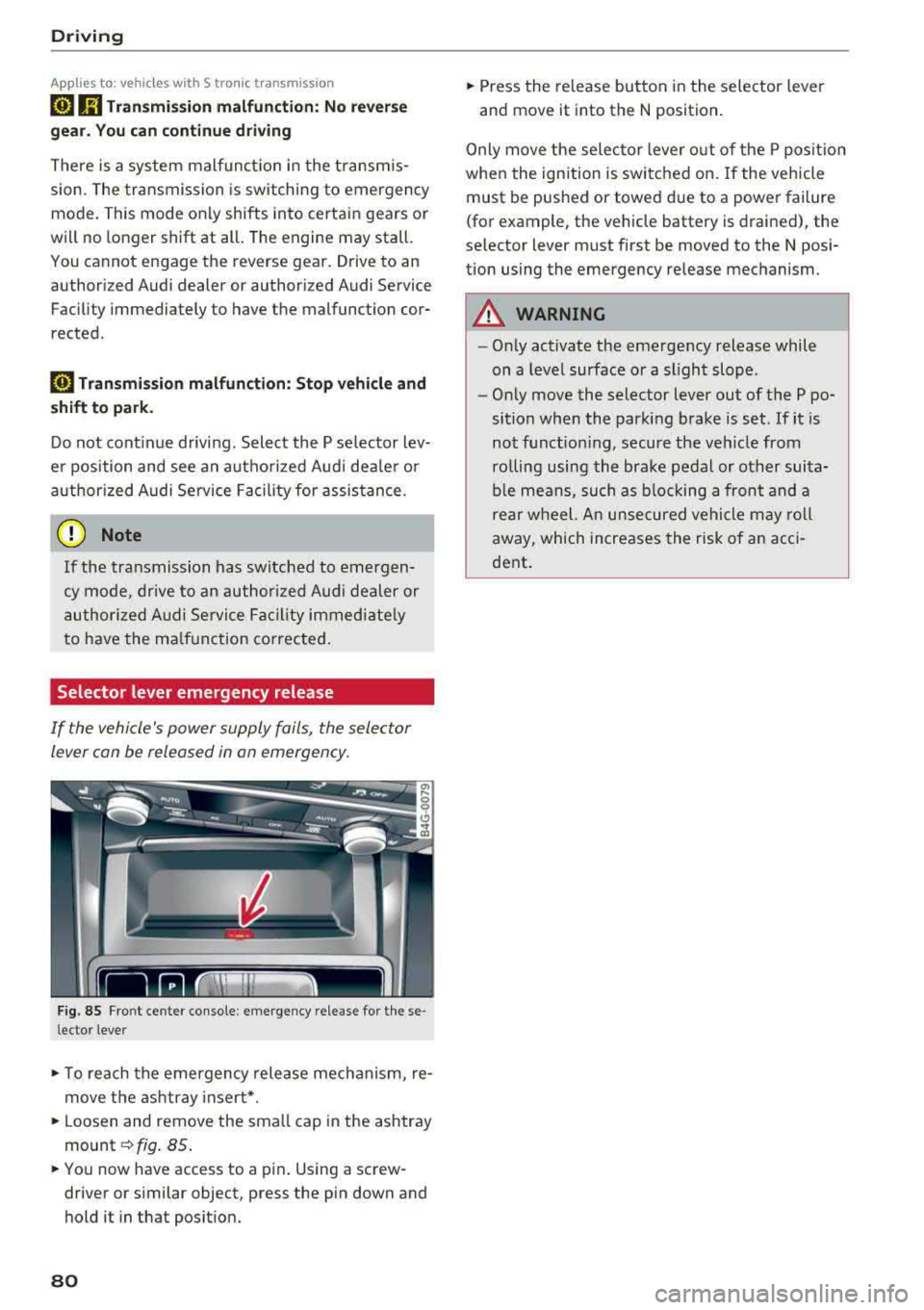
Selector lever emergency release
If the vehicle's power supply foils, the selector
lever con be released in on emergency.
F ig. 85 Fro nt ce nter console: emergency release for t hese
l ector lever
.,. T o reach the emergency release mechanism, re
move t he ashtray insert * .
.,. Loosen and remove the sma ll cap in the ashtray
mount ~ fig. 85 .
.,. You now have access to a pin . Using a screw
driver or s imilar object, press the pin down and
hold it in that posit ion.
80
.,. Press the release button in the selector lever
and move it into the N position .
Only move the selec tor lever o ut of the P posit ion
when the ignition is switched on. If the vehicle
must be pushed or towed due to a power failure
(for example, the vehicle battery is drained), the
selector lever must first be moved to the N posi
tion using the emergency release mechanism.
A WARNING
- Only activate the emergency release while
on a level surface or a slight slope .
- Only move the selector lever out of the P po
sition when the parking brake is set. If it is
not funct ioning, secure the veh icle from
ro lling using the brake pedal or other suita
ble means, such as b locking a front and a
rear wheel. An unsecured vehicle may roll
away, which increases the risk of an acci
dent .
Page 83 of 274

a co .... N
" N .... 0 00 \.J -
General information
Your veh icle is primar ily intended for transport
ing people and luggage. However, if you dr ive
with a trailer , follow the technical requirements,
the operation and driving tips, and the legal reg
u lations.
Driving with a trailer affects the vehicle 's fuel
consumption, performance and wear. It also re
quires highe r concentration from the driver.
A WARNING
Do not transport any people in a trailer due to
the risk of fatal injury.
Technical requirements
Certain requirements must be met when towing
a trailer.
Trailer hitch
Only use a trailer hitch with a removab le ball
hitch mount and ball hitch. The trailer hitch must
be perm itted for the vehicle, the trailer and the
permitted total weight of the trailer being
pu lled. Above all, it must be secure ly and safe ly
attached to the vehicle trailer.
Never mount a trailer hitch on the bumper. The
trailer hitch must be mounted in a way that does
not impair the function of the bumper. Do not
make any changes to the exhaust system and the
brake system.
Check regularly if the trailer hitch is securely
mounted. A lways follow the instructions given by
the trai ler hitch manufacturer .
Trailer brakes
If the tra iler has its own brake system, then fol
l ow the manufacturer specifications. However,
the brake system on the trailer must never be
connected to the vehicle brake system.
Trailer towing
Engine cooling system
Driving with a trailer means a higher load on the
engine and the cooling system. The coo ling sys
tem must be designed for additiona l load and
contain enough coo lant
i::> @ .
@ Note
Longer inclines cannot be driven without a
suitab le cooling system, especia lly if t he out
side temperatures are high . otherwise, this
increases the risk of engine damage.
Operating instructions
Several things must be noted when towing a
trailer.
Towing capacity
Your vehicle can only be operated with class 1 or
class 2 trailers.
Load distribution
Poor cargo load and distribut ion can negatively
impact vehicle handling.
- Store objects preferably in the vehicle luggage
compartment . The vehicle should always carry
the heaviest poss ible load and the trailer
should have the lightest possible load.
- Distribute the load in the trailer so that the
heavy objects are as close to the axle as poss i
b le.
- Secure objects from sl iding out of place .
- Ut ilize the maximum permitted tongue weight
if possible .
Tires
Set the tire pressure on your vehicle for a "full
load"; see the tire pressure sticker
c::>page 215.
If necessary, also adjust the tire pressure on the
trailer according to the manufacturer's recom mendat ion .
Winter tires should be mounted on the vehicle and on the trailer during winter temperatures.
Outside mirrors
If you cannot see the tra ffic behind the trailer
with the standard exterior mirrors, then you
81
Page 95 of 274

a co .... N
" N .... 0 00 \.J '
When detected in time, the system can assess
dangerous sit uat ions where an object a head
brakes suddenly or if your own vehicle is traveling
at a high speed and approaching an object that is
mov ing more slowly. The brak ing guard does not
react if it cannot detect the situation.
The system advises you of various dangero us sit
uations :
- T he
distan ce warning occurs if you d rive too
closely to the object ahead for a long period o f
time . If the object ahead brakes strongly, you
would not be able to avoid a collision .
The.
indicator light appears as an indication for th is.
- The
app roach wa rning occurs when an object
ahead is traveling more s low ly or brakes
strongly. When th is warning occurs, it may on ly
be poss ible to avoid a co llision by swerving or
braking strongly . The danger is indicated by the
• ind icator light ~ fig . 99 . An aud io signal w ill
also sound .
If you do not react early enough or at a ll to a dan
ge rous situation, the braking guard suppo rts you
w ith a brak ing intervent ion .
- If a co llision is imminent, the system will first
provide an
ac ute warning by braking sharply.
- If you do not react to the acute warning, the braking guard can increase the braking force
within the limits of the system
ll . Th is reduces
the veh icle speed in the event of a collision .
- The system can init iate comp lete decelerat ion
shortly before a collision
l l. Full deceleration at
high speeds occurs only in vehicles with adap
t ive cru ise control and s ide ass ist (pre sense
plus).
- If the braking gua rd determines that you are
not brak ing st rongly eno ugh whe n there is an
i mpending co llision, i t can increase the brak ing
fo rce .
- T he pre se nse functions also engage whe n
the re is an impend ing
collision ~ page 95.
ll This is not availa ble in so me co untrie s.
A ss istance systems
Which functions can be controlled?
Yo u can swit ch t he b raking guard and t he d is
tance/approach warning on or
off in the Infotain
ment system
~ page 94, Settings in the Info
tainment system .
A WARNING
--
Lack of attention can cause collisions, other
accidents and ser ious personal inj uries. The
braking guard is a n assist system and cannot
pr event a collision by itself . T he dr iver m ust
a lways inte rvene . The d river is always respon
s ib le for b raking at the co rrect t ime.
- Always pay close atten tion to traffic, even
when the b raking gua rd is switched on. Be
ready to in tervene and be rea dy to take
comp le te co ntro l wheneve r ne cess ary. A l
ways keep the sa fe and legal distance be
tween your vehi cle a nd ve hicl es up ahead .
- B raki ng g uard works w it hi n limi ts a nd will
not respond o uts ide the system limits, fo r
examp le when approach ing a stopped veh i
cle or stationary obstacle (end of a traff ic
jam or vehicle that has broken down in traf
fic).
- Always remember that the radar sensor for
the brak ing guard works only within def ined
detection and range limits that may prevent
the proper detect ion of other vehicles.
- The radar sensor's function and range can
be reduced by rain, snow and heavy spray.
Mov ing vehicles up ahead may not be
promptly de tected or may no t be detected
at a ll.
- Reflective surfaces includi ng crash ba rriers
or tunne l entra nces may impair the function
of t he ra da r se nso r.
(D Tips
- You can cancel the braking with increas ing
force tha t is initiated by t he sys tem by brak
ing yourse lf, by acce le ra ting not iceably or
by swe rving.
- Keep in mind that b raking gua rd can b rake
unexpectedly. A lways secure a ny cargo or
93
Page 108 of 274

Ass is tanc e system s
depending on the situation. The distribution of
power varies from balanced (comfort) to sporty
(dynamic) depending on the selected mode. The
goal is a high leve l of agility and ab ility to accel
erate on curves. The ve hicle is very respons ive to
steer ing .
Co rne ring light *
The cornering light adapts the high beams to the
direction of the curve depending on the speed.
The pivot ing action and the light ing also adapt to
the mode.
Adapti ve c ruise control *
The behavior when acce lerating can be adjusted
from comfortable to sporty, depending on the
drive select mode. Adaptive cruise control a lso
responds to the driving behavior of the veh icle
ahead in a more conservative or sporty manner.
Engine sound *
The engine sound adapts to the current mode
and can be subtle to sporty .
@ Note
Applies to: vehicles with adaptive air suspension
-Make sure there is enough clearance above
and below t he ve hicle when parking. The
height of the vehicle (ground clearance) can
change once it is parked due to temperature
fl uctuations, changes to t he load condit ions
and c hanges to the d rivi ng modes.
- When transporting the veh icle on a car car
r ier, tra in, sh ip or by other means, only t ie
the ve hicle dow n at t he ru nning surface of
the tires, w hich is the outer circ umfe rence.
Securing t he vehi cle at t he axle compo
nents, suspension struts or towing eyes is
not permitted because the pressu re in t he
a ir s uspension struts can change dur ing
Adjusting the Individual mode
transport . The vehicle may not be secured
sufficiently if this happens.
(D Tips
- In some models, the max imum ve hicle
speed can on ly be reached in t he auto and
dynamic modes.
- Th e S se lector lever position a utomat ica lly
engages if the dynamic mode is selected.
- Applies to: vehicles with dynamic steering:
operating noise is heard when sta rting o r
stopping the engine. This does not indicate
a problem .
Selecting the driving mode
.,. To select the mode, select the follow ing in the
Infotainment:
! CAR ! function button> Comfort ,
Auto , Dynamic or Individual.
.,. Applies to: vehicles with a ti:~ button on the
steering wheel: press the button repeatedly u n
til the desired mode appea rs in the instrument
cl uste r d isplay.
You
can change the driv ing mode whe n the vehi
cle is stationary or while d riv in g. If traff ic per
mits, afte r changing modes, briefly t ake your
foot o ff t he accelerator pedal so t hat the recently
selected mode is also activated for t he engine.
Comfort -provides a comfort-or iented vehicle
setup a nd is s uited fo r long d rives o n highways.
Auto -provides a n overall comfortable yet dy
nam ic dr iv ing feel and is suited for everyday use .
Dynamic -gives the driver a sporty driving fee l
and is suited to a sporty driving style .
Individu al -¢ page 106 .
A WARNING
Pay attention to traffic when ope rating the
drive select to reduce the r isk of an accident.
-
You can adjust the vehicle settings to your personal preferences .
.,. Select: the !CAR! function button > S et individ
ual
control b utton . Once you select the men u,
106
you will a utomatica lly drive in the Indi vidual
mode .
Page 131 of 274
a co .... N
" N .... 0 00 \.J '
Basics
Safe driving habits
Please remember -safety first!
The individua l safety features of your vehicle can
work together as a system to help protect you
and your passengers in a wide range of accidents.
These features cannot work as a system if they
are not always correctly adjusted and correctly
used .
This chapter contains important informat ion,
tips, instruct ions and warn ings that you need to
read and observe for your own safety, the safety
of your passengers and others . We have summar
i zed here what you need to know about safety
be lts, a irbags, child restra ints as well as child
safety. Yo ur safety is for us priority number 1. Al
ways observe the information and warnings in
this section - for your own safety as well as that
of your passengers.
The informa tion in t his sect ion app lies to all
model versions of your vehicle. Some of the fea
tures described in this sections may be standard
eq uipment on some models, or may be optional
equ ipment on others. If you are not sure, ask
your author ized Audi dealer.
A WARNING
-Always make sure that you follow the in
struct ions and heed the WARNINGS in th is
Manual. It is in your i nterest a nd in the in
te rest of your passengers .
-
-Always keep the complete Owner's Litera
t ur e in yo ur Audi whe n you lend or se ll yo ur
vehicle so that this important information
w ill a lways be available to the d rive r and
passengers.
-Always keep the Owne r's literature h andy so
that you can f ind it easily if yo u have ques
tions .
Driving saf ety
Important things to do before driving
Safety is everybody 's job ! Vehicle and occupant
safety always depends on the informed and care
ful driver .
For your safety and the safety of your passen
gers,
befor e dri ving alw ays:
.. Make sure that a ll lights and signals are operat
ing correctly.
.. Make sure tha t the tire pressure is correct .
.. Make sure that all windows are clean and afford
good vis ibility to the outs ide .
.. Secure all luggage and othe r items ca refully
¢ page 54, ¢page 53 .
.. Make sure that not hing c an interfere wi th the
peda ls .
.. Adjust front seat, head restraint and mirrors
correct ly for your height.
.. Instruct passengers to adjust the head re
straints according to their height.
.. Make sure to use the rig ht child restra int cor
rectly to protect children
¢ page 170, Child
safety .
.. Sit properly in your seat and make sure t hat
your passengers do the
same ¢ page 47, Seats
and storage.
.. Fasten your safety belt and wear it properly . Al
so instruct your passengers to fasten their safe
ty belts
properly ¢ page 138 .
What impairs driving safety?
Safe driving is directly related to the condition of
the vehicle , the driver as well as the driver 's abili
ty to concentrate on the road without being dis
tracted.
The driver is responsib le for the safety of the ve
hicle and a ll of its occupants. If your ability to
drive is impa ired, safety risks for everybody in the
vehicle increase and you a lso become a hazard to
everyone else on the road
¢ &_ . Therefore:
.. Do not let yourse lf be distracted by passengers
or by using a cellular telephone .
.. NEVER drive when your driving abi lity is im
pa ired (by med ications, alcohol, drugs, etc .) .
.. Observe all traffic laws, rules of the road and
speed lim its and plain common sense .
129
Page 134 of 274
Driving safety
to incorrect positioning of the safety belt
and improper seating position.
- Children must always ride in child seats
c:> page 170. Special precautions apply
when installing a child seat on the front passenger seat
c:> page 146 .
Proper seating positions for passengers in
rear seats
Rear sea t passengers must si t upright wi th both
feet on the floor consistent with their physical
size and be properly restrained whenever the
ve
hicle is in use.
To reduce the r isk of injury caused by an incorrect
seating position in the event of a sudden braking
maneuver or an accident, yo ur passengers on the
rear bench seat must always observe the follow
i n g:
• For adjustable head restra ints: adjust the head
r estra int so the uppe r edge is as even as poss i
ble with the top of your head. If that is not pos
sible, try to ad just the head restra int so th at it
is as close to this position as possib le
c:> page 132 .
• Keep both feet flat i n the footwell i n front of
the rear seat.
• Fas ten and wear safety belts properly
c:> page 141.
• Make sure that children are always properly re
strained in a ch ild restraint that is approp riate
for their size and age
c::> page 170 .
_& WARNING
Passengers who are imp roperly seated on the
rear seat can be seriously injured in a crash .
- E ach passenger m ust always sit on a seat o f
their own an d properly fas ten and we ar the
safe ty belt belongi ng to that sea t.
- Safe ty belts only offe r m aximum p rotection
when the safety belts are properly posi
tioned on the body and securely latched . By
not sitting upright, a rear seat passenger
in
c reases the risk of personal in ju ry from im
properly positioned safety belts!
132
- For adjustable head restraints: always ad
just the head restraint properly so that it
can give maximum protection.
Proper adjustment of head restraints
App lies to : vehicles with adjustable head restra ints
Correctly adjusted head restraints are an impor
tant part of your vehicle's occupant restraint sys
tem and can help to reduce the risk of injuries in
acciden t situations.
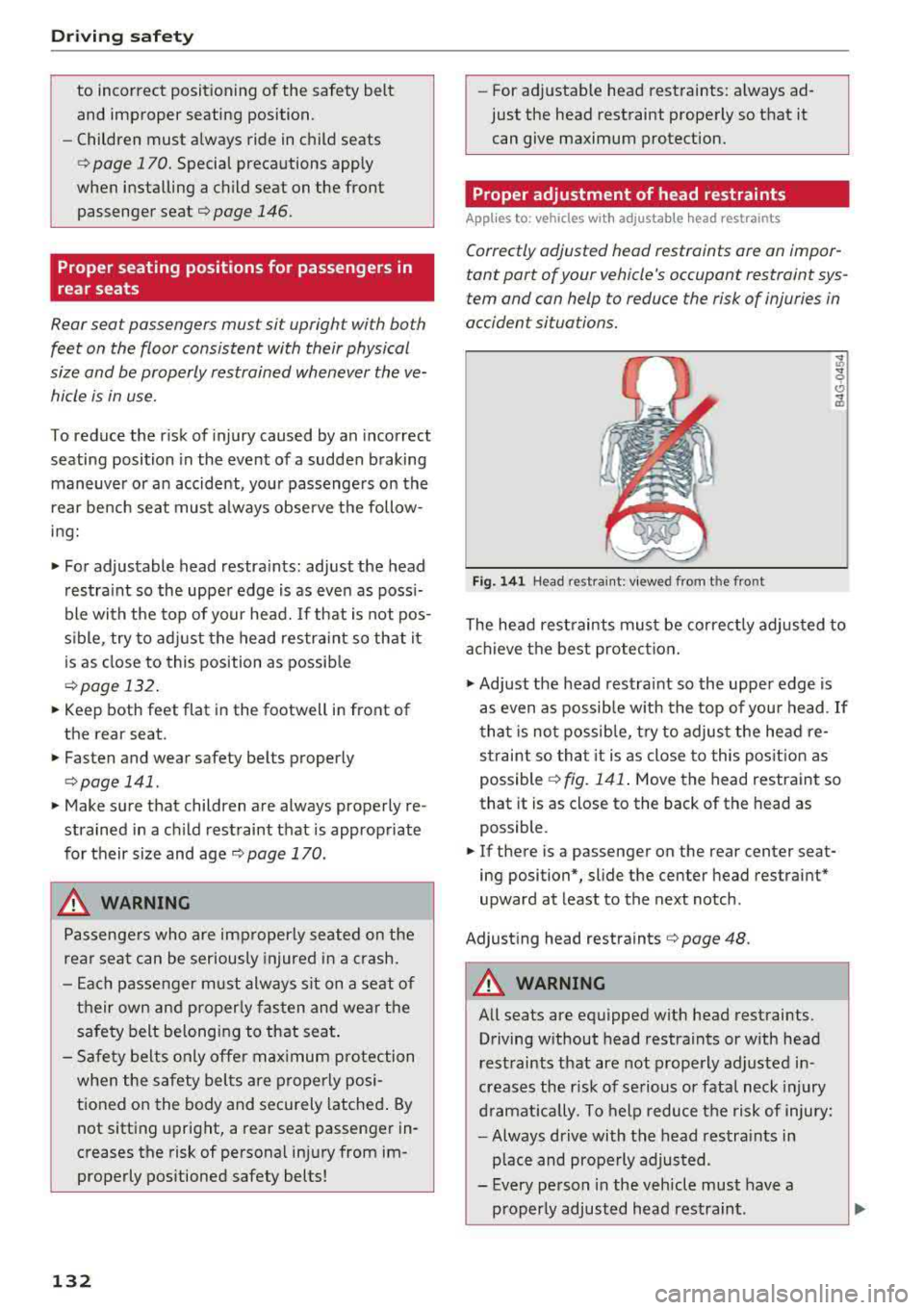
Fig. 141 Head rest ra in t: v iewed from t he front
The head rest raints must be corre ctly adjus ted to
a chieve t he best protec tion .
• Adjust the head rest ra int so the upper edge is
as even as possib le w ith the top of you r head . If
t ha t is no t possib le, try to adjus t the head
re
strai nt so that it is as close to this pos it ion as
possible
c:> fig. 141 . Move the head restraint so
that it is as close to the back of the head as
possible .
• If there is a passenger on the rear center seat
ing position*, slide the center head restraint *
upward at least to the next notch .
Adjust ing head restraints
c:> page 48.
_& WARNING
All seats are equipped w ith head restraints .
Driving w ithout head restraints or w ith head
rest raints that are not prope rly adj usted in
creases the r is k of se rious or fata l neck injury
d ramat ica lly . To help reduce t he risk of injury:
- Always drive with the head restra ints in
place and prope rly adjusted.
- Every pe rson in the vehicle must have a
proper ly adjusted head restraint .
-