infotainment AUDI A7 2018 User Guide
[x] Cancel search | Manufacturer: AUDI, Model Year: 2018, Model line: A7, Model: AUDI A7 2018Pages: 274, PDF Size: 42.77 MB
Page 40 of 274
Opening and closing
Programming buttons
Applies to: vehicles with garage door opener (Homelink)
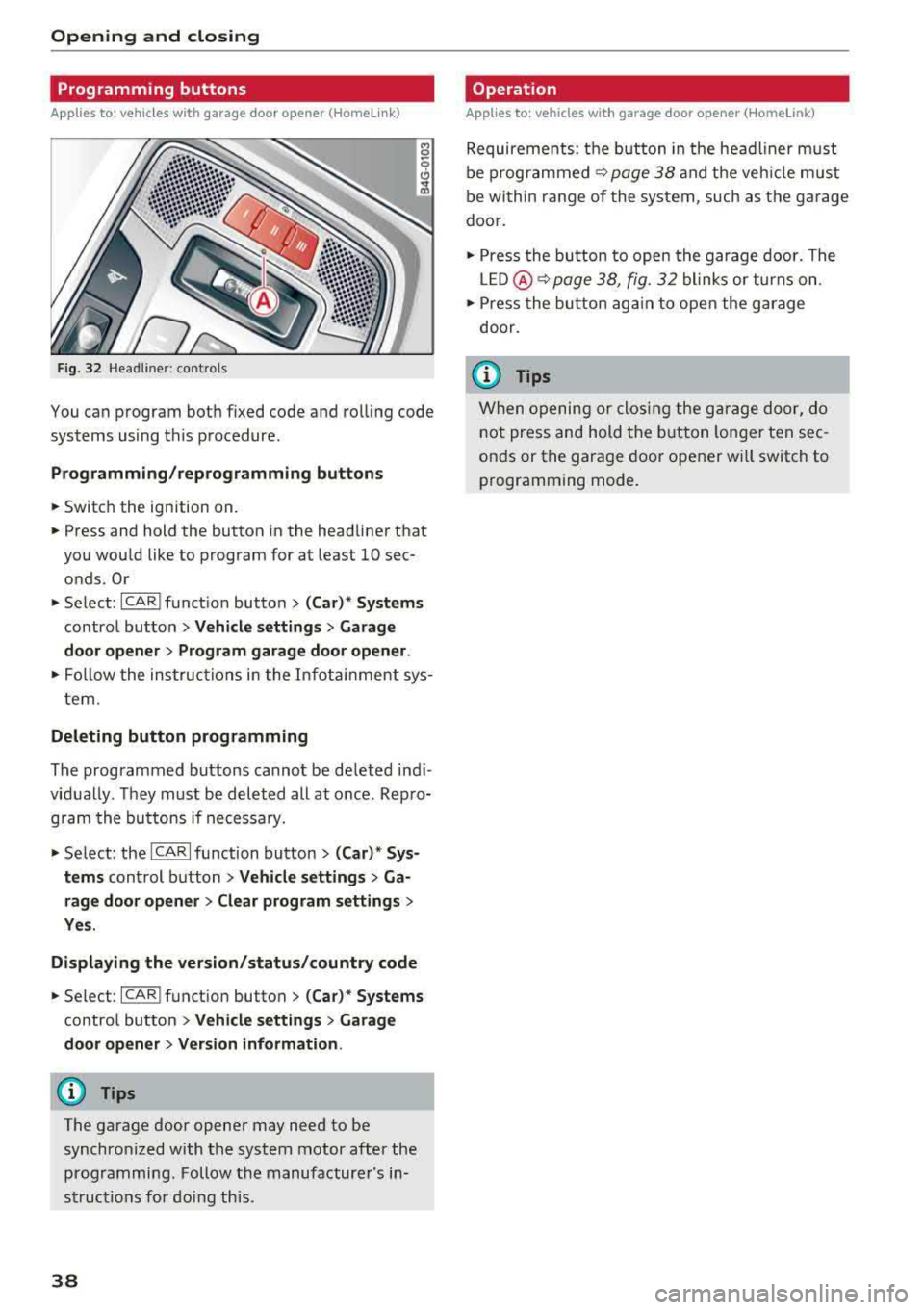
F ig. 32 Hea dlin er: co ntro ls
You can program both fixed code and rolling code
systems using this procedure.
Programming /reprogramming button s
... Switch the ignition on .
... Press and hold the button in the headliner that
you wou ld like to program for at least 10 sec
onds. Or
.,. Select : ~I C~ A~R~ I funct ion button > (Car)* Systems
control button > Vehicle settings > Garage
door opener > Program garage door opener .
., Follow the instruc tions in the Infotainment sys
tem.
Deleting button programming
The programmed buttons cannot be de leted ind i
vidually . They must be deleted all at once . Rep ro
gram the buttons if necessary .
.. Select: the ICARI function button > (Car)* Sys
tems
control button > Vehicle settings > Ga
rage door opener
> Clear program settings >
Yes.
Displaying the version/status/country code
... Select : ICAR I function button> (Car) * Systems
control button > Vehicle settings > Garage
door opener > Version information .
(D Tips
The garage door opener may need to be synchronized with the system motor after the
programming . Follow the manufacturer's in
structions for doing this.
38
Operation
Applies to: vehicles with garage door opener (Home link)
Requirements : the button in the head liner must
be
programmed ~ page 38 and the vehicle must
be within range of the system, such as the garage
door .
., Press the button to open the garage door. The
LED @ ~ page 38, fig. 32 blinks or turns on .
.. Press the button again to open the garage
door.
(D Tips
When opening or closing the garage door, do
not press and hold the button longer ten sec
onds or the garage door opener wi ll switch to
programming mode .
Page 43 of 274

Messages in the instrument cluster display
Headlight a ssist: Sy stem fault
Drive to an authorized Aud i dealer or a uthorized
Aud i Serv ice Fac ility immediately to have the
malfunc tion cor rected. You can still switc h the
hi gh beams on or off manu ally.
Headlight as sis t: Unavailable No camera view
The camera view is b locked, for example by a
sticker or debris.
The sensor is located between the interior rear
view mir ror and the windshield . Do not p lace any
stickers in this area on the windshield.
A WARNING
H igh beam assistant is only intended to assist
the drive r. The dr iver is still responsible for
con troll ing the headligh ts a nd switch ing
t hem manually depend ing on light and v is ibil
i t y cond itions .
It may be neces sary to operate
t hem manually in si tu at ions such as:
- In adve rse we athe r co nd itions s uch as fog,
heavy r ain, b low ing snow o r sp raying wa ter.
- On roads whe re oncoming t raffic may be
partia lly obs cured, su ch as exp ressways .
- Whe n there are road users t hat do no t have
s uff icient lighting, s uch as bi cycler s or
vehicles wi th dirty t ail lamps .
- In tight cu rv es and on st eep hills.
- In poor ly l it areas.
- With strong reflecto rs, such as s igns.
- If the area of the windsh ield near the sensor
is fogged over, dirty, icy or covered w ith a
st icker.
Adjusting the exterior lighting
The functions ore adjusted in the Infotainment
system.
.,. Se lect: I CARI function button> (Car)* Systems
co ntro l button > Vehicle settings > Exterior
lighting .
a Automatic headlights co ,...,
~ You can adjust the fo ll ow ing settings in the Au-N
8 tomatic headlights menu: 00 <.,;) '
Headlights activation time -you can adjust if the
headlig hts switch on
Early , Medium or Late ac
cording to the sensitivity of the light sensor .
Auto-dimming high beams * -you ca n sw itch the
high be am assistant*
On an d Off .
Daytime running lights*
USA models:
the daytime running lights can be
swi tched on/off. Sele ct
On or Off .
Canada models:
this f unction cannot be switched
off . They act ivate automatically eac h time the ig
ni tion is switched on .
Coming home, Leaving home
The coming home function illuminates the area
outside the vehicle when you turn the ignit ion off
and open t he driver 's doo r. To turn the function
o n, select
Light s when leaving car > On .
The leaving home illum inates the area outside
the vehicle when you unlock the vehicle . To turn
the function on, se lect
Lights when unlocking
car > On .
The coming home and leav ing home functions
o nly operate when it is dark and the light switc h
is in the
AUTO pos ition .
Emergency flashers
~ -~---------
Fig . 35 Cente r console : emergency f las her b utton
The emergency flashe rs makes other drivers
aware of your vehicle in dangerous situations .
.,. Press the~ button to switch t he emergency
flashe rs on or off.
You can indica te a lane change or a tur n w hen the
eme rgency flashers are switched o n by using the
.,..
41
Page 44 of 274

Lights and Vision
turn signal lever. The emergency flashers stop
temporarily .
The emergency flashers also wo rk when the igni
tion is turned off.
Interior lighting
Front and rear interior lighting
F ig . 36 Fro nt headli ner: inter io r lig hting co ntro ls
F ig. 37 Rear headliner: Read ing light
Press the corresponding button ~ fig . 36:
El-Interior lighting on/off
Jjj -Door contact sw itch on/off. The interior light
i n g is co ntro lled automatically.
~ -Read ing lights on/off
~ *·Switching the rear reading lights on/off
from the cockpit.
Ambient lighting
A ppl ies to: ve hicles w ith interio r lighting
You can adjust the brightness of the interior
lighting .
.,. In the Infotainment system , select: ICAR lfunc
tion button
> ( Ca r)* Sy stems cont rol button >
42
Vehicle settings > Interior lighting > Bright
ne ss .
.,. To increase or reduce the brightness, turn the
knob and press it.
The inter io r l ighting turns on when yo u sw itch
the headlights on w hile the ignition is on .
(D Tips
The setting is automa tically stored and a s
signed to the remote contro l key that is being
u sed .
Instrument illumination
The brightness of the illumination for the instru
ments , display and head-up display* con be ad
justed.
F ig. 38 In strument illuminat ion
.,. Press the knob to release it .
.,. T ur n the knob toward"." or"+" to re duce or in
c rease the br igh tness.
.,. Press the knob again to return it to i ts or iginal
position .
(D Tips
The ins trumen t illum ina tion f or the nee dles
and dials turns on when the ign ition is turned
on and the lights are turned off. The illum ina
tion for the gauges reduces automatically and
eventually turns o ff as b rightness outside in
creases. This funct ion reminds the dr iver to
turn the low beams on at the appropriate
time.
Page 47 of 274

a co ,...,
N
" N ,...,
0 00 <.,;) '
Do not use the sunshade to secure cargo. The
luggage compartment cover is not a surface
for storing objects. Objects placed on the cov er could endanger all veh icle occupants dur
ing sudden braking maneuvers or in a crash .
Windshield wipers
Switching the windshield wipers on
Fig. 43 W indshie ld wiper lever
Move the windshield wiper lever to the corre
sponding position:
@ -Windshield wipers off
~ M 0 ± ..,. CD
(D -Rain sensor mode . The windshield wiper s
switch on once the vehicle speed exceeds approx imately 2 mph (4 km/h) and it is raining . The
higher the sensitivity of the rain sensor that is set
(switch
@ to the right) , the earl ier the wind
shield wipers react to moisture on the wind
shie ld. You can deactivate the rain sensor mode
in the Infotainment system , which switches the
intermittent mode on . Select:
!CAR I function but
ton
> (Car)* systems control button > Dr ive r as
sistance > Rain sensor> Off.
In intermittent
mode, you can adjust the interval time using the
switch @.
@· Slow wiping
@ -Fast wiping
@·Single wipe. If you hold the lever in th is posi
tion longer, the wipers switch from s low wiping
to fast w iping .
® -Clean the windshield . The wipers wipe one
time after several seconds of dr iving to remove
Lights and Vision
water droplets. You can switch this function off
by moving the lever to position ® within 10 sec
onds of the afterwipe. The afterwipe function is
reactivated the next time you switch the ignition
on.
Clean the headlights*. The headlight washer sys
tem* operates only when the low beam head lights are on. If you move the lever to position
@, the headlights and the night vision assist
camera* are cleaned at intervals.
_& WARNING
--The rain sensor is only intended to ass ist the
driver . The driver may sti ll be responsible
for manually switching the wipers on based
on visibility cond itions .
- The windsh ield may not be treated w ith wa
ter-repelling w indshield coating agents. Un
favorable conditions, such as wetness, dark
ness or low sun, can result in increased
g lare , which increases the risk of an acci
dent. Wiper blade chatter is also possible.
- Properly functioning windshield wiper
b lades are required for a clear view and safe
driving
¢ page 46, Replacing windshield
wiper blades.
(D Note
- If there is frost, make sure the windshield
wiper blades are not frozen to the wind
shield. Switching on the windshield wipers
when the blades are frozen to the wind
shield can damage the wiper blades.
- The windshield wiper system must be switched off (lever in position 0) before us
ing a car wash. Th is prevents the wipers
from switching on un intentionally and caus
ing damage to the windsh ield wiper system .
(D Tips
-The windshield wipers switch off when the
ign ition is switched off. You can activate the
windshield wipers after the ignition is
switched back on by moving the w indshield
w iper lever to any position.
""
45
Page 48 of 274

Lights and Vi sion
-Worn or dirty windshield wipe r blades result
in streaking. This can affect the rain sensor
funct ion . Check your winds hield wiper
blades regularly.
-The washer fluid nozzles for the windshie ld
washer system are heated at low tempera
tures when the ignition is on .
-When stopping temporarily, such as at a
traffic light, the speed of the windshie ld
wipers automatically reduces by one level.
Cleaning windshield wiper blades
Clea n the w iper blades when you see wiper
streaks . Use a soft cloth and a glass cleaner .
.. Place the windshield wiper arms in the service
pos ition
¢ page 46.
.. Fold the windshield wiper arms away from the
windsh ield .
.&_ WARNING
Dirty w indshield wipe r blades can impair v i
sion , which increases the risk of a n accident .
Replacing windshield wiper blades
Fig . 44 Re mov ing w indshi eld w iper blades
Windshield wiper service position /blade
replacement po sition
-
:::
9 J: ... a,
.. Switch the ign ition off and move the winds hield
wipe r leve r to posit ion @
briefly ¢ page 45,
fig. 43. The w indshie ld w ipers move in to the
service pos ition .
.. To bring the windshield wipers back to the nor
mal position, switch the ignition on and hold
the windshie ld wiper lever in position @ until
the windshie ld w ipers go back to the normal
pos ition, or dr ive faster than 8 mph (12 km/h) .
46
You can also turn the service pos ition on or off in
the Infotainment system:
.. Switch the windshie ld w ipers off (posit ion @
¢ page 45, fig. 43).
.. Select: the I CAR I funct ion button > ( Car) * Sys
t e m s
control button > Servic e & control > Wip·
er change po sition.
> On /Off
Remo ving th e wipe r blade
.. Fold the windshie ld wiper arm away from the
w indshield .
.. Press the locking knob (D ¢ fig. 44 on the w iper
blade . Hold the wiper blade firmly .
.. Remove the wiper blade in the d irection of the
ar row .
Installing the w ipe r blade
.. Insert the new wiper blade into the mount on
the wiper arm @until it clicks into place.
.. Place the w iper arm back on the windsh ield .
.. Turn the service pos ition off .
.&_ WARNING -
Fo r safety reasons, the wi ndshield wipe r
b la des should be rep laced once o r twice eac h
year .
(Llj) Note
-Only fold the w indshie ld w ipers away when
they a re in the se rvice pos ition. Otherwise,
yo u r isk damag ing the pa int on the hood o r
the winds hield wiper motor .
-You should not move your ve hicle or operate
the winds hield wipe r leve r whe n the w iper
arms are folded away from t he windshie ld .
Th e windshie ld wipers would move back in
to their original position and co uld damage
the hood and w indshie ld.
(D Tips
-You can also use the service position, for ex
ample, if you want to protect the windshield
from icing by using a cover .
-You cannot activate the service position
when the hood is open.
Page 52 of 274
Seats and storage
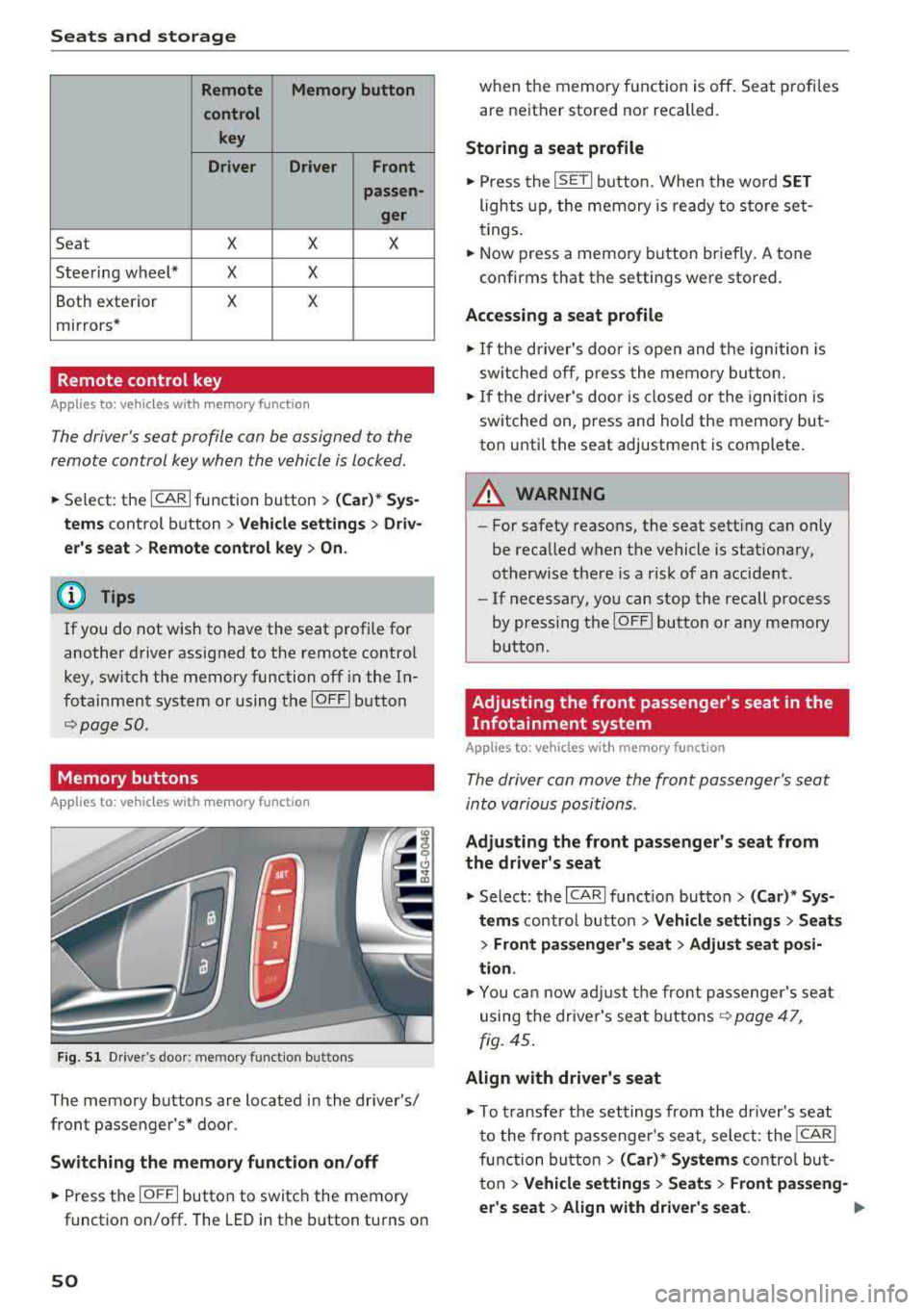
Remote Memory button
control key
Driver Driver
Front
passen-
ger
Seat X X X
Steering wheel* X X
Both exterior X X
mirrors*
Remote control key
Applies to: vehicles with memory function
The driver 's seat profile can be assigned to the
remo te control key when the vehicle is locked.
.,.. Se lect : the ICARI function button > (Car)* Sys
tems
control button > Vehicle settings > Driv
er 's seat
> Remote control key > On.
(D Tips
If you do not wish to have the seat profile for
another driver assigned to the remote contro l
key, switch the memory function off in the In
fotainment system or using the
IOFFI button
r::::;, page 50 .
Memory buttons
App lies to: vehicles with memory function
Fig. 51 Drive r's door : m em ory functio n bu ttons
The memory buttons are located in the driver's/
front passenger 's* door.
Switching the memory function on/off
.,.. Press the IO FF I button to switch the memory
functio n on/off. The LED in the button turns on
50
when the memory function is off . Seat profiles
are neither stored nor recalled.
Storing a seat profile
.,.. Press the ISET I button . When the word SET
lights up, the memory is ready to store set
tings.
.,.. Now press a memo ry button briefly. A tone
confirms that th e settings were stor ed.
Accessing a seat profile
.,.. If the driver's door is open and the ignition is
sw itched off, press the memory button.
.,.. If the driver's door is closed or the ignition is
switched on, press and hold the memory but
ton until the seat adjustment is complete .
A WARNING
-For safety reasons, the seat setting can only
be recalled when the vehicle is stationary,
otherwise there is a risk of an accident .
-If necessary, you can stop the recall process
by press ing the
IOF FI butto n or any memory
button .
Adjusting the front passenger's seat in the
Infotainment system
Applies to: vehicles with memory function
The driver can move the front passenger's seat
into various positions .
Adjusting the front passenger's seat from
the driver's seat
.,. Select: the I CARI function button > (Car)* Sys
tems
control butto n > Vehicle settings > Seats
> Front passenger's seat > Adjust seat posi
tion .
.,.. You can now adjust the front passenger's seat
using the driver's seat buttons
r:::;, page 47,
fig. 45.
Align with driver's seat
.,. To trans fer the settings from the dr iver's seat
to the front passenge r's seat, select: the
I CAR I
function button > (Car)* Systems control but
ton
> Vehicle settings > Seats > Front passeng-
er 's seat
> Align with driver 's seat. .,..
Page 64 of 274
Warm and cold
mode switches off . The temperature shou ld be
set to approximate ly 72 ° F (22 °C).
The
IAUTOI button sw itches the defroster off.
IQill REAR I Switching the rear window defogger
on /off
The rear window heate r on ly operates when the
e ng ine is r unni ng.
It sw itches off a utomat ica lly
afte r a few minutes, depend ing on the o utside
temperature .
To prevent the rear w indow heater from swit ch
i n g off automatically, p ress and ho ld the
l lliil REAR I
button fo r more than 2 seconds . This is s tored
until the ignition is switched off.
I SYNC I Synchronization
When synchronization is switched on, the set
tings for the dr ive r's side are appl ied to the front
p a ssenger's s ide (except for se at heating/ventila
tion*) . The settings in t he rear are a lso synchron
ized. Synchronization switches off when the set
tings are adj usted individually for the front pas
senger 's side or for the rear.
You can sync hronize the settings in a row by
p ressing and holding a contro l. For example, to
app ly the settings for the front passenger 's side
to the driver's side, press and ho ld the contro l on
the front passenger's side. The same applies to
the rear .
Residual heat *
With the ignition turned off, yo u can activate the
residual heat function by pressing the
Iii button
c:> fig. 71. The residual heat from the coolant is
used to heat the vehicle interior. The residual
heat function switches off automatically after
about 30 m inutes .
Air vents
You can open or close the center and rear vents in
the cockpit and the vents in the rear center con
sole and door p illars using the r idged thumb
wheels . The levers adjust the direct ion of the a ir
flow from the vents .
62
A WARNING
-You shou ld not use the recircu lation mode
for an extended period of time since no
fresh air is drawn in . W it h the air-condition
ing sw itched off, the windows ca n fog up,
whi ch inc reases the risk of an acc ident.
- Individ uals w ith reduced sensit iv ity to pa in
or tempe rature co uld develop b urns when
using the sea t heat ing f unct io n. T o re duce
t he r isk of injury, t hese individua ls sho uld
no t u se sea t hea ting.
@ Note
T o avoid damage to the heating elements in
the seats, do no t knee l on t he se ats o r pla ce
h eavy lo ads on a small area of the seat.
Basic settings
The climate control system basic settings are ac
cessed in the Infotainment system.
~ Select: the I CARI funct ion button > (Car )* Sys-
tems
contro l butto n > AC.
Rear seat settings *
When this function is se lected, all settings for
the rear can be adjusted through the climate con
trol system in the cockp it . T he climate control
system settings cannot be ad justed in the rear
seat at the same time. This f unct io n sw itches off
after a ce rtain per iod of t ime o r whe n one of t he
con tro ls in t he coc kp it is pressed.
Automatic recirculation*
The sensitivity level of t he automatic recircula
tion mode can be set at various levels from
Off to
Sen sitive . Recircul at io n mode is cont ro lled auto
matically. If the w indows fog up, p ress t he
l
Footwell temperature*
You can adjust the footwell temperature so that
i t is cooler or wa rme r.
Page 69 of 274
a co ,...,
N
" N ,...,
0 00 <.,;) '
face, the supplemental driver's airbag can
not provide as much protection in an acci
dent . Always make sure that the steering
wheel is aligned with your chest .
- Always hold the steering wheel with your
hands at the 9 o'clock and 3 o'clock posi
tions to reduce the risk of personal injury if
the driver's airbag deploys.
- Never hold the steering wheel at the 12 o'clock position or with your hands inside
the steering wheel rim or on the steering
wheel hub. Holding the steering wheel the
wrong way can cause serious injuries to the hands, arms and head if the driver's airbag
deploys.
Power steering wheel position adjustment
Applies to: veh icles with power steering wheel adjustment
The steering wheel position can be adjusted elec
trically up and down and forward and back.
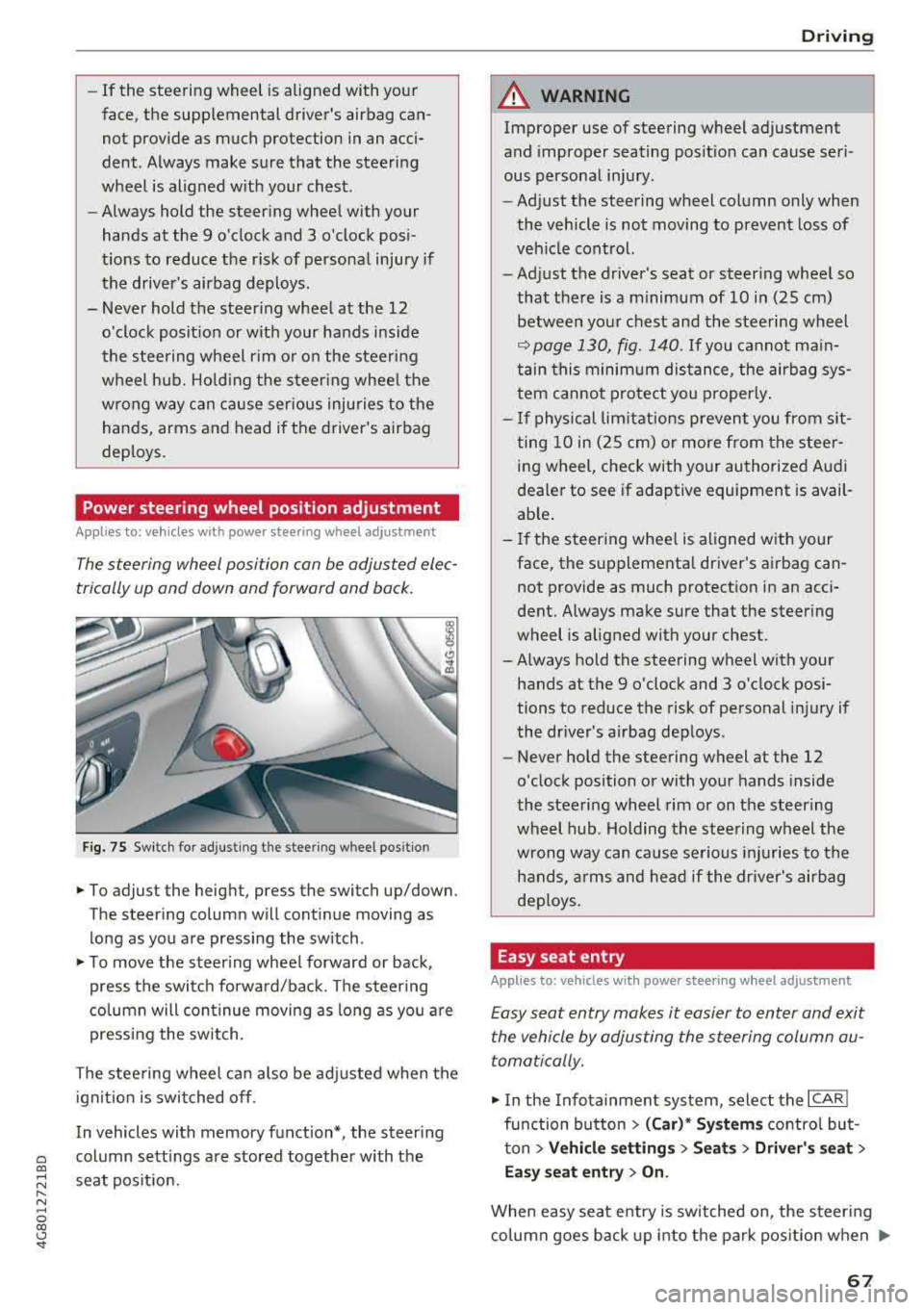
Fig. 75 Switch for adjusting the steering whee l pos itio n
.,. To adjust the height, press the switch up/down.
The steering column will continue moving as
long as you are pressing the switch .
.,. To move the steering wheel forward or back,
press the switch forward/back. The steering
column will continue moving as long as you are
pressing the switch.
The steering wheel can also be adjusted when the ignition is switched off .
In vehicles with memory fun ction*, the steering
column settings are stored together with the
seat position.
Driving
A WARNING
Improper use of steering wheel adjustment
and improper seating position can cause seri
ous personal injury.
- Adjust the steering wheel column only when
the vehicle is not moving to prevent loss of
vehicle control.
- Adjust the driver's seat or steering wheel so
that there is a minimum of 10 in (25 cm) between your chest and the steering wheel
¢ page 130, fig. 140. If you cannot main
tain this minimum distance, the airbag sys
tem cannot protect you properly.
- If physical limitations prevent you from sit
ting 10 in (25 cm) or more from the steer
ing wheel, check with your authorized Audi
dealer to see if adaptive equipment is avail
able.
- If the steering wheel is aligned with your
face, the supplemental driver's airbag can not provide as much protection in an acci
dent. Always make sure that the steering
wheel is aligned with your chest.
- Always hold the steering wheel with your
hands at the 9 o'clock and 3 o'clock posi
tions to reduce the risk of personal injury if
the driver's airbag deploys .
- Never hold the steering wheel at the 12
o'clock position or with your hands inside
the steering wheel rim or on the steering
wheel hub. Holding the steering wheel the
wrong way can cause serious injuries to the
hands, arms and head if the driver's airbag
deploys.
Easy seat entry
Applies to: vehicles with power stee ring wheel adjus tment
Easy seat entry makes it easier to enter and exit
the vehicle by adjusting the steering column au
tomatically.
.,. In the Infotainment system, select the ICARI
function button > (Car)* Systems control but
ton
> Vehicle settings > Seats > Driver's seat >
Easy seat entry > On.
When easy seat entry is switched on, the steering
column goes back up into the park position when
.,.
67
Page 86 of 274

Ass is tance sy stem s
Assistance systems
Speed warning system
Description
Applies to: veh icles with speed warning system
The speed warning system helps you to stay un
der a specified maximum speed.
The speed warning system warns you if you are
exceeding the maximum speed that you have set.
A warning tone will sound as soon as your speed
exceeds the sto red value slightly.
The . (USA models) I. (Canada models) indi
cator light and a message appear in the instru
ment cluster display at the same time.
The.
• indicator light and the message turn off if the
speed falls back below the stored maximum
speed.
Sett ing a threshold is recommended if you would
like to be reminded when you reach a certa in
maximum speed. S ituations where you may want
to do so i nclude driving in a country wit h a ge ne r
a l speed limit o r if the re is a specified maximum
speed for winter tires.
Setting the warning threshold
The warning threshold is set in the Infotainment
system.
• Se lect: the ICARI function button> (Car )* Sys
tems
control button > Driver assistan ce >
Spe ed warning .
(D Tips
Regardless of the speed warning system, you
should always monitor your speed using the
speedometer and make sure you are following
the legal speed limit.
84
Cruise control system
Switching on
Applies to: vehicles with cruise control system
The cruise control system makes it possible to
drive at a constant speed starting at 20 mph (30
km/h).
0
f
~
0
F ig . 86 Operat ing lever: c ruise control system
• To switch t he cru ise control o n, pull the lever
into position
(D ~ fig. 86 .
• Drive at the speed to be maintained.
• To store the speed, press the button @.
The stored speed and the
( ij;\1)~14 (USA models) /
l'I (Canada models) ind icator lig ht are disp layed
in the instrument cluster.
This information is also shown briefly in the
head -up display* .
The speed is mainta ined by modifying engine
power or through a n active br ake interven tion.
~ WARNING
-Always pay at tentio n to the traffic around
you when the cruise contro l system is in op
eration . You are always respons ible for your
speed and the distance between your ve hi
cle and other vehicles.
-For safety reasons, cruise control should not
be used in the city, in stop-and-go traff ic, on
winding roads and when road conditions are poor (such as ice, fog, gravel, heavy rai n and
hyd roplaning), because this inc reases the
r is k of an accident.
-Switch the cr uise control off temporarily
when dr iv ing in turning lanes, highway exits
or in constr uction zones.
-
Page 96 of 274

Assistance systems
objects that you are transporting to reduce
the risk of damage or injury.
Settings in the Infotainment system
A pp lies to: ve hicles w ith Audi a daptive cruise co ntro l
~ Se lect : the ICARI function button > (Car)* Sys
tems
control button > Driver assistance > Audi
braking guard .
System -
switch the brak ing guard On /Off. When
you switch the ign ition on, the message
Braking
guard: Off
appears if the system is switched off.
Early warning -the distance and approach warn
ings in the display can be sw itched
On /Off .
(D Tips
-Your settings are automatically stored and
assigned to the remote control key being
u sed .
-If you restrict or switch off the ESC, the
braking guard also switches itse lf off
c;, page 121.
-Switch braking guard off when you are load
in g t he ve hicle onto a vehicle ca rr ier, t rain,
sh ip or other type of transportation. This
ca n prevent undesired warnings from the
braking guard system.
Messages
App lies to: ve hicles w ith Audi a daptive cruise co ntro l
Braking guard: Off
This message appears if the system is switched
off throug h the I nfota inment system . Otherwise,
if the system is turned off, the information ap
pears every time shortly after the start of the
trip.
The message also appears if the system is not
ava ilable due to a malfunct ion or if the ESC is
sw itched off
c:;, page 121 . If this is the case, the
system w ill not prov ide warnings about a possi
b le co ll ision.
Braking guard: engaged
This message appears if a sharp brake pressure
was applied due to an acute warning.
94
ACC : Unavailable!
ACC and Audi braking guard: Unavailable
The system cannot guarantee that it will detect objects correctly and is sw itched off. The sensors
have been moved or are faulty . The pre sense
functions may also be affected . Drive to an au
thorized Audi dea le r or aut horized Audi Service
Facility immediately to have the malfunction cor
rected.
ACC: Currently unavailable. No sensor vision
ACC and Audi braking guard: Currently unavail
able. No sensor vision
This message appears if the sensor v iew is ob
structed, for examp le by leaves, snow, heavy
spray or dirt . Clean the sensors
c:;, page 87,
fig . 90 .
ACC : Currently unavailable. Gradient too steep
The road exceeds the maxim um possible angle
for safe adaptive cruise control operation. Adap
tive cruise control is switched off.
ACC : Only available in D, Sor M
Select the D/S or M selector lever position.
ACC: Currently unavailable. Parking brake ap
plied
The adaptive cruise control system switches off
automat ica lly if the parking brake is set.
ACC : Currently unavailable. Stability control
(ESC) input.
This message appears if the electro nic stabiliza
tion control (ESC) is taking action to stab ilize the
vehicle. In th is case, adaptive cruise control
switches off automatically.
ACC off: Manual control!
This message appears when adaptive cruise con
trol cannot set the parking brake. Press the brake
pedal to prevent the vehicle from ro llin g.
• ••
Three white dots appear if a setting cannot be se
l ected w ith the operating lever. For example, this
happens if adaptive cru ise control cannot start
driv ing automat ically in stop-and-go traff ic