instrument cluster AUDI A7 2018 User Guide
[x] Cancel search | Manufacturer: AUDI, Model Year: 2018, Model line: A7, Model: AUDI A7 2018Pages: 274, PDF Size: 42.77 MB
Page 77 of 274

a co ,...,
N
" N ,...,
0 00 <.,;) '
transmissions and allow the vehicle to accelerate without a noticeab le interruption in tract ion .
Appl ies to: veh icles wit h a t iptro nic tra nsm iss io n
Power is transferred using a torque converter .
Selector lever positions
Fig. 81 Instrument cluste r: se lecto r leve r po sition s
The selector lever position that is engaged is
shown in the instrument cluster display .
P- Park
T his selector l ev er position prevents the vehicle
from rolling. You can only sh ift into Park when
the vehicle is
stationary ¢.&. .
To shift in and out of the P selector lever posi
tion, press th e interlock button in the selector
lever
while pressing the brake pedal. This only
works when the ignition is turned on.
R - R everse
Only shift into reverse gea r when the vehicle is
stationary and the engine is running at idle
speed ¢.&. .
To select the R se lector lever position, press t he
interlock button
while pressing the brake peda l
at the same time. The back-up lights switch on in
the R position if the ignition is switched on .
N -Neutral
The transm iss ion is in idle in this pos it ion ¢,&. .
DIS -Normal pos iti on for d riv ing forward
In the D/S selector lever pos ition, the transm is
sion can be ope rated either in the normal D mode
or in the S sport mode . T o select the S sport
D rivi ng
mode, pull the selector lever back briefly. Pulling
the lever back again will select the normal D
mode. The instrument cluster d isp lay shows the
selected driving mode.
In the
n o rmal mode D, the transmission auto
matically selects the suitable gear ratio .
It de
pends on engine load, vehicle speed and driving
style.
Se lect the
sport mode S for sporty driving . The
vehicle makes fu ll use of the engine's power.
Sh ift ing is more not iceable when accelerating .
To move from selecto r lever pos ition N to D, you
must press the brake pedal and the vehicle must
be traveling less than 1 mph (2 km/h) or be sta
t ionary ¢.&. .
A WARNING
----
-The vehicle can roll even if the ignition is
sw itched off.
- Never se lect R or P while driving, because
this increases the risk of an accident.
- Power is still transmitted to the wheels
when the engine is running at idle . To pre
vent the vehicle from "creeping", you must keep your foot on the b rake in all selector
lever positions (except P) when the engine is
r u nning. Otherwise, this inc reases the risk
of an acc ident.
- Do not inadvertently p ress the accelerator
pedal when the vehicle is stopped if a gea r is
engaged. O therwise the ve hicle will start to
move immed iate ly, even if the parking brake
is set . This could result in a crash.
- To decrease the r is k of an accident, these
lecto r lever mus t be in the P pos ition and
the parking brake must be set before open
ing the hood and working on a running en
g ine. A lways read and follow the applicable
warn ings
¢ page 193, Working in the en
gine compartment.
(D Tips
- Drive select : sporty shifting characteristics
can be se lected using the
Dynamic driv ing
mode.Swill appear in the instrument clus
ter display instead of D.
75
Page 80 of 274
Driving
On vehicles with a cruise control system*
¢ page 84, hill descent control is also activated
when the speed is set.
A WARNING
Hill descent control cannot overcome physical
limitations, so it may not be able to maintain
a constant speed under all condit ions. Always
be ready to apply the brakes.
Shifting manually (tiptronic mode)
The tiptronic mode allows the driver to shift the
gears manually.
)
r
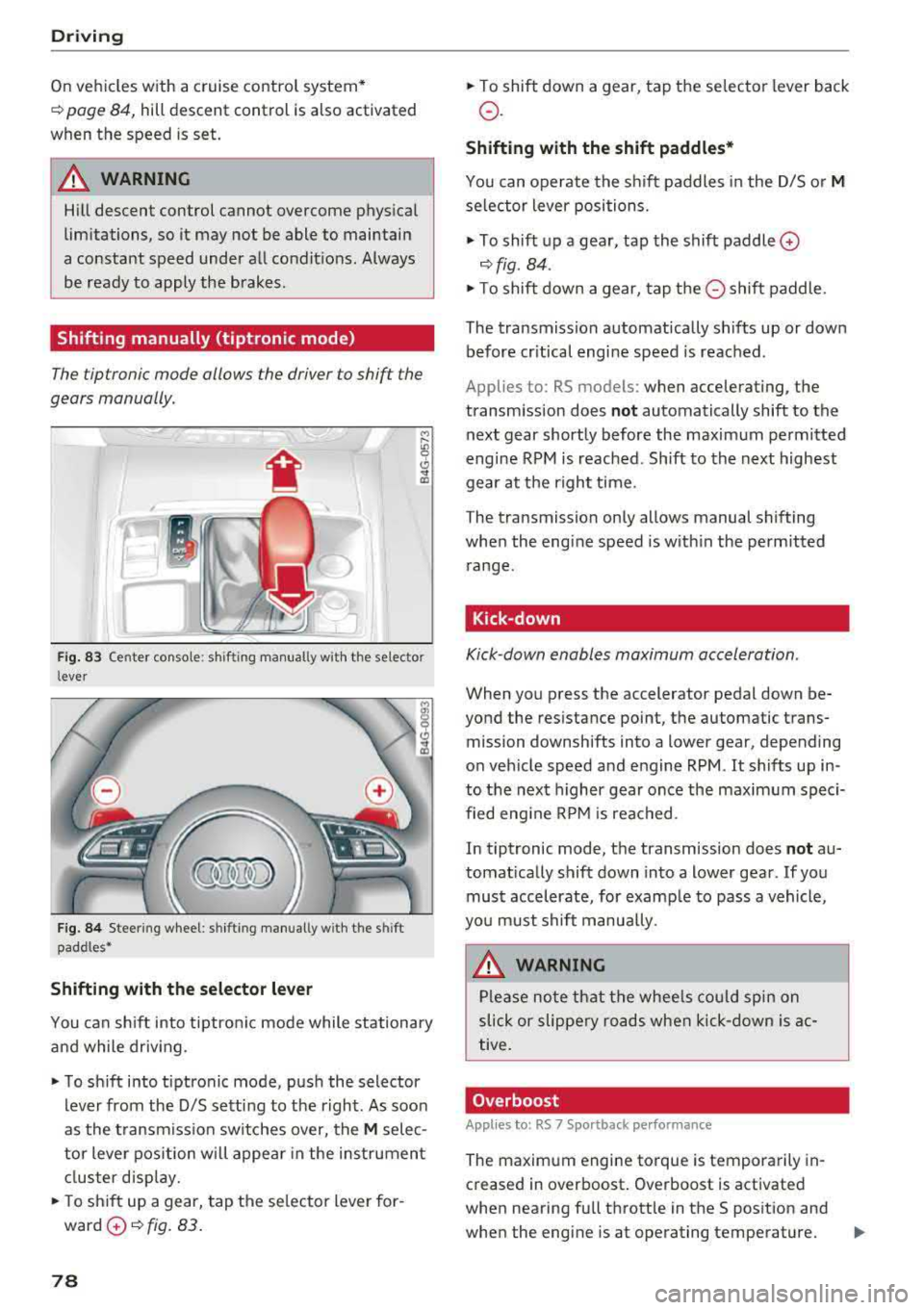
Fig. 83 Center console : sh ifting manual ly w ith the se lector
l ever
F ig. 84 Stee ring wheel: shifting manually w ith t he s hift
paddles*
Shifting with the selector lever
You can shift into tiptronic mode while stationary
and while driv ing .
"To shift into tiptronic mode, push the selector
lever from the 0/5 sett ing to the right. As soon
as the transmission switches over, the
M selec
tor lever position will appear in the instrument
cluster disp lay.
.. To sh ift up a gear, tap the se lector lever for
ward
0 ¢ fig. 83.
78
" To shift down a gear, tap the selector lever back
o.
Shifting with the shift paddles*
You can operate the shift paddles in the 0/5 or M
selector lever positions.
" To shift up a gear, tap the shift paddle 0
¢ fig . 84 .
"To shift down a gear, tap the 0 shift paddle.
The transmission automatically shifts up or down before cr itical engine speed is reached .
Applies to: RS mo dels: when accelerating , the
transmission does
not automatically shift to the
next gear shortly before the maximum permitted
engine RPM is reached. Shift to the next highest
gear at the right time.
The transmission only allows manual shifting
when the engine speed is w ith in the permitted
range.
Kick-down
Kick -down enables maximum acceleration .
When you press the accelerator pedal down be
yond the resistance point, the automatic trans mission downshifts into a lower gear, depending
on veh icle speed and engine RPM .
It shifts up in
to the next higher gear once the maximum speci
fied engine RPM is reached .
In tiptronic mode, the transmission does
not au
tomat ically shift down into a lower gear . If you
must accelerate, for examp le to pass a vehicle,
you must shift manually .
A WARNING
-
Please note that the wheels could spin on
slick or slippery roads when kick-down is ac
tive.
Overboost
Appl ies to : RS 7 Sportback pe rformance
The maximum engine torque is temporarily in
creased in overboost . Overboost is activated
when nearing full throttle in the S position and
when the engine is at operating temperature.
II>
Page 86 of 274

Ass is tance sy stem s
Assistance systems
Speed warning system
Description
Applies to: veh icles with speed warning system
The speed warning system helps you to stay un
der a specified maximum speed.
The speed warning system warns you if you are
exceeding the maximum speed that you have set.
A warning tone will sound as soon as your speed
exceeds the sto red value slightly.
The . (USA models) I. (Canada models) indi
cator light and a message appear in the instru
ment cluster display at the same time.
The.
• indicator light and the message turn off if the
speed falls back below the stored maximum
speed.
Sett ing a threshold is recommended if you would
like to be reminded when you reach a certa in
maximum speed. S ituations where you may want
to do so i nclude driving in a country wit h a ge ne r
a l speed limit o r if the re is a specified maximum
speed for winter tires.
Setting the warning threshold
The warning threshold is set in the Infotainment
system.
• Se lect: the ICARI function button> (Car )* Sys
tems
control button > Driver assistan ce >
Spe ed warning .
(D Tips
Regardless of the speed warning system, you
should always monitor your speed using the
speedometer and make sure you are following
the legal speed limit.
84
Cruise control system
Switching on
Applies to: vehicles with cruise control system
The cruise control system makes it possible to
drive at a constant speed starting at 20 mph (30
km/h).
0
f
~
0
F ig . 86 Operat ing lever: c ruise control system
• To switch t he cru ise control o n, pull the lever
into position
(D ~ fig. 86 .
• Drive at the speed to be maintained.
• To store the speed, press the button @.
The stored speed and the
( ij;\1)~14 (USA models) /
l'I (Canada models) ind icator lig ht are disp layed
in the instrument cluster.
This information is also shown briefly in the
head -up display* .
The speed is mainta ined by modifying engine
power or through a n active br ake interven tion.
~ WARNING
-Always pay at tentio n to the traffic around
you when the cruise contro l system is in op
eration . You are always respons ible for your
speed and the distance between your ve hi
cle and other vehicles.
-For safety reasons, cruise control should not
be used in the city, in stop-and-go traff ic, on
winding roads and when road conditions are poor (such as ice, fog, gravel, heavy rai n and
hyd roplaning), because this inc reases the
r is k of an accident.
-Switch the cr uise control off temporarily
when dr iv ing in turning lanes, highway exits
or in constr uction zones.
-
Page 91 of 274
a co ,...,
N
" N ,...,
0 00 <..:l '
Applies to: ve hicles with Audi adaptive cruise co ntro l
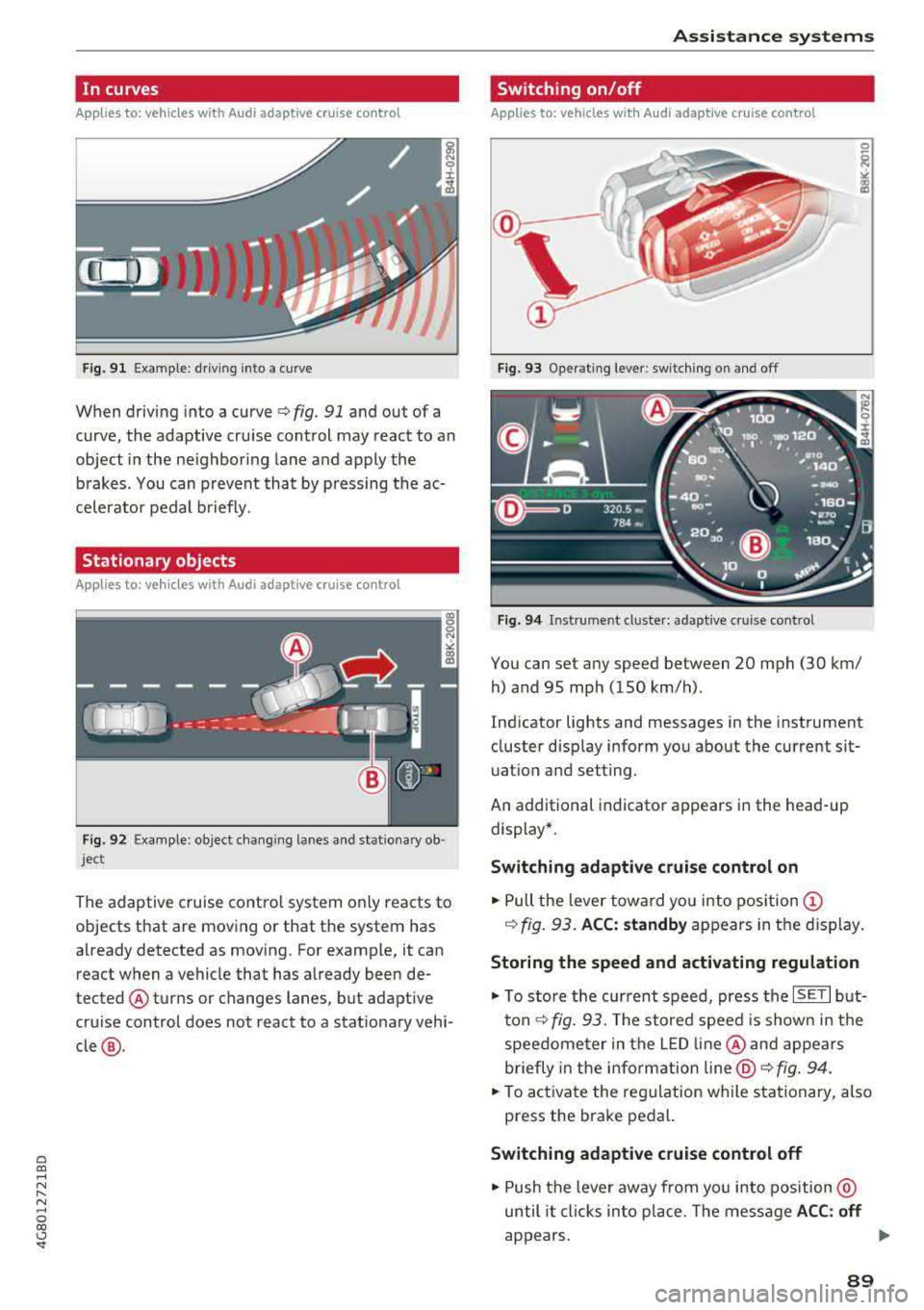
Fig. 9 1 Example: dr iv ing into a curve
When driving into a curve ¢ fig. 91 and out of a
curve , the adaptive cruise control may react to an
object in the ne ighboring lane and apply the
b rakes. You can prevent that by p ressing the ac
celerator pedal b riefly.
Stationary objects
A pp lies to: ve hicles with Audi adaptive cruise contro l
Fig. 92 Example: object changi ng lanes and stationa ry ob
ject
The adaptive cruise contro l system only reacts to
objects that are mov ing or that th e system has
already detected as moving. For example, it can
react when a vehicle that has already been de
tected @turns or changes lanes, but adapt ive
cru ise control does not react to a stat ionary vehi
cle @.
Assi st a nce systems
Switching on/off
App lies to : vehicles wit h Audi ada ptive cr uise control
Fi g. 93 Operat ing lever : switch ing on and off
Fig . 94 Instrument clus te r: adaptive cru ise cont rol
You can set any speed between 20 mph (30 km/
h) and 95 mp h (150 km/h) .
Ind icator lights and messages in the instrument
cluster disp lay inform you about the current sit
uatio n and setting.
An additional indicator appears in the head-up display*.
Switching adaptive crui se control on
.,. Pull the lever towa rd yo u into pos ition (!)
¢ fig. 93. ACC: standby appears in the display .
Storing the speed and activating regulation
.,. To store the current speed, press the ISE TI but
ton ¢ fig. 93. The stored speed is show n in the
speedome ter in the LED line @and appears
briefly in the i nform ation
line @¢ fig. 94 .
... To activate the reg ulation while stationary, also
press the brake pedal.
Switching adaptive cruise control off
.,. Push the lever away from you into position @
until it cl icks in to p lace. The message
A CC: off
appears. ..,.
89
Page 92 of 274

Ass is tance sy stem s
@ Indicator light s
Ill -Adaptive cruise cont rol is switched on. No
objects a re detected ahead. The stored speed is
maintained.
• -An object ahead was detected. The adaptive
cruise control system regulates the speed and
distance to the object ahead and accelerates/
brakes automatica lly .
fai -Adaptive cruise control is switched on. An
object ahead was detected . Your vehicle rema ins
stopped and w ill not start driving automat ica lly.
• -The automatic braking is not enough to
maintain a suffic ient distance to a n object ahead.
You must intervene
¢ page 92, Request for
driver intervention.
© Instrument cluster display
I f adaptive cruise contro l is not shown in the in
strumen t cluster display, yo u can call it up using
the multifunction stee ring wheel b uttons
¢ page 20.
Based on the graphics in the d isp lay, you can de
termine if the system is ma inta ining a distance to
the object ahead and what that distance is.
No vehicl e -no object was detected ahead .
Whit e vehicle -an object was detected ahead.
Red veh icle -request for driver intervention
¢ page 92 .
Both
arrow s on the scale © indicate the distance
to the object ahead . No arrow appea rs when the
vehicle is on an open road and there is no obje ct
ahead. If an object is detected ahead, the arrow
moves on t he scale.
The green zone on the scale indicates the store
distance. For information on changing the dis
tance, refer to
¢ page 91. If the distance se
lected is exceeded or not reached, the arrow
moves into the red zone on the sca le.
A WARNING
If you press the ISE TI button when driving at
speeds below 20 mph (30 km/h), the vehicle
accelerates automat ically up to 20 mph (30
90
km/h), wh ich is the minimum speed that can
be set .
(D Tips
-If you switch the ign it ion or the adaptive
cruise control system off, the set speed is
erased for safety reasons .
- The electronic stabilization control (ESC) and the anti-slip-regulation (ASR) are auto
matically switched on when the adaptive
cruise control is switched on.
Changing the speed
Applies to: vehicles with Audi adapt ive cruise control
0
f
jJ
0
Fig . 95 Operat ing lever: chang ing the speed
.,. To increase or reduce the speed in increme nts,
tap the lever up or down.
.,. To increase or decrease the speed qu ickly, hold
the lever up or down until the red LED @ reach
es the des ired
speed ¢ page 89 , fig. 94.
After each change, the new stored speed appears
briefly in the information
line¢ page 89, fig. 94
@ .
Driving in stop-and-go traffic
App lies to: vehicles with Aud i adapt ive cru ise control
The adaptive cru ise cont rol system also assists
you in stop-and-go traffic.
Stopping automatically
If
an object ahead stops, your vehicle will brake
and stay at a stop, within the limits of the sys
tem . The Start/Stop system* can be used as usu-
al. ..,.
Page 99 of 274
a co ,...,
N
" N ,...,
0 00 <..:l '
road, a banked roadway or crosswinds, the
corrective steering alone may not be enough
to keep the vehicle in the middle of the lane.
- For safety reasons , active lane assist must
not be used when there are poor road and/
o r weather conditions such as slippery
roads, fog, gravel, heavy ra in, snow and the
potent ial for hydroplaning. Using active lane
assist unde r th ese conditions may increase
the risk of a c rash .
Switching on/off
Appl ies to : ve hicles with Audi active lane assist
... g
9 ::i CX) ID
•
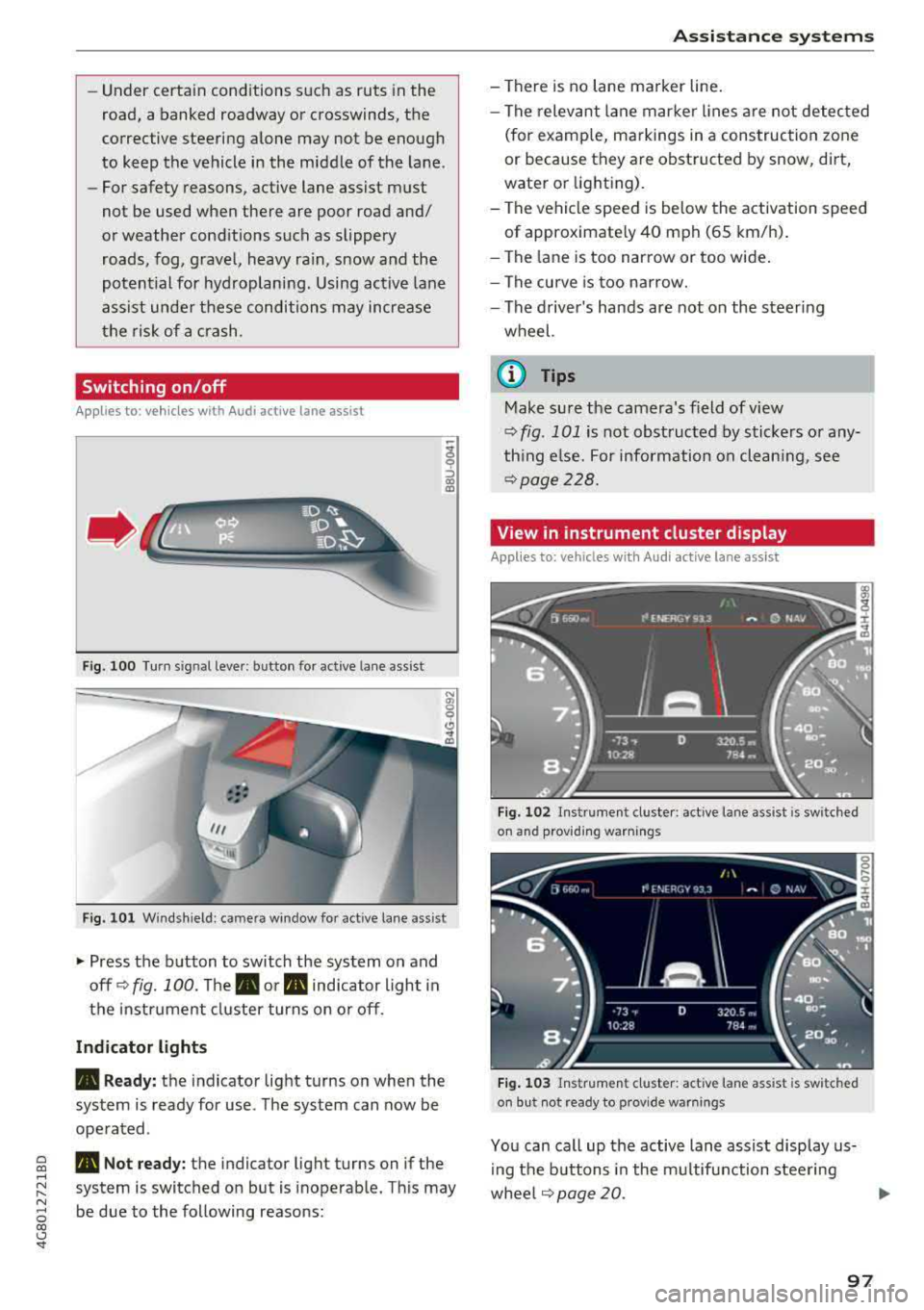
F ig. 1 00 Turn s ig n al leve r: b utton for act ive lane a ss is t
Fi g. 101 W ind sh iel d: cam era win dow fo r active lane ass is t
~ Press the b utton to switch the system on and
off ¢
fig. 100. The . or m, ind icator light in
the i nstrume nt cl uster turns on o r off.
Indicator lights
• Ready: the i ndicator light turns on whe n the
sys tem is ready for use . The sys tem can now be
ope rated .
m, Not ready: t h e indica tor ligh t turns on if the
system is switched o n but is i noperab le. Th is may
be due to the following reasons:
A ssi st a nce systems
- There is no lane marker line .
- The relevant lane mar ke r li nes a re not detec ted
(for examp le, m arkings in a construction zone
or because they are obstructed by snow, dirt,
wate r or light ing).
- The ve hicle speed is be low the activation speed
of approximate ly 40 mph (65 km/h) .
- The lane is too narrow or too wide .
- The curve is too narrow.
- The driver's hands are not on the steer ing
wheel.
(I} Tips
Make su re the camera's f ield of view
q fig . 101 is not obst ructed by stickers o r any
th ing e lse. For information on clean ing , see
¢ page 228.
View in instrument cluster display
Applies to: vehicles wit h Audi ac tive lane assist
Fig. 102 Ins trume nt cl uste r: act ive lane ass ist is sw it c h ed
on and prov idi ng warnings
Fi g. 1 03 Instr um en t cl uster : act iv e la ne ass ist is sw it c h ed
on but not rea dy to provide warn ings
You can ca ll up the active lane assist display us
i ng the b uttons in the m ultifunction steering
whee l
q page 20. .,.
97
Page 100 of 274
Assistance systems
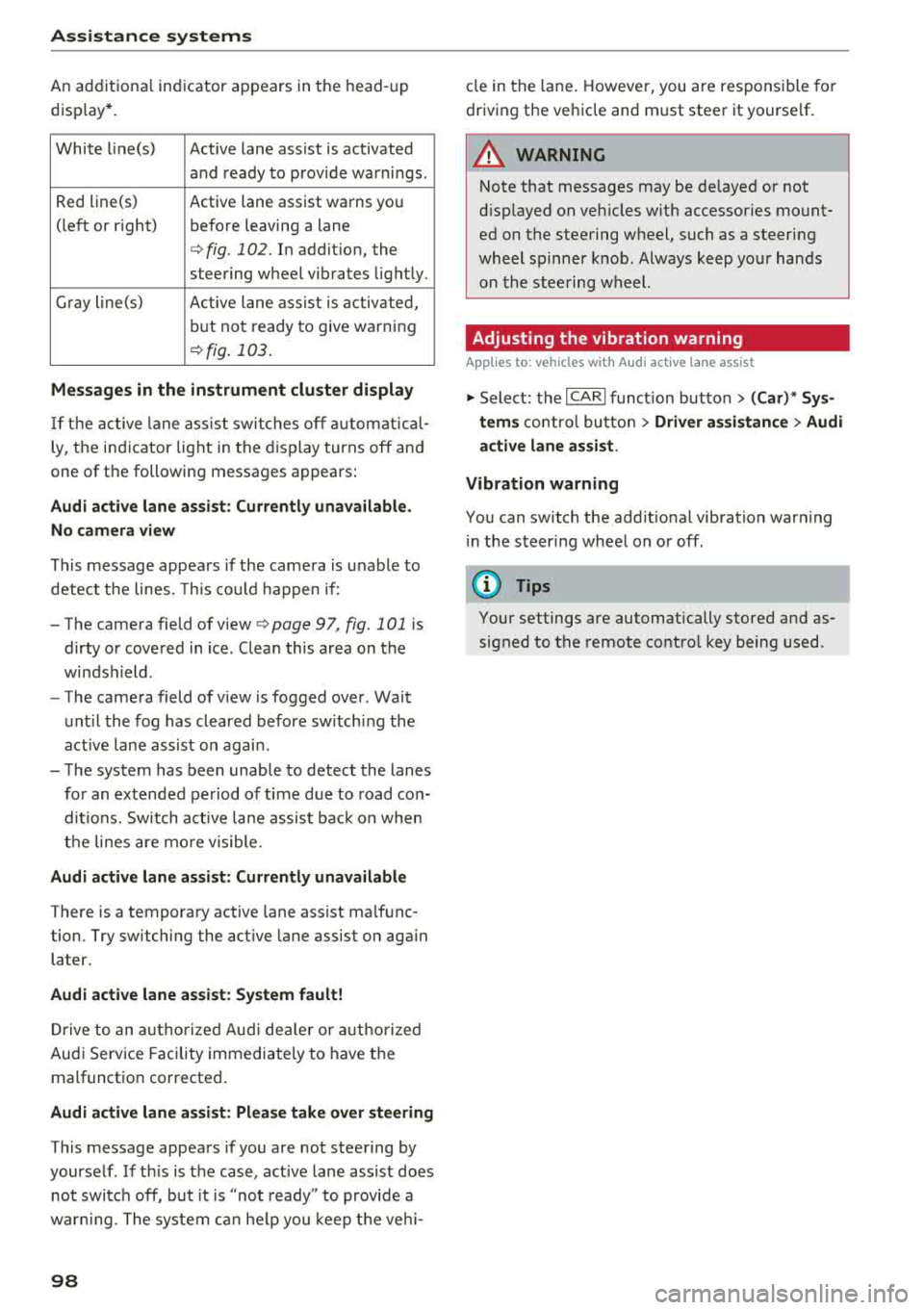
An additional indicator appears in the head-up
disp lay*.
White line(s) Active lane assist is activated
and ready to provide warnings .
Red line(s) Active lane assist warns you
(left o r right) before leaving a lane
c::>fig. 102. In addit ion, the
steering wheel vibrates lightly.
Gray line(s) Active lane assist is activated,
but not ready to give warning
c::>fig . 103.
Messages in the instrument cluster display
If the active lane assist swit ches off automat ical
ly, the indicator lig ht in the display turns off and
one of the following messages appears :
Audi active lane assist: Currently unavailable .
No camera view
This message appears if the came ra is unable to
detect the lines. This cou ld happen if :
- The camera field of v iew
c::> page 97, fig . 101 is
dirty or covered in ice. Clea n this area on the
windsh ield .
- The camera field of v iew is fogged over . Wait
until the fog has cleared before switch ing the
active lane assist on again .
- The system has been unable to detect the lanes
for an extended period of time due to road con
ditions. Sw itch act ive lane assist back on when
the lines are more visible.
Audi active lane assist : Currently unavailable
There is a temporary active lane assist ma lfunc
tion . Try sw itching the act ive lane assist on aga in
la ter.
Audi active lane assist : System fault!
Drive to an autho rized Aud i dealer or authorized
Audi Service Facility immediately to have the
malfunction corrected .
Audi active lane assist: Please take over steering
This message appears if you are not steering by
yourself . If th is is the case, active lane assist does
not switch off, but it is "not ready" to provide a
war ning. The system can help you keep the vehi-
98
cle in the lane . However, you are responsible for
driving the vehicle and must steer it yourse lf .
A WARNING
Note that messages may be de layed or not
displayed on vehicles with accessories mount
ed on the steering wheel, such as a steering
wheel spinner knob. Always keep your hands
on the stee ring wheel.
Adjusting the vibration warning
App lies to: vehicles wit h Audi active la ne ass ist
-
~ Select: the I CARI function button > (Car)* Sys
tems
contro l butto n > Driver assistance > Audi
active lane assist .
Vibration warning
You can switch the addit ional vibration warn ing
i n the steer ing wheel on or off .
(D Tips
Your settings are automatically stored and as
signed to the remote control key being used .
Page 104 of 274

Assistance systems
@ Tips
-Side assist is not active while you are mak
i ng the adjustment.
- Your settings are automatically stored and
assigned to the remote control key being
used.
Messages
Applies to: ve hicles w ith Audi side assist
If side ass ist switches off by itself, the LED in the
button turns off and a message will appear in the
instrument cluster display:
Audi side assist: Currently unavailable . No
sensor vision
The radar sensor v is ion is impaired . Do not cover
the area in front of the sensors with b ike wheels,
stickers, dirt or other objects . Clean the area in
front of the sensors, if
necessary¢ page 100,
fig . 107.
Audi side assist: Currently unavailable
Side assist cannot be switched on at th is time be ·
cause there is a malfunction (for example, the
battery charge level may be too low).
Audi side assist: System fault!
The system cannot guarantee that it w ill detect
vehicles correctly and it has switched off. The sensors have been moved or are faulty. Have the
system checked by an authorized Audi dealer or
authorized Audi Service Facility soon.
Audi side assist: Unavailable when towing
Side assist switches off automatically when a fac
tory-installed trailer hitch is connected to the
electrical connector on the trailer . There is no
guarantee the system will sw itch off when using
a retrofitted trailer hitch. Do not use side assist
when towing a trailer.
102
Night vision assist with
pedestrian and wild
animal detection
Description
App lies to: vehicles wit h night vision assist
The night vision assist can detect, highlight and,
if necessary, warn about pedestrians and large wild animals.
Night vision assist with pedestrian and wi ld ani
mal detection assists you at night by using an
in ·
frared camera to monitor the area in front of
your vehicle, within the limits of the system. It can d isplay objects up to a distance of approxi
mately 1000 feet (300 m). The thermal image
detected by the camera is shown in the instru
ment cluster display. Warm areas appear lighter
and cold areas appear darker.
Highlighting detected pedestrians and wild
animals
Applies to: vehicles wit h night vision assist
Fig. 109 In stru men t cl uste r: yellow highlighted pedes ·
tria ns
Fig. 110 Instrument cl uster : sy mbol when the infrar ed im
age is not v isible
Within th e limits of the system, the night vision
ass ist can detect pedestrians and wild animals
..,..
Page 105 of 274

a co ,...,
N
" N ,...,
0 00 <.,;) '
295
ft (90 m) in front of the vehicle and within
the detection zone . Within the limits of the sys
tem¢ page 103 , a pedestrian or w ild animal de
tected when the low beams are sw itched on is
h ighlighted in
yellow ¢ fig. 109 . Animal recogni
tion is not active w it hi n highly developed areas .
The system on ly de tects large wild anima ls such
as deer.
(D Tips
If another display such as navigation replaces
t he image from the night v is ion assist
the~ .,
symbo l appea rs in a tab ¢ fig. 110. You can
a ccess nigh t vision assist using the mul tifunc
t ion stee ring w heel
buttons ¢ page 21.
Pedestrian and wild animal warning
Applies to: vehicles with night vision assist
Fig . 111 In stru ment clust er: @ pede stri an warn ing ,@
wi ld ani mal warnin g
Fig. 112 In str ument clus te r: @ pedest ria n warn ing /@
wi ld an imal warning, when t he nigh t vis ion a ssis t image is
n ot se lec ted in the instrument clust er dis p lay
Image in the instrument cluster /head -up
di splay*
If there are pedestrians or wild animals in an
area in front of your veh icle that is class ified as
A ssi st a nce systems
critica l, the system will d irect your atten tion to
t h is:
- Pedestr ians or wild anima ls are h ighlighted in
red and the cor responding
symbo l. or.
turns on ¢fig. 111 .
-There is also an audib le sign al.
T he area classified as critical is based on the vehi
cle speed and the steering wheel angle . Pedes
t rian and w ild an imal warning encourages you to
pay more atten tion.
If the night vision assist image is replaced by an
othe r display (such as the on-board comp ute r) ,
t h e
red . or. in d ic ator lig ht ¢ fig . 112 will
appea r if the re is a pedestrian o r wild animal
war ning .
If the head-up display* is sw itched on and the
night v ision assist content is activated, .
or.
will appear i n the head-up displ ay *.
Marking light*
T o direct the driver's attention to a pedestr ian ,
the headlights can flash on the pedest rian three
tim es in a row whe n there is a pedestr ian war n
ing .
This occurs at speeds above approximately
35 mph (60 km/h) if yo u are outside of illuminat
ed a reas and no de tected ve hicles are shown. Th e
high be am assistant* con trols the m arking ligh t*
¢ page 40, High beam assis tant.
T he ma rking light is not used for wild anima ls .
General information
Applies to: vehicles with night vision assist
Fig . 11 3 Front of t he ve hicle : n ig h t v is io n ass ist camer a
103
Page 106 of 274

Assistance systems
The following situations may affect the function
of t he night vision assist system:
- Poor visibility such as snow, rain , fog or heavy
spray
- Dirty lens on the night vision assist camera
Make sure the night vision ass ist camera
¢ fig. 113 is not covered by stickers, deposits or
any other obstructions because that can affect
the camera function. For information on clean
ing, see
¢ page 228.
The pedestrian and wild animal recognition de
pends on the temperature difference between
the person/wild animal and the background. Peo ple/wild animals may not be detected if the dif
ference is too small. The pedestrian/wild animal
marking and the marking light* deactivate at
temperatures above approximately 77 °F
(25 °()
and during daylight. If the night vision assist
im
age is selected in the instrument cluster display,
then the
II symbol appears at the top on the
right side.
..&_ WARNING
Pay attention to traffic and the area around
your vehicle when night vision assist is switch
ed on. The driver is always responsible for as
sessing the traffic situation.
- Night vision assist can only warn about peo
ple and wild animals located within the visu
al range of the infrared camera. The visual
range corresponds to the image in the in
strument cluster display.
- Night vision assist may not detect people or
wild animals and mark them if
- they are not in an upright position, for ex
ample if they are sitting or lying down
and/or
- the silhouette in the display appears in
complete or interrupted, for example be
cause the person is partially covered by a
vehicle or the animal is partially covered
by tall grass. This could increase the risk
of an accident.
- Never try to swerve around animals if doing
so will endanger you or other road users, be
cause this increases the risk of an accident.
104
@ Tips
- Even though the system evaluates the
shape and heat given off by all detected ob
jects, there are limits to the system. There
may be false warnings.
- For technical reasons, the image pauses in
split second intervals.
Switching on /off
Applies to: vehicles with night vision assist
Fig. 114 Area around the ligh t switc h: ni gh t vis ion assist
button
Requirement: switch the ignition on and turn the
light switch to the
AUTO position.
.,. Press the~ button ¢ fig. 114. The heat image
from the night vision camera appears in the in
strument cluster display .
.,. Press the~ button again to switch the night
vision assist off .
If conditions are bright enough, night vision as
sist can be switched on without moving the light
switch to the
AUTO position. Pedestrian and wild
animal highlighting and warnings are only active
when it is dark outside and the headlights are
switched on.
Adjusting the contra st
Applies to: vehicles with night vision assist
.,. Select: the I CARI function button > (Car)* Sys
tems
contro l button > Driver assistance >
Night vision assist contrast.
When the night vision assist is switched on and
the image is visible in the instrument cluster dis
play, you can adjust the contrast in the image
from
Min to Max .