mirror AUDI A7 2018 User Guide
[x] Cancel search | Manufacturer: AUDI, Model Year: 2018, Model line: A7, Model: AUDI A7 2018Pages: 274, PDF Size: 42.77 MB
Page 102 of 274

Ass is tance sy stem s
General information
Applies to: ve hicles w ith Audi side assist
®
@
F ig. 106 Dr iving s ituations
rn A UD I
• 0 0 •
Fig. 107 Rear of the veh icle: pos it ion of the senso rs
Side assist functions at speeds above app roxi
mately 19 mph (30 km/h).
@ Vehicles that are appro aching
In certain cases, a vehicle will be classified as
cr itical for a lane change even if it is still some
what far away. The faster a veh icle app roaches ,
the sooner the d isplay in the exterio r mirror w ill
turn on .
@ Vehicles traveling with you
Vehicles traveling with you are ind icated in the
exterior m irror if they are classified as critical for
a lane change. All vehi cles detected by side assist
100
are indicated by the time they enter your "blind
spot", at the latest .
© Vehicle s you are passing
If you slow ly pass a vehicle that s ide assist has
detected (the difference in speed between the
vehicle and your vehicle is less than 9 mph (15
km/h)), the display in the exterior mirror turns
on as soon as the vehicle enters your blind spot.
The display w ill not turn on if you quickly pass a
vehicle that side ass ist has detected (the differ
ence in speed is greater than 9 mph (15 km/h)) .
Functional limitations
The radar sensors are designed to detect the left
and rig ht adjacent lanes when the road lanes are
the norma l width. In some si tuations, the display
i n the exterior m irror may turn on even though
there is no vehicle located in the area that is criti
ca l for a lane change. For example:
- If the lanes are narrow or if you are dr iving on
the edge of you r lane . If th is is the case, the
system may have detected a vehicle in another
lane that is
not adjacent to your current lane.
- If you are d riving through a curve. Side assist
may react to a vehicle that is one lane over
from the adjacent lane .
- If side assist reacts to other objects (such as
high or disp laced guard rai ls) .
- In poor weather conditions. The side assist functions are limited .
Do no t cover the rada r senso rs ¢
fig. 107 w it h
stickers, deposi ts, b icycle wheels or other ob
jects, because they will impair the function . Do
not use side assist when towing a trai ler. For in
format ion on cleaning, see
¢ page 228.
& WARNING
- Always pay attention to traffic and to the
area around your vehicle. Side assist cannot
replace a driver's attention . The driver alone
is always responsible for lane changes and
sim ila r driv ing maneuve rs .
- In some situations, the system may not function o r its function may be limited . For
examp le:
-
Page 103 of 274

a co ..... N
" N ..... 0 00 <..:l '
behind very quickly. The display may not
turn on in time.
- In poor weather conditions such as heavy
rain, snow or heavy mist.
- On very wide lanes, in tight curves, or if
there is a rise in the road surface. Vehicles
in the adjacent lane may not be detected
because they are outside of the sensor
range.
- Audi side assist cannot detect all vehicles
under all conditions, which can increase the
risk of accidents.
- Please note that side assist only displays ap
proaching vehicles or vehicles in your blind
spot if your vehicle is traveling at least 19 mph (30 km/h).
- In certain situations, the system may not
work or its function may be limited . For ex
ample:
- The display may not turn on at the right
time if vehicles are approaching or passing
very quickly.
- In poor weather conditions, such as heavy
rain, snow or fog.
- In very wide lanes, in tight curves or when
there are slopes in the roadway, vehicles
in the neighboring lanes may not be de
tected because they are outside of the
sensor range .
(D Note
The sensors can be displaced by impacts or
damage to the bumper, wheel housing and
underbody. This can impair the system. Have
an authorized Audi dealer or authorized Audi
Service Facility check their function.
(D Tips
- If the window glass in the driver's door or
front passenger's door has been tinted, the
display in the exterior mirror may be incor
rect.
- For an explanation on conformity with the
FCC regulations in the United States and the
Industry Canada regulations, see
¢page 258.
Assistance systems
Switching on and off
Applies to : veh icles w it h Audi s ide ass ist
Fig. 108 Driver 's door : side assist button
.,. Press the button to switch the system on and
off ¢.&. in General information on page 100 .
The LED in the button turns on when side assist
is switched on.
Adjusting the display brightness
App lies to: veh icles w ith Audi s ide ass ist
The display brightness can be adjusted in the In
fotainment system .
.,. Select: the I CARI function button > (Car)* Sys
tems control button > Driver assistance > Audi
side assist .
The display brightness adjusts automatically to
the brightness of the surroundings, both in the
information and in the warning stage. In very
dark or very bright surroundings, the automatic
adjustment will set the display to the minimum
or maximum level. In such cases, you may notice
no change when adjusting the brightness, or the
change may only be noticeable once the sur
roundings change.
Adjust the brightness to a level where the display
in the information stage will not disrupt your
view ahead. If you change the brightness, the dis
play in the exterior mirror will briefly show the
brightness level in the information stage . The
brightness of the warning stage is linked to the
brightness in the information stage and is adjust-
ed along with the information stage .
II>-
101
Page 113 of 274
a co ,...,
N
" N ,...,
0 00 <.,;) '
such as th e bumper of a parked vehicle, a
tra ile r hitch or the rear of a truck. Do not
us e the orientation lines in this case.
- If driven from a level surface onto an in
clin e, or a downward slope.
- If driven toward protrud ing objects.
- If the vehicle is carrying too much load in
the rear.
- Applies to: vehicles with air s uspension: the
accuracy of the orientation lines and blue
surfaces decreases when the vehicle is raised/lowered
<=)page 105.
(D Note
- Always read and follow the applicable warn
ings
Q 0 in General information on
page 108.
- The orange-colored or ientation lines in the
Infotainment display show the vehicle path
based on the steering wheel angle. The
front of the vehicle swings out more than
the rear of the veh icle . Ma inta in plenty of
distance so that an exterio r mirror or a cor
ner of the ve hicle does not co llide wit h any
obstacles.
Switching on /off
App lies to : vehicles wit h rearv iew camera
Switching on
.,. S hift i nto reve rse, or
.,. Press t he P' #A button in the cente r console
Qpage 109, fig. 116 . A short confirmat io n
tone sounds and the LED in the button turns
on .
Switching between the rearview camera and
optical di splay
.,. Press the Graphic control button ®
Qpage 111, fig. 121 to see the optica l display.
.,. Press the Rear view contro l button to see the
rearview camera image.
Switching off
.,. Drive faster than 6 mph ( 10 km/h), or
.,. Press the p,,,A button, or
.,. Switch the ignition off.
Parking systems
(D Tips
- The visua l display in the left part of the d is
play sho uld he lp you detect the critical veh i-
cle areas.
- You ca n change the vol ume and pitch of the
signa ls as well as the d isplay
Q page 118.
· Perpendicular parking
Applies to : veh icles w it h rearv iew camera
This view may be used when parking in a garage
or in a parking space .
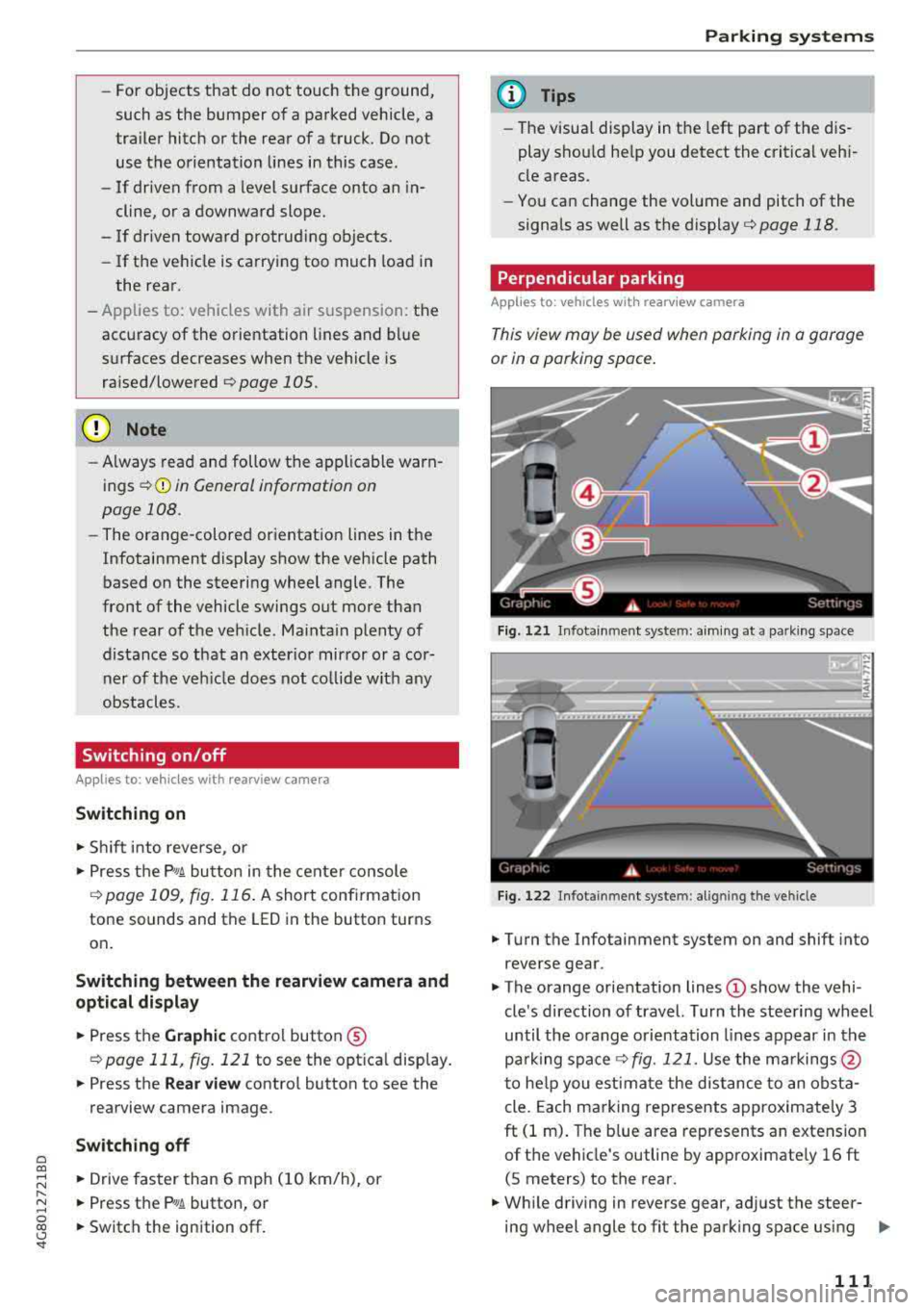
Fig. 1 21 Infotainme nt system: aim ing at a park in g space
Fi g. 122 In fotainment system: al ig nin g the ve hicle
.,. Tu rn the Infotainment system on and shift into
reverse gear.
.,. The orange orientation lines © show the vehi
cle 's direction o f travel. Turn the stee ring wheel
until the orang e orientation lines appear in th e
pa rk ing space
Q fig. 121. Use the ma rkings @
t o he lp you estima te the distance to an obst a
cle. Each ma rking represents approximately 3
ft (1 m) . The b lue area represents an extension
of t he vehicle's outline by approximate ly 16 ft
(S meters) to the rear .
.,. Wh ile driving in reverse gear, ad just the steer-
ing wheel angle to fit the park ing space using
..,_
111
Page 131 of 274
a co .... N
" N .... 0 00 \.J '
Basics
Safe driving habits
Please remember -safety first!
The individua l safety features of your vehicle can
work together as a system to help protect you
and your passengers in a wide range of accidents.
These features cannot work as a system if they
are not always correctly adjusted and correctly
used .
This chapter contains important informat ion,
tips, instruct ions and warn ings that you need to
read and observe for your own safety, the safety
of your passengers and others . We have summar
i zed here what you need to know about safety
be lts, a irbags, child restra ints as well as child
safety. Yo ur safety is for us priority number 1. Al
ways observe the information and warnings in
this section - for your own safety as well as that
of your passengers.
The informa tion in t his sect ion app lies to all
model versions of your vehicle. Some of the fea
tures described in this sections may be standard
eq uipment on some models, or may be optional
equ ipment on others. If you are not sure, ask
your author ized Audi dealer.
A WARNING
-Always make sure that you follow the in
struct ions and heed the WARNINGS in th is
Manual. It is in your i nterest a nd in the in
te rest of your passengers .
-
-Always keep the complete Owner's Litera
t ur e in yo ur Audi whe n you lend or se ll yo ur
vehicle so that this important information
w ill a lways be available to the d rive r and
passengers.
-Always keep the Owne r's literature h andy so
that you can f ind it easily if yo u have ques
tions .
Driving saf ety
Important things to do before driving
Safety is everybody 's job ! Vehicle and occupant
safety always depends on the informed and care
ful driver .
For your safety and the safety of your passen
gers,
befor e dri ving alw ays:
.. Make sure that a ll lights and signals are operat
ing correctly.
.. Make sure tha t the tire pressure is correct .
.. Make sure that all windows are clean and afford
good vis ibility to the outs ide .
.. Secure all luggage and othe r items ca refully
¢ page 54, ¢page 53 .
.. Make sure that not hing c an interfere wi th the
peda ls .
.. Adjust front seat, head restraint and mirrors
correct ly for your height.
.. Instruct passengers to adjust the head re
straints according to their height.
.. Make sure to use the rig ht child restra int cor
rectly to protect children
¢ page 170, Child
safety .
.. Sit properly in your seat and make sure t hat
your passengers do the
same ¢ page 47, Seats
and storage.
.. Fasten your safety belt and wear it properly . Al
so instruct your passengers to fasten their safe
ty belts
properly ¢ page 138 .
What impairs driving safety?
Safe driving is directly related to the condition of
the vehicle , the driver as well as the driver 's abili
ty to concentrate on the road without being dis
tracted.
The driver is responsib le for the safety of the ve
hicle and a ll of its occupants. If your ability to
drive is impa ired, safety risks for everybody in the
vehicle increase and you a lso become a hazard to
everyone else on the road
¢ &_ . Therefore:
.. Do not let yourse lf be distracted by passengers
or by using a cellular telephone .
.. NEVER drive when your driving abi lity is im
pa ired (by med ications, alcohol, drugs, etc .) .
.. Observe all traffic laws, rules of the road and
speed lim its and plain common sense .
129
Page 233 of 274
a co .... N
" N .... 0 00 \.J '
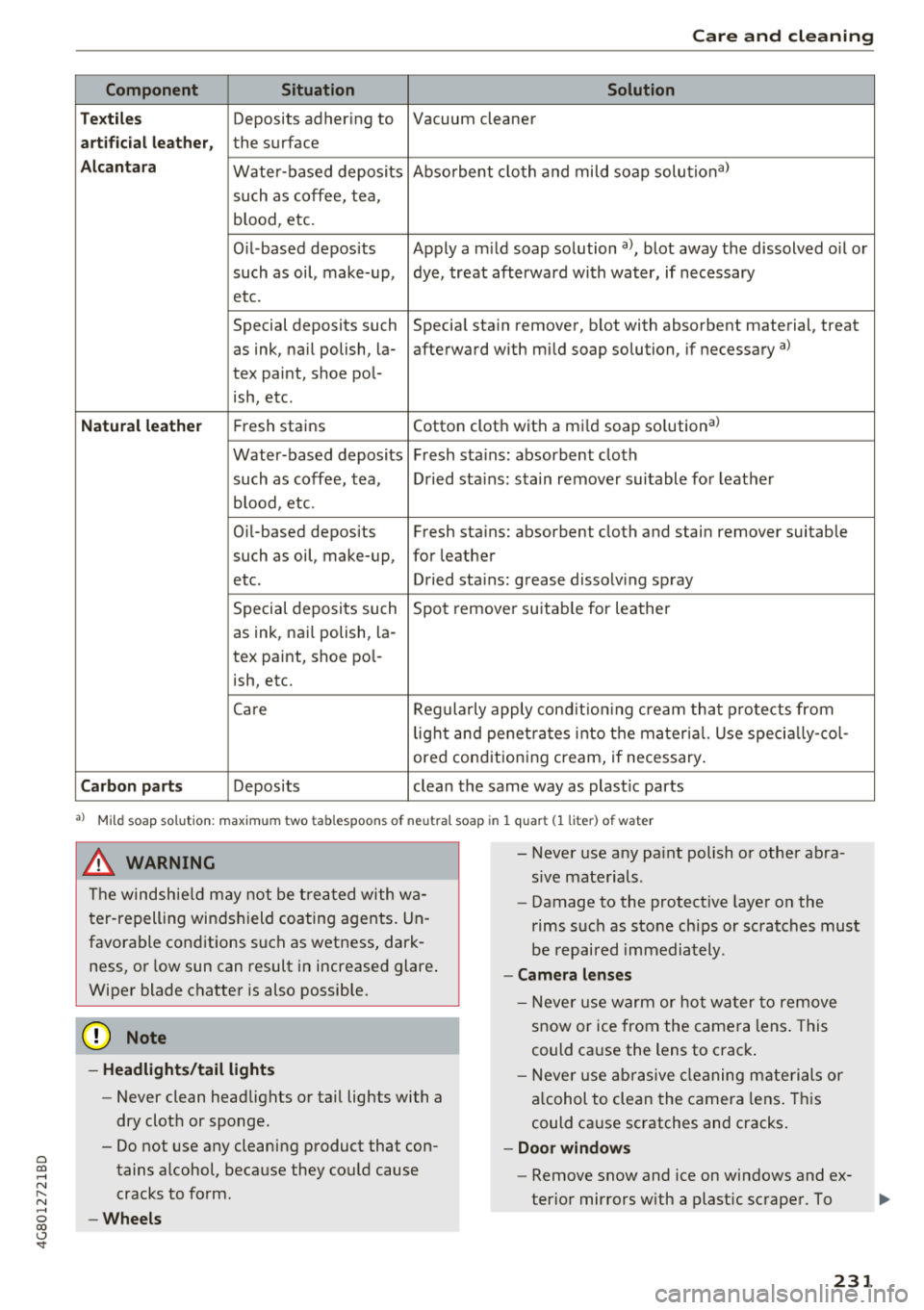
Component Situation Solution
T ex tile s
Deposits adhering to Vacuum cleaner
art ifi ci al l eat her, the surface
A lcan tara Water-based deposits Absorbent cloth and mild soap solutiona>
such
as coffee, tea,
b lood, etc.
O il-based deposits Apply a m ild soap solution
al, blot away the dissolved o il or
such as oil, make-up, dye, treat afterward with water, if necessary
etc.
Special deposits such
Special stain remover, blot with absorbent material, treat
as ink, nail polish, la-afterward with mild soap solution, if necessary
a)
tex paint, shoe pol-
ish, etc.
Natu ral leathe r Fresh stains Cotton cloth with a mi
ld soap so lution a>
Water-based deposits Fresh stains : absorbent cloth
such as coffee, tea, Dried stains: stain remover suitable for leather
b lood , etc.
Oi l-based deposits Fresh stains: absorbent cloth and stain remover suitable
such as oil, make-up, for leather
etc . Dried stains: grease dissolving spray
Special deposits such Spot
remove r suitable for leather
as ink, nail polish, la-
tex paint, shoe pol-
ish, etc.
Care Regula rly apply cond it ion ing cream that p rotects from
lig ht and penet rates into the mater ia l. Use specia lly-co l-
ored conditioning cream, if necessary .
Carbon part s Deposits clean the same way as plast ic parts
a) Mi ld soap solution: maximum two tablespoons of neutral soap in 1 quar t (1 liter) of water
.8, WARNING
The windsh ie ld may not be treated with wa
ter-repelling windshield coating agents. Un
favorable conditions such as wetness, dark
ness, or low sun can result in increased glare .
Wiper blade chatter is also possible.
@ Note
- Headlights /tail light s
-Never clean headlights or tail lights with a
dry clot h or sponge.
- Do not use any cleaning product that con
tains alcohol, because they could cause
cracks to form .
-Wheels
-
- Never use any pa int polish or other abra
sive materials .
- Damage to the protect ive layer o n the
rims such as stone ch ips or scratches must
be repaired immediately .
-Cam era lenses
- Neve r use warm or hot wa ter to remove
snow or ice from the camera lens . This
could ca use the lens to crack .
- Neve r use ab rasive cleaning m ate rials or
a lcohol to clean the camera lens . This
could ca use scratches and cracks .
-Door window s
-Remove snow and ice on windows and ex-
terior mirrors w ith a plast ic scraper . To
23 1
Page 234 of 274
Care and cl eaning
avoid scratches, move the scraper on ly in
one direction and not back and forth.
- Never remove snow o r ice from door win
dows and mirrors using warm or hot water
because this could cause cracks to form .
- To avoid damage to the rear w indow de
fogger , do not apply any stickers on the
heating wires on the inside of the window .
-Deco rati ve parts /trim
- Never use chrome care or cleaning prod-
ucts .
-Paint
-To red uce the risk of scratches, the vehicle
must be free of dirt and dus t before pol
ishing or waxing .
- To prevent pa int damage, do not pol ish or
w ax the veh icle in dire ct sunlight.
- To red uce the risk of pa int damage, do not
polish away rust spots .
- Remove cosmetics and sunscreen immedi
a tely
-these could damage the p aint.
- Displays
- To avoid scratches, do not use dry cleaning
methods on displays .
-Controls
- Make sure that no fluids enter the con-
trols, because this could ca use damage.
- Safety belts
- Do not remove the safety belts to clean
them.
- Never clean safe ty belts o r their compo
nents chemically or with corrosive fl uids
or so lvents and neve r al low sha rp o bje cts
t o come in to con ta ct w ith the sa fe ty belts .
Th is could cause damage to the belt web
bing .
- I f there is damage to the webbing, the
connections, the retractors or the b uckles,
have them replaced by an authorized Audi
dealer or author ized Audi Service Facility.
- Te xtiles /artificial leather/ Alcantara
- Never treat artificia l leather/ Alcantara
w ith leather care p roducts, solvents, floo r
polish, shoe polish, spot remove or similar
prod ucts.
- Have a specialis t remove st ubborn s tains
to prevent damage.
232
- Neve r use steam cleaners, brushes, hard
sponges, etc . when cleaning .
- D o not turn on the seat heating* to dry the
seat.
- Ob jects w ith sharp edges, such as zippe rs
or rive ts on clothing or belts, can cause
damage to the surface .
- Open hook and loop fastene rs, for exam
p le on clothing, can damage seat covers .
Make sure hook and loop fasteners a re
closed.
- Natural leather
- Never treat leather with solvents, floor
polish, shoe polish, spot remover or sim i
lar p roducts.
- Objects w ith sharp edges, such as zippe rs
or rivets on clothing or belts, can cause
damage to the surface.
- Never use steam cleaners, brushes, hard
sponges, etc. when cleaning.
- Do not turn on the seat heating * to dry the
seat .
- To he lp prevent the leather from fad ing,
do not leave the vehicle in d irec t sun light
for long periods of time. If leav ing the ve
h icl e parked fo r long pe riods of time, you
should cove r th e le athe r to pro te ct it from
dir ect sun light.
(D Tips
- I nsects are easier to remove from paint that
ha s bee n freshly waxe d.
- Regular waxing can prevent rust spots from
forming.
Placing your vehicle out
of service
I f you wo uld like to take your vehi cle out of serv
ice for a longer period of time, contact an author
i zed Audi dealer or author ized A udi Se rvice Facili
ty. They will adv ise you of important measures,
suc h as corrosion protect ion, serv ice and storage
procedures. A lso fo llow the information about
the ve hicle
battery ~ page 201.
Page 255 of 274

a co ,...,
N
" N ,...,
0 00 <.,;) '
Vehicle specifications
XXXXX XX -X -XXXX XXX XX
®-+ : ::::::. XXXXXXXX XX X XX XXX XXX
IYP /lffl XXX XXX
XX XXXXXXX XX X X XX
XXX KW XXX
®i ~=-:~~ XXXX XXX XXX
©+ ~ rur:i~ xxxx I xxxx XXX I xx
II. · AIJSlit I OPTIONS
EOA 7D 5 4U B 6XM SSG SR W
2 EH JO Z 1LB 1AS 1BA
3FC SM U 7Xl
F O A 9G3 OG7 O YH OJF
TL 6 3 KA 8EH UlA X 9B OZ7
l XW
803
908 8Z4 020
7 T6 CV7
71<0 4X3 21< 2
3L4 4 KC 3YO 413 5 02
1S A 7GB
01A 4GQ
XX . X XX X XX X XXXX
Fig. 220 Vehicle ident ifica tion labe l
Vehicle Ident ifi cation Number (VIN )
The VIN number is located in the following pla
ces :
-In the Infotai nment system: select: the !CARI
function button > (C ar) * systems contro l but
ton
> Service & control > VIN numbe r.
-on the vehicle identification label
Dimensions
0
0
~ :x:
-At the front under the windshield *
Vehicle identification label
The vehicle identification label~ fig. 220 is loca t·
ed in the luggage compartment unde r the cargo
floor cover.
The vehicle identification label informat ion can
also be found in the Wa rranty and Maintenance
booklet .
The st icker contains the follow ing vehicle data :
© Vehicle Identification Number (VIN)
@ Vehicle type, eng ine output, transm ission
@ Engine and transmission codes
@ Paint and interior codes
® Optional equipment numbers
Notes about technical
data
T he values may vary based on special equipment
as well as market-specif ic equipment and meas
u ring methods .
Please note that the specific ations listed in the
vehicle documen tat ion a lways take preceden ce.
{i) Tips
M issing tec hni cal data was not ava ilable at
t he time of pr int ing.
Length (in (mm)) Width (in (mm ))
Width across the Height at curb
mirrors (in (mm )) weight (in (mm))
A7 Sportback 196.2
(4,984) 75.2 (1,911) 84.2 (2,139) 5S.9 (1,420)
RS 7 Spo rtba ck 197.3 (5,012)
75. 2 (1 ,911) 84 .2 (2,139) 55.9 (1,419)
S7 Sportback 196.3 (4,985) 75.2 (1,911) 84.2 (2,139) 55.0 (1,398)
253
Page 264 of 274

Index
Cruise control system
Changing speed . . . . . . . . . . . . . . . . . . . . . . 85
Preselect ing speed . . . . . . . . . . . . . . . . . . . . 85
Sw itching off . . . . . . . . . . . . . . . . . . . . . . . . 85
sw itch ing on . . . . . . . . . . . . . . . . . . . . . . . . . 84
Cup holders . . . . . . . . . . . . . . . . . . . . . . . . . . . 52
Current consumption . . . . . . . . . . . . . . . . . . . 21
Cylinder management
refer to Cylinder on demand system . . . . . . 21
Cylinder on demand system . . . . . . . . . . . . . . 21
D
Data recorder . . . . . . . . . . . . . . . . . . . . . . . . 127
Date display . . . . . . . . . . . . . . . . . . . . . . . . . . 23
Daytime running lights . . . . . . . . . . . . . . . . . 39
Declarat ion of compliance . . . . . . . . . . . . . . 258
Defective light bulb warning Indicator light . . . . . . . . . . . . . . . . . . . . . . . 18
Defrost ing (windows)
4-zone deluxe automatic climate control . . 61
De luxe a utomatic climate contro l . . . . . . . . 59
D EF ( inst rument cluste r) . . . . . . . . . . . . . . . . 23
De luxe automatic cl imate control
A ir vents . . . . . . . . . . . . . . . . . . . . . . . . . . . . 60
Determining correct load limit . . . . . . . . . . 219
Dimensions . . . . . . . . . . . . . . . . . . . . . . . . . . 253
Dimming the rearview mirror . . . . . . . . . . . . 43
Distance dr iven . . . . . . . . . . . . . . . . . . . . . . . . 21
Door/rear l id war ning . . . . . . . . . . . . . . . . . . . 20
Doors Ch ild safety lock . . . . . . . . . . . . . . . . . . . . . . 35
Closing aid . . . . . . . . . . . . . . . . . . . . . . . . . . 26
Mechanically lock ing . . . . . . . . . . . . . . . . . . 31
Driver information system . . . . . . . . . . . . . . . 20
Boost . . . . . . . . . . . . . . . . . . . . . . . . . . . . . . 23
CD/rad io disp lay. . . . . . . . . . . . . . . . . . . . . . 20
Door/rear lid war ning . . . . . . . . . . . . . . . . . 20
Eff iciency program . . . . . . . . . . . . . . . . . . . . 22
E ng ine oil tempera ture display . . . . . . . . . . 23
E xterio r temperatu re disp lay . . . . . . . . . . . 20
On-boa rd computer . . . . . . . . . . . . . . . . . . . 2 1
Serv ice i nte rval d isplay . . . . . . . . . . . . . . . 203
Shifti ng indic ator . . . . . . . . . . . . . . . . . . . . . 23
Dr iver seating posit ion . . . . . . . . . . . . . . . . . 130
Drive se lect . . . . . . . . . . . . . . . . . . . . . . . . . . 105
Dr iving economically . . . . . . . . . . . . . . . . . . . 65
262
Driving safe ly . . . . . . . . . . . . . . . . . . . . . . . . 129
D rivi ng through water . . . . . . . . . . . . . . . . . . 64
Driving time . . . . . . . . . . . . . . . . . . . . . . . . . . 21
D ust fil ter
refer to P ollutant fi lter . . . . . . . . . . . . . . . . 58
Dynam ic steeri ng . . . . . . . . . . . . . . . . . . . . . 105
Ind icator lig ht . . . . . . . . . . . . . . . . . . . . . . 124
E
Easy seat entry . . . . . . . . . . . . . . . . . . . . . . . . 67
Economy tips (efficiency program) . . . . . . . . 22
EDL
refer to Elect ronic D ifferent ial Loc k . . . . . 120
Effic iency program . . . . . . . . . . . . . . . . . . . . . 22
E lectromechanical parking brake . . . . . . . . . 72
El ec tromechanical steering . . . . . . . . . . . . . 1 24
Ind icator lig ht . . . . . . . . . . . . . . . . . . . . . . 12 4
E lectronic Differen tial Lock . . . . . . . . . . . . . 120
Ind icator light . . . . . . . . . . . . . . . . . . . . . . . 16
E lectronic immobilizer . . . . . . . . . . . . . . . . . . 27
El ec tron ic stab ilizat ion control . . . . . . . . . . 120
In dic ator lig ht . . . . . . . . . . . . . . . . . . . . . . . 16
Spo rt mode . . . . . . . . . . . . . . . . . . . . . . . . 121
Emergency ass istance . . . . . . . . . . . . . . . . . 233
Emergency braking function . . . . . . . . . . . . . 73
E mergency f las hers . . . . . . . . . . . . . . . . . . . . 41
Emergency operation Doors . . . . . . . . . . . . . . . . . . . . . . . . . . . . . . 31
Luggage compartment lid . . . . . . . . . . . . . . 34
Se lector lever . . . . . . . . . . . . . . . . . . . . . . . . 80
Su nroof... .. .. .. .. .. ............. .. . 37
Emergency release Fuel f iller door . . . . . . . . . . . . . . . . . . . . . . 192
Emergency starting . . . . . . . . . . . . . . . . . . . 247
E miss ions control system . . . . . . . . . . . . . . 192
Energy management . . . . . . . . . . . . . . . . . . 126
Ind icator light . . . . . . . . . . . . . . . . . . . . . . . 14
Engine Coo lant ... .. .. ...... ... .. ..... ... .. 199
Start/Stop system . . . . . . . . . . . . . . . . . . . . 70
Start ing . . . . . . . . . . . . . . . . . . . . . . . . . . . . 68
Start ing with jumper cables . . . . . . . . . . . 247
Stopping . . . . . . . . . . . . . . . . . . . . . . . . . . . . 68
Warming up/cooling dow n . . . . . . . . . . . . . 64
Page 265 of 274

a co .... N
" N .... 0 00 \,;J '
Opening/closing the hood . . . . . . . . . . . . .
195
Overview ..... ................ ..... . 196
Safety precautions . . . . . . . . . . . . . . . . . . . 193
Engine control (ind icator light) . . . . . . . . . . . 17
Engine oil Adding . . . . . . . . . . . . . . . . . . . . . . . . . . . .
196
Changing . . . . . . . . . . . . . . . . . . . . . . . . . . 198
Checking oil level . . . . . . . . . . . . . . . . . . . . 196
Consumption . . . . . . . . . . . . . . . . . . . . . . . 196
Indicator light . . . . . . . . . . . . . . . . . . . . . . . 15
Temperature indicator . . . . . . . . . . . . . . . . . 23
En gin e sound . . . . . . . . . . . . . . . . . . . . . . . . 105
Engine speed limitation (indicator light) 17
Engine Start/Stop mode
refer to Start/Stop system . . . . . . . . . . . . . 72
Engine warm-up request
I ndicator light . . . . . . . . . . . . . . . . . . . . . . . 17
Environment Proper disposal of drained engine oil . . . .
198
Unleaded gasoline . . . . . . . . . . . . . . . . . . . 189
EPC (engine control) . . . . . . . . . . . . . . . . . . . . 17
E SC
Automatic post-collision braking system . 120
also refer to Electronic stabilization con-
tro l . . . . . . . . . . . . . . . . . . . . . . . . . . . . . . .
120
ESP
refer to Electronic stabilization control . . 120
Event Data Recorder (EDR) . . . . . . . . . . . . . 127
Exterior lighting . . . . . . . . . . . . . . . . . . . . . . .
39
Exterior mirrors
Adjusting . . . . . . . . . . . . . . . . . . . . . . . . . . .
43
Dimming . .. .. ............... .. .. .. .. 43
Heating .. .. .. ............. .. .. .. .. .. 43
Exterior temperature display . . . . . . . . . . . . . 20
F
Fastening
Booster seats . . . . . . . . . . . . . . . . . . . . . . . 180
Convertible child safety seats . . . . . . . . . . 178
Infant seats . . . . . . . . . . . . . . . . . . . . . . . . 176
Federa l Communications Commission (FCC)
258
Fl oor mats . . . . . . . . . . . . . . . . . . . . . . . . . . . 134
Folding the rear seats . . . . . . . . . . . . . . . . . . . 54
Foot pedals . . . . . . . . . . . . . . . . . . . . . . . . . . 134
Index
For the sake of the environment
Environmentally-friend ly driving . . . . . . . .
65
Fueling . . . . . . . . . . . . . . . . . . . . . . . . . . . . 190
Leaks. . . . . . . . . . . . . . . . . . . . . . . . . . . . . . 194
Roof rack . . . . . . . . . . . . . . . . . . . . . . . . . . . 54
Warming up the engine . . . . . . . . . . . . . . . . 68
Freeze protection
Coolant . . . . . . . . . . . . . . . . . . . . . . . . . . . .
199
Front airbags
Description . . . . . . . . . . . . . . . . . . . . . . . . .
150
How they work . . . . . . . . . . . . . . . . . . . . . . 156
Frontal collisions and the laws of physics . . 139
Front center armrest . . . . . . . . . . . . . . . . . . . 48
Front seats
Adjusting . . . . . . . . . . . . . . . . . . . . . . . . . .
131
Child restraints in the front seat . . . . . . . . 14 7
also refer to Seats . . . . . . . . . . . . . . . . . . . . 47
Fuel . . . . . . . . . . . . . . . . . . . . . . . . . . . . . . . .
189
Additives . . . . . . . . . . . . . . . . . . . . . . . . . . . 189
Blended gasoline . . . . . . . . . . . . . . . . . . . . 189
Current consumption . . . . . . . . . . . . . . . . . . 21
Fuel gauge . . . . . . . . . . . . . . . . . . . . . . . .
9, 10
Fuel tank capacity . . . . . . . . . . . . . . . . . . . 254
Gasoline . . . . . . . . . . . . . . . . . . . . . . . . . . . 189
Gasoline additives . . . . . . . . . . . . . . . . . . .
190
Indicator light . . . . . . . . . . . . . . . . . . . . . . . 17
Saving fuel . . . . . . . . . . . . . . . . . . . . . .
65, 105
Fueling
Fuel gauge . . . . . . . . . . . . . . . . . . . . . . . . . .
10
Fuel tank capacity . . . . . . . . . . . . . . . . . . . 254
Opening the fuel filler door . . . . . . . . . . . . 190
Fuses
Assignment . . . . . . . . . . . . . . . . . . . . . . . . 244
Replacing . . . . . . . . . . . . . . . . . . . . . . . . . .
243
G
Garage door opener (Homelink) . . . . . . . . . . 37
Garment hook . . . . . . . . . . . . . . . . . . . . . . . . .
53
Gasoline . . . . . . . . . . . . . . . . . . . . . . . . . . . . 189
Octane rating . . . . . . . . . . . . . . . . . . . . . . . 189
Recommendation . . . . . . . . . . . . . . . . . . . . 189
GAWR
refer to Gross Axle Weight Rating (GAWR) 254
Glasses holder . . . . . . . . . . . . . . . . . . . . . . . . 53
Glossary of tire and loading terminology . . 208
Glove compartment . . . . . . . . . . . . . . . . . . . . 53
cooled . . . . . . . . . . . . . . . . . . . . . . . . . . . . . . 53
263
Page 266 of 274
Index
Gross Axle Weight Rating (GAWR)
Gross Vehicle Weight Rat ing (GVWR)
GVWR
refer to Gross Veh icle Weight
Rating (GVWR) .. ... .. ..... ... .. .. .. .
H
254
254
254
Head -up display . . . . . . . . . . . . . . . . . . . . . . . 24
H eadlight range con trol system . . . . . . . . . . 39
I ndicato r light . . . . . . . . . . . . . . . . . . . . . . . 18
H eadlights . . . . . . . . . . . . . . . . . . . . . . . . . . . 40
Clean ing . . . . . . . . . . . . . . . . . . . . . . . . . . . 229
H eadlig ht range contro l system . . . . . . . . . 39
W asher system . . . . . . . . . . . . . . . . . . . . . . 45
H ead restra ints . . . . . . . . . . . . . . . . . . . . . . . 132
Adjusting .. .. .. .............. 48, 49, 132
Removing and installing . . . . . . . . . . . . . . . 49
Heated Exterior mirrors . . . . . . . . . . . . . . . . . . . . . . 43
Rear window (4-zone deluxe automatic cli
mate control) . . . . . . . . . . . . . . . . . . . . . . . . 62
Rea r window (deluxe automat ic climate con-
trol) . . . . . . . . . . . . . . . . . . . . . . . . . . . . . . . 60
Sea ts (4 -zone deluxe automatic climate con -
trol) . . . . . . . . . . . . . . . . . . . . . . . . . . . . . . . 61
Seats (de luxe automatic climate contro l) . . 60
Was her nozzles . . . . . . . . . . . . . . . . . . . . . . 45
H ea ting . . . . . . . . . . . . . . . . . . . . . . . . . . . . . . 58
H eavy clothing and safety belts . . . . . . . . . . 140
H igh beams
Assistant . . . . . . . . . . . . . . . . . . . . . . . . . . . . 40
Hi ll descent contro l . . . . . . . . . . . . . . . . . . . . 77
Hill hold ass ist . . . . . . . . . . . . . . . . . . . . . . . . 74
also refer to H ill hold ass ist . . . . . . . . . . . . 74
Homelink (garage door opener) . . . . . . . . . . 3 7
H ooks . . . . . . . . . . . . . . . . . . . . . . . . . . . . . . . 56
Horn . . . . . . . . . . . . . . . . . . . . . . . . . . . . . . . . . 6
H ow are child res tra int system an chors re lat-
ed to chi ld safety . . . . . . . . . . . . . . . . . . . . . 184
H ow many airbags does my veh icle have? . . 153
How safety be lt pretens ioners work
144
I
I gnition
Indicato r light . . . . . . . . . . . . . . . . . . . . . . . 1 5
Sw itching on/off . . . . . . . . . . . . . . . . . . . . . 68
264
Imbalance (whee ls) . . . . . . . . . . . . . . . . . . . 2 14
Immobilize r ... ... .. .. ............. 23, 27
Important things to do before driving . . . . 129
Imprope rly wo rn safety belts . . . . . . . . . . . 14 4
Ind icator lights . . . . . . . . . . . . . . . . . . . . . . . . 10
Infant seats . . . . . . . . . . . . . . . . . . . . . . . . . 176
Inspection interva l . . . . . . . . . . . . . . . . . . . . 203
Installing child safety seats Safety be lts . . . . . . . . . . . . . . . . . . . . . . . . 181
Installing the upper tether strap on the an
c h orage . . . . . . . . . . . . . . . . . . . . . . . . . . . . . 187
Instrument clus ter . . . . . . . . . . . . . . . . . . . . . . 9
Ind icator lig hts . . . . . . . . . . . . . . . . . . . . . . 10
Messages . . . . . . . . . . . . . . . . . . . . . . . . . . . 10
Instruments . . . . . . . . . . . . . . . . . . . . . . . . . . . 9
Adjust ing illumination . . . . . . . . . . . . . . . . . 42
Interio r light ing
Amb ient lighting . . . . . . . . . . . . . . . . . . . . . 42
Front and rear . . . . . . . . . . . . . . . . . . . . . . . 42
Intermittent (windshie ld wipers) . . . . . . . . . 45
J
Jump-sta rt ing 247
Jumper cables . . . . . . . . . . . . . . . . . . . . . . . . 248
K
Key.......... .. .. .. .. ............. ... 27
Ind icator light . . . . . . . . . . . . . . . . . . . . . . . 69
Key not recognized . . . . . . . . . . . . . . . . . . . 70
Key replacement . . . . . . . . . . . . . . . . . . . . . 27
Mechan ica l key . .. .. .. ............. 2 7, 28
Replacing the batte ry . . . . . . . . . . . . . . . . . 28
Unl ocking/locking .... ... .. ..... ... 29, 31
Key recognit io n (climate control system) . . . 58
Kick -down (automatic transmission) . . . . . . . 78
K nee a irbags . . . . . . . . . . . . . . . . . . . . . . . . . 162
Desc rip tion . . . . . . . . . . . . . . . . . . . . . . . . . 162
How they work . . . . . . . . . . . . . . . . . . . . . . 163
Important safety instr uctions . . . . . . . . . . 164
L
Lane assis t
refer to Active lane ass ist . . . . . . . . . . . . . . 96