parking brake AUDI A7 2018 User Guide
[x] Cancel search | Manufacturer: AUDI, Model Year: 2018, Model line: A7, Model: AUDI A7 2018Pages: 274, PDF Size: 42.77 MB
Page 79 of 274
a co .... N
" N .... 0 00 \.J '
If t he se lecto r lever is not in t he P posi tion when
you open the driver 's door, the vehicle could rol l.
The message
V ehicle ma y roll! Selector le ver not
in P
appears . A warning tone will a lso sound .
.,. Press and hold the brake pedal¢.&_ .
.,. Set the parking brake.
.,. Se lect the P selector lever position.
Unde r ce rtain c ircumstances, s uch as dr iv ing in
the mountains, i t may be useful to switch tempo
rari ly to the manua l shift program in order to
manually adjust the gears to the driving condi
tions
¢ page 78.
On inclines, activate the park ing brake fi rst and
then move the selector lever to the P position
¢ page 72 . Th is prevents the locking mechanism
from being loaded too heavi ly and wi ll make it
eas ier to move the se lector lever out of the P po
sition .
A WARNING
-The veh icle can roll even if the ignition is
switched off .
-Never leave your vehicle with the engine
runn ing wh ile in gear .
-Do not press the accelerator pedal when
changing the selector lever pos ition wh ile
the vehicle is stationary and the engine is
ru nning .
-
-Please note that a sma ll amount of power is
t ransmitted if the vehicle is stopped tempo
ra rily while in t he D/S or R selector lever po
s iti on. To redu ce the r isk of an accident, yo u
mus t continue press ing firmly on the brake
peda l w hil e the vehicle is stopped so that it
does not roll.
-Never engage the R o r P se lec to r level posi
tions while driving .
It could cause a crash.
-Be fore dr iv ing dow n a steep s lope, red uce
yo ur speed and shift in to a lower gear with
"ti ptro n i c" .
-Do not ride the brakes o r press the brake
peda l too often or too long w hen driving
down hill. Constant braking causes the
brakes to overheat and substantially re
duces braking performance, increases brak-
Driving
ing distance or causes comp lete fai lure of
the brake system.
-If you m ust stop on an incline, a lways ho ld
the vehicle in place wit h the foot brake or
parking brake to prevent it from rolling
back .
-Never hold the vehicle on an incline with a
slipp ing clutch. The clutch opens automati
cally when it becomes too hot from the
overload .
The@] indicator light turns on
a nd a message
appears~ page 79 when
the clutch is overloaded .
@ Note
-When stopping on an incl ine, do not try to
hold the ve hicle in place by pressing the ac
celerator peda l wh ile a d riving gear is se
lected. This ca n cause t he transmission to
over heat a nd can damage it. Se t the park ing
bra ke or p ress the brake pedal to p revent
t he vehicle from rolling.
-Allowing the vehicle to roll when t he engine
is stopped will damage the transmission be
cause it is not lubricated.
(D Tips
Fo r sa fety reasons, the park ing bra ke is re
l eased a utomatica lly on ly when t he driver 's
safety be lt is fastened.
Hill descent control
The hill descent control system assists the driver
when driving down hills .
Hill descent control is act ivated when the selec
tor leve r is in the D or S position and yo u press
the brake peda l. The transmission a utomatica lly
selects a gear that is suitable for the hi ll. Hill de
scent control tries to maintain the speed ach
ieved at the time of braking, w ith in physical and
technical lim itations . If may still be necessary to
adjust the speed w ith the brake pedal.
Hi ll descent control switches off once the hill lev-
els out or you press the accelerator pedal.
.,..
77
Page 82 of 274
Driving
App lies to: ve hicles w ith S tro nic t ra n smi ssio n
Ii) 10 Tran sm issio n m alfunctio n: N o reve rse
ge ar. You c an c ontinue d riv ing
There is a system malfunct io n in the t ransm is
sion . T he transmission is switching to emergency
mode. This mode only shifts into certain gears or
will no longer shift at all. The engine may stall.
You cannot engage the r everse gear. Drive to an
author ized Audi dealer or author ized Audi Service
Facility immediately to have the malfunction cor
rected .
[!l Transmi ssio n m alfun cti on : Sto p vehicl e and
s hift t o park .
Do not cont inue drivi ng. Select the P se lector lev
er position and see an authorized Audi dea le r or
author ized Audi Service Facility for assistance.
(D Note
If the transmission has switched to emergen
cy mode, drive to an author ized Audi dealer or
author ized A udi Se rvice Facility immediate ly
to have the ma lfunction corrected.
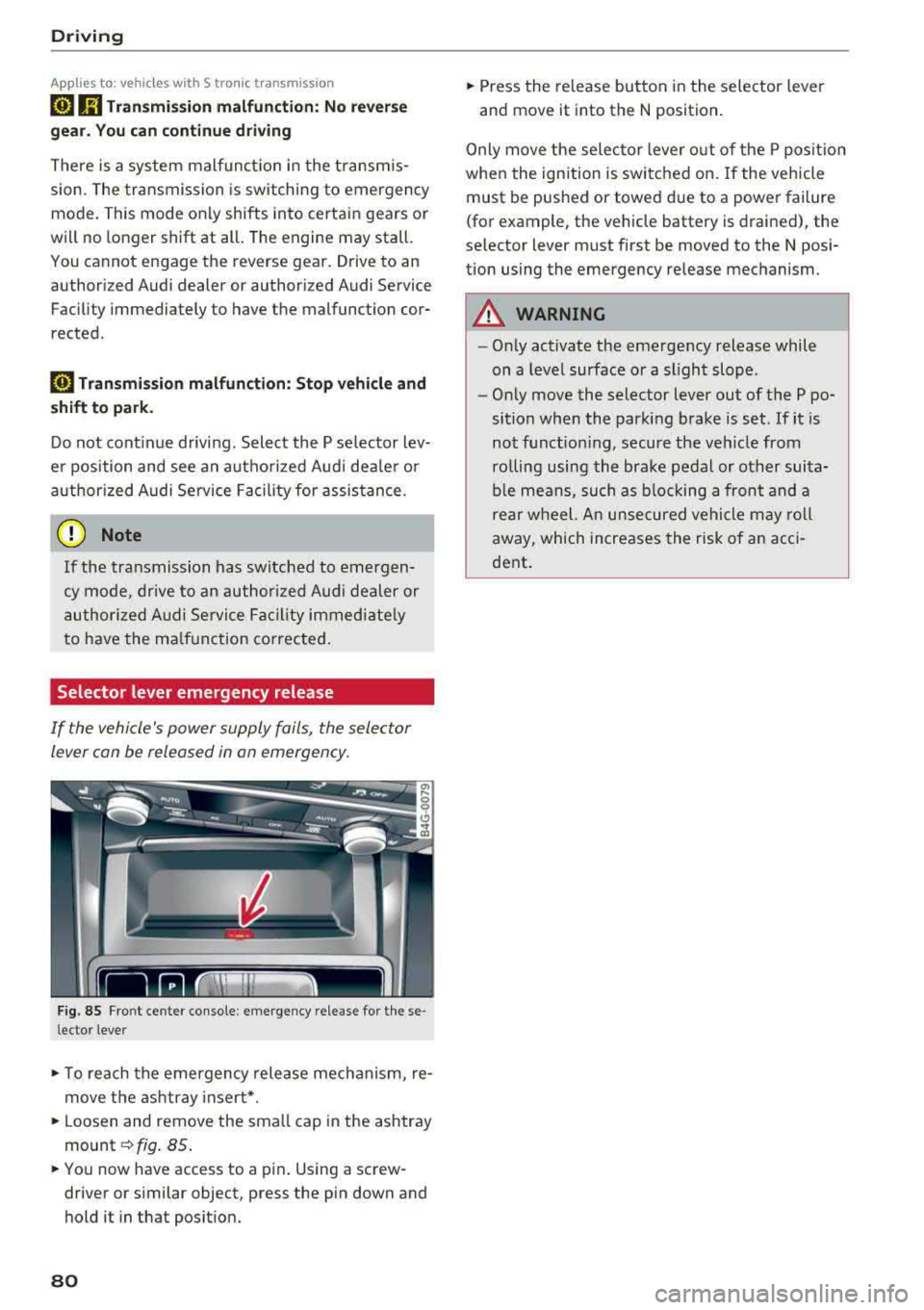
Selector lever emergency release
If the vehicle's power supply foils, the selector
lever con be released in on emergency.
F ig. 85 Fro nt ce nter console: emergency release for t hese
l ector lever
.,. T o reach the emergency release mechanism, re
move t he ashtray insert * .
.,. Loosen and remove the sma ll cap in the ashtray
mount ~ fig. 85 .
.,. You now have access to a pin . Using a screw
driver or s imilar object, press the pin down and
hold it in that posit ion.
80
.,. Press the release button in the selector lever
and move it into the N position .
Only move the selec tor lever o ut of the P posit ion
when the ignition is switched on. If the vehicle
must be pushed or towed due to a power failure
(for example, the vehicle battery is drained), the
selector lever must first be moved to the N posi
tion using the emergency release mechanism.
A WARNING
- Only activate the emergency release while
on a level surface or a slight slope .
- Only move the selector lever out of the P po
sition when the parking brake is set. If it is
not funct ioning, secure the veh icle from
ro lling using the brake pedal or other suita
ble means, such as b locking a front and a
rear wheel. An unsecured vehicle may roll
away, which increases the risk of an acci
dent .
Page 96 of 274

Assistance systems
objects that you are transporting to reduce
the risk of damage or injury.
Settings in the Infotainment system
A pp lies to: ve hicles w ith Audi a daptive cruise co ntro l
~ Se lect : the ICARI function button > (Car)* Sys
tems
control button > Driver assistance > Audi
braking guard .
System -
switch the brak ing guard On /Off. When
you switch the ign ition on, the message
Braking
guard: Off
appears if the system is switched off.
Early warning -the distance and approach warn
ings in the display can be sw itched
On /Off .
(D Tips
-Your settings are automatically stored and
assigned to the remote control key being
u sed .
-If you restrict or switch off the ESC, the
braking guard also switches itse lf off
c;, page 121.
-Switch braking guard off when you are load
in g t he ve hicle onto a vehicle ca rr ier, t rain,
sh ip or other type of transportation. This
ca n prevent undesired warnings from the
braking guard system.
Messages
App lies to: ve hicles w ith Audi a daptive cruise co ntro l
Braking guard: Off
This message appears if the system is switched
off throug h the I nfota inment system . Otherwise,
if the system is turned off, the information ap
pears every time shortly after the start of the
trip.
The message also appears if the system is not
ava ilable due to a malfunct ion or if the ESC is
sw itched off
c:;, page 121 . If this is the case, the
system w ill not prov ide warnings about a possi
b le co ll ision.
Braking guard: engaged
This message appears if a sharp brake pressure
was applied due to an acute warning.
94
ACC : Unavailable!
ACC and Audi braking guard: Unavailable
The system cannot guarantee that it will detect objects correctly and is sw itched off. The sensors
have been moved or are faulty . The pre sense
functions may also be affected . Drive to an au
thorized Audi dea le r or aut horized Audi Service
Facility immediately to have the malfunction cor
rected.
ACC: Currently unavailable. No sensor vision
ACC and Audi braking guard: Currently unavail
able. No sensor vision
This message appears if the sensor v iew is ob
structed, for examp le by leaves, snow, heavy
spray or dirt . Clean the sensors
c:;, page 87,
fig . 90 .
ACC : Currently unavailable. Gradient too steep
The road exceeds the maxim um possible angle
for safe adaptive cruise control operation. Adap
tive cruise control is switched off.
ACC : Only available in D, Sor M
Select the D/S or M selector lever position.
ACC: Currently unavailable. Parking brake ap
plied
The adaptive cruise control system switches off
automat ica lly if the parking brake is set.
ACC : Currently unavailable. Stability control
(ESC) input.
This message appears if the electro nic stabiliza
tion control (ESC) is taking action to stab ilize the
vehicle. In th is case, adaptive cruise control
switches off automatically.
ACC off: Manual control!
This message appears when adaptive cruise con
trol cannot set the parking brake. Press the brake
pedal to prevent the vehicle from ro llin g.
• ••
Three white dots appear if a setting cannot be se
l ected w ith the operating lever. For example, this
happens if adaptive cru ise control cannot start
driv ing automat ically in stop-and-go traff ic
Page 195 of 274

a co ,...,
N
" N ,...,
0 00 <..:l '
System (OBD)
The On-Board Diagnostic System monitors the
engine and transmission components that influ
ence emissions.
F ig . 178 Footwell o n le ft s ide of th e vehicle: con nectio n
port fo r th e On -Board Diagnostic System (OBD)
On -Board Diagnostic S ystem
Eng ine data can be read out using a special test
device at the On-Board D iagnost ic System con·
nection port
9 fig. 178.
Ind icat or light
If thE' ¢..ift indicator light blinks or turns on, there
is a malfunction that is causing poor emissions
quality and that could damage the catalytic con
verter .
Drive s lowly to an authorized Audi dealer or au
thor ized Audi Service Facility to have the mal
function corrected .
The indicator light can also turn on if the fuel fill
er cap is not closed correct ly
9 page 190 .
A WARNING
Incorrect use of the connection port for the
On-Board Diagnostic System can cause mal
functions, which can then result in acc idents
and ser io us injuries .
- Only allow an author ized Audi dealer or au
tho rized Aud i Serv ice Facility to read out the
engine data.
-
Chec king and Filling
Engine compartment
Working in the engine compartment
Special care is required if you are working in the
engine compartment
For wo rk in the engine com part ment , such a s
che cking and filling fluids, there i s a ris k of i n
jur y, sc alding, a cci dent s, and b urn s. For t his
r easo n, foll ow all the w arnings and g en e ral
s afe ty pre ca ution s pro vided in the f ollowing
in
formati on. The engine compartm ent i s a dan
ge rou s area in the vehicle .
9 &..
A WARNING
-Turn the engine off.
- Sw itch the ignition off.
- Set the parking brake.
- Select the P se lector lever position .
- Let the eng ine cool down .
- Never open the hood when there is steam or
coolant escaping from the engine compart ment, because there is a risk that you could
be burned . Wait unt il no steam or coolant is
escaping.
- Keep children away from the eng ine com
partment .
- Never sp ill fluids on a hot engine. These flu
ids (such as the freeze protection contained in the coolant) can catch fire.
- Avoid short c ircuits in the electrical system .
- When working in the engine compartment,
remember that the radiator fan can switch
on even if the ignition is switched off, which increases the ris k of personal injury .
- Never open the cap on the coolant expan
sion tank when the engine is warm . The
coo ling system is under pressure.
-To protect your face, hands, and arms from hot steam or coolant, cover the cap with a
large cloth when opening .
- Do not remove the eng ine cover under any
circumstances . This increases the risk of
bu rns .
- If tests need to be performed with the en
g ine runn ing, there is add it iona l danger due
to mov ing components (such as the ribbed
~
193
Page 196 of 274
Checking and Filling
belt, alternator and radiator fan) and from
the high-voltage ignition system.
- Do not under any circumstances give gas in
advertently (for example, by hand from the
engine compartment) if the vehicle is sta
tionary but the engine is running and a gear
is engaged. Otherwise, the vehicle will start
to move immediately and this could result
in an accident.
- Pay attention to the following warnings list
ed when work on the fuel system or on the
electrical equipment is required.
- Do not smoke.
- Never work near open flames.
- Always have a working fire extinguisher
nearby.
- All work on the battery or electrical system
in your vehicle can result in injuries, chemi
cal burns, accidents or burns. Because of
this, all work must be performed
only by an
authorized Audi dealer or authorized Audi
Service Facility.
- To reduce the risk of electric shock and in
jury, never touch the following components when the engine is running or is being start
ed:
- Ignition cable
- Other components in the electronic high-
voltage ignition system
- If you must check or perform work on the
engine while it is running:
- Set the parking brake and place the selec tor lever in the P (park) position first.
- Always proceed with extreme caution so that clothing, jewelry or long hair do not
become caught in the radiator fan, fan
belt or other moving components or do
not come into contact with hot compo
nents. Tie back long hair before beginning
work and do not wear clothing that can
hang down into the engine.
- Limit your exposure to exhaust and chemi
cals to as short a time as
possible~ &..
A WARNING
California Proposition 6S Warning:
194
-Engine exhaust, some of its constituents,
and certain vehicle components contain or
emit chemicals known to the State of Cali
fornia to cause cancer and birth defects and
reproductive harm . In addition, certain flu
ids contained in vehicles and certain prod
ucts of component wear contain or emit
chemicals known to the State of California
to cause cancer and birth defects or other
reproductive harm.
- Battery posts, terminals and related acces
sories contain lead and lead compounds,
chemicals known to the State of California
to cause cancer and reproductive harms.
Wash hands after handling.
@ Note
When filling fluids, be sure not to mix the flu
ids up. Otherwise severe malfunctions and en
gine damage will occur.
@ For the sake of the environment
You should regularly check the ground under
your vehicle in order to detect leaks quickly. If there are visible spots from oil or other fluids, bring your vehicle to an authorized Audi deal
er or authorized Audi Service Facility to be
checked.
Page 235 of 274
a co ,...,
N
" N ,...,
0 00 <.,;) '
General information
.. Par k the vehicle as far as poss ible from moving
traff ic in the event of a breakdown. In the event
of a flat tire, park the vehicle on a leve l surface .
It you are on a steep hill, be especially careful.
.. Set the parking brake .
.. Switch the emergency flashe rs on .
.. Set up the warn ing triangle C) page 233 .
.. Have the passengers exit the veh icle . They
sho uld move to a safe place, for example be
hind a guard rail.
_& WARNING
Follow the s teps given above. This is for your
protection and the for the safety of other d riv
ers .
Equipment
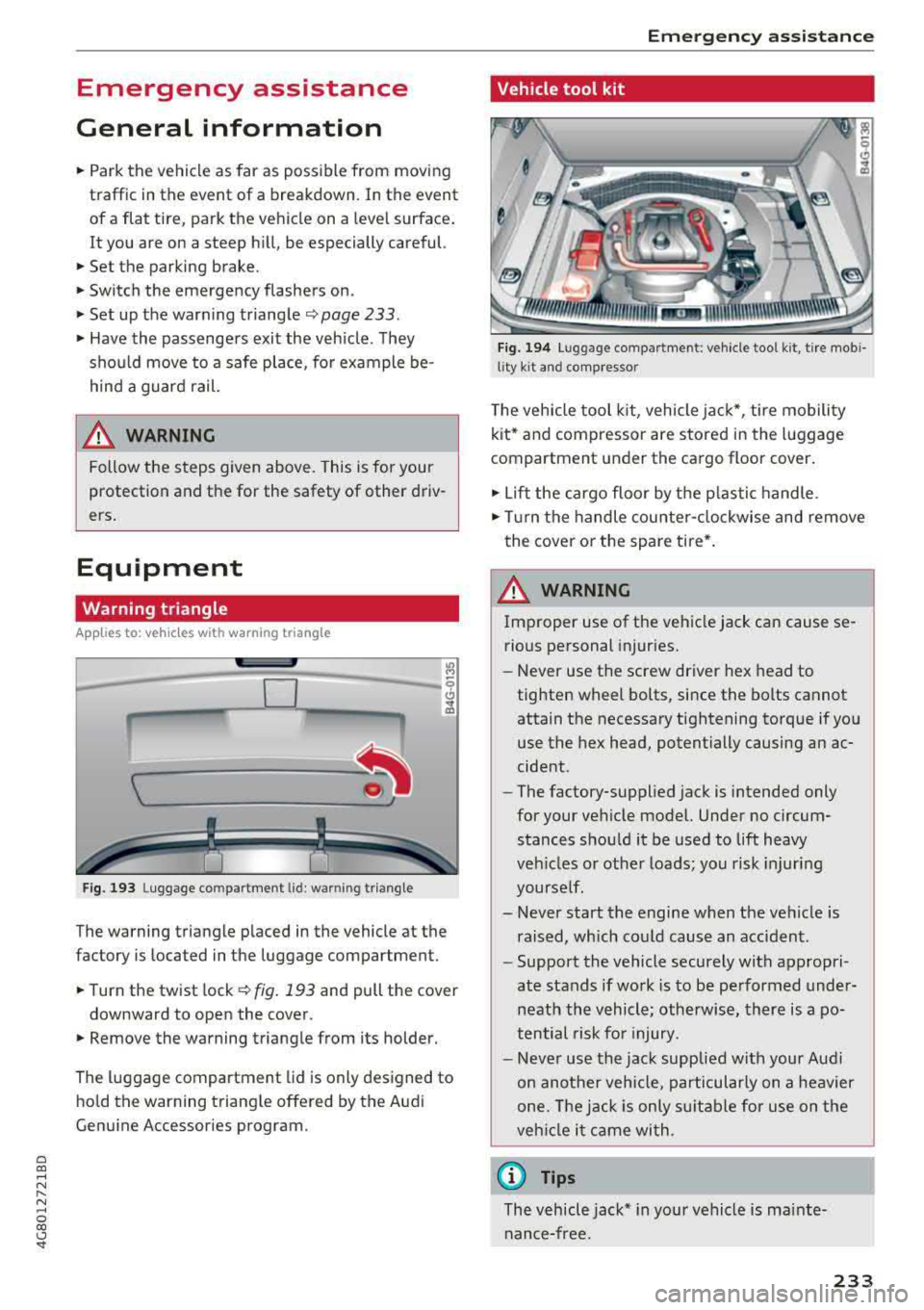
Warning triangle
App lies to: ve hicles with warning triangle
D
Fig. 193 Luggage compa rtment U d : wa rnin g tr iang le
The warning triangle placed in the vehicle at the
factory is located in the luggage compartment.
.. Turn the twist lock C) fig . 193 and pull the cover
downward to open the cover.
.. Remove the warning triangle from its holder.
The luggage compartment lid is only designed to
hold the warning triangle offered by the Audi
Genu ine Accessories program.
Em ergen cy as sis tanc e
Vehicle tool kit
Fig. 194 Lu ggage compartment: vehicle tool kit, tire mob i
lity kit and comp resso r
The vehicle tool kit, vehicle ja ck*, tire mobility
ki t* and compressor are stored in the luggage
compartment under the ca rgo floor cover .
.. Lift the cargo floor by the p lastic handle .
.. Turn the handle cou nter- clockwise and remove
the cover or the spare tire *.
A WARNING
Improper use of the vehicle jack can cause se
rious pe rsonal injuries.
-Never use the screw driver hex head to
tighten wheel bolts, since the bolts cannot
attain the necessary tightening torque if yo u
use the hex head, potentially causing an ac
cident.
-The factory-supplied jack is intended only
for your vehicle model. Under no circum stances shou ld it be used to lift heavy
veh icles o r othe r loads; you risk injuri ng
yourse lf .
-Never start the engine when the vehicle is
raised, which could cause an accident.
-Support the vehicle securely with appropri
ate stands if wo rk is to be performed under
neath the vehicle; otherwi se, there is a po
t ential risk fo r injury .
-Never use the jack supplied with your Aud i
on another vehicle, particularly on a heavier
o n e. Th e jack is o nly sui tab le for u se on the
veh icle i t came wi th.
(D Tips
The vehicle jack* in your vehicle is mainte
nance-free.
233
Page 238 of 274
Emergency assistance
-If the tire is too severely damaged, see an
authorized Aud i dealer or authorized Aud i
Service Facility for assistance.
@ For the sake of the environment
You can give the used tire sealant bottle to an
authorized Audi dealer or authorized Audi
Serv ice Facility for disposal.
(D Tips
Remember to obtain a new bottle of sealant
from an authorized Audi dealer or authorized
Audi Serv ice Facility after repairing a tire.
Replacing wheels
Before changing a wheel
Observe the following precautions for your own
and your passenger's safety when changing a
wheel.
.,. After you exper ience a tire fa ilure, pull the car
well away from moving traff ic and try to reach
level ground
before you stop ¢.&, .
.,. All passengers sho uld leave the car and move
to a safe location (for instance, be hind t he
guardrail) ¢.&, .
.. Engage the parking brake to prevent your vehi
cle from rolling
unintentionally ¢.&, .
.. Move selector lever to position P ¢ A-
.. If you are towing a trailer, unhitch the trailer
from your veh icle .
.,. Take the jack and the spare tire* out of the lug
gage compartment
ca> page 233 .
.8, WARNING
You or your passengers could be inju red w hile
chan gin g a wheel if you do not follow these
safety precautions:
- If you have a flat ti re, move a safe d ista nee
off th e road. Turn off the engine, turn the
emergency flashers on and use other warn
ing devices to alert other motorists .
- Make sur e that passengers wait in a safe
place away from the vehicle and we ll away
from the road and traffic.
236
- To help prevent the vehicle from moving
suddenly and possibly s lipping off the jack,
always fully set the parking brake and block
the front and back of the wheel diagonally
opposite the wheel being changed. When
one front wheel is lifted off the ground,
p lacing the Automat ic Transmission in P
(Pa rk) w ill
not prevent the vehicle from
mov ing.
- Before you change a wheel, be sure the
ground is level and firm. If necessary, use a
sturdy board under the jack.
- Always store the vehicle tool kit, the jack
and the replaced tire in the lu ggage com
pa rtment
¢page 134 .
(D Tips
Before changing the wheel, you must activate
the jacking mode, so that the automatic con
trols for the Adaptive Air Suspension* do not
make it more difficult to lift the vehicle with
the jack
ca> page 238 .
Changing a wheel
When you change a wheel, follow the sequence
described below step-by-step and in exactly that
order .
1. Act ivate the vehicle jack mode* ca> page 238 .
2. Remove the decorative wheel cover* or the
wheel bolt caps*. For more details see also
¢ page 23 7, Decorative wheel covers or
¢ page 237, Wheels with wheel bolt caps.
3. Loosen the wheel bolts ¢ page 238.
4. Locate the proper mounting point for the
jack and alig n the jack below that po int
¢ page 238 .
5. Raise the car with the jack ca> page 238.
6. Remove the wheel with the flat tire and then
install
the spare ca> page 240.
7. T ighten all whee l bolts lightly.
8 .
Lower the vehicle with the jack.
9. Use the wheel bolt wrench and
firmly tighten
all wheel
bolts ¢ page 238.
10. Replace the decorat ive wheel cover* or the
wheel bolt caps*.
11. Deact ivate the vehicle jack mode* in the
MM I:
ICARI function button > (Ca r)* systems .,.
Page 240 of 274
Emergency assistance
The caps are to protect and keep the whee l bolts
clean.
Loosening and tightening the wheel bolts
Th e wheel bolts must be loosened b efore raising
the vehicle.
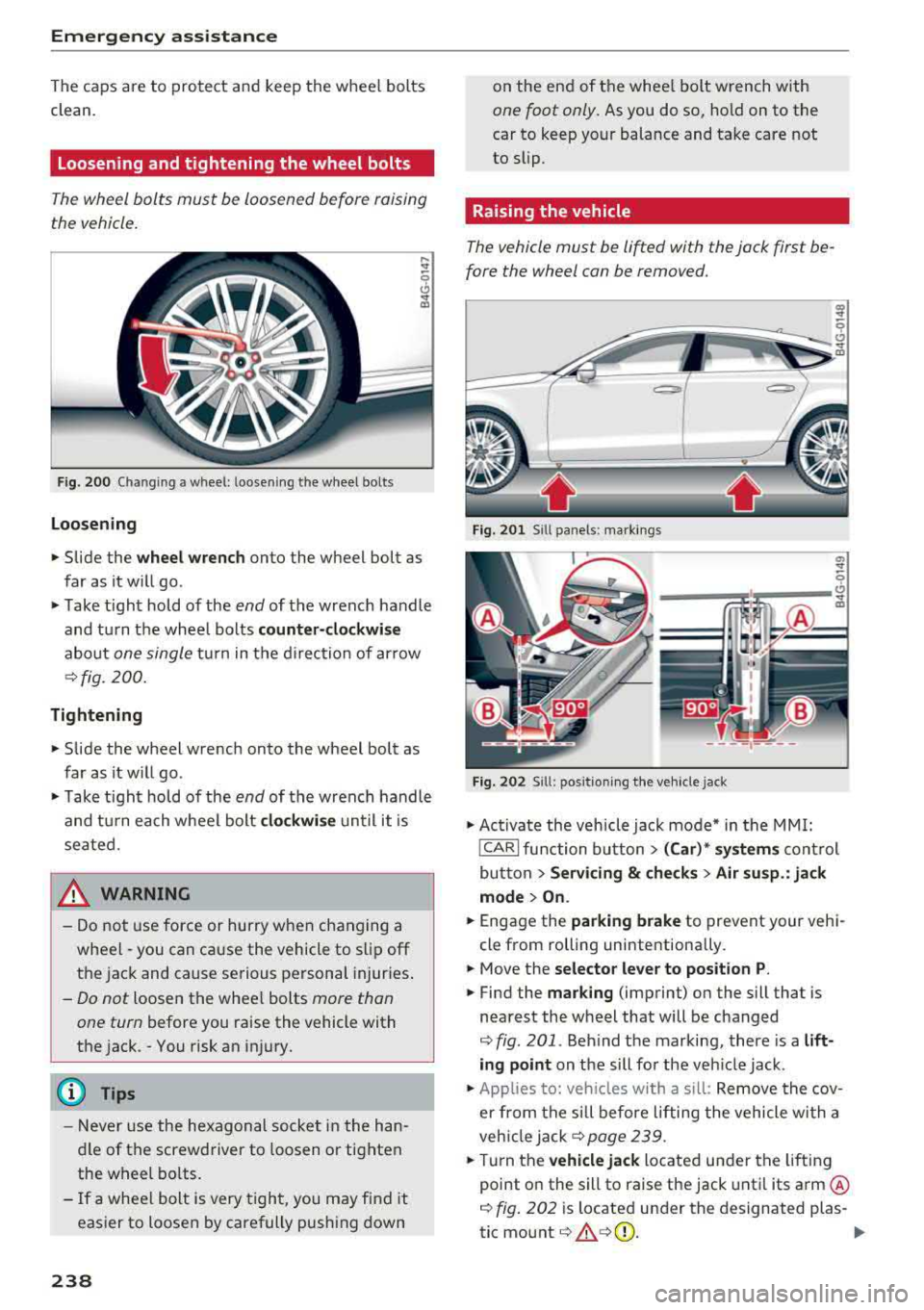
F ig . 2 00 Cha ngin g a w hee l: l oosening t he w heel bol ts
Loosening
.,. Slide the wheel wrench onto the wheel bolt as
far as it w ill go .
.,. Take t ight hold of the end of the wrench handle
and t urn the whee l bolts
counter -clockwise
about one single t ur n in t he d irec tion of ar row
¢ fig . 200.
Tightening
.,. Slide the wheel wrench onto the wheel bolt as
far as it w ill go .
.,. Take t igh t hold of the end of the wrench handle
and tu rn ea ch whee l bolt
clockwi se u ntil it is
sea ted.
_& WARNING
- Do not u se force or hurry when changing a
whee l
-you can ca use the vehicle to s lip off
th e jac k and cause serious pe rsonal injur ies .
-Do not loosen the whee l bolts more than
one turn
before you raise the vehicle with
t h e jac k.
-You risk an i njury.
(D Tips
- N ever use the he xag onal socket in the han
dle of the screwd river to loosen o r tighten
the w heel bolts .
- If a whee l bolt is very tigh t, you m ay fi nd i t
eas ier to loosen by carefully pus hing down
238
on the end of the whee l bolt wrench with
one foot only. As you do so, ho ld on to the
car to keep your balance and ta ke care not
to slip .
Raising the vehicle
The vehicle must be lifted with the jack first be
fore the wheel can be removed.
Fig . 201 Sill pa nels: marki ngs
.,, ..,
0
---"rn; S!~~;::---~
Fig. 20 2 S ill: p osit io nin g the ve hicle jack
.,. Ac tiva te the veh icle jack mo de* in the MMI:
!CAR I function button> (Car )* systems cont rol
but ton >
Servicing & che cks > Air su sp .: jack
mode > On .
.,. Engage the parking brake to prevent your veh i
cle from rolling uninte ntionally .
.,. Move the selector lever to position P .
.,. Find the marking (imprint) on the sill that is
nea rest the w heel that will be changed
¢ fig. 201 . Behind the marking, there is a lift
ing point
on t he sill fo r the ve hicle jack .
.,. Applies to: vehicles with a s ill: Remove the cov
er fro m the sill before lifting the vehicle wi th a
veh icle
ja ck¢ page 239.
.,. Tur n the vehicle jack located un der the lifting
point o n the s ill to raise the jack unt il its
arm @
~ fig. 202 is locate d under the d esignated plas-
tic
mount ¢ .&,¢(D. II>
Page 246 of 274

Fuses
Driver side cockpit fuse
assignment
Fig. 208 Driver side cockpit: fuse panel with plastic bracket
Fuse panel @ (black)
No. Equipment
Electromechanical power steering, trailer
1 hitch, ionizer, switch strip, seat heating
(rear), electromechanical parking brake
Horn, climate control system, Gateway,
2 automatic
dimming interior rearv iew mi r-
ror, On-Board Unit
4 Park ing aid, headlight range adjustment
5 Dynamic steering, electronic stabilization
control (E5C)
6 Headlights
7 Adaptive cruise control
8 Front passenger's seat sensors, airbag
9 Gateway
10 Engine sound, night vision
assist, garage
door opener (Home link), parking aid
11 Video
camera image processing
12 Headlights
13 Steering column switch module
244
Fuse panel
@ (black)
14 Terminal 15 (luggage compartment)
15 Starter
Fuse panel @ (brown)
N o. Equipment
1 Infotainment system
2 Infotainment system
3 F
ron t passenger's seat
5 Airbag, electronic stabilizat
ion control
(ESC)
6 Anti-theft alarm system
7 Electromechanical parking brake
8 Inter
ior lights
9
Windshield video camera heating, light/
rain sensor
10 Lumbar support (dr iver's seat)
11 Driver's
seat
12 Electronic stabilization control
13 Horn
14 Headlights
15 F
ront seat heating
16 Dynamic steering
Fuse panel © (red)
No . Equipment
1 Clutch pedal
2 Fuel pump
3 Brake light sensor
4 Engin e acoustics
5 Rear door
6 Front
door
7 Electronic stabilizat ion control
8 Windshield wiper motor
9 Headlight washer system
10 Inter
ior lighting, climate control system
11 Headlights
12 Sunroof
Page 247 of 274

a co ,...,
N
" N ,...,
0 00 <.:l '
cockpit fuse assignment
F ig. 2 09 Front passenger side cockpit: f use pane l w it h
p las tic bracket
Fuse panel @ (red )
No . Equipment
1 Infotainment, CD changer
2 I nfotainment (disp lay)
Fuse panel @ (brown )
No . Equipment
1 Climate control system
2 Climate con
trol sy stem (blowe r)
3 Diagnostic interface
4 Ele ctrical ignit ion lo ck
5 Electronic steer ing column lock
6 S teer ing col umn sw itch modu le
7 Power steering column adjustment
8 Light swi tch
9 Head-up display
1 0 I
nst rument cluste r
1 1 Infotainment, DVD changer
Fuses
Luggage compartment
fuse assignment
F ig . 2 10 L uggage compa rtment: fuse pane l with p last ic
b racket
Fuse panel @ (black )
No . Equipment
1 Tra
ile r hitc h/220 volt soc ket
2 Tra ile r hi tc h /climati ze d cup holder
3
Tra iler hitc h/ad justing front passenger's
seat from the rear
4 El ec trome chanic al pa rking brake
s Electromec hanical parking brake
6 F ront door (fron t passenger's si de)
7 Rear exterior lighting
8 Cen tral locking, closi ng aid
9 Seat heating (front)
1 1 Seat heating (rear), c
limate control system
12 Tra ile r hitch
Fuse panel @ (red)
No . Equipment
1 Left safety belt tensioner
2 R igh t safety be lt te nsion er
3 F u el pump
4 En gine moun t (gasoline e ngine)
s
Sensor-controlled l uggage compa rtment
lid
6 A ir su sp ension, ad ap tive d am pers
7 Rear door (front passenger's side)
8 Tail lights
9 Luggage compartment lid
10 Rear sea t ente rtainmen t
12 Rear spoiler (Spo rtback), sunroof
245