brake AUDI A7 2018 Owner's Manual
[x] Cancel search | Manufacturer: AUDI, Model Year: 2018, Model line: A7, Model: AUDI A7 2018Pages: 274, PDF Size: 42.77 MB
Page 80 of 274
Driving
On vehicles with a cruise control system*
¢ page 84, hill descent control is also activated
when the speed is set.
A WARNING
Hill descent control cannot overcome physical
limitations, so it may not be able to maintain
a constant speed under all condit ions. Always
be ready to apply the brakes.
Shifting manually (tiptronic mode)
The tiptronic mode allows the driver to shift the
gears manually.
)
r
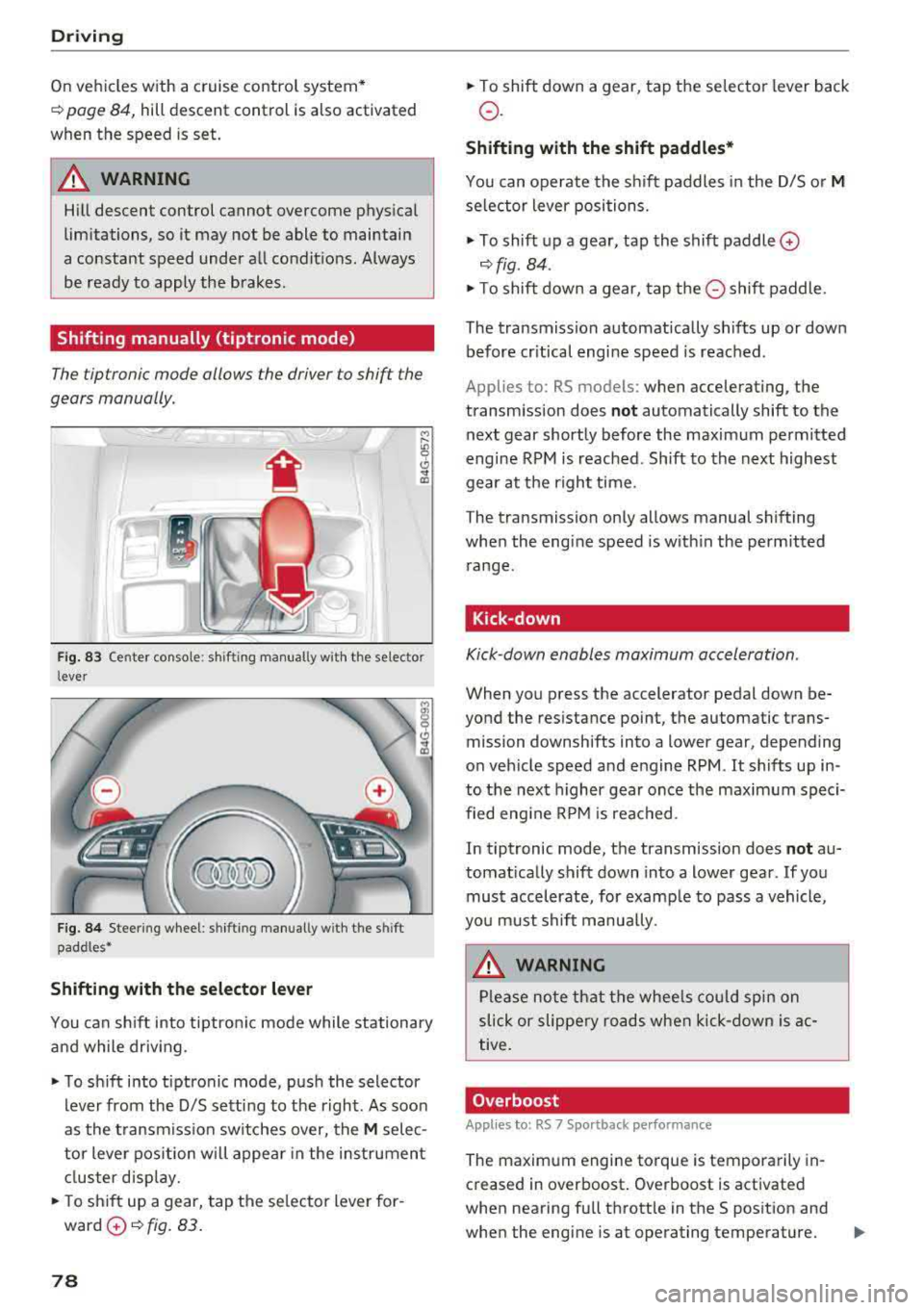
Fig. 83 Center console : sh ifting manual ly w ith the se lector
l ever
F ig. 84 Stee ring wheel: shifting manually w ith t he s hift
paddles*
Shifting with the selector lever
You can shift into tiptronic mode while stationary
and while driv ing .
"To shift into tiptronic mode, push the selector
lever from the 0/5 sett ing to the right. As soon
as the transmission switches over, the
M selec
tor lever position will appear in the instrument
cluster disp lay.
.. To sh ift up a gear, tap the se lector lever for
ward
0 ¢ fig. 83.
78
" To shift down a gear, tap the selector lever back
o.
Shifting with the shift paddles*
You can operate the shift paddles in the 0/5 or M
selector lever positions.
" To shift up a gear, tap the shift paddle 0
¢ fig . 84 .
"To shift down a gear, tap the 0 shift paddle.
The transmission automatically shifts up or down before cr itical engine speed is reached .
Applies to: RS mo dels: when accelerating , the
transmission does
not automatically shift to the
next gear shortly before the maximum permitted
engine RPM is reached. Shift to the next highest
gear at the right time.
The transmission only allows manual shifting
when the engine speed is w ith in the permitted
range.
Kick-down
Kick -down enables maximum acceleration .
When you press the accelerator pedal down be
yond the resistance point, the automatic trans mission downshifts into a lower gear, depending
on veh icle speed and engine RPM .
It shifts up in
to the next higher gear once the maximum speci
fied engine RPM is reached .
In tiptronic mode, the transmission does
not au
tomat ically shift down into a lower gear . If you
must accelerate, for examp le to pass a vehicle,
you must shift manually .
A WARNING
-
Please note that the wheels could spin on
slick or slippery roads when kick-down is ac
tive.
Overboost
Appl ies to : RS 7 Sportback pe rformance
The maximum engine torque is temporarily in
creased in overboost . Overboost is activated
when nearing full throttle in the S position and
when the engine is at operating temperature.
II>
Page 81 of 274
a co .... N
" N .... 0 00 \,;J '
¢page 23.
A WARNING
Please note that the wheels could spin on
slick or slippery roads when overboost is ac
tive.
Launch control program
A ppl ies to: ve hicles with S tro nic
-
The launch control program provides the best
possible acceleration when starting from a stop.
Requirement: the engine must be at operating
temperature and the steering wheel must not be
turned.
.. Deactivate the Start/Stop system*¢ page 72.
The LED in the 10 ,r- l button turns on.
.. Switch the electronic stabilization control (ESC)
sport mode on
¢ page 121. The II indicator
light turns on.
.. Pull the selector lever b ack out of the D/S posi
tion briefly to select the S position or select the
DYNAMIC driving mode in drive select
¢ page 106 .
.,. Press the brake pedal firmly with your left foot
and hold it all the way down for at least one
second.
.. At the same time, press the gas pedal all the
way down w ith your right foot until the engine
reaches and stays at a high RPM level.
.. Remove your foot from the brake pedal within
five seconds
¢ & ..
A WARNING
- Always adapt your driv ing to the traffic flow.
- Only use the Launch control program when
road and traffic conditions allow it and oth
er drivers will not be endangered or both
ered by your driving and the vehicle's accel
eration.
- Please note that the drive whee ls can sp in
and the vehicle can break away when sport
mode is switched on, especially when the
road is s lippery.
Driving
-Once the vehicle has started moving, press
the
I ~ OFFI button briefly to turn the sport
mode
off.
(D Tips
- Th e transmission temperature may increase
significantly after using the launch control
program. If that happens, the program may
not be available for a few minutes. It will be
available again after a cool-down period.
- When accelerating using the launch control
program, all vehicle parts are subject to
heavy loads . This can lead to increased
wear .
Transmission malfunction
[i'J Transmission: Pres s brake pedal and select
gear again .
Press the brake pedal and select the desired se
lector lever position again . You can then continue
driv ing .
[O] Transmission overheating: Please drive con
servatively.
The transmission temperature has increased sig
nificantly due to the sporty d riving manner. Drive
in a less sporty manner until the temperature re
turns to the normal range and the indicator light
switches of .
[O] Transmission malfunction: You can continue
driving
There is a system malfunction in the transmis
sion. You may continue driving. Drive to an au
thori zed Audi dealer or authori zed Audi Service
Facility soon to have the malfunction corrected .
[O] Transmission malfunction: You can continue
driving with limited functionality
T here is a system malfunction in the transmis
sion . The transmission is switching to emergency
mode. This mode only shifts into certain gears or
will no longer shift at a ll. The engine may sta ll.
Drive to an au thorized Audi dealer or authorized
Audi Service Facility immediately to have the malfunction corrected .
..,.
79
Page 82 of 274
Driving
App lies to: ve hicles w ith S tro nic t ra n smi ssio n
Ii) 10 Tran sm issio n m alfunctio n: N o reve rse
ge ar. You c an c ontinue d riv ing
There is a system malfunct io n in the t ransm is
sion . T he transmission is switching to emergency
mode. This mode only shifts into certain gears or
will no longer shift at all. The engine may stall.
You cannot engage the r everse gear. Drive to an
author ized Audi dealer or author ized Audi Service
Facility immediately to have the malfunction cor
rected .
[!l Transmi ssio n m alfun cti on : Sto p vehicl e and
s hift t o park .
Do not cont inue drivi ng. Select the P se lector lev
er position and see an authorized Audi dea le r or
author ized Audi Service Facility for assistance.
(D Note
If the transmission has switched to emergen
cy mode, drive to an author ized Audi dealer or
author ized A udi Se rvice Facility immediate ly
to have the ma lfunction corrected.
Selector lever emergency release
If the vehicle's power supply foils, the selector
lever con be released in on emergency.
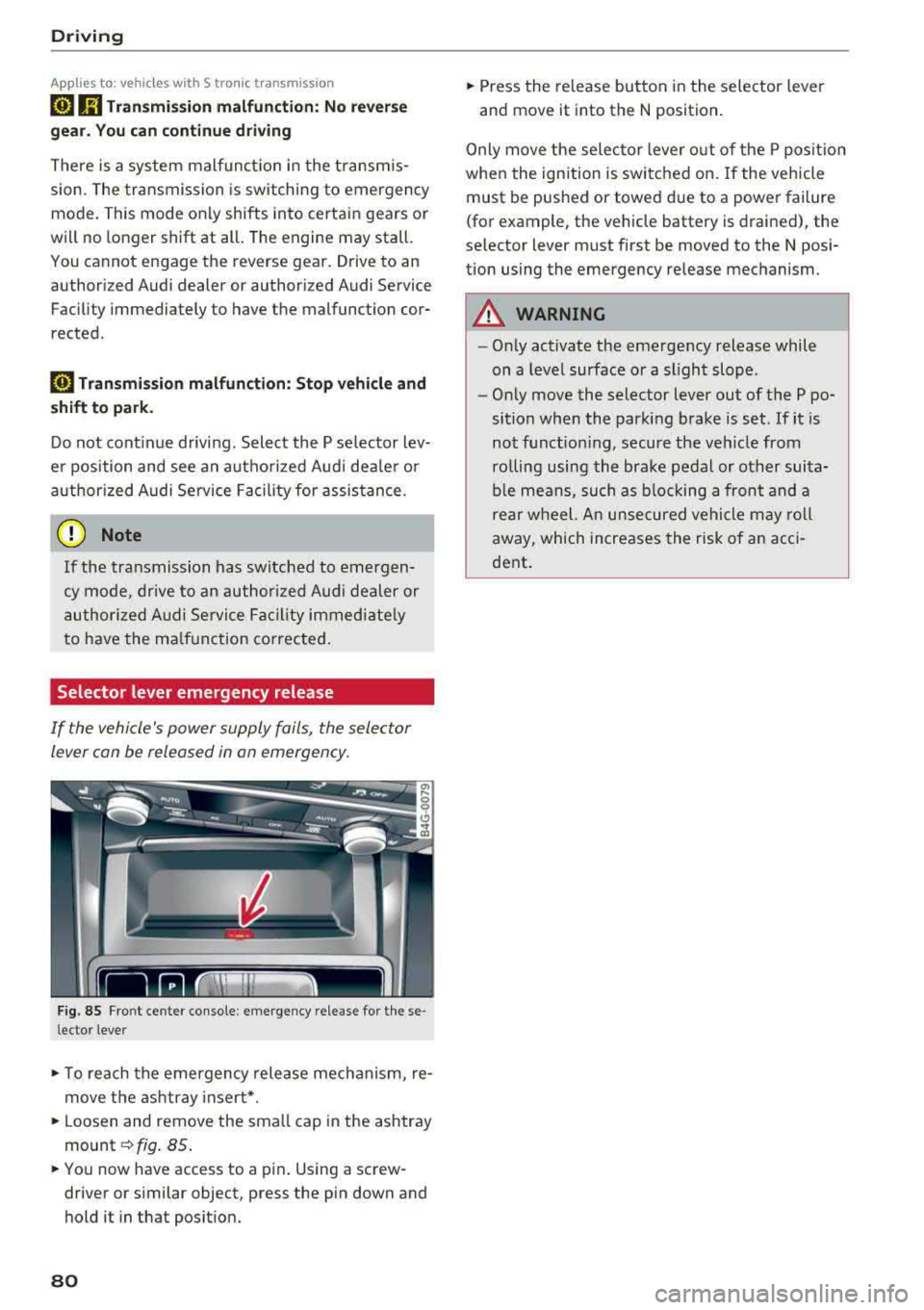
F ig. 85 Fro nt ce nter console: emergency release for t hese
l ector lever
.,. T o reach the emergency release mechanism, re
move t he ashtray insert * .
.,. Loosen and remove the sma ll cap in the ashtray
mount ~ fig. 85 .
.,. You now have access to a pin . Using a screw
driver or s imilar object, press the pin down and
hold it in that posit ion.
80
.,. Press the release button in the selector lever
and move it into the N position .
Only move the selec tor lever o ut of the P posit ion
when the ignition is switched on. If the vehicle
must be pushed or towed due to a power failure
(for example, the vehicle battery is drained), the
selector lever must first be moved to the N posi
tion using the emergency release mechanism.
A WARNING
- Only activate the emergency release while
on a level surface or a slight slope .
- Only move the selector lever out of the P po
sition when the parking brake is set. If it is
not funct ioning, secure the veh icle from
ro lling using the brake pedal or other suita
ble means, such as b locking a front and a
rear wheel. An unsecured vehicle may roll
away, which increases the risk of an acci
dent .
Page 83 of 274

a co .... N
" N .... 0 00 \.J -
General information
Your veh icle is primar ily intended for transport
ing people and luggage. However, if you dr ive
with a trailer , follow the technical requirements,
the operation and driving tips, and the legal reg
u lations.
Driving with a trailer affects the vehicle 's fuel
consumption, performance and wear. It also re
quires highe r concentration from the driver.
A WARNING
Do not transport any people in a trailer due to
the risk of fatal injury.
Technical requirements
Certain requirements must be met when towing
a trailer.
Trailer hitch
Only use a trailer hitch with a removab le ball
hitch mount and ball hitch. The trailer hitch must
be perm itted for the vehicle, the trailer and the
permitted total weight of the trailer being
pu lled. Above all, it must be secure ly and safe ly
attached to the vehicle trailer.
Never mount a trailer hitch on the bumper. The
trailer hitch must be mounted in a way that does
not impair the function of the bumper. Do not
make any changes to the exhaust system and the
brake system.
Check regularly if the trailer hitch is securely
mounted. A lways follow the instructions given by
the trai ler hitch manufacturer .
Trailer brakes
If the tra iler has its own brake system, then fol
l ow the manufacturer specifications. However,
the brake system on the trailer must never be
connected to the vehicle brake system.
Trailer towing
Engine cooling system
Driving with a trailer means a higher load on the
engine and the cooling system. The coo ling sys
tem must be designed for additiona l load and
contain enough coo lant
i::> @ .
@ Note
Longer inclines cannot be driven without a
suitab le cooling system, especia lly if t he out
side temperatures are high . otherwise, this
increases the risk of engine damage.
Operating instructions
Several things must be noted when towing a
trailer.
Towing capacity
Your vehicle can only be operated with class 1 or
class 2 trailers.
Load distribution
Poor cargo load and distribut ion can negatively
impact vehicle handling.
- Store objects preferably in the vehicle luggage
compartment . The vehicle should always carry
the heaviest poss ible load and the trailer
should have the lightest possible load.
- Distribute the load in the trailer so that the
heavy objects are as close to the axle as poss i
b le.
- Secure objects from sl iding out of place .
- Ut ilize the maximum permitted tongue weight
if possible .
Tires
Set the tire pressure on your vehicle for a "full
load"; see the tire pressure sticker
c::>page 215.
If necessary, also adjust the tire pressure on the
trailer according to the manufacturer's recom mendat ion .
Winter tires should be mounted on the vehicle and on the trailer during winter temperatures.
Outside mirrors
If you cannot see the tra ffic behind the trailer
with the standard exterior mirrors, then you
81
Page 84 of 274
Trail er to wing
must attach additiona l exterior mirrors . Adjust
them so you have a sufficient visibility behind
you .
Exterior lighting
Follow the lega l regulat ions regard ing the light
ing eq uipment on your trailer . Conta ct an author
ized Audi dealer or authorized Audi Service Facili
ty for more information.
Before start ing to drive, check a ll l ight ing equip
men t on the hitc hed trailer.
The headlig ht range contro l adjusts automatical
ly to the light range of the headl ights.
Safe ty chain s
Make sure the safety chains are correctly applied
when pulling a trailer . The chains should hang
enough so t hat the trailer can dr ive around
curves. However, they must not touch the
g round .
Air su spension
Applies to: vehicles with air suspension
The air suspension must be at the standard vehi
cle height before you set the tongue weight on
the trailer a nd h itch the trailer ¢@ ,
¢page 107,
Raising/lowering the vehicle.
For ve hicles w ith a factory-installed tra iler hitch,
the air suspension trailer mode will automat ically
sw itch on if you connect the trailer cable to the
socket.
For ve hicles w ith a retrof itted trailer hitch, you
must switch on the air suspension trailer mode
manually . Select in the Infota inment system:
ICARI function button > ( Car )* s yste m s contro l
button
> V ehicle setting s > Air su spen sion : trail
e r > On .
Switch it off again after tow ing a tra ile r.
You can also switch off tra iler mode ma nually
while driving, for example, when using a bicycle rac k system .
If you have to drive through difficult road condi
tions, you can raise the vehicle aga in after hitch
ing the t rai ler or after adjust ing the tongue
weight .
82
@ Note
Applies to: vehicles with air suspension
-Changes i n temperature or load can affect
the height of the vehicle .
- Set the air suspension to the standard veh i
cle he ight, otherwise the applicable tongue
we ight no longer appl ies to your veh icle.
(D Tips
- Use chocks when park ing on inclines if the
trai ler is loaded.
- We recommend also hav ing the vehicle in
spected between the inspection intervals if
you are towing a trailer frequently.
- Avoid driv ing with a trai ler dur ing the veh i
cle break-in per iod.
Driving with a trailer
Driving with a trailer requires extra caution.
Sp eed
Adhere to t he lega l speed lim its . Fo llow the legal
regu lations
specific to the country.
As the speed increases, the dr iv ing stab il ity of
t h e tra ile r decreases. Therefore you should not
exceed the max imum lega l speed lim it w hen
t h ere are unfavorab le road, weather and/or wind
conditions. This especia lly applies when driving
downh ill.
Yo u m ust always red uce your speed as soon as
you notice even the slightest swinging motion o f
the trai ler . Never try to "straighten out" the trai l
er by acce lerating.
The we ight d istr ibution is very poor if the vehicle
is empty and the trai ler is loaded. However if you
must drive under these circumstances, then drive
especially slowly .
Brakes
B rake in a time ly manner. Downs hift befo re dr iv
i ng down hill so that the engine can assist with
braking ¢&. .
When using a trailer w it h over run bra kes, fi rst
bra ke gently t hen q uick ly. This red uces the r isk of
j erking while braking if the trailer wheels lock up .
IIJJ,,
Page 85 of 274
a co .... N
" N .... 0 00 \.J '
Pay att ention specifica lly to the coolan t tempera
t ure d isp lay when t here are high outside tempe r
atures, an d when dr iv ing on long inclines
~ page 9 . Shift to a highe r gear in a timely man
ne r.
A WARNING
Constant b raking causes the brakes to ove r
heat and substant ially reduces b raking per
formance, increases brak ing distance or caus
es complete fa ilu re of the brake system.
-
Trailer towing
83
Page 87 of 274
a co .... N
" N .... 0 00 \.J '
yo ur foot on the accelerator pedal prevents
the cruise control from braking. Th is is be
cause pressing the acce lerator pedal over
rides the cruise control system .
- If a brake system ma lf u nction such as over
heating occu rs when the c ruise contro l sys
tem is switched on, the braking function in
the system may be switched off . The rest of
t h e cruise control system f unction s remain
ac tive as long as
the @;(IM~ (USA model s) /
l'I (C anada models) indi cator light is on .
(D Tips
The brake lights turn on when the brakes a re
ap plied a utomat ica lly .
Changing speed
Applies to: vehicles with cruise control system
.. T o inc rease o r decrease the speed in incre
ments, tap the lever toward
0 10 <=> page 84 ,
fig . 86 .
.. To inc rease o r decrease the speed qu ickly, ho ld
the leve r in the
010 direction until the de
s ired speed is displayed.
You can a lso press the acce lerator pedal down to
increase yo ur speed, for example i f you want to
pass someone. The speed you set earlier w ill re
sume as soo n as you release t he accelerator ped
al.
However, if you exceed your saved speed by S
mph (10 km/h) for longe r th an 6 mi nutes, the
cru ise control system tur ns off temporar ily .
The
green @;(i)~i~ (USA models) !l'I (Canada mod
e ls) indicator light in the speedometer tu rns off
and the stored speed is maintained.
Preselecting the speed
Applies to: vehicles with cruise control system
You can pre-select your desired speed when the
vehicle is stationary.
.. Switch the ign ition on.
.. Pull the lever into position @<=> page 84,
fig. 86 .
A ss istance systems
.. To increase or decrease the speed, tap the lever
toward
0 10 .
.. To store t he speed d isp layed, release the leve r.
T his func tion makes it possible , fo r example, to
save the spee d you want before driving on the
highway. Once on the highway, activate the
c ruise contro l by pull ing the leve r
towa rd @ .
Switching off
Applies to : vehicles with cruise control system
Deactivating temporarily
.. Press the brake pedal, or
.. Press the lever into position @(not clicked into
p lace) <=>
page 84, fig . 86, or
.. Dr ive fo r longer t han S m inutes faster than S
mph (10 km/h) above the stored speed .
Switching off completely
.. Press the lever into position@(clicked into
p lace), or
.. Switch the ignit ion off .
The speed you stored will be ma intained if the
cruise contro l has been switched off temporari ly .
To resume the stored speed, re lease the brake
peda l and pull the lever to
position @.
Switching the ignition off wi ll erase the stored
speed.
A WARNING "---
You should only resume the sto red speed if it
i s no t too high fo r existing t raff ic conditions .
Otherw ise you can inc rease the risk of an acci
d ent .
Lap timer
Introduction
Applies to: vehicles with lap timer
Yo u can record and eva luate lap t imes with the
l ap timer <=>
page 86, fig. 87. The time is meas
ur ed in m inutes, seconds and 1/10 seconds. The
ho urs are also shown when the lap time exceeds
60 m inutes . T he maxim um indiv id ual measure
me nt is 99 ho urs. A maxim um of SO laps can be
r ecorded.
.,.
85
Page 89 of 274
a co ,...,
N
" N ,...,
0 00 <..:l '
Description
Applies to: vehicles with Audi adaptive cruise control
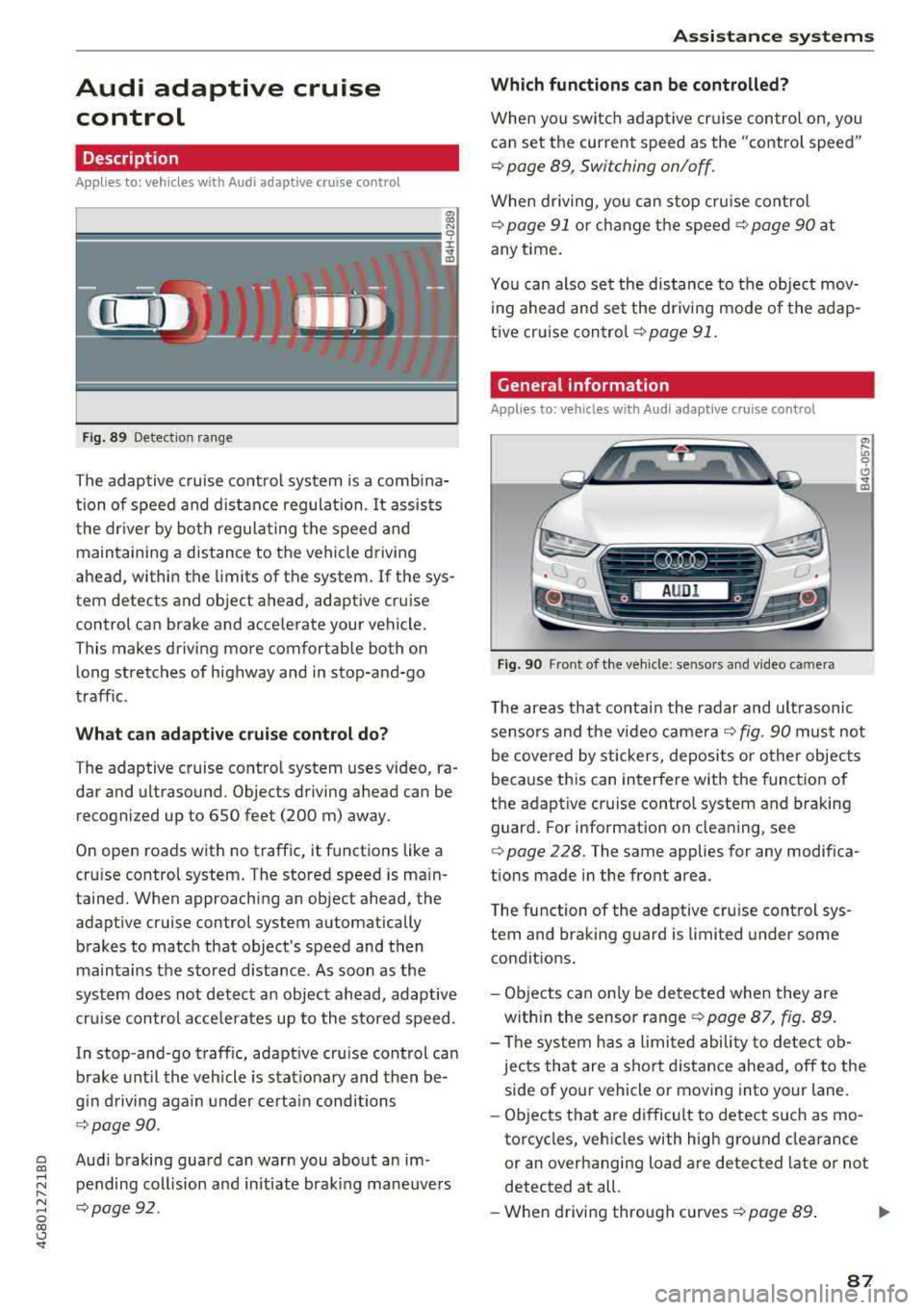
Fig . 8 9 Detectio n ra n ge
The adaptive cruise co ntro l system is a comb ina
tion of speed and d istance regula tion.
It assists
the dr iver by bot h regula ting the speed and
main taining a distance to the vehicle driving
ahead , within the limits of the system . If the sys
tem detects and object ahead, adaptive cruise
control can brake and acce lerate your vehicle.
This makes driving more comfortable both on long stretches of highway and in stop-and-go
traffic .
What can adaptive c rui se control do?
T he adaptive cruise contro l system uses video, ra
dar and ultrasound . Objects driving ahead can be
recogni zed up to 650 feet (200 m) away.
On open roads with no traffic, it functions like a
cru ise control system . T he stored speed is ma in
tained. When approaching an object ahead, the
adapt ive cruise control system automatically
brakes to match that object's speed and then
maintains the stored d istance. As soon as the
system does not detect a n object ahead, adaptive
cru ise con trol a cce lerates up to the stored speed .
In stop-and -go traff ic, adaptive cru ise control can
brake unt il the vehicle is s tat io nary and then be
g in d riving aga in under certai n conditions
¢ page 90.
Aud i braking guard can warn you about an im
pending col lision and in itiate braking maneuve rs
q page92 .
Assi st a nce systems
Which functions can be controlled?
When yo u switc h adap tive cr uise control on, you
can set the current speed as the "contro l speed"
¢ page 89, Switching on/off .
When driving, yo u can stop cru ise cont rol
¢ page 91 or ch ange t he speed ¢ page 90 at
any t ime .
Yo u can also se t the distance to the object mov
i ng ahead and set the d riving mode of the adap
t ive cr uise con trol ¢
page 91.
General information
Applies to: vehicles with Audi adaptive c ruise con trol
Fi g. 90 Fro nt o f th e ve hicle : se nsors and v ideo ca mera
T he areas that conta in the radar and ult rasonic
senso rs and the video came ra
¢ fig. 90 mus t not
be cove red by stickers, deposits or o ther objects
because th is can in terfere with the funct ion of
the adaptive cruise contro l system and braking
guard . For i nformation on clea ning, see
¢ page 228. The same applies for any modifica
tions made in the front area.
T he function of the adaptive cru ise control sys
tem and bra king g uard is limited under some
condit ions.
- Objects can on ly be detected when they are
w ith in the sensor range
¢ page 87 , fig . 89.
- The sys tem h as a limi ted abili ty to detect ob
jects that are a shor t distance ahead, off to the
side of your vehicle or mov ing into your lane.
- Ob jects that are difficult to detect such as mo
torcycles, vehicles with high g ro und clea rance
or an overhanging load are detected late or not
detected at all.
- When drivi ng through curves
¢ page 89 . .,.
87
Page 90 of 274

Assistance systems
-With stationary objects ¢ page 89.
A WARNING
Always pay attention to traffic when adaptive
cruise control is switched on and braking
guard is active. As the driver, you are still re
sponsible for starting and for maintaining
speed and distance to other objects. Braking
guard is used to assist you . The driver must
always take action to avoid a collision. The
driver is always responsible for braking at the
correct time.
- For safety reasons, do not use adaptive
cruise control when driving on roads with
many curves, when the road surface is in
poor condition and/or in bad weather (such
as ice, fog, gravel, heavy rain and hydroplan
ing). Using the system under these condi
tions increases the risk of an accident.
- Switch adaptive cruise control off tempora
rily when driving in turning lanes, on ex
pressway exits or in construction zones. This
prevents the vehicle from accelerating to
the stored speed when in these situations .
- The adaptive cruise control system will not
brake by itself if you put your foot on the ac
celerator pedal. Doing so can override the
speed and distance regulation.
- When approaching stationary objects such
as stopped traffic, adaptive cruise control
will not respond and braking guard will have limited function.
- The adaptive cruise control system and
braking guard do not react to people, ani
mals, objects crossing the road or oncoming
objects.
- The function of the radar sensors can be af
fected by reflective objects such as guard
rails, the entrance to a tunnel, heavy rain or
ice.
A WARNING
- Improper use of adaptive cruise control can
cause collisions, other accidents and serious
personal injury.
- Never let the comfort and convenience that
adaptive cruise control and braking guard
88
offer distract you from the need to be alert
to traffic conditions and the need to remain
in full control of your vehicle at all times,
- Always remember that the adaptive cruise
control and braking guard have limits -they
will not slow the vehicle down or maintain the set distance when you drive towards an
obstacle or something on or near the road
that is not moving, such as vehicles stopped
in a traffic jam, a stalled or disabled vehicle.
If registered by the radar sensors, vehicles
or obstacles that are not moving can trigger
a collision warning and if confirmed by the
video camera, an acute collision warning.
- Never follow a vehicle so closely that you
cannot stop your vehicle safely. The adap
tive cruise control cannot slow or brake the
vehicle safely when you follow another vehi cle too closely. Always remember that the
automatic braking function cannot bring the
vehicle to a sudden or emergency stop un
der these conditions .
- To prevent unintended operation, always
switch ACC off when it is not being used .
@ Note
The sensors can be displaced by impacts or
damage to the bumper, wheel housing and
underbody. That could affect the adaptive
cruise control system and braking guard .
Have an authorized Audi dealer or authorized
Audi Service Facility check their function.
© Tips
For an explanation on conformity with the
FCC regulations in the United States and the
Industry Canada regulations, see
¢page 258.
Page 91 of 274
a co ,...,
N
" N ,...,
0 00 <..:l '
Applies to: ve hicles with Audi adaptive cruise co ntro l
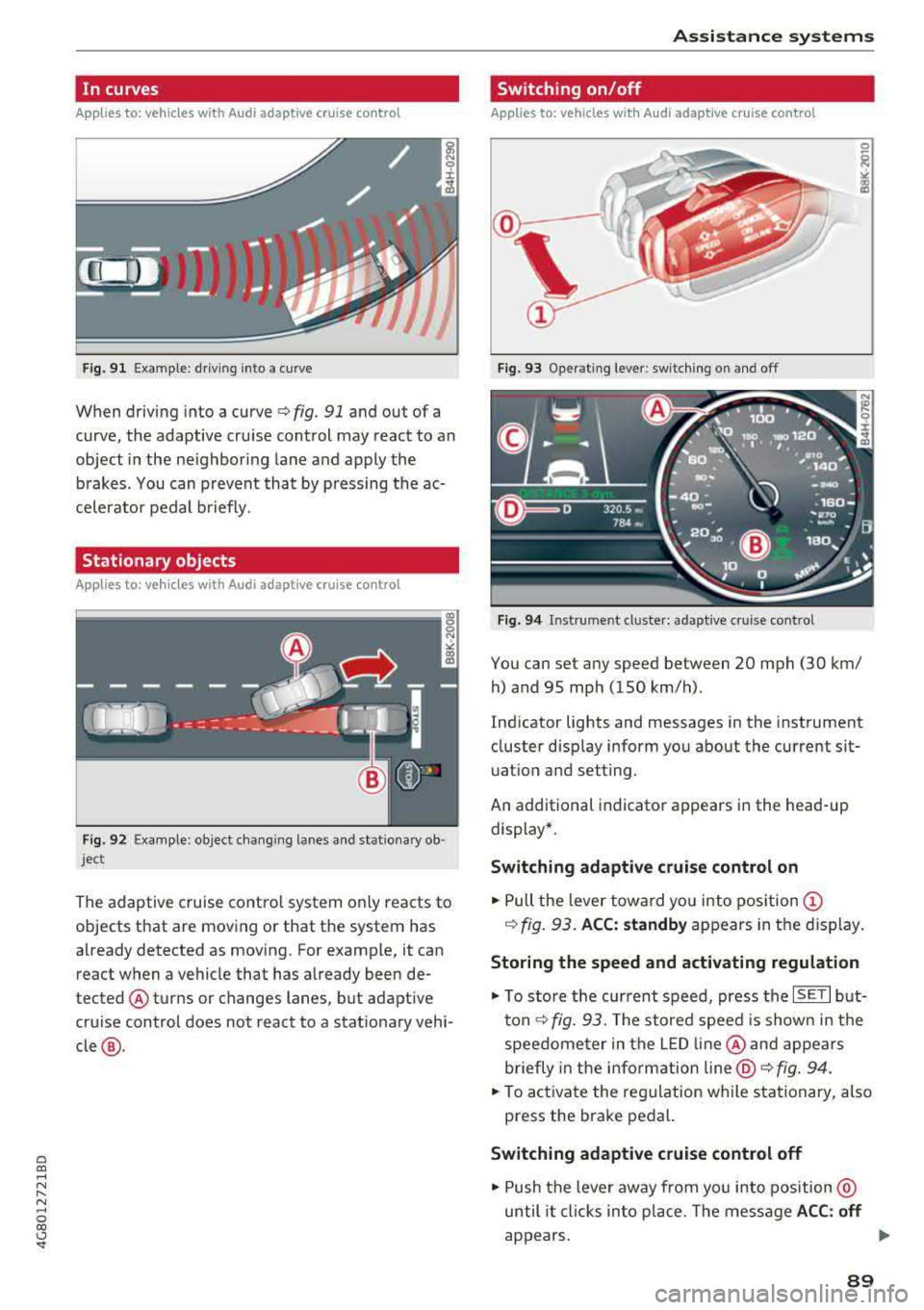
Fig. 9 1 Example: dr iv ing into a curve
When driving into a curve ¢ fig. 91 and out of a
curve , the adaptive cruise control may react to an
object in the ne ighboring lane and apply the
b rakes. You can prevent that by p ressing the ac
celerator pedal b riefly.
Stationary objects
A pp lies to: ve hicles with Audi adaptive cruise contro l
Fig. 92 Example: object changi ng lanes and stationa ry ob
ject
The adaptive cruise contro l system only reacts to
objects that are mov ing or that th e system has
already detected as moving. For example, it can
react when a vehicle that has already been de
tected @turns or changes lanes, but adapt ive
cru ise control does not react to a stat ionary vehi
cle @.
Assi st a nce systems
Switching on/off
App lies to : vehicles wit h Audi ada ptive cr uise control
Fi g. 93 Operat ing lever : switch ing on and off
Fig . 94 Instrument clus te r: adaptive cru ise cont rol
You can set any speed between 20 mph (30 km/
h) and 95 mp h (150 km/h) .
Ind icator lights and messages in the instrument
cluster disp lay inform you about the current sit
uatio n and setting.
An additional indicator appears in the head-up display*.
Switching adaptive crui se control on
.,. Pull the lever towa rd yo u into pos ition (!)
¢ fig. 93. ACC: standby appears in the display .
Storing the speed and activating regulation
.,. To store the current speed, press the ISE TI but
ton ¢ fig. 93. The stored speed is show n in the
speedome ter in the LED line @and appears
briefly in the i nform ation
line @¢ fig. 94 .
... To activate the reg ulation while stationary, also
press the brake pedal.
Switching adaptive cruise control off
.,. Push the lever away from you into position @
until it cl icks in to p lace. The message
A CC: off
appears. ..,.
89