brake light AUDI A7 2018 Owner's Manual
[x] Cancel search | Manufacturer: AUDI, Model Year: 2018, Model line: A7, Model: AUDI A7 2018Pages: 274, PDF Size: 42.77 MB
Page 91 of 274
a co ,...,
N
" N ,...,
0 00 <..:l '
Applies to: ve hicles with Audi adaptive cruise co ntro l
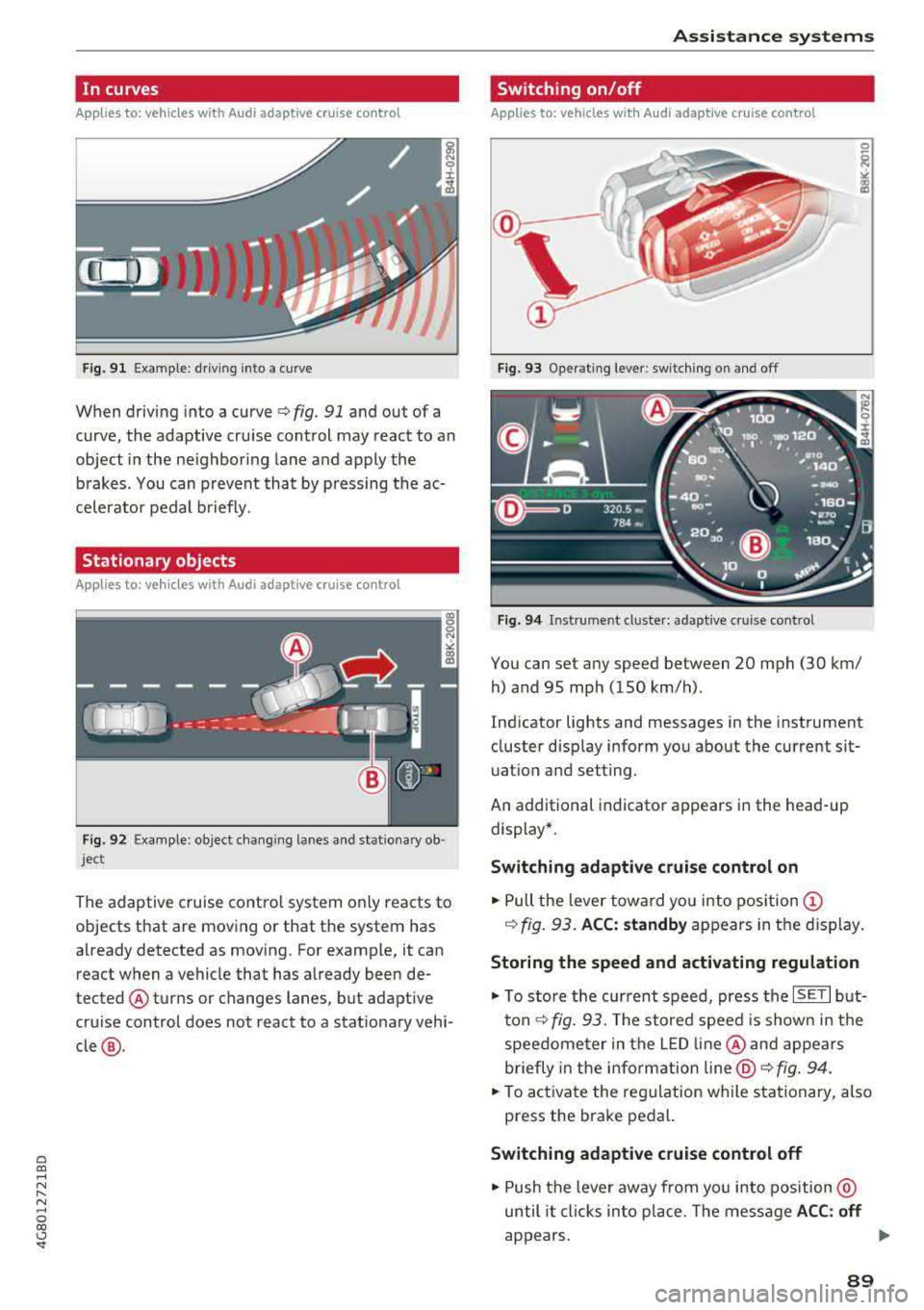
Fig. 9 1 Example: dr iv ing into a curve
When driving into a curve ¢ fig. 91 and out of a
curve , the adaptive cruise control may react to an
object in the ne ighboring lane and apply the
b rakes. You can prevent that by p ressing the ac
celerator pedal b riefly.
Stationary objects
A pp lies to: ve hicles with Audi adaptive cruise contro l
Fig. 92 Example: object changi ng lanes and stationa ry ob
ject
The adaptive cruise contro l system only reacts to
objects that are mov ing or that th e system has
already detected as moving. For example, it can
react when a vehicle that has already been de
tected @turns or changes lanes, but adapt ive
cru ise control does not react to a stat ionary vehi
cle @.
Assi st a nce systems
Switching on/off
App lies to : vehicles wit h Audi ada ptive cr uise control
Fi g. 93 Operat ing lever : switch ing on and off
Fig . 94 Instrument clus te r: adaptive cru ise cont rol
You can set any speed between 20 mph (30 km/
h) and 95 mp h (150 km/h) .
Ind icator lights and messages in the instrument
cluster disp lay inform you about the current sit
uatio n and setting.
An additional indicator appears in the head-up display*.
Switching adaptive crui se control on
.,. Pull the lever towa rd yo u into pos ition (!)
¢ fig. 93. ACC: standby appears in the display .
Storing the speed and activating regulation
.,. To store the current speed, press the ISE TI but
ton ¢ fig. 93. The stored speed is show n in the
speedome ter in the LED line @and appears
briefly in the i nform ation
line @¢ fig. 94 .
... To activate the reg ulation while stationary, also
press the brake pedal.
Switching adaptive cruise control off
.,. Push the lever away from you into position @
until it cl icks in to p lace. The message
A CC: off
appears. ..,.
89
Page 92 of 274

Ass is tance sy stem s
@ Indicator light s
Ill -Adaptive cruise cont rol is switched on. No
objects a re detected ahead. The stored speed is
maintained.
• -An object ahead was detected. The adaptive
cruise control system regulates the speed and
distance to the object ahead and accelerates/
brakes automatica lly .
fai -Adaptive cruise control is switched on. An
object ahead was detected . Your vehicle rema ins
stopped and w ill not start driving automat ica lly.
• -The automatic braking is not enough to
maintain a suffic ient distance to a n object ahead.
You must intervene
¢ page 92, Request for
driver intervention.
© Instrument cluster display
I f adaptive cruise contro l is not shown in the in
strumen t cluster display, yo u can call it up using
the multifunction stee ring wheel b uttons
¢ page 20.
Based on the graphics in the d isp lay, you can de
termine if the system is ma inta ining a distance to
the object ahead and what that distance is.
No vehicl e -no object was detected ahead .
Whit e vehicle -an object was detected ahead.
Red veh icle -request for driver intervention
¢ page 92 .
Both
arrow s on the scale © indicate the distance
to the object ahead . No arrow appea rs when the
vehicle is on an open road and there is no obje ct
ahead. If an object is detected ahead, the arrow
moves on t he scale.
The green zone on the scale indicates the store
distance. For information on changing the dis
tance, refer to
¢ page 91. If the distance se
lected is exceeded or not reached, the arrow
moves into the red zone on the sca le.
A WARNING
If you press the ISE TI button when driving at
speeds below 20 mph (30 km/h), the vehicle
accelerates automat ically up to 20 mph (30
90
km/h), wh ich is the minimum speed that can
be set .
(D Tips
-If you switch the ign it ion or the adaptive
cruise control system off, the set speed is
erased for safety reasons .
- The electronic stabilization control (ESC) and the anti-slip-regulation (ASR) are auto
matically switched on when the adaptive
cruise control is switched on.
Changing the speed
Applies to: vehicles with Audi adapt ive cruise control
0
f
jJ
0
Fig . 95 Operat ing lever: chang ing the speed
.,. To increase or reduce the speed in increme nts,
tap the lever up or down.
.,. To increase or decrease the speed qu ickly, hold
the lever up or down until the red LED @ reach
es the des ired
speed ¢ page 89 , fig. 94.
After each change, the new stored speed appears
briefly in the information
line¢ page 89, fig. 94
@ .
Driving in stop-and-go traffic
App lies to: vehicles with Aud i adapt ive cru ise control
The adaptive cru ise cont rol system also assists
you in stop-and-go traffic.
Stopping automatically
If
an object ahead stops, your vehicle will brake
and stay at a stop, within the limits of the sys
tem . The Start/Stop system* can be used as usu-
al. ..,.
Page 94 of 274

Ass is tance sy stem s
~-~ ---Di sta nce 1: this setting corresponds
to a distance of 92 ft (28 m) when traveling at 62
mph (100 km/h), for example (time between: 1
second) .
~-- ~--Di stan ce 2: this setting corresponds
to a distance of 118 ft (36 m) wh en traveling at
62 mph (100 km/h), for example (time between:
1.3 seconds) .
~--- ~-Distance 3: this setting corresponds
to a distance of 164 ft (SO m) when traveling at
62 mph (100 km/h), for example (time between:
1.8 seconds) .
~--- -~ Distance 4 : This setting corresponds
to a distance of 210 ft (64 m) when traveling at
62 mph (100 km/h), (time d istance of 2.3 sec
onds) .
A WARNING
Following other vehicles too closely increases
the risk of collisions and ser ious personal in
jury .
- Setting short distances to the traffic ahead
reduces the time and distance available to
br ing your vehicle to a safe stop and makes
it eve n mo re necessary to pay close atten
t ion to traffic.
- Always obey applicable traffic laws, use
good judgment, and select a safe following
distance fo r the traffic, road and weather
cond itio ns.
(D Tips
-Distance 3 is set automatically each time
you switch the ignit ion on.
-Your settings are automatically stored and
assigned to the remote control key being
used.
Selecting the driving mode
Applies to: vehicles with Audi adaptive cruise control
.. Se lect the des ired driving mode in dr ive se lect
q poge 105 .
92
@ Tips
Your settings are automatically stored and as
signed to the remote contro l key being used.
Request for driver intervention
Applies to: vehicles with Audi adaptive cruise control
Fig . 98 Ins trumen t cluster : request for dri ver in te rven tion
In certain situations, the system will request you
to take action :
-If the braking from the adaptive cru ise control
system is not eno ugh to ma inta in eno ugh dis
tance to the object ahead .
The danger is indicated by
the . indicato r light
q fig. 98. An aud io signa l will also so und.
- Press the brake pedal to slow your vehicle down .
Audi braking guard
Applies to: vehicles with Audi adaptive cruise control
Fig. 99 Instrumen t cl uster : approac h warn in g
The braking guard uses radar sensors and a v ideo
camera .
It also functions within the limits of the
system when adaptive cru ise control is switched
~ ~
Page 95 of 274

a co .... N
" N .... 0 00 \.J '
When detected in time, the system can assess
dangerous sit uat ions where an object a head
brakes suddenly or if your own vehicle is traveling
at a high speed and approaching an object that is
mov ing more slowly. The brak ing guard does not
react if it cannot detect the situation.
The system advises you of various dangero us sit
uations :
- T he
distan ce warning occurs if you d rive too
closely to the object ahead for a long period o f
time . If the object ahead brakes strongly, you
would not be able to avoid a collision .
The.
indicator light appears as an indication for th is.
- The
app roach wa rning occurs when an object
ahead is traveling more s low ly or brakes
strongly. When th is warning occurs, it may on ly
be poss ible to avoid a co llision by swerving or
braking strongly . The danger is indicated by the
• ind icator light ~ fig . 99 . An aud io signal w ill
also sound .
If you do not react early enough or at a ll to a dan
ge rous situation, the braking guard suppo rts you
w ith a brak ing intervent ion .
- If a co llision is imminent, the system will first
provide an
ac ute warning by braking sharply.
- If you do not react to the acute warning, the braking guard can increase the braking force
within the limits of the system
ll . Th is reduces
the veh icle speed in the event of a collision .
- The system can init iate comp lete decelerat ion
shortly before a collision
l l. Full deceleration at
high speeds occurs only in vehicles with adap
t ive cru ise control and s ide ass ist (pre sense
plus).
- If the braking gua rd determines that you are
not brak ing st rongly eno ugh whe n there is an
i mpending co llision, i t can increase the brak ing
fo rce .
- T he pre se nse functions also engage whe n
the re is an impend ing
collision ~ page 95.
ll This is not availa ble in so me co untrie s.
A ss istance systems
Which functions can be controlled?
Yo u can swit ch t he b raking guard and t he d is
tance/approach warning on or
off in the Infotain
ment system
~ page 94, Settings in the Info
tainment system .
A WARNING
--
Lack of attention can cause collisions, other
accidents and ser ious personal inj uries. The
braking guard is a n assist system and cannot
pr event a collision by itself . T he dr iver m ust
a lways inte rvene . The d river is always respon
s ib le for b raking at the co rrect t ime.
- Always pay close atten tion to traffic, even
when the b raking gua rd is switched on. Be
ready to in tervene and be rea dy to take
comp le te co ntro l wheneve r ne cess ary. A l
ways keep the sa fe and legal distance be
tween your vehi cle a nd ve hicl es up ahead .
- B raki ng g uard works w it hi n limi ts a nd will
not respond o uts ide the system limits, fo r
examp le when approach ing a stopped veh i
cle or stationary obstacle (end of a traff ic
jam or vehicle that has broken down in traf
fic).
- Always remember that the radar sensor for
the brak ing guard works only within def ined
detection and range limits that may prevent
the proper detect ion of other vehicles.
- The radar sensor's function and range can
be reduced by rain, snow and heavy spray.
Mov ing vehicles up ahead may not be
promptly de tected or may no t be detected
at a ll.
- Reflective surfaces includi ng crash ba rriers
or tunne l entra nces may impair the function
of t he ra da r se nso r.
(D Tips
- You can cancel the braking with increas ing
force tha t is initiated by t he sys tem by brak
ing yourse lf, by acce le ra ting not iceably or
by swe rving.
- Keep in mind that b raking gua rd can b rake
unexpectedly. A lways secure a ny cargo or
93
Page 122 of 274
Intelligent Technology
Intelligent Technology Electronic stabilization
control (ESC)
Description
Elect ronic stabili zation control ( ESC) suppo rts
driver safety. It red uces the risk of slipping and
improves dr iving stabi lity. ESC detects crit ica l sit
uations such as the vehicle overstee ring and un
dersteeri ng or the w heels are sp inning. The vehi
cle is stabilized by app lying the brakes or reduc
i n g e ngine torque . As soon as the ESC is active ly
regula ting, t he
Ii) indicato r light blink s in the in
s trumen t clus ter.
The fo llow ing systems are in tegrated in the ESC:
Anti-lock braking system (ABS)
ABS p reve nts the whee ls from lock ing whe n brak
ing. The vehicle can st ill be steered even d uring
hard brak ing. Apply steady press ure to the bra ke
pedal. Do not pump the pedal. A puls ing in t he
b rake pedal indicates that the system is act ing to
s tabili ze the vehicle .
Brake assist system
The brake assist system can dec rease brak ing dis
tance. It inc reases brak ing power when the d river
presses the brake pedal q uick ly in eme rgency sit
uations . You must press and hold t he b rake pedal
until the dangerous si tuatio n is ove r. In veh icles
w ith adapt ive c ruise con trol*, the bra ke assist
sys te m is more sensitive if t he di stan ce detec ted
t o the veh icle dr iv ing a head is too small. On
ve hicl es w ith ac tivated and funct io ni ng night vi
sion assist*, the brake assist system can respond mo re sensit ively if there is a warning .
Anti-Slip Regulation (ASR)
ASR reduces eng ine power when the drive w heels
beg in sp inning a nd ad ap ts the force to the road
conditions. This makes i t easie r to sta rt, acceler
ate and dr ive up h ills.
Electronic differential lock (EDL)
ED L appl ies the bra kes to a w heel that st arts
sp inning and transfe rs th e dr ive powe r to the
120
othe r driving whee ls. This func tion is no t ava ila
ble at higher s peeds .
I n extre me cases , EDL au tomat ic al ly swi tches off
to keep t he b rake o n the br aked whee l from ove r
h eating. The ve hicle is still wo rking co rrect ly. EDL
will switch on agai n automatically when co ndi
tions have returned to normal.
Steering recommendation
The ES C he lps to s tabili ze th e vehicle by ch ang ing
t h e steer ing torque.
In veh icles wi th dyna mic steer ing*, ESC a lso
h elps to stab ilize the steer ing in cr it ica l sit ua
t ion s.
Selective wheel torque control
Se lective wheel to rque con trol is used when driv
i ng o n curves . The fron t whee l on the inside of
t h e curve or bo th whee ls on the i nside of th e
cu rve are braked se lective ly as needed. This al
l ows mo re prec ise dr iving in curves .
Automatic post -collision braking system
The "automa tic post -coll is io n braking system"
can hel p t o reduce the risk of sl iding and of addi
tiona l co llisions after an acc iden t. If th e a irbag
c ontro l modu le de tec ts a c ollisi on above a cert ain
vehicle speed, the ve hicle is brak ed by the ESC.
The veh icle does not brake automatically if :
- the drive r presses t he acce lerator pedal, or
- the bra kin g force generate d by the presse d
brake pedal is greater than the b raking force
that wo uld be in itiated by the system, or
- the ESC, the bra ke system or the ve hicle elect ri
cal system are not functioning.
A WARNING
- The ESC and its integ rated systems can not
overcom e the lim its imposed by natura l
p hys ica l laws . Thi s is esp ec ially impo rtan t
on s lippery or wet roa ds. If the sys te m s be
g in a cting to stab ilize y our vehicle, y ou
s ho uld immedi ately alter y o ur speed to
match the road an d traffic condi tions . Do
not let the increased safety provi ded tem pt
Page 124 of 274
Intelligent Technology
ESC levels
Applies to : RS models
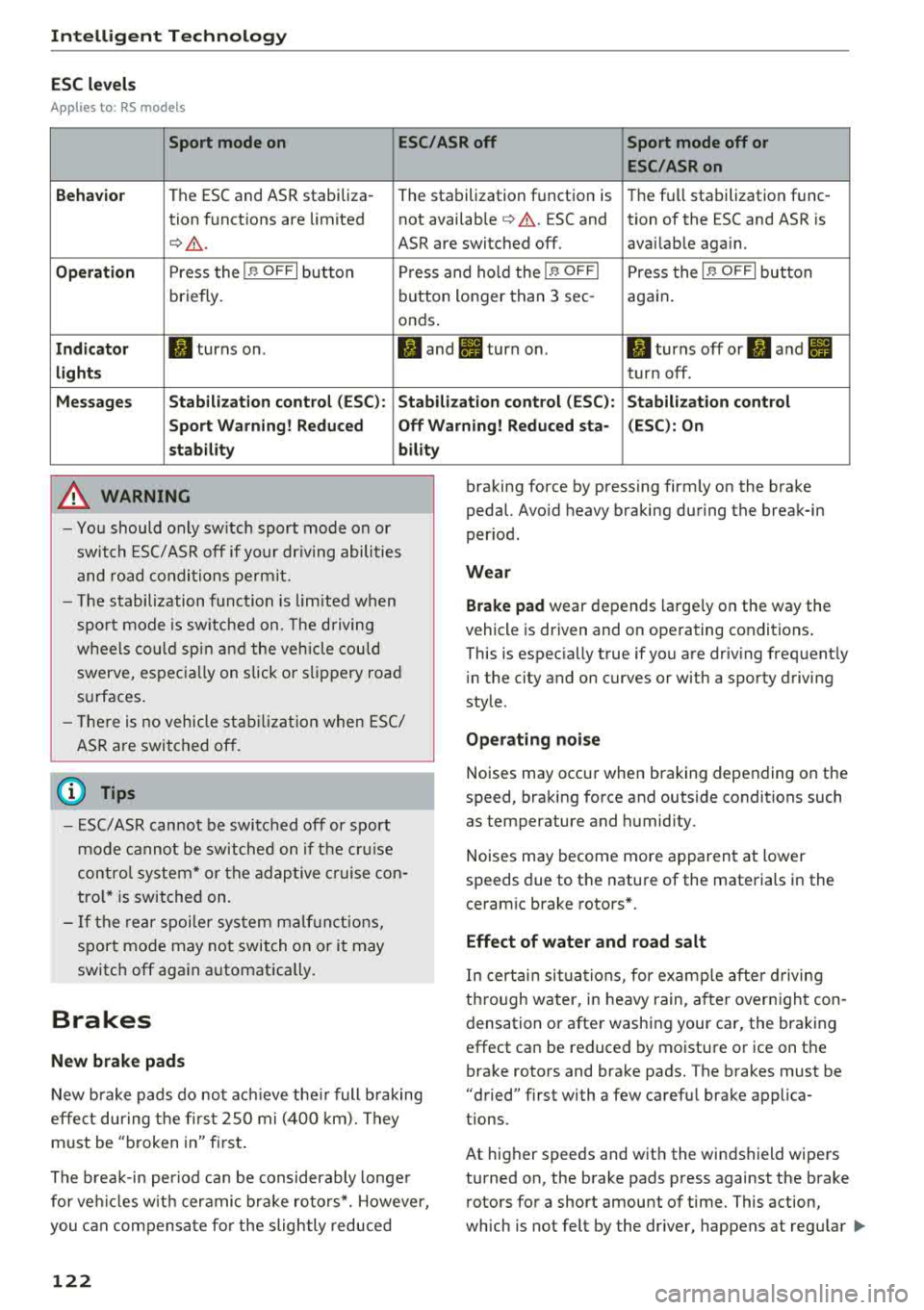
Sport mode on ESC/ASR off Sport mode off or
ESC/ASRon
Behavior
The ESC and ASR stabiliza -
The stabilization function is Th
e fu ll stabilization func-
tion functions are limited not available
¢ .&. . ESC and tion of the ESC and ASR is
¢ .&_. ASR are switched off. avai lab le aga in.
Operation Press the I~ OFFI button Press and hold the I~ OFFI Press the I ~ OFFI button
briefly. button
longer than 3 sec-
again.
onds .
Indicator II turns on. II and II turn on. II turns off or II and II
lights turn off.
Messages Stabilization control (ESC): Stabilization control (ESC): Stabilization control
Sport Warning! Reduced Off Warning! Reduced sta- (ESC): On
stability bility
A WARNING
-You should only switch sport mode on or
switch ESC/ ASR off if your driving abilities
and road conditions permit.
- The stabilization function is limited when
sport mode is switched on. The driving
wheels could spin and the vehicle could swerve, especially on slick or slippery road
surfaces.
- There is no vehicle stabilization when ESC/
ASR are switched off.
(D Tips
- ESC/ASR cannot be switched off or sport
mode cannot be switched on if the cruise
control system* or the adaptive cruise con
trol* is switched on.
- If the rear spoiler system malfunctions,
sport mode may not switch on or it may
switch off again automatically.
Brakes
New brake pads
-
New brake pads do not achieve their full braking
effe ct during the first 2S0 mi (400 km). They
must be "broken in" first.
The break-in period can be considerably longer
for vehicles with ceramic brake rotors*. However,
you can compensate for the slightly reduced
122
braking force by pressing firmly on the brake
pedal. Avoid heavy braking during the break-in
period.
Wear
Brake pad
wear depends large ly on the way the
vehicle is driven and on operating conditions .
This is espec ia lly true if you are driv ing frequently
i n the city and on curves or with a sporty driving
style.
Operating noise
Noises may occur when braking depending on the
speed, braking force and outside conditions such
as temperature and humidity.
Noises may become more apparent at lower
speeds due to the nature of the materials in the
ceramic brake rotors*.
Effect of water and road salt
In certain situations, for example after driving
through water, in heavy rain, after overnight con
densation or after washing your car, the braking
effect can be reduced by moisture or ice on the
brake rotors and brake pads. The brakes must be
"dried" first with a few carefu l brake applica
tions.
At higher speeds and with the windshield wipers
turned on, the brake pads press against the brake
rotors for a short amount of time. This action,
which is not felt by the dr iver, happens at regular
IJIJ,
Page 125 of 274
a co .... N
" N .... 0 00 \.J '
the brakes in wet weather.
The braking effect can also be reduced if you are
driving on salted roads and you do not apply the
brakes for long periods of time. The layer of salt
on the brake rotors and pads must be worn off
first when the brakes are applied.
Due to its surface, the ceramic brake rotor* ab
sorbs moisture in certain situations. Therefore,
there will temporarily be less braking force than
when the brakes are dry. You can compensate for
this by pressing the brake pedal harder.
Corrosion
Leaving the vehicle parked for long periods of
time, low mileage and avoiding heavy braking
can contribute to corrosion on the brake rotors
and to dirty brake pads.
If you usually avoid heavy braking or if there is
corrosion present, occasional heavy braking at
high speeds is recommended to clean the brake
rotors and
pads ¢.&. .
Brake system malfunction
If you notice that the brake pedal travel has sud
denly increased, then a brake circuit in the dual
circuit brake system may have malfunctioned. Drive to an authorized Audi dealer or authorized
Audi Service Facility immediately to have the
problem corrected. On the way there, drive with
reduced speed and keep in mind that you will
need a longer distance to stop and you will need
to press the brake pedal harder .
Low brake fluid level
When the brake fluid level is low, malfunctions in
the brake system may occur . The brake fluid level
is electronically monitored .
Brake booster
The brake booster amplifies the pressure you ap
ply to the brake pedal. It only works when the en
gine is running.
A WARNING
-Only apply the brakes for the purpose of
cleaning the brake system when road and
-
Intelligent Technology
traffic conditions permit. You must not en
danger other road users. This increases the
risk of an accident.
- Never let the vehicle roll while the engine is
stopped because this increases the risk of an
accident.
- New brake pads do not achieve their full
braking effect during the first 250 mi
(400 km) . They must be "broken in" first.
The break-in period can be considerably lon
ger for vehicles with ceramic brake rotors*.
However, you can compensate for the
slightly reduced braking force by pressing
firmly on the brake pedal. Avoid heavy brak
ing during the break-in period.
- Certain weather and operating conditions
such as driving through water, driving in
heavy rain or driving after washing your ve
hicle can impair the effectiveness of the
brakes. In the winter, ice may build up on
the brake pads, rotors and drums. Check
these components by braking carefully. Ap
plying the brakes carefully several times
dries the brakes and removes ice build-up .
- The efficiency of the brakes can also be im
paired by driving for long stretches on roads
covered with salt without using the brakes.
You can remove salt deposits from the
brake rotors and pads by carefully applying
the brakes several times.
- If the front spoiler is damaged or you install
another spoiler, make sure the front wheel
brakes are ventilated properly. Otherwise,
the brake system could overheat, which re
duces their effectiveness.
- Failure of a brake circuit impairs braking
performance, which increases braking dis
tance. Avoid driving the vehicle and have it
towed it to the nearest authorized Audi
dealer or authorized Audi Service Facility.
- If the brake booster is not working, you will
have to press much harder on the brake
pedal to compensate for the lack of the
booster .
@ Note
-Never let the brakes "rub" by pressing the
pedal lightly when braking is not actually
123
Page 126 of 274

Intellig ent T echn olo gy
necessary. This causes the brakes to over
heat and increases braking distance and
causes wear.
- Before driving downhi ll a long distance on a
steep hill, decrease your speed and select a l ower gear. This makes use of the engine
braking effect and relieves the brakes. If
you need to brake additionally, brake in in
tervals and not continuously .
(D Tips
-If the brake booster is not working, you
must press the brake pedal with much more
force than normal.
- If you retrofit your vehicle with a front spoil
er, wheel covers or s imilar items, make sure
that the a ir flow to the front wheels is not
i nterrupted. Otherw ise the brake system
ca n become too hot.
Electromechanical
steering, dynamic
steering
The electromechanical steering supports the
driver's steering movements .
Power steering adapts electronically based on
the vehicle speed .
Indicator light s and me ssages
• Do not d rive vehicle: St eering d efecti ve
If t his ind icator light tu rns o n and stays o n and
this message appears, t he power steer ing may
have fai led.
Stop the veh icle in a safe locat io n as soon as pos
sib le. Do
n ot continue dr iving. See an author ized
Aud i dea ler or authorized Aud i Serv ice Facility for
assistance.
l;:r-ij St ee ring : Sys tem f ault You can con tinu e
dri ving
If the ind icator light turns on and the message
appears, the steering wheel may be more diff i
cult to move or mo re sensit ive tha n usual. The
steer ing whee l may a lso be at an angle when
driving straight .
124
Drive slowly to an authorized Audi dea ler or au
thorized Audi Service Facility to have the mal
funct ion corrected .
'I-ij Dyn ami c ste ering : Initializing
If the indicator l ight is blinking and this message
appears, dy namic stee ring* is be ing initialized.
The steer ing whee l will be easy to move afte r
start ing t he engine . Re -init ialization mig ht be
necessary if the steering wheel was moved hard
to the left and right while the vehicle was not
moving . The d isp lay turns off if the init ia li zation
was successful.
(D Tips
- If the . or 'Tfl indicator light only stays on
for a short time, you may cont inue driving .
- Th e dynamic steering stability systems
<=>page 120 are not avai lab le in the event of
a system malfunction.
- For additiona l information on dynamic
steering, see
<=> page 105.
All wheel drive (quattro)
Applies to: vehicles with all wheel drive
In all wheel drive, all four wheels are powered.
G en eral information
In all whee l dr ive, the dr iv ing power is divided be
tween all four whee ls. This happens automatical
l y depending on your driving behavior as we ll as
the current road conditions . Also see
c> page 120, Electronic stabili zation control
(ESC).
A center differential distributes the driving power
variab ly to the front and rear ax le. It works to
gether w ith selective whee l torque contro l, wh ich
activates when driving through curves
<=>page 120 . With the sport d ifferent ial*, power
distribution to the rear wheels is variable and can
be adjusted with d rive select
c> page 105 .
The all wheel drive concept is designed for high
engine power . Your vehicle is except ionally pow
erful and has excellent driving characteristics
both under normal driving conditions and on
snow and ice. A lways read and follow safety pre-
ca utions
c> .&. . II>-
Page 129 of 274
a co .... N
" N .... 0 00 \.J '
der to maintain an optima l vehicle battery charge
level.
(D Tips
-Energy management cannot overcome the
l aws of physics. Note that the charge leve l
and length of the vehicle battery life are
limited.
-When the starting ability is endangered, the
(•) indicator light turns on qpage 14.
What you should know
Maintaining the starting ability is the highest
priority.
A lot of stress is placed on the vehicle battery
when driving short distances, during city driving,
and at co ld times of the year. A lot of energy is
used but little is generated. It is a lso critical
when the engine is not running but electrical
equipment is switched on. In this case, energy is
used but none is generated.
In situations like this, energy management will
actively regulate the distribution of energy.
Long periods without use
If you do not drive your vehicle for several days or
weeks, e lectrica l equipment is gradually sca led
back or switched off. This reduces energy use and
ensures the vehicle wi ll be able to start after long
periods of time. Some convenience functions,
such as interior lighting or power seat adjust
ment, may not be available under certain circum
stances . These convenience functions will be
ava ilable again once you switch the ig nition on
and start the engine.
With the engine switched off
The vehicle battery will drain if you use Infota in
ment functions such as listening to the radio
while the eng ine is switched off.
The vehicle's ability to start may be impaired by
the energy use, a message will appear in the In
fotainment system d isplay .
The message ind icates that the system will
switch off automatically soon. If you wou ld like
Intelligent Technology
to continue using the functions, you must start
the engine.
With the engine running
Although e lectr ical energy is generated wh ile
dr iv in g, the veh icle battery can drain. This can
happen if little energy is generated but much is
used, and the charge level of the vehicle battery
is not optimal.
To r esto re the balance of energy, components
that require large amounts of energy are tempo
rarily scaled back or switched off . Heating sys
tems in particular require a great deal of energy .
If you notice, for example, that the seat heating*
or rear window defogger is not work ing, then it
has been temporarily reduced or sw itched off.
These systems are available aga in as soon as the
energy supply has been restored .
In add ition, you may notice that the idle speed
has slightly increased. That is normal and no
cause for concern. By increasing the idling speed,
the addit ional required energy will be generated
and the vehicle battery w ill be charged .
Notice about data
recorded by the Event
Data Recorder and
vehicle control modules
Event Data Recorder
This vehicle is equ ipped w ith an Event Data Re
corder (EDR) . The ma in purpose of an EDR is to
record, in certain crash or near crash-l ike situa
tions, such as an airbag deployme nt or hitt ing a
road obstacle, data that will ass ist in understand
ing how a vehicle 's systems performed. The EDR
is designed to record data related to vehicle dy
namics and safety systems for a short period of
time, typically 30 seconds or less. The EDR in this
vehicle is designed to record such data as:
-How various systems in your vehicle were oper
ating;
-Whether or not the driver and passenger safety
be lts were buckled/fastened;
-How far (if at all) the driver was depressing the
accelerator and/or brake pedal; and,
..,.
127
Page 195 of 274

a co ,...,
N
" N ,...,
0 00 <..:l '
System (OBD)
The On-Board Diagnostic System monitors the
engine and transmission components that influ
ence emissions.
F ig . 178 Footwell o n le ft s ide of th e vehicle: con nectio n
port fo r th e On -Board Diagnostic System (OBD)
On -Board Diagnostic S ystem
Eng ine data can be read out using a special test
device at the On-Board D iagnost ic System con·
nection port
9 fig. 178.
Ind icat or light
If thE' ¢..ift indicator light blinks or turns on, there
is a malfunction that is causing poor emissions
quality and that could damage the catalytic con
verter .
Drive s lowly to an authorized Audi dealer or au
thor ized Audi Service Facility to have the mal
function corrected .
The indicator light can also turn on if the fuel fill
er cap is not closed correct ly
9 page 190 .
A WARNING
Incorrect use of the connection port for the
On-Board Diagnostic System can cause mal
functions, which can then result in acc idents
and ser io us injuries .
- Only allow an author ized Audi dealer or au
tho rized Aud i Serv ice Facility to read out the
engine data.
-
Chec king and Filling
Engine compartment
Working in the engine compartment
Special care is required if you are working in the
engine compartment
For wo rk in the engine com part ment , such a s
che cking and filling fluids, there i s a ris k of i n
jur y, sc alding, a cci dent s, and b urn s. For t his
r easo n, foll ow all the w arnings and g en e ral
s afe ty pre ca ution s pro vided in the f ollowing
in
formati on. The engine compartm ent i s a dan
ge rou s area in the vehicle .
9 &..
A WARNING
-Turn the engine off.
- Sw itch the ignition off.
- Set the parking brake.
- Select the P se lector lever position .
- Let the eng ine cool down .
- Never open the hood when there is steam or
coolant escaping from the engine compart ment, because there is a risk that you could
be burned . Wait unt il no steam or coolant is
escaping.
- Keep children away from the eng ine com
partment .
- Never sp ill fluids on a hot engine. These flu
ids (such as the freeze protection contained in the coolant) can catch fire.
- Avoid short c ircuits in the electrical system .
- When working in the engine compartment,
remember that the radiator fan can switch
on even if the ignition is switched off, which increases the ris k of personal injury .
- Never open the cap on the coolant expan
sion tank when the engine is warm . The
coo ling system is under pressure.
-To protect your face, hands, and arms from hot steam or coolant, cover the cap with a
large cloth when opening .
- Do not remove the eng ine cover under any
circumstances . This increases the risk of
bu rns .
- If tests need to be performed with the en
g ine runn ing, there is add it iona l danger due
to mov ing components (such as the ribbed
~
193