night vision AUDI A7 2018 Owners Manual
[x] Cancel search | Manufacturer: AUDI, Model Year: 2018, Model line: A7, Model: AUDI A7 2018Pages: 274, PDF Size: 42.77 MB
Page 9 of 274

a co .... N
" N .... 0 00 \,;J '
@
®
©
®
®
0
Side assist d isplay
Cent ral locking swit ch ..... .. .. .
M emory function buttons . ... .. .
Side assist button ............ .
A ir ven ts wit h thumbw heel
Lever for:
- T urn s ignals and h igh beams
- High beam assistant ........ .
- Active lane assist ......... .. .
@ Mul tifunct ion steer ing whee l with:
- Horn
- Drive r's airbag . ..... ... .. .. .
- Drive r informat ion sys tem con -
t rols .... ... .. ..... ... .. .. .
- Audio/v ideo, telephone, nav iga
t io n and voice recogn ition con
t rols
- dr ive se lec t ............ .. .. .
- Stee ring wheel heat ing .. .. .. .
- Sh ift paddles ............. . .
@ Ins trumen t cluste r .... ... .. .. .
@ Head-up display ........... .. .
@ W indshield was her system leve r
@ Buttons for :
- Infotai nment system display
- Tr ip odometer ........... .. .
@ Starting the eng ine when there is a
malfunc tion ............. .. .. .
(8) Knee airbag . .. .. ..... ... .. .. .
@ Steer ing whee l adjustment, de
pending on equipment
- Mechanica l .... ..... ... .. .. .
- Power . .. ............... .. .
@ Lever for:
- Cru ise cont rol system
- Adaptive cruise control ...... .
@ Bu tto n for sw itch ing the hea d-up
d isp lay on/o ff, adjust ing t he
h eight .... ... .. ..... ... .. .. .
@ Instrument illum ination ....... .
@) H ood release ............ .. .. .
@ Data link connector for On Board
Diagnostic System (OBD II) .. .. .
@ Lig ht switch ............. .. .. .
99
30
49
99
40
40
96
1 50
20
105
63 78
9
24
4 5
23
70
162
66
6 7
84
87
24
42
193
193 39
Coc kpit o ver view
@ Buttons for:
- All-weather lights
- Night vision assist .......... .
- Rear fog light(s) . .. .. ..... .. .
@) Power exterior m irror adjustment
@ Swi tch for luggage compartmen t
li d ... .. .. .... .. ... .. ..... .. .
@ Buttons for :
- P owe r wi ndows
- Parental control
@ Infot ain ment system display
@ Emergency flashers ........... .
@ G love compartment .......... .
@) Front passenger's airbag .... .. .
@ Drives (Infota inment system)
@ B utt ons/ indi cato r l ight for:
- Start/Stop system .......... .
- Parking aid .... ... .. ..... .. .
- P ASS EN GE R AIR BAG O FF .... .
- Re ar spo ile r ... ............ .
- Elect ronic Stabilization Cont rol
( E SC) . .. .. .. .. ............ .
@ Climate contro l system, depending
on vehicle eq uipment:
- Deluxe automatic climate control
- 4-zone deluxe automatic climate
con trol ... .. .. ............ .
@) Storage compartment or ashtray
with cigarette lighter .. ..... .. .
(§ I START E N GIN E STOP I button
@
@
@
In fota inment uni t
Cup holder, 12 Volt outlet
E lectromechanical parki ng brake
@ Se lector lever (automatic transm is -
sion) ... .. .... .. ... .. ..... .. .
(D Tips
39
102
39
43
32
35
35
41
53
150
70
108
158
1 2 5
1 2 1
59
60
51,51 68
52,52
72
75
- Some t he e qui pment lis ted here is o nly in
s ta lled in cert ain models or is available as
an opt io n.
- Th e instr ume nt cl us ter d is pla y is ei ther m ul
t ico lore d or monoc hrome, depending on ve
hicle equipment . Because t he images in
both a re near ly ident ica l, the mult icolored
disp lay is shown in this Owner's Manual.
.,.
7
Page 13 of 274
a co .... N
" N .... 0 00 \.J '
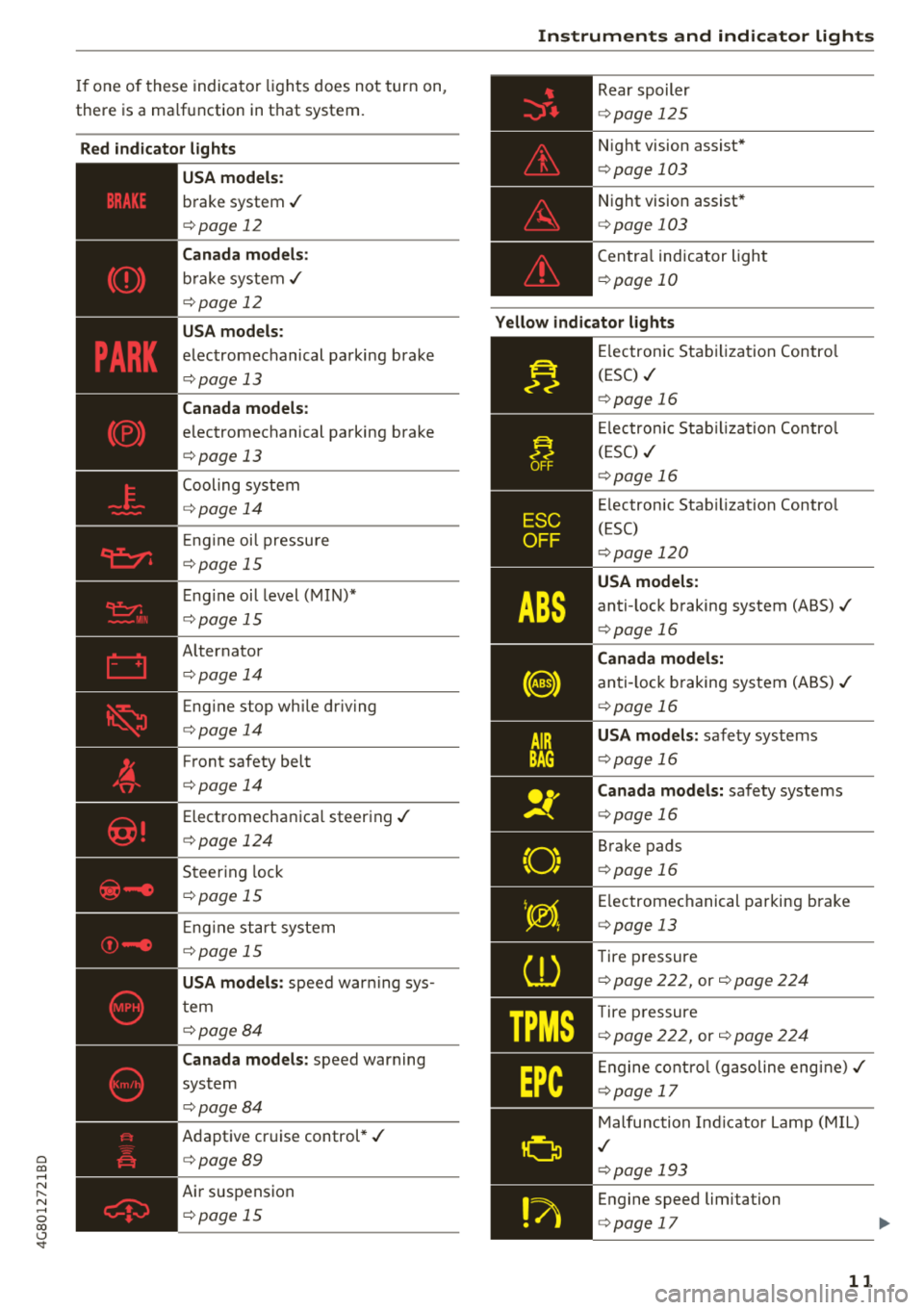
there is a ma lfu nction in t hat system.
Red indicator lights
--------------
US A models:
b rake system .I
c::> page 12
Canada models:
bra ke sys te m .I
c::> page 12
USA models :
elec tromechanical parking brake
c::> page 13
Canada models:
electromechanical pa rking brake
c::> page 13
Cooling sys tem
c::> page 1 4
Eng ine oi l pressu re
c::> page 15
E ng ine oi l level ( MIN )*
c::> pag e 15
A lternator
c::> page 14
Eng ine stop wh ile dr iv ing
c::> page 14
F ront safety belt
c::> page 14
Elect romecha nica l steer ing ./
c::> pag e 124
Steer ing lock
c::> page 1 5
En gine sta rt system
c::> page 15
USA models:
spee d war ning sys
t em
c::> page 8 4
Canada models :
speed warning
system
c::> page 84
Adapt ive cr uise control *./
c::> page 89
Air suspension
c::> page 15
Instruments and indicator lights
Rear spoil er
c::> page 1 2 5
N ight vision assist *
c::>page 103
Night vision assist*
c::> page 103
C en tra l ind icator light
c::> page 10
Yellow indicator lights
"O~ I I ~ ,.
--------------
El ec tronic Sta biliz ati on Contro l
(ESC)
.I
c::> page 16
El ec tro nic Sta bilizatio n C ontro l
( ES C)
./
c::> page 16
E lectron ic Stab iliza tion Contro l
(ESC)
c::> page 120
USA models:
anti- lock b raking system (ABS) ./
c::> page 16
Canada models:
anti-l ock braking system (ABS )./
c::> page 16
USA models: safe ty systems
c::> page 16
Canada models: sa fety systems
c::> pag e 16
B rake pads
c::> pag e 16
Electromec hanical par king brake
c::> page 13
Tire p ressure
c::> page 222, or c::> page 224
Tire pres sure
c::> page 222, or c::> page 22 4
Engine co ntro l (g aso line eng ine) ./
c::> page 17
Malfunc tion In dicator Lamp (M IL)
.I
c::> p age 19 3
En gine speed limitation
c::> pag e 17
11
Page 22 of 274

Driver information system
Driver information
system
Overview
F ig . 4 Driver information system in the i nstrume nt cluster
Fig. 5 Instrument cluster: examp le informatio n line
The information in the driver information system
is shown in @
tabs®¢ fig. 4. The fo llowing
content is possible depending on vehicle equip
ment:
20
® ®
First tab Vehicle functions:
On-board computer
c>page 21
Efficiency program*
¢page22
Digital speedometer
Cruise control system*
c>page84
Adaptive cruise control* and braking guard*
¢ page87
Active lane assist*
c>page96
Boost, shifting and eng ine oil tern-
perature indicators*
c> page23
Lap timer *
c>page85
Reduced display
Second Indicator lights and messages
tab Warning when a door, the hood or
the rear lid is not closed
Service interval display
c>page203
Speed warning system*
c>page84
Third tab Night vision assist*
c>page 102
Fourth Audio/Video
tab
Fifth tab Telephone*
Sixth tab Navigation*
The second and third tabs are only visib le if at
least one indicator light or message is shown or if
that system is sw itched on .
The status line © is located in the bottom part of
the
d isp lay¢ fig. 4. It displays the exterior tem
perature, time, selector lever position, tripod
ometer and odometer .
For some vehicle functions, you can access the
trip information from the temporary memory
¢ page 22 in line @ c> fig. 5 .
Page 26 of 274
Driver information system
In vehicles with an activated head-up display
c:::;, page 24, the shifting indicator is shown in
the head-up disp lay instead of the instrument
cluster .
© Engine oil temperature indicator
When engine oil temperatures are low, the dis
p lay --- °F (- --°C) appears in the instrument clus
ter.
The engine has reached its operating tempera
ture when the engine oil temperature is between
140 ° F (60 °C) and 248 °F (120 °C) under normal
driving conditions. The engine oil temperature
may be higher if there is heavy engine load and
high temperatures outside. Th is is not a cause for
concern as long as
the . c:::;, page 15 or II
c:::;, page 15 indicator lights in the display do not
blink .
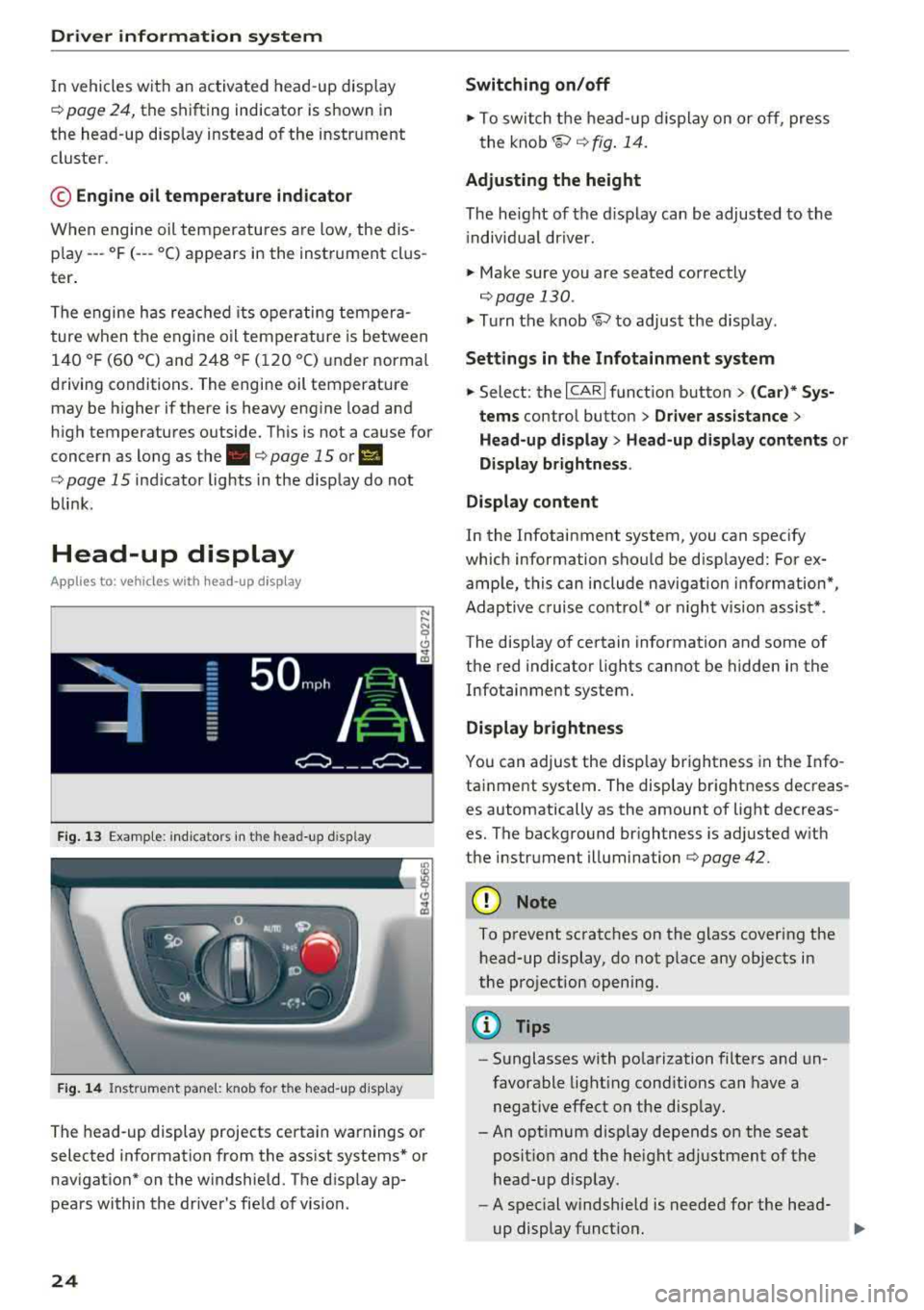
Head-up display
Appl ies to: ve hicles w ith hea d-up display
Fig. 13 Exampl e: indi cators in the head -up disp lay
Fig. 14 Instrument pane l: knob for the head-up disp lay
The head-up display projects certa in warnings or
selected information from the assist systems* or
nav igation* on the windshield. The d isp lay ap
pears within the driver's field of vision.
24
Switching on/off
.,. To switch the head-up dis play on or off, press
the
knob~ c:::;, fig. 14.
Adjusting the height
The height of the display can be adjusted to the
i ndivid ual driver.
.,. Make sure you are seated correctly
c:::;,page 130 .
.,. Turn the knob~ to adjust the disp lay.
Settings in the Infotainment system
.,. Select: the I CARI function button > (Car)* Sys
tems
contro l button > Driver assistance >
Head-up display > Head-up display contents or
Display brightness .
Display content
In the Infotainment system, you can spec ify
which information shou ld be disp layed: For ex
ample, this can include navigation information*,
Adaptive cruise control* or night vision assist*.
The display of certain information and some of
the red indicator lights cannot be hidden in the
Infotainment system.
Display brightness
You can adjust the display brightness in the Info
tainment system. The display brightness decreas
es automatically as the amount of light decreas
es. The background brightness is adjusted w ith
the instrument illumination c:::;,page
42.
(D Note
To prevent scratches on the glass covering the
head-up display, do not place any objects in
the projection opening.
(D Tips
-Sunglasses with polarization filters and un
favorable lighting conditions can have a
negative effect on the display.
-An opt imum disp lay depends on the seat
posit ion and the height adjustment of the
head-up display.
-A spec ial windshie ld is needed for the head-
up display funct ion.
1J,-
Page 29 of 274

a co ,...,
N
" N ,...,
0 00 <.,;) '
-Do not leave valuables unattended in the ve
hicle . A locked vehicle is not a safe!
- The LED in the driver's door rail blinks when
you lock the vehicle . If the LED lights up for
approximately 30 seconds after locking,
there is a malfunction in the central locking
system. Have the problem corrected by an
authorized Audi dealer or authorized Audi
Service Facility.
Key set
Fig . 15 Your vehicle key set
@ Remote control key or convenience key*
The convenience key* is a remote control key with
special
functions ¢ page 29 and¢ page 68.
You can unlock/lock your veh icle w ith the remote
control key . A mechan ical key is integrated in the
remote control
key ¢ page 28.
@ Separate mechanical key
This key is not intended for constant use. It
should only be used in an emergency. Do not
car
ry it on your key r ing and do not store it in the ve
hicle .
Replacing a key
If a key is lost, see an authorized Audi dealer or
authorized Audi Service Facility. Have
this key de
activated . It is important to bring all keys with
you . If a key is lost, you should report it to your
insurance company.
Number of keys
You can check the number of keys assigned to
your veh icle in the Infotainment system. Select:
the
! CAR ! function button> (Car )* Systems con-
Opening and closing
trol button > Service & control > Programmed
keys .
This way, you can make sure that you have
all the keys when purchas ing a used veh icle.
Electronic immobilizer
T he immobilizer prevents unauthorized use of
the ve hicle.
Under certain circumstances, the vehicle may not
be able to start if there is a key from a different
vehicle manufacturer on the key chain.
Data in the master key
When driving, service and ma intenance-relevant
data is cont inuously stored in your remote
con
trol key . Your A udi se rvice advisor can read out
this data and tell you abo ut the work your vehicle
needs. This applies also to vehicles with a
con
venience key*.
Personal convenience settings
If two people use one vehicle, it is recommended
that each person always uses "their own" master
key. When the ign ition is turned off o r when the
vehicle is locked, pe rsonal conven ien ce settings
f or the fo llowing systems are stored and
as
signed to the remote master key.
- Climate control system
- Central locking system
-Windows
- Interior lighting*
- Memory function*
- Parking aid*
- Adaptive cruise control*
-Active lane assist*
- Side assist*
- Dr ive select
- Night vision assist*
- Steering wheel heating*
T he stored settings are automatica lly recalled
when you unlock the vehicle, open the doors or
turn on the ignition.
.&_ WARNING ..__
Always take the vehicle key with you when
leaving the vehicle, even for a short period of
time. This applies particularly when children
-
27
Page 47 of 274

a co ,...,
N
" N ,...,
0 00 <.,;) '
Do not use the sunshade to secure cargo. The
luggage compartment cover is not a surface
for storing objects. Objects placed on the cov er could endanger all veh icle occupants dur
ing sudden braking maneuvers or in a crash .
Windshield wipers
Switching the windshield wipers on
Fig. 43 W indshie ld wiper lever
Move the windshield wiper lever to the corre
sponding position:
@ -Windshield wipers off
~ M 0 ± ..,. CD
(D -Rain sensor mode . The windshield wiper s
switch on once the vehicle speed exceeds approx imately 2 mph (4 km/h) and it is raining . The
higher the sensitivity of the rain sensor that is set
(switch
@ to the right) , the earl ier the wind
shield wipers react to moisture on the wind
shie ld. You can deactivate the rain sensor mode
in the Infotainment system , which switches the
intermittent mode on . Select:
!CAR I function but
ton
> (Car)* systems control button > Dr ive r as
sistance > Rain sensor> Off.
In intermittent
mode, you can adjust the interval time using the
switch @.
@· Slow wiping
@ -Fast wiping
@·Single wipe. If you hold the lever in th is posi
tion longer, the wipers switch from s low wiping
to fast w iping .
® -Clean the windshield . The wipers wipe one
time after several seconds of dr iving to remove
Lights and Vision
water droplets. You can switch this function off
by moving the lever to position ® within 10 sec
onds of the afterwipe. The afterwipe function is
reactivated the next time you switch the ignition
on.
Clean the headlights*. The headlight washer sys
tem* operates only when the low beam head lights are on. If you move the lever to position
@, the headlights and the night vision assist
camera* are cleaned at intervals.
_& WARNING
--The rain sensor is only intended to ass ist the
driver . The driver may sti ll be responsible
for manually switching the wipers on based
on visibility cond itions .
- The windsh ield may not be treated w ith wa
ter-repelling w indshield coating agents. Un
favorable conditions, such as wetness, dark
ness or low sun, can result in increased
g lare , which increases the risk of an acci
dent. Wiper blade chatter is also possible.
- Properly functioning windshield wiper
b lades are required for a clear view and safe
driving
¢ page 46, Replacing windshield
wiper blades.
(D Note
- If there is frost, make sure the windshield
wiper blades are not frozen to the wind
shield. Switching on the windshield wipers
when the blades are frozen to the wind
shield can damage the wiper blades.
- The windshield wiper system must be switched off (lever in position 0) before us
ing a car wash. Th is prevents the wipers
from switching on un intentionally and caus
ing damage to the windsh ield wiper system .
(D Tips
-The windshield wipers switch off when the
ign ition is switched off. You can activate the
windshield wipers after the ignition is
switched back on by moving the w indshield
w iper lever to any position.
""
45
Page 104 of 274

Assistance systems
@ Tips
-Side assist is not active while you are mak
i ng the adjustment.
- Your settings are automatically stored and
assigned to the remote control key being
used.
Messages
Applies to: ve hicles w ith Audi side assist
If side ass ist switches off by itself, the LED in the
button turns off and a message will appear in the
instrument cluster display:
Audi side assist: Currently unavailable . No
sensor vision
The radar sensor v is ion is impaired . Do not cover
the area in front of the sensors with b ike wheels,
stickers, dirt or other objects . Clean the area in
front of the sensors, if
necessary¢ page 100,
fig . 107.
Audi side assist: Currently unavailable
Side assist cannot be switched on at th is time be ·
cause there is a malfunction (for example, the
battery charge level may be too low).
Audi side assist: System fault!
The system cannot guarantee that it w ill detect
vehicles correctly and it has switched off. The sensors have been moved or are faulty. Have the
system checked by an authorized Audi dealer or
authorized Audi Service Facility soon.
Audi side assist: Unavailable when towing
Side assist switches off automatically when a fac
tory-installed trailer hitch is connected to the
electrical connector on the trailer . There is no
guarantee the system will sw itch off when using
a retrofitted trailer hitch. Do not use side assist
when towing a trailer.
102
Night vision assist with
pedestrian and wild
animal detection
Description
App lies to: vehicles wit h night vision assist
The night vision assist can detect, highlight and,
if necessary, warn about pedestrians and large wild animals.
Night vision assist with pedestrian and wi ld ani
mal detection assists you at night by using an
in ·
frared camera to monitor the area in front of
your vehicle, within the limits of the system. It can d isplay objects up to a distance of approxi
mately 1000 feet (300 m). The thermal image
detected by the camera is shown in the instru
ment cluster display. Warm areas appear lighter
and cold areas appear darker.
Highlighting detected pedestrians and wild
animals
Applies to: vehicles wit h night vision assist
Fig. 109 In stru men t cl uste r: yellow highlighted pedes ·
tria ns
Fig. 110 Instrument cl uster : sy mbol when the infrar ed im
age is not v isible
Within th e limits of the system, the night vision
ass ist can detect pedestrians and wild animals
..,..
Page 105 of 274

a co ,...,
N
" N ,...,
0 00 <.,;) '
295
ft (90 m) in front of the vehicle and within
the detection zone . Within the limits of the sys
tem¢ page 103 , a pedestrian or w ild animal de
tected when the low beams are sw itched on is
h ighlighted in
yellow ¢ fig. 109 . Animal recogni
tion is not active w it hi n highly developed areas .
The system on ly de tects large wild anima ls such
as deer.
(D Tips
If another display such as navigation replaces
t he image from the night v is ion assist
the~ .,
symbo l appea rs in a tab ¢ fig. 110. You can
a ccess nigh t vision assist using the mul tifunc
t ion stee ring w heel
buttons ¢ page 21.
Pedestrian and wild animal warning
Applies to: vehicles with night vision assist
Fig . 111 In stru ment clust er: @ pede stri an warn ing ,@
wi ld ani mal warnin g
Fig. 112 In str ument clus te r: @ pedest ria n warn ing /@
wi ld an imal warning, when t he nigh t vis ion a ssis t image is
n ot se lec ted in the instrument clust er dis p lay
Image in the instrument cluster /head -up
di splay*
If there are pedestrians or wild animals in an
area in front of your veh icle that is class ified as
A ssi st a nce systems
critica l, the system will d irect your atten tion to
t h is:
- Pedestr ians or wild anima ls are h ighlighted in
red and the cor responding
symbo l. or.
turns on ¢fig. 111 .
-There is also an audib le sign al.
T he area classified as critical is based on the vehi
cle speed and the steering wheel angle . Pedes
t rian and w ild an imal warning encourages you to
pay more atten tion.
If the night vision assist image is replaced by an
othe r display (such as the on-board comp ute r) ,
t h e
red . or. in d ic ator lig ht ¢ fig . 112 will
appea r if the re is a pedestrian o r wild animal
war ning .
If the head-up display* is sw itched on and the
night v ision assist content is activated, .
or.
will appear i n the head-up displ ay *.
Marking light*
T o direct the driver's attention to a pedestr ian ,
the headlights can flash on the pedest rian three
tim es in a row whe n there is a pedestr ian war n
ing .
This occurs at speeds above approximately
35 mph (60 km/h) if yo u are outside of illuminat
ed a reas and no de tected ve hicles are shown. Th e
high be am assistant* con trols the m arking ligh t*
¢ page 40, High beam assis tant.
T he ma rking light is not used for wild anima ls .
General information
Applies to: vehicles with night vision assist
Fig . 11 3 Front of t he ve hicle : n ig h t v is io n ass ist camer a
103
Page 106 of 274

Assistance systems
The following situations may affect the function
of t he night vision assist system:
- Poor visibility such as snow, rain , fog or heavy
spray
- Dirty lens on the night vision assist camera
Make sure the night vision ass ist camera
¢ fig. 113 is not covered by stickers, deposits or
any other obstructions because that can affect
the camera function. For information on clean
ing, see
¢ page 228.
The pedestrian and wild animal recognition de
pends on the temperature difference between
the person/wild animal and the background. Peo ple/wild animals may not be detected if the dif
ference is too small. The pedestrian/wild animal
marking and the marking light* deactivate at
temperatures above approximately 77 °F
(25 °()
and during daylight. If the night vision assist
im
age is selected in the instrument cluster display,
then the
II symbol appears at the top on the
right side.
..&_ WARNING
Pay attention to traffic and the area around
your vehicle when night vision assist is switch
ed on. The driver is always responsible for as
sessing the traffic situation.
- Night vision assist can only warn about peo
ple and wild animals located within the visu
al range of the infrared camera. The visual
range corresponds to the image in the in
strument cluster display.
- Night vision assist may not detect people or
wild animals and mark them if
- they are not in an upright position, for ex
ample if they are sitting or lying down
and/or
- the silhouette in the display appears in
complete or interrupted, for example be
cause the person is partially covered by a
vehicle or the animal is partially covered
by tall grass. This could increase the risk
of an accident.
- Never try to swerve around animals if doing
so will endanger you or other road users, be
cause this increases the risk of an accident.
104
@ Tips
- Even though the system evaluates the
shape and heat given off by all detected ob
jects, there are limits to the system. There
may be false warnings.
- For technical reasons, the image pauses in
split second intervals.
Switching on /off
Applies to: vehicles with night vision assist
Fig. 114 Area around the ligh t switc h: ni gh t vis ion assist
button
Requirement: switch the ignition on and turn the
light switch to the
AUTO position.
.,. Press the~ button ¢ fig. 114. The heat image
from the night vision camera appears in the in
strument cluster display .
.,. Press the~ button again to switch the night
vision assist off .
If conditions are bright enough, night vision as
sist can be switched on without moving the light
switch to the
AUTO position. Pedestrian and wild
animal highlighting and warnings are only active
when it is dark outside and the headlights are
switched on.
Adjusting the contra st
Applies to: vehicles with night vision assist
.,. Select: the I CARI function button > (Car)* Sys
tems
contro l button > Driver assistance >
Night vision assist contrast.
When the night vision assist is switched on and
the image is visible in the instrument cluster dis
play, you can adjust the contrast in the image
from
Min to Max .
Page 107 of 274

a co .... N
" N .... 0 00 \.J '
Applies to: vehicles with night vision assist
Night vi sion assist : S ys te m fault
The system cannot guarantee correct function
and is sw itched off . See an author ized Audi deal
er or authorized Audi Service Facility for ass is
tance.
Night vision a ssist : Currently una vailabl e
The system cannot guarantee correct function at
this t ime and is switched off.
Night vis ion assi st: Onl y av ailable at night with
light s turned on
Nig ht vision ass ist only wo rks when it is dar k out
side and the head lights are on.
Night vision a ssist : Pede strian marking curr ent
l y unavail abl e
The pedestrian and wild animal marking was
sw itched off by the system .
Audi drive select (drive
settings)
Introduction
Drive select makes it possible to experience dif
ferent types of veh icle settings in one vehicle .
The dr iver can se lect
Comf ort , Auto a nd D ynamic
modes in the I nfota inme nt system to switch be
tween , fo r example , a sporty and a comfo rtable
driving mode .
I n the
Indi vidual mode, the sett ings can be ad
justed to your perso nal preferences . This makes
it poss ible to comb ine settings such as a sporty
engine setting with light steering.
Description
The fo llowing systems, among other things, are
infl uenc ed by drive select:
Engine and automatic transmission
D epending on the mode, the e ng in e and auto
mat ic transmission respond more q uickl y o r in a
more balanced manner to accelerator pedal
A ss istance systems
movements . In the sporty dynamic mode, the
transmission shifts at higher speed ranges .
Adaptive air suspension*
The adapt ive a ir suspens ion* is an e lectron ica lly
contro lled air suspens io n and dampi ng sys tem.
T he adjustment depends o n the dr iving mode se
l ected, steering movements, the driver's braking
and acce leration, and as the road surface, ve hicle
speed and load.
T he vehi cle ground clearance depends on t he
mode selected and the speed . When you are in
the
a uto mode, the highway setting is activated
when you dr ive above 75 mph (120 km/h) for
more than 30 seconds. The ground clearance is
increased automatically if the speed drops below
44 mph (70 km/h) for more than 120 seconds .
Suspension control*
With the Audi Dynamic Ride Contro l damping
contro l, dampening characteristics of the vehicle
can be individually adjusted us ing drive select.
This makes it possib le to satisfy the des ire for
sporty suspens ion (DYNAMIC) and comfortable
suspension (COMFOR T) without g iv ing up bal
anced tu ning (AUTO) .
Steering
The power steering adapts. Indirect steering that
moves easily as in comfort mode is espec ially
su ited to long drives on a highway . The dynamic
mode provides sporty, direct steeri ng .
Applies to: vehicles with dynamic steering
The steering ratio changes based on veh icle
speed in order to maintain optimum steering ef
fort for the driver at all times . Th is sets the steer
i ng to be less sensitive at h igher speeds i n orde r
to prov ide improved ve hicl e cont rol. At red uced
speeds, stee ring is more d irect in orde r to keep
the steering effort as minimal as possible when
the driver is maneuvering the ve hicle. At low and
average speeds, dynamic steering * additionally
provides more responsive steering performance.
Sport differential *
As a compone nt o f the all whee l dr ive sys tem
(qua ttro)
q page 124, the sport different ia l dis -
tributes the driving power to the rear axle
.,.
105