charging AUDI A7 2020 User Guide
[x] Cancel search | Manufacturer: AUDI, Model Year: 2020, Model line: A7, Model: AUDI A7 2020Pages: 310, PDF Size: 81.29 MB
Page 240 of 310

Checking and Filling
@) Note
— If the vehicle will be parked for long periods
Other battery types
of time, protect the battery against the cold
so that it will not be destroyed by “freezing”
= page 239, Charging the 12 Volt vehicle
battery.
— There are electrical components under the
cargo floor behind a trim panel that warm
up during operation. To reduce the risk of
the components overheating, do not store
objects such as blankets under the cargo
floor. If the components overheat, they will
switch off temporarily. This will be indicated
by a message that will be displayed in the
instrument cluster until the temperature re-
turns to normal.
12 Volt vehicle battery
Explanation of warnings:
© Always wear eye protection.
Battery acid is highly corrosive. Always
wear protective gloves and eye protection.
forbidden.
A highly explosive mixture of gases can
A form when charging batteries.
Always keep children away from battery
ec) acid and the battery.
Always follow the instructions in the oper-
® Fire, sparks, open flame, and smoking are
@/
GQ) | ating manual.
@ For the sake of the environment
* Lead-acid batteries must be disposed of
Explanation of warnings:
Fire, sparks, open flame, and smoking are
) forbidden.
Always keep children away from battery
@) acid and the battery.
@/ | Always follow the instructions in the oper-
fQ) | ating manual.
ZA\ WARNING
All work on the batteries must only be per-
formed by an authorized Audi dealer or au-
thorized Audi Service Facility.
— Gases that escape from these different bat-
tery types can be poisonous or flammable.
— The contents of these battery types can be
corrosive. If any battery contents come into
contact with the skin, flush the affected
area for at least 15 minutes with clean wa-
ter. Then wash the affected area with soap.
Have the affected area examined by a medi-
cal professional.
@) Note
Components must not be connected to the
battery terminals and wires on these battery
types because this increases the risk of dam-
age, for example due to overvoltage.
@) For the sake of the environment
2 Hf These types of batteries must be dis-
posed of using methods that will not harm
the environment. Do not dispose of them in
household trash. They contain harmful sub-
stances and recyclable raw materials. Contact
using methods that will not harm the environ-
ment. Do not dispose of them in household
trash. They contain harmful substances, such
as sulfuric acid and lead, and also recyclable
raw materials. Contact an authorized Audi
dealer or authorized Audi Service Facility for
more information.
238
an authorized Audi dealer or authorized Audi
Service Facility for more information.
Page 241 of 310
4K8012721BC
Checking and Filling
Charging the 12 Volt vehicle battery
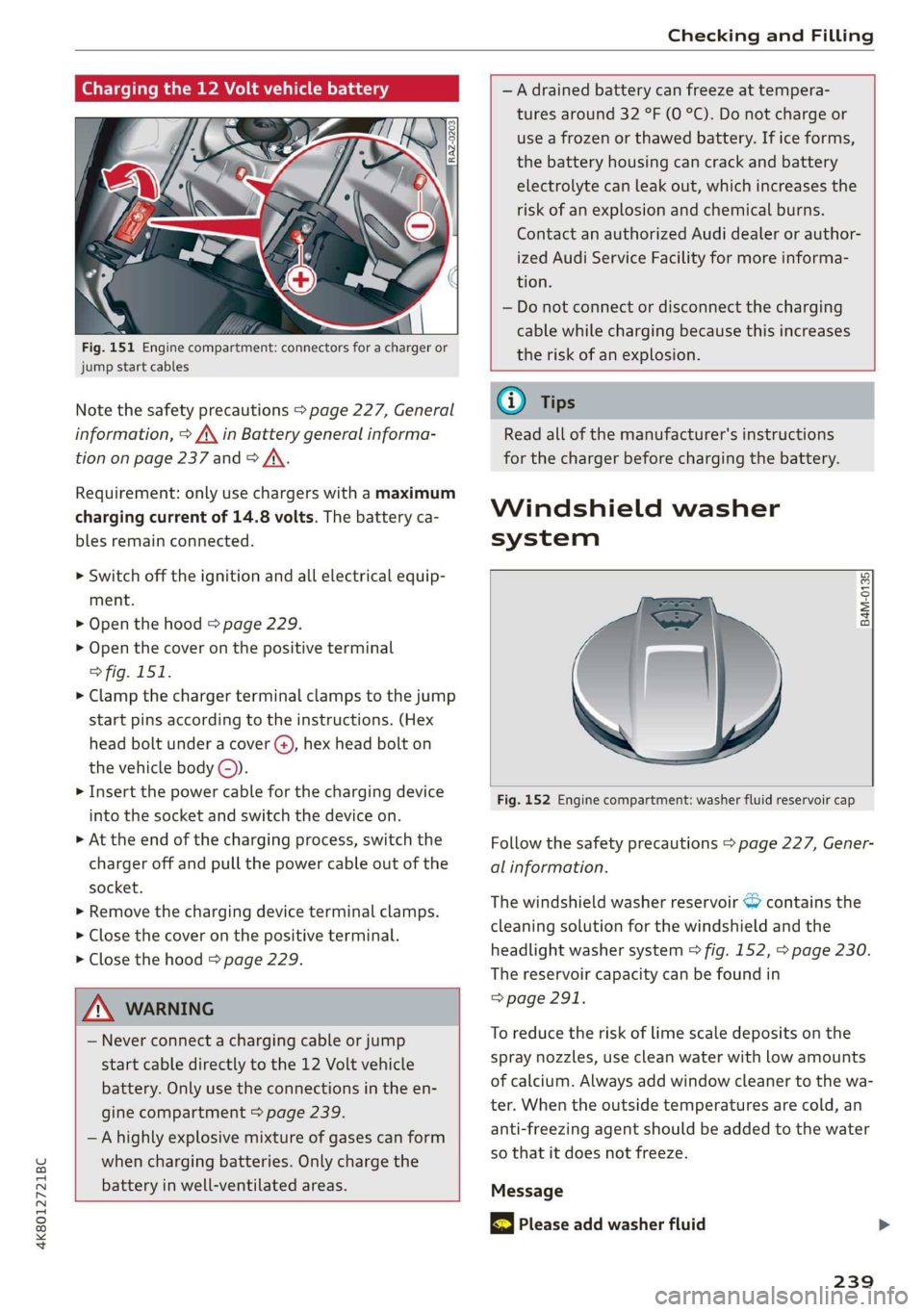
Fig. 151 Engine compartment: connectors for a charger or
jump start cables
Note the safety precautions > page 227, General
information, > A\ in Battery general informa-
tion on page 237 and > /\.
Requirement: only use chargers with a maximum
charging current of 14.8 volts. The battery ca-
bles remain connected.
> Switch off the ignition and all electrical equip-
ment.
> Open the hood > page 229.
> Open the cover on the positive terminal
> fig. 151.
> Clamp the charger terminal clamps to the jump
start pins according to the instructions. (Hex
head bolt under a cover ©, hex head bolt on
the vehicle body ©).
> Insert the power cable for the charging device
into the socket and switch the device on.
> At the end of the charging process, switch the
charger off and pull the power cable out of the
socket.
> Remove the charging device terminal clamps.
> Close the cover on the positive terminal.
> Close the hood > page 229.
Z\ WARNING
— Never connect a charging cable or jump
start cable directly to the 12 Volt vehicle
battery. Only use the connections in the en-
gine compartment > page 239.
— Ahighly explosive mixture of gases can form
when charging batteries. Only charge the
battery in well-ventilated areas.
—A drained battery can freeze at tempera-
tures around 32 °F (0 °C). Do not charge or
use a frozen or thawed battery. If ice forms,
the battery housing can crack and battery
electrolyte can leak out, which increases the
risk of an explosion and chemical burns.
Contact an authorized Audi dealer or author-
ized Audi Service Facility for more informa-
tion.
— Do not connect or disconnect the charging
cable while charging because this increases
the risk of an explosion.
G) Tips
Read all of the manufacturer's instructions
for the charger before charging the battery.
Windshield washer
system
B4M-0135)
Fig. 152 Engine compartment: washer fluid reservoir cap
Follow the safety precautions > page 227, Gener-
al information.
The windshield washer reservoir © contains the
cleaning solution for the windshield and the
headlight washer system > fig. 152, > page 230.
The reservoir capacity can be found in
=> page 291.
To reduce the risk of lime scale deposits on the
spray nozzles, use clean water with low amounts
of calcium. Always add window cleaner to the wa-
ter. When the outside temperatures are cold, an
anti-freezing agent should be added to the water
so that it does not freeze.
Message
& Please add washer fluid
239
Page 286 of 310

Data privacy
Adjusting individual privacy settings
In the MMI, you can adjust individually which da-
ta should be transmitted from the vehicle. If you
switch on a data category, the data will be trans-
mitted.
@) Note
You are responsible for all precautions taken
for data protection, anti-virus protection, and
protection against loss of data on mobile de-
vices that are used to access the Internet
through the Wi-Fi hotspot.
@ Tips
— The following interfaces are not affected by
changes to the privacy settings: Bluetooth,
Bluetooth Low Energy (BLE), Wi-Fi, Audi
smartphone interface (ASI), Near Field
Communication (NFC), charging communi-
cation (high-voltage system), Electronic Toll
Collect (ETC), On-Board Diagnostic System
(OBD) if equipped.
— If the maximum privacy settings are switch-
ed on, your vehicle may not receive security
updates and certificates for establishing an
encrypted connection, depending on vehicle
equipment. In order to receive security up-
dates and certificates, switch the maximum
privacy settings off for at least ten minutes
every six months. Make sure that your vehi-
cle is connected to the Internet. A symbol in
the MMI status bar indicates if the required
data connection is available > page 22.
— If the transmission of data is limited, it will
have the following effects on the exchange
of data for Audi connect services and emer-
gency calls, if equipped:
— The emergency call function will remain
available without restrictions and will con-
tinue to transmit data.
— If an online roadside assistance call is ini-
tiated, no data will be transmitted, but a
call will be made.
— If the Geofencing Alert, Speed Alert,
and/or Valet Alert services have been acti-
vated by the key user, then they will re-
284
main available without restrictions and
continue to transmit data.
— Stored destinations (favorites, last desti-
nations) are only stored in the vehicle. If
you allow transmission of data again,
these destinations will be synchronized via
the myAudi account. To prevent synchroni-
zation of destinations, delete the destina-
tions before you allow data to be trans-
mitted again.
Applies to: vehicles with Audi connect Infotainment
AUDI AG collects, uses, stores and shares your
personal information, such as contact data, vehi-
cle data, usage data, driving data and precise ge-
olocation, in order to provide you with the prod-
ucts and services you have purchased or request-
ed, and for a number of other purposes, for ex-
ample, to track quality issues, to performance
and safety, to meet our internal compliance or le-
gal requirements and to market to customers
and potential customers. For a more complete
list of the data we collect, how we use it and with
whom we share it, please visit your Audi nation-
al/sales region website at www.audi.com.
The collection, use and sharing may vary depend-
ing on your model and model year, your subscrip-
tion status, or the service offering. For example,
collection, use and sharing may vary between
Audi connect services, if you have designated a
key user, or if you are driving a model equipped
with persistent data logging. Please review the
complete Privacy Statement to understand our
data handling practices with respect to a particu-
lar service.
You can find additional information about our da-
ta privacy practices in your MMI.
> Applies to: MMI: On the home screen, select:
SETTINGS > General > Legal notes > About
Audi connect.
Information about our privacy practices in con-
junction with the mobile Audi connect applica-
tion can be found in the Application’s Privacy
Statement.
Page 295 of 310

4K8012721BC
Index
A
A/C cooling mode............. ee eee eee ee
Accelerator pedal.............--00000005
also refer to Accelerator pedal...........
ACCeSSOFICS . 6... eee
Active lane assist
refer to Lane departure warning.........
refer to Lane guidance................
Adaptive cruise assist..............-000.
Cleaning the sensors...........00 ee eee
Predictive control....................
Adaptive dampers...........--0000-00-
Adaptive speed assist
refer to Adaptive cruise assist...........
Adjusting the air distribution.............
Adjusting the brightness.................
Adjusting the sound..............-...0-
Adjusting the temperature...............
Adjusting the vents ...........0 cece eens
Adjusting the volume..............000005
Adjusting the volume (announcements) ... .
Adjusting the welcome sound............
Airbag SySteM « » ene s ews 4 5 Hemme tee Eee
Air quality display................2.2.00.
Air suspension..............00.00-0008
Alarm system
refer to Anti-theft alarm system..........
Alignment pin (changing the wheel).......
All-weather lights...............-.00000.
Allseason tires... 2.2.00... 22020
All wheel drive
refer to quattro... 2... eee eee eee
Amazon Alexa integration
Média playback’: ¢ sos s ¢ wees ¢ 4 orem b eae
Operation « sion ss aac sv rere © omen wa ar
AMI
refer to Audi music interface...........
Android Auto
refer to Audi smartphone interface......
Anti-freeze
Windshield washer system.............
Anti-lock braking system. ........-....-.
Anti-Slip Regulation.................0..
Anti-theft alarm system...........-..00--
Anti-theft wheel bolts................0.
Apple CarPlay
refer to Audi smartphone interface...... 217
Aspect ratio (video) ..........-..00. 211,.213
ASR
refer to Anti-Slip Regulation............ 108
Audi adaptive light.................0005. 48
Audi connect
refer to CONNECt:. « s ccascs seas ieeeee oe 174
Audi connect Remote & Control
refer to Vehicle control services......... 176
Audirdrive seletticy: « + sven « x cee x ¢ neem ¢ 2 2 104
Audi music interface...............20-- 208
Audio files.......... 00.0000 c cece 209
Audi phone box............ 00: e eee eee 163
Audi presense......... 0... e ee eee eee 143
Messages ............ 0.02. e eee eee 146
Audi pre sense front.............--..0-- 144
Audi side assist
refer to Side assist. ...... 0.00.00 eee eee 147
Audi smartphone interface.............. 217
Legalinformation.................005 221
Audi virtual cockpit
refer to Instrument cluster.............. 12
AUTO
Automatic headlights.................. 48
Climate control system.............0005 86
Auto Lock (central locking) ............... 32
Automatic climate control system
refer to Climate control system.......... 85
Automatic luggage compartment lid.... 40,41
Automatic transmission............-.0005 92
Parking lock emergency release.......... 95
Automatic wipe/wash system............. 55
Average consumption................... 16
Average speed.... 2.2... - ee eee eee eee 16
B
Bag hooks... ..... cece eee eee eee eee 80
Battery
Charging (12 Volt vehicle battery)....... 239
Vehicle battery (12 Volt)............... 237
Winter operation (12 Volt vehicle battery) . 237
BOCK rOUEE sicccans + 2 woewene © o sirens © ¥ ecevonT «ones 190
293
Page 296 of 310
Index
Bluetooth
Audio player... . 2... cece eee eee eee eee 206
Connecting acellphone............... 161
Deleting adevice...............00000- 221
Device overview............--0-0 0 eee 220
Disconnecting a device................ 221,
Displaying profiles. « cies 2 save «2 owen ae 221,
Searching fora device................. 221
Selecting a device : seas ss seg ts ees so: 221
Specifying a favorite.................. 221
BoOStss « « cosy: ¢ ¢ eyes 5 © sees § o Rewn ¢ a ees ¢ e 16
Boost pressure indicator................. 16
Brake fluid
New brake pads..............---000-- 100
Break-in security feature..............0.. 35
Breaking in
New brake pads..............-..00005 100
New tires « ¢ cvs + sie +e ctees ss ees es 248
Browser
refer to Mediacenter................0. 210
Bulb replacement...............000-005 281
Business. address): « s scx ¢ < swaw « x ome gee 191,
C
California Proposition 65 Warning........ 228
Batteryspecificie. «swine s vaaney o ownc oes 237
Galllist « cosas « s sess = i secu = 2 am = a8 165, 167
CaM@raS css « = ees 5 2 cee + & otters os ees es 116
LOGCALIONS sa, «+ veces oe 5 consents » x aamsens © 5 eewens 117
Capacities
Fueltank............ 20. 291
Washer fluid reservoir...............0 291
Cargonet........... 0... eee eee eee eee 83
Car key... eee eee eee 36
Car phone
Serial number (IMEI) .............0.006 172
SWItChING OMfessc <6 weww = awe a 2 mire «2 171
Capwashls « oaws 2 ¢ eau « 2 mame «x eee & 2 cee 261
Catalytic converter’; esos << weg ee ees se ee 227
294
Cell phone
refer to Telephone.............e eee eee 161
Cell phone compartment
refer to Audi phone box............... 163
Central
locking ...... 0. cece eee eee eee 32
AUTO LOCK: » geese + sunems 2 seene & 3 donee & = Be 32
Convenience key « sscsu © cvenesie © erase wo vnscem 37,
Convenience opening and closing......... 43
Luggage compartment lid............... 39
Mechanically unlocking and locking....... 35
Messages... 1.6... ce eee cece eee eee 34
Remote control keys: ss esas ss eves os ees 37
SettN's 6 e wanes a a saws «wo ones vo meen + 8 o8TH 33
Vehicle key... 6... ccc ee eee eee eee 37
Central locking switch................0-. 34
Ceramic brakesicicns x + sxcceie +o nessa 3 0 eres ¥ 6 « 100
Certificationies « 6 evar se enare a ears +e ewe 289
Changing light bulbs................... 281
Charging
refer to Power SOUrCES ...... eee eee eee 79
Charging the battery (mobile devices) . 163, 208
Child safety lock
Climate control system controls in the rear. 42
Power windows.........---00 eee eee eee 42
Rear doorSies 5 « aecw sa cams 3 cam 4 x ae a 42
Child safetyis@ats): se cous ye sews x 2 wren av we 73
Securing to the top tether anchor........ 77
Securing with a safety belt.............. 76
Securing with LATCH............-.-+--- 7
CIGSNING « sacze & s aes & s dae +e Sees te ee 261
Cleaning Alcantara...............00000. 264
Cleaning artificial leather............... 264
Cleaning carbon components........ 263, 264
Cleaning COMmtrols®. « scsi « x sro < « onmvess #6 vie 264
Cleaning decorative parts/trim........... 263
Cleaning exhaust tail pipes.............. 263
Cleaning plastic parts.................. 264
Cleaning textiles.................20005 264
Climate control system...........--..0-- 85
Climate control system controls in the rear
Child safety lok « seyoic 2 x ewe + saree 2 meee 2 42
Closing
Automatic luggage compartment lid...... 40
Convenience closing..............-.05. 43
HOG s « 2 seve y 5 meen ¢ 2 etme § eee OE ree 229
Luggage compartment lid............... 39
Page 304 of 310
Index
S
Safety belts. ...... 0... 2 cee eee eee 64
Cl@aniNnG: ¢ « sews = e eeay se ween 2 eaen se Be 264
LOCKING rains 2s acters oo arerece xo acne x mi senor owe 76
Securing child safety seats.............. 76
Satellite map... . 0.2... eee eee eee ee 192
Saving fuel
Energy consumers..........-..--000000- 17
RecUPEratiOn s ¢ wes + x ees 2 eee ss wee g 17
Screen
refer'to Touch displayriis. . . seiaw oo wecnw ov 18
SGREWAPIVER': = 4 sexes 5 2 even x s neues 5 e HUH & 2 267
SD card reader (MMI) ......... 0000s eee 205
Séarch aréa (POD) sccs = s ees x sees ys ees 185
Search function
refer to Free text search. .........00005 213
Seat Weating quay « x saws x # ame = RaeD aE REE 87
Seats
Adjusting the front seats................ 60
Cleaning...................000000008 264
Folding
Front passenger’s seat adjustment....... 62
Head restraints. .......... 0.0.00 eee eee 63
Massage function.............2--.000- 60
Mettiory furetion « cess as cows as ews a ¢ vers 67
Resetting the position.................. 61
Storing a seat profile..............200.. 67
Seat ventilation. ......... cece eee eee 87
Selecting a source (media).............. 209
Selector lever... 2.00... cee eee eee eee 92
Self-learning navigation
refer to Personal route assistance....... 190
Sensors
Coverage areaS..... 2. cece eee 116
LOGAIONS ies «2 sme = 3 meee © 7 sueKe wo ere LL7
Service interval display................. 240
Setting measurement units.............. 219
Settings ..........0 0.0.02 e eee eee 219
Announcements and tones............. 219
Bluetooth................ 00. eee eee 220
Date andtime.................0 eae 219
LANGUAGE veces 5 2 sees ¥ 2 eawa § 8 ews 2 2 ea 219
Measurement units.................4. 219
Media. ... 2... eee eee eects 214
NaVidatiOlic: = ¢ sew s 3 eee 2 ees & 5 Rome g 195
Rad Obariie se sewrie ve ouerere ew omens ew anaes ww 203
302
SOU ssccnes + a axcwe ww swcwuns © a anew w stews Oe 219
SyStEM . 6. eects 219
TIME ZONGiccs s 2 wees a & HoweE 2 i owR eb wee 219
Wi-Fihotspot « sices + 2 scene a 6 woe es woe 178
Setting the language................... 219
Setting the time... : sesass eeea ee reese ey 219
Shift paddles wx «= sees sv sees ay oeee ye oes 94
SHIPCSrTIEr: 5 xcs.c + sues cs Hew Ge Hewes 5 105
Shortcut
refer to Shortcuts’. = segs ss ees ye ees ees 23
SHORECUtSicx: = s game « 2 seus gv ee fe rae Eo 23
Shuffle... 0.0... eee eee eee 211
also refer to Shuffle..............000- 211
[email protected] s 2 news 3 ¥ cows ge Pee ye ese 147
Cleaning the sensors ..........0ee ee eee 262
SIMieand «3 inesius oi inomaon < aroma 2 inavim w © ascwem 175
SiriusXM alert notifications.............. 202
Sliding/tilting sunroof
refer to Panoramic glass roof............ 44
Smartfavoritest, « wiv oc save ao sarees @ wane 201
Smartphone
Wireless charging...............-.05. 163
also refer to Telephone............0005 161
Snow chains.......... 0.0.00 eee eee eee 257
Socket... eect eee 79
Software
Update... 0... ee eee eee eee 220
Software information
Legal information’: « 2 cw: ss sees se ewes s 221
Software version (MMI)
Version information...............05- 221
Sound
refer to Adjusting the sound............ 219
Space-saving spare tire (compact spare tire) . 273
SPar@ titles = esas + vers se wees se wees oe 273
Speed limit information
refer to Traffic sign recognition......... 120
Speed limits
refer to Traffic sign recognition......... 120
Speedometer..............00 cece eee ee 12
Speed warning system..............-00. 120
Spoilefias « = sscea ow veces = 2 mew + wate ee Rae 110
Sport differential « csas ss cseu stews news 108
Start/Stop SySt@ti ws < = saws ve sews 2 2 revs se 98
MeSSAQES « ewes ss sess 6% seman ¥ suaweas ao eRe 99
Switching offandon...............0005 98
Page 306 of 310
Index
Traffic jam assist
refer to Adaptive cruise assist........... 131
Traffic light information................ 122
Traffic sign recognition................. 120
TraFfi@SiGMs assem vx seme vo eens vw aecierw ¥ wae 123
Trailer mode
Airsuspension..........000 cece eee eee 112
Trailer mode (navigation).............. 197
Trailer towing... ..... 0.00 cece eee eee eee 112
Tongueweight.. ; : sees ss sse4ys sees sees 112
Trailer: load « « scavas vs sere « sresaie wv isan ww 112
TURMASSISE wrccsa: so ceawene 3 2 waves © wv ee © H ewe 146
TUPnSiQnalls esc ss meres o weiner 5 6 eens 49
U
Unable to’pass . cows ss sess s ceva se veee ee 139
Uniform tire quality grading............. 258
Unlocking and locking..............00005 32
BY TEMOterCONtrOl. » avoniss se wwe so ore 9 os 37
Using the lock cylinder................. 35
With the central locking switch.......... 34
With the convenience key..............- 37
Update (software) .............00e- eee 220
Updating stations (radio)................ 198
USB
Adapters « « caw + sams ¢ wien « s pace 6 ¥ es 163
USB charging port’: « sex « = meee oe een + bee 79
USB stick
refer to Audi music interface........... 208
Using residual heat................-000-. 87
V
Vanity TITTOF ss = = meme = = aoump s o Homes ¢ o ROSES < 55
Vehicle
Care/cleaning sii 2 casn es ween «2 eee oe 261
Dimensions............. 000.00 eee eee 291
Identification data................... 291
QUE OFSERVICE sieve oe sem «a een va oe 266
Raising... ... cece eee eee eee eee 271
Starting. ........ 0... eee 90
TAtSPOFt sasay + vsey 2 » weeps 6 & een 3 & HeERE 105
Vehiclecatersa: + x cima + nasyes = perme as rem 261
Vehicle control services................. 176
Vehicle identification number............ 291
304
Vehiclesjacks. «2 cscs xs cosene ve asscene ve mreuee os 267
Lifting points... 2... 6... eee eee eee 271
Tire change mode........... see eee eee 269
Vehicle key. ss isaac tenes oven ad ores 32,36
Vehicle start system. 1... . eee eee eee 99
Vehicle tool kit......... 2.000. cece eee 267
Ventilation... . eee eee eee 85
VIEW button. ....... 0.0... eee ee eee ee 13
Motcermaibecc: 2 scan wa avawees va anomie 2 6 saat oa 167
Voice recognition system..........0....0. 27
External... 2.0... eee eee eee 28
Operating...............0. 000. e eee ee 2h
Ww
Warning lights
refer to Indicator lights...............-.- 7
Washing matte finish paint.............. 261
W6IGNtS ss << ness so RekS cB ERS e BR GY He 292
Wheel bolts......... 00... cece cece eee 255
ANCIKCHETE scr & & qoees gx seUE Go Sew Be ee 270
Tightening specification............... 272
Wheelsix » wii ov sem @ » sens © 2 rasan @ & ees 241
Cleaning.......... 00. e eee eee eee 263
Glossary of tire and loading terminology... 244
Loose wheel warning 256
Replacing....... 6.0.0.0 cece ee eee eee 269
Tire pressure monitoring system........ 259
Tires and vehicle load limits............ 253
Wheel wrench: « + seme s 2 emu 2 9 sme © 2 cers 267
Wi-Fi
HotspotisettingSiinins « e suasere s & snacene @ & iene 178
Online media............... 00000008. 207
USIGa HOESPOE: wars » 2 wows 5 2 eee 5 eee 175
Wild animal recognition................ 124
Windows
Ghild Safety lock « ssi: = o aeme « naawe 2 pew 9 42
Cleaning and removing ice............. 263
Convenience opening and closing......... 43
Defrosting’: « s sees ¢ v sees sv een cv ene se 87
Opening and-closing « cessive sae a 6 ssa os 42
Power WindowS..........0 eee cece eens 42
Windshield
Cleaning ........ 2... cee cece eee eee ee 55
also refer to Windshield...............- 55
Windshield washer system..........- 55, 239
Reservoiricapacity es x « sscome w+ seus wo mes 291
Page 307 of 310
4K8012721BC
Index
Windshield wipers..............--.0000- 55
Winter operation
Car washes................0000000 008 261
COOLING 'SYStEM « saccs = & ees 3 ¢ Seree & ¥ eae 234
Defrosting the windows................ 87
Rear window defogger............000008 87
Removing ice from windows............ 263
Seat Heating s » msws ¢ » wow o aaew oe eee go 87
SMOW'CHAINS wen. so ses « a vernon + cteneas «© aeons 257
Steering wheel heating................. 88
Tit@S's + say « = swaps » ¢ meme so ee oo eee 256
Vehicle battery (12 Volt)............... 237
Windshield washer system............. 239
Winter tires... 0.0.0... eee eee eee 256
Wiper blades
Changing.......... 6. eee eee ee eee 56
GIESNING « « sens « & eaves « & teens 2 e eee ¢ 2 ROE 56
Wireless CarPlay
refer to Audi smartphone interface...... 217
Wireless charging
Audi phone box............-.-0000005 163
305