brake light AUDI A7 2020 Owner's Manual
[x] Cancel search | Manufacturer: AUDI, Model Year: 2020, Model line: A7, Model: AUDI A7 2020Pages: 310, PDF Size: 81.29 MB
Page 138 of 310

Driver assistance
— The driver's hands are not on the steering
wheel
Steering intervention request
If no steering activity is detected or the steering
power is not sufficient, the driver steering inter-
vention request will alert the driver using audio
and visual signals. Take over the steering and
keep your hands on the steering wheel so that
you will be ready to steer at any time. The system
will become inactive after a short time and will
only be active again later.
If the driver does not take over steering, adaptive
cruise assist will be canceled. If the vehicle is
equipped with emergency assist and it is ready to
function, it will be activated > page 151.
ZA WARNING
Follow the safety precautions and note the
limits of the assist systems, sensors, and
cameras > page 115.
G@) Tips
— Always keep your hands on the steering
wheel. The driver is always responsible for
adhering to the regulations applicable in
the country where the vehicle is being oper-
ated.
— It is recommended to only switch on lane
guidance on well-constructed roads.
— Certain settings are stored automatically in
the active personal profile.
—The & fig. 97 button switches lane guidance
availability and the lane departure warning
on or off simultaneously, if lane guidance is
preset in the adaptive cruise assist settings.
136
Setting the distance
Applies to: vehicles with adaptive cruise assist
B4M-0234
Fig. 98 Operating lever: setting the distance
If you adjust the speed, you must also change the
time gap to the vehicle driving ahead. The higher
the speed, the greater the distance that is need-
ed.
> Tap the rocker switch to display the distance
that is currently set.
> To increase or decrease the distance in incre-
ments, tap the switch again toward G) or ().
The newly-set distance will be shown briefly, for
example with the indicator light. In the Driv-
er assistance display, a graphic display is shown
instead of the indicator lights > page 133,
fig. 94. The display matches the functions of the
indicator lights.
When approaching a vehicle driving ahead, the
adaptive cruise assist brakes to the set speed and
then maintains the set distance. If the vehicle
driving ahead accelerates, then the adaptive
cruise assist will also accelerate up to the speed
that you have set.
The following distances can be set:
Page 140 of 310

Driver assistance
Driving in stop-and-go traffic
Applies to: vehicles with adaptive cruise assist
> Press the brake pedal to slow your vehicle
down.
aI
3 Ka | |
cc
Fig. 100 Instrument cluster: safe start monitor
Stopping with adaptive cruise assist
The adaptive cruise assist also assists you in stop-
and-go traffic. Within the limits of the system,
your vehicle may brake and remain at a stop if a
vehicle driving ahead stops.
Starting to drive with adaptive cruise assist!)
As long as the message ready to drive and aA is
displayed, your vehicle will begin driving when
the vehicle ahead starts to move > /\.
If you are stopped for several seconds, your vehi-
cle will no longer drive autonomously for safety
reasons, and the message will turn off.
> To extend ready to drive for several seconds or
reactivate, pull the lever briefly towards you in
the direction of the arrow > page 137, fig. 99.
> To resume manual control of the vehicle, tap
the accelerator pedal.
Safe start monitor
The vehicle can still start to drive even if certain
obstacles are detected when starting to drive
=> /\. For example, if an obstacle is detected by
the camera behind the windshield, the indica-
tor light will warn you of the danger.
If you are in the Driver assistance display, the
display @ © fig. 100 and the message Warning!
will also appear. An audio signal will also sound.
Your vehicle will drive more slowly when starting.
This may also occur in some situations when
there is no apparent obstacle.
D_ This is not available in some countries.
138
ZA\ WARNING
— Follow the safety precautions and note the
limits of the assist systems, sensors, and
cameras > page 115.
— If the message ready to drive!) appears,
your vehicle will start driving even if there is
an obstacle between your vehicle and the ve-
hicle ahead. To reduce the risk of an acci-
dent, always make sure there are no obsta-
cles between your vehicle and the vehicle
driving ahead.
@ Tips
For safety reasons, adaptive cruise assist is
only active if:
— The driver's safety belt is fastened
— All doors and the hood are closed
— Your vehicle is not stopped for a long period
of time
Tama c-a-e celta -te [Ct
Applies to: vehicles with adaptive cruise assist
Fig. 101 Instrument cluster: request for driver interven-
tion
The request for driver intervention instructs you
to resume manual control of the vehicle if the
adaptive cruise assist braking function is not able
to maintain a sufficient distance to the vehicle
ahead. The system will warn you of the hazard
with the A indicator light and the message Dis-
tance!.
Page 141 of 310

4K8012721BC
Driver assistance
The display @ only appears when the Driver as-
sistance display is open in the on-board
computer > page 16.
Z\ WARNING
Follow the safety precautions and note the
limits of the assist systems, sensors, and
cameras > page 115.
Oe dem ater) eke eS
Applies to: vehicles with adaptive cruise assist
You can adjust the adaptive cruise assist to your
own preferences. The settings depend on the ve-
hicle equipment.
> Applies to: MMI: Select on the home screen:
VEHICLE > Driver assistance > (<3) > Adaptive
cruise assist.
Possible settings:
Lane guidance - If lane guidance is also active
when adaptive cruise assist control is active, you
can switch it on or off.
Driving program - Depending on the driving pro-
gram and the distance that are set, the vehicle
handling will be adjusted from Sport to Moder-
ate and the lane guidance haptic feedback will be
adjusted.
Store last distance - The last distance that was
set will be stored after the ignition is switched
off. If the distance is not stored, distance
(time distance of approximately 1.8 seconds) is
automatically preset every time the ignition is
switched on.
Applies to: vehicles with efficiency assist
Predictive control - When predictive control is
switched on, the system reacts automatically to
situations > page 130.
@) Tips
Certain settings are stored automatically in
the active personal profile.
Applies to: vehicles with adaptive cruise assist
ri or is displayed when there is a malfunc-
tion, the adaptive cruise assist functions may be
unavailable or limited.
A message that indicates the cause and possible
solution
may appear with some displays. The
weather conditions may be too poor or a sensor
may be covered. Clean the area in front of the
sensors > page 117, fig. 83, > page 117, fig. 84
and try to turn on the systems again later.
If the malfunction remains, drive to an author-
ized Audi dealer or authorized Audi Service Facili-
ty immediately to have the malfunction correct-
ed.
Applies to: vehicles with narrowed road assist
Narrow area
Depending on vehicle equipment, this message
appears in the Driver assistance display if the
adaptive cruise assist is adjusting the speed ina
narrow area, for example a construction zone.
Adaptive cruise assist: Please take over!
This message appears if the vehicle rolls back
when starting on a slight incline, even though the
systems are active. Press the brake pedal to pre-
vent the vehicle from rolling or starting to move.
The message will also appear, for example if the
steering power from the system is not sufficient
and adaptive cruise assist is switched off.
Applies to: vehicles with laser scanner
Adaptive cruise assist: limited availability.
See owner's manual
This message appears when the sensor view is
limited, for example, when weather conditions
are too poor or a sensor is covered. You can
switch on the adaptive cruise assist, but certain
functions such as assistance in narrow areas will
not be available. Under certain circumstances,
some objects may be detected late or may not be
detected at all. Be especially careful. However,
cleaning the area in front of the sensors
=> page 117, fig. 83, > page 117, fig. 84 may cor-
rect the malfunction.
139
Page 153 of 310

4K8012721BC
Driver assistance
as well as the vehicle's surroundings with di-
rect eye contact.
— The system may not react if vehicles are ap-
proaching very fast.
@ Tips
For an explanation on conformity with the
FCC regulations in the United States and the
Industry Canada regulations, see > page 289.
Emergency assist
Applies to: vehicles with emergency assist
General information
Within the limits of the system, the emergency
assist detects if the driver is inactive. In these in-
stances, the system warns the driver, assumes
control of the vehicle if necessary, and brings the
vehicle automatically to a stop in the lane.
Regardless of the speed, the emergency assist is
automatically available when the adaptive cruise
assist* is activated. When the adaptive cruise as-
sist* is deactivated, the system is only active at
speeds higher than approximately 40 mph
(65 km/h).
Emergency assist functions
Within the limits of the system, the emergency
assist monitors the driver’s steering, accelerator,
and brake pedal activity. Depending on the se-
verity of the situation, it may initiate visual, au-
dio, and haptic warnings in stages:
— Reduces the speed
— Messages
— Lowers the volume of the Infotainment system
— Audible warning
— Tightening of the safety belt
—A brief application of the brakes
D_ This function is not available in every market and on all ve-
hicle equipment levels.
If the driver remains inactive despite the warn-
ings, the emergency assist controls the vehicle
within the limits of the system:
— The Audi pre sense preemptive safety measures
are triggered > page 143.
— The vehicle will stay in the lane and will be
braked to a stop.
— As soon as the vehicle comes to a full stop, the
emergency flashers are activated and the vehi-
cle prepares for the vehicle passengers to be
rescued. The parking brake is set, “P” gear is
engaged, the doors are unlocked, and the inte-
rior lighting is activated. If there is no move-
ment for several seconds, the emergency call ))
will be made if necessary.
Overriding the emergency assist
You can override the emergency assist > A\:
— Move the steering wheel. Or
— Press the brake pedal. Or
— Press the accelerator pedal distinctly.
When stationary, you can end the emergency as-
sist by leaving the "P" position or releasing the
parking brake > page 101.
Switching the emergency assist on and off
The system can be switched on and off in the
MMI & page 118.
Messages
If Bor s displayed when there is a malfunc-
tion, the emergency assist functions may be un-
available or may be limited.
A message that indicates the cause and possible
solution may appear with some displays. The
weather conditions may be too poor or a sensor
may be covered. Clean the area in front of the
sensors > page 117 and try to turn on the sys-
tems again later.
If the malfunction remains, drive to an author-
ized Audi dealer or authorized Audi Service Facili-
ty immediately to have the malfunction correct-
ed.
151
>
Page 229 of 310
4K8012721BC
Checking and Filling
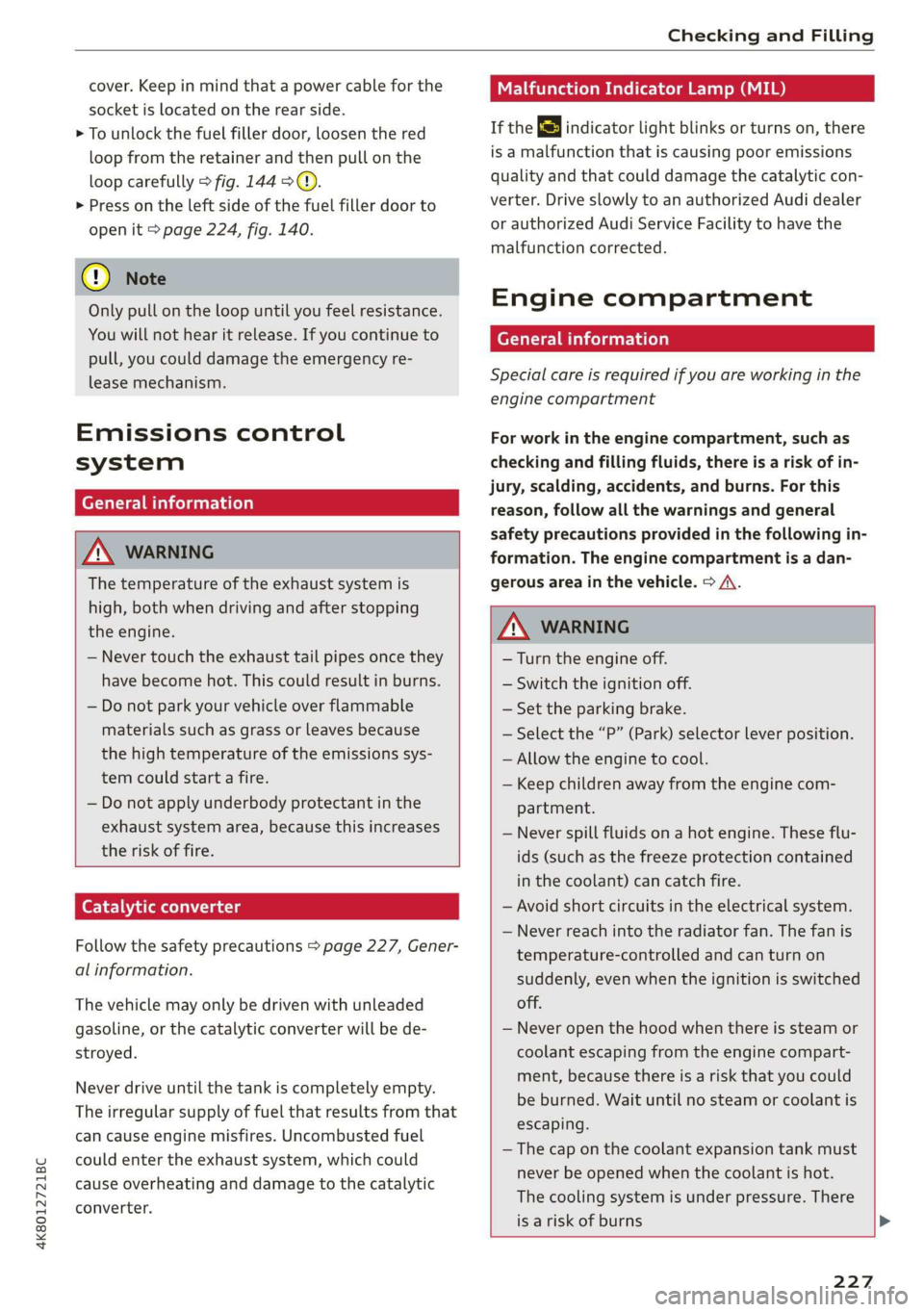
cover. Keep in mind that a power cable for the
socket is located on the rear side.
> To unlock the fuel filler door, loosen the red
loop from the retainer and then pull on the
loop carefully > fig. 144 >@).
> Press on the left side of the fuel filler door to
open it > page 224, fig. 140.
©) Note
Only pull on the loop until you feel resistance.
You will not hear it release. If you continue to
pull, you could damage the emergency re-
lease mechanism.
Emissions control
system
General information
Z\ WARNING
The temperature of the exhaust system is
high, both when driving and after stopping
the engine.
— Never touch the exhaust tail pipes once they
have
become hot. This could result in burns.
— Do not park your vehicle over flammable
materials such as grass or leaves because
the high temperature of the emissions sys-
tem could start a fire.
— Do not apply underbody protectant in the
exhaust system area, because this increases
the risk of fire.
Catalytic converter
Follow the safety precautions > page 227, Gener-
al information.
The vehicle may only be driven with unleaded
gasoline, or the catalytic converter will be de-
stroyed.
Never drive until the tank is completely empty.
The irregular supply of fuel that results from that
can cause engine misfires. Uncombusted fuel
could enter the exhaust system, which could
cause overheating and damage to the catalytic
converter.
Malfunction Indicator Lamp (MIL)
If the S indicator light blinks or turns on, there
is a malfunction that is causing poor emissions
quality and that could damage the catalytic con-
verter. Drive slowly to an authorized Audi dealer
or authorized Audi Service Facility to have the
malfunction corrected.
Engine compartment
General information
Special care is required if you are working in the
engine compartment
For work in the engine compartment, such as
checking and filling fluids, there is a risk of in-
jury, scalding, accidents, and burns. For this
reason, follow all the warnings and general
safety precautions provided in the following in-
formation. The engine compartment is a dan-
gerous area in the vehicle. > A\.
ZA\ WARNING
—Turn the engine off.
— Switch the ignition off.
— Set the parking brake.
— Select the “P” (Park) selector lever position.
— Allow the engine to cool.
— Keep children away from the engine com-
partment.
— Never spill fluids on a hot engine. These flu-
ids (such as the freeze protection contained
in the coolant) can catch fire.
— Avoid short circuits in the electrical system.
— Never reach into the radiator fan. The fan is
temperature-controlled and can turn on
suddenly, even when the ignition is switched
off.
— Never open the hood when there is steam or
coolant escaping from the engine compart-
ment, because there is a risk that you could
be burned. Wait until no steam or coolant is
escaping.
— The cap on the coolant expansion tank must
never be opened when the coolant is hot.
The cooling system is under pressure. There
is a risk of burns
227
Page 238 of 310

Checking and Filling
damage the engine. If this is the case, do not
continue driving. See an authorized Audi deal-
er or authorized Audi Service Facility for assis-
tance.
Brake fluid
BFV-0229|
Fig. 150 Engine compartment: cap on brake fluid reservoir
Follow the safety precautions > page 227, Gener-
al information.
Checking the brake fluid level
> Slide the cover that is located below the wind-
shield wipers on the driver's side toward the
windshield and remove the cover.
> Read the brake fluid level on the brake fluid res-
ervoir > page 230, fig. 147. The brake fluid lev-
el must be between the MIN and MAX markings
of.
The brake fluid level is monitored automatically.
Message
Ga / © Brakes: stop vehicle and check brake
fluid level
Stop the vehicle and check the brake fluid level.
See an authorized Audi dealer or authorized Audi
Service Facility for assistance.
Changing the brake fluid
Brake fluid should be changed at regular inter-
vals. Have the brake fluid changed by an author-
ized Audi dealer or authorized Audi Service Facili-
ty. The authorized Audi dealer or authorized Audi
Service Facility will inform you of the replace-
ment intervals.
236
ZA WARNING
— If the brake fluid level is below the MIN
marking, it can impair the braking effect and
driving safety, which increase the risk of an
accident. Do not continue driving. See an au-
thorized Audi dealer or authorized Audi
Service Facility for assistance.
— If the brake fluid is old, bubbles may form in
the brake system during heavy braking. This
could impair braking performance and driv-
ing safety, which increases the risk of an ac-
cident.
— The brake fluid in your vehicle must meet
the standard VW 501 14 and is available at
an authorized Audi dealer or authorized
Audi Service Facility. If this brake fluid is not
available, another high-grade brake fluid of
equivalent quality may be used, and it must
meet
the U.S. Federal Motor Vehicle Stand-
ard (FMVSS) 116 DOT 4, Class 6.
@) Note
— If the brake fluid level is above the MAX
marking, brake fluid may leak out over the
edge of the reservoir and result in damage
to the vehicle.
— Do not allow any brake fluid to come into
contact with the vehicle paint, because it
will corrode the paint.
Electrical system
If the = i. B or fm] indicator light turns on,
there is a malfunction in the power supply, the
battery, or the vehicle electrical system.
/ BB Electrical system: malfunction! Safely
stop vehicle
Do not continue driving and switch the ignition
off > A\. See an authorized Audi dealer or author-
ized Audi Service Facility for assistance.
= Electrical system: malfunction! Restart not
possible. Please contact Service
If you switch the ignition off, you will not be able
to restart the vehicle. Vehicle functions/driving
stability may be limited. Drive to an authorized >
Page 264 of 310

Care and cleaning
height and width of the inside of the car
wash.
—To reduce the risk of paint damage, do not
wash the vehicle in direct sunlight.
—To reduce the risk of damage, do not wash
decorative decals* with a pressure washer.
—To reduce the risk of damage to the surface,
do not use insect removing sponges, kitchen
sponges, or similar items.
— When washing matte finish painted vehicle
components:
ZA WARNING
—To reduce the risk of accidents, only wash
the vehicle when the ignition is off and fol-
low the instructions from the car wash
operator.
—To reduce the risk of cuts, protect yourself
from sharp metal components when wash-
ing the underbody or the inside of the wheel
housings.
— After washing the vehicle, the braking effect
may be delayed due to moisture on the
brake rotors or ice in the winter. This in-
creases the risk of an accident. The brakes
must be dried with a few careful brake appli-
— To reduce the risk of damage to the sur-
face, do not use polishing agents or hard
wax.
— Never use protective wax. It can destroy
ao the matte finish effect.
@) Note — Do not place any stickers or magnetic
signs on vehicle components painted with
— If you wash the vehicle in an automatic car matte finish paint. The paint could be
wash, you must retract the rear spoiler if damaged when the stickers or magnets
necessary, and fold the exterior mirrors in to
reduce the risk of damage. Power folding
exterior mirrors* must only be folded in and @) For the sake of the environment
out using the power folding function.
—To reduce the risk of damage to the rims
and tires, compare the width between the
wheels on your vehicle with the distance be-
tween the guide rails in the car wash.
—To reduce the risk of damage, compare the
height and width of your vehicle with the
are removed.
Only wash the vehicle in facilities specially de-
signed for that purpose. This will reduce the
risk of dirty water contaminated with oil from
entering the sewer system.
Cleaning and care information
When cleaning and caring for individual vehicle are not listed, consult an authorized Audi dealer
components, refer to the following tables. The or authorized Audi Service Facility. Also follow
information contained there is simply recommen- __ the information found in > A.
dations. For questions or for components that
Exterior cleaning
Component Situation Solution
Windshield wiper | Deposits Soft cloth with glass cleaner > page 57
blades
Headlights/ Deposits Soft sponge with a mild soap solution®
Tail lights
Sensors/ Deposits Sensors: soft cloth with a solvent-free cleaning solution
camera lenses Camera lenses: soft cloth with an alcohol-free cleaning sol-
ution
Snow/ice Hand brush/solvent-free de-icing spray >
262
Page 282 of 310
Fuses and bulbs
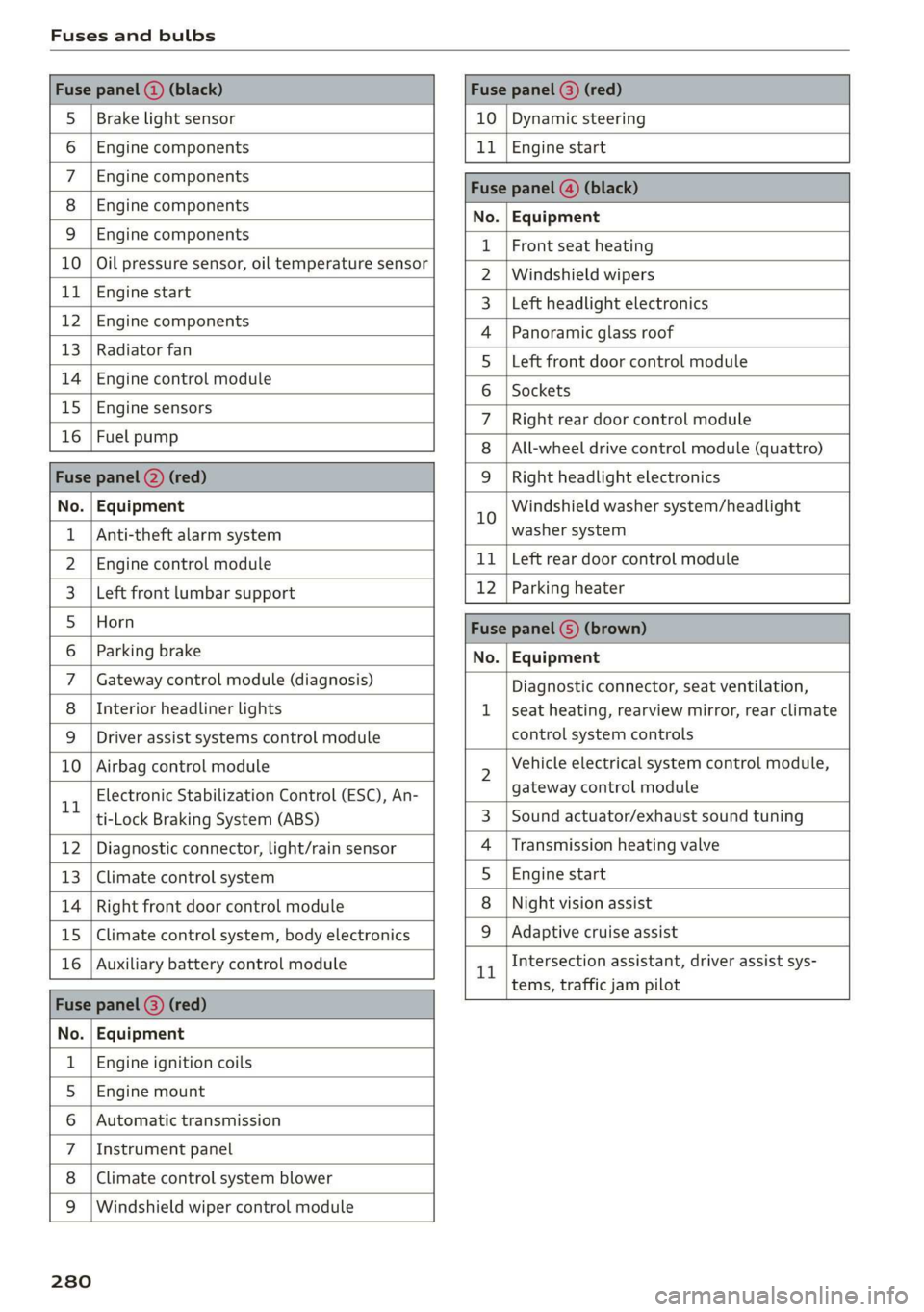
Fuse panel () (black) Fuse panel © (red)
S_ | Brake light sensor 10 | Dynamic steering
6 |Engine components 11 | Engine start
7 | Engine components Fase Parevauacn
8 | Engine components Na: Equipment
3_|Engine components 1 |Front seat heating
10 | Oil pressure sensor, oil temperature sensor 2 |Windshield wipers
ub BGI start 3 |Left headlight electronics
12 engine components 4 |Panoramic glass roof
13 | Radiator fal 5 |Left front door control module
14 | Engine control module 6 | sackats
15 |Engine sensors 7 |Right rear door control module
26 | ROBLBUTGD 8 | All-wheel drive control module (quattro)
Fuse panel (2) (red) 9 |Right headlight electronics
No. | Equipment 10 Windshield washer system/headlight
1 | Anti-theft alarm system washer system
2. |Engine control module 11 | Left rear door control module
3. | Left front lumbar support 12 | Parking heater
5_|Horn Fuse panel (5) (brown)
6 |Parking brake No. | Equipment
7 | Gateway control module (diagnosis) Diagnostic connector, seat ventilation,
8 | Interior headliner lights 1 |seat heating, rearview mirror, rear climate
9 | Driver assist systems control module control system controls
10 | Airbag control module 2 Vehicle electrical system control module,
11 Electronic Stabilization Control (ESC), An- gateway control module
ti-Lock Braking System (ABS) 3 | Sound actuator/exhaust sound tuning
12 | Diagnostic connector, light/rain sensor 4 |Transmission heating valve
13 | Climate control system 5 |Engine start
14 | Right front door control module 8 | Night vision assist
15 | Climate control system, body electronics 9 |Adaptive cruise assist
16 | Auxiliary battery control module 1 Intersection assistant, driver assist sys-
= tems, traffic jam pilot
Fuse panel (2) (red)
No. | Equipment
1 | Engine ignition coils
5 | Engine mount
6 |Automatic transmission
7 |Instrument panel
8 | Climate control system blower
9 |Windshield wiper control module
280
Page 283 of 310
4K8012721BC
Fuses and bulbs
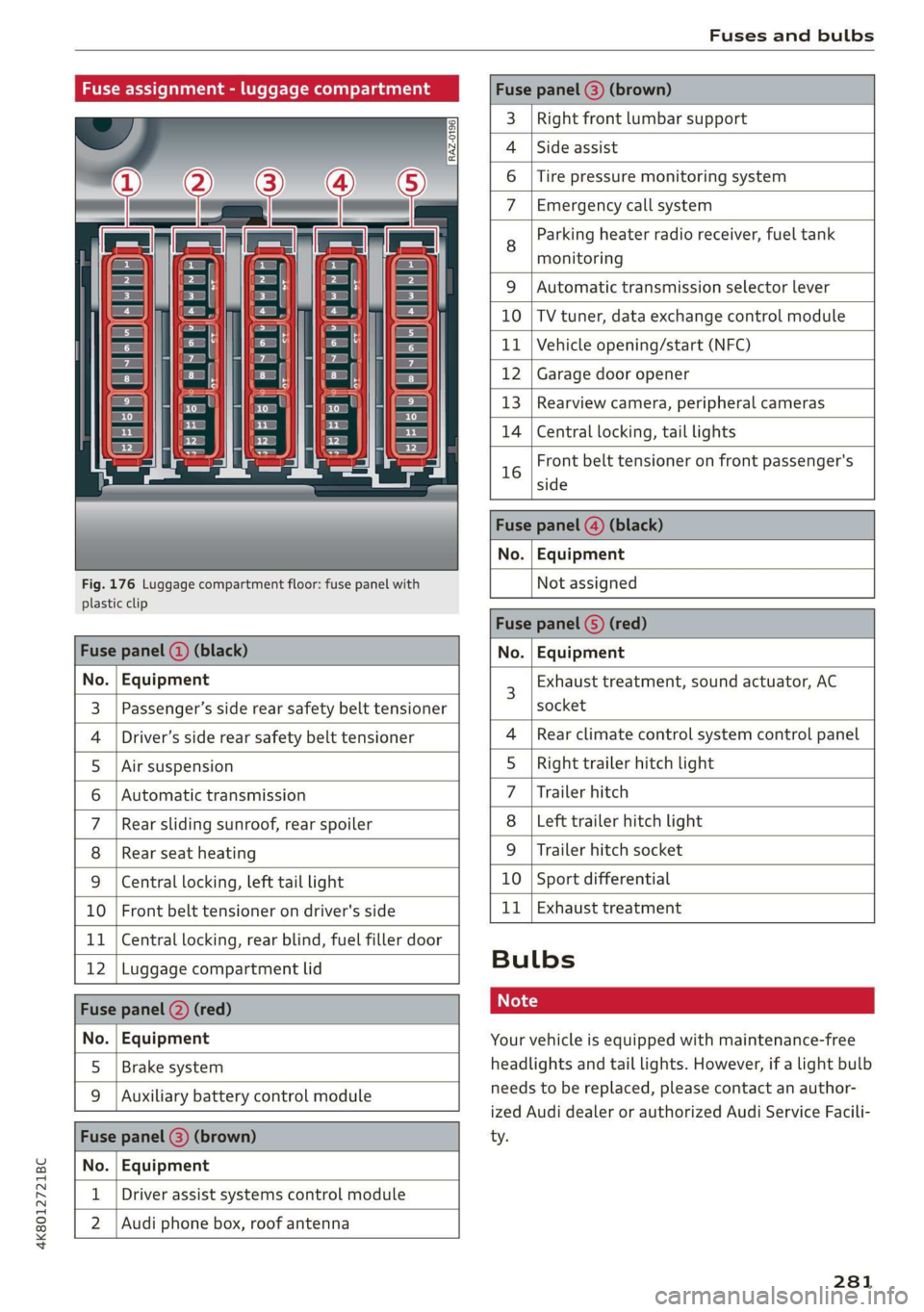
Fuse assignment - luggage compartment
[RAZ-0196
Cen
5
cs
i
-
fr) =)
ea
Fig. 176 Luggage compartment floor: fuse panel with
plastic clip
Fuse panel (@) (brown)
3 | Right front lumbar support
Side assist
4
6 |Tire pressure monitoring system
7 Emergency call system
Parking heater radio receiver, fuel tank
8 ae
monitoring
9 |Automatic transmission selector lever
10 |TV tuner, data exchange control module
11 | Vehicle opening/start (NFC)
12 | Garage door opener
13 | Rearview camera, peripheral cameras
14 | Central locking, tail lights
Front belt tensioner on front passenger's
16 side
Fuse panel @) (black)
No. | Equipment
Not assigned
Fuse panel (5) (red)
Fuse panel ( (black) No. | Equipment
No. | Equipment
Passenger’s side rear safety belt tensioner
Driver’s side rear safety belt tensioner
Air suspension
Automatic transmission
Rear sliding sunroof, rear spoiler
Rear seat heating
W}@O;N|
AD)
Mm)
BR)
Ww
Central locking, left tail light
10 | Front belt tensioner on driver's side
11 | Central locking, rear blind, fuel filler door
12 | Luggage compartment lid
Fuse panel (2) (red)
No. | Equipment
5 | Brake system
Auxiliary battery control module
Fuse panel (3) (brown)
No. | Equipment
Driver assist systems control module
2 |Audi phone box, roof antenna
Exhaust treatment, sound actuator, AC
socket
Rear climate control system control panel
Right trailer hitch light
Trailer hitch
Left trailer hitch light
Trailer hitch socket
10 | Sport differential
11 | Exhaust treatment
WOl/oOIN|
un]
Bulbs
Your vehicle is equipped with maintenance-free
headlights and tail lights. However, if a light bulb
needs to be replaced, please contact an author-
ized Audi dealer or authorized Audi Service Facili-
ty.
281
Page 296 of 310
Index
Bluetooth
Audio player... . 2... cece eee eee eee eee 206
Connecting acellphone............... 161
Deleting adevice...............00000- 221
Device overview............--0-0 0 eee 220
Disconnecting a device................ 221,
Displaying profiles. « cies 2 save «2 owen ae 221,
Searching fora device................. 221
Selecting a device : seas ss seg ts ees so: 221
Specifying a favorite.................. 221
BoOStss « « cosy: ¢ ¢ eyes 5 © sees § o Rewn ¢ a ees ¢ e 16
Boost pressure indicator................. 16
Brake fluid
New brake pads..............---000-- 100
Break-in security feature..............0.. 35
Breaking in
New brake pads..............-..00005 100
New tires « ¢ cvs + sie +e ctees ss ees es 248
Browser
refer to Mediacenter................0. 210
Bulb replacement...............000-005 281
Business. address): « s scx ¢ < swaw « x ome gee 191,
C
California Proposition 65 Warning........ 228
Batteryspecificie. «swine s vaaney o ownc oes 237
Galllist « cosas « s sess = i secu = 2 am = a8 165, 167
CaM@raS css « = ees 5 2 cee + & otters os ees es 116
LOGCALIONS sa, «+ veces oe 5 consents » x aamsens © 5 eewens 117
Capacities
Fueltank............ 20. 291
Washer fluid reservoir...............0 291
Cargonet........... 0... eee eee eee eee 83
Car key... eee eee eee 36
Car phone
Serial number (IMEI) .............0.006 172
SWItChING OMfessc <6 weww = awe a 2 mire «2 171
Capwashls « oaws 2 ¢ eau « 2 mame «x eee & 2 cee 261
Catalytic converter’; esos << weg ee ees se ee 227
294
Cell phone
refer to Telephone.............e eee eee 161
Cell phone compartment
refer to Audi phone box............... 163
Central
locking ...... 0. cece eee eee eee 32
AUTO LOCK: » geese + sunems 2 seene & 3 donee & = Be 32
Convenience key « sscsu © cvenesie © erase wo vnscem 37,
Convenience opening and closing......... 43
Luggage compartment lid............... 39
Mechanically unlocking and locking....... 35
Messages... 1.6... ce eee cece eee eee 34
Remote control keys: ss esas ss eves os ees 37
SettN's 6 e wanes a a saws «wo ones vo meen + 8 o8TH 33
Vehicle key... 6... ccc ee eee eee eee 37
Central locking switch................0-. 34
Ceramic brakesicicns x + sxcceie +o nessa 3 0 eres ¥ 6 « 100
Certificationies « 6 evar se enare a ears +e ewe 289
Changing light bulbs................... 281
Charging
refer to Power SOUrCES ...... eee eee eee 79
Charging the battery (mobile devices) . 163, 208
Child safety lock
Climate control system controls in the rear. 42
Power windows.........---00 eee eee eee 42
Rear doorSies 5 « aecw sa cams 3 cam 4 x ae a 42
Child safetyis@ats): se cous ye sews x 2 wren av we 73
Securing to the top tether anchor........ 77
Securing with a safety belt.............. 76
Securing with LATCH............-.-+--- 7
CIGSNING « sacze & s aes & s dae +e Sees te ee 261
Cleaning Alcantara...............00000. 264
Cleaning artificial leather............... 264
Cleaning carbon components........ 263, 264
Cleaning COMmtrols®. « scsi « x sro < « onmvess #6 vie 264
Cleaning decorative parts/trim........... 263
Cleaning exhaust tail pipes.............. 263
Cleaning plastic parts.................. 264
Cleaning textiles.................20005 264
Climate control system...........--..0-- 85
Climate control system controls in the rear
Child safety lok « seyoic 2 x ewe + saree 2 meee 2 42
Closing
Automatic luggage compartment lid...... 40
Convenience closing..............-.05. 43
HOG s « 2 seve y 5 meen ¢ 2 etme § eee OE ree 229
Luggage compartment lid............... 39