Cup holders AUDI A7 2020 Owners Manual
[x] Cancel search | Manufacturer: AUDI, Model Year: 2020, Model line: A7, Model: AUDI A7 2020Pages: 310, PDF Size: 81.29 MB
Page 8 of 310
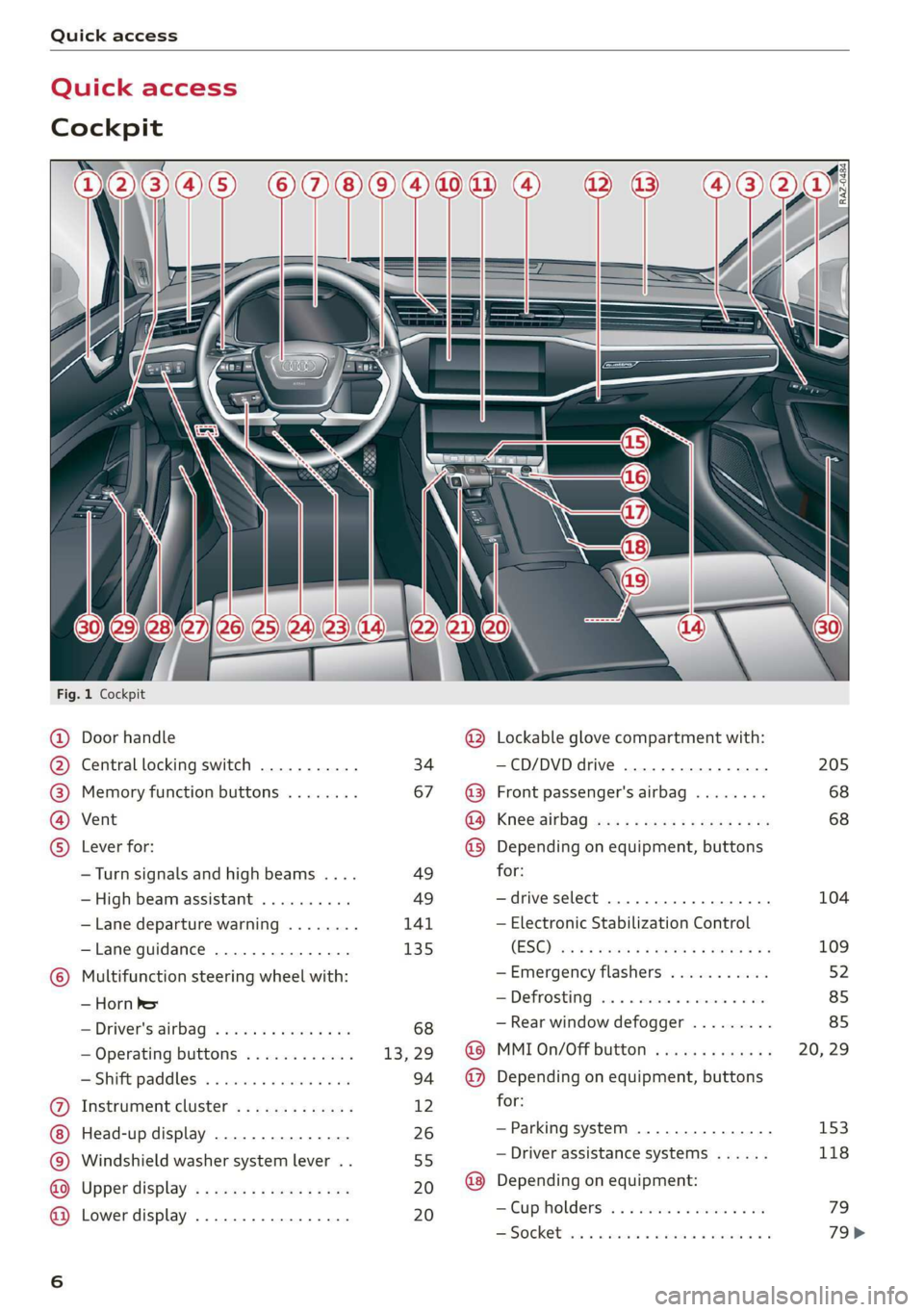
Quick access
Quick access
Cockpit
Sw a
Fig. 1 Cockpit
©
©OOOO
OO©eCOS
Door handle
Central locking switch ...........
Memory function buttons ........
Vent
Lever for:
— Turn signals and high beams ....
— High beam assistant ..........
— Lane departure warning ........
—Lane guidance ...............
Multifunction steering wheel with:
— Horn he
= Driver's:dirbag? » wees s 2 wees 2 sae
— Operating buttons ............
Shift paddles: « « cwwws « « savaxe w 0 von
Instrument cluster .............
Head-up display ...............
Windshield washer system lever ..
Upper display’ « = sees ¢ 2 cows ye ves
Lower display .................
34
67
49
49
141 135
@ Lockable glove compartment with:
—CD/DVD drive ................
@ Front passenger's airbag ........
GO; Knee Sirbag aes 2 x wwe ss ees s oe
@) Depending on equipment, buttons
for:
—drive select ...............00.
— Electronic Stabilization Control
(ES©) eas s sews a x wise + @ seyne 3 2g
—Emergency flashers ...........
= De frosting i. 2 esciis eo coeur so ove
— Rear window defogger .........
@ MMI On/Off button .............
@ Depending on equipment, buttons
for:
—Parking system ...............
— Driver assistance systems ......
@) Depending on equipment:
—Cup holders .........0.0. 0068
SSISOGKEE tons so teas a essen oe scams oo a
205
68 68
104
109
Page 81 of 310
4K8012721BC
Stowing and using
Stowing and using
Power sources
When the ignition is switched on, you may be
able to use multiple power sources for external
devices, depending on the vehicle equipment.
12 volt sockets
You can connect electrical accessories to the 12
volt sockets. The power usage must not exceed
120 watts.
The 12 volt sockets are labeled with the 12V
symbol. They are located in the front center con-
sole, in the rear* and on the side trim panel in the
luggage compartment*.
USB ports
Applies to: vehicles with USB input
You can charge mobile devices using the USB
ports. The USB ports are labeled with the «<> or
(4 symbol or CHARGE ONLY.
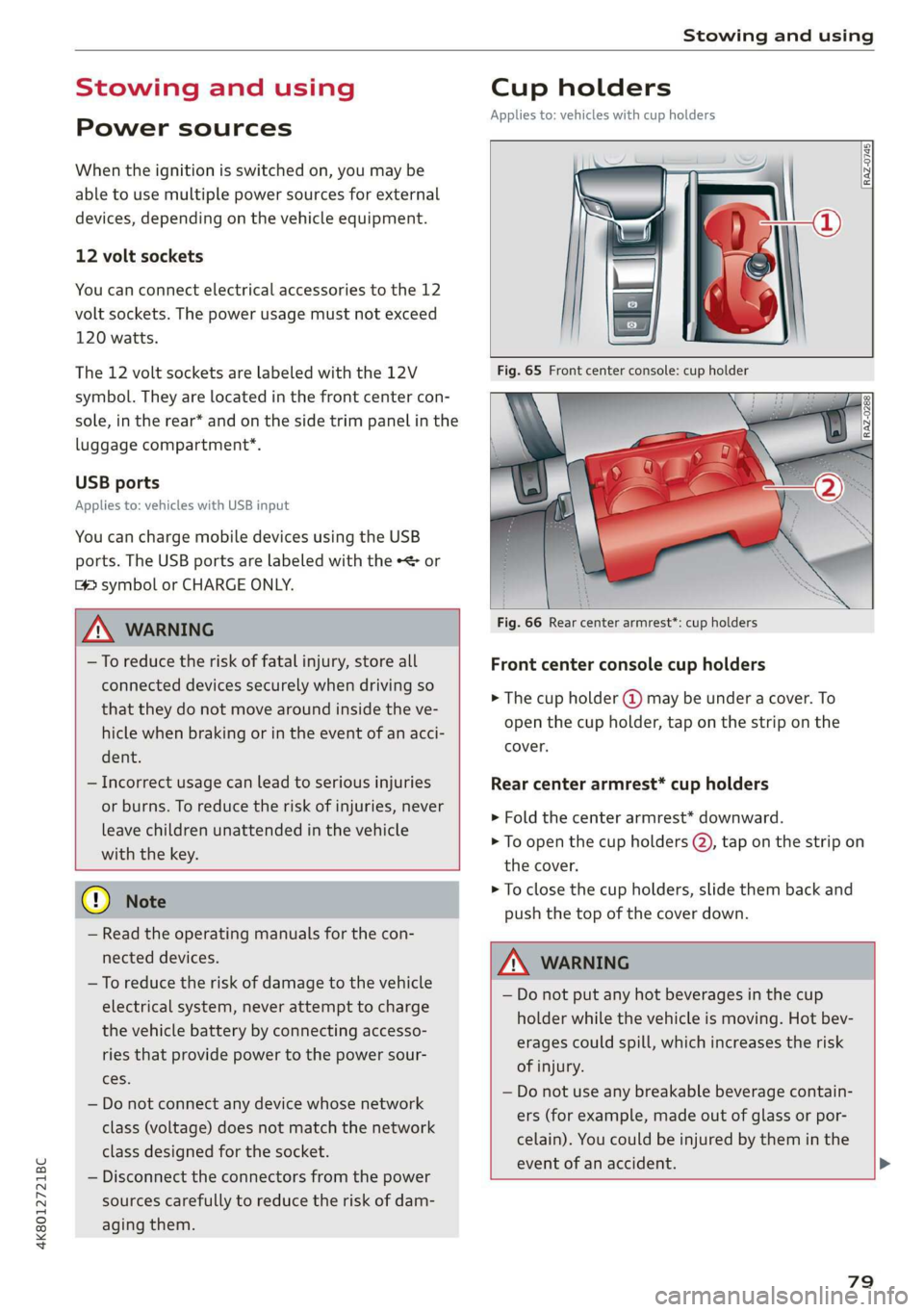
Cup holders
Applies to: vehicles with cup holders
[RAaz-0745
ZA WARNING
—To reduce the risk of fatal injury, store all
connected devices securely when driving so
that they do not move around inside the ve-
hicle when braking or in the event of an acci-
dent.
— Incorrect usage can lead to serious injuries
or burns. To reduce the risk of injuries, never
leave children unattended in the vehicle
with the key.
@) Note
— Read the operating manuals for the con-
nected devices.
—To reduce the risk of damage to the vehicle
electrical system, never attempt to charge
the vehicle battery by connecting accesso-
ries that provide power to the power sour-
ces.
— Do not connect any device whose network
class (voltage) does not match the network
class designed for the socket.
— Disconnect the connectors from the power
sources carefully to reduce the risk of dam-
aging them.
Fig. 66 Rear center armrest*: cup holders
Front center console cup holders
> The cup holder @) may be under a cover. To
open the cup holder, tap on the strip on the
cover.
Rear center armrest* cup holders
> Fold the center armrest* downward.
> To open the cup holders @), tap on the strip on
the cover.
> To close the cup holders, slide them back and
push the top of the cover down.
ZA\ WARNING
— Do not put any hot beverages in the cup
holder while the vehicle is moving. Hot bev-
erages could spill, which increases the risk
of injury.
— Do not use any breakable beverage contain-
ers (for example, made out of glass or por-
celain). You could be injured by them in the
event of an accident.
79
Page 82 of 310

Stowing and using
@) Note
Beverage containers in the cup holders should
always
have a lid. Otherwise, the liquid inside
could spill and cause damage to vehicle
equipment.
Storage and
compartments
Tole el eerie mane tat Le)
ted]
Applies to: vehicles with storage area behind the rear head re-
straints
The storage area can be used to carry light pieces
of clothing.
Z\ WARNING
The storage compartment must not be used
to transport heavy objects, hard objects, or
animals. Such objects endanger vehicle occu-
pants and increase the risk of injury during
sudden driving or braking maneuvers or in an
accident.
@) Note
Make sure that the heating grid strips for the
rear window defogger are not damaged by
abrasive objects.
Additional storage
Depending on the vehicle equipment, there may
be a variety of storage areas, compartments, and
retainers at various locations in the vehicle.
— Glove compartment: the glove compartment
can be locked using the mechanical key
> page 36.
— Holders for a notepad and a pen in the glove
compartment
— Storage compartment in the cockpit on the
driver's side
— Storage compartments in the door trim panel
— Net in the front passenger's footwell
— Key compartment in the center console
— Storage compartment under the front center
armrest
80
— Nets on the back of the front seats
— Garment hooks in the rear
— Storage compartment in the rear center arm-
rest
— Bag hooks in the luggage compartment
— Net in luggage compartment
ZX WARNING
—To reduce the risk of injury, make sure all
storage compartments are always closed
while driving.
— Loose objects can be thrown around the ve-
hicle interior during sudden driving or brak-
ing maneuvers, which increases the risk of
an accident. Store objects securely while
driving.
— Only use the storage compartments in the
door trim panels to store small objects that
will not stick out of the compartment and
impair the function of the side airbags.
— Only lightweight clothing should be hung
from the garment hooks in the vehicle. Do
not use clothes hangers to hang clothing.
The pockets of the clothing must not con-
tain any heavy, breakable, or sharp-edged
objects. This could impair the effectiveness
of the side curtain airbags.
— Make sure your view toward the rear is not
blocked, for example by hanging clothing or
objects in the vehicle.
Luggage compartment
General information
All pieces of luggage or objects must be securely
fastened in the luggage compartment. Note the
following to maintain good vehicle handling:
> Distribute the load evenly in the luggage com-
partment.
> Stow heavy luggage as far forward in the lug-
gage compartment as possible.
> Use non-elastic cords attached to the tie-downs
to secure objects.
Page 290 of 310

Accessories and technical changes
Service Facility, who will perform the work ac-
cording to Audi factory specifications. Only
Audi Genuine Parts are used when Audi ex-
perts perform repair or service procedures.
Failure to use Audi Genuine Parts or Audi Gen-
uine Accessories or performing repairs incor-
rectly may result in severe vehicle damage,
such as corrosion.
Accessories and parts
Consult with an authorized Audi dealer or author-
ized Audi Service Facility before purchasing ac-
cessories or replacement parts. We recommend
that you have your vehicle serviced by an author-
ized Audi dealer or authorized Audi Service Facili-
ty and that Audi Genuine Parts and Audi Genuine
Accessories are used.
Audi does not endorse the use of products and
accessories that it has not evaluated, even if the
product is approved by a certified testing agency
or government agency.
ZA WARNING
— Installing unapproved accessories or incor-
rect replacement parts can cause vehicle
damage and can increase the risk of an acci-
dent.
— Never attach accessories, such as telephone
holders or cup holders, to the airbag covers
or within the airbag deployment zone, be-
cause this increases the risk of injury if the
airbag deploys.
— Do not use a license plate bracket different
from the one installed by the factory in the
front of the vehicle, because it may impair
the function of some systems.
@) Note
A correctly-installed exterior antenna is re-
quired for operating radio equipment in the
vehicle. Otherwise, the increased electromag-
netic waves can cause malfunctions in the ve-
hicle. Observe the regulations in the country
where the vehicle is being operated and the
instructions from the radio equipment manu-
facturer.
288
Reporting Safety Defects
Applicable to U.S.A.
If you believe that your vehicle
has a defect which could cause a
crash or could cause injury or
death, you should immediately in-
form the National Highway Traffic
Safety Administration (NHTSA) in
addition to notifying
Audi of America, Inc.
2200 Ferdinand Porsche Drive
Herndon, VA 20171
If NHTSA receives similar com-
plaints, it may open an investiga-
tion, and if it finds that a safety
defect exists in a group of
vehicles, it may order a recall and
remedy campaign. However,
NHTSA cannot become involved in
individual problems between you,
your dealer, or Audi of America,
Inc.
To contact NHTSA, you may call
the Vehicle Safety Hotline toll-
free at 1-888-327-4236 (TTY: 1-
800-424-9153); go to http://
www.safercar.gov;