child lock AUDI A7 2020 Owners Manual
[x] Cancel search | Manufacturer: AUDI, Model Year: 2020, Model line: A7, Model: AUDI A7 2020Pages: 310, PDF Size: 81.29 MB
Page 4 of 310
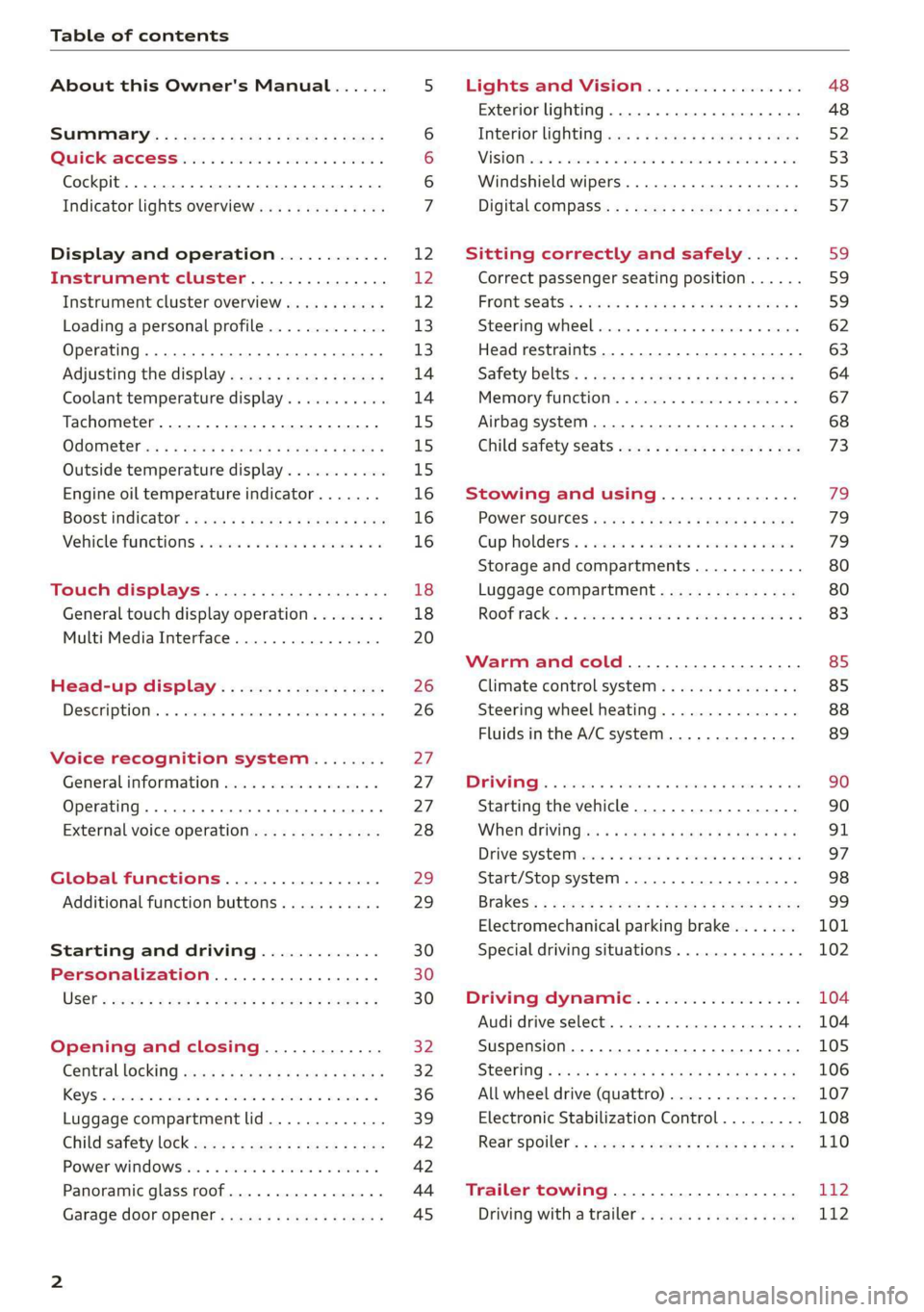
Table of contents
About this Owner's Manual......
SUMIMALY: ; « ss6% : osen ss sean cs poe s
QC CCeS Skis: si esis a 6 ores os ewe
Cockpit... 2... ee eee eee eee
Indicator lights overview...........0.
Display and operation............
Instrument cluster...............
Instrument cluster overview...........
Loading a personal profile.............
Operating. ........ 20.00. cece eee eee
Adjusting the display.................
Coolant temperature display...........
Tachometer............. eee eee eee
OdOMELEF as + 2 ams < gay & = pemE se ROR «
Outside temperature display...........
Engine oil temperature indicator.......
Boost indicator’: vos + 2 xeeg es meme a 2 oes
Vehicle functions « sisi ss em ee omen ees
Touch displays....................
General touch display operation........
Multi Media Interface................
Head-up display..................
DeSGriPtionis << seorve so mses w + axocune & ovorene
Voice recognition system........
General information.................
Operating... 0... cece eee eee eee
External voice operation..............
Global functions.................
Additional function buttons...........
Starting and driving.............
Personalization..................
Luggage compartment lid.............
Child safety lock sae < « see8 cs vena ee oes
Power windowSiin: ss sew. 4 sve eo scares a
Panoramic glass roof.................
Garage door opener..........--...0-5
NOD
OO
16
18 18
20
26
26
27 27 27 28 29 29 30 30 30
32
32
36 39
42 42
44
45
Lights and Vision................. 48
Exterior lighting. ...............000ee 48
Interior lightinGisws « 2 wove + ¢ wees os ewe §2
ViSIOM iss +o sea « 5 wore oo semen W armen © oi 53
Windshield wipers................45- 55
Digital compass: s : sees s sees sz wees se 57
Sitting correctly and safely...... 59
Correct passenger seating position...... 59
Frontse@ats's « sews ¢ ¢ asia & 3 saws @ o wars = 59
Steering wheel. ........... 00. - ee eee 62
Head restraints...................00. 63
Safety belts:: ¢ excess meas os eee ae ee 64
Memory function..............-.000- 67
Airbag system ..... 2... eee eee ee 68
Child
safety seats................004. 73
Stowing and using............... 79
POWEF SOURCES sans « 3 some ao meas sf eo 79
Gup holdersis «sass. +s snes sv somwaee + = omar 79
Storage and compartments............ 80
Luggage compartment............... 80
ROOF TACK: « + sonnss ao amvsans @ w cma ¥ & aue mee @ 8 83
Warm and cold................... 85
Climate control system............... 85
Steering wheel heating............... 88
Fluids in the A/C system.............. 89
BS GIMINIEE). «sess o arcese oe cone ov arene ww 90
Starting the vehicle.................. 90
When driving: = s sews + o eens ge cewe go: 91
Drive syste Misc: + « sons 6 amen +o emir ¥ te 97
Start/Stop system...........--00000- 98
Brakes: « » aog = eae & = eum ¢ ¥ cewE 4 ene 99
Electromechanical parking brake....... 101
Special driving situations.............. 102
Driving dynamic.................. 104
Audi driverselecty, . svceis so aauane oo seenem « vv 104
Suspension..............0 2.00.0 e eee 105
SEGELING « weg w 5 saree 3 & wae § 2 eee 4 Ee 106
All wheel drive (quattro) .............. 107
Electronic Stabilization Control......... 108
Rear spoiler’, : eesca . » saws sy pews ee eee 110
Trailer towing.................... 112
Driving with atrailer................. 112
Page 9 of 310
4K8012721BC
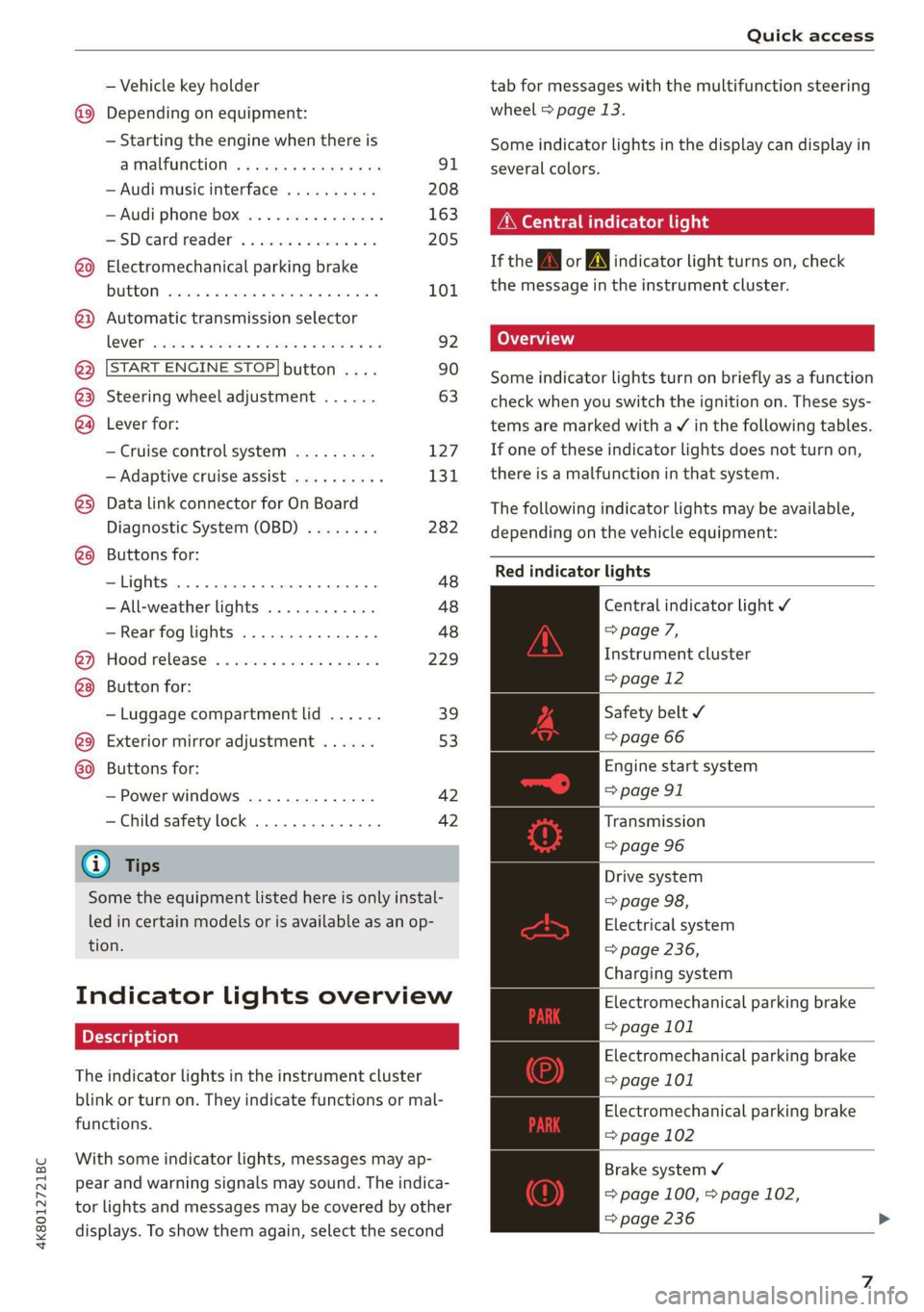
Quick access
— Vehicle key holder
@_ Depending on equipment:
— Starting the engine when there is
@ MalfUNGHON, « s cess oc worms « vase 91
— Audi musicinterface .......... 208
— Audi phone box ............... 163
HSDicardireader’ « « swesiis sv canes ¥ ave 205
@9 Electromechanical parking brake
BUtEON sssccws oa aves 0 x wasnt x x secu Y 101
@) Automatic transmission selector
LOVER arcane oo cevenes man comme ow eens oe 92
@ START ENGINE STOP} button .... 90
@3) Steering wheel adjustment ...... 63
@4 Lever for:
— Cruise control system ......... 127
— Adaptive cruise assist .......... 131
@5) Data link connector for On Board
Diagnostic System (OBD) ........ 282
@8 Buttons for:
-Lights ...............2..000. 48
—All-weather lights ............ 48
—Rear fog lights ............... 48
@) Hood release ...........0...0.. 229
Button for:
— Luggage compartment lid ...... 39
@9) Exterior mirror adjustment ...... 53
69 Buttons for:
— Power windows .............. 42
—Child safety lock .............. 42
@) Tips
Some the equipment listed here is only instal-
led in certain models or is available as an op-
tion.
Indicator lights overview
The indicator lights in the instrument cluster
blink or turn on. They indicate functions or mal-
functions.
With some indicator lights, messages may ap-
pear and warning signals may sound. The indica-
tor lights and messages may be covered by other
displays. To show them again, select the second
tab for messages with the multifunction steering
wheel > page 13.
Some indicator lights in the display can display in
several colors.
OMe ella Lins
If the AN or A indicator light turns on, check
the message in the instrument cluster.
Some indicator lights turn on briefly as a function
check when you switch the ignition on. These sys-
tems are marked with a V in the following tables.
If one of these indicator lights does not turn on,
there is a malfunction in that system.
The following indicator lights may be available,
depending on the vehicle equipment:
Red indicator lights
Central indicator light ¥
> page 7,
Instrument cluster
=> page 12
Safety belt ¥
=> page 66
Engine start system
=> page 91
Transmission
=> page 96
Drive system
=> page 98,
Electrical system
=> page 236,
Charging system
Electromechanical parking brake
=> page 101
Electromechanical parking brake
=> page 101
Electromechanical parking brake
=> page 102
Brake system ¥
= page 100, > page 102,
=> page 236
Page 12 of 310
Quick access
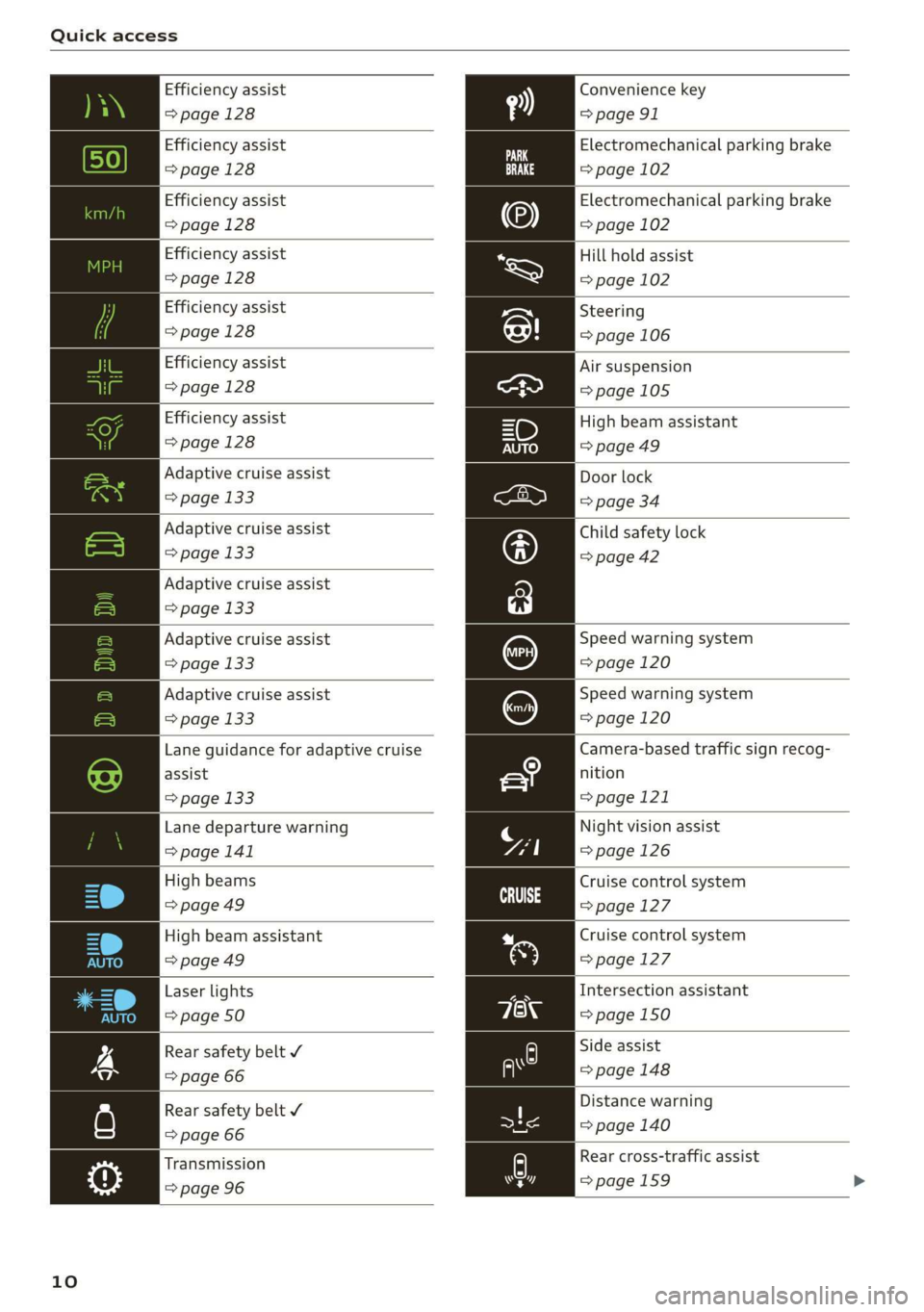
Efficiency assist
=>page 128
Efficiency assist
> page 128
Efficiency assist
=>page 128
Efficiency assist
> page 128
Efficiency assist
> page 128
Efficiency assist
>page 128
Adaptive cruise assist
=> page 133
Adaptive cruise assist
> page 133
Adaptive cruise assist
=> page 133
Adaptive cruise assist
=> page 133
Lane guidance for adaptive cruise
assist
=> page 133
Lane departure warning
=> page 141
High beams
> page 49
High beam assistant
=> page 49
Laser lights
=> page 50
Rear safety belt
=> page 66
Rear safety belt ¥
=> page 66
10
Efficiency assist
> page 128
Adaptive cruise assist
> page 133
Convenience key
=> page 91
Electromechanical parking brake
=> page 102
Electromechanical parking brake
=> page 102
Hill hold assist
=> page 102
Steering
=> page 106
Air suspension
=>page 105
High beam assistant
=> page 49
Door lock
=> page 34
Child safety lock
=> page 42
Speed warning system
=> page 120
Speed warning system
=> page 120
Camera-based traffic sign recog-
nition
=> page 121
Night vision assist
=> page 126
Cruise control system
CS age 127
Cruise control system
=>page 127
Intersection assistant
=> page 150
Side assist
> page 148
Distance warning
=> page 140
A) Rear cross-traffic assist
rsd => page 159
Page 34 of 310
Opening and closing
Opening and closing
Central locking
erasure)
ZA WARNING
— If you leave the vehicle, switch the ignition
off and take the key with you. This applies
particularly when children remain in the ve-
hicle. Otherwise, children could start the ve-
hicle or operate electrical equipment (such
as power windows), which increases the risk
of an accident.
— Applies to: vehicles with anti-theft alarm
system: When the vehicle is locked from the
outside, no one - especially children - should
remain in the vehicle, because the windows
can no longer be opened from the inside
= page 35, Anti-theft alarm system.
Locked doors make it more difficult for
emergency workers to enter the vehicle,
which puts lives at risk.
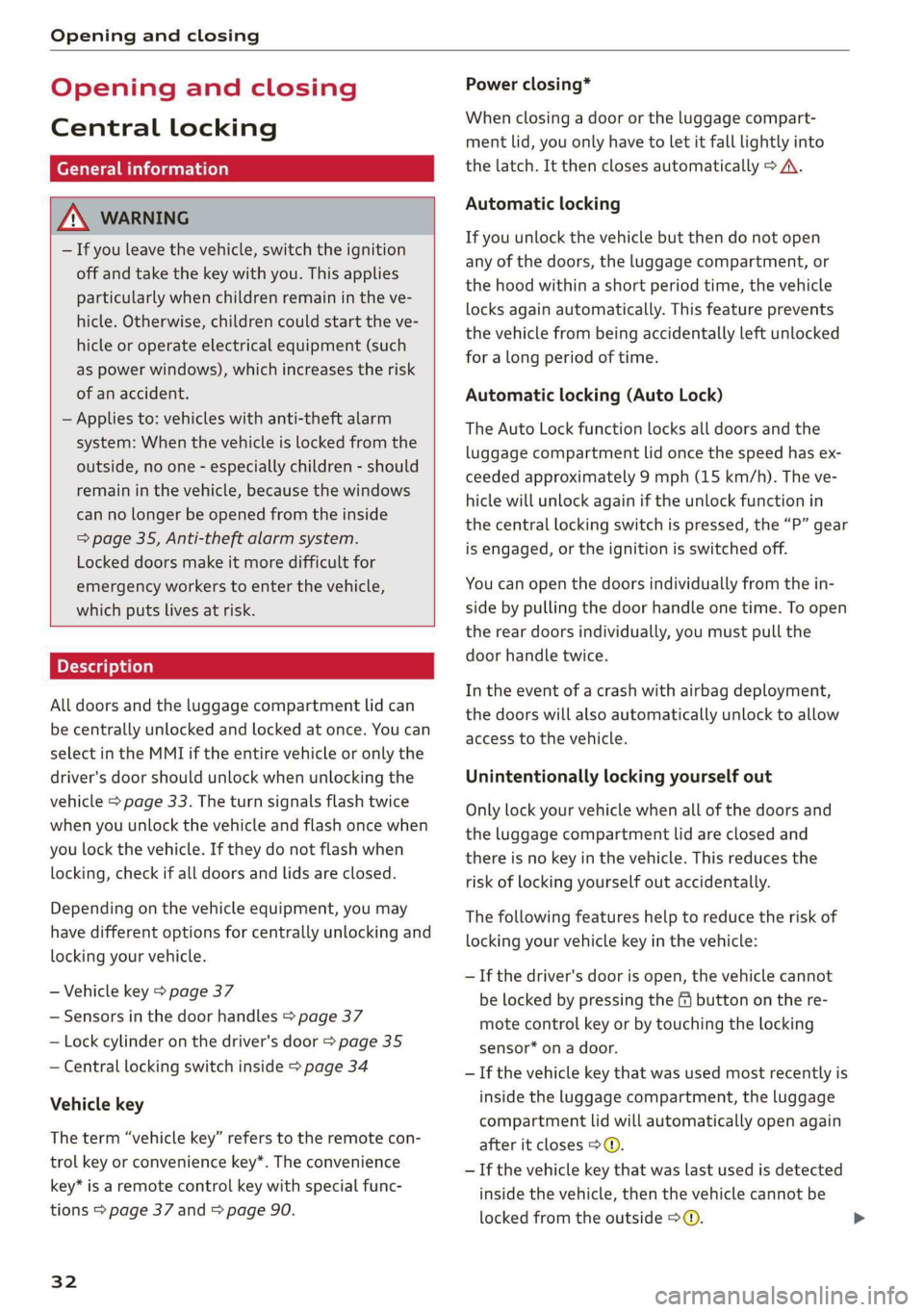
All doors and the luggage compartment lid can
be centrally unlocked and locked at once. You can
select in the MMI if the entire vehicle or only the
driver's door should unlock when unlocking the
vehicle > page 33. The turn signals flash twice
when you unlock the vehicle and flash once when
you lock the vehicle. If they do not flash when
locking, check if all doors and lids are closed.
Depending on the vehicle equipment, you may
have different options for centrally unlocking and
locking your vehicle.
— Vehicle key > page 37
— Sensors in the door handles > page 37
— Lock cylinder on the driver's door > page 35
— Central locking switch inside > page 34
Vehicle key
The term “vehicle key” refers to the remote con-
trol key or convenience key*. The convenience
key* is a remote control key with special func-
tions > page 37 and > page 90.
32
Power closing*
When closing a door or the luggage compart-
ment lid, you only have to let it fall lightly into
the latch. It then closes automatically > A.
Automatic locking
If you unlock the vehicle but then do not open
any of the doors, the luggage compartment, or
the hood within a short period time, the vehicle
locks again automatically. This feature prevents
the vehicle from being accidentally left unlocked
for a long period of time.
Automatic locking (Auto Lock)
The Auto Lock function locks all doors and the
luggage compartment lid once the speed has ex-
ceeded approximately 9 mph (15 km/h). The ve-
hicle will unlock again if the unlock function in
the central locking switch is pressed, the “P” gear
is engaged, or the ignition is switched off.
You can open the doors individually from the in-
side by pulling the door handle one time. To open
the rear doors individually, you must pull the
door handle twice.
In the event of a crash with airbag deployment,
the doors will also automatically unlock to allow
access to the vehicle.
Unintentionally locking yourself out
Only lock your vehicle when all of the doors and
the luggage compartment lid are closed and
there is no key in the vehicle. This reduces the
risk of locking yourself out accidentally.
The
following features help to reduce the risk of
locking your vehicle key in the vehicle:
— If the driver's door is open, the vehicle cannot
be locked by pressing the @ button on the re-
mote control key or by touching the locking
sensor* on a door.
— If the vehicle key that was used most recently is
inside the luggage compartment, the luggage
compartment lid will automatically open again
after it closes > ©.
— If the vehicle key that was last used is detected
inside the vehicle, then the vehicle cannot be
locked from the outside > ©.
Page 37 of 310
4K8012721BC
Opening and closing
Mechanically unlocking and locking the
doors
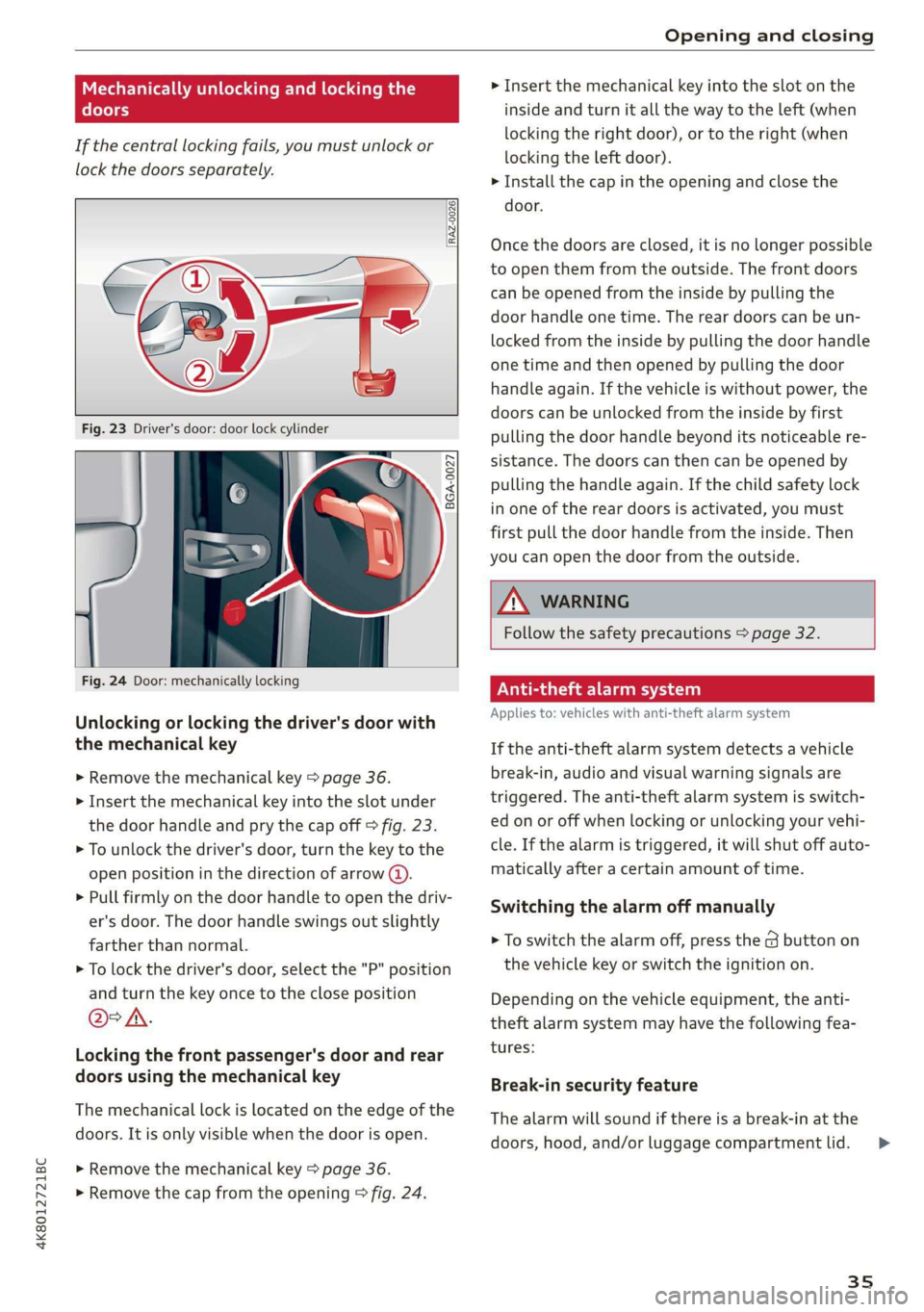
If the central locking fails, you must unlock or
lock the doors separately.
[RAZ-0026|
5 a
Ss
2
<=
go a
Fig. 24 Door: mechanically locking
Unlocking or locking the driver's door with
the mechanical key
> Remove the mechanical key > page 36.
> Insert the mechanical key into the slot under
the door handle and pry the cap off > fig. 23.
> To unlock the driver's door, turn the key to the
open position in the direction of arrow @).
> Pull firmly on the door handle to open the driv-
er's door. The door handle swings out slightly
farther than normal.
> To lock the driver's door, select the "P" position
and turn the key once to the close position
@°A.
Locking the front passenger's door and rear
doors using the mechanical key
The mechanical lock is located on the edge of the
doors. It is only visible when the door is open.
> Remove the mechanical key > page 36.
> Remove the cap from the opening > fig. 24.
> Insert the mechanical key into the slot on the
inside and turn it all the way to the left (when
locking the right door), or to the right (when
locking the left door).
> Install the cap in the opening and close the
door.
Once the doors are closed, it is no longer possible
to open them from the outside. The front doors
can be opened from the inside by pulling the
door handle one time. The rear doors can be un-
locked from the inside by pulling the door handle
one time and then opened by pulling the door
handle again. If the vehicle is without power, the
doors can be unlocked from the inside by first
pulling the door handle beyond its noticeable re-
sistance. The doors can then can be opened by
pulling the handle again. If the child safety lock
in one of the rear doors is activated, you must
first pull the door handle from the inside. Then
you can open the door from the outside.
ZA\ WARNING
Follow the safety precautions > page 32.
Vea lela)
Applies to: vehicles with anti-theft alarm system
If the anti-theft alarm system detects a vehicle
break-in, audio and visual warning signals are
triggered. The anti-theft alarm system is switch-
ed on or off when locking or unlocking your vehi-
cle. If the alarm is triggered, it will shut off auto-
matically after a certain amount of time.
Switching the alarm off manually
> To switch the alarm off, press the G button on
the vehicle key or switch the ignition on.
Depending on the vehicle equipment, the anti-
theft alarm system may have the following fea-
tures:
Break-in security feature
The alarm will sound if there is a break-in at the
doors, hood, and/or luggage compartment lid.
35
Page 38 of 310
Opening and closing
Interior/towing protection monitor
The alarm will be triggered if there are move-
ments detected in the vehicle interior (for exam-
ple, by animals) or if there is a change in the vehi-
cle angle (for example, when the vehicle is being
towed).
You can prevent the alarm from being triggered
by deactivating the interior/towing protection
monitor.
Deactivating the interior/towing protection
monitor
There are the following options for deactivating
the interior/towing protection monitor:
> Press the & button on the vehicle key a second
time within two seconds. Or
» Applies to: vehicles with convenience key:
Touch the sensor on the door handle a second
time within two seconds. Or
> Turn the mechanical key in the door lock to the
close position a second time within 2 seconds.
If you lock the vehicle, then the interior/towing
protection monitor will stay off until the next
time the vehicle is unlocked.
ZX WARNING
No one, especially children, should stay in the
vehicle when it is locked from the outside, be-
cause the windows can no longer be opened
from the inside. Locked doors make it more
difficult for emergency workers to enter the
vehicle, which puts lives at risk.
(i) Tips
The interior/towing protection monitor only
functions correctly when the windows and the
panorama glass roof* are closed.
36
RAZ-0621
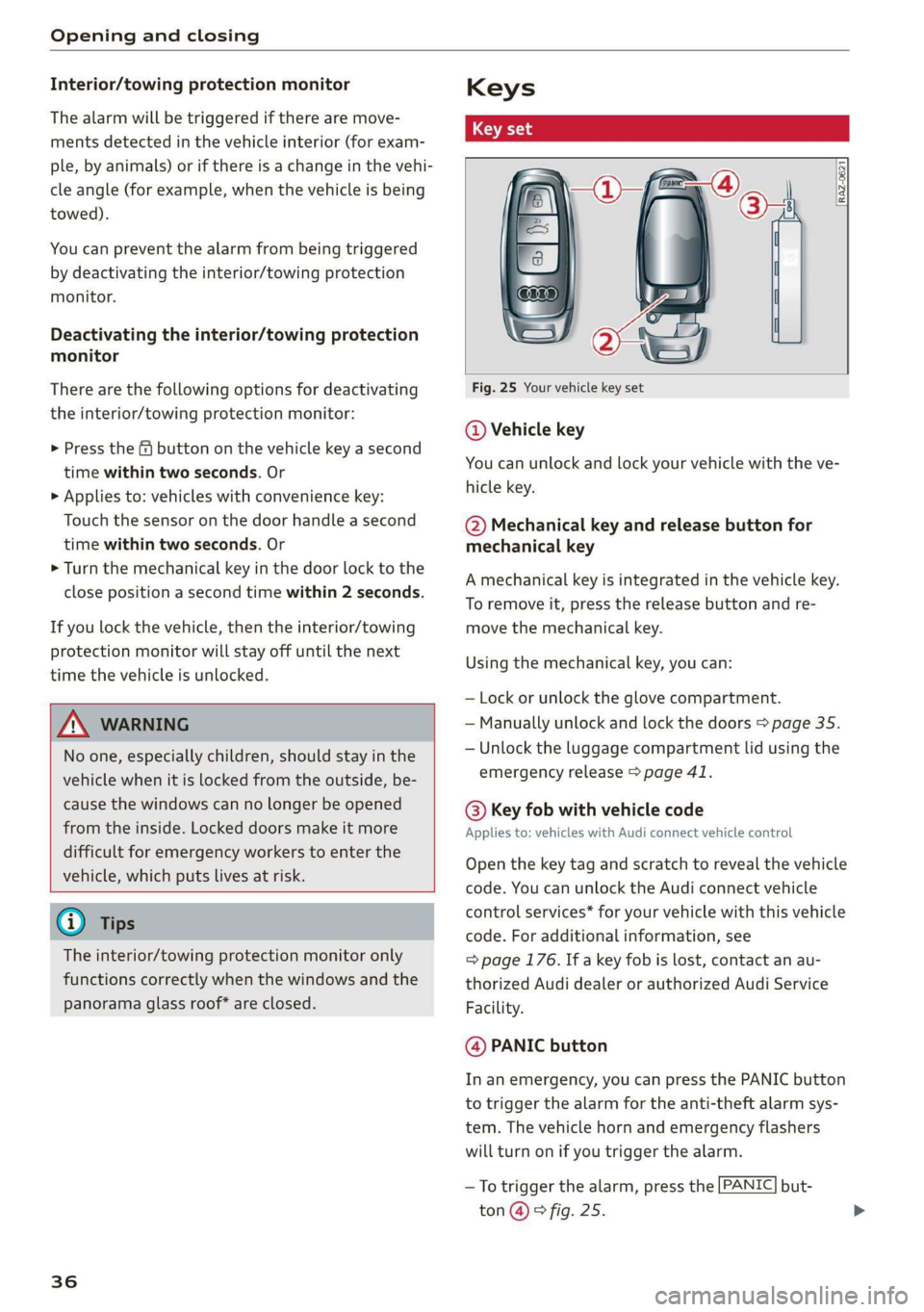
Fig. 25 Your vehicle key set
@ Vehicle key
You can unlock and lock your vehicle with the ve-
hicle key.
@ Mechanical key and release button for
mechanical key
A mechanical key is integrated in the vehicle key.
To remove it, press the release button and re-
move the mechanical key.
Using the mechanical key, you can:
— Lock or unlock the glove compartment.
— Manually unlock and lock the doors > page 35.
— Unlock the luggage compartment lid using the
emergency release > page 41.
@® Key fob with vehicle code
Applies to: vehicles with Audi connect vehicle control
Open the key tag and scratch to reveal the vehicle
code. You can unlock the Audi connect vehicle
control services* for your vehicle with this vehicle
code. For additional information, see
= page 176. If a key fob is lost, contact an au-
thorized Audi dealer or authorized Audi Service
Facility.
@ PANIC button
In an emergency, you can press the PANIC button
to trigger the alarm for the anti-theft alarm sys-
tem. The vehicle horn and emergency flashers
will turn on if you trigger the alarm.
—To trigger the alarm, press the [PANIC] but-
ton@ ® fig. 25.
Page 41 of 310
Opening and closing
Luggage compartment Pay careful attention when closing the lug-
lid gage compartment lid. Otherwise, you could
cause serious injury to yourself or others de-
spite the pinch protection.
Z\ WARNING
— Applies to: vehicles with anti-theft alarm
system: When the vehicle is locked from the
outside, no one - especially children - should
remain in the vehicle, because the windows
can no longer be opened from the inside
= page 35. Locked doors make it more diffi-
cult for emergency workers to enter the ve-
hicle, which puts lives at risk.
— Always close and lock the luggage compart-
ment lid and the doors when the vehicle is
not in use. Otherwise someone such as a
child could enter the vehicle through the
luggage compartment and become locked
inside it. To reduce the risk of injury, do not
allow children to play in or around the vehi-
cle. = =
— To reduce the risk of injuries by pinching, fala ee a
make sure that no one is in the operating
area of the luggage compartment lid, in-
cluding the hinge areas and the upper and
lower edge of the luggage compartment lid.
@) Note
The luggage compartment lid can bump into
objects such as the garage ceiling when open-
ing and become damaged.
@) Tips
— When the vehicle is locked, the luggage
compartment lid can be unlocked separately
by pressing the << / 4s button once / twice
on the vehicle key. The luggage compart-
ment lid locks automatically when it is
closed again.
— The ability to open the luggage compart-
ment lid using the handle can be deactivat-
ed or activated in the MMI > page 33.
— After closing the luggage compartment lid,
make sure that it is latched. The luggage
compartment lid could open suddenly while
driving, which would increase the risk of an
accident.
— Never drive with the luggage compartment
lid ajar or open, because poisonous gases
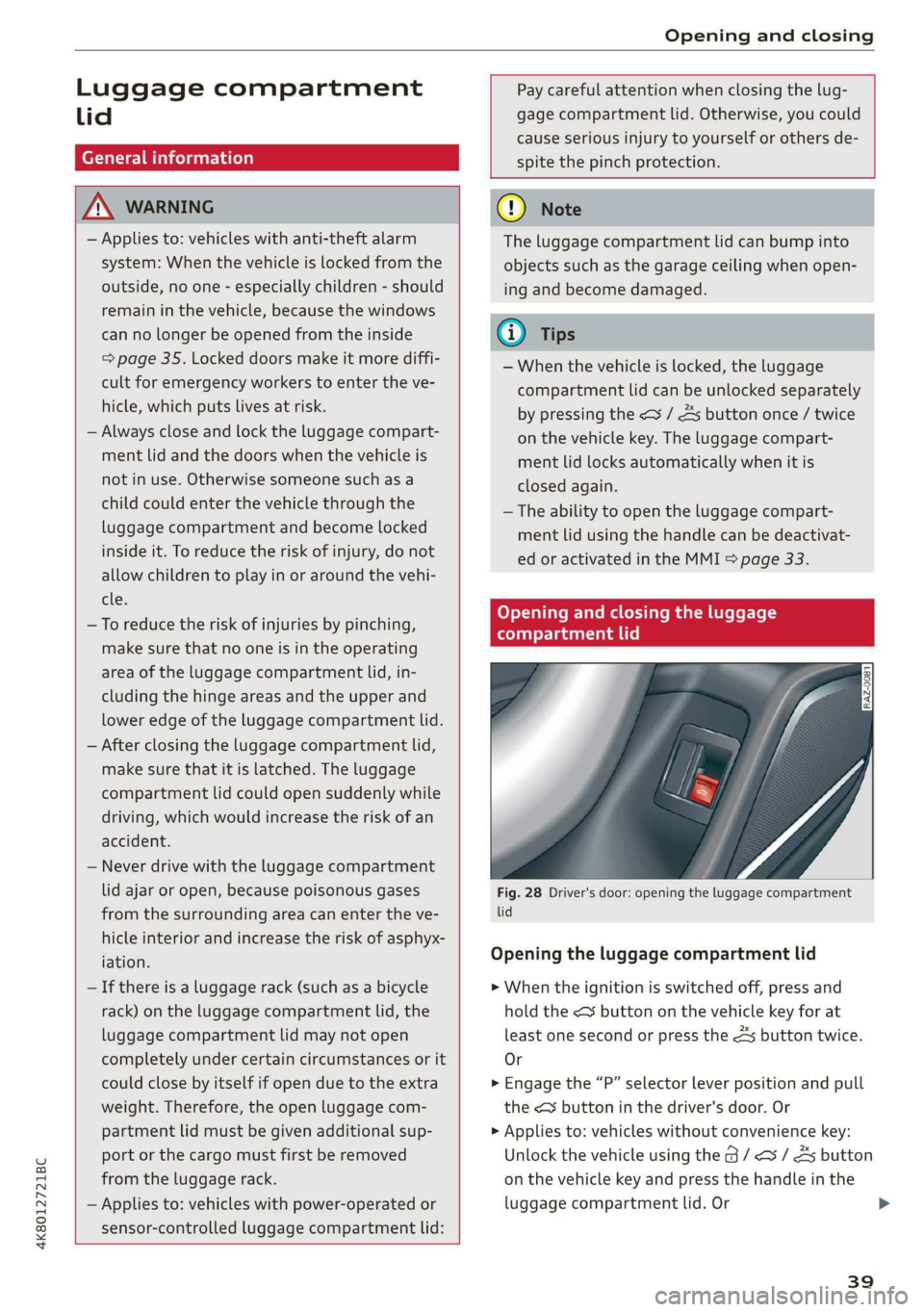
Fig. 28 Driver's door: opening the luggage compartment
from the surrounding area can enter the ve- lid
hicle interior and increase the risk of asphyx- ; |
‘ation? Opening the luggage compartment lid
— If there is a luggage rack (such as a bicycle
rack) on the luggage compartment lid, the
luggage compartment lid may not open
completely under certain circumstances or it
could close by itself if open due to the extra
weight. Therefore, the open luggage com-
partment lid must be given additional sup-
> When the ignition is switched off, press and
hold the << button on the vehicle key for at
least one second or press the 4s button twice.
Or
> Engage the “P” selector lever position and pull
the < button in the driver's door. Or
> Applies to: vehicles without convenience key:
4K8012721BC
port or the cargo must first be removed
from the luggage rack.
Unlock the vehicle using the B / <3 / As button
on the vehicle key and press the handle in the
— Applies to: vehicles with power-operated or luggage compartment lid. Or >
sensor-controlled luggage compartment lid:
39
Page 44 of 310
Opening and closing
> Using the mechanical key, pry the cover &> off
the luggage compartment lid trim panel.
> Press the lever with the mechanical key in the
direction of the arrow to release the luggage
compartment lid.
ZX WARNING
Follow the safety precautions > page 39.
ZA WARNING
If you have folded the backrests into the up-
right position, always check if the lock is cor-
rectly engaged by pulling forward on the
backrest.
Child safety lock
The child safety lock prevents the rear doors
from being opened from the inside and the rear
power windows from being operated.
12 a 3 2
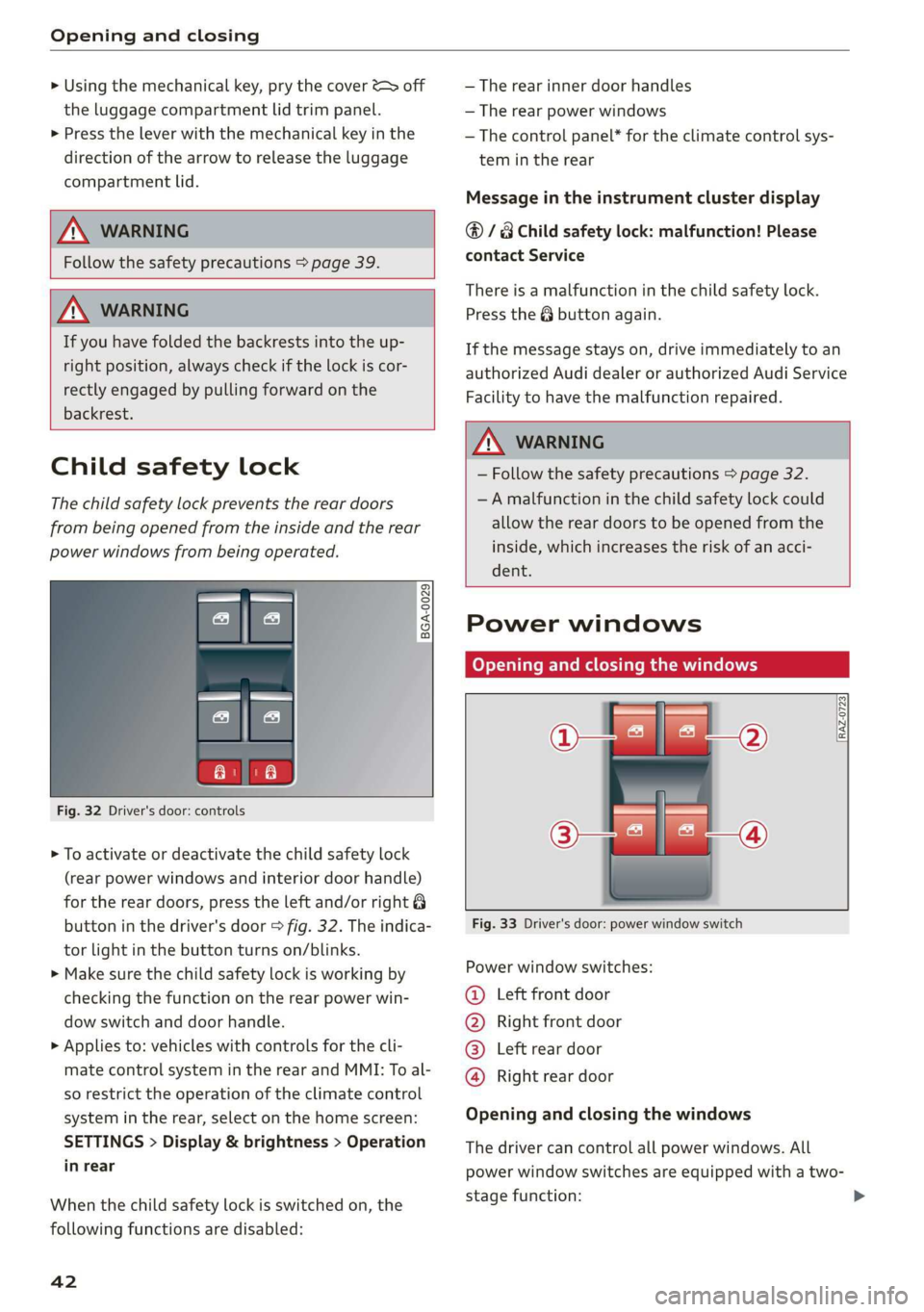
Fig. 32 Driver's door: controls
> To activate or deactivate the child safety lock
(rear power windows and interior door handle)
for the rear doors, press the left and/or right 8
button in the driver's door > fig. 32. The indica-
tor light in the button turns on/blinks.
> Make sure the child safety lock is working by
checking the function on the rear power win-
dow switch and door handle.
> Applies to: vehicles with controls for the cli-
mate control system in the rear and MMI: To al-
so restrict the operation of the climate control
system in the rear, select on the home screen:
SETTINGS > Display & brightness > Operation
in rear
When the child safety lock is switched on, the
following functions are disabled:
42
— The rear inner door handles
— The rear power windows
— The control panel* for the climate control sys-
tem in the rear
Message in the instrument cluster display
@/ Child safety lock: malfunction! Please
contact Service
There is a malfunction in the child safety lock.
Press the button again.
If the message stays on, drive immediately to an
authorized Audi dealer or authorized Audi Service
Facility to have the malfunction repaired.
ZA WARNING
— Follow the safety precautions > page 32.
—A malfunction in the child safety lock could
allow
the rear doors to be opened from the
inside, which increases the risk of an acci-
dent.
Power windows
Opening and closing the windows
RAZ-0723,
Fig. 33 Driver's door: power window switch
Power window switches:
@ Left front door
@ Right front door
@® Left rear door
@ Right rear door
Opening and closing the windows
The driver can control all power windows. All
power window switches are equipped with a two-
stage function:
Page 65 of 310
4K8012721BC
Sitting correctly and safely
Power steering wheel position adjustment
The steering wheel position can be adjusted elec-
trically up/down and forward/back.
e
Ss = c a
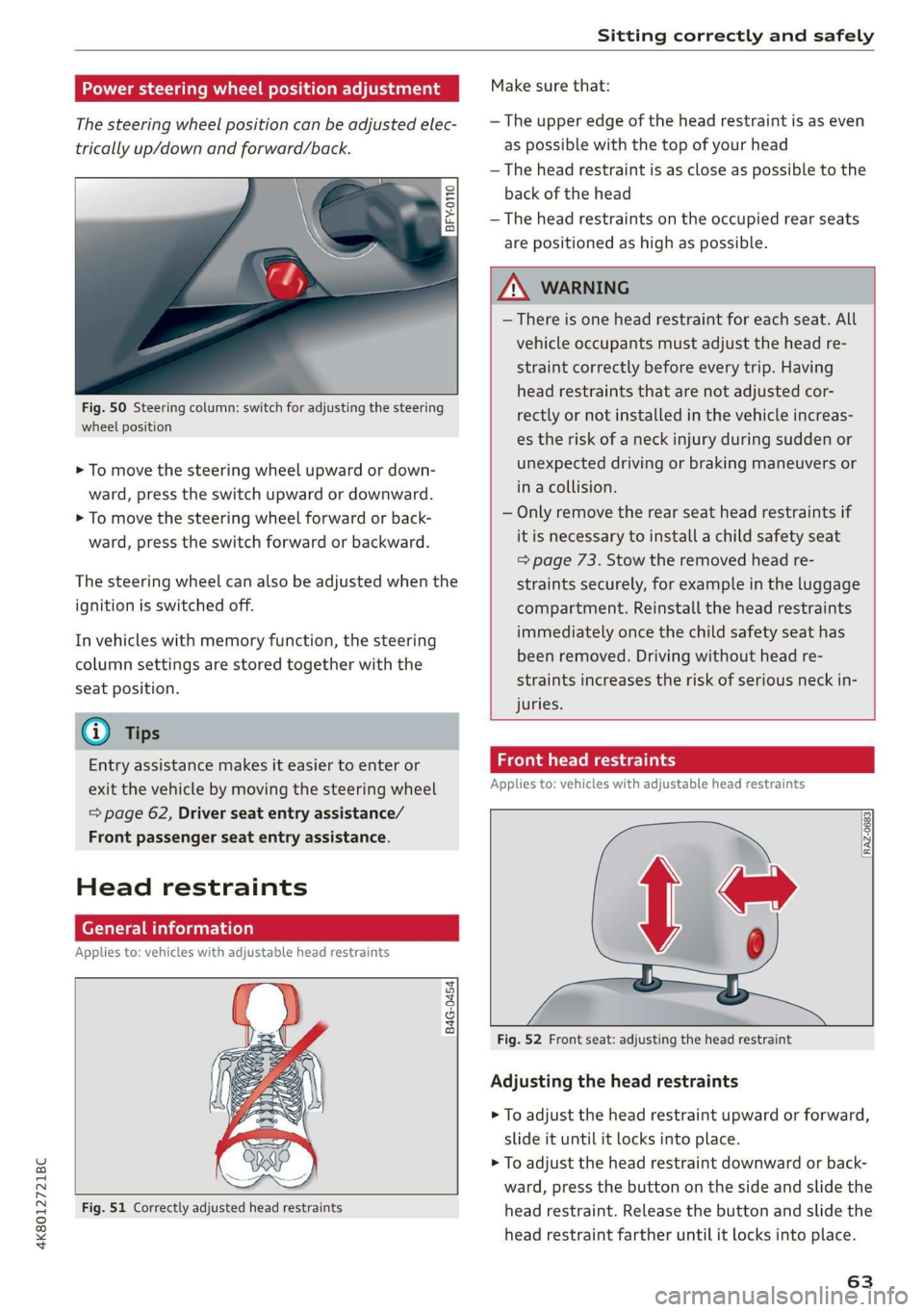
Fig. 50 Steering column: switch for adjusting the steering
wheel position
> To move the steering wheel upward or down-
ward, press the switch upward or downward.
> To move the steering wheel forward or back-
ward, press the switch forward or backward.
The steering wheel can also be adjusted when the
ignition is switched off.
In vehicles with memory function, the steering
column settings are stored together with the
seat position.
@) Tips
Entry assistance makes it easier to enter or
exit the vehicle by moving the steering wheel
=> page 62, Driver seat entry assistance/
Front passenger seat entry assistance.
Head restraints
General information
Applies to: vehicles with adjustable head restraints
B4G-0454
Fig. 51 Correctly adjusted head restraints
Make sure that:
— The upper edge of the head restraint is as even
as possible with the top of your head
— The head restraint is as close as possible to the
back of the head
— The head restraints on the occupied rear seats
are positioned as high as possible.
Z\ WARNING
— There is one head restraint for each seat. All
vehicle occupants must adjust the head re-
straint correctly before every trip. Having
head restraints that are not adjusted cor-
rectly or not installed in the vehicle increas-
es the risk of a neck injury during sudden or
unexpected driving or braking maneuvers or
in a collision.
— Only remove the rear seat head restraints if
it is necessary to install a child safety seat
=> page 73. Stow the removed head re-
straints securely, for example in the luggage
compartment. Reinstall the head restraints
immediately once the child safety seat has
been removed. Driving without head re-
straints increases the risk of serious neck in-
juries.
Front head restraints
Applies to: vehicles with adjustable head restraints
Fig. 52 Front seat: adjusting the head restraint
Adjusting the head restraints
> To adjust the head restraint upward or forward,
slide it until it locks into place.
> To adjust the head restraint downward or back-
ward, press the button on the side and slide the
head restraint. Release the button and slide the
head restraint farther until it locks into place.
63
Page 66 of 310
Sitting correctly and safely
Tae Mey
Applies to: vehicles with adjustable head restraints
RAZ-0823
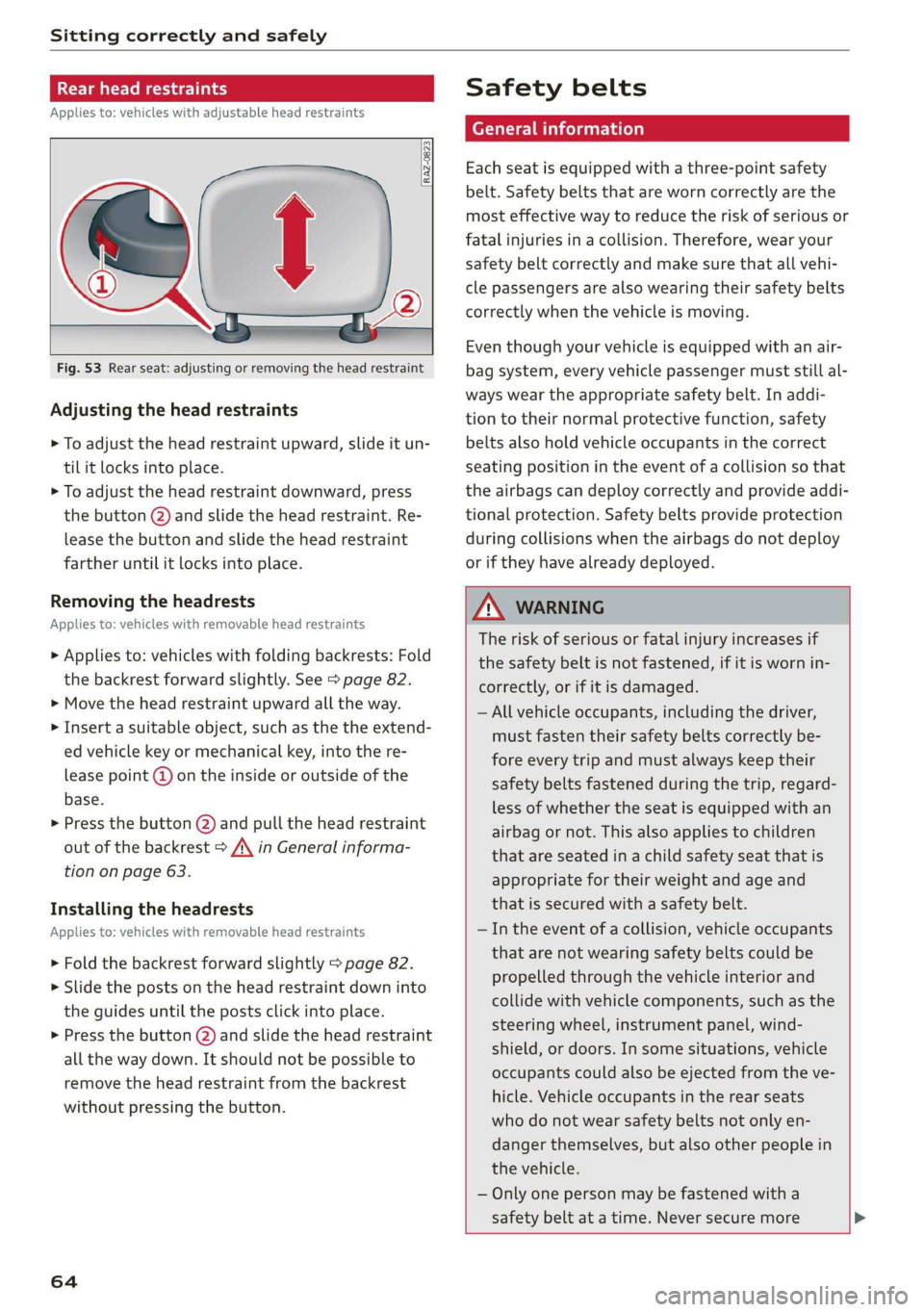
Fig. 53 Rear seat: adjusting or removing the head restraint
Adjusting the head restraints
> To adjust the head restraint upward, slide it un-
til it locks into place.
> To adjust the head restraint downward, press
the button @) and slide the head restraint. Re-
lease the button and slide the head restraint
farther until it locks into place.
Removing the headrests
Applies to: vehicles with removable head restraints
> Applies to: vehicles with folding backrests: Fold
the backrest forward slightly. See > page 82.
> Move the head restraint upward all the way.
> Insert a suitable object, such as the the extend-
ed vehicle key or mechanical key, into the re-
lease point @ on the inside or outside of the
base.
> Press the button @) and pull the head restraint
out of the backrest > /\ in General informa-
tion on page 63.
Installing the headrests
Applies to: vehicles with removable head restraints
> Fold the backrest forward slightly > page 82.
>» Slide the posts on the head restraint down into
the guides until the posts click into place.
> Press the button (2) and slide the head restraint
all the way down. It should not be possible to
remove the head restraint from the backrest
without pressing the button.
64
Safety belts
Each seat is equipped with a three-point safety
belt. Safety belts that are worn correctly are the
most effective way to reduce the risk of serious or
fatal injuries in a collision. Therefore, wear your
safety belt correctly and make sure that all vehi-
cle passengers are also wearing their safety belts
correctly when the vehicle is moving.
Even though your vehicle is equipped with an air-
bag system, every vehicle passenger must still al-
ways wear the appropriate safety belt. In addi-
tion to their normal protective function, safety
belts also hold vehicle occupants in the correct
seating position in the event of a collision so that
the
airbags can deploy correctly and provide addi-
tional protection. Safety belts provide protection
during collisions when the airbags do not deploy
or if they have already deployed.
ZX WARNING
The risk of serious or fatal injury increases if
the safety belt is not fastened, if it is worn in-
correctly, or if it is damaged.
— All vehicle occupants, including the driver,
must fasten their safety belts correctly be-
fore every trip and must always keep their
safety belts fastened during the trip, regard-
less of whether the seat is equipped with an
airbag or not. This also applies to children
that are seated in a child safety seat that is
appropriate for their weight and age and
that is secured with a safety belt.
— In the event of a collision, vehicle occupants
that are not wearing safety belts could be
propelled through the vehicle interior and
collide with vehicle components, such as the
steering wheel, instrument panel, wind-
shield, or doors. In some situations, vehicle
occupants could also be ejected from the ve-
hicle. Vehicle occupants in the rear seats
who do not wear safety belts not only en-
danger themselves, but also other people in
the vehicle.
— Only one person may be fastened with a
safety belt at a time. Never secure more