ABS AUDI A7 2021 Owner´s Manual
[x] Cancel search | Manufacturer: AUDI, Model Year: 2021, Model line: A7, Model: AUDI A7 2021Pages: 350, PDF Size: 126.66 MB
Page 285 of 350
4K8012721BF
Wheels
absolutely necessary and drive
carefully when doing so.
—Run-flat tires* may only be
used on vehicles that were
equipped with them at the
factory > page 296.
—If you install wheel covers on
the vehicle, make sure they al-
low enough air circulation to
cool the brake system. If they
do not, this could increase the
risk of an accident.
Tire wear and damage
rr)
+
x xz + a
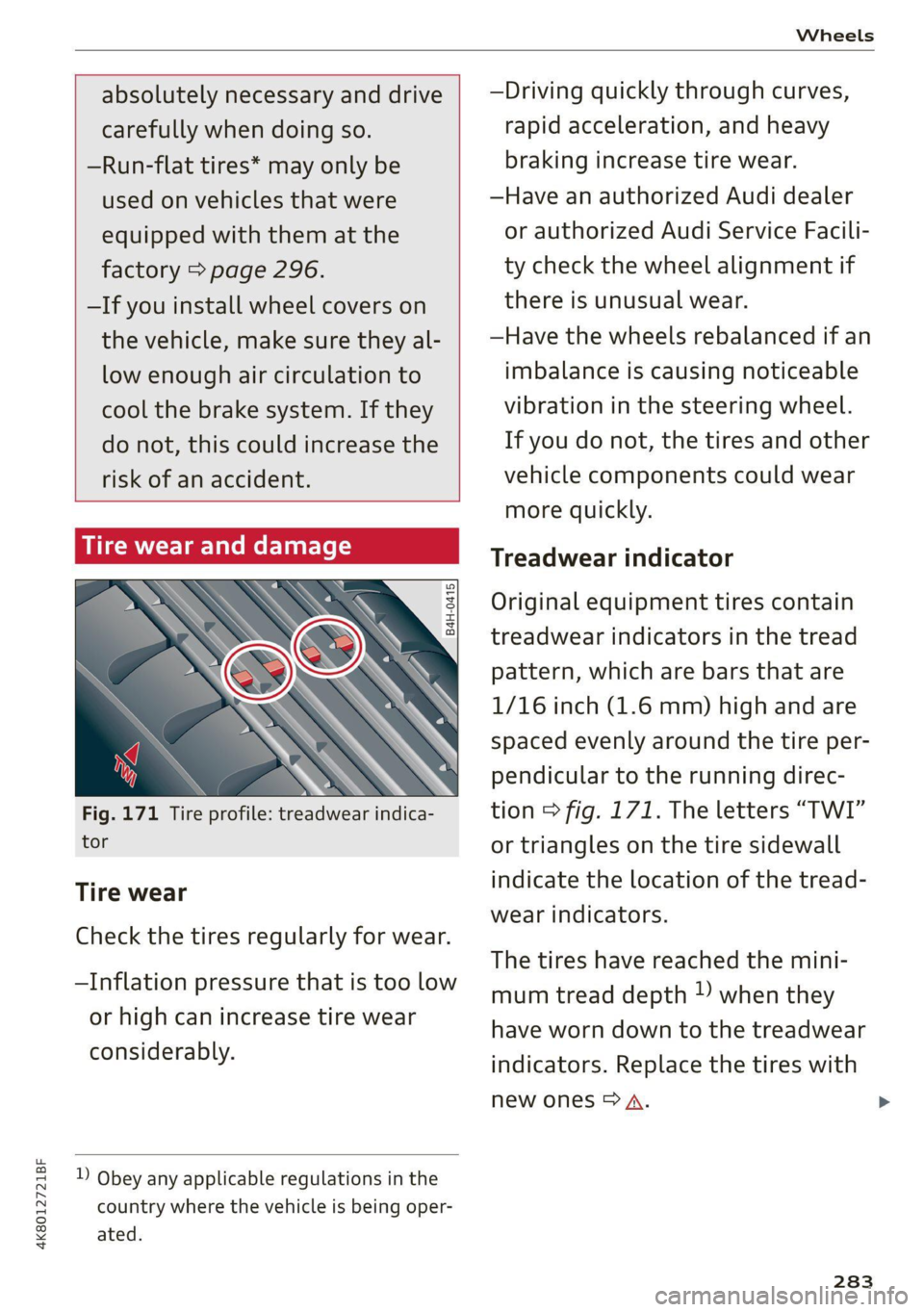
Fig. 171 Tire profile: treadwear indica-
tor
Tire wear
Check the tires regularly for wear.
—Inflation pressure that is too low
or high can increase tire wear
considerably.
D Obey any applicable regulations in the
country where the vehicle is being oper-
ated.
—Driving quickly through curves,
rapid acceleration, and heavy
braking increase tire wear.
—Have an authorized Audi dealer
or authorized Audi Service Facili-
ty check the wheel alignment if
there is unusual wear.
—Have the wheels rebalanced if an
imbalance is causing noticeable
vibration in the steering wheel.
If you do not, the tires and other
vehicle components could wear
more quickly.
Treadwear indicator
Original equipment tires contain
treadwear indicators in the tread
pattern, which are bars that are
1/16 inch (1.6 mm) high and are
spaced evenly around the tire per-
pendicular to the running direc-
tion > fig. 171. The letters “TWI”
or triangles on the tire sidewall
indicate the location of the tread-
wear indicators.
The tires have reached the mini-
mum tread depth !) when they
have worn down to the treadwear
indicators. Replace the tires with
new ones > A.
283
Page 291 of 350

4K8012721BF
Wheels
be five 150 lbs. passengers in
your vehicle, the amount of
available cargo and luggage
load capacity is 650 lbs.
(1400-750 (5 x 150) = 650
lbs.)
5. Determine the combined
weight of luggage and cargo
being loaded on the vehicle.
That weight may not safely ex-
ceed the available cargo and
luggage load capacity calculat-
ed in Step 4.
6. If your vehicle will be towing a
trailer, load from your trailer
will be transferred to your vehi-
cle. Consult this manual to de-
termine how this reduces the
available cargo and luggage
load capacity of your vehicle.
> Check the tire sidewall
(> page 275, fig. 170) to deter-
mine the designated load rating
for a specific tire.
Wheel bolts and rims
Wheel bolts
Wheel bolts must be clean and loosen/tighten
easily.
Rims
Rims with a bolted rim ring* or with bolted wheel
covers* consist of multiple pieces. These compo-
nents were bolted together using special bolts
and a special procedure. You must not repair or
disassemble them > A\.
ZA\ WARNING
Wheel bolts that are tightened or repaired in-
correctly can become loose and result in loss
of vehicle control, which increases the risk of
an accident. For the correct tightening specifi-
cation, see > page 311, Finishing.
— Always keep the wheel bolts and the threads
in the wheel hub clean and free of grease.
— Only use wheel bolts that fit the rim.
— Always have damaged rims repaired by an
authorized Audi dealer or authorized Audi
Service Facility. Never repair or disassemble
rims yourself, because this increases the risk
of an accident.
Loose wheel warning
Applies to: vehicles with loose wheel warning
Within the limits of the system, the loose wheel
warning in the instrument cluster warns you if
one or more wheels are loose.
Using the ABS sensors, the loose wheel warning
system compares the vibration characteristics of
the individual tires. If one or more wheels are
loose, it will be indicated in the instrument clus-
ter display with the fi indicator light and a mes-
sage. If only one wheel is affected, the location
of that wheel will be indicated.
Messages
fi Wheel bolts loose. Please safely stop the ve-
hicle and check all wheel bolts!
Loose wheel warning for at least one wheel > A\.
Check the wheel bolts on all wheels with the
wheel wrench (vehicle tool kit). Have the tighten-
ing specification checked as soon as possible with
a torque wrench. Drive carefully until then. For
the correct tightening specification, see
=> page 311, Finishing.
fi Wheel assessment active. Please continue
driving carefully
After this message appears and you have checked
the wheel bolts, the assessment phase begins
when the vehicle is in motion. This may take sev-
eral minutes. >
289
Page 295 of 350

4K8012721BF
Wheels
Gata e Mle a)
Eye) ye
Applies to: vehicles with Tire Pressure Monitoring System in-
dicator
Laie Mee 1 Keds
The tire pressure indicator in the instrument
cluster informs you if the tire pressure is too low
or if there is a system malfunction.
Using the ABS sensors, the tire pressure monitor-
ing system compares the tire tread circumference
and vibration characteristics of the individual
tires. If the pressure changes in one or more
tires, this is indicated in the instrument cluster
display with an indicator light (J and a message.
If only one tire is affected, the location of that
tire will be indicated.
The tire pressures must be stored again each
time you change the pressures (switching be-
tween partial and full load pressure) or after
changing or replacing a tire on your vehicle
= page 293. The tire pressure monitoring system
only monitors the tire pressure you have stored.
Refer to the tire pressure label for the recom-
mended tire pressure for your vehicle
=> page 284, fig. 173.
Tire tread circumference and vibration character-
istics can change and cause a tire pressure warn-
ing if:
— The tire pressure in one or more tires is too low
— The tires have structural damage
— The tire was replaced or the tire pressure was
changed and it was not stored > page 293
— Tires that are only partially used are replaced
with new tires
Indicator lights
If the @ indicator light turns on, there is a loss
of pressure in at least one tire .> A\ Check the
tires and replace or repair if necessary. Check and
correct
the pressures of all four tires and store
the pressure again > page 293.
ia Tire pressure: malfunction! See owner's
manual
fo appears after switching the ignition on or
while driving and the @) indicator light in the in-
strument cluster blinks for approximately one
minute and then stays on, there is system mal-
function. Try to store the correct tire pressures
=> page 293. In some cases, you must drive for
several minutes after storing the pressures until
the indicator light turns off. If the indicator light
does turn off or turns on again after a short peri-
od of time, drive to an authorized Audi dealer or
authorized Audi Service Facility immediately to
have the malfunction corrected.
Z\ WARNING
—If the tire pressure indicator appears in the
display, reduce your speed immediately and
avoid any hard steering or braking maneu-
vers. Stop as soon as possible and check the
tires and their pressure.
— The driver is responsible for maintaining the
correct tire pressure. You must check the
tire pressure regularly.
— Under certain conditions (such as a sporty
driving style, winter conditions, or unpaved
roads), the tire pressure monitoring system
indicator may be delayed.
Gi) Tips
— The tire pressure monitoring system can al-
so stop working when there is an ESC mal-
function.
— Using snow chains may result in a system
malfunction.
—The tire pressure monitoring system in your
Audi was calibrated with “Audi Original
Tires” > page 281. Audi recommends using
these tires.
Storing tire pressures
Applies to: vehicles with Tire Pressure Monitoring System in-
dicator
If the tire pressure changes or a tire is replaced,
it must be confirmed in the MMI.
> Before storing the tire pressures, make sure the
tire pressures in all four tires meet the speci-
fied values and are adapted to the load
> page 284.
> Switch the ignition on.
>» Applies to MMI: Select on the home screen: VE-
HICLE > Settings & Service > Tire pressure
293
Page 303 of 350
4K8012721BF
Care and cleaning
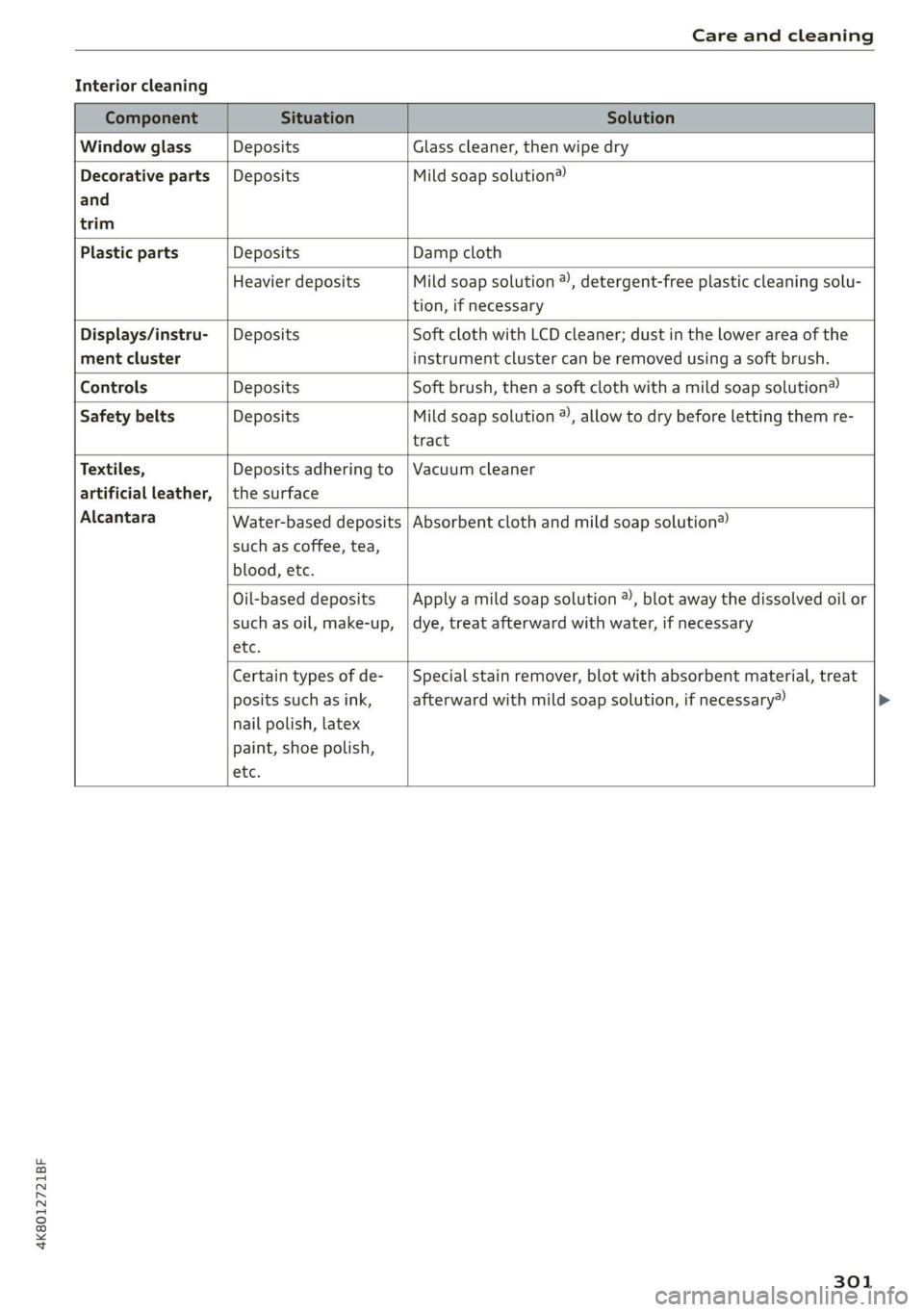
Interior cleaning
Component Situation Solution
Window glass Deposits Glass cleaner, then wipe dry
Decorative parts | Deposits Mild soap solution®
and
trim
Plastic parts Deposits Damp cloth
Heavier deposits Mild soap solution @), detergent-free plastic cleaning solu-
tion, if necessary
Displays/instru- | Deposits Soft cloth with LCD cleaner; dust in the lower area of the
ment cluster instrument cluster can be removed using a soft brush.
Controls Deposits Soft brush, then a soft cloth with a mild soap solution®
Safety belts Deposits Mild soap solution ), allow to dry before letting them re-
tract
Textiles, Deposits adhering to | Vacuum cleaner
artificial leather, | the surface
Alcantara Absorbent cloth and mild soap solution® Water-based deposits
such as coffee, tea,
blood, etc.
Oil-based deposits
such as oil, make-up,
etc.
Apply a mild soap solution ®, blot away the dissolved oil or
dye, treat afterward with water, if necessary
Certain types of de-
posits such as ink,
nail polish, latex
paint, shoe polish,
etc.
Special stain remover, blot with absorbent material, treat
afterward with mild soap solution, if necessary»
301
Page 304 of 350
Care and cleaning
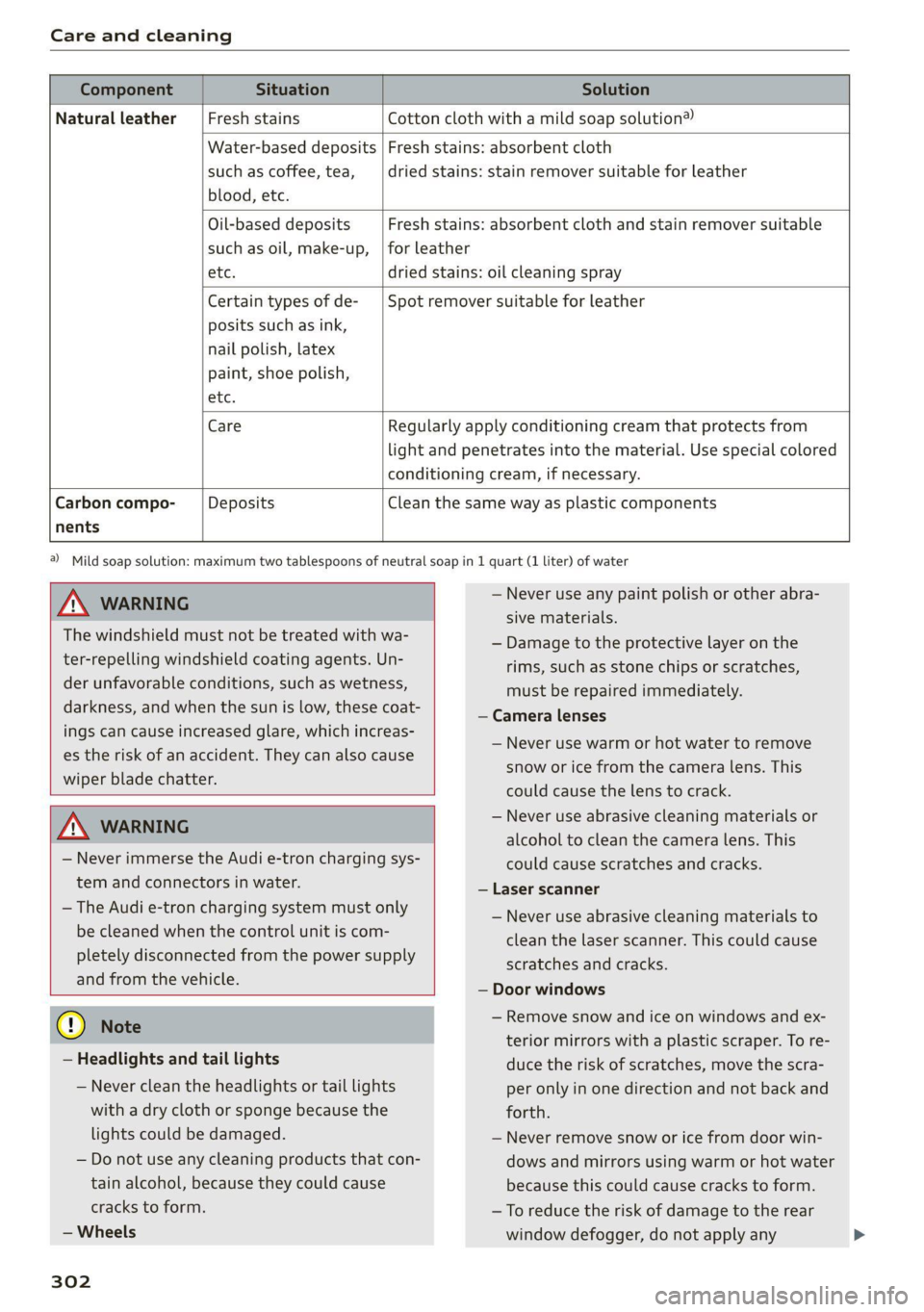
Component Situation Solution
Natural leather Fresh stains Cotton cloth with a mild soap solution®
Water-based deposits
such as coffee, tea,
blood, etc.
Fresh stains: absorbent cloth
dried stains: stain remover suitable for leather
Oil-based deposits
such as oil, make-up,
Fresh stains: absorbent cloth and stain remover suitable
for leather
etc. dried stains: oil cleaning spray
Certain types of de-
posits such as ink,
nail polish, latex
paint, shoe polish,
Spot remover suitable for leather
nents
etc.
Care Regularly apply conditioning cream that protects from
light and penetrates into the material. Use special colored
conditioning cream, if necessary.
Carbon compo- Deposits Clean the same way as plastic components
Z\ WARNING
The windshield must not be treated with wa-
ter-repelling windshield coating agents. Un-
der unfavorable conditions, such as wetness,
darkness, and when the sun is low, these coat-
ings can cause increased glare, which increas-
es the risk of an accident. They can also cause
wiper blade chatter.
ZA WARNING
— Never immerse the Audi e-tron charging sys-
tem and connectors in water.
— The Audi e-tron charging system must only
be cleaned when the control unit is com-
pletely disconnected from the power supply
and from the vehicle.
@) Note
— Headlights and tail lights
— Never clean the headlights or tail lights
with a dry cloth or sponge because the
lights could be damaged.
— Do not use any cleaning products that con-
tain alcohol, because they could cause
cracks to form.
— Wheels
302
a) Mild soap solution: maximum two tablespoons of neutral soap in 1 quart (1 liter) of water
— Never use any paint polish or other abra-
sive materials.
— Damage to the protective layer on the
rims, such as stone chips or scratches,
must be repaired immediately.
— Camera lenses
— Never use warm or hot water to remove
snow or ice from the camera lens. This
could cause the lens to crack.
— Never use abrasive cleaning materials or
alcohol to clean the camera lens. This
could cause scratches and cracks.
— Laser scanner
— Never use abrasive cleaning materials to
clean the laser scanner. This could cause
scratches and cracks.
— Door windows
— Remove snow and ice on windows and ex-
terior mirrors with a plastic scraper. To re-
duce the risk of scratches, move the scra-
per only in one direction and not back and
forth.
— Never remove snow or ice from door win-
dows and mirrors using warm or hot water
because this could cause cracks to form.
— To reduce the risk of damage to the rear
window defogger, do not apply any
Page 319 of 350

4K8012721BF
Fuses and bulbs
This can cause damage to the electrical sys-
tem and increases the risk of fire.
() Note
If a new fuse burns out again shortly after you
have installed it, have the electrical system
checked as soon as possible by an authorized
Audi dealer or authorized Audi Service Facili-
ty.
G@) Tips
— The following table does not list fuse loca-
tions that are not used.
— Some of the equipment listed in the follow-
ing tables applies only to certain model ver-
sions or certain optional equipment.
Fuse assignment - left footwell
Fuse panel @® (black)
4 |Engine components
S| Brake light sensor
6 |Engine valves
7 |Engine components
8 |Engine components
9 Engine components, 48 V water pump, 48
V drivetrain generator
10 | Oil pressure sensor, oil temperature sensor
Engine components, 48 V water pump, 48
11 |V drivetrain generator, 12 V drivetrain gen-
erator
12 | Engine valves, engine mount
13 | Engine cooling
14 | Engine control module, fuel injectors
Engine sensors, ignition coils, oxygen sen-
sors
15
RAZ-0195
ay
i
Toren
BARRIER P ala
Fig. 192 Left footwell: fuse panel with plastic clip
The fuse assignment @) and @) is in the opposite
order on right-hand drive vehicles.
16 | Fuel pump
Fuse panel (2) (red)
No. | Equipment
1 |Anti-theft alarm system
2 | Engine control module
3 | Left front lumbar support
5 |Horn
6 | Parking brake
7 | Diagnostic interface
8 |Roof electronics control module
9 | Driver assistance systems control module
10 | Airbag control module
iW Electronic Stabilization Control (ESC), An-
ti-Lock Braking System (ABS)
12 | Diagnostic connection, light/rain sensor
Climate control system, vehicle electrical
1
3 system control module
14 | Right front door control module
Fuse panel (@) (black)
No. | Equipment
Climate control system compressor, vehi-
15
cle electrical system control module
Catalytic converter heating
Auxiliary battery control module, brake
16 ;
system pressure reservoir
2 |Engine components
Engine components
317
Page 324 of 350

Data privacy
typically 30 seconds or less. The EDR in this vehi-
cle is designed to record such data as:
— How various systems in your vehicle were oper-
ating;
— Whether or not the driver and passenger safety
belts were buckled/fastened;
— How far (if at all) the driver was depressing the
accelerator and/or brake pedal; and,
— How fast the vehicle was traveling.
These data can help provide a better understand-
ing of the circumstances in which crashes and in-
juries occur. NOTE: EDR data are recorded by your
vehicle only if a non-trivial crash situation occurs;
no data are recorded by the EDR under normal
driving conditions and no personal data (e.g.
name, gender, age, and crash location) are re-
corded. However, other parties, such as law en-
forcement, could combine the EDR data with the
type of personally identifying data routinely ac-
quired during a crash investigation.
To read data recorded by an EDR, special equip-
ment is required, and access to the vehicle or the
EDR is needed. In addition to the vehicle manu-
facturer, other parties, such as law enforcement,
that have the special equipment, can read the in-
formation if they have access to the vehicle or the
EDR.
Assist system monitor
This vehicle is equipped with an Assist System
Monitor (ASM). The ASM collects data that is not
stored by the EDR in the event of an accident. The
main task of the ASM is to make it possible to un-
derstand the role and the behavior of the assist
systems in these accident situations. In addition
to the data that the EDR stores, the ASM records
data related to the assist systems starting sever-
al seconds before the accident or near-accident.
The data collected by ASM depends on the equip-
ment and may include the following information:
status information of the assist systems (for ex-
ample, if they are switched on or off, system
events, etc.), control interventions (for example,
D_ System availability may be limited depending on the mar-
ket.
2) In preparation at the time of printing.
322
by ESC, ABS, Audi pre sense’, etc.), and assist
systems settings (such as speed settings).
Special devices and access to the vehicle or to the
ASM are necessary in order to read the data from
the ASM memory. In addition to the vehicle man-
ufacturer, third parties such as law enforcement
authorities can also read and analyze the stored
data if they have access to the vehicle or to the
ASM.
Data usage
Audi can read out the information stored in the
data memories or similar data, or give this infor-
mation to third parties, especially in the follow-
ing situations:
— If the vehicle owner or lessee agrees
— If there is an official request from the police
— Ifa court or authorities request it
If legally permitted, Audi can also use the data
for analysis of vehicle operation and safety per-
formance or provide this data to third parties for
research purposes.
Data memory for autonomous driving!)
Applies to: vehicles with data memory for autonomous driv-
ing
When park assist plus is active > page 186, data
is stored in a memory in the vehicle. This data is
continuously overwritten by more current data
after a few seconds. The data is erased when the
ignition is switched off.
In certain situations, such as if an airbag has
been triggered or a parking process was ended,
the corresponding technical data may be stored
in the data memory for autonomous driving. The
data memory for autonomous driving is a read-
only memory that has a limited amount of stor-
age space. If the storage space is full, the oldest
data will be overwritten with the newest data. >
Page 340 of 350

Index
GVWR
refer to Gross Vehicle Weight
Rating (GVWR) @ sews ¢ « weae a ¢ eaves x s aoe 332
H
HandStre@’s « scces ss cecan & saree = ¢ See sf 198
Hands Free Profile..................005 198
Head-up display
AGjUStNGiacx = = acey « & pea = e eee 2 awe ge 28
Adjusting the brightness................ 57
Operating .... 6... cece eee eee eee 28
Headlight range control............-...0- 52
Headlights
Cleaning... .... eee eee eee eee 299
Headlight range control................ 52
Washersystems: « scsi «wen © 6 evainin © 6 woaee 59
Washer system (filling washer fluid) ..... 272
Head restraints
ACjUStiNG rss » 5 ame ¢ 9 seuR ta eR x ROE aE 67
Removing and installing................ 67
Heated rear window...........0seceeeeuee 89
Heated steering wheel........... 000.0008 90
H@atiiGicias + < sate 3 & sees + 2 ees te eR SBS 87
HFP
refer to Hands Free Profile............. 197
High-voltage battery................... 119
Audi e-tron compact charging system.... 128
Charging........... eee eee ee eee 119,122
Charging display on the vehicle......... 123
Charging equipment................0- 126
Charging methods.................... 119
Charging ports on the vehicle........... 119
Charging timers . ¢ evi ss eve sv oxen 2 ve 120
Connecting the charging cable.......... 122
Messages while driving
Not running for long periods of time..... 121.
Opening the charging port door......... 122
Quick charging....................00. 119
Setting the timer’: « e.as ss sees ae eens es 124
Transporting charging equipment....... 127
High-voltage system............--000-- 119
High beams
High beam assistant.................4. 53
HighwayiliQhts.. « anor » suensus te « vomces a + aorewe i 6 52
Hill descenticontrrolis: « swans < v coves w ovarme a 0 109
Hill Hold iassist s seesiie oo sccm o susan av wenen wes 95
338
Home
refer to Home address...........-.04. 222
Home address..........2..00 eee eee eee 222
HomeLink
refer to Garage door opener............. 49
Home screen... 1.2.0... eee eee eee eee 20
HOM... eee 6
Hotspot
refer to Wi-Fi... 6.2... cece eee eee ee 211
I
Ignition
Switching on and off..............20005 93
Imbalance (wheels) .........00.0ees e008 283
Immobilizer
refer to Electronic immobilizer........... 40
Indicator lights’: » sce: : eens ss eee se eee ee 7
Inspection interval..............000000. 273
Instrument cluster.............0.-00 eee 12
Adjusting the layout................... 14
Cleaning iis « 6 scree oo comme 2 wonaes wo ween ao 301
Engine code........... ee cee eee ee eee 252
FaillP@iss = = sees se ees ¥ eee Ge BOERS ee 12
On-board computer ...........+-0e0e eee 17
Operating............... 0.0 e eee eee 13
Service interval display................ 273
Software information...........-.0005 252
Switching tabs.......... 0... e eee eee 13
Switching the view.............-.-0000 ee 14
Vehicle FUNCTIONS . wii ie cares bo orn sw ae 17
Version information.................. 252
Instrument illumination................- 57
Integrated assistance................0-. 21.
Integrated Toll Module................. 149
Intelligent search
NaVvigatiOMncss » samen © emcnene a 2 emamem @ H amen 217
Interference-Causing Equipment Standard
(ICES)... eee eee 330
TARERIOF LIGHT. . » ccesvie © masons © acasem es 56, 57
Interior: Monitoring. . = wes «6 wees oo wen © 39
Intermittent mode (windshield wipers) ..... 59
International travel.................00. 212
Internet
refer toconnect.......... cece eee ee eee 208
Internet radio
refer
to Online radio.............. 232, 233