headlights AUDI A7 2021 Owner´s Manual
[x] Cancel search | Manufacturer: AUDI, Model Year: 2021, Model line: A7, Model: AUDI A7 2021Pages: 350, PDF Size: 126.66 MB
Page 151 of 350

4K8012721BF
Driving information
Marking and warning
Applies to: vehicles with night vision assist
Fig. 98 Instrument cluster: pedestrian marking and warn-
ing
Highlighting detected pedestrians and wild
animals
Within the limits of the system, the night vision
assist can detect pedestrians and wild animals
that are between approximately 32 feet (10 m)
and 295 feet (90 m) in front of the vehicle and
within the detection zone. Animal recognition is
not active within highly developed areas. The sys-
tem only detects large wild animals such as deer.
When it is dark outside and the low beams are
switched on, detected objects are marked in yel-
low (), within the limits of the system.
Pedestrian and wild animal warning
This system limits are based on the vehicle speed
and steering angle. Pedestrian and wild animal
warning encourages you to pay more attention.
If there are pedestrians or wild animals in front
of your vehicle that could pose a danger, the sys-
tem will direct your attention to this.
— Pedestrians or wild animals are highlighted in
red in the instrument cluster @) and the | A\| or
FA symbol turns on @.
— When the head-up display* is switched on, the
additional indicator JM or EM appears.
—Achime will sound if something is detected.
—If the night vision assist thermal image is re-
placed by another display (such as the on-board
computer), the red A or &A indicator light will
appear if there is a pedestrian or wild animal
warning.
The Sl symbol will appear when pedestrian and
wild animal detection is not available.
Marking light*
To direct the driver's attention to a pedestrian,
the headlights can flash on the pedestrian when
there is a pedestrian warning.
This occurs at speeds above approximately
35 mph (60 km/h) if you are outside of illuminat-
ed areas and no detected vehicles are shown. The
marking light is not used for wild animals. The
high beam assistant®™ controls the marking
light*> page 53.
Adjusting the contrast
Applies to: vehicles with night vision assist
Requirement: the night vision assist must be
switched on and the % tab must be displayed.
> Applies to MMI: Select on the home screen: VE-
HICLE > Driver assistance > (<3) > Night vision
assist.
> To set the desired contrast, move the slider.
Messages
Applies to: vehicles with night vision assist
Night vision assist: currently unavailable.
See owner's manual
The system is not functioning correctly at the
time, so it has been switched off. If the malfunc-
tion persists, drive immediately to an authorized
Audi dealer or authorized Audi Service Facility to
have the malfunction repaired.
Integrated Toll Module
Applies to: vehicles with Integrated Toll Module
Depending on the region, you can pay toll fees in
certain countries using the Integrated Toll Mod-
ule (ITM). It replaces a separate transponder for
detecting toll fees. The system electronics are in-
tegrated in the rearview mirror housing.
To use the ITM in toll zones, you must register
and activate it.
149
Page 301 of 350

4K8012721BF
Care and cleaning
height and width of the inside of the car
wash.
—To reduce the risk of paint damage, do not
wash the vehicle in direct sunlight.
—To reduce the risk of damage, do not wash
decorative decals* with a pressure washer.
—To reduce the risk of damage to the surface,
do not use insect removing sponges, kitchen
sponges, or similar items.
— When washing matte finish painted vehicle
components:
ZA WARNING
—To reduce the risk of accidents, only wash
the vehicle when the ignition is off and fol-
low the instructions from the car wash oper-
ator.
—To reduce the risk of cuts, protect yourself
from sharp metal components when wash-
ing the underbody or the inside of the wheel
housings.
— After washing the vehicle, the braking effect
may be delayed due to moisture on the
brake rotors or ice in the winter. This in-
creases the risk of an accident. The brakes
must be dried with a few careful brake appli-
cations.
— To reduce the risk of damage to the sur-
face, do not use polishing agents or hard
wax.
— Never use protective wax. It can destroy
the matte finish effect.
@) Note — Do not place any stickers or magnetic
signs on vehicle components painted with
matte finish paint. The paint could be
damaged when the stickers or magnets
are removed.
— If you wash the vehicle in an automatic car
wash, you must retract the rear spoiler if
necessary, and fold the exterior mirrors in to
reduce the risk of damage. Power folding
exterior mirrors* must only be folded in and (@) For the sake of the environment
out using the power folding function.
—To reduce the risk of damage to the rims
and tires, compare the width between the
wheels on your vehicle with the distance be-
tween the guide rails in the car wash.
—To reduce the risk of damage, compare the
height and width of your vehicle with the
Only wash the vehicle in facilities specially de-
signed for that purpose. This will reduce the
risk of dirty water contaminated with oil from
entering the sewer system.
Cleaning and care information
When cleaning and caring for individual vehicle are not listed, consult an authorized Audi dealer
components, refer to the following tables. The or authorized Audi Service Facility. Also follow
information contained there is simply recommen- __ the information found in > A.
dations. For questions or for components that
Exterior cleaning
Component Situation Solution
Windshield wiper | Deposits Soft cloth with glass cleaner, > page 61
blades
Headlights/ Deposits Soft sponge with a mild soap solution®
tail lights
Sensors/ Deposits Sensors: soft cloth with a solvent-free cleaning product
camera lenses Camera lenses: soft cloth with an alcohol-free cleaning sol-
ution
Snow/ice Hand brush/solvent-free de-icing spray >
299
Page 304 of 350
Care and cleaning
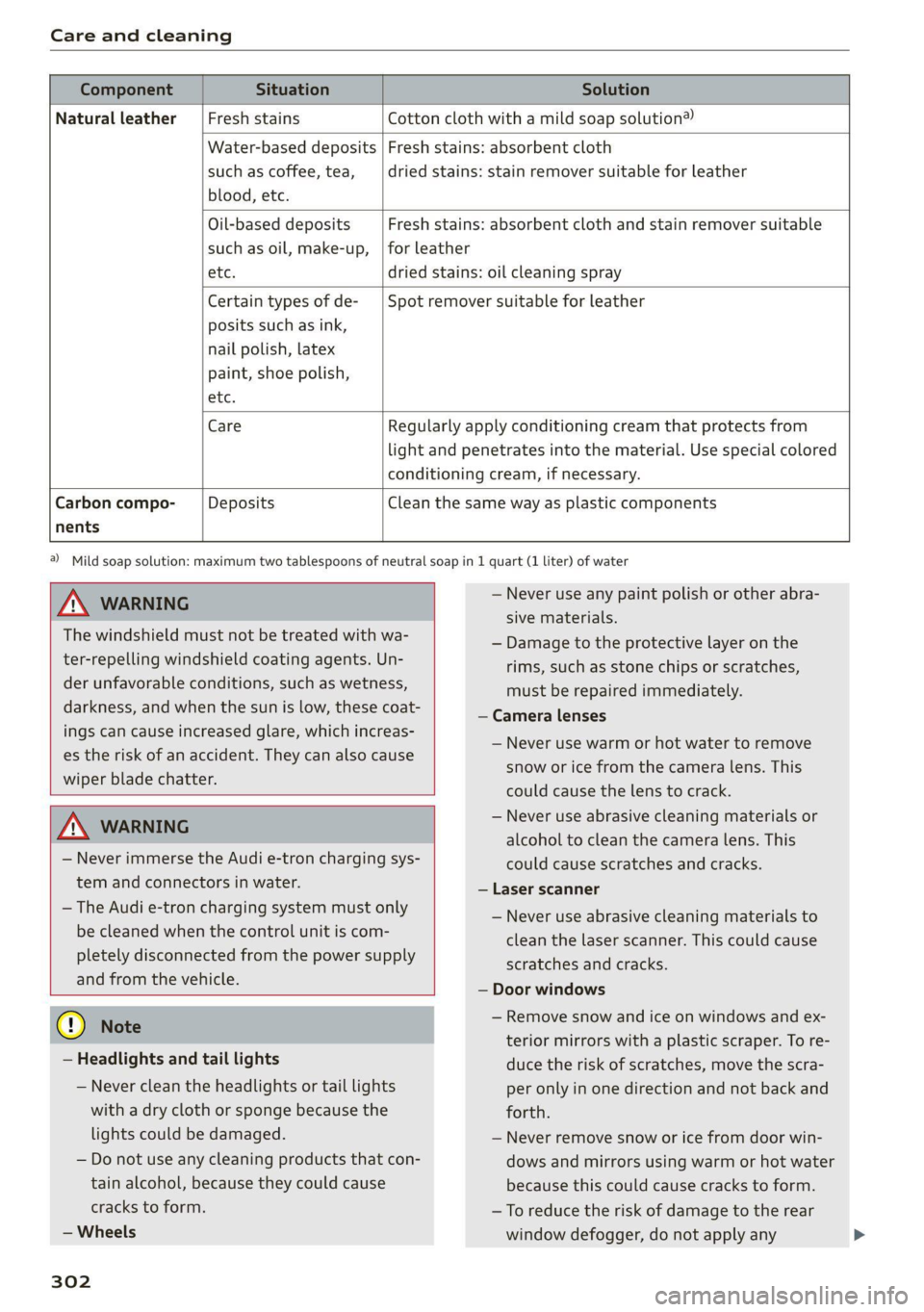
Component Situation Solution
Natural leather Fresh stains Cotton cloth with a mild soap solution®
Water-based deposits
such as coffee, tea,
blood, etc.
Fresh stains: absorbent cloth
dried stains: stain remover suitable for leather
Oil-based deposits
such as oil, make-up,
Fresh stains: absorbent cloth and stain remover suitable
for leather
etc. dried stains: oil cleaning spray
Certain types of de-
posits such as ink,
nail polish, latex
paint, shoe polish,
Spot remover suitable for leather
nents
etc.
Care Regularly apply conditioning cream that protects from
light and penetrates into the material. Use special colored
conditioning cream, if necessary.
Carbon compo- Deposits Clean the same way as plastic components
Z\ WARNING
The windshield must not be treated with wa-
ter-repelling windshield coating agents. Un-
der unfavorable conditions, such as wetness,
darkness, and when the sun is low, these coat-
ings can cause increased glare, which increas-
es the risk of an accident. They can also cause
wiper blade chatter.
ZA WARNING
— Never immerse the Audi e-tron charging sys-
tem and connectors in water.
— The Audi e-tron charging system must only
be cleaned when the control unit is com-
pletely disconnected from the power supply
and from the vehicle.
@) Note
— Headlights and tail lights
— Never clean the headlights or tail lights
with a dry cloth or sponge because the
lights could be damaged.
— Do not use any cleaning products that con-
tain alcohol, because they could cause
cracks to form.
— Wheels
302
a) Mild soap solution: maximum two tablespoons of neutral soap in 1 quart (1 liter) of water
— Never use any paint polish or other abra-
sive materials.
— Damage to the protective layer on the
rims, such as stone chips or scratches,
must be repaired immediately.
— Camera lenses
— Never use warm or hot water to remove
snow or ice from the camera lens. This
could cause the lens to crack.
— Never use abrasive cleaning materials or
alcohol to clean the camera lens. This
could cause scratches and cracks.
— Laser scanner
— Never use abrasive cleaning materials to
clean the laser scanner. This could cause
scratches and cracks.
— Door windows
— Remove snow and ice on windows and ex-
terior mirrors with a plastic scraper. To re-
duce the risk of scratches, move the scra-
per only in one direction and not back and
forth.
— Never remove snow or ice from door win-
dows and mirrors using warm or hot water
because this could cause cracks to form.
— To reduce the risk of damage to the rear
window defogger, do not apply any
Page 315 of 350

4K8012721BF
Emergency assistance
4. Attach the other end of the negative cable
(black) to the jump-start pin @) on the vehi-
cle.
Starting the engine
> Start the engine in the vehicle giving the charge
and let it run at idle.
> Now start the engine in your vehicle, which has
the
drained battery.
> If the engine does not start, stop the starting
procedure after 10 seconds and then repeat it
after approximately 30 seconds.
> Turn on the rear window defogger in your vehi-
cle in order to reduce any voltage peaks that
may occur when disconnecting the jump start
cables. The headlights must be switched off.
> With the engines running, remove the cables in
reverse order of the way they were installed.
> Close the red cover on the positive terminal.
Z\ WARNING
— Never connect the jump start cable directly
to your vehicle battery. Only use the connec-
tions in the engine compartment.
— Do not touch the non-insulated parts of the
terminal clamps. The cable must also not
come into contact with vehicle components
that conduct electricity when it is connected
to the positive vehicle battery terminal. This
can cause a short circuit.
— The plugs on the battery cells must not be
opened.
— Keep ignition sources (such as open flames,
burning cigarettes, etc.) away from the vehi-
cle batteries to reduce the risk of an explo-
sion.
— Route the jump start cables so they cannot
get caught in the moving parts in the other
vehicle's engine compartment.
@ Note
Please note that the connecting process previ-
ously described for the jump start cables is in-
tended for when your vehicle is being jump
started.
@) Tips
Make sure that the connected jump start ca-
bles have sufficient contact with metal.
Towing
General information
You should only perform the steps that follow if
you have the necessary tools and technical ex-
pertise.
Towing requires a certain amount of practice.
Audi recommends contacting a towing company
to have the vehicle transported.
You should only have your vehicle towed by an-
other vehicle when disabled in exceptional cir-
cumstances. Inexperienced drivers should not
tow.
Notes on towing
When the engine is stopped, the transmission
will not be sufficiently lubricated if traveling at
high speeds and long distances:
— The maximum permitted towing speed is 30
mph (50 km/h).
— The maximum permitted towing distance is 30
miles (50 km).
Additional information on towing with a tow
truck
The vehicle may only be towed with the front axle
raised. Do not wrap any chains or cables around
the brake lines.
Tow bar and towing cable
The vehicle can be towed with a tow bar or tow-
ing cable. Both drivers should be familiar with
the special considerations when towing, especial-
ly when using a towing cable.
Always make sure the traction force does not ex-
ceed the permitted level and there are no shock
loading conditions. There is always the risk of the
coupling becoming overloaded when driving off-
road.
For the most safety and security, drive with a tow
bar. You should use a towing cable onlyifatow >
313
Page 335 of 350

4K8012721BF
Index
A
A/C cooling mode..........-. eee eee eee ee
A/C system refrigerant oil...............
Acceleration measurement..............
Accelerator pedal...............--00 000s
also refer to Accelerator pedal...........
AccessorieS.... 0... 0.00. eee eee
Active lane assist
refer to Lane departure warning.........
refer to Lane guidance................
Adaptive cruise assist................04.
Cleaning the sensors......... 0.0.0.0 005
Adaptive cruise control
Predictive control..............000005
Adaptive dampers « sve « « savece ae scare 6 0 oe
Adaptive speed assist
refer to Adaptive cruise assist..........
Adjusting the air distribution.............
Adjusting the brightness.................
Adjusting the sound................0005
Adjusting the temperature...............
Adjusting the vents ccs <= csws + © sews +o oer
Adjusting the volume............. eee eee
Adjusting the volume (announcements) ... .
Adjusting the welcome sound............
Airbag system... 2.2... eee eee
AIPSUSPONSION ix o © aowees « 2 mines + omnes 5, v0
Alarm system
refer to Anti-theft alarm system..........
Alignment pin (changing the wheel).......
All-weather lights...............-..00005
Allseason tires’... cscu ve ones ee eee ee oe
All wheel drive
refer to quattro.............. 0...
Amazon Alexa integration
Media playback........... 00 cee e eee
QOPOratitig = = sews = « eee 5 4 wees s Ree se BES
AMI
refer to Audi music interface...........
Android Auto
refer to Audi smartphone interface......
Anti-lock braking system............000.
Anti-Slip Regulation.................05.
Anti-theft alarm system ...........-.00005
Anti-theft wheel bolts...............00.
Apple CarPlay
refer to Audi smartphone interface...... 247
Aspect ratio
NidGO verse < ¢ seven & 5 seaRE ze SeHER Fo Bee 241, 243
ASR
refer to Anti-Slip Regulation............ 115
Audi adaptive light...............-..000- §2
Audi connect
MEFEPTONCONNECE: « «esses oo wesc ow xem ¥ v0 208
AUGIGriVe’SelECt ios: « « suas > gemy 2 x seme gee 111
Audi e-tron compact charging system..... 128
Adjusting the charging power level...... 128
Changing or attaching the power cable... 133
SECUCINGls » 5 seme ¢ 9 same < a eR Eee EOE ne 133
Status and malfunction indicators....... 129
Audi musiciintertace sas ss iwes se gee ay oo 238
UGGS iexsy: a 2 wares & & gee & 2 eR Ee ER 239
Audi phone BOX eis 5 y omnes 5 3 eas «8 ews 199
Audi presense........ 0.00 e cee eee eee 166
MGSSAGES saws + & cmer 9 ¢ cemes 9 o ews 8 9 ee 170
Audi pre sense front.............eeeeeee 167
Audi side assist
refer to Side assist............-.00000. 170
Audi smartphone interface.............. 247
Legal. ivformalioms « ence x < cosas x « coca 252
Audi virtual cockpit
refer to Instrument cluster.............. 12
AUTO
Automatic headlights.................. 52
Climate control system.............0005 88
Auto Lock (central locking) ............... 36
Automatic climate control system
refer to Climate control system.......... 87
Automatic luggage compartment lid.... 44,45
Automatic transmission............-.0005 95
Parking lock emergency release.......... 99
Automatic wipe/wash system............. 59
Auxiliary climate control................. 90
Average consumption.................-- 17
Average speed... 1.0... cece eee eee renee 17
B
Bag hooks........ 0... eee eee eee eee 83
Band
refer to Frequency band............... 228
333
Page 340 of 350

Index
GVWR
refer to Gross Vehicle Weight
Rating (GVWR) @ sews ¢ « weae a ¢ eaves x s aoe 332
H
HandStre@’s « scces ss cecan & saree = ¢ See sf 198
Hands Free Profile..................005 198
Head-up display
AGjUStNGiacx = = acey « & pea = e eee 2 awe ge 28
Adjusting the brightness................ 57
Operating .... 6... cece eee eee eee 28
Headlight range control............-...0- 52
Headlights
Cleaning... .... eee eee eee eee 299
Headlight range control................ 52
Washersystems: « scsi «wen © 6 evainin © 6 woaee 59
Washer system (filling washer fluid) ..... 272
Head restraints
ACjUStiNG rss » 5 ame ¢ 9 seuR ta eR x ROE aE 67
Removing and installing................ 67
Heated rear window...........0seceeeeuee 89
Heated steering wheel........... 000.0008 90
H@atiiGicias + < sate 3 & sees + 2 ees te eR SBS 87
HFP
refer to Hands Free Profile............. 197
High-voltage battery................... 119
Audi e-tron compact charging system.... 128
Charging........... eee eee ee eee 119,122
Charging display on the vehicle......... 123
Charging equipment................0- 126
Charging methods.................... 119
Charging ports on the vehicle........... 119
Charging timers . ¢ evi ss eve sv oxen 2 ve 120
Connecting the charging cable.......... 122
Messages while driving
Not running for long periods of time..... 121.
Opening the charging port door......... 122
Quick charging....................00. 119
Setting the timer’: « e.as ss sees ae eens es 124
Transporting charging equipment....... 127
High-voltage system............--000-- 119
High beams
High beam assistant.................4. 53
HighwayiliQhts.. « anor » suensus te « vomces a + aorewe i 6 52
Hill descenticontrrolis: « swans < v coves w ovarme a 0 109
Hill Hold iassist s seesiie oo sccm o susan av wenen wes 95
338
Home
refer to Home address...........-.04. 222
Home address..........2..00 eee eee eee 222
HomeLink
refer to Garage door opener............. 49
Home screen... 1.2.0... eee eee eee eee 20
HOM... eee 6
Hotspot
refer to Wi-Fi... 6.2... cece eee eee ee 211
I
Ignition
Switching on and off..............20005 93
Imbalance (wheels) .........00.0ees e008 283
Immobilizer
refer to Electronic immobilizer........... 40
Indicator lights’: » sce: : eens ss eee se eee ee 7
Inspection interval..............000000. 273
Instrument cluster.............0.-00 eee 12
Adjusting the layout................... 14
Cleaning iis « 6 scree oo comme 2 wonaes wo ween ao 301
Engine code........... ee cee eee ee eee 252
FaillP@iss = = sees se ees ¥ eee Ge BOERS ee 12
On-board computer ...........+-0e0e eee 17
Operating............... 0.0 e eee eee 13
Service interval display................ 273
Software information...........-.0005 252
Switching tabs.......... 0... e eee eee 13
Switching the view.............-.-0000 ee 14
Vehicle FUNCTIONS . wii ie cares bo orn sw ae 17
Version information.................. 252
Instrument illumination................- 57
Integrated assistance................0-. 21.
Integrated Toll Module................. 149
Intelligent search
NaVvigatiOMncss » samen © emcnene a 2 emamem @ H amen 217
Interference-Causing Equipment Standard
(ICES)... eee eee 330
TARERIOF LIGHT. . » ccesvie © masons © acasem es 56, 57
Interior: Monitoring. . = wes «6 wees oo wen © 39
Intermittent mode (windshield wipers) ..... 59
International travel.................00. 212
Internet
refer toconnect.......... cece eee ee eee 208
Internet radio
refer
to Online radio.............. 232, 233
Page 341 of 350
4K8012721BF
Index
Intersection assistantreoe. + wees ao wean a 6 a6 173
TONIZEs & season a & assewes ue wee a © ese ww AoE & 89
iPhone
refer to Audi music interface........... 238
J
JUMPEStANtING bss vo saisara eo wvuens wo ewwaara so escows SLI.
K
ROY cescies 6 6 cence o auasaes ov me ow amie & ao 36, 40
Convenience opening and closing......... 48
Key Téplaceiient: = wcww » y ews + ¢ wean x x ae 40
Mechanical keypass wasn es wen a 6 wwe ao ¥ 40
Not recognized..............00 2.000 94
PANIC BULtOM ccss + = sans ¢ ¢ saws ¢ o Seen eo Be 40
Replacing the battery.................. 42
Unlocking and locking................55 41
Vehicle code... 1.2... cee eee eee eee 40
Key user... 2... eee ee eee 34
Kick-doWn .. 6... ee eee eee 98
L
Lane assist
refer to Lane departure warning......... 165
refer to Lane guidance................ 165
Lane departure warning................. 165
Cleaning the camera area.............. 299
LaANe:QUuIGANGES. « cise e & or oo wwe ae ETS 157
Lap timers sees ¢ seins & = eevee + & eee ¥ cere 146
Laser lighting’. x + cows + = sews © © cores 5 2 eeree 54
Laserscanner: ; 2eax < ¢ seme ss seme ye oes § 139
Cleaning « « sesiws vs sens ow mene 2H sure wo oe 300
LATCH (securing child safety seats)......... 78
Launch’ Controls: « = saves = ¢ sawp 2 x sews xe wees 98
Leather care and cleaning............... 302
Legal information
License subscriptions................. 252
Software information................. 252
Software licenses..............-..0005 252
Version, information « » ss +s sewn 2 ¢ eae 252
License plate bracket................... 328
Lifting points (vehicle jack).............. 309
Light/rain sensor
Headlights:c: : = sees : © saws se sews eo ees = 52
Intermittent mode (windshield wipers).... 59
Lighting
Exterior... 0... eee eee eee 52
INQEFION wees « 2 qos « & yews 2 o eee Eg Eee FS 56
LIGHES « aac > 5 Same 2 ¢ Saee ot Sates o 5 eGER ES: 52
Lights on the charging port
refer to Charging display............... 123
Listening to music
Fefer tOMe dials: « «wees sv wee 6 owen 236, 239
LOG « seco 2 a neers 2 a seems 9 5 seo © a a oe 332
LOGALUSETS (is : x seme 2 wae 2 2 neem Be meme ag sg 33
Locking and unlocking
Byremotercontrols. « ssn s 6 coos sa ees 6 Ww 41
Using the lock cylinder................. 39
With the convenience key............... 41
Low beam headlights.................00, 52
LTE
refer to Exterior antenna.............. 200
Luggage compartment.................. 83
COVER ex a 2 cess: 3 a ete so momen oH cote © o oem 84
Increasing the size........... 0.0 eee ee 85
Power SOUrCES .... 1. ee eee eee eee 82
also refer to Luggage compartment...... 83
Luggage compartment lid
ClOSING*DULOM Ys: « & cessie « o ccaves © 6 cana @ are 44
Generalinformation................... 43
Mechanically unlocking. ...........0eees 46
Opening and closing.................-. 44
Opening and closing with foot motion..... 4S
Power opening and closing.............. 44
LUMDErSUPPOFt: ccs & x eeee so Secs x ¥ Ree + 64
M
Maintenance.......... 00... eee eee eee 326
Maintenance intervals...............00. 273
Malfunction Indicator Lamp (MIL)........ 259
Maneuverassist «ccs 6s came ae nner «0 cee 195
Manually releasing the charging connector. 125
Manually releasing the charging port door.. 125
Manual operation
ChargingconmectOtinncc. w 2 ammos x awexne a oe 125
Charging port door................00. 125
Manual shifting............ 0.002 e eee 97
Map
Changing the scale................0-. 219
Display’: oss 5 eseew 6 ¢ canes @ e eases + o ero 221,
339
Page 344 of 350
Index
Presets
Radio... eee eee 231
Presets list
refer to PresetS.........cseeeeceeneee 231
Pressure
Tire pressure monitoring system .... 293,294
MMOSic » 1 canssan = 5 suwoame # @ weenie « o vomings & @ mae 284
Profilespictune « ciscsa x x suse x v cme ov omen 6 2 33
Progressive steering’. « «cen . esc e woes os L13
PROLGCtING cx 5 = ease 5 5 eemwig & o eewE sy eee eg 300
Pyrotechnic elements............-...0- 326
Q
GUSUENO's = naz.s 3 aauee 8 2 eieR & 3 OSE 2 BR 2 114
Selective wheel torque control.......... 116
Quick charging « ese. + ¢ sees 2 e sees ys saws 119
R
Radio’: = yew 2 2 maces g o MEME & 2 BOGE aE eG ge 228
Radioitextics 2s sccsn: i % wanes ox vwccame x cnee 2311.
Station list... 60... cece cece eee ee 228
Radio communications equipment........ 328
RadiorequipMeMbieer « suescus ie « cxnwne us anonons i» 328
Radio Standards Specification (RSS) ....... 329
Raikearrier’. sc «2 onsen « 2 ones sa nemo # oe 112
Rain/light sensor
Headlights « 4 snus © eanwsn © emeasua we ¥ vaca 52
Intermittent mode (windshield wipers).... 59
Random
Wefer to SHUTflé’s : sxe « + xcom & + ome s 2 241
Range. ..... 2c eee eee 17
Range monitor.................0..000. 102
Range potential..................0000- 103
Ramger(@lectric) mers. sever + seesem ovens a ae 224
Reading lightsias « scssss i & wasn © escinie ws @ ecasre 56
Rear cross-trafficiassist ws. 6. oso. ae sive a 183
Reartog lights sss x = syne x 2 aes ¢ x ewe «2s 52
Rear lid
refer to Luggage compartment lid........ 44
Rearspoile feiss: 2 « swears + « mena @ wersin » ¥ arane 117
Cleaning...................00000 eee 300
Rearview:Camet as. « seces « «cies «oem © 4 om 179
Rear window defogger.................5- 89
REAR (climate control system) ............ 88
Recirculation Mode sajes + ¢ wey 2 x eee 9 & eoee 89
342
RECUPERATION secre vs ssceene wo seensen 6 ower 18,101
RefrigerantOilocius «5 wee 2 8 ween ¢ wows = vs 332
Refueling’: + = sean y 2 saws y 2 sews ¥ 0 wees eve 255
Remote access authorization (key user)..... 34
Remote control
Garage door opener...........--...--5- 49
Remote control key........... eee ee ee eee 40
Convenience opening and closing......... 48
Key replacement.............0.-.0 eee 40
LED 2 puss ay gomy o 2 Mowe yy BwmN a See Ee 42
PANTO PurmebOmis i wccscos 4 x mena 4 x seus «x xeese 40
Replacing the battery.................. 42
Unlocking and locking................55 41
also refer to Vehicle key..............-. 40
Remote controlled parking.............. 190
Remote park assist plus
refer to Remote controlled parking...... 190
Remote park assist plus with garage function
refer to Remote controlled parking...... 190
Removing the caps (wheel bolts)......... 308
REPAIRS « sais & sxnwnte 6 eweteite te omnes wo oO 326
Replacement keyiew «wi xv onewa av wren eo 40
Replacement parts)... 52 cise veces eee es 328
Replacing fuses..............-002-000- 316
Reporting Safety Defects................ 328
RiltiSis ¢ & maces & @ matne & F BaRRS & T RacRE & oR 289
GLEAMING ix & & oesie oo isan w wean aw nm wo 300
Road Canrieh’s swan: « = gage: » = seem = 9 ewe ge 112
ROLINGix: ¢ cene se noes ¢ ees Ge ee Ge eee 94
Rolling ability
Electromechanical parking brake........ 108
TRANSMISSION (le bs + « sneane a 0 annua wo axarane x 0 96
Roof
refer to Panoramic glass roof............ 48
Roof load. ...... 0... ee eee ee eee eee 332
ROOERAGK evar: cs ssewews «x aso
also refer to Roof rack..........-0000005 86
Route guidance
SUEOPPING « cours x & eases ¥ o aeeS 7 2 ROM FE Oe 220
also refer to Navigation............... 216
RUMPPLaE CEES) so sce 2 o secu oo seem ow aes 296
Running direction (tires)..............-. 310