power steering AUDI A7 2021 Owner´s Manual
[x] Cancel search | Manufacturer: AUDI, Model Year: 2021, Model line: A7, Model: AUDI A7 2021Pages: 350, PDF Size: 126.66 MB
Page 114 of 350

Driving dynamic
Steering
The power steering will adapt. Light steering is
suitable for long trips on highways or smooth
driving around curves, for example.
Suspension
The suspension adjusts to be tighter or more
comfort-oriented when it comes to compensat-
ing for uneven spots on the road.
The vehicle ground clearance is adjusted by the
air suspension” based on the setting.
Engine sound
The engine sound adapts and can be subtle to
sporty. In the automatic setting, the engine
sound depends on the selected driving program.
quattro with sport differential
Applies to: RS models
Depending on the setting, the drive power at the
rear axle will be distributed with the sport differ-
ential* to be more sporty or moderate
=>page 115.
ESC
Applies to: RS models
The ESC sport mode can be activated. Also refer
to the important information regarding driving
with ESC limited > page 116.
Suspension
PCED aN eer ute)
Applies to: vehicles with suspension control
The adaptive dampers are an electronically-con-
trolled damping system. The firmness of the sus-
pension will adapt to the driving conditions and
the driving situation. The settings depend on the
selected Audi drive select* mode.
Air suspension
Applies to: vehicles with air suspension
The air suspension is an electronically-controlled
suspension and leveling system. The firmness of
the suspension will adapt to the driving condi-
tions and the driving situation. The system balan-
ces out changes in load. The vehicle level will also
112
adapt gradually to the vehicle speed in order to
reduce the wind resistance at high speeds and in-
crease the ground clearance at low speeds. The
settings depend on the selected Audi drive se-
lect* mode.
Displaying the vehicle level
» Applies to MMI: Select on the home screen: VE-
HICLE > Audi drive select.
The filled-in boxes represent the current vehicle
level. The more boxes that are filled in, the high-
er the ground clearance. The box that corre-
sponds with the current vehicle level will flash
while the vehicle is lifting or lowering. The target
level is highlighted in color.
Raising the vehicle
> Applies to MMI: Select on the home screen: VE-
HICLE > Audi drive select.
> Press Raise to reach the highest vehicle level
and thus the maximum ground clearance.
» Press Lower to lower the vehicle down again.
The vehicle will lower at speeds of approximately
22 mph (35 km/h) and below. This function may
only be used temporarily when increased ground
clearance is necessary. It is not intended for long
drives.
@) Note
— Also refer to the information about ground
clearance > page 112.
— When transporting the vehicle on a road
carrier,
rail carrier, ship carrier, or other car-
rier, it may only be secured at the running
surfaces of the tires (circumference). Secur-
ing the vehicle at the axle components, sus-
pension struts, or towing eyes is not permit-
ted because the pressure in the air suspen-
sion struts can change during transport. The
vehicle might not be secured sufficiently if
this happens.
Ground clearance
The vehicle height and clearance can be influ-
enced by the following factors:
— Change in temperature
Page 115 of 350

4K8012721BF
Driving dynamic
— Change in load
— Change to the Audi drive select* mode
— Lifting and lowering via the air suspension*
ZA\ WARNING
To reduce the risk of injury, make sure no one
gets pinched when the vehicle level is chang-
ing, for example when cleaning the under-
body or the wheel housings.
() Note
Always make sure there is enough clearance
above and below the vehicle. This is especially
important for entrances with height restric-
tions, for example, before driving into under-
ground garages. You could also scrape the
ground when driving over the edges of curbs
or on steep ramps, which could damage your
vehicle.
Messages
BB Air suspension: malfunction! You may con-
tinue driving slowly at max. XX mph (km/h)
There is a malfunction. Driving stability may be
limited. Drive to an authorized Audi dealer or au-
thorized Audi Service Facility immediately. Do not
drive faster than the speed given in the message.
B Air suspension: malfunction! Safely stop ve-
hicle.
Steering and ground clearance limited
There is a malfunction. Do not continue driving.
Secure the vehicle against rolling before exiting
the vehicle > page 94. Avoid turning the steering
wheel, because the vehicle ground clearance may
be so low that turning the steering wheel could
result in damage to the wheels and wheel hous-
ings.
| 8 | Suspension: malfunction! You can continue
driving
There is a malfunction. See an authorized Audi
dealer or authorized Audi Service Facility for as-
sistance.
air suspension: vehicle too low. Limited
ground clearance
The vehicle ground clearance is very low. Wait un-
til the air suspension system has restored normal
ground clearance. Have an authorized Audi dealer
or authorized Audi Service Facility repair the mal-
function immediately if the indicator light does
not turn off after a significant period of time.
B Air suspension: malfunction! Please contact
Service
There is a malfunction. The driving stability may
be limited and the ground clearance may be low.
See an authorized Audi dealer or authorized Audi
Service Facility for assistance.
Audi drive select: automatic suspension low-
ering. See owner's manual
The vehicle level is adjusted to the setting stored
for the active personal profile > page 33.
Audi drive select: automatic suspension Lift.
See owner's manual
The vehicle level is adjusted to the setting stored
for the active personal profile > page 33.
Steering
Electromechanical steering supports the driver's
steering movements by electronically adapting
the power steering depending on the vehicle
speed. The settings depend on the selected Audi
drive select* mode.
Progressive steering
Applies to: vehicles with progressive steering
The driving dynamic and driving stability are in-
creased by the steering ratio based on the steer-
ing wheel angle. The steering is very direct when
the steering wheel angle is sharp, and indirect
when the angle is low. This enables comfortable
maneuvering and a precise steering response at
higher driving speeds.
Dynamic all-wheel steering
Applies to: vehicles with dynamic all-wheel steering
Active corrective steering at the front and rear
axles increases the driving dynamic and driving
stability. At low speeds, the rear wheels are
steered in the opposite direction from the front >
113
Page 116 of 350

Driving dynamic
wheels to reduce the steering effort needed by
the driver and to reduce the turning radius. Vehi-
cle handling improves. At high speeds, steering
the rear wheels in the same direction as the front
wheels improves the vehicle response and driving
stability. The vehicle reacts quickly and precisely
to the driver's steering movements.
Messages
& Steering: malfunction! Please stop vehicle
The power steering may have failed. Adapt your
driving style immediately to compensate for the
fact that it may be more difficult to turn the
steering wheel, and stop your vehicle in a safe lo-
cation as soon as possible. Do not continue driv-
ing. See an authorized Audi dealer or authorized
Audi Service Facility for assistance.
& Steering: malfunction! Please stop vehicle.
Pay attention to distance at side
The rear axle steering may have failed. More
space on the road may be needed at the side of
the vehicle, and the turning radius may be much
larger. Slow down immediately, and stop your ve-
hicle as soon as possible in a safe location with
enough space at the sides of the vehicle. Do not
continue driving. See an authorized Audi dealer
or authorized Audi Service Facility for assistance.
io] Steering: malfunction! Please stop vehicle
There is a malfunction in the electronic steering
lock. You cannot turn the ignition on. Secure the
vehicle against rolling before exiting the vehicle
= page 94. Do not tow your vehicle because it
cannot be steered. See an authorized Audi dealer
or authorized Audi Service Facility for assistance.
& Steering: malfunction! You can continue
driving
There is a malfunction in the steering system.
Steering may be more difficult or more sensitive.
Adapt your driving style. Have the steering sys-
tem checked immediately by an authorized Audi
dealer or authorized Audi Service Facility. Please
note that the red indicator light may turn on af-
ter restarting the engine. Do not continue driving
if it does.
114
a Steering: malfunction! Adapt driving style.
Larger turning radius
The rear axle steering may have failed. The vehi-
cle will have a larger turning radius, and the sta-
bility when driving around curves will be compa-
rable to a vehicle without rear axle steering. Drive
carefully to an authorized Audi dealer or author-
ized Audi Service Facility to have the malfunction
corrected.
& Steering lock: malfunction! Please contact
Service
There is a malfunction in the electronic steering
lock. Drive immediately to an authorized Audi
dealer or authorized Audi Service Facility to have
the malfunction repaired.
Dynamic steering: correcting steering wheel
position
The steering is reinitializing. The steering wheel
will move easily after starting the vehicle. Reiniti-
alization might be necessary if the steering wheel
was moved while the engine was switched off.
The display turns off if the initialization was suc-
cessful.
Z\ WARNING
Do not tow your vehicle if there is a malfunc-
tion in the electronic steering lock because
this increases the risk of an accident.
@) Tips
— If there is a malfunction, the steering wheel
may be crooked when driving straight.
—Ifthe a or & indicator light only stays on
for a short time, you may continue driving.
ALL wheel drive (quattro)
Applies to: vehicles with all wheel drive
The all-wheel drive system distributes the driving
power variably to the front and rear axle to im-
prove the driving characteristics. It works togeth-
er with selective wheel torque control, which can
activate when driving through curves
> page 116.
Page 117 of 350

4K8012721BF
Driving dynamic
The all-wheel drive system is designed for high
engine power. Your vehicle is exceptionally pow-
erful and has excellent driving characteristics
both under normal driving conditions and on
snow and ice. Always read and follow safety pre-
cautions > A\.
Quattro ultra
Applies to: vehicles with quattro ultra
If the driving situation does not require all wheel
drive, then the rear section of the drivetrain will
decouple and thus save fuel. The system con-
stantly determines and anticipates if all wheel
drive is needed. This allows the rear drivetrain to
recouple shortly before it is needed.
ZA WARNING
— Even in vehicles with all wheel drive, you
should adapt your driving style to the cur-
rent road and traffic conditions to reduce
the risk of an accident.
— The braking ability of your vehicle is limited
to the traction of the wheels. In this way, it
is not different from a two wheel drive vehi-
cle. Do not drive too fast because this in-
creases the risk of an accident.
— Note that on wet streets, the front wheels
can “hydroplane’” if driving at speeds that
are too high. Unlike front wheel drive
vehicles, the engine RPM does not increase
suddenly when the vehicle begins hydro-
planing. Adapt your speed to the road condi-
tions to reduce the risk of an accident.
Syed)
Applies to: vehicles with sport differential
The sport differential distributes the drive power
to the rear axle based on the situation. The goal
is a high level of agility and ability to accelerate
on curves. The vehicle is very responsive to steer-
ing. The settings depend on the selected Audi
drive select* mode.
t3] All-wheel drive: malfunction! You can con-
tinue driving. Please contact Service
Drive immediately to an authorized Audi dealer
or authorized Audi Service Facility to have the
malfunction repaired.
it} Sport differential: malfunction! Please con-
tact Service
Drive immediately to an authorized Audi dealer
or authorized Audi Service Facility to have the
malfunction repaired.
it} All-wheel drive: too hot. Please adapt driv-
ing style. See owner's manual
The transmission temperature has increased sig-
nificantly due to the sporty driving manner. Drive
in a less sporty manner until the temperature re-
turns to the normal range and the indicator light
switches of.
73} Sport differential: temperature too high.
Please adapt driving style
The transmission temperature has increased sig-
nificantly due to the sporty driving manner. Drive
in a less sporty manner until the temperature re-
turns to the normal range and the indicator light
switches of.
ZA\ WARNING
Contact an authorized Audi dealer or author-
ized Audi Service Facility if the sport differen-
tial is faulty or malfunctioning. The repair
must be performed by trained personnel us-
ing the correct oil in order to ensure safety.
Electronic Stabilization
Control
Electronic Stabilization Control (ESC) supports
driver safety. It reduces the risk of slipping and
improves driving stability. ESC detects critical sit-
uations, such as if the vehicle is oversteering or
understeering, or if the wheels are spinning.
The brakes are applied or the engine torque is re-
duced in order to stabilize the vehicle.
The following stabilization functions are integrat-
ed into the ESC, among others: >
115
Page 118 of 350

Driving dynamic
Anti-lock braking system (ABS)
ABS prevents the wheels from locking when brak-
ing. The vehicle can still be steered even during
hard braking. Apply steady pressure to the brake
pedal. Do not pump the pedal.
A pulsing in the brake pedal indicates that the
system is acting to stabilize the vehicle.
Anti-Slip Regulation (ASR)
ASR reduces drive power when the wheels begin
spinning and adapts the power to the road condi-
tions. This will increase the driving stability.
Electronic Differential Lock (EDL)
The EDL applies the brakes to wheels that are
slipping and transfers the drive power to the oth-
er wheels. This function is not available at higher
speeds.
In extreme cases, EDL automatically switches off
to keep the brake on the braked wheel from over-
heating. The vehicle is still functioning correctly.
EDL will switch on again automatically when con-
ditions have returned to normal.
Selective wheel torque control
Selective wheel torque control is used when driv-
ing on curves. Braking is targeted toward the
wheels on the inside of the curve as needed. This
allows more precise driving in curves.
Power steering
The ESC can also support vehicle stability
through steering.
ZA\ WARNING
— The ESC and its integrated systems cannot
overcome the limits imposed by natural
physical laws. This is especially important on
slippery or wet roads. If the systems begin
acting to stabilize your vehicle, you should
immediately alter your speed to match the
road and traffic conditions. Do not let the in-
creased safety provided tempt you into tak-
ing risks. This could increase your risk of a
collision.
— Please note the risk of a collision increases
when driving fast, especially through curves
116
and on slippery or wet roads, and when driv-
ing too close to objects ahead. There is still
a risk of accidents because the ESC and its
integrated systems cannot always prevent
collisions.
— Accelerate carefully when driving on
smooth, slippery surfaces such as ice and
snow. The drive wheels can spin even when
these control systems are installed and this
can affect driving stability and increase the
risk of a collision.
G) Tips
— The ABS and ASR only function correctly
when all four wheels have a similar wear
condition. Different tire sizes can lead toa
reduction in engine power.
— You may hear noises when the systems de-
scribed are working.
The So button (or , depending on the model)
for controlling the ESC is located in the center
console, in front of the selector lever. The ESC is
automatically switched on when the ignition is
switched on.
Limiting ESC
In some situations, it may make sense to limit
the stabilizing function of the ESC so that the
wheels can spin, for example to rock a vehicle to
free it when it is stuck or to drive with snow
chains. The ESC can also be limited to provide
more sporty driving characteristics with fewer
stabilizing corrective actions.
—To limit the ESC, press the oF button briefly.
The B indicator light will turn on.
— To completely reactivate the ESC stabilization
function, press the button again. The indicator
light turns off.
Switching off ESC
For a more active control of the vehicle where the
stabilizing functions of the ESC cannot intervene,
the ESC can be switched off.
Page 160 of 350

Driver assistance
Switching lane guidance on and off
Requirement: lane guidance must be preselected
in the MMI > page 162.
> To activate or deactivate the availability of the
lane guidance, press the button on the turn sig-
nal lever > fig. 105.
The system will assist the driver by providing cor-
rective steering only when adaptive cruise assist
is actively regulating and availability is switched
on.
Overview of displays and lane guidance
limitations
The availability of lane guidance is shown with in-
dicator lights and with arrows @)) > page 155,
fig. 102 in the Driver assistance display.
> 4 - Lane guidance is active.
ri turns on (applies to vehicles with Audi vir-
tual cockpit) or the Z indicator light blinks (ap-
plies to vehicles with analog instrument cluster),
the limits of the system have been reached (for
example, the system does not have enough steer-
ing power in tight curves). Take over steering.
rg turns white, lane guidance is switched on
but is not active. This may occur due to the fol-
lowing system limits or situations:
— The necessary lane marker lines have not been
detected (for example, in a construction zone
or because the lines are obstructed by snow,
dirt, water, or lighting)
— The lane is too narrow or too wide
— The curve is too narrow
— Visibility is obstructed by a rise or dip.
— The driver's hands are not on the steering
wheel
— The turn signal was activated.
Steering intervention request
If no steering activity is detected or the limits of
the system are reached, the driver steering inter-
vention request will alert the driver using audio
and visual signals, such as B or BE. Take over
the steering and keep your hands on the steering
wheel so that you will be ready to steer at any
time. The system will become inactive after a
short time and will only be active again later.
158
If the driver does not take over steering, adaptive
cruise assist will be canceled. If the vehicle is
equipped with emergency assist and it is ready to
function, it will be activated if possible
=>page 174.
ZA WARNING
Observe the safety precautions and note the
limits of the assist systems, sensors, and
cameras > page 138.
(i) Tips
— Always keep your hands on the steering
wheel so you can be ready to steer at any
time. The driver is always responsible for
adhering to the regulations applicable in
the country where the vehicle is being oper-
ated.
— Audi recommends only switching on lane
guidance on well-constructed roads.
—The & fig. 105 button switches lane guid-
ance availability and the lane departure
warning on or off simultaneously, if lane
guidance is preset in the adaptive cruise as-
sist settings.
Predictive control
Applies to: vehicles with adaptive cruise assist and efficiency
assist
Applies to: vehicles with Audi virtual cockpit
Fig. 106 Instrument cluster: speedometer: predictive con-
trol display
With predictive control, efficiency assist adapts
the set speed in adaptive cruise control @ based
on detected speed limits and the upcoming
route. Once the system no longer detects any in-
cidents, adaptive cruise control will accelerate
back up to the last speed that the driver set. Af-
ter switching on the ignition, the availability of >
Page 182 of 350
Parking and maneuvering
Applies to: vehicles with rearview camera/peripheral cameras
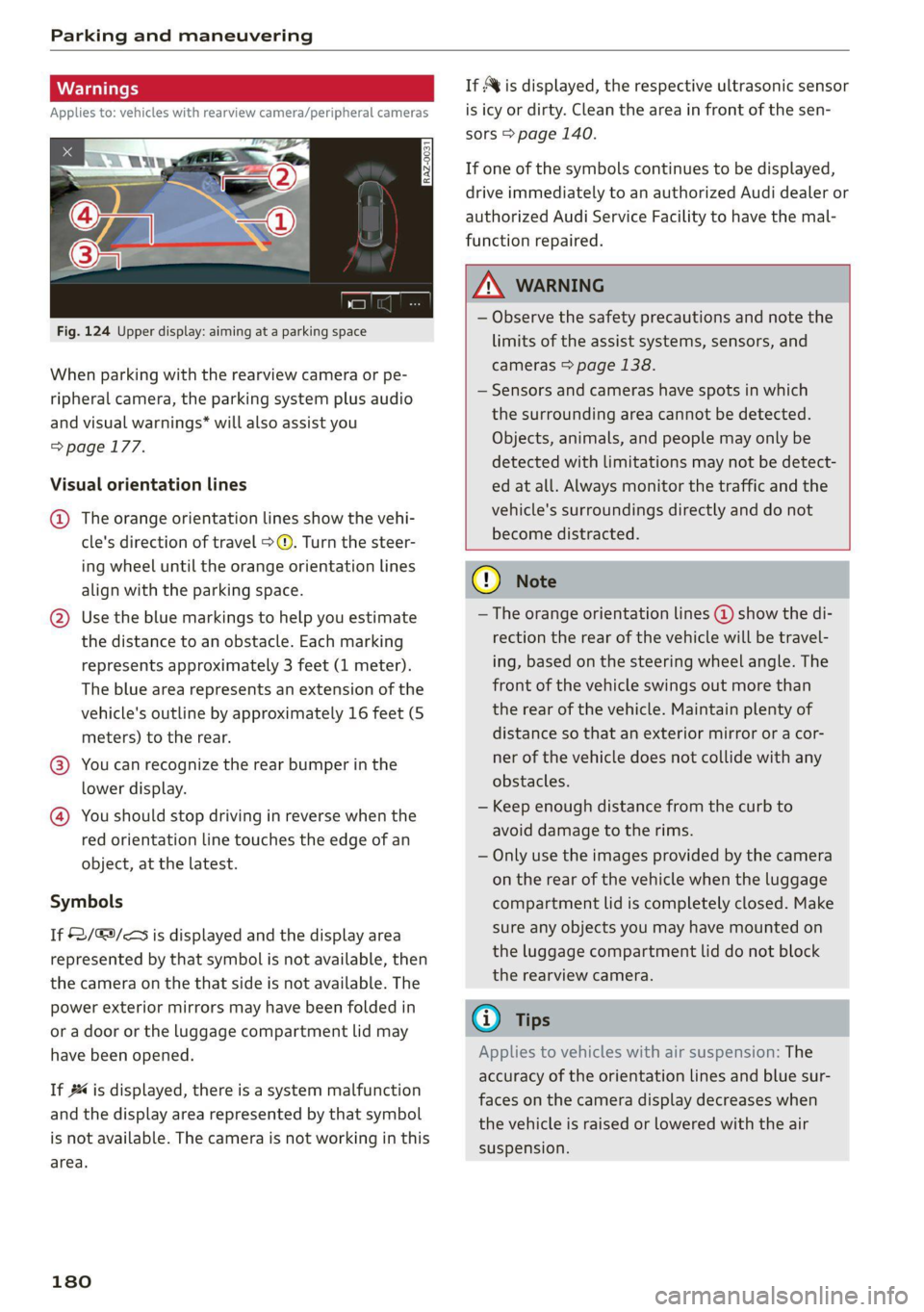
Fig. 124 Upper display: aiming at a parking space
When parking with the rearview camera or pe-
ripheral camera, the parking system plus audio
and visual warnings* will also assist you
=> page 177.
Visual orientation lines
@ The orange orientation lines show the vehi-
cle's direction of travel >@. Turn the steer-
ing wheel until the orange orientation lines
align with the parking space.
@) Use the blue markings to help you estimate
the distance to an obstacle. Each marking
represents approximately 3 feet (1 meter).
The blue area represents an extension of the
vehicle's outline by approximately 16 feet (5
meters) to the rear.
@® You can recognize the rear bumper in the
lower display.
@ You should stop driving in reverse when the
red orientation line touches the edge of an
object, at the latest.
Symbols
If 2/&9/< is displayed and the display area
represented by that symbol is not available, then
the camera on the that side is not available. The
power exterior mirrors may have been folded in
or a door or the luggage compartment lid may
have been opened.
If # is displayed, there is a system malfunction
and the display area represented by that symbol
is not available. The camera is not working in this
area.
180
If Avis displayed, the respective ultrasonic sensor
is icy or dirty. Clean the area in front of the sen-
sors > page 140.
If one of the symbols continues to be displayed,
drive immediately to an authorized Audi dealer or
authorized Audi Service Facility to have the mal-
function repaired.
ZA WARNING
— Observe the safety precautions and note the
limits of the assist systems, sensors, and
cameras > page 138.
— Sensors and cameras have spots in which
the surrounding area cannot be detected.
Objects, animals, and people may only be
detected with limitations may not be detect-
ed at all. Always monitor the traffic and the
vehicle's surroundings directly and do not
become distracted.
() Note
— The orange orientation lines @ show the di-
rection the rear of the vehicle will be travel-
ing, based on the steering wheel angle. The
front of the vehicle swings out more than
the rear of the vehicle. Maintain plenty of
distance so that an exterior mirror or a cor-
ner of the vehicle does not collide with any
obstacles.
— Keep enough distance from the curb to
avoid damage to the rims.
— Only use the images provided by the camera
on the rear of the vehicle when the luggage
compartment lid is completely closed. Make
sure any objects you may have mounted on
the luggage compartment lid do not block
the rearview camera.
G) Tips
Applies to vehicles with air suspension: The
accuracy of the orientation lines and blue sur-
faces on the camera display decreases when
the vehicle is raised or lowered with the air
suspension.
Page 241 of 350
4K8012721BF
Media
Never leave mobile devices in the vehicle in
extremely high or low temperatures.
@ Tips
— Always follow the information found in
=> page 82.
— When you switch the ignition off, the USB
ports are still supplied with power until the
energy management intervenes.
— Do not use an additional adapter cable or
USB extension cable to connect mobile devi-
ces to the Audi music interface that already
have a cable or that must be connected with
a USB adapter cable (> page 238, fig. 154).
Using an additional adapter or US extension
cable may impair functionality.
— Functionality is not guaranteed for mobile
devices that do not conform to the USB 2.0
specification.
— USB hubs are not supported.
— Video playback through the Audi music in-
terface is not supported on Apple devices
and MTP devices (such as smartphones).
— iPod touch or iPhone malfunctions also af-
fect the operation of the MMI. Reset your
mobile device in these situations.
— Audi recommends updating the iPod touch
or iPhone software to the latest version. Re-
fer to your mobile device owner's manual
for more information.
— The USB adapter on the Audi music inter-
face will support iPod touch or iPhone devi-
ces from the 5th generation or newer with
the lightning connector.
—Aselection of supported devices can be
found in the database for tested mobile de-
vices at www.audi.com/mp3.
Playing media
The following sources can be selected depending
on the vehicle equipment:
— Amazon Alexa > page 237.
— USB device > page 238.
— DVD © page 237.
— External device: you can connect external devi-
ces via Bluetooth and use the Bluetooth audio
player > page 237, or you can connect an exter-
nal device directly to the Audi music interface
=> page 238.
Accessing media
Playing media files using the MMI
> Applies to: MMI: Select on the home screen:
MEDIA > Source > a source. Depending on the
connected device, the symbol for a source may
change. The device name may be displayed (for
example: myPhone).
> Select a track from the categories in the media
center > page 240.
Playing media files using the multifunction
steering wheel
Requirement: a media source must contain me-
dia files > page 239.
> Select the radio/media tab in the instrument
cluster.
> Turn the left thumbwheel to display the play-
list.
> To switch to a different source, press the
button.
> To select a media file or a source, turn and
press the left thumbwheel.
> To switch between radio and media, select in
the instrument cluster: the LE] button > Switch
to radio/Switch to media.
G) Tips
— For safety reasons, the video image is only
displayed when the vehicle is stationary. On-
ly the sound from the video plays while driv-
ing.
— Applies to: multifunction steering wheel:
Depending on the selected function, opera-
tion through the MMI may be required.
239
Page 316 of 350

Emergency assistance
bar is not available. Use a towing cable made of
synthetic elastic cable similar elastic material.
ZA WARNING
— Towing highly increases the risk of an acci-
dent, for example from colliding with the
towing vehicle.
— To reduce the risk of an accident, do not al-
low anyone to remain inside the vehicle
when it is being transported by a tow truck
or a special transporter.
@) Note
— If normal towing is not possible, for exam-
ple if the transmission is faulty or if the
towing distance is greater than 30 miles
(50 km), then transport the vehicle on a
special carrier.
— If the vehicle is towed by a tow truck at the
axle that is not permitted, this can cause se-
vere damage to the transmission.
— The vehicle must not be tow started for
technical reasons.
@) Tips
— If the power supply is interrupted, then it
will not be possible to move the selector
lever out of the "P" position. The parking
lock must be released using the emergency
release before towing the vehicle
> page 99.
— Switch Audi pre sense* off > page 169 when
loading the vehicle onto a vehicle carrier,
train, ship, or other type of transportation,
or when towing the vehicle. This can prevent
an undesired intervention from the pre
sense* system.
— Follow the local legal regulations for tow-
ing.
Read and follow the important information under
=> page 313.
314
Preparations
> Only secure the towing cable or tow bar at the
designated towing loops > page 315,
=> page 315.
> Make sure the towing cable is not twisted. Oth-
erwise it could disconnect from the towing loop
while towing.
> Switch the emergency flashers on in both
vehicles > page 55. However, do not do this if it
prohibited by law.
Towing vehicle (front)
> Only start to drive when the towing cable is
taut.
> Press the brake pedal very carefully.
> Avoid sudden braking or driving maneuvers.
Vehicle being towed (rear)
> Make sure the ignition is switched on so that
the steering wheel is not locked and so that you
can use the turn signals, the horn, and the
windshield wipers if needed > A\.
> Switching it off before the vehicle has stopped
may impair the function of the brake booster
and power steering. You would then need to
use more force to steer and brake the vehicle.
> Release the parking brake > page 107.
> Select the “N” selector lever position.
> Make sure the towing cable is always taut.
ZA\ WARNING
— Never tow a vehicle using a tow bar or tow-
ing cable if the vehicle does not have electri-
cal power.
— If the vehicle runs out of power while it is
being towed, stop towing the vehicle imme-
diately and consult an authorized Audi deal-
er or qualified repair facility.
Page 338 of 350

Index
Diteetor yess 6 s cscaves ws sacewes v6 aneims v © sxeams 6 0 202
Business card... 6... eee eee eee 203
SCttinGSanww + wuwn x 3 mee ee ReUeE SE eee & 205
Display
Cleaning’s « «sew 2s seas © 2 eww vo ene woe 301
DispOSalis: + = secre 5 5 was 5 ¥ ees eo ee Ge 326
DistanG@ies = : ees = : wes ¢ 2 eee Yo ewe Ye: 17
Distance WarhiiG sca + < sees 2 3 has os eS 164
Doors
Childisafety lock sxe < « same s » ews = 2 eres = 46
Door:comtact:switeh i « sess 2s sansa vo scares a 5 56
Mechanically unlocking and locking....... 39
Power closing/closing aid............... 36
Driver information system................ 13
Drives
refer to Media... ...s0scceees eens 236; 239
Drive select
refer to Audi drive select............... 111
Drive'SySteMm « sessen « swswss 6 2 cae 3 ¥ a0 100, 105
Audi drive select..............000000- 111
DrivingiGOwniBills ecerese © versus ie o vvasene a + wavess 109
Driving programs « x saves vo meses xo esas 6 96, 162
Driving through water............-...0- 110
Driving’ CUIMGls « « seme ss eee so ees eae a 17
Driving tips
Driving through water................- 110
Efficient driving. ..........00 eee ee eee 103
Uphill ahd Gownhill we » s wore 2 x eae o 2 caer 109
Driving track. . 2.2... ee eee ee eee eee 109
Driving uphills...................0000. 109
DVD drive... .. 0.2.02. eee 237
Dynamic all-wheel steering.............. 113
E
BERL l « cncmena eo wwesien we meres so sete sw cane 206
Settings........... 0... e eee eee eee 206
EDL
refer to Electronic Differential Lock...... 115
EDR
refer to Event Data Recorder (EDR)...... 321
Efficienity a8SiSbies « caw x x eews vo eam ex 152
Predictive Comtrobsisin: 0 o seve w scum 2 v sueawe 158
Electrical:system’. « « wessce so wena ee ene soe 269
Electric ranges s ¢ evans s+ meas s ¥ cae 5 2 meee 224
Electromechanical parking brake......... 107
Electronic Differential Lock.............. 116
336
Electronic immobilizer .............0.004. 41
Electronic Stabilization Control........... 115
Embedded SIM: card « « saws x « wwe x s gue 8 209
EMergency:aSsist sasws s ness 3 5 nee so teeE 174
Emergency assistance..............-... 305
Emergency braking function............. 108
Emergency call..............000.. 204, 213
Emergency flashers.............--..00-- 55
Emergency fueling............--..20005 257
Emergency M0de esc + secs es ences oo acee 3 99
Emergency operation
Doors... 2... eee eee eee ee 39
FUSLTINLERGGOF sx ¢ « casas» 2 news a 3 mae 2 a 258
Luggage compartment lid............... 46
Panoramic glass roof.............200005 49
Emissions control system.............. 259
EMeErgy CONSUMENSHs «i iii + asus oo eacem wo 8 18
Energy flow display® wees ¢ s wees s 6 ween s ve 102
Energy management.................5. 104
Etergy TECOVERYase « 2 caps 5 « smerny 5 o eye 101
Engine
Breaking'inl's « sevas « ¢ saves « » newer x 2 Mowe @ 100
COOLANE «, cassne « « snawins = w eeawens © a temsem « areneten 266
Emergency stop. ... 0.06... eee ee eee eee 93
JUMP Starting « + mews s x eews 5 a sowe 4 eee 311
Start/Stop system............-0000005 104
Starting/stopping.............0...00ee 93
Engine braking effect
refer to Recuperation...............-. 101
Engine compartment
Opening and closing the hood.......... 261
OVERVIOW'. score na sesrene a w eaesere oo sieeern a 8 ae 262
Safety precautions..............00000 259
Engine data
refer to Sport displays .............0065- 16
Engine oil
AGING « ccs scorn 2 3 ceveum eo aman oe Eos
Changing
Checking oillevel.............2--000-- 262
CONSUMpPtiON ss ¢ ¢ eees ¢ eee oo ee oo 262
Indicator light........... 0. cece eee eee 263
Replacement interval................. 273
Temperature display................0-. 16
Engine sound
Audi drive:selectii: « ccine os vomem 2 seas ¥ as 112
Engineistartsystem vce + acs 6 2 wanes 6 2 vonse 94