suspension AUDI A7 2021 Owner´s Manual
[x] Cancel search | Manufacturer: AUDI, Model Year: 2021, Model line: A7, Model: AUDI A7 2021Pages: 350, PDF Size: 126.66 MB
Page 190 of 350

Parking and maneuvering
process will be recalculated based on the vehi-
cle position.
LED in the button (4)
The LED informs about the availability of park as-
sist plus:
— Blinking white - park assist plus is ready to
control the parking process automatically or to
resume after an interruption.
— Green - park assist plus is active.
— Red - park assist plus was paused or stopped. A
message will appear in the instrument cluster
display > page 190.
Indicator in the upper display
The current driving maneuver and the status of
the park assist plus are shown in the upper dis-
play:
@ Path that the vehicle will travel during the
current parking maneuver
@® End point of the current parking maneuver/
direction change
®@ o Park assist plus active
©) Driving direction display
End of the parking process
The parking process will end automatically once
the vehicle has reached the end point in the park-
ing space. After park assist plus finishes parking
successfully, the parking lock will be engaged
and the parking brake will be set.
Pause park assist plus > page 189.
— Park assist plus is an assist system. The driv-
er is still responsible for monitoring the ve-
hicle's surroundings and preventing colli-
sions when using the system.
— When using park assist plus to drive into or
out of a parking space, the steering wheel
turns quickly on its own. Reaching into the
steering wheel spokes while this is happen-
ing can result in injury.
— Sensors and cameras have spots in which
the surrounding area cannot be detected.
Objects, animals, and people may only be
detected with limitations may not be detect-
ed at all. Always monitor the traffic and the
vehicle's surroundings directly and do not
become distracted.
Z\ WARNING
— Observe the safety precautions and note the
limits of the assist systems, sensors, and
cameras > page 138.
— Press and hold the [>>P] button only if you
are sure that there are no obstacles in the
vehicle's path or under the vehicle, and that
no obstacles will move into the vehicle's
path.
188
G) Tips
— You can reduce the speed specified by the
system at any time by pressing the brake
pedal.
— The system can incorrectly interpret parking
space barriers (such as parking curbs). Take
over the parking process = page 189 if the
vehicle is not completely inside the parking
space or if the vehicle tries to drive over the
parking space barrier.
— The image in the display is an enlarged and
distorted image. Under certain circumstan-
ces, objects may appear different and un-
clear on the display. This is especially true if
there are objects that do not touch the
ground, such as the bumper of a parked ve-
hicle or the rear of a truck. Drive with spe-
cial care and do not use the image if neces-
sary.
— Applies to vehicles with air suspension: The
accuracy of the orientation lines and green
surfaces in the display decreases when the
vehicle is raised or lowered with the air sus-
pension.
Page 293 of 350

4K8012721BF
Wheels
AN WARNING
Using incorrect snow chains or installing snow
chains incorrectly can result in loss of vehicle
control, which increases the risk of an acci-
dent.
() Note
— Snow chains can damage the rims and
wheel covers* if the chains come into direct
contact with them. Remove the wheel cov-
ers* first. Use coated snow chains.
— Do not install and use snow chains if there is
a malfunction in the air suspension*, be-
cause the vehicle height will be very low. If
you drive with snow chains anyway, the
wheel housings and other vehicle compo-
nents can be severely damaged.
@ Tips
When using snow chains, it may be advisable
to limit the ESC > page 116.
Low-profile tires
Applies to: vehicles with low-profile tires
Compared to other tire/rim combinations, low-
profile tires offer a wider tread surface and a
larger rim diameter with shorter tire sidewalls.
This results in an agile driving style. However, it
may reduce the level of comfort and increase
road noise when driving on roads in poor condi-
tion.
Low-profile tires can become damaged more
quickly than standard tires when driving over
large bumps, potholes, manhole covers, and
curbs. Therefore, it is particularly important to
maintain the correct tire pressure > page 284.
To reduce the risk of damage to the tires and
rims, drive very carefully on poor roads.
Check your wheels regularly every 2,000 mi
(3,000 km) for damage. For example, check for
bulges/cracks on the tires or deformations/cracks
on the rims.
After a heavy impact or damage, have the tires
and rims inspected or replaced immediately by
an authorized Audi dealer or authorized Audi
Service Facility.
Low-profile tires can wear out faster than stand-
ard tires.
Uniform tire quality grading
— Tread wear
— Traction AAABC
— Temperature ABC
Quality grades can be found where applicable on
the tire side wall between tread shoulder and
maximum section width > page 275, fig. 170.
For example: Tread wear 200, Traction AA, Tem-
perature A.
All passenger car tires must conform to Federal
Safety Requirements in addition to these grades.
Tread wear
The tread wear grade is a comparative rating
based on the wear rate of the tire when tested
under controlled conditions on a specified gov-
ernment test course.
For example, a tire graded 150 would wear one
and one half (1 1/2) times as well on the govern-
ment course as a tire graded 100.
The relative performance of tires depends upon
the actual conditions of their use, however, and
may depart significantly from the norm due to
variations in driving habits, service practices and
differences in road characteristics and climate.
Traction
The traction grades, from highest to lowest, are
AA, A, Band C. Those grades represent the tire's
ability to stop on wet pavement as measured un-
der controlled conditions on specified govern-
ment test surfaces of asphalt and concrete. A tire
marked C may have poor traction performance
SA.
Temperature
The temperature grades are A (the highest), B,
and C, representing the tire's resistance to the
generation of heat and its ability to dissipate
291
>
Page 299 of 350
4K8012721BF
Wheels
or authorized Audi Service Facility immediately to
have the problem corrected.
Continuing to drive on run-flat tires is no
longer possible if:
— There is visible damage to the tires, such as
cracks in the sidewalls
— Strong vibrations are felt while driving, or the
tire begins to smoke due to a strong build-up of
heat
—The tire has been heavily damaged, for example
in an accident. There is a risk that parts of the
tire tread will detach and damage important
vehicle components.
—The Electronic Stabilization Control (ESC) is not
working or is continuously running
— The tire pressure monitoring system is not
working
If it is no longer possible to continue driving de-
spite having run-flat tires, see an authorized Audi
dealer or authorized Audi Service Facility for as-
sistance.
— Avoid full-throttle acceleration, heavy
braking, and fast cornering, because this
increases the risk of an accident.
— The vehicle may become more difficult to
control.
— See an authorized Audi dealer or author-
ized Audi Service Facility for assistance if
the tire is too heavily damaged.
— Have the faulty tires replaced and the rims
checked for damage by an authorized Audi
dealer or authorized Audi Service Facility.
— The driver is responsible for the vehicle, for
correcting the tire pressure, and for replac-
ing faulty parts. Therefore, always adjust
your driving to the current situation.
ZA WARNING
Run-flat tires may only be used on vehicles
that were equipped with them at the factory.
— The vehicle must have suspension designed
for run-flat tires and a factory-installed tire
pressure monitoring system.
— Incorrect use of run-flat tires can lead to ve-
hicle damage or accidents. Contact an au-
thorized Audi dealer or authorized Audi
Service Facility to learn if run-flat tires may
be used on your vehicle and if so, which
ones.
—If run-flat tires are used, they must be in-
stalled on all four wheels. Mixing tire types
is not permitted.
— If you have to drive when the tire pressure is
too low or there is no tire pressure, note the
following:
— Do not drive faster than 50 mph (80 km/h)
because this increases the risk of an acci-
dent. Observe any laws specific to the
country where you are driving.
@) Tips
— Audi Original run-flat tires can be identified
by the “AOE” labeling on the tire sidewall.
— You can use the tire mobility kit* on run-flat
tires > page 305.
297
Page 310 of 350
Emergency assistance
Replacing wheels
You must complete the preparation before
changing a tire.
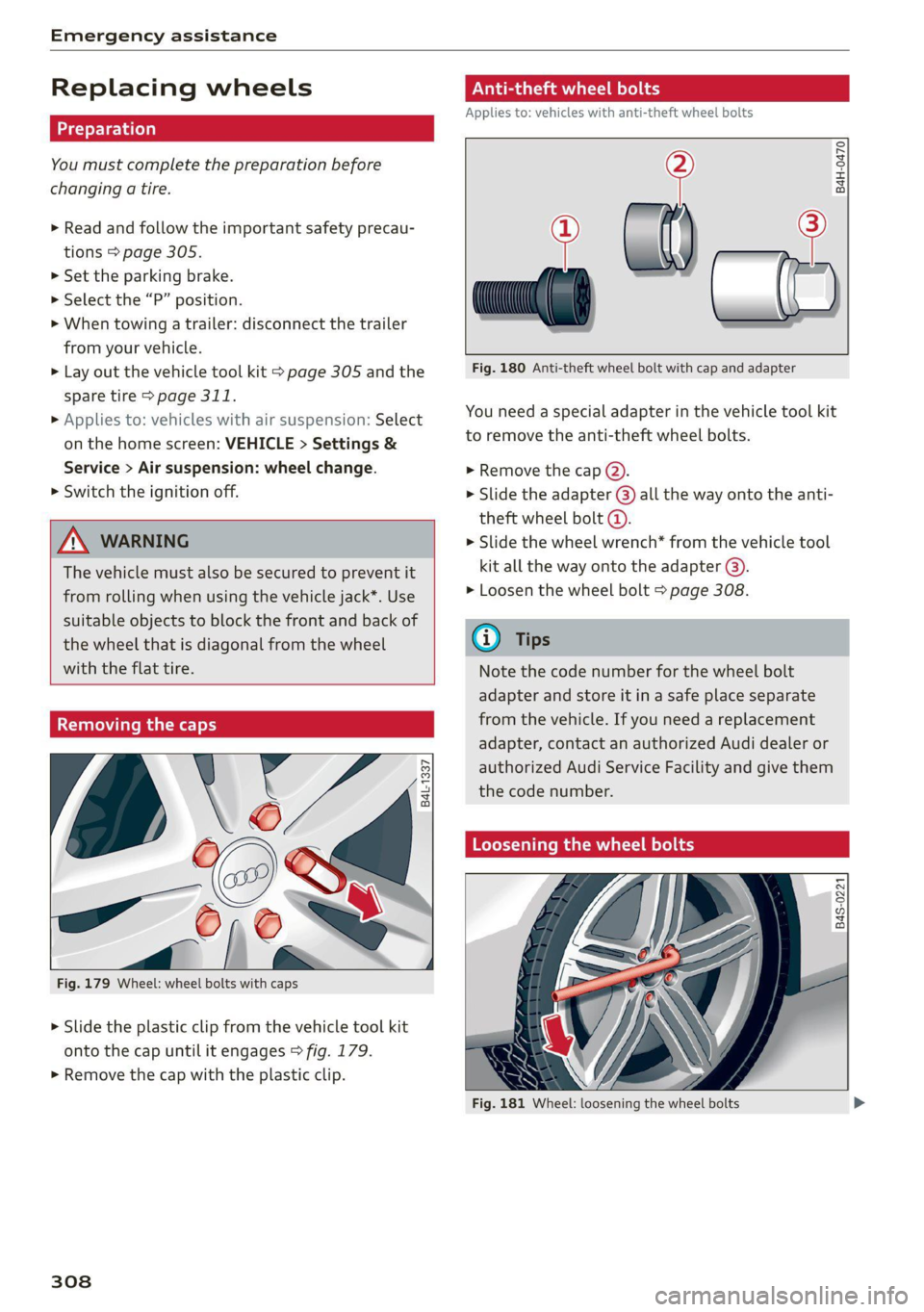
> Read and follow the important safety precau-
tions > page 305.
> Set the parking brake.
> Select the “P” position.
> When towing a trailer: disconnect the trailer
from your vehicle.
> Lay out the vehicle tool kit > page 305 and the
spare tire > page 311.
> Applies to: vehicles with air suspension: Select
on the home screen: VEHICLE > Settings &
Service > Air suspension: wheel change.
> Switch the ignition off.
ZA\ WARNING
The vehicle must also be secured to prevent it
from rolling when using the vehicle jack”. Use
suitable objects to block the front and back of
the wheel that is diagonal from the wheel
with the flat tire.
Removing the caps
\
B4L-1337
x
®
? =
©
4
Fig. 179 Wheel: wheel bolts with caps
> Slide the plastic clip from the vehicle tool kit
onto the cap until it engages > fig. 179.
> Remove the cap with the plastic clip.
308
ONL eta ere) od
Applies to: vehicles with anti-theft wheel bolts
> al) —2
Fig. 180 Anti-theft wheel bolt with cap and adapter
B4H-0470
You need a special adapter in the vehicle tool kit
to remove the anti-theft wheel bolts.
> Remove the cap @).
> Slide the adapter @) all the way onto the anti-
theft wheel bolt @.
> Slide the wheel wrench* from the vehicle tool
kit all the way onto the adapter @).
> Loosen the wheel bolt > page 308.
@ Tips
Note the code number for the wheel bolt
adapter and store it in a safe place separate
from the vehicle. If you need a replacement
adapter, contact an authorized Audi dealer or
authorized Audi Service Facility and give them
the code number.
Loosening the wheel bolts
B4S-0221
Fig. 181 Wheel: loosening the wheel bolts
Page 311 of 350

4K8012721BF
Emergency assistance
> Slide the wheel wrench* from the vehicle tool
kit all the way onto the wheel bolt).
> Turn the wheel bolt approximately one turn to
the left. To achieve the required torque, hold
the end of the wheel wrench*. If the wheel bolt
will not loosen, press carefully on the wheel
wrench* with your foot. Hold onto the vehicle
securely while doing this and make sure your
footing is stable.
ZA WARNING
To reduce the risk of an accident, only loosen
the wheel bolts gently one turn before raising
the vehicle with the vehicle jack*.
Raising the vehicle
Applies to: vehicles with vehicle jack
Fig. 183 Sill: positioning the vehicle jack
> Place the vehicle jack from the vehicle tool kit
ona firm surface. Use a flat, stable support if
necessary. On a slippery surface such as tile,
you should use a non-slip pad such as a rubber
mat > /\.
D_ You need the matching adapter in order to loosen and
tighten anti-theft wheel bolts* > page 308.
> Find the marking on the sill that is closest to
the tire that will be changed © fig. 182. Behind
the marking, there is a lifting point on the side
sill for the vehicle jack.
> Raise the vehicle jack under the lifting point on
the side sill until the bracket on the jack @)
completely covers the notch on the vehicle.
> Align the vehicle jack so the bracket (@) covers
the notch and the base (2) is flat on the ground.
The base @) must be directly under the mount-
ing point @.
> Mount the crank on the vehicle jack: insert the
crank into the opening on the handwheel. Turn
the crank to the left or right to secure it.
> Continue raising the vehicle jack with the crank
until the wheel lifts off the ground slightly.
ZX WARNING
—To reduce the risk of injury, make sure no
one is in the vehicle before raising it.
— Make sure the vehicle jack is stable. The risk
of injury is increased when the ground is
slippery or soft, because the vehicle jack
could slide or sink.
— Only raise your vehicle with the vehicle jack
provided by the factory. If you use a vehicle
jack designed for another vehicle, your vehi-
cle could slip and cause injury.
— Position the vehicle jack only at the desig-
nated mounting points on the side sill and
align the jack. Otherwise, the vehicle jack
could slip and cause an injury if it does not
have sufficient hold on the vehicle.
—To reduce the risk of injury, do not raise any
other vehicles or other loads using the vehi-
cle jack provided by the factory.
— Applies to: vehicles with air suspension:
Changes in temperature or load can affect
the height of the stopped vehicle.
— To reduce the risk of an accident, never start
the engine when the vehicle is raised.
—To reduce the risk of injury, no work should
be performed under the vehicle while it is
raised.
309
Page 321 of 350

4K8012721BF
Fuses and bulbs
Fuse panel (2) (brown) Fuse panel (2) (black)
4 |Head-up display Luggage compartment lid central locking,
g Climate control system, fragrance system, 11 | fuel filler door, luggage compartment cov-
ionizer eh
9 |Steering column lock 12 |Luggage compartment lid control module
Fuse panel (2) (red)
No. Equipment
1 |Suspension stabilization control module
2 |Service disconnect switch
4 |Electric drive system
5 | Brake system, brake booster
6 |High-voltage battery water pump
7 |Auxiliary climate control
8 |Climate control system compressor
9 |Auxiliary battery control module
10 | High-voltage battery
11 |High-voltage charger
14 |Thermomanagement, water pump
15 | Thermomanagement control module
Fuse panel (3) (brown)
No. | Equipment
1 | Driver assistance systems control module
2 | Audi phone box
Fig. 194 Luggage compartment floor: fuse panel with
plastic clip
Front seat electronics, right lumbar sup-
a port
Fuse panel (@) (black) 4 |Side assist
No. | Equipment 5 |Rear climate control system control panel,
1 | Thermal management Infotainment system control panel
3 | Passenger’s side rear safety belt tensioner 6 |Tire pressure monitoring system
4 |Driver’s side rear safety belt tensioner 7 |Emergency call system
5 |Air suspension/suspension control 8 Auxiliary heating radio receiver, tank mod-
6 |Automatic transmission control module ule
7 |Rear sliding sunroof, rear spoiler 9 |Automatic transmission selector lever
8 |Rear seat heating 10 TV tuner, data exchange and telematics
9 | Convenience system control module, left centro mouule
tail light
ll Convenience access and start authoriza-
10 | Front belt tensioner on driver's side tion control module
12 | Garage door opener
13 | Rearview camera, peripheral cameras
319
Page 346 of 350
Index
Starting toidrives. 2. esc = 2 sevice 2 v eave vv ome 94
Starting (engine). «i ssc. 6s sovcane ao ssamene oo 105
Ste@ring wc + = sacs « ¢ ews yo eww +e Gan ¥ 113
(Audi Crive:se@lect:s sews x « scree x 5 suenes a ane 112
also refer to Steering...........0eeee 113
Steering lock.............00 eee eee 93,114
Steering wheel
AGjUStING ccs = 5 sane ¢ 5 eames ROSS e BeBe 66
Shiftpaddles » sccwose e = smn ov sawwee a rea eo 97
Steering wheel heating................. 90
also refer to Multifunction steering wheel. . 13
Steps for determining correct load limit... 288
Stopover (navigation) .................. 220
STOPPING beer « u wsszeice « excenene 0 6 esonene « 6 ecmonnea « & arene 94
Stopping the vehicle... ........ 0.0. ee eens 94
SCOPPING (ENGINE) weiss s sews vo swenios Fo wives 105
StOlaGelss 4 « aay ov mewn ¢ & Rew 2 v Hews 6 oe 83
Storage’ compartinents « sews se sens se pass 83
Stored stations
referto: Presets sas «owes os weve o weve vv 231
Subtitles
DN Doscrise 2 commons © 5 suena 6 3 secs oo atone a om 243
Sunshade
ROOF... eee eee eee eee 48
also refer to Panoramic glass roof........ 48
SUITVISONS = aie + AtS8 5 Gave GS Hate ge RRR a 59
Suspension. ........0.. cee cece ee eee 112
Auidi drive’select + seas x 2 cae 4 e yews 3 5 oe 112
Swapping Calls: + snes ¢ v sees se een ce ees 203
Swerve assist... 2.2... . cee ee eee eee 169
Symbols
Charging equipment’: sas « s ome s x wom o 126
NAVIGATION iis sss: cess ao sexo & susaes wo vHeEMED w 220
Traffic... 2... eee 225
also refer to Indicator lights.............. 7
SYNC (climate control system) ............ 88
System settings .................e esau 249
T
Tachometer...........000 cece eeeaee 12,15
Tail lights
CLEANING: + = semen 3 y mews ¢ cee Ree Fe 299
Technical data... ...... eee eee eee eee 331
Technical modifications................. 326
344
Telephonetic: = cscs » seven eo eee =o wien 2 as 197
Accepting/ending acall................ 203
Audi phOne: bOxwsy + «sana s eowa se ewe as 199
Charging the battery (USB)............. 200
Charging the battery (wireless) ......... 200
Connecting a mobile phone............ 197
Dialing anumber...........0 eee ee eee 203
Exterior antenna..............--.000- 200
Mobile device reminder signal.......... 201
Options during aphonecall............ 203
PLAYIMGSTMUSIE «, ccssece so sanseite + © eneseie « 0) oseseie 9 237
Temperature displays
refer to Sport displays.................. 16
Temperature display (outside temperature).. 16
Temperature gauge
Coolant.................020 2c eee 12
Text input......... 0.0.00... 000002 26
Text MesSageS .... 22-2... eee eee eee 205
SOCtinGS sccm = = saws ¢ eeu 2 § eee 2g ee 205
also refer to Text messages............ 205
Tig=dOwnS': « » mews 2 s pees 2 2 new ¢ woe oo eas 85
Tightening specification
Wheel, boltsterisc 2 vecaee « 3 csaue 2 0 oso 2 oniae 311
Tightening specification (wheel bolts)... .. 311
Titt@s « ¢ saws 5 ¢ ews ¢ 2 ews + 8 eee x eas 17
Timer (high-voltage battery) ............. 124
tiptronic
refer to Manual shifting................ 97
Tire Mobility System (tire repair set)....... 305
TGS » seem a o mange & ¢ wou EE aor a a ee gee 274
Loose wheel warning.............-.4.. 289
Low-profile tires. .............000-00- 291
Répaitt S@ts « = wwe » ¢ ems : ¢ oem & Eee ee 305
Replacing « icasai a © savas «0 smawins & 7 omen © 9 oe 308
Run-flat.. 0... eee eee ee 296
SOFVICE life ccs & & eawe 5 & cate 5 ews § eae 283
TPG PROSSUNC isis. 6 & vissees 6% rere vo eevee 8 eo 284
Tire pressure monitoring sys-
POWs 5 & news 5 ¢ cews a tea 292, 293, 294
Tire pressure table.................00. 286
Tire pressure (trailer mode)............ 135
Treadwear indicators.................. 283
Unidirectionalis: « 2 saz x « waves ae vee 276, 310
Uniform tire quality grading............ 291
Tires and wheels
Glossary of tire and loading terminology .. 277
Tires and vehicle load limits............ 287
Page 347 of 350
4K8012721BF
Index
Toll Module
refer to Integrated Toll Module......... 149
Tools... eee 305
Tooltips. .... 0.0... eee eee eee eee 21
Top tether anchor (securing the child safety
S@at) 0. cc ee eee eee eee 80
Touch display
Adjusting feedback................0005 21
Operating « « wes 2 owe 2 omen veo eo oes 19
TOWING’: « ¢ saws 5 ¢ ewe § 5 ewig & 8 ew ee ee 313
TOWING LOOP ewes = 2 ewes ge tees de eee ee 315
Towing protection monitoring............. 39
TPMS
indicator Wight 2x. » 2 wows 9 © ewe « ¢ ewe = 296
Tire pressure monitoring system.... 293, 294
Traffic incidents
refer to Online traffic information....... 225
Traffic information » sxc. . 5 sessee + sramess a « sven 226
Online traffic information.............. 225
Traffic light information..............0. 145
Traffic sign recognition................. 143
Traffic SignS.. 6... eee eee eee 146
Trailer mode
Airsuspension..............00e eevee 135
Trailer towing ...... 2.0.0. e eee T35.
Tongue weight ..............ee ee ee eee 135
Trailer
load « aiceso: so saws ¢ o semen oa coon oo 135
TUM aSSISt wcus = 4 ewe se eee ee vee as pees 169
Turinsigtials sus < » acme 2 » wees x 8 eee 2 eeR 53
U
Uniform tire quality grading............. 291
Unlocking and locking. .......... esse eee 36
By remote’control.. «nc ss eves ee eres sees 41
Using the lock cylinder................. 39
With Audi connect vehicle control........ 42
With the central locking switch.......... 38
With the convenience key.............0. 41
Update (software) isiscca sa scence seine as wine 250
USB
Adapter... . 0... cece eee eee eee 200
USBi charging: ports cscs +s omens ¥ = esenens xo coors 82
USB drive
Supported types/formats.............. 244
USB stick
refer to Audi music interface........... 238
Users
Localusers...... cece eee eee eee 33
MYAUGi USErSins ¢ ¢ semu se cewy s e em ee oes 33
Using residual heat............00e cece uae 89
V
Vanity Mirror... .... cee cece eee 59
Vehicle
Care/cleaning « wes sv wnee + eereee s Been gs 298
DIMONSIONS xcs x suswans « 0 seers vow samen © wg 33:1,
Identification data................00. 331
Out GFSOrVICE een: « s ees 2 2s ee Bw 304
Raising ls & coses a sens ow inmne + @ suasewe @ & ste 309
Starting. ........... 0. eee eee 93
ThanspOrt vce ¢ s eee so ove ss Hewes s HeeR 112
Unlocking and locking...............004 41
Vehicle-care scx + ¢ sews ¢ o ews oo cee se oes 298
Vehicle control services ..........0ee eee 210
Vehicle data label..................00005 331
Vehicle identification number............ 331
Vehicle jack. ................0.00000005 305
Lifting POINTS: + « sees ss anew se ave se oes 309
Tire change mode.............2--.00- 308
Vehicle key's «= coms ¢ svee & ¢ sense @ o asa 36, 40
Vehiclessound 23 eeva 2 s weep sy ees se eee 103
Vehicle start system ...........-.02-005- 105
Wehicle:toolkit®. + esas < ¢ acre @ s cams 3 x eee 305
Ventilation. . 0.0... eee ce eee eee 87
VIEW button... ... eee eee 13
Voicemail... 2... eee eee eee eee 203
Voice recognition system..........-..0 00s 29
External... 0.0... eee eee eee eee 30
Operating’: = « sees « seee so yews gs geen ee ae 29
Ww
Wall mount Clip sec ss eens ss een ce ewes 133
Warning lights
refer to Indicator lights...............-.. 7
Washing matte finish paint.............. 298
Wave band
refer to Frequency band............... 228
WEIQNESS « « caves se caw ys ews ¢ & wows & ¥ we 332
Wheel bolts 2 some « » news x mean x x ayes 9 es 289
AMEENETE essics 3 & ciceiors 6 o cnauere & weenewe me & wvexao 308
Tightening specification............... 311
345