lane assist AUDI A7 2021 Owner´s Manual
[x] Cancel search | Manufacturer: AUDI, Model Year: 2021, Model line: A7, Model: AUDI A7 2021Pages: 350, PDF Size: 126.66 MB
Page 170 of 350
Driver assistance
Driving situations
The situations to which the system reacts de-
pends on the vehicle speed.
Up to speeds of approximately 50 mph
(85 km/h), the system may react to the following
situations:
— Pedestrians and cyclists in your lane
Up to speeds of approximately 155 mph
(250 km/h), the system may react to the follow-
ing situations:
— A vehicle driving ahead clearly applies the
brakes
— When approaching a vehicle ahead that is clear-
ly traveling more slowly
— When approaching a stationary vehicle
Prewarning
To warn about detected dangers, Audi pre
sense o will appear in the instrument cluster
and an audio signal will sound.
A brief application of the brakes
If a collision is imminent, there may be an acute
warning using a brief application of the brakes.
You will also be warned about the danger by an
indicator in the instrument cluster display. You
may only be able to avoid a collision by swerving
or braking strongly.
Automatic braking force increase
If there is an impending collision and you are not
applying the brakes enough, the braking force
may be increased, depending on the situation.
Automatic braking
If you do not react to the acute warning, the sys-
tem may apply the brakes with strong braking
force within the limits of the system in order to
reduce the speed of impact in the event of a colli-
sion.
If the brakes were applied until the vehicle stop-
ped, © Please take over! will appear in the in-
strument cluster and you must take over control
of the vehicle.
168
ZA WARNING
— Observe the safety precautions and note the
limits of the assist systems, sensors, and
cameras > page 138.
— Audi pre sense front cannot overcome natu-
ral physical laws. It is a system designed to
assist and it cannot prevent a collision in ev-
ery circumstance. The driver must always in-
tervene. The driver is always responsible for
braking at the correct time. Do not let the
increased safety provided tempt you into
taking risks. This could increase your risk of
a collision.
— Audi pre sense front does not react to cer-
tain objects, such as animals, crossing or on-
coming vehicles, bars, railings, or railcars.
— Audi pre sense front may be limited or un-
available when driving in curves.
— Loose objects can be thrown around the ve-
hicle interior during sudden driving or brak-
ing maneuvers, which increases the risk of
an accident. Store objects securely while
driving.
ONT Tee
Applies to: vehicles with Audi pre sense rear
Within the limits of the system, Audi pre sense
rear uses data from radar sensors at the rear cor-
ners of the vehicle and calculates the probability
of a rear-end collision with the vehicle behind
you.
Audi pre sense preemptive safety measures can
be initiated if the risk of a collision with the vehi-
cle behind you is detected.
ZA WARNING
— Observe the safety precautions and note the
limits of the assist systems, sensors, and
cameras > page 138.
— Audi pre sense rear does not react to pedes-
trians, animals, crossing objects, and ob-
jects not detected as vehicles.
Page 171 of 350
4K8012721BF
Driver assistance
@) Tips
Audi pre sense rear functions may also switch
off if there is a malfunction in the side assist
system.
Audi pre sense side
Applies to: vehicles with Audi pre sense side
Within the limits of the system, Audi pre sense
can warn about impending collisions with cross-
traffic and vehicles approaching from the side,
and trigger Audi pre sense preemptive safety
measures.
The system uses additional sensors in the front
and rear areas and is active at speeds up to ap-
proximately 35 mph (60 km/h).
ZA\ WARNING
— Observe the safety precautions and note the
limits of the assist systems, sensors, and
cameras > page 138.
— Audi pre sense side does not react to pedes-
trians, animals, and objects not detected as
vehicles.
ZA\ WARNING
— Observe the safety precautions and note the
limits of the assist systems, sensors, and
cameras > page 138.
— Swerve assist does not react to pedestrians,
animals, crossing objects, and objects not
detected as vehicles.
@ Tips
— System functions may not be available if the
ESC is limited or switched off, or if there is a
malfunction.
— An indicator in the instrument cluster will
inform you when there is an intervention.
see
Applies to: vehicles with turn assist
When turning left, turn assist can help to reduce
the risk of a collision with an oncoming vehicle by
using braking action to keep your vehicle in its
lane. The function is only available when the turn
signal is turned on and at speeds up to maximum
of 6 mph (10 km/h).
@) Tips
The Audi pre sense side functions may also
switch off if there is a malfunction in the in-
tersection assistant*.
Swerve assist
Applies to: vehicles with swerve assist
The swerve assist can help you to steer the vehi-
cle around an obstacle detected in a critical area.
If you avoid an obstacle after the acute warning,
then swerve assist assists you by specifically
braking individual wheels and applying slight
steering adjustment to correct the steering
wheel angle as long as you are actively steering.
The swerve assist is available at speeds between
approximately 30 mph and 90 mph (50 km/h -
150 km/h).
Z\ WARNING
— Observe the safety precautions and note the
limits of the assist systems, sensors, and
cameras > page 138.
— The turn assist does not react to pedes-
trians, animals, crossing objects, and ob-
jects not detected as vehicles.
@) Tips
— System functions may not be available if the
ESC is limited or switched off, or if there is a
malfunction.
— An indicator in the instrument cluster will
inform you when there is an intervention.
Adjusting Audi pre sense
Applies to: vehicles with Audi pre sense
The system can be switched on and off in the
MMI => page 141. You can adjust Audi pre sense
functions to your preferences. The adjustment
options depend on the vehicle equipment. >
169
Page 172 of 350
Driver assistance
» Applies to MMI: Select on the home screen: VE-
HICLE > Driver assistance > (<3) > Audi pre
sense.
Setting the prewarning
You can adjust the warning time for the prewarn-
ing individually (Early/Medium/Late) or switch
the prewarning off.
Set the warning time for the early warning to
Early at first. If you feel that the prewarnings ap-
pear too early, then set the warning time to Me-
dium. The Late warning time should only be set
in special circumstances.
@ Tips
— If the system is switched off, it switches on
again automatically once the ignition is
switched on again).
— Switch Audi pre sense off when you are not
using public streets, when loading the vehi-
cle onto a vehicle carrier, train, ship, or oth-
er type of transportation, or when towing
the vehicle. This can help to prevent an un-
desired intervention from the Audi pre
sense system.
Messages
Applies to: vehicles with Audi pre sense
re is displayed when there is a malfunction,
the Audi pre sense functions may be unavailable
or may be limited.
A message that indicates the cause and possible
solution may appear with some displays. The
weather conditions may be too poor or a sensor
may be covered. Bring the vehicle to a full stop,
switch the ignition off, and clean the area in front
of the sensors > page 140.
If the message still appears after switching the
ignition on again, have an authorized repair facili-
ty correct the malfunction as soon as possible.
D_Incertain countries.
170
Side assist
Description
Applies to: vehicles with side assist
al 3
eI
q e|
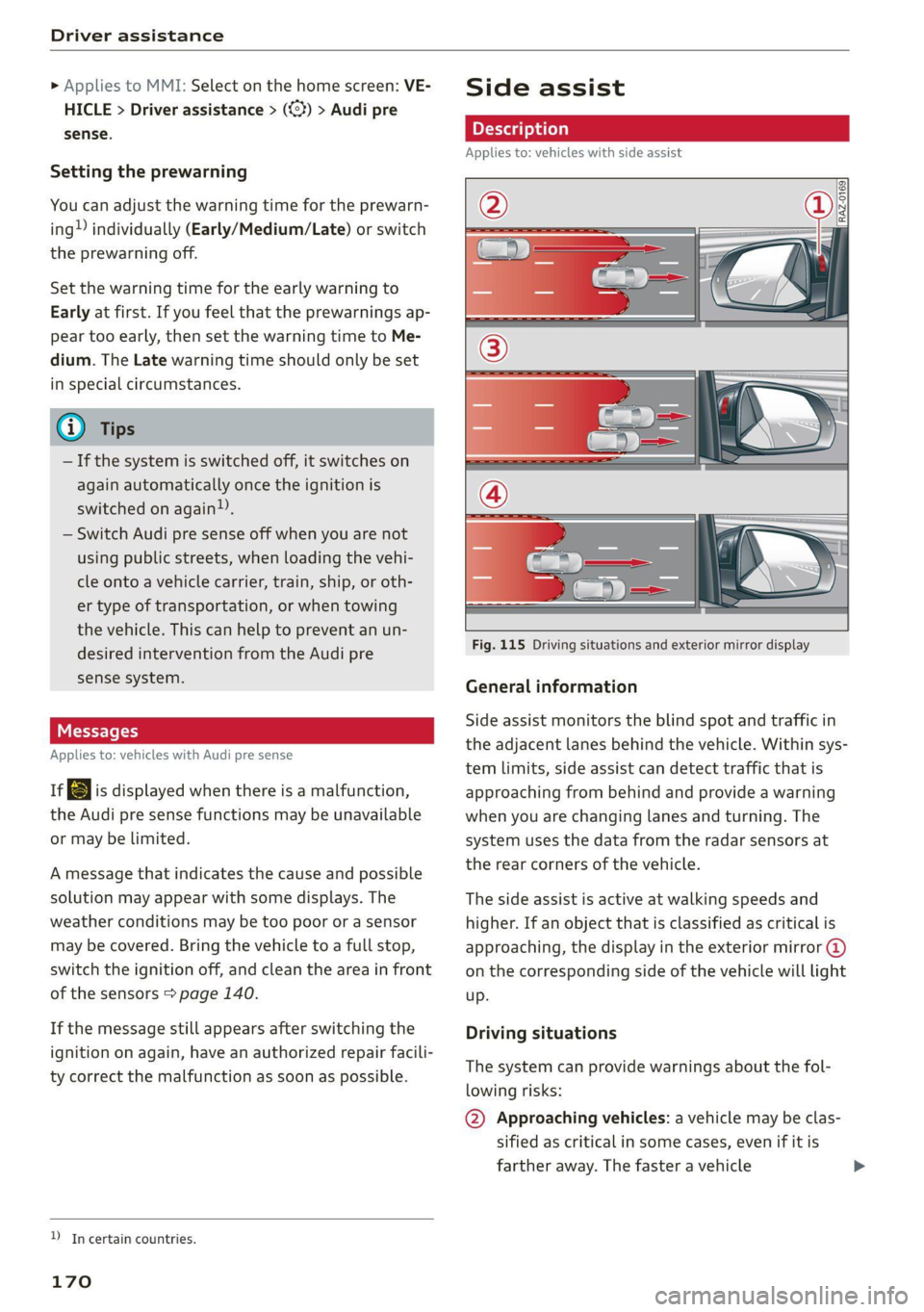
Fig. 115 Driving situations and exterior mirror display
General information
Side assist monitors the blind spot and traffic in
the adjacent lanes behind the vehicle. Within sys-
tem limits, side assist can detect traffic that is
approaching from behind and provide a warning
when you are changing lanes and turning. The
system uses the data from the radar sensors at
the rear corners of the vehicle.
The side assist is active at walking speeds and
higher. If an object that is classified as critical is
approaching, the display in the exterior mirror @
on the corresponding side of the vehicle will light
up.
Driving situations
The system can provide warnings about the fol-
lowing risks:
@ Approaching vehicles: a vehicle may be clas-
sified as critical in some cases, even if it is
farther away. The faster a vehicle
Page 173 of 350

4K8012721BF
Driver assistance
approaches, the sooner the display will turn
on.
@® Vehicles traveling in the same direction: the
display will turn on if vehicles traveling in the
same direction as your vehicle are classified
as critical. The side assist warns you of all de-
tected vehicles when they are in the “blind
spot” or before they reach that point.
@ Vehicles you are passing: the display only
turns on if you slowly pass a detected vehicle
(difference in speed between the two vehicles
is less than 9 mph (15 km/h)). There is no
display if you pass a vehicle more quickly.
Information stage
At the information level, the side assist informs
you of detected objects that are classified as criti-
cal. This is even possible when your vehicle is sta-
tionary and the turn signal is turned on, so that
the system can also assist you when turning.
From speeds of approximately 6 mph (10 km/h)
and higher, the system will warn you of detected
objects that are classified as critical, even if the
turn signal is not turned on.
The display remains dim in the information stage
so that you are not distracted while looking for-
ward.
Warning stage
If you activate a turn signal and the display flash-
es, side assist is warning about objects that have
been classified as critical.
Depending on the vehicle equipment and other
driver assistance systems, the display may also
flash if you have not activated a turn signal. If
you are approaching a detected lane marker line
and it appears you will be leaving the lane, the
display will warn you about detected vehicles
that are classified as critical. You can also be
warned with corrective steering > page 165,
Lane departure warning.
Detection range
The radar sensors are designed to detect the left
and right adjacent lanes when the road lanes are
the normal width. In some situations, the display
may turn on even though there is no vehicle lo-
cated in the area that is critical for a lane change.
For example:
— If the lanes are narrow or if you are driving on
the edge of your lane. If this is the case, the
system may have detected a vehicle in another
lane that is not adjacent to your current lane.
—If you are driving through a curve. Side assist
may react to a vehicle that is in the same lane
or one lane over from the adjacent lane.
—If side assist reacts to other objects (such as
roadside structures like guard rails).
Z\ WARNING
— Observe the safety precautions and note the
limits of the assist systems, sensors, and
cameras > page 138.
— The display may not appear on time when
vehicles are approaching or being passed
very quickly.
@) Tips
— If the window glass in the driver's door or
front passenger's door has been tinted, the
display in the exterior mirror may be incor-
rect.
— The coverage areas of the sensors > fig. 115
are diagrams and do not represent a true-
to-scale image of the sensor ranges.
— The system complies with United States FCC
regulations and ISED regulations
> page 329.
Oe ees
Applies to: vehicles with side assist
The system can be switched on and off in the
MMI > page 141. If the system is activated, the
displays will turn on briefly when the ignition is
switched on.
Adjusting the brightness
You can adjust the brightness of the display in
the exterior mirror. The settings depend on the
vehicle equipment.
> Applies to: MMI: Select on the home screen:
VEHICLE > Driver assistance > (<23) > Side as-
sist > Brightness.
171
Page 176 of 350

Driver assistance
approaching object when driving forward at
speeds up to approximately 6 mph (10 km/h).
Switching the intersection assistant on and
off
— The system can be switched on and off in the
MMI & page 141.
Messages
if or » is displayed when there is a mal-
function, the intersection assistant functions
may be unavailable or may be limited.
A message that indicates the cause and possible
solution may appear with some displays. The
weather conditions may be too poor or a sensor
may be covered. Clean the area in front of the
sensors > page 140 and try to turn the system on
again later.
If the malfunction remains, drive to an author-
ized Audi dealer or authorized Audi Service Facili-
ty immediately to have the malfunction correct-
ed.
ZA WARNING
— Observe the safety precautions and note the
limits of the assist systems, sensors, and
cameras > page 138.
— The intersection assistant will not provide
alerts about people and cannot warn you
about every type of approaching objects,
such as cyclists. Always monitor the traffic
as well as the vehicle's surroundings with di-
rect eye contact.
— The system may not react if vehicles are ap-
Proaching very fast.
G) Tips
— The coverage areas of the sensors > fig. 118
are diagrams and do not represent a true-
to-scale image of the sensor ranges.
— The system complies with United States FCC
regulations and ISED regulations
=> page 329.
) This function is not available in every market and on all ve-
hicle equipment levels.
174
Emergency assist
Applies to: vehicles with emergency assist
General information
Within the limits of the system, emergency assist
can detect inactivity from the driver. In these in-
stances, the system will warn the driver, assume
control of the vehicle if necessary, and bring the
vehicle automatically to a stop in the lane.
Regardless of the speed, the emergency assist is
automatically available when the adaptive cruise
assist* is activated. When the adaptive cruise as-
sist* is deactivated, the system is only available
at speeds above approximately 40 mph
(65 km/h).
Emergency assist functions
Measures may be initiated in stages. The vehicle
can be controlled with the limits of the system.
The measures depend on the dangerous situation
and the vehicle equipment:
— Visual and audio warnings
— Vehicle control
— Reduction of vehicle speed in stages
— Lowers the volume of the Infotainment system
— Tugs on the safety belt
— Activates the brakes
— The emergency flashers are activated
— Audi pre sense preemptive safety measures are
triggered > page 167
— The brakes are applied until the vehicle is sta-
tionary
As soon as the vehicle comes to a full stop, the
vehicle prepares for the vehicle passengers to be
rescued. The parking brake is set, “P” gear is en-
gaged, the doors are unlocked, and the interior
lighting is activated. The emergency call?) will be
started if necessary once the vehicle has been
stationary for several seconds.
Page 187 of 350
4K8012721BF
Parking and maneuvering
© Two-car garages”
@ Tips
— If there is enough space in a two-car garage,
the system automatically selects the park-
ing position in front of the vehicle that the
driver has selected.
— You can also drive into a perpendicular park-
ing space yourself and then activate the sys-
tem. If this is the case, the front of the vehi-
cle should already be in the space () so that
the sensors can measure the space.
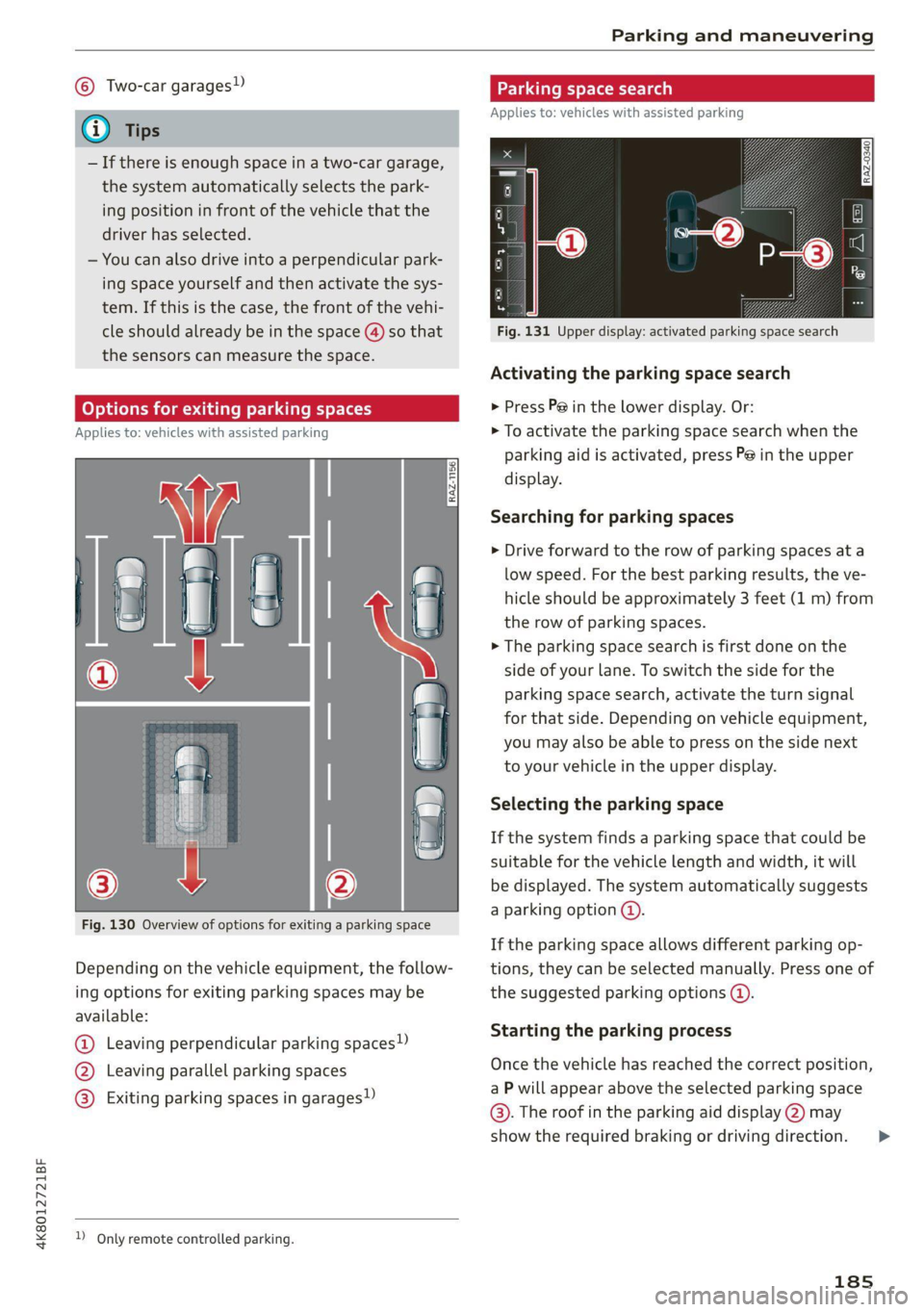
(oy oy a] for exiting parking spaces
Applies to: icles with assisted parking
Fig. 130 Overview of options for exiting a parking space
Depending on the vehicle equipment, the follow-
ing options for exiting parking spaces may be
available:
@ Leaving perpendicular parking spaces»)
@ Leaving parallel parking spaces
@® Exiting parking spaces in garages)
2 Only remote controlled parking.
Parking space search
Applies to: vehicles with assisted parking
S g 3
3]
&
Fig. 131 Upper display: activated parking space search
Activating the parking space search
> Press P@ in the lower display. Or:
> To activate the parking space search when the
parking aid is activated, press Pe in the upper
display.
Searching for parking spaces
> Drive forward to the row of parking spaces at a
low speed. For the best parking results, the ve-
hicle should be approximately 3 feet (1 m) from
the row of parking spaces.
> The parking space search is first done on the
side of your lane. To switch the side for the
parking space search, activate the turn signal
for that side. Depending on vehicle equipment,
you may also be able to press on the side next
to your vehicle in the upper display.
Selecting the parking space
If the system finds a parking space that could be
suitable for the vehicle length and width, it will
be displayed. The system automatically suggests
a parking option @.
If the parking space allows different parking op-
tions, they can be selected manually. Press one of
the suggested parking options @).
Starting the parking process
Once the vehicle has reached the correct position,
a P will appear above the selected parking space
©. The roof in the parking aid display @) may
show the required braking or driving direction.
185
>
Page 335 of 350

4K8012721BF
Index
A
A/C cooling mode..........-. eee eee eee ee
A/C system refrigerant oil...............
Acceleration measurement..............
Accelerator pedal...............--00 000s
also refer to Accelerator pedal...........
AccessorieS.... 0... 0.00. eee eee
Active lane assist
refer to Lane departure warning.........
refer to Lane guidance................
Adaptive cruise assist................04.
Cleaning the sensors......... 0.0.0.0 005
Adaptive cruise control
Predictive control..............000005
Adaptive dampers « sve « « savece ae scare 6 0 oe
Adaptive speed assist
refer to Adaptive cruise assist..........
Adjusting the air distribution.............
Adjusting the brightness.................
Adjusting the sound................0005
Adjusting the temperature...............
Adjusting the vents ccs <= csws + © sews +o oer
Adjusting the volume............. eee eee
Adjusting the volume (announcements) ... .
Adjusting the welcome sound............
Airbag system... 2.2... eee eee
AIPSUSPONSION ix o © aowees « 2 mines + omnes 5, v0
Alarm system
refer to Anti-theft alarm system..........
Alignment pin (changing the wheel).......
All-weather lights...............-..00005
Allseason tires’... cscu ve ones ee eee ee oe
All wheel drive
refer to quattro.............. 0...
Amazon Alexa integration
Media playback........... 00 cee e eee
QOPOratitig = = sews = « eee 5 4 wees s Ree se BES
AMI
refer to Audi music interface...........
Android Auto
refer to Audi smartphone interface......
Anti-lock braking system............000.
Anti-Slip Regulation.................05.
Anti-theft alarm system ...........-.00005
Anti-theft wheel bolts...............00.
Apple CarPlay
refer to Audi smartphone interface...... 247
Aspect ratio
NidGO verse < ¢ seven & 5 seaRE ze SeHER Fo Bee 241, 243
ASR
refer to Anti-Slip Regulation............ 115
Audi adaptive light...............-..000- §2
Audi connect
MEFEPTONCONNECE: « «esses oo wesc ow xem ¥ v0 208
AUGIGriVe’SelECt ios: « « suas > gemy 2 x seme gee 111
Audi e-tron compact charging system..... 128
Adjusting the charging power level...... 128
Changing or attaching the power cable... 133
SECUCINGls » 5 seme ¢ 9 same < a eR Eee EOE ne 133
Status and malfunction indicators....... 129
Audi musiciintertace sas ss iwes se gee ay oo 238
UGGS iexsy: a 2 wares & & gee & 2 eR Ee ER 239
Audi phone BOX eis 5 y omnes 5 3 eas «8 ews 199
Audi presense........ 0.00 e cee eee eee 166
MGSSAGES saws + & cmer 9 ¢ cemes 9 o ews 8 9 ee 170
Audi pre sense front.............eeeeeee 167
Audi side assist
refer to Side assist............-.00000. 170
Audi smartphone interface.............. 247
Legal. ivformalioms « ence x < cosas x « coca 252
Audi virtual cockpit
refer to Instrument cluster.............. 12
AUTO
Automatic headlights.................. 52
Climate control system.............0005 88
Auto Lock (central locking) ............... 36
Automatic climate control system
refer to Climate control system.......... 87
Automatic luggage compartment lid.... 44,45
Automatic transmission............-.0005 95
Parking lock emergency release.......... 99
Automatic wipe/wash system............. 59
Auxiliary climate control................. 90
Average consumption.................-- 17
Average speed... 1.0... cece eee eee renee 17
B
Bag hooks........ 0... eee eee eee eee 83
Band
refer to Frequency band............... 228
333
Page 338 of 350

Index
Diteetor yess 6 s cscaves ws sacewes v6 aneims v © sxeams 6 0 202
Business card... 6... eee eee eee 203
SCttinGSanww + wuwn x 3 mee ee ReUeE SE eee & 205
Display
Cleaning’s « «sew 2s seas © 2 eww vo ene woe 301
DispOSalis: + = secre 5 5 was 5 ¥ ees eo ee Ge 326
DistanG@ies = : ees = : wes ¢ 2 eee Yo ewe Ye: 17
Distance WarhiiG sca + < sees 2 3 has os eS 164
Doors
Childisafety lock sxe < « same s » ews = 2 eres = 46
Door:comtact:switeh i « sess 2s sansa vo scares a 5 56
Mechanically unlocking and locking....... 39
Power closing/closing aid............... 36
Driver information system................ 13
Drives
refer to Media... ...s0scceees eens 236; 239
Drive select
refer to Audi drive select............... 111
Drive'SySteMm « sessen « swswss 6 2 cae 3 ¥ a0 100, 105
Audi drive select..............000000- 111
DrivingiGOwniBills ecerese © versus ie o vvasene a + wavess 109
Driving programs « x saves vo meses xo esas 6 96, 162
Driving through water............-...0- 110
Driving’ CUIMGls « « seme ss eee so ees eae a 17
Driving tips
Driving through water................- 110
Efficient driving. ..........00 eee ee eee 103
Uphill ahd Gownhill we » s wore 2 x eae o 2 caer 109
Driving track. . 2.2... ee eee ee eee eee 109
Driving uphills...................0000. 109
DVD drive... .. 0.2.02. eee 237
Dynamic all-wheel steering.............. 113
E
BERL l « cncmena eo wwesien we meres so sete sw cane 206
Settings........... 0... e eee eee eee 206
EDL
refer to Electronic Differential Lock...... 115
EDR
refer to Event Data Recorder (EDR)...... 321
Efficienity a8SiSbies « caw x x eews vo eam ex 152
Predictive Comtrobsisin: 0 o seve w scum 2 v sueawe 158
Electrical:system’. « « wessce so wena ee ene soe 269
Electric ranges s ¢ evans s+ meas s ¥ cae 5 2 meee 224
Electromechanical parking brake......... 107
Electronic Differential Lock.............. 116
336
Electronic immobilizer .............0.004. 41
Electronic Stabilization Control........... 115
Embedded SIM: card « « saws x « wwe x s gue 8 209
EMergency:aSsist sasws s ness 3 5 nee so teeE 174
Emergency assistance..............-... 305
Emergency braking function............. 108
Emergency call..............000.. 204, 213
Emergency flashers.............--..00-- 55
Emergency fueling............--..20005 257
Emergency M0de esc + secs es ences oo acee 3 99
Emergency operation
Doors... 2... eee eee eee ee 39
FUSLTINLERGGOF sx ¢ « casas» 2 news a 3 mae 2 a 258
Luggage compartment lid............... 46
Panoramic glass roof.............200005 49
Emissions control system.............. 259
EMeErgy CONSUMENSHs «i iii + asus oo eacem wo 8 18
Energy flow display® wees ¢ s wees s 6 ween s ve 102
Energy management.................5. 104
Etergy TECOVERYase « 2 caps 5 « smerny 5 o eye 101
Engine
Breaking'inl's « sevas « ¢ saves « » newer x 2 Mowe @ 100
COOLANE «, cassne « « snawins = w eeawens © a temsem « areneten 266
Emergency stop. ... 0.06... eee ee eee eee 93
JUMP Starting « + mews s x eews 5 a sowe 4 eee 311
Start/Stop system............-0000005 104
Starting/stopping.............0...00ee 93
Engine braking effect
refer to Recuperation...............-. 101
Engine compartment
Opening and closing the hood.......... 261
OVERVIOW'. score na sesrene a w eaesere oo sieeern a 8 ae 262
Safety precautions..............00000 259
Engine data
refer to Sport displays .............0065- 16
Engine oil
AGING « ccs scorn 2 3 ceveum eo aman oe Eos
Changing
Checking oillevel.............2--000-- 262
CONSUMpPtiON ss ¢ ¢ eees ¢ eee oo ee oo 262
Indicator light........... 0. cece eee eee 263
Replacement interval................. 273
Temperature display................0-. 16
Engine sound
Audi drive:selectii: « ccine os vomem 2 seas ¥ as 112
Engineistartsystem vce + acs 6 2 wanes 6 2 vonse 94
Page 341 of 350
4K8012721BF
Index
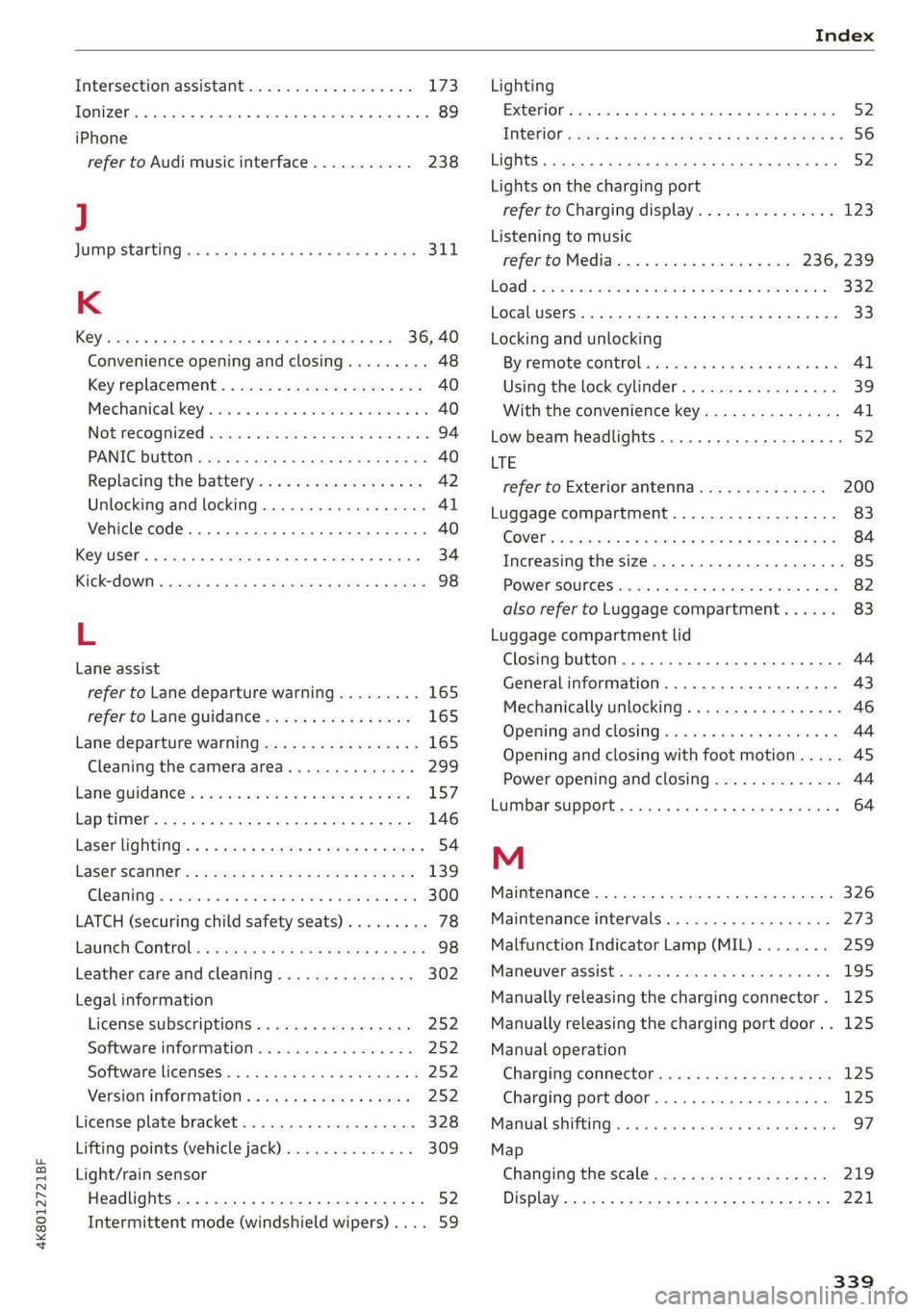
Intersection assistantreoe. + wees ao wean a 6 a6 173
TONIZEs & season a & assewes ue wee a © ese ww AoE & 89
iPhone
refer to Audi music interface........... 238
J
JUMPEStANtING bss vo saisara eo wvuens wo ewwaara so escows SLI.
K
ROY cescies 6 6 cence o auasaes ov me ow amie & ao 36, 40
Convenience opening and closing......... 48
Key Téplaceiient: = wcww » y ews + ¢ wean x x ae 40
Mechanical keypass wasn es wen a 6 wwe ao ¥ 40
Not recognized..............00 2.000 94
PANIC BULtOM ccss + = sans ¢ ¢ saws ¢ o Seen eo Be 40
Replacing the battery.................. 42
Unlocking and locking................55 41
Vehicle code... 1.2... cee eee eee eee 40
Key user... 2... eee ee eee 34
Kick-doWn .. 6... ee eee eee 98
L
Lane assist
refer to Lane departure warning......... 165
refer to Lane guidance................ 165
Lane departure warning................. 165
Cleaning the camera area.............. 299
LaANe:QUuIGANGES. « cise e & or oo wwe ae ETS 157
Lap timers sees ¢ seins & = eevee + & eee ¥ cere 146
Laser lighting’. x + cows + = sews © © cores 5 2 eeree 54
Laserscanner: ; 2eax < ¢ seme ss seme ye oes § 139
Cleaning « « sesiws vs sens ow mene 2H sure wo oe 300
LATCH (securing child safety seats)......... 78
Launch’ Controls: « = saves = ¢ sawp 2 x sews xe wees 98
Leather care and cleaning............... 302
Legal information
License subscriptions................. 252
Software information................. 252
Software licenses..............-..0005 252
Version, information « » ss +s sewn 2 ¢ eae 252
License plate bracket................... 328
Lifting points (vehicle jack).............. 309
Light/rain sensor
Headlights:c: : = sees : © saws se sews eo ees = 52
Intermittent mode (windshield wipers).... 59
Lighting
Exterior... 0... eee eee eee 52
INQEFION wees « 2 qos « & yews 2 o eee Eg Eee FS 56
LIGHES « aac > 5 Same 2 ¢ Saee ot Sates o 5 eGER ES: 52
Lights on the charging port
refer to Charging display............... 123
Listening to music
Fefer tOMe dials: « «wees sv wee 6 owen 236, 239
LOG « seco 2 a neers 2 a seems 9 5 seo © a a oe 332
LOGALUSETS (is : x seme 2 wae 2 2 neem Be meme ag sg 33
Locking and unlocking
Byremotercontrols. « ssn s 6 coos sa ees 6 Ww 41
Using the lock cylinder................. 39
With the convenience key............... 41
Low beam headlights.................00, 52
LTE
refer to Exterior antenna.............. 200
Luggage compartment.................. 83
COVER ex a 2 cess: 3 a ete so momen oH cote © o oem 84
Increasing the size........... 0.0 eee ee 85
Power SOUrCES .... 1. ee eee eee eee 82
also refer to Luggage compartment...... 83
Luggage compartment lid
ClOSING*DULOM Ys: « & cessie « o ccaves © 6 cana @ are 44
Generalinformation................... 43
Mechanically unlocking. ...........0eees 46
Opening and closing.................-. 44
Opening and closing with foot motion..... 4S
Power opening and closing.............. 44
LUMDErSUPPOFt: ccs & x eeee so Secs x ¥ Ree + 64
M
Maintenance.......... 00... eee eee eee 326
Maintenance intervals...............00. 273
Malfunction Indicator Lamp (MIL)........ 259
Maneuverassist «ccs 6s came ae nner «0 cee 195
Manually releasing the charging connector. 125
Manually releasing the charging port door.. 125
Manual operation
ChargingconmectOtinncc. w 2 ammos x awexne a oe 125
Charging port door................00. 125
Manual shifting............ 0.002 e eee 97
Map
Changing the scale................0-. 219
Display’: oss 5 eseew 6 ¢ canes @ e eases + o ero 221,
339
Page 343 of 350
4K8012721BF
Luggage compartment lid............... 44
Luggage compartment lid with foot motion . 45
Panoramic glass roof..............2.005 48
Sunshaden(noof)!: = ssicca: ic x awn xo cenmene m 1 ones 48
Windows ...... 0... eee eee eee 47
Opening and closing
refer to Unlocking and locking........ 36,41
Opening the charging port door.......... 122
Operating
Head-up display: « s wu < » asm : seems i pe 28
Instrumenticluste tess is s sane os saves & 6 oars 13
Multifunction steering wheel............ 13
Multi Media Interface............... 19,22
TEXBINPUBS » sexorcs « 2 conozes » 2 smrans oo ponies oo: vee 26
TOUCH GISPlay'. « « xsuis + o aesse © 0 eomnese « manen 19
Voice recognition system............... 29
Operating mode.................--005. 101
Optional equipment number............. 331
Options
Media.... 0... cece eee eee eee eee 243
RadiOtss « » sane a + meme a 2 meee a 2 eens & 2 ae 233
Qutside noise = seas < = gers se eee se eewS se 103
OVervieW(COCKPit) s some » x mows 5 3 ees a a eR 6
P
Paint code... 2.6... cece eee eee 331
Paint damage............2.- cee ee eae 300
PANIC button.............-. 000 e cece eee 40
PANIC FUMEEOM ss 0 « wissane ow suaeane o » ageimae 0 9) axes 40
Panoramiciglass. roof. . ose. cen ee ote ee 48
Convenience opening and closing......... 48
Emergency closing « « css + = ses se ees ees 49
Quick opening and closing.............. 49
Parental control
DVD... 0. eee eee 243
Park assist plus..............000 020000 186
Rating sociwe x = camsne x wwnmne ¥ 2 aeveene renee 94
Parking aid... = sce s = ceva ye exm ve mw oe 176
Adjusting the volume...............-5 178
Automatic activation................0- 177
Cleaning the sensors and camera........ 299
Deactivating rear cross-traffic assist ..... 183
Park assist plus..............002-000. 186
Parking aid plUS « scsi cee se eee ce wes 176
Parking space search.............-.... 184
Peripheral cameras..............0000. 179
Rearview Cametarciccs «6 cscs v2 comes +o ssecens 179
Remote controlled parking............. 190
Switching off maneuver assist.......... 196
Parking and maneuvering..............- 176
Parking brake
refer to Electromechanical parking brake. 107
Parking heater
refer to Auxiliary climate control......... 90
Parking lightsiesiu 2s some s sons ev omeam ee one 52
Parking lock emergency release........... 99
Pass-through seas s « ses 3 v ween yw eee so oe 85
Pedals... 2.2... cece eee eee eee 97
Pedestrian detection................00. 148
Perchlorate... 2.0... 0... eee eee eee eee 326
Performance/torque display
refer to Sport displays.................. 16
Peripheral cameras............---000-- 179
Phone
Connecting a second mobile device...... 198
Disconnecting a mobile device.......... 199
Settings...............0 0.02.0. 204
Phonebook
refer to Directory. .... 0. ec cece eee eae 202
PIN
4-digit myAudi PIN.................00- 33
Protection cmc sv wens wo iwc x 2 ames ae mene 34
Playback (triedia)s. 2 sissies 6 mesos eo ome os 239
Plug-in hybrid drive..............2.-00. 101
COOLANE sresie 5 6 crests ow ermene oe weaver 266, 267
Power meter............ 0.0 c eee ee eee 15
Plug-in hybrid mode.............--..00- 101
Podcast
refer to Online radio.............. 232, 233
Polishing... 0.0... 0.0 e eee ee eee eee 300
Pollutant filter... 2.2... 0.0.0... eee eee 87
Power'closing: (doors) « « svecis. + seve ayers « « 36
POWeEr MEER’ cicwous « 2 sucees 2 sxawous wx somwees o 42,15
POWePr’SOURGES's 3 & siesac 4 a arene aw sevens 82, 238
Power WINdOWS ...... 00 ee cee rece ee ne eeee 47
Malfunction..............00 02000 e eee 47
Power windows malfunction.............. 47
Predictive:control.. « scva so even ee wean 2 4 oe 158
Predictive messages..............05 98, 153
pre sense
refer to Audi presense................ 166
Presentation mode..............---00 ee 227