additional function buttons AUDI A7 2021 Owner´s Manual
[x] Cancel search | Manufacturer: AUDI, Model Year: 2021, Model line: A7, Model: AUDI A7 2021Pages: 350, PDF Size: 126.66 MB
Page 4 of 350
Table of contents
About this Owner's Manual......
SUMIMAry: < = exe : eens: Seen cs sens
QutckeaeCe ssh: «i esis se ois a eaves @
Cockpit. ...... 0... eee eee eee eee
Indicator lights overview...........4..
Display and operation...........
Instrument cluster...............
Instrument cluster overview...........
Operating. ecccuse w+ were oo wens oo ayes 9 ¥
Adjusting the display.................
Coolant temperature display...........
Tachometer’ series i ewe so snes ¥ & ome
Power meter...............0 00000005
QdOMe@ter a: =e giws + pases 2 pees se Hees <
Outside temperature display...........
Engine oil temperature indicator.......
Boost indicator’: 2 2c« «= sesa ¢ x sews «x 2x8
Shiftilightindicator ics «+ sca + 2 oman 2 6 ox
Sport displays...............0 eee eee
Vehicle functions............-.00-005
Touch displays.................008
General touch display operation........
Multi Media Interface................
Head-up display..................
Descriptionis: ss gem = x eames ¢ eee ge eee
Voice recognition system........
General information.................
DeSeriptionis = ssssas « « wens s + eres « + aes
External voice operation..............
Global functions.................
Additional function buttons...........
Starting and driving.............
Personalization..................
Luggage compartment lid.............
Child safety lock.............0...000.
POWEr WIKdOWS 6: «oxen se aes ye eee
NOD
OO
12 12 12
13
14 14
15 15
16
16
16
16
16
16 17
1
19
21
28 28 29 29
29
30
32 32 33 33 33
36 36
40
43
46 47
Panoramic glass roof................. 48
Garage door opener..........--.00 eee 49
Lights and Vision................. 52
Exterior lighting...................4. 52
Interior liQhting ss =e aves ss eews so eos 56
ViSIOMsn « 3 ses 3 3 ema oo wena vo ae © ove 57
Windshield wipers.............-..45- 59
Digital compass.............-.-0000- 61
Sitting correctly and safely...... 63
Correct passenger seating position...... 63
Frontseats:: » ssw. « ¢ sews & » saws +s ewe < 63
Steering wheel seis < «cies ¥ eerie ss eee 66
Head restraints.................0000. 67
Safety Beltsi: s sass x eeups ¢ < saves 2 e cee 68
Memory function . « scons ecw ee cro ee 71
Airbag system... ... 2.62... 0 ee eee eee 72
Child safety seats.................04- 76
Storage and convenience........ 82
POWErSOURCES coisa gs seen ss wae se aes 82
Gup holders. ¢ ssn ss wee 2 2 see 2 & pee 82
Storage and compartments............ 83
Luggage compartment............... 83
ROOF hacks « = weies x = wae 2 s eae 2 & ween 2 86
Warm and cold.................45 87
Climate control system............... 87
Steering wheel heating............... 90
Auxiliary climate control.............. 90
Fluids in the A/C system. .........0065 92
Driving .............. 0.0... eee eee 93
Starting the vehicle...............0.0. 93
When driving isis ss iovsvie se aerswce oo anes oe 94
Drive system... 2.2... ee eee eee eee 100
Start/Stop system .........ee cece eee 104
BrakeS's so isemi 2 wane w aman a 2 oer as ie 105
Electromechanical parking brake....... 107
Special driving situations.............. 109
Driving: dynamic. . « sic. 6 6 see a 6 se Ld
Audi drive select..................00. Tay
SUSPENSION es « + exes ¢ ¢ eres +o ees vv eae 112
SUECOKING « wvessse oo csisweue 6 & saouwun 6 a atonae 6 WB 113
All wheel drive (quattro) .............. 114
Page 25 of 350

4K8012721BF
Touch displays
Description
Open settings for the selected
menu
Open the submenu
Adjust the settings
Set as favorite
Switch functions on or off
Switch functions on or off
Switch functions on or off
Open additional actions
Open additional information for
the selected menu
@ Tips
The following pages primarily show Illustra-
tions of the upper display with the largest
possible screen size. The display or location of
the items shown may vary depending on the
vehicle equipment.
Overview screen
Applies to: vehicles with overview screen
The overview screen is the first menu page in the
MMI. Information about certain vehicle functions
such as media, time, and phone is displayed in
tiles. The available information tiles can be rear-
ranged on the overview screen or replaced with
others. Depending on the system context, you
may be able to operate certain functions directly,
such as muting the sound.
Switching between the overview screen and
the home screen
> Press ( repeatedly until the desired view ap-
pears.
Configuring the overview screen
> Press and hold an information tile on the over-
view screen.
> To change the position of an information tile,
press and hold it and then slide it to the desired
position.
> To replace an information tile, press Z and se-
lect the desired information tile.
> Press Done to complete the configuration.
With quick access, you can return to the home
screen and quickly switch between four menus
that can be individually configured.
Returning to the home screen or opening a
menu quickly
> Press (© or one of the four buttons.
Configuring quick access
> Press and hold a button on the home screen
display area or in the quick access bar.
> To move a button to the quick access bar, pull it
from the display area to the quick access bar.
> To adjust the placement of the buttons in the
quick access bar, pull them to the desired posi-
tion in the bar.
>» Press Done to complete the configuration.
(i) Tips
The position of © cannot be adjusted.
Display area
You can freely change the location of the buttons
on the home screen display area.
Configuring the display area
> Press and hold a button on the home screen
display area.
> To adjust the placement of the buttons, pull
them to the desired locations.
> Press Done to complete the configuration.
Switching between menu pages
If a menu contains multiple menu pages, Eee] is
displayed in the display area. The white bar
shows the location of the current menu page.
> To switch between menu pages, swipe your fin-
ger to the right or left.
23
Page 34 of 350

Global functions
Global functions
Additional function
buttons
Fig. 20 Right side of the multifunction steering wheel
Fig. 21 MMI On/Off knob with joystick function
Adjusting the volume
You can adjust the volume of an audio source or a
system message (for example, from the voice
recognition system) when the sound is playing.
> To increase or decrease the volume, turn the
right thumbwheel @) © fig. 20 upward or
downward, or turn the On/Off knob @) © fig. 21
to the right or left.
> To mute, push the right thumbwheel or the
On/Off knob.
Selecting the previous/next track or station
> Press the d
Fast forward/rewind
> Press and hold the
the desired playback position is reached.
32
Quick access steering wheel button
Depending on vehicle equipment, the button ©)
may provide quick access to various functions.
> Applies to: RS models faz button, see
> page 111.
You can program the >K button with various func-
tions.
> To bring up the function that is currently set,
press the >K button.
> To perform the function that is currently set,
press and hold the >K button, or:
> Applies to MMI: Select on the home screen: VE-
HICLE > Settings & Service > Steering wheel
button assignment.
> Select and confirm the desired function.
Switching the voice recognition system on or
off
w& button @), see > page 29.
Using the telephone functions
button @), see > page 201.
ZA\ WARNING
Adjust the volume of the audio system so that
signals from outside the vehicle, such as po-
lice and fire sirens, can be heard easily at all
times.
Page 89 of 350
4K8012721BF
Warm and cold
Warm and cold
Climate control system
One of the following options may be available,
depending on vehicle equipment:
— A deluxe automatic climate control system with
3 zones where the temperature, air distribu-
tion, and air supply can be set separately on the
left front side, the right front side, and in the
rear
— A deluxe automatic climate control system with
4 zones to individually adjust the temperature,
air distribution, and amount of ventilation at all
of the seats
The climate control system warms, cools, dehu-
midifies, and filters the air in the vehicle interior.
It is the most effective when the windows and
panoramic glass roof* are closed. If there is a
build-up of heat inside the vehicle, ventilation
can help to speed up the cooling process.
The deluxe climate control system automatically
maintains a temperature once it has been set. In
all heating mode functions except defrost, the
blower only switches to a higher speed once the
coolant has reached a certain temperature.
Pollutant filter
The pollutant filter removes pollutants such as
dust and pollen from the air.
@ For the sake of the environment
Energy can be saved by switching off the A/C
mode.
G) Tips
— To prevent interference with the heating or
cooling output and to prevent the windows
from fogging over, the air intake in front of
the windshield must be free of ice, snow,
and leaves.
— Condensation from the cooling system can
drip and form a puddle of water under the
vehicle. This is normal and does not mean
there is a leak.
— The energy management system may tem-
porarily switch off certain functions, such as
the seat heating* or rear window defogger.
These systems are available again as soon as
the energy supply has been restored.
[RAZ-0638]
Sy
AUTO AUTO
aes
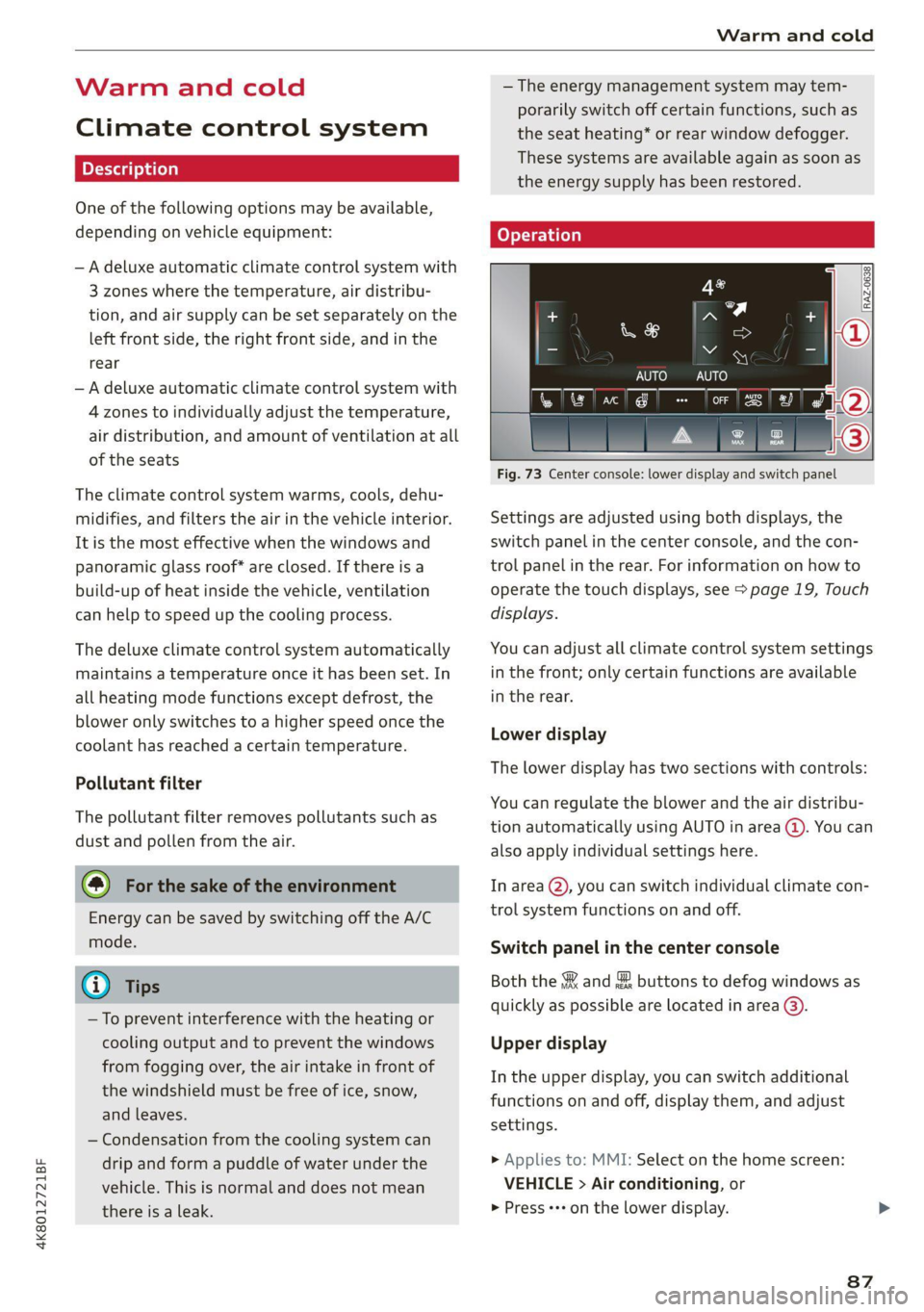
Fig. 73 Center console: lower display and switch panel
Settings are adjusted using both displays, the
switch panel in the center console, and the con-
trol panel in the rear. For information on how to
operate the touch displays, see > page 19, Touch
displays.
You can adjust all climate control system settings
in the front; only certain functions are available
in the rear.
Lower display
The lower display has two sections with controls:
You can regulate the blower and the air distribu-
tion automatically using AUTO in area @). You can
also apply individual settings here.
In area @, you can switch individual climate con-
trol system functions on and off.
Switch panel in the center console
Both the & and & buttons to defog windows as
quickly as possible are located in area @).
Upper display
In the upper display, you can switch additional
functions on and off, display them, and adjust
settings.
> Applies to: MMI: Select on the home screen:
VEHICLE > Air conditioning, or
> Press +++ on the lower display.
87