air suspension AUDI A7 2021 Owner´s Manual
[x] Cancel search | Manufacturer: AUDI, Model Year: 2021, Model line: A7, Model: AUDI A7 2021Pages: 350, PDF Size: 126.66 MB
Page 4 of 350
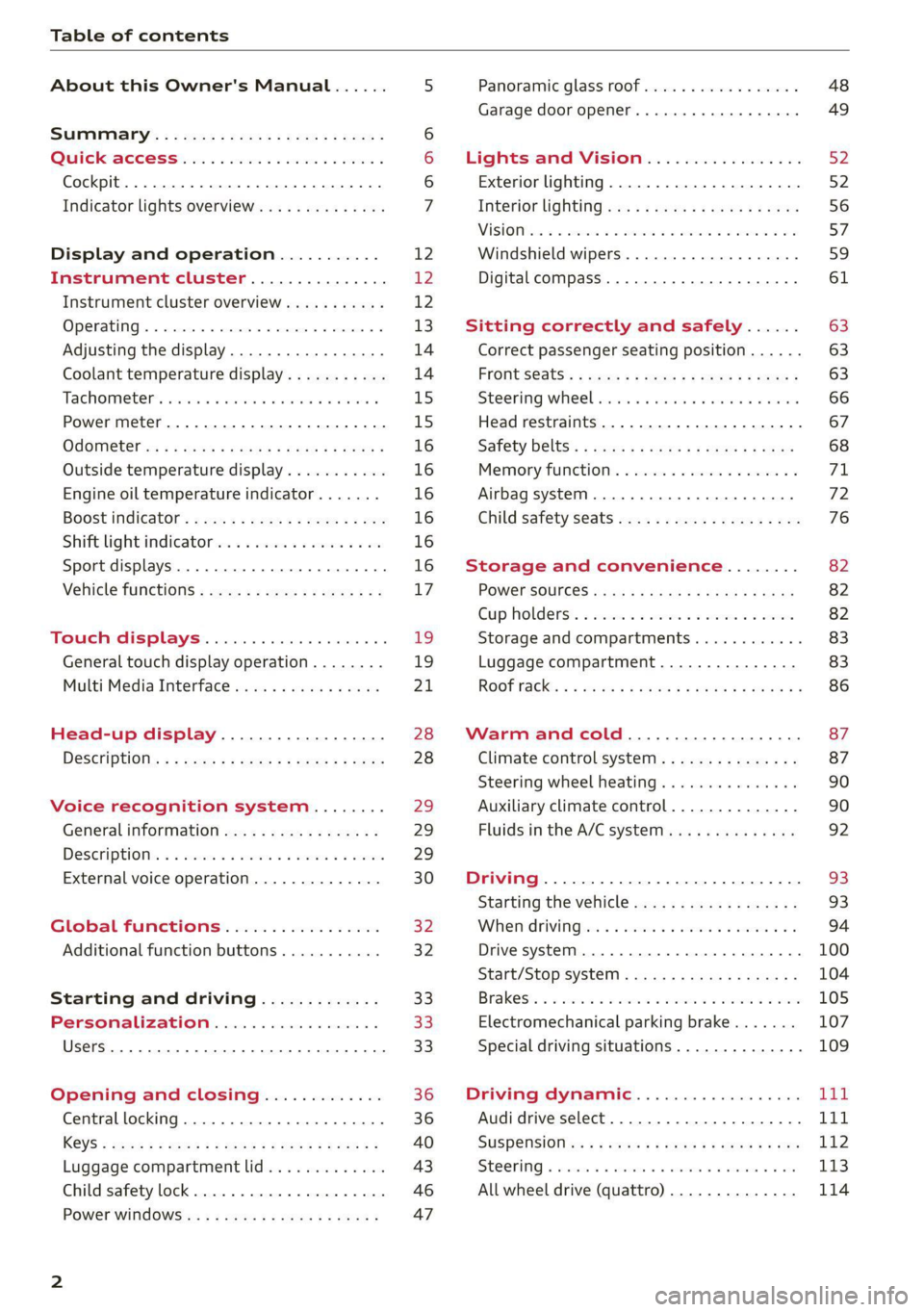
Table of contents
About this Owner's Manual......
SUMIMAry: < = exe : eens: Seen cs sens
QutckeaeCe ssh: «i esis se ois a eaves @
Cockpit. ...... 0... eee eee eee eee
Indicator lights overview...........4..
Display and operation...........
Instrument cluster...............
Instrument cluster overview...........
Operating. ecccuse w+ were oo wens oo ayes 9 ¥
Adjusting the display.................
Coolant temperature display...........
Tachometer’ series i ewe so snes ¥ & ome
Power meter...............0 00000005
QdOMe@ter a: =e giws + pases 2 pees se Hees <
Outside temperature display...........
Engine oil temperature indicator.......
Boost indicator’: 2 2c« «= sesa ¢ x sews «x 2x8
Shiftilightindicator ics «+ sca + 2 oman 2 6 ox
Sport displays...............0 eee eee
Vehicle functions............-.00-005
Touch displays.................008
General touch display operation........
Multi Media Interface................
Head-up display..................
Descriptionis: ss gem = x eames ¢ eee ge eee
Voice recognition system........
General information.................
DeSeriptionis = ssssas « « wens s + eres « + aes
External voice operation..............
Global functions.................
Additional function buttons...........
Starting and driving.............
Personalization..................
Luggage compartment lid.............
Child safety lock.............0...000.
POWEr WIKdOWS 6: «oxen se aes ye eee
NOD
OO
12 12 12
13
14 14
15 15
16
16
16
16
16
16 17
1
19
21
28 28 29 29
29
30
32 32 33 33 33
36 36
40
43
46 47
Panoramic glass roof................. 48
Garage door opener..........--.00 eee 49
Lights and Vision................. 52
Exterior lighting...................4. 52
Interior liQhting ss =e aves ss eews so eos 56
ViSIOMsn « 3 ses 3 3 ema oo wena vo ae © ove 57
Windshield wipers.............-..45- 59
Digital compass.............-.-0000- 61
Sitting correctly and safely...... 63
Correct passenger seating position...... 63
Frontseats:: » ssw. « ¢ sews & » saws +s ewe < 63
Steering wheel seis < «cies ¥ eerie ss eee 66
Head restraints.................0000. 67
Safety Beltsi: s sass x eeups ¢ < saves 2 e cee 68
Memory function . « scons ecw ee cro ee 71
Airbag system... ... 2.62... 0 ee eee eee 72
Child safety seats.................04- 76
Storage and convenience........ 82
POWErSOURCES coisa gs seen ss wae se aes 82
Gup holders. ¢ ssn ss wee 2 2 see 2 & pee 82
Storage and compartments............ 83
Luggage compartment............... 83
ROOF hacks « = weies x = wae 2 s eae 2 & ween 2 86
Warm and cold.................45 87
Climate control system............... 87
Steering wheel heating............... 90
Auxiliary climate control.............. 90
Fluids in the A/C system. .........0065 92
Driving .............. 0.0... eee eee 93
Starting the vehicle...............0.0. 93
When driving isis ss iovsvie se aerswce oo anes oe 94
Drive system... 2.2... ee eee eee eee 100
Start/Stop system .........ee cece eee 104
BrakeS's so isemi 2 wane w aman a 2 oer as ie 105
Electromechanical parking brake....... 107
Special driving situations.............. 109
Driving: dynamic. . « sic. 6 6 see a 6 se Ld
Audi drive select..................00. Tay
SUSPENSION es « + exes ¢ ¢ eres +o ees vv eae 112
SUECOKING « wvessse oo csisweue 6 & saouwun 6 a atonae 6 WB 113
All wheel drive (quattro) .............. 114
Page 10 of 350
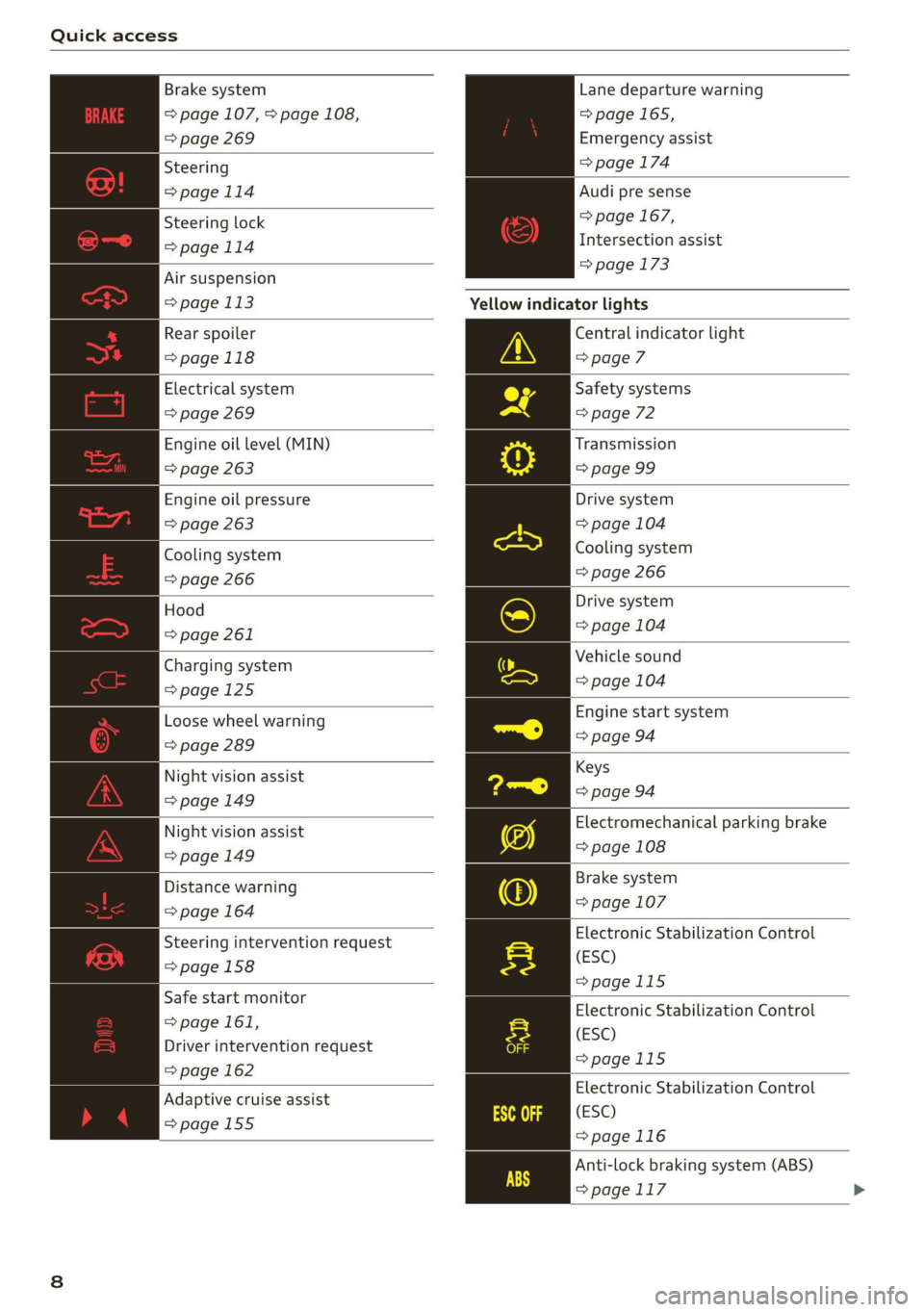
Quick access
Brake system
=> page 107, > page 108,
=> page 269
Lane departure warning
=> page 165,
Emergency assist
Steering => page 174
=> page 114 Audi pre sense
=> page 167,
Intersection assist
=> page 173
Steering lock
=>page 114
Air suspension
=> page 113 Yellow indicator lights
Rear spoiler
=>page 118
Central indicator light
> page 7
Electrical system
=> page 269
Engine oil level (MIN)
=> page 263
Safety systems
=> page 72
Transmission
=> page 99
Engine oil pressure
=> page 263
Drive system
=> page 104
Cooling system
=> page 266
Cooling system
=> page 266
Hood
=> page 261
Drive system
=> page 104
Vehicle sound
Charging system
eens => page 104 =>page 125
Engine start system
Loose wheel warning 6d
=> page
=> page 289
Keys
Night vision assist
=> page 94
=> page 149
Electromechanical parking brake
Night vision assist
=> page 108
=> page 149
Brake system
Distance warning i607
=> page => page 164
Electronic Stabilization Control
(ESC)
>page 115
Steering intervention request
=> page 158
Safe start monitor
=> page 161,
Driver intervention request
=> page 162
Electronic Stabilization Control
(ESC)
>page 115
Electronic Stabilization Control
(ESC)
=>page 116
Anti-lock braking system (ABS)
>page 117 >
Adaptive cruise assist
=>page 155
Page 11 of 350

4K8012721BF
Quick access
Anti-lock braking system (ABS) Maneuver assist
=>page 117 => page 196
Steering Tire pressure
=>page 114 => page 292, > page 294
Steering lock Tire pressure
>page 114 = page 292, > page 294
All wheel drive Loose wheel warning
=>page 115 => page 289
Suspension control Bulb failure indicator
=> page 113 = page 56
Air suspension Adaptive light
=> page 113 => page 56
Rear spoiler Light/rain sensor
>page 118 = page 56, > page 61
Engine speed limitation Door lock
>page 15 => page 38
Tank system Battery in vehicle key
=>page 255 = page 42
Tank system/high-voltage system Night vision assist
>page 255 => page 149
Electrical system Intersection assist
=> page 269 = page 174
Engine oil level (MIN) Side assist
=> page 263 => page 172;
Engine oil level (MAX) Exit warning
> page 263 = page 172
Rear cross-traffic assist
Engine oil sensor
= page 183
=> page 263
Adaptive cruise assist
Malfunction Indicator Lamp (MIL)
=> page 163
=> page 259,
Steering intervention request
Engine warm-up request
=> page 158, > page 165
=> page 263
Washer fluid level
=> page 273
Windshield wipers
> page 61
High-voltage battery range
=>page 125
Lane departure warning
=> page 166
Distance warning
=> page 164
Audi pre sense
=> page 170
Emergency assist
Parking systems
=>page 174
=>page 178
Park assist plus ae: call function
page 190 page 214 >
9
Page 12 of 350

Quick access
Other indicator lights
Rear safety belt
=> page 70
Start/Stop system
=> page 104
=>page 101
Low beam headlights
=> page 52
Parking lights
=> page 52
Turn signals
=> page 53, >page 55
Cruise control system
>page 151
Cruise control system
=>page 151
Efficiency assist
=> page 152
Efficiency assist
=>page 152
Efficiency assist
=> page 152
Efficiency assist
=> page 152
Efficiency assist
=> page 152
Efficiency assist
=> page 152
Efficiency assist
=> page 152
Adaptive cruise assist
>page 155
Adaptive cruise assist
>page 155
Adaptive cruise assist
>page 155
Adaptive cruise assist
>page 155
10
Electric drive ready mode
Efficiency assist
=>page 152
Adaptive cruise assist
=>page 155
Adaptive cruise assist
=>page 155
Park assist plus
=> page 187
Lane departure warning
=> page 165
High beam headlights
=> page 53
High beam assistant
=> page 53
Laser lights
=> page 54
Rear safety belt
=> page 70
Rear safety belt
=> page 70
Transmission
=> page 99
Convenience key
=> page 94
Electromechanical parking brake
=> page 108
Electromechanical parking brake
=> page 108
Electric drive ready mode
=> page 101
Electric drive ready mode
=>page 101
Combustion engine
=> page 101
Plug-in hybrid modes
=> page 101
Plug-in hybrid modes
=> page 101
Plug-in hybrid modes
=> page 101
Steering
>page 114
Air suspension
=> page 113
Page 114 of 350

Driving dynamic
Steering
The power steering will adapt. Light steering is
suitable for long trips on highways or smooth
driving around curves, for example.
Suspension
The suspension adjusts to be tighter or more
comfort-oriented when it comes to compensat-
ing for uneven spots on the road.
The vehicle ground clearance is adjusted by the
air suspension” based on the setting.
Engine sound
The engine sound adapts and can be subtle to
sporty. In the automatic setting, the engine
sound depends on the selected driving program.
quattro with sport differential
Applies to: RS models
Depending on the setting, the drive power at the
rear axle will be distributed with the sport differ-
ential* to be more sporty or moderate
=>page 115.
ESC
Applies to: RS models
The ESC sport mode can be activated. Also refer
to the important information regarding driving
with ESC limited > page 116.
Suspension
PCED aN eer ute)
Applies to: vehicles with suspension control
The adaptive dampers are an electronically-con-
trolled damping system. The firmness of the sus-
pension will adapt to the driving conditions and
the driving situation. The settings depend on the
selected Audi drive select* mode.
Air suspension
Applies to: vehicles with air suspension
The air suspension is an electronically-controlled
suspension and leveling system. The firmness of
the suspension will adapt to the driving condi-
tions and the driving situation. The system balan-
ces out changes in load. The vehicle level will also
112
adapt gradually to the vehicle speed in order to
reduce the wind resistance at high speeds and in-
crease the ground clearance at low speeds. The
settings depend on the selected Audi drive se-
lect* mode.
Displaying the vehicle level
» Applies to MMI: Select on the home screen: VE-
HICLE > Audi drive select.
The filled-in boxes represent the current vehicle
level. The more boxes that are filled in, the high-
er the ground clearance. The box that corre-
sponds with the current vehicle level will flash
while the vehicle is lifting or lowering. The target
level is highlighted in color.
Raising the vehicle
> Applies to MMI: Select on the home screen: VE-
HICLE > Audi drive select.
> Press Raise to reach the highest vehicle level
and thus the maximum ground clearance.
» Press Lower to lower the vehicle down again.
The vehicle will lower at speeds of approximately
22 mph (35 km/h) and below. This function may
only be used temporarily when increased ground
clearance is necessary. It is not intended for long
drives.
@) Note
— Also refer to the information about ground
clearance > page 112.
— When transporting the vehicle on a road
carrier,
rail carrier, ship carrier, or other car-
rier, it may only be secured at the running
surfaces of the tires (circumference). Secur-
ing the vehicle at the axle components, sus-
pension struts, or towing eyes is not permit-
ted because the pressure in the air suspen-
sion struts can change during transport. The
vehicle might not be secured sufficiently if
this happens.
Ground clearance
The vehicle height and clearance can be influ-
enced by the following factors:
— Change in temperature
Page 115 of 350

4K8012721BF
Driving dynamic
— Change in load
— Change to the Audi drive select* mode
— Lifting and lowering via the air suspension*
ZA\ WARNING
To reduce the risk of injury, make sure no one
gets pinched when the vehicle level is chang-
ing, for example when cleaning the under-
body or the wheel housings.
() Note
Always make sure there is enough clearance
above and below the vehicle. This is especially
important for entrances with height restric-
tions, for example, before driving into under-
ground garages. You could also scrape the
ground when driving over the edges of curbs
or on steep ramps, which could damage your
vehicle.
Messages
BB Air suspension: malfunction! You may con-
tinue driving slowly at max. XX mph (km/h)
There is a malfunction. Driving stability may be
limited. Drive to an authorized Audi dealer or au-
thorized Audi Service Facility immediately. Do not
drive faster than the speed given in the message.
B Air suspension: malfunction! Safely stop ve-
hicle.
Steering and ground clearance limited
There is a malfunction. Do not continue driving.
Secure the vehicle against rolling before exiting
the vehicle > page 94. Avoid turning the steering
wheel, because the vehicle ground clearance may
be so low that turning the steering wheel could
result in damage to the wheels and wheel hous-
ings.
| 8 | Suspension: malfunction! You can continue
driving
There is a malfunction. See an authorized Audi
dealer or authorized Audi Service Facility for as-
sistance.
air suspension: vehicle too low. Limited
ground clearance
The vehicle ground clearance is very low. Wait un-
til the air suspension system has restored normal
ground clearance. Have an authorized Audi dealer
or authorized Audi Service Facility repair the mal-
function immediately if the indicator light does
not turn off after a significant period of time.
B Air suspension: malfunction! Please contact
Service
There is a malfunction. The driving stability may
be limited and the ground clearance may be low.
See an authorized Audi dealer or authorized Audi
Service Facility for assistance.
Audi drive select: automatic suspension low-
ering. See owner's manual
The vehicle level is adjusted to the setting stored
for the active personal profile > page 33.
Audi drive select: automatic suspension Lift.
See owner's manual
The vehicle level is adjusted to the setting stored
for the active personal profile > page 33.
Steering
Electromechanical steering supports the driver's
steering movements by electronically adapting
the power steering depending on the vehicle
speed. The settings depend on the selected Audi
drive select* mode.
Progressive steering
Applies to: vehicles with progressive steering
The driving dynamic and driving stability are in-
creased by the steering ratio based on the steer-
ing wheel angle. The steering is very direct when
the steering wheel angle is sharp, and indirect
when the angle is low. This enables comfortable
maneuvering and a precise steering response at
higher driving speeds.
Dynamic all-wheel steering
Applies to: vehicles with dynamic all-wheel steering
Active corrective steering at the front and rear
axles increases the driving dynamic and driving
stability. At low speeds, the rear wheels are
steered in the opposite direction from the front >
113
Page 138 of 350

Trailer towing
you are operating the vehicle. Contact an author-
ized Audi dealer or authorized Audi Service Facili-
ty for more information.
Before you start driving, check all lighting equip-
ment on the trailer while it is hitched to the vehi-
cle.
The headlight range control automatically ad-
justs the light range of the headlights.
Safety chains
Make sure the safety chains are correctly applied
when pulling a trailer. The chains should hang
enough so that the trailer can drive around
curves. However, they must not touch the
ground.
Air suspension
Applies to: vehicles with air suspension
The Audi drive select* Comfort mode > page 111
must be selected before you adjust the tongue
weight on the trailer and hitch the trailer >@,
=> page 112.
Likewise, the vehicle cannot be raised manually
using the Raise function > page 112.
The air suspension trailer mode must be switched
on.
Applies to MMI: select on the home screen: VE-
HICLE > Settings & Service > Air suspension:
trailer.
Switch trailer mode off again when you are no
longer towing a trailer.
When using rear carrier systems that are mount-
ed directly on the trailer hitch ball head, you can
also switch trailer mode off manually.
If you must drive on roads that are in poor condi-
tion, you can raise the vehicle again after hitching
the trailer or after adjusting the tongue weight
=> page 112.
Vehicle levels below the values set in the Com-
fort level will no longer be available, even if you
are lowering the vehicle manually.
136
ZA WARNING
Applies to: vehicles with air suspension
— Never turn off trailer mode while driving
when a trailer is hitched, because then the
restrictions for controlling the vehicle level
will be turned off.
— Driving with a trailer on unpaved roads when
the vehicle is raised may change the vehicle
handling. Adapt your speed.
— Note that the vehicle will lower automatical-
ly at certain speeds if you have lifted the ve-
hicle manually.
C) Note
— Applies to: vehicles with air suspension: Se-
lect the Audi drive select* Comfort mode.
Otherwise, the tongue load specified for
your vehicle will no longer be applicable.
— Attachments retrofitted on the vehicle may
cause damage, especially on the trailer
hitch ball head. In cases of damage, have
the function checked by an authorized Audi
dealer or authorized Audi Service Facility.
@) Tips
— Block the wheels with chocks when parking
on inclines if the trailer is loaded.
— Audi recommends having the vehicle in-
spected between the inspection intervals if
you tow a trailer frequently.
— Avoid driving with a trailer during the vehi-
cle break-in period.
Pie Rie Relig
Driving with a trailer requires extra caution.
Speed
Adhere to the legal speed limits. Follow the legal
regulations that are applicable in the country
where you are operating the vehicle.
As the speed increases, the driving stability of
the trailer decreases. Therefore you should not
exceed the maximum legal speed limit when
there are unfavorable road, weather, and/or wind
conditions. This especially applies when driving
downhill.
Page 182 of 350
Parking and maneuvering
Applies to: vehicles with rearview camera/peripheral cameras
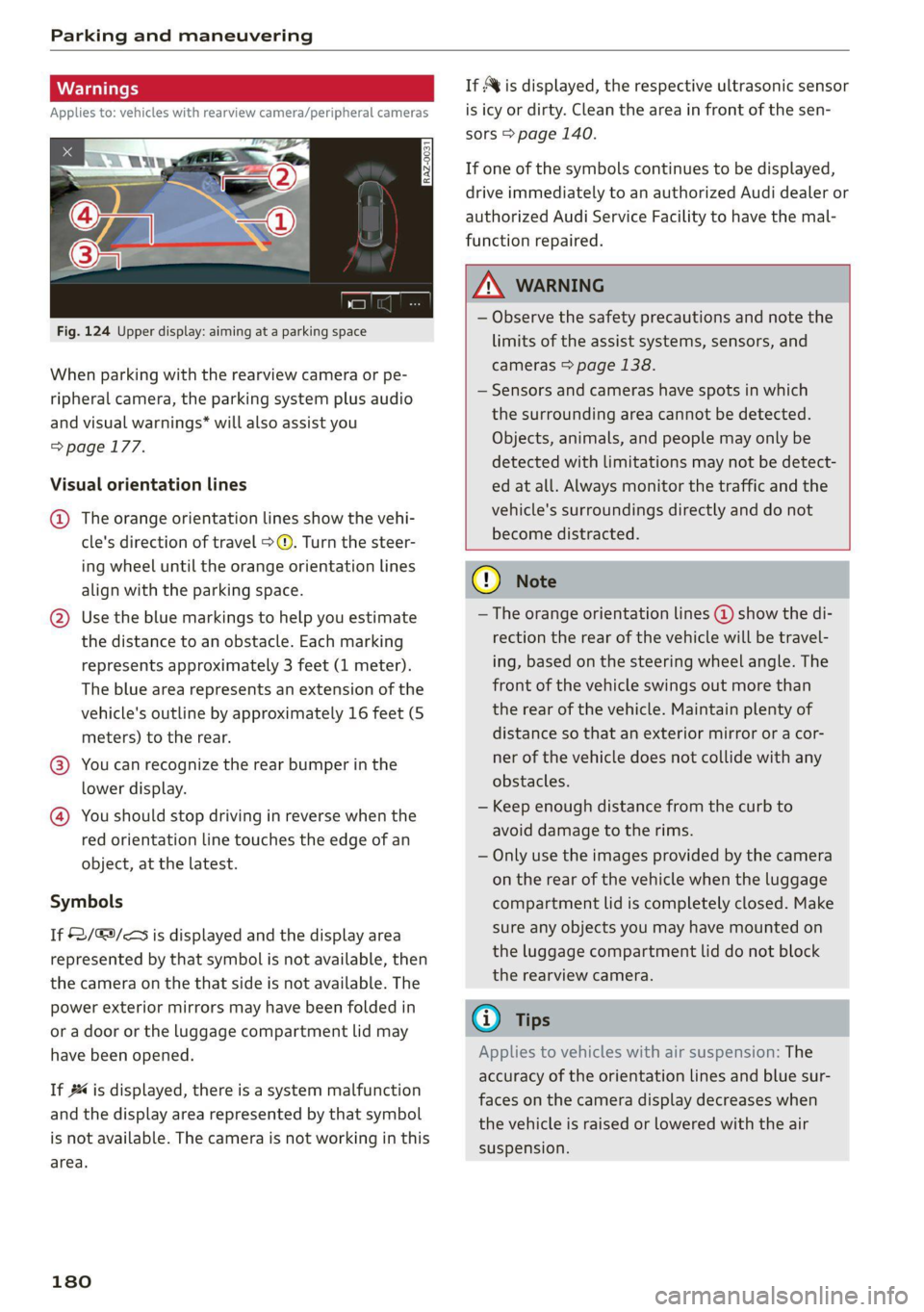
Fig. 124 Upper display: aiming at a parking space
When parking with the rearview camera or pe-
ripheral camera, the parking system plus audio
and visual warnings* will also assist you
=> page 177.
Visual orientation lines
@ The orange orientation lines show the vehi-
cle's direction of travel >@. Turn the steer-
ing wheel until the orange orientation lines
align with the parking space.
@) Use the blue markings to help you estimate
the distance to an obstacle. Each marking
represents approximately 3 feet (1 meter).
The blue area represents an extension of the
vehicle's outline by approximately 16 feet (5
meters) to the rear.
@® You can recognize the rear bumper in the
lower display.
@ You should stop driving in reverse when the
red orientation line touches the edge of an
object, at the latest.
Symbols
If 2/&9/< is displayed and the display area
represented by that symbol is not available, then
the camera on the that side is not available. The
power exterior mirrors may have been folded in
or a door or the luggage compartment lid may
have been opened.
If # is displayed, there is a system malfunction
and the display area represented by that symbol
is not available. The camera is not working in this
area.
180
If Avis displayed, the respective ultrasonic sensor
is icy or dirty. Clean the area in front of the sen-
sors > page 140.
If one of the symbols continues to be displayed,
drive immediately to an authorized Audi dealer or
authorized Audi Service Facility to have the mal-
function repaired.
ZA WARNING
— Observe the safety precautions and note the
limits of the assist systems, sensors, and
cameras > page 138.
— Sensors and cameras have spots in which
the surrounding area cannot be detected.
Objects, animals, and people may only be
detected with limitations may not be detect-
ed at all. Always monitor the traffic and the
vehicle's surroundings directly and do not
become distracted.
() Note
— The orange orientation lines @ show the di-
rection the rear of the vehicle will be travel-
ing, based on the steering wheel angle. The
front of the vehicle swings out more than
the rear of the vehicle. Maintain plenty of
distance so that an exterior mirror or a cor-
ner of the vehicle does not collide with any
obstacles.
— Keep enough distance from the curb to
avoid damage to the rims.
— Only use the images provided by the camera
on the rear of the vehicle when the luggage
compartment lid is completely closed. Make
sure any objects you may have mounted on
the luggage compartment lid do not block
the rearview camera.
G) Tips
Applies to vehicles with air suspension: The
accuracy of the orientation lines and blue sur-
faces on the camera display decreases when
the vehicle is raised or lowered with the air
suspension.
Page 190 of 350

Parking and maneuvering
process will be recalculated based on the vehi-
cle position.
LED in the button (4)
The LED informs about the availability of park as-
sist plus:
— Blinking white - park assist plus is ready to
control the parking process automatically or to
resume after an interruption.
— Green - park assist plus is active.
— Red - park assist plus was paused or stopped. A
message will appear in the instrument cluster
display > page 190.
Indicator in the upper display
The current driving maneuver and the status of
the park assist plus are shown in the upper dis-
play:
@ Path that the vehicle will travel during the
current parking maneuver
@® End point of the current parking maneuver/
direction change
®@ o Park assist plus active
©) Driving direction display
End of the parking process
The parking process will end automatically once
the vehicle has reached the end point in the park-
ing space. After park assist plus finishes parking
successfully, the parking lock will be engaged
and the parking brake will be set.
Pause park assist plus > page 189.
— Park assist plus is an assist system. The driv-
er is still responsible for monitoring the ve-
hicle's surroundings and preventing colli-
sions when using the system.
— When using park assist plus to drive into or
out of a parking space, the steering wheel
turns quickly on its own. Reaching into the
steering wheel spokes while this is happen-
ing can result in injury.
— Sensors and cameras have spots in which
the surrounding area cannot be detected.
Objects, animals, and people may only be
detected with limitations may not be detect-
ed at all. Always monitor the traffic and the
vehicle's surroundings directly and do not
become distracted.
Z\ WARNING
— Observe the safety precautions and note the
limits of the assist systems, sensors, and
cameras > page 138.
— Press and hold the [>>P] button only if you
are sure that there are no obstacles in the
vehicle's path or under the vehicle, and that
no obstacles will move into the vehicle's
path.
188
G) Tips
— You can reduce the speed specified by the
system at any time by pressing the brake
pedal.
— The system can incorrectly interpret parking
space barriers (such as parking curbs). Take
over the parking process = page 189 if the
vehicle is not completely inside the parking
space or if the vehicle tries to drive over the
parking space barrier.
— The image in the display is an enlarged and
distorted image. Under certain circumstan-
ces, objects may appear different and un-
clear on the display. This is especially true if
there are objects that do not touch the
ground, such as the bumper of a parked ve-
hicle or the rear of a truck. Drive with spe-
cial care and do not use the image if neces-
sary.
— Applies to vehicles with air suspension: The
accuracy of the orientation lines and green
surfaces in the display decreases when the
vehicle is raised or lowered with the air sus-
pension.
Page 293 of 350

4K8012721BF
Wheels
AN WARNING
Using incorrect snow chains or installing snow
chains incorrectly can result in loss of vehicle
control, which increases the risk of an acci-
dent.
() Note
— Snow chains can damage the rims and
wheel covers* if the chains come into direct
contact with them. Remove the wheel cov-
ers* first. Use coated snow chains.
— Do not install and use snow chains if there is
a malfunction in the air suspension*, be-
cause the vehicle height will be very low. If
you drive with snow chains anyway, the
wheel housings and other vehicle compo-
nents can be severely damaged.
@ Tips
When using snow chains, it may be advisable
to limit the ESC > page 116.
Low-profile tires
Applies to: vehicles with low-profile tires
Compared to other tire/rim combinations, low-
profile tires offer a wider tread surface and a
larger rim diameter with shorter tire sidewalls.
This results in an agile driving style. However, it
may reduce the level of comfort and increase
road noise when driving on roads in poor condi-
tion.
Low-profile tires can become damaged more
quickly than standard tires when driving over
large bumps, potholes, manhole covers, and
curbs. Therefore, it is particularly important to
maintain the correct tire pressure > page 284.
To reduce the risk of damage to the tires and
rims, drive very carefully on poor roads.
Check your wheels regularly every 2,000 mi
(3,000 km) for damage. For example, check for
bulges/cracks on the tires or deformations/cracks
on the rims.
After a heavy impact or damage, have the tires
and rims inspected or replaced immediately by
an authorized Audi dealer or authorized Audi
Service Facility.
Low-profile tires can wear out faster than stand-
ard tires.
Uniform tire quality grading
— Tread wear
— Traction AAABC
— Temperature ABC
Quality grades can be found where applicable on
the tire side wall between tread shoulder and
maximum section width > page 275, fig. 170.
For example: Tread wear 200, Traction AA, Tem-
perature A.
All passenger car tires must conform to Federal
Safety Requirements in addition to these grades.
Tread wear
The tread wear grade is a comparative rating
based on the wear rate of the tire when tested
under controlled conditions on a specified gov-
ernment test course.
For example, a tire graded 150 would wear one
and one half (1 1/2) times as well on the govern-
ment course as a tire graded 100.
The relative performance of tires depends upon
the actual conditions of their use, however, and
may depart significantly from the norm due to
variations in driving habits, service practices and
differences in road characteristics and climate.
Traction
The traction grades, from highest to lowest, are
AA, A, Band C. Those grades represent the tire's
ability to stop on wet pavement as measured un-
der controlled conditions on specified govern-
ment test surfaces of asphalt and concrete. A tire
marked C may have poor traction performance
SA.
Temperature
The temperature grades are A (the highest), B,
and C, representing the tire's resistance to the
generation of heat and its ability to dissipate
291
>