door lock AUDI A8 2011 User Guide
[x] Cancel search | Manufacturer: AUDI, Model Year: 2011, Model line: A8, Model: AUDI A8 2011Pages: 302, PDF Size: 76.07 MB
Page 39 of 302

If you pull light ly on its handle , the rea r lid
will close .
You can manually stop the automatic open ing/closing of th e luggage compa rtm ent lid .
Th e automatic clos ing process begins if you
push down on the rear lid .
A WARNING
- After closing the rear lid, always pull up
on it to make sure that it is properly
closed. O therwise it could open sudden ly
when the vehicle is moving .
- To help prevent poisonous exhaust gas
from being drawn into the vehicle, al
ways keep the rear lid closed while driv
ing . Never transport objects larger than
those which fit completely into the lug
gage area, because then the rear lid can
not be fu lly closed .
- Never leave you r vehicle unatte nded es
pecially wi th the rea r lid left open. A
child could cr awl into the ca r th rough the
l u ggage compartment and pull the lid
shut, becom ing trapped and unab le to
get out . To reduce the risk of persona l in
jury, never let children p lay in or around
your vehicle . Always keep the rear lid as
well as the vehicle doors closed when not
in use .
- Never close the rear lid inattentively or
without checking fi rst . Al though the
closing force of the rear lid is lim ited,
you can st ill ser iously injure yourself or
others.
- Always ensure that no one is w ith in
range of the rear lid when it is mov ing, in
par ticu lar close to t he h inges and the up
per and lower edges -fingers or hands
can be p inched.
- Never try to inte rfe re with the rear lid or
help it when it is being opened or closed
automatically .
(D Tips
- If there is a mechanical problem with au
tomatic closing for the rea r lid or there is
an obstruction, it opens again immed i-
Openin g an d clos ing 3 7
ately. Check to see why the rear lid co uld
not be closed before attempting to close
it again.
- The following applies to vehicles equip
ped with the Convenience key * feature: if
the remote control key is left in the lug
gage compartment, luggage compart
ment w ill automa tically unlock i tself af
ter you lock the vehicle . Th is prevents
you from unintentionally lock ing your
key in the l uggage compartme nt.
- When the vehicle is loc ked, the rear lid
can be unlocked separately by p ress ing
the button
cs on the mas ter key . When
t he rear lid is closed again, it locks au to
matically.
- Yo u can close the rear lid using t he mas
ter key (veh icles with convenience key *)
up to a distance of app roximately 3 me
ters.
Rear lid emergency release
If the central locking system fails, the rear lid
can b e opened at the lock cylinder .
AUD.1
Fig. 27 Re ar lid : m echan ic a l key in t he loc k cy linde r
.,. Remove the mechani cal key q page 30.
.,. In ser t t he key in the lock cylinder aspic
tured .
.,. Tu rn the key approximately 45° to the right
q fig. 27. The rear lid opens q .& .
In this position the key cannot be pulled out
of the lock cy linder .
A WARNING
-After closing the rear lid, always p ull up
on it to make sure t hat it is p roperly
Page 40 of 302

38 Opening and clo sing
closed. Otherw ise it could open sudden ly
when the vehicle is moving.
- To help prevent poisonous exhaust gas
from being drawn into the vehicle, al
ways keep the rear lid closed while driv
ing. Never transport objects larger than
those which fit completely into the lug gage area, because then the rear lid can
not be fully closed.
- Never leave your vehicle unattended es pecially with the rea r lid left open . A
child could crawl into the car through the
l u ggage compa rtment and pull the lid
shu t, becom ing trapped and unab le to
get out. To reduce the risk of persona l in
jury, never let children p lay in or around
yo ur vehicle. Always keep the rear lid as
we ll as the vehicle doors closed when not
in use.
Child safety lock
Mechanical child safety lock in the rear
doors
The child safety lo ck prevents the rear doors
from being opened from the inside.
Fig . 28 Rear doors: child safety loci<
The child safety lock is visible only when the
door is open.
• Remove the mechanical key¢
page 30.
• To sw itch on the child safety lock, turn the
key in the direction of the arrow.
• To switch off the child safety lock, turn the
key in the opposite direction to the arrow.
When the child safety locks are activated, the
ins ide door handles do not work and the doors
can only be opened from the outside.
Power child safety lock for the rear
doors
Applies to vehicles: with power child safety lock in the
rear doors
The power child safety lock t preven ts the
rear doors from being opened from the in
side .
Fig . 29 Sect ion from dr ive r's door: con trols
• To a ctivate the c hild safety loc k for the left/
right rear doo r, p ress the left/right b utton
t
in the driver's door r=> fig. 29. The light in the
button will turn on .
.,. To deact ivate the child safety lock for the
left/right rear door, press the left/rig ht but
ton
t in the driver's door . The light in the
button turns off .
The following features are switched off:
- The interior door hand les in the door,
- The power w indows in the rear doors,
- The b uttons for t he sun shade* in the rear
w indow,
- The b uttons fo r the power sun shades* i n
the s ide windows,
- The front passenger power seat adjust
men t* button (by pressing the right bu tton
[!]) .
In order to activate the ch ild safety lock on
the left and the r ight side, press the two safe
ty but to ns
I!] in succession.
Page 41 of 302

Power windows
Controls
The driver can control all power windows.
Fig. 30 Section of the driver's door: Controls
All power window switches are provided with
a two-pos ition function:
Opening the windows
"' Press the switch to the first stop and hold it
until the window reaches the desired posi
tion.
"' Press the switch briefly to the
second stop
to automatically open the window .
Closing the windows
"' Pull the switch to the first stop and hold it
until the window reaches the desired posi
t ion.
"' Pull the switch briefly to the
second stop to
automatical ly close the window.
Power window switches
@ Driver's door
@ Passenger's door
© Left rear door
@ Right rear door
® Safety button (or two safety buttons in ve
hicles with power child safety locks
<=>page38)
Child safety lock
When the safety button® c:> fig. 30 is press
ed, the LED in the button lights up. The fol
l owing features are switched off:
- The power windows in the rear doors,
Opening and closing 39
- The buttons for the power sun shades* in
the side windows,
- The buttons for the power sun shade* in the
rear window,
- Front passenger power seat adjustment*
button.
&_ WARNING ~
- When you leave your vehicle -even if on-
ly briefly - always take the ignit ion key
with you. This applies particularly when
children remain in the vehicle. Otherwise
the children could start the engine or op
erate electrical equipment (e.g. power
windows). The power windows are func
tional until the driver's door or passeng
er 's door has been opened.
- Be careful when closing the windows.
Check to see that no one is in the way, or
serious injury could result!
- When locking the vehicle from outside,
the vehicle must be unoccupied since the
windows can no longer be opened in an
emergency .
(j) Tips
- The driver can lower or ra ise the power
sun shades* in the sid e windows by using
switches © and @.
- After the ignition has been switched off,
the windows can st ill be opened or
closed for about 10 minutes. The power
windows are not switched off until the
driver's door or passenger's door has
been opened.
What to do after a malfunction
The one-touch open and close function must
be reactivated if the battery has been discon
nected.
"' Pull and ho ld the power window switch until
the window is fully closed.
"' Release the switch and then pull it again for
at leas t one second.
Page 42 of 302
40 Opening and closing
Valet parking
The valet parking feature protects the lug
gage comportment from unauthorized ac
cess .
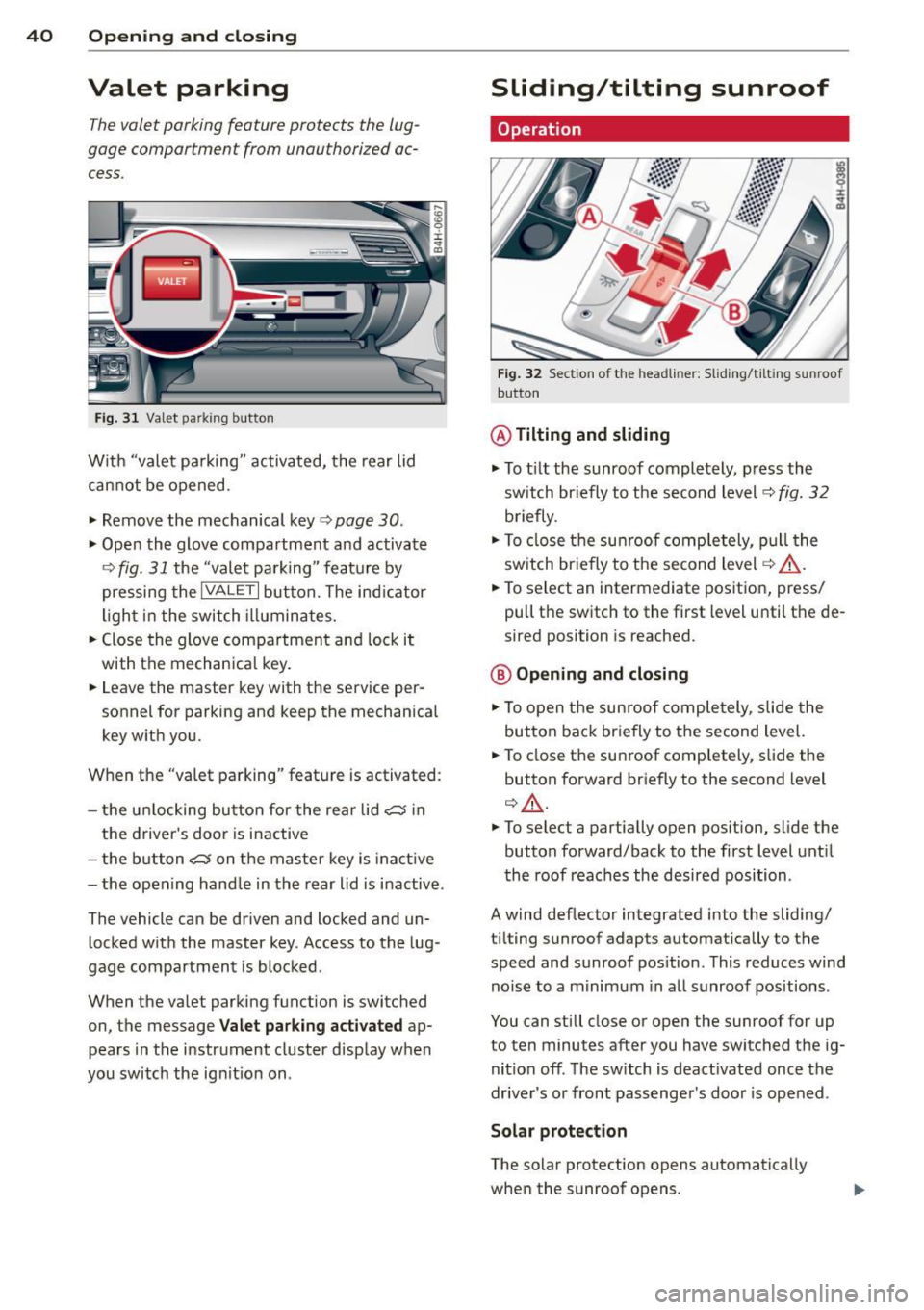
Fig. 31 Valet park ing button
With "valet pa rking" activated, the rear lid
cannot be opened.
.. Remove the mechanical key
c:> page 30 .
.,. Open the glove compartment and activate
¢
fig. 31 the "valet parking" feature by
pressing the
I VALET I button. The ind icator
light in the switch illuminates.
.,. Close the glove compartment and lock it
with the mechanical key .
.. Leave the master key with the service per
sonnel
for parking and keep the mechanical
key with you .
When the "valet parking" feature is activated :
- the u nlocking button for the rear lid
c:5 in
the driver's door is inactive
- the butt on
c:5 on the master key is inac tive
- the opening hand le in the rear lid is inactive.
The vehicle can be driven and locked and un locked w ith the master key. Access to the lug
gage compartment is blocked.
When the valet parking function is switched
on, the message
Valet parking activated ap
pears in the instrument cluster display when
you switch the ign it ion on .
Sliding/tilting sunroof
Operation
Fig. 32 Section of the headl iner: Sliding/t iltin g sunroof
button
@ Tilting and sliding
.,. To t ilt the sunroof completely, press the
sw itch br iefly to the second level¢
fig. 32
briefly .
.. To close the sunroof completely, pull the
sw itch briefly to the second level¢,&. .
.. To select an intermediate position, press/
pull the switch to the first level until the de
sired position is reached .
@ Opening and closing
.,. To open the sunroof completely, slide the
button back briefly to the second level.
.. To close the sunroof completely, slide the
button forward briefly to the second level
q ,&..
.. To select a partially open pos ition, slide the
button forward/back to the first level until
the roof reaches the desired position.
A wind deflector integrated into the sliding/
t il ting sunroof adapts automatically to the
speed and sunroof pos ition . This reduces wind
noise to a m inimum in all sunroof positions .
You can still close or open the sunroof for up
to ten minutes after you have switched the ig
nition off . The switch is deact ivated once the
driver's or front passenger's door is opened.
Solar protection
The solar protection opens automatically
when the sunroof opens.
Page 47 of 302
Automatic headlights
You can adjust the following settings in the
Automatic headlights menu:
Headlights activation time -You can adjust if
the headlights switch on
Early, Med . or Late
according to the sensitivity of the light sensor.
Audi adaptive light* -You can switch adaptive
light
On and Off.
Daytime running lights
USA models:
You can switch the dayt ime run
n ing lights
on and off .
Canada models :
The function cannot be
turned off . It is activated automatically each
time the ignition is switched on. This menu
item is shown "greyed out".
Coming home, Leaving home
The coming home function illuminates the
area outside the vehicle when you switch the
ignition off and open the driver's door. To turn
the function on, select
Lights when leaving
car > On .
The leaving home function illuminates the
area outside the vehicle when you un lock the
vehicle. To turn the funct ion on, select
Lights
when unlocking car > On .
The coming home and leaving home functions
only operate when it is dark and the light
switch is in the
AUTO pos ition. Clear
vision 45
Turn signal lever
The lever on the left side of the steering col
umn is used to operate the turn signals and
the high beam as well as the headlight flash
er.
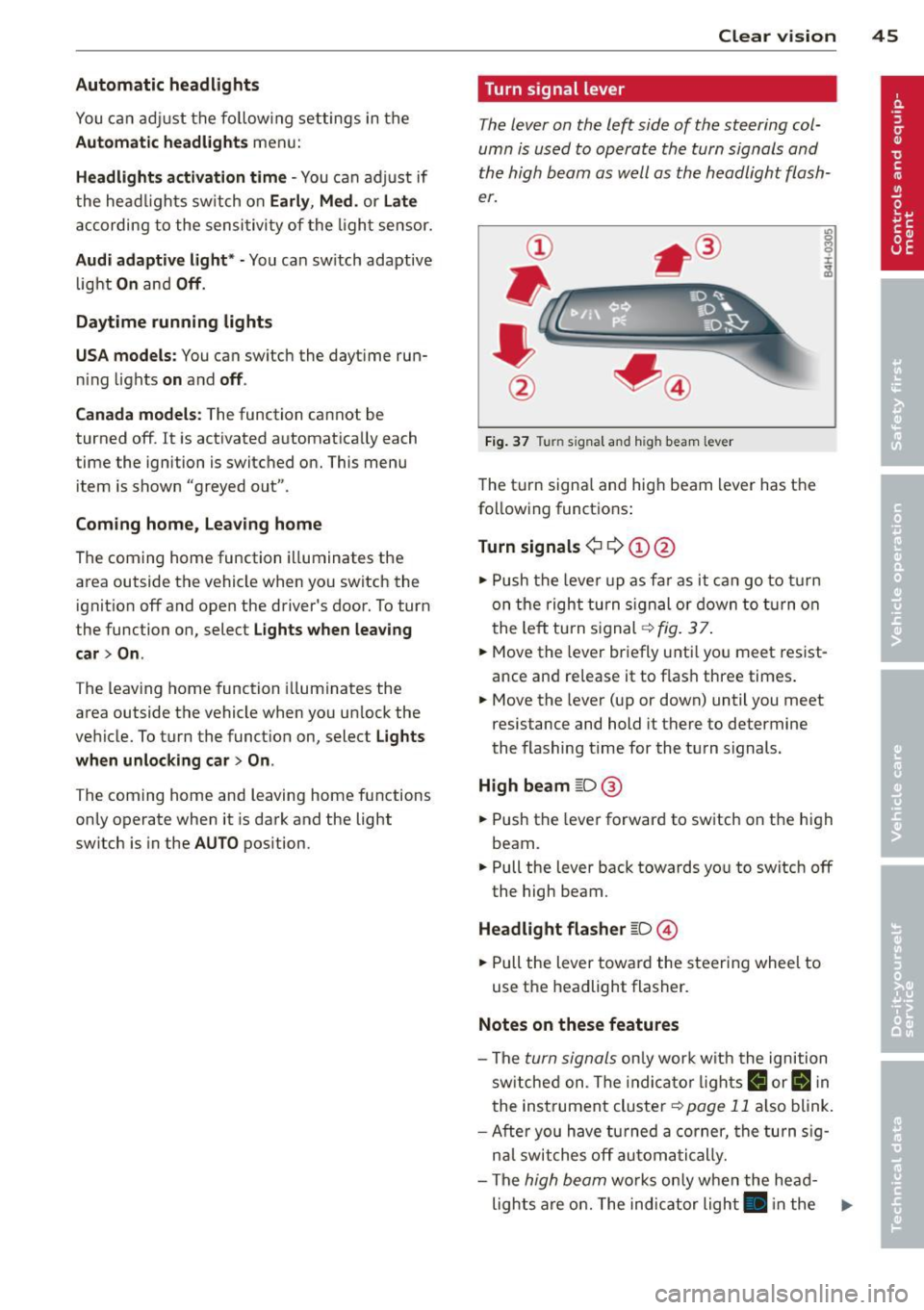
Fig. 37 Tu rn signal and high beam lever
The turn signa l and high beam lever has the
following funct ions :
Turn signals ¢ 9 ©@
.,. Push the lever up as fa r as it can go to turn
on the right turn signa l or down to turn on
the left tu rn s ignal ¢
fig. 3 7.
... Move the lever briefly unti l you meet resist
ance and re lease it to flash three times.
.,. Move the lever (up or down) until you meet
resistance and hold it there to determine
the flashing time for the turn signals.
High beam ~D @
... Push the lever forward to switch on the high
beam .
.,. Pull the lever back towards you to switch
off
the high beam.
Headlight flasher ~D ©
... Pull the lever toward the steering wheel to
use the headlight flasher.
Notes on these features
-The turn signals on ly work w ith the ignition
sw itched on. The indica tor l ights
R or II in
the instrument cluster
¢page 11 also blink.
-Aft er you have turned a corner, the turn sig-
nal switches
off automatically.
- The
high beam works only when the head-
lights are on. The indicator light . in the .,.
Page 48 of 302

46 Clear vision
instrument cluster illuminates when the
high beams are on.
- The
headlight flash er works only as long as
you hold the lever - even if there are no
lights turned on. The indicator light. in
the instrument cluster illuminates when you
use the headlight flasher.
(D Note
Do not use the high beam or headlight
flasher if you know that these could blind
oncoming traffic .
Interior lights
Front and rear interior lighting
Fig. 38 Headliner: Front interior l ig hts
Fig. 39 Rear headliner : Reading light
Press the appropriate button ¢ fig. 38:
§} -Interior lighting on/off
I]-Door contact switch. The interior lighting
turns on automatically when you unlock the
vehicle, open a door or switch the ignition off.
The interior lighting turns off several seconds
after you close the doors, when you lock the
vehicle or when you switch the ignition on.
When a door is open, the light turns off after
a few minutes.
L:!l -Reading lights on/off
~ - Switching the rear reading lights on/off
from the cockpit.
IREAR MODEt* - Sw itch ing the rear reading
lights on/off from the cockpit : press the
I REAR MODE i button and then the appropriate
button
L:!l in the cockpit .
Ambience lighting
Applies to vehicles: wi th ambience lig htin g
You can select a color profile and brightness
for the ambience lighting in various areas of
the vehicle, called zones.
Turning ambience lighting on
.,. Select in the MMI: ICARI function button >
Car systems control button > Vehicle set
tings > Interior lighting > On.
Adjusting/turning off the brightness
.,. Select in the MMI: ICARlfunction button>
Car systems control button > Vehicle set
tings > Interior lighting
> Brightnes s .
.,. Turn the knob to the desired vehicle area
and press the knob. The bar that appears in
dicates the selected brightness .
.,. To increase or reduce the brightness, turn
the knob and press it.
Selecting a color profile*
.,. Select in the MMI: ICARlfunction button>
Car systems control button > Vehicle set
tings > Interior lighting > Color profile.
The ambience lighting turns on when the
function is activated in the MMI and when you
turn the headlights on while the ignition is switched on.
Adjusting the brightness
You can adjust the brightness for the four
zones
Front top, Front footwell, Rear top and
Rear footwell or for All areas at the same
time . ..,.
Page 61 of 302
Operating the reclining rear seat
App lies to v ehicles: with reclining rea r seat
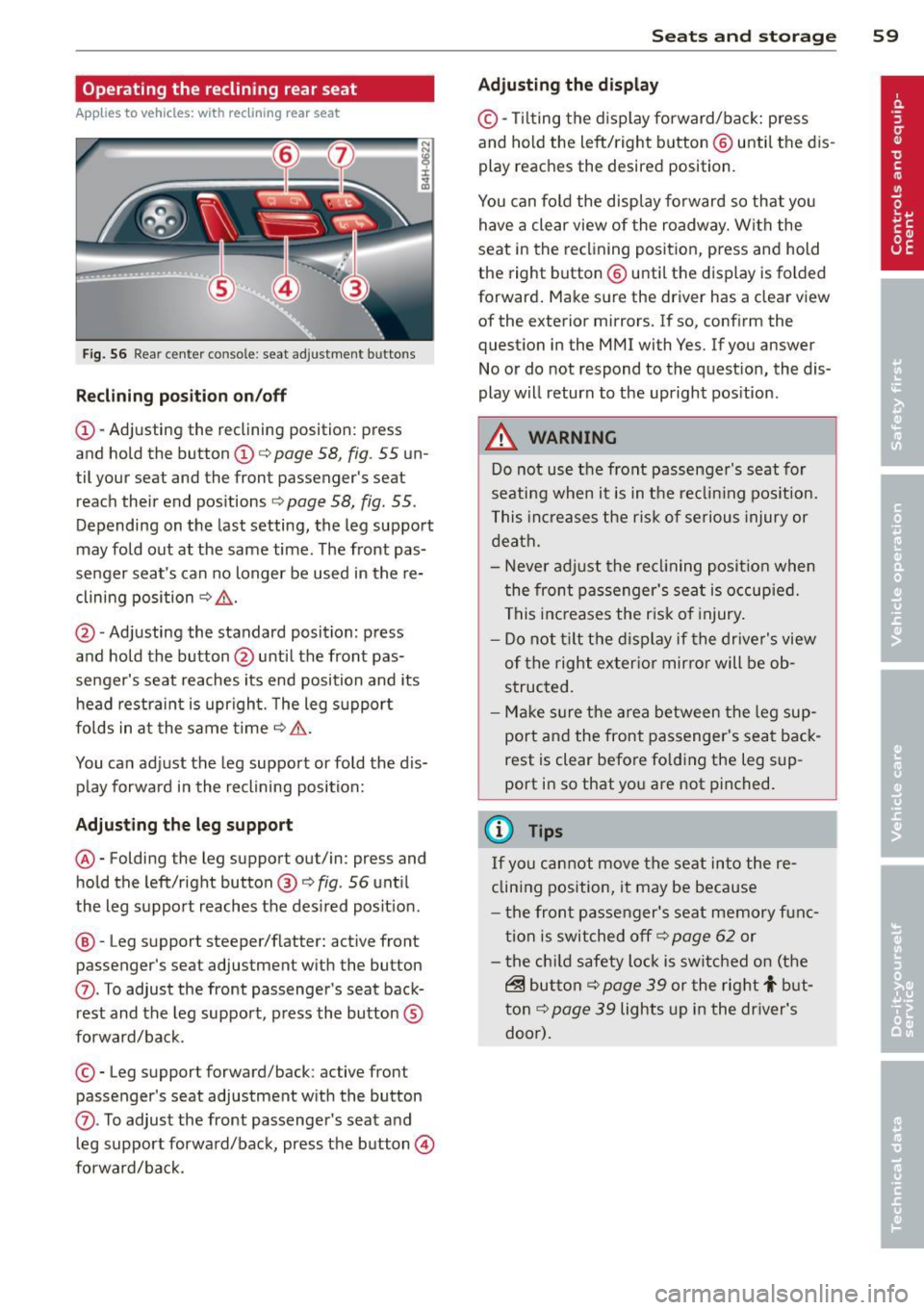
Fig. 56 Rear cente r co nso le : seat adjustment bu tto ns
Reclining position on/off
@-Adjusting the reclining position: press
and hold the button@c:::>
page 58, fig. 55 un
til your seat and the front passenger's seat
reach their end positions
c:::> page 58, fig. 55.
Depending on the last setting, the leg support
may fold out at the same time. The front pas
senger seat's can no longer be used in the re
clining position c:::>
&,.
@ -Adjusting the standard position: press
and hold the button @until the front pas
senger's seat reaches its end position and its
head restraint is upright. The leg support
folds in at the same time c:::>
&,.
You can adjust the leg support or fold the dis
play forward in the reclining position:
Adjusting the leg support
®-Folding the leg support out/in: press and
hold the left/right button ®
c:::>fig . 56 until
the leg support reaches the des ired posit ion .
@ -Leg support steeper/flatter: active front
passenger's seat adjustment with the button
(J) . To adjust the front passenger's seat back
rest and the leg support, press the button ®
forward/back.
© -Leg support forward/back: active front
passenger 's seat adjustment with the button
(J) . To adjust the front passenger's seat and
l eg support forward/back, press the button@
forward/back.
Seats and storage 59
Adjusting the display
©-Tilt ing the display forward/back: press
and hold the left/right b utton @ until the dis
play reaches the desired position.
You can fold the display forward so that you
have a clear view of the roadway. With the
seat in the reclining position, press and hold
the right button@ unti l the display is folded
forward. Make sure the driver has a clear view
of the exterior mirrors. If so, confirm the
question in the MMI with Yes. If you answer
No or do not respond to the question, the dis
play will return to the upright pos ition .
A WARNING
Do not use the front passenger's seat for
seating when it is in the reclin ing position.
This increases the risk of serious injury or
death.
- Never adjust the reclining position when
the front passenger's seat is occupied.
This increases the risk of injury.
- Do not t ilt the display if the driver's view
of the right exterior mirror will be ob
structed.
- Make sure the area between the leg sup
port and the front passenger's seat back
rest is clear before fo lding the leg sup
port in so that you are not pinched.
(!) Tips
If yo u cannot move the seat into the re
clining position, it may be because
- th e front passenger's seat memory func
tion is switched off c:::>
page 62 or
- the child safety lock is switched on (the
~ button c:::> page 39 or the rig ht t but
ton c:::>
page 39 lights up in the driver's
door).
Page 62 of 302
60 Seats and storage
Massage function remote control
Applies to vehicles: with reclining rear seat and massage
f u nct ion
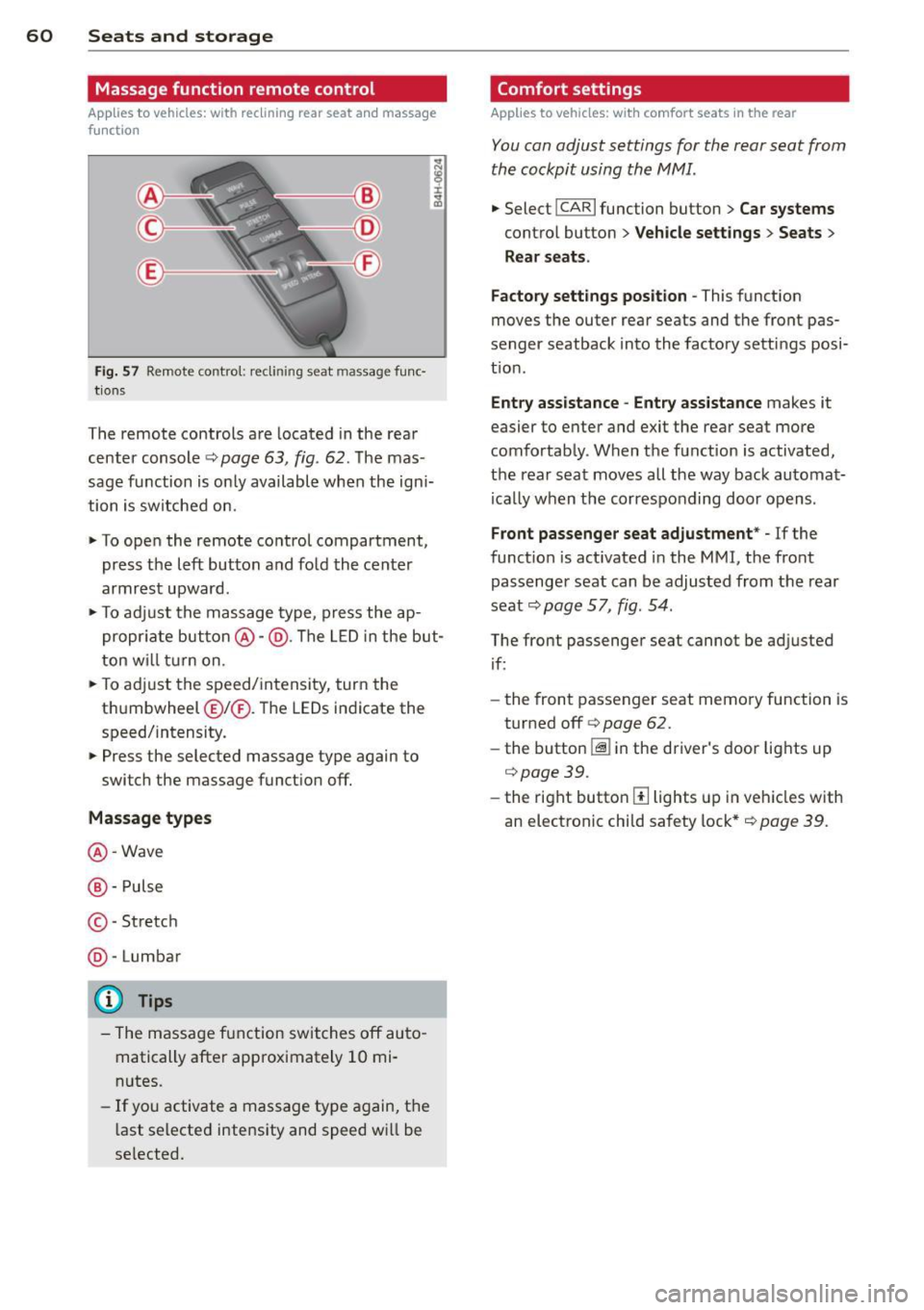
Fig. 57 Remote contro l: recli nin g seat massage func·
tions
The remote controls are located in the rear
center console
q page 63 , fig . 62. The mas
sage function is only available when the ign i
tion is switched on.
"To open the remote control compartment,
press the left button and fold the center
armrest upward .
"To adjust the massage type, press the ap
propriate button@-@ . The LED in the but
ton will turn on.
"T o adj ust the speed/intensity, turn the
t hu mbwheel @I® . Th e LEDs indicate the
speed/intensity.
" Press the selected massage type again to
switch the massage function off.
Massage types
@-Wave
@ -Pulse
© -St retch
@ -Lumbar
(D} Tips
- The massage function switches off auto
matically after approximately 10 mi·
nutes.
- If you activate a massage type again, the
last selected intensity and speed wi ll be
se lected.
Comfort settings
Applies to vehicles: wit h comfort seats in the rear
You can adjust settings for the rear seat from
the cockpit using the MMI.
" Select !CAR I function button> Car systems
contro l button > Vehicle settings > Seats >
Rear seats.
Factory settings position -
This function
moves the outer rear seats and the front pas
senger seatback into the factory settings posi
t ion .
Entry assistance -Entry assistance makes it
easier to enter and exit the rear seat more
comfortably. When the function is activated,
the rear seat moves all the way back automat
i ca lly when the corresponding door opens .
Front passenger seat adjustment* -If the
function is act ivated in the MMI, the fro nt
passenger seat can be adjusted from the rear
seat
q page 57, fig . 54 .
The front passenger seat cannot be ad justed
if:
- the front passenger seat memory function is
turned off
q page 62.
- the button
I:@ in the driver's door lights up
q page39.
-the right button[!] lights up in vehicles with
an electronic child safety lock*
q page 39.
Page 64 of 302
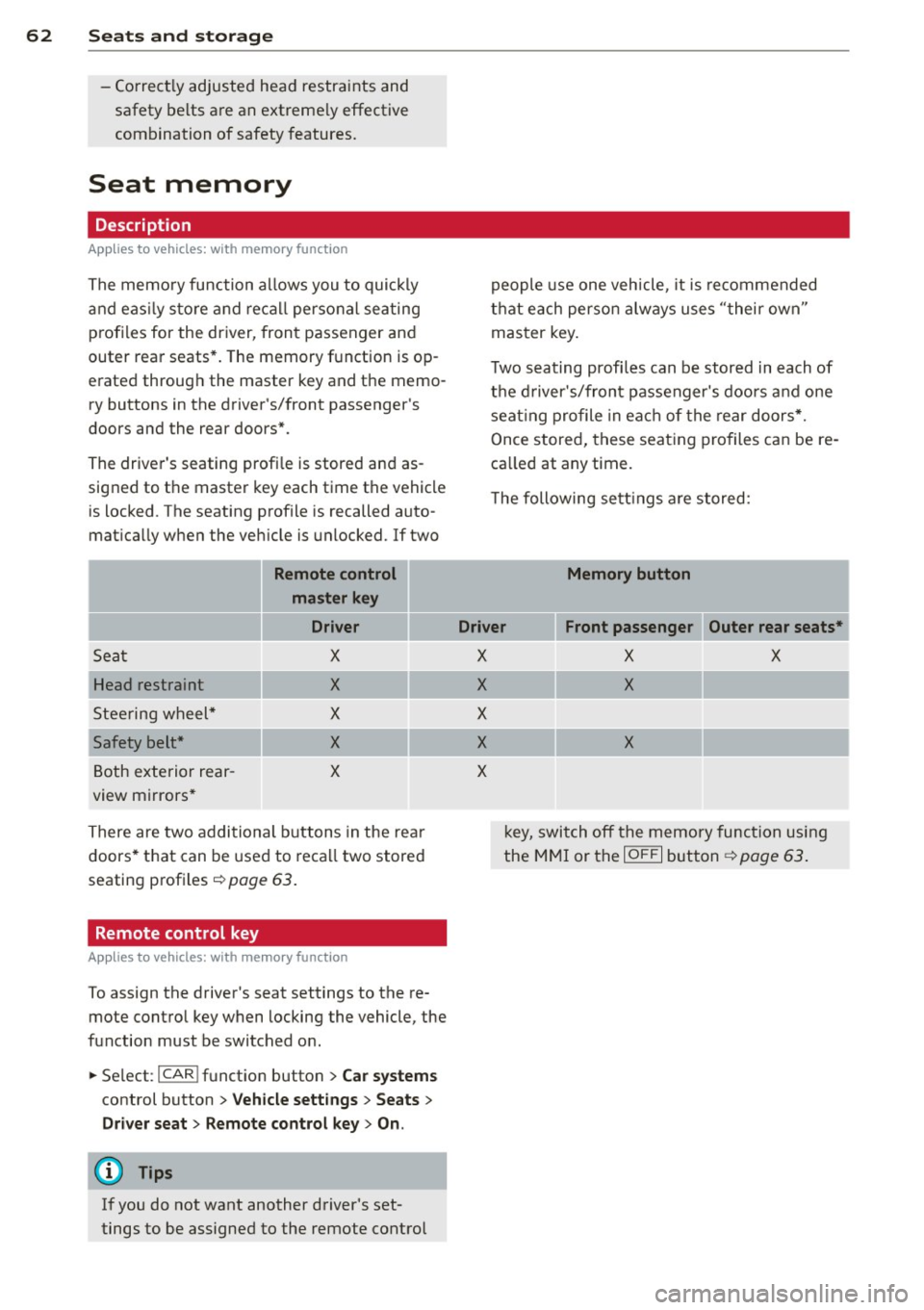
62 Seats and storage
-Correctly adjusted head restraints and
safety be lts are an extreme ly effective
combination of safety features.
Seat memory
Description
App lies to vehicles: with memory function
The memory function allows you to quickly
and easily sto re and recall personal seating
profiles for the driver, front passenger and
outer rear seats*. The memory function is op
erated through the master key and the memo ry buttons in the driver 's/front passenge r's
doors and the rear doors*.
The driver's seating profi le is stored and as
signed to the master key each time the vehicle
is locked . The seating profile is recalled auto
mat ically when the veh icle is unlocked . If two
Remote control
master key
Driver
Sec1t X
Head restraint X
Steering wheel* X
Safety belt* X
Both exterior rear-X
view mirrors*
There are two additional buttons in the rear
doors* that can be used to recall two stored
seating profiles
r:=> page 63.
Remote control key
Applies to vehicles: with memory function
To assign the driver's seat settings to the re
mote contro l key when locking the vehicle, the
function must be switched on.
• Se lect :
I CAR ! function button > Car systems
control button > Vehicle settings > Seats >
Driver seat > Remote control key> On .
(D Tips
If you do not want another driver's set
tings to be assigned to the remote control people
use one veh icle, it is recommended
that each person always uses "their own"
master key.
T wo seating profi les can be stored in each of
the driver's/front passenger's doors and one
seat ing profile in each of the rear doors*.
Once stored, these seating profiles can be re
ca lled at any time.
T he following sett ings are stored:
Memory button
Driver Front passenger Outer rear seats*
X
X
X
X
X
X X
X
X
k ey, switch off the memory function using
the MMI or the
IO FF I button ~ page 63.
Page 73 of 302

A WARNING ,~ ~
When driving, do not leave any hard ob
jects on the rear w indow shel f or allow
your pet to s it on the shelf. They could be
come a hazard for veh icle occupants in the
event of sudden braking or a crash.
([) Note
Make sure abrasive objects do not damage
the heating w ires for the rear window de
fogger.
{1) Tips
- A vent slot is located between the shelf
and the rear window. Do not b lock the
vent with any items you may place on the
rear w indow shelf.
- Do not place bulky items on the rear w in
dow shelf as they could restrict o r block
the driver's vis ion in the rear view mirro r.
Additional storage
There are a variety of storage compartments
and fasteners in various places in the vehicle.
- Storage compartments in the doors
- Net in the front passenger footwell
- Eyeglasses compartment in the headliner
(near the rearview m irror)
- Storage compartments under the center
armrests
- Compartments* on the back of the front
seat backrests
- Garment hooks over the rear doors
- Compartment in the center console with
pass-through)* (rear)
- Compartment behind the rear center arm
rest (in vehicles without the pass-through*
or refr igerator*)
- Bag hooks in the luggage compartment
A WARNING
-
- Always remove objects from the instru
ment panel. Any items not stored could
slide arou nd inside the vehicle while driv
ing or when accelerating or when apply-
S eat s an d sto rage 71
ing the brakes or when driving around a
corner.
- When you are driving make sure that
anyth ing you may have placed in the cen
ter conso le or other storage locations
cannot fall out into the footwells. In case
of sudden braking you would not be able
to b ra ke or accelerate .
- Any art icles of clothing that you have
hung up must not inte rfere wit h the dr iv
er's view. The coat hooks are des ign ed
only fo r ligh twe ight clot hing. Neve r hang
any cloth ing wi th hard, po in ted o r heavy
objects in the po ckets on the coat hoo ks .
During s udden braking or in an accident -
especia lly if the airbag is deployed -
these objects co uld inj ure any passen
gers inside the vehicle.
- To reduce the risk of perso nal inju ry in an
accident or s udden stop, always keep the
glove compartment closed wh ile driving.
- Read and follow a ll WARNINGS
c::> page 165 , Important safety instruc
tions on the side airbag system.
- Hang clothes in such a way that they do
not impair the driver's vision.
- The coat hooks must only be used for
lightweight clothing. Do not leave any
heavy or sharp edged objects in the pock
ets which may interfere with the s ide cur
tain airbag deployment and can ca use
pe rsonal injury in a crash .
- Do not use coat hangers for hanging cloth ing on the coat hooks as th is can in
terfere with prope r deployment of the
side curta in a irbags in an acc ident.
- Do not hang heavy objects on the coat
hooks, as they co uld cause perso nal i n
ju ry in a sudden stop.
(D Note
Objects located on the rear shelf that rub
against the rea r window could damage the
heating wires for the rear window defog
ger.