brake light AUDI A8 2012 User Guide
[x] Cancel search | Manufacturer: AUDI, Model Year: 2012, Model line: A8, Model: AUDI A8 2012Pages: 300, PDF Size: 75.06 MB
Page 82 of 300
80 On the road
the stored position as soon as you switch on
the ignition.
Starting and stopping
the engine
Starting the engine
This button switches on the ignition and
starts the engine.
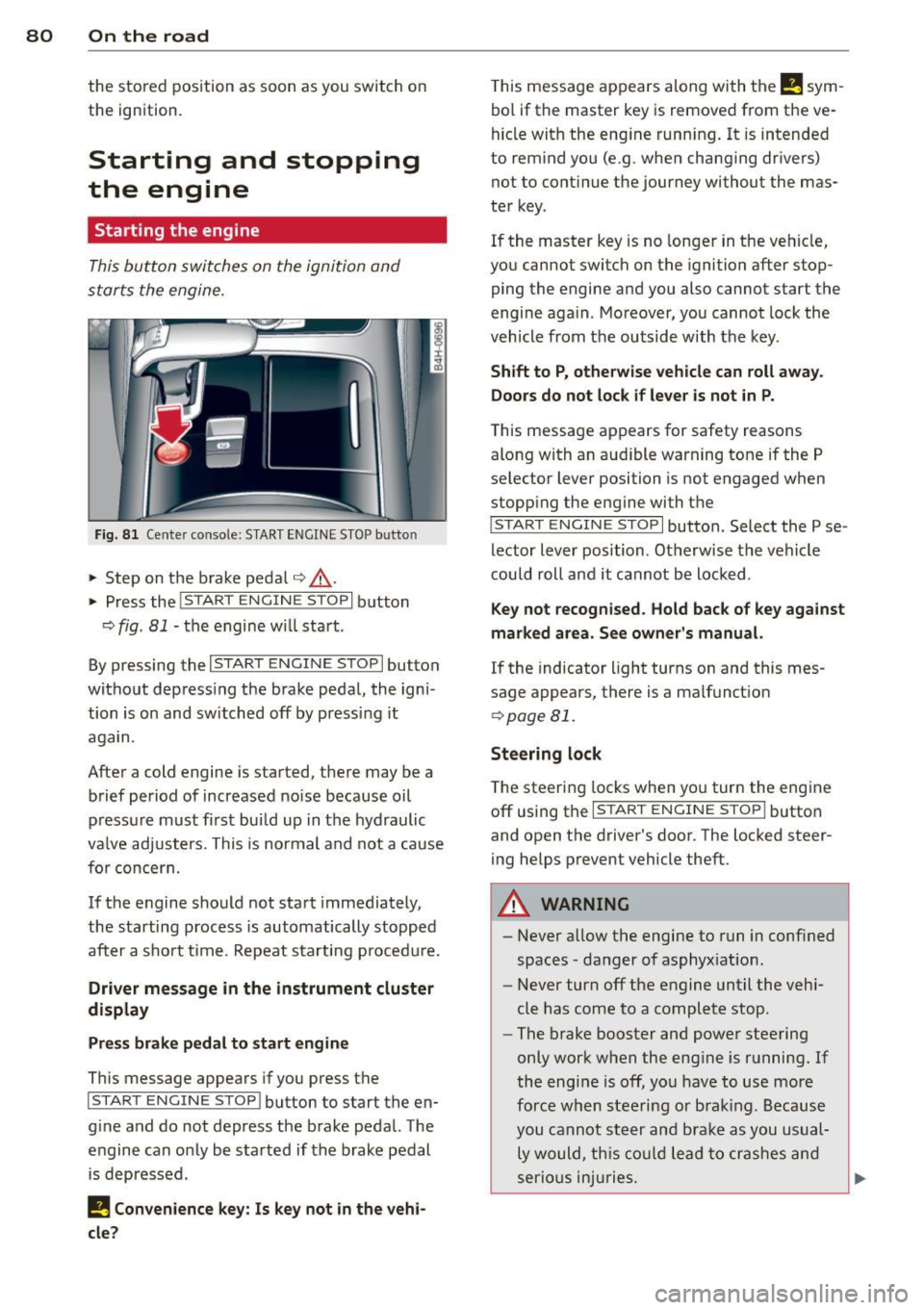
Fig. 81 Center console: S TART ENGINE S TOP b utto n
• Step on the brake pedal¢.&_ .
• Press the
!START E NGIN E STOPI button
¢
fig . 81 -the engine will start .
By pressing the
I START ENGIN E STOP I button
without depress ing the brake pedal, the igni
tion is on and switched off by pressing it
again.
After a cold engine is started, there may be a
brief period of increased noise because oil
pressure must fi rst bui ld up in the hydraulic
va lve adjusters. This is normal and not a cause
for concern.
If the engine should not start immediately,
the starting process is automatically stopped
after a sho rt time . Repeat sta rting p rocedu re.
Driver message in the instrument cluster
display
Press brake pedal to start engine
This message appears if you press the
I STAR T ENGIN E ST OP ! button to start the en
g ine and do not depress the brake pedal. The
engine can only be started if the brake pedal
is depressed.
I! Convenience key: Is key not in the vehi
cle?
T his message appears along with the I! sym
bol if the master key is removed from the ve
hicle with the eng ine running.
It is intended
to remind you (e.g . when changing drivers)
not to continue the journey without the mas
ter key.
If the maste r key is no longer in the vehicle,
you cannot switch on the ignition after stop
ping the engine and you also cannot start the
engine again . Moreover, you cannot lock the
vehicle from the outside with the key.
Shift to P, otherwise vehicle can roll away.
Doors do not lock if lever is not in P.
T his message app ears for safety reasons
along with an aud ible warning tone if the P
selector lever position is not engaged when
stopp ing the engine wi th the
I S TART ENGIN E STOP I button. Select the P se
lector lever position . Otherwise the vehicle
could roll and it cannot be locked .
Key not recognised. Hold back of key against
marked area. See owner's manual.
If the indicator light turns on and this mes
sage appears, there is a malfunct ion
¢ page Bl.
Steering lock
The steering locks when you turn the engine
off using the
I STAR T ENGINE ST OP I button
and open the driver 's door. The locked steer
ing helps prevent vehicle theft.
A WARNING
-
- Never allow the engine to run in conf ined
spaces -danger of asphyxiat ion .
- Never turn off the engine until the vehi
cle has come to a complete stop .
- The brake booster and power steering
only work when the engine is running.
If
the engine is off, you have to use more
force when steering or brak ing. Because
you cannot steer and brake as you usual
ly would, this could lead to crashes and
serio us injuries.
Page 83 of 300

CD Note
-Avoid high engine rpm, fu ll throttle and
heavy engine loads unti l the engine has
reached operating temperature -other
wise you risk engine damage.
- T he engine cannot be started by pushing
or towing the veh icle.
- If the engine has been under heavy load
for an extended period, heat builds up in
the engine compartment after the en
gine is switched off -there is a risk of
damag ing the engine . Allow the eng ine
to run at idle for about 2 m inutes befo re
swit ching it off.
@ Tips
- If you open the dr iver's door w ith the ig
nit ion on, a buzzer sounds and the mes
sage
Igniti on i s on appears in the instru
ment cluster disp lay. Switch the ign it ion
off .
-If you leave the vehicle with the ignit ion
swi tched on, the ignition will switch off
after a certain period of time. Please
note that e lectrica l equipment such as
exter ior lights wi ll switch off as well
when that happens .
Stopping the engine
... Bring your vehicle to a comple te stop .
... Move the selector lever to the P or N posi
t ion .
... Press the !START E NGIN E STOPI button
Q page 80, fig. 81 .
Emergen cy off
If necessary, the engine can be swi tched off
with the selector lever in the R, Dor S posi
tions . The eng ine stops if you press the
I START E NGIN E STOP I button at speeds be low
6 mph (10 km/h).
_& WARNING
- Never turn off the eng ine unt il the vehi
cle has come to a complete stop.
On th e road 81
- The brake booster and power steering
only work when the engine is running. If
the engine is off, you have to use more
force when steering or braking . Because
you cannot s teer and brake as you usual
ly would, th is could lead to crashes and
serious injuries.
- For safety reasons , you sho uld a lways
park your vehicle with the selector lever
in P . Otherwise, the vehicle could inad
vertently roll away.
- After the eng ine has been switched off,
the radiator fan can cont in ue to run for
up to 10 minutes -even with the igni tion
switched off .
It can also switch on again
after some time if the coolant tempera
ture rises as the result of a heat b uildup
or if the engine is hot and the engine
compartment is additionally heated by
the sun's rays .
~
CD Note
Do not stop the eng ine immediately after
hard or extended driving. Keep the engine
running for approximate ly two minutes to
prevent excess ive heat bu ild -up .
Starting the engine if there is a
malfunction
It may not be possible to start the engine un
der certain circumstances , for example if the
battery in the vehicle key is drained, if inter
ference is affected the key or if there is a sys
tem malfunction.
ij
:c
---- -~
Fig . 82 Center co nsole/m aste r key : star ting the engine
I
if th ere is a malfun ction Ill>
Page 84 of 300
82 On the road Requirem ent : The message
Key not recog
nized. Hold b ack of key against marked area.
See owner 's manual.
must appear and the in
dicator light
m must sw itch on.
• Hold the master key vertica lly in the loca
tion indicated y>l} q fig .
82.
• Press the brake pedal~ A in Starting the
engine on page 80.
.. Press the !~S _T _A_ R_T_ E_N_ G_ I_ N _E_ S_T_ O_ P~ I button.
The eng ine will start .
• Drive to your author ized Audi dealer imme
diately to have the malfunct ion corrected .
@ Tips
You can view the message again by press
ing the !START ENGINE STOP I button.
Electromechanical
parking brake
Operation
The electromechanical parking broke replaces
the hand broke.
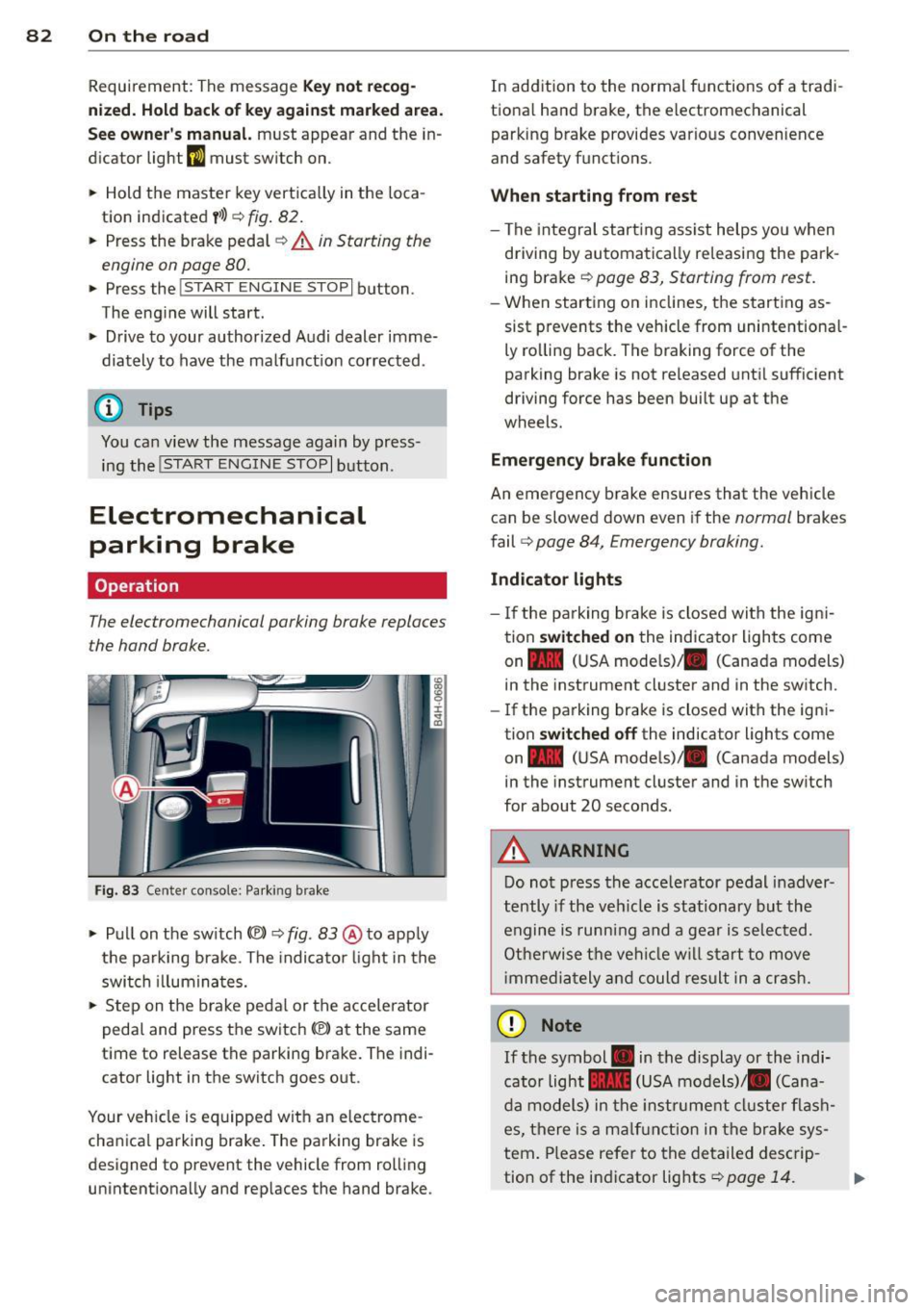
Fig . 83 Ce nter console: Parking brake
• Pull on the switch(®) ~ fig. 83 @ to app ly
the parking brake . The indica tor light in the
switch illuminates.
• Step on the brake pedal or the accelerator
pedal and press the switch(®) at the same
t ime to release the parking brake. The indi
cator light in the switch goes out .
Your vehicle is equipped wit h an electrome
cha nica l parking brake. The parking brake is
designed to prevent the vehicle from rol ling
unintentionally and rep laces the hand brake . In
addition to the normal functions of a tradi
tiona l hand brake, the electromechanical
parking brake provides var io us convenience
and safety functions .
When starting from rest
-The integral start ing ass ist helps you when
driving by automatically releasing the park
ing brake
~ page 83, Starting from rest .
-When starting on inclines, the starting as
sist prevents the vehicle from unintentiona l
ly rolling back. The braking force of the
parking brake is not released until sufficient
driving force has been built up at the
wheels.
Emergency brake function
An emergency brake ensures that the vehicle can be slowed down even if the
normal brakes
fail
q page 84, Emergency broking.
Indicator lights
-If the parking brake is closed with the ign i
tion
switched on the indicator lights come
on - (U SA mode ls)/ . (Canada models)
in the instrument cluster and in the switch.
- If the parking brake is closed with the igni
tion
switched off the indicator lights come
on - (USA mode ls)/ . (Canada models}
in the instrument cluster and in the sw itch
for about 20 seconds .
A WARNING
Do not press the acce lerator pedal inadver
tently if the vehicle is stationary but the
engine is running and a gear is selected.
Otherwise the vehicle will start to
move
immedia tely and could result in a crash.
(D Note
If the symbol . in the display or the indi
cator light .. (USA models)/ . (Cana
da models) in the instrum ent cluster flash
es, there is a malfunction in the brake sys
tem. Please refer to the detailed descrip-
tion of the indicator lights
~ page 14. ll-
Page 85 of 300
-If the indicato r light - (USA mod
els)
,111 (Canada models) or I.I turns
on, there may be a malfunction in the
parking brake
¢page 15.
@ Tips
-You can apply the parking brake at any
time - even w ith the ignition switched
off. The ignit ion must be on in order to
release the parking brake.
- Occasiona l noises when the park ing
brake is applied and released are norma l
and are not a cause for concern.
- When the vehicle is parked, the parking
brake goes through a self-test cycle at
regular intervals. Any assoc iated noises
are norma l.
Parking
Various rules apply to prevent the parked ve
hicle from rolling away accidentally.
P a rking
~ Stop the vehicle w ith the foot brake.
~ Pu ll the switch© to apply the parking
brake.
~ Se lect the P selector lever position
¢page 109.
~ Turn the eng ine off ¢,& .
In addition on incline s and grade s
~ Turn the steering wheel so that your vehicle
will roll against the curb in case it should
start to move.
A WARNING
-When you leave your veh icle - even if on
ly b riefly - always take the ignition key
with you. This applies particu la rly when
children remain in the veh icle. Otherw ise
the ch ild ren could sta rt the engine, re
lease the parking brake or operate elec
trical equipment (e .g. power windows).
There is the risk of an accident.
- When the vehicle is locked, no one - par
t icu larly not ch ildren should remain in
the vehicle. Locked doors make it more
On th e ro ad 83
difficult for emergency workers to get in
to the vehicle - putting lives at risk.
Starting from rest
The starting assist function ensures that the
parking broke is released automatically upon
starting.
Stopping and appl ying p arking brake
~ Pull the switch(®) to apply the pa rking
brake.
Sta rting and automaticall y releasing the
parking brak e
~ When you start to drive as us ual, the pa rk
ing brake is automatically released and your
veh icle begins to move .
When stopp ing at a traffic signal or stopping
in city t raff ic, the parking b rake can be ap
plied. The vehicle does not have to be held
with the footbrake. The parking brake elimi
nates the tendency to creep w ith a dr ive range
engaged. As soon as you drive off as usua l,
the parking brake is released automatically
and the vehicle starts to move.
St arting on slope s
When starting on inclines, the sta rting assist
prevents the vehicle from unintentionally roll
ing back. The braking force of the parking
brake is not re leased until suff ic ient driving
force has been built up at the wheels.
(D Tips
For safety reasons, the parking brake is re
l eased automatically on ly when the driv
er's safety belt is engaged in the buckle.
Starting off with a trailer
To prevent rolling back unintentionally on an
incline, do the following:
~ Keep the switch(®) pulled and depress the
accelerator. The parking brake stays applied
and prevents the vehicle from roll ing back-
ward . ..,.
Page 86 of 300
84 On th e road
• You can release the switch (®) once you are
sure that you are developing enough for
ward momentum at the wheels as you de
press the accelerator .
Depending on the weight of the rig (vehicle
and trai ler) and the severity of the incline, you
may roll backwards as you start . You can pre
vent roll ing backwards by holding the parking
brake switch(®) pulled out and accelerating -
just as you would when starting on a hill with
a conventional hand brake .
Emergency braking
In the event that the conventional brake sys
tem fails or locks .
• In an emergency, pull the switch(®) and
continue to pull it to slow your vehicle down
with the parking brake .
• As soon as you release the sw itch
C®> or ac-
cele rate , the braking p rocess stops.
If you pull the switch(®) and hold it above a
speed of about 5 mph (8 km/h), the emergen
cy braking function is in it iated. The veh icle is
b raked at all four wheels by activa ting the hy
d raul ic br ake system. The b rake performance
is simi lar to making an emergency stop
c::> & .
In order not to activate the emergency brak
i ng by m ista ke, an audible wa rning tone (bu z
z er) sounds when the swi tc h
C®> is pulled. As
soon as the switch(®) is released, or the accel
erator pedal is depressed, emergency braking
stops .
.&_ WARNING
Emergency braking should only be used in
an emergency, when the normal foot brake
has failed or the brake pedal is obstructed.
Using the parking bra ke to perform emer
gency braking will slow yo ur vehicle down
as if you had made a fu ll brake applicat ion.
T he laws of physics cannot be s uspended
even w ith ESC and its associate d compo
nents (ABS, ASR, EDL). In corners and
when road or weather conditions are bad, a full brake application can cause the vehi- cle to sk
id or the rear end to break away -
risking an accident.
Speed warning system
, Introduction
The speed warning system helps you to stay
under a specified maximum speed .
The speed warning system warns you if you
are exceeding the maximum speed that you
have set . You will hear a warning tone when
your speed exceeds the stored value by ap proximate ly 3 mph (3 km/h). An ind icator
l ight . (USA
models) ;a (Canada mode ls) in
the instr ument cluster d isp lay also tur ns on at
the same time. The indicator light.,.
turns off when the speed decreases be low the
stored maxim um speed.
Setting a th reshold is recommended if you
would like to be rem inded when you reach a
certain maxim um speed. Situations whe re you
may want to do so include driving in a co untry
with a genera l speed limit or if there is a
specified maximum speed for winter tires.
(D Tips
Even though your vehicle is equipped w ith
a speed warn ing system, you should still
watch the speedometer to make sure you
are not dr iv ing faster than the speed limit.
Setting the threshold
You can set, change and delete the threshold
in the MMI.
• Select: !CAR ! function b utton > Car systems
contro l button > Dri ver ass ist > Speed warn
ing .
You can set any threshold between 20 mph
(30 km/h) and 150 mph (240 km/h). Sett ings
can each be adj usted in increments of 5 mph
(10 km/h).
Page 87 of 300
Cruise control
Switching on
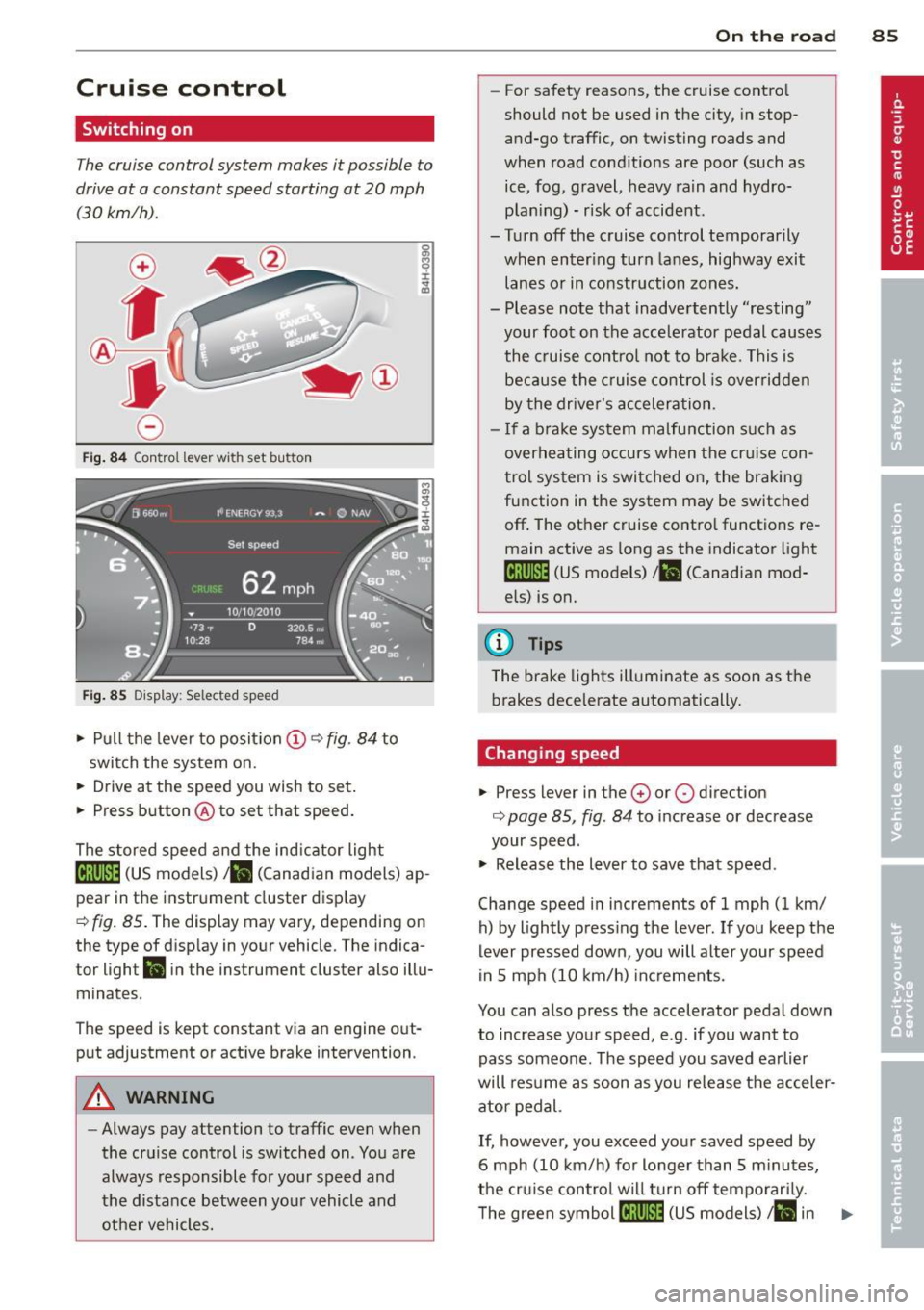
The cruise control system makes it possible to
drive at a constant speed starting at 20 mph
(30 km/h).
0
f
~
0
Fig . 84 Control lever with set button
Fig . 85 D isplay: Selected speed
.,. Pull the lever to position (D ~ fig . 84 to
swit ch the system on .
.,. Drive at the speed you wish to set.
.,. Press button @to set that speed.
The stored speed and the ind icator light
[lj;(i)~1ij (US models) 1 11 (Canad ian models) ap
pear in the instrument cluster display
¢ fig. 85. The display may vary, depending on
the type of disp lay in your vehicle. The indica
tor light
Ill in the instrument cluster also illu
minates.
The speed is kept constant via an engine out
put adjustment or active brake intervention.
A WARNING
-Always pay attention to traffic even when
the cruise control is switched on . You are
always responsible for your speed and
the distance between your vehicle and other vehicles.
On the road 85
-For safety reasons, the cruise control
should not be used in the city, in stop
and-go traffic, on twisting roads and
when road conditions are poor (such as ice, fog, gravel, heavy rain and hydro
plan ing) - risk of accident .
- Turn off the cruise control temporarily
when enter ing turn lanes, highway exit
lanes or in construction zones.
- Please note that inadvertently ''resting"
your foot on the accelerator pedal causes
the cruise control not to brake. This is
because the cruise control is overridden
by the driver's acceleration .
- If a brake system malfunction such as
overheating occurs when the cr uise con
trol system is switched on, the braking
function in the system may be switched
off . The other cruise contro l functions re
main active as long as the indicator light
tij;[i)~1ij (US models) 111 (Canadian mod
els) is on.
(D Tips
The brake lights illuminate as soon as the brakes decelerate automatically.
Changing speed
.,. Press lever in the 0 or 0 direction
¢ page 85, fig . 84 to increase or decrease
your speed .
.,. Release the lever to save that speed.
Change speed in increments of 1 mph (1 km/ h) by lightly press ing the lever. If you keep the
lever pressed down , you will alter your speed
in 5 mph (10 km/h) increments.
You can also press the accelerator pedal down
to increase your speed, e.g. if you want to
pass someone. The speed you saved earlier
will resume as soon as you release the acceler
ator pedal.
If, however, you exceed your saved speed by
6 mph (10 km/h) for longer than 5 m inutes,
the cruise control wil l turn off temporarily.
The green symbol
[ljlIJll (US models) ill in ..,_
Page 92 of 300
90 Audi adaptive cruise control and braking guard
• You must also press the brake pedal when
the vehicle is stopped.
Switching adaptive cruise control off
• Push the lever away from you into position
@ until it clicks into p lace. The message
ACC off appears.
@ Indicator lights
II-Adaptive cruise control is switched on . No
vehicles are detected up ahead. The stored
speed is maintained.
I-A moving vehicle is detected up ahead .
The adaptive cruise control system regulates
the speed and d istance to the moving vehicle
ahead and acce lerates/bra kes automatica lly.
f§ . Adaptive cru ise control is switched on . A
mov ing vehicle up ahead was detected. Your
vehicle remains stopped .
I -When automatic braking is not able to
keep enough distance to a p reviously detected
mov ing vehicle up ahead, you must take con
trol and brake¢
page 92, Prompt for driver
intervention.
© Display
If adap tive cruise control is not shown in the
d isplay, you can call it up with the multifunc
tion steering wheel buttons~
page 23.
Based on the symbols in the display , you can
determ ine if the system is maintaining a dis
tance to the vehicle ahead and w hat that dis
tance is.
No vehicle -No vehicle ahead was detected.
White vehicle -A vehicle ahead was detected .
Red vehicle -Prompt for the driver to take ac
tion ¢
page 92.
Both
arrows on the scale © indicate the dis
tance to the vehicle ahead . No arrow appears
when the vehicle is on an open road and there is no object ahead. If an object is detected
ahead, the arrow moves on the scale.
The green zone on the scale shows the stored d istance. For information on changing the stored distance, refer to
¢
page 91. If the
distance se lected is too close or may soon be
come too close, the arrows move into the red
z one on the sca le.
A WARNING
Improper use of the adaptive cruise con
trol can cause collisions, other accidents
and serious personal injur ies .
- Pressing the
!SET ! button when driving at
speeds below 20 mph (30 km/h), w ill au
tomatically accelerate the vehicle to 20
mph (30 km/h), which is the minimum
speed that can be set .
(D Tips
-If you switch the ignit ion or the adaptive
cruise control off, the set speed is erased
from the system memory.
- You cannot switch the Electron ic Stabili
ty Control (ESC) to the SPORT mode
when adaptive cruise control is switched
on .
Changing the speed
Applies to vehicles: with Audi adaptive cru ise control
0
f
• 0
Fig. 92 Selecto r lever : chang ing t he spee d
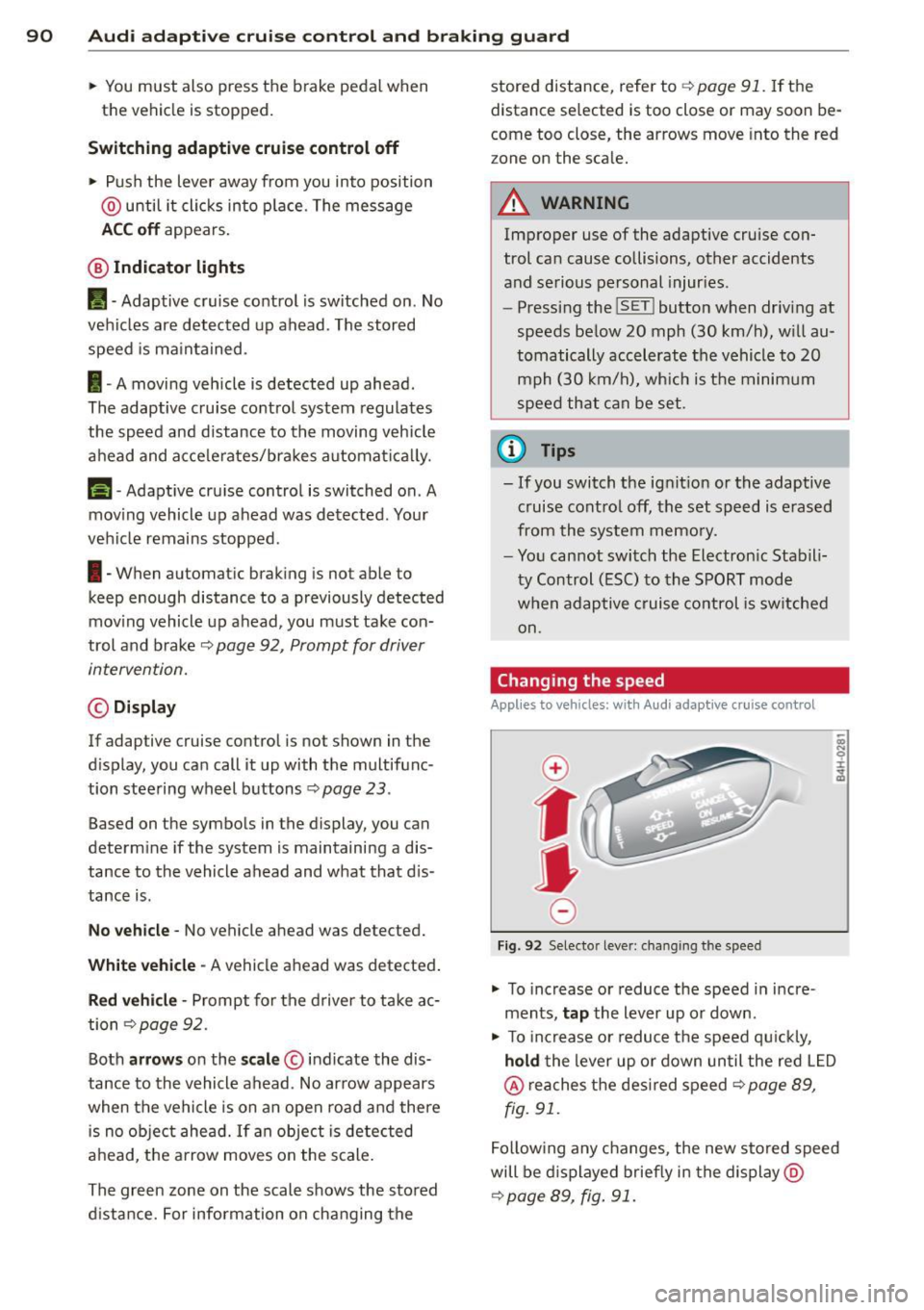
• To increase or reduce the speed in incre
ments,
tap the lever up or down.
-
-a)
N
q :r
~
"' To increase or reduce the speed qu ickly,
hold the lever up or down until the red L ED
@ reaches the desired speed ¢ page 89,
fig . 91.
Following any changes, the new stored speed
will be displayed briefly in the display @
¢page 89, fig. 91.
Page 94 of 300
92 Audi adaptive cruise control and braking guard
control will also accelerate up to the stored
speed.
The higher the speed , the greater the distance
in yards (meters)¢ .&.. T he
Distance 3 setting
is recommended .
The distances p rov ided are spec ified values.
Depending on the driving situation and the
how the vehicle ahead is dr iving, the actual
distance may be more or less than these tar
get distances .
The various symbols for the time increments
appear briefly in the info rmation line @
¢ page
89, fig. 91 when you change the set
tings .
c:::,_c:::, ___ Distance 1: This setting corre-
sponds to a distance of 92 feet/28 meters
when traveling at 62 mph ( 100 km/h), or a
time interval of
1 second.
c:::, __ c:::, __ Distan ce 2: Thi s setting corre
sponds to a dis tance of 118 feet/36 meters
when traveling at 62 mph ( 100 km/h), or a
time interva l of 1.3 seconds.
c:::, ___ c:::,_ Distance 3: This setting corre-
sponds to a distance of 164 feet/SO meters
when traveling at 62 mph ( 100 km/h), or a
time interva l of 1.8 seconds.
c:::, ____ c:::, Distance 4: This setting corre-
sponds to a distance of 210 feet/64 meters
when traveling at 62 mph ( 100 km/h), or a
time interval of 2.3 seconds.
.&_ WARNING
Following other vehicles too closely in
creases the risk of collisions and serious
personal injury.
- Setting short distances to the traffic ahead reduces the t ime and distance
available to br ing your vehicle to a safe
stop and makes it even more necessary
to pay close attention to traffic.
- Always obey applicable traffic laws, use
good judgment, and select a safe follow
ing distance for the traffic, road and
weather conditions .
(D Tips
-Distance 3 is set automatically each time
you switch the ignition on.
- Your standard settings are automatically
stored and assigned to the remote con
tro l key being used.
Selecting the driving mode
Applies to veh icles: w ith Audi adapt ive cr uise contro l
.,. Select the desired driving mode in dr ive se
lect
¢ page 103 .
@ Tips
Your settings are automatically stored and
assigned to the remote control key being
used.
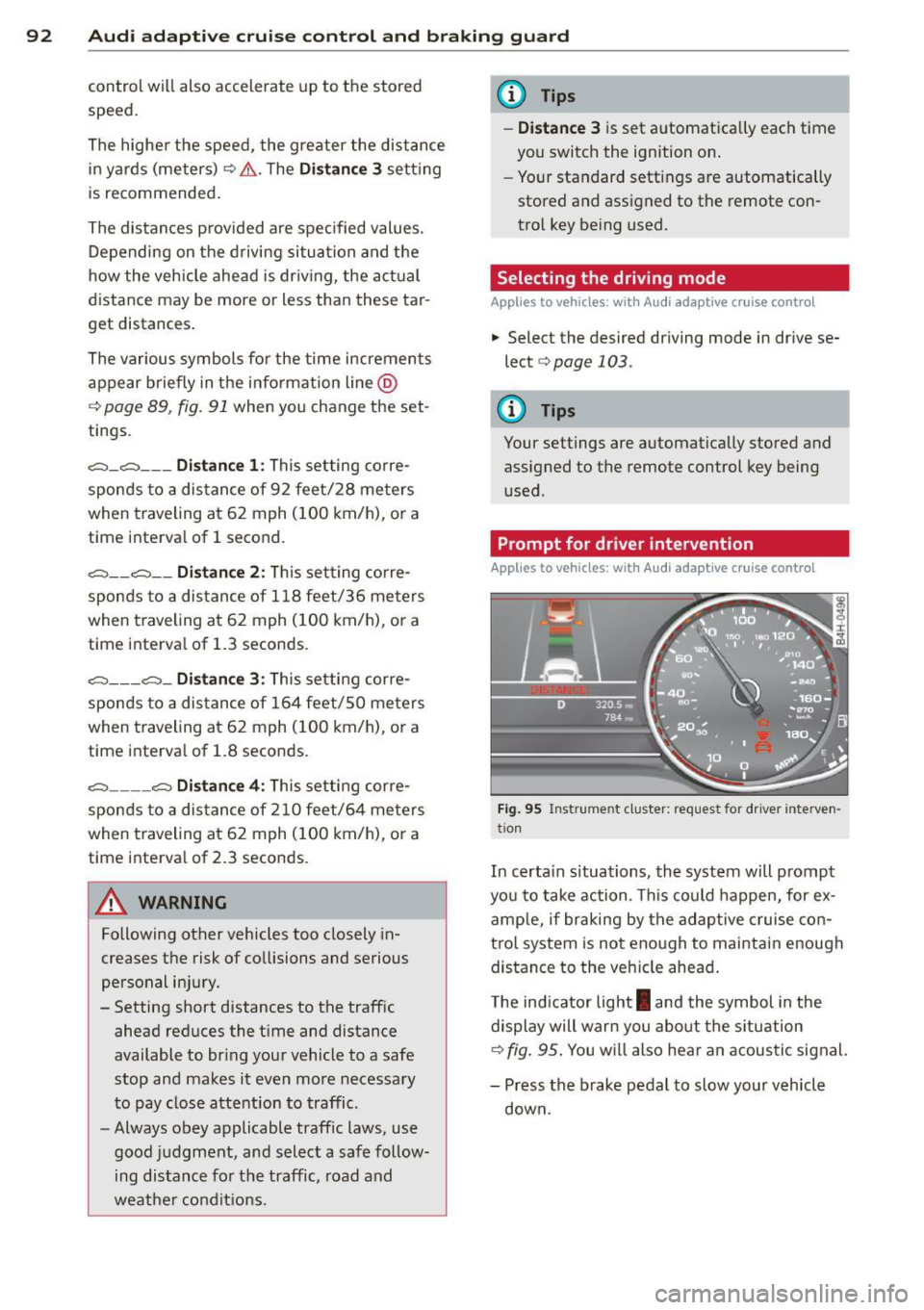
Prompt for driver intervention
Applies to vehicles : w it h Audi ada ptive cr uise cont ro l
Fig. 95 Instrument cluster: request for driver inte rven
tio n
In certa in s ituations, the system will prompt
yo u to take action . Thi s could happen, for ex
amp le, if braking by the adaptive cruise con
trol system is not enough to maintain enough
distance to the veh icle ahead .
The indicator light
I and the symbol in the
display will warn you about the situa tion
¢fig.
95. You w ill also hear an acoustic signal.
- Press the brake pedal to slow your vehicle
down.
Page 95 of 300

Audi adaptive cruise control and braking guard 93
Audi braking guard
Description
Applies to vehicles: with Audi adaptive cruise control
Fig. 96 Instrument cluster: approach warning
Audi braking guard uses radar sensors and a
video camera. It also functions within the lim
its of the system when adaptive cruise control
is switched off.
What can Audi braking guard do?
When detected in time, the system can assess
situations when a vehicle ahead brakes sud
denly or if your own vehicle is traveling at a
high speed and approaching a vehicle up
ahead that is moving more slowly . Audi brak
ing guard does not react if it cannot detect
the situation.
The system advises you of various situations:
- The
distance warning is given if you are too
close to the vehicle ahead for a long time. If
the vehicle ahead brakes sharply, you will not be able to avoid a collis ion. The indicator
light
I i n the display comes on .
- The
approach warning is given when a de
tected vehicle up ahead in your lane is mov
i ng much more slowly than you are or if it
brakes sharply . When this warning is given,
it may only be possible to avoid a collision
by swerving or braking sharply. The indicator
light
I and indicator in the display will warn
you about the danger
c::> fig . 96. You will a lso
hear an acoustic signal.
If you do not react fast enough or do not react
at all to the situation, Aud i braking guard will
11
This is not ava ilable in som e coun tri es.
intervene by braking and the message braking
guard intervention
will appear.
- If a coll is ion is imminent, the system wi ll
first provide an
acute warning by briefly and
sharply applying the brakes.
- If you do not react to the acute warning,
braking guard can brake with increas ing
force within the limits of the system. This
reduces the vehicle speed in the event of a
collision.
- The system can initiate complete dece lera
tion shortly before a collision
1>. Full deceler
ation at high speeds occurs only in vehicles
with adaptive cruise control and side assist
(pre sense plus).
- If the Audi braking guard senses that you
are not braking hard enough when a colli
sion is immi nent, it can increase the braking
force.
- The pre sense functions also engage when a
collision is imm inent
c::> page 185 .
Which function s can be controlled?
You can switch Audi braking guard and the
distance/approach warning on or off in the
MMI c::> page 94, Settings in the MMI.
A WARNING
Lack of attention can cause collisions, oth
er accidents and serious personal injuries .
The Audi braking guard is an assist system
and cannot prevent a collision by itself.
The driver must always intervene. The driv
er is always responsib le for braking at the
correct time.
- Always pay close attention to traffic,
even when the Audi braking guard is
switched on. Be ready to intervene and
be ready to take complete control when
ever necessary. Always keep the safe and
legal distance between your veh icle and
veh icles up ahead.
- Audi brak ing guard works within limits
and will not respond outside the system
lim its, for example when approaching a
Page 112 of 300
110 Automatic Tran sm iss ion
• You may need to release the selector lever
l ock depending on which se lector lever posi
t ion is selected and which one you would
Like to select ¢
page 110, Selector lever
lock.
• To engage the nearest selector lever posi
t ion, move the selector lever forward/back
unti l you feel the first pressure point . The
selector lever will return to its original posi
t ion.
• To skip over one (or two) se lector lever posi
tions, move the selector lever past the first
(and second) pressure point into the desired
pos it ion. The selector lever will return to its
origina l position.
For example, to move directly from the D se
lector lever position to P when stopping the
vehicle, you can shift past the N and R selector lever positions.
S ele ctor l ever lock
The selector lever lock prevents you from se
lecting a position unintentionally, causing the
vehicle to roll. When engaging some selector lever positions, you must press the button on
the selector lever¢
fig. 116 and/or press the
brake pedal.
You must press the brake pedal to engage a
selector lever position when the engine is run n ing while the vehicle is stationary. The ar
rows¢
fig. 117 indicate when you need to
press the button on the selector lever .
The selector lever does not lock if you sh ift
from D to R w ith in one second . Th is allows
you to "rock" the vehicle to free it when it is
stuck .
P- P ark
The whee ls are locked in th is position. Only
shift into park when the vehicle is stationary
¢ & .To engage the P selector lever position,
press the button on the selector lever and
shift into the P position .
You can only shift out of park when the eng ine
is running and you are press ing the brake ped
al. Press the button on the selector lever to r
elease the parking lock and select the desired
selector lever position.
P engages automa tica lly when you sw itch the
engine off while D, Sor R is engaged o r in
manua l mode .
If you switch the eng ine off when N is engag
ed, the transmiss ion remains in N for approxi
mately 30 minutes and then Pis engaged .
You must use the emergency release proce dure to release the parking lock before towi ng
the vehicle
¢ page 113.
R- Reverse
The reverse gear is engaged in this posit ion .
Only select reverse when the vehicle is sta
t ionary and the eng ine is running at id le speed
¢ & -To engage the R selector leve r pos ition,
press the button on the selector lever, press
the b rake pedal and move the selector lever
into the R position.
T he back-up lights turn on when you select
the R selector lever pos it ion wh ile the eng ine
. . 1s ru nning .
N -Neutral
The transm iss ion is in idle in this pos it ion . To
engage the N selector lever posit ion, press
the button on the selector lever and sh ift into
t h e N pos it ion.
If you switch the eng ine off when N is e ngag
ed, the transmiss ion remains in N for approxi
mately 30 minutes and then P is engaged .
You cannot se lect the N pos ition when the ig
nition is sw itched off. When dr iv ing th rough
an automat ic car wash, first select the N posi
t ion and then switch the engine off
¢page 204.
The veh icle cannot be locked when the selec
tor lever is in the N position.
D - Dri ve
In this pos ition, the transmission sh ifts up
and down automatically depending on eng ine
load, veh icle speed and the dynamic shift pro -
gram (DSP) .
ll-