center console AUDI A8 2012 User Guide
[x] Cancel search | Manufacturer: AUDI, Model Year: 2012, Model line: A8, Model: AUDI A8 2012Pages: 300, PDF Size: 75.06 MB
Page 69 of 300
Pass-through with ski
sack
Preparing the pass-through
Applies to vehicles: with pass-through and ski sack
Long objects such as skis can be transported
in the ski sack.
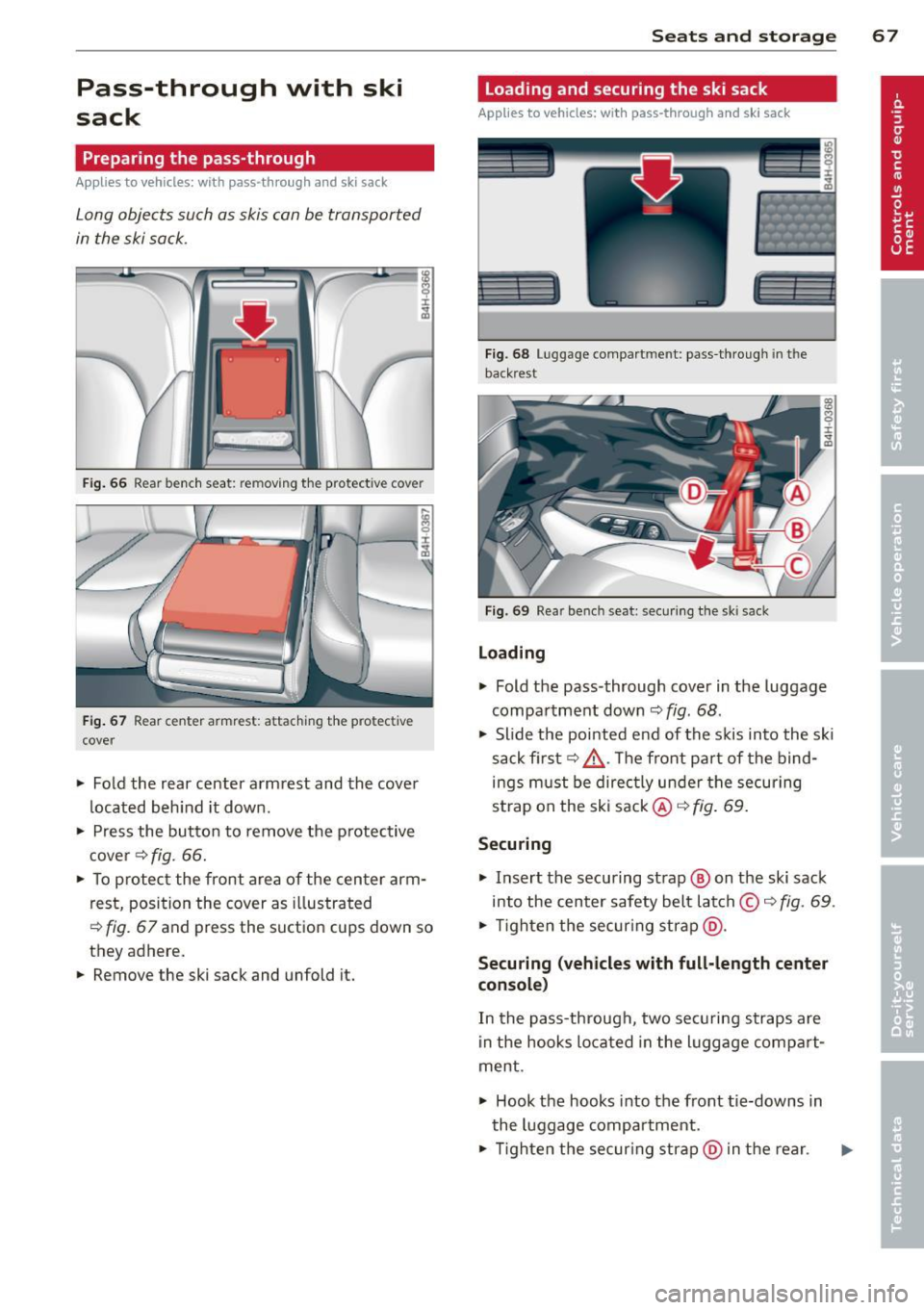
Fig. 66 Rear bench seat: removing the protect ive cover
Fig. 67 Rear center armrest: attaching the protective
cover
~ Fold the rear center armrest and the cover
located behind it down.
~ Press the button to remove the p rotective
cover ¢
fig. 66.
~ To protect the front area of the center arm
rest, position the cover as illustrated
¢
fig. 67 and press the suction cups down so
they adhere.
~ Remove the ski sack and unfold it.
Seats and storage 67
Loading and securing the ski sack
Applies to vehicles: with pass -through and ski sack
--~ --
·-- --· ----~-
Fig. 68 Luggage compartment: pass-through in th e
backrest
Fig. 69 Rear bench seat: sec uring the sk i sack
Loading
~ Fold the pass-through cover in the luggage
compartment down
<=:> fig. 68.
~ Slide the pointed end of the skis into the sk i
sack first
c:> ,&. . Th e front pa rt of the bind
ings must be directly under the securing
strap on the ski sack@<=:>
fig. 69.
Securing
~ Insert the securing strap @ on the ski sack
into the center safety belt latch ©
c:> fig. 69.
~ Tighten the secur ing strap @.
Securing (vehicles with full-length center
console)
In the pass-through, two securing straps are
in the hooks located in the luggage compart
ment .
~ Hook the hooks into the front tie-downs in
the luggage compartment.
~ Tighten the securing strap@in the rear .
Page 72 of 300
70 Seats and storage
-Never exceed the maximum permissible
load carrying capacity of the roof of your
vehicle, the permissible axle weights and
the permissible total weight of your vehi cle
c::, page 276, Weights .
@ For the sake of the environment
As a result of the increased wind resist
ance created by a roof rack, your vehicle is
using fuel unnecessarily. So remove the
roof rack after using it.
12-volt sockets
Applies to vehicles: 12-volt soc kets
Electrical accessories can be connected to ev
ery 12-volt socket.
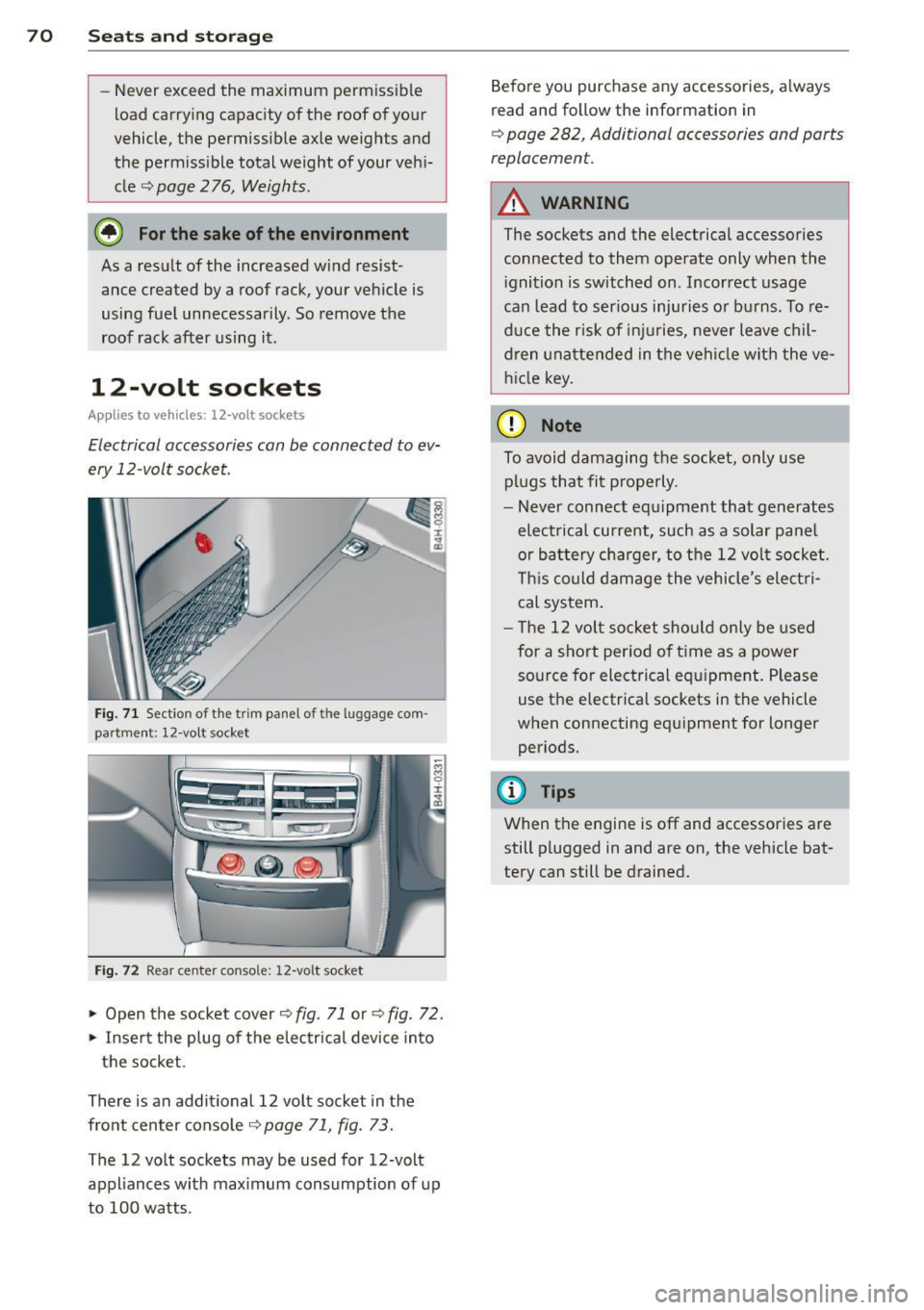
Fig. 71 Sect io n of the trim panel of th e lu ggage com
part ment: 12 -vol t soc ket
Fig. 72 Rear center conso le: 12-vo lt soc ket
... Open the socket cover c::, fig. 71 or c::, fig. 72 .
... Insert the plug of the electrical device into
the socket.
There is an additional 12 volt socket in the
front center console~
page 71, fig. 73.
The 12 volt sockets may be used for 12-volt
appliances with maximum consumption of up
to 100 watts . Before you purchase any accessories, always
read and follow
the information in
c::, page 282, Additional accessories and parts
replacemen t.
A WARNING
The sockets and the electrical accessories
connected to them operate only when the ignition is switched on . Incorrect usage
can lead to serious injuries or burns. To re
duce the risk of injuries , never leave chil
dren unattended in the vehicle with the ve
hicle key.
(D Note
To avoid damaging the socket, only use plugs that fit properly.
- Never connect equipment that generates
electrical current, such as a solar panel
or battery charger, to the 12 volt socket .
This could damage the vehicle 's electri
cal system.
- The 12 volt socket should only be used
for a short period of ti me as a power
source for electrical equipment. Please
use the electrical sockets in the vehicle
when connecting equipment for longer periods.
@ Tips
When the engine is off and accessories are
still plugged in and are on, the vehicle bat
tery can still be drained.
Page 73 of 300
Storage
(upholder
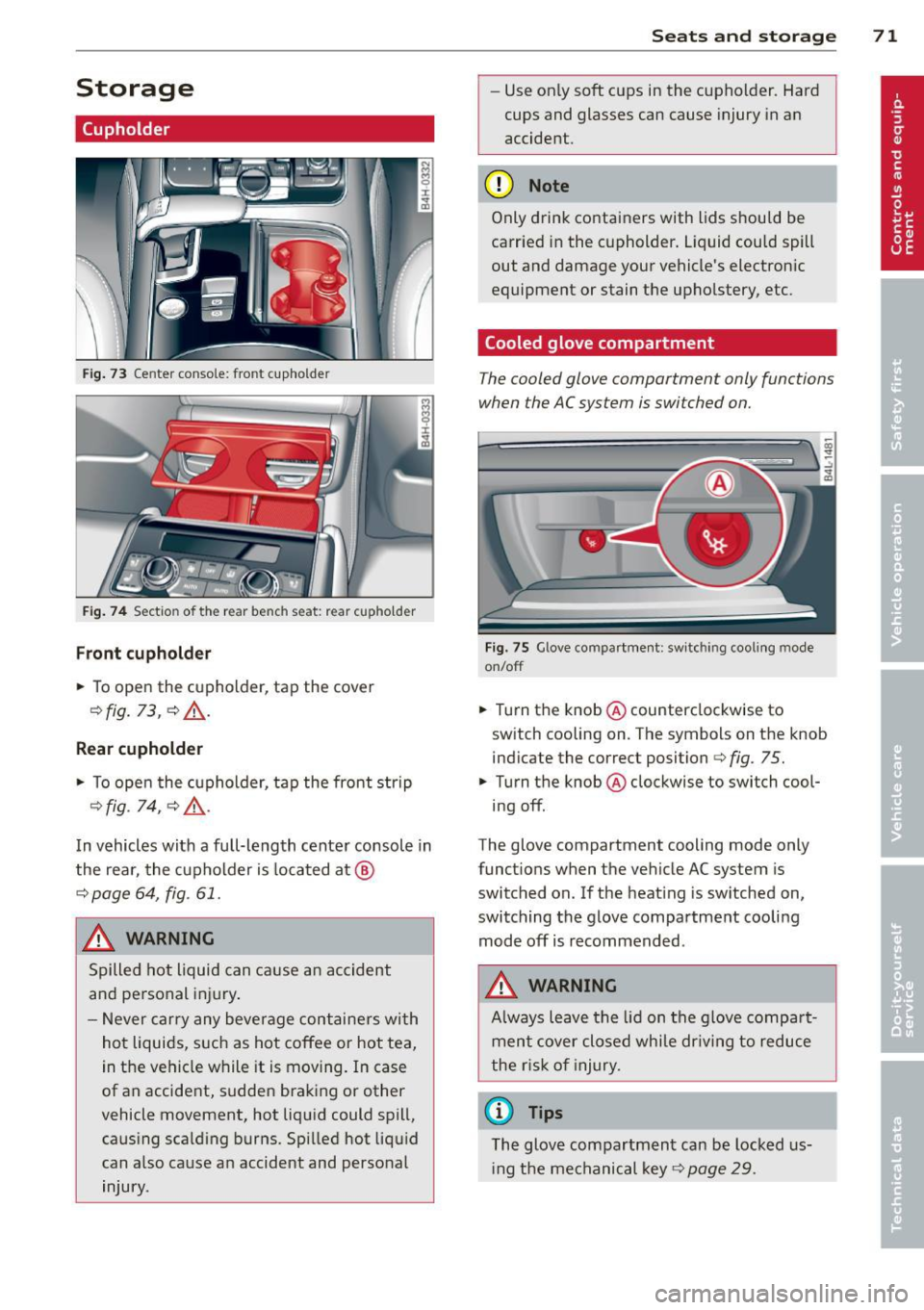
Fig. 73 Center console: front cupho lder
Fig. 74 Section of the rear bench seat: rear cupholder
Front cupholder
.,. To open the cupholder, tap the cover
¢fig . 73, ¢ &, .
Rear cupholder
.,. To open the cupholder, tap the front strip
¢fig. 14, QA .
In vehicles with a full-length center console in
the rear, the cupholder is located at @
¢ page 64, fig. 61.
A WARNING
Spilled hot liquid can cause an accident
and personal injury .
- Never carry any beverage containers with
hot liquids, such as hot coffee or hot tea,
in the vehicle while it is moving. In case
of an accident, sudden braking or other
vehicle movement, hot liquid could spill, causing scalding burns. Spilled hot liquid
can also cause an accident and personal
injury.
Seats and storage 71
-Use on ly soft cups in the cupholder. Hard
cups and glasses can cause injury in an
accident.
(D Note
Only drink containers with lids should be
carried in the cupholder. Liquid could spill
out and damage your vehicle's electronic
equipment or stain the upholstery, etc.
Cooled glove compartment
The cooled glove compartment only functions
when the AC system is switched on.
Fig. 75 Glove compar tment: switc hing cool ing mode
on/off
.,. Turn the knob ® counterclockwise to
switch cooling on . The symbols on the knob
ind icate the correct position¢
fig. 75 .
.,. Turn the knob ® clockwise to switch cool-
ing off.
The glove compartment cooling mode only
functions when the vehicle AC system is
switc hed on. If the heating is switched on,
switching the glove compartment cooling mode off is recommended .
A WARNING
Always leave the lid on the glove compart
ment cover closed while dr iving to reduce
the risk of injury.
a) Tips
The glove compartment can be locked us
i ng the mechanical key¢
page 29.
Page 74 of 300
72 Seats and stor age
Addit ional storage
There are a variety of storage compartments
and fasteners in various places in the vehicle.
- Storage compartments in the doors
- Net in the front passenger footwell
- Eyeglasses compartment in the headliner (near the rearview mirror)
- Storage compartments under the center
armrests
- Compartments* on the back of the front
seat backrests
- Garment hooks over the rear doors
- Compartment in the center console with
pass-through)* (rear)
- Compartment behind the rear center arm
rest (in vehicles without the pass-through*
or refrigerator*)
- Bag hooks in the luggage compartment
A WARNING
-When driving, do not leave any hard ob
jects on the rear window shelf or allow
your pet to sit on the shelf. They could
become a hazard for vehicle occupants in
the event of sudden braking or a crash .
- Always remove objects from the instru
ment panel. Any items not stored could
slide around inside the vehicle while driv
ing or when accelerating or when apply
ing the brakes or when driving around a
corner.
- When you are driving make sure that
anything you may have placed in the cen
ter console or other storage locat ions
cannot fall out into the footwells. In case
of sudden braking you would not be able
to brake or accelerate.
- Any articles of clothing that you have
hung up must not interfere with the driv
er's view. The coat hooks are designed
only for lightweight clothing. Never hang
any clothing with hard, pointed or heavy
objects in the pockets on the coat hooks.
During sudden braking or in an accident -
especially if the airbag is deployed - these objects could injure any passen
gers
inside the vehicle.
- To reduce the risk of personal injury in an
accident or sudden stop, always keep the
glove compartment closed while driving.
- Read and follow all WARNINGS
c:> page 161, Important safety instruc
tions on the side airbag system.
- Hang clothes in such a way that they do
not impair the driver's vision.
- The coat hooks must only be used for
lightweight clothing. Do not leave any
heavy or sharp edged objects in the pock
ets which may interfere with the side cur
tain airbag deployment and can cause personal injury in a crash.
- Do not use coat hangers for hanging clothing on the coat hooks as this can in
terfere with proper deployment of the
side curta in airbags in an acc ident.
- Do not hang heavy objects on the coat
hooks, as they could cause personal in
jury in a sudden stop.
@ Note
Objects located on the rear shelf that rub
against the rear window could damage the
heating wires for the rear window defog
ger .
(D Tips
-A vent slot is located between the shelf
and the rear window. Do not block the
vent with any items you may place on the
rear window she lf.
- Do not place bulky items on the rear win
dow shelf as they could restrict or block
the driver's vision in the rear view mirror.
Cooler
Introduction
App lies to vehicles: wit h coo ler
Please clean the cooler before using it for the
first time
c:> page 213.
You can only switch on the cooler if ...
Page 79 of 300
airflow and air distribution are controlled au
tomatically.
Adjusting the temperature
Temperatu res between 60 °F (+16 °() and
84 °F (+28 °C) can be set. O uts ide of this
range,
lo or hi will appear in the climate con
trol system disp lay. At both of these settings,
the climate control system runs continuously
at maximum coo ling or heating power. There
is no temperature regulation.
[!] Adjusting the airflow
You can ad just the airf low manually to suit
your needs . To have the airflow regulated au
tomatically, press the
! AUTO ! button.
~ Adjusting the air distribution
You can manually se lect the vents where the
air will flow. To have the air distribution regu
l ated automatically, press the
!AUTOI button.
~ I lil* Adjusting Seat heating/
ventilation*
Pressing the button switches the seat heat
ing/ventilation on at the highest setting ( level
3). The LEDs indicate the temperature leve l.
To reduce the temperature, press the button
again . To switch the seat heating/ventilation
off, press the button repeatedly until the LED
turns off.
After 10 minutes, the seat heating/ventilation
automatically switches from level 3 to level 2.
I n vehicles without the four zone automat ic
climate contro l*, buttons in the rear center
console control the seat heating for both out
er rear seats*.
~ Switch the defroster on/off
The windsh ield and sid e windows are defrost
ed or cleared o f condensation as quickly as
possible. The maximum amount of air flows
mainly from the vents be low the windshield.
Recirculation mode switches off . The tempera
ture is controlled automatically.
The
IAU TOI button switches the defroster off.
Warm and cold 77
~ Switching rear window heater on/off
The rear window heater only operates when
the engine is running. It switches off auto
matically after 10 to 20 minutes, depending
on the outside temperature.
T o p revent the rear window heater from
switching off automatically, press and hold
the ~ button for more than 2 seconds . This
remains stored until the ignition is switched
off .
I SYNC I Synchronization*
When synchronization is switched on, the set
tings for the driver's side are applied to the
front passenger's side (except for seat heat
i ng/venti lation*) . The rear seat is also
synchronized in vehicles with the 4-zone de
luxe automatic climate control system* . Syn
chronization switches off if the sett ings are
adjusted on the front passenger's side or in
the rear* .
You can synchronize the settings in a row by
pressing and holding a knob. For example, to
apply the settings for the front passenger's s ide to the driver's side, press and hold the
knob on the front passenger's s ide.
Air vents
You can open or close the center and rear
vents in the cockpit and the vents in the rear
center console and door pillars us ing the
ridged thumbwheels. The levers adjust the di
rection of the airflow from the vents.
,&. WARNING
-Do not use the recirc ulation mode for ex
tended periods of time. The windows
could fog up since no fresh air can enter
the vehicle. If the windows fog up, press
the air recircu lation button again imme
diately to switch off the air recirculation
function or select defrost .
- Individuals w ith reduced sensitivity to
pa in or temperature could deve lop burns
when using the seat heating function . To
reduce the risk of injury, these indiv idu-
als shou ld not use seat heating. ..,.
Page 82 of 300
80 On the road
the stored position as soon as you switch on
the ignition.
Starting and stopping
the engine
Starting the engine
This button switches on the ignition and
starts the engine.
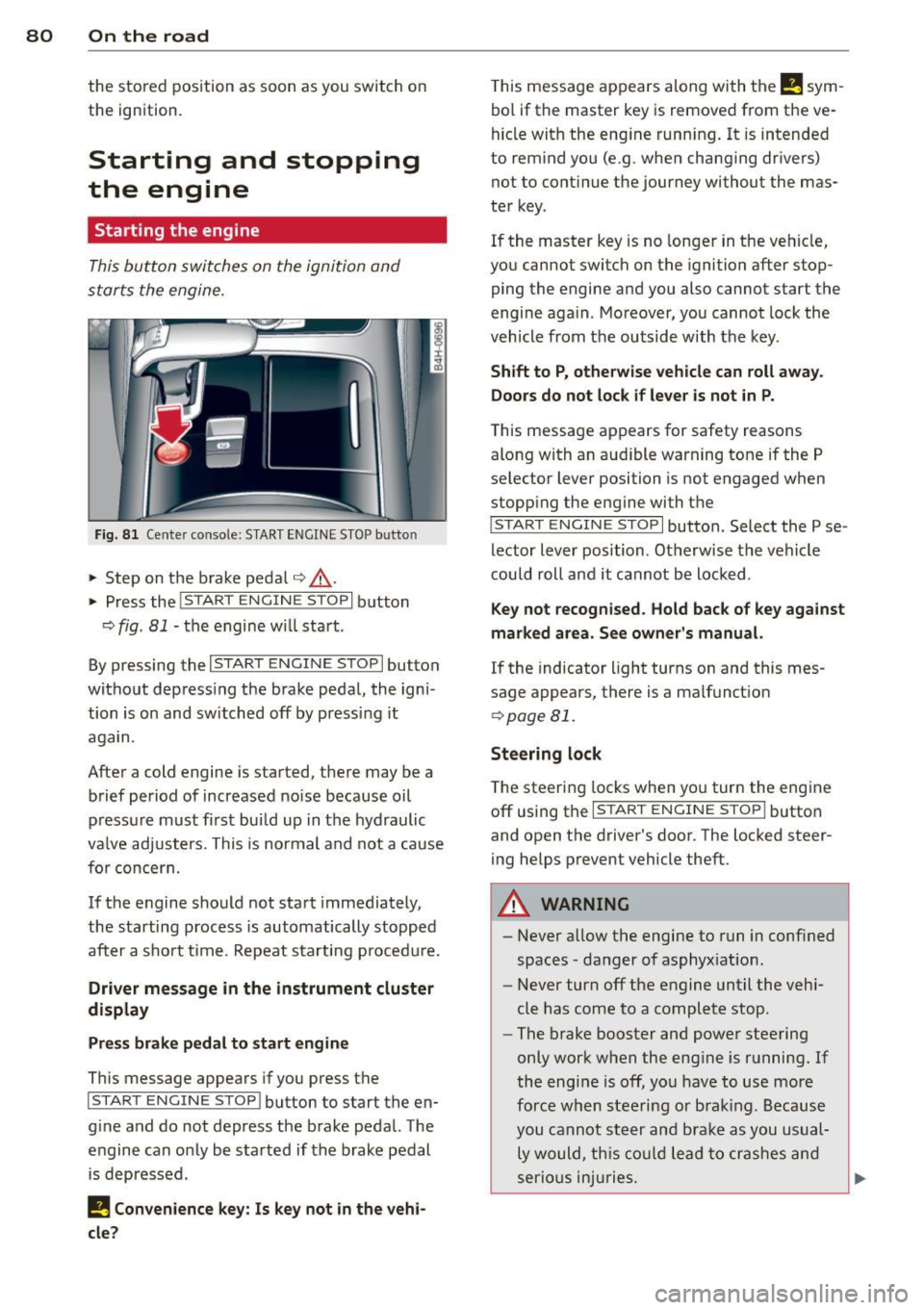
Fig. 81 Center console: S TART ENGINE S TOP b utto n
• Step on the brake pedal¢.&_ .
• Press the
!START E NGIN E STOPI button
¢
fig . 81 -the engine will start .
By pressing the
I START ENGIN E STOP I button
without depress ing the brake pedal, the igni
tion is on and switched off by pressing it
again.
After a cold engine is started, there may be a
brief period of increased noise because oil
pressure must fi rst bui ld up in the hydraulic
va lve adjusters. This is normal and not a cause
for concern.
If the engine should not start immediately,
the starting process is automatically stopped
after a sho rt time . Repeat sta rting p rocedu re.
Driver message in the instrument cluster
display
Press brake pedal to start engine
This message appears if you press the
I STAR T ENGIN E ST OP ! button to start the en
g ine and do not depress the brake pedal. The
engine can only be started if the brake pedal
is depressed.
I! Convenience key: Is key not in the vehi
cle?
T his message appears along with the I! sym
bol if the master key is removed from the ve
hicle with the eng ine running.
It is intended
to remind you (e.g . when changing drivers)
not to continue the journey without the mas
ter key.
If the maste r key is no longer in the vehicle,
you cannot switch on the ignition after stop
ping the engine and you also cannot start the
engine again . Moreover, you cannot lock the
vehicle from the outside with the key.
Shift to P, otherwise vehicle can roll away.
Doors do not lock if lever is not in P.
T his message app ears for safety reasons
along with an aud ible warning tone if the P
selector lever position is not engaged when
stopp ing the engine wi th the
I S TART ENGIN E STOP I button. Select the P se
lector lever position . Otherwise the vehicle
could roll and it cannot be locked .
Key not recognised. Hold back of key against
marked area. See owner's manual.
If the indicator light turns on and this mes
sage appears, there is a malfunct ion
¢ page Bl.
Steering lock
The steering locks when you turn the engine
off using the
I STAR T ENGINE ST OP I button
and open the driver 's door. The locked steer
ing helps prevent vehicle theft.
A WARNING
-
- Never allow the engine to run in conf ined
spaces -danger of asphyxiat ion .
- Never turn off the engine until the vehi
cle has come to a complete stop .
- The brake booster and power steering
only work when the engine is running.
If
the engine is off, you have to use more
force when steering or brak ing. Because
you cannot steer and brake as you usual
ly would, this could lead to crashes and
serio us injuries.
Page 119 of 300

Switching on and off
Applies to vehicles: with parking system advanced
The rear view camera switches on automati
cally together with the acoustic and visual
park assist when you put the vehicle in re
verse .
Fig. 125 Cen ter con sol e: Pa rking syst em swi tc h
Fig. 126 MMI display: visual distan ce di splay
Switching on
• Switch the MMI on
• Activate
comfort or auto mode in Audi drive
select
¢ page 103.
• Shift into reverse or
• Press the switch
Pw.!l. in the center console
¢
f ig. 125. A short confirmation tone
sounds and the ind icator light in the sw itch
light s up .
Switching between the rear view camera
and visual display
• Press the Graphic control button
¢
page 118 , fig . 127 @to see the visual
display .
• Press the
Rearview control button to see
the rear view camera image¢
fig. 126 .
Switching off
• Dr ive faste r than 6 mph (10 km/h), or
Advanced Parking System 11 7
• press the switch P1#.!l. or
• switch off the ignit ion .
Segments in the visual display
The red segments in front of and behind the
vehicle
¢ fig. 126 help you to determine the
distance between yo u and an obstacle. As
your vehicle comes closer to the obstacle, the
segments move closer to the veh icle. The co l
lision area has been reached when the next to
las t segmen t is displayed . Do not continue
driving farther ¢.&
in General Information
on page 116!
A WARNING
- The MMI display cannot show, or cannot
adequately show, certain objects (such as
small posts or grating), recesses in the
g ro und and protruding parts on another
car.
- Only use the rear view camera to assist
you if it shows a good, clear picture . For
examp le, the image may be affected by
the sun s hining into the lens, dirt on the
lens or if there is a defect.
- Use the rear view camera on ly with the
rear lid comp lete ly closed . Make sure any
objects you may have mounted on the
rear lid do not block the rear v iew cam
era.
(D Tips
- The sensors must be kept clean and free
of snow and ice for the park assist to op
erate.
- If your ve hicle is near an obstacle, an ad
ditional v isual ind icator appears in the
rearview camera image. Th is superim
posed image is there to help you to de
termined which area of the vehicle is af
fected .
- You can change the volume and pitch of the signals as well as the display
r:!;; page 119.
-What appears in the display is time-de
layed .
Page 159 of 300
regulations must be observed. Your au
thorized Audi dealer is familiar with these requirements and we recommend that you
have your dealer perform this service for
you.
Other things that can affect Advanced
Airbag performance
Changing the vehicle's suspension system can
change the way that the Advanced Airbag Sys
tem performs in a crash. For example, using
tire-rim combinations not approved by Audi, lower ing the vehicle, changing the stiffness of
the suspension, including the springs, suspen sion struts, shock absorbers etc. can change
the forces that are measured by the airbag
sensors and sent to the electronic control
un it . Some suspension changes can, for exam
ple, increase the force levels measured by the
sensors and make the airbag system deploy in
crashes in which it would not dep loy if the
changes had not been made. Other kinds of
changes may reduce the force Levels meas
ured by the sensors and prevent the airbag
from deploying when it should.
The sensors in the safety belt buckle for the
driver and front passenger seat tell the elec
tronic control module if the safety belt is
latched or not. If the safety belt is being used,
the front airbag will deploy at a slightly high
er rate of vehicle deceleration than if the safe
ty belt is not being used. Therefore, in a par
ticular collision, it is poss ible that an airbag
will not deploy at a seating position where the
safety belt is being used but will inflate at the
position where the safety belt is not being
used. It is important that nothing interfere
with the safety belt buckles so that the sen
sors can send the correct information about
safety belt use to the electronic control unit.
A WARNING
Changing the vehicle's suspension includ
ing use of unapproved tire-rim combina
tions can change Advanced Airbag per
formance and increase the risk of serious personal injury in a crash.
Airbag system 157
-Never install suspension components
that do not have the same performance
characteristics as the components origi
nally installed on your vehicle .
- Never use tire-rim combinations that
have not been approved by Audi.
A WARNING
-
Items stored between the safety belt
buckle and the center console can cause
the sensors in the buckle to send the
wrong information to the electronic con
trol module and prevent the Advanced Air
bag System from working properly.
- Always make sure that nothing can inter
fere with the safety belt buckles and that they are not obstructed.
Knee airbags
Description of knee airbags
The knee airbag system con provide supple
mental protection to properly restrained
front seat occupants.
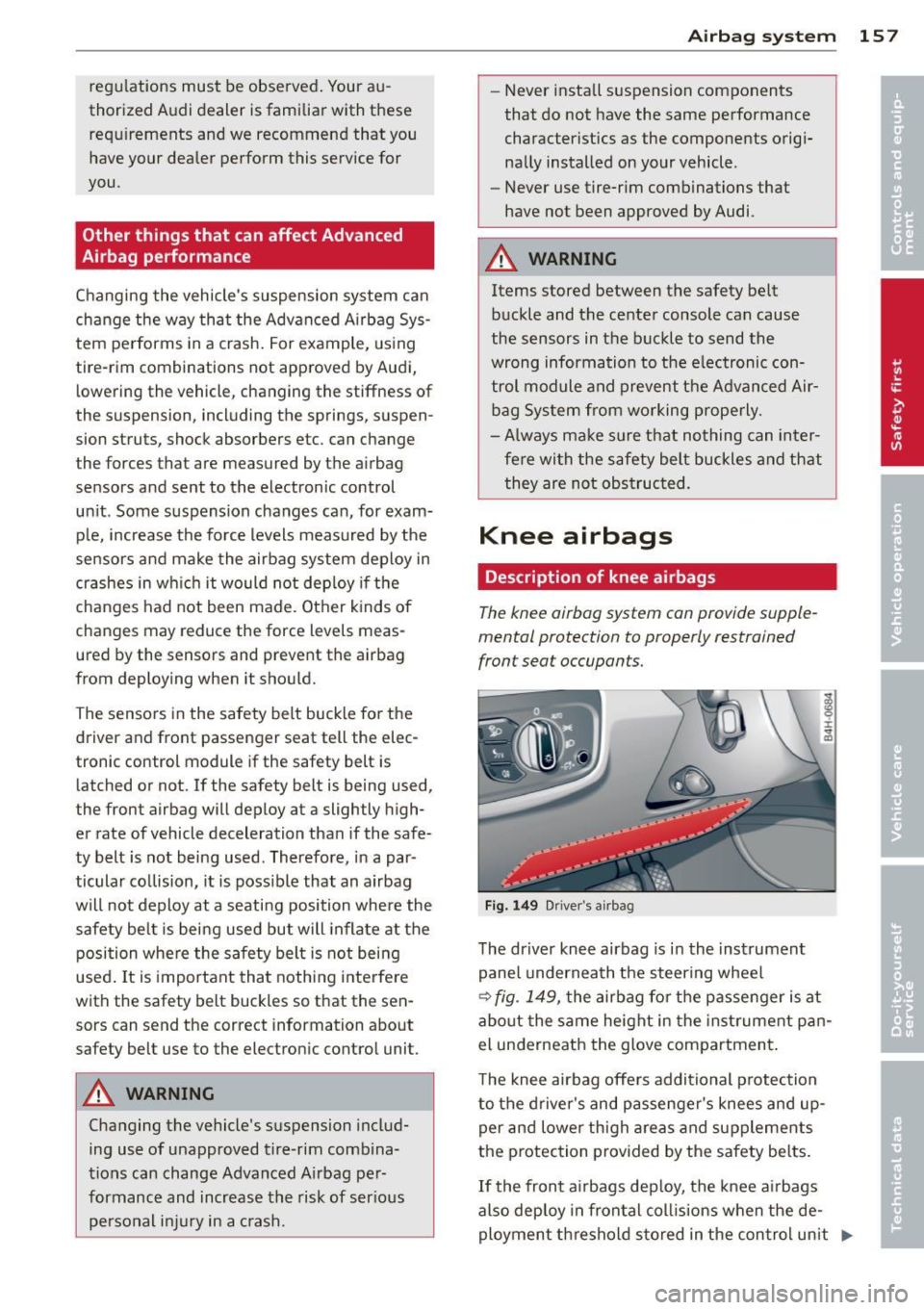
Fig. 149 Driver 's airbag
The driver knee airbag is in the instrument
panel underneath the steering wheel
¢ fig . 149, the airbag for the passenger is at
about the same height in the instrument pan
el underneath the glove compartment.
The knee airbag offers additional protection
to the driver's and passenger's knees and up
per and Lower thigh areas and supplements
the protection provided by the safety belts.
If the front airbags deploy, the knee airbags
also deploy in frontal col lisions when the de
ployment threshold stored in the control unit .,,.