cruise control AUDI A8 2012 User Guide
[x] Cancel search | Manufacturer: AUDI, Model Year: 2012, Model line: A8, Model: AUDI A8 2012Pages: 300, PDF Size: 75.06 MB
Page 92 of 300
90 Audi adaptive cruise control and braking guard
• You must also press the brake pedal when
the vehicle is stopped.
Switching adaptive cruise control off
• Push the lever away from you into position
@ until it clicks into p lace. The message
ACC off appears.
@ Indicator lights
II-Adaptive cruise control is switched on . No
vehicles are detected up ahead. The stored
speed is maintained.
I-A moving vehicle is detected up ahead .
The adaptive cruise control system regulates
the speed and d istance to the moving vehicle
ahead and acce lerates/bra kes automatica lly.
f§ . Adaptive cru ise control is switched on . A
mov ing vehicle up ahead was detected. Your
vehicle remains stopped .
I -When automatic braking is not able to
keep enough distance to a p reviously detected
mov ing vehicle up ahead, you must take con
trol and brake¢
page 92, Prompt for driver
intervention.
© Display
If adap tive cruise control is not shown in the
d isplay, you can call it up with the multifunc
tion steering wheel buttons~
page 23.
Based on the symbols in the display , you can
determ ine if the system is maintaining a dis
tance to the vehicle ahead and w hat that dis
tance is.
No vehicle -No vehicle ahead was detected.
White vehicle -A vehicle ahead was detected .
Red vehicle -Prompt for the driver to take ac
tion ¢
page 92.
Both
arrows on the scale © indicate the dis
tance to the vehicle ahead . No arrow appears
when the vehicle is on an open road and there is no object ahead. If an object is detected
ahead, the arrow moves on the scale.
The green zone on the scale shows the stored d istance. For information on changing the stored distance, refer to
¢
page 91. If the
distance se lected is too close or may soon be
come too close, the arrows move into the red
z one on the sca le.
A WARNING
Improper use of the adaptive cruise con
trol can cause collisions, other accidents
and serious personal injur ies .
- Pressing the
!SET ! button when driving at
speeds below 20 mph (30 km/h), w ill au
tomatically accelerate the vehicle to 20
mph (30 km/h), which is the minimum
speed that can be set .
(D Tips
-If you switch the ignit ion or the adaptive
cruise control off, the set speed is erased
from the system memory.
- You cannot switch the Electron ic Stabili
ty Control (ESC) to the SPORT mode
when adaptive cruise control is switched
on .
Changing the speed
Applies to vehicles: with Audi adaptive cru ise control
0
f
• 0
Fig. 92 Selecto r lever : chang ing t he spee d
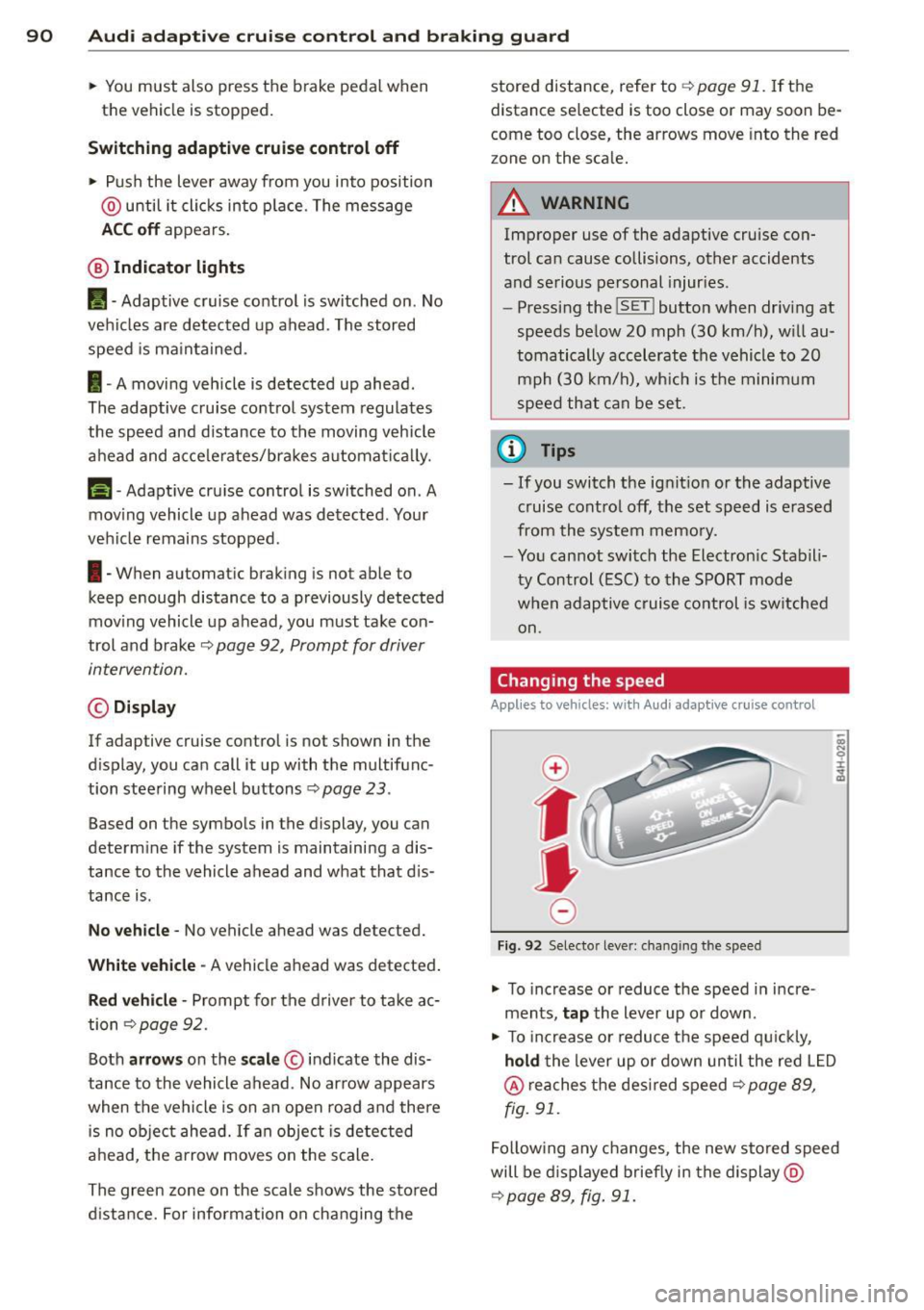
• To increase or reduce the speed in incre
ments,
tap the lever up or down.
-
-a)
N
q :r
~
"' To increase or reduce the speed qu ickly,
hold the lever up or down until the red L ED
@ reaches the desired speed ¢ page 89,
fig . 91.
Following any changes, the new stored speed
will be displayed briefly in the display @
¢page 89, fig. 91.
Page 93 of 300
Audi adaptive cruise control and braking guard 91
Driving in stop-and-go traffic
Applies to vehicles: with Audi adaptive cruise control
The adaptive cruise control system also as
sists you in stop-and -go traffic. If a previous
detected vehicle ahead s tops, yo ur vehicle will
brake to a stop, within the limits of the sys
tem .
.,. To resume driv ing with adap tive cruise con
tro l, tap the accelerator peda l or
.,. Pull the lever toward you into position @
¢ page 89, fig. 90.
(D Tips
-If adaptive cru ise contro l is active and
your vehicle does not start driving as ex
pected after pulling the lever once, you
can start out aga in by tapping the accel
erator pedal.
- If an obstacle is detected when your ve
hicle starts dr iv ing, the system w ill
prompt you to take over
¢ page 92.
Your vehicle w ill drive more slowly when
starting. This may also happen in some
s ituations when there no obstacle is ap
parent.
Interrupting cruise control
Ap plies to vehicles: with Audi adaptive cruise control
Fig. 93 Selecto r level
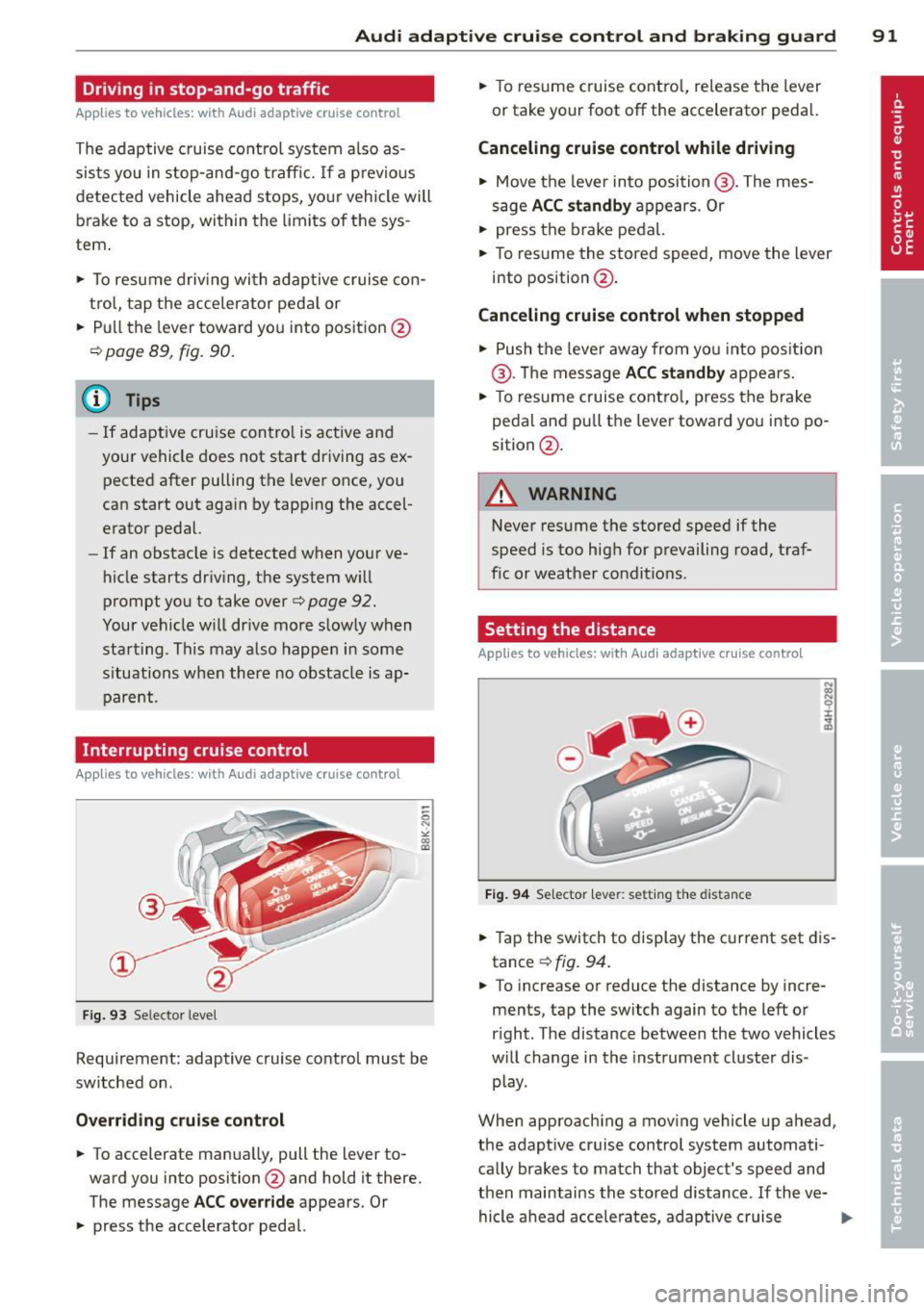
Requirement: adaptive cruise control must be
switched on .
Overriding crui se control
.,. To accelerate manua lly, pull the lever to
ward you into position @and hold it there.
The message
ACC override appears. Or
.,. press the accelerator pedal. .,.
To resume cruise contro l, release the lever
or take your foot off the accelerator pedal.
Canceling cruise control while driving
.,. Move the lever into position @. The mes
sage
ACC standby appears . Or
.,. press the brake pedal.
.,. To resume the stored speed, move the lever
into position @ .
Canceling cruise control when stopped
.,. Push the lever away from you into pos ition
@ . Th e message
ACC standby appears.
.,. To resume cruise control, press the brake
pedal and pu ll the lever toward you into po
sition @.
A WARNING
-
Never resume the stored speed if the
speed is too high for prevailing road, traf
fic or weather conditions.
Setting the distance
App lies to vehicles: with Audi adapt ive cr uise contro l
Fig. 94 Selector lever: setting th e dista nce
.,. Tap the switch to display the current set dis
tance
¢ fig. 94 .
.,. To increase or reduce the distance by incre
ments, tap the switch again to the left or
right. The distance between the two vehicles
w ill change in the instrument cluster dis
play.
When approaching a moving vehicle up ahead,
the adapt ive cruise control system automati
cally brakes to match that object's speed and
then maintains the stored distance . If the ve-
hicle ahead accelerates, adaptive cruise ..,.
Page 94 of 300
92 Audi adaptive cruise control and braking guard
control will also accelerate up to the stored
speed.
The higher the speed , the greater the distance
in yards (meters)¢ .&.. T he
Distance 3 setting
is recommended .
The distances p rov ided are spec ified values.
Depending on the driving situation and the
how the vehicle ahead is dr iving, the actual
distance may be more or less than these tar
get distances .
The various symbols for the time increments
appear briefly in the info rmation line @
¢ page
89, fig. 91 when you change the set
tings .
c:::,_c:::, ___ Distance 1: This setting corre-
sponds to a distance of 92 feet/28 meters
when traveling at 62 mph ( 100 km/h), or a
time interval of
1 second.
c:::, __ c:::, __ Distan ce 2: Thi s setting corre
sponds to a dis tance of 118 feet/36 meters
when traveling at 62 mph ( 100 km/h), or a
time interva l of 1.3 seconds.
c:::, ___ c:::,_ Distance 3: This setting corre-
sponds to a distance of 164 feet/SO meters
when traveling at 62 mph ( 100 km/h), or a
time interva l of 1.8 seconds.
c:::, ____ c:::, Distance 4: This setting corre-
sponds to a distance of 210 feet/64 meters
when traveling at 62 mph ( 100 km/h), or a
time interval of 2.3 seconds.
.&_ WARNING
Following other vehicles too closely in
creases the risk of collisions and serious
personal injury.
- Setting short distances to the traffic ahead reduces the t ime and distance
available to br ing your vehicle to a safe
stop and makes it even more necessary
to pay close attention to traffic.
- Always obey applicable traffic laws, use
good judgment, and select a safe follow
ing distance for the traffic, road and
weather conditions .
(D Tips
-Distance 3 is set automatically each time
you switch the ignition on.
- Your standard settings are automatically
stored and assigned to the remote con
tro l key being used.
Selecting the driving mode
Applies to veh icles: w ith Audi adapt ive cr uise contro l
.,. Select the desired driving mode in dr ive se
lect
¢ page 103 .
@ Tips
Your settings are automatically stored and
assigned to the remote control key being
used.
Prompt for driver intervention
Applies to vehicles : w it h Audi ada ptive cr uise cont ro l
Fig. 95 Instrument cluster: request for driver inte rven
tio n
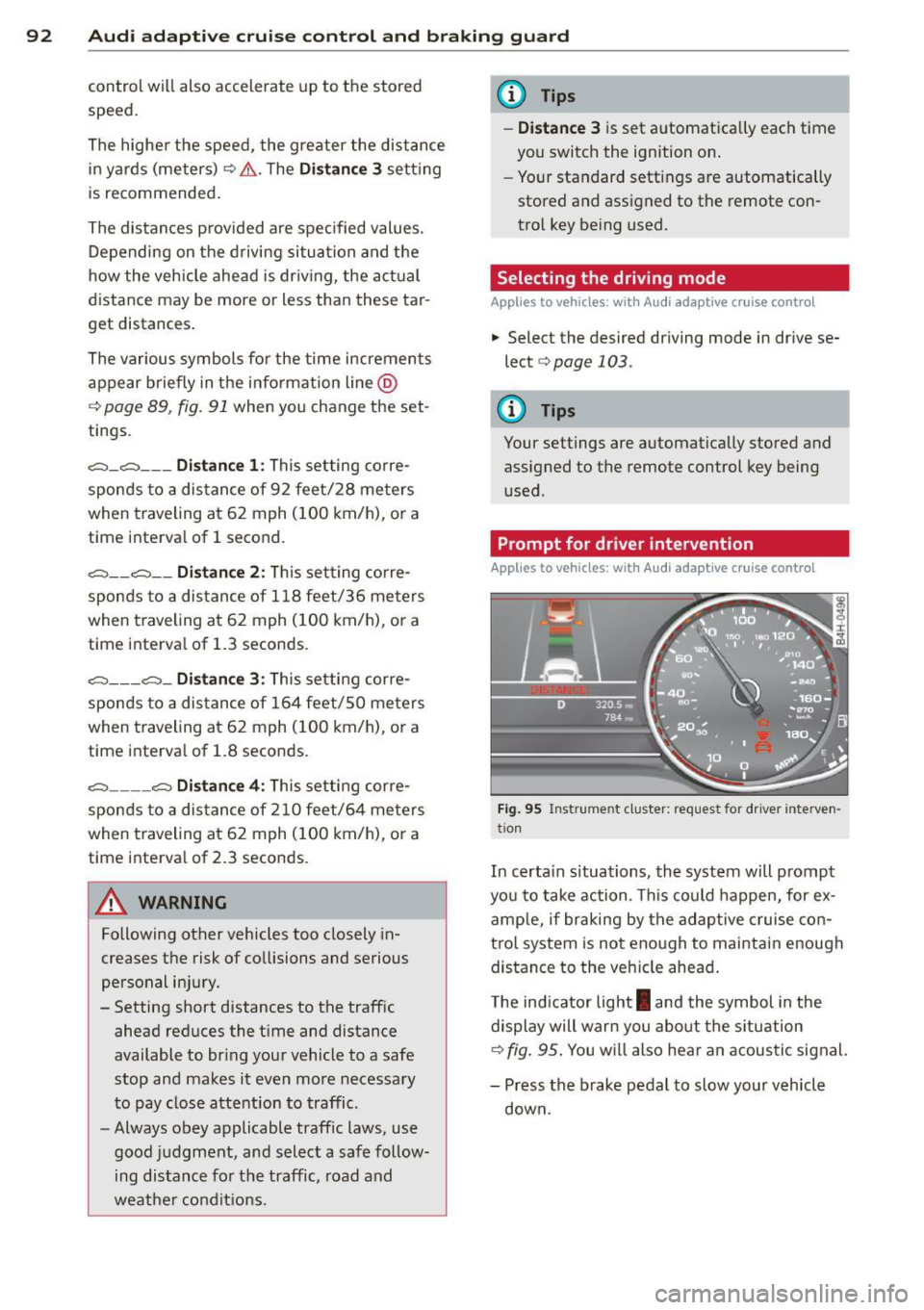
In certa in s ituations, the system will prompt
yo u to take action . Thi s could happen, for ex
amp le, if braking by the adaptive cruise con
trol system is not enough to maintain enough
distance to the veh icle ahead .
The indicator light
I and the symbol in the
display will warn you about the situa tion
¢fig.
95. You w ill also hear an acoustic signal.
- Press the brake pedal to slow your vehicle
down.
Page 95 of 300

Audi adaptive cruise control and braking guard 93
Audi braking guard
Description
Applies to vehicles: with Audi adaptive cruise control
Fig. 96 Instrument cluster: approach warning
Audi braking guard uses radar sensors and a
video camera. It also functions within the lim
its of the system when adaptive cruise control
is switched off.
What can Audi braking guard do?
When detected in time, the system can assess
situations when a vehicle ahead brakes sud
denly or if your own vehicle is traveling at a
high speed and approaching a vehicle up
ahead that is moving more slowly . Audi brak
ing guard does not react if it cannot detect
the situation.
The system advises you of various situations:
- The
distance warning is given if you are too
close to the vehicle ahead for a long time. If
the vehicle ahead brakes sharply, you will not be able to avoid a collis ion. The indicator
light
I i n the display comes on .
- The
approach warning is given when a de
tected vehicle up ahead in your lane is mov
i ng much more slowly than you are or if it
brakes sharply . When this warning is given,
it may only be possible to avoid a collision
by swerving or braking sharply. The indicator
light
I and indicator in the display will warn
you about the danger
c::> fig . 96. You will a lso
hear an acoustic signal.
If you do not react fast enough or do not react
at all to the situation, Aud i braking guard will
11
This is not ava ilable in som e coun tri es.
intervene by braking and the message braking
guard intervention
will appear.
- If a coll is ion is imminent, the system wi ll
first provide an
acute warning by briefly and
sharply applying the brakes.
- If you do not react to the acute warning,
braking guard can brake with increas ing
force within the limits of the system. This
reduces the vehicle speed in the event of a
collision.
- The system can initiate complete dece lera
tion shortly before a collision
1>. Full deceler
ation at high speeds occurs only in vehicles
with adaptive cruise control and side assist
(pre sense plus).
- If the Audi braking guard senses that you
are not braking hard enough when a colli
sion is immi nent, it can increase the braking
force.
- The pre sense functions also engage when a
collision is imm inent
c::> page 185 .
Which function s can be controlled?
You can switch Audi braking guard and the
distance/approach warning on or off in the
MMI c::> page 94, Settings in the MMI.
A WARNING
Lack of attention can cause collisions, oth
er accidents and serious personal injuries .
The Audi braking guard is an assist system
and cannot prevent a collision by itself.
The driver must always intervene. The driv
er is always responsib le for braking at the
correct time.
- Always pay close attention to traffic,
even when the Audi braking guard is
switched on. Be ready to intervene and
be ready to take complete control when
ever necessary. Always keep the safe and
legal distance between your veh icle and
veh icles up ahead.
- Audi brak ing guard works within limits
and will not respond outside the system
lim its, for example when approaching a
Page 96 of 300
94 Audi adap tive cruise control and br aking guard
stopped vehicle or stationary obstacle
(end of a traffic jam or veh icle that has
broken down in traffic).
- Always remember that the radar sensor
for the Audi braking guard works only
within defined detection and range limits
that may prevent the proper detection of
other vehicles .
- The radar sensor's function and range
can be reduced by rain, snow and heavy
spray. Moving vehicles up ahead may not
be promptly detected or may not be de
tected at al l.
- Reflective surfaces includ ing crash barri
ers or tunnel entrances may impair the
func tion of the radar sensor.
{D) Tips
- You can cancel the braking w ith increas
i ng force that is initiated by the system
by braking yo urself, by accelerating no
ticeab ly or by swerving.
- Audi braking guard error messages
¢page 94.
- Keep in mind that braking gua rd can
brake u nexpectedly. Always secure any
ca rgo or objec ts th at yo u are transport
i ng to reduce the risk of damage or in
ju ry.
Settings in the MMI
Applies to vehicles: with Audi adaptive cruise co ntrol
.. Se lect: I CARI function button > Ca r sys tem s
control button > Drive r assist > Audi b rak
ing guard .
System -
Switch Audi braking g uard On and
Off . When you switch the ignition on, the
message
Aud i braking gua rd off appears if
the system is switched off.
Ea rly warnin g -The distance and approach
warn ings in the display can be switched
On /
Off .
(D Tips
- Your settings are automatically stored
and ass igned to the remote control key being used at the times the settings are
made.
- If you switch the ESC to sport mode, A u
di braking gua rd switc hes off a utomat i
cally r=:>page
189.
- Switch A udi braking guard off when you
are loading the vehicle onto a vehicle car
rier, train, ship or other type of transpor
tat ion. This can prevent undesired warn
ings from the braking guard system.
Messages
Applies to vehicles: with Aud i adaptive cru ise contro l
ACC unavailable
ACC and b raking gua rd: unavailable
T he system cannot detect moving vehicles up
ahead correctly and is switched off. The sen
sors have been displaced or a re not working
proper ly . The Audi pre sense functions may a l
so be affected. Drive to your authorized Audi
dealer or authorized A udi service facility im
med iate ly to have the malfunction corrected.
ACC: unavaila ble at thi s time. No sen sor vi
sion
ACC and braking guide: un ava ilabl e at thi s
time . No s ensor vi sion
Th is message appears if the sensor v iew is ob
structed, for examp le by leaves, snow, heavy
spray o r d irt. Clean the sensors
r=;, page 87,
fig. 86 .
ACC: unavailabl e at this time. Inclin e too
s teep
The road exceeds the max imum possible an
gle for proper adaptive cru ise control opera
t ion. Adaptive cru ise cont rol is switched off.
ACC: only selector lever pos itions D , S or M
available
Se lect the D, Sor M selector lever position .
ACC: un available at thi s time . Parking brake
s et
T he adapt ive cru ise control system switches
off au tomatically if the par king b rake is set. .,.
Page 97 of 300
Audi adaptive cruise control and braking guard 95
ACC: unavailable at this time . ESP interven
tion
This me ssage appea rs if the Ele ct ron ic Stab ili
t y Control (ESC) is wor king to help stab ilize
the vehicle . In this case, adaptive cru ise con
trol switches off a utomatica lly .
ACC : Please take over
This message appea rs whe n adapt ive cr uise
con trol cannot set t he parking b ra ke . P ress
the brake pedal to preve nt the vehicle from
r olling .
•••
Three wh ite dots appear if a setting cannot be
se lected with t he se lecto r lever . Fo r example,
this happens if adapt ive cr uise c ontrol can not
resume dr iv ing in stop-and -go traff ic because
one of the conditions required for ACC to wor k
i s not p resent.
Door open
The adaptive c ruise control system cannot
sw itch on when a d oor is open .
Stationary object ahead
This message appea rs if you would li ke to
sw itch ad aptive cr uise con trol o n and t here is
a sta ti onar y ve hicle or obsta cle direc tly ah ea d
of yo ur vehicle.
Page 105 of 300
Audi drive select Driving settings
Introduction
Aud i drive select makes it possible to experi
ence different types of vehicle settings in one
veh icle. The driver can select th ree
Comfort,
Auto
and Dynamic modes in the MMI to
switch between a sporty and a comfortable
driving mode.
You can also adjust the setting according to
your preferences in the
individual mode. For
examp le, you can combine settings such as a
sporty engine tuning with light steering.
Descript ion
The vehicle setup in each mode depends on
the vehicle's features. The engine, transmis
sion, steering, reversible safety belt tension
ers and adaptive air suspension are always in
volved .
Engine and transmission
Depending on the mode, the engine and the
transmission respond more quickly or in a
more balanced manner to accelerator pedal
movements. In the sporty dynamic mode, the
transmission sh ifts at higher RPMs.
Air suspension
The adaptive air suspension/adaptive air sus
pension sport*
( Air suspension in the MMI) is
an electronically cont rolled air suspension and
damping system. They are adjusted depend ing on the selected driving mode, the driver's
steering, braking and acceleration input and
the road s urface, veh icle speed and load. A
sporty setting is generally used in vehicles
with adaptive air suspension sport *.
The vehicle clearance va ries depending on the
selected mode and the speed .
The highway setting is activated automatically
when you drive above 75 mph (120 km/h) for
mo re than 30 seconds in the
auto or dynamic
mode. The g round clearance is increased auto-
Audi drive select 103
matically if the speed drops below 44 mph
(70 km/h) for more than 120 seconds.
Steering
The steering adapts in terms of steering effort
and steering ratios. Indirect steering that
moves easily as in comfort mode is especially
s ui ted to long drives on a highway. In con
trast, dynamic mode provides sporty, direct
steering.
T he following applies to vehicles with dynamic
steering*: the steering ratio changes based on
vehicle speed in order to maintain optimum
steering effort for the driver at all times. This
sets the steering to be less sens itive at higher
speeds in order to provide improved vehicle
control.
Sport diffe rential*
As a component of the all whee l drive system
(quattro
® ) c> page 191, the Sport differen
tial* distributes the driving power to the rear
axle depending on the situat ion. The dis tribu
tion of power varies depending on the select
ed mode, from balanced (comfort) to agile
(dynamic). The goal is a hig h level of agility
and ability to accelerate on curves. Th e vehi cle
is very responsive to steer ing.
Adaptive cruise control*
The behav ior when accelerating can be adjust
from comfortable to sporty, depending on the
drive select mode. Adaptive cruise control al
so responds to the driving behavior of the ve
hicle ahead in a more conserva tive or sporty
manner.
(D Note
- Make sure there is enough clearance
above and below the vehicle when park
ing . The height of the vehicle can change
once it is parked due to temperature
fluctuations, changes to the load condi
tions and changes to the driving modes,
w hich can affect clearance.
- When transporting the vehicle on a car
carrier, train, ship or by other means, on-
ly tie the vehicle down at the running
IJJ,,
Page 107 of 300
Audi drive select 105
Adjusting the Individual mode
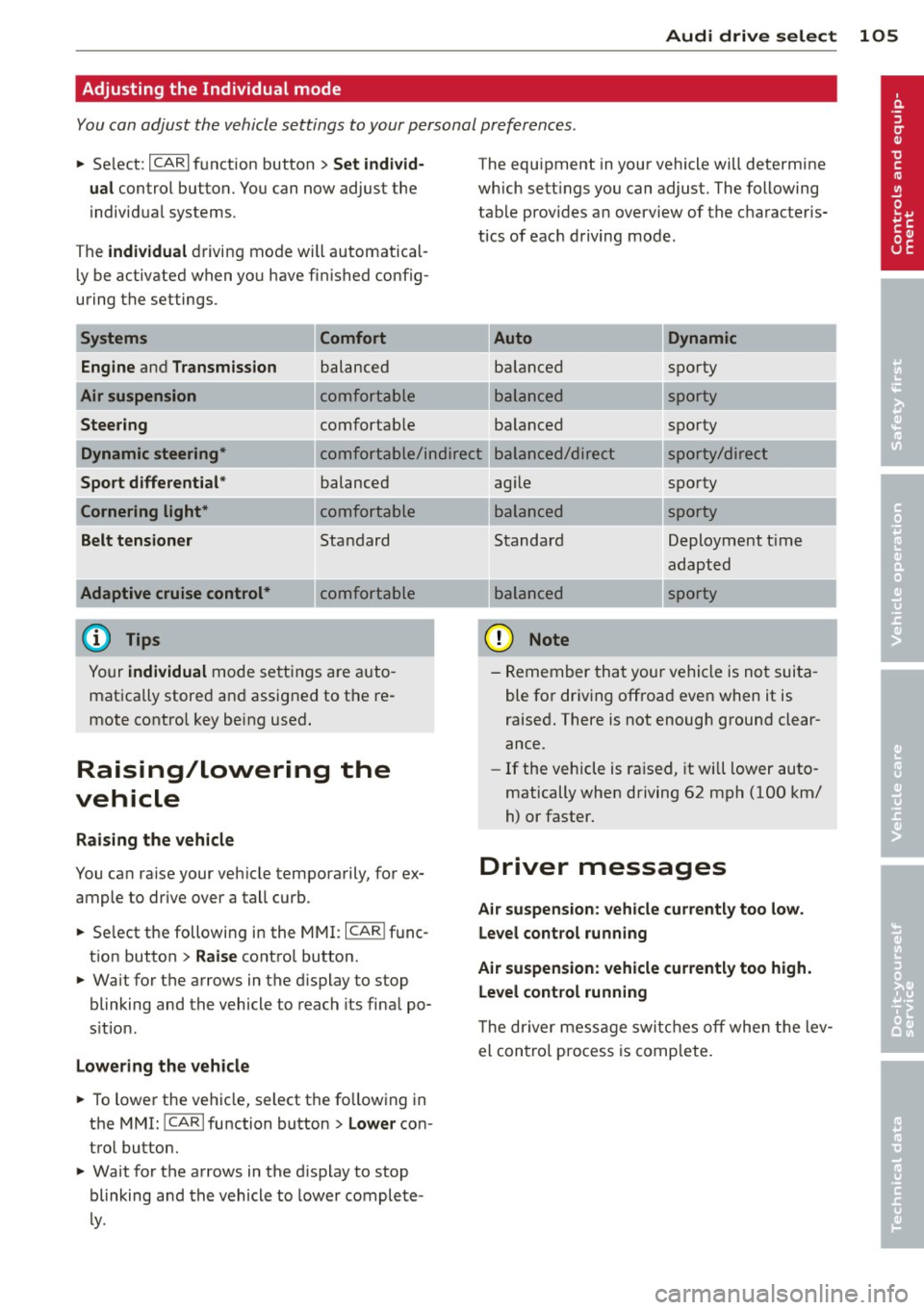
You can adjust the vehicle settings to your personal preferences.
~ Select: ICARlf unct ion button> Set individ·
ual
control button. You can now adjust the
individua l systems.
The
individual d riving mode will automatical
l y be activated when yo u have fin ished config
uring the settings.
Systems
Engine
a nd Transmission
Air suspension Steer ing Comfort balanced
comfo
rtable
comfortab le The equ
ipment in your vehicle will determ ine
which sett ings you can adjust. The following
tab le prov ides a n overview of the c haracteris
tics of eac h driving mode.
Dynamic
ba lanced spo
rty
---.. ,
s porty
ba lanced spo
rty
Dynamic steering*
Sport differential *
Cornering light*
Belt tensioner c o mfo rtable/ind ire c t balanced/dire ct sporty/direc t
spo rty
Adaptive cruise control *
balanced
comfortable
Standard
comfo rtable
Yo ur
individual mode se ttings a re auto
mat ica lly store d an d assig ned to t he re
mote control key bein g use d.
Raising/lowering the
vehicle
Raising the vehicle
You ca n ra ise your veh icle temporarily, for ex
ample to drive over a tall curb.
~ Se lect the following i n the MMI: I CARI f unc
t ion button >
Raise control button.
~ Wait for the arrows in the d isplay to stop
blinking and the vehicle to reach its fina l po
s it io n.
Lowe ring the vehicle
~ T o lower the veh icle, select the fo llow ing in
the MMI: ICARlfunction button>
Lower con
trol button.
~ Wa it for the arrows in the d isplay to stop
blinking and th e vehicle to lower complete
ly . ag
ile
balanced
Standard
balanced
(D Note
---.. ,
---.. ,
sporty Deployment t ime
adapt ed
sporty
- Remember that your ve hicle is not sui ta
ble fo r dr iv ing offroa d even when it is
raised . There is not enough ground clear
ance.
- If the vehicle is ra ised, it will lower auto
matically when driving 62 mph (100 km/
h) or faster.
Driver messages
Air suspension : vehicle currently too low.
Le vel control running
Air suspension: vehicle currently too high. Level control running
T he dr iver mess age swi tches o ff when the lev
el con tro l process is comp lete.
Page 187 of 300
Audi pre sense Preventative passenger
protection
App lies to veh icles: with Audi p re se nse
Audi pre sense can initiate steps to help pro
tect vehicle occupants in certain situations.
The funct ions descr ibed depend on equipment
installed in your vehicle:
Audi pre sense basic
The following functions can be triggered in
certain driving situations:
- Tightening of the safety belts (for example,
during heavy braking) : the front safety belts
have reversible belt pretensioners. If a colli
sion does not occur, the safety belts loosen
slightly and are ready to be tightened again.
- Closing the windows and the sunroof*: the
windows and the sunroof" close leaving a
small open gap .
Audi pre sense basic functions can be trig
gered at speeds above 20 mph (30 km/h).
Vehicles with Audi drive select*: the deploy
ment time is adapted in dynamic mode.
Audi pre sense front (vehicles with
adaptive cruise control*)
Audi pre sense front includes the functions in
Audi pre sense basic. In addition, within the
limits of the system, the likelihood of a colli
sion with the vehicle immediately ahead is al
so calculated . If the system senses an immi
nent collision the following functions can be
tr iggered:
- Audi braking guard
c> page 93
-Tightening the safety belts
- Closing the windows and the sunroof* ( leav-
ing a small open gap)
Audi pre sense rear (vehicles with Audi
side assist*)
Audi pre sense rear includes the functions in
Audi pre sense basic. In addition, the likeli
hood of a rear-end col lision with the vehicle
coming from behind is also calculated. If the
Audi pre sense 185
risk of a collision is detected, the following
functions can be triggered:
- Tightening the safety belts
- Closing the windows and the sunroof* (leav-
ing a small open gap)
- Adjusting the seats: the settings for the
power head restrains, the upper sections of
the backrests and the pneumatic side bol
sters* are optim ized for the front seats and
the outboard rear seats*. If a collision does
not occur, the previous seat settings are re
stored.
Audi pre sense plus
Audi pre sense plus includes the funct ions in
Audi pre sense front and Audi pre sense rear.
Error message
Audi pre sense: not available
Preventative passenger protection is not avail
able. See your authorized Audi dealer immedi
ately to have the malfunction corrected .
A WARNING
Audi pre sense cannot overcome the laws
of physics.
It cannot prevent a collision. Do
not let the increased safety provided
tempt you to take risks. This will increase
the risk of a collision and serious personal
injuries.
- The sensors cannot always detect all ob
jects . This increases the risk of a colli
sion.
-Audi pre sense does not detect people or
animals or objects that are crossing the
veh icle's path
c> page 87.
- The radar sensor's vision can be reduced
by heavy rain, ice, snow, heavy road spray
and reflections from guard rails, tunnel
entrances, etc. These and similar condi
tions can prevent vehicles from be ing ac
curately detected and in some cases they
may not be detected at all.
Ill-
•
•
Page 190 of 300
188 Intelligent technology
ESC includes and/or works together with the
anti-lock braking system (ABS), brake assist
system, anti-s lip regulat ion (ASR), e lectronic
d ifferential lock ( EDL), dynamic steering* and
e lectronic interaxle differentia l lock*. ESC is
switched on all the time. I n certa in s ituations
when you need less tract io n, you ca n sw itch
off ASR by pressi ng the button above
~ page 189, fig. 167 the se lector lever. Be
sure to sw itch ASR on ag ain when you no lon
ger need less trac tion.
Anti -lock braking system (ABS)
ABS prevents t he wheels from locking up
when braking. The veh icle can still be st eered
even d uring ha rd b rak ing . Apply steady p res
sure to the br ake ped al. Do no t pu mp the ped
a l. A puls ing in t he bra ke peda l ind icates that
the system is he lping yo u to b rake the vehicle .
Brake assist system
The brake assist system can decrease b ra kin g
d ista nce. It increases braking powe r w hen the
d river p resses the brake pedal quickl y in eme r
gency situa tions . You mus t press and ho ld the
b rake peda l until the situation is over. In vehi
cles with adaptive cruise control*, the brake
assist system is more sensitive i f the d istance
detected to the vehicle ahead is t oo smal l.
Anti-slip regulation (ASR)
ASR reduces engine power w hen the drive
wheels begin to spin and adapts the fo rce to
the road condit ions. This makes it eas ier to
start, accelerate and drive up hills.
Electronic differential lock (EDL )
The E DL brakes wheels that are spinn ing and
transfers the drive powe r to the o ther d rive
wheel o r whee ls if the vehic le is equipped with
a ll whee l drive*. This funct ion is available up
to about 7S mph (120 km/h).
I n extreme cases , EDL automatica lly swit ches
off to help keep the brake on the braked whee l
from overheating. ED L wi ll switch on again au
tomatically when conditions have returned to normal.
Dynamic steering*
On vehicles wi th dynam ic s teeri ng, ES C helps
stab ilize the steer ing in cer tain sit uations.
Electronic interaxle differential lock
function*
T he ele ctronic i nte raxle di fferentia l lock f unc
tion ac tiva tes when dr iving t hrough curves.
B ra king is targeted towar d the whee ls on the
inside of the curve as needed . This helps to
min imi ze front whee l skid, improves traction
and allows for more precise driving throug h
cu rves .
A WARNING
- ESC, ABS, ASR , EDL, dynamic steering*
and the elect ronic interaxle differential
loc k function* cannot ove rcome t he laws
of physics . This is espe cially im po rtant
on slippery o r we t road s.
If the sys tems
begin actin g to stabilize your veh icle, you
should immediately change yo ur speed
to match the road and t raffic conditions .
Do not let the increased safety provided
by these systems tempt you to take risks. Doing so will increase the risk of a loss of
veh icle cont ro l, collision and ser io us per
sonal injur ies .
-Always ada pt your speed to road , traffic
and wea ther conditions. The risk of los
ing contr ol of the vehicle i ncreases wh en
d riving too fast, espe cially through
curve s and on slippe ry or wet roads, and
when dr iv ing too close to vehicles up
ahead. ESC, ABS, the brake ass ist sys
tem, EDL, ASR, dynam ic steering * and
the elect ron ic interaxle differential lock
function * cannot prevent co llisions.
- Always accelerate with s pecial care on
even, smooth s urfaces such as those that
are wet or covered with ice and snow.
The drive wheels can spin even w ith
these assistance sys tems that cannot al
ways he lp to red uce the risk of loss of ve
h icle co nt ro l.
-