ignition AUDI A8 2012 User Guide
[x] Cancel search | Manufacturer: AUDI, Model Year: 2012, Model line: A8, Model: AUDI A8 2012Pages: 300, PDF Size: 75.06 MB
Page 27 of 300
Instruments and warning/indicator lights 25
For some vehicle functions, you can access the
trip information from the temporary memory
in the line
(I) c:;; page 23, fig. 5.
@ Tips
- All stored values will be lost if the vehi
cle battery is disconnected.
- Fuel consumptions (average and cur
rent), range and speed are displayed in
metric units on Canadian models.
Odometer
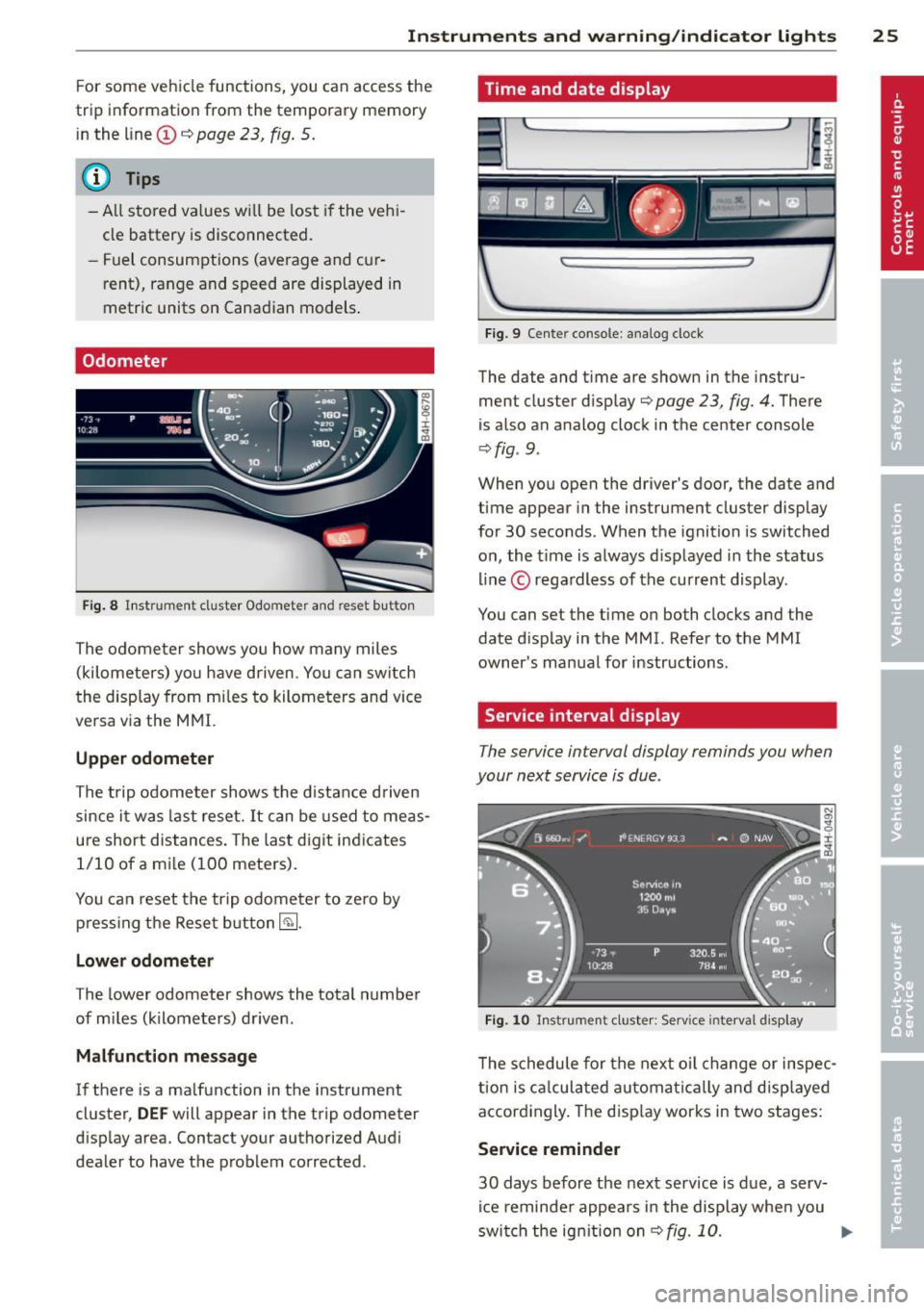
Fig. 8 Instrument cluster Odometer and reset b utto n
The odometer shows you how many miles
(kilometers) you have driven. You can switch
th e display from miles to kilometers and vice
versa via the MMI.
Upper odometer
The trip odometer shows the distance driven
since it was last reset.
It can be used to meas
ure short distances. The last digit indicates 1/10 of a mile (100 meters).
You can reset the trip odometer to zero by
pressing the Reset button~-
Lower odometer
The lower odometer shows the total number
of miles (kilometers) driven .
Malfunction message
If there is a malfunction in the instrument
cluster,
DEF will appear in the trip odometer
display area. Contact your authorized Audi
dealer to have the problem corrected .
Time and date display
...
I~
Fig. 9 Cente r console : analog clock
The date and time are shown in the instru
ment cluster display
c:;; page 23, fig. 4. There
is also an analog clock in the center console
¢fig . 9 .
:r
~
When you open the driver's door, the date and
time appear in the instrument cluster display
for 30 seconds. When the ignition is switched
on, the time is always displayed in the status
line © regardless of the current display.
You can set the time on both clocks and the
date display in the MMI. Refer to the MMI
owner's manual for instructions.
Service interval display
The service interval display reminds you when
your next service is due .
Fig. 10 Instrument cluster: Serv ice inte rval disp lay
The schedule for the next oil change or inspec
tion is calculated automatically and displayed
accordingly. The display works in two stages:
Service reminder
30 days before the next service is due, a serv
ice reminder appears in the display when you
switch the ignition on
¢fig. 10. ..,.
Page 28 of 300
26 Instruments and warning /indicator lights
After abo ut 5 seconds the display sw itches
back to normal. The distance and time re
maining are updated eac h time the ignition is
switched on until the date due for service is
reached .
Service due
When the due date for service is reached , the
message
Serv ice due! appears in the instr u
ment cluster immediately after you switch the
ignit io n on . Additionally, a warning tone
sounds . After about
5 seconds the display
sw itches back to no rmal.
Calling up the service schedules
If or when an oil change or inspection is due,
can be shown in the MMI d isplay by select ing
the service interva l display in the car menu .
Select the
!CAR ! function button> Car sys
tems
co ntrol button > Servicing & checks >
Service interval disp lays.
Re setting the service interval display
Your author ized Audi dealer w ill reset the cor
responding service sched ule after performing
the app rop riate se rv ice on you r vehicle . You
a lso have the possibili ty to reset the o il
change sched ule after having performed an
oil c hange a ccor ding to Audi s pecifications.
Selec t the
I CAR I func tion button > Car sys
tems
c on trol b utt on > Servicing & checks >
Service interval displays > Reset oil change
inte rval.
{[) Note
If you disconnec t the b attery termi nals, no
calc ulations can be made for the serv ice
interva l display during this t ime and no
service rem inder w ill appea r. Remembe r
that obse rv in g the prope r se rv ice interva ls
is vitally impo rtant to extend ing the life of
your v eh icle, part icu larly the eng ine, and
main taini ng its va lue . Ev en i f th e m ileage
driv en is low, th e maximum per iod o f one
yea r from o ne se rvi ce to the nex t mus t not
be e xcee ded.
(D Tips
- Do not reset the display betwee n oil
c h anges, otherwise the d isp lay w ill be in
co rrect.
- Th e info rmation in the Se rvice Remin der
remains stored even w hen t he vehicle
battery is disconnected.
Open door /hood /rear lid warning
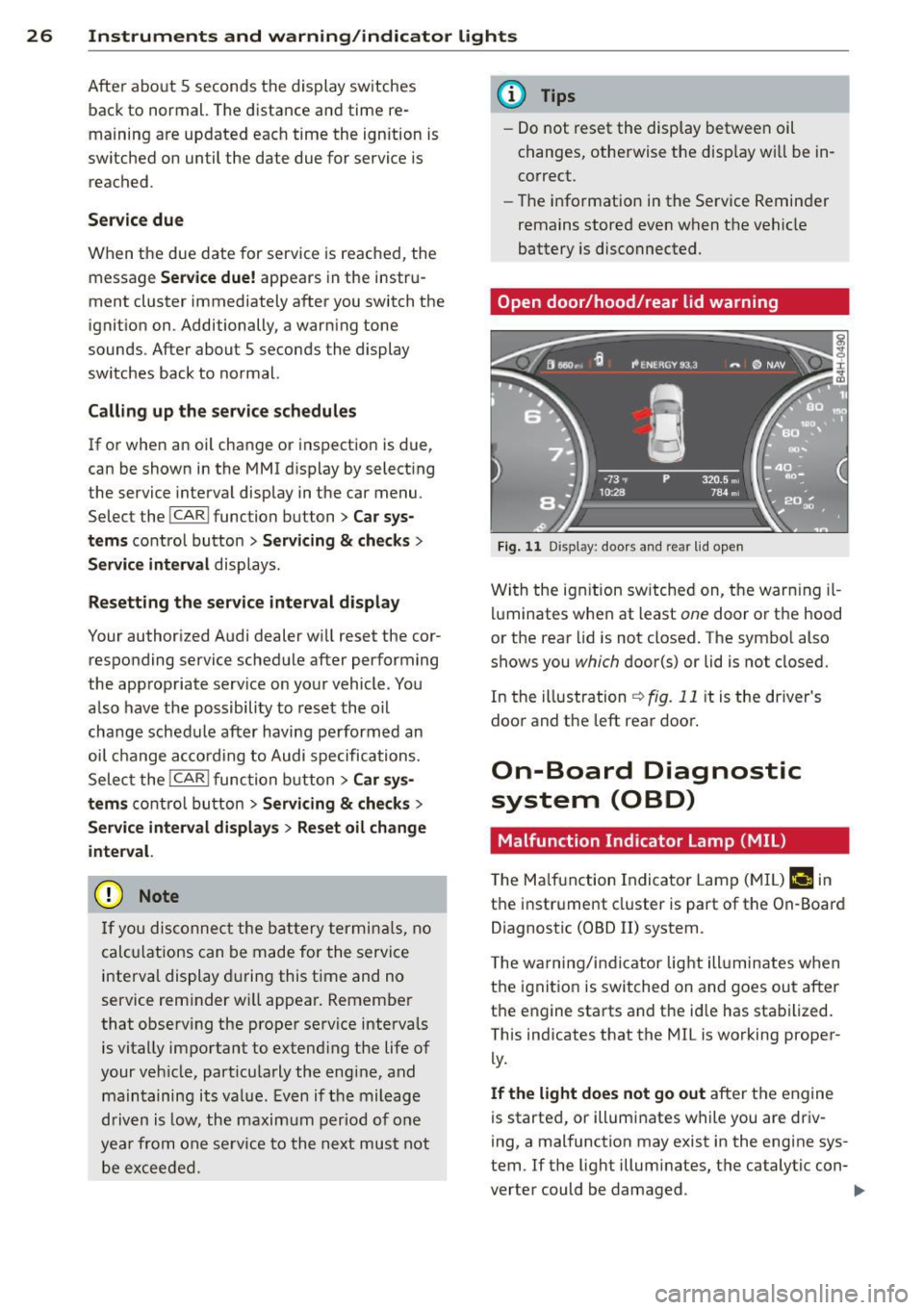
F ig. 1 1 Display : doors and rea r lid open
Wi th the ig nition sw itched on, t he warn ing il
lu minates when at least
one doo r or th e hood
or the rear lid is not closed. The sym bo l also
shows you
which d oor(s) or lid is not closed.
In the illustration
r:!> fig. 11 it is the driver's
doo randt he leftrea rdoo ~
On-Board Diagnostic
system (OBD)
Malfunction Ind icator Lamp (MIL )
The Ma lf u nction Indicator Lam p (M IL) f-4 in
t h e instr ume nt cluster is part of t he On -Board
Diagnostic (OBD
II) system .
T he wa rn ing /indic ator lig ht ill uminates when
the ignitio n is switched on and goes ou t after
t h e engine sta rts and t he id le has sta bilized.
This ind icates that the MIL is working proper
ly.
If the light does not go out afte r the e ngine
is starte d, or illumi nates w hile you are driv
i ng, a mal function may exist in the engine sys
tem . If t he light illum inates, t he catalytic con-
verter could be damaged .
IIJ,-
Page 30 of 300
28 Opening and closing
Opening and closing
Keys
Key set
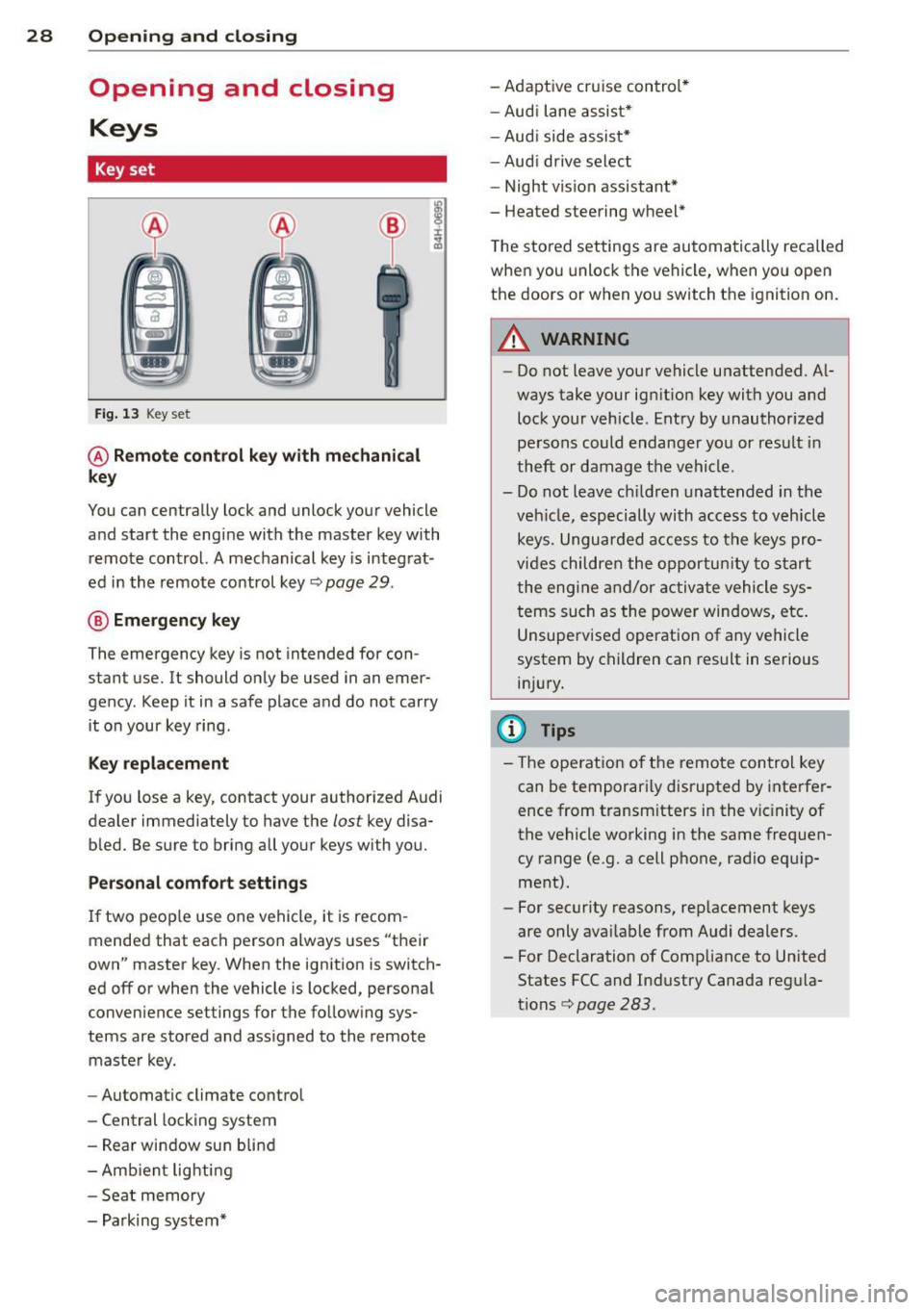
Fig. 13 Key set
@ Remote control key with mechanical
key
You can centrally lock and unlock your vehicle
and start the engine with the master key with remote control. A mechanical key is integrat
ed in the remote control key
c:> page 29 .
@ Emergency key
The emergency key is not intended for con
stant use.
It should only be used in an emer
gency. Keep it in a safe place and do not carry it on your key ring.
Key replacement
If you lose a key, contact your authorized Audi
dealer immediately to have the
lost key disa
bled. Be sure to bring all your keys with you.
Personal comfort settings
If two peop le use one vehicle, it is recom
mended that each person always uses "their
own" master key . When the ignition is switch
ed off or when the vehicle is locked, personal
convenience settings for the follow ing sys
tems are stored and assigned to the remote
master key.
- Automatic climate control
- Central locking system
- Rear window sun blind
- Amb ient lighti ng
- Seat memory
- Parking system* - Adaptive cruise control*
-
Aud i lane assist*
- Aud i side assist*
-Audi drive select
- Night vision assistant*
- Heated steering wheel *
T he stored settings are automatically recalled
when you unlock the vehicle, when you open
the doors or when you switch the ignition on.
A WARNING
-- Do not leave your vehicle unattended. Al
ways take your ignit ion key with you and
lock your vehicle. Entry by unauthorized
persons could endanger you or result in
theft or damage the vehicle.
- Do not leave ch ildren unattended in the
veh icle, especially with access to vehicle
keys. Unguarded access to the keys pro
vides children the opportunity to start
the engine and/or activate vehicle sys
tems such as the power windows, etc.
Unsupervised operation of any vehicle
system by children can result in serious
injury.
(D Tips
- The operation of the remote control key
can be temporarily disrupted by interfer
ence from transm itters in the vic inity of
the vehicle working in the same frequen
cy range (e .g. a cell phone, radio equip
ment).
- For security reasons, replacement keys
are only available from Audi dealers.
- For Declaration of Compliance to United
States FCC and Industry Canada regula
tions<=>
page 283.
Page 32 of 300
30 Openin g and clo sing
systems such as power window or power
sunroof leading to ser ious personal injury.
(D Tips
- The vehicle cannot be started if an unau
thorized key is used. The vehicle may not
start if another radio device such as a key
for another vehicle or a transponder is l ocated on the key ring.
- For Declaration of Compliance to United
States FCC and Industry Canada regula
tions
r::::> page 283.
Power locking system
General description
The power locking system locks or unlocks all
doors and the rear lid simultaneously.
You can lock a nd u nlock the veh icle centrally .
You have the following choices:
- Remote master key r:::>
page 32,
-Door handles with convenience key*
r::::> page 32,
-Lock cylinder at the dr iver's door
r::::> page 33, or
- Power locking switc h inside r:::>
page 33 .
Selective unlocking
When they a re closed , the door and rea r lid
a re lo ck ed. When unlocki ng, you can set in the
MMI whether only the driver's door or the en
tire vehicle sho uld be un locked r:::>
page 31 .
Automatic locking
The automat ic loc king featu re locks all t he ve
h icle doors and the rear lid when you drive
faster than 9 mph (15 km/h).
The ca r is un locked aga in, whe n the opening
function in the power loc king system sw itch
or at one of the doo r levers is ac tuated. The
Auto Lock f unction can be turned on and off in
the MMI
r::::> page 31.
Anti-theft alarm warning system
If the an ti- t h eft alarm warning sys tem de
tects a b reak-in into the vehicle, acoustic and
vis ual warn ing s ignals a re triggered .
T he anti-theft w arning sys tem is activated au
tomat ica lly when you lock the vehi cle. It is de
activated when unlocking using the remote
key, w ith the mechanica l key, and when yo u
switch the ignition on.
T he alarm a lso t urns off when the a la rm cy cle
has expired .
Turn signals
When you u nlock the veh icle, the turn s ignals
flash twice. When you lock the vehicle once,
the turn signals flash once. If they do not
flash, one of the doors, the rear lid o r the
hood is not locked .
Unintentionally locking yourself out
In the fo llow ing cases there safeguards to
preve nt yo u lock ing you r remo te master key i n
the ve hicl e:
- The vehicle does not lock w it h the central
lock ing switc h r:::>
page 33 if the driver's
door is open.
- On veh icles with convenience key*, if the
most recently used master key is in the lug
gage compartment, the rear lid is automat i
cally u nlocke d again after it is closed.
Do not lock your veh icle w ith the re mote mas
t e r k ey or con venienc e key * unti l all doors
and t he rear lid a re closed. In this way you
avo id lock ing yo urself out a cciden tally.
Power side door closer *
T he veh icle doo rs a re equipped with a powe r
s ide door closer . When closing a door, you on
ly have to le t it fall light ly into the latc h. The
doo r will the n automatically close by itself
Q .&. .
_& WARNING
--
-When you loc k yo ur vehicle from o utside,
nobody - especially children - s hou ld re-
main inside the vehicle . Remember, ..,
Page 33 of 300
when you lock the vehicle from the outside the windows cannot be opened from
the inside .
- When you leave the vehicle, always take
the ignition key with you. This will pre
ven t passengers (children, for example)
from accidentally being locked in the ve
hicle should they accidentally press the
power locking switch in the doors.
- Do not leave children inside the vehicle
unsupervised . In an emergency it would
be impossible to open the doors from
the outside without the key.
- Applies to vehicles with power side door
closer*:
- When closing a door, make sure noth
ing can interfere with the door. This
could cause serious personal injury.
- You can stop the door from closing at
any time by pulling on the inside or
outside door handle .
(D Tips
-In the event of a crash with airbag de
ployment all locked doors will be auto
matically unlocked to give access to the
vehicle occupants from the outside .
- If the power locking system should mal
function, you can lock the driver's door
using the mechanical key
r::;, page 34.
- If the power locking system should fail,
you can still open the fuel tank flap in an
emergency
r::;, page 218 .
-You are well advised not to keep valua
bles inside an unattended vehicle, visible
or not . Even a properly locked vehicle
cannot provide the security of a safe .
- If the LED in the upper edge of the driv
er's door panel comes on for about 30
seconds after the vehicle is locked, there
is a malfunction in the power locking or
the anti-theft warning system. Have the
malfunction corrected by an authorized
Audi dealership or qualified repair facili
ty.
Opening and closing 31
Setting power locking
T he driver can determine the functions for
power locking in the MMI .
.,. Select: !CAR !function button> Car systems
control bu tton > Vehicle settings > Central
locking .
Unlock doors -
You can decide if All doors or
only the
Driver should unlock. The rear lid al
so unlocks when
All is selected. If you select
Driver in a vehicle with a convenience key* ,
only the door whose handle you pull will un
lock.
If you select
Driver , all the doors and rear lid
will unlock if you press the
ffi button on the re
mote control master key twice .
Lock exterior trunk handle -If you select On,
the rear lid handle is locked. In this case the
rear lid can be opened with the button
a on
the master key or with the
a button* in the
driver's door . In vehicles with a convenience
key* , you can still open the rear lid using the
handle if an authorized master key is near the
proximity sensor.
Fold mirrors* -If you select On, the exterior
rearview mirrors fold in automatically when
you press the
(TI button on the remote control
master key or touch the sensor* in the handle.
Lock when driving -If you select On, the vehi
cle locks automatically when driving. All of
the doors and rear lid lock.
Tone when locking -When you select On, a
confirmation tone sounds when you lock the
vehicle.
Page 36 of 300
34 Opening and closing
- Rear doors : pu ll the door handle once to re
l ease the lock. Pull the handle
again to open
the door .
- If you have a crash and the airbag is activat
ed, the doors automatically unlock .
A WARNING
-The power locking switch works with the
ignition off and automatically locks the
entire vehicle when it is actuated .
- On a vehicle locked from the outside the
power locking system switch is inopera
tive .
- Locking doors from the inside can help
prevent inadvertent door opening during
an acc ident and can also prevent unwant
ed entry from the outs ide . Locked doors
can, however, de lay ass istance to ve hicle
occupants and hold up rescue efforts
from the out side in an accident or other
emergency.
(D Tips
Your vehicle is lock ed automatically at a
speed of 9 mph (15 km/h)
Q page 30. You
can unlock the vehicle again using the
open ing function in the power locking sys
tem switch.
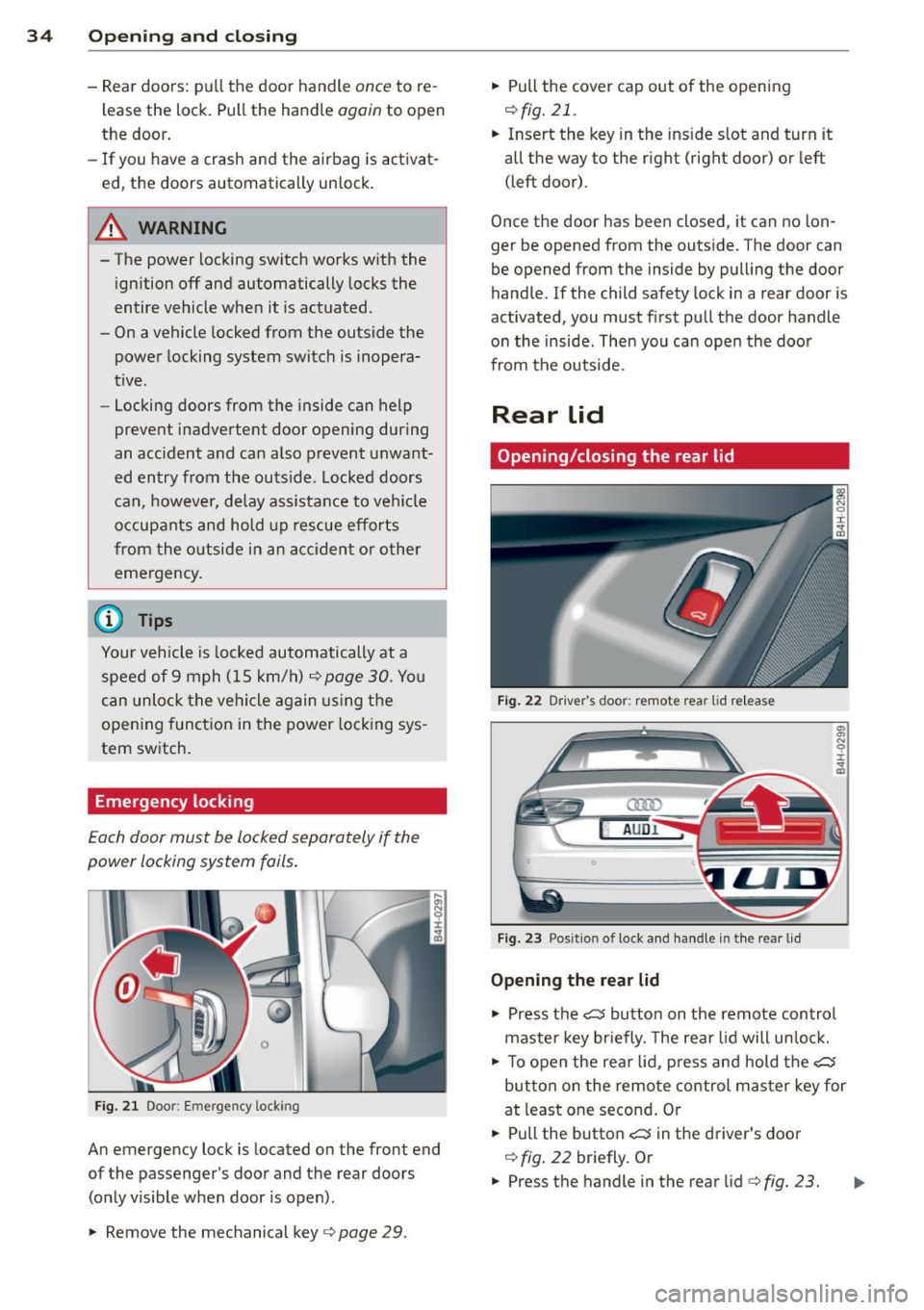
Emergency locking
Each door must be locked separately if the
pow er locking system fails.
F ig. 21 Doo r: Em erge ncy loc kin g
An emergency lock is located on the front end
of the passenger's door and the rear doors (on ly visible when door is open) .
.. Remove the mechanical key
Q page 29. ..
Pull the cover cap out of the opening
i=>fig.21 .
.. Insert the key in the ins ide slot and turn it
all the way to the right (right door) or left
(left door) .
Once the door has been closed, it can no lon
ger be opened from the outside. The doo r can
be opened from the inside by pulling the door
handle. If the child safety lock in a rear door is
activated, you must f irst pull the door handle
on the inside . Then you can open the door
from the outside.
Rear lid
Opening/closing the rear lid
Fig. 22 Driver 's doo r: remote rear lid re lea se
a:ro
AU Dl
Fig. 23 Posit io n of l ock and handle in t he rear lid
Opening the rear lid
.,, .,, N C? r ,. a,
.. Press the c:5 button on the remote control
maste r key briefly . T he rear lid will unlock .
.. To open the rear lid, press and hold the~
button on the remote control master key for
at least one second . Or
.. Pull the button
c:5 in the driver's door
i=> fig. 22 briefly. Or
.. Press the handle in the rear lid
c> fig. 23. Ill-
Page 39 of 300
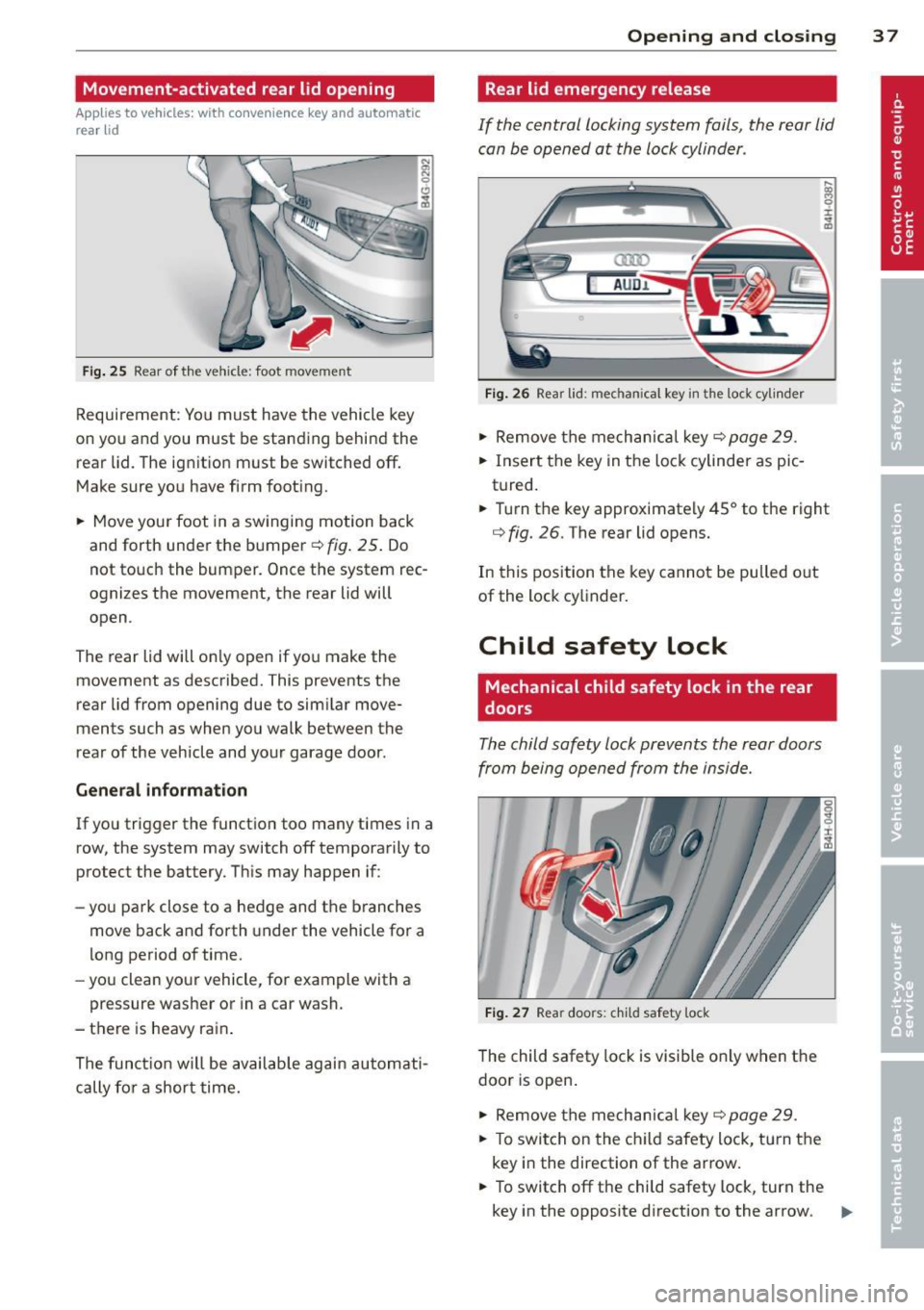
Movement-activated rear lid opening
Applies to vehicles: with convenience key and automatic
rear lid
Fig . 25 Rear of the vehicle: foot movement
Requirement: You must have the vehicle key
on you and you must be standing behind the rear lid. The ignition must be switched off.
Make sure you have firm footing.
• Move your foot in a sw inging motion back
and forth under the bumper¢
fig. 25. Do
not touch the bumper. Once the system rec
ognizes the movement, the rear lid will
open.
The rear lid will on ly open if you make the
movement as described. This prevents the
rear lid from opening due to similar move
ments such as when you walk between the
rear of the vehicle and your garage door.
General information
If you trigger the function too many times in a
row, the system may switch off tempera rily to
protect the battery. This may happen if:
- yo u park close to a hedge and the branches
move back and forth under the vehicle for a
long period of time.
- you clean your vehicle, for example with a
pressure washer or in a car wash.
- there is heavy rain .
The funct ion will be available again automati
cally fo r a short time.
Opening and closing 3 7
Rear lid emergency release
If the central locking system fails, the rear lid
can be opened at the lock cylinder .
(]ID
AUD.I.
Fig . 26 Rear lid: mechan ical key in the lock cylinder
• Remove the mechanical key c::> page 29 .
• Insert the key in the lock cylinder aspic
tured.
• Turn the key approximately 45° to the right
<=> fig. 26. The rear lid opens.
In this position the key cannot be pulled o ut
of the lock cy linder.
Child safety lock
Mechanical child safety lock in the rear
, doors
The child safety lock prevents the rear doors
from being opened from the inside.
Fig. 27 Rear doors: chi ld safety lock
The child safety lock is visible only when the
door is open .
• Remove the mechanical key
c::> page 29.
• To switch on the child safety lock, turn the
key in the direction of the arrow.
• To switch off the child safety lock, turn the
key in the opposite direction to the arrow.
ll>-
Page 41 of 300

- The buttons for the power sun shades* in
the side windows,
- The buttons for the power sun shade* in the
rear window,
- Front passenger power seat adj ustment *
button.
_& WARNING
- When you leave your vehicle -even if on
ly briefly- always take the ignition key
with you. This applies particularly when
children remain in the veh icle. Otherw ise
the ch ildren could start the engine or op
erate electrical equ ipment (e.g. power
w indows) . The power windows are func
t ional until t he driver's door or passeng
er's door has been opened.
- Be careful when closing the windows.
Check to see that no one is in the way, or
serious injury could result!
- When lo cking the veh icle from outside,
t he ve hicle must be unocc upied s in ce the
w indows can no longer be opened in an
emergency.
(D Tips
- The dr iver can lower or raise the power
sun shades * in the side windows by us ing
swi tches © and
@.
-After the ignition has been switched off,
the windows can still be opened o r
closed for about 10 minutes . The powe r
windows are not switched off until the
driver's door or passenger's door has
been opened.
What to do after a malfunction
The one-touch open and close function must
be reactivated if the battery hos been discon
nected.
• Pull and hold the power window switch un
ti l the window is fully closed.
• Release the switch and then pull it again for
at least one second .
Openin g an d clos ing 39
Valet parking
The valet parking feature protects the lug
gage comportment from unauthorized ac
cess.
F ig. 30 Valet par king button
Wi th "valet parking" a ctivated, the rear lid
cannot be opened.
• Remove the mechanical key
c::;, page 29 .
• Open the glove compartment and activate
c::;, fig. 30 the "valet parking" feature by
pressing the
! VALET I b utton. The indicator
light in the swi tch illuminates.
• Close the glove compartment and lock it
w ith the mechanical key.
• Leave the master key with the se rvice per
sonnel for park ing and keep the mechanical
key with you.
When the "valet parking" feature is activated:
- the unlocki ng button fo r the rear l id
c:s in
the dr ive r's door is inactive
- the button
c:s on the mas ter key is inac tive
- the opening handle in the rear lid is inact ive .
The vehicle can be driven and locked and un
locked with the master key. Access to the lug
gage compartment is blocked.
When the valet parking function is switched
on, the message
Vale t par king acti vated ap
pears in the instrument cluster display when
you sw itch the ignition on.
Page 43 of 300
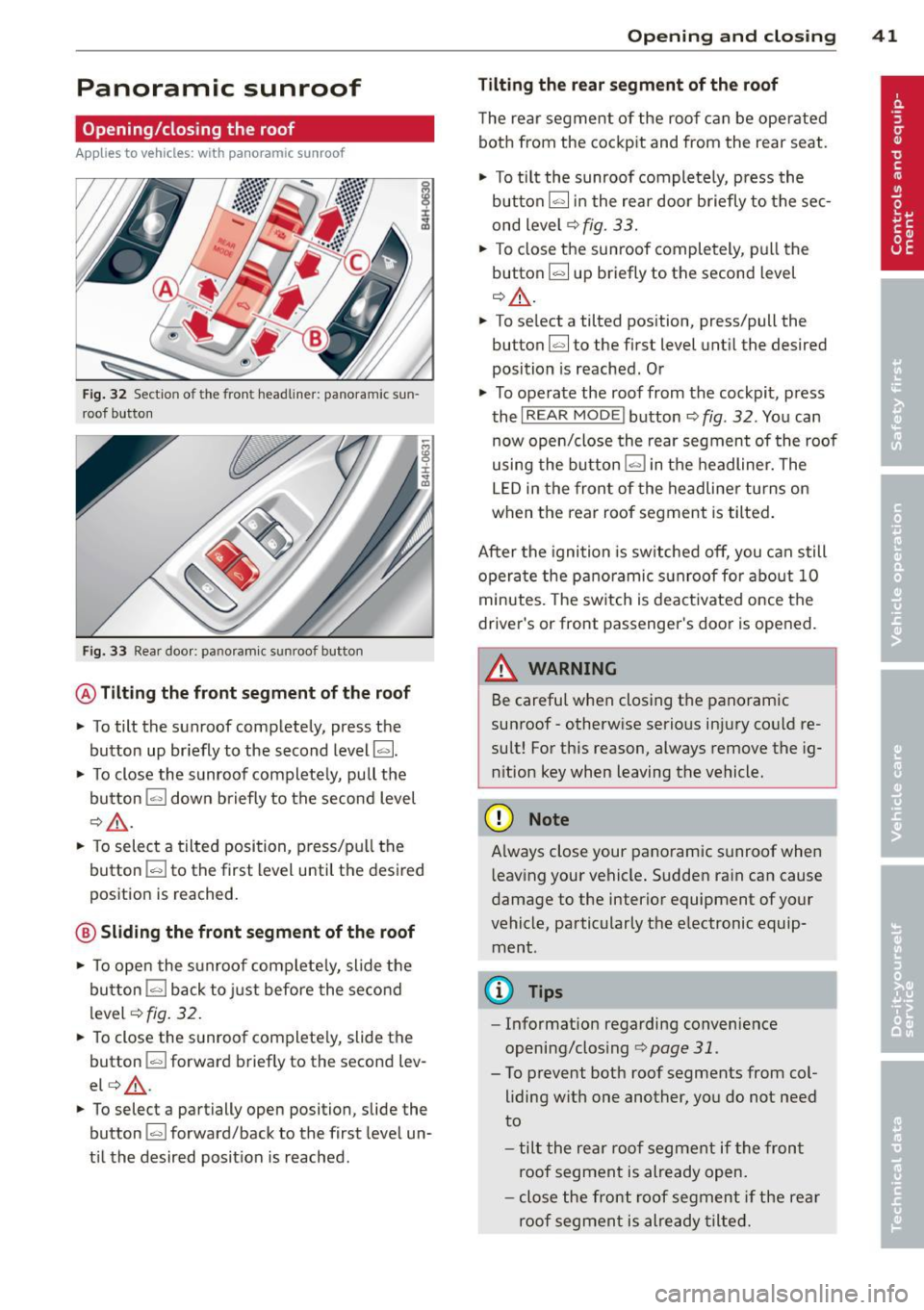
Panoramic sunroof
Opening/closing the roof
Applies to vehicles: with panoram ic sunroof
Fig. 32 Section of the front headliner: panoramic sun
roof button
Fig. 33 Rear doo r: panoram ic sunroof button
@ Tilting the front segment of the roof
• To tilt the sunroof completely, press the
button up br iefly to the second level~-
• To close the sunroof completely, pull the
button
1.,,,1 down briefly to the second level
¢ & .
• To select a tilted position, press/pull the
button
l "'-' I to the first level until the desired
position is reached.
@ Sliding the front segment of the roof
• To ope n the su nroof complete ly, slide the
button
l=I back to just before the second
level
<=>fig . 32.
• To close the sunroof completely, slide the
button
l=I forward brief ly to the second lev
el<=> &.
• To select a partially open position, slide the
button
l-"'I forward/back to the first level un
til the desired position is reached.
Opening and closing 41
Tilting the rear segment of the roof
The rear segment of the roof can be operated
both from the cockpit and from the rear seat.
• To tilt the sunroof completely, press the
button[;] in the rear door briefly to the sec
ond level
c:> fig. 33.
• To close the sunroof completely, pull the
button[;] up briefly to the second level
Q & .
• To select a tilted position, press/pull the
button~ to the first level until the desired
position is reached. Or
• To operate the roof from the cockpit, press
the
I REAR MODE ! button¢ fig. 32. You can
now open/close the rear segment of the roof
using the button
l=I in the headliner. The
LED in the front of the headliner turns on
when the rear roof segment is tilted.
After the ignition is switched off, you can still
operate the panoramic sunroof for about
10
minutes. The switch is deactivated once the
driver's or front passenger's door is opened.
WARNING
Be careful when closing the panoramic
sunroof- otherwise serious injury could re
sult! For this reason, always remove the ig
n ition key when leaving the vehicle.
(D Note
A lways close your panoramic sunroof when
l eav ing your vehicle. Sudden rain can cause
damage to the interior equipment of your
vehicle, particularly the electronic equip ment.
(D Tips
- Information regarding convenience
opening/clos ing
i=>page 31.
- To prevent both roof segments from col
liding with one another, you do not need
to
- tilt the rear roof segment if the fron t
roof segment is already open.
- close the front roof segment if the rear
roof segment is already tilted.
Page 45 of 300
Clear vision Lights
Switching the headlights on and off
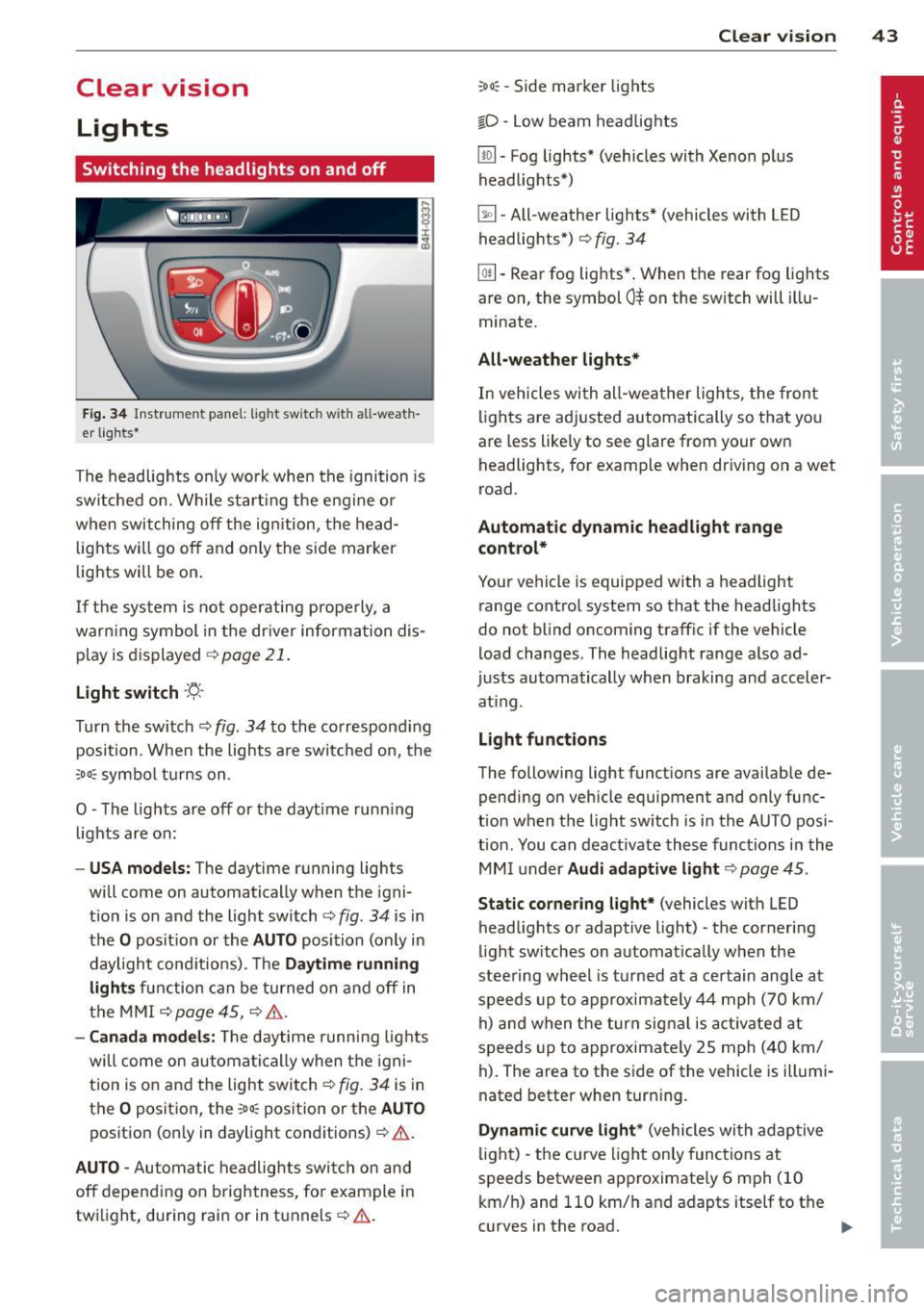
Fig . 34 Instrument pane l: lig ht sw itc h wit h all -weath
er lights•
The headlights only wo rk when the ignition is
switched on. Wh ile start ing the eng ine o r
when switching off the ign ition, the head
lights will go off and on ly the side marker
lights will be on .
If the system is not operating p rope rly, a
war ning symbol in the dr iver information dis
p lay is d isplayed
c::> page 21 .
Light switch ·'t!- -
Tu rn the switch c::> fig . 34 to the correspond ing
position . When the lights a re switched on, the
oD o: symbo l tu rns on .
0 -The lig hts are off or the dayt ime runn ing
lights are on:
- USA models: The day time running ligh ts
will come on automatically when the igni
t ion is on and the light switch
c::> fig . 34 is in
the
O posit ion or the AUTO position (only in
daylight cond itions). The
Daytime running
light s
function can be turned on and off in
the MMI
c::> page45, c::>A .
-Ca nada model s: The daytime running lig hts
will come on automa tically when the igni
t ion is on and the light switch
c::> fig . 34 is in
the
O position, the : Do: pos ition or the AUTO
position (only in daylight conditions) c::> A .
AUTO -Automatic headlights swi tch on and
off depend ing o n brightness, for example i n
tw ilight, during rain or in tunnels
c::> &. .
:Do: -Side marke r lights
io -Low beam headlights
Clear vi sion 43
lm -Fog lights* (vehicles with Xenon p lus
headlights *)
~ -All-weather lights * (vehicles with L ED
headligh ts*)
c::> fig. 34
@TI -Rear fog lights* . When the rear fog lights
are on, the symbol
0$ on the switch will illu
minate .
All-weather lights*
In vehicles wi th all -wea ther lights, the front
lights are adjusted au tomat ically so that you
are less like ly to see glare from your own
headlights, for example when dr iving on a wet
ro ad.
Automatic dynamic headlight rang e
control*
Your vehicle is equipp ed with a headlight
range contro l system so that the headlights
do no t blind oncoming traff ic if the vehicle
load changes. The headlig ht range a lso ad
justs automatically when braking and acceler
at ing .
Light function s
The following light funct ions are availab le de
pend ing on vehicle equipment and on ly func
t ion when t he light switch is in the AU TO posi
tion . You can deactivate these functions i n the
MM I under
Audi adapt ive light c::> page 45 .
Static corner ing light* (vehicles with L ED
headlights or adaptive light) -the cornering
ligh t sw itches on automat ica lly w hen the
stee ring wheel is turned at a ce rtain angle at
speeds up to approxima tely 44 mph (70 km/
h) and when the turn sig nal is act ivate d at
speeds up to approximately 25 mph (40 km/
h) . The area to the side of the veh icle is illumi
nated bette r when tur ning .
Dynamic curve light * (vehicles with adap tive
light) -the curve ligh t only functions at
speeds betwee n approximately 6 mph (10
km/ h) and 110 km/h and adapts itself to the
curves in the road.
Ill>